NIST IR 5395 日本語訳
英語タイトル : Preliminary Functional Specifications of a Prototype Electronic Research Notebook for NIST日本語タイトル : NIST 向け電子研究ノートのプロトタイプに関する予備的機能仕様
公開日 : 1994-04-01
原文URL : https://csrc.nist.gov/pubs/ir/5395/final
翻訳編集 : 自動生成(有志による非公式の日本語訳), 原文取得日 : 2026-10-31, 訳文 : 669 / 669 ブロック
[要約] NIST IR 5395 は、NIST における電子研究ノート(ERN)の実現可能性と利用の可能性に関する予備的な調査で、ERN の機能仕様を示した報告書です。プロジェクトの目標は、NIST の科学者のノート記録の実態を調査し、電子的なノート記録の要件を明らかにし、ERN の設計のために現行技術を評価し、ERN の機能仕様を作成することです。NIST の科学者への聞き取り調査により、基本的な ERN の機能と拡張的な ERN の機能が明らかになり、電子ノートパッド、手書き文字認識、マルチメディア、データベース管理、デジタル署名、タイムスタンプなどの技術と製品を評価しています。これらを踏まえ、基本的な ERN の機能仕様を定義した潜在的なシステム構成を提案しています。
NISTIR 5395
NISTIR 5395
Preliminary Functional Specifications of a Prototype Electronic Research Notebook for NIST
NIST 向け電子研究ノートのプロトタイプに関する予備的機能仕様
Shu-jen Chang
Elizabeth Fong
James Foti
Bruce Rosen
Shu-jen Chang
Elizabeth Fong
James Foti
Bruce Rosen
U.S. DEPARTMENT OF COMMERCE
Technology Administration
National Institute of Standards and Technology
Computer Systems Laboratory
Gaithersburg, MD 20899
米国商務省
技術局
国立標準技術研究所(National Institute of Standards and Technology)
コンピュータシステム研究所(Computer Systems Laboratory)
Gaithersburg, MD 20899
Preliminary Functional Specifications of a Prototype Electronic Research Notebook for NIST
NIST 向け電子研究ノートのプロトタイプに関する予備的機能仕様
Shu-jen Chang
Elizabeth Fong
James Foti
Bruce Rosen
Shu-jen Chang
Elizabeth Fong
James Foti
Bruce Rosen
U.S. DEPARTMENT OF COMMERCE
Technology Administration
National Institute of Standards and Technology
Computer Systems Laboratory
Gaithersburg, MD 20899
米国商務省
技術局
国立標準技術研究所(National Institute of Standards and Technology)
コンピュータシステム研究所(Computer Systems Laboratory)
Gaithersburg, MD 20899
April 1994
1994年4月
U.S. DEPARTMENT OF COMMERCE
Ronald H. Brown, Secretary
TECHNOLOGY ADMINISTRATION
Mary L. Good, Under Secretary for Technology
NATIONAL INSTITUTE OF STANDARDS AND TECHNOLOGY
Arati Prabhakar, Director
米国商務省
Ronald H. Brown 長官
技術局
Mary L. Good 技術担当次官
国立標準技術研究所
Arati Prabhakar 所長
ABSTRACT
要旨
This report is a preliminary study on the feasibility and possible use of electronic research notebooks (ERNs) at the National Institute of Standards and Technology (NIST). The goal of this project is to determine the requirements for ERN and to assess current technologies for the design of a prototype ERN for NIST scientists. The project involves the determination and specifications of functional requirements of the ERN. NIST scientists were interviewed to survey current notekeeping practices and identify specific needs for the ERN. The survey identified a set of basic and enhanced ERN features. Current technologies and products were also assessed in order to see how these requirements may be met. A potential system configuration is proposed where functional specifications for a basic ERN are defined.
本報告書は、国立標準技術研究所(NIST)における電子研究ノート(ERN)の実現可能性と利用の可能性に関する予備的な調査です。このプロジェクトの目標は、ERN の要件を明らかにし、NIST の科学者向けの ERN プロトタイプを設計するための現行技術を評価することです。このプロジェクトでは、ERN の機能要件の決定と仕様化を行います。NIST の科学者に聞き取り調査を行い、現在のノート記録の実態を調べ、ERN に対する具体的なニーズを洗い出しました。調査により、基本的な ERN の機能と拡張的な ERN の機能が明らかになりました。これらの要件をどのように満たせるかを見るため、現行の技術と製品も評価しました。基本的な ERN の機能仕様を定義した潜在的なシステム構成を提案します。
Keywords: Electronic research notebook, multimedia, information security, digital signature, digital time-stamp, information storage and retrieval.
キーワード: 電子研究ノート、マルチメディア、情報セキュリティ、デジタル署名、デジタルタイムスタンプ、情報の蓄積と検索。
ACKNOWLEDGEMENTS
謝辞
We like to thank those NIST scientists named in Appendix C who graciously accepted our interview requests. Their insights and comments are crucial for our requirements analysis, upon which the design of the ERN is based. We are also very grateful for Dr. David Jefferson, Chief of Information Systems Engineering Division, CSL, who originally suggested this proposal. Dr. Stuart Katzke, Chief of Computer Security Division, CSL, also made significant contribution to the proposal. Many people assisted us in our assessment of relevant technologies and products including Gertrude Sherwood, Miles Smid, Bill Higgins, Charles Sheppard, and Kathryn Harvill, to whom we are deeply indebted.
付録 C に挙げた NIST の科学者の方々が聞き取り調査の依頼を快く受けてくださったことに、感謝いたします。その見識と意見は、ERN の設計の基礎となる要件分析に欠かせないものです。また、この提案を最初に示唆してくださった CSL 情報システム工学部門長の Dr. David Jefferson に深く感謝します。CSL コンピュータセキュリティ部門長の Dr. Stuart Katzke も、この提案に大きく貢献してくださいました。関連する技術と製品の評価では、Gertrude Sherwood、Miles Smid、Bill Higgins、Charles Sheppard、Kathryn Harvill をはじめ、多くの方々の協力を得ました。深く感謝いたします。
DISCLAIMER
免責事項
Several vendor products and companies are mentioned in this document. Mention of these products is for descriptive purposes only and does not constitute a NIST endorsement nor does it imply that these products are necessarily the best available for that purpose.
本書では、複数のベンダーの製品と企業に言及しています。これらの製品への言及は説明のためだけのものであり、NIST による推奨を意味するものではなく、これらの製品がその目的で入手できる最良のものであることを示唆するものでもありません。
EXECUTIVE SUMMARY
エグゼクティブサマリー
This report is the preliminary study on the feasibility and possible use of electronic research notebooks (ERN) for NIST scientists.
本報告書は、NIST の科学者向けの電子研究ノート(ERN)の実現可能性と利用の可能性に関する予備的な調査です。
In a memorandum for NIST staff from Raymond G. Kammer dated June 7, 1993, Mr. Kammer instructed each laboratory director to develop a policy for research notebooks in his operating unit. As stated in a July 24, 1992 memorandum on the general policy on research notebooks at NIST, all NIST employees engaged in research are responsible for recording and maintaining a thorough and accurate record of their work by maintaining research notebooks. The general policy also stated that notebooks using electronic media need to be retrievable as a chronological record and as an index to electronic work files.
Raymond G. Kammer による 1993 年 6 月 7 日付の NIST 職員宛て覚書で、Kammer 氏は各研究所の所長に対し、それぞれが管轄する運営部門における研究ノートの方針を策定するよう指示しました。NIST における研究ノートの一般方針に関する 1992 年 7 月 24 日付の覚書に述べられているとおり、研究に従事するすべての NIST 職員は、研究ノートをつけることによって、自らの業務の十分かつ正確な記録を作成し維持する責任を負います。この一般方針では、電子媒体を用いたノートは、時系列の記録として、また電子作業ファイルへの索引として、取り出せる必要があるとも述べられています。
In today’s workplace where more and more professionals are using computers in performing their tasks, keeping research notes in a separate handwritten notebook adds unnecessary overhead. This project is to investigate how research notebooks can be maintained, retrieved, cross-referenced, archived and legalized electronically. Using contemporary computer security technology, electronic notes can also provide unforgeable time-stamping, sequencing, and signing of entries, as well as protection against unauthorized disclosure and modification of contents. The purposes of the ERN project are:
今日の職場では、業務にコンピュータを使う専門職が増えており、研究記録を別の手書きノートに残すことは余計な負担になります。このプロジェクトは、研究ノートを電子的に維持し、取り出し、相互参照し、アーカイブし、法的に有効な記録として整える方法を調べるものです。最新のコンピュータセキュリティ技術を使えば、電子的な記録によって、記入事項に対する偽造できないタイムスタンプの付与、順序づけ、署名を行うことができ、内容の不正な開示や改ざんからの保護も提供できます。ERN プロジェクトの目的は次のとおりです。
(1)to survey the notekeeping practices of NIST scientists;
(1)NIST の科学者のノート記録の実態を調査すること。
(2)to determine the requirements for electronic notekeeping;
(2)電子的なノート記録の要件を明らかにすること。
(3)to assess current technologies for the design of the ERN; and
(3)ERN の設計のために現行技術を評価すること。
(4)to develop functional specifications of the ERN.
(4)ERN の機能仕様を作成すること。
Thus, this project explores the technical means, without establishing the policies, for notekeeping in laboratory and technical units at NIST. It needs to be complemented with appropriate policies for electronic research notebooks. The responsibility for developing and enforcing these policies lies with each laboratory director.
このようにこのプロジェクトは、NIST の研究室および技術部門におけるノート記録のための技術的手段を、方針を定めることなく探るものです。この技術的手段は、電子研究ノートのための適切な方針で補完する必要があります。これらの方針を策定し実施する責任は、各研究所の所長にあります。
Survey Findings
調査結果
Although all of the scientists interviewed keep some form of research notebooks, their notekeeping practices and styles vary. The majority of them keep a combination of handwritten notes and electronic notes. Most scientists consider notekeeping to be solely for documenting important research progress, procedures and results. Presently, security and legal concerns are not considered a major issue, although this may change in the future. The most important requirement that was expressed for an ERN is ease of use. Information must be entered in an effortless manner and must be cost-effective in order for the ERN to be acceptable to the scientists and managers.
聞き取りをしたすべての科学者は何らかの形で研究ノートをつけていますが、ノート記録の実態やスタイルはさまざまです。大多数は、手書きのノートと電子的なノートを併用しています。ほとんどの科学者は、ノート記録の目的は、研究の重要な進捗、手順、結果を記録することだけだと考えています。現在のところ、セキュリティや法的な懸念は大きな問題とは考えられていませんが、将来は変わる可能性があります。ERN について示された最も重要な要件は、使いやすさです。ERN が科学者と管理者に受け入れられるためには、情報を労力をかけずに入力でき、費用対効果も高くなければなりません。
Basically, the ERN must do everything that a pencil and paper can do, with value-added. Writing and drawing in a paper-based notebook will be replaced by an ERN system with text- and image-processing capabilities, and possibly with a scanner as well. The tools for making different types of notebook entries must be provided and integrated so that it is possible to link different objects together and still allow the retrieval of a specific object if desired. Each committed entry should be signed by the author using digital signature technology. The signed entry should also be sent to an independent time-stamping server in order to obtain an official time-stamp.
基本的に ERN は、鉛筆と紙でできることをすべて、付加価値を添えて行えなければなりません。紙のノートへの記述や描画は、テキスト処理と画像処理の機能を備え、場合によってはスキャナも備えた ERN システムに置き換わります。さまざまな種類のノート記入を行うためのツールを提供して統合し、異なるオブジェクトを相互にリンクできるようにしつつ、必要なら特定のオブジェクトを取り出せるようにしなければなりません。確定した各記入事項には、著者がデジタル署名技術を用いて署名すべきです。署名した記入事項は、公式のタイムスタンプを得るため、独立したタイムスタンプサーバにも送信すべきです。
Technology Assessment
技術の評価
Based on the requirements gathered from the survey, a set of enabling technologies were identified and assessed. These include:
調査で集めた要件に基づき、一連の実現技術を特定して評価しました。これには次のものが含まれます。
•the electronic notepad and PDA technology;
•電子ノートパッドと PDA の技術
•the handwriting recognition technology;
•手書き文字認識技術
•the optical character recognition (OCR) technology;
•光学式文字認識(OCR)技術
•the multimedia technology;
•マルチメディア技術
•the object-oriented technology;
•オブジェクト指向技術
•the database management technology;
•データベース管理技術
•the digital signature technology; and
•デジタル署名技術
•the time-stamping technology.
•タイムスタンプ技術
Commercial products that are relevant for the design of the ERN were also reviewed.
ERN の設計に関連する市販製品も調べました。
Functional Specifications
機能仕様
Instead of prescribing a single system configuration for all scientists at NIST, we recommend that the ERN be implemented as a software application and be portable to different platforms. If there is a need to carry the ERN around, a light-weight notebook computer may be considered for installing the ERN. Regardless of the platform to be used, an operating system that supports Graphical User Interface (GUI) is essential due to the various types of input possibilities. As an option, a scanner with associated OCR software may be added to provide an alternative for making ERN entries. We also recommend that an independent time-stamping service be installed. The computer hosting the ERN must be able to access the time-stamping server, preferably through a network connection.
NIST のすべての科学者に単一のシステム構成を規定するのではなく、ERN をソフトウェアアプリケーションとして実装し、異なるプラットフォームに移植できるようにすることを推奨します。ERN を持ち運ぶ必要がある場合は、ERN をインストールするために軽量のノートパソコンを検討してもよいです。どのプラットフォームを使う場合でも、入力方法がさまざまに考えられることから、グラフィカルユーザインタフェース(GUI)をサポートするオペレーティングシステムが不可欠です。オプションとして、ERN への記入の代替手段を提供するため、OCR ソフトウェア付きのスキャナを追加してもよいです。独立したタイムスタンプサービスの導入も推奨します。ERN を稼働させるコンピュータは、できればネットワーク接続を通じて、タイムスタンプサーバにアクセスできなければなりません。
The acceptance of the ERN depends greatly on the tools provided for its users. Not only must the appropriate tools be provided and easy to use, but they need to be integrated as a package. An ERN can be designed to be a simple application, or it can be built to have a powerful data tracking capability, in which case an indexing scheme and database management functions can be added to the basic ERN.
ERN が受け入れられるかどうかは、利用者に提供するツールに大きく左右されます。適切なツールを提供して使いやすくするだけでなく、それらをパッケージとして統合する必要があります。ERN は単純なアプリケーションとして設計することもできますし、強力なデータ追跡機能を持つように作ることもできます。後者の場合は、基本的な ERN に索引付けの仕組みとデータベース管理機能を追加できます。
Building indices is essential for context retrieval. Information that is crucial for searching should be included in the indexing system. Indices may be built on ERN contents or on the information that the ERN uses to provide a data tracking capability. A good design of the ERN should consider the needs of its users, and provide a means for its users to customize functionalities suitable for them.
索引の作成は、文脈に基づく検索に不可欠です。検索に重要な情報は、索引システムに含めるべきです。索引は、ERN の内容に対して作成することも、ERN がデータ追跡機能を提供するために使う情報に対して作成することもできます。優れた ERN の設計では、利用者のニーズを考慮し、利用者が自分に合った機能にカスタマイズする手段を提供すべきです。
Future Tasks
今後の課題
Since the majority of the NIST scientists use computers, it is feasible to have their research notes maintained electronically. Many products that were reviewed seemed promising for the design of the ERN. These include pen-based notebook computers, multimedia stations, and elaborate database management tools. However, none of these products presents an integrated solution for immediate use. Specific applications have yet to be developed.
NIST の科学者の大多数がコンピュータを使っているため、研究記録を電子的に維持することは実現可能です。調査した多くの製品は、ERN の設計に有望と思われました。これには、ペン入力のノートパソコン、マルチメディアステーション、高度なデータベース管理ツールが含まれます。しかし、すぐに使える統合的な解決策を示す製品はありません。具体的なアプリケーションはまだ開発されていません。
There are other technical issues that need to be addressed, since many of the technologies reviewed are still new and developing. The use of any one of these in a single project, let alone using all of them, involves and raises many design issues. Obviously there is still much research to be done.
調査した技術の多くはまだ新しく発展途上であるため、対処すべき技術的課題がほかにもあります。これらの技術のいずれか一つを単一のプロジェクトで使うだけでも、多くの設計上の課題を伴い、すべてを使えばなおさら多くの課題が生じます。明らかに、まだ多くの研究が必要です。
Additional research and a prototype implementation are necessary. This includes the investigation of full multimedia support for ERN entries, the linking and signing of different types of objects, the logical storage of ERN contents, and the indexing scheme to be used.
追加の研究とプロトタイプの実装が必要です。これには、ERN の記入事項に対する完全なマルチメディアのサポート、異なる種類のオブジェクトのリンクと署名、ERN の内容の論理的な保存、使用する索引付けの方式の調査が含まれます。
TABLE OF CONTENTS
目次
1. INTRODUCTION
1. 序論
1.1 Background
1.1 背景
This report documents the preliminary study of the feasibility and possible use of electronic research notebook (ERN) at the National Institute of Standards and Technology (NIST). The project started in January 1993 after the approval of a proposal for the NIST Director’s reserve funds.
本報告書は、国立標準技術研究所(NIST)における電子研究ノート(ERN)の実現可能性と利用の可能性に関する予備的な調査を記録したものです。このプロジェクトは、NIST 所長予備費の提案が承認された後、1993 年 1 月に開始されました。
The proposal was initiated in a response to a NIST memorandum (dated July 29, 1992) on the general policy of research notebooks. The policy stated that all NIST employees engaged in research must record and maintain a thorough and accurate research notebook. The general policy also stated that notebooks using electronic media must be retrievable in chronological order and must also provide indices to electronic work files. The policy was reiterated in another memorandum from the acting Director Raymond Kammer on June 7, 1993. In that memorandum, Mr. Kammer instructed each laboratory director to develop a policy for research notebooks in his operating unit.
この提案は、研究ノートの一般方針に関する NIST の覚書(1992 年 7 月 29 日付)を受けて出されたものです。この方針では、研究に従事するすべての NIST 職員は、十分かつ正確な研究ノートを記録し維持しなければならないとされています。また、電子媒体を用いたノートは時系列順に取り出せなければならず、電子作業ファイルへの索引も備えなければならないとされています。この方針は、1993 年 6 月 7 日付の Raymond Kammer 所長代理の別の覚書でも繰り返されました。その覚書で Kammer 氏は、各研究所の所長に対し、自身の担当部門における研究ノートの方針を策定するよう指示しました。
The ERN project was proposed to apply current information management and computer security technologies to the design and development of an electronic analogue of a research notebook, and to determine if the benefits of an ERN outweigh those of traditional paper-based notebooks. In addition to fulfilling the record-keeping requirements of hardbound notebooks, the ERN will allow automated storage, cross-referencing, retrieval, and archiving of research related material including large volumes of raw data. Using contemporary computer security technology, the ERN could provide unforgeable time-stamping, sequencing, and signing of entries; and protection against unauthorized disclosure and modification of the ERN contents.
ERN プロジェクトは、現行の情報管理技術とコンピュータセキュリティ技術を、研究ノートの電子版の設計と開発に適用すること、また ERN の利点が従来の紙のノートの利点を上回るかどうかを判断することを目的として提案されました。ERN は、製本ノートの記録保持要件を満たすことに加え、大量の生データを含む研究関連資料の自動的な保存、相互参照、検索、アーカイブを可能にします。最新のコンピュータセキュリティ技術を使えば、ERN は記入事項に対する偽造できないタイムスタンプの付与、順序づけ、署名を行い、ERN の内容を不正な開示や改ざんから保護できる可能性があります。
The approach to the project was as follows: The requirements of hardbound notebooks were reviewed where required properties and desirable features were determined. In order to better understand specific electronic notebook requirements, nineteen NIST scientists from different laboratories were interviewed. The interviews resulted in a list of basic requirements and potential enhancements of the ERN. To meet these requirements, current technologies and commercial products were also assessed. Based on the information obtained, functional specifications of the prototype ERN that can meet basic ERN requirements were developed.
プロジェクトの進め方は次のとおりです。製本ノートの要件を見直し、必須の特性と望ましい機能を明らかにしました。電子ノートの具体的な要件をよりよく理解するため、さまざまな研究所の NIST の科学者 19 人に聞き取りを行いました。聞き取りの結果、ERN の基本要件と拡張の可能性の一覧ができました。これらの要件を満たすため、現行の技術と市販製品も評価しました。得られた情報に基づき、基本的な ERN の要件を満たせるプロトタイプ ERN の機能仕様を作成しました。
The Information Systems Engineering Division and the Computer Security Division are collaborating in this research effort by applying database management technology, object-oriented technology, and digital signature technology in the design of the ERN. Other collaborators also include NIST research scientists from different disciplines. Their insights and comments are essential for the successful design, development, and utilization of the prototype ERN.
情報システム工学部門とコンピュータセキュリティ部門は、ERN の設計にデータベース管理技術、オブジェクト指向技術、デジタル署名技術を適用することで、この研究に協力しています。ほかにも、さまざまな分野の NIST の研究科学者が協力者に加わっています。プロトタイプ ERN の設計、開発、利用を成功させるうえで、その見識と意見は欠かせません。
1.2 Research Approach
1.2 研究のアプローチ
To develop the functional specifications of the prototype ERN, the following steps were taken:
プロトタイプ ERN の機能仕様を作成するため、次の手順を踏みました。
Step 1 - Determine the Requirements of the ERN
手順 1 - ERN の要件の決定
In this step, NIST’s research notebook policy was reviewed and current notekeeping practices were assessed. A survey questionnaire was developed for the interviews with NIST scientists. The interview notes were analyzed and specific needs and concerns for ERNs were identified. From these findings, required ERN features were separated into two types: the basic requirements and the enhancement features.
この手順では、NIST の研究ノートの方針を見直し、現在のノート記録の実態を評価しました。NIST の科学者への聞き取りのために、調査用質問票を作成しました。聞き取りの記録を分析し、ERN に対する具体的なニーズと懸念を特定しました。これらの結果から、ERN に必要な機能を、基本要件と拡張機能の 2 種類に分けました。
Step 2 - Assess Enabling Technologies and Available Products
手順 2 - 実現技術と入手可能な製品の評価
In this step, current technologies relevant for the design of the ERN were assessed. Specifically, these include: the electronic notepad and Personal Digital Assistant (PDA) technology, handwriting recognition technology, optical character recognition technology, multimedia technology, object-oriented technology, database management technology, digital signature technology, and time-stamping technology. Commercial products were also assessed for their feasibility for ERN implementation.
この手順では、ERN の設計に関連する現行技術を評価しました。具体的には、電子ノートパッドと携帯情報端末(PDA)の技術、手書き文字認識技術、光学式文字認識技術、マルチメディア技術、オブジェクト指向技術、データベース管理技術、デジタル署名技術、タイムスタンプ技術です。市販製品についても、ERN の実装における実現可能性を評価しました。
Step 3 - Specify System Configuration and Functional Specifications
手順 3 - システム構成と機能仕様の特定
This step specified a potential system configuration for the ERN which was considered suitable for the NIST environment, though flexibility in this configuration was possible depending on an individual user’s needs. Functional specifications were also defined for an ERN that had the basic ERN capabilities as described in Step 1.
この手順では、NIST の環境に適していると考えられる ERN の潜在的なシステム構成を特定しました。ただし、個々の利用者のニーズに応じて、この構成に柔軟性を持たせることも可能でした。また、手順 1 で述べた基本的な ERN の能力を備えた ERN の機能仕様も定義しました。
These steps correspond one to one with Sections 2, 3, and 4 of this document.
これらの手順は、本書の第 2 節、第 3 節、第 4 節に一対一で対応します。
2. DETERMINATION OF ERN REQUIREMENTS
2. ERN の要件の決定
This section presents the results of a survey of the notekeeping practices of NIST scientists in order to find out specific requirements that the scientists may have for electronic research notebooks (ERNs). In the process, NIST’s policy on keeping research notebooks (Appendix A) and other references regarding the maintenance of laboratory notebooks [KANA85, NAS89, NBS83] were reviewed. A sample questionnaire was also developed and used in face-to-face interviews with scientists from NIST’s seven organizational Laboratories. The basic requirements and major concerns pertaining to the ERNs are summarized later in this section.
この節では、電子研究ノート(ERN)に対して科学者が持つ可能性のある具体的な要件を明らかにするために行った、NIST の科学者のノート記録の実態に関する調査の結果を示します。その過程で、研究ノートの記録に関する NIST の方針(付録 A)と、実験ノートの維持管理に関するその他の文献 [KANA85, NAS89, NBS83] を見直しました。また、サンプルの質問票を作成し、NIST の 7 つの組織的な研究所の科学者との対面での聞き取りで使用しました。ERN に関する基本要件と主な懸念は、この節の後半にまとめています。
2.1 NIST’s Policy on Research Notebooks
2.1 研究ノートに関する NIST の方針
According to NIST memoranda issued on July 29, 1992 and on June 7, 1993, all NIST employees engaged in research are responsible for recording and maintaining a research notebook. The policy, included in Appendix A, is summarized as follows:
1992 年 7 月 29 日と 1993 年 6 月 7 日に出された NIST の覚書によれば、研究に従事するすべての NIST 職員は、研究ノートを記録し維持する責任を負います。付録 A に収めたこの方針は、次のように要約されます。
•Notebooks can be in the form of written pages using hardcovered or spiral bound notebooks with sequentially numbered pages, such as the types available from the NIST storeroom.
•ノートは、NIST の備品室で入手できる種類のような、ページに通し番号が付いた、硬表紙またはスパイラル綴じのノートに手書きしたページの形でもよいです。
•A notebook using electronic media needs to be retrievable as a chronological record and as an index to electronic work files.
•電子媒体を用いたノートは、時系列の記録として取り出せる必要があり、電子作業ファイルへの索引も提供する必要があります。
•Each page of the notebook should be signed and dated by the author. Two co-workers must also sign and date each page to signify that they have read and understood the notebook entries.
•ノートの各ページには、著者が署名して日付を記入すべきです。また、記入事項を読んで理解したことを示すため、同僚 2 人も各ページに署名して日付を記入しなければなりません。
•All research notebooks and electronic files pertaining to NIST activities are official records of the U.S. Government and, as such, are the property of the Government. These records are not to be removed from NIST without proper authorization.
•NIST の活動に関するすべての研究ノートと電子ファイルは、米国政府の公式記録であり、したがって政府の財産です。これらの記録は、適切な許可なく NIST から持ち出してはなりません。
The primary reasons for notekeeping are to accurately document scientific investigation, protect one’s intellectual properties, and prove the integrity of work in the event of inventions and patent applications. Reference [KANA85] provides a detailed discussion of good notekeeping practices.
ノート記録の主な理由は、科学的な調査を正確に記録すること、自らの知的財産を守ること、発明や特許出願の際に研究の完全性を証明することです。文献 [KANA85] に、優れたノート記録の実践についての詳細な議論があります。
2.2 Survey of Current Notekeeping Practices
2.2 現在のノート記録の実態の調査
The first phase of the ERN project involved the collection of information on how NIST scientists use their notebooks and what scientists would like to see in the design of an ERN.
ERN プロジェクトの第 1 段階では、NIST の科学者がノートをどのように使っているか、また ERN の設計に科学者が何を望むかについての情報を収集しました。
2.2.1 Survey Questionnaire
2.2.1 調査用質問票
To determine the scientists’ current notekeeping practices and their requirements for the ERN, a questionnaire was developed (as shown in Appendix B) and used in interviews with the NIST scientists. The questionnaire covered the following topics:
科学者の現在のノート記録の実態と ERN に対する要件を明らかにするため、質問票を作成し(付録 B に示します)、NIST の科学者への聞き取りで使用しました。質問票は次の話題を扱いました。
Current Notekeeping Practice
現在のノート記録の実態
•Primary purpose of notekeeping
•ノート記録の主な目的
•Notebook issuance
•ノートの支給
•Types of notebook entries
•ノートへの記入の種類
•Notebook maintenance
•ノートの維持管理
Computer Familiarity and Preferences for the ERN
コンピュータへの習熟度と ERN に対する希望
•Computer literacy
•コンピュータの習熟度
•Preferred platform for the ERN
•ERN に望ましいプラットフォーム
•Software environment
•ソフトウェア環境
•Programming languages and tools used
•使用しているプログラミング言語とツール
Visions of the ERN
ERN の構想
•Minimum requirements
•最低限の要件
•Desirable features
•望ましい機能
•Specific concerns (including security concerns)
•具体的な懸念(セキュリティ上の懸念を含む)
Managerial Questions
管理上の質問
•Acceptable cost range
•許容できる費用の範囲
•Operation requirements
•運用要件
2.2.2 General Survey Findings
2.2.2 調査結果の概要
With the assistance of the upper management at NIST’s organizational laboratories, a list of scientists was suggested for interviews (Appendix C). An important aspect of the interviews was to learn about current notekeeping practices and to determine how feasible it would be to automate those practices. The interview findings are summarized as follows.
NIST の組織内研究所の上層管理職の協力を得て、聞き取りの対象となる科学者の一覧が提案されました(付録 C)。聞き取りの重要な目的は、現在のノート記録の実態を知り、それらの実践を自動化することがどの程度実現可能かを判断することでした。聞き取りの結果は、次のように要約されます。
Finding 1: Diverse notekeeping needs and styles
所見 1: 多様なノート記録のニーズとスタイル
Most scientists have developed personal notekeeping styles, and their needs and practices vary. There is no one particular format which pleases all respondents. However, a unanimous requirement for the ERN is for ease of use. Even though many scientists realize that user-friendliness may be a demanding requirement with the current technology, an ERN that is restrictive and difficult to use is considered worthless for recording their work.
ほとんどの科学者は個人的なノート記録のスタイルを確立しており、ニーズや実態はさまざまです。すべての回答者を満足させる特定の形式は一つもありません。しかし、ERN に対する要件として全員が一致したのは、使いやすさです。現在の技術では使いやすさが高い要求になりうると認識している科学者も多くいますが、制約が多く使いにくい ERN は、自分の仕事を記録するには価値がないと考えられています。
Finding 2: Different usage of notebooks
所見 2: ノートの用途の違い
Most notebooks used by NIST scientists are hardcovered or spiral bound. Many scientists also use three-ring binders and file folders because it is easy to insert and file other papers, such as correspondence, loose-leaf meeting notes, etc. The usage of notebooks varies and can be classified as follows:
NIST の科学者が使うノートの大半は、硬表紙またはスパイラル綴じです。多くの科学者は、通信文やルーズリーフの会議メモなど、ほかの書類を挟んだり綴じたりしやすいため、3 穴バインダーやファイルフォルダーも使っています。ノートの用途はさまざまで、次のように分類できます。
1)Public notebooks - These notebooks are frequently associated with a particular instrument or a specific material. Many scientists use public notebooks to record instrument configuration, control settings, service and repair log records, usage and location of samples, etc. A few characteristics of these public notebooks are:
1)共用ノート - これらのノートは、特定の機器や特定の材料と結び付けられていることがよくあります。多くの科学者は、機器の構成、制御設定、保守・修理の記録、試料の使用状況と所在などを記録するために共用ノートを使っています。これらの共用ノートの特徴は次のとおりです。
•They are often kept close to the equipment. If the equipment is moved, so are the notebooks.
•機器の近くに置かれていることが多くあります。機器が移動されると、ノートも移動されます。
•The entries are normally quite legible since they are intended to be read by others.
•ほかの人が読むことを想定しているため、記入事項は通常かなり読みやすいです。
•The data entries can be quite varied, with some entries consisting of a one-line entry, while others may contain textual information and pictures. There is not a "standard" format defined.
•データの記入事項はかなり多様で、1 行だけの記入もあれば、文章の情報や図を含むものもあります。「標準」の形式は定められていません。
•Each entry is dated, but rarely signed. Most scientists claim that they recognize the handwriting of their colleagues.
•各記入事項には日付が記入されますが、署名されることはまれです。ほとんどの科学者は、同僚の筆跡は見分けがつくと言っています。
•In laboratories that comply with the ISO/IEC GUIDE 25: 1990 ("General requirements for the competence of calibration and testing laboratories"), these public notebooks are very useful in providing documentary evidence and audit trails.
•ISO/IEC GUIDE 25: 1990("General requirements for the competence of calibration and testing laboratories")に適合している研究所では、これらの共用ノートは、文書による証拠と監査証跡を提供するうえで非常に有用です。
2)Project notebooks - A scientist may keep several project notebooks - one for each of their projects. These project notebooks are used to record procedural descriptions, observations, and calculations for a specific project. The characteristics of these notebooks are:
2)プロジェクトノート - 科学者は、自分のプロジェクトごとに 1 冊ずつ、複数のプロジェクトノートをつけていることがあります。これらのプロジェクトノートは、特定のプロジェクトの手順の説明、観察、計算を記録するために使われます。これらのノートの特徴は次のとおりです。
•The entries may contain text, equations, and sketches which are typically handwritten by the scientist.
•記入事項には、文章、数式、スケッチが含まれることがあり、通常は科学者が手書きします。
•Photographs, instrument printouts, computer printouts, and spreadsheets are frequently pasted in the notebook.
•写真、機器の出力紙、コンピュータの出力紙、スプレッドシートがノートに貼り付けられることがよくあります。
•References are frequently made to external objects such as electronic files, sample materials, and spectrographic plates.
•電子ファイル、試料、分光写真乾板などの外部の対象が参照されることがよくあります。
•Entries are referenced by date or by visual recognition of a particular page layout when browsing.
•記入事項は、日付によって、またはノートをめくる際の特定のページレイアウトを目で見て認識することによって参照されます。
•Both completed and current notebooks are often kept close to where the experiments take place or in the scientist’s office for easy retrieval.
•完成したノートも現在使っているノートも、取り出しやすいよう、実験が行われる場所の近くか科学者の執務室に置かれていることが多くあります。
3)Personal Notebooks - Some scientists also keep a personal notebook for recording telephone conversations, meeting notes, and actions items. Characteristics of such notebooks are:
3)個人ノート - 科学者の中には、電話での会話、会議のメモ、対応事項を記録するための個人ノートもつけている人がいます。このようなノートの特徴は次のとおりです。
•They are often carried around to meetings in different places.
•さまざまな場所での会議に持ち歩かれることが多くあります。
•They are sometimes used as "chalkboards" during research interaction with peers.
•同僚との研究上のやり取りで「黒板」として使われることもあります。
•The entries are typically scribbled by hand in text or as diagrams.
•記入事項は、通常、文章や図として手で走り書きされます。
•These notes are more for private use rather than for public review.
•これらのメモは、公開して確認するためのものというより、私的な利用のためのものです。
Finding 3: High computer literacy
所見 3: コンピュータへの高い習熟度
Most scientists we interviewed are skilled computer users and have access to a personal desktop computer which generally is an IBM-PC (or PC compatible), a Macintosh, or a UNIX-based workstation. The majority of these machines are connected to a local area network. Many laboratory instruments are connected to computers and a network, but stand-alone systems are also numerous.
聞き取りをしたほとんどの科学者はコンピュータの熟練した利用者であり、個人用デスクトップコンピュータを利用できます。その多くは一般に IBM-PC(または PC 互換機)、Macintosh、あるいは UNIX ベースのワークステーションです。これらのコンピュータの大多数は、ローカルエリアネットワークに接続されています。多くの実験室の機器はコンピュータとネットワークに接続されていますが、スタンドアロンのシステムも数多くあります。
Software tools are abundant, word-processors are essential, and database management systems (dBASE, Paradox), spreadsheets (Lotus 1-2-3, Excel), Windows tools, statistical packages (SPSS), and other special-purpose tools are also used widely.
ソフトウェアツールは豊富で、ワープロは必須であり、データベース管理システム(dBASE、Paradox)、表計算ソフト(Lotus 1-2-3、Excel)、Windows のツール、統計パッケージ(SPSS)、その他の専用ツールも広く使われています。
Finding 4: Notekeeping solely for recording purposes
所見 4: 記録のみを目的としたノート記録
Almost all of the scientists interviewed claimed that the purpose of maintaining research notebooks is solely for record keeping. Keeping notes helps them keep track of important research procedures, major research events, significant findings and discoveries. Notebooks are frequently used and referenced - even notebooks dated twenty years ago. However, none of the scientists interviewed used or intended to use notebook entries to support patent claims. Though the attitude may change in the future with respect to ERNs, the current consensus is that notekeeping is solely for record keeping.
聞き取りをしたほぼすべての科学者が、研究ノートを維持する目的は記録の保持だけであると述べました。ノートをつけることは、重要な研究手順、主要な研究上の出来事、重要な知見や発見を把握するのに役立ちます。ノートは頻繁に使われ参照されており、20 年前の日付のノートでさえ参照されます。しかし、聞き取りをした科学者の中に、特許請求を裏付けるためにノートの記入事項を使った人、または使うつもりの人はいませんでした。ERN に関してはこの姿勢が将来変わる可能性がありますが、現在の共通認識は、ノート記録は記録の保持だけのためのものだということです。
Notebook security is not currently a major concern. Specifically, no scientists felt that there was a need to hide or "lock up" their notebooks unless the project was classified. They would be more concerned if a notebook was misplaced than if some notes were altered. If notes were altered, chances are that the alteration was done by a colleague. and most scientists claimed that they had no problem recognizing the handwriting of their colleagues.
ノートのセキュリティは、現在のところ大きな懸念ではありません。具体的には、プロジェクトが機密扱いでない限り、ノートを隠したり「施錠」したりする必要があると感じた科学者はいませんでした。一部のメモが改ざんされることよりも、ノートが紛失されることのほうを心配するでしょう。メモが改ざんされたとすれば、それは同僚によるものである可能性が高く、ほとんどの科学者は、同僚の筆跡を見分けるのに問題はないと述べました。
Most scientists review and modify notes. However, this practice does not involve erasing the previous entries, but rather striking out old text and dating the modification, often with a different color pen.
ほとんどの科学者は、メモを見直して修正します。しかし、この作業では以前の記入事項を消すことはなく、古い文章に取り消し線を引き、多くは別の色のペンで修正の日付を記入します。
Finding 5: Need for notebook storage, archival and retrieval
所見 5: ノートの保存、アーカイブ、検索の必要性
Scientists generally store laboratory notebooks in easily accessible places since notes are typically taken daily. Project notebooks can be kept at the scientist’s desk or in a location where research is performed. Most scientists allow their peers to have access to their notebooks. Public notebooks usually stay in the lab where experiments or testings take place. If a notebook is associated with a particular item of equipment, the notebook remains with that equipment.
科学者は通常、毎日メモを取るため、実験ノートを手の届きやすい場所に保管します。プロジェクトノートは、科学者の机か研究を行う場所に置いておくことができます。ほとんどの科学者は、同僚がノートを閲覧することを認めています。公開ノートは通常、実験または試験が行われる研究室に置かれます。ノートが特定の機器と結び付いている場合、ノートはその機器とともにあります。
When notebooks are completed, they may still be referenced regularly. Therefore, archiving a notebook usually does not involve more than placing it on an office shelf or in an easily-accessible filing cabinet.
ノートを書き終えた後も、定期的に参照されることがあります。そのため、ノートのアーカイブは通常、執務室の棚や手の届きやすいファイルキャビネットにしまう程度のものです。
Many of the scientists that were interviewed regularly backup their computer files. The procedure usually takes place over the network, and uses such storage media as magnetic tapes, 8mm digital tapes, or optical disks. Most scientists expressed the need for the proper storage of information in ERNs, such as automatic backup and the archival of ERN files.
聞き取りをした科学者の多くは、コンピュータのファイルを定期的にバックアップしています。その手順は通常ネットワーク経由で行われ、磁気テープ、8mm デジタルテープ、光ディスクなどの記憶媒体が使われます。ほとんどの科学者は、自動バックアップや ERN ファイルのアーカイブなど、ERN の情報を適切に保存することが必要だと述べました。
2.2.3 Specific Needs and Concerns for ERN
2.2.3 ERN に対する具体的なニーズと懸念
Presented in the previous section were a few of the observations made during the interviews, which provided a glimpse of the computing environment accessible to scientists, and a general understanding of their current notekeeping practices. This section will focus on the scientists’ expectations and concerns with regard to using an ERN. The discussion will start with the scientists’ wish list, followed by their concerns with ERN use. The needs and concerns specified in the following are as stated by the scientists interviewed.
前節では、聞き取りで得られた観察結果のうち、科学者が利用できるコンピューティング環境の一端と、現在のノート記録の実態に関する全般的な理解を示しました。この節では、ERN の利用に関する科学者の期待と懸念に焦点を当てます。まず科学者の要望一覧を示し、続いて ERN の利用に関する懸念を示します。以下に示すニーズと懸念は、聞き取りをした科学者が述べたとおりのものです。
Specific Needs for the ERNs:
ERN に対する具体的なニーズ:
•Ease of use - this is the only unanimous requirement of the ERN that was expressed;
•使いやすさ - これは、ERN について示された唯一の全員一致の要件です。
•Should have tools available to facilitate the input of text, equations, and drawings;
•文章、数式、図の入力を容易にするツールを備えるべきです。
•Should be able to accept scanned-in documents which might include handwritten equations and other papers;
•手書きの数式やその他の書類を含む可能性のあるスキャンした文書を取り込めるべきです。
•Should have the capability to input and edit video and imagery;
•映像と画像を入力し編集する機能を備えるべきです。
•Should be able to integrate with applications already in use;
•すでに使用しているアプリケーションと統合できるべきです。
•Would be useful to have an electronic pen capability for entering data while using an instrument, such as a microscope;
•顕微鏡など、機器を使いながらデータを入力するための電子ペンの機能があると便利です。
•Should have a powerful indexing scheme for fast and easy retrieval;
•高速で容易な検索のために、強力な索引付けの仕組みを備えるべきです。
•Should have an object linking capability to permit linkage to other electronic files;
•ほかの電子ファイルへのリンクを可能にするオブジェクトリンク機能を備えるべきです。
•Should have the capability to modify earlier entries;
•以前の記入事項を修正する機能を備えるべきです。
•Should have an automatic and transparent time-stamp;
•自動的で利用者に意識させないタイムスタンプを備えるべきです。
•Backing up of the ERN should be as transparent as possible;
•ERN のバックアップは、できるだけ利用者に意識させないものであるべきです。
•Electronic bookmarks would be useful for visually browsing through entries;
•記入事項を視覚的にめくって見るために、電子的なしおりがあると便利です。
•Should have a math coprocessor for complex calculations (note: this requirement stems from older PC chip architectures and is no longer valid under the new chip architectures for PCs.);
•複雑な計算のために数値演算コプロセッサを備えるべきです(注: この要件は古い PC のチップアーキテクチャに由来するもので、PC の新しいチップアーキテクチャでは有効ではなくなっています)。
•Should have a large amount of storage space;
•大容量の記憶領域を備えるべきです。
•Would be nice to have a powerful processing capability;
•強力な処理能力があるとよいです。
•Should have proper access control;
•適切なアクセス制御を備えるべきです。
•Would be nice to have a large color screen and full-size keyboard;
•大型のカラー画面とフルサイズのキーボードがあるとよいです。
•Would be nice to have an option to encrypt entries;
•記入事項を暗号化するオプションがあるとよいです。
Concerns and Possible Difficulties:
懸念と起こりうる困難:
•To justify the use of the ERN over the much less expensive paper-based notebook, the ERN should be easy to use and yet provides functionality which is not available in a paper-based notebook.
•はるかに安価な紙のノートよりもERNを使うことを正当化するには、ERNは使いやすく、しかも紙のノートにはない機能を備えているべきです。
•How usable will the ERN be after five or ten years? Will its storage media be accessible, and will the ERN itself be human-readable?
•5 年後、10 年後に ERN はどれだけ使えるでしょうか。その記憶媒体にアクセスできるでしょうか。ERN 自体は人間が読める形式でしょうか。
•Having data stored on multiple machines which are not necessarily compatible may cause serious incompatibilities while transferring data to the ERN.
•互換性があるとは限らない複数の機械にデータが保存されていると、データを ERN に移す際に重大な非互換が生じるおそれがあります。
•Scientists are comfortable with particular computer environments and don’t want to be forced to use different ones, so the ERN should be portable across various platforms.
•科学者は特定のコンピュータ環境に慣れており、別の環境の使用を強いられることを望まないため、ERN はさまざまなプラットフォームに移植できるべきです。
•The ERN must ensure data integrity and provide protection from unauthorized access. The ERN must guarantee to laboratory auditors and scientists alike that the computer records are secure. In particular, much of a scientist’s career work is stored in his notebooks.
•ERN はデータの完全性を確保し、不正アクセスからの保護を提供しなければなりません。ERN は、研究室の監査担当者にも科学者にも、コンピュータの記録が安全であることを保証しなければなりません。特に、科学者の経歴上の業績の多くはノートに保存されています。
•The ERN should be cost-effective for wide acceptance. The unit cost as well as the staff training cost should be very small.
•広く受け入れられるには、ERN は費用対効果が高いものであるべきです。単価も職員の訓練費用も、非常に小さくすべきです。
•If the ERN involves new hardware, it must be small and light, due to space constraints in the laboratories and offices. The ERN must also be able to sustain harsh laboratory and field conditions.
•ERN に新しいハードウェアが関わる場合、研究室や執務室のスペースの制約のため、小型で軽量でなければなりません。ERN は、過酷な研究室やフィールドの条件にも耐えられなければなりません。
•How will changing the path of a data file’s location affect references to that file in the ERN?
•データファイルの置き場所のパスを変更すると、ERN におけるそのファイルへの参照にどのような影響があるでしょうか。
•Is the ERN intended to help NIST scientists do their work more efficiently? If the ERN is implemented, will all NIST scientists be required to use it?
•ERN は、NIST の科学者が仕事をより効率的に行う助けとなることを意図したものでしょうか。ERN が実装された場合、NIST のすべての科学者がその使用を求められるのでしょうか。
2.3 Required ERN Features
2.3 ERN に必要な機能
From the survey with NIST scientists, the requirements for the ERN were determined. These requirements are divided into two groups: basic and enhanced features. The basic features are essential capabilities to prompt scientists to convert to ERNs from today’s paper-based notebooks. The interviewees also contributed ideas for enhanced features which would allow for incorporating some new emerging technologies in the design of the ERN.
NIST の科学者への調査から、ERN の要件が決まりました。これらの要件は、基本機能と拡張機能の 2 つのグループに分けられます。基本機能は、科学者が現在の紙のノートから ERN に移行するきっかけとなる、不可欠な能力です。聞き取りに応じた方々は、ERN の設計に新たに登場しつつある技術を取り入れることを可能にする拡張機能についても、案を出してくれました。
2.3.1 Basic ERN Features
2.3.1 基本的な ERN の機能
The basic requirements identified for an ERN are:
ERN について特定された基本要件は次のとおりです。
•Customizable format
•カスタマイズ可能な書式
•Word processing capability
•ワープロ機能
•Sketching/drawing capability
•スケッチ・描画機能
•Ability to scan documents and images
•文書と画像をスキャンする機能
•Searching capability
•検索機能
•Object linking capability
•オブジェクトリンク機能
•Ability to redline or append data to an entry
•記入事項に修正(赤入れ)や追記を行う機能
•Time-stamping capability
•タイムスタンプ機能
•Digital signature capability
•デジタル署名機能
•Storage and archival facility
•保存・アーカイブの機構
•Printing capability
•印刷機能
Each of these is discussed in the following paragraphs.
これらの要件それぞれについて、以下の段落で述べます。
Customizable format
カスタマイズ可能な書式
Scientists like to take notes in an individual style which is convenient and comfortable to them. Of all the notebooks we saw during the interviews, no two were alike. The ERN will therefore have to allow each user to create his custom format for making notebook entries.
科学者は、自分にとって都合がよく快適な個人のスタイルでメモを取ることを好みます。聞き取りの間に見たノートに、同じものは二つとありませんでした。したがって ERN は、各利用者がノートへの記入のための独自の書式を作成できるようにする必要があります。
Word processing and sketching/drawing capabilities
ワープロ機能とスケッチ・描画機能
For the scientists to record procedures, data, and observations, the ERN must have a word processing functionality. Creating sketches and graphs in the laboratory notebook is almost as important as entering text, so a sketching capability which is integrated with word processing is crucial to the success of the ERN. It would be ideal for the ERN user to be able to enter text and drawings on the same "page", so that the information can be kept together. That user should not be requested to enter separate applications to make each type of entry.
科学者が手順、データ、観察を記録するため、ERN にはワープロ機能が必要です。実験ノートにスケッチやグラフを作成することは、文章を入力することとほぼ同じくらい重要であるため、ワープロと統合されたスケッチ機能は、ERN の成功に不可欠です。ERN の利用者が同じ「ページ」に文章と図を入力でき、情報をひとまとめにしておけるのが理想的です。記入の種類ごとに別のアプリケーションを起動するよう利用者に求めるべきではありません。
Ability to scan documents and images
文書と画像をスキャンする機能
Many ERN users have a need to enter equations or hand-drawn sketches. If this cannot be done using the word processing feature, then the scientist should have the option of scanning handwritten materials into the notebook from a piece of paper. Other paper documents, such as correspondence, memoranda, and publications, could also be scanned and placed in the main body of the notebook. It might be desirable to have the user to include a short caption each time a scanned image is placed in the notebook in case the image is not self-explanatory.
多くの ERN 利用者は、数式や手描きのスケッチを入力する必要があります。ワープロ機能でこれができない場合、科学者は、手書きの資料を紙からノートにスキャンして取り込む選択肢を持つべきです。通信文、覚書、刊行物など、ほかの紙の文書もスキャンして、ノートの本体に置くことができます。スキャンした画像がそれだけでは内容を説明できない場合に備えて、画像をノートに置くたびに、利用者に短い説明文を添えるよう求めることが望ましい場合もあります。
Searching capability
検索機能
Most scientists commented that it is usually easy to find particular entries in a paper-based notebook by flipping through pages. Comparing multiple entries which are not necessarily on adjoining pages is also possible. With an electronic notebook, such a powerful referencing capability can be provided with hypertext, indexing, or a text search engine. This also gives the user an indexing tool which is not commonly found in paper-based notebooks. Scientists often use bookmarks or highlighting to quickly search for some important facts. These features should also be available in the ERN by using electronic bookmarks.
ほとんどの科学者が、紙のノートでは、ページをめくって特定の記入事項を見つけるのが通常は容易だと述べました。必ずしも隣り合ったページにあるとは限らない複数の記入事項を比較することも可能です。電子ノートでは、このような強力な参照機能を、ハイパーテキスト、索引付け、テキスト検索エンジンによって提供できます。これにより、紙のノートには一般的に見られない索引付けのツールも利用者に提供されます。科学者は、重要な事実をすばやく探すために、しおりや強調表示をよく使います。電子的なしおりを使って、これらの機能も ERN で利用できるようにすべきです。
Object linking capability
オブジェクトリンク機能
To take advantage of the fact that most scientific work involves computers, the ERN should allow the user to create links to that work. For example, if a scientist makes an entry that refers to a particular data file from a laboratory computer, it should be possible to include a pointer to that file in the notebook. The inclusion of an entire data file in the notebook would result in unnecessary replication of data, as well as an ERN of enormous size. If only specific parts of a file are needed for inclusion in an ERN entry, then the user should be able to copy that data and paste it in the notebook. Hypertext could provide object links.
科学的な業務の大半にコンピュータが関わっているという事実を活用するため、ERN は、その業務へのリンクを利用者が作成できるようにすべきです。たとえば、科学者が研究室のコンピュータにある特定のデータファイルを参照する記入を行う場合、そのファイルへのポインタをノートに含められるようにすべきです。データファイル全体をノートに含めると、データの不要な複製が生じるうえ、ERN が非常に大きくなります。ERN の記入事項にファイルの特定の部分だけが必要な場合、利用者はそのデータをコピーしてノートに貼り付けられるべきです。ハイパーテキストでオブジェクトリンクを提供できる可能性があります。
Ability to redline or append data to an entry
記入事項に修正(赤入れ)や追記を行う機能
An important aspect of the written notebook is that entries are written in ink, which prevents erasure. When a correction is made, the author strikes a line through the error so that the text remains readable, adds the correction, and dates the change (the author may or may not initial the change). A similar feature is needed in the ERN that would allow for dated and signed addenda, which would also prevent the deletion of previously signed material.
手書きのノートの重要な点は、記入がインクで書かれ、消去できないことです。訂正する場合、著者は、文章が読めるように誤りに線を引き、訂正を加え、変更の日付を記入します(著者が変更にイニシャルを付ける場合も付けない場合もあります)。ERN にも同様の機能が必要で、日付と署名の付いた追記を可能にし、それによって以前に署名された内容が削除されることも防げるようにすべきです。
Time-stamping capability
タイムスタンプ機能
The NIST policy on keeping research notebooks requires each notebook entry to be dated by the author. To meet this requirement as well as to prevent forgery, the ERN should be automatically time-stamped by an accurate and trusted Time Stamping Service. This procedure should be as transparent as possible to the user and should be used each time the user completes an entry.
研究ノートの記録に関する NIST の方針では、ノートの各記入事項に著者が日付を記入することが求められています。この要件を満たし、偽造を防ぐため、ERN には、正確で信頼できるタイムスタンプサービスによって自動的にタイムスタンプを付与すべきです。この手順は、利用者にできるだけ意識させないようにすべきであり、利用者が記入を完了するたびに適用すべきです。
Digital signature capability
デジタル署名機能
Officially, a notebook must contain the signature of the author after each entry. In the case of the ERN, a digital signature can be used as a replacement of the handwritten signature. The topic of digital signatures is addressed in Section 3. Notebook entries should be signed automatically by a trusted third party, much like the trusted time-stamping service. The author may want to sign his/her notebook entry before sending it to the trusted signing authority. Not only can a digital signature be used to authenticate the author of an entry, but the digital signature can also be used to check the integrity of the entry. Precautions must be taken to ensure that a previously signed entry cannot be modified and then re-signed.
公式には、ノートの各記入事項の後に著者が署名しなければなりません。ERN の場合、手書きの署名の代わりにデジタル署名を使うことができます。デジタル署名については第 3 節で扱います。ノートの記入事項には、信頼できるタイムスタンプサービスと同様に、信頼できる第三者が自動的に署名すべきです。著者は、信頼できる署名機関に送信する前に、自分のノートの記入事項に署名したいと考える場合もあります。デジタル署名は、記入事項の著者を認証するためだけでなく、記入事項の完全性を確認するためにも使えます。署名済みの記入事項が変更された後に再び署名されることがないよう、予防措置を講じなければなりません。
Storage and archival facility
保存・アーカイブの機構
Electronic notebook entries should be easy to retrieve. For permanent archiving, ERNs should be stored on a medium which can be readable over a long period of time, but which cannot be overwritten. Cryptographic elements necessary for signature verification (e.g. keys) should be archived for the lifetime of the archived ERNs.
電子ノートの記入事項は、取り出しやすくすべきです。恒久的なアーカイブのため、ERN は、長期にわたって読み取り可能でありながら上書きはできない媒体に保存すべきです。署名の検証に必要な暗号要素(たとえば鍵)は、アーカイブされた ERN の保持期間にわたってアーカイブすべきです。
Printing capability
印刷機能
Although one goal of the ERN is to minimize the scientist’s dependence on paper-based documents, allowing the user to print hard copies of ERN entries would help smooth the transition from a paper-based to a fully automated notekeeping system. Having a hard copy is comforting and familiar to most computer users. In addition, a scientist may wish to either show an entry to another person who cannot electronically access the ERN, or take notebook information into an environment which is not suitable for the ERN.
ERN の目標の一つは、科学者の紙の文書への依存を最小限にすることですが、利用者が ERN の記入事項を紙に印刷できるようにすることは、紙のノートから完全に自動化されたノート記録システムへの移行を円滑にする助けとなります。ほとんどのコンピュータ利用者にとって、紙の控えを持つことは安心できて慣れ親しんだことです。さらに、科学者は、ERN に電子的にアクセスできない人に記入事項を見せたい場合や、ERN に適さない環境にノートの情報を持ち込みたい場合があります。
2.3.2 Enhanced ERN Features
2.3.2 拡張的な ERN の機能
Based on current technology, the previous section showed the basic features of the ERN. These features seem to be more achievable today than the features addressed below. In this section, enhanced features that can make the ERN more powerful and easier to use are addressed. However, the enabling technologies for some of these features may not exist or need to evolve further. Section 3 contains an assessment of current technology related to ERN. The desirable ERN features for enhancement include:
前節では、現在の技術に基づいて ERN の基本機能を示しました。これらの機能は、以下で扱う機能よりも、現在では実現しやすいと思われます。この節では、ERN をより強力で使いやすくできる拡張機能を扱います。ただし、これらの機能の一部については、実現技術がまだ存在しない、あるいはさらに発展する必要がある場合があります。ERN に関連する現行技術の評価は第 3 節にあります。拡張として望ましい ERN の機能は次のとおりです。
•Electronic stylus for entering text and drawings
•文章と図を入力するための電子スタイラス
•Multimedia capabilities
•マルチメディア機能
•Central database for ERN storage
•ERN の保存のための中央データベース
•Integration with external software
•外部ソフトウェアとの統合
•Visual browsing capability
•視覚的な閲覧機能
Electronic stylus capability
電子スタイラス機能
In a laboratory environment, scientists must often record data when it is inconvenient to use a keyboard. For example, a scientist may be working at a microscope or adjusting instrument settings. Using a keyboard, which normally requires both hands, may not be desirable at such times. It might be easier if the scientist has the option of using an electronic stylus to make entries. By using a pen-based application within the ERN, one could use handwriting recognition software to convert stylus-entered electronic ink into text, or simply save the electronic data as an ink type (bit map). In this way, textual data and sketches can be entered side by side in the ERN with little effort on the part of the scientist. However, it should be noted that handwriting recognition technology is still developing, and the capability of recognizing cursive handwriting is quite limited.
研究室の環境では、科学者はキーボードを使うのが不便なときにデータを記録しなければならないことがよくあります。たとえば、科学者が顕微鏡で作業しているときや、機器の設定を調整しているときです。通常は両手が必要なキーボードを使うのは、そのようなときには望ましくない場合があります。記入に電子スタイラスを使うというオプションがあれば、より容易になる可能性があります。ERN 内でペン入力のアプリケーションを使えば、手書き文字認識ソフトウェアを用いてスタイラスで入力した電子インクをテキストに変換することも、単に電子データをインク型(ビットマップ)として保存することもできます。こうすれば、科学者はほとんど労力をかけずに、文章データとスケッチを ERN に並べて入力できます。ただし、手書き文字認識技術はまだ発展途上であり、筆記体を認識する能力はかなり限られていることに留意すべきです。
Multimedia capabilities
マルチメディア機能
Multimedia features would add flexibility to the ERN. Many scientists currently include photographs in their notebooks on which they often make marks and notations. These photographs could be scanned into the computer and represented as a bit map in the ERN entry. The entry could then be edited or annotated by the user. A similar capability with video input would be desirable which not only allows video input, but also allows the editing of the video imagery. With paper-based notebooks, there is simply no way of including video imagery other than by making a reference to a video file.
マルチメディアの機能は、ERN に柔軟性を加えます。現在、多くの科学者はノートに写真を貼っており、その写真に印や注記を書き込むことがよくあります。これらの写真はコンピュータにスキャンして、ERN の記入事項内のビットマップとして表現できます。その記入事項は、利用者が編集したり注釈を付けたりできます。映像の入力についても同様の機能があることが望ましく、映像の入力だけでなく、映像の編集も可能にします。紙のノートでは、映像ファイルへの参照を書く以外に、映像を含める方法はまったくありません。
Voice input, another multimedia feature, would allow the user to enter data by simply speaking into a microphone. Enabling lab scientists to enter data while doing something else could be an extremely valuable feature of the ERN. Though speech recognition technology, which converts spoken language into text, is fairly primitive at the moment, voice objects can always be represented as digital data and adds another multimedia capability to the ERN.
音声入力もマルチメディアの機能の一つで、利用者がマイクに向かって話すだけでデータを入力できるようにします。研究室の科学者がほかの作業をしながらデータを入力できるようになることは、ERN の非常に価値のある機能になりえます。話し言葉をテキストに変換する音声認識技術は現時点ではかなり未熟ですが、音声オブジェクトは常にデジタルデータとして表現でき、ERN にマルチメディア機能をもう一つ加えます。
Central database for ERN storage
ERN の保存のための中央データベース
Collaborative research efforts would benefit greatly from the maintenance of an ERN database on a local area network. This would be ideal for sharing public notebooks in which multiple scientists make entries. Once an entry is signed, permissions can be automatically set to make the entry read-only for all users. However, the original author should be able to add a signed addendum to the entry if the need arises. It may also be beneficial to include single-author project notebooks in this database. Scientists often find it useful to share information by consulting a peer’s notebook during information searches and work flow coordination. In an electronic environment, a centralized database for the ERN that permits simultaneous access over a network would be most convenient.
共同研究の取り組みは、ローカルエリアネットワーク上で ERN データベースを維持することによって大きな恩恵を受けます。これは、複数の科学者が記入する共用ノートを共有するのに理想的です。記入事項に署名がなされると、その記入事項をすべての利用者にとって読み取り専用にするよう、アクセス許可を自動的に設定できます。ただし、必要が生じた場合は、元の著者がその記入事項に署名付きの追記を加えられるべきです。著者が 1 人のプロジェクトノートをこのデータベースに含めることも有益な場合があります。科学者は、情報の検索や作業の流れの調整の際に、同僚のノートを参照して情報を共有することを有用と感じることがよくあります。電子的な環境では、ネットワーク経由で同時にアクセスできる ERN の中央集中型データベースが最も便利です。
Another important reason for storing the ERNs in a central database is that the central database management system can provide the crucial time-stamping and digital signature capabilities for the ERNs.
ERN を中央データベースに保存するもう一つの重要な理由は、中央のデータベース管理システムが、ERN に不可欠なタイムスタンプとデジタル署名の機能を提供できることです。
Integration with external software
外部ソフトウェアとの統合
Most scientists use a variety of software tools such as spreadsheets, statistical packages, finite element analysis packages, etc. Ideally, these should be linked to the ERN in order to integrate important data and prevent needless repetition.
ほとんどの科学者は、表計算ソフト、統計パッケージ、有限要素解析パッケージなど、さまざまなソフトウェアツールを使っています。理想的には、重要なデータを統合し、不要な繰り返しを避けるために、これらを ERN とリンクさせるべきです。
Visual browsing capability
視覚的な閲覧機能
Since many scientists use visual browsing to search for particular notebook entries, it would be useful for the ERN to provide a similar capability. This may be done by placing a series of thumbnail sketches of consecutive entries on the screen. Using visual recognition as a search mechanism might prove to be faster in some cases than using hypertext to retrieve important data.
多くの科学者は、特定のノートの記入事項を探すのに視覚的な閲覧を使っているため、ERN が同様の機能を提供すると便利です。これは、連続する記入事項のサムネイルスケッチを画面に並べることで実現できる可能性があります。検索の仕組みとして視覚的な認識を使うほうが、ハイパーテキストで重要なデータを取り出すよりも速い場合があるかもしれません。
3. ASSESSMENT OF MARKET TECHNOLOGY
3. 市場技術の評価
In the previous section, the required ERN features were presented. In this section, current technologies as well as commercial products that are relevant for the design of the ERN are reviewed. The enabling technologies to support the ERN design include:
前節では、ERN に必要な機能を示しました。この節では、ERN の設計に関連する現行技術と市販製品を見直します。ERN の設計を支える実現技術には次のものがあります。
•Electronic notepad and PDA technology;
•電子ノートパッドと PDA の技術
•Handwriting recognition technology;
•手書き文字認識技術
•Optical Character Recognition (OCR) technology;
•光学式文字認識(OCR)技術
•Multimedia technology;
•マルチメディア技術
•Object-oriented technology;
•オブジェクト指向技術
•Database management technology;
•データベース管理技術
•Digital signature technology;
•デジタル署名技術
•Time-stamping technology.
•タイムスタンプ技術
For each technology reviewed, a brief overview is provided, and commercial products are identified. Detailed product descriptions are provided in Appendix D. It is impossible to conduct an exhaustive survey and evaluation of all possible products due to the vast number in the marketplace and the rapid rate at which technology evolves. It should be noted that the mention of specific vendor products is for description purposes only and does not constitute a NIST endorsement.
見直した各技術について、簡単な概要を示し、市販製品を挙げます。製品の詳細な説明は付録 D にあります。市場にある製品が膨大な数にのぼり、技術の進化が速いため、考えられるすべての製品について網羅的な調査と評価を行うことは不可能です。特定のベンダーの製品への言及は説明のためだけのものであり、NIST による推奨を意味するものではないことに留意すべきです。
3.1 Electronic Notepad and PDA Technology
3.1 電子ノートパッドと PDA の技術
The term "electronic notepad" refers to a computer or peripheral device which functions in a manner similar to a conventional notebook that involves paper and pen. In an electronic environment, a digitizing surface and an electronic stylus (pen) interact to create digital information, which is sent to the application being used. To make sense of the digital input, the application in use must be made to recognize interactions between the electronic stylus and the digitizing surface. This requires support from the operating system.
「電子ノートパッド」という用語は、紙とペンを使う従来のノートに似た働きをするコンピュータまたは周辺機器を指します。電子的な環境では、デジタイズ面と電子スタイラス(ペン)が相互に作用してデジタル情報を作り、それが使用中のアプリケーションに送られます。デジタル入力を意味のあるものにするには、使用中のアプリケーションが、電子スタイラスとデジタイズ面の間のやり取りを認識するようにしなければなりません。このためには、オペレーティングシステムのサポートが必要です。
The most common configuration of digitizer and stylus is one in which a cordless pen sends digital data to the processor via the digitizer. The stylus has the look and feel of an ordinary pen, and is not attached to the computer with any type of cable. Some styluses are pressure-sensitive, and the digitizer can adjust the width of the electronic "ink" based upon how hard the pen is pressed against the digitizing surface.
デジタイザとスタイラスの最も一般的な構成は、コードレスのペンがデジタイザ経由でプロセッサにデジタルデータを送るものです。スタイラスは普通のペンと同じ見た目と手触りで、いかなる種類のケーブルでもコンピュータに接続されていません。スタイラスの中には感圧式のものもあり、デジタイザは、ペンをデジタイズ面にどれだけ強く押し付けたかに基づいて、電子「インク」の太さを調整できます。
Stylus functions may include dragging and dropping objects, selecting an object by pointing or tapping, or inputting data by writing or drawing as if the stylus was an ordinary writing device. Depending upon the application, the input data may either be stored as an image or converted to actual text.
スタイラスの機能には、オブジェクトのドラッグアンドドロップ、指し示すかタップすることによるオブジェクトの選択、スタイラスを普通の筆記具のように使って書いたり描いたりすることによるデータの入力などがあります。アプリケーションによっては、入力データを画像として保存することも、実際のテキストに変換することもできます。
The integration of the stylus, digitizing surface and computer is accomplished in various ways. Four such products are discussed in the following sections: digitizer tablets, tablet computers, personal digital assistants (PDAs), and pentop notebook computers. One type of technology which is essential to the latter three devices is the PCMCIA (Personal Computer Memory Card International Association) Type II card. The PCMCIA card is capable of storing large amounts of information and functionality on a very small token which is about the size of a credit card, but thicker. The card can be used by any machine with a PCMCIA Type II slot, in which the user plugs the card. It has many uses, including data storage, modem and network connectivity, and a system-level interface capability such as the Small Computer System Interface (SCSI). Since PCMCIA cards can currently hold up to 20 MB of information, they may be used in place of floppy disks to distribute applications. In addition, information stored on PCMCIA cards can be accessed much more quickly than data found on ordinary floppy disks.
スタイラス、デジタイズ面、コンピュータの統合は、さまざまな方法で実現されます。次の各項では、デジタイザタブレット、タブレットコンピュータ、携帯情報端末(PDA)、ペントップ型ノートパソコンの 4 つの製品を扱います。後の 3 つの装置にとって不可欠な技術の一つが、PCMCIA(Personal Computer Memory Card International Association)Type II カードです。PCMCIA カードは、クレジットカードほどの大きさで、それより厚みのある非常に小さなトークンに、大量の情報と機能を格納できます。このカードは、利用者がカードを差し込む PCMCIA Type II スロットを持つあらゆる機械で使えます。データストレージ、モデムとネットワークの接続、Small Computer System Interface(SCSI)などのシステムレベルのインタフェース機能など、多くの用途があります。PCMCIA カードは現在、最大 20 MB の情報を保持できるため、アプリケーションを配布するのにフロッピーディスクの代わりに使えます。さらに、PCMCIA カードに格納された情報には、通常のフロッピーディスクにあるデータよりもはるかに速くアクセスできます。
3.1.1 Digitizer Tablets
3.1.1 デジタイザタブレット
Digitizer tablets are thin, flat screens which are similar to mouse pads. They range in size from under a square foot to well over three square feet. The larger ones are typically used in conjunction with Computer Aided Design (CAD) packages. Various drivers are shipped with the digitizer, depending on the platform in use. The digitizer is connected to the computer with a cable. The type of cable is also determined by the platform in use.
デジタイザタブレットは、マウスパッドに似た薄く平らな画面です。大きさは 1 平方フィート未満から 3 平方フィートをはるかに超えるものまであります。大きいものは通常、コンピュータ支援設計(CAD)パッケージと組み合わせて使われます。使用中のプラットフォームに応じて、さまざまなドライバがデジタイザに同梱されます。デジタイザはケーブルでコンピュータに接続されます。ケーブルの種類も、使用中のプラットフォームによって決まります。
Most digitizer tablets are input-only devices. To see what effects the pen is having, the user must watch the computer’s monitor while writing on the tablet. However, there are some digitizers which integrate the tablet and screen, and the user appears to be writing on the monitor. In fact, this is the technology used by each of the products discussed in the following three sections.
ほとんどのデジタイザタブレットは入力専用の装置です。ペンがどのような効果を及ぼしているかを見るには、利用者はタブレットに書きながらコンピュータのモニタを見なければなりません。ただし、タブレットと画面を一体にしたデジタイザもあり、利用者はモニタに書いているように見えます。実際、次の 3 つの項で扱う各製品が使っているのは、この技術です。
Smaller digitizer tablets weigh less than ten pounds, and the ones with the smallest footprint weigh less than five. Such devices are available for under a thousand dollars. These factors would allow ERN users to inexpensively add the pen capability to their existing systems without sacrificing a large amount of desk- or laboratory-bench space.
小型のデジタイザタブレットは重さが 10 ポンド未満で、設置面積が最小のものは 5 ポンド未満です。このような装置は 1,000 ドル未満で入手できます。これらの要因により、ERN の利用者は、机や実験台の広いスペースを犠牲にすることなく、既存のシステムに安価にペン機能を追加できます。
3.1.2 Tablet Computers
3.1.2 タブレットコンピュータ
Tablet or notepad computers combine the digitizer tablet, display, and processor in a single device. Oriented primarily toward pen-based applications, tablets have external keyboards as options. They are less than a square foot in area and weigh under six pounds. Physical portability is a distinct advantage for these machines. However, reduced storage space is a trade-off for this increased mobility.
タブレットまたはノートパッド型のコンピュータは、デジタイザタブレット、ディスプレイ、プロセッサを 1 つの装置にまとめたものです。主にペン入力のアプリケーション向けで、タブレットにはオプションで外付けのキーボードがあります。面積は 1 平方フィート未満で、重さは 6 ポンド未満です。物理的な持ち運びやすさは、これらの機械の明確な利点です。しかし、この移動性の向上とのトレードオフとして、記憶容量が小さくなります。
Currently, hard disk drives in tablets are less than 100 megabytes, and PCMCIA Type II cards can hold at most 20 megabytes of data. As technology advances, though, so do storage capacities (last-generation tablets typically had 20 or 40 megabyte hard disks). Most tablet users also have the option of connecting an external floppy disk drive. Other peripherals can be connected to the tablet by means of serial, parallel, external video, and mouse ports.
現在、タブレットのハードディスクドライブは 100 メガバイト未満で、PCMCIA Type II カードが保持できるデータは多くても 20 メガバイトです。しかし、技術が進歩するにつれて記憶容量も増えています(前世代のタブレットは、通常、20 または 40 メガバイトのハードディスクを備えていました)。ほとんどのタブレット利用者には、外付けフロッピーディスクドライブを接続するオプションもあります。ほかの周辺機器は、シリアルポート、パラレルポート、外部ビデオポート、マウスポートでタブレットに接続できます。
When using the stylus, the user writes directly on the screen and can immediately see the results of the pen’s actions. The typical display is black and white, with at least 640 x 400 pixel resolution.
スタイラスを使うとき、利用者は画面に直接書き、ペンの操作の結果をすぐに見ることができます。一般的なディスプレイは白黒で、解像度は少なくとも 640 x 400 ピクセルです。
If the ERN is to include pen technology as a significant feature, then the powerful processors, optional keyboards, and PCMCIA support in tablet computers make these highly mobile computers prospective candidates for the ERN. A large capacity hard disk (at least 80 megabytes), a 486/20 MHz processor, and two PCMCIA slots (one for storage, another for establishing a network connection) should be the minimum requirements for an ERN tablet computer. Tablet computers do have a few drawbacks: the lack of color screens, relatively small screen size, and limited storage, which may be the limiting factors on the integration of multimedia in the ERN. However, as technology advances, these problems may be solved.
ERN がペン技術を重要な機能として含めるのであれば、タブレットコンピュータの強力なプロセッサ、オプションのキーボード、PCMCIA のサポートにより、これらの移動性の高いコンピュータは ERN の有望な候補になります。大容量のハードディスク(少なくとも 80 メガバイト)、486/20 MHz のプロセッサ、2 つの PCMCIA スロット(1 つは記憶用、もう 1 つはネットワーク接続の確立用)が、ERN 用タブレットコンピュータの最低限の要件であるべきです。タブレットコンピュータには、カラー画面がないこと、画面サイズが比較的小さいこと、記憶容量が限られていることといった欠点がいくつかあり、これらが ERN へのマルチメディアの統合を制限する要因となる可能性があります。しかし、技術が進歩すれば、これらの問題は解決される可能性があります。
3.1.3 Pentop Notebook Computers
3.1.3 ペントップ型ノートパソコン
The pentop notebook is essentially a notebook computer with a screen that is also a digitizing surface. This pentop notebook can be used as an ordinary notebook computer and becomes a tablet by simply sliding the screen down onto the keyboard.
ペントップ型ノートは、基本的に、画面がデジタイズ面を兼ねているノートパソコンです。このペントップ型ノートは普通のノートパソコンとして使うことができ、画面をキーボードの上にスライドさせて倒すだけでタブレットになります。
Current pentop computers include one or more slots for PCMCIA Type II cards which can be used for additional memory, network and modem connections, and possibly handwriting recognizer in the future. Reasonable storage space is also provided by a 120MB hard disk, at a minimum. A cordless stylus is included which functions both as a pen and a mouse. Serial, parallel, and external video ports are all standard features. A math coprocessor, an internal fax/modem, and RAM upgrades are available options.
現在のペントップ型コンピュータには、PCMCIA Type II カード用のスロットが 1 つ以上あり、メモリの増設、ネットワークとモデムの接続に使用できます。また、将来的には手書き文字認識器にも使用できる可能性があります。最低でも 120MB のハードディスクにより、妥当な記憶容量も確保されています。ペンとマウスの両方として機能するコードレスのスタイラスが付属しています。シリアルポート、パラレルポート、外部ビデオポートはすべて標準の機能です。数値演算コプロセッサ、内蔵のファックス/モデム、RAM の増設は、利用可能なオプションです。
The present generation of pentop computers has several drawbacks, including 386 processors and gray-scale displays. The next logical step in pentop evolution is the implementation of a 486 processor. This processor is estimated to have twice the processing power of its predecessor. Gray-scale displays are the current norm for pentops because of the difficulty in combining color matrix displays with digitizers, due to the thickness of each. To work in color, current pentops can be connected to an external color monitor, and used as an integrated digitizer tablet.
現世代のペントップ型コンピュータには、386 プロセッサやグレースケールのディスプレイなど、いくつかの欠点があります。ペントップ型の進化の次の論理的な段階は、486 プロセッサの採用です。このプロセッサの処理能力は、先代の 2 倍と見積もられています。カラーマトリクスのディスプレイとデジタイザは、どちらも厚みがあるため組み合わせにくく、グレースケールのディスプレイが現在のペントップ型の標準になっています。カラーで作業するには、現在のペントップ型を外付けのカラーモニタに接続し、一体型のデジタイザタブレットとして使うことができます。
Future generations of pentop computers may prove to be ideal candidates for implementing the ERN, given certain improvements such as more powerful processors, color displays, additional storage space, and advances in handwriting recognition and PCMCIA technology. The fundamental tools for building a robust system are already in place on pentop systems: keyboard input, ease of switching between textual and pen input, PCMCIA slots for various interfaces (ethernet, modem, SCSI), mobility, and durability.
将来の世代のペントップ型コンピュータは、より強力なプロセッサ、カラーディスプレイ、追加の記憶容量、手書き文字認識と PCMCIA 技術の進歩といった改良がなされれば、ERN を実装する理想的な候補になる可能性があります。堅牢なシステムを構築するための基本的な道具は、ペントップ型のシステムにすでに備わっています。キーボード入力、文章入力とペン入力の切り替えやすさ、各種インタフェース(ethernet、モデム、SCSI)用の PCMCIA スロット、移動性、耐久性です。
3.1.4 Personal Digital Assistants (PDAs)
3.1.4 携帯情報端末(PDA)
The newest and smallest type of pen computer is known as a Personal Digital Assistant (PDA). It is geared towards being a portable Personal Information Manager (PIM), which allows the user to collect and organize valuable information at almost any time or place. PCMCIA cards serve as storage and communication devices for PDAs, and so as PCMCIA technology advances, PDA capabilities will increase. PDAs also make use of wireless communications, pen technology, and specialized software and operating systems.
最も新しく最も小型のペンコンピュータは、携帯情報端末(PDA)として知られています。これは、持ち運べる個人情報マネージャ(PIM)を目指したもので、利用者はほぼいつでもどこでも、貴重な情報を収集して整理できます。PCMCIA カードは PDA の記憶装置兼通信装置として働くため、PCMCIA 技術が進歩するにつれて、PDA の能力も高まります。PDA は、無線通信、ペン技術、専用のソフトウェアやオペレーティングシステムも利用します。
PDA users can write on a small Liquid Crystal Display (LCD) screen to sketch, take notes, send a fax, and maintain an address book. A handwriting recognizer, to be discussed later, can convert printed characters to text, and PDAs can use a graphics recognizer to interpret and neaten sketches.
PDA の利用者は、小型の液晶ディスプレイ(LCD)画面に書き込んで、スケッチをしたり、メモを取ったり、ファックスを送ったり、アドレス帳を維持したりできます。後述する手書き文字認識器は活字体の文字をテキストに変換でき、PDA は図形認識器を使ってスケッチを解釈し整えることができます。
Pen-based computing is a new technology that has some drawbacks. The extremely small black-and-white screens used by PDAs make using a keyboard impractical, if not impossible. Therefore, instead of connecting a keyboard to the PDA to enter typed text, the PDA’s contents (which are stored on a PCMCIA card) must be downloaded to a desktop personal computer for editing.
ペンコンピューティングは新しい技術であり、いくつかの欠点があります。PDA で使われる極めて小さな白黒画面では、キーボードの使用は不可能とまではいかなくても現実的ではありません。そのため、入力した文章を扱うために PDA にキーボードを接続するのではなく、PDA の内容(PCMCIA カードに保存されています)を編集用のデスクトップパソコンにダウンロードしなければなりません。
An ERN using PDA technology would be very portable and easy to use in the field or in the laboratory. However, there are concerns with durability and limited battery life.
PDA 技術を使った ERN は、持ち運びが非常に容易で、現場でも研究室でも使いやすいでしょう。ただし、耐久性とバッテリー寿命の短さに懸念があります。
It is still undetermined how easy it will be to exchange information between a PDA and a computer attached to a laboratory instrument, or if it is even possible. A scientist might use the PDA to take notes while on travel or in the lab. These notes can later be downloaded from the PDA to the scientist’s desktop computer, and integrated with other files or notes.
PDA と研究室の機器に接続されたコンピュータの間で情報を交換することがどれほど容易か、あるいはそもそも可能かどうかは、まだ決まっていません。科学者は、出張中や研究室で、PDA を使ってメモを取るかもしれません。これらのメモは、後で PDA から科学者のデスクトップコンピュータにダウンロードし、ほかのファイルやメモと統合できます。
Current pen-based computing with PDAs is mostly being used to assist in the management of a person’s private information. It is especially useful for people who are on travel and need to retrieve information, access personal electronic mail, take notes or do simple calculations. These PDAs may not be adequate to provide several basic ERN features. Some PDAs may not have sufficient storage space to perform lengthy text or graphics retrieval. It is also uncertain how a central database would be maintained and accessed by pen-based computing devices. This technology is still in its infancy, which makes it unclear how useful it will be for the ERN development.
現在の PDA を使ったペンコンピューティングは、主に個人の私的な情報の管理を支援するために使われています。出張中で、情報を取り出したり、個人の電子メールにアクセスしたり、メモを取ったり、簡単な計算をしたりする必要がある人にとって、特に有用です。これらの PDA は、ERN の基本機能のいくつかを提供するには十分でない可能性があります。PDA によっては、長い文章や図形を検索するのに十分な記憶容量がない場合があります。ペン入力のコンピューティング機器から中央データベースをどのように維持し、アクセスするのかも不確かです。この技術はまだ初期段階にあるため、ERN の開発にどれほど役立つかは明らかではありません。
3.2 Handwriting Recognition Technology
3.2 手書き文字認識技術
For most people, entering text using a keyboard or typewriter is quite easy. However, when a scientist needs to enter an equation or draw some diagrams, one soon realizes that the easiest way to do such things is to use a pen and paper. Though there are software tools that allow a user to draw graphics or enter mathematical equations, it takes time to learn and use these tools. Moreover, for certain tasks, even if the tools are easy to use, these tools may just not be as convenient to work with as pen and paper. Mathematical equations are one example. While one can always use a powerful word processor to enter an equation, entering the superscripts, subscripts and unique mathematical symbols in the equation can be quite tedious. For this reason, handwriting input would be very desirable in ERNs, since it allows the user to interact with the computer in a natural way.
ほとんどの人にとって、キーボードやタイプライターを使って文章を入力することはかなり簡単です。しかし、科学者が数式を入力したり図を描いたりする必要があるとき、そうしたことを行う最も簡単な方法はペンと紙を使うことだと、すぐに気づくでしょう。利用者が図形を描いたり数式を入力したりできるソフトウェアツールはありますが、それらのツールを習得して使うには時間がかかります。そのうえ、特定の作業では、ツールが使いやすくても、ペンと紙ほど使い勝手がよくない場合があります。数式はその一例です。強力なワープロを使えば数式はいつでも入力できますが、数式中の上付き文字、下付き文字、特殊な数学記号を入力するのはかなり面倒です。こうした理由から、手書き入力は、利用者が自然な方法でコンピュータとやり取りできるため、ERN で非常に望ましいものです。
Pen-based computer systems have been reviewed in the previous section. The technology of handwriting recognition is assessed in this section, followed by an assessment of the optical scanner and optical character recognition (OCR) technology. The scanner and the OCR software are also important for the ERN because, if it is decided that the easiest way to input data is by means of pen and paper, then one may want to take notes by hand and scan the finished notes into the computer. The electronic version of these notes could then be edited using the extensive power available under word processing technology.
前節では、ペン入力のコンピュータシステムを見直しました。この節では、手書き文字認識の技術を評価し、続いて光学式スキャナと光学式文字認識(OCR)技術を評価します。スキャナと OCR ソフトウェアは ERN にとっても重要です。データを入力する最も簡単な方法がペンと紙であると判断された場合、メモを手書きして、書き終えたメモをコンピュータにスキャンすることが考えられるからです。そのメモの電子版は、ワープロ技術で利用できる広範な機能を使って編集できます。
Research efforts in pen input recognition have been underway since the 1970’s, particularly in Japan and China because of the non-alphabetic nature of their handwritten characters. Much of the delay in implementing pen input has been attributed to the lack of an adequate handwriting recognizer. Due to the complexity involved in electronically recognizing different types of handwriting, separate recognizers have been developed for printed and cursive handwriting. Recognizers for cursive writing are much more difficult to develop than for printed characters.
ペン入力の認識に関する研究は、1970 年代から行われてきました。特に日本と中国では、手書き文字が表音文字ではないため、盛んでした。ペン入力の実装の遅れの多くは、適切な手書き文字認識器がなかったことに起因するとされています。さまざまな種類の手書き文字を電子的に認識することの複雑さのため、活字体用と筆記体用の認識器が別々に開発されてきました。筆記体の認識器は、活字体の認識器よりも開発がはるかに困難です。
3.2.1 Printed Handwriting Recognition
3.2.1 活字体の手書き文字認識
Promising advances have been made in printed handwriting recognition systems. Particularly useful for form-filling applications in a pen-based system, a printed handwriting recognizer can be trained to convert printed characters into text. While a form is displayed on the screen, the user prints the data and fills out the form using an electronic stylus. The entered data is sent to the recognizer and converted to text or numbers.
活字体の手書き文字認識システムでは、有望な進歩がありました。ペン入力システムでの書式入力アプリケーションに特に有用な、活字体の手書き文字認識器は、活字体の文字をテキストに変換するように訓練できます。書式が画面に表示されている間に、利用者は電子スタイラスを使ってデータを活字体で書き、書式に記入します。入力されたデータは認識器に送られ、テキストまたは数字に変換されます。
3.2.2 Cursive Handwriting Recognition
3.2.2 筆記体の手書き文字認識
There has been very limited success in cursive handwriting recognition. The recognition process is still in the research stage using advanced mathematical theories and artificial intelligence techniques. Cursive handwriting recognition software normally requires users to register their handwriting on the computer for later reference. Therefore, each individual can have a customized library of handwritten characters which improves the accuracy and speed of character recognition. Some software also requires a domain-specific vocabulary so that the cursive handwriting can be semantically understood. Example applications of cursive handwriting recognition have a limited vocabulary on a simple subject matter such as an appointment schedule application.
筆記体の手書き文字認識の成功は、非常に限られています。認識の過程は、高度な数学理論と人工知能の技法を用いる研究段階にあります。筆記体の手書き文字認識ソフトウェアでは、通常、後で参照するために、利用者が自分の筆跡をコンピュータに登録する必要があります。そのため、各個人が手書き文字のライブラリをカスタマイズでき、文字認識の精度と速度が向上します。ソフトウェアによっては、筆記体の手書き文字を意味的に理解できるように、分野固有の語彙も必要とします。筆記体の手書き文字認識の応用例は、予定表アプリケーションのように、単純な主題に関する限られた語彙を扱います。
3.3 Optical Character Recognition (OCR) Technology
3.3 光学式文字認識(OCR)技術
It may be desirable at times to take notes by hand and have the handwritten notes scanned into the computer. Scanners are peripheral devices capable of optically scanning a printed document page by page into a computer and capturing the scanned document as images. Recently, color scanners capable of scanning colored documents are also appearing in the marketplace. Some color scanners have a resolution of 600 dots per inch (dpi) and accept 24-bit color images. Scanners only capture the scanned document’s images. OCR software is needed to convert the textual images from bitmaps to a more useful format.
メモを手書きし、その手書きのメモをコンピュータにスキャンして取り込むことが望ましい場合があります。スキャナは、印刷された文書を 1 ページずつ光学的にコンピュータに読み取り、読み取った文書を画像として取り込める周辺機器です。最近では、カラーの文書を読み取れるカラースキャナも市場に登場しています。カラースキャナの中には、解像度が 600 ドット/インチ(dpi)で、24 ビットのカラー画像を受け付けるものがあります。スキャナが取り込むのは、読み取った文書の画像だけです。文字の画像をビットマップから、より役に立つ形式に変換するには、OCR ソフトウェアが必要です。
OCR is the process of converting hardcopy analog information into a digital bitmap form and then into a text file. Most OCR programs locate text blocks in a scan, align them if they are off baseline, then build character models. Algorithms and techniques used in character recognition include feature extraction, pattern matching, mathematical modeling and artificial intelligence. The foremost criteria of the OCR software is its accuracy rate, which is claimed to be about 95% by most of today’s OCR vendors, depending on the quality and complexity of the original input document.
OCR は、紙に印刷されたアナログ情報をデジタルのビットマップ形式に変換し、さらにテキストファイルに変換する処理です。ほとんどの OCR プログラムは、スキャン内の文章ブロックを見つけ、基線からずれている場合は位置を揃え、文字モデルを構築します。文字認識で使われるアルゴリズムと技法には、特徴抽出、パターンマッチング、数学的モデリング、人工知能があります。OCR ソフトウェアの最も重要な基準は精度で、今日の OCR ベンダーの大半は、元の入力文書の品質と複雑さに応じて約 95% と主張しています。
OCR software can offer many powerful features. For example, the ability to differentiate between different fonts, the ability to identify smudged or broken characters, dirt, staples, binder holes, etc. Different tools may be provided to process text and graphics images, and to store the resulting files separately. Bitmapped images of scanned documents usually consume a great amount of storage, yet once through the OCR process, a 1-MB image can be reduced to an average length of 10KB of text. This is a reduction of 99 percent. The resulting text file can then be processed by a variety of word processors. Indexing tools can also be built into and integrated with the OCR package to provide full-text search capability. This capability allows a user to search for a particular word or phrase using a variety of ways to express the search query.
OCR ソフトウェアは、多くの強力な機能を提供できます。たとえば、異なるフォントを区別する機能、かすれた文字や欠けた文字、汚れ、ホチキス、バインダーの穴などを識別する機能があります。文章と図形の画像を処理し、結果のファイルを別々に保存するために、異なるツールが提供されることもあります。スキャンした文書のビットマップ画像は通常、大量の記憶領域を消費しますが、OCR 処理を通すと、1 MB の画像は平均 10KB の長さの文章に縮小できます。これは 99 パーセントの削減です。得られたテキストファイルは、さまざまなワープロで処理できます。索引付けのツールを OCR パッケージに組み込んで統合し、全文検索機能を提供することもできます。この機能により、利用者は、さまざまな方法で検索クエリを表現して、特定の語句を検索できます。
Graphics images are usually compressed before they are stored in files. Some packages provide a limited indexing capability by allowing captions to be added to graphics images for search and retrieval. Operations for zooming and rotating the imagery can be made available. Images can also be cut and pasted to a clipboard, or linked to an object or word, thus providing a hypertext capability.
図形の画像は、通常、ファイルに保存する前に圧縮されます。パッケージによっては、検索と取り出しのために図形の画像に説明文を追加できるようにして、限定的な索引付け機能を提供しているものもあります。画像の拡大・縮小や回転の操作も利用可能にできます。画像は、切り取ってクリップボードに貼り付けることも、オブジェクトや語にリンクさせることもでき、ハイパーテキスト機能を提供します。
3.4 Multimedia Technology
3.4 マルチメディア技術
A multimedia computer system is one that is capable of handling the input or output of more than one medium. Typically, a multimedia system can take input from a keyboard, mouse, electronic stylus, microphone, video camera, or VCR; and display output on the monitor or generate high quality audio and video output. A multimedia system would greatly enhance the functionality of an ERN, because it would include many different object types that are not found in current paper-based notebooks. Also, it would facilitate the entry of some data which may be tedious to use on a computer which does not have multimedia capabilities. For example, a scientist may want to dictate a research procedure into a recorder during an experiment, or the scientist may wish to record an invention and explain how it works on a videotape. Multimedia technology can provide the necessary tools for these undertakings.
マルチメディアのコンピュータシステムとは、複数の媒体の入力または出力を扱えるシステムです。通常、マルチメディアシステムは、キーボード、マウス、電子スタイラス、マイク、ビデオカメラ、VCR から入力を受け取り、モニタに出力を表示したり、高品質の音声と映像の出力を生成したりできます。マルチメディアシステムは、現在の紙のノートにはない多くの異なるオブジェクトの種類を含むため、ERN の機能を大幅に高めます。また、マルチメディア機能のないコンピュータでは入力が面倒なデータの入力も容易にします。たとえば、科学者は、実験中に研究手順を録音機に口述したいかもしれませんし、発明をビデオテープに記録して、その仕組みを説明したいかもしれません。マルチメディア技術は、こうした取り組みに必要なツールを提供できます。
In a multimedia system, each media represents information in a unique manner. In the case of audio or video, a multimedia system requires a series of data samples which are manipulated in succession to recreate a sound or moving picture. The integration of text with images and audio is an important requirement for an ERN.
マルチメディアシステムでは、各媒体が固有の方法で情報を表現します。音声や映像の場合、マルチメディアシステムは、音や動画を再現するために、連続して処理される一連のデータサンプルを必要とします。文章と画像と音声の統合は、ERN の重要な要件です。
3.4.1 Multimedia Hardware
3.4.1 マルチメディアのハードウェア
Multimedia, as the term implies, requires a group of hardware integrated under the control of a computer. Although multimedia may pose great demands on computing power, today’s PCs are adequate for general multimedia usage. Because of the wide range of equipment available on the market, building a multimedia station takes some planning and careful selection. Some of the factors that should be considered are discussed in the following paragraphs.
マルチメディアは、その言葉が示すとおり、コンピュータの制御の下で統合された一群のハードウェアを必要とします。マルチメディアは計算能力に大きな要求を課す可能性がありますが、今日の PC は一般的なマルチメディアの利用には十分です。市場で入手できる機器は幅広いため、マルチメディアステーションの構築には、ある程度の計画と慎重な選定が必要です。考慮すべき要因のいくつかを以下の段落で述べます。
System CPU
システム CPU
The CPU chip determines the character and speed of the entire machine. A multimedia system requires a great amount of processing power, therefore, a powerful microprocessor with high clock speed is a requirement.
CPU チップは、機械全体の特性と速度を決めます。マルチメディアシステムは非常に大きな処理能力を必要とするため、クロック速度の高い強力なマイクロプロセッサは必須です。
Random Access Memory (RAM) and Mass Storage
ランダムアクセスメモリ(RAM)と大容量記憶装置
A multimedia system also requires vast storage, not only for storing generally huge files from some of the media, but also for the temporary storage required by the high demand in processing and performance. An important consideration is not only the amount of storage required but also the speed at which the storage can be accessed by the CPU to retrieve the stored data.
マルチメディアシステムは、一部の媒体の一般に巨大なファイルを保存するためだけでなく、処理と性能に対する高い要求によって必要になる一時的な記憶のためにも、膨大な記憶容量を必要とします。重要な考慮事項は、必要な記憶容量だけでなく、CPU が保存されたデータを取り出すために記憶装置にアクセスできる速度でもあります。
Video Display
ビデオディスプレイ
Video displays in most PCs use a memory-mapped approach in which a region of memory stores all the pixel values to be displayed. To create the display, the video display adapter reads through the memory at a rapid rate and converts the pixel values to signals that drive the display device. This process requires a massive amount of memory access to move data to refresh the screen. Multimedia systems need a dynamic video presentation, which requires the capability of rapidly changing the images. Therefore, the system must be able to rapidly retrieve video display information from the mass storage, process it, and pass the resulting information to the video display subsystem for presentation.
ほとんどの PC のビデオディスプレイは、表示するすべてのピクセル値をメモリの一領域に保存する、メモリマップ方式を使っています。表示を作るため、ビデオディスプレイアダプタは、メモリを高速で読み出し、ピクセル値を表示装置を駆動する信号に変換します。この処理では、画面を更新するためにデータを移動するのに、膨大な量のメモリアクセスが必要です。マルチメディアシステムには動的な映像表示が必要で、そのためには画像を素早く切り替える能力が必要です。したがって、システムは、ビデオディスプレイの情報を大容量記憶装置から素早く取り出して処理し、得られた情報を表示のためにビデオ表示サブシステムに渡せなければなりません。
Another important consideration for a video display is the number of colors that can be displayed. This is directly related to the number of bits of data that can be allocated for each pixel. Most computers today only support 4 or 8 bits per pixel color displays. However, the display of realistic, high-resolution images requires at least 16 bits per pixel, preferably 24 bits.
ビデオディスプレイのもう一つの重要な考慮事項は、表示できる色数です。これは、各ピクセルに割り当てられるデータのビット数に直接関係します。現在のほとんどのコンピュータは、1 ピクセルあたり 4 ビットまたは 8 ビットのカラー表示にしか対応していません。しかし、現実的な高解像度の画像を表示するには、1 ピクセルあたり少なくとも 16 ビット、できれば 24 ビットが必要です。
Audio System
音声システム
One important consideration for an audio system is the audio quality desired. To reproduce high quality sound, a large number of samples must be taken of a sound wave. Each sample uses either eight or sixteen bits to store information on a part of a sound wave. At least 20,000 samples should be taken each second (the sampling rate) to produce high-quality playback. Larger sample sizes and higher sampling rates produce digitized sound with finer resolution.
音声システムの重要な考慮事項の一つは、望まれる音質です。高品質の音を再現するには、音波から多数のサンプルを取らなければなりません。各サンプルは、音波の一部の情報を保存するのに 8 ビットまたは 16 ビットを使います。高品質の再生を行うには、毎秒少なくとも 20,000 サンプル(サンプリング周波数)を取るべきです。サンプルサイズが大きく、サンプリング周波数が高いほど、デジタル化された音はより細かな解像度になります。
3.4.2 Multimedia Software
3.4.2 マルチメディアのソフトウェア
The quality of a multimedia system also depends on having software which allows a user to take full advantage of the multimedia hardware. The combination of both software and hardware creates a complete multimedia environment for the user, so that all multimedia elements can be accessed from a single application. The development of a multimedia project requires both editing tools that allow the user to create and edit individual multimedia objects, as well as authoring software which combines those multimedia objects into a project.
マルチメディアシステムの品質は、利用者がマルチメディアのハードウェアを最大限に活用できるソフトウェアがあるかどうかにも左右されます。ソフトウェアとハードウェアの組み合わせが利用者に完全なマルチメディア環境を作り出し、すべてのマルチメディア要素に単一のアプリケーションからアクセスできるようになります。マルチメディアプロジェクトの開発には、利用者が個々のマルチメディアオブジェクトを作成し編集できる編集ツールと、それらのマルチメディアオブジェクトを 1 つのプロジェクトにまとめるオーサリングソフトウェアの両方が必要です。
Editing Tools
編集ツール
Before organizing assorted multimedia objects, one may want to edit them. For example, the initial window of a multimedia project may introduce the user to the program with both animation and sound. The application’s creator could customize these objects using editing tools. A drawing tool or image editor could be used to create the animated object, and a sound editor could manipulate the waveforms of a recorded sound to create the desired sounds.
さまざまなマルチメディアオブジェクトを整理する前に、それらを編集したくなる場合があります。たとえば、マルチメディアプロジェクトの最初のウィンドウは、アニメーションと音声の両方で利用者にプログラムを紹介するかもしれません。アプリケーションの作成者は、編集ツールを使ってこれらのオブジェクトをカスタマイズできます。描画ツールや画像エディタでアニメーションのオブジェクトを作成し、サウンドエディタで録音した音の波形を操作して、望みの音を作ることができます。
Authoring Software
オーサリングソフトウェア
Multimedia elements are typically sewn together into a project using authoring tools. These software tools are designed to manage multimedia elements and provide user interaction. In addition to providing a method for users to interact with the project, most authoring tools also offer facilities for creating and editing text and images, and they have extensions to drive videodisc players, videotape players, and other relevant hardware peripherals [VAU93].
マルチメディア要素は、通常、オーサリングツールを使ってプロジェクトにまとめ上げられます。これらのソフトウェアツールは、マルチメディア要素を管理し、利用者とのやり取りを提供するように設計されています。ほとんどのオーサリングツールは、利用者がプロジェクトとやり取りする方法を提供することに加え、文章と画像を作成し編集する機能も提供し、ビデオディスクプレーヤー、ビデオテープレコーダー、その他の関連するハードウェア周辺機器を駆動する拡張機能を備えています [VAU93]。
Generally speaking, there are three categories of authoring software: page-based, icon-based, and time-based tools. Page-based authoring systems are best-suited for applications in which the data elements can be viewed separately. A series of "pages" can be linked together in a desired order so that different events that take place on a page move the user to other pages. Icon-based systems let the author link multimedia objects in a flow chart format that displays the program’s logic. The flow chart is a series of icons, each of which represents an event, that are drawn from libraries. Time-based authoring tools allow the user to set the duration and speed of different multimedia events. For example, still images can be played at a certain speed, and specific actions may activate audio events with predetermined durations.
一般に、オーサリングソフトウェアには、ページベース、アイコンベース、タイムベースのツールの 3 つの分類があります。ページベースのオーサリングシステムは、データ要素を個別に見られるアプリケーションに最も適しています。一連の「ページ」を望みの順序でリンクさせ、あるページで起こるさまざまな出来事によって、利用者をほかのページに移動させることができます。アイコンベースのシステムでは、作成者は、プログラムの論理を表示するフローチャートの形式でマルチメディアオブジェクトをリンクできます。フローチャートは、それぞれが 1 つの出来事を表す一連のアイコンで、ライブラリから描かれます。タイムベースのオーサリングツールでは、利用者がさまざまなマルチメディアの出来事の継続時間と速度を設定できます。たとえば、静止画を一定の速度で再生したり、特定の動作によって、あらかじめ決められた継続時間の音声の出来事を起動したりできます。
3.5 Object-Oriented Technology
3.5 オブジェクト指向技術
3.5.1 Overview of Object-Oriented Technology
3.5.1 オブジェクト指向技術の概要
Object-Oriented technology is a recent development in computing. It started as a programming language concept and was gradually into the database world as an alternative to the relational data model. More recently, there are object-oriented approaches for performing analysis and attacking design problems. To add to the confusion, object computing is now being introduced to multimedia services, graphical user interfaces, and object linking environments for application development tools.
オブジェクト指向技術は、コンピューティングにおける最近の発展です。プログラミング言語の概念として始まり、リレーショナルデータモデルに代わるものとして、次第にデータベースの世界に取り入れられました。さらに最近では、分析を行い設計上の問題に取り組むためのオブジェクト指向のアプローチもあります。混乱に拍車をかけるように、現在では、マルチメディアサービス、グラフィカルユーザインタフェース、アプリケーション開発ツール用のオブジェクトリンク環境にもオブジェクトコンピューティングが導入されつつあります。
The basic premise with object-oriented technology is that computer systems and applications are constructed from so-called objects. Conceptually, an object is something which is perceived as an identifiable, self-contained unit, which is distinguishable from its surroundings. An object may be described by a set of attributes that constitute an internal state, and a set of externally visible operations, called methods, which define its behavior.
オブジェクト指向技術の基本的な前提は、コンピュータシステムとアプリケーションが、いわゆるオブジェクトから構築されるということです。概念的には、オブジェクトとは、識別可能で自己完結した単位として認識され、周囲から区別できるものです。オブジェクトは、内部状態を構成する一組の属性と、その振る舞いを定義する、メソッドと呼ばれる外部から見える一組の操作によって記述できます。
Some of the characteristics typically associated with object technology are briefly discussed below.
オブジェクト技術に通常関連づけられる特徴のいくつかを、以下に簡単に述べます。
Message sending
メッセージ送信
In a pure "object" system, the predominant mode of computation is not with the conventional top-down program control, but is replaced by a collection of objects which send and receive messages. Communicating with an object is accomplished by sending a message to it. An object has a set of messages to which it responds. When an object receives a message, one of its procedures (methods) is invoked, and an operation is performed which may return a result.
純粋な「オブジェクト」システムでは、計算の主な方式は、従来のトップダウンのプログラム制御ではなく、メッセージを送受信するオブジェクトの集まりに置き換えられます。オブジェクトとの通信は、そのオブジェクトにメッセージを送ることで行います。オブジェクトには、応答する一組のメッセージがあります。オブジェクトがメッセージを受け取ると、その手続き(メソッド)の一つが呼び出され、結果を返す場合のある操作が実行されます。
Encapsulation
カプセル化
The details of the operation performed are not specified in the message and are not visible to the message sender. An object’s internal state is not accessible by an external agent, but can only be affected indirectly through message passing and method invocation. This hiding of the object’s internal state is known as object encapsulation. The advantage of the encapsulation feature is that the implementation part of the object’s internal state can be hidden while allowing the results of the computation to be performed. For example, one only needs to know when a computation is done, and not how to perform the computation.
実行される操作の詳細は、メッセージには指定されておらず、メッセージの送信者からは見えません。オブジェクトの内部状態は外部の主体からアクセスできず、メッセージの受け渡しとメソッドの呼び出しを通じて間接的にしか影響を与えられません。このようにオブジェクトの内部状態を隠すことは、オブジェクトのカプセル化として知られています。カプセル化の特徴の利点は、オブジェクトの内部状態の実装部分を隠しつつ、計算の結果が得られるようにできることです。たとえば、計算がいつ終わるかを知っていればよく、計算の方法を知る必要はありません。
Polymorphic Behavior
多態的な振る舞い
Polymorphism refers to the ability to hide different implementations behind a common interface, thus simplifying the communications among objects [TAY90]. For instance, several objects may receive the same message, but depending upon the parameters, an object may respond to the message differently and exhibit different behavior. Such binding may occur at compile time or at run time. Run time binding means that the selection of the method to respond to the message is made when the program is executed.
ポリモーフィズムとは、共通のインタフェースの背後にさまざまな実装を隠す能力のことで、オブジェクト間の通信を簡単にします [TAY90]。たとえば、複数のオブジェクトが同じメッセージを受け取ることがありますが、パラメータに応じて、オブジェクトがそのメッセージに異なる応答をし、異なる振る舞いを示す場合があります。このような束縛は、コンパイル時にも実行時にも起こりえます。実行時の束縛とは、メッセージに応答するメソッドの選択が、プログラムの実行時に行われることを意味します。
Classes
クラス
Objects having the same data structures and behavior can be considered as belonging to the same type, or class. There can be many different classes. Some objects are more specific kinds of other objects. For example, the "employee" class is a specialized class of the "person" object. It is possible to take advantage of natural relationships found in real world domains to create class hierarchies. The advantage of defining subclass (specialization) from a superclass (generalization) object is that all the class definitions in terms of attributes and methods are inherited. By extensive inheritance of methods, the amount of code needed to implement an application can be significantly reduced. For this reason, object programming is said to promote code reuse.
同じデータ構造と振る舞いを持つオブジェクトは、同じ型、つまりクラスに属すると見なせます。クラスは多数ありえます。あるオブジェクトが、ほかのオブジェクトのより特殊な種類である場合があります。たとえば、「従業員」クラスは「人」オブジェクトの特殊化されたクラスです。現実世界の領域に見られる自然な関係を利用して、クラス階層を作ることができます。スーパークラス(一般化)のオブジェクトからサブクラス(特殊化)を定義する利点は、属性とメソッドの観点でのクラス定義がすべて継承されることです。メソッドを広範に継承することで、アプリケーションの実装に必要なコード量を大幅に減らせます。このため、オブジェクトプログラミングはコードの再利用を促進すると言われます。
3.5.2 Applicability to ERN
3.5.2 ERN への適用可能性
The ideas that form the basis of object-oriented technology can be applied to the implementation of the ERN. For example, the ability to encapsulate and hide implementation details allows users to use and reuse object software components without having to know the details for data and operations. In particular, enhanced notebook features may be added in the future without having to modify any of the original objects. Encapsulation also permits better security for protection against alteration of data.
オブジェクト指向技術の基礎をなす考え方は、ERN の実装に適用できます。たとえば、実装の詳細をカプセル化して隠す能力により、利用者は、データと操作の詳細を知らなくても、オブジェクトのソフトウェア部品を使い、再利用できます。特に、将来、元のオブジェクトを一切変更せずに、ノートの拡張機能を追加できる可能性があります。カプセル化は、データの改変から保護するためのよりよいセキュリティも可能にします。
Another object feature applicable to ERN is the object polymorphic behavior which means software may respond to the same request, but depending upon the parameters, will perform different tasks. For example, the ERN will initially have the ability to do object linking and binding for an object data type in the "TEXT" class. At a later time, as new object data types in the form of pictures, graphs, and bitmap images are included, enhanced notebook features may support the storage and retrieval of these new data types in the form of voice and video clippings without having to reprogram the software.
ERN に適用できるもう一つのオブジェクトの特徴は、オブジェクトの多態的な振る舞いで、これは、ソフトウェアが同じ要求に応答しつつ、パラメータに応じて異なる作業を行うことを意味します。たとえば、ERN は最初、「TEXT」クラスのオブジェクトのデータ型に対して、オブジェクトのリンクと束縛を行う能力を持ちます。後に、画像、グラフ、ビットマップ画像の形の新しいオブジェクトのデータ型が加わるにつれて、ノートの拡張機能は、ソフトウェアのプログラムを組み直すことなく、音声や映像の断片の形のこれらの新しいデータ型の保存と取り出しをサポートできる可能性があります。
3.6 Database Management Technology
3.6 データベース管理技術
The primary functions of a database management system are to store data and provide operations on the database. The operations usually include the creation, deletion, updating, and searching of data.
データベース管理システムの主な機能は、データを保存し、データベースに対する操作を提供することです。操作には通常、データの作成、削除、更新、検索が含まれます。
There are many commercially available Database Management Systems (DBMSs). Most DBMSs today are relational, which means the logical view of data to the users consists of tables with rows and columns. Queries to the relational DBMS are about sets of homogeneous types of data.
市販されているデータベース管理システム(DBMS)は数多くあります。今日の DBMS の大半はリレーショナルで、これは、利用者から見たデータの論理的な見え方が、行と列からなる表で構成されていることを意味します。リレーショナル DBMS への問い合わせは、同種のデータの集合に対するものです。
Recently, there have been a few commercial offerings of object DBMSs. An object DBMS generally supports most of the relational DBMS features, including persistence, concurrency control, recovery and database language. In addition, an object DBMS may support some or all of the following features: polymorphism, encapsulation, dynamic integrity checking, versioning, schema evolution, and change management.
最近では、オブジェクト DBMS がいくつか市販されています。オブジェクト DBMS は一般に、永続性、同時実行制御、回復、データベース言語など、リレーショナル DBMS の機能の大半をサポートしています。さらに、オブジェクト DBMS は、ポリモーフィズム、カプセル化、動的な完全性検査、バージョン管理、スキーマの進化、変更管理のうち、一部またはすべての機能をサポートする場合があります。
Characteristics of DBMSs
DBMS の特徴
Commercial DBMSs now come in all sizes and shapes. In order to choose one or more DBMSs for an ERN it is important to understand the different characteristics that can be affected by DBMS packages. Some important characteristics of DBMSs are summarized here:
市販の DBMS には、今やあらゆる規模と形態のものがあります。ERN のために 1 つまたは複数の DBMS を選ぶには、DBMS パッケージによって左右されうるさまざまな特徴を理解することが重要です。DBMS の重要な特徴のいくつかをここにまとめます。
DBMS for Private Use
個人用の DBMS
Most PC users employ DBMS software to establish databases for their own private use. Typical features of such DBMSs are their ability to create data definitions, define a form for ease of entering data values, query and retrieve data with simple Boolean conditional statements, and produce simple reports. These DBMSs do not support multiple simultaneous accesses, and therefore do not have a concurrency control mechanism. Security is provided only at the database level with a password mechanism. Some DBMSs offer a fourth generation language to permit non-programmers to quickly establish a database for use almost immediately.
ほとんどの PC 利用者は、自分の私的な利用のためのデータベースを構築するために DBMS ソフトウェアを使っています。このような DBMS の典型的な機能は、データ定義を作成する能力、データ値を入力しやすくする書式を定義する能力、単純なブール条件文でデータを問い合わせて取り出す能力、単純な報告書を作成する能力です。これらの DBMS は複数の同時アクセスをサポートしないため、同時実行制御の仕組みがありません。セキュリティは、パスワードの仕組みによるデータベースレベルでのみ提供されます。DBMS の中には、プログラマでない人でも、ほぼすぐに使えるデータベースを素早く構築できるようにする、第 4 世代言語を提供するものもあります。
DBMS for Workgroup
ワークグループ用の DBMS
Some databases provide the capability for data to be shared and modified by a group of persons. Key features required are that the DBMS must be able to support careful control in access and modification of data, and also be able to manage multiple versions and copies of the data.
データベースの中には、データを複数の人からなるグループで共有し、修正する機能を提供するものがあります。求められる主な機能は、DBMS が、データへのアクセスと修正を慎重に制御でき、データの複数のバージョンとコピーも管理できなければならないことです。
Workgroup software, or "groupware", is a cross between database software and a network application package. Typically, the database, the repository, and the database software can be kept centrally in a server computer with multiple clients accessing and manipulating the databases. The client side of the workgroup DBMS generally provides a graphical user interface to allow users to define data definitions by using many point and click options.
ワークグループ用ソフトウェア、つまり「グループウェア」は、データベースソフトウェアとネットワークアプリケーションパッケージの中間にあたるものです。通常、データベース、リポジトリ、データベースソフトウェアはサーバコンピュータに集中して置かれ、複数のクライアントがデータベースにアクセスして操作できます。ワークグループ用 DBMS のクライアント側は、一般に、利用者が多くのポイントアンドクリック形式の選択肢を使ってデータ定義を作成できるよう、グラフィカルユーザインタフェースを提供します。
Client-Server Distributed DBMS
クライアントサーバ型の分散 DBMS
The client-server architecture is now commonly available in DBMS products. These DBMSs not only have all of the above basic features, but also have additional features to support distributed DBMSs. Examples of distributed features include location transparency and replication transparency. Location transparency means that there exist multiple database servers, but the user, when formulating a request, does not have to know where the database is located that will be used to satisfy the request. Replication transparency means that there exist multiple copies of the same data at multiple locations, and the DBMS software has mechanisms for ensuring that all of the multiple copies of data are consistent at the same point in time.
クライアントサーバアーキテクチャは、現在では DBMS 製品で一般的に利用できます。これらの DBMS は、上記のすべての基本機能を備えているだけでなく、分散 DBMS をサポートする追加の機能も備えています。分散機能の例には、位置透過性と複製透過性があります。位置透過性とは、複数のデータベースサーバが存在するものの、利用者が要求を作成するとき、その要求を満たすために使われるデータベースがどこにあるかを知る必要がないことを意味します。複製透過性とは、同じデータの複数のコピーが複数の場所に存在し、DBMS ソフトウェアに、データのすべての複数のコピーが同じ時点で整合していることを保証する仕組みがあることを意味します。
DBMS with Family of Adjunct Packages
付属パッケージ群を備えた DBMS
Most of today’s DBMS vendors offer not only basic data definition and manipulation capabilities, but also a family of compatible software tools that provide additional functionality. Examples of these families of adjunct packages include fourth generation languages for building forms and report writers, computer-aided software engineering (CASE) tools for application development with the DBMS, a data dictionary or information resource dictionary system for maintenance of meta data (data definitions), and database administration tools for performance tuning. In addition, some DBMSs allow the user to create links with the software of other vendors, such as spreadsheets or mathematical and statistical packages. In the case of multimedia stations, DBMSs may provide the underlying persistent, object-based engine for the storage and retrieval of varieties of data objects including pictures, graphs, bitmap images, voice and video.
今日の DBMS ベンダーの大半は、基本的なデータ定義と操作の機能だけでなく、追加の機能を提供する互換性のあるソフトウェアツール群も提供しています。これらの付属パッケージ群の例には、書式を作成するための第 4 世代言語や報告書作成ツール、DBMS を使ったアプリケーション開発のためのコンピュータ支援ソフトウェア工学(CASE)ツール、メタデータ(データ定義)を維持するためのデータ辞書または情報資源辞書システム、性能調整のためのデータベース管理ツールがあります。さらに、DBMS の中には、表計算ソフトや数学・統計パッケージなど、他社のソフトウェアとのリンクを利用者が作成できるものもあります。マルチメディアステーションの場合、DBMS は、画像、グラフ、ビットマップ画像、音声、映像を含むさまざまなデータオブジェクトの保存と取り出しのための、基盤となる永続的なオブジェクトベースのエンジンを提供する場合があります。
3.7 Digital Signature Technology
3.7 デジタル署名技術
One of the difficulties encountered in converting paper documents to electronic documents is the search for a viable replacement for handwritten signature. In a paper-based office environment, signatures are generated in every step of the work flow. To convert this to an automated, paperless environment, a suitable replacement for the handwritten signature is critical. Such a replacement signature must be as legally binding as the handwritten signature. The digital signature technology provides an answer to this search.
紙の文書を電子文書に変換する際に直面する困難の一つは、手書きの署名に代わる実用的なものを探すことです。紙ベースの事務環境では、業務の流れのあらゆる段階で署名が生成されます。これを自動化されたペーパーレスの環境に移行するには、手書きの署名に代わる適切なものが不可欠です。そのような代替の署名は、手書きの署名と同様に法的拘束力を持たなければなりません。デジタル署名技術は、この探求に対する答えを提供します。
Digital signature technology has become a reality due to developments in public key cryptography. An overview of cryptography is presented in the following section so that readers may have a better understanding of what a digital signature is, and how it actually works. Briefly, a digital signature can be considered as a computer checksum generated on an electronic message by using a specific signature generation algorithm. The signature is generated using the signer’s private key which is known only to the signer. The digital signature can be attached to a message before the message is sent electronically, and the signature can be verified by the message recipient using the signer’s public key.
デジタル署名技術は、公開鍵暗号の発展により現実のものとなりました。デジタル署名とは何か、実際にどのように機能するかを読者によりよく理解してもらうため、次の項で暗号技術の概要を示します。簡単に言えば、デジタル署名は、特定の署名生成アルゴリズムを使って電子メッセージに対して生成されたコンピュータのチェックサムと考えることができます。署名は、署名者だけが知っている署名者の秘密鍵を使って生成されます。デジタル署名は、メッセージを電子的に送る前にメッセージに添付でき、メッセージの受信者は、署名者の公開鍵を使って署名を検証できます。
This technology is important for the design of the ERN because without proper protection, electronic documents can be easily tampered with by unauthorized persons. The digital signature provides both a signing capability and a mechanism for checking the integrity of the signed message. Since an ERN may contain valuable information or significant scientific discoveries, proper access control of each individual ERN is extremely important. Moreover, the possibility exists that some entries in an ERN may later be used to support patent claims. Therefore, the integrity of the ERN contents must be protected. A brief overview of how digital signatures work is thus provided.
この技術は、適切な保護がなければ電子文書は権限のない者に容易に改ざんされうるため、ERN の設計にとって重要です。デジタル署名は、署名機能と、署名されたメッセージの完全性を確認する仕組みの両方を提供します。ERN には貴重な情報や重要な科学的発見が含まれる可能性があるため、個々の ERN の適切なアクセス制御は極めて重要です。さらに、ERN の一部の記入事項が、後に特許の主張を裏付けるために使われる可能性もあります。したがって、ERN の内容の完全性は保護しなければなりません。そこで、デジタル署名の仕組みの概要を簡単に示します。
3.7.1 Overview of Secret-Key and Public-Key Cryptography
3.7.1 共通鍵暗号と公開鍵暗号の概要
The prevalence of computers and computer networks has greatly influenced the way people work. Unfortunately, the lack of properly protected computer systems and networks has also contributed to a notable increase in computer-related crimes. Cryptography has been used for centuries to protect sensitive or secret information from viewing by unauthorized personnel while the information was delivered via unsecured channels.
コンピュータとコンピュータネットワークの普及は、人々の働き方に大きな影響を与えました。残念ながら、適切に保護されていないコンピュータシステムとネットワークが多いことも、コンピュータ関連の犯罪の著しい増加の一因となっています。暗号技術は、何世紀にもわたって、機微な情報や秘密の情報を、安全でない経路で配送される間に権限のない人員から見られないよう保護するために使われてきました。
When a message is encrypted, it is transformed into a form that is unreadable by anyone without a secret decryption key. Encryption is the only way known today that can protect the privacy of information traveling on unsecured networks. Cryptography may also be used to protect the integrity of information by calculating a computer checksum based on the message to be sent. The checksum is sent along with the message to a recipient, who may recompute the checksum and verify that the message was not modified in transit.
メッセージが暗号化されると、秘密の復号鍵を持たない人には読めない形に変換されます。暗号化は、安全でないネットワークを移動する情報のプライバシーを保護できる、今日知られている唯一の方法です。暗号技術は、送信するメッセージに基づいてコンピュータのチェックサムを計算することで、情報の完全性を保護するためにも使えます。チェックサムはメッセージとともに受信者に送られ、受信者はチェックサムを再計算して、メッセージが転送中に改変されていないことを確認できます。
Two branches of cryptosystems prevail today: the secret-key based cryptosystem and the public-key based cryptosystem. In a secret-key cryptosystem (also known as a conventional cryptosystem), a secret key is established and shared between two individuals or parties. The same key is used to encrypt and decrypt messages. If the two parties are in different physical locations, they must trust a courier, or some transmission system to establish the secret key without disclosing or modifying its value. The generation, transmission, and storage of keys is called key management. Ensuring that key storage, exchange of new keys and destruction of old keys are performed securely often creates complex key management requirements for secret-key cryptography [FAHN92].
今日は、2 つの暗号システムの系統が主流です。共通鍵に基づく暗号システムと、公開鍵に基づく暗号システムです。共通鍵暗号システム(従来型の暗号システムとも呼ばれます)では、共通鍵が確立され、2 人の個人または当事者の間で共有されます。同じ鍵がメッセージの暗号化と復号に使われます。2 つの当事者が物理的に離れた場所にいる場合、鍵の値を開示したり改変したりすることなく共通鍵を確立するため、運搬人や何らかの伝送システムを信頼しなければなりません。鍵の生成、伝送、保管は、鍵管理と呼ばれます。鍵の保管、新しい鍵の交換、古い鍵の破棄が安全に行われるようにすることは、多くの場合、共通鍵暗号に複雑な鍵管理の要件を生じさせます [FAHN92]。
In public-key cryptography [NECH91], a user makes use of a pair of keys: a public key and a private key. The two keys are uniquely related so that the public key of a user can be made public without revealing any information about the private key. The private key of a user is known only by its owner. Because the value of the private key is not shared, public-key cryptography is often considered to be more secure than secret-key cryptography. It is the specific feature that a private key is never shared with another party that permits the unique signing capability. Public-key cryptography is used more for signing than encryption. Few public-key algorithms provide an encryption capability. In the algorithm that does provide the encryption capability, no single key is used for both encryption and decryption. Thus, public-key cryptography is also known as asymmetric cryptography.
公開鍵暗号 [NECH91] では、利用者は公開鍵と秘密鍵の鍵ペアを使います。2 つの鍵は一意に関係づけられており、利用者の公開鍵を公開しても、秘密鍵に関する情報は一切明らかになりません。利用者の秘密鍵は、その所有者だけが知っています。秘密鍵の値は共有されないため、公開鍵暗号は共通鍵暗号よりも安全であると見なされることがよくあります。秘密鍵がほかの当事者と決して共有されないという特有の性質が、独自の署名機能を可能にします。公開鍵暗号は、暗号化よりも署名に多く使われます。暗号化の機能を提供する公開鍵アルゴリズムはわずかです。暗号化の機能を提供するアルゴリズムでも、暗号化と復号の両方に 1 つの鍵が使われることはありません。そのため、公開鍵暗号は非対称鍵暗号としても知られています。
One of the major advantages of public-key cryptography is the digital signature capability. A user may sign a message using a private key while others may verify the signature with the corresponding public key. Since the private key never leaves the possession of its owner, nobody else can forge the signature unless the signer’s private key is compromised. Due to this feature, public-key cryptography also provides a "non-repudiation" property which is not provided by secret-key cryptography. Non-repudiation is the ability of a third party to authenticate the source and content of a message.
公開鍵暗号の主な利点の一つは、デジタル署名の機能です。利用者は秘密鍵を使ってメッセージに署名でき、ほかの人は対応する公開鍵で署名を検証できます。秘密鍵が所有者の手元から離れることはないため、署名者の秘密鍵が危殆化しない限り、ほかの誰も署名を偽造できません。この特徴により、公開鍵暗号は、共通鍵暗号では提供されない「否認防止」の性質も提供します。否認防止とは、第三者がメッセージの出所と内容を認証できる能力です。
Though public-key cryptography is more secure than secret-key cryptography in the sense that the private key is not shared, one disadvantage of the public-key cryptosystem is that it is not as fast as the secret-key cryptosystem. To compensate for this, a one-way hash function is typically applied to the message to be signed. The hashing produces a condensed version of the message called the message digest, which is then signed using the signer’s private key.
公開鍵暗号は、秘密鍵が共有されないという意味で共通鍵暗号より安全ですが、公開鍵暗号システムの欠点の一つは、共通鍵暗号システムほど高速ではないことです。これを補うため、通常は、署名対象のメッセージに一方向ハッシュ関数を適用します。ハッシュ化によって、メッセージダイジェストと呼ばれるメッセージの要約版が生成され、これに署名者の秘密鍵を使って署名します。
The hash function takes every bit in the input message and hashes it to a bit string of fixed size. The message digest can be thought of as a "digital fingerprint" of the message from which it was computed. If a single bit in the message is altered, the message digest will be different, hence, a signature generated from the original message will not verify. Therefore, a digital signature based on public-key cryptography can be used to check and protect the integrity of the message signed. In summary, a digital signature based on public-key cryptography possesses the following attributes:
ハッシュ関数は、入力メッセージのすべてのビットを取り、固定サイズのビット列にハッシュ化します。メッセージダイジェストは、それを計算した元のメッセージの「デジタル指紋」と考えることができます。メッセージの 1 ビットでも変更されると、メッセージダイジェストは異なるものになり、したがって、元のメッセージから生成された署名は検証に成功しません。そのため、公開鍵暗号に基づくデジタル署名は、署名されたメッセージの完全性を確認し保護するために使えます。要約すると、公開鍵暗号に基づくデジタル署名には、次の属性があります。
•Unique to the signer
•署名者に固有
•Signer’s private key is under the signer’s sole control
•署名者の秘密鍵が署名者だけの管理下にある
•Signature is linked to the data being signed
•署名が署名対象のデータに結び付けられている
•Signature is verifiable
•署名が検証可能である
•Provides non-repudiation property
•否認防止の性質を提供する
3.7.2 Implementation of Digital Signature Algorithm
3.7.2 デジタル署名アルゴリズムの実装
In 1991 NIST proposed a draft Digital Signature Standard (DSS) [DSS91], which is expected to be approved by the Secretary of Commerce. In addition, NIST also proposed a Secure Hash Algorithm (SHA) to be used along with the DSS. The Secure Hash Standard (SHS) has been adopted as a Federal Information Processing Standard [FIPS180]. The Security Technology Group at NIST has successfully implemented the Digital Signature Algorithm (DSA) in an in-house designed smart card.
1991 年に NIST は、デジタル署名標準(DSS)の草案 [DSS91] を提案し、商務長官によって承認される見込みです。さらに NIST は、DSS とあわせて使うセキュアハッシュアルゴリズム(SHA)も提案しました。セキュアハッシュ標準(SHS)は、連邦情報処理標準 [FIPS180] として採用されました。NIST のセキュリティ技術グループは、自ら設計したスマートカードにデジタル署名アルゴリズム(DSA)を実装することに成功しました。
Though the digital signature appears to be a promising replacement for a handwritten signature and was sanctioned in writing by GAO for certain government use [GAO91], there are specific technical concerns and issues that need to be resolved before the technology can be widely implemented. One of the issues relates to the impact of software version change on human readability and signature verification when numerous word processors are in use and software is frequently updated. How can one ensure that a signature generated on a document three years ago can still be verified five years from now? Furthermore, would the correct version of software be around to permit a user to read the document as it was signed? This raises a question on whether a document should be re-signed every time the software used to generate the document is upgraded.
デジタル署名は、手書きの署名に代わるものとして有望と思われ、政府の特定の用途について GAO によって文書で承認されています [GAO91] が、この技術を広く実装する前に解決すべき、具体的な技術的懸念と課題があります。その課題の一つは、多数のワープロが使われ、ソフトウェアが頻繁に更新される状況での、ソフトウェアのバージョン変更が、人間による可読性と署名の検証に与える影響に関するものです。3 年前に文書に対して生成された署名が、5 年後にも検証できることを、どのように保証できるでしょうか。さらに、利用者が署名されたときのままの文書を読めるようにする、正しいバージョンのソフトウェアは存在し続けるでしょうか。これは、文書を生成するのに使ったソフトウェアをアップグレードするたびに、文書に再署名すべきかどうかという問題を提起します。
Another issue is the generation of digital signatures on linked and embedded objects. At the present time, it is not clear how this should be done, nor is it clear that documents with code to link objects and with embedded objects are compatible with digital signature technology. These are areas that require further research.
もう一つの課題は、リンクされたオブジェクトや埋め込まれたオブジェクトに対するデジタル署名の生成です。現時点では、これをどのように行うべきかは明らかではなく、オブジェクトをリンクするコードを含む文書や埋め込まれたオブジェクトを含む文書がデジタル署名技術と両立するのかも明らかではありません。これらは、さらなる研究が必要な分野です。
3.8 Time-Stamping Technology
3.8 タイムスタンプ技術
The provision of a reliable time-stamping service is particularly important for the adoption of the ERN. This service is necessary in order to prove that a certain research event did occur on or before a particular date, which is often a critical issue in patent disputes. The time-stamping service not only provides the correct date and time, but also certifies, by digitally signing the time-stamp, that the specific document has been received and time-stamped by the service. The resulting time-stamp is affixed to the message sent to the time-stamping server. At present, the United States Government has several time services which only provide correct date and time, none of these services provides time-stamping function. One of these time services is at the U.S. Naval Observatory and another is at NIST.
信頼できるタイムスタンプサービスの提供は、ERN を採用するうえで特に重要です。このサービスは、ある研究上の出来事が特定の日付かそれ以前に実際に起こったことを証明するために必要であり、これは特許紛争でしばしば決定的な問題となります。タイムスタンプサービスは、正しい日付と時刻を提供するだけでなく、タイムスタンプにデジタル署名することで、特定の文書がそのサービスによって受信されタイムスタンプを付与されたことも証明します。得られたタイムスタンプは、タイムスタンプサーバに送られたメッセージに添付されます。現在、米国政府にはいくつかの時刻サービスがありますが、これらは正しい日付と時刻だけを提供し、いずれのサービスもタイムスタンプ機能を提供していません。これらの時刻サービスの一つは U.S. Naval Observatory にあり、もう一つは NIST にあります。
The NIST time service can be accessed by using Research Material 8101, Automated Computer Time Service (ACTS). ACTS consists of software that can track the differences between a computer’s clock and the NIST clock, and synchronize the computer’s clock with the NIST clock. This software can be used periodically to correct the computer clock’s natural drift. The U.S. Naval Observatory provides a similar time service, although resetting the computer’s clock requires using commercial or custom-made software.
NIST の時刻サービスには、Research Material 8101、Automated Computer Time Service(ACTS)を使ってアクセスできます。ACTS は、コンピュータの時計と NIST の時計との差を追跡し、コンピュータの時計を NIST の時計に同期させるソフトウェアで構成されています。このソフトウェアを定期的に使えば、コンピュータの時計の自然なずれを補正できます。U.S. Naval Observatory も同様の時刻サービスを提供していますが、コンピュータの時計をリセットするには、市販またはカスタムメイドのソフトウェアを使う必要があります。
NIST’s Time and Frequency Division has submitted a proposal for establishing a time-stamping service at NIST which would integrate the ACTS time service, electronic mail, the Secure Hash Standard (SHS), and the draft Digital Signature Standard (DSS). Basically, the user would take the data to be signed, create a message digest using the algorithm specified in the SHS, and send this message digest to the NIST time server via electronic mail or telephone. The NIST server would then affix a time-stamp to the message digest and use the DSS to sign the combined data. This time-stamped document could then be transmitted back to the user. The signature on the time-stamp can be verified by using the time server’s public key.
NIST の時間周波数部門は、ACTS の時刻サービス、電子メール、セキュアハッシュ標準(SHS)、デジタル署名標準(DSS)草案を統合した、NIST でのタイムスタンプサービスの確立に関する提案を提出しました。基本的には、利用者は署名対象のデータを取り、SHS で規定されたアルゴリズムを使ってメッセージダイジェストを作成し、そのメッセージダイジェストを電子メールまたは電話で NIST の時刻サーバに送ります。NIST のサーバはその後、メッセージダイジェストにタイムスタンプを付与し、DSS を使って、結合されたデータに署名します。このタイムスタンプ付きの文書は、利用者に返送できます。タイムスタンプの署名は、時刻サーバの公開鍵を使って検証できます。
The proposed time-stamping service assumes the availability of a trusted time-stamp server. However, some people may prefer not to place so much trust in such a service. Haber and Stornetta of Bellcore have designed two time-stamping schemes which do not require a trusted server [HABE91]. Bayer, Haber, and Stornetta later published another paper to address ways to improve the efficiency and reliability of such time-stamping methods [BAYE93]. Bellcore has been developing a time-stamping service based on this work.
提案されたタイムスタンプサービスは、信頼できるタイムスタンプサーバが利用できることを前提としています。しかし、そのようなサービスにそれほど信頼を置きたくない人もいるでしょう。Bellcore の Haber と Stornetta は、信頼できるサーバを必要としない 2 つのタイムスタンプ方式を設計しました [HABE91]。その後、Bayer、Haber、Stornetta は、そのようなタイムスタンプ方法の効率と信頼性を高める方法を扱う別の論文を発表しました [BAYE93]。Bellcore は、この研究に基づくタイムスタンプサービスを開発してきました。
4. FUNCTIONAL SPECIFICATIONS OF THE ERN
4. ERN の機能仕様
This section presents the functional specifications of an ERN that can meet basic ERN requirements as discussed in Section 2.3.1. The functionalities are specified regardless of the maturity and availability of the enabling technologies. However, current technological limitations or restraints will be noted. The discussion starts with the system configuration that is considered suitable for the NIST environment. Due to the concerns over cost, it is recommended that NIST scientists use existing resources as much as possible, adding only the pieces of hardware/software that are absolutely necessary for their work. Consequently, there is no specific requirement for a particular platform. It should be noted that while functional specifications of the ERN are being addressed, there is still much research to be performed. Currently we do not have an implemented ERN application for the scientists to evaluate. It will become apparent in Section 4.2.3 that the development of an ERN with all the necessary security features is a very complicated task.
この節では、第 2.3.1 節で述べた基本的な ERN の要件を満たす ERN の機能仕様を示します。機能は、実現技術の成熟度や入手可能性にかかわらず規定されています。ただし、現在の技術的な限界や制約は記します。議論は、NIST の環境に適していると考えられるシステム構成から始めます。費用に関する懸念から、NIST の科学者は既存の資源をできるだけ使い、自らの業務に絶対に必要なハードウェアとソフトウェアだけを追加することが推奨されます。したがって、特定のプラットフォームに関する具体的な要件はありません。ERN の機能仕様を扱っている間も、まだ多くの研究を行う必要があります。現在のところ、科学者が評価できる ERN アプリケーションの実装はありません。必要なセキュリティ機能をすべて備えた ERN の開発が非常に複雑な作業であることは、第 4.2.3 節で明らかになります。
4.1 System Configuration
4.1 システム構成
An ERN can be implemented as a software application which can run on a variety of platforms, much like a word processor. However, if an official time-stamp is desirable, an ERN will need to interact with an independent server in order to receive the official time-stamp. In this case, the computer hosting the ERN should be connected to a network, or should at least have a modem. To avoid unnecessary confusion, an ERN and a time-stamping service will be considered as two separate applications in the following discussion.
ERN は、ワープロと同様に、さまざまなプラットフォームで動作するソフトウェアアプリケーションとして実装できます。ただし、公式のタイムスタンプが望ましい場合、ERN は公式のタイムスタンプを受け取るために独立したサーバとやり取りする必要があります。この場合、ERN を稼働させるコンピュータは、ネットワークに接続されているか、少なくともモデムを備えているべきです。不要な混乱を避けるため、以降の議論では、ERN とタイムスタンプサービスを 2 つの別個のアプリケーションとして扱います。
An ERN should be portable to different platforms so that one may install the ERN on whatever hardware is accessible. The survey revealed that most NIST scientists have their own desktop computers. The most common computers are PCs, Macintoshes (Macs), and workstations running a UNIX operating system. However, if there is a need for the ERN to be carried around like a paper-based notebook, then a light-weight notebook or subnotebook computer may be a better choice as the host for the ERN. This portability must be weighed against the negative factor of limited connection capabilities to a network or other devices.
ERN は、利用できるハードウェアにインストールできるように、異なるプラットフォームに移植できるべきです。調査では、ほとんどの NIST の科学者が自分のデスクトップコンピュータを持っていることがわかりました。最も一般的なコンピュータは、PC、Macintosh(Mac)、UNIX オペレーティングシステムを稼働させるワークステーションです。ただし、ERN を紙のノートのように持ち歩く必要がある場合は、軽量のノートパソコンやサブノートパソコンが、ERN を稼働させるものとしてより適切な選択となる可能性があります。この携帯性は、ネットワークやほかの機器への接続能力が限られるという否定的な要因と比較検討しなければなりません。
In any case, an operating system that supports user-friendly Graphical User Interface (GUI) is essential for the ERN. The Macintosh and the PC, whether a desktop or a light-weight portable model, running in an environment with windows offer a compelling combination of affordability and software availability. If a multimedia capability is also a requirement for the ERN, these computers are the most desirable for the development and delivery of multimedia capabilities. This will be the model configuration, but not the required configuration, for the NIST ERN as illustrated in Figure 1. As an option, a scanner with associated OCR software may be added to this configuration to provide an alternative for making ERN entries in cases where software tools for ERN entries cannot adequately meet the users’ needs.
いずれの場合も、使いやすいグラフィカルユーザインタフェース(GUI)をサポートするオペレーティングシステムは、ERN に不可欠です。デスクトップ型でも軽量の携帯型でも、ウィンドウのある環境で動作する Macintosh と PC は、手頃な価格とソフトウェアの入手しやすさの点で優れた組み合わせです。ERN にマルチメディア機能も要件として必要な場合、これらのコンピュータは、マルチメディア機能の開発と提供に最適です。これは、図 1 に示すように、NIST の ERN のモデル構成であり、必須の構成ではありません。ERN への記入用のソフトウェアツールが利用者のニーズを十分に満たせない場合に、ERN への記入の代替手段を提供するため、この構成に、OCR ソフトウェア付きのスキャナをオプションとして追加してもよいです。
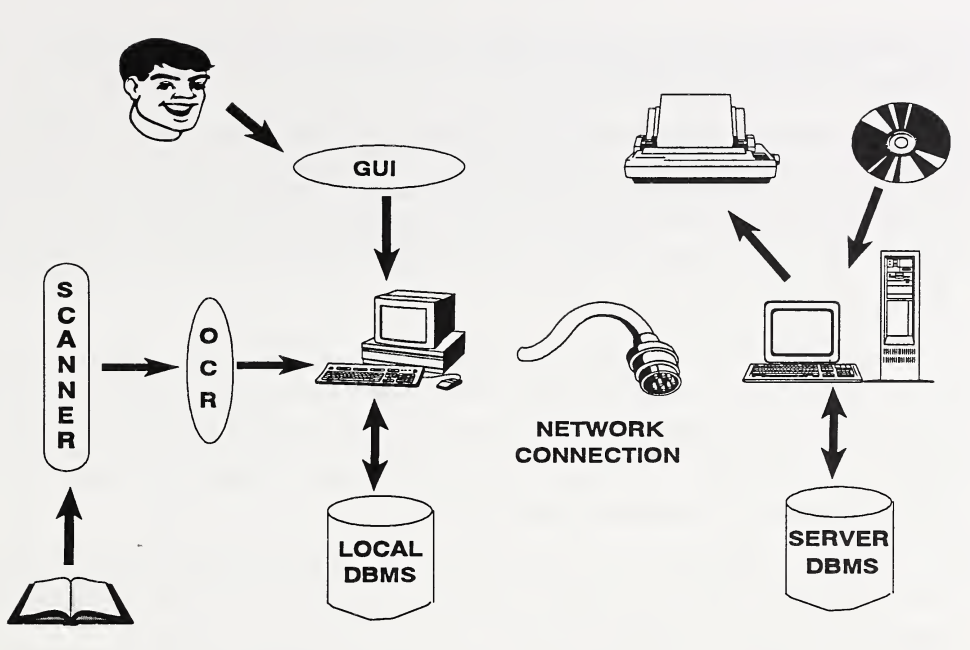
システム構成の図です。利用者(似顔絵)から楕円「GUI」へ、GUI から下のデスクトップ計算機へ矢印があります。左側では、開いた本から縦長の楕円「SCANNER」(スキャナー)へ、SCANNER から楕円「OCR」へ、OCR からデスクトップ計算機へ矢印が続きます。デスクトップ計算機と円筒「LOCAL DBMS」(ローカル DBMS)は両向きの矢印で結ばれています。中央にはケーブルのプラグがあり、「NETWORK CONNECTION」(ネットワーク接続)と書かれています。右側のサーバー計算機(モニター、キーボード、タワー)からプリンターへ矢印が出て、CD-ROM からサーバー計算機へ矢印が入り、サーバー計算機と円筒「SERVER DBMS」(サーバー DBMS)は両向きの矢印で結ばれています。
Figure 1. A System Configuration for the NIST ERN
図 1. NIST ERN のシステム構成
4.2 Functional Specifications
4.2 機能仕様
This section presents the functional specifications of the basic ERN as described in Section 2.3.1. The specifications are provided in three subsections starting with the ERN input capability, followed by storage and retrieval considerations, and concluding with a discussion on security aspects of the ERN.
この節では、第 2.3.1 節で述べた基本的な ERN の機能仕様を示します。仕様は 3 つの項に分けて示します。まず ERN の入力機能、続いて保存と検索に関する考慮事項、最後に ERN のセキュリティ面に関する議論です。
4.2.1 ERN Input Capability
4.2.1 ERN の入力機能
The ERN should utilize a user-friendly interface. The acceptance of the ERN depends to a great extent on the tools that are provided for users to make notebook entries that include text, graphics, images, equations, etc. Not only must the appropriate tools be provided and easy to use, but they need to be integrated as a package. Due to the multiple input possibilities and different forms of storage, this integration of tools will not be a trivial task.
ERN は、使いやすいインタフェースを利用すべきです。ERN が受け入れられるかどうかは、利用者が文章、図形、画像、数式などを含むノートへの記入を行うために提供されるツールに大きく左右されます。適切なツールを提供して使いやすくするだけでなく、それらをパッケージとして統合する必要があります。複数の入力方法と異なる保存形式があるため、このツールの統合は容易な作業ではありません。
Since word processors are so common, textual input is easily supported. However, to sketch a diagram, a drawing tool with all the built-in functions that can be expected from a commercial drawing package must be available. A capability to link a particular drawing to the associated text must also be provided.
ワープロは非常に一般的であるため、文章の入力は容易にサポートされます。しかし、図を描くには、市販の作図パッケージに期待できるすべての組み込み機能を備えた作図ツールが利用できなければなりません。特定の図を関連する文章にリンクさせる機能も提供しなければなりません。
Many scientists write equations in their paper notebooks. To simulate this function, a mathematical tool should be included in the ERN. The tool must be easy to use so that entering an equation does not take longer than writing the equation by hand. If such a tool is not currently available, an alternative is to write the equation on a piece of paper and scan the equation into the ERN using a scanner. The drawback of this, however, is that the scanned equation can only be stored as an image and cannot be edited as text due to the limitations of cursive handwriting recognition.
多くの科学者は、紙のノートに数式を書きます。この機能を模倣するため、ERN には数式ツールを含めるべきです。数式の入力に手で書くより時間がかからないよう、そのツールは使いやすくなければなりません。そのようなツールが現在利用できない場合は、数式を紙に書き、スキャナを使って ERN にスキャンして取り込むという代替手段があります。ただし、この場合の欠点は、筆記体の手書き文字認識の限界のため、スキャンした数式は画像としてしか保存できず、テキストとして編集できないことです。
As indicated, the ERN should also permit the entry of imagery, whether from an image file or directly from a scanned image. The designer of the ERN should consider the compatibility issue and make sure the ERN can accept the type of image format that is used most frequently. Once images are incorporated into the ERN, the ERN should provide an image-editing capability. It is yet to be determined how well current commercially available image processing systems can be integrated into the ERN.
前述のとおり、ERN は、画像ファイルからでもスキャンした画像から直接でも、画像を入力できるようにすべきです。ERN の設計者は互換性の問題を考慮し、最も頻繁に使われる画像形式を ERN が受け付けられるようにすべきです。画像が ERN に取り込まれたら、ERN は画像編集の機能を提供すべきです。現在市販されている画像処理システムを ERN にどの程度うまく統合できるかは、まだ決まっていません。
As multimedia PCs are becoming more and more popular, it may be desirable for the ERN to allow voice, video, or pen input and output. An ERN may also be designed to have the capability of retrieving reference information from a CD-ROM or a database and link the retrieved information to a notebook entry. The complexity of including multimedia capabilities in the ERN has not yet been explored since the enabling technologies are still evolving.
マルチメディア PC がますます普及しているため、ERN が音声、映像、ペンの入出力を可能にすることが望ましいかもしれません。ERN は、CD-ROM やデータベースから参考情報を取り出し、取り出した情報をノートの記入事項にリンクさせる機能を持つように設計することもできます。ERN にマルチメディア機能を含めることの複雑さは、実現技術がまだ発展途上であるため、まだ調べられていません。
As indicated earlier, the integration of these input tools may not be an easy task. Some word processors already provide text and graphics tools that can easily be integrated. Equations can also be entered as text. In addition, some OCR software has built-in functionality to convert scanned imagery into specific formats that are acceptable by popular word processors. By combining the use of a powerful word processor and a scanner with OCR software, a plausible short-term solution for NIST scientists is provided.
前述のとおり、これらの入力ツールの統合は容易な作業ではない可能性があります。ワープロの中には、容易に統合できる文章ツールと図形ツールをすでに備えているものがあります。数式も文章として入力できます。さらに、OCR ソフトウェアの中には、スキャンした画像を、一般的なワープロが受け付ける特定の形式に変換する機能を組み込んだものがあります。強力なワープロとスキャナをOCRソフトウェアと組み合わせて使うことで、NIST の科学者にとって妥当な短期的解決策が得られます。
To make a workable ERN, more functionalities need to be built into the package. These functionalities will be discussed in the following subsections. Three products recently entering the market seem to provide some of the ERN capabilities that are needed, though complete details are still lacking. Generally speaking, these products are electronic notebook systems which use a central database to manage notebooks. Users can work on various platforms and can include many different types of objects on the same page of the notebook. The system keeps a record of changes made to those objects and to the notebooks as a whole. Developments in this area will be closely watched, as the long-term solution for the ERN is being researched.
実用的な ERN を作るには、より多くの機能をパッケージに組み込む必要があります。これらの機能は、以降の項で述べます。最近市場に登場した 3 つの製品は、必要な ERN の機能の一部を提供しているようですが、完全な詳細はまだわかっていません。一般に、これらの製品は、中央データベースを使ってノートを管理する電子ノートシステムです。利用者はさまざまなプラットフォームで作業でき、ノートの同じページにさまざまな種類のオブジェクトを含められます。システムは、それらのオブジェクトとノート全体に対して行われた変更の記録を保持します。ERN の長期的な解決策を研究している間、この分野の動向は注意深く見守られます。
4.2.2 Storage and Retrieval of ERN Contents
4.2.2 ERN の内容の保存と検索
The storage and retrieval of ERN contents is a complex topic that requires clarification. The storage of ERN contents may refer to the physical location where the ERN files reside, or storage may refer to the logical aspect of how the various ERN objects are stored. The latter is the focus of this section, namely, to consider how the objects are integrated and linked, and how to build an indexing system to permit fast and easy object retrieval. For physical storage, it is assumed that the ERN contents are stored either as files or in a database, and can reside locally on a desktop, or remotely on a designated server. For security considerations, those files or the database must be backed up periodically, and for certain information it may even be wise to keep a hard copy.
ERN の内容の保存と検索は、明確にする必要のある複雑な話題です。ERN の内容の保存は、ERN のファイルが置かれる物理的な場所を指す場合もあれば、さまざまな ERN のオブジェクトがどのように保存されるかという論理的な側面を指す場合もあります。この節が焦点を当てるのは後者、すなわち、オブジェクトがどのように統合されリンクされるか、またオブジェクトを高速かつ容易に取り出せるようにする索引システムをどのように構築するかを検討することです。物理的な保存については、ERN の内容はファイルとして、またはデータベースに保存され、デスクトップ上のローカルにも、指定されたサーバ上のリモートにも置けると想定します。セキュリティ上の考慮から、それらのファイルまたはデータベースは定期的にバックアップしなければならず、特定の情報については紙の控えを保管しておくのが賢明な場合さえあります。
An ERN can be designed to be a simple application, or can be implemented with a powerful data tracking capability. At a minimum, an ERN should have the ability to handle textual and graphical input, capabilities which are already available in many word processing packages. Multimedia input can then be added, and each input data type can be an object in the ERN and stored in the proper format specific to that object. The storage of multimedia objects is an area that needs further research. However, a mechanism must be provided by the ERN application to link all these objects together and still allow the retrieval of a specific object if desired. Therefore, control information on these objects must be collected and maintained by the ERN application. Information such as the following should be considered for retention as control information:
ERN は、単純なアプリケーションとして設計することも、強力なデータ追跡機能を備えて実装することもできます。最低限、ERN は文章と図形の入力を扱う能力を備えるべきで、これらの能力は多くのワープロパッケージにすでにあります。そこにマルチメディアの入力を追加でき、各入力データの型は ERN のオブジェクトとなって、そのオブジェクト固有の適切な形式で保存できます。マルチメディアオブジェクトの保存は、さらなる研究が必要な分野です。しかし、ERN アプリケーションは、これらのオブジェクトをすべて結び付けつつ、必要なら特定のオブジェクトを取り出せるようにする仕組みを提供しなければなりません。したがって、これらのオブジェクトに関する制御情報を、ERN アプリケーションが収集して維持しなければなりません。次のような情報は、制御情報として保持することを検討すべきです。
•the type of information/object
•情報またはオブジェクトの種類
•the creator of the object
•オブジェクトの作成者
•the date and time the object was created
•オブジェクトが作成された日時
•the description of the information
•情報の説明
•security control of the object
•オブジェクトのセキュリティ制御
•associated keyword or caption
•関連するキーワードまたは説明文
•list of association or linkage information
•関連づけまたはリンクの情報の一覧
•modifications of the object
•オブジェクトの変更
•file name if applicable
•該当する場合はファイル名
•author’s signature if applicable
•該当する場合は著者の署名
•time-stamp if applicable
•該当する場合はタイムスタンプ
•version number if applicable
•該当する場合はバージョン番号
It is possible to create an ERN application using only these tracking functionalities. Under such an ERN application, it would be up to the user to remember what file name was given to a particular project or notebook entry for later retrieval. On the other hand, a more powerful ERN program can be built which would not only provide initial entry functionality for the user, but would also provide various tracking capabilities to assist the user in retrieving and organizing information in the ERN. An ERN application can log all notebooks maintained by a single user or by all users, can track the user’s projects, or track the equipment or resources used for a particular project. To provide these tracking capabilities, the ERN is essentially building indices and adding database management functions to its basic functions.
これらの追跡機能だけを使って ERN アプリケーションを作ることもできます。そのような ERN アプリケーションでは、後で取り出すために、特定のプロジェクトやノートの記入事項にどのファイル名を付けたかを、利用者が覚えておくことになります。一方、利用者に最初の入力機能を提供するだけでなく、利用者が ERN の情報を取り出して整理するのを助けるさまざまな追跡機能も提供する、より強力な ERN プログラムを構築することもできます。ERN アプリケーションは、1 人の利用者または全利用者が維持するすべてのノートを記録したり、利用者のプロジェクトを追跡したり、特定のプロジェクトに使われる機器や資源を追跡したりできます。これらの追跡機能を提供するため、ERN は基本機能に、本質的に索引の構築とデータベース管理機能の追加を行います。
Building indices is essential for context retrieval. Information that is crucial for searching should be included in the indexing system. For example, if an ERN is to have a project tracking capability, then the project title, project description, research approach, and project conclusion can all use specific keywords to permit a fast and easy search and retrieval. As indices can be built on the tracking or logging information, so too can they be built on the ERN contents. For example, a textual notebook entry may use a few keywords for searching, or a full-text searching capability may be provided by including every word, except for noise words, in the indexing system. A full-text indexing system would consume a tremendous amount of storage just for the indices. Therefore, a good design of the ERN should consider the needs of its users, and provide a capability for the users to customize functionalities as well as tracking capabilities in order to create an ERN that is best suited for them.
索引の作成は、文脈に基づく検索に不可欠です。検索に重要な情報は、索引システムに含めるべきです。たとえば、ERN にプロジェクトの追跡機能を持たせる場合、プロジェクトの題名、プロジェクトの説明、研究のアプローチ、プロジェクトの結論はすべて、特定のキーワードを使って、高速で容易な検索と取り出しを可能にできます。索引を追跡情報や記録情報に対して作成できるように、ERN の内容に対しても作成できます。たとえば、文章のノートの記入事項では、検索用にいくつかのキーワードを使うことも、ノイズ語を除くすべての語を索引システムに含めることで全文検索機能を提供することもできます。全文索引システムでは、索引だけで膨大な記憶容量を消費します。したがって、優れた ERN の設計は、利用者のニーズを考慮し、利用者に最も適した ERN を作れるよう、機能も追跡機能もカスタマイズできる能力を利用者に提供するものです。
4.2.3 Time-stamping Service
4.2.3 タイムスタンプサービス
As indicated earlier, a creditable time-stamping service from an independent source should be made available to ERN users. A time-stamp signed by an independent server and attached to an ERN entry may provide strong evidence of when the entry was signed. At the current time, legal questions concerning the validity of such time-stamps will have to be resolved by the legal experts. Since a great amount of trust is placed in the time-stamping server, physical security for the server should be provided and other vulnerabilities must be assessed and corrected, if any exists.
前述のとおり、独立した提供元による信頼できるタイムスタンプサービスを ERN の利用者が利用できるようにすべきです。独立したサーバが署名して ERN の記入事項に添付したタイムスタンプは、その記入事項がいつ署名されたかを示す強力な証拠となる可能性があります。現時点では、そのようなタイムスタンプの有効性に関する法的な問題は、法律の専門家が解決しなければなりません。タイムスタンプサーバには大きな信頼が置かれるため、サーバの物理的なセキュリティを確保し、ほかの脆弱性を評価し、存在する場合には是正しなければなりません。
To protect the integrity of ERN contents, notebook entries, once finalized, should be signed by the author and sent to be time-stamped. This requires that the computer on which the ERN program resides be connected to a network, whether it is a Local Area Network (LAN) or a Wide Area Network (WAN).
ERN の内容の完全性を保護するため、ノートの記入事項は、確定したら著者が署名し、タイムスタンプを付与してもらうために送るべきです。そのためには、ERN プログラムが置かれているコンピュータが、ローカルエリアネットワーク(LAN)であれ広域ネットワーク(WAN)であれ、ネットワークに接続されている必要があります。
Digital signature technology is currently available, but the infrastructure to support public key certificate management is not yet in place. Key management has always been a complex issue for any type of cryptosystem. To provide a digital signature capability for the ERN users, detailed key management issues need to be addressed and resolved. Included are issues such as the key generation, the determination of a suitable cryptographic module to be used for various cryptographic functions, the initialization of the cryptographic module, the generation and distribution of public key certificates, and the entire arena of certificate management. Therefore, even though the technology exists, the implementation of this technology is a non-trivial task.
デジタル署名技術は現在利用できますが、公開鍵証明書の管理を支えるインフラストラクチャはまだ整っていません。鍵管理は、どのような種類の暗号システムにとっても、常に複雑な問題でした。ERN の利用者にデジタル署名機能を提供するには、鍵管理の詳細な課題に対処し、解決する必要があります。これには、鍵の生成、さまざまな暗号機能に使う適切な暗号モジュールの決定、暗号モジュールの初期化、公開鍵証明書の生成と配布、証明書管理の全領域といった課題が含まれます。したがって、技術が存在していても、この技術の実装は容易ではない作業です。
The issues mentioned above also apply to the provision of a time-stamping service, since a time-stamping server uses the digital signature technology to generate the time-stamp. The issues raised here are not meant to discourage potential ERN implementors. Rather, the point is to forewarn them not to overlook some crucial security issues, especially since designing a secure system is never easy and needs to be done as an integral part of the initial system design.
上記の課題は、タイムスタンプサーバがタイムスタンプを生成するためにデジタル署名技術を使うため、タイムスタンプサービスの提供にも当てはまります。ここで提起した課題は、ERN の実装を考えている人々を思いとどまらせるためのものではありません。むしろ、重要なセキュリティ上の課題を見落とさないよう事前に注意を促すことが目的です。特に、安全なシステムの設計は決して容易ではなく、最初のシステム設計に不可欠な部分として行う必要があるからです。
Once the key management issues are resolved, an ERN user can use his/her private key to sign a notebook entry, possibly using a NIST-developed smart card for key storage and signature generation. A smart card is a credit card size cryptographic module which not only provides protection for the information stored on the card, but also provides the implementations of cryptographic functions. A signed notebook entry can be sent to the time-stamping server over the network. The server stamps the ERN entry with the correct date and time, and signs the time-stamped entry with the server’s private key. If a need arises to prove that an entry containing certain information was made at a specific time, the signature on the time-stamp can be verified by anyone who has access to the time-stamp server’s public key. If even a single bit of the information on the notebook entry or the time-stamp was modified, the signature will not verify.
鍵管理の課題が解決すれば、ERN の利用者は、鍵の保管と署名生成に NIST が開発したスマートカードを使うなどして、自分の秘密鍵でノートの記入事項に署名できます。スマートカードは、クレジットカードの大きさの暗号モジュールで、カードに保存された情報を保護するだけでなく、暗号機能の実装も提供します。署名されたノートの記入事項は、ネットワークを通じてタイムスタンプサーバに送れます。サーバは、ERN の記入事項に正しい日付と時刻のスタンプを押し、サーバの秘密鍵でタイムスタンプ付きの記入事項に署名します。特定の情報を含む記入事項が特定の時刻に作成されたことを証明する必要が生じた場合、タイムスタンプの署名は、タイムスタンプサーバの公開鍵にアクセスできる人であれば誰でも検証できます。ノートの記入事項やタイムスタンプの情報が 1 ビットでも改変されていれば、署名は検証に成功しません。
5. FUTURE WORK
5. 今後の作業
Based upon the assessment of the ERN requirements and the enabling technologies, functional specifications for a basic ERN are presented in Section 4. During the survey, many NIST scientists expressed interest in maintaining research notebooks on the computer. Some have actually done that. However, in order for the ERN to be widely accepted and used regularly, more functions would need to be built into the basic system. Many of the current technologies and commercial products that were reviewed seem promising for the design of the ERN. These range from the specific hardware that can be used to host the ERN to various software tools that can be integrated to provide useful ERN functions. However, none of these products currently present an integrated solution for immediate use. Specific applications have yet to be developed.
ERN の要件と実現技術の評価に基づき、基本的な ERN の機能仕様を第 4 節に示しました。調査の間、多くの NIST の科学者が、研究ノートをコンピュータ上で維持することに関心を示しました。実際にそうしている人もいます。しかし、ERN が広く受け入れられ、定期的に使われるためには、基本システムにより多くの機能を組み込む必要があります。見直した現行技術と市販製品の多くは、ERN の設計に有望と思われます。それらは、ERN をホストするために使える特定のハードウェアから、有用な ERN の機能を提供するために統合できるさまざまなソフトウェアツールにまでわたります。しかし、これらの製品のうち、すぐに使える統合的な解決策を現在示しているものはありません。具体的なアプリケーションはまだ開発されていません。
To use these state-of-the-art technologies, many technical issues would need to be resolved since many of these technologies are still new and developing. The utilization of any one of these in a single project, let alone using all of them, will raise many design issues. Obviously there is still much research to be done.
これらの最先端の技術を使うには、技術の多くがまだ新しく発展途上であるため、多くの技術的課題を解決する必要があります。これらのうち一つを単一のプロジェクトで利用するだけでも、すべてを使うことは言うまでもなく、多くの設計上の課題が生じます。明らかに、まだ多くの研究が必要です。
Additional research and a prototype implementation are necessary. This includes the investigation of full multimedia support for ERN entries, the linking and signing of different types of objects, the logical storage of ERN contents, and the indexing scheme to be used. Once these issues are resolved, the current ERN functional specifications will be augmented, and the implementation of a prototype ERN will be attempted accordingly. The prototype ERN, once implemented, will be demonstrated to, and tested by, participating research scientists for possible improvement and enhancement.
追加の研究とプロトタイプの実装が必要です。これには、ERN の記入事項に対する完全なマルチメディアのサポート、異なる種類のオブジェクトのリンクと署名、ERN の内容の論理的な保存、使用する索引付けの方式の調査が含まれます。これらの課題が解決されたら、現在の ERN の機能仕様を拡充し、それに従ってプロトタイプ ERN の実装を試みます。プロトタイプ ERN は、実装された後、参加する研究科学者に披露してテストしてもらい、改善と拡張の可能性を探ります。
APPENDIX A - NIST RESEARCH NOTEBOOKS POLICY
付録 A - NIST の研究ノートに関する方針
July 29, 1992
1992 年 7 月 29 日
All NIST employees engaged in research and development activities are responsible for maintaining a thorough and accurate record of their work by keeping a research notebook. Employees conducting research using electronic media are responsible for maintaining a notebook that chronologically documents the progress of their research and indexes electronic work files so that primary research results may be retrieved.
研究開発活動に従事するすべての NIST 職員は、研究ノートをつけることによって、自らの業務の十分かつ正確な記録を維持する責任を負います。電子媒体を使って研究を行う職員は、研究の進捗を時系列で記録し、一次研究結果を取り出せるよう電子作業ファイルに索引を付けたノートを維持する責任を負います。
Research notebooks are to be hard covered or spiral bound with pre-printed sequentially numbered pages, such as the types available from the NIST storeroom. Research records must be permanent, contemporaneous with the research, accurate, and reasonably protected from compromise. Record-keeping procedures discussed in Subchapter 2.10.06 of the NIST Administrative Manual should be followed when intellectual property issues, such as patents, copyrights, etc., are likely to be important since these records establish the legal foundation for future claims.
研究ノートは、NIST の備品室で入手できる種類のような、通し番号があらかじめ印刷されたページの付いた、硬表紙またはスパイラル綴じとします。研究記録は永続的で、研究と同時に作成され、正確であり、損なわれないよう合理的に保護されなければなりません。特許、著作権などの知的財産の問題が重要になる可能性が高い場合は、これらの記録が将来の主張の法的基盤となるため、NIST Administrative Manual の Subchapter 2.10.06 で述べられている記録保持の手順に従うべきです。
All NIST laboratory and technical unit managers are responsible for insuring that the technical activities of their staff are fully documented, that appropriate control measures are in place so that either paper or electronic records of research results are retrievable, and that all staff engaged in research are properly instructed. NIST laboratories that conduct research predominately using electronic media may be allowed to implement procedures that accomplish the same goals but use alternatives to bound notebooks. Prior approval for such exceptions must be obtained from NIST Director.
NIST のすべての研究所と技術部門の管理者は、職員の技術的活動が十分に文書化されること、紙の記録でも電子的な記録でも研究結果を取り出せるよう適切な管理策が整えられていること、研究に従事するすべての職員が適切に指導を受けていることを確実にする責任を負います。主に電子媒体を使って研究を行う NIST の研究所には、同じ目標を達成しつつ製本ノートに代わる手段を使う手順を実施することが認められる場合があります。そのような例外には、NIST 所長の事前承認を得なければなりません。
All technical records, including research notebooks, journals, electronic records, data, calculations, etc. pertaining to NIST activities are official files of the U.S. government and, as such, are the property of the Government, not the employee. Laboratory and technical unit directors are responsible for insuring that these records are not removed from NIST without proper authority even when an employee transfers, retires, or otherwise separates from NIST.
研究ノート、日誌、電子記録、データ、計算など、NIST の活動に関するすべての技術記録は、米国政府の公式ファイルであり、したがって職員ではなく政府の財産です。研究所と技術部門の部門長は、職員が異動、退職、またはその他の理由で NIST を離れる場合でも、これらの記録が適切な権限なく NIST から持ち出されないことを確実にする責任を負います。
APPENDIX B - ERN QUESTIONNAIRE
付録 B - ERN 質問票
I. Questions for all (scientists and managers)
I. 全員(科学者と管理者)への質問
A. Current Notebooks
A. 現在のノート
Issuance
支給
•Do you currently use a notebook to keep records of your research? Explain why or why not. If you do, what form does your notebook take (e.g. paper-based, computer-based, etc.) ?
•現在、研究の記録をつけるのにノートを使っていますか。使っている理由、使っていない理由を説明してください。使っている場合、ノートはどのような形式ですか(たとえば紙ベース、コンピュータベースなど)。
•Are notebooks automatically provided to you, or must you request them from supply? Do you fill out an issuance form which binds you to that particular notebook?
•ノートは自動的に支給されますか、それとも補給部門に請求する必要がありますか。その特定のノートに紐づけられる支給用紙に記入しますか。
•Upon starting employment at NIST, did you receive specific instructions for the maintenance of a laboratory notebook? From whom? Are these requirements NIST-wide, or particular to your organization?
•NIST で勤務を開始したとき、実験ノートの維持管理に関する具体的な指示を受けましたか。誰からですか。これらの要件は NIST 全体のものですか、それともあなたの組織に固有のものですか。
•If you have organization-specific requirements, describe them briefly?
•組織に固有の要件がある場合、簡単に説明してください。
•How closely do you adhere to the rules for maintaining your notebook? What regulations don’t you follow?
•ノートを維持するための規則にどの程度忠実に従っていますか。従っていない規則はどれですか。
•What reason for keeping a notebook is most important to you:
•ノートをつける理由のうち、あなたにとって最も重要なものは何ですか。
a.recording data for easy future reference
a.将来の参照を容易にするためのデータの記録
b.recognition from peers in scientific community
b.科学界の同僚からの評価
c.potential support for patent claims
c.特許請求の根拠となる可能性
d.other (specify)
d.その他(具体的に)
Nature of notebook information
ノートの情報の性質
•What form do your notebook entries take (e.g. text, numerical data, diagrams, references to other materials, attached printouts, etc.) ? Estimate what percentage of your notebook is in each format.
•ノートの記入事項はどのような形式ですか(たとえば、文章、数値データ、図、ほかの資料への参照、貼り付けた出力紙など)。ノートのうち、各形式が占める割合を推定してください。
•What type of attachments do you place in your notebook (e.g. photographs, instrument printouts, etc.) ?
•ノートにどのような種類の添付物を入れますか(たとえば写真、機器の出力紙など)。
•What kind of line rule do you use in your notebook (e.g. horizontal, square grid, columnar) ? What kind is required for your work?
•ノートにどのような種類の罫線を使っていますか(たとえば横罫、方眼、縦罫)。あなたの業務にはどのような種類が必要ですか。
•Do you make an effort to write legibly enough for others to read and understand your work?
•ほかの人があなたの仕事を読んで理解できるよう、読みやすく書く努力をしていますか。
•What methods do you use to reference particular data/entries?
•特定のデータや記入事項を参照するのにどのような方法を使っていますか。
Maintenance of the notebook
ノートの維持管理
•How often do you use your notebook?
•どのくらいの頻度でノートを使いますか。
•Do you sign and date your entries? If so, how often?
•記入事項に署名して日付を記入しますか。そうする場合、どのくらいの頻度ですか。
•Do you have witnesses sign and date each page of your notebook? How many witnesses? Who are they? Do they really read and understand your work, or do they just sign the page?
•ノートの各ページに立会人に署名して日付を記入してもらいますか。立会人は何人ですか。誰ですか。立会人はあなたの仕事を実際に読んで理解していますか、それとも単にページに署名しているだけですか。
•Does your supervisor review your notebook on a regular basis? If so, how often and how thorough are the reviews?
•上司は定期的にあなたのノートを確認しますか。そうする場合、どのくらいの頻度で、確認はどの程度徹底していますか。
•How many other people read your notebook each week? How do they obtain it? How concerned would you be if your notebook was disclosed to others without your knowledge?
•毎週、何人の人があなたのノートを読みますか。どのようにして入手していますか。あなたの知らないうちにノートがほかの人に開示された場合、どの程度気にしますか。
•How concerned would you be if you found out that information in your notebook had been altered?
•ノートの情報が改ざんされていたことがわかった場合、どの程度気にしますか。
•How/Where do you keep your notebook? Do you keep it locked up? Is it easily accessible to others?
•ノートをどのように、どこに保管していますか。施錠していますか。ほかの人が容易にアクセスできますか。
•How often do you use your notebook outside of your lab at NIST? In what type of environment? Do you make entries or just review the notebook?
•NIST の研究室の外で、どのくらいの頻度でノートを使いますか。どのような環境ですか。記入をしますか、それともノートを見直すだけですか。
•How long do you normally use an individual notebook? How many do you use while working on a project? (How many pages are in these notebooks?)
•通常、1 冊のノートをどのくらいの期間使いますか。1 つのプロジェクトに取り組む間に何冊使いますか。(これらのノートは何ページありますか。)
•What do you do with completed notebooks? Are they archived? By whom?
•書き終えたノートをどうしますか。アーカイブされますか。誰によってですか。
•What other requirements would you suggest which could benefit you and NIST?
•あなたと NIST に利益をもたらしうる要件として、ほかにどのようなものを提案しますか。
Other comments:
その他のコメント:
B. Computer familiarity
B. コンピュータへの習熟度
•Do you currently make frequent use of a computer for your lab work? If so, what kind is it? Is it attached to the NIST Local Area Network?
•現在、研究室の業務でコンピュータを頻繁に使っていますか。使っている場合、どのような種類ですか。NIST のローカルエリアネットワークに接続されていますか。
•Would you feel comfortable using a computer-based electronic notebook?
•コンピュータベースの電子ノートを使うことに抵抗はありませんか。
•Are you comfortable working in a Windows environment on the computer? If not, please explain why.
•コンピュータ上の Windows 環境で作業することに抵抗はありませんか。抵抗がある場合は、その理由を説明してください。
C. ERN
C. ERN
•What type of computer would be most convenient for your use of the ERN (e.g. desk-top, laptop, hand-held) ?
•ERN を使ううえで、どのような種類のコンピュータが最も便利でしょうか(たとえばデスクトップ型、ノート型、携帯型)。
•Would you like to have the capability of making handwritten entries into a computer as well as typed entries? Estimate what percentage of the time you would use each.
•コンピュータに、キーボード入力だけでなく手書き入力もできる機能がほしいですか。それぞれを使う時間の割合を推定してください。
•Would the ability to choose what type of line rule is on a particular "page" in the ERN be convenient to you?
•ERN の特定の「ページ」にどの種類の罫線を使うか選べる機能は、あなたにとって便利でしょうか。
•What kind of electronic "attachments" (e.g. video, audio, instrument results) would you like to be able to place in the ERN? Which ones are required for your work?
•どのような種類の電子的な「添付物」(たとえば映像、音声、機器の測定結果)を ERN に入れられるようにしたいですか。あなたの業務にはどれが必要ですか。
•What cross-referencing capabilities would you like in the ERN which you do not have now?
•現在はありませんが、ERN にほしい相互参照の機能は何ですか。
•Is there any special requirement for the ERN for the type of work you are doing (e.g. Any special-format notebook that you use regularly?) ? Why do you need this format?
•あなたが行っている種類の仕事のために、ERN に何か特別な要件はありますか(たとえば、普段使っている特別な書式のノートはありますか)。なぜその書式が必要ですか。
•What other features would you like the ERN to have? Please be sure to list features of the ERN which are needed to meet your work requirements, and which have not been addressed in previous questions.
•ERN にほかにどのような機能がほしいですか。あなたの業務要件を満たすために必要で、これまでの質問で扱われていない ERN の機能を、必ず挙げてください。
•What security concerns do you have with respect to the ERN (possible issues: data integrity, accessibility(by yourself and others), loss of notebook)?
•ERN に関して、どのようなセキュリティ上の懸念がありますか(考えられる問題: データの完全性、アクセス可能性(自分自身と他者による)、ノートの紛失)。
II. Questions for managers
II. 管理者への質問
•How do you enforce the NIST policy of requiring your staff to keep research notebooks?
•職員に研究ノートをつけることを求める NIST の方針を、どのように徹底していますか。
•Does your staff adhere to the procedures for the distribution, collection, and control of notebooks?
•職員は、ノートの配布、回収、管理の手順に従っていますか。
•Do you require your staff to use a specific format for their notebooks (paper or electronic)? Do you require that they keep records of a specific nature?
•職員に、ノート(紙または電子)の特定の書式を使うよう求めていますか。特定の種類の記録をつけるよう求めていますか。
•Are these notebooks reviewed periodically? If yes, by whom? How important is the role of the notebook during performance review time?
•これらのノートは定期的に確認されますか。確認される場合は誰によってですか。業績評価の時期に、ノートの役割はどのくらい重要ですか。
•What kind of cost range will be acceptable for your organization to use ERNs on a regular basis?
•あなたの組織が ERN を日常的に使うとして、どの程度の費用の範囲が許容できますか。
•What features must the ERN have, at a minimum, to meet your needs?
•あなたのニーズを満たすために、ERN が最低限備えなければならない機能は何ですか。
•What extra features and capabilities would be nice to have on the ERN?
•ERN にあるとよい追加の機能や能力は何ですか。
•What concerns would you have about the security of ERNs in your organization?
•あなたの組織の ERN のセキュリティについて、どのような懸念がありますか。
•What are the potential benefits of the ERN to your organization? Do you feel that implementation of the ERN is favorable to the system of research notebook maintenance which is now in use?
•ERN があなたの組織にもたらしうる利点は何ですか。ERN の実装は、現在使われている研究ノートの維持管理の仕組みより好ましいと思いますか。
•Suggestions:
•提案:
APPENDIX C - INTERVIEWED SCIENTISTS
付録 C - 聞き取りを行った科学者
| DATE | NAME | NIST LABORATORY |
|---|---|---|
| 2/22/93 | Craig Sansonetti | Physics Laboratory |
| Joseph Reader | Physics Laboratory | |
| 2/25/93 | Edward Kelley | Electronics and Electrical Engineering Laboratory |
| Bruce Field | Electronics and Electrical Engineering Laboratory | |
| 2/25/93 | Thomas Larason | Physics Laboratory |
| 3/2/93 | Susannah Schiller | Computing and Applied Mathematics Laboratory |
| James Blue | Computing and Applied Mathematics Laboratory | |
| 3/4/93 | Robert Saunders | Physics Laboratory |
| James Walker | Physics Laboratory | |
| 3/5/93 | Robert Myklebust | Chemical Science and Technology Laboratory |
| 3/9/93 | Joseph Kinard | Electronics and Electrical Engineering Laboratory |
| 3/16/93 | Eric Steel | Chemical Science and Technology Laboratory |
| Cynthia Zeissler | Chemical Science and Technology Laboratory | |
| Ryna Marinenko | Chemical Science and Technology Laboratory | |
| 3/17/93 | Richard Lindstrom | Chemical Science and Technology Laboratory |
| 3/19/93 | Richard H. Harris | Building and Fire Research Laboratory |
| Richard Peacock | Building and Fire Research Laboratory | |
| 3/26/93 | Donald Blomquist | Manufacturing Engineering Laboratory |
| 4/20/93 | Michael Gaitan | Electronics and Electrical Engineering Laboratory |
| 日付 | 氏名 | NIST の研究所 |
|---|---|---|
| 1993/2/22 | Craig Sansonetti | 物理研究所 |
| Joseph Reader | 物理研究所 | |
| 1993/2/25 | Edward Kelley | 電子・電気工学研究所 |
| Bruce Field | 電子・電気工学研究所 | |
| 1993/2/25 | Thomas Larason | 物理研究所 |
| 1993/3/2 | Susannah Schiller | 計算・応用数学研究所 |
| James Blue | 計算・応用数学研究所 | |
| 1993/3/4 | Robert Saunders | 物理研究所 |
| James Walker | 物理研究所 | |
| 1993/3/5 | Robert Myklebust | 化学科学技術研究所 |
| 1993/3/9 | Joseph Kinard | 電子・電気工学研究所 |
| 1993/3/16 | Eric Steel | 化学科学技術研究所 |
| Cynthia Zeissler | 化学科学技術研究所 | |
| Ryna Marinenko | 化学科学技術研究所 | |
| 1993/3/17 | Richard Lindstrom | 化学科学技術研究所 |
| 1993/3/19 | Richard H. Harris | 建築・火災研究所 |
| Richard Peacock | 建築・火災研究所 | |
| 1993/3/26 | Donald Blomquist | 製造工学研究所 |
| 1993/4/20 | Michael Gaitan | 電子・電気工学研究所 |
APPENDIX D - PRODUCTS REVIEW
付録 D - 製品の調査
Many off-the-shelf products including hardware devices and software tools were reviewed for potential use in an ERN implementation. Reviewed products are summarized using the following format:
ハードウェア機器やソフトウェアツールを含む多くの既製品を、ERN の実装への利用の可能性という観点で見直しました。見直した製品は、次の形式でまとめています。
1.A brief description of the product;
1.製品の簡単な説明
2.An assessment of how the product can provide the basic ERN features, and allow for the addition of enhanced features;
2.製品が基本的な ERN の機能をどのように提供でき、拡張機能の追加を可能にするかの評価
3.An identification of the software/hardware necessary to support the product;
3.製品を支えるために必要なソフトウェアとハードウェアの特定
4.The approximate cost.
4.おおよその費用
It is impossible to survey and evaluate all the products in the marketplace due to the sheer number of available products and the pace at which new products are being introduced. It should also be noted that mention of vendor products is for descriptive purpose only and does not constitute a NIST endorsement.
入手可能な製品の数が非常に多く、新製品が登場する速度も速いため、市場にあるすべての製品を調査し評価することは不可能です。また、ベンダーの製品への言及は説明のためだけのものであり、NIST による推奨を意味するものではないことにも留意すべきです。
Current Electronic Notebook Products
現行の電子ノート製品
ResearchStation (from Helix Systems, Inc.)
ResearchStation(Helix Systems, Inc. 製)
1.This is a software environment which allows scientists to integrate currently-used applications and tools, existing computer systems, multimedia technology, and database systems. ResearchStation may be used to acquire, organize, search, and share information in various electronic ways in project notebooks or personal laboratory notebooks. Multiple data types can be manipulated on the same page by users working at two separate locations. Versions of notebooks and notebook objects can be tracked, and several visual browsing mechanisms are provided. An intelligent assistant can be used to monitor information changes and flows, and can automate certain tasks done by the scientist. ResearchStation can also be used to retrieve information from on-line catalogs and other services.
1.これは、科学者が現在使っているアプリケーションとツール、既存のコンピュータシステム、マルチメディア技術、データベースシステムを統合できるソフトウェア環境です。ResearchStation は、プロジェクトノートや個人の実験ノートで、さまざまな電子的な方法により、情報を取得し、整理し、検索し、共有するために使えます。2 つの別々の場所で作業する利用者が、同じページで複数のデータ型を操作できます。ノートとノートのオブジェクトのバージョンを追跡でき、複数の視覚的な閲覧の仕組みが提供されます。インテリジェントアシスタントを使って情報の変更と流れを監視でき、科学者が行う特定の作業を自動化できます。ResearchStation は、オンラインカタログやその他のサービスから情報を取り出すこともできます。
2.This is a very comprehensive software environment which appears to meet many of the basic requirements mentioned in Chapter 2 of this paper. It has not been thoroughly tested yet, but a demonstration of this product revealed that it has great potential for use in the development of a prototype ERN system.
2.これは非常に包括的なソフトウェア環境で、本書の第 2 章で述べた基本要件の多くを満たしているようです。まだ十分にはテストされていませんが、この製品のデモンストレーションでは、プロトタイプ ERN システムの開発に使える大きな可能性があることがわかりました。
3.ResearchStation will run in MS Windows 3.1, MS WindowsNT, and Macintosh environments. It may operate as a stand-alone system, or it may be connected to a network in a client-server configuration. Additional hardware and software (scanner, OCR software, sound board, speakers, microphone) could be purchased to take advantage of scanning and audio capabilities offered with the software.
3.ResearchStation は、MS Windows 3.1、MS WindowsNT、Macintosh の環境で動作します。スタンドアロンのシステムとしても、クライアントサーバ構成でネットワークに接続しても動作します。ソフトウェアが提供するスキャンと音声の機能を活用するため、追加のハードウェアとソフトウェア(スキャナ、OCR ソフトウェア、サウンドボード、スピーカー、マイク)を購入することもできます。
4.No pricing is available yet - this product is expected to be commercially available in 1994.
4.価格はまだわかっていません。この製品は 1994 年に市販される見込みです。
The Virtual Notebook System (from The ForeFront Group, Inc.)
Virtual Notebook System(The ForeFront Group, Inc. 製)
1.The VNS is a software product which allows scientists to perform collaborative research. A VNS Applications Programming Interface (VAPI) can be used to integrate the VNS with other applications, such as digital signature software. Pages may be of varying size (they can even be scrolled), and may contain any number of information objects. Objects may be retrieved from another file, cut and pasted from another window, or created directly on the page, depending on the object type. Other features include an automatic table of contents, navigational links to other parts of the notebook, action links to external applications, support for audio and video objects, and a browser.
1.VNS は、科学者が共同研究を行えるようにするソフトウェア製品です。VNS Applications Programming Interface(VAPI)を使えば、VNS をデジタル署名ソフトウェアなどのほかのアプリケーションと統合できます。ページの大きさはさまざまで(スクロールもできます)、任意の数の情報オブジェクトを含められます。オブジェクトは、オブジェクトの種類に応じて、別のファイルから取り出すことも、別のウィンドウから切り取って貼り付けることも、ページ上で直接作成することもできます。そのほかの機能には、自動的な目次、ノートのほかの部分へのナビゲーションリンク、外部アプリケーションへのアクションリンク、音声と映像のオブジェクトのサポート、ブラウザがあります。
2.This system appears to provide many of the basic capabilities mentioned in Section 2. The system has not been tested as of the moment, but the Virtual Notebook System might help the development of a prototype ERN.
2.このシステムは、第 2 節で述べた基本機能の多くを提供しているようです。このシステムは現時点ではテストされていませんが、Virtual Notebook System は、プロトタイプ ERN の開発に役立つ可能性があります。
3.The VNS Server (Real-time Object Manager: RTOM) can be implemented on a computer with any of the following operating systems: Solaris, AIX, HP-UX, Ultrix, OSF/1, SGI, and Unixware/System V Release 4. The VNS Client can run on X Windows, Microsoft Windows, and in a Macintosh environment. Separate platforms of the VNS can communicate using TCP/IP, and a WindowsNT version is being developed. A VAPI should be used to integrate the VNS with other applications. A relational database system which is SQL-compatible may be used. Additional hardware and software may be purchased to take advantage of multimedia capabilities offered with the VNS.
3.VNS サーバ(Real-time Object Manager: RTOM)は、Solaris、AIX、HP-UX、Ultrix、OSF/1、SGI、Unixware/System V Release 4 のいずれかのオペレーティングシステムを搭載したコンピュータに実装できます。VNS クライアントは、X Windows、Microsoft Windows、Macintosh の環境で動作します。VNS の別々のプラットフォームは TCP/IP を使って通信でき、WindowsNT 版が開発中です。VNS をほかのアプリケーションと統合するには、VAPI を使うべきです。SQL 互換のリレーショナルデータベースシステムを使ってもよいです。VNS が提供するマルチメディア機能を活用するため、追加のハードウェアとソフトウェアを購入してもよいです。
4.MS Windows and Apple Macintosh clients are listed at $595 each, while a UNIX client lists for $795. The UNIX server portion of the VNS is priced at $6000 for an unlimited number of users. Annual software maintenance costs run approximately $1000 for each VNS server, and $100-$150 for each client. VNS API Programmer’s Toolkits for clients cost between $3750 and $5000, with annual software maintenance costs between $675 and $900. Finally, VNS API Runtime Licenses are available for each client for under $100.
4.MS Windows と Apple Macintosh のクライアントは 1 台あたり 595 ドル、UNIX クライアントは 795 ドルとされています。VNS の UNIX サーバ部分は、利用者数無制限で 6000 ドルです。ソフトウェアの年間保守費用は、VNS サーバ 1 台につきおよそ 1000 ドル、クライアント 1 台につき 100〜150 ドルです。クライアント用の VNS API プログラマーズツールキットは 3750〜5000 ドルで、年間のソフトウェア保守費用は 675〜900 ドルです。最後に、VNS API ランタイムライセンスは、クライアントごとに 100 ドル未満で入手できます。
FlowStream (from Consilium)
FlowStream(Consilium 製)
1.FlowStream was developed mainly for the pharmaceutical and related chemical industries, thus the compliance to regulations is much emphasized. FlowStream specifically addresses the needs of the chemical research and development facility. The researcher can define and document experiments and procedures, statistically compare results from different experiments, and automatically record notebook changes. FlowStream also maintains a detailed record of laboratory equipment, including its use and servicing history. A Document Vault permanently stores documents and provides a complete audit trail of their life cycle.
1.FlowStream は主に製薬業界と関連する化学産業向けに開発されたため、規制への準拠が重視されています。FlowStream は、化学の研究開発施設のニーズに特に対応しています。研究者は、実験と手順を定義して文書化し、異なる実験の結果を統計的に比較し、ノートの変更を自動的に記録できます。FlowStream は、使用履歴と保守履歴を含む実験機器の詳細な記録も維持します。Document Vault は、文書を永続的に保存し、そのライフサイクルの完全な監査証跡を提供します。
2.FlowStream appears to provide some of the basic requirements mentioned in Chapter 2 of this paper. It has not been tested as of the moment, but it might be helpful in the development of a prototype ERN system. One concern about using this product is that its format might be too industry-specific in the area of pharmaceutical, but this will have to be determined at a later time.
2.FlowStream は、本書の第 2 章で述べた基本要件の一部を提供しているようです。現時点ではテストされていませんが、プロトタイプ ERN システムの開発に役立つ可能性があります。この製品を使ううえでの懸念の一つは、その書式が製薬分野に特化しすぎている可能性があることですが、これは後で確認する必要があります。
3.The Document Vault package is based on a client-server architecture, and requires either Microsoft Windows, XWindows, or a Macintosh platform, as well as network software and hardware. An SQL-compatible relational database could also be used. Tools from the Digital Equipment Corporation should allow the user to connect FlowStream to existing equipment, such as data acquisition devices and laboratory information systems.
3.Document Vault パッケージはクライアントサーバアーキテクチャに基づいており、Microsoft Windows、XWindows、Macintosh のいずれかのプラットフォームに加え、ネットワークのソフトウェアとハードウェアが必要です。SQL 互換のリレーショナルデータベースも使えます。Digital Equipment Corporation のツールにより、利用者は FlowStream を、データ取得装置や研究室情報システムなどの既存の機器に接続できるはずです。
4.To obtain all modules of FlowStream for twelve users, the estimated cost ranges between $175,000 and $200,000 (it is not clear if this figure includes the price of hardware).
4.12 人の利用者向けに FlowStream のすべてのモジュールを入手する場合、概算の費用は 175,000 ドルから 200,000 ドルです(この金額にハードウェアの価格が含まれるかどうかは明らかではありません)。
Digitizer Tablets
デジタイザタブレット
Wacom SD-510C
Wacom SD-510C
1.A small digitizer (under one square foot and 5 lbs.) that is compatible with PCs, Macintoshes, and Sun, NeXT, and HP workstations. It comes with a cordless, pressure-sensitive pen.
1.PC、Macintosh、Sun、NeXT、HP のワークステーションと互換性のある小型のデジタイザ(1 平方フィート未満、5 ポンド未満)です。コードレスの感圧式ペンが付属します。
2.This digitizer has a small footprint and would be a simple addition to the scientist’s system. It might be awkward to use for writing or sketching since the user must write on the tablet while watching the monitor. Writing on the tablet does not feel as natural as writing on paper.
2.このデジタイザは設置面積が小さく、科学者のシステムに簡単に追加できます。利用者がモニタを見ながらタブレットに書かなければならないため、書いたりスケッチしたりするのに使いにくいかもしれません。タブレットに書く感覚は、紙に書くほど自然ではありません。
3.A pen operating system and pen-aware applications are required.
3.ペン用のオペレーティングシステムと、ペンに対応したアプリケーションが必要です。
4.The cost of this digitizer tablet is under $600.
4.このデジタイザタブレットの費用は 600 ドル未満です。
CalComp NotePad (Model 33111)
CalComp NotePad (Model 33111)
1.This is another small digitizer (under one square foot) which weighs less than two pounds. It is designed for use with PCs, with an RS-232 interface and drivers for Microsoft Mouse and Windows.
1.これも小型のデジタイザ(1 平方フィート未満)で、重さは 2 ポンド未満です。RS-232 インタフェースと Microsoft Mouse および Windows 用のドライバを備え、PC で使うように設計されています。
2.In addition to its small size and possible awkwardness of use, it is unclear whether this digitizer can be connected to non-PC compatible computers.
2.サイズが小さいことと使いにくい可能性があることに加え、このデジタイザを PC 互換でないコンピュータに接続できるかどうかは明らかではありません。
3.Either Microsoft Windows for Pen Computing, CIC PenDOS, or Go Corporation PenPoint is required to allow applications to understand pen input.
3.アプリケーションがペン入力を理解できるようにするには、Microsoft Windows for Pen Computing、CIC PenDOS、または Go Corporation PenPoint のいずれかが必要です。
4.The approximate cost is $200.
4.おおよその費用は 200 ドルです。
Tablet Computers
タブレットコンピュータ
NCR 3130
NCR 3130
1.This is a light tablet ( < 4.5 lbs ) which has a last-generation processor (386SL), 60 MB hard disk, and additional memory which can be provided by a PCMCIA card. Four major pen environments are supported including the Microsoft Windows for Pen Computing, PenDOS, PenPoint, and PenRight!
1.これは軽量のタブレット(< 4.5 lbs)で、旧世代のプロセッサ(386SL)、60 MB のハードディスクを備え、PCMCIA カードによって追加メモリを搭載できます。Microsoft Windows for Pen Computing、PenDOS、PenPoint、PenRight! を含む 4 つの主要なペン環境をサポートします。
2.The NCR 3130 is a rugged computer with a shock-mounted hard disk, light weight, 4 hours battery life, and PCMCIA capability, which make this tablet a good candidate for use in laboratory and field environments. However, the processor, clock (20MHz), and black-and-white screen are drawbacks for using the device very frequently for ERN work. The NCR 3130 system probably will not be able to support enhanced ERN features such as multimedia.
2.NCR 3130 は、衝撃吸収マウント付きハードディスク、軽量設計、4 時間のバッテリー駆動時間、PCMCIA 機能を備えた堅牢なコンピュータであり、研究室やフィールド環境で使用するタブレットとして有力な候補です。しかし、プロセッサ、クロック速度(20MHz)、白黒画面は、この機器を ERN の作業に非常に頻繁に使ううえでの欠点です。NCR 3130 システムは、マルチメディアなどの拡張 ERN 機能をおそらくサポートできないでしょう。
3.An optional keyboard and external video are recommended. PCMCIA memory, Ethernet/LAN, SCSI, and modem cards should also be considered for use.
3.オプションのキーボードと外部ビデオを推奨します。PCMCIA メモリ、Ethernet/LAN、SCSI、モデムの各カードの使用も検討すべきです。
4.The approximate cost is $3500.
4.おおよその費用は 3500 ドルです。
NEC UltraLite Autograph
NEC UltraLite Autograph
1.The Autograph has a powerful 486SL processor, although its clock speed is only 20MHz. It also comes with a relatively large (80MB) hard disk drive, a pair of PCMCIA Type II slots, and a choice of pre-installed Windows for Pen Computing or PenPoint. Next to the black-and-white screen are several HotZone buttons which allow for one-touch functionality.
1.Autograph は強力な 486SL プロセッサを備えていますが、クロック速度は 20MHz にとどまります。また、比較的大きな(80MB の)ハードディスクドライブ、PCMCIA Type II スロット 2 つ、プリインストールされた Windows for Pen Computing または PenPoint のどちらかの選択肢も付属します。白黒画面の横には、ワンタッチで機能を使えるようにする HotZone ボタンがいくつかあります。
2.Multiple PCMCIA slots would allow the ERN scientist to use a memory card and ethernet/LAN card simultaneously. Support of multimedia is questionable, considering the tablet’s display and limited storage.
2.複数の PCMCIA スロットにより、ERN の科学者は、メモリカードと ethernet/LAN カードを同時に使えます。タブレットのディスプレイと限られた記憶容量を考えると、マルチメディアのサポートには疑問があります。
3.An optional keyboard and external video monitor are recommended. PCMCIA memory, Ethernet/LAN, SCSI, and modem cards should be considered for use.
3.オプションのキーボードと外部ビデオモニタを推奨します。PCMCIA メモリ、Ethernet/LAN、SCSI、モデムの各カードの使用も検討すべきです。
4.No pricing information is available yet.
4.価格情報はまだありません。
GRiD PalmPAD
GRiD PalmPAD
1.PalmPAD is a wrist-held, 3 lb. computer with a very small screen and configurable communication module (either a short-range radio or data/fax). It holds a PCMCIA storage card, and the PenRight! environment is also provided.
1.PalmPAD は、手首に装着する重さ 3 ポンドのコンピュータで、画面は非常に小さく、構成を変更できる通信モジュール(近距離無線、またはデータ/ファックスのいずれか)を備えています。PCMCIA の記憶カードを保持でき、PenRight! 環境も提供されます。
2.The PalmPAD’s size, weight, and radio link (up to 800 feet) are ideal for the lab and field environments. However, the small storage capacity (20MB) and 6.5" black-and-white screen make it unsuitable for implementing the entire ERN. Its orientation towards vertical, data collection applications does not allow for much variability - a factor which might detract from a scientist’s willingness to use the PalmPAD.
2.PalmPAD のサイズ、重さ、無線リンク(最大 800 フィート)は、研究室やフィールド環境での使用に理想的です。しかし、記憶容量が小さく(20MB)、6.5" の白黒画面であるため、ERN 全体の実装には適していません。特定業務向け(垂直型)のデータ収集アプリケーションに特化した設計であるため、用途の幅があまりなく、このことが科学者の PalmPAD を使う意欲を損なう可能性があります。
3.An optional keyboard is recommended, and software and hardware for downloading data to a desktop computer are needed to use the radio capability.
3.推奨オプションはキーボードです。また、無線機能を使うには、デスクトップコンピュータにデータをダウンロードするためのソフトウェアとハードウェアが必要です。
4.The approximate cost is $3395.
4.おおよその費用は 3395 ドルです。
IBM ThinkPad 710T
IBM ThinkPad 710T
1.Of all the tablet computers reviewed in this section, the ThinkPad has the most powerful processor (486SLC/25 MHz). It weighs about 6 lbs. The only available pen environments on the ThinkPad are PenDOS and PenPoint. Two different configurations are available: one PCMCIA Type II slot with a 60MB hard drive, or three PCMCIA Type II slots with an open bay.
1.この節で評価したすべてのタブレットコンピュータの中で、ThinkPad のプロセッサが最も強力です(486SLC/25 MHz)。重さは約 6 ポンドです。ThinkPad で利用できるペン環境は PenDOS と PenPoint だけです。2 種類の構成があり、PCMCIA Type II スロット 1 つと 60MB のハードドライブを備えるもの、または PCMCIA Type II スロット 3 つと空きベイを備えるものがあります。
2.The ThinkPad’s powerful processor lends itself to relatively fast character recognition, but the limited storage space and monochrome LCD once again raise doubt about the possible incorporation of multimedia capabilities.
2.ThinkPad の強力なプロセッサは、比較的高速な文字認識に向いていますが、限られた記憶容量とモノクロの LCD により、ここでもマルチメディア機能を取り込める可能性に疑問が生じます。
3.An optional keyboard and external video monitor are recommended. PCMCIA memory, Ethernet/LAN, SCSI, and modem cards should be considered.
3.オプションのキーボードと外部ビデオモニタを推奨します。PCMCIA メモリ、Ethernet/LAN、SCSI、モデムの各カードの使用も検討すべきです。
4.The list price is $3599.
4.定価は 3599 ドルです。
Pentop Notebook Computers
ペントップ型ノートパソコン
GRiD Convertible / AST PenExec
GRiD Convertible / AST PenExec
1.This notebook computer combines the keyboard and digitizer in one small package. It weighs about 5.5 lbs. The Convertible/PenExec may be used as a regular notebook computer, but the screen can slide down over the keyboard for use as a tablet computer. It comes with a math coprocessor, one PCMCIA Type II slot, Windows for Pen Computing, and a 120MB hard disk drive.
1.このノートパソコンは、キーボードとデジタイザを 1 つの小型パッケージにまとめたものです。重さは約 5.5 ポンドです。Convertible/PenExec は通常のノートパソコンとして使えますが、画面をキーボードの上にスライドさせて倒すと、タブレットコンピュータとして使えます。数値演算コプロセッサ、PCMCIA Type II スロット 1 つ、Windows for Pen Computing、120MB のハードディスクドライブが付属します。
2.The combination of keyboard and digitizer would allow the ERN user to easily switch between textual and sketching input. The notebook has a magnesium casing which is very rugged, and this factor combined with the computer’s size and weight would make it very useful in laboratory and field environments. Storage space is reasonably large and sufficient to hold several large applications and ERN data. However, multimedia use is still questionable due to the black-and-white screen, 386 processor, and limited number of ports (not as many peripherals can be attached to a notebook computer as compared to a desktop machine). Later generations with larger storage space, more PCMCIA slots, more powerful processors, and color displays might be better-suited for use as a mobile ERN.
2.キーボードとデジタイザの組み合わせにより、ERN の利用者は文章入力とスケッチ入力を容易に切り替えられます。このノートパソコンはマグネシウム製の筐体で非常に堅牢であり、この要因とコンピュータのサイズと重さが相まって、研究室やフィールドの環境で非常に有用でしょう。記憶容量は比較的大きく、複数の大きなアプリケーションと ERN のデータを保持するのに十分です。しかし、白黒画面、386 プロセッサ、限られたポートの数(デスクトップ機に比べて、ノートパソコンに接続できる周辺機器は多くありません)のため、マルチメディアの利用にはやはり疑問があります。記憶容量がより大きく、PCMCIA スロットがより多く、プロセッサがより強力で、カラーディスプレイを備えた後の世代なら、移動型の ERN としてより適している可能性があります。
3.Recommended options include an internal modem, PCMCIA Ethernet and SCSI cards, and an external video monitor.
3.推奨するオプションは、内蔵モデム、PCMCIA の Ethernet カードと SCSI カード、外部ビデオモニタです。
4.The approximate cost is $3000.
4.おおよその費用は 3000 ドルです。
Personal Digital Assistants (PDAs)
携帯情報端末(PDA)
Apple Newton MessagePad
Apple Newton MessagePad
1.The Newton MessagePad is a hand-held, pen-based computer which weighs less than a pound and accepts a single PCMCIA Type II card for storage purposes. This computer is designed as a personal information manager (PIM) on which a person can jot down notes, send fax, mark important information, use a calendar, and do similar tasks. An Intelligent Assistant is a feature which anticipates some of the user’s actions. Also included is a printed handwriting recognizer unique to Newton products, and a graphics recognizer which straightens lines and smoothes curves. Newton products can communicate with one another through an infrared link, and a tool was developed for the Newton to easily download data to a PC or Mac.
1.Newton MessagePad は、重さが 1 ポンド未満の携帯型のペン入力コンピュータで、記憶用に PCMCIA Type II カードを 1 枚受け付けます。このコンピュータは個人情報マネージャ(PIM)として設計されており、メモを走り書きしたり、ファックスを送ったり、重要な情報に印を付けたり、カレンダーを使ったり、それに類する作業をしたりできます。インテリジェントアシスタントは、利用者の操作の一部を先読みする機能です。Newton 製品に特有の手書き文字認識器と、線をまっすぐにし曲線を滑らかにする図形認識器も含まれます。Newton 製品は赤外線リンクによって互いに通信でき、Newton から PC や Mac にデータを簡単にダウンロードするためのツールも開発されました。
2.If the Newton MessagePad were used in an implementation of the ERN, it would have to be paired with a desktop personal computer or workstation to provide all of the ERN’s basic requirements. For example, word processing does not exist on the Notepad, and storage space is very limited. The lack of a hard disk necessitates the use of a PCMCIA card for storing applications and data, so all information used must not exceed 20 MB (which is the current storage limit on PCMCIA cards). Despite the advantage provided by the Newton’s physical portability, PDA technology is extremely new and untested, and time will be required to pinpoint and correct the PDA’s shortcomings.
2.Newton MessagePad を ERN の実装に使う場合は、ERN の基本要件をすべて満たすため、デスクトップパソコンやワークステーションと組み合わせる必要があります。たとえば、Notepad にはワープロがなく、記憶容量も非常に限られています。ハードディスクがないため、アプリケーションとデータの保存に PCMCIA カードを使う必要があり、使用するすべての情報は 20 MB(現在の PCMCIA カードの記憶容量の上限)を超えてはなりません。Newton の物理的な携帯性という利点はあるものの、PDA 技術は極めて新しく実績がないため、PDA の欠点を特定して是正するには時間が必要です。
3.A desktop system is needed to provide many of the ERN’s basic requirements, and special software might be required to download PDA data to this system. PCMCIA cards are needed for storage.
3.ERN の基本要件の多くを満たすにはデスクトップシステムが必要で、PDA のデータをこのシステムにダウンロードするには、特別なソフトウェアが必要になる場合があります。記憶には PCMCIA カードが必要です。
4.The cost ranges between $600 and $800 depending on the configuration desired.
4.費用は、希望する構成に応じて 600 ドルから 800 ドルです。
Scanners
スキャナ
Fujitsu 3093
Fujitsu 3093
1.The Fujitsu 3093 is a high performance, high-speed top of the line scanner. The output resolution is user definable from 50-600 dots per inch.
1.Fujitsu 3093 は、高性能で高速な最上位機種のスキャナです。出力解像度は、利用者が 50〜600 ドット/インチで設定できます。
2.Printed documents or hand-drawn diagrams may be scanned. The scanner needs to be coupled with optical character recognition software for the capture, storage, and retrieval of scanned text and images.
2.印刷された文書や手描きの図をスキャンできます。スキャンした文章と画像を取り込み、保存し、検索するには、このスキャナを光学式文字認識ソフトウェアと組み合わせる必要があります。
3.The scanner operates with Sun SPARC workstations and PCs running Microsoft Windows.
3.このスキャナは、Sun SPARC ワークステーションと、Microsoft Windows を実行する PC で動作します。
4.The approximate cost is $9,000.
4.おおよその費用は 9,000 ドルです。
Hewlett-Packard ScanJet Plus IIP and IIC
Hewlett-Packard ScanJet Plus IIP と IIC
1.The Hewlett-Packard ScanJet Plus IIP and IIC are graphics and text scanners. The IIP model is a gray scale scanner, and the IIC model is a color scanner. The output resolution of both models is 400 dots per inch.
1.Hewlett-Packard ScanJet Plus IIP と IIC は、図形・文章用のスキャナです。IIP モデルはグレースケールのスキャナで、IIC モデルはカラースキャナです。どちらのモデルも、出力解像度は 400 ドット/インチです。
2.The scanners are useful for scanning and inserting graphics, text and handwritten equations into the ERN.
2.これらのスキャナは、図形、文章、手書きの数式をスキャンして ERN に挿入するのに便利です。
3.These scanners operate with PCs running Microsoft Windows.
3.これらのスキャナは、Microsoft Windows を実行する PC で動作します。
4.The IIP model costs $1,700 and the IIC model costs $2,700.
4.IIP モデルは 1,700 ドル、IIC モデルは 2,700 ドルです。
Logitech Hand-operated Scanner
Logitech Hand-operated Scanner
1.The Logitech scanner is a hand-operated scanner. It is capable of scanning both gray scales and colors up to 400 dots per inch.
1.Logitech のスキャナは手動式のスキャナです。グレースケールもカラーも、最大 400 ドット/インチでスキャンできます。
2.This scanner needs a steady hand to scan the document.
2.このスキャナで文書をスキャンするには、手を安定させる必要があります。
3.The scanner requires software in the attached computer and will work with Microsoft Windows 3.0 and a VGA graphics card with 8-bit color.
3.このスキャナは、接続先のコンピュータにソフトウェアを必要とし、Microsoft Windows 3.0 と、8 ビットカラーの VGA グラフィックスカードで動作します。
4.The approximate cost is $699.
4.おおよその費用は 699 ドルです。
OCR Software
OCR ソフトウェア
WordScan Plus by Calera
Calera 製 WordScan Plus
1.WordScan is optical character recognition software which works in conjunction with a scanner. WordScan is capable of scanning text only, image only, text and image, or template mode. A verifier is provided to allow a user to edit the scanned document. Depending upon the quality of the input from the scanner, the WordScan claims to be 99% accurate.
1.WordScan は、スキャナと連携して動作する光学式文字認識ソフトウェアです。WordScan は、文章のみ、画像のみ、文章と画像、テンプレートモードのいずれかでスキャンできます。スキャンした文書を利用者が編集できるよう、検証用の機能が用意されています。スキャナからの入力品質によっては、WordScan は 99% の精度があると主張しています。
2.The WordScan, after a scanned document is OCRed and verified, is capable of storing the text and image files in the formats of many popular word-processors and image-processing tools for further editing and processing.
2.スキャンした文書を OCR 処理して検証した後、WordScan は、さらなる編集と処理のために、文章と画像のファイルを多くの一般的なワープロや画像処理ツールの形式で保存できます。
3.The WordScan software operates with compatible brands of scanners and PCs running Microsoft Windows.
3.WordScan ソフトウェアは、互換性のある銘柄のスキャナと、Microsoft Windows を実行する PC で動作します。
4.The approximate cost is $600.
4.おおよその費用は 600 ドルです。
OmniPage Professional by Caere Corporation
Caere Corporation 製 OmniPage Professional
1.OmniPage will reformat the scanned data, catalog it, and store it online. The OmniPage system documentation claims that this product can create databases, but more information is needed on this feature.
1.OmniPage は、スキャンしたデータの書式を整え、目録化し、オンラインで保存します。OmniPage のシステム文書は、この製品でデータベースを作成できると主張していますが、この機能についてはさらに情報が必要です。
2.This product has most of the capability of WordScan.
2.この製品は、WordScan の機能の大半を備えています。
3.The OmniPage system operates on PCs running MS-DOS.
3.OmniPage システムは、MS-DOS を実行する PC で動作します。
4.No pricing information is available.
4.価格情報はありません。
Document Storage and Retrieval Software
文書の保存・検索ソフトウェア
ZyIMAGE by Calera Recognition Systems
Calera Recognition Systems 製 ZyIMAGE
1.ZyIMAGE is designed specifically to work with the OCR products from the Calera Recognition Systems. It saves scanned text in the ASCII format, and saves images in TIFF files. The text database automatically maintains links between text files and the associated images.
1.ZyIMAGE は、Calera Recognition Systems の OCR 製品と連携して動作するよう特別に設計されています。スキャンした文章を ASCII 形式で、画像を TIFF ファイルで保存します。文章のデータベースは、文章ファイルと関連する画像の間のリンクを自動的に維持します。
2.The fully integrated text and image viewing capability of this product is useful for retrieval of ERN contents. The user interface of ZyIMAGES is easy to use, thanks to plain text searches and context-sensitive HELP support.
2.この製品の完全に統合された文章と画像の閲覧機能は、ERN の内容の取り出しに有用です。ZyIMAGES のユーザインタフェースは、プレーンテキストでの検索と状況に応じた HELP サポートのおかげで、使いやすいです。
3.The ZyIMAGE system operates on PCs (or compatible computers) running DOS 3.1 or Windows 3.1. It needs a VGA monitor, and a Windows-compatible Mouse or pointing device.
3.ZyIMAGE システムは、DOS 3.1 または Windows 3.1 を実行する PC(または互換コンピュータ)で動作します。VGA モニタと、Windows 互換のマウスまたはポインティングデバイスが必要です。
4.The approximate cost is $900.
4.おおよその費用は 900 ドルです。
Excalibur by Excalibur Technologies Corporation
Excalibur Technologies Corporation 製 Excalibur
1.Excalibur/Electronic Filing Software manages both text and images from multiple sources and locations. It offers automatic full-content indexing and content-based retrieval. It also supports relational DBMSs such as ORACLE, Informix, and Sybase.
1.Excalibur/Electronic Filing Software は、複数の提供元と場所からの文章と画像の両方を管理します。自動的な全内容の索引付けと、内容に基づく検索を提供します。ORACLE、Informix、Sybase などのリレーショナル DBMS もサポートします。
2.This software has many document retrieval features, but its capabilities have not been fully tested as of the moment.
2.このソフトウェアには多くの文書検索機能がありますが、その能力は現時点では十分にテストされていません。
3.Excalibur operates on UNIX platforms as well as PCs running Microsoft Windows.
3.Excalibur は、Microsoft Windows を実行する PC のほか、UNIX プラットフォームでも動作します。
4.The approximate cost of the system is $35,000.
4.このシステムのおおよその費用は 35,000 ドルです。
Database Management Systems
データベース管理システム
InfoSelect from Micro Logic Corporation
Micro Logic Corporation 製 InfoSelect
1.InfoSelect is a personal information manager (PIM) which allows users to organize their personal information such as phone numbers, client lists, plans and projects, etc. It is not a generalized DBMS but rather a program that uses stacks and windows - like pieces of paper on a desk. It offers a number of predefined forms so that users do not have to create fields and enter information in a particular way.
1.InfoSelect は、電話番号、顧客リスト、計画やプロジェクトなどの個人情報を、利用者が整理できる個人情報マネージャ(PIM)です。汎用的な DBMS ではなく、机の上の紙のように、スタックとウィンドウを使うプログラムです。あらかじめ定義された書式が多数用意されているため、利用者はフィールドを作成したり、特定の方法で情報を入力したりする必要がありません。
2.InfoSelect has already been used by some NIST scientists to organize their information, which could be extended for ERN use. It is claimed to be very easy to use. The drawbacks are that it is strictly a personal information management tool and not designed to support sharable databases.
2.InfoSelect は、すでに一部の NIST の科学者が情報の整理に使っており、これを ERN での利用に拡張できる可能性があります。非常に使いやすいと言われています。欠点は、純粋に個人情報の管理ツールであり、共有できるデータベースをサポートするようには設計されていないことです。
3.InfoSelect operates on PCs and compatible computers running Microsoft Windows.
3.InfoSelect は、Microsoft Windows を実行する PC と互換コンピュータで動作します。
4.The approximate cost is $150.
4.おおよその費用は 150 ドルです。
Lotus Notes by Lotus Development Corporation
Lotus Development Corporation 製 Lotus Notes
1.Lotus Notes is a cross between database software and network application packages for workgroup communications. Lotus Notes provides an easy user interface to allow users to create data definitions with many point and click options. The system has a simple macro language which allows users to define views so that selective queries may be displayed with a customized reporting style. All Windows applications can be "cut and pasted" into Notes, including data in the form of pictures, graphs, and bitmap images (In the future voice and video will be included.). Lotus Notes also incorporates public-key signature verification features.
1.Lotus Notes は、データベースソフトウェアと、ワークグループ通信用のネットワークアプリケーションパッケージの中間にあたるものです。Lotus Notes は、利用者が多くのポイントアンドクリックの選択肢を使ってデータ定義を作成できる、使いやすいユーザインタフェースを提供します。このシステムには、利用者が、選択的な問い合わせをカスタマイズした報告のスタイルで表示できるようにビューを定義するための、単純なマクロ言語があります。すべての Windows アプリケーションは、画像、グラフ、ビットマップ画像の形のデータを含め、Notes に「切り取って貼り付け」できます(将来は音声と映像も含まれる予定です)。Lotus Notes には、公開鍵署名の検証機能も組み込まれています。
2.Notes can be used to organize public ERN files and report and display different views of lab notebook contents for retrieval, browsing or reading. The key feature is that multiple clients may access a central server computer in order to manipulate multiple databases. It is also simple to design a database and display data, but Notes probably cannot handle very large database problems. There may also be performance issues.
2.Notes は、公開 ERN ファイルを整理し、実験ノートの内容のさまざまなビューを、取り出し、閲覧、読み取りのために報告して表示するのに使えます。主な特徴は、複数のクライアントが中央のサーバコンピュータにアクセスして、複数のデータベースを操作できることです。データベースの設計とデータの表示も簡単ですが、Notes は非常に大規模なデータベースを扱えない可能性があります。性能上の問題もあるかもしれません。
3.Notes servers must operate under either Microsoft Windows or OS/2, on a dedicated 386 or 486 computer. Clients can run under Windows, OS/2 or in a Macintosh environment. The network software includes Novell, 3Com, Banyan VINES, Microsoft LAN Manager, and Microsoft Windows for Workgroup. TCP/IP will be available in the fall of 1993, along with UNIX and WindowsNT servers and clients.
3.Notes サーバは、専用の 386 または 486 コンピュータ上の Microsoft Windows または OS/2 のいずれかで動作する必要があります。クライアントは、Windows、OS/2、Macintosh の環境で動作できます。ネットワークソフトウェアには、Novell、3Com、Banyan VINES、Microsoft LAN Manager、Microsoft Windows for Workgroup があります。TCP/IP は、UNIX と WindowsNT のサーバおよびクライアントとともに、1993 年の秋に利用可能になる予定です。
4.Each copy of the client license for Notes Release 3.0 costs $495. The Starter Pack with a Windows server and two clients retails for $995.
4.Notes Release 3.0 のクライアントライセンスは、1 本あたり 495 ドルです。Windows サーバ 1 台とクライアント 2 台のスターターパックの小売価格は 995 ドルです。
Relational Database Management Systems
リレーショナルデータベース管理システム
1.Many relational DBMSs complete with SQL query language are available commercially including the following:
1.SQL 問い合わせ言語を備えた多くのリレーショナル DBMS が市販されており、次のものがあります。
•RDB by Digital Equipment Corporation
•Digital Equipment Corporation 製 RDB
•Database 2 by IBM
•IBM 製 Database 2
•INFORMIX-Online by Informix Software Inc.
•Informix Software Inc. 製 INFORMIX-Online
•ORACLE by Oracle Corporation
•Oracle Corporation 製 ORACLE
•Model 204 by Praxis International Inc.
•Praxis International Inc. 製 Model 204
•ADABAS SQL Server by Software AG
•Software AG 製 ADABAS SQL Server
•Sybase System 10 by Sybase, Inc.
•Sybase, Inc. 製 Sybase System 10
•WHITE CROSS 9000 by White Cross Systems Ltd.
•White Cross Systems Ltd. 製 WHITE CROSS 9000
These products were all validated with the NIST SQL test suite as conformant to Database Language SQL validation procedures. All of the above products offer a family of products such as SQL-forms, dictionary and client-server networking software.
これらの製品はすべて、NIST の SQL テストスイートで、Database Language SQL の検証手順に適合していると検証されました。上記のすべての製品は、SQL フォーム、辞書、クライアントサーバのネットワークソフトウェアなどの製品群を提供しています。
2.Relational DBMSs are loaded with database functionality. An ERN may not need all the features provided by this DBMS, and the integration of an ERN with the DBMS will be quite complicated.
2.リレーショナル DBMS は、データベースの機能が豊富に備わっています。ERN は、この DBMS が提供するすべての機能を必要としないかもしれず、ERN と DBMS の統合はかなり複雑になるでしょう。
3.All products operate on most mainframe platforms as well as workstations and PCs.
3.すべての製品は、ワークステーションや PC のほか、ほとんどのメインフレームのプラットフォームで動作します。
4.Cost of the products depends on the specific DBMS and platform used.
4.製品の費用は、使用する特定の DBMS とプラットフォームによって決まります。
LIST OF ACRONYMS
略語一覧
ACTS - Automated Computer Time Service
ACTS - Automated Computer Time Service(自動コンピュータ時刻サービス)
CAD - Computer Aided Design
CAD - Computer Aided Design(コンピュータ支援設計)
CASE - Computer-Aided Software Engineering
CASE - Computer-Aided Software Engineering(コンピュータ支援ソフトウェア工学)
DBMS - Database Management System
DBMS - Database Management System(データベース管理システム)
DPI - Dots Per Inch
DPI - Dots Per Inch(ドット/インチ)
DSA - Digital Signature Algorithm
DSA - Digital Signature Algorithm(デジタル署名アルゴリズム)
DSS - Digital Signature Standard
DSS - Digital Signature Standard(デジタル署名標準)
ERN - Electronic Research Notebook
ERN - Electronic Research Notebook(電子研究ノート)
GAO - Government Accounting Office
GAO - Government Accounting Office(政府会計検査院)
GUI - Graphical User Interface
GUI - Graphical User Interface(グラフィカルユーザインタフェース)
LAN - Local Area Network
LAN - Local Area Network(ローカルエリアネットワーク)
LCD - Liquid Crystal Display
LCD - Liquid Crystal Display(液晶ディスプレイ)
NIST - National Institute of Standards and Technology
NIST - National Institute of Standards and Technology(国立標準技術研究所)
OCR - Optical Character Recognition
OCR - Optical Character Recognition(光学式文字認識)
PCMCIA - Personal Computer Memory Card International Association
PCMCIA - Personal Computer Memory Card International Association
PDA - Personal Digital Assistant
PDA - Personal Digital Assistant(携帯情報端末)
PIM - Personal Information Manager
PIM - Personal Information Manager(個人情報マネージャ)
RAM - Random Access Memory
RAM - Random Access Memory(ランダムアクセスメモリ)
RTI - Research Triangle Institute
RTI - Research Triangle Institute
RTOM - Real-time Object Manager
RTOM - Real-time Object Manager
SCSI - Small Computer System Interface
SCSI - Small Computer System Interface
SHA - Secure Hash Algorithm
SHA - Secure Hash Algorithm(セキュアハッシュアルゴリズム)
SHS - Secure Hash Standard
SHS - Secure Hash Standard(セキュアハッシュ標準)
SRM - Standard Reference Material
SRM - Standard Reference Material(標準参照物質)
VAPI - VNS Applications Programming Interface
VAPI - VNS Applications Programming Interface
VNS - Virtual Notebook System
VNS - Virtual Notebook System
WAN - Wide Area Network
WAN - Wide Area Network(広域ネットワーク)
REFERENCES
参考文献
[BAYE93] D. Bayer, S. Haber, and W.S. Stornetta. Improving the Efficiency and Reliability of Digital Time-stamping. In Sequences II: Methods in Communication, Security, and Computer Science, Pages 329-334, Springer-Verlag, New York, 1993.
[BAYE93] D. Bayer, S. Haber, and W.S. Stornetta. Improving the Efficiency and Reliability of Digital Time-stamping. In Sequences II: Methods in Communication, Security, and Computer Science, Pages 329-334, Springer-Verlag, New York, 1993.
[DSS91] National Institute of Standards and Technology (NIST). FIPS Publication XX: Announcement and Specifications for a Digital Signature Standard (DSS). August 1991.
[DSS91] National Institute of Standards and Technology (NIST). FIPS Publication XX: Announcement and Specifications for a Digital Signature Standard (DSS). August 1991.
[FAHN92] P. Fahn. Answers to Frequently Asked Questions about Today’s Cryptography. RSA Laboratories. September 1992.
[FAHN92] P. Fahn. Answers to Frequently Asked Questions about Today’s Cryptography. RSA Laboratories. September 1992.
[FIPS180] National Institute of Standards and Technology (NIST). FIPS Publication 180: Secure Hash Standard. May 1993.
[FIPS180] National Institute of Standards and Technology (NIST). FIPS Publication 180: Secure Hash Standard. May 1993.
[GAO91] General Accounting Office. Decision on Use of Electronic Data Interchange Technology to Create Valid Obligations. Controller General Decision B-245714. December 13, 1991.
[GAO91] General Accounting Office. Decision on Use of Electronic Data Interchange Technology to Create Valid Obligations. Controller General Decision B-245714. December 13, 1991.
[HABE91] S. Haber and W.S. Stornetta. How to Time-stamp a Digital Document. Journal of Cryptology, 3:99-111, 1991.
[HABE91] S. Haber and W.S. Stornetta. How to Time-stamp a Digital Document. Journal of Cryptology, 3:99-111, 1991.
[KANA85] H.M. Kanare. Writing the Laboratory Notebook. American Chemical Society, 1985.
[KANA85] H.M. Kanare. Writing the Laboratory Notebook. American Chemical Society, 1985.
[NECH91] J. Nechvatal. National Institute of Standards and Technology Special Publication 800-2: Public-Key Cryptography. April 1991.
[NECH91] J. Nechvatal. National Institute of Standards and Technology Special Publication 800-2: Public-Key Cryptography. April 1991.
[NBS83] National Bureau of Standards (NBS). Inventions and Patents. NBS Administrative Manual, Subchapter 2.10.06, May 20, 1983.
[NBS83] National Bureau of Standards (NBS). Inventions and Patents. NBS Administrative Manual, Subchapter 2.10.06, May 20, 1983.
[NAS89] Committee on the Conduct of Science, National Academy of Science. On Being a Scientist. National Academy Press. 1989.
[NAS89] Committee on the Conduct of Science, National Academy of Science. On Being a Scientist. National Academy Press. 1989.
[TAY90] David A. Taylor. Object-Oriented Technology: A Manager’s Guide. Servio Corporation, 1990.
[TAY90] David A. Taylor. Object-Oriented Technology: A Manager’s Guide. Servio Corporation, 1990.
[VAU93] Tay Vaughan. Multimedia: Making it Work. Osborne McGraw-Hill, 1993.
[VAU93] Tay Vaughan. Multimedia: Making it Work. Osborne McGraw-Hill, 1993.