NIST IR 7290 日本語訳
英語タイトル : Fingerprint Identification and Mobile Handheld Devices: An Overview and Implementation日本語タイトル : 指紋識別とモバイルハンドヘルド機器:概要と実装
公開日 : 2006-03-01
原文URL : https://csrc.nist.gov/pubs/ir/7290/final
翻訳編集 : 自動生成(有志による非公式の日本語訳), 原文取得日 : 2026-10-31, 訳文 : 147 / 156 ブロック
[要約] NIST IR 7290 は、モバイルハンドヘルド機器での指紋識別の利用について述べた報告書です。適切な利用者認証を可能にすることは、放置された、紛失した、または盗まれたハンドヘルド機器の不正使用に対する第一の防御線であるとして、指紋ベースの認証機構を取り上げています。ほとんどのハンドヘルド機器がサポートする標準インタフェースを通じて機器と通信するセンサーユニットを使い、1 つはハンドヘルド機器の計算能力で利用者の指紋を認証する解決策、もう 1 つは専用プロセッサの計算能力で機器の処理を肩代わりさせる解決策の 2 種類を示しています。両解決策について、設計と実装の詳細を述べ、マルチモード認証フレームワーク(MAF)にも触れています。
[NIST のロゴ。公的な標章のため、この非公式サイトには掲載していません。原本 PDF を参照してください。]
NISTIR 7290
NISTIR 7290
Fingerprint Identification and Mobile Handheld Devices: An Overview and Implementation
指紋識別とモバイルハンドヘルド機器: 概要と実装
Wayne Jansen
Ronan Daniellou
Nicolas Cilleros
Wayne Jansen
Ronan Daniellou
Nicolas Cilleros
NISTIR 7290
NISTIR 7290
Fingerprint Identification and Mobile Handheld Devices: Overview and Implementation
指紋識別とモバイルハンドヘルド機器: 概要と実装
Wayne Jansen
Ronan Daniellou
Nicolas Cilleros
Wayne Jansen
Ronan Daniellou
Nicolas Cilleros
COMPUTER SECURITY
コンピュータセキュリティ
Computer Security Division
Information Technology Laboratory
National Institute of Standards and Technology
Gaithersburg, MD 20988-8930
Computer Security Division
Information Technology Laboratory
National Institute of Standards and Technology
Gaithersburg, MD 20988-8930
March 2006
2006年3月
U.S. Department of Commerce
Carlos Gutierrez, Secretary
米国商務省
Carlos Gutierrez、長官
Technology Administration
Michelle O'Neill, Acting Under Secretary of Commerce for Technology
技術局
Michelle O'Neill、商務次官代行(技術担当)
National Institute of Standards and Technology
William Jeffrey, Director
国立標準技術研究所
William Jeffrey、NIST 所長
Reports on Computer Systems Technology
コンピュータシステム技術に関する報告書
The Information Technology Laboratory (ITL) at the National Institute of Standards and Technology (NIST) promotes the U.S. economy and public welfare by providing technical leadership for the Nation’s measurement and standards infrastructure. ITL develops tests, test methods, reference data, proof of concept implementations, and technical analysis to advance the development and productive use of information technology. ITL’s responsibilities include the development of technical, physical, administrative, and management standards and guidelines for the cost-effective security and privacy of sensitive unclassified information in Federal computer systems. This Interagency Report discusses ITL’s research, guidance, and outreach efforts in computer security, and its collaborative activities with industry, government, and academic organizations.
国立標準技術研究所(NIST)の情報技術研究所(ITL)は、国家の測定・標準インフラに対する技術的なリーダーシップを提供することにより、米国経済と公共の福祉を促進しています。ITL は、情報技術の開発と生産的な利用を推進するため、試験、試験方法、参照データ、概念実証の実装、技術分析を開発しています。ITL の責務には、連邦コンピュータシステムにおける機密扱いではない機微情報のセキュリティとプライバシーを費用対効果の高い方法で確保するための、技術的、物理的、管理的、運用管理上の標準およびガイドラインの策定が含まれます。この省庁間報告書は、コンピュータセキュリティに関する ITL の研究、ガイダンス、アウトリーチの取り組みと、産業界、政府、学術機関との共同活動について述べています。
National Institute of Standards and Technology Interagency Report
18 pages (2006)
国立標準技術研究所 省庁間報告書
18ページ(2006年)
Abstract
概要
The use of mobile handheld devices within the workplace is expanding rapidly. These devices are no longer viewed as coveted gadgets for early technology adopters, but have instead become indispensable tools that offer competitive business advantages for the mobile workforce. While these devices provide productivity benefits, they also pose new risks to an organization’s security by the information they contain or can access remotely.
職場でのモバイルハンドヘルド機器の利用は急速に拡大しています。これらの機器はもはや、新技術をいち早く取り入れる人々が憧れるガジェットではなく、モバイルワーカーに競争上の事業優位をもたらす不可欠な道具になっています。これらの機器は生産性の向上をもたらす一方で、機器が保持する、または遠隔からアクセスできる情報により、組織のセキュリティに新たなリスクをもたらします。
Enabling adequate user authentication is the first line of defense against unauthorized use of an unattended, lost, or stolen handheld device. This report describes using fingerprint identification on handheld devices. Two types of solutions are described: one that uses the computational capabilities of the handheld device to authenticate a user’s fingerprints, the other that uses the computational capabilities of a specialized processor to offload processing by the handheld device. Details of the design and implementation of both solutions are provided.
適切な利用者認証を可能にすることは、放置された、紛失した、または盗まれたハンドヘルド機器の不正使用に対する第一の防御線です。本報告書は、ハンドヘルド機器での指紋識別の利用について述べます。2 種類の解決策を取り上げます。1 つはハンドヘルド機器の計算能力を使って利用者の指紋を認証するもの、もう 1 つは専用プロセッサの計算能力を使い、ハンドヘルド機器の処理を専用プロセッサにオフロードするものです。両解決策の設計と実装の詳細を示します。
Table of Contents
目次
Introduction
はじめに
With the trend toward a highly mobile workforce, the use of handheld devices such as Personal Digital Assistants (PDAs) is growing at an ever-increasing rate. These devices are relatively inexpensive productivity tools that are quickly becoming a necessity in government and industry. Most handheld devices can be configured to send and receive electronic mail and browse the Internet using wireless communications. While such devices have their limitations, they are nonetheless useful in managing appointments and contact information, reviewing documents and spreadsheets, corresponding via electronic mail and instant messaging, delivering presentations, and accessing remote corporate data.
労働力のモバイル化が進むにつれて、携帯情報端末(PDA)などのハンドヘルド機器の利用は、ますます速い勢いで増えています。これらの機器は比較的安価な生産性向上の道具であり、政府と産業界で急速に必需品になりつつあります。ほとんどのハンドヘルド機器は、無線通信を使って電子メールの送受信やインターネットの閲覧ができるよう構成できます。こうした機器には制約があるものの、予定や連絡先の管理、文書や表計算の閲覧、電子メールやインスタントメッセージによるやり取り、プレゼンテーションの実施、遠隔の企業データへのアクセスに有用です。
Manufacturers produce handheld devices using a broad range of hardware and software. Unlike desktops and notebook computers, handheld devices typically support a set of interfaces that are oriented toward user mobility. Handheld devices are characterized by their small physical size, limited storage and processing power, and battery-powered operation. Most Personal Digital Assistant (PDA) devices provide adequate memory (at least 32 megabytes of flash memory and 64 megabytes of random access memory) and processing speed (200 MHz or higher) for basic organizational use. Such devices come equipped with a Liquid Crystal Display (LCD) touch screen (one-quarter VGA or higher) and a microphone/ soundcard/ speaker, but usually lack a QWERTY hardware keypad and rely instead on a virtually displayed one. One or more wireless interfaces, such as infrared or radio (e.g., Bluetooth and WiFi) are also built-in for communication over limited distances to other devices and network access points; so too are wired interfaces (e.g., serial and USB) for synchronizing data with a more capable desktop computer. Many high-end PDA devices also support Secure Digital (SD) and Compact Flash (CF) card slots for feature expansion. Over their course of use, such handheld devices can accumulate significant amounts of sensitive corporate information (e.g., medical or law enforcement data) and be configured for access to corporate resources via wireless and wired communications.
製造者は、幅広いハードウェアとソフトウェアを使ってハンドヘルド機器を製造しています。デスクトップやノート型コンピュータと異なり、ハンドヘルド機器は通常、利用者の移動性を重視したインタフェース群をサポートします。ハンドヘルド機器の特徴は、物理的なサイズが小さいこと、記憶容量と処理能力が限られていること、電池で動作することです。ほとんどの携帯情報端末(PDA)機器は、基本的な業務利用に十分なメモリ(少なくとも 32 メガバイトのフラッシュメモリと 64 メガバイトのランダムアクセスメモリ)と処理速度(200 MHz 以上)を備えています。こうした機器には液晶ディスプレイ(LCD)のタッチスクリーン(VGAの4分の1以上)とマイク/サウンドカード/スピーカーが備わっていますが、通常は QWERTY のハードウェアキーパッドがなく、代わりに仮想表示のキーパッドに頼ります。赤外線や無線(Bluetooth や WiFi など)といった 1 つ以上の無線インタフェースが、ほかの機器との限られた距離での通信やネットワークアクセスポイントへのアクセスのために内蔵されています。また、より高性能なデスクトップコンピュータとデータを同期するための有線インタフェース(シリアルや USB など)も内蔵されています。多くの高性能な PDA 機器は、機能を拡張するための Secure Digital(SD)と Compact Flash(CF)のカードスロットにも対応しています。使用するうちに、こうしたハンドヘルド機器には、重要な企業情報(医療データや法執行機関のデータなど)が大量に蓄積される場合があり、無線および有線の通信を介して企業資源にアクセスするよう構成される場合があります。
One of the most serious security threats to any computing device is unauthorized use. User authentication is the first line of defense against this threat. Unfortunately, management oversight of user authentication is a persistent problem, particularly with handheld devices, which tend to be at the fringes of an organization’s influence. Other security issues related to authentication that loom over their use include the following items:
どのコンピューティング機器にとっても、最も深刻なセキュリティ脅威の 1 つは不正使用です。利用者認証は、この脅威に対する第一の防御線です。残念ながら、利用者認証に対する管理上の監督は慢性的な問題であり、とりわけ組織の影響が及びにくい周縁部にあることの多いハンドヘルド機器で顕著です。ハンドヘルド機器の利用に付きまとう、認証に関するその他のセキュリティ上の問題には、次のものがあります。
•Because of their small size, handheld devices are easily lost, misplaced, or stolen.
•サイズが小さいため、ハンドヘルド機器は容易に紛失したり置き忘れたり盗まれたりします。
•User authentication may be disabled, a common default mode, divulging the contents of the device to anyone who possesses it.
•利用者認証が無効にされている場合があり(よくある初期設定)、機器を手にした誰に対しても機器の内容が漏れてしまいます。
•Even if user authentication is enabled, the authentication mechanism may be weak or easily circumvented.
•利用者認証が有効であっても、認証機構が弱い、または容易に回避される場合があります。
•Once authentication is enabled, changing the authentication information regularly is seldom done.
•いったん認証を有効にすると、認証情報を定期的に変更することはほとんど行われません。
•Limited processing power of the device may preclude the use of computationally intensive authentication techniques or cryptographic algorithms.
•機器の処理能力が限られているため、計算量の多い認証技術や暗号アルゴリズムを使えない場合があります。
Fingerprint authentication is perhaps the best-known example of a proof by property mechanism. Other classes of authentication mechanisms include proof by knowledge (e.g., passwords) and proof by possession (e.g., smart cards).
指紋認証は、おそらく、本人の性質による証明(proof by property)の機構として最もよく知られた例です。認証機構のほかの種類には、知識による証明(パスワードなど)と所持による証明(スマートカードなど)があります。
This report describes fingerprint-based authentication mechanisms involving sensor units that communicate with the device through standard interfaces supported by most handheld devices. The report provides an overview of two different types of solutions to authenticate users and provides details of the solutions’ design and implementation. The first solution uses the computational capabilities of the handheld device to authenticate a user’s fingerprints. The other solution uses the computational capabilities of a specialized processor to offload processing by the handheld device.
本報告書は、ほとんどのハンドヘルド機器がサポートする標準インタフェースを通じて機器と通信するセンサーユニットを使った、指紋ベースの認証機構について述べます。報告書は、利用者を認証する 2 種類の異なる解決策の概要と、両解決策の設計および実装の詳細を示します。1 つ目の解決策は、ハンドヘルド機器の計算能力を使って利用者の指紋を認証します。もう 1 つの解決策は、専用プロセッサの計算能力を使って、ハンドヘルド機器の処理を肩代わりさせます。
The authentication mechanisms were implemented in C and C++ on an iPAQ Personal Digital Assistant (PDA), running the Familiar distribution of the Linux operating system from handhelds.org and the Open Palmtop Integrated Environment (OPIE). OPIE is an open-source implementation of the Qtopia graphical environment of TrollTech. OPIE and Qtopia are both built with Qt/Embedded, a C++ toolkit for graphical user interface (GUI) and application development for embedded devices, which includes its own windowing system. The Familiar distribution was modified with a Multi-mode Authentication Framework (MAF) that includes a policy enforcement engine, which governs the behavior of both code modules and users [Jan03]. That framework provides the facility to add new authentication mechanism modules and have them execute in a prescribed order.
認証機構は、handhelds.org の Linux オペレーティングシステムの Familiar ディストリビューションと Open Palmtop Integrated Environment(OPIE)を実行する iPAQ 携帯情報端末(PDA)上で、C と C++ で実装されました。OPIE は、TrollTech の Qtopia グラフィカル環境のオープンソース実装です。OPIE と Qtopia はいずれも、組込み機器向けのグラフィカルユーザインタフェース(GUI)とアプリケーション開発用の C++ ツールキットで、独自のウィンドウシステムを含む Qt/Embedded で構築されています。Familiar ディストリビューションは、コードモジュールと利用者の双方の振る舞いを統制するポリシー強制エンジンを含む、マルチモード認証フレームワーク(MAF)で修正されました [Jan03]。このフレームワークは、新しい認証機構モジュールを追加し、それらを所定の順序で実行させる機能を提供します。
Background
背景
Fingerprint verification is a quick and convenient method of establishing an individual’s identity. Among all the biometric techniques, fingerprint-based identification is the oldest [Boe02]. A fingerprint is made of a series of three-dimensional lines, called ridges, and the spaces between them, called valleys. Features found in the unique pattern of a fingerprint’s ridges and valleys are involved in the verification of an identity. Anatomic characteristics called minutiae are the locations on a fingerprint where the ridges begin, stop, fork, or intersect. Minutia extraction analyzes and identifies the key features of the fingerprint, such as the location and direction of the ridges. Some approaches use only minutiae for matching, while others include information such as the number of ridgelines between adjacent minutiae [Boe02].
指紋照合は、個人の身元を確立する迅速で便利な方法です。あらゆる生体認証技術のなかで、指紋による識別は最も古いものです [Boe02]。指紋は、隆線(ridge)と呼ばれる一連の三次元の線と、その間の谷線(valley)と呼ばれる空間でできています。指紋の隆線と谷線の固有のパターンに見られる特徴が、身元の照合に用いられます。マニューシャ(minutiae)と呼ばれる解剖学的な特徴は、指紋上で隆線が始まる、終わる、分岐する、または交差する位置です。マニューシャ抽出は、隆線の位置や方向など、指紋の主要な特徴を分析して識別します。照合にマニューシャだけを使う方法もあれば、隣り合うマニューシャ間の隆線の数などの情報を含める方法もあります [Boe02]。
When the fingerprint image is analyzed, the minutiae points are extracted and translated into a code that serves as a template. The template is initially encrypted and stored in local memory, in the scanning device itself, or on a smart card. Templates usually have a size of between 40 and 1000 bytes, often around 256 bytes [Boe02]. All of the details of the original fingerprint cannot be recreated from the minutia data stored on the template. However, an artificial fingerprint exhibiting that minutia can be generated [Ulu04].
指紋画像を分析すると、マニューシャの点が抽出され、テンプレートとして機能するコードに変換されます。テンプレートは最初に暗号化され、ローカルメモリ、スキャン機器そのもの、またはスマートカードに保存されます。テンプレートの大きさは通常 40〜1000 バイトで、256 バイト前後であることが多いです [Boe02]。元の指紋のすべての詳細を、テンプレートに保存されたマニューシャのデータから再現することはできません。しかし、そのマニューシャを示す人工の指紋を生成することは可能です [Ulu04]。
Authentication by means of fingerprint recognition is based on matching the features of a live fingerprint against those of enrolled fingerprints held in a data store. The technique relies on a sensor to capture an image and the necessary algorithms to perform feature extraction and matching. During verification of a fingerprint, an image of a live fingerprint is captured and translated into a template of minutiae, and then compared with the stored templates of images enrolled by the user. Authentication is successful and an identity established when the two match. Several technologies exist that can be used to obtain a digital image of the fingerprint, including capacitance, thermal, and optical sensing [Boe02].
指紋認識による認証は、生きた指紋の特徴を、データストアに保持された登録済みの指紋の特徴と照合することに基づきます。この技術は、画像を取得するセンサーと、特徴抽出と照合を行うために必要なアルゴリズムに依存します。指紋の照合時には、生きた指紋の画像が取得されてマニューシャのテンプレートに変換され、利用者が登録した画像の保存済みテンプレートと比較されます。両者が一致すると認証は成功し、身元が確立されます。指紋のデジタル画像を得るために使える技術がいくつかあり、静電容量方式、熱方式、光学方式の検知があります [Boe02]。
Fingerprint authentication on a PDA is challenging since the algorithms cannot impose too high a computational demand to be impractical, yet the result must be effective with reasonable false acceptance and rejection rates. Fingerprint readers are beginning to appear as built-in hardware on some PDA devices. For example, as early as 2002, IBM & CDL (Consumer Direct Link) announced the Paron MPC PDA containing a small touch sensor, and at about the same time, the HP’s iPAQ H54xx series was released containing a small swipe sensor beneath the navigation button. Fingerprints readers have also been integrated into sleeves for iPAQ and other devices.
PDA での指紋認証は困難です。アルゴリズムの計算要求が高すぎて実用的でなくなってはならない一方で、結果は妥当な誤受入率と誤拒否率で有効でなければならないからです。指紋読取装置は、一部の PDA 機器に組込みハードウェアとして現れ始めています。たとえば、早くも 2002 年に IBM と CDL(Consumer Direct Link)が小型のタッチセンサーを備えた Paron MPC PDA を発表し、同じころに HP の iPAQ H54xx シリーズが、ナビゲーションボタンの下に小型のスワイプセンサーを備えて発売されました。指紋読取装置は、iPAQ やその他の機器用のスリーブにも組み込まれています。
The Multi-mode Authentication Framework (MAF)
マルチモード認証フレームワーク(MAF)
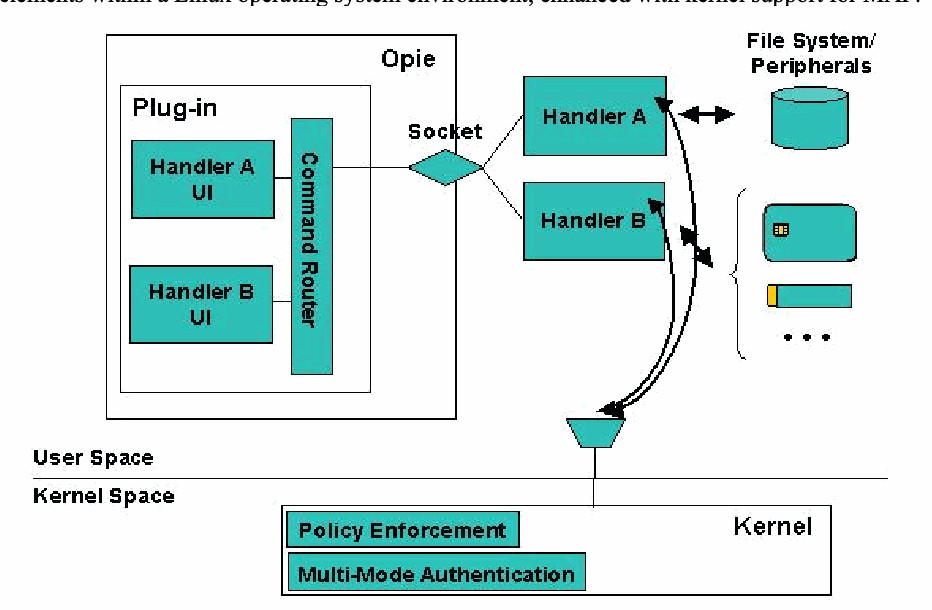
MAF was developed previously in a related effort to provide a structured environment for the protection and execution of one or more authentication mechanisms operating on Linux handheld devices [Jan03]. The authentication mechanisms described in this report were implemented specifically for this framework. Each authentication mechanism consists of two distinct parts: an authentication handler and a user interface (UI) for the handler. Figure 1 illustrates these elements within a Linux operating system environment, enhanced with kernel support for MAF.
MAF は、Linux ハンドヘルド機器で動作する 1 つ以上の認証機構の保護と実行のための構造化された環境を提供する、関連する取り組みのなかで以前に開発されました [Jan03]。本報告書で述べる認証機構は、このフレームワーク向けに特別に実装されました。各認証機構は、認証ハンドラとそのハンドラ用のユーザインタフェース(UI)という 2 つの別個の部分で構成されます。図 1 は、MAF に対するカーネルサポートで強化された Linux オペレーティングシステム環境における、これらの要素を示します。
マルチモード認証フレームワークの構成図です。ユーザー空間には「Opie」と書かれた大きな枠があり、その中の「Plug-in」の枠に「Handler A UI」「Handler B UI」と縦長の「Command Router」があります。プラグインは「Socket」(ひし形)を介して、Opie の外にある「Handler A」「Handler B」の2つの枠につながっています。Handler A は「File System/ Peripherals」と書かれた円柱と双方向の矢印で結ばれ、その右には周辺機器(スマートカード、トークン、「…」)のアイコンが並びます。両方のハンドラーから曲線の双方向の矢印が、「User Space」と「Kernel Space」を分ける線上の漏斗形の接続部へ伸びています。線の下の「Kernel」の枠には「Policy Enforcement」と「Multi-Mode Authentication」があります。
Figure 1: Multi-mode Authentication Framework
図 1: マルチモード認証フレームワーク
Authentication handlers embody the mechanism that performs the actual authentication. They communicate with the kernel, listening for when to initiate authentication and reporting whether authentication was successful. They communicate with the user interface components to bring up specific screens, accept input, display messages, etc. on the device. Handlers also communicate with any peripheral hardware devices needed for authentication, such as a security token, and access the file system to store and retrieve information as needed. Handlers run in user space as do their respective user interface.
認証ハンドラは、実際の認証を行う機構を具現化したものです。ハンドラはカーネルと通信して、認証を開始するタイミングを待ち受け、認証が成功したかどうかを報告します。ユーザインタフェースの構成要素と通信して、機器上で特定の画面を表示させ、入力を受け付け、メッセージを表示するなどします。ハンドラはまた、セキュリティトークンなど、認証に必要な周辺ハードウェア機器とも通信し、必要に応じて情報を保存および取得するためにファイルシステムにアクセスします。ハンドラは、それぞれのユーザインタフェースと同様に、ユーザ空間で動作します。
The user interface for an authentication mechanism is implemented as a set of components of a plug-in module for the OPIE desktop environment. Their function is to perform all necessary interactions with the user. For example, with smart card applications they can be used to prompt for and accept entry of a personal identification number (PIN), or to notify the user of errors. The plug-in module supports a socket interface to receive commands from an authentication handler that runs as a separate process, and to route the commands to the correct user interface component. Similarly, reverse routing is also supported for responses from user interface components to an authentication handler.
認証機構のユーザインタフェースは、OPIE デスクトップ環境用のプラグインモジュールの構成要素群として実装されます。その機能は、利用者との必要なやり取りをすべて行うことです。たとえばスマートカードのアプリケーションでは、個人識別番号(PIN)の入力を促して受け付けたり、利用者にエラーを通知したりするのに使えます。プラグインモジュールは、別のプロセスとして動作する認証ハンドラからコマンドを受け取り、そのコマンドを正しいユーザインタフェース構成要素へ送るためのソケットインタフェースをサポートします。同様に、ユーザインタフェース構成要素から認証ハンドラへの応答についても、逆方向の経路制御がサポートされます。
The kernel has two key modifications to support the framework: the policy enforcement functionality and the multi-mode authentication functionality.
カーネルには、フレームワークをサポートするための 2 つの主要な修正があります。ポリシー強制機能と、マルチモード認証機能です。
•Policy enforcement’s main responsibility is to impose different sets of policy rules on the device, as signaled by multi-mode authentication, for one or more defined policy contexts referred to as policy levels. For example, it can block hardware buttons and certain I/O ports on the device until the user is authenticated at the lowest policy level, policy level 1. Policy enforcement is also used to protect authentication information files, the user interface and handler components, and policy enforcement information against improper access. Moreover, it also has the means to register and start up authorized handlers, if they are not running, or restart them, if they terminate for some reason.
•ポリシー強制の主な責務は、マルチモード認証からの合図に従って、ポリシーレベルと呼ばれる 1 つ以上の定義済みポリシーコンテキストに対し、機器にさまざまなポリシー規則の集合を課すことです。たとえば、最も低いポリシーレベルであるポリシーレベル 1 で利用者が認証されるまで、機器のハードウェアボタンや特定の I/O ポートを遮断できます。ポリシー強制は、認証情報ファイル、ユーザインタフェースとハンドラの構成要素、およびポリシー強制の情報を、不適切なアクセスから保護するためにも使われます。さらに、認可されたハンドラが動作していなければ登録して起動し、何らかの理由で終了した場合は再起動する手段も備えています。
•The main responsibility of the multi-mode authentication functionality within the kernel is to govern the authentication steps as they relate to the various policy levels that are configured. Communication between the kernel and an authentication handler is done via the /proc file system. The multi-mode authentication functionality maintains complete knowledge about the mappings between authentication mechanisms and policy levels, simplifying the development of the authentication handlers. One of its key functions is to initiate user authentication when the device is powered on. It also controls the order and frequency in which the handlers are awakened from suspended state and begin execution, and ensures that messages from only legitimate handlers are accepted and processed.
•カーネル内のマルチモード認証機能の主な責務は、構成された各種のポリシーレベルに関連する認証ステップを統制することです。カーネルと認証ハンドラの間の通信は、/proc ファイルシステムを介して行われます。マルチモード認証機能は、認証機構とポリシーレベルの対応付けに関する情報をすべて保持しており、認証ハンドラの開発を簡素化します。その主な機能の 1 つは、機器の電源投入時に利用者認証を開始することです。また、ハンドラが一時停止状態から起こされて実行を開始する順序と頻度を制御し、正当なハンドラからのメッセージだけが受け付けられて処理されるようにします。
Together, the kernel policy enforcement and multi-mode authentication extensions are essential for securing authentication applications.
カーネルのポリシー強制とマルチモード認証の拡張は、あわせて、認証アプリケーションを保護するうえで不可欠です。
To create an authentication mechanism, a developer needs to create an authentication handler for the mechanism along with any needed user interface objects and the associated policy rules to protect the mechanism. Policy rules include limiting access to any storage objects used, the user interface objects within the plug-in module, and the handler itself; and limiting communications to peripheral devices and among the handler, the user interface, and kernel. Note that writing an authentication mechanism that neither interacts with the user nor requires a user interface component is possible. For example, the mechanism could be based on a sensor that is continually monitored and whose input triggers both an authenticated or non-authenticated transition.
認証機構を作成するには、開発者は、その機構用の認証ハンドラを、必要なユーザインタフェースオブジェクト、および機構を保護するための関連するポリシー規則とともに作成する必要があります。ポリシー規則には、使用する記憶オブジェクト、プラグインモジュール内のユーザインタフェースオブジェクト、ハンドラ自体へのアクセスの制限、および周辺機器との通信と、ハンドラ、ユーザインタフェース、カーネル間の通信の制限が含まれます。利用者とやり取りせず、ユーザインタフェース構成要素も必要としない認証機構を書くことも可能であることに注意してください。たとえば、継続的に監視されるセンサーに基づき、その入力が認証済み状態または未認証状態への遷移を引き起こす機構が考えられます。
Fingerprint Authentication – Lightweight
指紋認証 – 軽量型
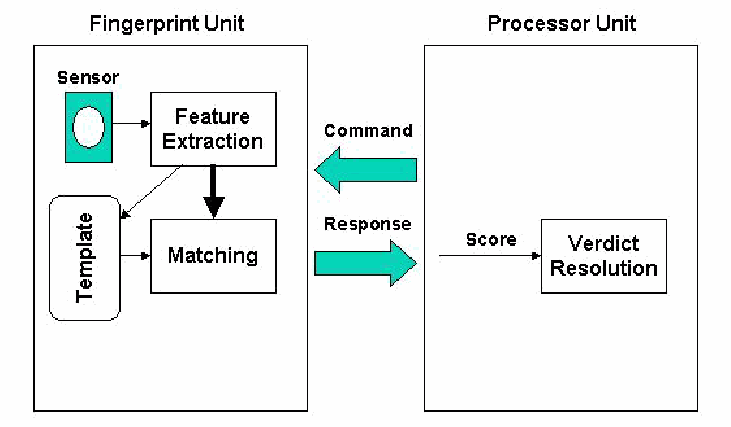
The lightweight fingerprint authentication mechanism relies on a fingerprint identification unit to perform the entire authentication process and return a score for verdict determination to the PDA. The work left to the PDA is mainly governing the fingerprint unit’s capture and comparison of enrolled fingerprints with live prints. In addition, the PDA work includes the display of user interface messages to guide the enrollment and management of fingerprints, the determination of a pass/fail verdict from the matching score received, and the notification of an authentication success or failure to the user. Figure 2 illustrates the functional organization of the process, split between the fingerprint unit and the processor unit of the PDA. The term lightweight is used to describe this approach, since much of the work is offloaded from the PDA to the fingerprint unit, lightening the load on PDA processor unit.
軽量型の指紋認証機構は、認証プロセス全体を指紋識別ユニットに行わせ、判定を決めるためのスコアを PDA に返させます。PDA に残る作業は、主に、登録済みの指紋と生きた指紋の取得と比較を行う指紋ユニットを統制することです。加えて PDA の作業には、指紋の登録と管理を案内するユーザインタフェースメッセージの表示、受け取った照合スコアからの合否判定の決定、認証の成功または失敗の利用者への通知が含まれます。図 2 は、このプロセスの機能構成を、指紋ユニットと PDA のプロセッサユニットに分割して示します。作業の多くが PDA から指紋ユニットに肩代わりされ、PDA のプロセッサユニットの負荷が軽くなることから、この方式を指して軽量型(lightweight)という用語を使います。
「Fingerprint Unit」(左)と「Processor Unit」(右)の2つの枠からなる機能構成図です。指紋ユニットの中では「Sensor」が「Feature Extraction」につながり、Feature Extraction から「Matching」へ太い矢印が、また角の丸い「Template」へ矢印が出ています。Template から Matching へも矢印があります。2つのユニットの間には、プロセッサユニットから指紋ユニットへの「Command」の矢印と、指紋ユニットからプロセッサユニットへの「Response」の矢印があります。プロセッサユニットの中では、応答が「Score」として「Verdict Resolution」に渡されます。
Figure 2: Lightweight Functional Organization
図 2: 軽量型の機能構成
The Fingerprint ID Unit (FIU) 300 from Sony was used for the prototype implementation.1 It is a two-module sensor board and verification board, with a 128 x 192 pixel, solid state capacitive sensor, 16-bit microcomputer, 1 megabyte of read only flash memory, 32 kilobytes of random access memory, and supports RS-232 and Universal Serial Bus (USB) communications interfaces. Extracted templates use 512 bytes per print, allowing up to 1000 fingerprint templates to be stored in on-board memory. Templates can also be exported and stored elsewhere. A temporary session key is used with a nonce to encrypt communications to/from the unit and protect against replay. Encryption uses the Data Encryption Standard (DES) 56-bit data Electronic Code Book (ECB) mode. Session keys are managed by the PDA, using a shared master key.
試作の実装には、Sony の Fingerprint ID Unit(FIU)300 を使用しました。1 これは、センサーボードと照合ボードの 2 モジュール構成で、128 x 192 ピクセルの固体静電容量センサー、16 ビットのマイクロコンピュータ、1 メガバイトの読取り専用フラッシュメモリ、32 キロバイトのランダムアクセスメモリを備え、RS-232 と Universal Serial Bus(USB)の通信インタフェースをサポートします。抽出されるテンプレートは 1 指紋あたり 512 バイトを使い、最大 1000 個の指紋テンプレートをオンボードメモリに保存できます。テンプレートをエクスポートして、ほかの場所に保存することもできます。ユニットとの間の通信を暗号化し、リプレイから保護するために、一時的なセッション鍵がナンスとともに使われます。暗号化には、Data Encryption Standard(DES)の 56 ビットデータ Electronic Code Book(ECB)モードを使います。セッション鍵は、共有のマスター鍵を使って PDA が管理します。
Overview
概要
The fingerprint handler for the lightweight solution, as all MAF handlers, runs in user space. The handler manages the mechanism by communicating with the kernel, the fingerprint reader, and the Opie plug-in containing its user interface components. It guides the placement and removal of fingers during fingerprint scans and controls all the necessary steps regarding the authentication process and verdict determination.
軽量型解決策の指紋ハンドラは、すべての MAF ハンドラと同様に、ユーザ空間で動作します。ハンドラは、カーネル、指紋読取装置、およびそのユーザインタフェース構成要素を含む Opie プラグインと通信することで、機構を管理します。指紋のスキャン時に指を置く動作と離す動作を案内し、認証プロセスと判定の決定に関する必要なステップをすべて制御します。
The handler is triggered by the MAF enabled kernel when the user tries to access a specific level that the handler protects, and after obtaining a live fingerprint scan of the user, replies to the kernel with the result of the authentication (success or failure). The fingerprint handler is a non-polling one – once a user is authenticated, the mechanism does not need continual fingerprint authentication checks, as long as the policy level remains at that of the mechanism or higher. The handler uses the Opie plug-in to tell its UI to display informative messages to guide the user through the sign-on and enrollment steps. The type of interaction with the fingerprint reader depends on the device interface used (e.g., serial, USB, etc.) and the command set of the reader. In the case of the FIU-300, it uses the on-board capabilities of the device to acquire the fingerprint images and templates, control the matching process, and obtain the scores of matches.
ハンドラは、ハンドラが保護する特定のレベルに利用者がアクセスしようとしたときに MAF 対応のカーネルによって起動され、利用者の生きた指紋のスキャンを取得した後、認証の結果(成功または失敗)をカーネルに返します。指紋ハンドラはポーリングしないタイプです。いったん利用者が認証されると、ポリシーレベルがその機構のレベル以上に保たれている限り、機構は継続的な指紋認証の確認を必要としません。ハンドラは Opie プラグインを使い、その UI に、サインオンと登録のステップを通じて利用者を案内する情報メッセージを表示させます。指紋読取装置とのやり取りの種類は、使用する機器インタフェース(シリアル、USB など)と、読取装置のコマンドセットによって決まります。FIU-300 の場合は、機器のオンボード機能を使って、指紋画像とテンプレートを取得し、照合プロセスを制御し、照合のスコアを得ます。
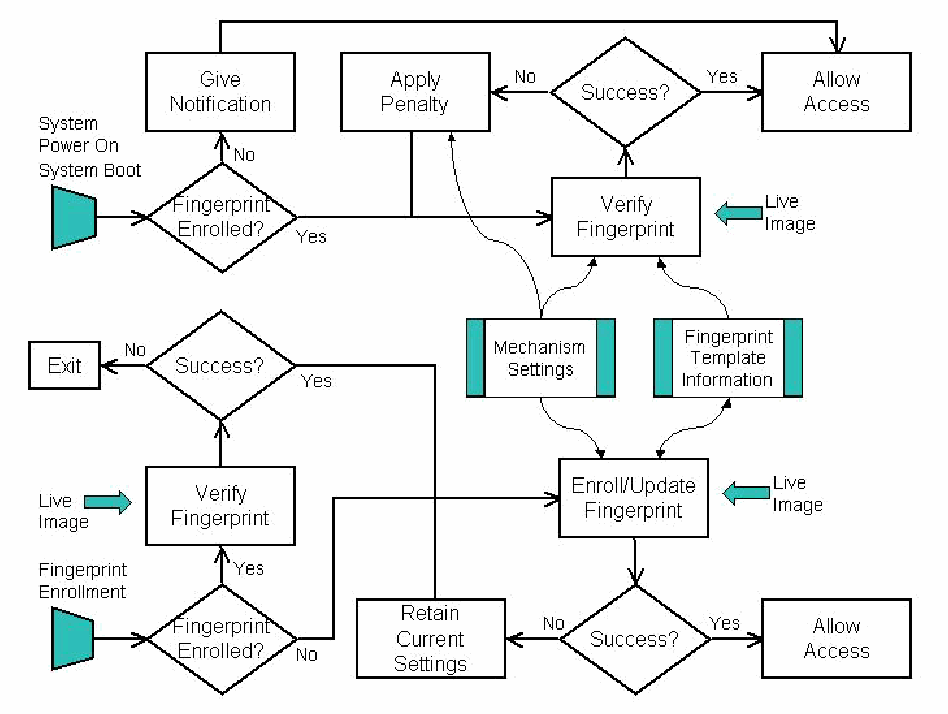
Fingerprint authentication has two main parts: enrollment and verification. Figure 3 gives an overview of the fingerprint authentication process. The upper half shows the verification functionality and the lower half the enrollment functionality. Note that discretion to enable the authentication mechanism is, by default, left to the user. However an organizational administrator can pre-enable the mechanism by enrolling the user at the time the device is issued.
指紋認証には、登録と照合という 2 つの主要な部分があります。図 3 は、指紋認証プロセスの概要を示します。上半分が照合の機能、下半分が登録の機能です。認証機構を有効にするかどうかの裁量は、初期設定では利用者に任されていることに注意してください。ただし、組織の管理者は、機器を支給する時点で利用者を登録しておくことにより、機構をあらかじめ有効にしておくことができます。
上下2つに分かれた流れ図です。上半分(照合): 「System Power On / System Boot」から判定「Fingerprint Enrolled?」に進み、「No」なら「Give Notification」へ進み、そこから上端を通る線で「Allow Access」につながります。「Yes」なら「Live Image」を受け取る「Verify Fingerprint」へ進みます。Verify Fingerprint の次の判定「Success?」で、「Yes」なら「Allow Access」、「No」なら「Apply Penalty」へ進み、Apply Penalty からの線は Verify Fingerprint への経路に戻ります。「Mechanism Settings」と「Fingerprint Template Information」の2つの保存領域が Verify Fingerprint に入力されます(Mechanism Settings は Apply Penalty にもつながります)。下半分(登録): 「Fingerprint Enrollment」から判定「Fingerprint Enrolled?」に進み、「Yes」なら「Live Image」を受け取る「Verify Fingerprint」を経て「Success?」に進み、「No」なら「Exit」、「Yes」の線は下の「Retain Current Settings」につながります。「No」なら「Enroll/Update Fingerprint」へ進みます。Enroll/Update Fingerprint は「Live Image」を受け取り、2つの保存領域を使い(Fingerprint Template Information とは双方向)、判定「Success?」で「Yes」なら「Allow Access」、「No」なら「Retain Current Settings」へ進みます。
Figure 3: Authentication Process Overview
図 3: 認証プロセスの概要
When activated, the handler mechanism prompts the user to login or, if fingerprints are not yet enrolled, notifies the user to do so and then allows access. The authentication mechanism is activated at both device power on and system boot up. Enrolling a fingerprint requires the device to register a fingerprint scan of the finger several times to ensure accuracy. After the user enrolls one or more fingerprints, he must successfully authenticate himself in the future before being allowed to access the device or to add new or replace existing fingerprints. If a problem arises during enrollment, the user can continue the process until successful.
ハンドラ機構は、起動されると、利用者にログインを促します。指紋がまだ登録されていなければ、登録するよう利用者に通知したうえで、アクセスを許可します。認証機構は、機器の電源投入時とシステムの起動時の両方で起動されます。指紋を登録するには、精度を確保するために、機器が指のスキャンを複数回登録する必要があります。利用者が 1 つ以上の指紋を登録した後は、機器へのアクセスを許可される前や、新しい指紋の追加または既存の指紋の置換を行う前に、以後は必ず認証に成功しなければなりません。登録中に問題が発生した場合は、利用者は成功するまで処理を続けることができます。
Enrollment uses several types files. The mechanism settings file contains information related to the scanning process, such as the number of fingerprints to collect and the root shared key for encrypting information to and from the fingerprint unit. When a successful enrollment occurs, the resulting template derived from the fingerprint scans taken of the user are saved away within the fingerprint template information file, and the user gains access to the device. Note that for the lightweight variant, fingerprint templates are maintained in the memory of the fingerprint unit.
登録では、いくつかの種類のファイルを使います。機構設定ファイルには、収集する指紋の数や、指紋ユニットとの間の情報を暗号化するためのルート共有鍵など、スキャンプロセスに関する情報が含まれます。登録に成功すると、利用者から取った指紋スキャンから得られたテンプレートが指紋テンプレート情報ファイルの中に保存され、利用者は機器にアクセスできるようになります。軽量型では、指紋テンプレートは指紋ユニットのメモリに保持されることに注意してください。
Once enrolled, subsequently powering on or booting up the device prompts the user to provide a live fingerprint image for verification. The verification process uses information from the mechanism settings file to encrypt information between the device and the fingerprint reader. A correct match against the enrolled fingerprint templates in the fingerprint information file results in successful authentication and access is granted to the device. If too many authentication failures occur, further attempts are blocked temporarily to prevent unrestricted password guessing attempts.
いったん登録されると、以後は機器の電源投入時または起動時に、照合のために生きた指紋画像を提供するよう利用者に促します。照合プロセスは、機構設定ファイルの情報を使って、機器と指紋読取装置の間の情報を暗号化します。指紋情報ファイル内の登録済み指紋テンプレートと正しく一致すると、認証は成功し、機器へのアクセスが許可されます。認証の失敗が多すぎる場合は、パスワードの推測を無制限に試みることを防ぐために、それ以上の試行は一時的に遮断されます。
Any time after gaining access, a user can update the set of enrolled fingerprints by using an available icon to launch the process and providing a live fingerprint image for verification, which then follows the same procedure described above for verification at power on or boot up. In Figure 3, the “Verify Fingerprint” boxes associated with fingerprint update do not show the information flows discussed above, but are present implicitly. Successful verification allows the user to enroll new fingerprint images adding to or replacing the existing set. A successful enrollment updates the fingerprint template information file and the user regains access to the device.
アクセスを得た後はいつでも、利用者は、利用可能なアイコンを使ってプロセスを起動し、照合のために生きた指紋画像を提供することで、登録済み指紋の集合を更新できます。この照合は、上で述べた電源投入時や起動時の照合と同じ手順で行われます。図 3 では、指紋の更新に関連する「Verify Fingerprint」のボックスは、上で述べた情報の流れを示していませんが、暗黙のうちに存在します。照合に成功すると、利用者は新しい指紋画像を登録して、既存の集合に追加するか置換することができます。登録に成功すると、指紋テンプレート情報ファイルが更新され、利用者は機器へのアクセスを回復します。
Protection
保護
For user authentication the fundamental threat is an attacker impersonating a user and gaining control of the device and its contents. Fingerprint units should be embedded into devices that are designed to resist physical tampering and avoid exposing the communications channel between the device and the unit. Presuming those safeguards are effective, the following vulnerabilities are the main candidates for exploitation:
利用者認証における根本的な脅威は、攻撃者が利用者になりすまして、機器とその内容の制御を得ることです。指紋ユニットは、物理的な改ざんに耐えるよう設計され、機器とユニットの間の通信路を露出させない機器に組み込むべきです。それらの保護策が有効であると仮定すると、悪用の主な候補となる脆弱性は次のとおりです。
•The authentication mechanism can be bypassed
•認証機構を迂回できる
•Weak authentication algorithms and methods are used
•弱い認証アルゴリズムと方式が使われている
•The implementation of a correct and effective authentication mechanism design is flawed
•正しく効果的な認証機構の設計を実装する部分に欠陥があります
•The confidentiality and integrity of stored authentication information is not preserved
•保存された認証情報の機密性と完全性が保たれていない
The fingerprint handler uses the encryption capabilities of the FIU-300 to protect its communications with the unit. The openssl library is used to carry out the encryption operations on the PDA. Fingerprint templates are maintained on the FIU-300. Storing the templates in the memory of the biometric device avoids risks associated with their transmission [Pol97].
指紋ハンドラは、FIU-300 の暗号機能を使って、ユニットとの通信を保護します。PDA 上での暗号処理の実行には、openssl ライブラリを使います。指紋テンプレートは FIU-300 上に保持されます。テンプレートを生体認証機器のメモリに保存することで、その伝送に伴うリスクを避けられます [Pol97]。
The lightweight fingerprint authentication mechanism relies on MAF, which in turns relies on the security of the underlying operating system implementation. The handler must be protected from substitution and overwrite respectively through the multi-mode authentication and policy enforcement functionalities of MAF. Substitution is prevented through an entry in the list of registered handlers (e.g., </usr/bin/handlerSMMC 2>) identifying its location, while overwrite is prevented with the following policy rules in the MAF policy file (/etc/MAF/defaultPolicy), which also grants exclusive access to information maintained by the handler:
軽量型の指紋認証機構は MAF に依存しており、MAF は基盤となるオペレーティングシステムの実装のセキュリティに依存しています。ハンドラは、MAF のマルチモード認証機能とポリシー強制機能によって、それぞれ、すり替えと上書きから保護されなければなりません。すり替えは、ハンドラの場所を示す登録済みハンドラ一覧のエントリ(例: </usr/bin/handlerSMMC 2>)によって防がれ、上書きは、ハンドラが保持する情報への排他的アクセスも付与する、MAF のポリシーファイル(/etc/MAF/defaultPolicy)内の次のポリシー規則によって防がれます。
<file  /etc/MAF/FP*  /usr/bin/HandlerFP  0>
<file /root/Settings/FP/* /usr/bin/HandlerFP 0>Handler Implementation
ハンドラの実装
The lightweight fingerprint handler operates as a non-polling handler, allowing a prescribed number of fingerprint scans before giving up. The following code excerpt shows the main execution loop of the handler, during a regular authentication (device available, fingerprint(s) already enrolled):
軽量型の指紋ハンドラは、ポーリングしないハンドラとして動作し、断念するまでに所定の回数の指紋スキャンを行います。次のコード抜粋は、通常の認証(機器が利用可能で、指紋が登録済み)時のハンドラのメイン実行ループを示します。
while(1)  {
   int result;

   result = HandlerReady ( 0 );
   TellKernel ( ex_Login() ? "AUTH-OK" : "AUTH-FAIL" );
}The ex_Login() function below uses the global variable NB_OF_ATTEMPTS, which is set to the number of authentication attempts allowed a user to provide a live matching fingerprint before an authentication failure is returned to the kernel.
次の ex_Login() 関数は、グローバル変数 NB_OF_ATTEMPTS を使います。この変数には、認証失敗がカーネルに返される前に、利用者が実際に読み取った指紋で照合を試みることのできる認証試行回数が設定されています。
for(nb_of_attempts = 1; nb_of_attempts <= NB_OF_ATTEMPTS;
nb_of_attempts++)
  {
...

    if ( fingerprint_authentication (fd) )
    {
      TellUI ( "FP:shw:User Authenticated" );
...
      plugin_release_device(fd);
      return -1;
    }
  }  // for nb_of_attempts
...
return(0);The fingerprint_authentication function called by ex_Login() determines where to carry out the work (i.e., either off or on the PDA), as shown below.
ex_Login() から呼び出される fingerprint_authentication 関数は、以下に示すように、作業を行う場所(PDA の外か PDA 上か)を決定します。
int fingerprint_authentication (int fd)
{
  #ifdef FIU300_ONLY
  // scanning and processing of the fingerprint done on the device
  i = compare_on_fiu300(fd, 5);
  #else
  // scanning of the image, then transferred to the pda, which process it
  i = compare_on_pda(fd);
  #endif // FIU300_ONLY

  if (i < AUTH_THRESHOLD)
  {
    printf("fingerprint_authentication: failed\n");
    return 0;
  }
  printf("fingerprint_authentication: success\n");
  return 1;
}For the lightweight authentication variant, the compare_on_fiu300 function is called. The work is eventually performed on the fingerprint device, using findIDInListwithScan(), which is part of the system development kit for the fingerprint unit. The function builds the appropriate command according to the parameters given, sends it to the unit, gets acknowledgment from the unit, and returns the score.2 The unit itself scans a fingerprint image, creates gray scale and monochrome data, and compares the monochrome data with template data at specified index numbers to obtain a matching score.
軽量型の認証方式では、compare_on_fiu300 関数が呼び出されます。作業は最終的に、指紋ユニット用のシステム開発キットの一部である findIDInListwithScan() を使って、指紋装置上で行われます。この関数は、与えられたパラメータに従って適切なコマンドを組み立て、ユニットに送り、ユニットから確認応答を受け取り、スコアを返します。2 ユニット自体が、指紋画像をスキャンし、グレースケールとモノクロのデータを作成し、モノクロデータを指定されたインデックス番号のテンプレートデータと比較して、照合スコアを得ます。
/*************************************************************************
*/
  int compare_on_fiu300(int fd, int nb_registers, ...)
  {
...


    if ( (i = findIDInListwithScan(fd, &score, 10, 8, 0X00, 0X17 0X00,
                                         0X02, 0X00, 0X00, 0X00, 0X01)) )
    {
       fprintf(stderr, "compare : findIDInListwithScan failed (%d)\n", i);
       return(-1);
    };

    return score;
}Fingerprint Authentication – Heavyweight
指紋認証 – 重量型
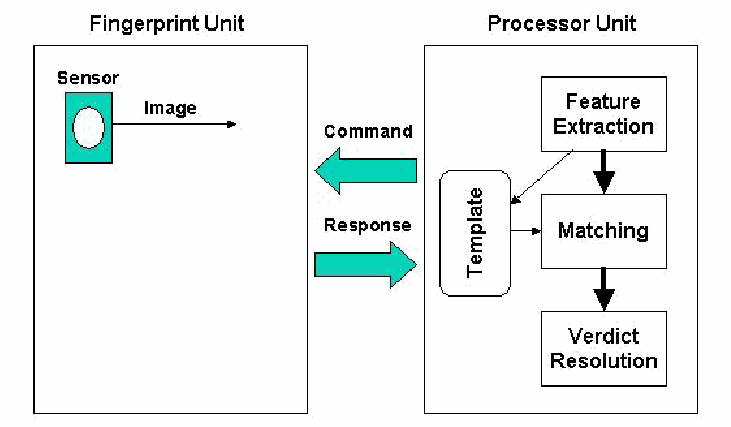
The heavyweight fingerprint authentication mechanism relies on the computational capabilities PDA to perform the entire authentication process. The PDA relies on the fingerprint sensor only to capture fingerprint images on demand, performing feature extraction, template storage, matching, and verdict resolution using its own computational resources. Figure 4 illustrates the functional organization of process, split between the fingerprint unit and the processor unit of the PDA. The term heavyweight is used to describe this approach, since most of the work is done directly on the PDA rather than the fingerprint unit, reducing the hardware needed for the fingerprint unit to a sensor.
重量型の指紋認証機構は、認証プロセス全体を PDA の計算能力を使って実行します。PDA は、指紋センサーに要求に応じた指紋画像の取得だけを任せ、特徴抽出、テンプレートの保存、照合、判定の確定を自らの計算資源で行います。図 4 は、この処理の機能構成を、指紋ユニットと PDA のプロセッサユニットに分割して示します。作業の大部分が指紋ユニットではなく PDA 上で直接行われ、指紋ユニットに必要なハードウェアがセンサーだけに減ることから、この方式を指して重量型(heavyweight)という用語を使います。
「Fingerprint Unit」(左)と「Processor Unit」(右)の2つの枠からなる機能構成図です。指紋ユニットには「Image」を出力する「Sensor」だけがあります。2つのユニットの間には、プロセッサユニットから指紋ユニットへの「Command」の矢印と、指紋ユニットからプロセッサユニットへの「Response」の矢印があります。プロセッサユニットには「Feature Extraction」があり、そこから「Matching」と角の丸い「Template」の格納領域へ矢印が出ています。Template から Matching へ、Matching から「Verdict Resolution」へ矢印があります。
Figure 4: Heavyweight Functional Organization
図 4: 重量型の機能構成
The heavyweight solution can significantly overwhelm the processing load on the PDA processor unit. Two experiments performed with open source code, cross-compiled to the ARM3 processor used on the iPAQ, illustrate this point. Executing an early version of a fingerprint verification system from SourceForge took approximately one hour to feature extract and match a fingerprint.4 While an order of magnitude better, the NIST fingerprint image software took several minutes to perform the same task.5
重量型の解決策は、PDA のプロセッサユニットの処理負荷を著しく圧迫する可能性があります。iPAQ で使われている ARM3 プロセッサ向けにクロスコンパイルしたオープンソースのコードによる 2 つの実験が、この点を示しています。SourceForge の指紋照合システムの初期版を実行したところ、指紋 1 つの特徴抽出と照合におよそ 1 時間かかりました。4 桁違いに優れてはいるものの、NIST の指紋画像ソフトウェアでも、同じ作業に数分かかりました。5
The heavyweight application uses a commercial product for Original Equipment Manufacturers called FingerCell, which is specialized for handheld devices.6 The FingerCell Embedded Development Kit (EDK) provides a software library, documentation, and a sample fingerprint database for developing an embedded fingerprint identification system. The FingerCell library functions include feature extraction, feature generalization, matching, and algorithm parameter setting. The library is designed to run on ARM-based platforms and for compatibility with the Arm-Linux GCC C compiler. An ARM based processor with at least 150 MHz Central Processing Unit (CPU) clock rate results in fingerprint enrollment in less than one second.
重量型のアプリケーションは、ハンドヘルド機器向けに特化した、Original Equipment Manufacturer 向けの商用製品である FingerCell を使います。6 FingerCell Embedded Development Kit(EDK)は、組込み指紋識別システムを開発するためのソフトウェアライブラリ、ドキュメント、サンプルの指紋データベースを提供します。FingerCell ライブラリの関数には、特徴抽出、特徴の一般化、照合、アルゴリズムパラメータの設定が含まれます。このライブラリは ARM ベースのプラットフォームで動作し、Arm-Linux GCC C コンパイラと互換性を持つよう設計されています。中央処理装置(CPU)のクロック周波数が少なくとも 150 MHz の ARM ベースのプロセッサであれば、指紋の登録は 1 秒未満で完了します。
Overview
概要
The fingerprint authentication process illustrated earlier in Figure 3 is also applicable for the heavyweight solution. The heavyweight variant of fingerprint handler, as with the lightweight variant, is a non-polling handler that runs in user space. It also manages the mechanism by communicating with the kernel, the fingerprint reader, and the Opie plug-in containing its user interface components in a similar fashion, guiding the fingerprint scanning process and controlling all the necessary steps during the authentication process and verdict determination. The main difference, however, is that once an image is captured from the fingerprint sensor, the handler relies on the algorithms of the FingerCell library to extract features and create templates and to perform matching operations.
先に図 3 で示した指紋認証プロセスは、重量型の解決策にも当てはまります。指紋ハンドラの重量型は、軽量型と同様に、ユーザ空間で動作するポーリングしないハンドラです。これも同様の方法で、カーネル、指紋読取装置、およびユーザインタフェース構成要素を含む Opie プラグインと通信して認証機構を管理し、指紋スキャンの手順を案内するとともに、認証プロセスと判定の確定に必要なすべての手順を制御します。ただし主な違いは、指紋センサーから画像を取得した後、ハンドラが FingerCell ライブラリのアルゴリズムを使って特徴を抽出してテンプレートを作成し、照合処理を行うことです。
Two different sensors were used in the implementation:
実装では 2 種類のセンサーを使いました。
•The Fingerprint ID Unit (FIU) 300, discussed earlier in the lightweight fingerprint authentication section
•Fingerprint ID Unit(FIU)300。軽量型の指紋認証の節で先に述べたもの
•The Atmel FingerChip AT77C101B
•Atmel FingerChip AT77C101B
The automatic template extraction, storage, and matching features of the FIU-300 were not used in the heavyweight variant. Instead, only its ability to capture and return an image was relied on. However, communications with the unit were encrypted using the FIU-300 supported features.
FIU-300 の自動のテンプレート抽出、保存、照合の機能は、重量型では使いませんでした。代わりに、画像を取得して返す機能だけに頼りました。ただし、ユニットとの通信は、FIU-300 がサポートする機能を使って暗号化されました。
The FingerChip single-chip sensor is integrated into the body of iPAQ 5400’s and 5500’s and interfaces to the USB host controller.7 It uses physical temperature effects for fingerprint sensing. The sensor comprises an array of 8 rows by 280 columns, giving 2240 temperature-sensitive pixels. The fingerprint image is captured by sweeping the user's finger across the linear sensing area. Sweeping captures successive images (slices) from which the fingerprint is reconstructed. Reconstruction produces a large, high-quality, 500 dots per inch image of the fingerprint. Unlike the FIU-300, no function exists to support encrypted communications with the processor.
FingerChip のシングルチップセンサーは、iPAQ 5400 と 5500 の本体に組み込まれており、USB ホストコントローラとインタフェースします。7 指紋の検知には、物理的な温度の効果を使います。センサーは 8 行×280 列の配列からなり、2240 個の温度感応ピクセルを持ちます。指紋画像は、利用者の指を線状の検知領域の上でなぞることで取得されます。なぞることで連続する画像(スライス)が取得され、そこから指紋が再構成されます。再構成により、1 インチあたり 500 ドットの、大きく高品質な指紋画像が得られます。FIU-300 と異なり、プロセッサとの暗号化通信をサポートする機能はありません。
Protection
保護
For user authentication the fundamental threat is an attacker impersonating a user and gaining control of the device and its contents. Fingerprint units should be embedded into devices that are designed to resist physical tampering and avoid exposing the communications channel between the device and the unit. Presuming those safeguards are effective, the following vulnerabilities are the main candidates for exploitation:
利用者認証における根本的な脅威は、攻撃者が利用者になりすまして、機器とその内容の制御を得ることです。指紋ユニットは、物理的な改ざんに耐えるよう設計され、機器とユニットの間の通信路を露出させない機器に組み込むべきです。それらの保護策が有効であると仮定すると、悪用の主な候補となる脆弱性は次のとおりです。
•The authentication mechanism can be bypassed
•認証機構を迂回できる
•Weak authentication algorithms and methods are used
•弱い認証アルゴリズムと方式が使われている
•The implementation of a correct and effective authentication mechanism design is flawed
•正しく効果的な認証機構の設計を実装する部分に欠陥があります
•The confidentiality and integrity of stored authentication information is not preserved
•保存された認証情報の機密性と完全性が保たれていない
As with the lightweight variant, the heavyweight fingerprint authentication mechanism relies on MAF, which in turns relies on the security of the underlying operating system implementation. The heavy fingerprint handler and its UI components are protected using the policy enforcement mechanisms and policy rules as that of the lightweight variant. When communicating with the FIU-300, all messages are encrypted.
軽量型と同様に、重量型の指紋認証機構は MAF に依存しており、MAF は基盤となるオペレーティングシステムの実装のセキュリティに依存しています。重量型の指紋ハンドラとその UI 構成要素は、軽量型と同じポリシー強制機構およびポリシー規則によって保護されます。FIU-300 と通信する際は、すべてのメッセージが暗号化されます。
Handler Implementation
ハンドラの実装
The heavyweight fingerprint handler operates as a non-polling handler, allowing a prescribed number of fingerprint scans before giving up. The main execution loop of the handler is the same as that of the lightweight variant discussed earlier. The fingerprint_authentication function called by ex_Login() from the main loop is also identical. However, instead of the work being carried out on the device, fingerprint authentication is carried out on the PDA through the use of the compare_on_pda function listed below.
重量型の指紋ハンドラは、ポーリングしないハンドラとして動作し、断念するまでに所定の回数の指紋スキャンを行います。ハンドラのメイン実行ループは、先に述べた軽量型と同じです。メインループから ex_Login() によって呼び出される fingerprint_authentication 関数も同一です。ただし、作業を機器上で行う代わりに、以下に示す compare_on_pda 関数を使って PDA 上で指紋認証が行われます。
int compare_on_pda(int fd) {
  ...
// get the collection of enrolled fingerprint files to compare the
fingerprint to
  n = scandir(WORKING_DIRECTORY, &enrolledList, filter, alphasort);
...
  // Put the finger on the sensor
...
  if ( (i = scan(fd)) )
   ...

  TellUI( "FP:shw:Scan complete\nPlease remove your finger");

  // copy the grayscale from the device to the pda
  if ( (i = getGrayscale(fd)) )
   ...

  // show the image to the user
  if( !(buffer1=strcatalloc(0, 3, "FP:shwimg:", WORKING_DIRECTORY,
"grayscale.pgm")) )
   ...
  TellUI ( buffer1 );

  // Processing the file
  // first, the image of the fingerprint just scanned is of grayscale type
  type1=0;
...
  if (!(buffer1=strcatalloc(0, 2, WORKING_DIRECTORY, "grayscale.pgm")) )
  ...

  while(n--)
  {
// determine the type of the file which will be processed
    if ( !(i=fnmatch("*grayscale*", enrolledList[n]->d_name,
FNM_NOESCAPE)))
    {
      //grayscale
      type2=0;
    } else {
      //template
      type2=1;
    }

    if ( score < AUTH_THRESHOLD)
    {
// compare with the next file in the collection we found, only if
necessary
     if (!(buffer2=strcatalloc(0, 2, WORKING_DIRECTORY, enrolledList[n]-
>d_name)) )
      {
        //error handling
      } else {
        if ( (score = compare_fingerprints(buffer1, type1, buffer2, type2)
) < 0)
        ... //error handling
      }
    }
    free(enrolledList[n]);
  }

  /* delete the raw image */
  printf("Deleting the grayscale image got from the device for comparison
(%s)\n", buffer1);
  i=remove(buffer1);
   ...

  return score;
}The compare_on_pda function collects a live fingerprint and then compares it to the enrolled set of fingerprints using the FingerCell compare_fingerprints function. Similarly, during enrollment, the heavyweight solution uses a FingerCell function to generalize the fingerprint images scanned to remove noise and extract the common characteristics to create a template.
compare_on_pda 関数は、実際に読み取った指紋を取得し、FingerCell の compare_fingerprints 関数を使って登録済み指紋の集合と比較します。同様に、登録時には重量型の解決策で FingerCell の関数を使い、スキャンした指紋画像を一般化してノイズを除去し、共通の特徴を抽出してテンプレートを作成します。
Management interface
管理インタフェース
The fingerprint management interface is the same for both the lightweight and heavyweight solutions. It can be launched at any time to enroll or update the set of enrolled fingerprints via an icon located on the tab “Settings” of the Opie desktop. If fingerprints have been enrolled, the user must authenticate to the mechanism with a live fingerprint, before any changes are allowed. The snapshots of the user interface are shown in Figure 5 below, showing the attempt to enroll a new fingerprint (at left) and delete an existing one (at right).
指紋管理インタフェースは、軽量型と重量型の解決策で共通です。Opie デスクトップの「Settings」タブにあるアイコンから、登録済み指紋の集合を登録または更新するためにいつでも起動できます。指紋が登録済みであれば、変更が許可される前に、利用者は実際に読み取った指紋を使って機構で認証しなければなりません。ユーザインタフェースのスナップショットを下の図 5 に示します。新しい指紋の登録を試みる画面(左)と、既存の指紋の削除を試みる画面(右)です。
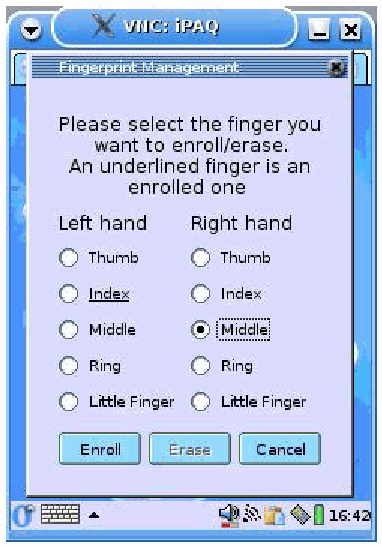
iPAQ 上の試作の指紋管理ダイアログの画面で、「VNC: iPAQ」のウィンドウに表示されています。「Fingerprint Management」のダイアログには「Please select the finger you want to enroll/erase. An underlined finger is an enrolled one」とあり、「Left hand」と「Right hand」の下に Thumb、Index、Middle、Ring、Little Finger のラジオボタンが並びます。左手の「Index」には下線があります(登録済み)。ボタンは「Enroll」「Erase」「Cancel」です。この画面では右手の「Middle」が選択され(ラベルが枠で囲まれ)、「Enroll」ボタンが有効で「Erase」が灰色になっています。下端には Opie のタスクバーと時刻が表示されています。
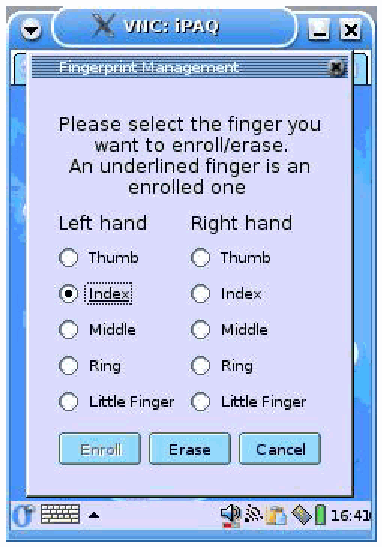
iPAQ 上の試作の指紋管理ダイアログの画面で、「VNC: iPAQ」のウィンドウに表示されています。「Fingerprint Management」のダイアログには「Please select the finger you want to enroll/erase. An underlined finger is an enrolled one」とあり、「Left hand」と「Right hand」の下に Thumb、Index、Middle、Ring、Little Finger のラジオボタンが並びます。左手の「Index」には下線があります(登録済み)。ボタンは「Enroll」「Erase」「Cancel」です。この画面では左手の「Index」が選択され(ラベルが枠で囲まれ)、「Erase」ボタンが有効で「Enroll」が灰色になっています。下端には Opie のタスクバーと時刻が表示されています。
Figure 5: Fingerprint Management Screens
図 5: 指紋管理画面
The management interface is very simple and intuitive to use. The user can select any finger of either hand. For the selected finger, an action is proposed corresponding to the enrollment state of this finger. The user can erase the information using the Erase button or add a fingerprint using the Enroll button. :
管理インタフェースは非常に単純で、直感的に使えます。利用者は、どちらの手のどの指でも選択できます。選択した指には、その指の登録状態に応じた操作が提示されます。利用者は、Erase ボタンで情報を消去することも、Enroll ボタンで指紋を追加することもできます。:
•If the finger is enrolled, its name is underlined. If the user chooses to erase a fingerprint, all information concerning the fingerprint is cleared, after a confirmation. If the user chooses to update a fingerprint, the existing information must be cleared before the enrollment process can proceed (i.e., the finger must not be enrolled).
•指が登録済みの場合、その名前に下線が付きます。利用者が指紋の消去を選ぶと、確認の後、その指紋に関するすべての情報が消去されます。利用者が指紋の更新を選ぶ場合は、登録プロセスを進める前に、既存の情報を消去しておく必要があります(つまり、その指が未登録でなければなりません)。
•If the finger is not enrolled, no underline appears and the user can enroll the finger. Three consecutive fingerprint scans are taken, which are compared against one another using a round robin protocol. The one with the best average result is selected as the representative template for the user’s finger.
•指が未登録の場合、下線は表示されず、利用者はその指を登録できます。連続して 3 回の指紋スキャンが取得され、ラウンドロビン方式で互いに比較されます。平均結果が最も良いものが、利用者のその指の代表テンプレートとして選ばれます。
After an action is completed, the interface is updated and the user can continue with any additional fingerprint management functions.
操作が完了すると、インタフェースが更新され、利用者はそのほかの指紋管理機能を続けて使用できます。
The fingerprint management interface is contained in the Opie plug-in, with the other MAF interfaces. The graphical part is written in C++ and completely separated from the processing part, the handler itself, written in C.
指紋管理インタフェースは、ほかの MAF インタフェースとともに Opie プラグインに含まれます。グラフィカルな部分は C++ で書かれており、処理部分であるハンドラ自体(C で書かれています)から完全に分離されています。
The dialog between the handler and the interface is done using the dialog protocol, as shown in the following code with the erase_fingerprint() method:
ハンドラとインタフェースの間の対話は、次のコードの erase_fingerprint() メソッドに示すように、対話プロトコルを使って行われます。
// This method is called when the user presses the Erase button, after
choosing a finger
int FPManagementUI :: erase_fingerprint() {

// handFinger is the finger currently selected

 char Seq[250];
 snprintf(Seq, 250, "FPM:eras:%i", handFinger);
 if ( -1 == msgMux->SendMsg(Seq, (struct sockaddr*)rAddr, rAddrLen) ){
        perror ( "Error Sending the sequence" );
 }

}Every time the interface needs to communicate with the handler, a message is constructed and sent. The handler analyzes this message, as illustrated in the following code example:
インタフェースがハンドラと通信する必要があるたびに、メッセージが構築されて送られます。ハンドラは、次のコード例に示すように、このメッセージを解析します。
// Test if the message is an erase command

if ( strncmp ( msgFromUI, "FPM:eras", 8) == 0 ) {
       printf("erase_fingerprint command received \n");

       char str [10];
       int tp_fing = 0;

       // We scan the message to get the finger number
       if( sscanf ( msgFromUI, "%9s%d",str,&tp_fing)){
              printf("\nerase_fingerprint - sscanf done, finger = %i \n" ,
tp_fing);
              // we launch the erase process
              if (!( erase_fingerprint(tp_fing) )) {
                     sprintf(msgToUI, "FPM:quit:%i", 4);
                     TellUI(msgToUI);
                     release_device(fd);
                     return(-1);
}References
参考文献
[Beo02] Nicky Boertien, Eric Middelkoop, Authentication in Mobile Applications, CMG, Telematica Instituut, The Netherlands, January 2002, <URL: https://doc.telin.nl/dscgi/ds.py/Get/File-23314/VH_authenticatie.pdf>.
[Beo02] Nicky Boertien, Eric Middelkoop, Authentication in Mobile Applications, CMG, Telematica Instituut, The Netherlands, January 2002, <URL: https://doc.telin.nl/dscgi/ds.py/Get/File-23314/VH_authenticatie.pdf>.
[Jan03] Wayne Jansen Vlad Korolev, Serban Gavrila, Thomas Heute, Clément Séveillac, A Framework for Multi-Mode Authentication: Overview and Implementation Guide, NISTIR 7046, August 2003, <URL: http://csrc.nist.gov/publications/nistir/nistir-7046.pdf>.
[Jan03] Wayne Jansen Vlad Korolev, Serban Gavrila, Thomas Heute, Clément Séveillac, A Framework for Multi-Mode Authentication: Overview and Implementation Guide, NISTIR 7046, August 2003, <URL: http://csrc.nist.gov/publications/nistir/nistir-7046.pdf>.
[Pol97] Despina Polemi, Biometric Techniques: Review and Evaluation of Biometric Techniques for Identification and Authentication, Institute of Communication and Computer Systems, National Technical University of Athens, April 1997, <URL: ftp://ftp.cordis.lu/pub/infosec/docs/biomet.doc>.
[Pol97] Despina Polemi, Biometric Techniques: Review and Evaluation of Biometric Techniques for Identification and Authentication, Institute of Communication and Computer Systems, National Technical University of Athens, April 1997, <URL: ftp://ftp.cordis.lu/pub/infosec/docs/biomet.doc>.
[Ulu04] Umut Uludag, Anil K. Jain, Fingerprint Minutiae Attack System, The Biometric Consortium Conference, Arlington, VAm September 2004, <URL: http://www.wvu.edu/~bknc/2004%20Abstracts/Fingerprint%20Minutiae%20Attack%20System.pdf>.
[Ulu04] Umut Uludag, Anil K. Jain, Fingerprint Minutiae Attack System, The Biometric Consortium Conference, Arlington, VAm September 2004, <URL: http://www.wvu.edu/~bknc/2004%20Abstracts/Fingerprint%20Minutiae%20Attack%20System.pdf>.
Appendix A – Software Organization
付録 A – ソフトウェアの構成
The fingerprint authentication software is organized into the following components:
指紋認証ソフトウェアは、次の構成要素で構成されています。
•FPManagementUI.cpp - This is the management interface class, where enrolling and deleting fingerprints are implemented.
•FPManagementUI.cpp - 管理インタフェースのクラスで、指紋の登録と削除が実装されています。
•main.c - This is the regular main code of the handler that is launched by the kernel to carry out authentication. The ex_Login and fingerprint_authentication functions discussed in the body of the report are part of this component.
•main.c - 認証を行うためにカーネルから起動される、ハンドラの通常のメインコードです。報告書の本文で述べた ex_Login 関数と fingerprint_authentication 関数は、この構成要素の一部です。
•fingerprint.c – This Contains the main methods of the fingerprint handler, such as reading/saving configuration, initiating comparisons, etc. The compare_on_pda and compare_on_fiu300 functions discussed in the body of the report are part of this component.
•fingerprint.c – 設定の読み書き、比較の開始など、指紋ハンドラの主なメソッドを含みます。報告書の本文で述べた compare_on_pda 関数と compare_on_fiu300 関数は、この構成要素の一部です。
•authentication.c - The methods here carry out the authentication. They are called by the methods in fingerprint.c. If the authentication library or its methods are changed this part should be re-implemented.
•authentication.c - ここのメソッドが認証を行います。fingerprint.c のメソッドから呼び出されます。認証ライブラリまたはそのメソッドが変更される場合は、この部分を再実装すべきです。
•encryption.c - The FIU-300 uses encryption for communication; the methods used to perform cryptography using the openssl library are embodied here.
•encryption.c - FIU-300 は通信に暗号化を使います。openssl ライブラリを使って暗号処理を行うメソッドは、ここに実装されています。
•serial.c –The generic methods that fingerprint.c is calling and also specific ones for the specific device being used are located here. This procedure should be re-implemented if another RS-232 serial scanner is used. The heavyweight variant relies too much on the specific communication protocol of the sensor to abstract out generic functions. For the lightweight variant, the generic methods that would need to be re-implemented for another scanner are:
•serial.c – fingerprint.c が呼び出す汎用のメソッドと、使用する特定の機器に固有のメソッドがここにあります。別の RS-232 シリアルスキャナを使う場合は、この手続きを再実装すべきです。重量型は、センサー固有の通信プロトコルに依存しすぎており、汎用の関数を抽象化できません。軽量型では、別のスキャナ向けに再実装が必要となる汎用メソッドは次のとおりです。
•getGrayscale()
•getGrayscale()
•release_device()
•release_device()
•initialise_device()
•initialise_device()