NIST IR 7983 日本語訳
英語タイトル : Report: Authentication Diary Study日本語タイトル : レポート:認証に関する日誌調査
公開日 : 2014-02-04
原文URL : https://csrc.nist.gov/pubs/ir/7983/final
翻訳編集 : 自動生成(有志による非公式の日本語訳), 原文取得日 : 2026-10-31, 訳文 : 1131 / 1132 ブロック
[要約] NIST IR 7983 は、ユーザーの認証に関する認識と行動を理解するために実施した、認証に関する日誌調査の報告書です。調査は NIST の職員 25 人を対象とした 2 部構成で、第 1 部では参加者が 24 時間の間に遭遇したすべての認証イベントを用紙に記録し、第 2 部では参加者の認証の経験について個別のフォローアップインタビューを行いました。調査は、認証が日常の活動のどこに位置づけられるか、認証のどのような特性が主要な活動を妨げうるか、1 日に何度も認証することの累積的なコストをどのように釣り合わせているか、という問いに答えるよう設計されています。背景として認証、ユーザビリティ、摩擦、コンプライアンス予算、パスワード疲れなどの概念を説明し、結果として認証が行われた時期、アプリケーションの種類、場所、使用されたデバイスなどを示します。
NISTIR 7983
NISTIR 7983
Report: Authentication Diary Study
レポート: 認証に関する日誌調査
Michelle Steves
Dana Chisnell
Angela Sasse
Kat Krol
Mary Theofanos
Hannah Wald
Michelle Steves
Dana Chisnell
Angela Sasse
Kat Krol
Mary Theofanos
Hannah Wald
http://dx.doi.org/10.6028/NIST.IR.7983
http://dx.doi.org/10.6028/NIST.IR.7983
[NIST のロゴ。公的な標章のため、この非公式サイトには掲載していません。原本 PDF を参照してください。]
NISTIR 7983
NISTIR 7983
http://dx.doi.org/10.6028/NIST.IR.7983
http://dx.doi.org/10.6028/NIST.IR.7983
Report: Authentication Diary Study
レポート: 認証に関する日誌調査
Michelle Steves
Information Access Division
Information Technology Laboratory
Michelle Steves
情報アクセス部門
情報技術研究所
Dana Chisnell
Usability Works
Boston, MA
Dana Chisnell
Usability Works
Boston, MA
Angela Sasse
Kat Krol
University College London
London, UK
Angela Sasse
Kat Krol
University College London
London, UK
Mary Theofanos
Office of Data and Informatics
Material Measurement Laboratory
Mary Theofanos
データ・情報学室
物質計測研究所
Hannah Wald
Booze Allen Hamilton
McLean, VA
Hannah Wald
Booze Allen Hamilton
McLean, VA
February 2014
2014 年 2 月
U.S. Department of Commerce
Penny Pritzker, Secretary
米国商務省
Penny Pritzker 長官
National Institute of Standards and Technology
Patrick D. Gallagher, Under Secretary of Commerce for Standards and Technology and Director
国立標準技術研究所
Patrick D. Gallagher、商務次官(標準・技術担当)兼所長
TABLE OF CONTENTS
目次
LIST OF TABLES
表の一覧
LIST OF FIGURES
図の一覧
EXECUTIVE SUMMARY
エグゼクティブサマリー
The purpose of authentication is to ensure that only authorized individuals have access to a particular resource or physical area. To authenticate and prove their “right to access,” a person must essentially prove that they are who they claim to be (i.e., an authorized individual) by presenting elements such as ID badges, fingerprints, personal identification numbers (PINs) or – very often – a username and password. For users of information technology, authentication is an inescapable fact of daily life – and it affects them in ways that are still poorly understood.
認証の目的は、許可された個人だけが特定のリソースや物理的な区域にアクセスできるようにすることです。認証してその「アクセスする権利」を証明するには、人は基本的に、ID バッジ、指紋、個人識別番号(PIN)、あるいは非常に多くの場合ユーザー名とパスワードといった要素を提示することで、自分が主張どおりの人物(すなわち許可された個人)であることを証明しなければなりません。情報技術のユーザーにとって、認証は日常生活で避けられない事実であり、まだ十分に理解されていない形でユーザーに影響を与えています。
In order to better understand users’ authentication-related perceptions and behaviors, we conducted a two-part study with 25 NIST employees. In the first part of the study, we instructed our participants to record all the authentication events they encountered over a 24-hour period (in the workplace and, if they so chose, at home) using forms we provided. The second part of the study consisted of individual follow-up interviews regarding participants’ experiences with authentication.
ユーザーの認証に関する認識と行動をよりよく理解するため、私たちは NIST の職員 25 人を対象とした 2 部構成の調査を実施しました。調査の第 1 部では、参加者に、私たちが提供した用紙を使って、24 時間の間に(職場で、また希望すれば自宅で)遭遇したすべての認証イベントを記録するよう指示しました。調査の第 2 部は、参加者の認証の経験についての個別のフォローアップインタビューでした。
Our study was designed to answer the following questions:
私たちの調査は、次の問いに答えるように設計されました。
•Where does authentication fit into the daily activities people carry out?
•認証は、人々が行う日常の活動のどこに位置づけられますか。
•What characteristics of authentication may interfere with the primary activity that authentication is supposed to enable? What are the friction points?
•認証のどのような特性が、認証が可能にするはずの主要な活動を妨げる可能性がありますか。摩擦点は何でしょうか。
•How do people add up the cumulative costs of authenticating multiple times each day, and how do they balance them against their own perceived security needs?
•人々は、1 日に何度も認証することの累積的なコストをどのように積み上げ、それを自らが認識するセキュリティ上のニーズとどのように釣り合わせていますか。
•How do people perceive the costs of performing security tasks (particularly authentication tasks) in comparison with the benefits of performing those tasks?
•人々は、セキュリティに関するタスク(特に認証タスク)を実行するコストを、それらのタスクを実行する利点と比べて、どのように認識していますか。
We found that our participants were confused about what “authentication” actually meant. For example, one participant erroneously recorded unlocking his car with his remote key fob as an authentication event. Conversely, some participants did not record showing their ID badge to a guard before entering the NIST campus (although most did). Our participants recorded an average of 23 authentication events each during the study period. Since many participants did not record authentication events outside of work, we suspect that the actual number is higher. In interviews, participants indicated that they were frustrated by the sheer number of authentication tasks they had to perform every day – especially those they had to perform repeatedly, such as unlocking work computers that auto-locked after 15 minutes. In addition, while participants were understandably frustrated by problems that interfered with the successful completion of authentication tasks, they were also frustrated by tasks that were particularly complex and/or time-consuming, even when they did not encounter problems. Participants also found it particularly effortful to manage a variety of passwords for multiple resources, especially since those passwords were often governed by different policies.
参加者は、「認証」が実際に何を意味するのかについて混乱していることがわかりました。たとえば、ある参加者は、リモコンキーで自分の車のロックを解除することを、誤って認証イベントとして記録しました。逆に、NIST の敷地に入る前に警備員に ID バッジを見せたことを記録しなかった参加者もいました(ほとんどの参加者は記録していました)。参加者は、調査期間中に平均で 23 件の認証イベントを記録しました。多くの参加者が勤務時間外の認証イベントを記録していなかったため、実際の数はもっと多いと私たちは推測しています。インタビューで、参加者は、毎日行わなければならない認証タスクの数の多さ、特に、15 分後に自動的にロックされる業務用コンピュータのロック解除のように、繰り返し行わなければならないタスクに不満を感じていると述べました。さらに、参加者は、認証タスクの正常な完了を妨げる問題に不満を持つのは当然ですが、問題に遭遇しなかった場合でも、特に複雑な、または時間のかかるタスクに不満を感じていました。参加者はまた、複数のリソースのためのさまざまなパスワードを管理することに、特に労力を感じていました。それらのパスワードが異なるポリシーに従っていることが多いためです。
Although our participants valued organizational security and understood the benefits of authentication with regard to security, these benefits were often overshadowed by the day-to-day costs of using and managing multiple authentication elements. For that reason, many of our participants adopted behaviors to help them cope with or avoid authentication, without (from their perspective) compromising organizational security. Coping strategies included synchronizing passwords across multiple IT resources; employing password creation schemas; keeping password notes in a secure place; and employing password vaults or managers. Avoidance usually meant giving up on performing certain “extra” activities (e.g., doing additional work from home) because the cost of authenticating to do so seemed greater than the potential benefit of the activity.
参加者は組織のセキュリティを重視し、セキュリティに関する認証の利点を理解していましたが、これらの利点は、複数の認証要素を使用し管理する日々のコストによって、しばしば隠れてしまっていました。そのため、多くの参加者は、(自分たちの視点では)組織のセキュリティを損なうことなく、認証に対処する、あるいは認証を避けるのに役立つ行動をとっていました。対処戦略には、複数の IT リソース間でパスワードを同期させること、パスワード作成の型を使うこと、パスワードのメモを安全な場所に保管すること、パスワードボールトやパスワードマネージャーを使うことが含まれていました。回避は、通常、ある「追加の」活動(たとえば自宅での追加の仕事)を行うために認証するコストが、その活動の潜在的な利益よりも大きいと思われたため、その活動を行うのをあきらめることを意味しました。
Our participants are not unique in being impacted by authentication. “Password fatigue” is, in fact, a very common problem [1][13]. Expecting users to simply adapt to an excessive authentication workload is not realistic. But from the user’s perspective, what is excessive? In any case, if our participants’ coping and avoidance strategies are any indication, the ways in which users adapt may not be desirable from an organizational perspective. Rather than trying to force users to adapt to authentication, organizations, security experts, developers, and engineers must find ways to make authentication adapt to users – in other words, to make it more usable.
認証の影響を受けているのは、私たちの参加者に限ったことではありません。「パスワード疲れ」は、実際に非常に一般的な問題です [1][13]。過度な認証の作業負荷に、ユーザーが単に適応することを期待するのは現実的ではありません。しかし、ユーザーの視点では、何が過度なのでしょうか。いずれにせよ、参加者の対処戦略と回避戦略が何かを示すものであるとすれば、ユーザーが適応する方法は、組織の観点からは望ましくない場合があります。組織、セキュリティの専門家、開発者、エンジニアは、ユーザーを認証に適応させようとするのではなく、認証をユーザーに適応させる、言い換えれば、認証をより使いやすくする方法を見つけなければなりません。
Ultimately, making authentication more usable will take time. Further research is needed on how authentication affects users and the habits they develop to cope with those effects. This kind of research is essential for developing more usable, context-sensitive authentication solutions that will keep interference with users’ primary tasks to an absolute minimum. Finally, there is a need for best practices aimed at designing and implementing more usable authentication.
結局のところ、認証をより使いやすくするには時間がかかります。認証がユーザーにどのような影響を与え、ユーザーがその影響に対処するためにどのような習慣を身につけるかについて、さらなる研究が必要です。この種の研究は、ユーザーの主要なタスクへの干渉を最小限に抑える、より使いやすく、文脈に応じた認証ソリューションを開発するために不可欠です。最後に、より使いやすい認証の設計と実装を目指したベストプラクティスが必要です。
Until then, organizations can take steps to reduce the burden of authentication on their employees, and other users of these systems, which will improve both security and productivity. This study indicates that users prefer single sign-on (SSO) authentication; another option is standardizing password policies throughout the organization, which will make authentication elements easier for users to manage. Finally, organizations can encourage and support authentication coping mechanisms such as the use of password manager or vault applications on computers and mobile electronic devices.
それまでの間、組織は、従業員やこれらのシステムの他のユーザーに対する認証の負担を減らすための措置をとることができ、それによってセキュリティと生産性の両方が向上します。この調査は、ユーザーがシングルサインオン(SSO)認証を好むことを示しています。別の選択肢は、組織全体でパスワードポリシーを標準化することで、これにより、ユーザーが認証要素を管理しやすくなります。最後に、組織は、コンピュータやモバイル電子機器上のパスワードマネージャーまたはパスワードボールトのアプリケーションの使用など、認証への対処の仕組みを奨励し、支援できます。
1 INTRODUCTION
1 はじめに
Users must interact with a variety of applications and systems over the course of a day, in both their professional and personal lives. Each application and system has its own set of security policies and measures. Even different systems within the same organization – say, a single company or governmental agency – tend to have separate (and sometimes conflicting) security policies that are effectively “unaware” of each other. Each policy is narrowly focused on the system or application to which it directly applies, rather than the broader technological and policy environment in which the system exists.
ユーザーは、仕事でも私生活でも、1 日の間にさまざまなアプリケーションやシステムとやり取りしなければなりません。各アプリケーションとシステムには、それぞれ独自のセキュリティポリシーと対策があります。同じ組織(たとえば単一の企業や政府機関)内の異なるシステムでさえ、別々の(時には矛盾する)セキュリティポリシーを持つ傾向があり、それらは事実上、互いを「認識していません」。各ポリシーは、そのシステムが存在するより広い技術およびポリシーの環境ではなく、それが直接適用されるシステムやアプリケーションに狭く焦点を当てています。
Fragmented security policies are one reason why workers have to manage multiple passwords – between 5 and 15, according to some researchers in the usability field [1][5][9][10]. In addition, those passwords may be governed by different and even mutually exclusive password policies. One requires a password 8 characters long, while another requires a password at least 12 characters long; one mandates that the password include special characters, while another forbids them; and one expires every six weeks while another expires every ninety days. In addition to the challenges of password management, users must handle the cumulative impact imposed by the need to authenticate multiple times per day [5].
セキュリティポリシーが断片化していることは、労働者が複数のパスワードを管理しなければならない理由の 1 つであり、ユーザビリティ分野の一部の研究者によれば、その数は 5 個から 15 個です [1][5][9][10]。さらに、それらのパスワードは、異なる、さらには相互に排他的なパスワードポリシーに従っている場合があります。あるシステムは 8 文字のパスワードを求め、別のシステムは少なくとも 12 文字のパスワードを求めます。あるシステムはパスワードに特殊文字を含めるよう義務づけ、別のシステムはそれを禁じます。あるシステムは 6 週間ごとに期限切れになり、別のシステムは 90 日ごとに期限切れになります。パスワード管理の課題に加えて、ユーザーは、1 日に複数回認証する必要があることによる累積的な影響にも対処しなければなりません [5]。
In theory, authentication is supposed to enable users to perform their primary tasks (e.g., research, financial management) in a secure way. But from a user’s perspective, authentication often interferes with the performance of primary tasks. Beautement et al. refer to this kind of interference as “friction,” a term we use in this report [5].1
理論上、認証は、ユーザーが主要なタスク(たとえば研究や財務管理)を安全な方法で実行できるようにするものです。しかし、ユーザーの視点では、認証は主要なタスクの実行をしばしば妨げます。Beautement らは、この種の干渉を「摩擦」と呼んでおり、本報告書でもこの用語を使用します [5]。1
Users have developed various coping strategies for minimizing or avoiding the friction and burden associated with managing and using their portfolios of user IDs and passwords or personal identification numbers (PINs). Many try to use the same password (or different versions of the same password) across different systems [10]. Others use memory aids or technological assistants such as password management software for computers and mobile electronic devices.
ユーザーは、ユーザー ID とパスワード、または個人識別番号(PIN)の一式の管理と使用に伴う摩擦と負担を最小化する、あるいは回避するために、さまざまな対処戦略を身につけています。多くの人が、異なるシステム間で同じパスワード(または同じパスワードの異なるバージョン)を使おうとします [10]。ほかには、記憶補助や、コンピュータやモバイル電子機器向けのパスワード管理ソフトウェアのような技術的な支援手段を使う人もいます。
The research team was interested in these coping strategies and the “friction points” that prompt people to use them. More broadly, we wanted to address a pressing research need by gathering data for user-centered models of how people interact with security as part of their daily life, as empirical research in that area is currently lacking.
研究チームは、これらの対処戦略と、人々がそれらを使う動機となる「摩擦点」に関心を持ちました。より広くは、この分野の実証研究が現在不足しているため、人々が日常生活の一部としてセキュリティとどのようにやり取りするかについての、ユーザー中心のモデルのためのデータを収集することで、差し迫った研究上の必要性に応えたいと考えました。
Specifically, this study was designed to answer the following research questions:
具体的には、この調査は、次の研究課題に答えるように設計されました。
•Where does authentication fit into the daily activities people carry out?
•認証は、人々が行う日常の活動のどこに位置づけられますか。
•What characteristics of authentication cause friction with the primary activity that authentication is supposed to enable? What are the friction points?
•認証のどのような特性が、認証が可能にするはずの主要な活動との摩擦を生みますか。摩擦点は何でしょうか。
•How do people perceive the cumulative costs of performing authentication tasks for the systems and applications they use, and how do they balance them against their own perceived security needs?
•人々は、使用するシステムやアプリケーションの認証タスクを実行する累積的なコストをどのように認識し、それを自らが認識するセキュリティ上のニーズとどのように釣り合わせていますか。
•How do people perceive the costs of performing security tasks (particularly authentication tasks) in comparison with the benefits of performing those tasks?
•人々は、セキュリティに関するタスク(特に認証タスク)を実行するコストを、それらのタスクを実行する利点と比べて、どのように認識していますか。
The research team considered a few different factors in this study. A first objective was to develop an estimate of how many times in a typical day federal government knowledge workers2 authenticate – in other words, prove who they are to persons or systems. To do this, participants were asked to record the “authentication events” they encountered during a typical workday in a diary form provided by the team (shown in Appendix A). It was anticipated that by examining users’ security compliance from this angle, rather than focusing on the number of user IDs and passwords individuals maintain, some insights about usable security that have not been revealed by prior research could be obtained.
研究チームは、この調査でいくつかの異なる要因を考慮しました。最初の目的は、連邦政府のナレッジワーカー2が、典型的な 1 日に何回認証する、言い換えれば、人やシステムに対して自分が誰であるかを証明するかの推定値を作成することでした。そのために、参加者は、チームが用意した日誌用紙(付録 A に示す)に、典型的な 1 日の勤務中に遭遇した「認証イベント」を記録するよう求められました。個人が維持しているユーザー ID とパスワードの数に注目するのではなく、この角度からユーザーのセキュリティコンプライアンスを調べることで、これまでの研究では明らかにされていなかった、使いやすいセキュリティに関する知見が得られると期待されました。
Second, the study examined instances in which participants reported situations that delayed or prevented successful completion of the authentication process, in order to identify circumstances attributed to delays and problems, e.g., friction. Finally, we investigated the factors that contributed to frustration, friction, and the use of coping strategies associated with daily use of authentication. Following the recording of authentication events, we conducted an interview with each the participant to examine these issues.
第二に、この調査は、認証プロセスの正常な完了を遅らせた、または妨げた状況を参加者が報告した事例を調べ、遅れや問題(たとえば摩擦)の原因とされる状況を特定しました。最後に、認証の日常的な使用に伴う、フラストレーション、摩擦、対処戦略の使用に寄与した要因を調べました。認証イベントの記録の後、これらの問題を調べるため、各参加者にインタビューを実施しました。
This report presents when, where, and how participants authenticated during the study period, as well the issues they encountered. Based on the findings, we quantified and developed a preliminary visual model of task disruption, success (or failure), and frustration – factors contributing to impact on the user. These factors include the mental and physical workload associated with recalling authentication elements such as passwords and PINs and the disruption that failure to recall those elements causes to the user’s activity.
本報告書は、調査期間中に参加者がいつ、どこで、どのように認証したか、ならびに遭遇した問題を示します。調査結果に基づいて、ユーザーへの影響に寄与する要因であるタスクの中断、成功(または失敗)、フラストレーションを定量化し、予備的な視覚的モデルを作成しました。これらの要因には、パスワードや PIN などの認証要素を思い出すことに伴う精神的・身体的な作業負荷と、それらの要素を思い出せないことがユーザーの活動に引き起こす中断が含まれます。
Additionally, we identify and discuss the friction points of authentication that participants reported. We also relate and discuss participants’ observations about organizational security from their perspective as it relates to authentication, as well their coping mechanisms to manage the impact of authentication requirements. Insights and recommendations related to usable security were also derived from the findings.
さらに、参加者が報告した認証の摩擦点を特定し、論じます。また、認証に関連する組織のセキュリティについての参加者の観察と、認証要件の影響に対処するための参加者の対処の仕組みについても、参加者の視点から関連づけて論じます。使いやすいセキュリティに関する知見と推奨事項も、調査結果から導き出しました。
2 BACKGROUND
2 背景
This section presents key terms used in this study:
この節は、この調査で使用する主要な用語を示します。
•Authentication (including authentication factors)
•認証(認証要素を含む)
•Usability
•ユーザビリティ
•Enabling tasks and primary tasks
•実現タスクと主要タスク
•Friction
•摩擦
•Compliance budget
•コンプライアンス予算
•Password fatigue
•パスワード疲れ
The definitions of these terms are given below, as well as, a description of the general IT and authentication environment within NIST and how that environment affects the way authentication mechanisms are implemented and used there – important considerations for this study, since all of the participants were NIST employees.
これらの用語の定義を以下に示すとともに、NIST 内の一般的な IT と認証の環境、およびその環境が認証の仕組みの実装と使用のされ方にどのように影響するかを説明します。参加者はすべて NIST の職員であるため、これらはこの調査にとって重要な検討事項です。
2.1 AUTHENTICATION
2.1 認証
The purpose of authentication is to ensure that only authorized individuals have access to a particular resource: that resource can be a system, application, database, or even a physical area. In essence, authentication requires that a person prove that they are who they claim to be, i.e., an authorized individual, using a set of authentication elements that employ some combination of the following three factors:
認証の目的は、許可された個人だけが特定のリソースにアクセスできるようにすることです。そのリソースは、システム、アプリケーション、データベース、あるいは物理的な区域でもかまいません。本質的に、認証では、人が、次の 3 つの要素の何らかの組み合わせを用いる一連の認証要素を使って、自分が主張どおりの人物、すなわち許可された個人であることを証明する必要があります。
•Something you have – a physical token such as a smart card or ID
•持っているもの – スマートカードや ID などの物理的なトークン
•Something you are – biometrics such as fingerprints or a facial image
•本人自身 – 指紋や顔画像などの生体情報
•Something you know – a password, code, or PIN
•知っているもの – パスワード、コード、PIN
While there are a variety of authentication mechanisms currently in use, the one that will perhaps be most familiar to people is the combination of a user ID and password (something you know). Displaying a picture ID to a guard or holding a passcard to a reader in order to unlock a door are also common forms of authentication (something you have). One form that is becoming more and more common is a multi-factor authentication (MFA) mechanism involving a smartcard and PIN (something you have, something you know).
現在使われている認証の仕組みにはさまざまなものがありますが、おそらく人々に最もなじみ深いのは、ユーザー ID とパスワード(知っているもの)の組み合わせでしょう。ドアのロックを解除するために、警備員に写真付き ID を見せたり、パスカードをリーダーにかざしたりすることも、一般的な認証の形です(持っているもの)。ますます一般的になりつつある形の 1 つは、スマートカードと PIN(持っているもの、知っているもの)を用いる多要素認証(MFA)の仕組みです。
2.2 USABILITY
2.2 ユーザビリティ
Mary Ellen Zurko and Richard T. Simon coined the term “user-centered security” in a research paper in 1996. In their paper, they described the usability lessons they had learned from their work on a user-centered rules-based authorization engine. One of their key observations was that because “security mechanisms need to be appropriately used to maintain their effectiveness…. Mechanisms and models that are confusing to the user will be misused.” Not misused maliciously, in the classic sense, but unintentionally. Zurko and Simon strongly recommended that secure systems should be designed and tested for usability in order to reduce the potential for confusion and, by extension, inadvertent misuse [29].
Mary Ellen Zurko と Richard T. Simon は、1996 年の研究論文で「ユーザー中心のセキュリティ」という用語を作り出しました。この論文で、彼らは、ユーザー中心のルールベース認可エンジンの研究から学んだユーザビリティに関する教訓を述べました。彼らの主要な観察の 1 つは、「セキュリティ機構は、その有効性を維持するために適切に使われる必要があります。……ユーザーにとって紛らわしい機構やモデルは、誤用されます」というものでした。従来の意味での悪意のある誤用ではなく、意図しない誤用です。Zurko と Simon は、混乱の可能性を減らし、ひいては不注意による誤用を減らすために、安全なシステムをユーザビリティを考慮して設計し、試験すべきであると強く勧告しました [29]。
A few years later, in 1999, Alma Whitten and Doug Tygar published the results of a usability study on Pretty Good Privacy (PGP) 5.0, a program that provides cryptographic privacy and authentication for e-mail and other online communication. In their paper, they presented the following criteria for usability:
数年後の 1999 年に、Alma Whitten と Doug Tygar は、電子メールやその他のオンライン通信に暗号によるプライバシーと認証を提供するプログラムである Pretty Good Privacy(PGP)5.0 のユーザビリティ調査の結果を発表しました。彼らは論文の中で、ユーザビリティについて次の基準を示しました。
“Security software is usable if the people who are expected to use it:
(1) Are reliably made aware of the security tasks they need to perform.
(2) Are able to figure out how to successfully perform those tasks.
(3) Don’t make dangerous errors.
(4) Are sufficiently comfortable with the interface to continue using it.” [27].
「セキュリティソフトウェアが使いやすいのは、それを使うことが期待される人々が、次の条件を満たす場合です。
(1) 実行する必要があるセキュリティタスクを確実に認識している。
(2) それらのタスクを正しく実行する方法を理解できる。
(3) 危険な誤りを犯さない。
(4) 使い続けられるほどインタフェースに十分慣れている。」[27]
2.3 ENABLING TASKS AND PRIMARY TASKS
2.3 実現タスクと主要タスク
Authentication is something that users do on the way to some other activity – for example, logging into an e-mail application in order to send a message to a co-worker. Sending the e-mail is the primary task, while logging into the application in order to do so is the secondary task that enables it. Or, as usability researchers Dirk Weirich and Martina Angela Sasse put it:
認証は、ユーザーが別の活動に向かう途中で行うものです。たとえば、同僚にメッセージを送るために電子メールアプリケーションにログインすることです。電子メールを送ることが主要タスクであり、そのためにアプリケーションにログインすることが、それを可能にする二次タスクです。あるいは、ユーザビリティの研究者である Dirk Weirich と Martina Angela Sasse が述べたように、次のようになります。
“In most cases, authentication to a system is an enabling task, which means it creates an overhead for the user, who is using that system as a tool to achieve a primary, real-world task.” [26]
「ほとんどの場合、システムへの認証は実現タスクであり、これは、そのシステムを現実世界の主要なタスクを達成するための道具として使っているユーザーに、オーバーヘッドを生じさせることを意味します。」[26]
In some cases the enabling task of authentication can be transparent: it fits into the flow of the user’s primary task or happens automatically, so the user does not notice it. But in the overwhelming majority of cases, authentication is explicit – a specific set of actions that the user must take before proceeding. It is something the user must do before engaging in something he or she wants to do.
場合によっては、認証という実現タスクが透過的であることもあります。ユーザーの主要タスクの流れに組み込まれているか、自動的に行われるため、ユーザーはそれに気づきません。しかし、圧倒的多数の場合、認証は明示的であり、ユーザーが先に進む前にとらなければならない特定の一連の行動です。それは、ユーザーが自分のしたいことに取りかかる前に、しなければならないことです。
2.4 FRICTION
2.4 摩擦
In a report on a study examining the factors that influence users’ compliance (or non-compliance) with organizational security requirements, Beautement et al. explained that:
組織のセキュリティ要件に対するユーザーのコンプライアンス(または非コンプライアンス)に影響を与える要因を調べた調査の報告書で、Beautement らは次のように説明しました。
“Employees focus on completing their primary (production) tasks, and the behaviour required by the security (enabling) tasks often presents an obstacle on the shortest path to the primary goal. This misalignment introduces friction between security and business processes into the organizational system, and it is this friction that is at the heart of individual compliance issues.” [5]
「従業員は、主要な(生産に関する)タスクの完了に集中しており、セキュリティ(実現)タスクが求める行動は、しばしば主要な目標への最短経路上の障害となります。この不整合は、セキュリティと業務プロセスの間の摩擦を組織のシステムに持ち込み、個人のコンプライアンスの問題の核心にあるのは、この摩擦です。」[5]
In other words, friction occurs when security tasks interrupt the user on his or her way to completing a primary task. Because of this friction, users must spend additional time and effort to accomplish their primary goals.
言い換えれば、摩擦は、セキュリティタスクが、ユーザーが主要タスクを完了する途中で、そのユーザーを中断させる場合に生じます。この摩擦のために、ユーザーは主要な目標を達成するために、追加の時間と労力を費やさなければなりません。
2.5 THE COMPLIANCE BUDGET
2.5 コンプライアンス予算
Because of the friction inherent in security tasks, as described in Sec. 2.4, users often perceive these tasks as an obstacle to engaging in and completing their primary tasks. More than that, they see little if any return on the investment of time and effort that they put into security tasks. As Beautement et al. explain, users have a limited tolerance for the disruption related to security tasks:
第 2.4 節で述べたように、セキュリティタスクには摩擦が本質的に伴うため、ユーザーはこれらのタスクを、主要タスクに取り組み完了することへの障害と認識することがよくあります。それどころか、セキュリティタスクに費やした時間と労力に対する見返りは、あったとしてもほとんどないと考えています。Beautement らが説明するように、ユーザーは、セキュリティタスクに関連する中断に対する許容度に限りがあります。
“There is a limit to the amount of effort individuals are prepared to expend on security measures that do not obviously contribute to their key production tasks, and this extra non-productive effort required accumulates until a limit is reached. We have named this limit the Compliance Budget… The limit of the Compliance Budget is referred to as the compliance threshold; this being the point at which the individual no longer has the will to comply with official requirements.” [5]
「主要な生産タスクに明らかに寄与しないセキュリティ対策のために、個人が進んで費やす労力には限度があり、必要とされるこの余分な非生産的な労力は、限度に達するまで蓄積されます。私たちは、この限度を「コンプライアンス予算」と名づけました。…… コンプライアンス予算の限度は、コンプライアンスのしきい値と呼ばれます。これは、個人が公式の要件に従う意思を失う時点です。」[5]
For users, cost/benefit calculations related to the compliance budget are largely non-quantified, just like most of the cost/benefit calculations humans perform as they make decisions on a daily basis – for example, determining the importance and urgency of individual tasks when prioritizing the tasks that might be accomplished in a given timeframe. Users cannot quantify their compliance budget. But they are aware that security requirements and security tasks cause accumulated fatigue over time.
ユーザーにとって、コンプライアンス予算に関連する費用対効果の計算は、人間が日々の意思決定で行う費用対効果の計算の大半と同様に、ほとんど定量化されていません。たとえば、ある期間内に達成できるタスクの優先順位を付ける際に、個々のタスクの重要性と緊急性を判断することなどです。ユーザーは、自分のコンプライアンス予算を定量化できません。しかし、セキュリティ要件とセキュリティタスクが、時間とともに疲労を蓄積させることは認識しています。
2.6 PASSWORD FATIGUE
2.6 パスワード疲れ
Password fatigue, also referred to as authentication fatigue, is conceptually related to the compliance budget and compliance threshold: it is a nearly perpetual state of stress and exhaustion experienced by technology users who are overwhelmed by authentication-related demands on their time, energy, and memory [13]. Martina Angela Sasse and Angela Adams point out that this situation is exacerbated by organizational IT departments that try to address what they see as the problem of “inherently insecure” users by escalating the number and stringency of security mechanisms and policies those users must deal with [1].
パスワード疲れは、認証疲れとも呼ばれ、概念的にはコンプライアンス予算およびコンプライアンスのしきい値に関連しています。これは、認証に関連する時間、エネルギー、記憶への要求に圧倒されている技術ユーザーが経験する、ほぼ恒常的なストレスと疲弊の状態です [13]。Martina Angela Sasse と Angela Adams は、この状況は、「本質的に安全でない」ユーザーという問題と彼らが見なすものに対処しようとして、ユーザーが対処しなければならないセキュリティ機構とポリシーの数と厳しさを増やしていく、組織の IT 部門によって悪化させられていると指摘しています [1]。
“Password fatigue” is a common term in the security and IT industries, often cited as the reason why many users – even if they are relatively security-conscious – engage in behaviors that compromise the security of the systems they use, e.g., creating passwords that are easy to guess or to compromise with password-cracking software. Another possible effect of password fatigue is changing one’s work habits to reduce or avoid authentication in a way that does not compromise security, but does have adverse effects on one’s productivity.
「パスワード疲れ」は、セキュリティ業界や IT 業界で一般的な用語であり、比較的セキュリティ意識の高いユーザーでさえ、使用するシステムのセキュリティを損なう行動、たとえば推測しやすい、あるいはパスワードクラッキングソフトウェアで危殆化しやすいパスワードを作成する行動をとってしまう理由として、しばしば挙げられます。パスワード疲れのもう 1 つの考えられる影響は、セキュリティを損なわない形で、認証を減らす、あるいは避けるために、自分の仕事の習慣を変えることですが、これは生産性に悪影響を及ぼします。
2.7 IT AND AUTHENTICATION AT NIST
2.7 NIST における IT と認証
At NIST, many and varied applications and software systems3 are required to perform the business of the organization. These applications and systems may be administered by agencies and organizations outside of NIST, e.g., other government agencies or standards bodies; and as a consequence NIST does not have control over their authentication configuration. Other systems are administered by the NIST IT system support staff, while still other (often more specialized) systems and applications may be managed by staff associated with the individual projects that make use of those applications. Users at NIST interact with multiple applications each day to do their work, each of which requires authentication. The authentication methods associated with these applications include: user ID and password, smartcard and PIN, remote token combined with smartcard and PIN, and picture ID.
NIST では、組織の業務を遂行するために、多くのさまざまなアプリケーションとソフトウェアシステム3が必要です。これらのアプリケーションとシステムは、他の政府機関や標準化団体など、NIST の外部の機関や組織によって管理されている場合があり、その結果、NIST はそれらの認証の構成を管理できません。他のシステムは NIST の IT システム支援スタッフによって管理され、さらに別の(しばしばより専門的な)システムやアプリケーションは、それらを利用する個々のプロジェクトに関わるスタッフによって管理されている場合があります。NIST のユーザーは、仕事をするために毎日複数のアプリケーションとやり取りし、それぞれが認証を必要とします。これらのアプリケーションに関連する認証方法には、ユーザー ID とパスワード、スマートカードと PIN、スマートカードと PIN を組み合わせたリモートトークン、写真付き ID があります。
As in many other organizations, the most common authentication mechanism used for logical access (i.e., access to a system or application) employs a user ID and password. Logins for a number of mission-critical applications and systems within the NIST domain are consolidated using a single sign-on (SSO) solution – for example, NIST’s domain services automatically log users into e-mail and calendar clients as well as other applications. However, Windows and OSX user profile passwords are not part of the SSO solution, nor are the passwords used for hard disk encryption on laptops. Fortunately these are all governed by the same password policy. Additionally, authentication elements for a number of other applications used at NIST – such as applications managed by the Department of Commerce – are not managed through SSO, and their password policies vary.
他の多くの組織と同様に、論理アクセス(すなわちシステムやアプリケーションへのアクセス)に使われる最も一般的な認証の仕組みは、ユーザー ID とパスワードを用いるものです。NIST ドメイン内の多数のミッションクリティカルなアプリケーションとシステムのログインは、シングルサインオン(SSO)ソリューションを使って統合されています。たとえば、NIST のドメインサービスは、電子メールやカレンダーのクライアント、およびその他のアプリケーションに、ユーザーを自動的にログインさせます。しかし、Windows と OSX のユーザープロファイルのパスワードは SSO ソリューションの一部ではなく、ノートコンピュータのハードディスク暗号化に使われるパスワードも同様です。幸いなことに、これらはすべて同じパスワードポリシーに従っています。さらに、商務省が管理するアプリケーションなど、NIST で使われる他の多数のアプリケーションの認証要素は、SSO では管理されておらず、それらのパスワードポリシーはまちまちです。
Some applications and systems also support smartcard-based authentication. All NIST employees have a Personal Identity Verification (PIV) smartcard with an associated 6-8 digit PIN. At the time of this writing, a relatively small number of employees use this method on a regular basis, in part because not all employees are “PIV-enabled,” i.e., they do not have the requisite card reader and middleware or operating system. Even employees who use smartcard authentication almost exclusively must still manage their NIST domain password, which expires every ninety days.
一部のアプリケーションとシステムは、スマートカードベースの認証もサポートしています。すべての NIST 職員は、6 桁から 8 桁の PIN が関連づけられた個人識別確認(PIV)スマートカードを持っています。本書の執筆時点では、この方法を日常的に使用している職員は比較的少数です。これは、すべての職員が「PIV 対応」であるわけではなく、すなわち必要なカードリーダーとミドルウェアまたはオペレーティングシステムを持っていないことが一因です。スマートカード認証をほぼ専ら使用している職員でも、90 日ごとに期限切れになる NIST ドメインのパスワードを管理しなければなりません。
Logging into the NIST virtual private network (VPN) from off campus requires not only a user ID and password (or PIV card and PIN), but also a six-digit code from a NIST-issued RSA token, which changes every sixty seconds. To authenticate, users must enter their user ID, PIN and the RSA code, then their user ID and password. It takes a few seconds for the system to process each set of authentication elements once they are submitted, and if the RSA code expires before the authentication process is completed, the user will have to authenticate again.
キャンパス外から NIST の仮想プライベートネットワーク(VPN)にログインするには、ユーザー ID とパスワード(または PIV カードと PIN)だけでなく、NIST が発行した RSA トークンの 6 桁のコードも必要で、このコードは 60 秒ごとに変わります。認証するには、ユーザーはユーザー ID、PIN、RSA コードを入力し、その後ユーザー ID とパスワードを入力しなければなりません。各組の認証要素は、送信されてからシステムが処理するのに数秒かかり、認証プロセスが完了する前に RSA コードが期限切れになると、ユーザーは再度認証しなければなりません。
All NIST computers, whether they are desktops or laptops, are set to lock after fifteen minutes of inactivity, i.e., no input from the keyboard or mouse. Once the computer is locked, the user must enter his/her password – or insert a PIV card (if it had been removed) and enter the corresponding PIN – to unlock it.4
すべての NIST のコンピュータは、デスクトップでもノートでも、15 分間操作がない、すなわちキーボードやマウスからの入力がない場合に、ロックされるように設定されています。コンピュータがロックされると、ユーザーは、ロックを解除するために、ユーザーのパスワードを入力するか、PIV カード(取り外されていた場合)を挿入して対応する PIN を入力しなければなりません。4
NIST requires authentication for physical access to the grounds and buildings as well as logical access to information systems. All NIST employees, contractors, and associates have a picture ID/keycard that they use as a credential for this purpose. This ID must be shown to the guards posted at NIST gates for campus access. Further, this card is also required for access, via an electronic reader, to the majority of NIST facilities.
NIST は、敷地と建物への物理的アクセス、および情報システムへの論理アクセスのために認証を求めます。すべての NIST の職員、請負業者、関係者は、この目的の資格情報として使う、写真付き ID/キーカードを持っています。この ID は、キャンパスに入る際に、NIST の門に配置された警備員に提示しなければなりません。さらに、このカードは、NIST の施設の大半に、電子リーダーを介してアクセスする際にも必要です。
3 METHOD
3 方法
This study used a combined methods approach, drawing quantitative data from self-reports from participants about the number and types of authentication they encountered (called a diary study), and qualitative data from ethnographic interviews to probe participants’ experiences and specific authentication incidents reported in their diaries. Ethnographic methods such as the in-depth follow-up interviews conducted, provided an excellent opportunity to understand the contexts in which participants encountered authentication, and in particular, situations in which they experienced problems, frustration, or authentication-related disruption. The interviews provided a counterpoint to the participant diaries.
この調査は、混合的な手法を用いました。参加者が遭遇した認証の数と種類に関する自己報告(日誌調査と呼ばれます)から量的データを引き出し、参加者の経験と、日誌で報告された具体的な認証の出来事を掘り下げるエスノグラフィー的インタビューから質的データを引き出しました。実施した詳細なフォローアップインタビューのようなエスノグラフィー的手法は、参加者が認証に遭遇した文脈、特に、問題、フラストレーション、認証に関連する中断を経験した状況を理解する絶好の機会となりました。インタビューは、参加者の日誌に対する対比を提供しました。
3.1 PARTICIPANTS
3.1 参加者
NIST’s Visualization and Usability Group (VUG) put out a call for volunteers throughout the organization via e-mail. Twenty-five NIST employees responded to that call. Of those, 22 attended briefings before the data collection started. We were able to use data from 23 participants to model the day-long snapshot of authentication that formed the critical component of our study. The remaining two participants were unable to provide authentication diary data within the requested time frame. We were able to conduct follow-up interviews with 22 of those 23 participants who provided diary information.
NIST の可視化・ユーザビリティグループ(VUG)は、電子メールで組織全体にボランティアを募集しました。25 人の NIST 職員がその呼びかけに応じました。そのうち 22 人が、データ収集の開始前に事前説明に出席しました。私たちは、調査の重要な構成要素となった、1 日の認証のスナップショットをモデル化するために、23 人の参加者のデータを使用できました。残りの 2 人の参加者は、要請された期間内に認証の日誌データを提供できませんでした。日誌の情報を提供した 23 人の参加者のうち 22 人に、フォローアップインタビューを実施できました。
There were 9 women and 14 men. 11 of the participants ranged in age from 50-59; 3 were in their 40s, 5 were in their 30s, and the remaining 3 were in their 20s.
女性が 9 人、男性が 14 人でした。参加者のうち 11 人は 50 歳から 59 歳、3 人は 40 代、5 人は 30 代で、残りの 3 人は 20 代でした。
All the participants in this study were knowledge workers. Thirteen of the participants were researchers with computer science explicitly in their title or background. Three participants were researchers with non-computer science backgrounds (e.g., physics, cognitive science). Two were information technology systems administrators. Three participants held technical supervisory positions. The remaining two participants were administrative support staff.
この調査の参加者はすべてナレッジワーカーでした。参加者のうち 13 人は、肩書きや経歴に明示的にコンピュータサイエンスを含む研究者でした。3 人の参加者は、コンピュータサイエンス以外の経歴(たとえば物理学、認知科学)を持つ研究者でした。2 人は情報技術システムの管理者でした。3 人の参加者は技術系の管理職に就いていました。残りの 2 人の参加者は、事務支援スタッフでした。
3.2 MATERIALS
3.2 資料
The research team worked with NIST scientists to develop the following materials for use in this study:
研究チームは、この調査で使用する次の資料を、NIST の科学者と協力して作成しました。
•A script for briefing participants prior to the study. The script contained an explanation of the study and the definition of “authentication events” participants were supposed to record.
•調査の前に参加者に事前説明を行うためのスクリプト。このスクリプトには、調査の説明と、参加者が記録することになっている「認証イベント」の定義が含まれていました。
•A list of open-ended questions to ask in follow-up interviews conducted with participants (see Appendix A).
•参加者に対して行うフォローアップインタビューでたずねる、自由回答式の質問のリスト(付録 A を参照)。
•The diary form that participants could use to capture authentication events during the course of a work day.
•参加者が 1 日の勤務中に認証イベントを記録するために使用できる、日誌用紙。
Since the form participants use to collect data is a key success factor in every diary study – and the research team did not want to create an additional burden for participants – every effort was made to create one that was compact, clear, and easy to complete. Several members of the NIST staff contributed to the design of the form, working from design principles and lessons learned by others at University College London’s Human-Centred Security, Privacy, Identity, and Trust department who had previously conducted diary studies about usable security [10]. At the participant briefing, described more fully in Sec. 3.4.1, study participants received printed copies of the diary form. Each 21.59 cm by 27.94 cm (8.5 in x 11 in) page contained two entry forms. Each participant received a packet of 20 sheets, containing a total of 40 event entry form instances. Softcopy, editable versions of the form were also e-mailed to participants in Word and PDF formats. The form can be seen in Appendix A.
参加者がデータ収集に使用する用紙は、あらゆる日誌調査の成功を左右する重要な要因であり、研究チームは参加者に余分な負担をかけたくなかったため、簡潔で明確で記入しやすい用紙を作成するためにあらゆる努力を払いました。NIST の複数のスタッフが、以前に使いやすいセキュリティに関する日誌調査を実施した University College London の Human-Centred Security, Privacy, Identity, and Trust 部門の人々が得た設計原則と教訓に基づいて、用紙の設計に貢献しました [10]。第 3.4.1 節で詳しく説明する参加者への事前説明で、調査参加者は日誌用紙の印刷物を受け取りました。21.59 cm × 27.94 cm(8.5 インチ × 11 インチ)の各ページには、記入欄が 2 つありました。各参加者には、イベント記入用紙が合計 40 枚分含まれる 20 枚の用紙一式が渡されました。編集可能な電子版も、Word 形式と PDF 形式で参加者に電子メールで送られました。用紙は付録 A で確認できます。
3.3 SETTING
3.3 環境
Data collection centered on authentication events participants encountered during a normal workday at NIST. Most of the data was from authentication events on the NIST campus, but some participants were on travel or worked from home for at least part of the day. A few participants reported authentication events in their personal lives as well as in their workday; these are delineated in the presentation of the data.
データ収集は、参加者が NIST での通常の勤務日に遭遇した認証イベントを中心に行われました。データの大半は NIST のキャンパスでの認証イベントのものでしたが、出張中や、少なくとも 1 日の一部を在宅勤務していた参加者もいました。一部の参加者は、勤務日の認証イベントだけでなく、私生活での認証イベントも報告しました。これらは、データの提示の中で区別されています。
3.4 PROCEDURE
3.4 手順
3.4.1 Briefing
3.4.1 事前説明
Participants were invited to group meetings to be briefed about the study and to receive specific instructions about how to record “authentication events”. Because this diary study was about security, it was anticipated that some participants might not want to join a group briefing meeting. The option for individual briefings was available to participants. However, a majority of participants attended the group meetings. A few were briefed individually, as they were not located on the NIST Gaithersburg campus at the time of the briefing meetings rather than because of other concerns. Of the participants who were briefed individually, one was based on the NIST campus in Boulder, Colorado, while others were traveling or working from home at the time – remote briefings took place via teleconference.
参加者は、調査についての事前説明を受け、「認証イベント」の記録方法に関する具体的な指示を受けるために、グループミーティングに招待されました。この日誌調査はセキュリティに関するものであったため、グループでの事前説明の会合への参加を望まない参加者もいるかもしれないと予想されました。個別の事前説明という選択肢が、参加者に用意されていました。しかし、参加者の大半はグループミーティングに出席しました。何人かは、他の懸念からではなく、事前説明の会合の時点で NIST の Gaithersburg キャンパスにいなかったため、個別に事前説明を受けました。個別に事前説明を受けた参加者のうち、1 人は Colorado 州 Boulder の NIST キャンパスに勤務しており、他の参加者は事前説明の時点で出張中か在宅勤務中でした。リモートでの事前説明は、電話会議で行われました。
In the briefing, the study was described to participants as a “day in the life of authentication” and participants were invited to be “co-researchers,” helping the research team to understand the depth and breadth of the effects of authenticating. Participants were given the diary form created for the study (described in Sec. 3.2) and were asked to use it to record every authentication event, every time they had to prove their identity to a person or a system, during a 24-hour period.
事前説明では、調査は「認証のある 1 日」と参加者に説明され、参加者は、認証することの影響の深さと広がりを研究チームが理解する助けとなる「共同研究者」になるよう招かれました。参加者には、この調査用に作成された日誌用紙(第 3.2 節で説明)が渡され、24 時間の間に、人やシステムに対して身元を証明しなければならなかったすべての認証イベントを、毎回、記録するよう求められました。
Participants were asked to record the following information:
参加者は、次の情報を記録するよう求められました。
•The beginning and ending times of each authentication event, i.e., when it happened and how long it took
•各認証イベントの開始時刻と終了時刻、すなわちいつ起きて、どれくらい時間がかかったか
•The purpose of the authentication, e.g., first log-in of the day, re-trying authentication after a problem
•認証の目的。たとえば、1 日の最初のログイン、問題の後に認証を再試行する場合
•What device they were logging into
•ログインしていたデバイス
•Where they were during each authentication event (on NIST’s campus or off)
•各認証イベントの際にいた場所(NIST のキャンパス内か外か)
•What type of application or system they were authenticating
•認証していたアプリケーションまたはシステムの種類
•Whether they used any memory aids for an authentication and if so, what type
•認証に記憶補助を使ったかどうか、使った場合はその種類
•Any problems encountered during the authentication event
•認証イベント中に遭遇した問題
•Actions taken in the event of an authentication problem
•認証の問題が生じた場合にとった行動
•Frustration level (on a 5-point scale, with 1 being “Not Frustrated” and 5 being “Very Frustrated"
•フラストレーションのレベル(5 段階評価で、1 が「フラストレーションなし」、5 が「非常にフラストレーションを感じる」)
In addition, participants were provided with examples of authentication events, e.g., VPN, NIST domain, and NIST e-mail logins. It was specified that they should focus on authentications that were work-related; authentications outside of work were optional. Although the data was protected and anonymous, because the participants and some of the researchers worked for the same agency, we wanted to allow for as much privacy as possible.
さらに、参加者には、VPN、NIST ドメイン、NIST の電子メールへのログインなど、認証イベントの例が示されました。業務に関連する認証に焦点を当てるよう指定され、業務外の認証は任意でした。データは保護され匿名化されていましたが、参加者と一部の研究者が同じ機関に勤務していたため、できる限りプライバシーを確保したいと考えました。
Therefore participants were provided with blank envelopes with which to deliver their paper diaries to Mary Theofanos at NIST and instructed not to mark or label the envelopes. Alternatively, participants had the option to e-mail softcopy versions of their diaries to Dana Chisnell, a contractor employed by NIST. Finally, participants were advised that they would be contacted shortly after the diary recording portion of the study to a schedule a follow-up interview.
そのため、参加者には、紙の日誌を NIST の Mary Theofanos に届けるための無地の封筒が渡され、封筒に印やラベルを付けないよう指示されました。あるいは、日誌の電子版を NIST に雇用された請負業者の Dana Chisnell に電子メールで送る選択肢もありました。最後に、日誌記録部分の終了後まもなく、フォローアップインタビューの日程調整のために連絡があることを参加者に伝えました。
3.4.2 Data Collection Period
3.4.2 データ収集期間
Since the briefings were held a few days before the “diary day” when participants were supposed to record their authentication events, participants were e-mailed the day before to remind them of their recording task. At that time, participants were also given instructions on how to obtain more diary forms and how to contact a researcher with any questions.
事前説明は、参加者が認証イベントを記録することになっている「日誌の日」の数日前に行われたため、参加者には、記録の課題を思い出してもらうために、前日に電子メールが送られました。その際、参加者には、追加の日誌用紙の入手方法と、質問がある場合に研究者に連絡する方法の指示も与えられました。
To minimize the disruption caused by the self-observation, participants were given a choice of how to document their authentication events, and were encouraged to use the tools they found most comfortable. Most participants recorded the events on the paper forms provided to them, but some participants constructed their own spreadsheets or used Portable Document Format (PDF) versions of the paper diaries. Although we offered participants the option of recording their diaries on video or audio, none of them opted for this alternative.
自己観察による中断を最小限に抑えるため、参加者には、認証イベントを記録する方法の選択肢が与えられ、最も使いやすいと感じるツールを使うよう奨励されました。大半の参加者は、提供された紙の用紙にイベントを記録しましたが、自分でスプレッドシートを作成した参加者や、紙の日誌のポータブルドキュメントフォーマット(PDF)版を使った参加者もいました。日誌をビデオや音声で記録するという選択肢も提示しましたが、この方法を選んだ参加者はいませんでした。
3.4.3 Follow-Up Interviews
3.4.3 フォローアップのインタビュー
Within one month after the “diary day,” we met with each participant to interview them about their experiences with authentication. During this time, basic demographic information, including profession, gender, and age range, was collected from each participant.
「日誌の日」から 1 か月以内に、私たちは各参加者と面会して、認証に関する経験についてインタビューしました。この間に、職業、性別、年齢層を含む基本的な属性情報を、各参加者から収集しました。
The interview focused on retrospectively reviewing diary events to ensure the researchers understood the data collected, as well as the context for problem events. Because of the retrospective nature of the interview, participant diaries were used in combination with a list of open-ended questions (see Sec. 3.2), to set the framework for the exchange.
インタビューは、研究者が収集したデータと、問題イベントの文脈を確実に理解できるよう、日誌のイベントを振り返って確認することに焦点を当てました。インタビューは振り返りの性質を持つため、やり取りの枠組みを設定するために、参加者の日誌を、自由回答式の質問のリスト(第 3.2 節を参照)と組み合わせて使用しました。
Initially, participants were asked what they thought the big insights were from their “diary day,” what surprises they encountered, and what questions they had. The rest of the interview investigated:
最初に、参加者は、「日誌の日」から得られた大きな気づきは何か、どのような驚きがあったか、どのような疑問があるかをたずねられました。インタビューの残りの部分では、次の点を調べました。
•The number and frequency of authentications throughout the day, and how participants felt about these measures.
•1 日を通した認証の回数と頻度、およびこれらの措置について参加者がどう感じたか。
•How much control and autonomy participants felt they had in authentication and where they exercised it, e.g., whether they could do certain things to control how often they authenticated.
•認証において参加者がどの程度の制御権と自律性を感じていたか、また、それをどこで行使していたか。たとえば、認証の頻度を制御するために特定のことができたかどうか。
•Where participants encountered frustration, and what were the factors contributing to that frustration, i.e., what participants found frustrating and why.
•参加者がどこでフラストレーションに遭遇したか、およびそのフラストレーションに寄与した要因は何か。すなわち、参加者が何にフラストレーションを感じ、それはなぜか。
•When participants authenticated during the day and why.
•参加者が 1 日のいつ認証したか、およびその理由。
•How participants felt about the effectiveness of authentication, including perceived tradeoffs of security versus usability and convenience.
•セキュリティとユーザビリティ・利便性のトレードオフと認識されるものを含め、認証の有効性について参加者がどう感じたか。
•How participants decided on their coping strategies, if used.
•参加者は、対処戦略を用いた場合、どのようにそれを決定しましたか。
•How typical the timing of recorded authentication events was.
•記録された認証イベントのタイミングが、どの程度典型的でしたか。
•What participants considered the major impediments related to authentication.
•参加者が、認証に関連する主な障害と考えたもの。
Participants’ responses to these inquiries are related in Sec. 4 and Sec. 6. Appendix C provides a catalog of participants’ direct quotes.
これらの質問に対する参加者の回答は、第 4 節と第 6 節で述べます。付録 C は、参加者の直接の発言の一覧を示します。
4 RESULTS
4 結果
Although we defined the term “authentication event” to participants during briefings and provided participants with examples of what we were seeking, the data participants provided on their diary forms was somewhat inconsistent across the sample. For example, one participant included unlocking his car with a remote key fob; key entries were not considered to be authentication events because a key is not usually unique to a person, nor does it serve as proof of one’s identity. Events such as the key entry example that did not qualify as authentication events in this study and were excluded from the data that was analyzed. Conversely, many participants included checking with the guard as they came through the gate at the entrance to the NIST campus – which was considered to be authentication because the participant had to prove who they were with approved identification to gain entry – but seven participants did not record this type of event even though they logged on-campus events. This example illustrates that some underreporting existed; however, only the qualifying data that participants reported was included in the analysis.
事前説明で参加者に「認証イベント」という用語を定義し、私たちが求めているものの例を示しましたが、参加者が日誌用紙に記入したデータは、標本全体でいくぶん一貫性がありませんでした。たとえば、ある参加者は、リモコンキーで自分の車のロックを解除することを含めました。鍵を使った操作は、鍵が通常は個人に固有ではなく、身元の証明としても機能しないため、認証イベントとはみなされませんでした。この調査で認証イベントとして適格でなかった、鍵を使った操作の例のようなイベントは、分析対象のデータから除外されました。逆に、多くの参加者は、NIST のキャンパスの入口の門を通る際に警備員に確認してもらうことを含めました。これは、入場するために参加者が承認された身分証明書で自分が誰であるかを証明しなければならなかったため、認証とみなされました。しかし、7 人の参加者は、キャンパス内のイベントをログに記録していたにもかかわらず、この種のイベントを記録しませんでした。この例は、ある程度の過少報告があったことを示していますが、分析に含められたのは、参加者が報告した適格なデータのみです。
Overall, participants reported a total of 528 authentication events during the diary data collection period – one 24-hour day (all reporting will reflect that period, unless otherwise noted). On average, participants authenticated 23 times during this period, with the lowest number of authentication events being 4 and the highest 40. The majority of authentication events delayed participants in the performance of their primary tasks, but usually did not prevent them from reaching their goals.
全体として、参加者は、日誌データの収集期間である 24 時間の 1 日の間に、合計 528 件の認証イベントを報告しました(特に断りのない限り、すべての報告はその期間を反映しています)。平均して、参加者はこの期間中に 23 回認証し、認証イベントの数は最少で 4 回、最多で 40 回でした。認証イベントの大半は、参加者の主要タスクの実行を遅らせましたが、通常は、参加者が目標に到達することを妨げませんでした。
To inform a primary research objective, Where does authentication fit into the daily activities people carry out?, the diary data collected and reported by participants was summarized into the following groupings:
主要な研究目的である「認証は、人々が行う日常の活動のどこに位置づけられるか」に情報を提供するため、参加者が収集し報告した日誌データは、次のグループに要約されました。
•When did participants authenticate?
•参加者はいつ認証したか
•Distribution of events over the study period
•調査期間にわたるイベントの分布
•What were the types of applications requiring authentication that were reported?
•報告された、認証を必要とするアプリケーションの種類は何か
•Personal and work-related authentication events
•個人用および業務用の認証イベント
•Types of applications requiring authentication
•認証を必要とするアプリケーションの種類
•Application subtypes
•アプリケーションのサブタイプ
•Where were these events taking place?
•これらのイベントはどこで行われたか
•Authentication event locations
•認証イベントの場所
•Information surrounding how authentication events occurred:
•認証イベントがどのように行われたかに関する情報:
•Devices used to authenticate
•認証に使用されたデバイス
•Types of authentication factors and information required for authentication
•認証要素の種類と、認証に必要だった情報
•Authentication memory aids
•認証の記憶補助
•Authentication problems
•認証の問題
•Actions taken after encountering authentication problems
•認証の問題に遭遇した後にとられた行動
•Participant frustration ratings
•参加者のフラストレーション評価
Several of the latter categories just given, i.e., “Authentication memory aids”, “Authentication problems”, and “Actions taken after encountering authentication problems”, were diary reporting categories that were anticipated to give researchers insights into the research question, What characteristics of authentication cause friction with the primary activity that authentication is supposed to enable?
上に挙げたカテゴリのうち後者のいくつか、すなわち「認証の記憶補助」、「認証の問題」、「認証の問題に遭遇した後にとられた行動」は、研究課題である「認証のどのような特性が、認証が可能にするはずの主要な活動との摩擦を生むか」について、研究者に知見を与えると期待された日誌の報告カテゴリでした。
The remainder of Sec. 4 relates aggregated diary data to inform these research questions.
第 4 節の残りの部分は、これらの研究課題に情報を提供するために、集計した日誌データを示します。
4.1 WHEN DID PARTICIPANTS AUTHENTICATE?
4.1 参加者はいつ認証したか
The largest cluster of authentication events reported by participants occurred near the start of the workday – around 9:00 AM – as is evident in Fig. 1.
図 1 から明らかなように、参加者が報告した認証イベントの最大の集まりは、勤務日の開始近く、午前 9 時頃に発生しました。
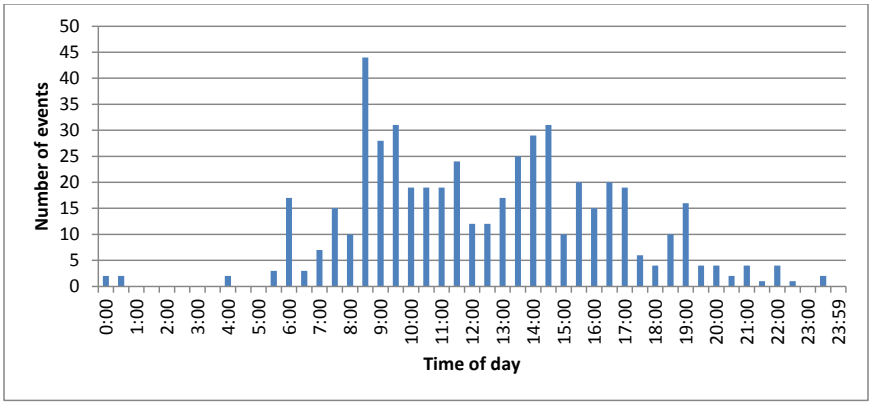
時刻別の認証イベント数の棒グラフです。縦軸は「Number of events」(0〜50、5刻み)、横軸は「Time of day」(0:00、1:00、…、23:00、23:59)で、30分ごとに棒があります。5:00より前と21:00より後にはイベントがほとんどありません。最も高い棒は9:00の目盛りの直前で約44件です。ほかに9:00〜10:00ごろと14:00〜15:00ごろに約31件の山があり、6:00ごろに約17件、19:00ごろに約16件の棒があります。
Figure 1: Distribution of authentication events over the study period
図 1: 調査期間にわたる認証イベントの分布
Other peak periods of authentication activity occurred later in the morning and in the early afternoon.
認証活動のその他のピーク期間は、午前の遅い時間帯と午後の早い時間帯に発生しました。
4.2 WHAT TYPES OF APPLICATIONS WERE USED?
4.2 どのような種類のアプリケーションが使われたか
In this paper we use the term “application” broadly: it can mean an actual computer application, a device, a system, a network, a website, a door that must be opened with a keycard, or even a checkpoint staffed by a human who ensures that only persons with legitimate identification are allowed onto the NIST campus. In this section, we present the types of applications participants reported encountering and authenticating to throughout the study period. Two different perspectives are given: the first differentiates between events enabling a primary task for personal use or one which is work-related. The second view presents the researcher-assigned categorization of each event by application type and subtype.
本稿では、「アプリケーション」という用語を広い意味で使います。実際のコンピュータアプリケーション、デバイス、システム、ネットワーク、Web サイト、キーカードで開けなければならないドア、あるいは正当な身分証明書を持つ人だけが NIST のキャンパスに入れるようにする、人が配置された検問所まで意味する場合があります。この節では、参加者が調査期間を通じて遭遇し、認証したと報告したアプリケーションの種類を示します。2 つの異なる視点を示します。1 つ目は、個人用の主要タスクを可能にするイベントと、業務に関連するイベントを区別します。2 つ目は、研究者が各イベントにアプリケーションの種類とサブタイプで割り当てた分類を示します。
4.2.1 Personal and work-related authentication events
4.2.1 個人用および業務用の認証イベント
Although participants were invited to log events for a 24-hour period, logging events outside of work hours was optional. 18 of 23 participants logged authentication events when they were not working; however these participants typically logged fewer personal events than work-related events. It is therefore unsurprising that 81.21% of the authentication events captured in the study were work-related, while the remaining 18.79% were personal authentications. Figure 2 shows a summary of each participant’s events requiring authentication categorized as work-related and personal applications. Note that while participants were not asked to distinguish between personal or work-related events, the nature of each event was evident from the recorded data (combined with supplemental information from the interview as needed).
参加者は 24 時間のイベントを記録するよう求められましたが、勤務時間外のイベントの記録は任意でした。23 人の参加者のうち 18 人が、勤務していない間の認証イベントを記録しましたが、これらの参加者は、通常、業務に関連するイベントよりも少ない個人用のイベントを記録しました。したがって、この調査で収集された認証イベントの 81.21 % が業務に関連するもので、残りの 18.79 % が個人用の認証であったことは、驚くべきことではありません。図 2 は、各参加者の認証を必要とするイベントを、業務用と個人用のアプリケーションに分類した概要を示します。参加者は、個人用のイベントか業務用のイベントかを区別するよう求められなかったものの、各イベントの性質は、記録されたデータ(必要に応じてインタビューからの補足情報と合わせたもの)から明らかであったことに注意してください。
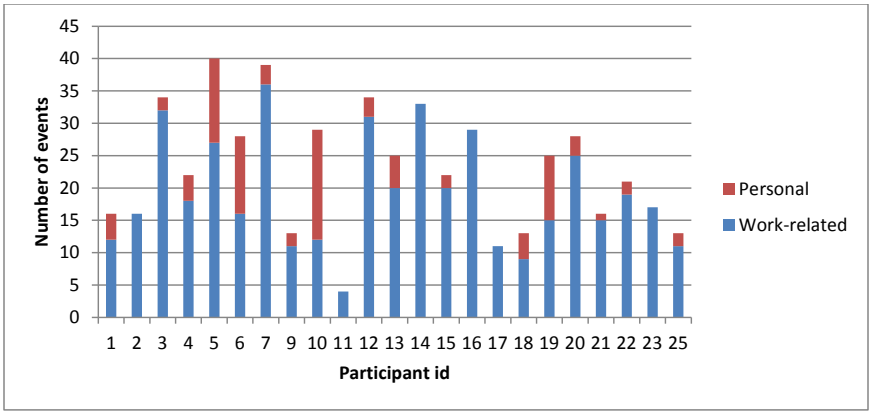
参加者ごとの認証イベント数の積み上げ棒グラフです。下の青が「Work-related」(業務)、上の赤が「Personal」(私用)です。縦軸は「Number of events」(0〜45)、横軸は「Participant id」で、参加者1〜7、9〜23、25が並びます。グラフから読み取った値(業務+私用=合計): 1: 12+4=16、2: 16+0=16、3: 32+2=34、4: 18+4=22、5: 27+13=40、6: 16+12=28、7: 36+3=39、9: 11+2=13、10: 12+17=29、11: 4+0=4、12: 31+3=34、13: 20+5=25、14: 33+0=33、15: 20+2=22、16: 29+0=29、17: 11+0=11、18: 9+4=13、19: 15+10=25、20: 25+3=28、21: 15+1=16、22: 19+2=21、23: 17+0=17、25: 11+2=13。
Figure 2: Work-related and personal authentication events by participant5
図 2: 参加者別の業務用および個人用の認証イベント5
4.2.2 Types of applications requiring authentication
4.2.2 認証を必要とするアプリケーションの種類
Figure 3 shows the categories of applications that users reported authenticating to and the percentage of each type’s reported use during the data collection period.
図 3 は、ユーザーが認証したと報告したアプリケーションのカテゴリと、データ収集期間中に報告された各種類の使用の割合を示します。
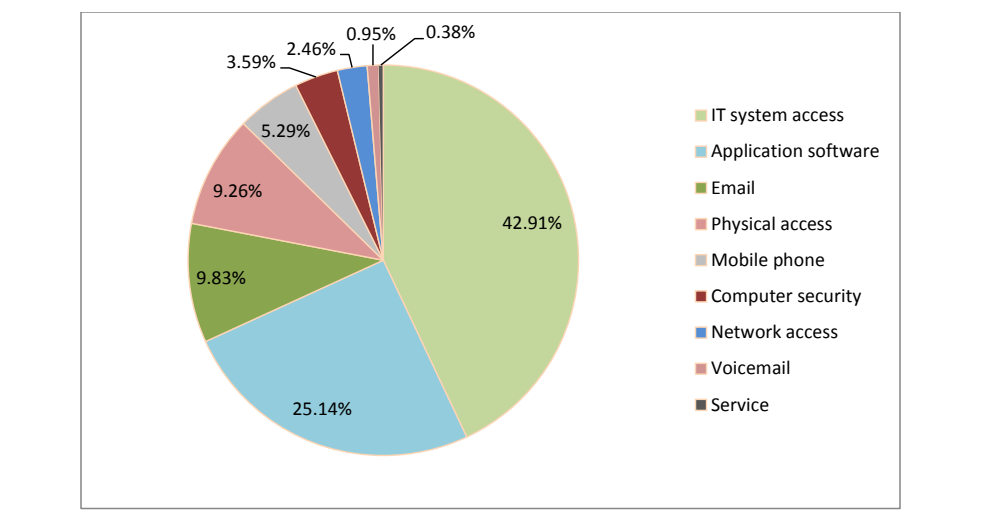
凡例付きの円グラフです。IT system access(IT システムへのアクセス)42.91%、Application software(アプリケーションソフトウェア)25.14%、Email(電子メール)9.83%、Physical access(物理的なアクセス)9.26%、Mobile phone(携帯電話)5.29%、Computer security(コンピューターセキュリティ)3.59%、Network access(ネットワークアクセス)2.46%、Voicemail(ボイスメール)0.95%、Service(サービス)0.38% です。
Figure 3: Application types requiring authentication
図 3: 認証を必要とするアプリケーションの種類
As the chart shows, the largest portion of the recorded authentications were for access to IT systems (42.91%), e.g., computer account access. The second-largest category, Application software, contained authentication events related to access for a plethora of packages and internet-based functionality and services (25.14%). Some examples include backup software, online banking, online shopping, e-conferencing, NIST time and attendance, applications supporting other NIST administrative functions, and Web applications. Authentication events related to e-mail access were contained in the next largest category (9.86%). Events related to physical access, such as admittance to the NIST campus6 and buildings, were categorized as Physical access (9.26%). Events related to mobile phone device access was the next largest category, comprising 5.29% of all events. The Computer security category (3.59%) contained events that were considered specialized computer security access above and beyond those contained in the IT system category, such as computer encryption software, password vaults, and privileged account access. The Network access category, having 2.46% of the total events, contained events related to authentication for network access that were not abstracted from the user. The Voicemail category contained all events related to accessing voicemail systems (0.95%). Finally, the Service category contained two events (0.38%), use of a library card and use of a debit card.
グラフが示すように、記録された認証の最大の部分は、コンピュータアカウントへのアクセスなど、IT システムへのアクセスのためのものでした(42.91 %)。2 番目に大きいカテゴリであるアプリケーションソフトウェアには、数多くのパッケージやインターネットベースの機能およびサービスへのアクセスに関連する認証イベントが含まれていました(25.14 %)。例として、バックアップソフトウェア、オンラインバンキング、オンラインショッピング、電子会議、NIST の勤怠管理、NIST の他の管理機能を支援するアプリケーション、Web アプリケーションがあります。電子メールへのアクセスに関連する認証イベントは、次に大きいカテゴリに含まれました(9.86 %)。NIST のキャンパス6や建物への入場など、物理的なアクセスに関連するイベントは、物理アクセス(9.26 %)に分類されました。携帯電話デバイスへのアクセスに関連するイベントは次に大きいカテゴリで、全イベントの 5.29 % を占めました。コンピュータセキュリティのカテゴリ(3.59 %)には、コンピュータの暗号化ソフトウェア、パスワードボールト、特権アカウントへのアクセスなど、IT システムのカテゴリに含まれるものに加えて、専門的なコンピュータセキュリティアクセスとみなされたイベントが含まれていました。ネットワークアクセスのカテゴリは、全イベントの 2.46 % を占め、ユーザーに対して抽象化されていないネットワークアクセスの認証に関連するイベントを含んでいました。ボイスメールのカテゴリには、ボイスメールシステムへのアクセスに関連するすべてのイベントが含まれていました(0.95 %)。最後に、サービスのカテゴリには 2 件のイベント(0.38 %)、すなわち図書館カードの使用とデビットカードの使用が含まれていました。
The chart in Fig. 4 displays the relative number of work-related and personal events in each application category.
図 4 のグラフは、各アプリケーションのカテゴリにおける、業務用と個人用のイベントの相対的な数を示します。
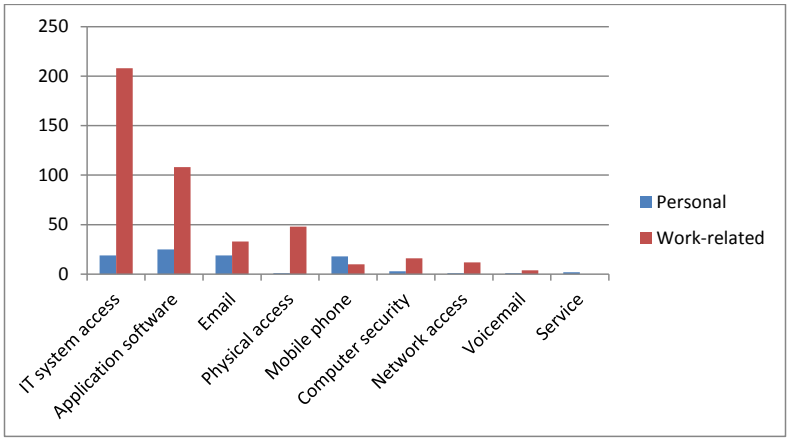
アプリケーションの種類ごとに「Personal」(私用、青)と「Work-related」(業務、赤)の認証イベント数を並べた棒グラフです。縦軸は0〜250(50刻み)です。種類と値(私用/業務。表1と一致): IT system access 19/208、Application software 25/108、Email 19/33、Physical access 1/48、Mobile phone 18/10、Computer security 3/16、Network access 1/12、Voicemail 1/4、Service 2/0。
Figure 4: Personal and work-related events for each category
図 4: 各カテゴリの個人用および業務用イベント
4.2.3 Application subtypes
4.2.3 アプリケーションのサブタイプ
There were often a variety of applications reported within each application category: these are referred to in this report as the application subtypes. For example, within the category IT system access, three specific types of system access were reported: NIST domain, local computer, and remote computer. The list of application types, subtypes, and number of participant-reported logins associated with each is provided in Table 1.
各アプリケーションのカテゴリ内では、さまざまなアプリケーションが報告されることがよくありました。これらを、本報告書ではアプリケーションのサブタイプと呼びます。たとえば、IT システムアクセスというカテゴリでは、NIST ドメイン、ローカルコンピュータ、リモートコンピュータという 3 つの具体的な種類のシステムアクセスが報告されました。アプリケーションの種類、サブタイプ、およびそれぞれに関連して参加者が報告したログインの数の一覧を、表 1 に示します。
Table 1: Number of participant-recorded logins by application
表 1: アプリケーション別の参加者が記録したログイン数
| Application type | Application Subtype | Work-related | Personal | Totals |
|---|---|---|---|---|
| IT system access | 208 | 19 | 227 | |
| Local computer | 23 | 19 | 42 | |
| NIST domain | 144 | 0 | 144 | |
| Remote computer | 41 | 0 | 41 | |
| Application software | 108 | 25 | 133 | |
| Backup | 4 | 0 | 4 | |
| E-conferencing | 15 | 2 | 17 | |
| NIST application | 32 | 0 | 32 | |
| NIST time & attendance | 21 | 0 | 21 | |
| Not specified | 0 | 1 | 1 | |
| Online banking | 0 | 5 | 5 | |
| Online shopping | 0 | 3 | 3 | |
| IT support incident mgmt sys | 3 | 0 | 3 | |
| Web application | 33 | 14 | 47 | |
| 33 | 19 | 52 | ||
| NIST e-mail | 33 | 0 | 33 | |
| Personal e-mail | 0 | 19 | 19 | |
| Physical access | 48 | 1 | 49 | |
| Building/door entry | 31 | 1 | 32 | |
| Gated location | 17 | 0 | 17 | |
| Mobile phone | 10 | 18 | 28 | |
| Cellular/phone account | 10 | 18 | 28 | |
| Computer security | 16 | 3 | 19 | |
| Computer encryption | 8 | 0 | 8 | |
| OS privileged access | 2 | 1 | 3 | |
| Password manager | 6 | 1 | 7 | |
| PC security package | 0 | 1 | 1 | |
| Network access | 12 | 1 | 13 | |
| NIST wireless network | 5 | 0 | 5 | |
| Virtual Private Network | 7 | 0 | 7 | |
| Wireless network | 0 | 1 | 1 | |
| Voicemail | 4 | 1 | 5 | |
| Home voicemail | 0 | 1 | 1 | |
| NIST voicemail | 4 | 0 | 4 | |
| Service | 0 | 2 | 2 | |
| Library card | 0 | 1 | 1 | |
| Purchase (debit) | 0 | 1 | 1 | |
| Grand Total | 439 | 89 | 528 |
| アプリケーションの種類 | アプリケーションのサブタイプ | 業務用 | 個人用 | 合計 |
|---|---|---|---|---|
| IT システムアクセス | 208 | 19 | 227 | |
| ローカルコンピュータ | 23 | 19 | 42 | |
| NIST ドメイン | 144 | 0 | 144 | |
| リモートコンピュータ | 41 | 0 | 41 | |
| アプリケーションソフトウェア | 108 | 25 | 133 | |
| バックアップ | 4 | 0 | 4 | |
| 電子会議 | 15 | 2 | 17 | |
| NIST のアプリケーション | 32 | 0 | 32 | |
| NIST の勤怠管理 | 21 | 0 | 21 | |
| 指定なし | 0 | 1 | 1 | |
| オンラインバンキング | 0 | 5 | 5 | |
| オンラインショッピング | 0 | 3 | 3 | |
| IT サポートのインシデント管理システム | 3 | 0 | 3 | |
| Web アプリケーション | 33 | 14 | 47 | |
| 電子メール | 33 | 19 | 52 | |
| NIST の電子メール | 33 | 0 | 33 | |
| 個人用の電子メール | 0 | 19 | 19 | |
| 物理アクセス | 48 | 1 | 49 | |
| 建物・ドアへの入室 | 31 | 1 | 32 | |
| ゲートのある場所 | 17 | 0 | 17 | |
| 携帯電話 | 10 | 18 | 28 | |
| 携帯電話・電話のアカウント | 10 | 18 | 28 | |
| コンピュータセキュリティ | 16 | 3 | 19 | |
| コンピュータの暗号化 | 8 | 0 | 8 | |
| OS の特権アクセス | 2 | 1 | 3 | |
| パスワードマネージャー | 6 | 1 | 7 | |
| PC セキュリティパッケージ | 0 | 1 | 1 | |
| ネットワークアクセス | 12 | 1 | 13 | |
| NIST の無線ネットワーク | 5 | 0 | 5 | |
| 仮想プライベートネットワーク | 7 | 0 | 7 | |
| 無線ネットワーク | 0 | 1 | 1 | |
| ボイスメール | 4 | 1 | 5 | |
| 自宅のボイスメール | 0 | 1 | 1 | |
| NIST のボイスメール | 4 | 0 | 4 | |
| サービス | 0 | 2 | 2 | |
| 図書館カード | 0 | 1 | 1 | |
| 購入(デビット) | 0 | 1 | 1 | |
| 総計 | 439 | 89 | 528 |
As described in Sec. 2.7, logins for a number of applications and systems within portions of the NIST domain are consolidated using an SSO solution; for example, NIST’s domain services automatically log users into the e-mail and calendar application when the client is started. This is true for other applications as well, when it is implemented. Because of this, we suspect that there were a large number of authentication events that users did not notice or report, as the actual authentication was abstracted from the user. Users would only notice these authentications if SSO either failed to work or was not available (e.g., when the user logged in remotely or from a segment of the domain where SSO was not implemented). Since users did not notice these automatic SSO-enabled authentications, they did not report them. It is likely that if SSO-enabled authentication had not been in place, participants in this study would have encountered and recorded more work-related authentication events in the Application software, NIST e-mail, and Network access categories.
第 2.7 節で述べたように、NIST ドメインの一部の範囲内にある多数のアプリケーションとシステムのログインは、SSO ソリューションを使って統合されています。たとえば、NIST のドメインサービスは、クライアントが起動されたときに、電子メールとカレンダーのアプリケーションにユーザーを自動的にログインさせます。これは、実装されている場合には、他のアプリケーションについても同様です。このため、実際の認証がユーザーから抽象化されているので、ユーザーが気づかず、報告しなかった認証イベントが多数あったと私たちは推測しています。ユーザーがこれらの認証に気づくのは、SSO が機能しなかった場合や利用できなかった場合(たとえば、ユーザーがリモートでログインした場合や、SSO が実装されていないドメインの区画からログインした場合)だけです。ユーザーは、SSO による自動的な認証に気づかなかったため、それらを報告しませんでした。SSO による認証が導入されていなければ、この調査の参加者は、アプリケーションソフトウェア、NIST の電子メール、ネットワークアクセスのカテゴリで、より多くの業務に関連する認証イベントに遭遇し、記録していた可能性が高いです。
In addition, since all NIST computers are set to lock after a certain period of inactivity and must be unlocked with a password (as described in Sec. 2.7) or a PIV card, it is likely that many of the work-related IT system access authentication events recorded by users represented unlocking their computers multiple times during the day.
さらに、すべての NIST のコンピュータは、一定期間操作がないとロックされるように設定されており、(第 2.7 節で述べたように)パスワードまたは PIV カードでロックを解除しなければならないため、ユーザーが記録した業務に関連する IT システムアクセスの認証イベントの多くは、1 日の間にコンピュータのロックを複数回解除したことを表している可能性が高いです。
4.3 WHERE WERE THESE EVENTS TAKING PLACE?
4.3 これらのイベントはどこで行われたか
For each authentication event recorded, participants were asked to record whether they were on or off the NIST campus at the time of the event. Figure 5 shows the number of events recorded by each participant, while distinguishing the location (i.e., whether they were on- or off-campus).
記録した各認証イベントについて、参加者は、そのイベントの時点で NIST のキャンパス内にいたか外にいたかを記録するよう求められました。図 5 は、場所(すなわちキャンパス内か外か)を区別して、各参加者が記録したイベントの数を示します。
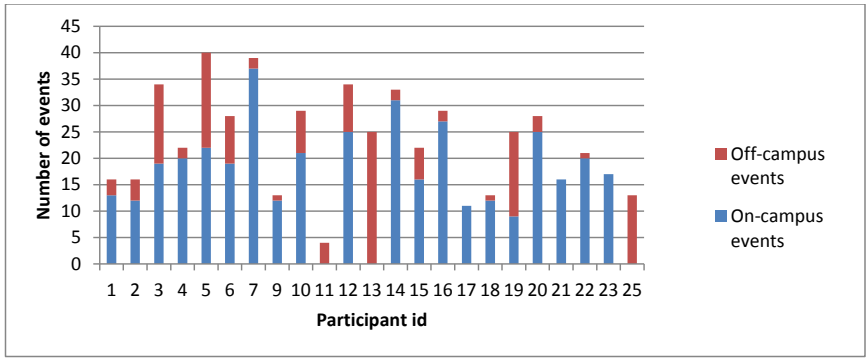
参加者ごとの認証イベント数を場所別に積み上げた棒グラフです。下の青が「On-campus events」(構内)、上の赤が「Off-campus events」(構外)です。縦軸は「Number of events」(0〜45)、横軸は「Participant id」で、参加者1〜7、9〜23、25が並びます。棒の合計は図2と同じです。多くの参加者は主に構内でイベントを記録しています。参加者11、13、25は構外のイベントだけ(4件、25件、13件)で、参加者3、5、19、10は構外の部分が大きくなっています(約15件、18件、16件、8件)。
Figure 5: Participants' authentication events by location
図 5: 場所別の参加者の認証イベント
Table 2 provides a delineation of all participants’ authentication events by location (on-campus or off-campus) and type (work-related or personal). It should be noted that authentication events recorded on the NIST campus were not always work-related; likewise, not all events that were recorded off-campus were personal.
表 2 は、すべての参加者の認証イベントを、場所(キャンパス内かキャンパス外か)と種類(業務用か個人用か)で分けて示します。NIST のキャンパスで記録された認証イベントが、常に業務に関連するものであったわけではなく、同様に、キャンパス外で記録されたすべてのイベントが個人用であったわけでもないことに注意すべきです。
Table 2: Authentication events by location and type
表 2: 場所と種類別の認証イベント
| Event Location | Event Type | All Types | |
|---|---|---|---|
| Personal | Work-related | ||
| NIST | 26 | 359 | 385 |
| Off-campus | 63 | 80 | 143 |
| All Locations | 89 | 439 | 528 |
| イベントの場所 | イベントの種類 | 全種類 | |
|---|---|---|---|
| 個人用 | 業務用 | ||
| NIST | 26 | 359 | 385 |
| キャンパス外 | 63 | 80 | 143 |
| 全場所 | 89 | 439 | 528 |
Additionally, the data show that 72.92% of the recorded authentication events took place on-campus, while 27.08% took place off-campus. This is to be expected, given that most of our participants worked on-campus during the diary day. Two participants were telecommuting at the time of the study, and one was on work-related travel.
さらに、データは、記録された認証イベントの 72.92 % がキャンパス内で、27.08 % がキャンパス外で行われたことを示しています。参加者の大半が日誌の日にキャンパス内で働いていたことを考えると、これは予想どおりです。調査時点で、2 人の参加者がテレワークをしており、1 人が業務上の出張中でした。
4.4 INFORMATION SURROUNDING HOW THESE EVENTS OCCURRED
4.4 これらのイベントがどのように行われたかに関する情報
4.4.1 Devices used to authenticate
4.4.1 認証に使用されたデバイス
Diary data show that participants used a number of different mechanisms, usually electronic devices, to gain access to various resources through authentication. These mechanisms included desktop computers, laptop computers, tablet computers, mobile phones, landline phones, biometric scanners (e.g., fingerprint readers), and various electronic card readers for PIV smartcards, NIST badges, debit cards, and so on. There was also a human authentication mechanism – specifically, a guard at each gate to the NIST campus to whom participants had to display their ID badges for admittance.
日誌データは、参加者が、認証を通じてさまざまなリソースにアクセスするために、通常は電子機器である、数多くの異なる仕組みを使用したことを示しています。これらの仕組みには、デスクトップコンピュータ、ノートコンピュータ、タブレットコンピュータ、携帯電話、固定電話、生体情報スキャナー(たとえば指紋リーダー)、PIV スマートカード、NIST のバッジ、デビットカードなどのためのさまざまな電子カードリーダーが含まれていました。人による認証の仕組みもあり、具体的には、NIST のキャンパスの各門にいる警備員に、参加者が入場のために ID バッジを提示しなければなりませんでした。
As one might expect, the devices used in the vast majority of authentications were desktop and laptop computers (42.52% and 32.12% respectively). The next most commonly used authentication device types were mobile phones (10.04%) and NIST badge readers located at most building entrances (5.66%). Events using a human authenticator, i.e., authenticating to a guard at a NIST property gate, accounted for the next highest number of events, 3.10%. Note that while some building-entry badge reader devices could read NIST PIV cards at the time of this study, use of the non-PIV and PIV NIST identification cards7 were not distinguished at gate and building entry. Biometric scanners built into computing systems or keyboards constituted 2.92% of the reported use. Tablet use accounted for 1.46% of the reported authentications.
予想されるとおり、認証の大多数で使用されたデバイスは、デスクトップコンピュータとノートコンピュータでした(それぞれ 42.52 % と 32.12 %)。次によく使われた認証デバイスの種類は、携帯電話(10.04 %)と、ほとんどの建物の入口に設置されている NIST のバッジリーダー(5.66 %)でした。人による認証器を使ったイベント、すなわち NIST の敷地の門で警備員に対して認証するイベントが、次に多く、3.10 % を占めました。この調査の時点で、建物入口のバッジリーダーの一部は NIST の PIV カードを読み取れましたが、門と建物入口では、PIV ではない NIST の身分証明カードと PIV の身分証明カード7の使用は区別されなかったことに注意してください。コンピューティングシステムやキーボードに内蔵された生体情報スキャナーは、報告された使用の 2.92 % を占めました。タブレットの使用は、報告された認証の 1.46 % を占めました。
The “Other” category contained three different electronic card reader types, i.e., credit/debit card reader, library card reader, and a membership card reader, as well as a hardware-based encrypted password vault device. This category constituted 0.91% of the reported device type use. Landline phone use accounted for another 0.91% of the total use.
「その他」のカテゴリには、3 種類の電子カードリーダー、すなわちクレジット/デビットカードリーダー、図書館カードリーダー、会員カードリーダーと、ハードウェアベースの暗号化パスワードボールトデバイスが含まれていました。このカテゴリは、報告されたデバイスの種類の使用の 0.91 % を占めました。固定電話の使用は、全使用のさらに 0.91 % を占めました。
PIV card readers may be attached to or integrated into a desktop or laptop computer, but for purposes of this study we asked participants to count readers as a device. PIV card readers accounted for 0.36% of the total number of reported device types used. For the two events in which participants reported using a PIV card reader, the associated device was a desktop computer, which was also counted as a device on which authentication occurred during those events. Figure 6 shows a circle graph in which the relative sizes of the areas shown correspond to the percentages of reported device use for authentication during the study period.
PIV カードリーダーは、デスクトップコンピュータまたはノートコンピュータに接続または内蔵されている場合がありますが、この調査では、参加者にリーダーを 1 つのデバイスとして数えるよう求めました。PIV カードリーダーは、報告されたデバイスの種類の使用の総数の 0.36 % を占めました。参加者が PIV カードリーダーを使用したと報告した 2 件のイベントでは、関連するデバイスはデスクトップコンピュータであり、これらのイベントの間に認証が行われたデバイスとしても数えられました。図 6 は、示された領域の相対的な大きさが、調査期間中に認証のために報告されたデバイスの使用の割合に対応する円グラフを示します。
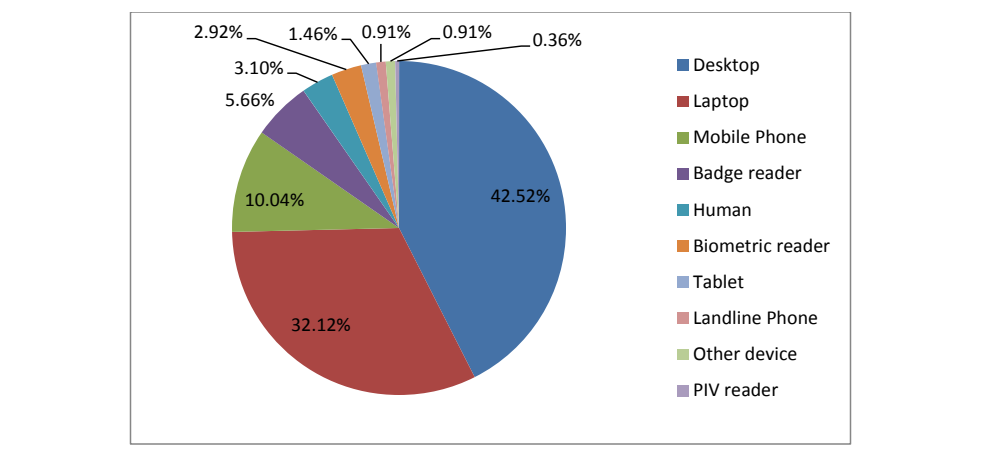
凡例付きの円グラフです。Desktop(デスクトップ)42.52%、Laptop(ノートパソコン)32.12%、Mobile Phone(携帯電話)10.04%、Badge reader(バッジ読み取り機)5.66%、Human(人)3.10%、Biometric reader(生体情報読み取り機)2.92%、Tablet(タブレット)1.46%、Landline Phone(固定電話)0.91%、Other device(その他の機器)0.91%、PIV reader(PIV 読み取り機)0.36% です。
Figure 6: Device use during authentication
図 6: 認証時のデバイスの使用
Figure 7 shows the relative number and device types used by each participant during authentication events.
図 7 は、認証イベントの際に各参加者が使用したイベント数とデバイスの種類を示します。
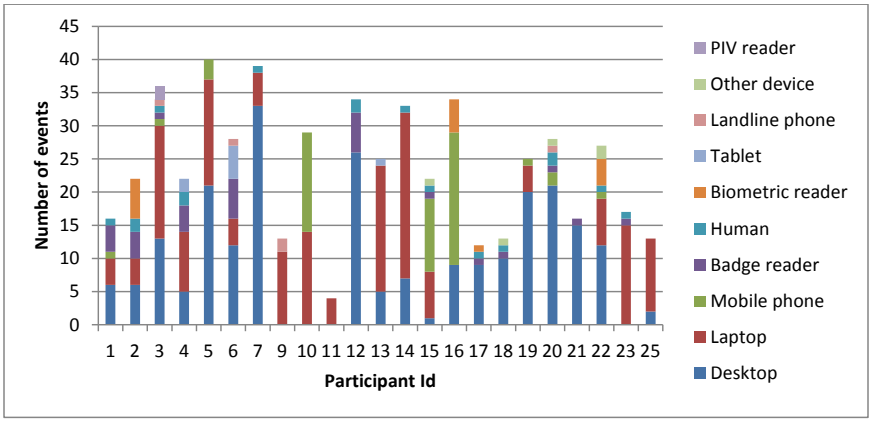
参加者ごとに、認証時に使用したデバイスの種類を積み上げた棒グラフです。縦軸は「Number of events」(0〜45)、横軸は「Participant Id」で、参加者1〜7、9〜23、25が並びます。積み上げ区分は、下から凡例の順にDesktop、Laptop、Mobile phone、Badge reader、Human、Biometric reader、Tablet、Landline phone、Other device、PIV readerです。ほぼすべての棒でデスクトップとノートパソコンが大部分を占めます。参加者7(約39件)と参加者12(約34件)は主にデスクトップ、参加者9、10、11、23、25は主にノートパソコンです。参加者10、15、16は携帯電話の区分が大きく、参加者3(約36件)は最も幅広い種類のデバイスを使用しています。
Figure 7: Devices used by each participant while authenticating
図 7: 各参加者が認証時に使用したデバイス
On average, participants in this study reported using 3.74 ± 1.57 SD different device types when authentication occurred during the study period. At the ends of the spectrum of device use, one participant reported authenticating via only one device type, a laptop, while another participant reported authenticating via seven different device types over the course of the day.
平均して、この調査の参加者は、調査期間中に認証が行われた際に、3.74 ± 1.57(標準偏差)種類の異なるデバイスを使用したと報告しました。デバイス使用の両極では、ある参加者はノートコンピュータという1種類のデバイスのみを使って認証したと報告し、別の参加者は1日の間に7種類の異なるデバイスを使って認証したと報告しました。
4.4.2 What was required for authentication?
4.4.2 認証に必要だったもの
Participants also reported the types of information and objects they were required to provide during authentication events. Figure 8 shows the relative use of the different types of items used in the 528 application events recorded during the data collection period. The “Other” category contains information elements such as: personally identifying information (e.g., birthdate, Social Security number), challenge question responses, Google credentials, Completely Automated Public Turing Test To Tell Computers and Humans Apart (CAPTCHA), a user-selected verification image associated with an account, encoding contained on a hardware-based password vault, and encoding on electronically read cards (e.g., debit card, library card).
参加者はまた、認証イベントの際に提供する必要があった情報や物の種類も報告しました。図 8 は、データ収集期間中に記録された528件のアプリケーションイベントで使用された各種項目の相対的な使用を示します。「その他」のカテゴリには、個人を特定できる情報(たとえば生年月日、社会保障番号)、チャレンジ質問への回答、Google の認証情報、コンピュータと人間を区別するための完全自動公開チューリングテスト(CAPTCHA)、アカウントに関連付けられたユーザー選択の検証画像、ハードウェアベースのパスワードボールトに含まれる符号化情報、電子的に読み取られるカード(たとえばデビットカード、図書館カード)上の符号化情報などの情報要素が含まれます。
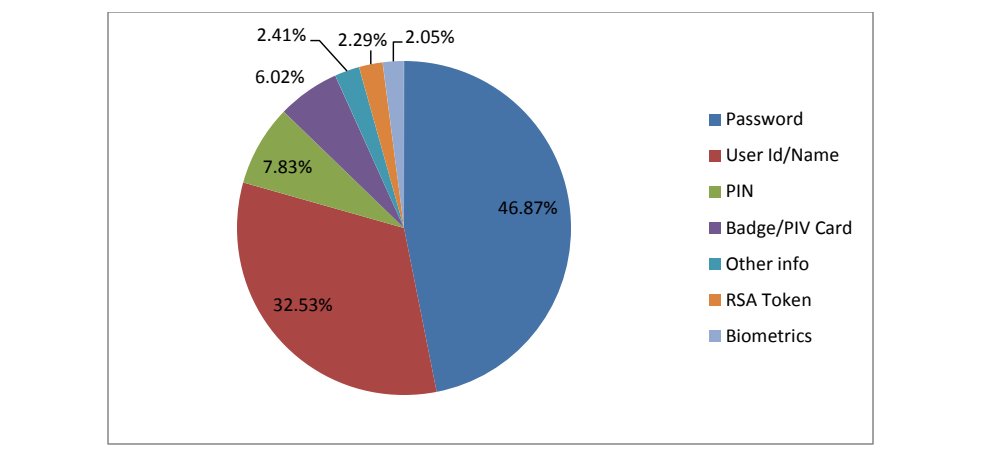
凡例付きの円グラフです。Password(パスワード)46.87%、User Id/Name(ユーザー ID・ユーザー名)32.53%、PIN 7.83%、Badge/PIV Card(バッジ・PIV カード)6.02%、Other info(その他の情報)2.41%、RSA Token(RSA トークン)2.29%、Biometrics(生体情報)2.05% です。
Figure 8: Types of elements required for authentication
図 8: 認証に必要だった要素の種類
As the chart shows, the most commonly used authentication elements were passwords (46.87%) and user IDs or user names (32.53%). This is unsurprising, given that the most common authentication mechanism used on information systems requires a user ID and password. Since the two items are almost always used together, one might expect the percentages of both elements to be equal; however, in many cases a user ID may be filled in automatically based on the previous login, so the only element a user must enter manually is a password. In such cases, it is understandable that a participant would not count the user ID as an authentication element.
グラフが示すように、最もよく使われた認証要素は、パスワード(46.87 %)とユーザー ID またはユーザー名(32.53 %)でした。情報システムで使われる最も一般的な認証の仕組みがユーザー ID とパスワードを必要とすることを考えると、これは驚くべきことではありません。この 2 つの項目はほぼ常に一緒に使われるため、両方の要素の割合は等しいと予想されるかもしれません。しかし、多くの場合、ユーザー ID は前回のログインに基づいて自動的に入力される場合があり、ユーザーが手動で入力しなければならない唯一の要素はパスワードです。そのような場合、参加者がユーザー ID を認証要素として数えなかったことは理解できます。
The next most common were a PIN (7.83%) and a NIST badge/PIV card (6.02%). Although a PIV card and a PIN can be used together to authenticate in the same way that a user ID and password are, there were only two reported uses of a PIV card during the diary period. So even though the PIN and badge/PIV card had roughly similar reported use, in this study PINs were generally used in events that did not involve use of a PIV card. The majority of reported badge/PIV card use was for physical access to the NIST site and buildings.
次に多かったのは、PIN(7.83 %)と NIST のバッジ/PIV カード(6.02 %)でした。PIV カードと PIN は、ユーザー ID とパスワードと同じように、一緒に使って認証できますが、日誌の期間中に報告された PIV カードの使用は 2 件しかありませんでした。したがって、PIN とバッジ/PIV カードの報告された使用はおおむね同程度でしたが、この調査では、PIN は一般に、PIV カードの使用を伴わないイベントで使用されていました。報告されたバッジ/PIV カードの使用の大多数は、NIST の敷地と建物への物理的アクセスのためのものでした。
The “Other” category (2.41%) had a relatively small proportion of the elements participants reported using during the study period. The fact that VPN tokens were only used in 2.29% of authentication is to be expected: one would only need to use the token to connect remotely to the NIST network, and the fact that the vast majority of work-related authentication events took place on the NIST campus (illustrated in Table 2) indicates that most of the study participants did not connect remotely during the study period. Finally, biometrics accounted for 2.05% of the reported elements used for authentication.
「その他」のカテゴリ(2.41 %)は、調査期間中に参加者が使用したと報告した要素のうち、比較的小さな割合を占めました。VPN トークンが認証の 2.29 % でしか使われなかったことは、予想されることです。トークンが必要になるのは、NIST のネットワークにリモートで接続する場合だけであり、業務に関連する認証イベントの大多数が NIST のキャンパスで行われたこと(表 2 に示す)は、調査参加者の大半が調査期間中にリモートで接続しなかったことを示しています。最後に、生体情報は、認証に使用されたと報告された要素の 2.05 % を占めました。
Table 3 shows how many and which authentication elements (e.g., user IDs, VPN tokens, PIV cards) participants used to authenticate to the applications reported via diaries.
表 3 は、日誌を通じて報告されたアプリケーションへの認証のために、参加者がいくつの、どのような認証要素(たとえばユーザー ID、VPN トークン、PIV カード)を使用したかを示します。
Table 3: Authentication elements used for each application type
表 3: アプリケーションの種類ごとに使用された認証要素
| Application Type | # Of events | Password | User ID or Name | PIN | Badge or PIV Card | Other Info | Token | Biometrics | Avg # of items needed |
|---|---|---|---|---|---|---|---|---|---|
| IT system access | 227 | 184 | 92 | 22 | 2 | 1 | 0 | 16 | 1.40 |
| Local computer | 42 | 35 | 13 | 1 | 0 | 0 | 0 | 6 | 1.31 |
| NIST domain | 144 | 109 | 42 | 21 | 2 | 0 | 0 | 10 | 1.28 |
| Remote computer | 41 | 40 | 37 | 0 | 0 | 1 | 0 | 0 | 1.90 |
| Application software | 133 | 119 | 103 | 3 | 0 | 15 | 0 | 0 | 1.80 |
| Backup | 4 | 4 | 4 | 0 | 0 | 0 | 0 | 0 | 2.00 |
| E-conferencing | 17 | 12 | 12 | 0 | 0 | 6 | 0 | 0 | 1.76 |
| IT support incident management sys | 3 | 3 | 2 | 0 | 0 | 0 | 0 | 0 | 1.67 |
| NIST application | 32 | 29 | 16 | 1 | 0 | 3 | 0 | 0 | 1.53 |
| NIST time & attendance | 19 | 19 | 17 | 0 | 0 | 0 | 0 | 0 | 1.81 |
| Not specified | 1 | 1 | 1 | 0 | 0 | 0 | 0 | 0 | 2.00 |
| Online banking | 5 | 4 | 5 | 2 | 0 | 2 | 0 | 0 | 2.60 |
| Online shopping | 3 | 2 | 3 | 0 | 0 | 0 | 0 | 0 | 1.67 |
| Web application | 47 | 43 | 43 | 0 | 0 | 4 | 0 | 0 | 1.91 |
| 52 | 52 | 48 | 11 | 0 | 1 | 12 | 0 | 2.38 | |
| NIST e-mail | 33 | 33 | 33 | 11 | 0 | 1 | 12 | 0 | 2.73 |
| Personal e-mail | 19 | 19 | 15 | 0 | 0 | 0 | 0 | 0 | 1.79 |
| Physical access | 49 | 0 | 0 | 0 | 48 | 1 | 0 | 0 | 1.00 |
| Building/door entry | 32 | 0 | 0 | 0 | 31 | 1 | 0 | 0 | 1.00 |
| Gated location | 17 | 0 | 0 | 0 | 17 | 0 | 0 | 0 | 1.00 |
| Mobile phone | 28 | 11 | 0 | 17 | 0 | 0 | 0 | 0 | 1.00 |
| Cellular/phone account | 28 | 11 | 0 | 17 | 0 | 0 | 0 | 0 | 1.00 |
| Computer security | 19 | 19 | 14 | 0 | 0 | 0 | 0 | 0 | 1.74 |
| Computer encryption | 8 | 8 | 8 | 0 | 0 | 0 | 0 | 0 | 2.00 |
| OS privileged access | 3 | 3 | 1 | 0 | 0 | 0 | 0 | 0 | 1.33 |
| Password manager | 7 | 7 | 4 | 0 | 0 | 0 | 0 | 0 | 1.57 |
| PC security package | 1 | 1 | 1 | 0 | 0 | 0 | 0 | 0 | 2.00 |
| Network access | 13 | 5 | 11 | 7 | 0 | 0 | 7 | 0 | 2.31 |
| NIST wireless network | 5 | 4 | 4 | 0 | 0 | 0 | 0 | 0 | 1.60 |
| Virtual Private Network | 7 | 0 | 7 | 7 | 0 | 0 | 7 | 0 | 3.00 |
| Wireless network | 1 | 1 | 0 | 0 | 0 | 0 | 0 | 0 | 1.00 |
| Voicemail | 5 | 1 | 2 | 4 | 0 | 0 | 0 | 0 | 1.40 |
| Home voicemail | 1 | 0 | 0 | 1 | 0 | 0 | 0 | 0 | 1.00 |
| NIST voicemail | 4 | 1 | 2 | 3 | 0 | 0 | 0 | 0 | 1.50 |
| Service | 2 | 0 | 0 | 1 | 0 | 2 | 0 | 0 | 1.50 |
| Library card | 1 | 0 | 0 | 0 | 0 | 1 | 0 | 0 | 1.00 |
| Purchase (debit) | 1 | 0 | 0 | 1 | 0 | 1 | 0 | 0 | 2.00 |
| アプリケーションの種類 | イベント数 | パスワード | ユーザー ID または名前 | PIN | バッジまたは PIV カード | その他の情報 | トークン | 生体情報 | 必要な項目の平均数 |
|---|---|---|---|---|---|---|---|---|---|
| IT システムアクセス | 227 | 184 | 92 | 22 | 2 | 1 | 0 | 16 | 1.40 |
| ローカルコンピュータ | 42 | 35 | 13 | 1 | 0 | 0 | 0 | 6 | 1.31 |
| NIST ドメイン | 144 | 109 | 42 | 21 | 2 | 0 | 0 | 10 | 1.28 |
| リモートコンピュータ | 41 | 40 | 37 | 0 | 0 | 1 | 0 | 0 | 1.90 |
| アプリケーションソフトウェア | 133 | 119 | 103 | 3 | 0 | 15 | 0 | 0 | 1.80 |
| バックアップ | 4 | 4 | 4 | 0 | 0 | 0 | 0 | 0 | 2.00 |
| 電子会議 | 17 | 12 | 12 | 0 | 0 | 6 | 0 | 0 | 1.76 |
| IT サポートのインシデント管理システム | 3 | 3 | 2 | 0 | 0 | 0 | 0 | 0 | 1.67 |
| NIST のアプリケーション | 32 | 29 | 16 | 1 | 0 | 3 | 0 | 0 | 1.53 |
| NIST の勤怠管理 | 19 | 19 | 17 | 0 | 0 | 0 | 0 | 0 | 1.81 |
| 指定なし | 1 | 1 | 1 | 0 | 0 | 0 | 0 | 0 | 2.00 |
| オンラインバンキング | 5 | 4 | 5 | 2 | 0 | 2 | 0 | 0 | 2.60 |
| オンラインショッピング | 3 | 2 | 3 | 0 | 0 | 0 | 0 | 0 | 1.67 |
| Web アプリケーション | 47 | 43 | 43 | 0 | 0 | 4 | 0 | 0 | 1.91 |
| 電子メール | 52 | 52 | 48 | 11 | 0 | 1 | 12 | 0 | 2.38 |
| NIST の電子メール | 33 | 33 | 33 | 11 | 0 | 1 | 12 | 0 | 2.73 |
| 個人用の電子メール | 19 | 19 | 15 | 0 | 0 | 0 | 0 | 0 | 1.79 |
| 物理アクセス | 49 | 0 | 0 | 0 | 48 | 1 | 0 | 0 | 1.00 |
| 建物・ドアへの入室 | 32 | 0 | 0 | 0 | 31 | 1 | 0 | 0 | 1.00 |
| ゲートのある場所 | 17 | 0 | 0 | 0 | 17 | 0 | 0 | 0 | 1.00 |
| 携帯電話 | 28 | 11 | 0 | 17 | 0 | 0 | 0 | 0 | 1.00 |
| 携帯電話・電話のアカウント | 28 | 11 | 0 | 17 | 0 | 0 | 0 | 0 | 1.00 |
| コンピュータセキュリティ | 19 | 19 | 14 | 0 | 0 | 0 | 0 | 0 | 1.74 |
| コンピュータの暗号化 | 8 | 8 | 8 | 0 | 0 | 0 | 0 | 0 | 2.00 |
| OS の特権アクセス | 3 | 3 | 1 | 0 | 0 | 0 | 0 | 0 | 1.33 |
| パスワードマネージャー | 7 | 7 | 4 | 0 | 0 | 0 | 0 | 0 | 1.57 |
| PC セキュリティパッケージ | 1 | 1 | 1 | 0 | 0 | 0 | 0 | 0 | 2.00 |
| ネットワークアクセス | 13 | 5 | 11 | 7 | 0 | 0 | 7 | 0 | 2.31 |
| NIST の無線ネットワーク | 5 | 4 | 4 | 0 | 0 | 0 | 0 | 0 | 1.60 |
| 仮想プライベートネットワーク | 7 | 0 | 7 | 7 | 0 | 0 | 7 | 0 | 3.00 |
| 無線ネットワーク | 1 | 1 | 0 | 0 | 0 | 0 | 0 | 0 | 1.00 |
| ボイスメール | 5 | 1 | 2 | 4 | 0 | 0 | 0 | 0 | 1.40 |
| 自宅のボイスメール | 1 | 0 | 0 | 1 | 0 | 0 | 0 | 0 | 1.00 |
| NIST のボイスメール | 4 | 1 | 2 | 3 | 0 | 0 | 0 | 0 | 1.50 |
| サービス | 2 | 0 | 0 | 1 | 0 | 2 | 0 | 0 | 1.50 |
| 図書館カード | 1 | 0 | 0 | 0 | 0 | 1 | 0 | 0 | 1.00 |
| 購入(デビット) | 1 | 0 | 0 | 1 | 0 | 1 | 0 | 0 | 2.00 |
Figure 9 below displays the information from Table 3 in bar chart form. Specifically, it charts the number and types of authentication elements reported being used for each application category, e.g., IT system access, e-mail, Network access, and so on.
下の図 9 は、表 3 の情報を棒グラフの形で示します。具体的には、IT システムアクセス、電子メール、ネットワークアクセスなど、各アプリケーションのカテゴリで使用されたと報告された認証要素の数と種類をグラフにしたものです。
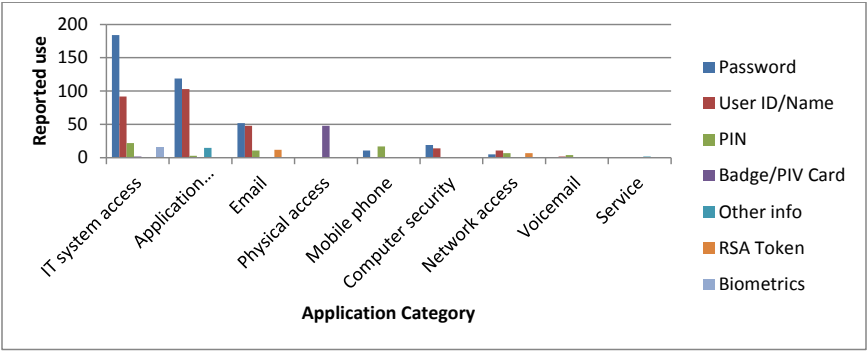
集合縦棒グラフです。縦軸は「Reported use」(0〜200、50刻み)、横軸は「Application Category」で、IT system access、Application...、Email、Physical access、Mobile phone、Computer security、Network access、Voicemail、Service の分類が並びます。凡例は Password、User ID/Name、PIN、Badge/PIV Card、Other info、RSA Token、Biometrics です。IT system access の棒が最も高く(Password 約184、User ID/Name 約92、PIN 約22、Biometrics 約16)、次が Application software(Password 約119、User ID/Name 約103、Other info 約15)です。Email は Password 約52、User ID/Name 約48 と小さな PIN・RSA Token の棒、Physical access は Badge/PIV Card の棒(約48)だけで、ほかの分類の棒は小さくなっています。
Figure 9: Authentication elements used for authentication by application category
図 9: アプリケーションのカテゴリ別に認証で使用された認証要素
The application categories that demanded the largest average number of elements for authentication were IT system access and Application software. Reported password use was higher than username/ID use in several categories; in these cases it is expected that the username portion of the authentication event had already been supplied by the application. For example, a locked computer session inherently has a user ID associated with it. Also of note is the fact that mobile phone users reported using both PINs and passwords to access their devices, when in fact it is possible some of these elements were mis-reported, i.e., that elements labeled as passwords were actually PINs.
認証に最も多くの平均要素数を求めたアプリケーションのカテゴリは、IT システムアクセスとアプリケーションソフトウェアでした。いくつかのカテゴリでは、報告されたパスワードの使用がユーザー名/ID の使用を上回っていましたが、これらの場合は、認証イベントのユーザー名の部分が、アプリケーションによってすでに提供されていたと考えられます。たとえば、ロックされたコンピュータのセッションには、本質的にユーザー ID が関連付けられています。また、携帯電話のユーザーが、デバイスにアクセスするために PIN とパスワードの両方を使用したと報告していることも注目に値します。実際には、これらの要素の一部が誤って報告された、すなわちパスワードとラベル付けされた要素が実際には PIN であった可能性があります。
4.4.3 Authentication information memorization and memory aids
4.4.3 認証情報の記憶と記憶補助
Participants in this study reported using a variety of memory aids to help them avoid mistakes while performing their authentication tasks during the study period. In this case, we define a “memory aid” as anything that helped relieve some of the authentication-related pressures on participants’ memories. By this definition, a memory aid could be a record of passwords and PINs, or a non-password authentication mechanism (such as a fingerprint reader) that helps minimize the need to use passwords at all. Note that authentication tasks that did not involve memory use by design, e.g., physical access using a badge and badge reader, are delineated as such. However, there were some events where the participant could provide something they are, such as a fingerprint, as opposed to something they know, like a password. In this type of event where participants chose to use fingerprint scanners rather than provide one or more other elements, the use of biometric information was considered a memory aid.
この調査の参加者は、調査期間中に認証タスクを実行する際の間違いを避ける助けとなる、さまざまな記憶補助を使用したと報告しました。ここでは、「記憶補助」を、認証に関連する参加者の記憶への負担をいくらか軽減する助けとなるものすべてと定義します。この定義により、記憶補助は、パスワードと PIN の記録でもあり、あるいはパスワードの必要性を最小限に抑えるのに役立つ、指紋リーダーなどのパスワード以外の認証の仕組みでもありえます。バッジとバッジリーダーを使った物理アクセスなど、設計上、記憶の使用を伴わない認証タスクは、そのように区別されています。ただし、参加者が、パスワードのような知っているものではなく、指紋のような本人自身のものを提供できるイベントもありました。参加者が、他の 1 つ以上の要素を提供するのではなく、指紋スキャナーを使うことを選んだこの種のイベントでは、生体情報の使用は記憶補助とみなされました。
While all participants reported having at least some passwords and PINs memorized, all but two participants reported using some type of memory aid. Some stored their passwords in a client such as a Web browser, or wrote them down in an electronic file or on paper. Others used password manager programs or secure USB drives.8 Participants also used strategies such as keeping a designated “root” segment of a password the same and changing a predefined part of it every time that password was about to expire.
すべての参加者は、少なくとも一部のパスワードと PIN を記憶していると報告しましたが、2 人を除くすべての参加者が、何らかの種類の記憶補助を使用していると報告しました。パスワードを Web ブラウザなどのクライアントに保存したり、電子ファイルや紙に書き留めたりする人もいました。パスワードマネージャーのプログラムや安全な USB ドライブを使う人もいました。8 参加者はまた、パスワードの指定された「ルート」部分を同じに保ち、そのパスワードが期限切れになるたびに、事前に決めた部分を変更するといった戦略も使っていました。
4.4.3.1 Memorization reported
4.4.3.1 報告された記憶
All participants recorded at least one event where they reported having used a memorized authentication element for authentication during the study period. Indeed, of the total 528 events, 353 events (66.86%) were reported as having at least one element that was described as memorized. Note that it was often the case where multiple elements were required for an event, the diary form did not prompt participants to note which elements were memorized, only to indicate if at least one was memorized.
すべての参加者は、調査期間中に、記憶した認証要素を認証に使用したと報告したイベントを、少なくとも 1 件記録しました。実際、合計 528 件のイベントのうち、353 件(66.86 %)のイベントで、少なくとも 1 つの要素が記憶されていたと記述されたと報告されました。1 件のイベントに複数の要素が必要な場合が多く、日誌用紙は、どの要素が記憶されていたかを記載するよう参加者に促さず、少なくとも 1 つが記憶されていたかどうかを示すよう求めただけであることに注意してください。
For these 353 events, where one or more elements used in the event’s authentication task were reported to be memorized, Table 4 shows how many events were reported being used for the types of memory aids reported. The data reported in Table 4 were collected from both diaries and follow-up interviews.
これらの 353 件のイベント、すなわちイベントの認証タスクで使用された 1 つ以上の要素が記憶されていたと報告されたイベントについて、表 4 は、報告された各種類の記憶補助が使用されたイベント数を示します。表 4 のデータは、日誌とフォローアップインタビューの両方から収集されました。
Table 4: Memory aid use where one or more elements were memorized
表 4: 1 つ以上の要素を記憶していた場合の記憶補助の使用
| Memory Aid | Number of events |
|---|---|
| Paper note | 34 |
| Maintaining the same root or stem for passwords while varying one or more parts | 8 |
| Biometric (fingerprint) | 5 |
| Client application storage (e.g., Web browser) | 5 |
| Configuring the computer or application to use local user ID information | 3 |
| Electronic file | 2 |
| Memorable phrase | 2 |
| Total number of events in which memory aids were employed when elements were reported being memorized | 59 |
| 記憶補助 | イベント数 |
|---|---|
| 紙のメモ | 34 |
| 1 つ以上の部分を変えながら、パスワードの同じルートまたは語幹を維持する | 8 |
| 生体情報(指紋) | 5 |
| クライアントアプリケーションの保存機能(たとえば Web ブラウザ) | 5 |
| コンピュータまたはアプリケーションを、ローカルのユーザー ID 情報を使うように構成する | 3 |
| 電子ファイル | 2 |
| 覚えやすいフレーズ | 2 |
| 要素を記憶していたと報告された場合に、記憶補助が使われたイベントの総数 | 59 |
As shown in Table 4, of these 353 events, participants reported 59 events where a memory aid was used. Put another way, participants reported a total of 294 events where the authentication task was completed by use of memory without additional aid. In the context of all events reported for the study period, this is 294 of 528 total events, or 55.5%.
表 4 に示すように、これらの 353 件のイベントのうち、参加者は、記憶補助が使われたイベントを 59 件報告しました。言い換えれば、参加者は、追加の補助なしに記憶を使って認証タスクが完了したイベントを、合計 294 件報告しました。調査期間中に報告されたすべてのイベントという文脈では、これは全 528 件のうち 294 件、すなわち 55.5 % です。
4.4.3.2 Memorization not reported
4.4.3.2 報告されなかった記憶
For the 175 events where authentication information was not reported as being memorized, 50 events were of the type that required the participant to provide a sole physical authentication element (something you have), e.g., an identification or library card; therefore information recall was not a part of the authentication task. Additionally, five events were for authentication prompts that the participant aborted without entering information (the participant did not know why the prompt appeared). And finally, eleven events were reported without indication that one or more elements were memorized or that memory aids were used. The omission of the memory aid information appeared to be an oversight by these participants, as each participant who omitted the memory aid information for these eleven events recorded the memory aid information for other events reported in their diaries.
認証情報が記憶されていたと報告されなかった 175 件のイベントのうち、50 件は、参加者が唯一の物理的な認証要素(持っているもの)、たとえば身分証明書や図書館カードを提供することを求めるタイプのイベントでした。したがって、情報の想起は認証タスクの一部ではありませんでした。さらに、5 件のイベントは、参加者が情報を入力せずに中止した認証のプロンプトに関するものでした(参加者は、プロンプトが表示された理由を知りませんでした)。そして最後に、11 件のイベントは、1 つ以上の要素が記憶されていたことや、記憶補助が使われたことを示さずに報告されました。これらの 11 件のイベントについて記憶補助の情報を省略した各参加者が、日誌に報告した他のイベントでは記憶補助の情報を記録していたため、記憶補助の情報の省略は、これらの参加者の見落としであったと思われます。
For the remaining 109 events, participants did not report memorizing the elements required for authentication and relying on other aids to help them complete the authentication task.
残りの 109 件のイベントでは、参加者は、認証に必要な要素を記憶していたことも、認証タスクの完了を助ける他の補助に頼っていたことも報告しませんでした。
Table 5 shows how often the different types of memory aids were noted as being used for events where participants did not report elements being memorized. Again, the data were extracted from both participant diaries and follow-up interviews.
表 5 は、参加者が要素を記憶したと報告しなかったイベントで、さまざまな種類の記憶補助が使われたと記されたのが、どのくらいの頻度であったかを示します。ここでも、データは、参加者の日誌とフォローアップインタビューの両方から抽出しました。
Table 5: Memory aids used when memorization not reported
表 5: 記憶したという報告がなかった場合に使用された記憶補助
| Memory Aid | Number of events |
|---|---|
| Client application storage (e.g., Web browser) | 59 |
| Paper note | 14 |
| Vaults and managers (e.g., IronKey, KeePass) | 13 |
| Biometric (fingerprint) | 11 |
| Electronic file | 8 |
| OAuth9 used to attempt recovery of forgotten information | 4 |
| E-mail used to attempt recovery of forgotten information | 3 |
| Total number of memory aids employed when elements were reported not being memorized | 112* |
| 記憶補助 | イベント数 |
|---|---|
| クライアントアプリケーションの保存機能(たとえば Web ブラウザ) | 59 |
| 紙のメモ | 14 |
| ボールトとマネージャー(たとえば IronKey、KeePass) | 13 |
| 生体情報(指紋) | 11 |
| 電子ファイル | 8 |
| 忘れた情報の復旧を試みるために使用された OAuth9 | 4 |
| 忘れた情報の復旧を試みるために使用された電子メール | 3 |
| 要素を記憶していなかったと報告された場合に使われた記憶補助の総数 | 112* |
* Note that one participant reported using two memory aids for the authentication information used in three events, relating where a password was written on paper as well as stored in an application, which resulted in three reported uses of memory aids beyond the 109 events for this category. These data show that only one participant reported using a “back-up” method for authentication retrieval for elements that were not memorized, while other participants relied on one chosen method, without reporting the use of additional methods for authentication element retrieval in the event that their primary method failed in some way.
* 1 人の参加者が、3 件のイベントで使用した認証情報について、パスワードを紙に書き留めるとともにアプリケーションに保存するという 2 つの記憶補助を使用したと報告したため、このカテゴリの 109 件を超える 3 件分の記憶補助の使用が報告されたことに注意してください。これらのデータは、記憶していない要素の認証情報を取り出すための「バックアップ」方法を使用したと報告した参加者は 1 人だけであり、他の参加者は、主要な方法が何らかの形で失敗した場合に認証要素を取り出すための追加の方法を使用したとは報告せず、選んだ 1 つの方法に頼っていたことを示しています。
The previous two tables show how many times, i.e., the frequency expressed in number of events, each memory aid was used in the context of authentication information memorization. The next subsection presents how many memory aids participants reported using overall and the context of authentication information memorization when it was available.
前の 2 つの表は、認証情報の記憶に関連して、各記憶補助が使用された回数、すなわちイベント数で表した頻度を示しています。次の小節では、参加者が全体としていくつの記憶補助を使用したと報告したか、および認証情報が記憶されていた場合における記憶補助の使用状況を示します。
4.4.3.3 Number of memory aids used
4.4.3.3 使用された記憶補助の数
Through their diary entries and interviews, each participant reported on the types and number of memory aids employed. Figure 10 shows the distribution of how many memory aids participants reported using. This data were extracted from both the diary and interview data. The use of two different memory aids was the most commonly reported situation (nine participants); however two participants reported not using any memory aids, while one participant reported using five different memory aids for the various authentication elements required over the course of the study period.
各参加者は、日誌の記入とインタビューを通じて、使用した記憶補助の種類と数を報告しました。図 10 は、参加者が使用したと報告した記憶補助の数の分布を示します。このデータは、日誌とインタビューのデータの両方から抽出されました。2 種類の異なる記憶補助の使用が、最もよく報告された状況でした(9 人の参加者)。ただし、2 人の参加者は記憶補助をまったく使っていないと報告し、1 人の参加者は、調査期間中に必要だったさまざまな認証要素に対して、5 種類の異なる記憶補助を使用したと報告しました。
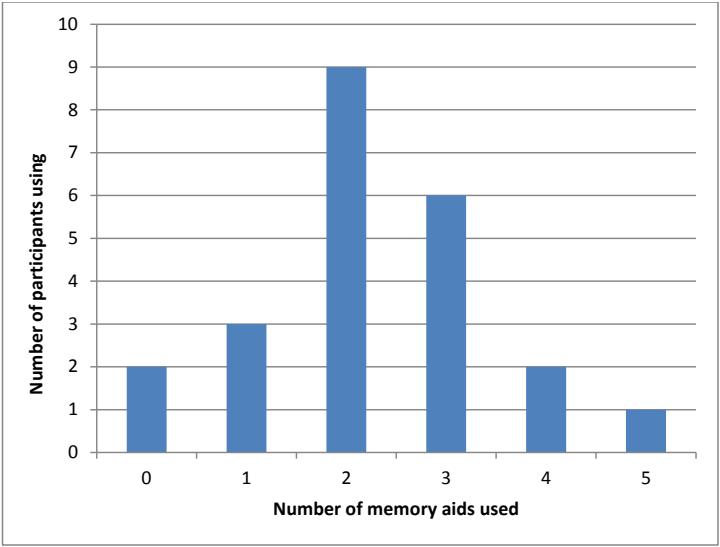
棒グラフです。縦軸は「Number of participants using」(0〜10)、横軸は「Number of memory aids used」(0〜5)です。棒の値は、0個が2人、1個が3人、2個が9人、3個が6人、4個が2人、5個が1人です。
Figure 10: Number of authentication memory aids used by participants
図 10: 参加者が使用した認証の記憶補助の数
As noted earlier, participants also reported whether one or more authentication elements for each event were memorized; this was usually associated with a password or PIN. The diary data can be viewed by which types of memory aids were noted when participants reported that one or more authentications elements were memorized or not. The next segment explores this perspective.
前述のように、参加者は各イベントの認証要素を 1 つ以上記憶していたかどうかも報告しており、これは通常、パスワードまたは PIN に関するものでした。日誌データは、参加者が 1 つ以上の認証要素を記憶していたかどうかを報告した際に、どの種類の記憶補助が記録されたかという観点から見ることができます。次の箇所では、この観点を検討します。
Table 6 shows how many participants used each memory aid that was reported being used in both the diaries and interviews. The two middle columns in the table provide insights from the diary data to distinguish which memory aids were used when one or more authentication elements were reported as being memorized. The right-most column (heavy shading) in the table provides data on memory aid use from the follow-up interviews. In particular, this data comes from the interview question, “What kinds of tricks do you use to make authentication easier or more efficient for yourself?” Often the number of participants detailing use of a particular memory aid in their diary did not match with their reported memory aid use during the later interview.
表 6 は、日誌とインタビューの両方で使用したと報告された各記憶補助を、何人の参加者が使用したかを示します。表の中央の 2 つの列は、1 つ以上の認証要素が記憶されていたと報告された場合に、どの記憶補助が使われたかを区別するための、日誌データからの知見を示します。表の右端の列(濃い網掛け)は、フォローアップインタビューからの記憶補助の使用に関するデータを示します。特に、このデータは、「認証を自分にとってより簡単で効率的にするために、どのような工夫をしていますか」というインタビューの質問から得られたものです。日誌で特定の記憶補助の使用を詳述した参加者の数は、その後のインタビューで報告された記憶補助の使用と一致しないことがよくありました。
Again, events where an authentication element of the type “something you have”, e.g., a identification or library card was required and no other authentication information was used, and where the element was not substituted for “something you know”, e.g., a fingerprint instead of a password, were excluded from the table below.
ここでも、「持っているもの」に該当する身分証明書や図書館カードなどの認証要素だけが必要で、他の認証情報が使われなかったイベント、およびその要素が「知っているもの」に該当する要素(たとえばパスワード)の代わりとして使われたのではないイベントは、下の表から除外されました。
Table 6: Authentication memory aids used by participants
表 6: 参加者が使用した認証の記憶補助
| Memory Aid | … when elements(s) memorized | … when elements(s) NOT memorized | Use reported during interview10 |
|---|---|---|---|
| Client application storage (e.g., Web browser) | 1 | 12 | 3 |
| Paper note | 5 | 6 | 5 |
| Electronic file | 1 | 3 | 3 |
| Biometric (fingerprint) | 1 | 3 | 3 |
| Vaults and managers (e.g., IronKey, KeePass) | 0 | 2 | 4 |
| E-mail hints, reminders, or passwords | 0 | 2 | 0 |
| OAuth | 0 | 1 | 0 |
| Configuring the computer or application to use local user ID information | 1 | 0 | 0 |
| Maintaining the same root or stem for passwords while varying one or more parts | 1 | 0 | 5 |
| Memorable phrase | 1 | 0 | 1 |
| Using the same password across all applications (where possible) | 0 | 0 | 2 |
| 記憶補助 | …要素を記憶していた場合 | …要素を記憶していなかった場合 | インタビューで報告された使用10 |
|---|---|---|---|
| クライアントアプリケーションの保存機能(たとえば Web ブラウザ) | 1 | 12 | 3 |
| 紙のメモ | 5 | 6 | 5 |
| 電子ファイル | 1 | 3 | 3 |
| 生体情報(指紋) | 1 | 3 | 3 |
| ボールトとマネージャー(たとえば IronKey、KeePass) | 0 | 2 | 4 |
| 電子メールのヒント、リマインダー、またはパスワード | 0 | 2 | 0 |
| OAuth | 0 | 1 | 0 |
| コンピュータまたはアプリケーションを、ローカルのユーザー ID 情報を使うように構成する | 1 | 0 | 0 |
| 1 つ以上の部分を変えながら、パスワードの同じルートまたは語幹を維持する | 1 | 0 | 5 |
| 覚えやすいフレーズ | 1 | 0 | 1 |
| (可能な場合)すべてのアプリケーションで同じパスワードを使う | 0 | 0 | 2 |
From the perspective of which memory aids were reported being used by the most participants, use of client authentication information storage, e.g., Web browser storage, was the most prevalent. Use of the paper note was the next most commonly employed memory aid. Use of electronic files and biometric (fingerprint) data was next highest in reported use. In addition to the first four listed aids, password vaults, managers, e-mail, and OAuth were the types of memory aids used when authentication information was not reported being memorized – note conversely these aids were not used when information was reported being memorized (table entries are lightly shaded). Likewise, there were three memory aids used exclusively when elements were reported being memorized: configuring the computer to use the local user ID, maintaining the same root or stem, and use of a memorable phrase (medium shading), in addition to the top four listed memory aids. Finally, two participants reported in the follow-up interviews, use of the strategy of attempting to use the same password across all applications.
最も多くの参加者が使用したと報告された記憶補助という観点では、Web ブラウザの保存機能など、クライアントでの認証情報保存が最も一般的でした。次に多く使用された記憶補助は紙のメモでした。報告された使用数では、電子ファイルと生体情報(指紋)データがその次に多くなっていました。最初に挙げた 4 種類の補助に加え、パスワードボールト、マネージャー、電子メール、OAuth は、認証情報を記憶していなかったと報告された場合に使われていました。反対に、情報を記憶していたと報告された場合には、これらの補助は使われていませんでした(表の該当項目は薄い網掛けです)。同様に、上位 4 種類の記憶補助に加え、要素を記憶していたと報告された場合にだけ使われた補助が 3 種類ありました。ローカルのユーザー ID 情報を使うようコンピュータを構成すること、パスワードの同じルートまたは語幹を維持すること、覚えやすいフレーズを使うことです(中程度の網掛け)。最後に、2 人の参加者がフォローアップインタビューで、すべてのアプリケーションで同じパスワードを使おうとする戦略を使用したと報告しました。
The memory aids discussed in this section are part of a larger collection of coping mechanisms our participants reported using to deal with authentication. We explore these coping mechanisms – memory aids included – in more detail in Sec. 6.4.
この節で論じた記憶補助は、参加者が認証に対処するために使用したと報告した、より大きな対処の仕組みの集まりの一部です。これらの対処の仕組みを、記憶補助も含めて、第 6.4 節でより詳しく探ります。
4.4.4 Authentication problems
4.4.4 認証の問題
15 of the 23 participants who logged authentication event data for the study reported having one or more authentication problems during the study period. Of the 528 total events recorded, 48 (or 9.09%) were “problematic” (meaning that participants experienced some problem during those events). Figure 11 shows the number of problems in relation to all events reported by each participant during the study period.
調査のために認証イベントデータを記録した 23 人の参加者のうち 15 人が、調査期間中に 1 件以上の認証の問題があったと報告しました。記録された合計 528 件のイベントのうち、48 件(9.09 %)が「問題のある」イベントでした(つまり、参加者がそれらのイベント中に何らかの問題を経験したことを意味します)。図 11 は、調査期間中に各参加者が報告したすべてのイベントに対する、問題の数を示します。
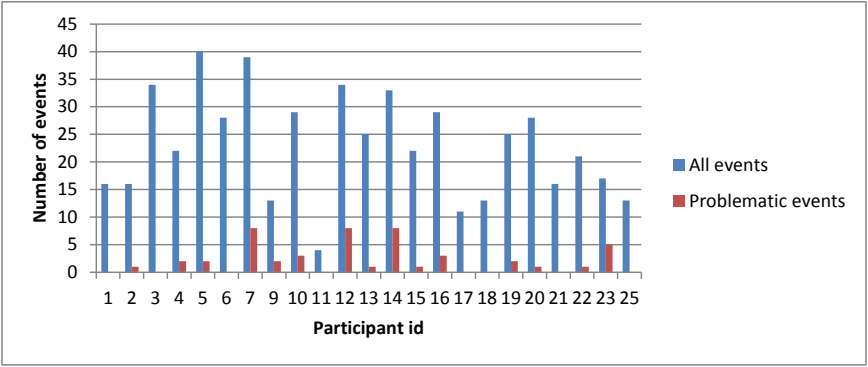
集合縦棒グラフです。縦軸は「Number of events」(0〜45、5刻み)、横軸は「Participant id」で、参加者 1、2、3、4、5、6、7、9、10、11、12、13、14、15、16、17、18、19、20、21、22、23、25 が並びます。凡例は All events(青)と Problematic events(赤)です。参加者ごとの全イベント数は約4(参加者11)から約40(参加者5)まであり、問題のあったイベントは少なく、参加者7・12・14 が約8、参加者23 が約5 で最も高く、赤い棒のない参加者も複数います。
Figure 11: Number of authentication problems reported by each participant
図 11: 各参加者が報告した認証の問題の数
The average number of authentication problems per participant was 2.09 ± 2.66 SD.55; three participants reported eight problems each, while eight participants did not report encountering any authentication problems during the study period.
参加者 1 人あたりの認証の問題の平均数は 2.09 ± 2.66 SD.55 でした。3 人の参加者がそれぞれ 8 件の問題を報告した一方、8 人の参加者は、調査期間中に認証の問題に遭遇しなかったと報告しました。
Table 7 shows the types of problems reported by each participant, along with the number of occurrences of each type of problem (for a total of 48 authentication events with a reported problem). The most common authentication problem was mistyping one’s password (50.00%), followed by using the wrong password and problems due to an unknown cause (14.58% each). As stated earlier, there were five events where the unknown cause reported by one participant was a case where an application was requesting authentication information, seemingly without cause; the participants reporting the remaining two events of unknown cause simply could not detect the cause of a failed authentication attempt.
表 7 は、各参加者が報告した問題の種類と、各種類の問題の発生回数を示します(問題が報告された認証イベントは合計 48 件)。最もよくある認証の問題は、パスワードの入力ミス(50.00 %)で、誤ったパスワードの使用と、原因不明による問題(それぞれ 14.58 %)がそれに続きました。前述のように、1 人の参加者が報告した原因不明のものには、アプリケーションが、明らかな理由なく認証情報を要求していた 5 件のイベントがありました。原因不明の残りの 2 件のイベントを報告した参加者は、認証の試行が失敗した原因を単に特定できませんでした。
Table 7: Authentication problems reported
表 7: 報告された認証の問題
| Problem or issue | Number of occurrences | Percentage Of problems | Percentage of all events |
|---|---|---|---|
| Mistyped password | 24 | 50.00% | 4.55% |
| Unknown cause | 7 | 14.58% | 1.33% |
| Used wrong password | 7 | 14.58% | 1.33% |
| Account/password not recovered | 2 | 4.17% | 0.38% |
| Forgot password | 2 | 4.17% | 0.38% |
| Caps lock on | 1 | 2.08% | 0.19% |
| Could not find where to enter password | 1 | 2.08% | 0.19% |
| Forced to strengthen weak password | 1 | 2.08% | 0.19% |
| Forgot user ID | 1 | 4.08% | 0.19% |
| Password change required re-authentication11 | 1 | 2.08% | 0.19% |
| Trouble finding (written) memory aid | 1 | 2.08% | 0.19% |
| 問題または課題 | 発生回数 | 問題に占める割合 | 全イベントに占める割合 |
|---|---|---|---|
| パスワードの入力ミス | 24 | 50.00% | 4.55% |
| 原因不明 | 7 | 14.58% | 1.33% |
| 誤ったパスワードの使用 | 7 | 14.58% | 1.33% |
| アカウント・パスワードを復旧できなかった | 2 | 4.17% | 0.38% |
| パスワードを忘れた | 2 | 4.17% | 0.38% |
| Caps Lock がオンだった | 1 | 2.08% | 0.19% |
| パスワードの入力場所が見つからなかった | 1 | 2.08% | 0.19% |
| 弱いパスワードの強化を強制された | 1 | 2.08% | 0.19% |
| ユーザー ID を忘れた | 1 | 2.08% | 0.19% |
| パスワードの変更により再認証が必要になった11 | 1 | 2.08% | 0.19% |
| (書き留めた)記憶補助を探すのに手間取った | 1 | 2.08% | 0.19% |
4.4.5 Actions taken after encountering authentication problems
4.4.5 認証の問題に遭遇した後にとられた行動
Participants were asked to report what actions they took after encountering a problem during authentication. 13 participants reported a total of 43 actions taken after encountering authentication problems. “Try again immediately” was the most commonly employed action by a large margin. This is not surprising given that the most common problems reported were mistyped passwords or using the wrong password. The next most common action was “dismiss pop-up,” which requires some explanation. This was the user’s solution to a problem stemming from a glitch in the PIV card middleware used by participants with the Windows XP operating system. The problem occurred when a user logged into the computer and by extension the e-mail client using his/her PIV card, removed the card to lock the computer, and later unlocked the computer with a user ID and password. The e-mail client would detect that the user ID and password, while valid, did not match the authentication information originally used to log in, and would generate a pop-up. It did not, however, require re-authentication, so dismissing the pop-up was the only action the user needed to perform.
参加者は、認証中に問題に遭遇した後、どのような行動をとったかを報告するよう求められました。13 人の参加者が、認証の問題に遭遇した後にとられた行動を、合計 43 件報告しました。「すぐに再試行する」が、大差で最もよくとられた行動でした。最もよく報告された問題が、パスワードの入力ミスまたは誤ったパスワードの使用であったことを考えると、これは驚くべきことではありません。次に多かった行動は「ポップアップを閉じる」で、これには説明が必要です。これは、Windows XP オペレーティングシステムの参加者が使っていた PIV カードのミドルウェアの不具合に起因する問題に対する、ユーザーの解決策でした。この問題は、ユーザーが PIV カードを使ってコンピュータに、ひいては電子メールクライアントにログインし、コンピュータをロックするためにカードを抜いて、その後ユーザー ID とパスワードでコンピュータのロックを解除した場合に発生しました。電子メールクライアントは、ユーザー ID とパスワードが有効であっても、最初にログインに使われた認証情報と一致しないことを検出し、ポップアップを表示します。ただし、再認証は要求されなかったため、ポップアップを閉じることが、ユーザーが行う必要のある唯一の行動でした。
Each action category is given in Table 8, along with the number of times used and the percentage of the 43 total actions.
各行動のカテゴリを、使用回数と、合計 43 件の行動に占める割合とともに、表 8 に示します。
Table 8: Actions taken after authentication problems
表 8: 認証の問題の後にとられた行動
| Strategy | # of times used | % of times used |
|---|---|---|
| Try again immediately | 30 | 69.77% |
| Dismiss pop-up | 5 | 11.63% |
| Contact NIST support | 2 | 4.65% |
| Correct and resubmit | 2 | 4.65% |
| Ask a colleague | 1 | 2.33% |
| Give up | 1 | 2.33% |
| Log out and back in | 1 | 2.33% |
| Review memory aid | 1 | 2.33% |
| 戦略 | 使用回数 | 使用回数の割合 |
|---|---|---|
| すぐに再試行する | 30 | 69.77% |
| ポップアップを閉じる | 5 | 11.63% |
| NIST のサポートに連絡する | 2 | 4.65% |
| 修正して再送信する | 2 | 4.65% |
| 同僚にたずねる | 1 | 2.33% |
| あきらめる | 1 | 2.33% |
| ログアウトして再度ログインする | 1 | 2.33% |
| 記憶補助を確認する | 1 | 2.33% |
4.4.6 Participant frustration ratings
4.4.6 参加者のフラストレーション評価
Participants were asked to rate their level of frustration for any problems they encountered on a scale of 1 to 5, with 1 being “Not Frustrated” and 5 being “Very Frustrated.” Some participants gave a frustration rating even when they did not record having any problems, and some did not record a frustration rating even when they did record problems.
参加者は、遭遇した問題について、フラストレーションのレベルを 1 から 5 の尺度で評価するよう求められました。1 は「フラストレーションなし」、5 は「非常にフラストレーションが大きい」です。問題を記録しなかった場合でもフラストレーションの評価を行った参加者や、問題を記録した場合でもフラストレーションの評価を記録しなかった参加者もいました。
Unfortunately the middle position (3) of the frustration rating scale was labeled “Neutral” on the diary form: this potentially complicates the interpretation of these results, as the qualitative interview data indicates that some participants used the numbers as a rating of the strength of the frustration they experienced. In that case, 3 would not be “Neutral” but instead would designate a level of frustration higher than 2 and lower than 4.
残念ながら、フラストレーション評価の尺度の中間の位置(3)は、日誌用紙で「どちらでもない」とラベル付けされていました。質的なインタビューデータは、一部の参加者が、この数字を、経験したフラストレーションの強さの評価として使っていたことを示しているため、これは結果の解釈を複雑にする可能性があります。その場合、3 は「どちらでもない」ではなく、2 より高く 4 より低いフラストレーションのレベルを示すことになります。
Table 9 shows the total number of reported authentication events for each application, as well as how many (and relative percentage) of those events were “problematic.” The table also shows participants’ average frustration ratings with each type of application.
表 9 は、各アプリケーションについて報告された認証イベントの総数と、それらのイベントのうち「問題のある」ものがいくつあったか(およびその相対的な割合)を示します。この表はまた、各種類のアプリケーションに対する参加者の平均フラストレーション評価も示します。
Table 9: Authentication problems and frustration ratings by application
表 9: アプリケーション別の認証の問題とフラストレーション評価
| Application | # of problems | # of events | Average number of problems | Average frustration (1-5 scale) |
|---|---|---|---|---|
| IT system access | 21 | 227 | 9.25% | 1.73 |
| Local computer | 4 | 42 | 9.52% | 1.69 |
| NIST domain | 16 | 144 | 11.11% | 1.89 |
| Remote computer | 1 | 41 | 2.44% | 1.24 |
| Application software | 18 | 133 | 13.53% | 1.52 |
| Backup | 1 | 4 | 25.00% | 1.50 |
| E-conferencing | 6 | 17 | 35.29% | 1.71 |
| IT support incident mgmt sys | 0 | 3 | 0.00% | 1.00 |
| NIST application | 2 | 32 | 6.25% | 1.19 |
| NIST time & attendance | 6 | 21 | 28.57% | 2.46 |
| Not specified | 0 | 1 | 0.00% | 0.00 |
| Online banking | 0 | 5 | 0.00% | 3.50 |
| Online shopping | 0 | 3 | 0.00% | 1.00 |
| Web application | 3 | 47 | 6.38% | 1.26 |
| 6 | 52 | 11.54% | 1.59 | |
| NIST e-mail | 5 | 33 | 15.15% | 1.96 |
| Personal e-mail | 1 | 19 | 5.26% | 0.85 |
| Physical access | 1 | 49 | 2.04% | 1.55 |
| Building/door entry | 1 | 32 | 3.13% | 1.52 |
| Gated location | 0 | 17 | 0.00% | 1.60 |
| Mobile phone | 0 | 28 | 0.00% | 1.08 |
| Cellular/phone account | 0 | 28 | 0.00% | 1.08 |
| Computer security | 1 | 19 | 5.26% | 2.00 |
| Computer encryption | 0 | 8 | 0.00% | 2.80 |
| OS privileged access | 1 | 3 | 33.33% | 3.00 |
| Password manager | 0 | 7 | 0.00% | 0.80 |
| PC security package | 0 | 1 | 0.00% | 0.00 |
| Network access | 2 | 13 | 15.38% | 2.44 |
| NIST wireless network | 2 | 5 | 40.00% | 3.00 |
| Virtual Private Network | 0 | 7 | 0.00% | 1.75 |
| Wireless network | 0 | 1 | 0.00% | 0.00 |
| Voicemail | 0 | 5 | 0.00% | 1.20 |
| Home voicemail | 0 | 1 | 0.00% | 1.00 |
| NIST voicemail | 0 | 4 | 0.00% | 1.25 |
| Service | 0 | 2 | 0.00% | 1.00 |
| Library card | 0 | 1 | 0.00% | 0.00 |
| Purchase (debit) | 0 | 1 | 0.00% | 1.00 |
| アプリケーション | 問題の数 | イベント数 | 問題の平均数 | 平均フラストレーション(1〜5 の尺度) |
|---|---|---|---|---|
| IT システムアクセス | 21 | 227 | 9.25% | 1.73 |
| ローカルコンピュータ | 4 | 42 | 9.52% | 1.69 |
| NIST ドメイン | 16 | 144 | 11.11% | 1.89 |
| リモートコンピュータ | 1 | 41 | 2.44% | 1.24 |
| アプリケーションソフトウェア | 18 | 133 | 13.53% | 1.52 |
| バックアップ | 1 | 4 | 25.00% | 1.50 |
| 電子会議 | 6 | 17 | 35.29% | 1.71 |
| IT サポートのインシデント管理システム | 0 | 3 | 0.00% | 1.00 |
| NIST のアプリケーション | 2 | 32 | 6.25% | 1.19 |
| NIST の勤怠管理 | 6 | 21 | 28.57% | 2.46 |
| 指定なし | 0 | 1 | 0.00% | 0.00 |
| オンラインバンキング | 0 | 5 | 0.00% | 3.50 |
| オンラインショッピング | 0 | 3 | 0.00% | 1.00 |
| Web アプリケーション | 3 | 47 | 6.38% | 1.26 |
| 電子メール | 6 | 52 | 11.54% | 1.59 |
| NIST の電子メール | 5 | 33 | 15.15% | 1.96 |
| 個人用の電子メール | 1 | 19 | 5.26% | 0.85 |
| 物理アクセス | 1 | 49 | 2.04% | 1.55 |
| 建物・ドアへの入室 | 1 | 32 | 3.13% | 1.52 |
| ゲートのある場所 | 0 | 17 | 0.00% | 1.60 |
| 携帯電話 | 0 | 28 | 0.00% | 1.08 |
| 携帯電話・電話のアカウント | 0 | 28 | 0.00% | 1.08 |
| コンピュータセキュリティ | 1 | 19 | 5.26% | 2.00 |
| コンピュータの暗号化 | 0 | 8 | 0.00% | 2.80 |
| OS の特権アクセス | 1 | 3 | 33.33% | 3.00 |
| パスワードマネージャー | 0 | 7 | 0.00% | 0.80 |
| PC セキュリティパッケージ | 0 | 1 | 0.00% | 0.00 |
| ネットワークアクセス | 2 | 13 | 15.38% | 2.44 |
| NIST の無線ネットワーク | 2 | 5 | 40.00% | 3.00 |
| 仮想プライベートネットワーク | 0 | 7 | 0.00% | 1.75 |
| 無線ネットワーク | 0 | 1 | 0.00% | 0.00 |
| ボイスメール | 0 | 5 | 0.00% | 1.20 |
| 自宅のボイスメール | 0 | 1 | 0.00% | 1.00 |
| NIST のボイスメール | 0 | 4 | 0.00% | 1.25 |
| サービス | 0 | 2 | 0.00% | 1.00 |
| 図書館カード | 0 | 1 | 0.00% | 0.00 |
| 購入(デビット) | 0 | 1 | 0.00% | 1.00 |
While we expected participants to assign relatively high frustration ratings to applications that frequently had authentication problems, we were surprised to note that participants indicated (sometimes considerable) frustration with certain applications even when they experienced few or no problems with those applications. For example, no participants reported experiencing authentication problems with online banking or computer encryption, but the average frustration ratings associated with these applications were among the highest on the list. Other applications that participants reported as problem-free but somewhat frustrating were the NIST VPN (1.75) and entering a gated location on the NIST campus (1.6). This data suggests that additional factors beyond an actual “problem” experienced by a participant during a specific authentication event (or not), influence the frustration rating recorded for the event.
認証の問題が頻繁にあったアプリケーションに、参加者が比較的高いフラストレーション評価を付けることは予想していましたが、特定のアプリケーションについて、問題がほとんど、あるいはまったくなかった場合でも、参加者が(時にはかなりの)フラストレーションを示したことには驚きました。たとえば、オンラインバンキングやコンピュータの暗号化で認証の問題を経験したと報告した参加者はいませんでしたが、これらのアプリケーションに関連する平均フラストレーション評価は、一覧の中で最も高いものに含まれていました。参加者が問題なしと報告しましたが、いくぶんフラストレーションを感じたその他のアプリケーションは、NIST の VPN(1.75)と、NIST のキャンパスのゲートのある場所への入場(1.6)でした。このデータは、特定の認証イベントの間に参加者が実際に経験した「問題」(の有無)以外の追加の要因が、そのイベントについて記録されたフラストレーション評価に影響することを示唆しています。
Table 10 displays the total number of authentication events each participant recorded during the reporting period, their total number of problem events, and the average level of frustration experienced by each. If a participant did not give any frustration ratings, the relevant cell in the “Average frustration” column contains a dash (-) rather than a number.
表 10 は、各参加者が報告期間中に記録した認証イベントの総数、問題イベントの総数、およびそれぞれが経験した平均のフラストレーションのレベルを示します。参加者がフラストレーション評価をまったく付けなかった場合、「平均フラストレーション」の列の該当するセルには、数値ではなくダッシュ(-)が入っています。
Table 10: Individual participants’ problem events and average frustration ratings
表 10: 個々の参加者の問題イベントと平均フラストレーション評価
| Participant | Total # of events | # Events with problems | Average frustration (1-5 scale) |
|---|---|---|---|
| 1 | 16 | 0 | - |
| 2 | 15 | 1 | 1.53 |
| 3 | 34 | 0 | 0.6512 |
| 4 | 22 | 2 | 1.00 |
| 5 | 40 | 2 | - |
| 6 | 28 | 0 | 1.64 |
| 7 | 39 | 9 | 1.53 |
| 9 | 13 | 2 | 1.00 |
| 10 | 29 | 3 | 5.00 |
| 11 | 4 | 0 | 1.00 |
| 12 | 34 | 8 | 2.63 |
| 13 | 24 | 1 | 4.67 |
| 14 | 34 | 8 | 3.09 |
| 15 | 22 | 1 | 1.05 |
| 16 | 29 | 3 | 3.33 |
| 17 | 11 | 0 | 1.60 |
| 18 | 13 | 0 | 1.00 |
| 19 | 25 | 2 | 1.00 |
| 20 | 28 | 1 | 1.25 |
| 21 | 16 | 0 | - |
| 22 | 21 | 1 | 2.76 |
| 23 | 17 | 5 | 3.00 |
| 25 | 13 | 0 | 1.08 |
| 参加者 | イベント総数 | 問題のあるイベント数 | 平均フラストレーション(1〜5 の尺度) |
|---|---|---|---|
| 1 | 16 | 0 | - |
| 2 | 15 | 1 | 1.53 |
| 3 | 34 | 0 | 0.6512 |
| 4 | 22 | 2 | 1.00 |
| 5 | 40 | 2 | - |
| 6 | 28 | 0 | 1.64 |
| 7 | 39 | 9 | 1.53 |
| 9 | 13 | 2 | 1.00 |
| 10 | 29 | 3 | 5.00 |
| 11 | 4 | 0 | 1.00 |
| 12 | 34 | 8 | 2.63 |
| 13 | 24 | 1 | 4.67 |
| 14 | 34 | 8 | 3.09 |
| 15 | 22 | 1 | 1.05 |
| 16 | 29 | 3 | 3.33 |
| 17 | 11 | 0 | 1.60 |
| 18 | 13 | 0 | 1.00 |
| 19 | 25 | 2 | 1.00 |
| 20 | 28 | 1 | 1.25 |
| 21 | 16 | 0 | - |
| 22 | 21 | 1 | 2.76 |
| 23 | 17 | 5 | 3.00 |
| 25 | 13 | 0 | 1.08 |
Eight participants (1, 3, 6, 11, 17, 18, 21, and 25) did not record any problems, while five participants (2, 13, 15, 20, and 22) recorded experiencing 1 authentication problem during the reporting period. Ten participants (4, 5, 7, 9, 10, 12, 14, 16, 19, and 23) recorded experiencing multiple problems. Five participants (10, 13, 14, 16 and 23) had average frustration ratings of 3.0 or higher. Note that participants’ frustration level did not always correlate with the number of problems they encountered during the reporting period: for example, participant 13 reported one problem but recorded an average frustration level of 4.67, while participant 7 reported eight problems but had a much lower average level of 1.53.
8 人の参加者(1、3、6、11、17、18、21、25)は問題を記録せず、5 人の参加者(2、13、15、20、22)は、報告期間中に 1 件の認証の問題を経験したと記録しました。10 人の参加者(4、5、7、9、10、12、14、16、19、23)は、複数の問題を経験したと記録しました。5 人の参加者(10、13、14、16、23)は、平均フラストレーション評価が 3.0 以上でした。参加者のフラストレーションのレベルが、報告期間中に遭遇した問題の数と常に相関していたわけではないことに注意してください。たとえば、参加者 13 は 1 件の問題を報告しましたが、平均フラストレーションのレベルは 4.67 と記録した一方、参加者 7 は 8 件の問題を報告しましたが、平均のレベルははるかに低い 1.53 でした。
5 VISUALIZING THE EFFECTS OF AUTHENTICATION: THE USER EXPERIENCE
5 認証の影響の可視化: ユーザーエクスペリエンス
One of the goals of this study was to understand better how authentication affected users over the course of a workday. To that end, the data captured from participants’ diaries and follow-up interviews were used to quantify and chart their individual experiences during the data collection period.
この調査の目標の 1 つは、認証が 1 日の勤務中にユーザーにどのような影響を与えるかを、よりよく理解することでした。そのために、参加者の日誌とフォローアップインタビューから得られたデータを用いて、データ収集期間中の個々の経験を定量化し、チャートにしました。
As presented at the beginning of Sec. 4, the 23 participants reported a total of 528 application events during the data collection period, meaning they each experienced an average of 23 authentication events. After observing the results presented in Sec. 4, the research team members posed additional questions of the data in an attempt to break down these numbers even further: Do the authentication events tend to happen at particular times of the day? Do authentication problems occur at certain times of the day more than other times of the day?
第 4 節の冒頭で示したように、23 人の参加者は、データ収集期間中に合計 528 件のアプリケーションイベントを報告し、これは、各人が平均 23 件の認証イベントを経験したことを意味します。第 4 節で示した結果を観察した後、研究チームのメンバーは、これらの数字をさらに細かく分解しようとして、データに追加の問いを立てました。認証イベントは、1 日の特定の時間帯に起こりやすいか。認証の問題は、1 日の他の時間帯よりも、特定の時間帯に多く発生しますか。
In order to answer these questions, visualizations of the diary data were generated depicting how authentication impacted a user’s day. The next sections explain how these visualizations were constructed, and the visualization for Participant 23 is displayed in Fig. 12 in Sec. 5.3 to illustrate the method employed. Visualizations for each participant are shown in Appendix B.
これらの問いに答えるために、認証がユーザーの 1 日にどのように影響したかを描く、日誌データの可視化を作成しました。次の節は、これらの可視化がどのように構築されたかを説明し、用いた方法を例示するために、参加者 23 の可視化を第 5.3 節の図 12 に示します。各参加者の可視化は、付録 B に示します。
5.1 THE “JOURNEY MAP” AS A TEMPLATE FOR USER EXPERIENCE VISUALIZATION
5.1 ユーザーエクスペリエンスの可視化のテンプレートとしての「ジャーニーマップ」
The concept of a “journey map” was the starting point for this visualization. The idea for this particular tool came from a lecture by the author Kurt Vonnegut, who used journey maps to lay out the various narrative arcs a hero might travel in the course of a story [25]. Vonnegut first started sharing this idea in the 1990s. Not much later, design firms adopted a similar approach – perhaps inspired by Vonnegut’s visualization of the storyline – to “map” the customer “journey” as customers encounter an organization, interact with it, and then end the relationship or start a new cycle. A discipline of design called service design [22][23] regularly uses a variant to depict customer experience touch points with a particular service and factors involved in those customer interactions with the service that might be causing highs and lows.
この可視化の出発点は、「ジャーニーマップ」の概念でした。この特定のツールのアイデアは、作家の Kurt Vonnegut の講義から得られました。彼は、物語の中で主人公がたどりうるさまざまな物語の弧を示すために、ジャーニーマップを使いました [25]。Vonnegut は、1990 年代にこのアイデアを共有し始めました。それからまもなく、デザイン会社が、おそらく Vonnegut の物語の筋の可視化に触発されて、顧客が組織と出会い、やり取りし、その後関係を終えるか新たなサイクルを始めるまでの顧客の「旅」を「マップ化」する、同様の手法を採用しました。サービスデザインと呼ばれるデザインの分野 [22][23] は、特定のサービスに対する顧客体験のタッチポイントと、そのサービスとの顧客のやり取りに関わる、高低の原因となりうる要因を描くために、その変種を日常的に使用しています。
The journey maps used in design are typically generated heuristically – that is, researchers or designers review user stories that sometimes come from ethnographic data, make inferences about why users had the experiences they reported, and then place users in the map accordingly, much like tracking the epic journey of a protagonist in a story.
デザインで使われるジャーニーマップは、通常、ヒューリスティックに作成されます。すなわち、研究者やデザイナーが、時にはエスノグラフィーのデータから得られるユーザーの話を確認し、ユーザーが報告した経験をした理由について推論し、物語の主人公の壮大な旅を追跡するのとよく似て、それに従ってユーザーをマップに配置します。
The research team co-opted the concept of journey maps to model and visualize the impact of authentication. Because the factors that caused, fed, and weighted disruption could be quantified, a series of formulas to aid in the modeling of authentication events for the journey maps were generated. The visualizations helped the research team see, participant by participant, the times during the day when participants encountered and perhaps struggled with authentication.
研究チームは、認証の影響をモデル化し可視化するために、ジャーニーマップの概念を借用しました。中断を引き起こし、助長し、重み付けする要因を定量化できたため、ジャーニーマップのための認証イベントのモデル化を支援する一連の式が作成されました。可視化は、研究チームが、参加者ごとに、1 日のうち参加者が認証に遭遇し、おそらく苦労した時間帯を把握する助けとなりました。
5.2 MEASURES USED IN THE USER EXPERIENCE CHART
5.2 ユーザーエクスペリエンスのチャートで使用した指標
A chart was created for each participant, using their recorded events, with the time of day on the x-axis and a scale of what the research team called “User experience” on the y-axis. While the x-axis component is a straightforward value representing time of day, the user experience component (y-axis) is based on quantifiable measures gathered from the participants.
各参加者について、記録されたイベントを用いて、x 軸に時刻、y 軸に研究チームが「ユーザーエクスペリエンス」と呼んだ尺度をとったチャートが作成されました。x 軸の成分は時刻を表す単純な値ですが、ユーザーエクスペリエンスの成分(y 軸)は、参加者から収集した定量化可能な指標に基づいています。
The user experience scale runs between +5 and -5, with +5 representing no impact on the experience (i.e., the primary task the user is performing) from authentication, 0 indicating moderate impact, and -5 representing extreme disruption. The user experience scale used here is consistent with the Service Design-based Journey Map concept, in that the positive end of the scale maps to more positive user experiences, while the negative end of the scale maps to less positive user experiences.
ユーザーエクスペリエンスの尺度は +5 から -5 の範囲で、+5 は認証によるエクスペリエンス(すなわちユーザーが実行している主要タスク)への影響がないこと、0 は中程度の影響、-5 は極度の中断を表します。ここで使用するユーザーエクスペリエンスの尺度は、尺度の正の端がより肯定的なユーザーエクスペリエンスに対応し、負の端がより肯定的でないユーザーエクスペリエンスに対応するという点で、サービスデザインに基づくジャーニーマップの概念と整合しています。
Four measures are shown on each participant’s user experience chart. The first three measures, based on collected data, are the frustration rating the participant assigned to each event; an interviewer rating assigned by the researcher based on data from the interview with the participant; and a calculated value of effort and interruption for each event. The final measure is a composite informed by the previous three.
各参加者のユーザーエクスペリエンスのチャートには、4 つの指標が示されています。収集したデータに基づく最初の 3 つの指標は、参加者が各イベントに付けたフラストレーション評価、参加者とのインタビューのデータに基づいて研究者が付けた面接者評価、各イベントの労力と中断を算出した値です。最後の指標は、前の 3 つを踏まえた総合評価です。
Note that since the scales used in the underlying measures, e.g., user-supplied frustration rating, were not already on a +5 to -5 scale, the appropriate linear transformations were applied to convert each collected data set into appropriate values for the +5 to -5 user experience scale employed in these charts. The next sections provide the details on how each measure was informed.
基礎となる指標で使われた尺度(たとえばユーザーが付けたフラストレーション評価)は、もともと +5 から -5 の尺度ではなかったため、収集した各データセットを、このチャートで用いた +5 から -5 のユーザーエクスペリエンス尺度における適切な値に変換するため、適切な線形変換が適用されたことに注意してください。次の節では、各指標にどのような情報が反映されたかを詳しく説明します。
5.2.1 Frustration Rating
5.2.1 フラストレーション評価
The Frustration Rating (red line in the user experience graphs) was taken directly from diary data supplied by the participant and mapped to a +5 to -5 scale. On this scale, a +5 means the participant reported a frustration rating of 1 (“Not Frustrated”), while a -5 means the participant reported a frustration rating of 5 (“Very Frustrated”). A zero (0) means the participant means the participant reported a frustration rating of 3.
フラストレーション評価(ユーザーエクスペリエンスのグラフの赤い線)は、参加者が提供した日誌データから直接取得し、+5 から -5 の尺度に対応づけました。この尺度では、+5 は参加者が 1(「フラストレーションなし」)のフラストレーション評価を報告したことを意味し、-5 は参加者が 5(「非常にフラストレーションが大きい」)のフラストレーション評価を報告したことを意味します。0 は、参加者が 3 のフラストレーション評価を報告したことを意味します。
5.2.2 Interviewer Rating
5.2.2 面接者評価
The Interviewer Rating (green line in the user experience graphs) was assigned by a researcher based on interview data for each event. This rating is intended to inform the impact on the primary task enabled by a given authentication event, in terms of both completion and ripple effects. The researcher assigned a score of 1-4 based on which of the following occurred during an event:
面接者評価(ユーザーエクスペリエンスのグラフの緑の線)は、各イベントのインタビューデータに基づいて研究者が割り当てました。この評価は、特定の認証イベントによって可能になる主要タスクへの影響を、タスクの完了と波及効果の両面から示すことを意図しています。研究者は、イベント中に次のうちどれが起きたかに基づいて、1~4のスコアを割り当てました。
1.The need to perform authentication slightly delayed the primary task
1.認証を行う必要性が、主要タスクをわずかに遅らせた
2.Problems with authentication necessitated extra work, steps, and/or work-arounds to continue with the primary task
2.認証の問題のために、主要タスクを続けるための追加の作業、手順、または回避策が必要になった
3.Problems with authentication prevented full completion of the primary task, i.e., some progress on the primary enabled, but full completion restricted or blocked
3.認証の問題により、主要タスクを完全には完了できませんでした。すなわち、主要タスクはある程度進んだものの、完全な完了が制限された、または阻止されました。
4.Problems with authentication caused primary task failure, i.e., the participant was unable to make any further progress on the primary task
4.認証の問題のために、主要タスクが失敗しました。すなわち、参加者が主要タスクをそれ以上まったく進められなかった
A linear transformation was then performed on these scores to assign an appropriate representation on the user experience graph. The mapping is shown in Table 11 below.
その後、ユーザーエクスペリエンスのグラフ上に適切な表現を割り当てるために、これらのスコアに線形変換を行いました。対応づけを、下の表 11 に示します。
Table 11: Interviewer rating mapping for assigned scores
表 11: 割り当てられたスコアに対する面接者評価の対応づけ
| Interviewer assigned score | Interviewer rating (mapped to user experience scale) |
|---|---|
| 1 | 4 |
| 2 | 1 |
| 3 | -2 |
| 4 | -5 |
| 面接者が割り当てたスコア | 面接者評価(ユーザーエクスペリエンスの尺度に対応づけたもの) |
|---|---|
| 1 | 4 |
| 2 | 1 |
| 3 | -2 |
| 4 | -5 |
5.2.3 Calculated Disruption
5.2.3 算出された中断
The Calculated Disruption (blue line in the user experience graphs) is a composite measure representing impact from the authentication subtask, based on three factors:
算出された中断(ユーザーエクスペリエンスのグラフの青い線)は、次の 3 つの要因に基づく、認証というサブタスクからの影響を表す総合的な指標です。
•Authentication Event Outcome: success or failure of the authentication event
•認証イベントの結果: 認証イベントの成功または失敗
•Impact on task switching: categorized assessment of how much attention the authentication enabling task might have taken, e.g., how much problem-solving was needed when a problem was encountered during the event
•タスク切り替えへの影響: 認証タスクにどの程度の注意が必要だった可能性があるかについての分類評価。たとえば、イベント中に問題が発生した際、どの程度の問題解決が必要だったか
•Authentication information entry effort: the effort required to supply necessary authentication elements.
•認証情報の入力の労力: 必要な認証要素を提供するために必要な労力。
The research team expected that these three factors, taken together, would provide a useful view of the user experience. To the team’s knowledge, this application is the first of its kind to employ these measures in this way. The value assignments used for each factor are explained below. Overall, each assignment was chosen in an effort to appropriately inform the factor, with consideration for the impact on the visualization, i.e., providing separation of significant factor differences. Therefore, other values could be determined to be more useful or representative with additional research; however, the ones used in this study were considered adequate by the research team for the visualizations provided by the user experience charts and to illustrate the method.
研究チームは、これら 3 つの要因を合わせることで、ユーザーエクスペリエンスの有用な見方が得られると期待しました。チームの知る限り、この応用は、これらの指標をこのような形で用いた最初のものです。各要因に用いた値の割り当てを、以下で説明します。全体として、各割り当ては、可視化への影響、すなわち要因の大きな違いを分離して示すことを考慮しながら、要因を適切に反映するように選ばれました。したがって、さらなる研究によって、他の値がより有用または代表的であると判断される可能性があります。ただし、この調査で使用した値は、ユーザーエクスペリエンスのチャートで示す可視化のため、および方法を例示するために、研究チームによって十分であると考えられました。
5.2.3.1 Authentication Event Outcomes
5.2.3.1 認証イベントの結果
The authentication event outcome served as the base value for the calculated disruption composite metric. As shown in Table 12, the calculated disruption measure had a base value of 3 if an authentication event was successful. If the event ended in failure, however, the calculated disruption measure had a base value of -3.
認証イベントの結果は、算出された中断という総合指標の基準値として使われました。表 12 に示すように、認証イベントが成功した場合、算出された中断の指標の基準値は 3 でした。しかし、イベントが失敗に終わった場合、算出された中断の指標の基準値は -3 でした。
Table 12: Authentication outcome factor values for calculated disruption
表 12: 算出された中断に対する認証結果の係数値
| Authentication Event Outcome | Impact | Value |
|---|---|---|
| “Success” | Minor | +3 |
| “Failure” | Major | -3 |
| 認証イベントの結果 | 影響 | 値 |
|---|---|---|
| 「成功」 | 軽微 | +3 |
| 「失敗」 | 重大 | -3 |
5.2.3.2 Impact on task switching
5.2.3.2 タスクの切り替えへの影響
Any authentication problems encountered by a participant during an event were also factored into the Calculated Disruption measure. Each diary-reported problem (as listed in Sec. 4.4.4) impact was categorized as “Major” or “Minor”. For each minor-impact problem, a value of 1 was added to the Calculated Disruption measure, while 1 was subtracted for each major-impact problem.13 The categorizations and value adjustments for each problem are shown in Table 13. It should be noted that the participants in this study reported a single problem when any problem was encountered therefore, only one value would be selected from this category per event.
イベント中に参加者が遭遇した認証の問題も、算出された中断の指標に反映されました。日誌で報告された各問題(第 4.4.4 節に記載)の影響を「重大」または「軽微」に分類しました。軽微な影響の問題ごとに指標へ 1 を加算し、重大な影響の問題ごとに 1 を減算しました。13 各問題の分類と値の調整を表 13 に示します。この調査では、問題が発生した場合、参加者は問題を 1 つだけ報告しました。そのため、イベントごとにこのカテゴリから選ばれる値は 1 つだけです。
Table 13: Authentication problems and corresponding calculated disruption value adjustments
表 13: 認証の問題と、対応する算出された中断値の調整
| Problem reported | Impact | Value |
|---|---|---|
| Caps lock on | Minor | +1 |
| Needed to correct element before submitting | Minor | -1 |
| Mistyped password | Minor | +1 |
| Password change required re-authentication | Minor | +1 |
| Could not find where to enter password | Major | -1 |
| Forgot password | Major | -1 |
| Forgot user ID | Major | -1 |
| Lost PIV | Major | -1 |
| Misremembered password | Major | -1 |
| Trouble finding written memory aid | Major | -1 |
| Unknown problem | Major | -1 |
| Used wrong password | Major | -1 |
| Weak password – forced to strengthen | Major | -1 |
| 報告された問題 | 影響 | 値 |
|---|---|---|
| Caps Lock がオンだった | 軽微 | +1 |
| 送信前に要素を修正する必要があった | 軽微 | -1 |
| パスワードの入力ミス | 軽微 | +1 |
| パスワードの変更により再認証が必要になった | 軽微 | +1 |
| パスワードの入力場所が見つからなかった | 重大 | -1 |
| パスワードを忘れた | 重大 | -1 |
| ユーザー ID を忘れた | 重大 | -1 |
| PIV を紛失した | 重大 | -1 |
| パスワードを覚え違えた | 重大 | -1 |
| 書き留めた記憶補助を探すのに手間取った | 重大 | -1 |
| 原因不明の問題 | 重大 | -1 |
| 誤ったパスワードの使用 | 重大 | -1 |
| 弱いパスワード – 強化を強制された | 重大 | -1 |
5.2.3.3 Authentication Element Entry Effort
5.2.3.3 認証要素の入力の労力
The factor pertaining to the effort required to submit authentication information was informed by adding an assigned “effort value” for each element reported being used during an authentication event. The effort factor added to the overall calculated distribution measure is always a negative value, reflecting the negative effect on the participant’s primary task. As shown in Table 14, the value -0.5 is assigned if the user had the element memorized or had to look it up (e.g., on a handwritten note), and -0.1 if the element was contained in a mechanism such as a Web browser or PIV card. Note the relatively small value assigned to the Minor impact category reflects the relatively lower cognitive impact on the user.
認証情報の送信に必要な労力に関する要因は、認証イベント中に使用したと報告された各要素に、割り当てられた「労力値」を加えることで反映されました。算出された中断の総合指標に加算される労力要因は、参加者の主要タスクへの悪影響を反映して、常に負の値です。表 14 に示すように、ユーザーが要素を記憶していた、または調べる必要があった場合(たとえば手書きのメモを参照した場合)は -0.5、要素が Web ブラウザや PIV カードなどの仕組みに含まれていた場合は -0.1 が割り当てられます。軽微な影響のカテゴリに割り当てられた値が比較的小さいのは、ユーザーへの認知的影響が比較的低いことを反映している点に注意してください。
Table 14: Effort values for different types of authentication elements
表 14: 異なる種類の認証要素に対する労力値
| Authentication element status | Impact | Value |
|---|---|---|
| Memorized or remembered | Major | -0.5 |
| Look up by user (e.g., RSA token, file, paper) | Major | -0.5 |
| ‘Something you have,’ ‘something you are’ or contained in mechanism (e.g., PIV card, fingerprint, browser-stored) | Minor | -0.1 |
| 認証要素の状態 | 影響 | 値 |
|---|---|---|
| 記憶している、または思い出して使用した | 大 | -0.5 |
| ユーザーが調べて使用(たとえば RSA トークン、ファイル、紙) | 大 | -0.5 |
| 「持っているもの」、「本人自身のもの」、または仕組みに含まれている(たとえば PIV カード、指紋、ブラウザに保存されたもの) | 小 | -0.1 |
Most authentications required a combination of different types of elements or information, and some required multiple elements of the same type. The following examples show how effort values were calculated depending upon the elements used in a given authentication event:
ほとんどの認証は、異なる種類の要素や情報の組み合わせを必要とし、同じ種類の複数の要素を必要とするものもありました。次の例は、特定の認証イベントで使用された要素に応じて、労力値がどのように算出されたかを示します。
•Participant used a (one) password stored in browser (1 element contained in the mechanism): yields a calculated value of -0.1
•参加者は、ブラウザに保存された(1 つの)パスワードを使用した(仕組みに含まれる要素が 1 つ): 算出値は -0.1 になる
Calculation: \((1)_{\text{(element)}} \ast (-0.1)_{\text{(assigned value)}} = -0.1_{\text{(calculated value)}}\)
計算: \((1)_{\text{(element)}} \ast (-0.1)_{\text{(assigned value)}} = -0.1_{\text{(calculated value)}}\)
•Participant used a memorized password (1 element memorized): yields a calculated value of -0.5
•参加者は、記憶したパスワードを使用した(記憶した要素が 1 つ): 算出値は -0.5 になる
Calculation: \((1)_{\text{(element)}} \ast (-0.5)_{\text{(assigned value)}} = -0.5_{\text{(calculated value)}}\)
計算: \((1)_{\text{(element)}} \ast (-0.5)_{\text{(assigned value)}} = -0.5_{\text{(calculated value)}}\)
•Authenticated to VPN (2 elements memorized, 1 token element): yields a calculated value of -1.5
•VPN に認証した(記憶した要素が 2 つ、トークンの要素が 1 つ): 算出値は -1.5 になる
Calculation: \((2)_{\text{(elements)}} \ast (-0.5)_{\text{(assigned value)}} + 1_{\text{(token element)}} \ast (-0.5)_{\text{(assigned value)}} = -1.5_{\text{(calculated value)}}\)
計算: \((2)_{\text{(elements)}} \ast (-0.5)_{\text{(assigned value)}} + 1_{\text{(token element)}} \ast (-0.5)_{\text{(assigned value)}} = -1.5_{\text{(calculated value)}}\)
5.2.4 Composite Rating
5.2.4 総合評価
The Composite Rating (purple line in the user experience graphs) was created by a simple weighting of each of the above three measures. Since participants did not always supply a frustration rating for each event, two sets of weights were created.
総合評価(ユーザーエクスペリエンスのグラフの紫の線)は、上記の 3 つの指標のそれぞれを単純に重み付けすることで作成されました。参加者が各イベントについて常にフラストレーション評価を提供したわけではないため、2 組の重みが作成されました。
•If the participant supplied a frustration rating for an event, the measures for that event were weighted as follows:
•参加者がイベントについてフラストレーション評価を提供した場合、そのイベントの指標は次のように重み付けされました:
•Frustration Rating = 20%
•フラストレーション評価 = 20 %
•Interviewer Rating = 30%
•面接者評価 = 30 %
•Calculated Disruption = 50%
•算出された中断 = 50 %
•If the participant did not supply a frustration rating for an event, the measures for that event were weighted as follows:
•参加者がイベントについてフラストレーション評価を提供しなかった場合、そのイベントの指標は次のように重み付けされました:
•Interviewer rating = 40%
•面接者評価 = 40 %
•Calculated Disruption = 60%
•算出された中断 = 60 %
In the early stages of development of the user experience graphs for this study, it seemed logical to give more weight to the user-reported frustration ratings than the Interviewer Rating or Calculated Disruption rating, since the frustration rating was the most direct measure of impact on the participant. However, after carefully reviewing the frustration ratings provided by the participants, it was discovered that participants did not apply the frustration rating consistently (see Sec. 4.4.6). Additionally, in the retrospective review of events during follow-up interviews, participants sometimes expressed frustration or annoyance about events they had recorded, but for which they had not recorded any frustration rating.
この調査のユーザーエクスペリエンスのグラフの開発の初期段階では、フラストレーション評価が参加者への影響の最も直接的な指標であったため、ユーザーが報告したフラストレーション評価に、面接者評価や算出された中断の評価よりも大きな重みを与えるのが論理的に思われました。しかし、参加者が提供したフラストレーション評価を注意深くレビューした結果、参加者がフラストレーション評価を一貫して適用していなかったことがわかりました(第 4.4.6 節を参照)。さらに、フォローアップインタビューでのイベントの振り返りのレビューで、参加者は、記録したイベントについて、フラストレーションや苛立ちを表現することがありましたが、それらのイベントについては、フラストレーション評価を記録していませんでした。
In contrast, the Calculated Disruption rating (as described in Sec. 5.2.3) could be computed consistently across all participants. Given the greater reliability of this data, the research team elected to weight it more heavily in each of the weight sets.
これに対して、算出された中断の評価(第 5.2.3 節で説明)は、すべての参加者について一貫して計算できました。このデータの信頼性がより高いことを踏まえ、研究チームは、各組の重みの中で、それにより大きな重みを付けることを選びました。
Likewise, the interviewer rating provided some post-collection perspective. It gave the team a gauge of how authentication affected task completion and the ripple effects of authentication problems for the user.
同様に、面接者評価は、収集後のいくらかの視点を提供しました。これにより、チームは、認証がタスクの完了にどのように影響したか、および認証の問題がユーザーに及ぼした波及効果を測る尺度を得ました。
Note that no authentication events have a user experience rating of +5 (no impact), because all authentications have an impact – at the very least, they delay users in the performance of their primary tasks
すべての認証には、少なくともユーザーの主要タスクの実行を遅らせるという影響があるため、ユーザーエクスペリエンス評価が +5(影響なし)の認証イベントはないことに注意してください。
5.3 USER EXPERIENCE CHARTS
5.3 ユーザーエクスペリエンスのチャート
The user experience graph shown in Fig. 12 displays the measures in relation to each other and the effect of the assigned weights in the composite measure for Participant 23 (P23), using the technique described in the previous section. User experience graphs for each participant were generated and are shown in Appendix B.
図 12 に示すユーザーエクスペリエンスのグラフは、前の節で説明した手法を用いて、参加者 23(P23)について、各指標の相互の関係と、総合指標の算出に割り当てた重みが及ぼす影響を示します。各参加者のユーザーエクスペリエンスのグラフを作成し、付録 B に示しています。
Admittedly, the disruption assignments are a set of values assigned without benefit of empirical data or research-based findings on relative disruption for each disruption component used; however, one could argue that since the assignments are applied uniformly across all participants’ data, that as a visualization aid, fine-tuning the value assignments would be a matter of scale adjustment rather than negating the value of the visualization.
確かに、中断の割り当ては、用いた各中断の構成要素の相対的な中断に関する、実証データや研究に基づく知見の裏付けなしに割り当てられた一連の値です。しかし、割り当てはすべての参加者のデータに一様に適用されているため、可視化の補助としては、値の割り当ての微調整は、可視化の価値を否定するものではなく、尺度の調整の問題であるという主張も成り立ちます。
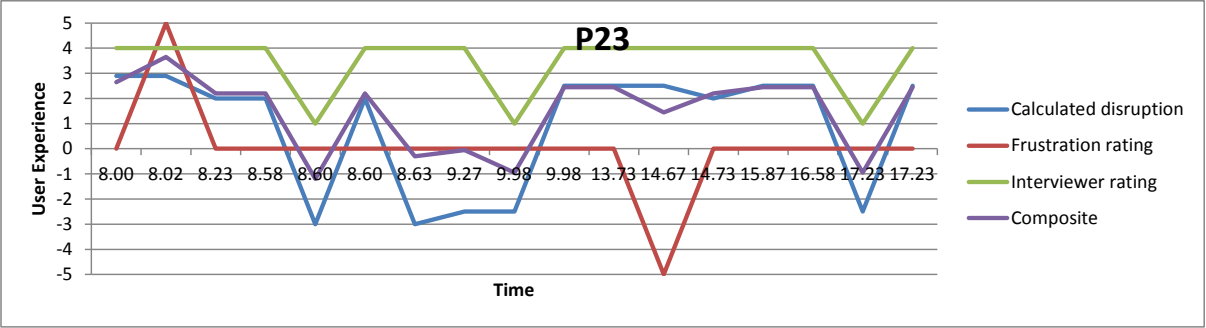
「P23」と題した折れ線グラフです。縦軸は「User Experience」(-5〜5)、横軸は「Time」で、8.00、8.02、8.23、8.58、8.60、8.60、8.63、9.27、9.98、9.98、13.73、14.67、14.73、15.87、16.58、17.23、17.23 の17件のイベント時刻が並びます。凡例は Calculated disruption(青)、Frustration rating(赤)、Interviewer rating(緑)、Composite(紫)です。Interviewer rating はおおむね4で、1つ目の8.60、1つ目の9.98、1つ目の17.23の3か所で1に下がります。Frustration rating は0で、8.02だけ+5、14.67だけ-5です。Calculated disruption は多くのイベントで約2〜3ですが、1つ目の8.60と8.63で-3、9.27と1つ目の9.98で約-2.5、1つ目の17.23で約-2.5に下がります。Composite はその間を通り、8.00で約2.6、8.02で約3.6、その後の多くのイベントで約2.2です。1つ目の8.60、9.98、17.23で約-1、8.63で約-0.3、9.27で約0、14.67で約1.4に下がります。
Figure 12: User experience graph – P23
図 12: ユーザーエクスペリエンスのグラフ – P23
This user experience graph tells the story of Participant 23’s experience during the reporting period. Looking at the red frustration rating, we can see that at the beginning of the day, the participant did not experience frustration when authenticating (8:00, with a frustration score of +5). But during the afternoon (~14:30), P23 experienced an event that caused extreme frustration (a score of -5). In a few unrelated cases, P23 experienced some authentication problems that prevented full completion of the primary task (the valleys on the green line at ~8:30, ~10:00 and ~5:30), however the participant never experienced complete primary task failure. The blue line, which indicates the amount of disruption caused by authentication events, tells us that while none of the authentication events were failures (e.g., the participant was unable to log in), P23 did have to take remedial action to recover from problems that were exacerbated by some circumstance that made providing the necessary authentication information difficult (e.g., the participant had to retrieve a memory aid). The composite (purple) line integrates the three measures together, showing us that though P23 experienced some problems and frustrations related to authentication, he/she experienced only light to moderate disruption during the day.
このユーザーエクスペリエンスのグラフは、報告期間中の参加者 23 の経験の経過を示しています。赤いフラストレーション評価を見ると、1 日の始まりには、参加者は認証時にフラストレーションを感じていなかったことがわかります(8:00、フラストレーションスコアは +5)。しかし午後(約 14:30)には、P23 は極度のフラストレーションを引き起こすイベントを経験しました(スコアは -5)。互いに関連のないいくつかの事例で、P23 は主要タスクを完全に完了できなくなる認証の問題を経験しました(緑の線が谷になっている約 8:30、約 10:00、約 5:30)。しかし、参加者が主要タスクをまったく完了できなかったことはありません。認証イベントによって生じた中断の程度を示す青い線から、認証イベント自体に失敗はなかった(たとえば、参加者がログインできなかった)ものの、必要な認証情報の提供を困難にする何らかの状況によって悪化した問題から回復するため、P23 が是正措置を取る必要があったことがわかります(たとえば、参加者が記憶補助を取り出さなければなりませんでした)。総合(紫)の線は 3 つの指標を統合したものです。P23 は認証に関連する問題やフラストレーションを経験しましたが、1 日を通して経験した中断は軽度から中程度にとどまったことを示しています。
Figure 13 shows a different view of P23’s event data. In this user experience graph, the composite rating assessment has been graphed for each event at its associated time of day. Rather than a line graph, discrete points are displayed representing the disruption for each event over the course of the day. Note that the time scale was also expanded to show the entire collection period.
図 13 は、P23 のイベントデータの別の見方を示します。このユーザーエクスペリエンスのグラフでは、総合評価の判定が、各イベントについて、関連する時刻にグラフ化されています。折れ線グラフではなく、1 日を通した各イベントの中断を表す離散的な点が表示されています。時間の尺度も、収集期間全体を示すために拡張されていることに注意してください。
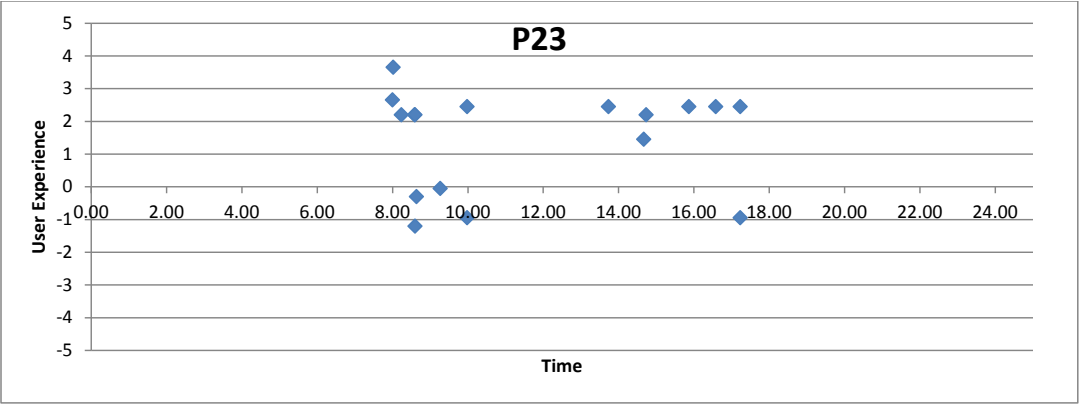
「P23」と題した散布図です。縦軸は「User Experience」(-5〜5)、横軸は「Time」(0.00〜24.00、2.00刻み)です。ひし形の点が17個あり、すべておよそ8:00〜17:30の間にあります。8.00〜10.00の間に約3.7、2.7、2.2、2.2、2.5、-0.3、-1.2、0、-1の点が集まっています。13.7〜17.2の間には約2.5、2.2、1.5、2.5、2.5、2.5の点と、約17.2に-1の点があります。約-1.2より下の点はありません。
Figure 13: How users experience disruption caused by authentication - P23 (composite rating)
図 13: 認証によって生じる中断をユーザーがどのように経験するか - P23(総合評価)
With this view, it is somewhat easier to locate clusters of events and the relative impact they represent over the course of the day, while the view shown in Fig. 12 provides a good presentation of how the various ratings compare to each other. Using Fig. 13, it now becomes easier to discern that P23 experienced 5 mildly disruptive authentication events and 4 moderately disruptive authentication events before 10:30 AM. The authentication events that occurred after 1:30 PM were only mildly disruptive, with the exception of one event at approximately 5:30.
この見方では、イベントの集まりと、1 日を通してそれらが表す相対的な影響を見つけることがいくらか容易になります。一方、図 12 に示す見方は、さまざまな評価が互いにどのように比較されるかをよく示しています。図 13 を使うと、P23 が午前 10:30 より前に、軽度の中断を伴う認証イベントを 5 件、中程度の中断を伴う認証イベントを 4 件経験したことが、より容易にわかります。午後 1:30 以降に発生した認証イベントは、約 5:30 の 1 件を除いて、軽度の中断を伴うだけでした。
The view shown in Fig. 13 was then used with the aggregated event data from all the participants using the composite rating method in order to provide an overview of the total disruption caused by authentication for all participants. The resulting graph can be seen in Fig. 14.
次に、図 13 に示した見方を、総合評価の方法を用いたすべての参加者の集計されたイベントデータに適用し、すべての参加者について認証によって生じた中断の総量の概要を示しました。得られたグラフは、図 14 で見ることができます。
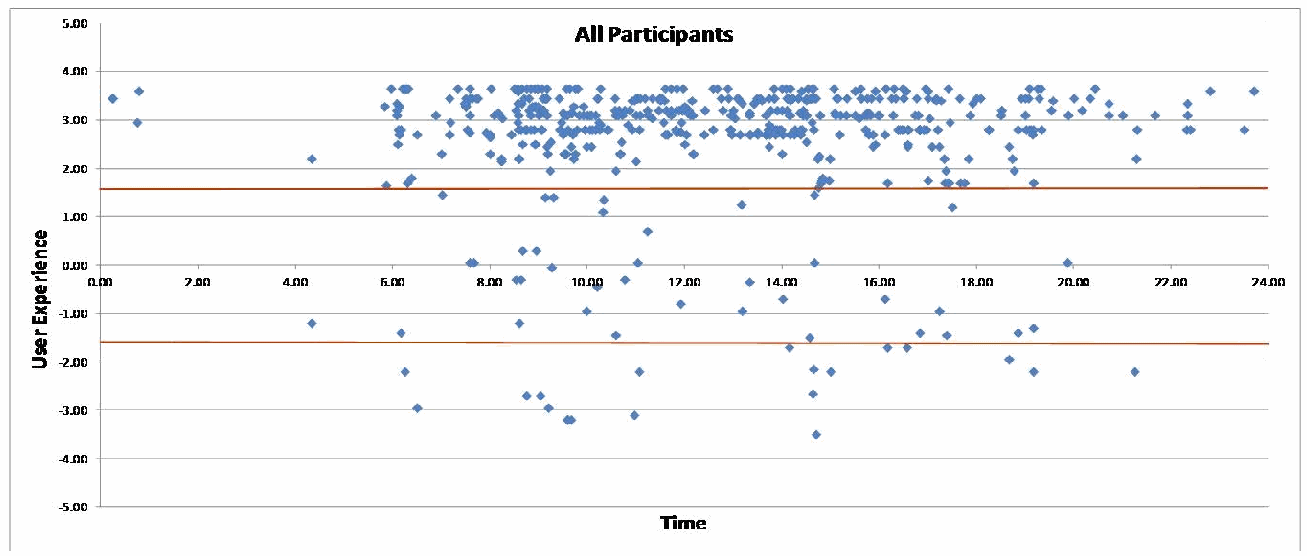
「All Participants」と題した散布図です。縦軸は「User Experience」(-5.00〜5.00)、横軸は「Time」(0.00〜24.00、2.00刻み)です。認証イベントごとのひし形の点が数百個あります。赤い横線が約+1.6と約-1.6の高さに2本引かれています。大部分の点は上の線より上の約2〜3.7にあり、6:00〜20:00ごろに密集し、6:00より前と20:00より後にはまばらです。2本の線の間(約-1.5〜1.5)にはそれより少ない点があり、下の線より下にも少数の点があります(最も低いのは14:40ごろの約-3.5)。
Figure 14: User experience with respect to disruption caused by authentication - all participants (composite rating)
図 14: 認証によって生じる中断に関するユーザーエクスペリエンス - 全参加者(総合評価)
Two horizontal lines superimposed over the graph designate ranges of disruption. The top area contains 466 (88%) of the authentication events, showing that the vast majority of events reported during the study period caused mild disruption (recall that all authentication events are at least mildly disruptive in that they delay completion of a primary activity). The middle or moderate disruption range contained 42 (8%) of the events, and finally, 21 (4%) of the events were very disruptive.
グラフに重ねられた 2 本の水平線は、中断の範囲を示します。上の領域には、認証イベントの 466 件(88 %)が含まれ、調査期間中に報告されたイベントの大多数が、軽度の中断を引き起こしたことを示しています(すべての認証イベントは、少なくとも主要な活動の完了を遅らせるという意味で、軽度の中断を伴うことを思い出してください)。中央、すなわち中程度の中断の範囲には、イベントの 42 件(8 %)が含まれ、最後に、イベントの 21 件(4 %)が非常に大きな中断を伴うものでした。
Figure 15 displays the same data for all participants in the form of a heat map representation to convey the composite disruption measure for each event across the course of the study period. Again, with respect to relative disruption, most events are in the mildly disruptive top 3rd of the graph. The highest concentrations of events occurred at 9:00 AM, 10:00 AM, 12:00 PM and 2:30 PM.
図 15 は、調査期間にわたる各イベントの総合的な中断指標を示すため、すべての参加者について同じデータをヒートマップで表しています。ここでも相対的な中断について見ると、ほとんどのイベントは、グラフの上位3分の1にあたる軽度の中断の領域にあります。イベントが最も集中していたのは、午前 9:00、午前 10:00、午後 12:00、午後 2:30 でした。
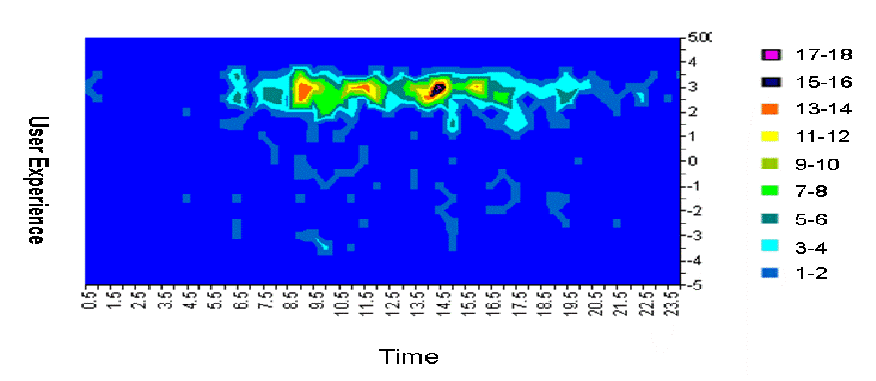
認証イベントのヒートマップ(等高線図)です。縦軸は「User Experience」(-5〜5.00)、横軸は「Time」で、0.5、1.5、2.5 … 23.5 の30分ごとの区間です。凡例は色ごとのイベント数で、1-2(青)、3-4(水色)、5-6(青緑)、7-8(緑)、9-10(黄緑)、11-12(黄)、13-14(橙)、15-16(黒)、17-18(赤紫)です。背景は青です。User Experience の約2〜4の高さに、6:00ごろから21:00ごろまでイベント数の多い横長の帯があり、9:00〜10:00ごろ、12:00ごろ、14:00〜15:00ごろに最も密な部分(黄、橙、小さな黒と赤紫の中心)があります。User Experience が約1より下には、イベント数の少ないセルが点在するだけです。
Figure 15: Heat map of authentication events and user disruption - all participants
図 15: 認証イベントとユーザーの中断のヒートマップ - 全参加者
6 DISCUSSION
6 考察
This section addresses the researchers’ interpretations of and insights gained from the research findings. The section presents qualitative data from the participants themselves, researcher observations regarding users’ authentication-related behavior, and finally insights about authentication gained from this study.
この節は、研究結果についての研究者の解釈と、そこから得られた知見を扱います。この節では、参加者自身からの質的データ、ユーザーの認証に関する行動についての研究者の観察、そして最後に、この調査から得られた認証に関する知見を示します。
6.1 HOW PARTICIPANTS PERCEIVED THEIR AUTHENTICATION WORKLOAD
6.1 参加者による認証作業負荷の受け止め方
As presented in Sec. 4, participants reported an average of 23 authentication events each during the data collection period. However, they did not notice (and therefore did not report) any automatic authentications facilitated by NIST’s partial SSO solution. This means that the actual number of authentications was probably somewhat higher than the number reported.
第 4 節で示したように、参加者は、データ収集期間中に、平均で 1 人あたり 23 件の認証イベントを報告しました。しかし、NIST の部分的な SSO ソリューションによって円滑に行われた自動的な認証には気づかず、したがって報告しませんでした。これは、認証の実際の数は、報告された数よりもおそらくいくらか多かったことを意味します。
Participants themselves were actually surprised at the number of authentications they reported during the data collection period. In briefing meetings before the data collection period, when the researchers gave participants diary forms (see Appendix A for an example) with space to record 20 authentication events, many participants asserted that they would need more diary forms because they were going to authenticate much more than 20 times. In the follow-up interviews, when researchers asked participants what surprised them most about their experiences during the data collection period, the answer was often related to their estimated vs. actual number of times authenticating. Several said they had authenticated far less than anticipated. A few said they had authenticated considerably more than they thought they would, but over-estimation was more common by far than under-estimation.
参加者自身、データ収集期間中に報告した認証の数に実際に驚いていました。データ収集期間前の事前説明会で、研究者が認証イベントを 20 件記録できる日誌用紙(例は付録 A を参照)を参加者に渡した際、多くの参加者は、20 回よりずっと多く認証することになるので、もっと日誌用紙が必要だと主張しました。フォローアップインタビューで、研究者がデータ収集期間中の経験で最も驚いたことは何かと尋ねると、回答はしばしば、認証した回数の推定値と実際の回数に関連するものでした。何人かは、予想よりはるかに少ない回数しか認証していなかったと述べました。少数の人は、予想よりかなり多く認証していたと述べましたが、過小評価よりも過大評価の方がはるかによくありました。
This is not because something unusual happened to participants during the data collection period. On the contrary, the day was fairly typical for most of them (except for the fact that they were recording authentication events). So where did this discrepancy between expectations and reality originate? The qualitative data suggest two principal reasons why many participants’ actual authentication workload did not align with their expectations.
これは、データ収集期間中に参加者に異常な出来事が起きたからではありません。それどころか、その日は、(認証イベントを記録していたことを除いて)参加者の大半にとってかなり典型的な日でした。では、期待と現実の間のこの食い違いは、どこから生じたのでしょうか。質的データは、多くの参加者の実際の認証の作業負荷が、期待と一致しなかった 2 つの主な理由を示唆しています。
First, since participants taking part in the study were more aware of authenticating than was usually the case, they may have changed their behavior during the day. For example, some of them followed security policies more closely than usual: a few participants commented that during the study, they were more likely to purposely lock their computers when they left their desks than they normally did. The implications of the usual lack of awareness are significant. The qualitative data from this study suggest that authentication can become an automatic or automatized behavior: people do it habitually, or by rote, until some significant disruption occurs (e.g., an authentication problem). Under most circumstances, participants reported they were not as mindful of authentication as they were when they recorded it for this study, reminiscent of the Hawthorne Effect.
第一に、調査に参加した人々は、通常より認証を意識していたため、その日の行動を変えた可能性があります。たとえば、一部の参加者は通常より厳密にセキュリティポリシーに従いました。何人かは、調査中は席を離れるときに普段よりも意図的にコンピュータをロックする傾向が強かったとコメントしました。通常は認証が意識されていないことの意味は重大です。この調査の質的データは、認証が自動的、あるいは自動化された行動になりうることを示唆しています。人々は何らかの大きな中断(たとえば認証の問題)が起きるまで、習慣的に、あるいは決まりきった手順として認証を行います。ほとんどの状況で、参加者は、この調査のために認証を記録していたときほど認証を意識していなかったと報告しました。これはホーソン効果を思い起こさせます。
Second, from the data in this study, we propose the theory that this discrepancy between expectations and reality is that the act (or even the prospect) of authenticating carries a notable emotional and psychological load. This may have affected participants’ perceptions of the workload involved in specific authentication tasks and authentication in general: that is, participants’ feelings about authentication made it seem to take more time and effort than it actually did. This emotional load is created in part by previous “catastrophic” experiences with authentication, such as when authentication problems severely delay work on a critical primary task:
第二に、この調査のデータから、期待と現実の食い違いは、認証する行為(あるいは認証する見込みさえ)が顕著な感情的・心理的負荷を伴うことによるものだという説を提案します。この負荷は、特定の認証タスクと認証全般に伴う作業負荷についての参加者の認識に影響した可能性があります。つまり、認証に対する参加者の感情によって、認証には実際より多くの時間と労力がかかるように思われたということです。この感情的負荷は、一部には、認証の問題が重要な主要タスクに関する作業を著しく遅らせた場合など、認証に関する以前の「破滅的な」経験によって生じます:
“So a situation where authentication has been a real challenge and caused real problems, there's one example I can think of where I have a system that had completely failed, and I had to restore the system from a backup, a procedure that I've done a few times, works flawlessly without any problems. In this particular case there was some...just call it a bug that interfered with restoring the passwords to this device. These are root-level passwords, very low-level and basic passwords you log in to control a system, basically, the only account on this device, right? There's one account and it's super-user, super-privilege. That password had not been properly been reset, or it was...I think it was actually reset to a very, very, old password that...in hindsight it was a very, very old password, and it took me about three hours to figure out that that was the password that was in place and that something had happened in the configuration, and it restored a really old password or something like that. So that was very, very frustrating. The cost was actually high then. We had three hours, or two hours, of complete network failure of major component of our network, a major section of our network. So the cost was actually very high there, and it was all because the expected outcome of a restore didn't happen that way. […] The real cost is with all the people that are not able to use their systems and get their work done.” (P5)
「認証が本当に難題で、本当に問題を引き起こした状況ですが、思い当たる例が 1 つあります。システムが完全に故障してしまい、バックアップからシステムを復元しなければなりませんでした。この手順は何度か行ったことがあり、何の問題もなく完璧に動作します。この特定のケースでは、このデバイスのパスワードの復元を妨げる、何かこう……バグと呼ぶことにしますが、それがありました。これらはルートレベルのパスワードで、システムを制御するためにログインする、非常に低レベルで基本的なパスワードです。基本的に、このデバイス上の唯一のアカウントです。アカウントは 1 つで、スーパーユーザー、スーパー特権のものです。そのパスワードが正しくリセットされていなかったか、あるいは……実際には、非常に古いパスワードにリセットされていたのだと思います。後から考えると、非常に古いパスワードでしたが、それが有効になっているパスワードだと突き止めるのに、約 3 時間かかりました。構成で何かが起きて、本当に古いパスワードか何かが復元されたのです。それはとても、とてもフラストレーションの大きいことでした。その時のコストは実際に高かったです。ネットワークの主要な構成要素、ネットワークの主要な部分が、3 時間、あるいは 2 時間、完全に停止しました。ですから、そのコストは実際に非常に高く、それはすべて、復元で期待した結果が得られなかったからでした。[……] 本当のコストは、システムを使えず、仕事を終えられないすべての人々にあります。」(P5)
It is understandable that a few experiences like the one described above would make a user wary about authentication and the disruption that can cause, and make authentication tasks (or even the prospect of performing authentication tasks) seem more time-consuming and effortful than they actually are.
上述のような経験がいくつかあれば、ユーザーが認証と、それが引き起こしうる中断に対して警戒するようになり、認証タスク(あるいは認証タスクを行う見通しでさえ)を、実際よりも時間と労力がかかるように感じさせることは理解できます。
Tension created by specific adverse experiences is only part of the emotional load related to authentication. The other part is the everyday experience of friction and disruption caused by authentication. The literature on task switching indicates that going from one type of task to another – for example, from a creative primary task to the memory-intensive and physical task of recalling and typing in a password – has an impact on focus, concentration, and efficiency that can linger through subsequent tasks [7][16].
特定の悪い経験によって生じる緊張は、認証に関連する感情的負荷の一部にすぎません。もう 1 つの部分は、認証によって生じる摩擦と中断の日常的な経験です。タスクの切り替えに関する文献は、あるタイプのタスクから別のタイプのタスクへ、たとえば創造的な主要タスクから、記憶を要し身体的でもあるパスワードの想起と入力というタスクへ移ることが、集中力や効率に影響を与え、その影響が後続のタスクにまで残りうることを示しています [7][16]。
This issue may also be related to what is called the “Zeigarnik effect” (after the psychiatrist who first studied the phenomenon), which states that people remember uncompleted or interrupted tasks better than they remember tasks they finish [28]. Clifford Nass, a professor at Stanford University who studies multi-tasking and task switching, theorizes that users are painfully aware of disruption caused by authentication because authentication is imposed on them:
この問題は、「ツァイガルニク効果」(この現象を最初に研究した精神科医にちなむ)と呼ばれるものにも関連している可能性があります。この効果は、人は完了したタスクよりも、未完了または中断されたタスクの方をよく覚えているというものです [28]。マルチタスクやタスクの切り替えを研究している Stanford University の教授 Clifford Nass は、認証がユーザーに課されるため、ユーザーは認証によって生じる中断を痛切に意識していると理論づけています:
“I suspect that unlike multitasking, in which the task switching is voluntary and hence people have an incentive to downplay the costs, authentication is not voluntary, thereby making people aware of the cognitive cost. Also…negative experiences are much more memorable than positive experiences.” [17]
「タスクの切り替えが自発的で、したがって人がそのコストを軽視する動機を持つマルチタスクとは異なり、認証は自発的ではないため、人は認知的なコストを意識するのではないかと思います。また……否定的な経験は、肯定的な経験よりもはるかに記憶に残りやすいのです。」[17]
Study participants’ own accounts give credence to the theory that they carried an emotional load related to authentication. They described, in detail and at length, the general and specific ways in which authentication makes their work (and their lives) more difficult than it would be otherwise. These friction points are the subject of the following section.
調査参加者自身の説明は、彼らが認証に関連する感情的な負荷を抱えていたという理論を裏づけています。彼らは、認証が、そうでない場合よりも仕事(と生活)をより困難にする、一般的な、また具体的な方法を、詳細に、長々と述べました。これらの摩擦点が、次の節の主題です。
6.2 SPECIFIC “FRICTION POINTS” DESCRIBED BY OUR PARTICIPANTS
6.2 参加者が述べた具体的な「摩擦点」
Participants’ diaries from the data collection period provided insights into the aspects of authentication that the participants found particularly frustrating or difficult, as well as the applications for which they were most likely to have problems when authenticating. During the follow-up interviews, researchers asked participants for more detail about these “friction points.” Many of them independently mentioned similar or identical issues, discussed in detail in Secs. 6.2.1 through 6.2.5. Many of these friction points were also identified as problematic issues for users of technology by an independent study at NIST regarding passwords [5].
データ収集期間の参加者の日誌は、参加者が特にフラストレーションを感じた、または難しいと感じた認証の側面と、認証の際に問題が起きる可能性が最も高かったアプリケーションについての知見を提供しました。フォローアップインタビューで、研究者は、これらの「摩擦点」についてより詳しく参加者にたずねました。その多くは、第 6.2.1 節から第 6.2.5 節で詳しく論じる、類似または同一の問題に、独立して言及しました。これらの摩擦点の多くは、パスワードに関する NIST の独立した調査 [5] でも、技術のユーザーにとって問題のある課題として特定されていました。
6.2.1 Re-authenticating due to timed lockouts
6.2.1 タイムアウトによるロックアウトのための再認証
One of the friction points most frequently mentioned by participants was that of having to authenticate to the same application over and over again, particularly because of the timed lockouts described in Sec. 2.7. The purpose of this measure is to make it more difficult for an attacker to exploit a user’s computer (and access privileges) while the user is away from the computer.
参加者が最も頻繁に挙げた摩擦点の 1 つは、特に第 2.7 節で述べたタイムアウトによるロックアウトのために、同じアプリケーションに何度も繰り返し認証しなければならないことでした。この措置の目的は、ユーザーがコンピュータから離れている間に、攻撃者がユーザーのコンピュータ(とアクセス権限)を悪用することを難しくすることです。
Of the 42 local computer authentication events participants recorded during the reporting period, only 4 (or 9.52%) had problems and the average frustration rating associated with the application was only 1.69 (see Table 9). However, almost half of the study participants (10) cited the timed lockout as a source of non-problem-related friction and frustration during follow-up interviews. Some participants noted that the timeout often takes effect while they are actually sitting in front of – but not actively using – their computers, which often disrupts or diverts their thought processes. Several participants expressed sentiments along the lines of “the system should know it’s me.” One participant said of the timed lockouts:
報告期間中に参加者が記録したローカルコンピュータの認証イベント 42 件のうち、問題があったのは 4 件(9.52 %)だけで、このアプリケーションに関連する平均フラストレーション評価も 1.69 にすぎませんでした(表 9 を参照)。しかし、調査参加者のほぼ半数(10 人)が、フォローアップインタビューで、タイムアウトによるロックアウトを、問題とは無関係な摩擦とフラストレーションの原因として挙げました。一部の参加者は、タイムアウトが、実際にコンピュータの前に座っているものの、積極的に使用していないときに作動することが多く、それがしばしば思考の流れを妨げたり、そらしたりすると述べました。何人かの参加者は、「システムは、それが私だとわかるはずだ」という趣旨の感想を表明しました。ある参加者は、タイムアウトによるロックアウトについて次のように述べました。
“Well, I think that if I just logged in, then it should be able to understand that I just logged in and not ask me for the password again. […] That's too much, because you shouldn't have to do extra work to authenticate. Because yeah, it can just pick up what you do.” (P18)
「ええと、ログインしたばかりなら、ログインしたばかりだと理解して、またパスワードを求めないでほしいと思います。[……] それは多すぎます。認証のために余計な作業をしなければならないのはおかしいからです。だって、こちらがしていることは、システムが拾えるはずですから。」(P18)
Periodically pressing a key or jiggling the mouse did not really alleviate the interruption and subsequent irritation caused by timed lockouts, as another participant noted:
ときどきキーを押したり、マウスを揺らしたりしても、タイムアウトによるロックアウトによって生じる中断とその後の苛立ちは、実際にはやわらぎませんでした。別の参加者が述べたとおりです。
“You end up having to almost set a timer in your head to go back to the computer and type something within every 10 minutes or so. And some minor studies of productivity I've been involved with indicate that it's better to be focused on a task as opposed to have lots of interruptions throughout the day.” (P21)
「結局、10 分かそこらごとに、コンピュータに戻って何かを入力するために、頭の中でほとんどタイマーを設定しなければならなくなります。そして、私が関わったいくつかの小規模な生産性の調査は、1 日を通して多くの中断があるよりも、1 つのタスクに集中する方が良いことを示しています。」(P21)
6.2.2 Remembering a large number of passwords and when/where each one is supposed to be used
6.2.2 多数のパスワードと、それぞれをいつ・どこで使うことになっているかを覚えておくこと
Participants also said that having to remember all the passwords for all the different applications they used was very difficult: all but one participant in this study reported managing at least some passwords using some form of external record (e.g., handwritten note, password management software). Remembering which password corresponded to which application could be a problem as well, especially since some participants were unclear as to which passwords were synchronized and which were not:
参加者はまた、使用するさまざまなアプリケーションすべてのパスワードを覚えなければならないことは非常に難しいと述べました。この調査の参加者のうち 1 人を除くすべてが、少なくとも一部のパスワードを、何らかの形の外部の記録(たとえば手書きのメモ、パスワード管理ソフトウェア)を使って管理していると報告しました。どのパスワードがどのアプリケーションに対応するかを覚えておくことも問題になりえました。特に、どのパスワードが同期されていて、どれが同期されていないのかがはっきりしていない参加者もいたためです。
“So there's the confusion of is this our BizFlow password? Is it our general realm password? Is it our Entrust password? Then they enter the password wrong. Then they think they need the password reset, but they don't because it's not actually the Entrust password that they're entering. So it's a big mess that way. […] Most users will say, "This is my e-Approval password." But e-Approval is a combination of now two different passwords, the general realm password and the Entrust password. But people think, "My e-Approval password," which will easily get them confused.” (P3)
「それで、これは BizFlow のパスワードなのか、一般的なレルムのパスワードなのか、Entrust のパスワードなのかという混乱があります。それで、パスワードを間違って入力します。そして、パスワードのリセットが必要だと考えますが、実際に入力しているのは Entrust のパスワードではないので、必要ありません。ですから、その点で大変な混乱です。[……] ほとんどのユーザーは、「これが私の e-Approval のパスワードです」と言うでしょう。しかし、e-Approval は、現在は 2 つの異なるパスワード、すなわち一般的なレルムのパスワードと Entrust のパスワードの組み合わせです。それなのに、人々は「私の e-Approval のパスワード」と考えるので、簡単に混乱してしまいます。」(P3)
6.2.3 Managing a large number of authentication elements
6.2.3 多数の認証要素の管理
Authentication information management was also a major friction point. Again, the sheer number of passwords participants had to juggle was part of the problem (since they had to manage authentication information for many of the applications they used individually). When a password expired, participants would have to replace it with a new one, which they would have to commit to memory – and all the time and effort they put into this would cease to matter when the password expired and the cycle started again. In addition, the many applications they used could (and often did) have different password policies. A password that was acceptable for one application might not be allowed for another, which made it even more difficult to come up with compliant passwords. Passwords for different applications might also expire at different times. One participant expanded a specific example of this type of problem into a general complaint about it:
認証情報の管理も、大きな摩擦点でした。ここでも、参加者がやりくりしなければならなかったパスワードの数の多さが、問題の一部でした(使用する多くのアプリケーションの認証情報を個別に管理しなければならなかったためです)。パスワードが期限切れになると、参加者は新しいパスワードに置き換えなければならず、それを記憶しなければなりませんでした。そして、そのために費やしたすべての時間と労力は、パスワードが期限切れになり、サイクルが再び始まると、意味がなくなってしまいました。さらに、使用する多くのアプリケーションは、異なるパスワードポリシーを持つ可能性があり(実際にそうであることもよくありました)、あるアプリケーションで受け入れられるパスワードが、別のアプリケーションでは許可されない場合があり、ポリシーに適合するパスワードを考え出すことがさらに難しくなりました。異なるアプリケーションのパスワードは、期限切れになる時期も異なる場合がありました。ある参加者は、この種の問題の具体的な例を、それに関する一般的な不満へと広げました。
“[W]hen I started getting into the WebTA thing, it just so happened that it was time to change my password and WebTA makes you change your password more frequently than the NIST general domain. And every time I have to do that, I get really frustrated because I am like why can't they always be in sync. You have to think if you are going to be the responsible person, then you have to think of different passwords for everything and it is very frustrating. So when it gets to those infrequently used passwords, then I get really irritated.“ (P11)
「WebTA を使い始めたとき、ちょうどパスワードを変更する時期で、WebTA は NIST の一般的なドメインよりも頻繁にパスワードの変更を求めるのです。そして、それをしなければならないたびに、なぜいつも同期させられないのかと、本当にフラストレーションを感じます。責任ある人でいようとするなら、すべてのものに異なるパスワードを考えなければならず、それはとてもフラストレーションの大きいことです。ですから、使用頻度の低いパスワードになると、本当に苛立ちます。」(P11)
This participant touched on a related and particularly sore point: that of resetting passwords for applications that participants did not use often.
この参加者は、関連する、特に痛いところに触れました。参加者があまり使わないアプリケーションのパスワードのリセットです。
6.2.4 Management workload for infrequently used passwords
6.2.4 使用頻度の低いパスワードの管理の作業負荷
Multiple participants described the difficulties of managing a password that needs to be renewed more than it is actually used:
複数の参加者が、実際に使用される回数よりも多く更新が必要なパスワードを管理することの難しさを述べました。
“[O]nce or twice a year I have to log into a foreign application we have here, and fill out a form, BizFlow, and I usually have to get my password reset because I don't remember what it was. I try a few times, and before I get to the right one I'm locked out.” (P14)
「年に 1、2 回、ここにある外部のアプリケーションである BizFlow にログインして、フォームに記入しなければなりませんが、たいてい、パスワードが何だったか覚えていないので、パスワードをリセットしてもらわなければなりません。何度か試して、正しいものにたどり着く前に、ロックアウトされてしまいます。」(P14)
“I don't travel very often, but when I do I have to log in to something called Travel Management. And that password expires just as fast as any other password. Every single time I go to log in to submit my expense reports, first of all, my account is locked because I haven't changed my password in a few months. So then I have to figure out how to unlock it. Then I've got to go change it.” (P19)
「出張はあまりしませんが、するときには、Travel Management というものにログインしなければなりません。そして、そのパスワードは、ほかのどのパスワードとも同じくらいすぐに期限切れになります。経費報告書を提出するためにログインしようとするたびに、まず、数か月間パスワードを変更していないために、アカウントがロックされています。そこで、ロックを解除する方法を調べなければなりません。それから、パスワードを変更しなければなりません。」(P19)
“And e-Approval is something that I use so infrequently that each of the past few times I've had to do something in there, I've had to get my password reset, and it is very embarrassing.” (P11)
「そして e-Approval は、使うことが非常にまれなので、ここ何回かそこで何かをしなければならないたびに、パスワードをリセットしてもらわなければならず、それはとても恥ずかしいです。」(P11)
“Once again security has gotten in my way and it takes me extra time because now I got to look that one up because I don't use that one often enough.” (P17)
「またしてもセキュリティが邪魔をして、余計な時間がかかります。そのパスワードは使う頻度が十分でないので、調べなければならないからです。」(P17)
6.2.5 Miscellaneous friction points
6.2.5 その他の摩擦点
Some other authentication-related friction points mentioned by participants included:
参加者が挙げた、認証に関連するその他の摩擦点には、次のものがありました。
•The “human factor” – mistakes and weaknesses in the interaction because humans are forgetful or neglectful
•「ヒューマンファクター」– 人間は忘れっぽく、不注意であるために生じる、やり取りの中の間違いと弱点
•Being unable to re-use the same password multiple times on a single system, or across different systems
•1 つのシステム、または異なるシステム間で、同じパスワードを複数回再利用できないこと
•The time and effort it takes to change passwords
•パスワードを変更するのにかかる時間と労力
•Being interrupted on the way to a task because of requirement to reset passwords
•パスワードのリセットが必要なために、タスクに向かう途中で中断されること
•Embarrassment at having to request support from a help desk when encountering an authentication problem
•認証の問題に遭遇したときに、ヘルプデスクにサポートを依頼しなければならない気まずさ
•The sheer number of authentication mechanisms and combination of requirements
•認証の仕組みの数と要件の組み合わせの多さそのもの
•Password policies and other security rules that are not revealed until the user fails to meet them
•ユーザーがそれらを満たせなかった時点まで明らかにされない、パスワードポリシーやその他のセキュリティ規則
•Drops and interruptions in connectivity to the VPN or wireless network because of some problem related to authentication
•認証に関連する何らかの問題による、VPN や無線ネットワークへの接続の切断と中断
And finally, participants simply find themselves spending a great deal of time and effort on authentication:
そして最後に、参加者は、単純に、認証に多大な時間と労力を費やしていると感じています。
“And it gets in the way. It definitely takes way more time out of my day, both just time having to deal with this and then the break in the flow of work.” (P19)
「そして、それは邪魔になります。間違いなく、1 日のうちのはるかに多くの時間を奪います。これに対処しなければならない時間そのものと、その後の仕事の流れの途切れの両方です。」(P19)
“In my attention it's a tiny blip, but time wise, I think it does actually still take a lot of time. There's a substantial amount of time” (P5).
「注意という点では小さな一瞬の出来事ですが、時間という点では、実際にはやはり多くの時間がかかっていると思います。かなりの時間です」(P5)。
6.3 PARTICIPANTS’ FEELINGS ABOUT THE NECESSITY AND EFFECTIVENESS OF AUTHENTICATION
6.3 認証の必要性と有効性に対する参加者の考え
Authentication clearly created problems for the study participants (as described in Sec. 6.2). However, they did not think authentication should be scrapped entirely, nor did they think it was acceptable or appropriate to ignore, shortcut, or bypass NIST’s organizational security requirements. Participants valued organizational security (see Sec. 2.7) and knew that authentication played a key role in maintaining it. They simply felt that authentication at NIST could be implemented in a more efficient and usable way.
認証は、(第 6.2 節で述べたように)調査参加者に明らかに問題を生じさせました。しかし、彼らは、認証を完全に廃止すべきだとは考えておらず、NIST の組織のセキュリティ要件を無視したり、近道をしたり、迂回したりすることが許容される、あるいは適切であるとも考えていませんでした。参加者は組織のセキュリティを重視しており(第 2.7 節を参照)、認証がそれを維持するうえで重要な役割を果たすことを理解していました。彼らは単に、NIST での認証は、より効率的で使いやすい方法で実装できると感じていました。
6.3.1 While all participants saw a need for organizational security at NIST, some questioned the effectiveness of current methods
6.3.1 すべての参加者が NIST での組織のセキュリティの必要性を認めたが、現在の方法の有効性に疑問を持つ参加者もいた
Several participants expressed the belief that following NIST security policy is an effective way to protect their own online assets and those of their co-workers. But more participants questioned whether the authentication requirements they must follow are actually effective. This is not to say that participants think the organization for which they work does not face real security risks. They had no expectation that the need to authenticate will ever go away, because there will always be “bad agents” who want to do damage for a variety of reasons. Rather, they felt that they had a part in protecting the organization from attackers – that they all shared some responsibility for organizational security. On that general point, they agreed with the organization and security specialists: however, they had specific disagreements about what security measures were actually appropriate.
何人かの参加者は、NIST のセキュリティポリシーに従うことが、自分自身と同僚のオンライン資産を保護する効果的な方法であるという信念を表明しました。しかし、より多くの参加者が、従わなければならない認証要件が実際に有効であるかどうかに疑問を呈しました。これは、参加者が、自分たちが働く組織が実際のセキュリティリスクに直面していないと考えているという意味ではありません。彼らは、さまざまな理由で損害を与えたい「悪意ある者」が常にいるため、認証の必要性がなくなることを期待していませんでした。むしろ、彼らは、自分たちが攻撃者から組織を守る役割を担っている、すなわち、組織のセキュリティに対して全員が何らかの責任を共有していると感じていました。その一般的な点では、彼らは組織やセキュリティの専門家と意見が一致していましたが、実際にどのようなセキュリティ対策が適切かについては、具体的な意見の相違がありました。
Generally, participants did not fear unknown, non-specific attacks on organizational security. They also expected that most attacks (or the most serious attacks) would target the organization’s servers or weaknesses in its infrastructure – not their own passwords. One participant said he had, “Never had anyone steal my account or break in by stealing my password – that I know of” (P7). Another echoed the sentiment, saying, “No one has hijacked my accounts. Problems – fraud – comes from insiders, not people hacking. The emphasis may be in the wrong place” (P20).
一般に、参加者は、組織のセキュリティに対する未知の、特定されていない攻撃を恐れていませんでした。また、ほとんどの攻撃(または最も深刻な攻撃)は、自分自身のパスワードではなく、組織のサーバやインフラストラクチャの弱点を標的にすると予想していました。ある参加者は、「アカウントを盗まれたり、パスワードを盗まれて侵入されたりしたことはありません。私の知る限りでは」と述べました(P7)。別の参加者も同じ感想を述べ、「誰も私のアカウントを乗っ取っていません。問題、つまり不正は、ハッキングする人ではなく、内部者から来ます。重点の置き方が間違っているのかもしれません」と述べました(P20)。
This is related to another belief many participants held regarding security risks: even if they followed all security policies perfectly and did everything imaginable, they could not guarantee the safety of their organizational systems. An attacker could still find and exploit some previously unknown vulnerability.
これは、セキュリティリスクに関して多くの参加者が抱いていたもう 1 つの信念に関連しています。すべてのセキュリティポリシーを完璧に守り、考えられるすべてのことをしたとしても、組織のシステムの安全性を保証することはできない、というものです。攻撃者は、それまで知られていなかった何らかの脆弱性を見つけ、悪用する可能性があります。
But another participant pointed out that it is unreasonable to expect security policies to be sufficiently proactive to counter unknown threats. On the contrary, security policies tend to be retroactive and implemented in response to specific security incidents:
しかし、別の参加者は、セキュリティポリシーが未知の脅威に対抗できるほど十分に先手を打つことを期待するのは、無理があると指摘しました。それどころか、セキュリティポリシーは事後的であり、特定のセキュリティインシデントへの対応として実施される傾向があります。
“It’s hard for the system administrators and the security people to design authentication approaches that are more flexible. It's just hard. So more of a brute force approach is what people tend to favor. Does it really make the systems more secure? I don't know. It appears not in general. It helps protect against accounts being broken into, perhaps, by coworkers or insider attacks more, but people who are still doing sophisticated attacks still seem to be able to do those and be relatively successful at them. A lot of this stuff at least some of the security requirements on laptops especially, especially when traveling – resulted more from, I think, higher level screw ups, people in upper level management having their systems being broken into.” (P21)
「システム管理者やセキュリティ担当者が、より柔軟な認証方式を設計するのは難しいです。ただ、難しいのです。ですから、人々は力ずくの方法を好む傾向があります。それで本当にシステムの安全性が高まるのでしょうか。わかりません。一般的には、そうではないようです。おそらく、同僚や内部関係者による攻撃に対しては、アカウントへの侵入防止により役立ちます。しかし、高度な攻撃を行う人々は、依然として攻撃を実行し、比較的成功しているようです。こうしたことの多く、少なくともノートパソコン、特に出張時に関するセキュリティ要件の一部は、上級管理職の人々のシステムが侵入されたという、より上層部での失態から生じたものだと思います。」(P21)
The implication of this statement is that security policies are difficult to make flexible (i.e., responsive to actual risk assessment) and effective, which leads to burdensome polices that attempt to cover more weaknesses, both human and information-technology related.
この発言が示唆しているのは、セキュリティポリシーは、柔軟にする(すなわち実際のリスク評価に対応させる)ことも、有効にすることも難しく、それが、人間の弱点と情報技術に関連する弱点の両方を、より多くカバーしようとする、負担の大きいポリシーにつながるということです。
6.3.2 Participants think organizational security measures are too demanding
6.3.2 参加者は、組織のセキュリティ対策は負担が大きすぎると考えている
In general, study participants were cautious about criticizing the state and implementation of security where they work. This may have been an artifact of an internally conducted study. Even so, participants strongly suggested that they felt they were required to authenticate too much, too often – that security policies were far more demanding than they had to be to address security risks, and may in fact have created new vulnerabilities. “The things that move us beyond human memory, we have to use things less secure, like [password] sharing schemes. [IT] people are bound by their rules, not common sense” (P20), as one participant put it. Some participants also expressed the belief that security policies related to authentication were so demanding as to be counterproductive:
一般に、調査参加者は、自分たちの職場のセキュリティの状況や実施状況を批判することには慎重でした。これは、内部で実施された調査だったことによる影響かもしれません。それでも参加者は、認証をあまりにも多く、あまりにも頻繁に求められていると強く訴えました。つまり、セキュリティポリシーはセキュリティリスクへの対処に必要な水準をはるかに超えて負担が大きく、実際には新たな脆弱性を生み出している可能性さえあると感じていました。ある参加者は、「人間の記憶の限界を超えるものについては、[パスワードの]共有方式のような、より安全性の低いものを使わなければなりません。[IT の]人々は常識ではなく、自分たちの規則に縛られています」と述べました(P20)。一部の参加者は、認証に関連するセキュリティポリシーは逆効果になるほど負担が大きいとも考えていました。
“Going for longer and longer passwords, that just seems silly to me. I'm not sure that it actually gives you anything in terms of security, except it actually at a certain point decreases security.” (P2)
「パスワードをどんどん長くしていくのは、私にはばかげているように思えます。セキュリティの面で何かを与えてくれるとは思えません。ある時点では、実際にはセキュリティを低下させます。」(P2)
“Authentication becomes a block if you don't use it frequently. It becomes an annoyance if you use it frequently.” (P1)
「頻繁に使わなければ、認証は障害になります。頻繁に使えば、煩わしいものになります。」(P1)
“Human memory is limited. More security means more barriers, which makes it less usable. Close the door to attackers, but I have to put that password somewhere, which opens a window. Wish I could protect the whole house.” (P3)
「人間の記憶には限りがあります。セキュリティを強化すれば、障壁が増え、使いにくくなります。攻撃者に対してドアを閉じても、そのパスワードをどこかに置かなければならず、それが窓を開けることになります。家全体を守れたらいいのですが。」(P3)
In addition, a number of participants worried that if the IT department found out about some of their strategies for coping with authentication (particularly schemas for password creation, as described in Sec. 6.4.1.3), they would prohibit these strategies through policy, technical enforcement, or both. Fortunately, this is not the case at NIST, as its management supports this and related research in an effort to improve the usability of IT security at NIST and elsewhere. However, this is not an unreasonable concern within other organizations, given that IT departments often tend to see imposing stricter and stricter security requirements as the most effective way to deal with “inherently insecure” users [1].
さらに、多くの参加者は、認証に対処するための自分たちの戦略の一部(特に、第 6.4.1.3 節で述べるパスワード作成の型)を IT 部門が知った場合、ポリシー、技術的な強制、またはその両方によって、これらの戦略が禁止されるのではないかと心配していました。幸いなことに、NIST ではそうなっておらず、NIST の経営陣は、NIST とその他の場所での IT セキュリティのユーザビリティを向上させる取り組みとして、この研究および関連する研究を支援しています。しかし、IT 部門は、「本質的に安全でない」ユーザーに対処する最も効果的な方法として、より厳しいセキュリティ要件を課すことを考える傾向があることが多いため [1]、これは他の組織では不合理な懸念ではありません。
Sentiments like these aside, many participants seemed resigned to dealing with the institution’s security policies. As the final participant quote in Sec. 6.3.1 implies, many considerations inevitably shape organizational security policy. Another participant summarized this situation by saying “[It’s a] cost of doing business in this environment. Just part of workday here” (P1).
このような感想はさておき、多くの参加者は、組織のセキュリティポリシーに対処することをあきらめているように見えました。第 6.3.1 節の最後の参加者の発言が示唆するように、多くの考慮事項が、組織のセキュリティポリシーを必然的に形作ります。別の参加者は、この状況を、「[それは] この環境で仕事をするためのコストです。ここでの勤務日の一部にすぎません」と要約しました(P1)。
6.3.3 Overall, participants believe SSO is the best way to address both security and usability issues
6.3.3 全体として、参加者は、SSO がセキュリティとユーザビリティの両方の問題に対処する最良の方法だと考えている
Several participants suggested organization-wide SSO as a compromise solution that would reduce tension between the organization’s need for security and their own need for usability (NIST already has partial SSO, as described in Sec. 2.7). A number of participants already employ authentication coping strategies that mimic SSO, such as synchronizing their passwords for multiple applications and trying to update all their passwords at the same time (see Sec. 6.4.1.6 and Sec. 6.4.1.7).
何人かの参加者は、組織のセキュリティの必要性と、自分たちのユーザビリティの必要性の間の緊張を和らげる、妥協的な解決策として、組織全体での SSO を提案しました(第 2.7 節で述べたように、NIST にはすでに部分的な SSO があります)。多数の参加者は、複数のアプリケーションのパスワードを同期させることや、すべてのパスワードを同時に更新しようとすることなど、SSO を模倣した認証への対処戦略をすでに採用しています(第 6.4.1.6 節と第 6.4.1.7 節を参照)。
Participants said they would accept having a long SSO password (longer than the ones they are currently required to use for any application) – provided that they could use it across all their work-related accounts, systems, and applications. As one participant explained it:
参加者は、業務に関連するすべてのアカウント、システム、アプリケーションで使用できるのであれば、長い SSO パスワード(現在、どのアプリケーションでも使用を求められているものよりも長いもの)を持つことを受け入れると述べました。ある参加者は、次のように説明しました。
“…the strength of the single sign-on is if I only have to remember one password for my work, I don't care that that is a 12-character password. But it's just one. Right? ... Then I probably would not put it in my personal password vault or whatever, because I could keep better separation.” (P23)
「……シングルサインオンの強みは、仕事用に覚えておくパスワードが 1 つだけなら、それが 12 文字のパスワードでも気にしないということです。でも、1 つだけです。ですよね。…… そうなら、おそらくそれを個人用のパスワードボールトか何かに入れることはないでしょう。分離をもっとうまく保てるからです。」(P23)
However, they were aware that SSO contained the inherent risk of an attacker gaining access to the “master” password, and by extension all of a user’s access privileges on every application he/she used. One participant summarized the issue by saying, “If there’s a break-in, the attacker has everything. I don’t know how to balance that” (P7).
しかし、彼らは、SSO には、攻撃者が「マスター」パスワードにアクセスし、ひいてはユーザーが使用するすべてのアプリケーションに対するユーザーのアクセス権限をすべて得てしまうという、固有のリスクがあることを認識していました。ある参加者は、この問題を、「侵入されたら、攻撃者がすべてを手に入れます。それをどう釣り合わせたらいいのかわかりません」と要約しました(P7)。
Another participant suggested doing away with passwords entirely and using a biometrics-based SSO solution:
別の参加者は、パスワードを完全に廃止し、生体情報ベースの SSO ソリューションを使うことを提案しました。
“We have to go to some sort of a single sign-on using biometrics. Enough of this business of trying to remember passwords and draw up rules for passwords that are designed to secure stuff when passwords themselves are not secure.” (P17)
「生体情報を使った何らかのシングルサインオンに移行しなければなりません。パスワード自体が安全でないのに、ものを守るために設計された、パスワードを覚えようとしたり、パスワードの規則を作ったりするこの仕事は、もうたくさんです。」(P17)
Unfortunately, some NIST users’ experiences with biometric authentication – specifically, using fingerprint readers – suggests that this is not yet feasible. One participant indicated that fingerprint authentication is not a reliable alternative to passwords:
残念ながら、NIST の一部のユーザーの、生体認証、特に指紋リーダーの使用に関する経験は、これがまだ実現可能ではないことを示唆しています。ある参加者は、指紋認証がパスワードの信頼できる代替手段ではないと述べました。
“This [authentication method] is worse, because it works by a biometric, and my finger doesn't read very well. I have to smear it with moisturizer, and then I forget what the actual password is. When it really just won't read my finger, I can't unlock it and I can't remember.” (P2)
「この[認証方法]はもっと悪いです。生体情報で動作するのですが、私の指はあまりうまく読み取られません。保湿剤を塗りつけなければならず、そうすると実際のパスワードが何だったか忘れてしまいます。指がまったく読み取られないときは、ロックを解除できず、パスワードも思い出せません。」(P2)
Whether it involved biometrics or not, implementing a true SSO solution at NIST would be extremely difficult (in part because of the way application ownership works within the organization – see Sec. 2.7).14
生体情報を伴うかどうかにかかわらず、NIST で真の SSO ソリューションを実装することは極めて困難でしょう(一部には、組織内でのアプリケーションの所有の仕組みのためです。第 2.7 節を参照してください)。14
6.4 COPING WITH AUTHENTICATION
6.4 認証への対処
The study participants, like all users, are rational in the behavioral-economics sense: they have a high authentication workload, so they find or develop various ways to reduce the costs of individual authentication tasks. This allows them to use their authentication budget more efficiently and to greater effect than they would otherwise be able to do, all while complying with organizational security policies. In other words, they employ coping mechanisms to help them deal with the impact of authentication.
調査参加者は、すべてのユーザーと同様に、行動経済学の意味で合理的です。認証の作業負荷が高いため、個々の認証タスクのコストを減らすさまざまな方法を見つけたり、開発したりします。これにより、組織のセキュリティポリシーに従いながら、そうでなければ可能であったよりも効率的かつ効果的に、自らの認証の予算を使うことができます。言い換えれば、認証の影響に対処するために、対処の仕組みを用いているのです。
In this section, we describe specific coping mechanisms used by our participants and what participants’ use of those coping mechanisms implies about how they view the relationship between authentication and security.
この節では、参加者が用いた具体的な対処の仕組みを説明し、参加者がそれらを用いたことから、認証とセキュリティの関係をどのように捉えているかが何を示唆するのかを述べます。
6.4.1 Coping mechanisms used by participants
6.4.1 参加者が用いた対処の仕組み
Generally, participants’ coping mechanisms reflected the desire to make authentication as automatic and unconscious as possible and minimize the amount of effort they had to spend on entering and managing authentication elements [19]. These mechanisms could be tools, behavioral strategies, or a combination of both.
一般に、参加者の対処の仕組みは、認証を可能な限り自動的で無意識的なものにし、認証要素の入力と管理に費やさなければならない労力を最小限に抑えたいという願望を反映していました [19]。これらの仕組みは、ツール、行動戦略、またはその両方の組み合わせでありえました。
Memory aids are perhaps the most obvious (and common) examples of coping mechanisms. As described in Sec. 4.4.3, all participants reported having at least some of their passwords memorized: however, all but one said that they used some kind of memory aid to help them remember their passwords. A number of them wrote their passwords down, either digitally (e.g., in an encrypted file on the computer) or by hand. These memory aids helped participants avoid the immense cognitive pressure of memorizing all their passwords or, alternatively, the impact of having to reset forgotten passwords. Some memory aids, such as password managers/vaults, not only made it easier to remember authentication information but made it easier to enter as well.
記憶補助は、おそらく対処の仕組みの最も明白で一般的な例です。第4.4.3節で述べたように、参加者は全員、少なくとも一部のパスワードを記憶していると報告しました。しかし、1人を除く全員が、パスワードを思い出すために何らかの記憶補助を使っていると述べました。参加者の多くは、パスワードをデジタル形式(たとえばコンピュータ上の暗号化ファイル)または手書きで記録していました。こうした記憶補助は、すべてのパスワードを記憶するという甚大な認知的負荷、あるいはパスワードを忘れてリセットしなければならないことによる負担を避けるのに役立ちました。パスワードマネージャーやパスワードボールトなどの記憶補助の中には、認証情報を思い出しやすくするだけでなく、入力もしやすくするものがありました。
The diary and interview data provided a rich picture of how participants used memory aids as well as other mechanisms and strategies to cope with authentication. These included:
日誌とインタビューのデータは、参加者が認証に対処するために、記憶補助やその他の仕組みと戦略をどのように使ったかについて、豊富な状況を示しました。これらには次のものが含まれます。
•Planning and time management
•計画と時間管理
•Removing the need to re-enter authentication elements
•認証要素の再入力の必要性を取り除くこと
•Employing a schema for generating passwords
•パスワードを生成するための型の使用
•Creating memorable passwords
•覚えやすいパスワードの作成
•Creating passwords that are easy to type
•入力しやすいパスワードの作成
•Synchronizing passwords across multiple applications
•複数のアプリケーション間でのパスワードの同期
•Proactively renewing passwords
•パスワードの事前の更新
•Using written memory aids
•書き留めた記憶補助の使用
•Using cached or stored passwords
•キャッシュまたは保存されたパスワードの使用
•Employing non-password authentication mechanisms
•パスワード以外の認証の仕組みの使用
•Using password managers/vaults
•パスワードマネージャー・ボールトの使用
Each of these mechanisms is described in detail in the following subsections.
これらの仕組みのそれぞれを、以下の小節で詳しく説明します。
6.4.1.1 Planning and time management
6.4.1.1 計画と時間管理
One strategy many participants used to cope with authentication was planning ahead. For example, one participant said that if he/she expected to receive an urgent request while working at home, he/she would sign on remotely to the NIST network well in advance.
多くの参加者が認証に対処するために使った戦略の 1 つは、事前の計画でした。たとえば、ある参加者は、自宅で作業中に緊急の依頼を受けることが予想される場合は、事前に十分余裕をもって NIST のネットワークにリモートでサインオンすると述べました。
This way he/she could go through the complex, time-consuming process of authenticating to the NIST VPN and download and install any required security software updates (a process that could take up to half an hour) at his/her leisure, rather than when he/she was under pressure to perform an urgent primary task.
こうすれば、緊急の主要タスクを実行するよう迫られているときではなく、余裕のあるときに、NIST の VPN への認証という複雑で時間のかかるプロセスを行い、必要なセキュリティソフトウェアの更新をダウンロードしてインストールできます(このプロセスには最大で 30 分かかる場合があります)。
On a similar note, a number of participants reported that they batched primary tasks so that they could keep to a minimum the number of times that they authenticated to a particular application. If a participant had more than one activity to perform using a given application during the day, he/she would block out time to perform all those activities at once. This batching of activities did not correspond to the natural flow of participants’ work, but it allowed them to authenticate to the application they needed only once instead of doing so multiple times during the day.
同様に、多数の参加者は、特定のアプリケーションに認証する回数を最小限にするために、主要タスクをまとめて行ったと報告しました。参加者が、1 日のうちに特定のアプリケーションを使って複数の活動を行う場合、それらの活動をすべて一度に行うための時間を確保しました。この活動のまとめ方は、参加者の仕事の自然な流れに沿ったものではありませんでしたが、1 日に何度も認証する代わりに、必要なアプリケーションへの認証を 1 回で済ませることができました。
This coping strategy is, essentially, changing one’s work habits because of authentication. One of the problems with doing so is that it overlaps with one of the symptoms of password fatigue: trading off productivity for security [13]. As one participant described, batching primary tasks can sometimes amount to postponing them:
この対処戦略は、本質的に、認証のために自分の仕事の習慣を変えることです。そうすることの問題の 1 つは、パスワード疲れの症状の 1 つである、セキュリティのための生産性のトレードオフと重なることです [13]。ある参加者が述べたように、主要タスクをまとめることは、時にはそれらを先延ばしすることに等しいことがあります。
“Things get put off until when it's, ’OK, I have a block of time. It's worth it for me to get the token, to log in and to sit there and do like an hour's worth of work or half an hour or something like that.’ […] But if it's for like fleeting little, ’Oh, I have this great idea‘ or ’I want to send this e-mail‘ or something, then I'm more likely to put it off until I have that sort of block of time where a log-in is worth it. […] especially if it's something that wasn't actually due. It's after hours. You've already put in your nine hours or however many hours you're doing and then you think of something of home, it definitely is less likely that you're going to get online to actually do that thing that you're thinking of. You're just going to wait until the next day.” (P11)
「『よし、まとまった時間がある。トークンを手に入れてログインし、そこに座って1時間分か30分分かの作業をする価値がある』というときまで、物事は先延ばしにされます。[……] でも、『ああ、いい考えがある』とか『このメールを送りたい』といった、ちょっとした一時的なことなら、ログインする価値のあるまとまった時間ができるまで、先延ばしにする可能性の方が高いです。[……] 特に、実際には期限が来ていないことならなおさらです。勤務時間外です。すでに9時間なり何時間なり働いていて、それから家で何かを思いつくと、思いついたことを実際に行うためにオンラインになる可能性は、間違いなく低くなります。翌日まで待つだけです。」(P11)
6.4.1.2 Removing the need to re-enter authentication elements
6.4.1.2 認証要素の再入力の必要性を取り除くこと
Study participants reported avoiding entering authentication elements in two key situations: time-outs on systems or networks, and when they perceived authenticating as more of a “hassle” than it was worth for the task they needed to do.
調査参加者は、2 つの主な状況で認証要素の入力を避けたと報告しました。システムやネットワークでのタイムアウトのときと、行う必要のあるタスクにとって、認証が割に合わない「面倒」なものだと感じたときです。
One common reason for having to re-authenticate was because the desktop or laptop computer the person was using had locked after 15 minutes of inactivity (as described in Sec. 2.7). Participants addressed this inconvenience by doing something to prevent the computer from timing out, such as jiggling the mouse, or carrying their laptop with them – although as the participant quoted at the end of Sec. 6.2.1 pointed out, this solution was far from ideal and did little to reduce the friction and disruption caused by timed lockouts. One participant also mentioned (in jest) that software that makes the computer think the mouse is moving often enough to prevent the screen from locking or a “drinking bird” could be employed to periodically tap a key on the computer and prevent timeouts. Another participant said that despite the appeal of “cheating” the lockout, he/she did not plan to do so:
再認証しなければならない一般的な理由の 1 つは、使用していたデスクトップコンピュータまたはノートコンピュータが、(第 2.7 節で述べたように)15 分間操作がなかったためにロックされたことでした。参加者は、この不便に対して、マウスを揺らす、あるいはノートコンピュータを持ち歩くなど、コンピュータがタイムアウトしないようにするための何かをすることで対処しました。ただし、第 6.2.1 節の最後に引用した参加者が指摘したように、この解決策は理想からはほど遠く、タイムアウトによるロックアウトが生じる摩擦と中断を減らす効果はほとんどありませんでした。ある参加者はまた、(冗談で)画面がロックされないよう、マウスが十分な頻度で動いているとコンピュータに思わせるソフトウェアや、タイムアウトを防ぐために定期的にコンピュータのキーを叩く「ドリンキングバード」を使えるかもしれないと述べました。別の参加者は、ロックアウトを「ごまかす」ことの魅力にもかかわらず、そうするつもりはないと述べました。
“Well you have two choices. Either you can beat the system – I mean there are little devices that you can buy that you plug into USB that imitates the mouse being moved every so often, right? […] And they're very cheap. They're like five dollars or something. But I prefer not to try and beat the system, although that's tempting.” (P23)
「ええと、選択肢は 2 つあります。システムを出し抜くか、つまり、USB に差し込むと、一定間隔でマウスが動かされているように見せかける小さなデバイスを買えるんです。[……] そしてそれらは非常に安いです。5 ドルとかそのくらいです。でも、システムを出し抜こうとはしないほうがいいと思っています。誘惑はありますけど。」(P23)
In certain situations, participants elected to perform long tasks without the computer because doing so was more efficient than logging in, being locked out, having to log in again, and so on. In most cases, this involved working with pen and paper rather than digitally. For example, some participants reported printing documents rather than viewing digital copies on their laptop. Others said they would rather scribble things quickly on paper rather than open their machine, authenticate, and take notes digitally, or, if off campus, log into a computer, log into a virtual private network (VPN), log into the NIST network, and then log into e-mail to send a quick thought or idea.
特定の状況では、参加者は、ログインし、ロックアウトされ、再度ログインしなければならないといったことを繰り返すよりも効率的だったため、コンピュータを使わずに長いタスクを行うことを選びました。ほとんどの場合、これは、デジタルではなくペンと紙で作業することを意味しました。たとえば、一部の参加者は、ノートコンピュータでデジタルのコピーを見るのではなく、文書を印刷すると報告しました。ほかには、マシンを開いて認証し、デジタルでメモをとるよりも、紙にさっと書きなぐるほうがよい、あるいは、キャンパス外であれば、コンピュータにログインし、仮想プライベートネットワーク(VPN)にログインし、NIST のネットワークにログインし、さらに電子メールにログインして、ちょっとした考えやアイデアを送るよりもよいと述べた人もいました。
6.4.1.3 Employing a schema for generating passwords
6.4.1.3 パスワードを生成するための型の使用
Because passwords must be remembered and entered, password construction often has an impact on subsequent use. For this reason, many participants used systems or schemas for generating passwords. Schemas are more of a general coping strategy than a specific one: they could be used to help facilitate password memorability, entry, management, or some combination of all three. Some specific examples of these schemas are described in Sec. 6.4.1.4 and Sec. 6.4.1.5.
パスワードは、記憶して入力しなければならないため、パスワードの作り方が、その後の使用に影響を与えることがよくあります。このため、多くの参加者は、パスワードを生成するための仕組みや型を使っていました。型は、特定の戦略というよりも一般的な対処戦略であり、パスワードの覚えやすさ、入力、管理、またはこの 3 つの組み合わせを円滑にするために使われます。これらの型の具体的な例のいくつかは、第 6.4.1.4 節と第 6.4.1.5 節で説明します。
6.4.1.4 Creating memorable passwords
6.4.1.4 覚えやすいパスワードの作成
Many of the participants’ reported systems for creating memorable passwords involved “chunking” them into segments. Some participants used predetermined sets of segments in a modular fashion: when updating a password, they would simply take the segments within it and reorder them. Others would take a single set of three or four characters and repeat them until they reached the required password character length.
参加者が報告した覚えやすいパスワードの作成方法の多くは、パスワードを部分に「チャンク化」することを伴っていました。一部の参加者は、あらかじめ決めた部分の集合をモジュール方式で使っていました。パスワードを更新するときは、単にその中の部分を取り出して並べ替えます。ほかには、3 文字か 4 文字の 1 つの集合を、必要なパスワードの文字数に達するまで繰り返す人もいました。
In a number of cases, participants had a fixed segment or root that remained the same in all their passwords, ensuring that there would always be an element of the passwords that they could remember. When they needed to renew a password, participants would keep this fixed segment while changing a different part of the password, such as a prefix, suffix, and/or a single character they could increment (e.g., from “a” to “b” or from “1” to “2”). The fact that so many participants used these types of password creation strategies is not surprising: some previous usability studies indicate that such techniques are very common [21].
多くの場合、参加者は、すべてのパスワードで同じままの固定の部分またはルートを持っており、パスワードに必ず覚えておける要素が含まれるようにしていました。パスワードを更新する必要があるときは、参加者は、この固定の部分を保ちながら、接頭辞、接尾辞、あるいは増やしていける 1 文字(たとえば「a」から「b」へ、または「1」から「2」へ)など、パスワードの別の部分を変更しました。これほど多くの参加者がこれらの種類のパスワード作成戦略を使っていたことは、驚くべきことではありません。以前のいくつかのユーザビリティ調査は、このような手法が非常に一般的であることを示しています [21]。
Two participants described a somewhat less common strategy of using a cryptic password hint (when an application permitted it) that was effectively an “abbreviated” form of their segmented password. For example, one participant used the hint D! #, where “D” was his/her date of birth, while “!” and “#” each represented a specific password segment he/she had memorized.
2 人の参加者は、(アプリケーションが許す場合に)事実上、部分に分けたパスワードの「省略形」である、暗号めいたパスワードのヒントを使うという、やや一般的でない戦略を説明しました。たとえば、ある参加者は、D! # というヒントを使っていました。ここで「D」は自分の生年月日で、「!」と「#」は、それぞれ記憶している特定のパスワードの部分を表していました。
These kinds of strategies do not always protect users from forgetting their passwords, in large part because they simply have so many passwords to manage. One participant admitted to having this problem:
この種の戦略は、ユーザーがパスワードを忘れることから常に守ってくれるとは限りません。これは大部分が、管理しなければならないパスワードがとにかく非常に多いためです。ある参加者は、この問題があったことを認めました。
“Yeah, I used to add an abbreviation to the end for each different system, but once in a while I'd forget how I'd abbreviated it.” (P14)
「ええ、以前は、システムごとに異なる略語を末尾に付けていましたが、時々、どう略したか忘れてしまうことがありました。」(P14)
6.4.1.5 Creating passwords that are easy to type
6.4.1.5 入力しやすいパスワードの作成
Two participants reported that they used methods for creating passwords that were easy to type. Two others mentioned creating passwords based on keyboard typing patterns, moving one key in a specific direction whenever they had to renew their passwords (e.g., “a” to “s”). However, as one participant noted, this practice is often prevented by systems that perform assessments on password strength before they can be accepted and used.
2 人の参加者は、入力しやすいパスワードを作成する方法を使っていると報告しました。ほかの 2 人は、パスワードを更新しなければならないたびに、特定の方向に 1 キーずつ動かす(たとえば「a」から「s」へ)という、キーボードの入力パターンに基づいてパスワードを作成することに言及しました。ただし、ある参加者が指摘したように、この慣行は、パスワードが受け入れられ使用される前に、パスワードの強度の評価を行うシステムによって妨げられることがよくあります。
Also, this method only works on conventional PC and laptop computers. It is not easy to use on mobile devices with touchscreens or small keyboards. However, some participants take this into consideration as well: one said that he/she chose a password that did not require the Shift key so that it would be easier to enter on his/her iPad.
また、この方法は、従来型の PC やノートコンピュータでしか機能しません。タッチスクリーンや小さなキーボードを持つモバイルデバイスでは、使いにくいです。しかし、一部の参加者は、この点も考慮しています。ある参加者は、iPad でより入力しやすくなるように、Shift キーを必要としないパスワードを選んだと述べました。
6.4.1.6 Synchronizing passwords across multiple applications
6.4.1.6 複数のアプリケーション間でのパスワードの同期
During new hire orientation, NIST staff are given best practices training that explicitly encourages using different passwords for every application. However, several participants mentioned reusing the same passwords across multiple applications. At least one participant specifically reported that he/she used one strong password for of all the applications on which it would work. Many participants actually used different classes of passwords based on the sensitivity of the data or application protected by the password. For example, two participants reported using the strongest passwords for their online banking, and weaker passwords for commenting on blogs. This is consistent with the findings of a large-scale study of password habits conducted by Microsoft researchers Dinei Florencio and Cormac Herley [9].
新規採用者のオリエンテーションで、NIST の職員は、アプリケーションごとに異なるパスワードを使うことを明示的に奨励するベストプラクティスの研修を受けます。しかし、何人かの参加者は、複数のアプリケーションで同じパスワードを再利用していると述べました。少なくとも 1 人の参加者は、そのパスワードが使えるすべてのアプリケーションで、1 つの強力なパスワードを使っていると具体的に報告しました。実際、多くの参加者は、パスワードで保護されるデータやアプリケーションの機微性に基づいて、異なるクラスのパスワードを使い分けていました。たとえば、2 人の参加者は、オンラインバンキングには最も強力なパスワードを、ブログへのコメントにはより弱いパスワードを使っていると報告しました。これは、Microsoft の研究者である Dinei Florencio と Cormac Herley が実施した、パスワードの習慣に関する大規模な調査 [9] の結果と一致しています。
Participants who used this strategy said that they often struggled with creating passwords that would comply with the different password policies (regarding length, composition, special characters, etc.) of multiple applications. Some found it very frustrating when they created what they considered a good, strong, memorable password, only to have it rejected when they tried to use it on certain applications.
この戦略を使った参加者は、複数のアプリケーションの異なるパスワードポリシー(長さ、構成、特殊文字などに関するもの)に適合するパスワードを作成することに、しばしば苦労したと述べました。自分では良い、強力で覚えやすいと考えるパスワードを作ったのに、特定のアプリケーションで使おうとすると拒否されることを、非常にフラストレーションが大きいと感じた人もいました。
One participant circumvented this by creating a “universal” password that worked for the application with the strictest password policy, then using that password on other applications with less stringent requirements. This kind of “over-fulfilling” of password requirements is common [10][21]. While it may work well most of the time within enterprises or large organizations, it may not transfer to personal online accounts (e.g., because the password character minimum for an organization is greater than the password character maximum for one’s social networking account).
ある参加者は、最も厳しいパスワードポリシーを持つアプリケーションで通用する「万能」のパスワードを作成し、そのパスワードを、要件のより緩い他のアプリケーションで使うことで、これを回避しました。パスワード要件のこのような「過剰な充足」は一般的です [10][21]。これは、エンタープライズや大規模な組織内ではたいていうまくいくかもしれませんが、(たとえば、組織のパスワードの最小文字数が、自分のソーシャルネットワーキングアカウントのパスワードの最大文字数を上回っているなどの理由で)個人のオンラインアカウントには通用しないかもしれません。
Another obstacle to keeping one’s passwords synchronized is that the passwords for different applications may expire at different intervals – this was certainly the case for many NIST applications. To address this issue, many participants who synchronized passwords to some degree also used the complementary strategy of updating all their passwords on a schedule, as described in the next section.
パスワードを同期させておくうえでのもう 1 つの障害は、異なるアプリケーションのパスワードが、異なる間隔で期限切れになる可能性があることです。これは、NIST の多くのアプリケーションで確かに当てはまりました。この問題に対処するために、ある程度パスワードを同期させていた多くの参加者は、次の節で説明するように、すべてのパスワードをスケジュールに従って更新するという補完的な戦略も使っていました。
6.4.1.7 Proactively renewing passwords
6.4.1.7 パスワードの事前の更新
The applications used by the study participants had different password expiry intervals: some expired in less time or more time than others. For example, one application might have a “password lifetime” of 90 days, while another had a lifetime of only 30 days. To save time and effort in managing passwords, participants said they proactively updated as many passwords as possible when they received a notification that one was about to expire. In other words, many participants who had a 30-day password and a 90-day password would update both every 30 days. This was especially important for participants who tried to synchronize passwords across multiple applications.
調査参加者が使用したアプリケーションは、パスワードの有効期限の間隔が異なっていました。ほかよりも短い期間、または長い期間で期限切れになるものがありました。たとえば、あるアプリケーションの「パスワードの有効期間」は 90 日であり、別のアプリケーションの有効期間は 30 日だけである場合があります。パスワードの管理にかかる時間と労力を節約するため、参加者は、1 つのパスワードがまもなく期限切れになるという通知を受け取ったときに、できるだけ多くのパスワードを事前に更新すると述べました。言い換えれば、30 日のパスワードと 90 日のパスワードを持つ多くの参加者は、両方を 30 日ごとに更新していました。これは、複数のアプリケーション間でパスワードを同期させようとした参加者にとって、特に重要でした。
Based on comments from participants in follow-up interviews, it seemed that the practice of updating all of one’s passwords on the schedule of the one with the shortest lifetime was fairly widespread. One participant said that having to reset multiple passwords on different schedules was one reason that he/she badly wanted SSO (while acknowledging that others might not feel the same way):
フォローアップインタビューでの参加者のコメントに基づくと、すべてのパスワードを、有効期間が最も短いもののスケジュールに合わせて更新する慣行は、かなり広まっているようでした。ある参加者は、異なるスケジュールの複数のパスワードをリセットしなければならないことが、SSO を強く望む理由の 1 つだと述べました(他の人は同じように感じないかもしれないと認めながら)。
“If you forget that one password, you’re hosed, and maybe not everybody would like that, I mean because you would have to have such strict security requirements on that one password that maybe it wouldn't be worth it for everybody. But I guarantee for me I would sit down and practice that thing and practice that thing and practice that thing until it's automatized and I wouldn't forget it and I would be totally happy to enter a 20-digit password if I could use the same one and not have to go through this hullabaloo of calling and resetting.” (P11)
「その 1 つのパスワードを忘れたら、お手上げです。それに、全員がそれを好むわけではないかもしれません。その 1 つのパスワードに非常に厳しいセキュリティ要件を課さなければならないので、全員にとっては割に合わないかもしれないからです。でも、私なら、座ってそれを練習して、練習して、練習して、自動化されて忘れないようになるまでやりますし、同じものを使えて、電話をかけてリセットしてもらうこの大騒ぎをしなくて済むなら、20 桁のパスワードを入力するのも、まったく苦になりません。」(P11)
A disadvantage to this strategy is that a user might have so many passwords that resetting all of them at once could be a monumental task. One of our participants noted that synchronizing all her passwords could take him/her half an hour at best: at worst it could take him/her an entire day.
この戦略の欠点は、ユーザーのパスワードが非常に多く、それらをすべて一度にリセットすることが途方もない作業になる可能性があることです。参加者の 1 人は、すべてのパスワードを同期させるのに、最短でも 30 分、最長では丸 1 日かかることがあると述べました。
6.4.1.8 Using written memory aids
6.4.1.8 書き留めた記憶補助の使用
Participants reported using a variety of memory aids, most of which are listed in Sec. 4.4.3. Many participants (16 in all, or 69.57%) reported writing passwords down or recording them in some other way: 11 (47.83%) of them said they used paper notes, and 6 (26.06%) said they wrote their passwords down in digital files such as Word or Notepad documents, while one participant used both aids; the use of written memory aids was also documented by Choong, et al, in [5]. It should be noted that NIST’s security policy does not prohibit writing passwords down: simply that passwords in general be safeguarded, which means that writing down a password would not necessarily violate the policy.
参加者は、さまざまな記憶補助を使用したと報告し、そのほとんどは第 4.4.3 節に挙げられています。多くの参加者(合計 16 人、すなわち 69.57 %)が、パスワードを書き留める、あるいは他の何らかの方法で記録していると報告しました。そのうち 11 人(47.83 %)は紙のメモを使い、6 人(26.06 %)は Word やメモ帳の文書などのデジタルファイルにパスワードを書き留め、1 人の参加者は両方の補助を使っていると述べました。書き留めた記憶補助の使用は、Choong, et al. [5] にも記録されています。NIST のセキュリティポリシーは、パスワードを書き留めることを禁じているわけではなく、パスワード全般の保護を求めているだけである点に注意すべきです。これは、パスワードを書き留めても必ずしもポリシーに違反するわけではないことを意味します。
Those participants who wrote their passwords down had different ways of doing so, and some were more systematic than others. While some participants reported saving each password in a file and encrypting it, others said they wrote down only the difficult passwords on Post-Its and carried the notes with them while they were learning and memorizing new passwords. Others said they kept an up-to-date list of their passwords in a secure location.
パスワードを書き留めた参加者は、それぞれ異なる方法でそうしており、他よりも体系的な人もいました。一部の参加者は、各パスワードをファイルに保存して暗号化したと報告しましたが、難しいパスワードだけを付箋に書き留め、新しいパスワードを覚えている間は、そのメモを持ち歩いたと述べた人もいました。ほかには、最新のパスワードの一覧を安全な場所に保管していると述べた人もいました。
Though writing down passwords can reduce anxiety, it does create additional physical effort because the user has to have either the file or the piece of paper containing the passwords at hand and copy from it when entering his/her password. Digitally written passwords are somewhat less labor-intensive, since a user can simply copy and paste those passwords as needed – although as with handwritten passwords, the user may have to spend some time and effort locating the password they need first. Also, if something happens to the machine on which the digital password file is saved (e.g., hard drive failure) and the user does not have a backup or printout of that file, all the user’s passwords will be lost. This creates a serious authentication problem, as one of the study participants learned from his/her own experience:
パスワードを書き留めることで不安を減らせますが、ユーザーはパスワードの入ったファイルか紙を手元に置き、パスワードを入力するときにそこから写さなければならないため、追加の物理的な労力が生じます。デジタルで書き留めたパスワードは、ユーザーが必要に応じて単にコピーアンドペーストできるため、手間がいくらか少なくて済みます。ただし、手書きのパスワードと同様に、ユーザーは、まず必要なパスワードを探すために、いくらか時間と労力を費やさなければならない場合があります。また、デジタルのパスワードファイルが保存されているマシンに何かが起きて(たとえばハードドライブの故障)、ユーザーがそのファイルのバックアップや印刷物を持っていなければ、ユーザーのパスワードはすべて失われます。これは、調査参加者の 1 人が自らの経験から学んだように、深刻な認証の問題を生みます。
“I ended up having to change a password that day because I got locked out of an account. The reason that happened was because I had switched computers, where before, I was relying on the browser for my password. So I went to the new laptop, I didn't remember it, and I had no way of getting the password other than resetting it. The other computer was gone.” (P10)
「その日、アカウントからロックアウトされたため、結局パスワードを変更しなければなりませんでした。そうなったのは、コンピュータを替えたからで、それまではブラウザにパスワードを頼っていたのです。それで、新しいノートコンピュータに行きましたが、覚えておらず、リセットする以外にパスワードを手に入れる方法がありませんでした。もう一方のコンピュータはなくなっていました。」(P10)
6.4.1.9 Using cached or stored passwords
6.4.1.9 キャッシュまたは保存されたパスワードの使用
Many Web browsers (e.g., Firefox, Internet Explorer) will offer to save a user’s login information for a Web site when the user creates an account or enters the password for the first time. Browsers that cache login information will not only store it, but when the user visits a Web site for which the browser has stored login information, they can enter it with one click, which takes much less time and effort than entering the information manually. Macs have a “Keychain” password management utility that works in much the same way, except not just in a single Web browser but also for all browsers and applications on a machine. Slightly more than half of the study participants (12, or 52.17%) reported using cached passwords.15
多くの Web ブラウザ(たとえば Firefox、Internet Explorer)は、ユーザーがアカウントを作成したときや、初めてパスワードを入力したときに、Web サイトのログイン情報を保存することを提案します。ログイン情報をキャッシュするブラウザは、それを保存するだけでなく、ブラウザがログイン情報を保存している Web サイトをユーザーが訪れたときに、クリック 1 つでそれを入力できるようにし、これは手動で情報を入力するよりもはるかに少ない時間と労力で済みます。Mac には「キーチェーン」というパスワード管理ユーティリティがあり、これはほぼ同じように機能しますが、単一の Web ブラウザだけでなく、マシン上のすべてのブラウザとアプリケーションに対して機能します。調査参加者の半数をわずかに超える(12 人、すなわち 52.17 %)が、キャッシュされたパスワードを使っていると報告しました。15
There is, however, a significant disadvantage to browser-cached passwords: like the digitally written passwords described in Sec. 6.4.1.9, they will be lost if the device on which they reside is lost and the user has made no backup. This is actually a more serious issue for browser-cached passwords, because while most users have the technical knowledge necessary to transfer an encrypted Word document containing their passwords off of a computer (e.g., by putting it on a thumb drive), the same is not true for passwords cached in a browser.
ただし、ブラウザにキャッシュされたパスワードには、重大な欠点があります。第 6.4.1.9 節で説明したデジタルで書き留めたパスワードと同様に、それらが存在するデバイスが失われ、ユーザーがバックアップをとっていなければ、失われてしまうのです。これは、ブラウザにキャッシュされたパスワードにとって、実際にはより深刻な問題です。ほとんどのユーザーは、パスワードを含む暗号化された Word 文書を、(たとえばサムドライブに入れて)コンピュータから持ち出すために必要な技術的知識を持っていますが、ブラウザにキャッシュされたパスワードについては、そうではないからです。
6.4.1.10 Employing non-password authentication mechanisms
6.4.1.10 パスワード以外の認証の仕組みの使用
Some participants also used authentication methods that reduced the need to use passwords. Four participants used a biometric fingerprint reader to authenticate in 16 events (total). While one participant used his/her PIV card two times to authenticate to a NIST computer during the study period.
一部の参加者は、パスワードを使う必要性を減らす認証方法も使っていました。4 人の参加者が、生体情報の指紋リーダーを使って、(合計)16 件のイベントで認証しました。また、1 人の参加者は、調査期間中に PIV カードを 2 回使って NIST のコンピュータに認証しました。
While not the participant who reported using a PIV card where a username-password could have been employed, one participant, P19, gave some insights into an appeal of PIV card use, but also why he/she was not using it to log into computer systems. “I just put it in, put in the PIN, and that's it.” This participant went on to explain how the PIN composition requirements are easier than that of passwords, “A PIN number is four to six numbers, and that's pretty easy for me to remember. It's different than 20 characters, 15 characters, of random stuff.” However, Participant 19 further explained why he/she does not use the PIV card to log into computer systems at NIST, “I actually don't use my PIV card here at work because I forget it in the computer a lot. If I leave the building, I can't get back in because that's also my access back into the building.”
ユーザー名とパスワードを使えた場面で PIV カードを使ったと報告した参加者ではありませんが、ある参加者 P19 は、PIV カードの使用の魅力についての知見と、コンピュータシステムへのログインに PIV カードを使っていない理由を述べました。「ただ差し込んで、PIN を入力すれば、それで終わりです。」この参加者は、PIN の構成要件がパスワードのものよりも容易であることをさらに説明しました。「PIN は 4 桁から 6 桁の数字で、それなら覚えるのもかなり簡単です。20 文字や 15 文字のランダムなものとは違います。」しかし、参加者 19 は、NIST でコンピュータシステムへのログインに PIV カードを使わない理由についても説明しました。「実は、職場では PIV カードを使っていません。コンピュータに差したままにすることがよくあるからです。建物を出ると、中に戻れなくなります。それが建物に戻るためのアクセスにもなっているからです。」
When using a fingerprint reader, in theory an individual could authenticate simply by placing his/her finger on the reader, without having to enter a password (at least for applications that supported this kind of authentication). In practice, fingerprint readers were not that reliable, as one participant pointed out:
指紋リーダーを使う場合、理論上は、個人は、パスワードを入力することなく、単に指をリーダーに置くだけで認証できます(少なくとも、この種の認証をサポートするアプリケーションについては)。実際には、ある参加者が指摘したように、指紋リーダーはそれほど信頼できませんでした。
“This [authentication method] is worse, because it works by a biometric, and my finger doesn't read very well. I have to smear it with moisturizer, and then I forget what the actual password is. When it really just won't read my finger, I can't unlock it and I can't remember.” (P2)
「この[認証方法]はもっと悪いです。生体情報で動作するのですが、私の指はあまりうまく読み取られません。保湿剤を塗りつけなければならず、そうすると実際のパスワードが何だったか忘れてしまいます。指がまったく読み取られないときは、ロックを解除できず、パスワードも思い出せません。」(P2)
For this participant, one authentication failure – the fingerprint reader producing a false negative – led to another one: forgetting the password he/she could otherwise use as a backup, because he/she did not practice it enough to remember it.
この参加者にとって、1 つの認証の失敗、すなわち指紋リーダーが偽陰性を出したことが、別の失敗につながりました。バックアップとして使えるはずだったパスワードを、覚えられるほど十分に練習していなかったため、忘れてしまったのです。
Another participant explained that in NIST’s implementation, the fingerprint reader and PIV card mechanisms are authentication system front-ends to an underlying password system. This means that while using the reader or the PIV card eliminates the daily exercise of recalling and entering complex passwords, it does not eliminate the need for password management. The participant said he/she still had to change his/her general NIST domain password every three months when it expired, which involved looking up the old domain password he/she never used just for the purpose of resetting it.
別の参加者は、NIST の実装では、指紋リーダーと PIV カードの仕組みは、基盤となるパスワードシステムの認証システムのフロントエンドであると説明しました。これは、リーダーや PIV カードを使うことで、複雑なパスワードを思い出して入力するという日々の作業はなくなるものの、パスワード管理の必要性はなくならないことを意味します。この参加者は、NIST の一般的なドメインのパスワードが期限切れになる 3 か月ごとに変更しなければならず、そのために、リセットする目的のためだけに、一度も使ったことのない古いドメインのパスワードを調べることが必要だと述べました。
6.4.1.11 Using password management tools
6.4.1.11 パスワード管理ツールの使用
A password manager or vault is a piece of software or hardware installed on a computing device, which can be a desktop computer, notebook computer, tablet, or smartphone. They store passwords16 – in encrypted form, protected by a single “master” password – and can fill them in as appropriate when the user opens an application or visits a Web page that requires authentication information. Password management tools have multiple advantages: they take pressure off users’ memory; remove the physical effort of entering authentication information (except for the master password); and prevent mistakes when recalling or entering a password. In certain circumstances, they can also automate some aspects of password management: if a user changes his/her password for a particular website, the management tool will offer to update the appropriate password in storage.
パスワードマネージャーまたはパスワードボールトは、デスクトップコンピュータ、ノートコンピュータ、タブレット、スマートフォンのいずれかである、コンピューティングデバイスにインストールされたソフトウェアまたはハードウェアです。これらは、パスワード16を、単一の「マスター」パスワードで保護された暗号化された形で保存し、ユーザーが認証情報を必要とするアプリケーションを開いたり、Web ページを訪れたりしたときに、適切にそれらを入力できます。パスワード管理ツールには、複数の利点があります。ユーザーの記憶への負担を軽減し、認証情報を入力する物理的な労力(マスターパスワードを除く)をなくし、パスワードを思い出すときや入力するときの間違いを防ぎます。特定の状況では、パスワード管理の一部の側面を自動化することもできます。ユーザーが特定の Web サイトのパスワードを変更すると、管理ツールは、保存されている該当のパスワードを更新することを提案します。
Five (21.74%) study participants reported using some kind of password management tool. Although there are a variety of password management tools on the market, the participants reported that they used the following three products:
5 人(21.74 %)の調査参加者が、何らかの種類のパスワード管理ツールを使っていると報告しました。市場にはさまざまなパスワード管理ツールがありますが、参加者は次の 3 つの製品を使っていると報告しました。
•IronKey is an encrypted USB stick with an option for a password vault.
•IronKey は、パスワードボールトのオプションを備えた暗号化 USB メモリです。
•KeePass is a free, open-source password management tool. It can be downloaded from the Internet.
•KeePass は、無料のオープンソースのパスワード管理ツールです。インターネットからダウンロードできます。
•LastPass is a free online application (a premium version is available with a paid subscription). It can be downloaded from the Internet.
•LastPass は、無料のオンラインアプリケーションです(有料のサブスクリプションでプレミアム版も利用できます)。インターネットからダウンロードできます。
One participant described how his/her password manager worked, and mentioned some of its advantages:
ある参加者は、自分のパスワードマネージャーがどのように機能するかを説明し、その利点のいくつかに言及しました。
“It sits up here, as a browser extension for Mozilla or Chrome. I click this. Currently, I'm logged in. I had to log in for my master password this morning. It will automatically fill the form fields. But it stores things encrypted. I have it on my phone as well. It's very accessible.” (P3)
「これは、Mozilla や Chrome のブラウザ拡張機能として、ここにあります。これをクリックします。今、ログインしています。今朝、マスターパスワードでログインしなければなりませんでした。フォームの欄は自動的に入力されます。でも、保存するものは暗号化されています。携帯電話にも入れています。とても使いやすいです。」(P3)
No password management tool worked for all the accounts and devices users had, but participants reported that use of these tools made many of their authentication tasks easier and less time consuming.
ユーザーが持つすべてのアカウントとデバイスで機能するパスワード管理ツールはありませんでしたが、参加者は、これらのツールを使うことで、多くの認証タスクがより簡単になり、時間もかからなくなったと報告しました。
The research team developed two simulations to illustrate one of the anticipated advantages – time – of using a password manager to enter a user ID and password, rather than entering that authentication information manually. These simulations were informed by measuring the time required for a skilled user to log into a web application through a browser by entering authentication information manually and the time to perform the same task using the LastPass password manager, which automatically fills in the username and password on a Web page. The underlying modeling techniques used for the time measurements were: Goals, Operators, Methods, and Selection rules (GOMS) and its daughter technique, Keystroke-Level Modeling (KLM), referred to as GOMS-KLM.
研究チームは、ユーザー ID とパスワードを手動で入力するのではなく、パスワードマネージャーを使って入力することで期待される利点の 1 つである時間を例示するために、2 つのシミュレーションを開発しました。これらのシミュレーションは、熟練したユーザーが、認証情報を手動で入力してブラウザ経由で Web アプリケーションにログインするのに必要な時間と、Web ページ上のユーザー名とパスワードを自動的に入力する LastPass パスワードマネージャーを使って同じタスクを行う時間を測定することで、情報を得ました。時間の測定に用いた基礎となるモデル化手法は、Goals, Operators, Methods, and Selection rules(GOMS)と、その派生手法であるキーストロークレベルモデリング(KLM)で、GOMS-KLM と呼ばれます。
The modeling technique GOMS-KLM reduces the interaction between a human and a computer to basic physical and cognitive actions such as pointing with the mouse, clicking, pressing keys, and mental preparation. GOMS-KLM provides numerical predictions for user performance of a set task and also estimates the amount of time a skilled user would require to accomplish that task. The task chosen was logging into a Web-based e-mail application with authentication requirements similar to that of logging into the NIST e-mail application through a Web browser. Two models, both employing GOMS-KLM, were developed to assess the time requirements for a skilled user to complete the selected task in two modes: 1) without using the LastPass and 2) to complete the task while using LastPass, which presumed that the preliminary task of logging into LastPass had already been completed (time estimate provided). The first model was built by a member of the research team, who manually specified each step of the task according to the GOMS-KLM technique. A lengthy example is provided in Table 17, Appendix D The second model employed CogTool, which also uses GOMS-KLM, but may be more accurate than the manually generated GOMS-KLM estimates, as it removes the need for the researcher to be trained in the theory and use of KLM [11]. An example of a CogTool script used in this simulation is shown in Fig. 17, Appendix D.
GOMS-KLM というモデル化手法は、人間とコンピュータの間のやり取りを、マウスでの指示、クリック、キーの押下、心の準備など、基本的な身体的・認知的行動に還元します。GOMS-KLM は、定められたタスクに対するユーザーのパフォーマンスの数値的な予測を提供し、熟練したユーザーがそのタスクを達成するのに必要な時間の量も見積もります。選ばれたタスクは、Web ブラウザ経由で NIST の電子メールアプリケーションにログインする場合と同様の認証要件を持つ、Web ベースの電子メールアプリケーションへのログインでした。熟練したユーザーが、選ばれたタスクを、2 つのモード、すなわち 1) LastPass を使わない場合と、2) LastPass を使ってタスクを完了する場合(これは LastPass へのログインという予備的なタスクがすでに完了していることを前提とします(時間の見積もりを提供))で、完了するのに必要な時間を評価するため、いずれも GOMS-KLM を用いた 2 つのモデルが開発されました。最初のモデルは、研究チームのメンバーが構築し、GOMS-KLM の手法に従って、タスクの各手順を手動で指定しました。長い例を付録 D の表 17 に示します。2 つ目のモデルは、やはり GOMS-KLM を用いる CogTool を使いました。これは、手動で作成した GOMS-KLM の見積もりよりも正確である可能性があります。研究者が KLM の理論と使用法について訓練を受ける必要がなくなるためです [11]。このシミュレーションで使用した CogTool のスクリプトの例を、付録 D の図 17 に示します。
Table 15 shows the simulation results from the two models described above for the login task in both modes (with and without LastPass), as well as an estimate of the time needed to log into LastPass initially. The results of the GOMS-KLM analyses using both the manual method and CogTool, show that using a password management tool is likely to substantially reduce the time needed for a similar authentication task. These models predict that entering the authentication information manually will take approximately 14 seconds (14.8 seconds using the researcher-developed model and 13.2 seconds using the CogTool-developed model), while using the password manager took roughly 5 seconds (5.7 seconds using the researcher-developed model and 4.6 seconds using the CogTool developed model) – meaning that the use of the password manager reduced the task time by approximately 9 seconds.
表 15 は、上述の 2 つのモデルによる、両方のモード(LastPass ありとなし)でのログインタスクのシミュレーション結果と、最初に LastPass にログインするのに必要な時間の見積もりを示します。手動の方法と CogTool の両方を使った GOMS-KLM 分析の結果は、パスワード管理ツールを使うことで、同様の認証タスクに必要な時間が大幅に短縮される可能性が高いことを示しています。これらのモデルは、認証情報を手動で入力するのに約 14 秒(研究者が開発したモデルでは 14.8 秒、CogTool で開発したモデルでは 13.2 秒)かかり、パスワードマネージャーを使うとおよそ 5 秒(研究者が開発したモデルでは 5.7 秒、CogTool で開発したモデルでは 4.6 秒)かかると予測しています。これは、パスワードマネージャーの使用によってタスクの時間が約 9 秒短縮されたことを意味します。
Table 15: Task completion estimates for the login task using manual authentication information entry and a password manager
表 15: 認証情報の手動入力とパスワードマネージャーを使ったログインタスクの、タスク完了時間の見積もり
| Task | Model type | |
|---|---|---|
| Researcher-developed model using GOMS-KLM: estimate (seconds) | Model developed using CogTool: estimate (seconds) | |
| Logging into web e-mail by manually entering information (No LastPass) | 14.8 | 13.2 |
| Logging into web e-mail with LastPass password manager | 5.7 | 4.6 |
| Logging into LastPass password manager (initial login) | 10.4 | 10.1 |
| タスク | モデルの種類 | |
|---|---|---|
| GOMS-KLM を使った研究者開発のモデル: 見積もり(秒) | CogTool を使って開発したモデル: 見積もり(秒) | |
| 情報を手動で入力して Web メールにログインする(LastPass なし) | 14.8 | 13.2 |
| LastPass パスワードマネージャーを使って Web メールにログインする | 5.7 | 4.6 |
| LastPass パスワードマネージャーにログインする(最初のログイン) | 10.4 | 10.1 |
Note that using the password manager requires an initial login. The predicted task completion times for the initial login to LastPass are also given, just over 10 seconds. However, a user can perform this initial login shortly after starting their system, after which the password manager will remain open until the user logs out – and the user will more than make up their investment of time in the initial password manager authentication with two or more authentications similar to the one modeled.
パスワードマネージャーを使うには、最初のログインが必要であることに注意してください。LastPass への最初のログインの予測タスク完了時間も示されており、10 秒をわずかに超えるものです。ただし、ユーザーは、この最初のログインを、システムを起動した直後に行うことができ、その後は、ユーザーがログアウトするまで、パスワードマネージャーは開いたままになります。そして、ユーザーは、モデル化したものと同様の認証を 2 回以上行うことで、最初のパスワードマネージャーの認証にかけた時間を十分に取り戻せます。
6.4.2 What participants’ coping mechanisms imply about their view of authentication and security
6.4.2 参加者の対処の仕組みが、認証とセキュリティに対する見方について示唆すること
As the preceding descriptions of coping mechanisms illustrate, participants clearly spent considerable time and effort trying to balance meeting security requirements with minimizing the impact of authentication on their primary tasks. Coping mechanisms were employed to make the secondary tasks of authentication as automatic and effortless as possible. But at least some of these coping mechanisms – such as using the same password across multiple applications, storing authentication information in Web browsers, and using schemas for creating passwords – suggest that participants were focused largely on following the rules to the letter without considering the security rationale behind them.
ここまでの対処の仕組みの説明が示すように、参加者は明らかに、セキュリティ要件を満たすことと、認証が主要タスクに与える影響を最小限に抑えることのバランスをとろうとして、かなりの時間と労力を費やしていました。対処の仕組みは、認証という二次的なタスクを、可能な限り自動的で労力のかからないものにするために使われました。しかし、複数のアプリケーションで同じパスワードを使うこと、認証情報を Web ブラウザに保存すること、パスワードを作成するための型を使うことなど、これらの対処の仕組みの少なくとも一部は、参加者が、規則の背後にあるセキュリティ上の根拠を考慮することなく、主に規則を文字どおりに守ることに焦点を当てていたことを示唆しています。
This is not to say that participants did not value organizational security: on the contrary, they did. In principle, participants accepted that authentication was an important part of protecting the assets and reputation of NIST. But in practice, participants looked for ways to reduce the impact of compliance to more manageable levels.
これは、参加者が組織のセキュリティを重視していなかったという意味ではありません。それどころか、重視していました。原則として、参加者は、認証が NIST の資産と評判を守る重要な部分であることを受け入れていました。しかし、実際には、参加者は、コンプライアンスの影響を、より管理しやすい水準に減らす方法を探していました。
6.5 TRADING OFF PRODUCTIVITY FOR SECURITY
6.5 セキュリティのための生産性のトレードオフ
Even security-conscious users with an array of coping mechanisms can find authentication tasks too effortful. They still have limited compliance budgets (see Sec. 2.5), which can be exhausted by performing dozens of small authentication tasks over the course of a day. More subtly, prior bad experiences with authentication can condition users to approach future authentication tasks – particularly those that are time-consuming, complex, or otherwise difficult – with additional emotional loading. This emotional load increases the perceived time-and-effort costs of authentication (see Sec. 6.1).
さまざまな対処の仕組みを持つ、セキュリティ意識の高いユーザーでさえ、認証タスクに労力がかかりすぎると感じることがあります。彼らのコンプライアンス予算は依然として限られており(第 2.5 節を参照)、1 日の間に何十もの小さな認証タスクを行うことで使い果たされてしまうことがあります。より微妙なことに、認証に関する過去の悪い経験は、ユーザーを、今後の認証タスク、特に時間がかかる、複雑な、あるいは他の面で困難なタスクに、追加の感情的負荷を伴って臨むように条件づける可能性があります。この感情的負荷は、認証に伴う時間と労力のコストの認識を増大させます(第 6.1 節を参照)。
Either circumstance (or both) can cause users to trade security for productivity or vice-versa. The study participants felt too invested in NIST’s organizational security (see Sec. 2.7) to deliberately do anything that would compromise it, so they traded off productivity instead. In essence, if engaging in a certain activity required going through a difficult authentication process, the participants would either engage in that activity less or just give it up completely.
どちらの状況(または両方)も、ユーザーに、セキュリティと生産性を、あるいはその逆を、トレードオフさせる原因となりえます。調査参加者は、NIST の組織のセキュリティ(第 2.7 節を参照)に深く関わっていると感じていたため、それを損なうようなことは意図的にはしなかったので、代わりに生産性をトレードオフしました。本質的に、ある活動を行うために困難な認証プロセスを経る必要がある場合、参加者は、その活動をあまり行わなくなるか、完全にあきらめました。
For example, some participants stopped using certain devices because the effort of going through the authentication steps necessary to use them was not worth the trouble. Two participants reported giving up use of NIST laptops because of the authentication mechanism associated with the platform’s disk encryption. One participant gave up using a portable cellular device because of the authentication effort. Others have not given up entirely on using such devices, but do not use them as much as they might otherwise (for example, in between meetings).
たとえば、一部の参加者は、特定のデバイスを使うために必要な認証手順を経る労力が、手間に見合わないために、それらの使用をやめました。2 人の参加者は、プラットフォームのディスク暗号化に関連する認証の仕組みのために、NIST のノートコンピュータの使用をあきらめたと報告しました。1 人の参加者は、認証の労力のために、携帯用のセルラーデバイスの使用をあきらめました。ほかの人は、そのようなデバイスの使用を完全にはあきらめていませんが、そうでなければ使うであろうほどには(たとえば会議の合間に)使っていません。
The impact of authentication caused some participants to limit not only the devices they worked on, but from where they worked. One participant complained that “authentication policies work against telecommuting, off-site computing and connecting” (P21). This sentiment seems to have been shared by other participants. One stated that he/she worked from home less because of the three-step authentication process required to connect remotely to the NIST network – a process that involves entering a frequently-changing numeric code from an RSA token (see Sec. 2.7). Two other participants reported that they avoid traveling for the same reason. Others mentioned that when off-campus, they check their e-mails less frequently than they would otherwise because the effort and interruption of going through the necessary authentication is just not worthwhile.
認証の影響により、一部の参加者は、作業するデバイスだけでなく、作業する場所も制限しました。ある参加者は、「認証ポリシーは、テレワーク、オフサイトでのコンピューティング、接続に不利に働いている」と不満を述べました(P21)。この感想は、他の参加者にも共有されていたようです。ある参加者は、NIST のネットワークにリモートで接続するために必要な 3 段階の認証プロセス(頻繁に変わる RSA トークンの数字コードの入力を伴うプロセス、第 2.7 節を参照)のために、在宅勤務の頻度が減ったと述べました。他の 2 人の参加者は、同じ理由で出張を避けていると報告しました。ほかには、キャンパス外にいるときは、必要な認証を行う労力と中断が割に合わないため、電子メールを確認する頻度が普段より減ると述べた人もいました。
Finally, authentication requirements hinder collaboration between employees at NIST and members of other organizations. One participant stressed that he/she no longer seeks to do software development work with people from other institutions because security restrictions make transferring software across organizational boundaries prohibitively difficult.
最後に、認証要件は、NIST の職員と他の組織のメンバーとの協業を妨げます。ある参加者は、セキュリティ上の制限により、組織の境界を越えてソフトウェアを転送することが、あまりにも困難であるため、他の機関の人々とのソフトウェア開発の仕事は、もう求めていないと強調しました。
In each of the examples mentioned above, participants stated that their actions had ripple effects on their productivity, the productivity of their colleagues, and the organization overall. The participants were aware that by changing their habits to avoid dealing with authentication, they had lost out on potentially valuable opportunities. However, they felt that the time and effort required to pursue these opportunities – to overcome the friction of authentication – was not worth the potential rewards.
上述の各例で、参加者は、自らの行動が、自分自身の生産性、同僚の生産性、組織全体に波及効果を及ぼしたと述べました。参加者は、認証に対処することを避けるために習慣を変えることで、潜在的に価値のある機会を逃したことを認識していました。しかし、彼らは、これらの機会を追求するために、すなわち認証の摩擦を乗り越えるために必要な時間と労力は、潜在的な見返りに見合わないと感じていました。
6.6 INSIGHTS REGARDING AUTHENTICATION, FRICTION, AND DISRUPTION
6.6 認証、摩擦、中断に関する知見
This study resulted in some valuable insights into why authentication causes friction and disruption and what factors intensify those effects. This study illustrated that 1) authentication friction and disruption are increased by authentication problems, 2) friction and disruption are increased during an authentication event as the impact increases with the addition of each authentication “cost” associated with that event, and 3) users experience friction even when there are no problems. Additionally, the study findings indicate that authentication may have more subtle, long-term effects on users than previously thought.
この調査は、認証がなぜ摩擦と中断を引き起こすのか、またどのような要因がそれらの影響を強めるのかについて、いくつかの貴重な知見をもたらしました。この調査は、1) 認証の摩擦と中断は認証の問題によって増大すること、2) 摩擦と中断は、認証イベントの間に、そのイベントに関連する認証の「コスト」が加わるごとに影響が大きくなって増大すること、3) ユーザーは問題がない場合でも摩擦を経験することを示しました。さらに、調査結果は、認証がユーザーに、これまで考えられていたよりも微妙で長期的な影響を与えている可能性があることを示しています。
6.6.1 Authentication problems create considerable friction
6.6.1 認証の問題は大きな摩擦を生む
Authentication creates friction when it delays or obstructs a user’s attempt to perform a primary task (as described in Sec. 2.4). The greater the time and effort required to complete an authentication task, the greater the friction it creates. Predictably, when users experience problems that interfere with the completion of authentication tasks (e.g., having to recover lost authentication information elements) both the disruption of the primary task and the degree of friction are considerable.
認証は、(第 2.4 節で述べたように)ユーザーが主要タスクを実行しようとするのを遅らせたり、妨げたりするときに、摩擦を生みます。認証タスクを完了するために必要な時間と労力が大きいほど、それが生む摩擦も大きくなります。予想どおり、ユーザーが、認証タスクの完了を妨げる問題(たとえば、失われた認証情報の要素を復旧しなければならないこと)を経験すると、主要タスクの中断と摩擦の度合いの両方が大きくなります。
Many of the study participants said that they tend to experience authentication problems with applications they use infrequently. Since these applications tend to be “out of sight, out of mind” most of the time, users can easily forget to change their passwords. As a result, when they do use these applications, they often find that their passwords have expired, necessitating that they spend significant time and effort reinstating their accounts. Participants frequently cited these kinds of applications as a source of irritation and stress, in large part because of the need to change their passwords more frequently than they actually use them. As one participant said:
多くの調査参加者は、頻繁に使用しないアプリケーションで認証の問題を経験する傾向があると述べました。これらのアプリケーションは、たいていの場合「目に入らなければ気にならない」ため、ユーザーは簡単にパスワードの変更を忘れてしまいます。その結果、実際にこれらのアプリケーションを使うときに、パスワードが期限切れになっていることがよくあり、アカウントを復旧するために多大な時間と労力を費やさなければなりません。参加者は、この種のアプリケーションを、苛立ちとストレスの原因として頻繁に挙げましたが、その大部分は、実際に使用する回数よりも多く、パスワードを変更する必要があるためでした。ある参加者は次のように述べました。
“I've even thought about setting up a reminder on my calendar every two months to remind myself to just go in and change the passwords. I don't have to deal with the whole locking out thing. […] But even that's too much work, because if I don't travel for a year, I'll change my password six times. […] There's no purpose for it other than to avoid the five to 15 minutes next year.” (P19)
「2 か月ごとにカレンダーにリマインダーを設定して、忘れずにログインしてパスワードを変更するようにしようとさえ考えました。そうすれば、ロックアウトされることに対処しなくて済みます。[……] でも、それでも作業が多すぎます。1 年間出張しなければ、パスワードを 6 回変更することになるからです。[……] 来年の 5 分から 15 分を避けること以外に、その目的はありません。」(P19)
A complete list of applications and the number of authentication problems reported for each is shown in Table 9 in Sec. 4.4.6.
アプリケーションの完全な一覧と、それぞれについて報告された認証の問題の数は、第 4.4.6 節の表 9 に示されています。
6.6.2 Users experience friction from authentication even when there are no problems
6.6.2 問題がない場合でも、ユーザーは認証による摩擦を感じる
Authentication can create friction even if the user experiences no problems with it. The study participants’ self-reported levels of frustration certainly tend to indicate this: consider Table 9 (Sec. 4.4.6), in which participants reported frustration with authenticating to certain applications even if they did not experience problems doing so (online banking, for example). Similarly, Table 10 (also in Sec. 4.4.6) shows that some participants were frustrated by authentication even if they did not experience any authentication problems during the reporting period.
認証は、ユーザーがそれに関する問題を経験しない場合でも、摩擦を生むことがあります。調査参加者が自己報告したフラストレーションのレベルは、確かにこれを示す傾向があります。表 9(第 4.4.6 節)を考えてみてください。そこでは、参加者は、特定のアプリケーションへの認証に際して、そうすることに問題を経験しなかった場合でも(たとえばオンラインバンキングのように)フラストレーションを報告しました。同様に、表 10(これも第 4.4.6 節にあります)は、一部の参加者が、報告期間中に認証の問題を経験しなかった場合でも、認証にフラストレーションを感じたことを示しています。
Why would users be so frustrated even over authentication tasks that go smoothly? There are a few reasons, one being that authentication is a “non-productive” task that does not result in any direct benefits for the user [5]. Also, any authentication task that requires time and effort on the part of the user creates a “wall of disruption” that impedes the performance of primary tasks. This effect is illustrated in Fig. 16.
なぜユーザーは、円滑に進む認証タスクについてさえ、これほどフラストレーションを感じるのでしょうか。いくつかの理由があり、その 1 つは、認証が、ユーザーに直接の利益をもたらさない「非生産的な」タスクであるということです [5]。また、ユーザーの側に時間と労力を要する認証タスクは、主要タスクの実行を妨げる「中断の壁」を作り出します。この効果は、図 16 に示されています。
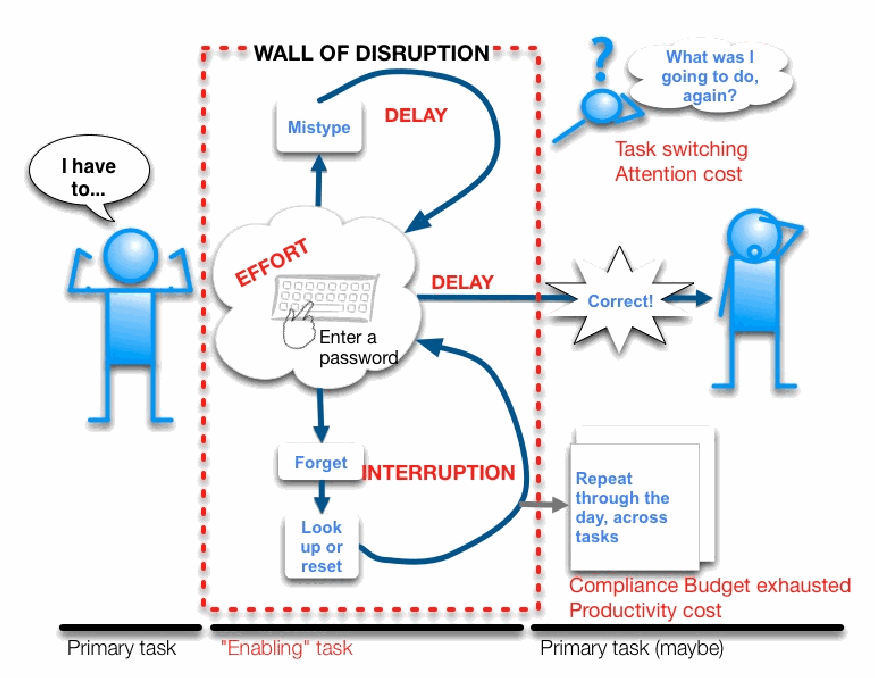
認証を「中断の壁」として描いた漫画風の図です。下の時間軸は「Primary task」(主タスク)、次に「"Enabling" task」(実現タスク)、続いて「Primary task (maybe)」(主タスク(おそらく))です。左の棒人間は「I have to...」(〜しなければならない)と言っています。「WALL OF DISRUPTION」と書かれた赤い破線の枠が実現タスクを覆っています。枠の中には、キーボードと「Enter a password」がある「EFFORT」と書かれた雲があります。「Mistype」へ向かう矢印は「DELAY」と書かれたループで戻ります。「Forget」から「Look up or reset」へ向かう矢印は「INTERRUPTION」と書かれたループで戻ります。「DELAY」と書かれた矢印が枠の外へ伸び、「Correct!」の吹き出しと困惑した棒人間に至ります。その上には、疑問符の付いた虫眼鏡と「What was I going to do, again?」という思考の吹き出しがあり、赤字で「Task switching Attention cost」と書かれています。右下には「Repeat through the day, across tasks」と書かれた重なった紙があり、赤字で「Compliance Budget exhausted Productivity cost」と書かれています。
Figure 16: The wall of disruption created by the enabling task of authentication
図 16: 認証という実現タスクが生み出す中断の壁
Even a successful, problem-free authentication task is fraught with friction caused by the effort of context switching between primary tasks and authentication tasks. As noted in Sec. 6.1, users are painfully aware of the task-switching costs imposed upon them by authentication [17].
成功した、問題のない認証タスクでさえ、主要タスクと認証タスクの間で文脈を切り替える労力によって生じる摩擦に満ちています。第 6.1 節で述べたように、ユーザーは、認証によって課されるタスク切り替えのコストを痛切に意識しています [17]。
The higher the workload associated with a specific authentication task, the more friction and disruption it creates. Based on diary data and interview data from this study, the research team identified four essential factors that increase authentication workload (and therefore friction and disruption):
特定の認証タスクに伴う作業負荷が高いほど、それが生む摩擦と中断も大きくなります。この調査の日誌データとインタビューデータに基づいて、研究チームは、認証の作業負荷(したがって摩擦と中断)を増大させる 4 つの本質的な要因を特定しました。
•Difficulty accessing and/or retrieving authentication elements. Forgetting a password and having to consult a memory aid; having difficulty finding the memory aid; losing a smartcard; having trouble reading the code on an RSA token.
•認証要素へのアクセスや取り出しの難しさ。パスワードを忘れて記憶補助を調べなければならないこと、記憶補助を見つけるのに苦労すること、スマートカードを紛失すること、RSA トークンのコードを読み取るのに苦労すること。
•Perceived lack of user control. Having to follow seemingly arbitrary rules; being blocked from access to an application, resource, or system due to problems with authentication; having no control over when one authenticates (or re-authenticates), such as when the computer locks after a set period of time; being forced to create passwords that are difficult to remember and type.
•ユーザーによる制御の欠如の認識。一見恣意的に思える規則に従わなければならないこと、認証の問題のためにアプリケーション、リソース、システムへのアクセスを妨げられること、コンピュータが一定時間後にロックされる場合のように、いつ認証する(または再認証する)かを制御できないこと、覚えにくく入力しにくいパスワードを作成させられること。
•Complexity. Dealing with different (and conflicting) sets of password creation requirements; having passwords with different expiration timing; keeping track of which passwords are synchronized and which ones are not; having to submit a large number of elements (3 or more) to authenticate.
•複雑さ。異なる(そして矛盾する)パスワード作成要件の組に対処すること、有効期限のタイミングが異なるパスワードを持つこと、どのパスワードが同期されていて、どれが同期されていないかを把握すること、認証のために多数(3 つ以上)の要素を提出しなければならないこと。
•Time. Waiting for a new password to be valid after it has been changed; spending 15 or 20 minutes getting assistance from a help desk to resolve authentication problems; re-entering a password multiple times (either because it was entered incorrectly or because of repeated prompts for authentication); making multiple attempts to recover a password; delaying work to renew a password that is about to expire.
•時間。変更した新しいパスワードが有効になるのを待つこと、認証の問題を解決するためにヘルプデスクの支援を受けるのに 15 分や 20 分を費やすこと、(誤って入力したか、認証が繰り返し要求されたために)パスワードを複数回再入力すること、パスワードを復旧するために複数回試みること、期限切れが近いパスワードを更新するために作業を遅らせること。
Note that some of the example situations listed above involve more than one factor. For example, having to consult a memory aid (especially one that has been misplaced or is otherwise inconveniently located) not only involves the “Difficulty accessing and/or retrieving authentication elements” factor, but the “Time” factor as well. Time is actually a factor in all authentication tasks, because at a minimum, a user must spend some time to perform the task. All authentication tasks have some workload, and therefore a cost to the user: there is no “free” authentication.
上に挙げた状況の例の一部は、複数の要因を伴うことに注意してください。たとえば、記憶補助を調べなければならないこと(特に、置き忘れた、あるいは他の面で不便な場所にあるもの)は、「認証要素へのアクセスや取り出しの難しさ」の要因だけでなく、「時間」の要因も伴います。時間は、実際にはあらゆる認証タスクの要因です。少なくとも、ユーザーはタスクを実行するためにいくらかの時間を費やさなければならないためです。すべての認証タスクには、何らかの作業負荷があり、したがってユーザーにとってのコストがあります。「無料の」認証はありません。
Generally speaking, the greater the impact of any one of these factors in an authentication task (e.g., the more difficult it is to retrieve elements, the less control the user feels, the more complex the task, and the longer it takes), the more friction and frustration the user experiences. This is supported by the data displayed in Table 9 (Sec. 4.4.6) and Table 3 (Sec. 4.4.2): the former shows the frequency of problems and average frustration ratings for each application, and the latter shows the average number of authentication elements required to authenticate to each application. Upon comparing the two tables, the research team found that the more elements an application required for authentication, the more likely participants were to report some frustration with it, even if they experienced few or no problems. Table 16 consolidates this information.
一般的に言えば、認証タスクでこれらの要因のいずれか 1 つの影響が大きいほど(たとえば、要素の取り出しが難しいほど、ユーザーが感じる制御が少ないほど、タスクが複雑なほど、時間がかかるほど)、ユーザーが経験する摩擦とフラストレーションは大きくなります。これは、表 9(第 4.4.6 節)と表 3(第 4.4.2 節)に示されたデータによって裏づけられます。前者は各アプリケーションの問題の頻度と平均フラストレーション評価を示し、後者は各アプリケーションに認証するために必要な認証要素の平均数を示します。2 つの表を比較したところ、研究チームは、アプリケーションが認証に必要とする要素が多いほど、問題をほとんど、あるいはまったく経験しなかった場合でも、参加者がそれについて何らかのフラストレーションを報告する可能性が高いことを発見しました。表 16 は、この情報を統合したものです。
Table 16: Frustration and problems associated with number of authentication elements used
表 16: 使用された認証要素の数に関連するフラストレーションと問題
| Authentication elements | Average frustration | Percentage of problems |
|---|---|---|
| 1 | 1.58 | 8.20% |
| 2 | 1.62 | 8.94% |
| 3 | 2.25 | 6.67% |
| 4 | 2.36 | 36.36% |
| 認証要素 | 平均フラストレーション | 問題の割合 |
|---|---|---|
| 1 | 1.58 | 8.20% |
| 2 | 1.62 | 8.94% |
| 3 | 2.25 | 6.67% |
| 4 | 2.36 | 36.36% |
This data suggest that there is a connection between labor-intensive authentication and participant frustration.
このデータは、労力のかかる認証と参加者のフラストレーションの間に関連があることを示唆しています。
Accumulated frustration associated with a low-cost authentication task repeated many times was also high. The study participants said that performing the same small authentication task over and over was one of their major friction points (see Sec. 6.2.1). Both individual high-cost authentication tasks and large aggregations of low-cost tasks have the same effect in the end: friction and disruption that extends beyond the authentication task itself.
低コストの認証タスクを何度も繰り返すことに関連して蓄積されるフラストレーションも大きいものでした。調査参加者は、同じ小さな認証タスクを何度も繰り返すことが、主な摩擦点の 1 つであると述べました(第 6.2.1 節を参照)。個別の高コストの認証タスクも、低コストのタスクの大量の集積も、最終的には同じ効果をもたらします。認証タスクそのものを超えて広がる、摩擦と中断です。
6.6.3 Friction and disruption from authentication have long-term effects
6.6.3 認証による摩擦と中断には長期的な影響がある
One of the most important insights that can be derived from the findings of this study is that authentication leads to an accumulation of disruption over time on any one account or application. The cost of authentication to the user goes well beyond those identified in some previous authentication diary studies [10]. The literature on task switching suggests that the negative impact of experiencing authentication as an obstacle to one primary task probably lingers through multiple subsequent primary tasks [7][16]. Consider the following example of a hypothetical NIST knowledge worker named Alice, derived from diary and interview data provided by our participants.
この調査の結果から導き出せる最も重要な知見の 1 つは、認証が、単一のアカウントまたはアプリケーションにおいて、時間とともに中断の蓄積につながるということです。ユーザーにとっての認証のコストは、これまでのいくつかの認証の日誌調査で特定されたもの [10] をはるかに超えています。タスクの切り替えに関する文献は、ある主要タスクへの障害として認証を経験することの悪影響が、おそらく、その後の複数の主要タスクにまで尾を引くことを示唆しています [7][16]。参加者から提供された日誌およびインタビューのデータに基づく、NIST の仮想のナレッジワーカー、Alice の次の例を考えてみてください。
At the end of a two-week pay period, Alice sits down to use the NIST Time and Attendance (TA) application, where she records how many hours she spent working on her projects, performing administrative duties, and/or on leave. However, Alice has not logged in since she last renewed her password two weeks ago. Because she has not had an opportunity to “exercise” the new TA password, she does not have it memorized. She has to look it up. But because she wants to keep the password secure, she has stored it in an encrypted file. She must find the file, unlock it, and then find the right password. Alice feels annoyed because this password is not synchronized with that of other key accounts she uses – she usually tries to renew all her passwords at the same time so she can focus her attention properly and not be interrupted at different times by different systems asking for new passwords.
2 週間の給与期間の終わりに、Alice は NIST の勤怠管理(TA)アプリケーションを使うために席に着き、プロジェクトに従事した時間、管理業務を行った時間、および/または休暇に充てた時間を記録します。しかし、Alice は 2 週間前に最後にパスワードを更新して以来、ログインしていません。新しい TA のパスワードを「使う」機会がなかったため、彼女はそれを記憶していません。調べなければなりません。しかし、パスワードを安全に保ちたいので、彼女はそれを暗号化されたファイルに保存しています。彼女はそのファイルを見つけ、ロックを解除し、それから正しいパスワードを見つけなければなりません。このパスワードは、彼女が使う他の主要なアカウントのパスワードと同期されていないため、Alice は苛立ちを感じています。彼女は通常、注意を適切に集中し、さまざまなシステムから新しいパスワードを求められてさまざまな時点で中断されないよう、すべてのパスワードを同時に更新しようとします。
Part of the reason Alice is having trouble is that she cannot remember the requirements for authenticating to TA. Does this password require a number? A special character? Both? Neither? She may feel that the password rules are more stringent than is appropriate for the value of the data being protected.
Alice が苦労している理由の一部は、TA に認証するための要件を覚えていないことです。このパスワードには数字が必要でしょうか。特殊文字は必要でしょうか。両方でしょうか。どちらも不要でしょうか。彼女は、パスワードの規則が、保護されるデータの価値に照らして適切な範囲を超えて厳しいと感じているかもしれません。
Nevertheless, Alice keeps trying to authenticate to TA. She types her new password incorrectly, even though she has it right in front of her, because her fingers remember the old one or the combination of characters in the new one is difficult to type (or both). She tries to enter the password a second time, and logs on successfully.
それでも、Alice は TA に認証しようとし続けます。彼女は、目の前にパスワードがあるにもかかわらず、指が古いパスワードを覚えているか、新しいパスワードの文字の組み合わせが入力しにくい(あるいはその両方)ために、新しいパスワードを間違って入力します。彼女は 2 回目にパスワードを入力しようとして、正常にログオンします。
While it is true that this scenario typically plays out in under a minute, variations of the scenario repeat throughout the day. For example, Alice may have to log in to her TA account several times before she is done because she was interrupted while recording her hours each time and the application automatically logged her out after being idle for a few minutes. Multiply the time-and-effort cost of this kind of authentication task (i.e., remembering the new password, finding the memory aid, entering the password incorrectly) by the number of mission-critical applications Alice uses, and by the number of times per day she needs to authenticate to them, and the switching costs become more evident. Alice takes longer to complete the next several tasks because she is still processing the enabling task which caused a problem.
このシナリオは通常 1 分以内で終わるのは確かですが、シナリオの変種は 1 日を通して繰り返されます。たとえば、Alice は、時間を記録している途中で毎回中断され、アプリケーションが数分間アイドル状態になると自動的にログアウトされたため、終えるまでに TA アカウントに何度もログインしなければならないかもしれません。この種の認証タスク(すなわち、新しいパスワードを思い出すこと、記憶補助を探すこと、パスワードを間違って入力すること)にかかる時間と労力のコストに、Alice が使うミッションクリティカルなアプリケーションの数と、それらに 1 日に認証しなければならない回数を掛けると、切り替えのコストはより明白になります。Alice は、問題を引き起こした実現タスクをまだ処理しているため、その後のいくつかのタスクの完了に、より長い時間がかかります。
In addition, because Alice has experienced many authentication-related problems like the one described above, she is conditioned to approach authentication anticipating possible difficulty (an issue touched on in Sec. 6.1). She also feels that the repeated cycle of renewing, using, and then retiring passwords never seems to end. Also, she feels guilty for being so frustrated with authentication: after all, authentication plays a key role in maintaining NIST’s security, and she takes that security very seriously [14].
さらに、Alice は上述のような認証に関連する問題を何度も経験してきたため、認証に臨む際に、起こりうる困難を予期するように条件づけられています(第 6.1 節で触れた問題)。彼女はまた、パスワードの更新、使用、そして廃止という繰り返しのサイクルが、決して終わらないように感じています。さらに、認証にこれほどフラストレーションを感じることに罪悪感も抱いています。結局のところ、認証は NIST のセキュリティを維持するうえで重要な役割を果たしており、彼女はそのセキュリティを非常に真剣に受け止めているのです [14]。
The result of all this is that Alice’s accumulated experiences with authentication adds to the perceived costs of even the smallest authentication tasks, creating additional drains on the compliance budget and hastening the onset of physical, mental, and password fatigue [5][13]. Users’ experience of fatigue affects their future perceptions of and approaches to authentication, and so forth. In effect, authentication friction and disruption create a vicious cycle.
こうしたことの結果として、Alice が認証に関して積み重ねてきた経験は、最も小さな認証タスクでさえ、本人が認識するコストを増大させ、コンプライアンス予算をさらに消耗させるとともに、身体的疲労、精神的疲労、およびパスワード疲れの始まりを早めます [5][13]。ユーザーが疲労を経験すると、認証に対する将来の認識や取り組み方に影響し、以降も同様のことが続きます。実際、認証による摩擦と中断は悪循環を生み出します。
7 RECOMMENDATIONS
7 推奨事項
As was illustrated in the preceding sections of this document, authentication entails significant costs for the study participants in terms of time and effort. Their authentication workload is high – because they have so many different authentication elements to use and manage – that they often resort to coping mechanisms to keep that workload at a manageable level. Even with these coping mechanisms, authentication creates disruption that has an impact on participants’ work – not just on the primary task immediately disrupted by authentication, but on future tasks as well. For some participants, the friction and disruption from authentication prompted them to avoid certain elective activities requiring authentication, which resulted in lost productivity.
本書のここまでの節で示したように、認証は、調査参加者にとって時間と労力の面で大きなコストを伴います。使用し管理しなければならない認証要素が非常に多いため、参加者の認証の作業負荷は高く、その負荷を管理可能な水準に保つために、しばしば対処の仕組みに頼っています。これらの対処の仕組みがあっても、認証は中断を生み出し、それは参加者の仕事に影響を与えます。認証によってすぐに中断された主要タスクだけでなく、その後のタスクにも影響します。一部の参加者にとって、認証による摩擦と中断は、認証を必要とする特定の任意の活動を避けるきっかけとなり、その結果、生産性が失われました。
The study participants are hardly unique. Their situation is extremely common for countless other organizations and users, and has been for some time: Anne Adams and Martina Angela Sasse observed as early as 1999 that users were severely overburdened by their authentication workloads [1]. Over-authentication is already a crisis [9]. What can be done to address it? Where to start?
調査参加者は、決して特別ではありません。彼らの状況は、他の数え切れないほど多くの組織とユーザーにとって極めて一般的であり、しばらく前からそうでした。Anne Adams と Martina Angela Sasse は、早くも 1999 年に、ユーザーが認証の作業負荷によって深刻に負担を強いられていることを指摘していました [1]。過剰な認証は、すでに危機です [9]。これに対処するために何ができるでしょうか。どこから始めればよいでしょうか。
This section presents recommendations on how to tackle the problem of over-authentication, including changes in how specialists should think about and implement security; concrete steps that organizations, decision makers, security specialists, and even users can take to reduce the impact of authentication; and suggestions for future work in the field of usability.
この節では、過剰な認証の問題にどう取り組むかについての推奨事項を示します。これには、専門家がセキュリティについてどう考え、実装すべきかの見直し、組織、意思決定者、セキュリティ専門家、さらにはユーザーが認証の影響を減らすために取ることのできる具体的な措置、およびユーザビリティ分野における今後の取り組みへの提案が含まれます。
7.1 RETHINKING ASSUMPTIONS ABOUT AUTHENTICATION
7.1 認証に関する前提の再考
The findings from this study illustrate how often knowledge workers authenticate during a typical day, that the impact from those events can linger beyond the enabling task of authentication, and that coping mechanisms are employed to reduce that impact. These findings suggest that it is necessary for security professions to acknowledge and respect the limits of users. When users’ cognitive limits are reached; they resort to variety of memory aids, some of which may have unintended security implications.
この調査の結果は、ナレッジワーカーが典型的な 1 日にどのくらいの頻度で認証するか、それらのイベントの影響が認証という実現タスクを超えて尾を引く可能性があること、そしてその影響を減らすために対処の仕組みが用いられていることを示しています。これらの結果は、セキュリティ専門家がユーザーの限界を認識し、尊重する必要があることを示唆しています。ユーザーの認知的限界に達したとき、ユーザーはさまざまな記憶補助手段に頼ります。その一部は、意図しないセキュリティ上の影響をもたらす可能性があります。
7.1.1 Users struggle with authentication because they are only human
7.1.1 ユーザーが認証に苦労するのは、人間にすぎないからである
Security specialists may be under the impression that users fail to practice good security behaviors because they are completely unaware of the consequences of their actions, or because they do not care about organizational security. This is not typically the case. Most users are aware, in principle, that they have a responsibility to help maintain organizational security. They also understand that part of that responsibility involves fulfilling authentication requirements. The authentication diary study participants were certainly aware of this, and took the importance of organizational security very seriously.
セキュリティの専門家は、ユーザーが良いセキュリティ行動をとらないのは、自分の行動の結果をまったく認識していないか、組織のセキュリティを気にかけていないからだと思い込んでいるかもしれません。これは、通常は当てはまりません。ほとんどのユーザーは、原則として、組織のセキュリティの維持に協力する責任があることを認識しています。また、その責任の一部が、認証要件を満たすことを含むことも理解しています。認証の日誌調査の参加者は、確かにこれを認識しており、組織のセキュリティの重要性を非常に真剣に受け止めていました。
However, on a practical, day-to-day basis, users’ principal objective is to accomplish their primary tasks. Authentication makes that more difficult than it would otherwise be, because it disrupts users’ workflow (especially if it is complex, time-consuming, and/or prone to problems). The time-and-effort costs of authentication and the disruption it causes – which are both compounded by the number, type, and success or failure of authentication events – accumulate across tasks and applications over time.
しかし、実際の日々の現場では、ユーザーの主たる目的は、主要タスクを達成することです。認証は、ユーザーのワークフローを中断させるため(特に、複雑で、時間がかかり、問題が起きやすい場合)、それを本来よりも困難にします。認証の時間と労力のコストと、それが引き起こす中断は、どちらも認証イベントの数、種類、成功または失敗によって増幅され、時間とともにタスクとアプリケーションをまたいで蓄積します。
Therefore, users lose sight of the value of security measures as their attention naturally gravitates to the immediate task of meeting authentication requirements as quickly and efficiently as possible (which is the reason for coping mechanisms). When users encounter authentication, they tend to see it as a hassle first and a necessity second. This is not because users are stupid, malicious, or lazy; they are simply having an instinctive human reaction to being interrupted and detoured on the way to accomplishing their goals [17].
したがって、ユーザーの注意は、認証要件をできるだけ早く効率的に満たすという目前のタスクに自然に引きつけられます(これが対処の仕組みの理由です)。そのため、ユーザーはセキュリティ対策の価値を見失います。ユーザーは認証に遭遇すると、まず面倒なものと捉え、次に必要なものと認識する傾向があります。これは、ユーザーが愚か、悪意がある、あるいは怠惰だからではありません。目標の達成に向かう途中で中断され、回り道をさせられることに対する、人間としての本能的な反応を示しているにすぎません [17]。
7.1.2 More authentication is not necessarily better
7.1.2 認証が多いほど良いとは限らない
Some of the study participants admitted that certain authentication coping mechanisms they used – such as writing passwords down, or using the same password for multiple accounts – had the potential to compromise organizational security. But without these coping mechanisms, it is difficult to use and manage many passwords. What choice did they have?
一部の調査参加者は、パスワードを書き留める、複数のアカウントで同じパスワードを使うなど、自分たちが使っていた特定の認証への対処の仕組みが、組織のセキュリティを損なう可能性があることを認めました。しかし、これらの対処の仕組みがなければ、多くのパスワードを使用し管理することは困難です。彼らにどのような選択肢があったでしょうか。
In security design, making the user authenticate for everything is often the path of least resistance. But taking that path adds significantly, and possibly unnecessarily, to a user’s authentication burden.
セキュリティ設計では、あらゆるものについてユーザーに認証させることが、最も抵抗の少ない道であることがよくあります。しかし、その道をたどることは、ユーザーの認証の負担を大幅に、そしておそらく不必要に増やします。
7.2 MAKING PASSWORD-BASED AUTHENTICATION MORE USABLE
7.2 パスワードベースの認証をより使いやすくする
Making authentication more usable is, ultimately, a long-term prospect. It will require not only a major shift in perspective, but extensive research and development efforts: we suggest some possible directions for both in Sec. 7.3. Fortunately there are steps that organizations can take in the relatively short term to reduce their users’ authentication burden.
認証をより使いやすくすることは、結局のところ、長期的な見通しです。それには、視点の大きな転換だけでなく、広範な研究開発の取り組みが必要です。両方について、考えられる方向性を第 7.3 節で提案します。幸いなことに、組織が比較的短期間で、ユーザーの認証の負担を減らすためにとれる措置があります。
7.2.1 Listen to and work with users
7.2.1 ユーザーの声を聞き、ユーザーと協力する
Making users more aware of and educated about the importance of organizational security and authentication’s role in it can help increase users’ compliance budgets [5]. Users will be more tolerant of authentication and other security policies and measures if they feel they understand the rationale behind them. The participants in this study were probably more accepting of authentication than they otherwise would have been because NIST makes it a point to foster a culture of security awareness, in no small part through relevant education and training. However, such measures will not give users an inexhaustible compliance budget [5]. Even the most patient and security-positive users have limits.
組織のセキュリティの重要性と、その中での認証の役割について、ユーザーの認識を高め、教育することは、ユーザーのコンプライアンス予算を増やす助けとなりえます [5]。ユーザーは、認証やその他のセキュリティポリシーと対策の背後にある根拠を理解していると感じれば、それらに対してより寛容になります。この調査の参加者は、NIST が、関連する教育と研修を通じて、セキュリティ意識の文化を醸成することに力を入れているため、そうでない場合よりも認証を受け入れていた可能性が高いです。ただし、そのような措置が、ユーザーに無尽蔵のコンプライアンス予算を与えるわけではありません [5]。最も忍耐強く、セキュリティに前向きなユーザーにも、限界があります。
For users juggling many authentication elements, resorting to coping mechanisms – such as writing passwords down, reusing them, caching them in browsers, or employing management tools – is a rational way to reduce the impacts of authentication on their primary tasks. But from the point of view of organizational IT and security personnel, these coping strategies can shift user behavior into unintended territory. In this reactive posture, IT ends up lagging somewhat behind user workarounds that have not been assessed for risk or compliance, a situation that may create security vulnerabilities of which users are unaware.
多くの認証要素をやりくりしているユーザーにとって、パスワードを書き留める、再利用する、ブラウザにキャッシュする、管理ツールを使うなどの対処の仕組みに頼ることは、認証が主要タスクに与える影響を減らす合理的な方法です。しかし、組織の IT およびセキュリティ担当者の視点からは、これらの対処戦略は、ユーザーの行動を意図しない領域へと移す可能性があります。この受け身の姿勢では、IT は、リスクやコンプライアンスの評価を受けていないユーザーの回避策に、いくらか遅れをとることになり、これはユーザーが気づいていないセキュリティ上の脆弱性を生み出しうる状況です。
Organizational IT and security personnel need to support their users in this area. This means engaging users in discussions about authentication, encouraging them to share their friction points and coping mechanisms – and then following up with constructive action. Soliciting feedback from users and addressing their problems should be part of the organization’s iterative security process. Robust organizational security depends upon the willing and active cooperation of users.
組織の IT およびセキュリティ担当者は、この領域でユーザーを支援する必要があります。これは、ユーザーを認証についての議論に参加させ、摩擦点と対処の仕組みを共有するよう奨励し、その後、建設的な行動で対応することを意味します。ユーザーからのフィードバックを求め、その問題に対処することは、組織の反復的なセキュリティプロセスの一部であるべきです。堅牢な組織のセキュリティは、ユーザーの自発的で積極的な協力に依存します。
7.2.2 Implement SSO
7.2.2 SSO を実装する
Many of the study participants expressed a desire for NIST to implement organization-wide SSO. They said they would accept a password that is longer and more complex than any they are currently required to use, so long as it was the only one they had to use. Indeed, government employees in a much larger study regarding attitudes towards passwords expressed a preference for SSO [5].
多くの調査参加者は、NIST が組織全体の SSO を実装することを望んでいると表明しました。彼らは、使用しなければならないパスワードが 1 つだけであるなら、現在使用を求められているどのパスワードよりも長く複雑なパスワードを受け入れると述べました。実際、パスワードに対する態度に関するはるかに大規模な調査で、政府職員は SSO への選好を表明しました [5]。
SSO would solve many of the pressing usability problems described by our participants, such as having to manage multiple complex passwords with different composition rules and expiration schedules. While SSO may be difficult and expensive to implement for an organization, it may be a worthwhile investment, since it would significantly cut down on authentication-related friction and disruption and their subsequent costs.
SSO は、異なる構成規則と有効期限のスケジュールを持つ複数の複雑なパスワードを管理しなければならないことなど、参加者が述べた差し迫ったユーザビリティの問題の多くを解決するでしょう。SSO は、組織にとって実装が困難で費用がかかるかもしれませんが、認証に関連する摩擦と中断、およびそれに続くコストを大幅に削減するため、価値のある投資かもしれません。
7.2.3 Consolidate and standardize authentication as much as possible
7.2.3 認証を可能な限り統合し標準化する
If it is not feasible for an organization to implement actual SSO, the best alternative is to meet users halfway and implement a uniform password policy. Even if the policy chosen for universal application is the one with the most stringent content rules and the shortest expiration time, it will still help users by reducing the confusion and inconsistency that makes it more difficult for them to cope with their authentication workloads. If an overhaul of existing password policies is considered to be too difficult and disruptive, the organization should at least dictate that all future applications and systems that use password-based authentication should have the same policy.
組織が実際の SSO を実装することが実現可能でない場合、最善の代替策は、ユーザーに歩み寄って、統一されたパスワードポリシーを実装することです。全体に適用するために選ばれたポリシーが、最も厳格な内容規則と最も短い有効期限を持つものであっても、ユーザーが認証の作業負荷に対処することをより困難にしている混乱と不整合を減らすことで、ユーザーの助けになります。既存のパスワードポリシーの全面的な見直しが、あまりにも困難で混乱を招くとみなされる場合、組織は少なくとも、パスワードベースの認証を使用する今後のすべてのアプリケーションとシステムが、同じポリシーを持つべきだと定めるべきです。
The lack of a uniform, consistent password policy made it that much harder for participants to create and manage the multiple passwords they used, especially if they employed the coping strategy of synchronizing passwords across multiple accounts. The fact that different passwords also expired at different times was also a source of confusion, and even those who tried to update all their passwords on the schedule of the one with the shortest expiry time found it difficult to keep up. NIST’s system owners may not have intended to cause this situation, but it is the natural consequence of an environment where password policies for many applications were created in isolation from each other and may have been inherited from legacy systems.
統一された一貫性のあるパスワードポリシーがないために、参加者が使用する複数のパスワードを作成し管理することが、それだけ難しくなりました。特に、複数のアカウント間でパスワードを同期させるという対処戦略を使っていた場合はそうでした。異なるパスワードが異なる時期に期限切れになることも、混乱の原因であり、有効期限が最も短いもののスケジュールに合わせてすべてのパスワードを更新しようとした人でさえ、それについていくことが困難だとわかりました。NIST のシステム所有者は、この状況を引き起こすつもりはなかったかもしれませんが、これは、多くのアプリケーションのパスワードポリシーが互いに独立して作成され、レガシーシステムから引き継がれた可能性のある環境の、当然の結果です。
7.2.4 Encourage and support the use of password managers or vaults
7.2.4 パスワードマネージャーまたはパスワードボールトの使用を奨励し、支援する
Finally, it is recommended that organizations actively support a user coping mechanism that, when practiced correctly, significantly reduces authentication burden while maintaining security: password management tools. (Individual users are also recommended to look into password managers or vaults for their personal use.) As described earlier, participants described password management tools as considerably simplifying password entry, which is especially useful for users who need to authenticate multiple times during the course of a day.
最後に、組織が、正しく実践すれば、セキュリティを維持しながら認証の負担を大幅に減らすユーザーの対処の仕組み、すなわちパスワード管理ツールを積極的に支援することを推奨します。(個々のユーザーにも、個人用としてパスワードマネージャーまたはパスワードボールトを検討することを推奨します。)前述のように、参加者は、パスワード管理ツールがパスワードの入力を大幅に簡素化したと述べており、これは、1 日の間に複数回認証する必要があるユーザーにとって特に有用です。
7.3 FUTURE DIRECTIONS
7.3 今後の方向性
Although there are a number of different authentication mechanisms that employ a variety of different authentication elements (including PIV cards, RSA tokens, and biometrics), password-based mechanisms are by far the most common. They were the first authentication mechanism to be used on computers, starting with timesharing systems in the 1960s [15]. Users of these systems were required to enter a password once: to log on to the computer. This required a trivial amount of time and effort and did not overly disrupt any particular primary task. The relative few individuals who used computing resources needed only one simple password, which typically only had to be changed if there was good reason to believe it had been compromised.
PIV カード、RSA トークン、生体情報など、さまざまな異なる認証要素を用いる、数多くの異なる認証の仕組みがありますが、パスワードベースの仕組みが、圧倒的に最も一般的です。これは、1960 年代のタイムシェアリングシステムに始まり、コンピュータで最初に使われた認証の仕組みでした [15]。これらのシステムのユーザーは、コンピュータにログオンするために、パスワードを 1 回入力することが求められました。これには、わずかな時間と労力しか必要とせず、特定の主要タスクを過度に中断させることもありませんでした。コンピューティングリソースを使った比較的少数の個人は、単純なパスワード 1 つだけで済み、そのパスワードは通常、危殆化したと考える十分な理由がある場合にのみ変更すればよいものでした。
Computing technology and the way we use it has changed radically since then. But we are still using passwords as our default method of authentication in essentially the same way: one password per technological asset. This was effective and appropriate in the days when a user would interact with, at most, a handful of password-protected assets on a daily basis. But now that most users interact with dozens of such assets – devices, applications, Web pages, networks, etc. – protecting each one with a password is no longer practical. There are simply more than most users can remember, especially with the added complication of policies that require passwords to be longer, more complex, and subject to frequent expiration.
コンピューティング技術と、それを使う方法は、それ以来、根本的に変化しました。しかし、私たちは依然として、パスワードを、本質的に同じ方法、すなわち技術的資産ごとに 1 つのパスワードという方法で、認証の既定の方法として使っています。これは、ユーザーが日常的にやり取りするパスワードで保護された資産が、せいぜい一握りだった時代には、効果的で適切でした。しかし、今では大半のユーザーが、デバイス、アプリケーション、Web ページ、ネットワークなど、数十もの資産とやり取りしているため、それぞれをパスワードで保護することは、もはや現実的ではありません。特に、パスワードをより長く、より複雑にし、頻繁な期限切れの対象とすることを求めるポリシーによって複雑さが加わっているため、ほとんどのユーザーが覚えられる数を、単純に超えています。
7.3.1 Take a broader perspective
7.3.1 より広い視野を持つ
Mary Theofanos and Ellen Cram Kowalczyk observed at a recent NIST Information Security and Privacy Advisory Board (ISPAB) meeting, that we have evolved from thinking “the user is the problem” to “technology is the solution”, to the realization that “the user must be part of the solution” [24]. However this holistic approach requires us to fully understand the user and embrace the considerable social science knowledge relevant to usability and computer systems. Taking a broader perspective, allows us to build usability into our security products and processes, that span the life of a system from conception through design, implementation, and evolution. Good usability, like good security takes into account the changing nature of the threat environment, changing business goals, and differences in user needs, skills, attitudes, and experience. In addition, usable security should be tailored to organizational priorities and needs.
Mary Theofanos と Ellen Cram Kowalczyk は、最近の NIST の情報セキュリティ・プライバシー諮問委員会(ISPAB)の会合で、私たちが、「ユーザーが問題である」という考えから、「技術が解決策である」という考えを経て、「ユーザーが解決策の一部でなければならない」という認識へと進化してきたと指摘しました [24]。しかし、この全体的なアプローチでは、ユーザーを十分に理解し、ユーザビリティとコンピュータシステムに関する相当量の社会科学の知識を取り入れる必要があります。より広い視野から捉えることで、構想から設計、実装、進化に至るシステムのライフサイクル全体にわたるセキュリティ製品とプロセスに、ユーザビリティを組み込むことができます。優れたユーザビリティは優れたセキュリティと同様に、脅威環境の変化する性質、変化する事業目標、およびユーザーのニーズ、スキル、態度、経験の違いを考慮に入れます。さらに、使いやすいセキュリティは、組織の優先事項とニーズに合わせて調整されるべきです。
Authentication throughout an organization should be driven by an overall authentication strategy or approach that is driven by organizational security priorities and user needs and provides a vision for future growth. It appears in many cases that as systems are deployed that there is no overall strategy that governs the authentication mechanism offered and how it complements or prepares for the future.
組織全体の認証は、組織のセキュリティの優先事項とユーザーのニーズに基づき、将来の成長に向けたビジョンを提供する、全体的な認証の戦略またはアプローチによって導かれるべきです。多くの場合、システムが展開される際に、提供される認証の仕組みと、それが将来をどのように補完し、あるいは準備するかを統制する全体的な戦略が存在しないように見受けられます。
7.3.2 Establish best practices for implementing usable authentication
7.3.2 使いやすい認証を実装するためのベストプラクティスを確立する
Essentially, usability best practices must give IT and security professionals a roadmap for understanding the context of use for whatever asset they are working with and assessing how they can implement authentication in a way that fits that context. For example, does securing a transaction require making the user authenticate, or would it be more effective to authenticate the transaction itself? Is it possible to secure a system through implicit authentication, where the system satisfies itself that this is the authorized user [2]?
本質的に、ユーザビリティのベストプラクティスは、IT およびセキュリティの専門家に、扱うあらゆる資産の利用の文脈を理解し、その文脈に合う形で認証をどのように実装できるかを評価するための、ロードマップを提供しなければなりません。たとえば、トランザクションを保護するには、ユーザーに認証させる必要があるでしょうか。それとも、トランザクション自体を認証する方が効果的でしょうか。システムが、これが許可されたユーザーであると自ら確信する暗黙的な認証によって、システムを保護することは可能でしょうか [2]。
Sections 5 and 6 described some methodological tools (experience graphs and prototyping with CogTool) for measuring the effect of authentication on users, as well as recommendations for improving the usability of password-based authentication; these could be considered as a basis for best practices. But that is not nearly enough. Security and IT professionals need best practices that help them apply some basic principles of social science and design. Best practices should also guide the effective development and use of the modular authentication solutions we described in the previous section.
第 5 節と第 6 節は、認証がユーザーに与える影響を測定するためのいくつかの方法論上のツール(エクスペリエンスグラフと CogTool を用いたプロトタイピング)と、パスワードベースの認証のユーザビリティを改善するための推奨事項を説明しました。これらは、ベストプラクティスの基礎として考えることができます。しかし、それでは到底十分ではありません。セキュリティおよび IT の専門家は、社会科学とデザインのいくつかの基本原則を適用する助けとなるベストプラクティスを必要としています。ベストプラクティスはまた、前の節で述べたモジュール式の認証ソリューションの効果的な開発と使用の指針ともなるべきです。
7.3.3 Conduct further research on habits and effects related to authentication
7.3.3 認証に関する習慣と影響について、さらに研究を行う
Technologies, techniques, and best practices in any field need to have a basis in empirical data. Usability is no different. However, at this time there is only a small body of usability research from which to draw for this domain.
どの分野の技術、手法、ベストプラクティスも、実証データに基づく必要があります。ユーザビリティも同様です。しかし、現時点では、この領域について参照できるユーザビリティの研究は、ごくわずかしかありません。
This study makes strong methodological contributions in identifying and measuring the impact of explicit authentication on users. The experience journey maps discussed in Sec. 5 (and shown for each participant in Appendix B) and their underlying measures can potentially be used by organizations to track and manage the effects of authentication on their customers or users. The experience journey maps, along with analyses that can be achieved through prototyping tools like CogTool, could be useful to IT and security professionals as they make security decisions that take user effort into account.
この調査は、明示的な認証がユーザーに与える影響を特定し測定するうえで、方法論上の大きな貢献をしています。第 5 節で論じた(付録 B に各参加者について示した)エクスペリエンスのジャーニーマップとその基礎となる指標は、組織が、認証が顧客やユーザーに与える影響を追跡し管理するために使える可能性があります。エクスペリエンスのジャーニーマップは、CogTool のようなプロトタイピングツールを通じて実現できる分析とともに、IT およびセキュリティの専門家が、ユーザーの労力を考慮に入れたセキュリティ上の決定を行う際に役立つ可能性があります。
The research team would like to see these techniques applied by other researchers in other settings, in order to confirm their utility and validity. In addition, we welcome suggestions for any refinements that may make these tools more effective. Finally, we are interested in seeing whether these findings and insights regarding users’ authentication-related perceptions and behaviors hold true elsewhere.
研究チームは、これらの手法の有用性と妥当性を確認するために、他の研究者が他の環境でこれらを適用することを望んでいます。さらに、これらのツールをより効果的にするための改良についての提案を歓迎します。最後に、ユーザーの認証に関する認識と行動についてのこれらの調査結果と知見が、他の場所でも当てはまるかどうかに関心があります。
There is also a need for additional tools that reflect the factors involved in users’ compliance budgets and the properties of disruption from authentication. Research that employs these kinds of tools will help security designers to think beyond current models and take into account the downstream effects of security burden for users, teams, and organizations.
ユーザーのコンプライアンス予算に関わる要因と、認証による中断の特性を反映する追加のツールも必要です。この種のツールを用いる研究は、セキュリティ設計者が、現在のモデルを超えて考え、ユーザー、チーム、組織にとってのセキュリティの負担の下流への影響を考慮に入れる助けとなります。
Even without analytical tools such as the user experience journey maps and CogTool task analysis, the authors believe that usability researchers and organizations can gain valuable insights by conducting diary studies and follow-up interviews similar to those employed by this study. At a minimum, such studies are useful for collecting feedback and identifying the most widespread and persistent authentication issues within an organization. Studies with a larger number of participants than this one, would potentially reach a broader audience within an organization for an even broader perspective of the issues surrounding authentication.
ユーザーエクスペリエンスのジャーニーマップや CogTool のタスク分析のような分析ツールがなくても、ユーザビリティの研究者や組織は、この調査で用いたものと同様の日誌調査とフォローアップインタビューを実施することで、貴重な知見を得られると著者らは考えています。少なくとも、このような調査は、フィードバックを収集し、組織内で最も広まっていて根強い認証の問題を特定するのに役立ちます。この調査よりも多くの参加者を対象とした調査は、認証を取り巻く問題について、さらに広い視点を得るために、組織内のより広い層に届く可能性があります。
Longer-term diary studies, spanning the course of a week or more, may also be valuable. However, the data collection methods would have to be changed slightly in order to make this feasible for study participants. Expecting participants to record every single instance of authentication over a long-term period would add significantly to their authentication burden, which is the exact opposite of what we want to accomplish, and they would probably find journaling activities difficult to sustain for more than one day. One plausible variation would be to have participants record significant authentication related events (including problems) at the end of the day, while their actual authentications would be counted through some automated means. The data from a series of periodic interviews would be invaluable, although the number of interviews should be related to the length of the study period.
1 週間以上にわたる、より長期の日誌調査も、有益かもしれません。ただし、調査参加者にとってこれを実現可能にするためには、データ収集の方法を少し変更する必要があります。長期間にわたって、認証のすべての事例を記録することを参加者に期待することは、認証の負担を大幅に増やすことになり、それは私たちが達成したいこととまったく逆であり、参加者は、1 日を超えて日誌をつける活動を維持するのは難しいと感じるでしょう。考えられる 1 つの変形は、参加者に、1 日の終わりに、認証に関連する重要なイベント(問題を含む)を記録してもらい、実際の認証は何らかの自動的な手段で数えるというものです。定期的な一連のインタビューからのデータは非常に貴重ですが、インタビューの回数は調査期間の長さに関連づけるべきです。
8 CONCLUSION
8 結論
This study provided a very clear picture of the average government knowledge worker’s authentication workload at NIST during the course of a typical day. While participants were using technology, any kind of technology at all, the impact of authentication was present. The study participants spent a considerable amount of time and effort on authentication each day. Participants tried very hard to cope with this workload in ways that they thought would preserve organizational security. It is important to note that they dealt with authentication not only at work, but also in their personal lives, on their computers and devices outside of the work environment. Organizations may not consider it incumbent to count users’ personal authentication workload since they cannot control it. But it is an important factor that cannot be ignored, as people cannot divide their cognitive effort: they need to be able to accommodate some personal authentication events as well as work events.
この調査は、NIST における典型的な 1 日の間の、平均的な政府のナレッジワーカーの認証の作業負荷について、非常に明確な状況を示しました。参加者が技術を使っている間は、どのような種類の技術であっても、認証の影響が存在しました。調査参加者は、毎日、認証に相当な時間と労力を費やしていました。参加者は、組織のセキュリティを維持できると考える方法で、この作業負荷に対処しようと懸命に努力しました。彼らが、職場だけでなく、私生活でも、職場環境外の自分のコンピュータやデバイスで、認証に対処していたことに注意することが重要です。組織は、ユーザーの個人的な認証の作業負荷を管理できないため、それを数えることが自らの責務だとは考えないかもしれません。しかし、それは無視できない重要な要因です。人は認知的な労力を分けられないためです。人は、業務のイベントだけでなく、個人的な認証イベントにも対応できる必要があります。
We found that:
私たちは次のことを発見しました。
•Authentication problems create considerable friction
•認証の問題は大きな摩擦を生む
•Users experience authentication friction even when there are no problems
•問題がない場合でも、ユーザーは認証の摩擦を経験する
•Friction and disruption from authentication have long-term effects
•認証による摩擦と中断には長期的な影響がある
These findings lead us to a set of recommendations, described in Sec. 7. Most importantly, the underlying assumptions about authentication must be revisited, as the human limitations of users must be respected. For NIST in particular, further implementation of SSO and incorporation of an accepted password vault or manager would help reduce the friction of authentication for NIST knowledge workers. Moreover, we believe that the findings from this study generalize to the average government knowledge worker, as the password authentication workload found here is consistent with the findings from a much larger, Department of Commerce-wide study on password related behaviors [5].
これらの調査結果は、第 7 節で説明した一連の推奨事項につながります。最も重要なのは、ユーザーの人間としての限界を尊重しなければならないため、認証に関する基礎となる前提を見直さなければならないということです。特に NIST については、SSO のさらなる実装と、承認されたパスワードボールトまたはパスワードマネージャーの導入が、NIST のナレッジワーカーの認証の摩擦を減らす助けとなるでしょう。さらに、ここで見られたパスワード認証の作業負荷は、パスワード関連の行動に関する、商務省全体のはるかに大規模な調査 [5] の結果と一致しているため、この調査の結果は、平均的な政府のナレッジワーカーに一般化できると私たちは考えています。
9 REFERENCES
9 参考文献
[1] Adams, A., & Sasse, A. M. (1999). Users are not the enemy. Communications of the ACM, 42(12), 41-46.
[1] Adams, A., & Sasse, A. M. (1999). Users are not the enemy. Communications of the ACM, 42(12), 41-46.
[2] Almuairfi, S., Veeraraghavan, P. and Chilamkurti, N. (2011). IPAS: Implicit Password Authentication System. In IEEE workshops of international conference on advanced information networking and applications (pp. 430-435). doi: 10.1109/WAINA.2011.36
[2] Almuairfi, S., Veeraraghavan, P. and Chilamkurti, N. (2011). IPAS: Implicit Password Authentication System. In IEEE workshops of international conference on advanced information networking and applications (pp. 430-435). doi: 10.1109/WAINA.2011.36
[3] Baumeister, R. F. (2003). The psychology of irrationality. In I. Brocas & J. Carrillo (Eds.), The Psychology of Economic Decisions: Rationality and well-being (pp. 1-15). New York, NY: Oxford University Press.
[3] Baumeister, R. F. (2003). The psychology of irrationality. In I. Brocas & J. Carrillo (Eds.), The Psychology of Economic Decisions: Rationality and well-being (pp. 1-15). New York, NY: Oxford University Press.
[4] Card, S. K., Thomas, T. P., & Newall, A. (1983). The psychology of human-computer interaction. London, UK: Lawrence Erlbaum Associates.
[4] Card, S. K., Thomas, T. P., & Newall, A. (1983). The psychology of human-computer interaction. London, UK: Lawrence Erlbaum Associates.
[5] Choong, Y., Theofanos, M., & Liu, H. (2013). A Large-Scale Survey of Employee’s Password Behaviors. Manuscript submitted for publication.
[5] Choong, Y., Theofanos, M., & Liu, H. (2013). A Large-Scale Survey of Employee’s Password Behaviors. Manuscript submitted for publication.
[6] Beautement, A., Sasse, M. A., & Wonham, M. (2010). The compliance budget: Managing security behaviour in organisations. In Proceedings of the 2008 workshop on New security paradigms (pp. 47-58). doi: 0.1145/1595676.1595684
[6] Beautement, A., Sasse, M. A., & Wonham, M. (2010). The compliance budget: Managing security behaviour in organisations. In Proceedings of the 2008 workshop on New security paradigms (pp. 47-58). doi: 0.1145/1595676.1595684
[7] Czerwinski, M., Horvitz, E., & Qilhite, S. (2004). A diary study of task switching and interruptions. In Proceedings of the SIGCHI conference on Human factors in computing systems (pp. 175-182). doi: 10.1145/985692.985715
[7] Czerwinski, M., Horvitz, E., & Qilhite, S. (2004). A diary study of task switching and interruptions. In Proceedings of the SIGCHI conference on Human factors in computing systems (pp. 175-182). doi: 10.1145/985692.985715
[8] Fitts, P. M. (1954). The information capacity of the human motor system in controlling the amplitude of movement. Journal of experimental psychology, 47(6), 381.
[8] Fitts, P. M. (1954). The information capacity of the human motor system in controlling the amplitude of movement. Journal of experimental psychology, 47(6), 381.
[9] Florencio, D., & Herley, C. (2007). A large-scale study of web password habits. In Proceedings of the 16th international conference on World Wide Web (pp. 657-666). doi: 10.1145/1242572.1242661
[9] Florencio, D., & Herley, C. (2007). A large-scale study of web password habits. In Proceedings of the 16th international conference on World Wide Web (pp. 657-666). doi: 10.1145/1242572.1242661
[10] Inglesant, P. G., & Sasse, M. A. (2010). The true cost of unusable password policies: Password use in the wild. In Proceedings of the 28th international conference on Human factors in computing systems. doi: 10.1145/1753326.1753384
[10] Inglesant, P. G., & Sasse, M. A. (2010). The true cost of unusable password policies: Password use in the wild. In Proceedings of the 28th international conference on Human factors in computing systems. doi: 10.1145/1753326.1753384
[11] John, B. E., Prevas, K., Salvucci, D. D., Koedinger, K. (2004) Predictive human performance modeling made easy. Proceedings of CHI 2004 (Vienna, Austria, April 2004) ACM New York. 455-462.
[11] John, B. E., Prevas, K., Salvucci, D. D., Koedinger, K. (2004) Predictive human performance modeling made easy. Proceedings of CHI 2004 (Vienna, Austria, April 2004) ACM New York. 455-462.
[12] Kieras, D. (1993). Using the keystroke-level model to estimate execution times. Informally published manuscript, University of Michigan, Ann Arbor, Michigan. Retrieved from http://www.pitt.edu/~cmlewis/KSM.pdf
[12] Kieras, D. (1993). Using the keystroke-level model to estimate execution times. Informally published manuscript, University of Michigan, Ann Arbor, Michigan. 入手先: http://www.pitt.edu/~cmlewis/KSM.pdf
[13] Maxwell, K. (2008). Password fatigue. In BuzzWord by MacMillan Dictionary. New York, NY: Macmillan Publishers Limited. Retrieved from http://www.macmillandictionary.com/buzzword/entries/password-fatigue.html
[13] Maxwell, K. (2008). Password fatigue. In BuzzWord by MacMillan Dictionary. New York, NY: Macmillan Publishers Limited. 入手先: http://www.macmillandictionary.com/buzzword/entries/password-fatigue.html
[14] McDermott, R. (2012). Emotion and security. Communications of the ACM, 55(2), 35-37. doi: 10.1145/2076450.2076462
[14] McDermott, R. (2012). Emotion and security. Communications of the ACM, 55(2), 35-37. doi: 10.1145/2076450.2076462
[15] The M.I.T. Computation Center (1965). The compatible time-sharing system: A programmer’s guide. (2nd ed.). Boston, MA: MIT Press.
[15] The M.I.T. Computation Center (1965). The compatible time-sharing system: A programmer’s guide. (2nd ed.). Boston, MA: MIT Press.
[16] Monsell, S. (2003). Task switching. Trends in Cognitive Sciences, 7(3), 134-140. Retrieved from matt.colorado.edu/teaching/highcog/fall8/m3.pdf
[16] Monsell, S. (2003). Task switching. Trends in Cognitive Sciences, 7(3), 134-140. 入手先: matt.colorado.edu/teaching/highcog/fall8/m3.pdf
[17] Nass, C., & Yen, C. (2010). The man who lied to his laptop: What machines teach us about human relationships. New York, NY: Penguin Publishing.
[17] Nass, C., & Yen, C. (2010). The man who lied to his laptop: What machines teach us about human relationships. New York, NY: Penguin Publishing.
[18] Parkin, S., van Moorsel, A., Inglesant, P., & Sasse, M. A. (2010). A stealth approach to usable security: helping it security managers to identify workable security solutions. In Proceedings of the 2010 workshop on New security paradigms (pp. 33-50). doi: 10.1145/1900546.1900553
[18] Parkin, S., van Moorsel, A., Inglesant, P., & Sasse, M. A. (2010). A stealth approach to usable security: helping it security managers to identify workable security solutions. In Proceedings of the 2010 workshop on New security paradigms (pp. 33-50). doi: 10.1145/1900546.1900553
[19] Reason, J. (2008). The human contribution: Unsafe acts, accidents and heroic recoveries. Surrey, UK: Ashgate Publishing, Ltd.
[19] Reason, J. (2008). The human contribution: Unsafe acts, accidents and heroic recoveries. Surrey, UK: Ashgate Publishing, Ltd.
[20] Sasse, M.A. and Flechais, I. (2005). Usable Security. In Security and Usability: Designing Systems that People Can Use (pp. 13-30). Sebastopol, CA: O'Reilly Media.
[20] Sasse, M.A. and Flechais, I. (2005). Usable Security. In Security and Usability: Designing Systems that People Can Use (pp. 13-30). Sebastopol, CA: O'Reilly Media.
[21] Shay, R., Komanduri, S., Kelley, P. G., Leon, P. G., Mazurek, M. L., Bauer, L., Christin, N., & Cranor, L. F. (2010). Encountering stronger password requirements: User attitudes and behaviors. In Proceedings of the Sixth Symposium on Usable Privacy and Security. doi: 10.1145/1837110.1837113
[21] Shay, R., Komanduri, S., Kelley, P. G., Leon, P. G., Mazurek, M. L., Bauer, L., Christin, N., & Cranor, L. F. (2010). Encountering stronger password requirements: User attitudes and behaviors. In Proceedings of the Sixth Symposium on Usable Privacy and Security. doi: 10.1145/1837110.1837113
[22] Shostack, L. G. (1984). Design services that deliver. Harvard Business Review(84115), 133-139.
[22] Shostack, L. G. (1984). Design services that deliver. Harvard Business Review(84115), 133-139.
[23] Stickdorn, M. and Schneider, J. (2010). This is service design thinking. Amsterdam, BIS Publishers. Retrieved from http://www.thisisservicedesignthinking.com
[23] Stickdorn, M. and Schneider, J. (2010). This is service design thinking. Amsterdam, BIS Publishers. 入手先: http://www.thisisservicedesignthinking.com
[24] Theofanos, M. and Cram Kowalczyk, E. (2010). “ISPAB Panel on Usable Security”. Retrieved from http://csrc.nist.gov/groups/SMA/ispab/documents/minutes/2010-11/Theofanos-Kowalczyk_usability-security_ISPAB.pdf
[24] Theofanos, M. and Cram Kowalczyk, E. (2010). “ISPAB Panel on Usable Security”. 入手先: http://csrc.nist.gov/groups/SMA/ispab/documents/minutes/2010-11/Theofanos-Kowalczyk_usability-security_ISPAB.pdf
[25] Vonnegut, K. (Presenter). (2010). Kurt Vonnegut on the shapes of stories. [Web Video]. Retrieved from http://www.youtube.com/watch?v=oP3c1h8v2ZQ
[25] Vonnegut, K. (Presenter). (2010). Kurt Vonnegut on the shapes of stories. [Web Video]. 入手先: http://www.youtube.com/watch?v=oP3c1h8v2ZQ
[26] Weirich, D., & Sasse, M. A. (2001). Pretty good persuasion: A first step towards effective password security in the real world. In Proceedings of the 2001 workshop on New security paradigms (pp. 137 - 143). doi: 10.1145/508171.508195
[26] Weirich, D., & Sasse, M. A. (2001). Pretty good persuasion: A first step towards effective password security in the real world. In Proceedings of the 2001 workshop on New security paradigms (pp. 137 - 143). doi: 10.1145/508171.508195
[27] Whitten, A., & Tygar, J. D. (1999). Why Johnny can't encrypt: A usability evaluation of PGP 5.0. In Proceedings of the 8th conference on USENIX Security Symposium - Volume 8 (p. 14). Retrieved from http://static.usenix.org/events/sec99/whitten.html
[27] Whitten, A., & Tygar, J. D. (1999). Why Johnny can't encrypt: A usability evaluation of PGP 5.0. In Proceedings of the 8th conference on USENIX Security Symposium - Volume 8 (p. 14). 入手先: http://static.usenix.org/events/sec99/whitten.html
[28] Zeigarnik, B. (1938). On finished and unfinished tasks. In W. Ellis (Ed.), A source book of Gestalt psychology (pp. 300-314). London, England: Kegan Paul, Trench, Trubner & Company. doi: 10.1037/11496-025
[28] Zeigarnik, B. (1938). On finished and unfinished tasks. In W. Ellis (Ed.), A source book of Gestalt psychology (pp. 300-314). London, England: Kegan Paul, Trench, Trubner & Company. doi: 10.1037/11496-025
[29] Zurko, M. E., & Simon, R. T. (1996). User-centered security. In Proceedings of the 1996 Workshop on New Security Paradigms (pp. 27-33). doi: 10.1145/304851.304859
[29] Zurko, M. E., & Simon, R. T. (1996). User-centered security. In Proceedings of the 1996 Workshop on New Security Paradigms (pp. 27-33). doi: 10.1145/304851.304859
APPENDIX A: STUDY MATERIALS
付録 A: 調査資料
A.1 DIARY FORM
A.1 日誌用紙
| Event Details | |||
|---|---|---|---|
| Start Time: __________ End Time: ___________ | Reason for Authentication _____ First use since last logout _____ Re-try due to unsuccessful login (if re-try right after a failed login, you can skip the rest if info is the same) _____ Login after time-out Other reason: _________________ Location _____ NIST campus _____ Offsite Device _____ Desktop _____ Laptop _____ Blackberry _____ Cell phone _____ Desk phone _____ iPad Other device: _________________ | Type of Account/Application For example, NIST domain, Web TA, etc. _ Information required for authentication _____ User ID/Name _____ Password _____ RSA Token _____ PIN _____ PIV card Other info: _________________ Memory Aids _____ Memorized _____ Written on a paper _____ Stored in a file _____ Remembered by the browser Other aids: _________________ | Any Problems? For example, mistyped password, forgot user ID, lost PIV... _ What are you going to do? _____ Try again immediately _____ Contact support (e.g. ITAC) Other : _ Frustration Level Not frustrated 1 2 Neutral 3 4 Very frustrated 5 Overall comment |
| イベントの詳細 | |||
|---|---|---|---|
| 開始時刻: __________ 終了時刻: ___________ | 認証の理由 _____ 前回のログアウト以降の最初の使用 _____ ログインに失敗したための再試行(ログイン失敗の直後の再試行で、情報が同じ場合は、残りを省略できます) _____ タイムアウト後のログイン その他の理由: _________________ 場所 _____ NIST のキャンパス _____ キャンパス外 デバイス _____ デスクトップ _____ ノートコンピュータ _____ Blackberry _____ 携帯電話 _____ 卓上電話 _____ iPad その他のデバイス: _________________ | アカウント・アプリケーションの種類 たとえば、NIST ドメイン、Web TA など。 _ 認証に必要だった情報 _____ ユーザー ID/名前 _____ パスワード _____ RSA トークン _____ PIN _____ PIV カード その他の情報: _________________ 記憶補助手段 _____ 記憶した _____ 紙に書いた _____ ファイルに保存した _____ ブラウザが記憶した その他の補助手段: _________________ | 何か問題はありましたか。 たとえば、パスワードの入力ミス、ユーザー ID を忘れた、PIV を紛失した…… _ どうしますか。 _____ すぐに再試行する _____ サポートに連絡する(例: ITAC) その他: _ フラストレーションのレベル フラストレーションなし 1 2 中立 3 4 非常に強いフラストレーション 5 全体的なコメント |
A.2 FOCUS QUESTIONS FOR FOLLOW-UP INTERVIEWS
A.2 フォローアップインタビューの重点質問
We’re looking for high-level patterns here in terms of frustration, burden, or automatizing.
ここでは、フラストレーション、負担、あるいは認証の自動化に関する、大まかなパターンを探しています。
Indented questions are suggestions for follow-up. The focus questions can happen in any order that makes sense in the interview. Go with the participant flow.
字下げされた質問は、フォローアップのための提案です。重点質問は、インタビューの中で意味のある任意の順序で行ってかまいません。参加者の話の流れに沿って進めてください。
A.1.1 Opening broad questions
A.1.1 最初の大まかな質問
•What’s the biggest take-away for you from doing the day-in-the-life? Why?
•1日の記録調査を行って、あなたにとって最も大きな気づきは何でしたか。それはなぜですか。
•What was the biggest surprise? Why?
•最も驚いたことは何ですか。それはなぜですか。
•What big questions do you have now?
•今、どのような大きな疑問がありますか。
A.1.2 Focus questions
A.1.2 重点質問
A.1.2.1 Frequency
A.1.2.1 頻度
If this hasn’t come up already:
まだ話に出ていない場合:
How do you feel about the number of authentication events you documented in your day?
1 日に記録した認証イベントの数について、どう感じますか。
How close was that number to what you’d expected?
その数は、予想していたものにどれくらい近かったですか。
A.1.2.2 Control and autonomy
A.1.2.2 制御と自律性
•In looking at the range of authentication devices, places, and methods you logged, tell me about how all that fits together.
•記録した認証のデバイス、場所、方法の範囲を見て、それらがどのようにつながっているかを教えてください。
•Of what you can control about authentication, how did you decide on that combination?
•認証について自分で制御できる部分のうち、その組み合わせはどのように決めましたか。
•What kinds of tricks do you use to make authentication easier or more efficient for yourself?
•認証を自分にとってより簡単で効率的にするために、どのような工夫をしていますか。
A.1.2.3 Frequency
A.1.2.3 頻度
Let’s look at a couple of episodes where you marked that you were very frustrated. [Walk through the data from the form, if you have it, up to the point of describing the problem. After you read their description, ask: ] What happened here?
非常にフラストレーションを感じたと記した出来事を、いくつか見てみましょう。[用紙に記入したデータがあれば、問題の説明に至るまでその内容を確認します。相手の説明を読んだ後、次のように尋ねてください。]ここで何が起きましたか。
•What was frustrating about it? [or, continue, if needed:] Why did you become frustrated?
•それのどのような点に苛立ちを感じましたか。[または、必要であれば続けて:]なぜ苛立ちを感じたのですか。
•What did that event cost you?
•その出来事は、あなたにとってどのようなコストになりましたか。
A.1.2.4 Timing clusters
A.1.2.4 時間帯の集中
When we skimmed through your data, we saw that most of your events happened [when?]. Tell us about that. How typical is that?
データにざっと目を通したところ、あなたのイベントの大半が[いつ?]に起きていました。それについて教えてください。それはどの程度典型的ですか。
A.1.2.5 Big picture: what’s the hassle factor?
A.1.2.5 全体像: 面倒さはどの程度か
•Looking back at your day-in-the-life of authentication, what’s your take on authentication effectiveness?
•認証を記録した1日を振り返って、認証の有効性についてどう思いますか。
•What’s the biggest hassle about it? Why?
•それについて最も面倒だと感じることは何ですか。それはなぜですか。
•What do you see as the tradeoffs?
•どのようなトレードオフがあると考えますか。
A.3 DEMOGRAPHIC SURVEY
A.3 属性調査
What is your profession?
あなたの職業は何ですか。
Gender ____ F _____M
性別 ____ 女性 _____ 男性
Age range
年齢層
__< 20
__< 20
__ 21-29
__ 21-29
__ 30-39
__ 30-39
__ 40-49
__ 40-49
___ 50-59
___ 50-59
__ 60+
__ 60+
APPENDIX B: USER EXPERIENCE CHARTS FOR STUDY PARTICIPANTS
付録 B: 調査参加者のユーザーエクスペリエンスグラフ
This appendix contains user experience charts (as described in Section 5) for each of our study participants, in the form of a line graph and a scatterplot.
この付録は、各調査参加者の(第 5 節で説明した)ユーザーエクスペリエンスのチャートを、折れ線グラフと散布図の形で示します。
Some participants provided frustration ratings for some of their recorded authentication events but not others: in these cases, the red Frustration line on their line graph may be broken. In a few cases participants provided no frustration ratings at all, so their graphs do not include frustration lines.
一部の参加者は、記録した認証イベントの一部にフラストレーション評価を提供し、他のイベントには提供しませんでした。その場合、折れ線グラフの赤いフラストレーションの線が途切れている場合があります。参加者がフラストレーション評価をまったく提供しなかった少数の事例では、グラフにフラストレーションの線が含まれていません。
User Experience Line Graph and Scatterplot – Participant 1
ユーザーエクスペリエンスの折れ線グラフと散布図 – 参加者 1
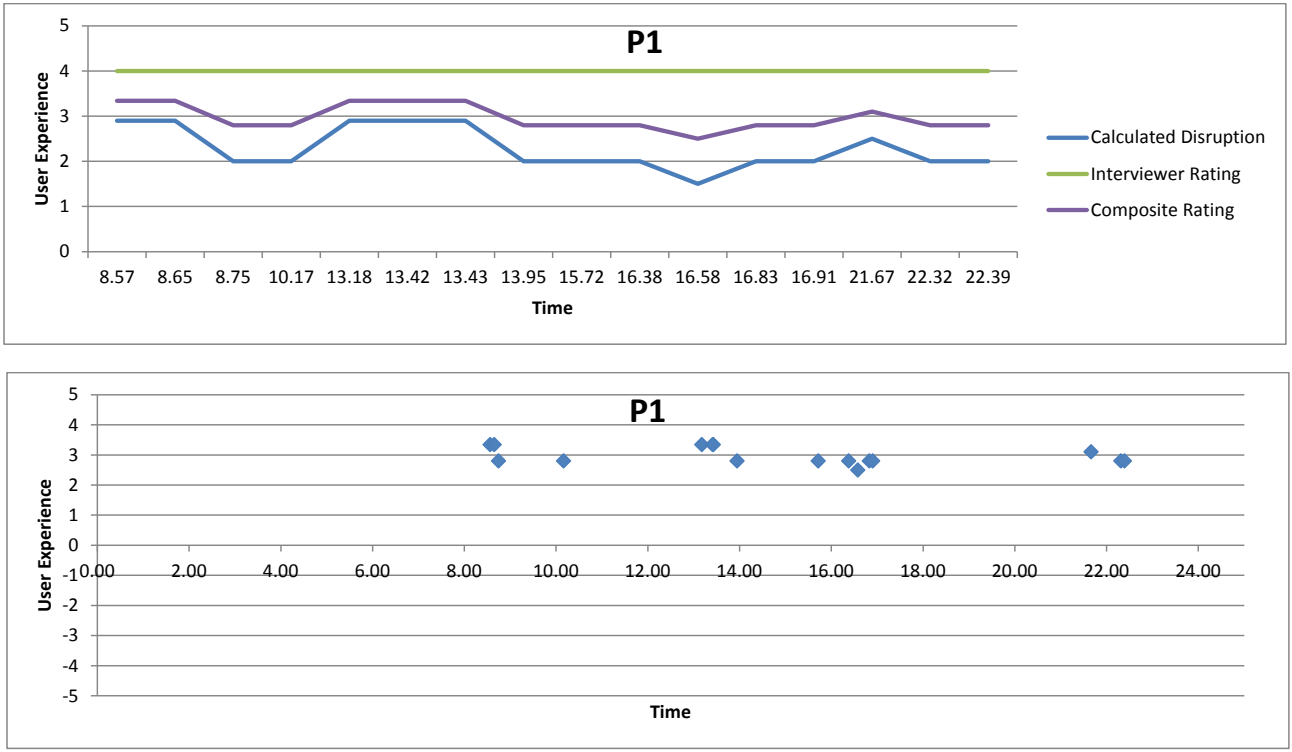
参加者1の2つのグラフ(どちらも表題は「P1」)です。上は折れ線グラフで、縦軸は「User Experience」(0~5)、横軸は「Time」です。横軸は参加者が記録した16件の認証イベントごとの項目で、イベントの時刻がラベルになっています(最初のラベルは8.57、最後のラベルは22.39)。凡例は Calculated Disruption、Interviewer Rating、Composite Rating です。イベント順のおおよその値(「×n」はn回続くこと)は次のとおりです。Calculated Disruption: 2.9 ×2, 2.0 ×2, 2.9 ×3, 2.0 ×3, 1.5, 2.0 ×2, 2.5, 2.0 ×2。Interviewer Rating: 4.0 ×16。Composite Rating: 3.3 ×2, 2.8 ×2, 3.3 ×3, 2.8 ×3, 2.5, 2.8 ×2, 3.1, 2.8 ×2。下は散布図で、縦軸は「User Experience」(−5~5)、横軸は「Time」(0.00~24.00)です。青いひし形の点がおおよそ次の位置(時刻, 値)にあります: (8.57, 3.4), (8.65, 3.4), (8.74, 2.8), (10.17, 2.8), (13.18, 3.4), (13.41, 3.4), (13.43, 3.4), (13.95, 2.8), (15.72, 2.8), (16.38, 2.8), (16.58, 2.5), (16.83, 2.8), (16.90, 2.8), (21.66, 3.1), (22.31, 2.8), (22.39, 2.8)。
User Experience Line Graph and Scatterplot – Participant 2
ユーザーエクスペリエンスの折れ線グラフと散布図 – 参加者 2
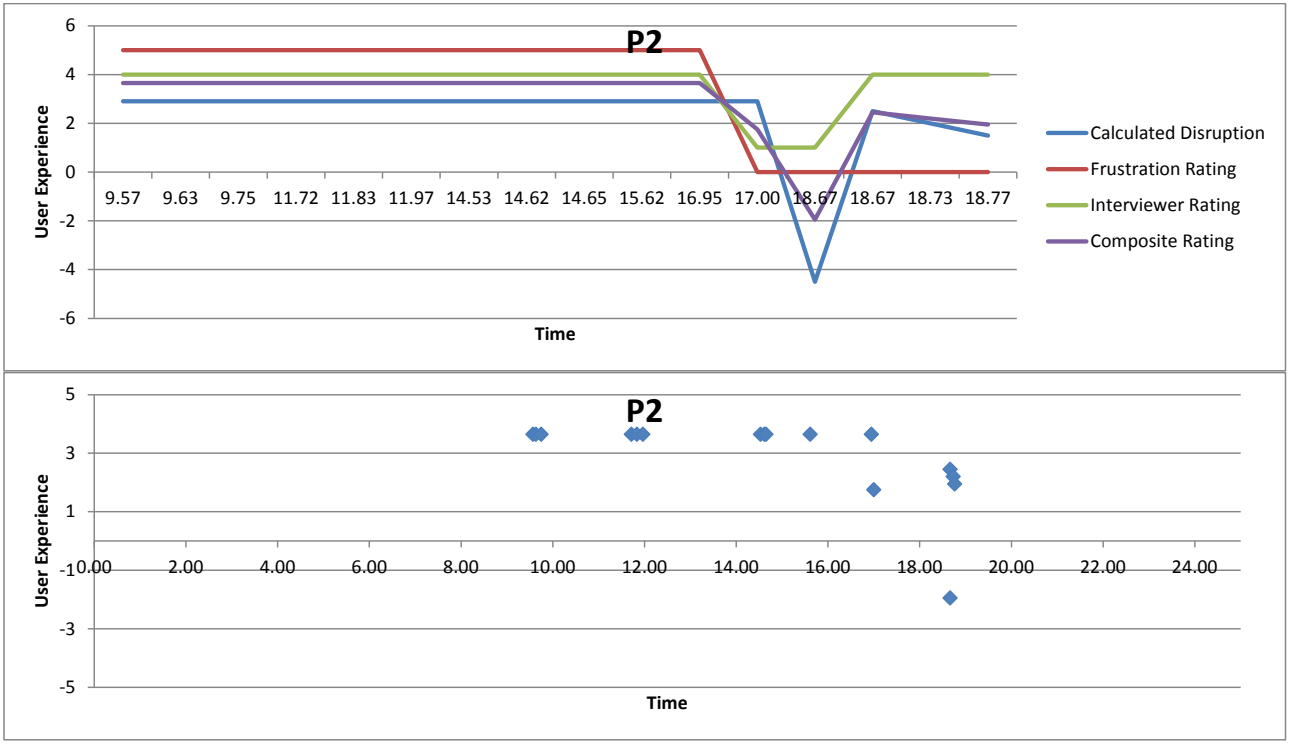
参加者2の2つのグラフ(どちらも表題は「P2」)です。上は折れ線グラフで、縦軸は「User Experience」(−6~6)、横軸は「Time」です。横軸は参加者が記録した16件の認証イベントごとの項目で、イベントの時刻がラベルになっています(最初のラベルは9.57、最後のラベルは18.77)。凡例は Calculated Disruption、Frustration Rating、Interviewer Rating、Composite Rating です。イベント順のおおよその値(「×n」はn回続くこと)は次のとおりです。Calculated Disruption: 2.9 ×12, −4.5, 2.5, 2.0, 1.5。Frustration Rating: 5.0 ×11, 0.0 ×5。Interviewer Rating: 4.0 ×11, 1.0 ×2, 4.0 ×3。Composite Rating: 3.7 ×11, 1.8, −1.9, 2.5, 2.2, 2.0。下は散布図で、縦軸は「User Experience」(−5~5)、横軸は「Time」(0.00~24.00)です。青いひし形の点がおおよそ次の位置(時刻, 値)にあります: (9.57, 3.6), (9.63, 3.6), (9.75, 3.6), (11.71, 3.6), (11.83, 3.6), (11.96, 3.6), (14.53, 3.6), (14.61, 3.6), (14.65, 3.6), (15.61, 3.6), (16.95, 3.6), (17.00, 1.8), (18.66, −1.9), (18.66, 2.5), (18.73, 2.2), (18.76, 1.9)。
User Experience Line Graph and Scatterplot – Participant 3
ユーザーエクスペリエンスの折れ線グラフと散布図 – 参加者 3
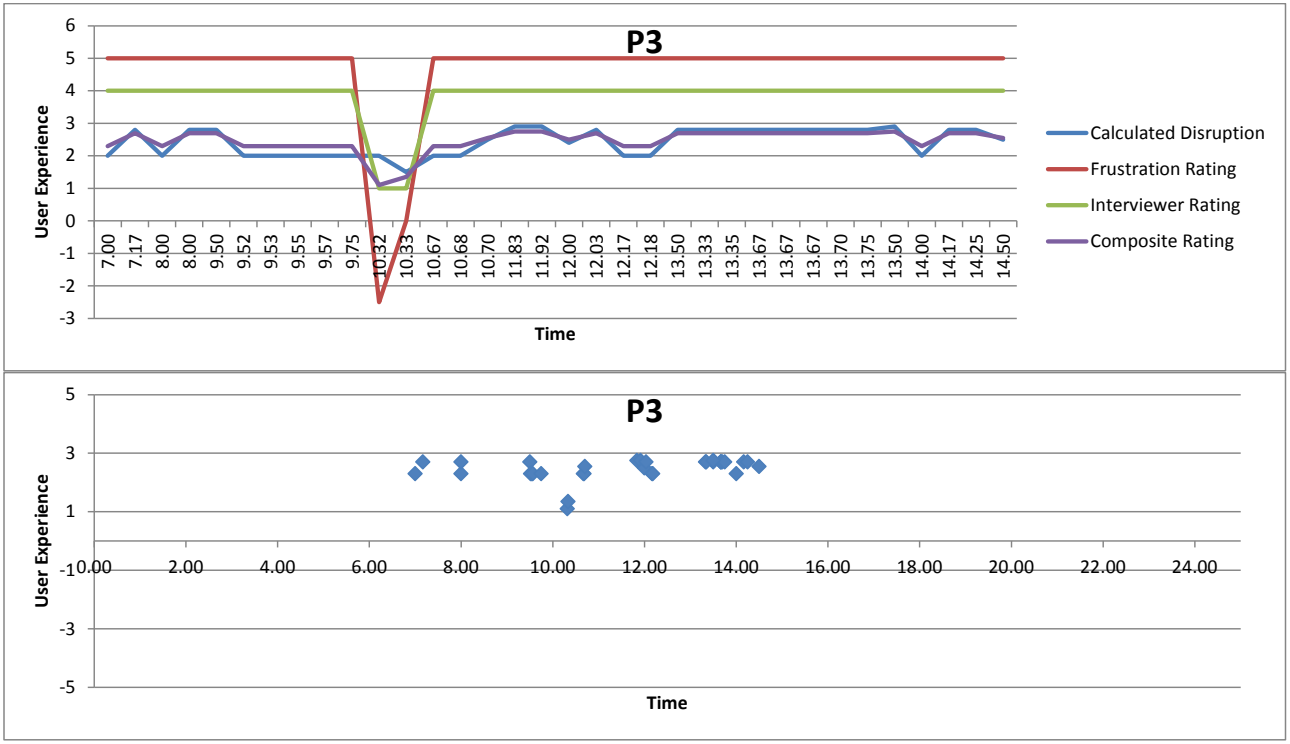
参加者3の2つのグラフ(どちらも表題は「P3」)です。上は折れ線グラフで、縦軸は「User Experience」(−3~6)、横軸は「Time」です。横軸は参加者が記録した34件の認証イベントごとの項目で、イベントの時刻がラベルになっています(最初のラベルは7.00、最後のラベルは14.50)。凡例は Calculated Disruption、Frustration Rating、Interviewer Rating、Composite Rating です。イベント順のおおよその値(「×n」はn回続くこと)は次のとおりです。Calculated Disruption: 2.0, 2.8, 2.0, 2.8 ×2, 2.0 ×6, 1.5, 2.0 ×2, 2.5, 2.9 ×2, 2.4, 2.8, 2.0 ×2, 2.8 ×8, 2.9, 2.0, 2.8 ×2, 2.5。Frustration Rating: 5.0 ×10, −2.5, 0.0, 5.0 ×22。Interviewer Rating: 4.0 ×10, 1.0 ×2, 4.0 ×22。Composite Rating: 2.3, 2.7, 2.3, 2.7 ×2, 2.3 ×5, 1.1, 1.4, 2.3 ×2, 2.5, 2.8 ×2, 2.5, 2.7, 2.3 ×2, 2.7 ×8, 2.8, 2.3, 2.7 ×2, 2.5。下は散布図で、縦軸は「User Experience」(−5~5)、横軸は「Time」(0.00~24.00)です。青いひし形の点がおおよそ次の位置(時刻, 値)にあります: (7.00, 2.3), (7.16, 2.7), (8.00, 2.3), (8.00, 2.7), (9.50, 2.7), (9.52, 2.3), (9.53, 2.3), (9.55, 2.3), (9.56, 2.3), (9.75, 2.3), (10.31, 1.1), (10.33, 1.4), (10.67, 2.3), (10.68, 2.3), (10.70, 2.5), (11.83, 2.8), (11.91, 2.8), (12.00, 2.5), (12.03, 2.7), (12.16, 2.3), (12.18, 2.3), (13.33, 2.7), (13.35, 2.7), (13.50, 2.7), (13.50, 2.8), (13.66, 2.7), (13.70, 2.7), (13.75, 2.7), (14.00, 2.3), (14.16, 2.7), (14.25, 2.7), (14.50, 2.5)。
User Experience Line Graph and Scatterplot – Participant 4
ユーザーエクスペリエンスの折れ線グラフと散布図 – 参加者 4
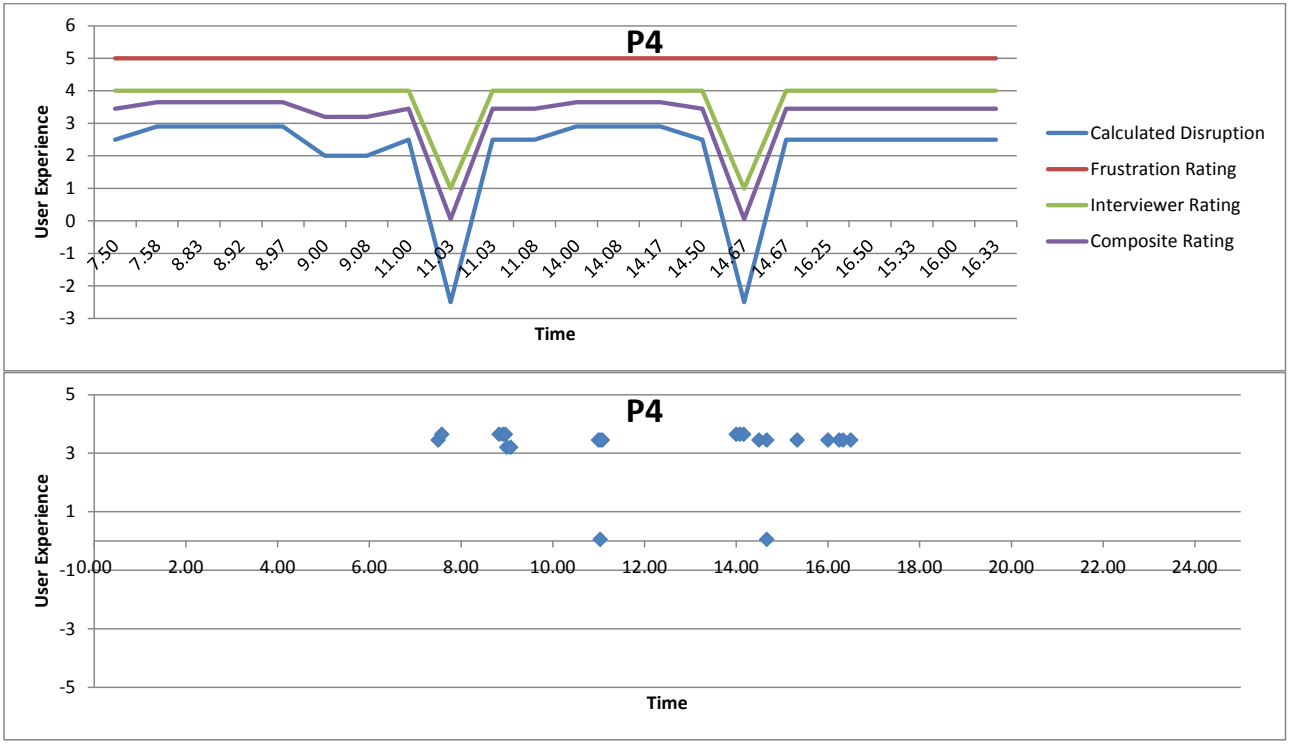
参加者4の2つのグラフ(どちらも表題は「P4」)です。上は折れ線グラフで、縦軸は「User Experience」(−3~6)、横軸は「Time」です。横軸は参加者が記録した22件の認証イベントごとの項目で、イベントの時刻がラベルになっています(最初のラベルは7.50、最後のラベルは16.33)。凡例は Calculated Disruption、Frustration Rating、Interviewer Rating、Composite Rating です。イベント順のおおよその値(「×n」はn回続くこと)は次のとおりです。Calculated Disruption: 2.5, 2.9 ×4, 2.0 ×2, 2.5, −2.5, 2.5 ×2, 2.9 ×3, 2.5, −2.5, 2.5 ×6。Frustration Rating: 5.0 ×22。Interviewer Rating: 4.0 ×8, 1.0, 4.0 ×6, 1.0, 4.0 ×6。Composite Rating: 3.5, 3.6 ×4, 3.2 ×2, 3.5, 0.1, 3.5 ×2, 3.6 ×3, 3.5, 0.1, 3.5 ×6。下は散布図で、縦軸は「User Experience」(−5~5)、横軸は「Time」(0.00~24.00)です。青いひし形の点がおおよそ次の位置(時刻, 値)にあります: (7.50, 3.5), (7.58, 3.6), (8.83, 3.6), (8.91, 3.6), (8.97, 3.6), (9.00, 3.2), (9.08, 3.2), (10.99, 3.5), (11.03, 0.1), (11.03, 3.5), (11.08, 3.5), (14.00, 3.6), (14.08, 3.6), (14.16, 3.6), (14.50, 3.5), (14.66, 0.1), (14.66, 3.5), (14.67, 3.5), (15.33, 3.5), (16.00, 3.5), (16.25, 3.5), (16.33, 3.5), (16.50, 3.5)。
User Experience Line Graph and Scatterplot – Participant 5
ユーザーエクスペリエンスの折れ線グラフと散布図 – 参加者 5
参加者5の2つのグラフ(どちらも表題は「P5」)です。上は折れ線グラフで、縦軸は「User Experience」(−4~5)、横軸は「Time」です。横軸は参加者が記録した40件の認証イベントごとの項目で、イベントの時刻がラベルになっています(最初のラベルは5.83、最後のラベルは22.33)。凡例は Calculated Disruption、Interviewer Rating、Composite Rating です。イベント順のおおよその値(「×n」はn回続くこと)は次のとおりです。Calculated Disruption: 2.8, 2.5, 2.9, 1.5, 2.0, 2.8, −3.0, 2.0, 2.5, 2.8 ×2, 2.0, 2.8 ×2, 1.5, 2.8, 2.0, 2.8, 2.0 ×6, 2.5, 2.8, 2.0 ×5, −3.0, 2.0 ×2, 2.5 ×2, 2.9, 2.5, 2.9, 2.0。Interviewer Rating: 4.0 ×6, 1.0, 4.0 ×24, 1.0, 4.0 ×8。Composite Rating: 3.3, 3.1, 3.4, 2.5, 2.8, 3.3, −1.4, 2.8, 3.1, 3.3 ×2, 2.8, 3.3 ×2, 2.5, 3.3, 2.8, 3.3, 2.8 ×6, 3.1, 3.3, 2.8 ×5, −1.4, 2.8 ×2, 3.1 ×2, 3.4, 3.1, 3.4, 2.8。下は散布図で、縦軸は「User Experience」(−5~5)、横軸は「Time」(0.00~24.00)です。青いひし形の点がおおよそ次の位置(時刻, 値)にあります: (5.83, 3.3), (6.08, 3.1), (6.08, 3.3), (6.09, 2.5), (6.11, 2.8), (6.13, 3.3), (6.16, −1.4), (6.16, 2.8), (6.88, 3.1), (7.50, 3.3), (8.90, 2.8), (8.91, 3.3), (8.93, 2.5), (8.93, 3.3), (9.78, 2.8), (9.91, 3.3), (9.95, 2.8), (10.05, 2.8), (10.25, 2.8), (10.39, 2.8), (10.43, 2.8), (10.58, 3.1), (12.00, 3.3), (12.58, 2.8), (12.93, 2.8), (13.83, 2.8), (16.50, 2.8), (16.58, 2.8), (16.83, −1.4), (16.83, 2.8), (16.97, 2.8), (18.50, 3.1), (20.72, 3.1), (20.72, 3.3), (22.33, 3.1), (22.33, 3.3), (23.50, 2.8)。
User Experience Line Graph and Scatterplot – Participant 6
ユーザーエクスペリエンスの折れ線グラフと散布図 – 参加者 6
参加者6の2つのグラフ(どちらも表題は「P6」)です。上は折れ線グラフで、縦軸は「User Experience」(0~6)、横軸は「Time」です。横軸は参加者が記録した28件の認証イベントごとの項目で、イベントの時刻がラベルになっています(最初のラベルは8.57、最後のラベルは0.78)。凡例は Calculated Disruption、Frustration Rating、Interviewer Rating、Composite Rating です。イベント順のおおよその値(「×n」はn回続くこと)は次のとおりです。Calculated Disruption: 2.5, 2.8 ×2, 2.9 ×3, 2.0, 2.8 ×2, 2.0 ×4, 2.9, 2.0, 2.8, 2.9 ×2, 2.0 ×2, 2.8 ×2, 2.5, 2.9, 2.8 ×2, 2.5, 2.8。Frustration Rating: 2.5, 5.0 ×2, 2.5 ×12, 5.0, 2.5 ×4, 5.0 ×6, 2.5, 5.0。Interviewer Rating: 4.0 ×7, 1.0, 4.0 ×20。Composite Rating: 3.0, 3.6 ×2, 3.1 ×3, 2.7, 2.2, 3.1, 2.7 ×4, 3.1, 2.7, 3.6, 3.1 ×2, 2.7 ×2, 3.6 ×2, 3.5, 3.6 ×3, 3.0, 3.6。下は散布図で、縦軸は「User Experience」(−5~5)、横軸は「Time」(0.00~24.00)です。青いひし形の点がおおよそ次の位置(時刻, 値)にあります: (0.75, 3.0), (0.78, 3.6), (8.56, 3.0), (8.56, 3.6), (8.58, 3.6), (9.50, 3.1), (9.67, 3.1), (9.68, 3.1), (9.70, 2.7), (9.71, 2.2), (9.83, 3.1), (11.63, 2.7), (11.64, 2.7), (12.40, 2.7), (12.97, 2.7), (14.37, 3.1), (14.38, 2.7), (14.40, 3.6), (15.75, 3.1), (15.78, 2.7), (15.78, 3.1), (15.86, 2.7), (15.91, 3.6), (16.55, 3.6), (20.33, 3.5), (20.43, 3.6), (22.80, 3.6), (23.70, 3.6)。
User Experience Line Graph and Scatterplot – Participant 7
ユーザーエクスペリエンスの折れ線グラフと散布図 – 参加者 7
参加者7の2つのグラフ(どちらも表題は「P7」)です。上は折れ線グラフで、縦軸は「User Experience」(−6~6)、横軸は「Time」です。横軸は参加者が記録した39件の認証イベントごとの項目で、イベントの時刻がラベルになっています(最初のラベルは8.50、最後のラベルは19.88)。凡例は Calculated Disruption、Frustration Rating、Interviewer Rating、Composite Rating です。イベント順のおおよその値(「×n」はn回続くこと、「–」は値なし)は次のとおりです。Calculated Disruption: 2.9, 2.5 ×2, −2.5, 2.5, 2.4, −5.0, 2.0, 2.4, 2.0, 2.4 ×2, 2.5 ×3, 2.4, 2.0 ×2, −5.0, 2.0, 2.4 ×3, −4.6, −5.1, −4.1, −5.0, 2.9 ×2, 2.0, 2.9, 2.0, 2.9, 2.5, 2.9 ×2, 2.5, −2.5, 2.5。Frustration Rating: 5.0 ×2, 2.5 ×4, 5.0 ×2, 2.5, 5.0 ×5, 2.5, 5.0 ×3, 2.5, 5.0 ×2, 2.5, 5.0, 2.5, –, 2.5 ×3, 0.0, 2.5, 0.0 ×2, 5.0 ×4, – ×3。Interviewer Rating: 4.0 ×3, 1.0, 4.0 ×19, 1.0 ×2, −2.0, −5.0, 1.0 ×4, 4.0 ×6, 1.0, 4.0。Composite Rating: 3.7, 3.5, 3.0, −0.5, 3.0, 2.9, −0.3, 3.2, 2.9, 3.2, 3.4 ×2, 3.5 ×2, 3.0, 3.4, 3.2 ×2, −0.8, 3.2, 3.4, 2.9, 3.4, −1.5, −2.6, −2.1, −3.5, 2.3, 1.8 ×3, 2.2, 3.7, 3.5, 3.7 ×2, 3.1, 0.1, 3.1。下は散布図で、縦軸は「User Experience」(−5~5)、横軸は「Time」(0.00~24.00)です。青いひし形の点がおおよそ次の位置(時刻, 値)にあります: (8.50, 3.6), (8.80, 3.5), (9.46, 3.0), (10.20, −0.4), (10.23, 3.0), (10.26, 2.9), (10.76, −0.3), (10.76, 3.2), (10.83, 2.9), (10.86, 3.2), (10.91, 3.4), (10.96, 3.4), (11.03, 3.5), (11.53, 3.5), (11.57, 3.0), (11.58, 3.4), (11.61, 3.2), (11.83, 3.2), (11.91, −0.8), (11.95, 3.2), (12.15, 3.4), (13.73, 2.9), (14.50, 3.4), (14.57, −1.5), (14.63, −2.7), (14.65, −2.1), (14.70, −3.5), (14.76, 2.3), (14.82, 1.8), (14.83, 1.8), (14.96, 1.8), (14.98, 2.2), (15.06, 3.6), (15.63, 3.5), (16.30, 3.6), (16.48, 3.6), (16.73, 3.1), (19.87, 0.1), (19.88, 3.1)。
User Experience Line Graph and Scatterplot – Participant 9
ユーザーエクスペリエンスの折れ線グラフと散布図 – 参加者 9
参加者9の2つのグラフ(どちらも表題は「P9」)です。上は折れ線グラフで、縦軸は「User Experience」(−3~6)、横軸は「Time」です。横軸は参加者が記録した13件の認証イベントごとの項目で、イベントの時刻がラベルになっています(最初のラベルは7.58、最後のラベルは19.07)。凡例は Calculated Disruption、Frustration Rating、Interviewer Rating、Composite Rating です。イベント順のおおよその値(「×n」はn回続くこと)は次のとおりです。Calculated Disruption: −2.5, 2.5 ×2, −2.5, 2.5 ×9。Frustration Rating: 5.0 ×13。Interviewer Rating: 1.0, 4.0 ×2, 1.0, 4.0 ×9。Composite Rating: 0.1, 3.5 ×2, 0.1, 3.5 ×9。下は散布図で、縦軸は「User Experience」(−5~5)、横軸は「Time」(0.00~24.00)です。青いひし形の点がおおよそ次の位置(時刻, 値)にあります: (7.58, 0.1), (7.58, 3.5), (7.63, 3.5), (7.66, 0.1), (7.71, 3.5), (7.75, 3.5), (9.08, 3.5), (10.56, 3.5), (13.48, 3.5), (14.33, 3.5), (14.58, 3.5), (15.83, 3.5), (19.07, 3.5)。
User Experience Line Graph and Scatterplot – Participant 10
ユーザーエクスペリエンスの折れ線グラフと散布図 – 参加者 10
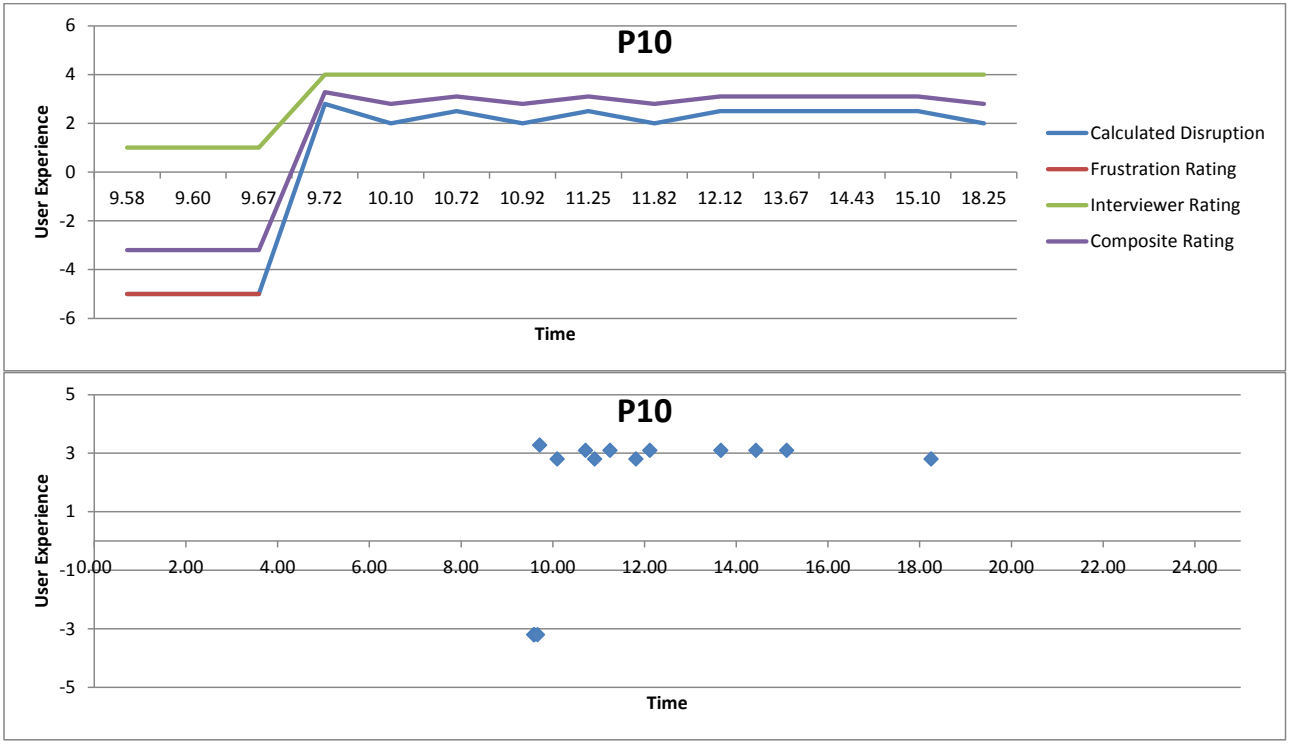
参加者10の2つのグラフ(どちらも表題は「P10」)です。上は折れ線グラフで、縦軸は「User Experience」(−6~6)、横軸は「Time」です。横軸は参加者が記録した14件の認証イベントごとの項目で、イベントの時刻がラベルになっています(最初のラベルは9.58、最後のラベルは18.25)。凡例は Calculated Disruption、Frustration Rating、Interviewer Rating、Composite Rating です。イベント順のおおよその値(「×n」はn回続くこと、「–」は値なし)は次のとおりです。Calculated Disruption: −5.0 ×3, 2.8, 2.0, 2.5, 2.0, 2.5, 2.0, 2.5 ×4, 2.0。Frustration Rating: −5.0 ×3, – ×11。Interviewer Rating: 1.0 ×3, 4.0 ×11。Composite Rating: −3.2 ×3, 3.3, 2.8, 3.1, 2.8, 3.1, 2.8, 3.1 ×4, 2.8。下は散布図で、縦軸は「User Experience」(−5~5)、横軸は「Time」(0.00~24.00)です。青いひし形の点がおおよそ次の位置(時刻, 値)にあります: (9.58, −3.2), (9.60, −3.2), (9.67, −3.2), (9.71, 3.3), (10.10, 2.8), (10.72, 3.1), (10.91, 2.8), (11.25, 3.1), (11.81, 2.8), (12.12, 3.1), (13.66, 3.1), (14.43, 3.1), (15.10, 3.1), (18.25, 2.8)。
User Experience Line Graph and Scatterplot – Participant 11
ユーザーエクスペリエンスの折れ線グラフと散布図 – 参加者 11
参加者11の2つのグラフ(どちらも表題は「P11」)です。上は折れ線グラフで、縦軸は「User Experience」(0~6)、横軸は「Time」です。横軸は参加者が記録した4件の認証イベントごとの項目で、イベントの時刻がラベルになっています(最初のラベルは11.88、最後のラベルは12.00)。凡例は Calculated Disruption、Frustration Rating、Interviewer Rating、Composite Rating です。イベント順のおおよその値(「×n」はn回続くこと)は次のとおりです。Calculated Disruption: 2.0, 1.5, 2.0 ×2。Frustration Rating: 5.0 ×4。Interviewer Rating: 4.0 ×4。Composite Rating: 3.2, 3.0, 3.2 ×2。下は散布図で、縦軸は「User experience」(−5~5)、横軸は「Time」(0.00~24.00)です。青いひし形の点がおおよそ次の位置(時刻, 値)にあります: (11.88, 3.2), (11.93, 3.0), (11.95, 3.2), (11.99, 3.2)。
User Experience Line Graph and Scatterplot – Participant 12
ユーザーエクスペリエンスの折れ線グラフと散布図 – 参加者 12
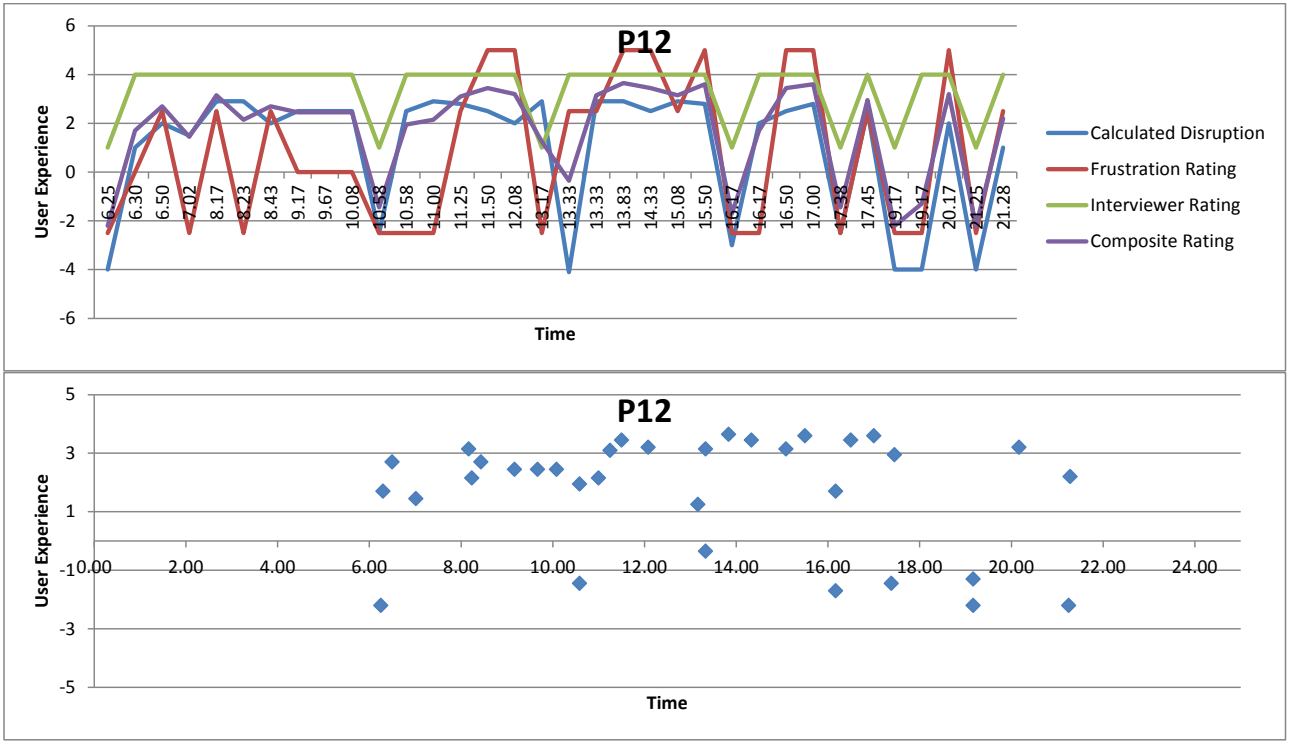
参加者12の2つのグラフ(どちらも表題は「P12」)です。上は折れ線グラフで、縦軸は「User Experience」(−6~6)、横軸は「Time」です。横軸は参加者が記録した34件の認証イベントごとの項目で、イベントの時刻がラベルになっています(最初のラベルは6.25、最後のラベルは21.28)。凡例は Calculated Disruption、Frustration Rating、Interviewer Rating、Composite Rating です。イベント順のおおよその値(「×n」はn回続くこと)は次のとおりです。Calculated Disruption: −4.0, 1.0, 2.0, 1.5, 2.9 ×2, 2.0, 2.5 ×3, −2.5, 2.5, 2.9, 2.8, 2.5, 2.0, 2.9, −4.1, 2.9 ×2, 2.5, 2.9, 2.8, −3.0, 2.0, 2.5, 2.8, −2.5, 2.5, −4.0 ×2, 2.0, −4.0, 1.0。Frustration Rating: −2.5, 0.0, 2.5, −2.5, 2.5, −2.5, 2.5, 0.0 ×3, −2.5 ×3, 2.5, 5.0 ×2, −2.5, 2.5 ×2, 5.0 ×2, 2.5, 5.0, −2.5 ×2, 5.0 ×2, −2.5, 2.5, −2.5 ×2, 5.0, −2.5, 2.5。Interviewer Rating: 1.0, 4.0 ×9, 1.0, 4.0 ×5, 1.0, 4.0 ×6, 1.0, 4.0 ×3, 1.0, 4.0, 1.0, 4.0 ×2, 1.0, 4.0。Composite Rating: −2.2, 1.7, 2.7, 1.4, 3.2, 2.1, 2.7, 2.5 ×3, −1.4, 2.0, 2.1, 3.1, 3.5, 3.2, 1.3, −0.3, 3.2, 3.7, 3.5, 3.2, 3.6, −1.7, 1.7, 3.5, 3.6, −1.4, 3.0, −2.2, −1.3, 3.2, −2.2, 2.2。下は散布図で、縦軸は「User Experience」(−5~5)、横軸は「Time」(0.00~24.00)です。青いひし形の点がおおよそ次の位置(時刻, 値)にあります: (6.25, −2.2), (6.30, 1.7), (6.49, 2.7), (7.01, 1.4), (8.16, 3.1), (8.23, 2.2), (8.43, 2.7), (9.16, 2.5), (9.67, 2.5), (10.08, 2.5), (10.58, −1.4), (10.58, 1.9), (10.99, 2.2), (11.25, 3.1), (11.50, 3.5), (12.08, 3.2), (13.16, 1.2), (13.33, −0.3), (13.33, 3.1), (13.83, 3.6), (14.33, 3.5), (15.08, 3.1), (15.50, 3.6), (16.17, −1.7), (16.17, 1.7), (16.49, 3.5), (17.00, 3.6), (17.38, −1.4), (17.45, 3.0), (19.16, −2.2), (19.16, −1.3), (20.17, 3.2), (21.25, −2.2), (21.28, 2.2)。
User Experience Line Graph and Scatterplot – Participant 13
ユーザーエクスペリエンスの折れ線グラフと散布図 – 参加者 13
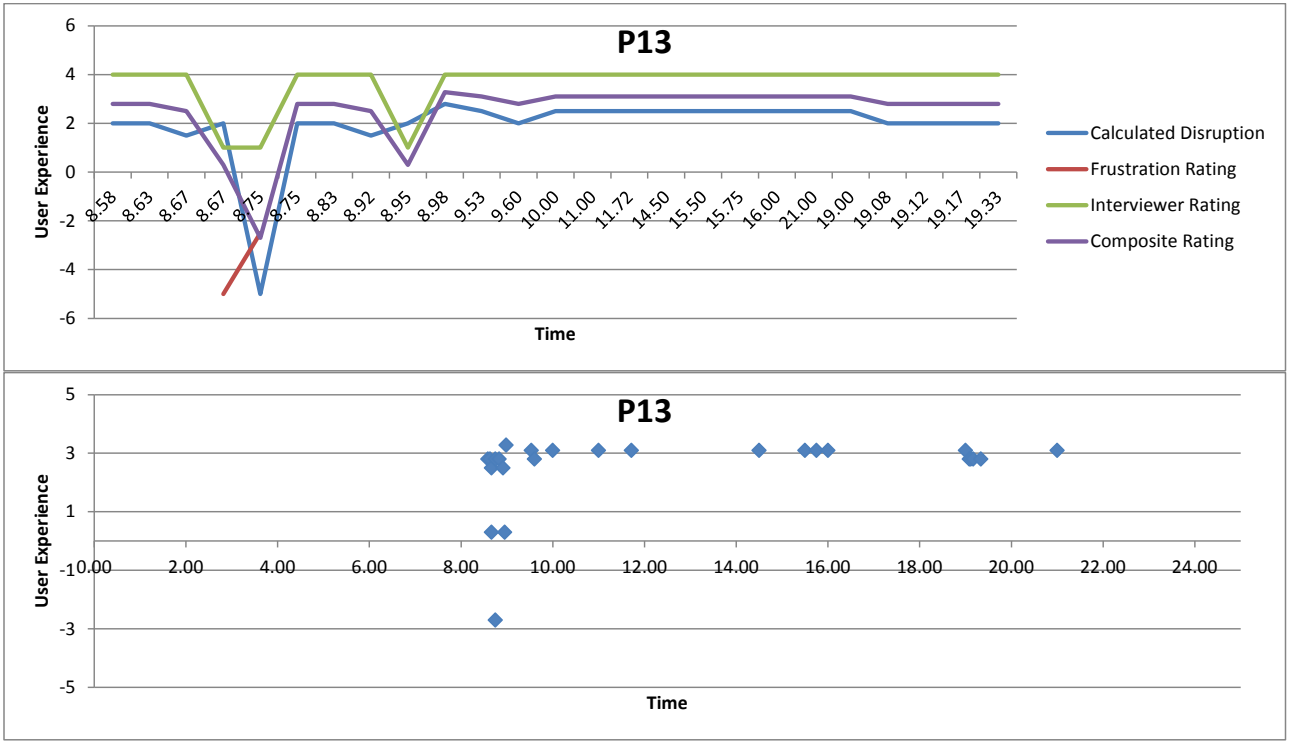
参加者13の2つのグラフ(どちらも表題は「P13」)です。上は折れ線グラフで、縦軸は「User Experience」(−6~6)、横軸は「Time」です。横軸は参加者が記録した25件の認証イベントごとの項目で、イベントの時刻がラベルになっています(最初のラベルは8.58、最後のラベルは19.33)。凡例は Calculated Disruption、Frustration Rating、Interviewer Rating、Composite Rating です。イベント順のおおよその値(「×n」はn回続くこと、「–」は値なし)は次のとおりです。Calculated Disruption: 2.0 ×2, 1.5, 2.0, −5.0, 2.0 ×2, 1.5, 2.0, 2.8, 2.5, 2.0, 2.5 ×9, 2.0 ×4。Frustration Rating: – ×3, −5.0, −2.5, – ×20。Interviewer Rating: 4.0 ×3, 1.0 ×2, 4.0 ×3, 1.0, 4.0 ×16。Composite Rating: 2.8 ×2, 2.5, 0.3, −2.7, 2.8 ×2, 2.5, 0.3, 3.3, 3.1, 2.8, 3.1 ×9, 2.8 ×4。下は散布図で、縦軸は「User Experience」(−5~5)、横軸は「Time」(0.00~24.00)です。青いひし形の点がおおよそ次の位置(時刻, 値)にあります: (8.58, 2.8), (8.63, 2.8), (8.66, 0.3), (8.66, 2.5), (8.74, −2.7), (8.74, 2.8), (8.83, 2.8), (8.91, 2.5), (8.95, 0.3), (8.98, 3.3), (9.53, 3.1), (9.60, 2.8), (10.00, 3.1), (10.99, 3.1), (11.71, 3.1), (14.50, 3.1), (15.50, 3.1), (15.75, 3.1), (16.00, 3.1), (19.00, 3.1), (19.08, 2.8), (19.12, 2.8), (19.16, 2.8), (19.33, 2.8), (21.00, 3.1)。
User Experience Line Graph and Scatterplot – Participant 14
ユーザーエクスペリエンスの折れ線グラフと散布図 – 参加者 14
参加者14の2つのグラフ(どちらも表題は「P14」)です。上は折れ線グラフで、縦軸は「User Experience」(−6~6)、横軸は「Time」です。横軸は参加者が記録した34件の認証イベントごとの項目で、イベントの時刻がラベルになっています(最初のラベルは8.58、最後のラベルは21.30)。凡例は Calculated Disruption、Frustration Rating、Interviewer Rating、Composite Rating です。イベント順のおおよその値(「×n」はn回続くこと、「–」は値なし)は次のとおりです。Calculated Disruption: 2.9, 2.0, 2.8 ×2, 2.5 ×2, −5.0, 2.0 ×2, −4.0, 2.0, −4.0, 2.5, 2.0 ×3, −3.0, 2.0, −4.0, 2.0 ×4, −4.0, −3.0, 2.0, −4.0, 2.0 ×4, 2.9, 2.0 ×2。Frustration Rating: – ×16, 2.5 ×2, 0.0, – ×3, −2.5 ×2, 2.5 ×2, 0.0, – ×7。Interviewer Rating: 4.0 ×6, 1.0, 4.0 ×2, −2.0, 4.0, 1.0, 4.0 ×4, 1.0, 4.0, 1.0, 4.0 ×2, 1.0, 4.0, 1.0 ×2, 4.0, 1.0, 4.0 ×7。Composite Rating: 3.3, 2.8, 3.3 ×2, 3.1 ×2, −2.7, 2.8 ×2, −3.1, 2.8, −2.2, 3.1, 2.8 ×3, −0.7, 2.7, −1.7, 2.8 ×2, 1.6, 1.7, −2.2, −0.7, 2.7, −1.7, 2.8 ×4, 3.3, 2.8 ×2。下は散布図で、縦軸は「User Experience」(−5~5)、横軸は「Time」(0.00~24.00)です。青いひし形の点がおおよそ次の位置(時刻, 値)にあります: (8.58, 3.4), (8.71, 2.8), (8.87, 3.3), (8.93, 3.3), (9.00, 3.1), (9.03, −2.7), (9.05, 2.8), (9.06, 2.8), (10.05, 3.1), (10.96, −3.1), (11.06, −2.2), (11.06, 2.8), (13.33, 3.1), (13.86, 2.8), (13.89, 2.8), (13.98, 2.8), (14.02, −0.7), (14.02, 2.7), (14.15, −1.7), (14.26, 2.8), (14.65, 2.8), (14.75, 1.6), (14.79, 1.7), (15.00, −2.2), (16.11, −0.7)。
User Experience Line Graph and Scatterplot – Participant 15
ユーザーエクスペリエンスの折れ線グラフと散布図 – 参加者 15
参加者15の2つのグラフ(どちらも表題は「P15」)です。上は折れ線グラフで、縦軸は「User Experience」(−6~6)、横軸は「Time」です。横軸は参加者が記録した22件の認証イベントごとの項目で、イベントの時刻がラベルになっています(最初のラベルは12.42、最後のラベルは0.25)。凡例は Calculated Disruption、Frustration Rating、Interviewer Rating、Composite Rating です。イベント順のおおよその値(「×n」はn回続くこと)は次のとおりです。Calculated Disruption: 2.0, 2.9 ×2, 2.5 ×6, −4.5, 2.5, 2.0, 2.5 ×10。Frustration Rating: 5.0 ×13, 2.5, 5.0 ×8。Interviewer Rating: 4.0 ×9, 1.0, 4.0 ×12。Composite Rating: 3.2, 3.7 ×2, 3.5 ×6, −0.9, 3.5, 3.2, 3.5, 3.0, 3.5 ×8。下は散布図で、縦軸は「User Experience」(−5~5)、横軸は「Time」(0.00~24.00)です。青いひし形の点がおおよそ次の位置(時刻, 値)にあります: (0.23, 3.5), (0.24, 3.5), (12.42, 3.2), (12.58, 3.6), (12.66, 3.6), (12.75, 3.5), (12.90, 3.5), (13.08, 3.5), (13.10, 3.5), (13.18, −0.9), (13.55, 3.5), (13.76, 3.2), (14.21, 3.5), (14.61, 3.0), (15.12, 3.5), (15.15, 3.5), (15.75, 3.5), (17.65, 3.5), (18.08, 3.5), (20.00, 3.5)。
User Experience Line Graph and Scatterplot – Participant 16
ユーザーエクスペリエンスの折れ線グラフと散布図 – 参加者 16
参加者16の2つのグラフ(どちらも表題は「P16」)です。上は折れ線グラフで、縦軸は「User Experience」(−4~5)、横軸は「Time」です。横軸は参加者が記録した29件の認証イベントごとの項目で、イベントの時刻がラベルになっています(最初のラベルは4.33、最後のラベルは19.17)。凡例は Calculated Disruption、Frustration Rating、Interviewer Rating、Composite Rating です。イベント順のおおよその値(「×n」はn回続くこと、「–」は値なし)は次のとおりです。Calculated Disruption: −3.0, 2.0, 1.9, 2.4, 2.5 ×8, 2.4 ×2, 2.5 ×9, 2.4, −3.0 ×2, 2.0 ×3。Frustration Rating: 0.0 ×2, – ×27。Interviewer Rating: 1.0, 4.0 ×23, 1.0 ×2, 4.0 ×3。Composite Rating: −1.2, 2.2, 2.7, 3.0, 3.1 ×8, 3.0 ×2, 3.1 ×9, 3.0, −1.4 ×2, 2.8 ×2, 1.7。下は散布図で、縦軸は「User Experience」(−5~5)、横軸は「Time」(0.00~24.00)です。青いひし形の点がおおよそ次の位置(時刻, 値)にあります: (4.33, −1.2), (4.33, 2.2), (7.58, 2.7), (8.25, 3.0), (8.58, 3.1), (8.83, 3.1), (9.16, 3.1), (9.58, 3.1), (9.91, 3.1), (10.08, 3.1), (10.63, 3.1), (11.08, 3.1), (11.33, 3.0), (13.03, 3.0), (14.16, 3.1), (14.50, 3.1), (14.78, 3.1), (15.20, 3.1), (15.31, 3.1), (15.70, 3.1), (15.96, 3.1), (16.28, 3.1), (16.80, 3.1), (17.03, 3.0), (18.85, −1.4)。
User Experience Line Graph and Scatterplot – Participant 17
ユーザーエクスペリエンスの折れ線グラフと散布図 – 参加者 17
参加者17の2つのグラフ(どちらも表題は「P17」)です。上は折れ線グラフで、縦軸は「User Experience」(−6~6)、横軸は「Time」です。横軸は参加者が記録した11件の認証イベントごとの項目で、イベントの時刻がラベルになっています(最初のラベルは5.87、最後のラベルは15.58)。凡例は Calculated Disruption、Frustration Rating、Interviewer Rating、Composite Rating です。イベント順のおおよその値(「×n」はn回続くこと、「–」は値なし)は次のとおりです。Calculated Disruption: 2.9 ×2, 2.0 ×2, 2.9 ×5, 2.0, 2.4。Frustration Rating: −5.0, 5.0 ×2, 2.5, 5.0 ×5, 2.5, –。Interviewer Rating: 4.0 ×9, 1.0, 4.0。Composite Rating: 1.7, 3.7, 3.2, 2.7, 3.7 ×5, 1.8, 3.0。下は散布図で、縦軸は「User Experience」(−5~5)、横軸は「Time」(0.00~24.00)です。青いひし形の点がおおよそ次の位置(時刻, 値)にあります: (5.86, 1.7), (5.97, 3.6), (6.08, 3.2), (6.13, 2.7), (6.20, 3.6), (6.23, 3.6), (6.27, 3.6), (6.28, 3.6), (6.31, 3.6), (6.38, 1.8), (15.58, 3.0)。
User Experience Line Graph and Scatterplot – Participant 18
ユーザーエクスペリエンスの折れ線グラフと散布図 – 参加者 18
参加者18の2つのグラフ(どちらも表題は「P18」)です。上は折れ線グラフで、縦軸は「User Experience」(0~6)、横軸は「Time」です。横軸は参加者が記録した13件の認証イベントごとの項目で、イベントの時刻がラベルになっています(最初のラベルは8.98、最後のラベルは19.08)。凡例は Calculated Disruption、Frustration Rating、Interviewer Rating、Composite Rating です。イベント順のおおよその値(「×n」はn回続くこと)は次のとおりです。Calculated Disruption: 2.9 ×2, 2.0, 2.5, 2.0 ×2, 2.5 ×3, 2.0, 2.5, 2.0, 2.9。Frustration Rating: 5.0 ×13。Interviewer Rating: 4.0 ×13。Composite Rating: 3.6 ×2, 3.2, 3.5, 3.2 ×2, 3.5 ×3, 3.2, 3.5, 3.2, 3.6。下は散布図で、縦軸は「User Experience」(−5~5)、横軸は「Time」(0.00~24.00)です。青いひし形の点がおおよそ次の位置(時刻, 値)にあります: (8.98, 3.6), (9.06, 3.6), (9.10, 3.2), (10.22, 3.5), (10.65, 3.2), (13.00, 3.2), (13.73, 3.5), (13.83, 3.5), (13.85, 3.5), (13.89, 3.2), (17.17, 3.5), (18.52, 3.2), (19.08, 3.6)。
User Experience Line Graph and Scatterplot – Participant 19
ユーザーエクスペリエンスの折れ線グラフと散布図 – 参加者 19
参加者19の2つのグラフ(どちらも表題は「P19」)です。上は折れ線グラフで、縦軸は「User Experience」(−6~6)、横軸は「Time」です。横軸は参加者が記録した25件の認証イベントごとの項目で、イベントの時刻がラベルになっています(最初のラベルは8.53、最後のラベルは19.57)。凡例は Calculated Disruption、Frustration Rating、Interviewer Rating、Composite Rating です。イベント順のおおよその値(「×n」はn回続くこと)は次のとおりです。Calculated Disruption: −5.0, 2.0, 2.9, 2.0, 2.9, 2.5, 2.0, 2.9 ×2, 2.0, −3.0, 2.0, 2.9, 1.0, 2.0 ×2, 1.0 ×2, 2.0 ×3, 1.0 ×2, 2.0, 2.4。Frustration Rating: 5.0 ×25。Interviewer Rating: 4.0 ×3, −2.0, 4.0, 1.0, −2.0, 4.0 ×18。Composite Rating: −0.3, 3.2, 3.7, 1.4, 3.7, 2.6, 1.4, 3.7 ×2, 3.2, 0.7, 3.2, 3.7, 2.7, 3.2 ×2, 2.7 ×2, 3.2 ×3, 2.7 ×2, 3.2, 3.4。下は散布図で、縦軸は「User Experience」(−5~5)、横軸は「Time」(0.00~24.00)です。青いひし形の点がおおよそ次の位置(時刻, 値)にあります: (8.53, −0.3), (8.53, 3.2), (8.56, 3.6), (9.13, 1.4), (9.16, 3.6), (9.25, 2.5), (9.29, 1.4), (9.80, 3.6), (10.26, 3.6), (10.56, 3.2), (11.23, 0.7), (11.23, 3.2), (11.60, 2.7), (11.60, 3.6), (11.71, 3.2), (12.78, 3.2), (13.13, 2.7), (13.86, 2.7), (14.00, 3.2), (14.10, 3.2), (14.43, 3.2), (15.18, 2.7), (19.15, 2.7), (19.53, 3.2), (19.56, 3.4)。
User Experience Line Graph and Scatterplot – Participant 20
ユーザーエクスペリエンスの折れ線グラフと散布図 – 参加者 20
参加者20の2つのグラフ(どちらも表題は「P20」)です。上は折れ線グラフで、縦軸は「User Experience」(−6~6)、横軸は「Time」です。横軸は参加者が記録した28件の認証イベントごとの項目で、イベントの時刻がラベルになっています(最初のラベルは8.65、最後のラベルは19.25)。凡例は Calculated Disruption、Frustration Rating、Interviewer Rating、Composite Rating です。イベント順のおおよその値(「×n」はn回続くこと)は次のとおりです。Calculated Disruption: 2.9 ×2, 2.0 ×2, 2.5 ×5, 2.0, −4.5, 2.5 ×4, 2.0, 2.5, 2.9, 2.5 ×9, 2.9。Frustration Rating: 5.0 ×10, −5.0, −2.5, 5.0 ×16。Interviewer Rating: 4.0 ×9, 1.0 ×2, 4.0 ×17。Composite Rating: 3.7 ×2, 3.2 ×2, 3.5 ×5, 2.3, −3.0, 2.0, 3.5 ×3, 3.2, 3.5, 3.7, 3.5 ×9, 3.7。下は散布図で、縦軸は「User Experience」(−5~5)、横軸は「Time」(0.00~24.00)です。青いひし形の点がおおよそ次の位置(時刻, 値)にあります: (8.65, 3.6), (8.74, 3.6), (8.80, 3.2), (9.10, 3.2), (9.11, 3.5), (9.13, 3.5), (9.15, 3.5), (9.16, 3.5), (9.18, 2.3), (9.19, −2.9), (9.23, 1.9), (9.42, 3.5), (10.20, 3.5), (11.33, 3.5), (11.46, 3.2), (11.48, 3.5), (12.88, 3.6), (14.10, 3.5), (14.12, 3.5), (14.13, 3.5), (14.21, 3.5), (14.58, 3.5), (14.70, 3.5)。
User Experience Line Graph and Scatterplot – Participant 21
ユーザーエクスペリエンスの折れ線グラフと散布図 – 参加者 21
参加者21の2つのグラフ(どちらも表題は「P21」)です。上は折れ線グラフで、縦軸は「User Experience」(0~4.5)、横軸は「Time」です。横軸は参加者が記録した16件の認証イベントごとの項目で、イベントの時刻がラベルになっています(最初のラベルは7.47、最後のラベルは16.47)。凡例は Calculated Disruption、Interviewer Rating、Composite Rating です。イベント順のおおよその値(「×n」はn回続くこと)は次のとおりです。Calculated Disruption: 2.9, 2.0, 2.5, 2.0, 2.5 ×3, 2.0 ×2, 2.5, 2.0 ×2, 2.5, 1.5, 2.0 ×2。Interviewer Rating: 4.0 ×16。Composite Rating: 3.3, 2.8, 3.1, 2.8, 3.1 ×3, 2.8 ×2, 3.1, 2.8 ×2, 3.1, 2.5, 2.8 ×2。下は散布図で、縦軸は「User Experience」(−5~5)、横軸は「Time」(0.00~24.00)です。青いひし形の点がおおよそ次の位置(時刻, 値)にあります: (7.46, 3.4), (7.53, 2.8), (8.08, 3.1), (9.43, 2.8), (10.16, 3.1), (12.16, 3.1), (12.95, 2.8), (12.95, 3.1), (13.71, 2.8), (14.15, 3.1), (14.38, 2.8), (14.41, 2.8), (15.81, 3.1), (15.91, 2.5), (16.41, 2.8), (16.46, 2.8)。
User Experience Line Graph and Scatterplot – Participant 22
ユーザーエクスペリエンスの折れ線グラフと散布図 – 参加者 22
参加者22の2つのグラフ(どちらも表題は「P22」)です。上は折れ線グラフで、縦軸は「User Experience」(−6~6)、横軸は「Time」です。横軸は参加者が記録した21件の認証イベントごとの項目で、イベントの時刻がラベルになっています(最初のラベルは6.50、最後のラベルは17.87)。凡例は Calculated Disruption、Frustration Rating、Interviewer Rating、Composite Rating です。イベント順のおおよその値(「×n」はn回続くこと、「–」は値なし)は次のとおりです。Calculated Disruption: −4.5, 2.9 ×2, 2.5, 1.9, 2.4 ×3, 2.5, 2.4 ×2, 2.0 ×2, 2.5, 2.0 ×6, 2.5。Frustration Rating: −5.0, 5.0, – ×3, 5.0 ×6, 0.0, −2.5 ×4, −5.0, −2.5 ×2, 0.0, –。Interviewer Rating: 1.0, 4.0 ×20。Composite Rating: −3.0, 3.7, 3.3, 3.1, 2.7, 3.4 ×3, 3.5, 3.4 ×2, 2.2, 1.7, 2.0, 1.7 ×2, 1.2, 1.7 ×2, 2.2, 3.1。下は散布図で、縦軸は「User Experience」(−5~5)、横軸は「Time」(0.00~24.00)です。青いひし形の点がおおよそ次の位置(時刻, 値)にあります: (6.49, −2.9), (7.33, 3.6), (7.50, 3.4), (7.58, 3.1), (7.92, 2.7), (11.50, 3.4), (13.58, 3.4), (14.16, 3.4), (17.00, 3.5), (17.17, 3.4), (17.27, 3.4), (17.33, 2.2), (17.35, 1.7), (17.37, 1.9), (17.40, 1.7), (17.43, 1.7), (17.50, 1.2), (17.66, 1.7), (17.75, 1.7), (17.83, 2.2), (17.86, 3.1)。
User Experience Line Graph and Scatterplot – Participant 23
ユーザーエクスペリエンスの折れ線グラフと散布図 – 参加者 23
参加者23の2つのグラフ(どちらも表題は「P23」)です。上は折れ線グラフで、縦軸は「User Experience」(−5~5)、横軸は「Time」です。横軸は参加者が記録した17件の認証イベントごとの項目で、イベントの時刻がラベルになっています(最初のラベルは8.00、最後のラベルは17.23)。凡例は Calculated Disruption、Frustration Rating、Interviewer Rating、Composite Rating です。イベント順のおおよその値(「×n」はn回続くこと)は次のとおりです。Calculated Disruption: 2.9 ×2, 2.0 ×2, −3.0, 2.0, −3.0, −2.5 ×2, 2.5 ×3, 2.0, 2.5 ×2, −2.5, 2.5。Frustration Rating: 0.0, 5.0, 0.0 ×9, −5.0, 0.0 ×5。Interviewer Rating: 4.0 ×4, 1.0, 4.0 ×3, 1.0, 4.0 ×6, 1.0, 4.0。Composite Rating: 2.7, 3.7, 2.2 ×2, −1.2, 2.2, −0.3, −0.1, −0.9, 2.5 ×2, 1.5, 2.2, 2.5 ×2, −0.9, 2.5。下は散布図で、縦軸は「User Experience」(−5~5)、横軸は「Time」(0.00~24.00)です。青いひし形の点がおおよそ次の位置(時刻, 値)にあります: (8.00, 2.6), (8.01, 3.6), (8.23, 2.2), (8.58, 2.2), (8.60, −1.2), (8.60, 2.2), (8.63, −0.3), (9.26, 0.0), (9.98, −0.9), (9.98, 2.5), (13.73, 2.5), (14.67, 1.4), (14.73, 2.2), (15.86, 2.5), (16.58, 2.5), (17.23, −0.9), (17.23, 2.5)。
User Experience Line Graph and Scatterplot – Participant 25
ユーザーエクスペリエンスの折れ線グラフと散布図 – 参加者 25
参加者25の2つのグラフ(どちらも表題は「P25」)です。上は折れ線グラフで、縦軸は「User Experience」(0~6)、横軸は「Time」です。横軸は参加者が記録した13件の認証イベントごとの項目で、イベントの時刻がラベルになっています(最初のラベルは7.17、最後のラベルは19.32)。凡例は Calculated Disruption、Frustration Rating、Interviewer Rating、Composite Rating です。イベント順のおおよその値(「×n」はn回続くこと)は次のとおりです。Calculated Disruption: 2.5, 1.5, 2.5 ×4, 2.9, 2.5, 1.5, 2.9, 2.5 ×2, 2.9。Frustration Rating: 5.0 ×8, 2.5, 5.0 ×4。Interviewer Rating: 4.0 ×13。Composite Rating: 3.5, 3.0, 3.5 ×4, 3.6, 3.5, 2.5, 3.6, 3.5 ×2, 3.6。下は散布図で、縦軸は「User Experience」(−5~5)、横軸は「Time」(0.00~24.00)です。青いひし形の点がおおよそ次の位置(時刻, 値)にあります: (7.16, 3.5), (7.18, 3.0), (8.70, 3.5), (11.18, 3.5), (14.61, 3.5), (15.61, 3.5), (16.13, 3.6), (16.76, 3.5), (17.08, 2.5), (17.41, 3.6), (18.92, 3.5), (19.28, 3.5), (19.31, 3.6)。
APPENDIX C: CATALOG OF PARTICIPANT QUOTES ON AUTHENTICATION-RELATED FRICTION POINTS, COPING STRATEGIES, AND HABITS
付録 C: 認証に関連する摩擦点、対処戦略、習慣に関する参加者の発言の一覧
The material in this appendix comes from follow-up interviews researchers conducted with participants following the data collection period. It consists of direct quotes (and, to a lesser extent, paraphrased statements written by researchers) regarding participants’ authentication-related experiences, perceptions, and behaviors. The quotes and paraphrased statements are organized by subject category in a hierarchical format. The “top-level” categories (indicated by Roman numerals) deal with five general areas related to authentication: the entry of authentication information; the management of that information; the impact of authentication on primary tasks; authentication coping strategies; and authentication’s unintended effects on work habits. Each section is further divided into parts that “drill down” into specific concepts, actions, or topics addressed by our participants. The quotes and paraphrased themselves are italicized, bulleted items appearing under the appropriate subject category (direct quotes have quotation marks, while the paraphrased statements do not). Each quote or paraphrased statement is attributed to the participant from whom it originated by means of the participant designations (e.g., P3, P17, P22) used in this study.
この付録の内容は、データ収集期間の後に研究者が参加者に実施したフォローアップインタビューから得たものです。参加者の認証に関連する経験、認識、行動についての、直接の発言(および、より少ない程度で、研究者が書いた言い換えの記述)で構成されています。発言と言い換えの記述は、階層的な形式で、主題のカテゴリ別に整理されています。(ローマ数字で示された)「最上位」のカテゴリは、認証に関連する5つの一般的な領域を扱います。認証情報の入力、その情報の管理、認証が主要タスクに与える影響、認証への対処戦略、認証が仕事の習慣に与える意図しない影響です。各節はさらに、参加者が取り上げた具体的な概念、行動、話題を「掘り下げる」部分に分けられています。発言と言い換えの記述そのものは、該当する主題カテゴリの下に斜体の箇条書き項目として示されています(直接の発言には引用符が付き、言い換えの記述には付きません)。各発言または言い換えの記述は、この調査で用いた参加者の呼称(たとえばP3、P17、P22)によって、その発言元の参加者に帰属させています。
Some quotes appear multiple times in different categories.
一部の発言は、異なるカテゴリに複数回現れます。
I. Entering authentication elements
I. 認証要素の入力
A. Entering authentication elements > Passwords
A. 認証要素の入力 > パスワード
1. Entering authentication elements > Passwords > Mistyping passwords
1. 認証要素の入力 > パスワード > パスワードの入力ミス
a) Entering authentication elements > Passwords > Mistyping passwords > Mistyping passwords is a common problem
a) 認証要素の入力 > パスワード > パスワードの入力ミス > パスワードの入力ミスはよくある問題
•P3, P12, P14, and P23 all mention the problem of mistyping passwords in general terms.
•P3、P12、P14、P23 は、いずれもパスワードの入力ミスの問題に一般的な表現で言及しています。
b) Entering authentication elements > Passwords > Mistyping passwords > The longer a password is, the easier it is to mistype
b) 認証要素の入力 > パスワード > パスワードの入力ミス > パスワードが長いほど入力ミスをしやすいこと
•“I notice here, much more than other places where they only ask for an eight-character password. I tend to fat-finger it more. […] That's when I went out and then had to come, so of course I had to lock it again. And then come back in again and I fat-fingered again.” (P2)
•「ここ[のシステム]では、8 文字のパスワードしか求めないほかの場所よりも、ずっと指がもつれやすいことに気づきます。[……] そのときは外に出て、それから戻らなければならなかったので、もちろんまたロックしなければなりませんでした。そして、再び戻ってきて、また指がもつれてしまいました。」(P2)
•P23 says entering long (12-character) passwords can be difficult, fat-fingering is likely to occur, and this causes frustration.
•P23 は、長い(12 文字の)パスワードを入力するのは難しい場合があり、指がもつれる可能性が高く、それがフラストレーションを引き起こすと述べています。
c) Entering authentication elements > Passwords > Mistyping passwords > Slowing down and putting in conscious effort when entering a password reduces the likelihood of typos and other mistakes
c) 認証要素の入力 > パスワード > パスワードの入力ミス > パスワードをゆっくり意識して入力すると、タイプミスなどの間違いが起きる可能性が減ること
•“I probably mistype it at least once every day. But again, I know what it is and I just need to either slow down. It's easy to fat finger, especially on a laptop keyboard. Maybe if I had an ergonomic one I'd type better.” (P9)
•「おそらく毎日少なくとも 1 回は入力を間違えます。でも、パスワードはわかっているので、ただゆっくり入力すればいいのです。特にノートコンピュータのキーボードでは、指がもつれやすいです。人間工学に基づいたキーボードなら、もっとうまく打てるかもしれません。」(P9)
•“It was really fascinating to have authentication fully in my consciousness as opposed to just kind of background and automatically happening. I think I typed – I made fewer typos. So there may be something about that too. I think I actually made fewer typos because it was getting 80 or 90% of my brain instead of, like, two or 3%.” (P5)
•「認証が、背景で自動的に起こるのではなく、完全に意識の中にあるのは、本当に興味深いことでした。入力ミスが少なかったと思います。それにも何かあるのかもしれません。脳の 2、3 % ではなく 80 % や 90 % を使っていたので、実際に入力ミスが少なかったのだと思います。」(P5)
d) Entering authentication elements > Passwords > Mistyping passwords > Being watched or thinking too hard when entering passwords makes mistyping more likely
d) 認証要素の入力 > パスワード > パスワードの入力ミス > パスワード入力中に見られたり、考えすぎたりすると入力ミスが起きやすくなること
•“I usually don't misspell my passwords that – I don't know. When I was trying, when I was conscious of it, I was a little more [inaudible 03:55].” (P12)
•「普段はそんなにパスワードを打ち間違えません、その――よくわかりませんが。試していたとき、意識していたときは、もう少し[聞き取れない 03:55]でした。」(P12)
•“I was thinking like when I mistype passwords, usually it's only if I'm trying to login when somebody is sitting next to me. I'm either trying to type fast, or checking to see if they're watching, and that's usually when I end up having to retype my password. But other than that, I think that in all other circumstances, I don't end up mistyping.” (P10)
•「パスワードを打ち間違えるのは、たいてい、誰かが隣に座っているときにログインしようとする場合だけだと考えていました。速く打とうとしているか、相手が見ているか確認しようとしているかのどちらかで、たいていそのときにパスワードを打ち直す羽目になります。でも、それ以外の状況では、打ち間違えることはないと思います。」(P10)
e) Entering a password into a system while it is loading may cause it to miss some characters being typed
e) システムの読み込み中にパスワードを入力すると、入力した文字の一部が取りこぼされる場合がある
•“Now if the endpoint, this came up one time, where the endpoint and checkpoint encryption thing or whatever, for whatever reason sometimes it just kind of lags behind and you are forced to conscientiously type that thing that you know really, really, really well, very slowly and explicitly and then I would mess it up. […] sometimes there is a lag with the initial log-in screen, whatever a full disk encryption thing they have is called checkpoint endpoint security, it's the thing that pops up. Occasionally, it just seems to be running slow where it doesn't keep up with you when you are typing. And so you get to that and you have typed it like you normally do, you hit enter and somehow it's missed a couple of letters and so you can't log in and then you have to go back and literally do it so slowly and wait for it to catch up, you know, the little stars to appear. And when that happens, I usually mess up two times and then like it's very painful to do it the third time because you really, really, really have to pay attention.“ (P11)
•「エンドポイントについて、一度こういうことがありました。エンドポイントとチェックポイントの暗号化のものか何かが、何らかの理由でときどき遅れ、とてもよく知っているものを非常にゆっくり、はっきり意識して入力せざるを得なくなり、そうすると間違えてしまいます。[……] 最初のログイン画面で遅延が起きることがあります。フルディスク暗号化のものが何と呼ばれているかはともかく、チェックポイントのエンドポイントセキュリティという、ポップアップするものです。ときどき動作が遅く、入力に追いつかないようです。そこまで進んで普段どおりに入力し、Enterキーを押すと、なぜか数文字が抜けていてログインできません。それから戻り、本当にゆっくり入力して、あの小さな星印が表示されて追いつくまで待たなければなりません。そうなると、たいてい2回間違え、3回目は本当に、本当に、本当に注意を払わなければならないので、とてもつらいです。」(P11)
f) Entering authentication elements > Passwords > Mistyping passwords > Touchscreens on mobile devices make it difficult to enter passwords correctly
f) 認証要素の入力 > パスワード > パスワードの入力ミス > モバイルデバイスのタッチスクリーンではパスワードを正しく入力しにくいこと
•“There's a few times [mistyping a password], with the Blackberry, because it's touchscreen. If my hand gets wet, or something, and if I'm in a hurry, and I can't get the password in, it gets a little frustrating.
“In that 24-hour period I didn't actually experience that. I did want to say, that it does happen with the Blackberry. With the touchscreen, there's times, trying to enter it, that it's frustrating and you can't get it to enter correctly.” (P15)
•「[パスワードの入力ミスは]数回あります。Blackberry では、タッチスクリーンなので。手が濡れたりして、急いでいてパスワードを入力できないと、少しフラストレーションが大きくなります。
その 24 時間の間には、実際にはそれを経験しませんでした。Blackberry では起こるということは言いたかったのです。タッチスクリーンでは、入力しようとして、フラストレーションを感じて、正しく入力できないことがあります。」(P15)
2. Entering authentication elements > Passwords > Forgetting passwords
2. 認証要素の入力 > パスワード > パスワードを忘れる
•“All I had to do was go in quickly, electronically sign a form and send it on. It took me half an hour because I forgot the password.” (P15)
•「やらなければならなかったのは、さっと入って、フォームに電子署名して、送信することだけでした。パスワードを忘れたために 30 分かかりました。」(P15)
•“And e-Approval is something that I use so infrequently that each of the past few times I've had to do something in there, I've had to get my password reset, and it is very embarrassing.” (P11)
•「そして e-Approval は、使うことが非常にまれなので、ここ数回、そこで何かをしなければならなかったたびに、パスワードをリセットしてもらわなければならず、とても恥ずかしい思いをします。」(P11)
•“I don't remember exactly when it was, but I know I just had changed my password for a SafeBoot, and I just couldn't find where I'd written it down, and I couldn't get it right on the first ten tries.“ (P14)
•「いつだったか正確には覚えていませんが、SafeBoot のパスワードを変更したばかりだったのは確かで、書き留めた場所が見つからず、最初の 10 回では正しく入力できませんでした。」(P14)
•“Once again security has gotten in my way and it takes me extra time because now I got to look that one up because I don't use that one often enough.” (P17)
•「またしてもセキュリティが邪魔をして、余計な時間がかかります。そのパスワードは使う頻度が十分でないので、調べなければならないからです。」(P17)
•“Yeah, I used to add an abbreviation to the end for each different system, but once in a while I'd forget how I'd abbreviated it.” (P14)
•「ええ、以前は、システムごとに異なる略語を末尾に付けていましたが、時々、どう略したか忘れてしまうことがありました。」(P14)
B. Entering authentication elements – ID badge for physical entry
B. 認証要素の入力 – 物理的入室のための ID バッジ
1. Entering authentication elements > ID badge for physical entry > Having consistency in how one authenticates to particular applications can help make the action automatic
1. 認証要素の入力 > 物理的入室のための ID バッジ > 特定のアプリケーションへの認証方法に一貫性があると、その行動が自動化されること
•“[T]his that requires a hard key. When that door was shut, you have to open it with a hard key. I tried to badge into it. I held my badge up to the door, I wasn't even thinking and, again, just as an example of how when it becomes automated, you don't even think about it.” (P11)
•「これは物理的な鍵が必要なものです。そのドアが閉まっているときは、物理的な鍵で開けなければなりません。私はバッジで入ろうとしました。何も考えずに、バッジをドアにかざしていました。これもまた、自動化されると、考えもしなくなるということの一例です。」(P11)
2. Entering authentication elements > ID badge for physical entry > It is difficult to “badge in” to a building while holding things
2. 認証要素の入力 > 物理的入室のための ID バッジ > ものを持っていると、建物に「バッジで入る」のが難しいこと
•“I fold the wallet here, and coffee, and I'm trying to hold the badge up. And then it will beep, and then I'll pull it away. And if I don't open the door in the next two seconds, I have to do it all over again because I kind of re-position myself. There's limited light. So that's kind of weird, just the sort of mechanics of it. I mean, if I hold it up to the reader and then I put things back, or I don't go in right away, it will lock me out. I have to do it all over again.“ (P12)
•「財布をここで折りたたみ、コーヒーも持ちながら、バッジをかざそうとします。するとビープ音が鳴り、バッジを離します。次の2秒以内にドアを開けなければ、自分の位置を変えるため、すべてやり直さなければなりません。明かりが限られています。仕組みそのものが少し変です。つまり、リーダーにバッジをかざしてから持ち物を戻したり、すぐに中に入らなかったりすると、ロックアウトされます。すべてやり直さなければなりません。」(P12)
3. Entering authentication elements > ID badge for physical entry > Having to show ID to a guard to get onto the NIST campus delays the start of the working day
3. 認証要素の入力 > 物理的入室のための ID バッジ > NIST のキャンパスに入るために警備員に ID を見せなければならないことが、勤務日の開始を遅らせる
•P17 says that having to show his/her ID to guards the NIST Campus gates to gain entry delays the start of his/her working day.
•P17 は、NIST のキャンパスの門で、入場するために警備員に ID を見せなければならないことが、勤務日の開始を遅らせると述べています。
C. Entering authentication elements > Biometrics
C. 認証要素の入力 > 生体情報
1. Entering authentication elements > Biometrics > Fingerprint readers are not reliable
1. 認証要素の入力 > 生体情報 > 指紋リーダーは信頼できない
•“This one is worse, because it works by a biometric, and my finger doesn't read very well. I have to smear it with moisturizer, and then I forget what the actual password is. When it really just won't read my finger, I can't unlock it and I can't remember.” (P2)
•「これはもっと悪いです。生体情報で動作するのですが、私の指はあまりうまく読み取られません。保湿剤を塗りつけなければならず、そうすると実際のパスワードが何だったか忘れてしまいます。指がまったく読み取られないときは、ロックを解除できず、パスワードも思い出せません。」(P2)
D. Entering authentication elements > RSA token code (to log into NIST VPN)
D. 認証要素の入力 > RSA トークンのコード(NIST の VPN へのログイン用)
1. Entering authentication elements > RSA token code (to log into NIST VPN) – Logging in with the RSA token is time-consuming and effortful
1. 認証要素の入力 > RSA トークンのコード(NIST の VPN へのログイン用) – RSA トークンでのログインにかかる時間と労力
•“And then the fact that I was realizing that you have to do it so many times. You have to log in. First I have to log in to decrypt. And then, I have to log in to actually start the computer. Then I have to log in to connect to the wireless network. […] You have to put in name and password three times before you're fully hooked up. If something goes screwy without luck, you have to do it four times because you have to do it once to decrypt, once to enter in, and then once to connect to the wireless.” (P2)
•「そして、何度もそれをしなければならないと気づきました。ログインしなければなりません。まず、復号するためにログインしなければなりません。それから、実際にコンピュータを起動するためにログインしなければなりません。それから、無線ネットワークに接続するためにログインしなければなりません。[……] 完全に接続されるまでに、名前とパスワードを3回入力しなければなりません。何かうまくいかないことがあれば、4回入力しなければなりません。復号に1回、コンピュータに入るのに1回、そして無線への接続に1回必要だからです。」(P2)
•“For the e-mail, when I was at home, if I don't do anything on the Web page for five minutes or 10 minutes, it will log me out automatically. Which that can get frustrating because then I have to close the browser, open it up again, use the RSA key, hope I get it right the first time. And I can do that 15 or 20 times throughout the day. And a lot of times I'm just so tired of re-logging in, I'll just stop checking my e-mail. I might do it once every three or four hours instead of every 20 minutes.” (P19)
•「電子メールについては、自宅にいるとき、5 分か 10 分 Web ページで何もしないと、自動的にログアウトされます。それがフラストレーションの原因になることがあります。ブラウザを閉じて、もう一度開き、RSA キーを使い、最初で正しく入力できることを祈らなければならないからです。それを 1 日のうちに 15 回や 20 回することもあります。そして、再ログインにうんざりして、電子メールを確認するのをやめてしまうことがよくあります。20 分ごとではなく、3、4 時間に 1 回くらいにするかもしれません。」(P19)
•“If I was home and doing that, I would get a lot more irritation. Because in order to get into webmail, you have to put in your name, password and the PIN, and the secure ID, and your name and domain, and your domain name as well. It takes like probably about 20 seconds just to put the stupid information in. And then if you get something wrong, it blanks all the fields again […] That's just irritating.” (P2)
•「自宅でそれをしていたら、もっとずっと苛立ったでしょう。ウェブメールに入るには、名前、パスワード、PIN、セキュア ID、名前とドメイン、さらにドメイン名も入力しなければならないからです。そのばかげた情報を入力するだけで、おそらく 20 秒くらいかかります。そして、何か間違えると、すべての入力欄がまた空になります。[……] ただただ苛立たしいです。」(P2)
•“It's a bit stupid. Well, the token is a great idea I think, but the way the webmail account is done here is I have to give, of course, my user name. I have to give my password that I use at least, but also when I use a token there is... The token has two parts. One is the PIN number which doesn't change and all these numbers that changes every minute.” (P18)
•「ちょっとばかげています。ええと、トークンはよい考えだと思いますが、ここのウェブメールのアカウントの仕組みでは、もちろんユーザー名を入力しなければなりません。少なくとも、いつも使っているパスワードも入力しなければなりませんが、トークンを使うときにはさらに……。トークンには 2 つの部分があります。1 つは変わらない PIN 番号で、もう 1 つは 1 分ごとに変わるこれらの数字です。」(P18)
•“It's this extra, again, effortful stuff. I have to dig around in my bag and get the RSA ID token out and then set it on my laptop and then type out the number, make sure that you're not typing it right before changes or as it's changing or whatever. And it's not something that you just have memorized that you just can do automatically. Again, it's that sort of effortful, "I have to get the device. I have to look at it. I have to copy what it says into my computer, and then enter my password." If it was just me entering my password it wouldn't be as big of a deal. […] It's that deliberate effortful, conscientious...I really have to stop what I'm doing and think about it. Whereas if you're just doing something from muscle memory, you don't really even have to think about that.” (P11)
•「これもまた、余計な、労力のかかることです。かばんの中を探って RSA の ID トークンを取り出し、ノートコンピュータの上に置いて数字を入力し、数字が変わる直前や変わっている最中に入力していないか確認しなければなりません。そして、覚えておいて自動的にできるようなものではありません。繰り返しになりますが、それは「デバイスを取り出さなければなりません。それを見なければなりません。表示されている内容をコンピュータに転記し、それからパスワードを入力しなければなりません」という、労力のかかることです。自分のパスワードを入力するだけなら、それほど大したことではないでしょう。[……] それは意図的で、労力のかかる、意識的な作業です……本当に、今していることを止めて、それについて考えなければなりません。一方、筋肉の記憶で何かをしているだけなら、そのことについて考える必要さえありません。」(P11)
2. Entering authentication elements > RSA token code (to log into NIST VPN) – Some physical aspects of the RSA token make it difficult to use
2. 認証要素の入力 > RSA トークンのコード(NIST の VPN へのログイン用) – RSA トークンの物理的な側面の一部が使用を難しくしていること
•“I have to dig around in my bag and get the RSA ID token out and then set it on my laptop and then type out the number, make sure that you're not typing it right before changes or as it's changing or whatever.” (P11)
•「かばんの中を探って RSA の ID トークンを取り出し、ノートコンピュータの上に置いて、それから数字を入力します。数字が変わる直前や、変わっている最中などに入力していないか、確認しなければなりません。」(P11)
•“These are very low-resolution. You have to have bright light. It's frequently misread. […] If you make a simple mistake, which it is easy to do. Sevens can easily be ones. Sometimes twos look like eights. If you make a mistake, then of course you've got to reenter... [...]There aren't clear signs on it to indicate which way it ought to be held and viewed. It looks like it's intended more to be held with you left hand than right.” (P21)
•「これらは解像度が非常に低いです。明るい光が必要です。頻繁に読み間違えます。[……] 簡単な間違いをすることがあります。実際、間違えやすいのです。7 が簡単に 1 に見えることがあります。2 が 8 に見えることもあります。間違えたら、もちろん再入力しなければなりません。[……] どちら向きに持って見るべきかを示すはっきりした印がありません。右手よりも左手で持つことを想定しているように見えます。」(P21)
3. Entering authentication elements > RSA token code (to log into NIST VPN) – The number on the RSA token changes every minute
3. 認証要素の入力 > RSA トークンのコード(NIST の VPN へのログイン用) – RSA トークンの数字が 1 分ごとに変わること
•“It changes every minute. So sometimes I'll be a little bit late, and it will be like, "OK, your pass code is invalid," because it had changed. And I had to type in my user name twice, my password, and it's just a lot of stuff to do. And I often make typos, so... And even if this thing still has a minute left on it, I have to wait another minute because it kind of skips that step in the pass code chain or whatever, however it works.” (P19)
•「1 分ごとに変わります。それで、少し遅れることがあり、そうすると「パスコードが無効です」となります。変わってしまったからです。そして、ユーザー名を 2 回、パスワードを入力しなければならず、やることがとても多いです。それに、よく打ち間違えるので……。それに、これがまだ 1 分残っていても、パスコードの連鎖のその段階をいわば飛ばしてしまうか何か、どう動作しているのかはわかりませんが、あと 1 分待たなければなりません。」(P19)
•“It's a bit stupid. Well, the token is a great idea I think, but the way the webmail account is done here is I have to give, of course, my user name. I have to give my password that I use at least, but also when I use a token there is... The token has two parts. One is the PIN number which doesn't change and all these numbers that changes every minute.” (P18)
•「ちょっとばかげています。ええと、トークンはよい考えだと思いますが、ここのウェブメールアカウントの仕組みでは、もちろんユーザー名を入力しなければなりません。少なくとも、いつも使っているパスワードも入力しなければなりませんが、トークンを使うときにはさらに……。トークンには2つの部分があります。1つは変わらないPIN番号で、もう1つは1分ごとに変わる数字です。」(P18)
II. Managing authentication elements
II. 認証要素の管理
A. Managing authentication elements > Passwords
A. 認証要素の管理 > パスワード
1. Managing authentication elements > Passwords > Password change
1. 認証要素の管理 > パスワード > パスワードの変更
a) Managing authentication elements > Passwords > Password change > Password policies vary across applications, which can make it hard to keep up with all the elements one is supposed to manage
a) 認証要素の管理 > パスワード > パスワードの変更 > アプリケーションによってパスワードポリシーが異なるため、管理すべきすべての要素に対応し続けることが難しいこと
•“Yeah, it can be a pain. And when I'm here, everything I log into, the password policy is completely different. So even if I wanted to, the password can't be the same. Some of them have to be eight characters, some of them have to be 12. So it can't be anything more than 12. So some passwords I have are 20 characters, some are 6. And it's just hard to remember everything, so I actually load a file on my computer that just has every password listed so I can just copy and paste it.” (P19)
•「ええ、面倒なことがあります。ここでは、ログインするものすべてでパスワードポリシーがまったく違います。そうしたくても、同じパスワードにはできません。8 文字でなければならないものもあれば、12 文字でなければならないものもあります。つまり、12 文字を超えてはならないのです。私のパスワードには 20 文字のものもあれば、6 文字のものもあります。すべてを覚えておくのは大変なので、実際には、すべてのパスワードを一覧にしたファイルをコンピュータに置いて、コピーアンドペーストできるようにしています。」(P19)
b) Managing authentication elements > Passwords > Password change > Password change intervals are too short for infrequently used systems
b) 認証要素の管理 > パスワード > パスワードの変更 > 使用頻度の低いシステムでは、パスワードの変更間隔が短すぎる
•“And e-Approval is something that I use so infrequently that each of the past few times I've had to do something in there, I've had to get my password reset, and it is very embarrassing.” (P11)
•「そして e-Approval は、使うことが非常にまれなので、ここ何回かそこで何かをしなければならないたびに、パスワードをリセットしてもらわなければならず、それはとても恥ずかしいです。」(P11)
•“I don't travel very often, but when I do I have to log in to something called Travel Management. And that password expires just as fast as any other password. Every single time I go to log in to submit my expense reports, first of all, my account is locked because I haven't changed my password in a few months. So then I have to figure out how to unlock it. Then I've got to go change it.” (P19)
•「出張はあまりしませんが、するときには、Travel Management というものにログインしなければなりません。そして、そのパスワードは、ほかのどのパスワードとも同じくらいすぐに期限切れになります。経費報告書を提出するためにログインしようとするたびに、まず、数か月間パスワードを変更していないために、アカウントがロックされています。そこで、ロックを解除する方法を調べなければなりません。それから、パスワードを変更しなければなりません。」(P19)
•“[T]he first time I have logged in at the airport, I guess, then I got the message, "Oh, change your password, it will expire in two days." I am thinking I am out of town; I am not changing right now. I don't want to have to deal with that. Where am I going to write it down. And then the next day it's "Password is expiring in one day." Then I was trying to change it and I got interrupted by something or something, I don't remember, I'd have to look back at exactly what happened. But it's just that fact that you have to change it so much more frequently for Time and Attendance.” (P11)
•「空港で初めてログインしたときだったと思いますが、「パスワードを変更してください。2日後に期限切れになります」というメッセージが出ました。町を離れているのだから、今は変更しない、と思いました。そんなことに対処したくありませんでした。どこに書き留めたらいいのでしょう。そして翌日には「パスワードは1日後に期限切れになります」となりました。そこで変更しようとしたのですが、何かで中断されたか何かで、覚えていません。正確に何が起きたかは、記録を振り返って確認する必要がありそうです。でも、Time and Attendanceでは、はるかに頻繁に変更しなければならないという、その事実が問題なのです。」(P11)
•“[W]hen I started getting into the WebTA thing, it just so happened that it was time to change my password and WebTA makes you change your password more frequently than the NIST general domain. And every time I have to do that, I get really frustrated because I am like why can't they always be in sync. You have to think if you are going to be the responsible person, then you have to think of different passwords for everything and it is very frustrating. So when it gets to those infrequently used passwords, then I get really irritated.“ (P11)
•「WebTA を使い始めたとき、ちょうどパスワードを変更する時期でした。WebTA は NIST の一般的なドメインよりも頻繁にパスワードの変更を求めます。そして、そのたびに、なぜいつも同期させられないのかと本当にフラストレーションを感じます。責任を持つ人になるなら、すべてのものに異なるパスワードを考えなければならず、それはとてもフラストレーションの大きいことです。ですから、使用頻度の低いパスワードになると、本当に苛立ちます。」(P11)
c) Managing authentication elements > Passwords > Password change > It can be difficult to remember a password one has recently changed/created
c) 認証要素の管理 > パスワード > パスワードの変更 > 最近変更または作成したパスワードを覚えておくことの難しさ
•P18 says if he changes his password at the end of the week, he has a hard time remembering it on Monday. Otherwise after using the new password a couple of times, of entering, he is fine.
•P18 は、週末にパスワードを変更すると、月曜日にそれを思い出すのに苦労すると述べています。それ以外の場合は、新しいパスワードを数回使って入力すれば、問題ありません。
•“[T]hat's when I had the most trouble. I remember my passwords pretty well, but after I change it I need to write it down on a cheat sheet for a little while. Especially with some things like the disk encryption on the laptop. If you type the wrong password more than three times it starts delaying authentication, it starts with one minute, goes to two minutes, then four, and pretty soon you are just shut out.” (P14)
•「そのときが一番苦労しました。パスワードはかなりよく覚えていますが、変更した後は、少しの間、カンニングペーパーに書き留める必要があります。特に、ノートコンピュータのディスク暗号化のようなものではそうです。間違ったパスワードを 3 回を超えて入力すると、認証の応答が遅くなり始めます。1 分から始まり、2 分、4 分となり、やがて完全に締め出されてしまいます。」(P14)
d) Managing authentication elements > Passwords > Password change > Creating a new password that complies with password policies is difficult
d) 認証要素の管理 > パスワード > パスワードの変更 > パスワードポリシーに適合する新しいパスワードを作成するのは難しい
•“Plus, they have to be punctuations and numbers. I use a password scheme with a slight variation, so that no one password is the same. The problem is that different secure sites have different requirements for passwords. Some of them require punctuation marks. Some of them forbid punctuation marks. So I can't even use one secure password base on all of my accounts. It's very frustrating. I manage most of my passwords by writing them down on paper.” (P7)
•「それに、句読点と数字も必要です。私は少し変化をつけるパスワードの型を使っていて、どのパスワードも同じにならないようにしています。問題は、安全なサイトによってパスワードの要件が異なることです。句読点を必須とするものもあれば、句読点を禁止するものもあります。ですから、すべてのアカウントで共通の安全なパスワードの基本形を使うことさえできません。とてもフラストレーションの大きいことです。パスワードの大半は、紙に書き留めて管理しています。」(P7)
•“Then I've got to deal with finding a new password that works according to that website's password policy.” (P19)
•「それから、その Web サイトのパスワードポリシーに従って通用する新しいパスワードを見つけることにも対処しなければなりません。」(P19)
e) Managing authentication elements > Passwords > Password change > Reminders to change one’s password are annoying
e) 認証要素の管理 > パスワード > パスワードの変更 > パスワード変更を促すリマインダーの煩わしさ
•“So it happens every 90 days. Actually, that's a misnomer too. They tell you it will last up to 90 days. But they start reminding you 20 days early. […] But they don't tell you, "Hey, we just thought if you are taking the next two weeks off, you might want to change it now." They don't say any of that. […] They just stick it in your face.” (P23)
•「それは 90 日ごとに起きます。実際、それも誤った呼び方です。最長 90 日間有効だと言われます。でも、20 日前から通知してきます。[……] でも、「ねえ、これから 2 週間休暇をとるなら、今変更しておいたほうがいいかもしれませんよ」とは言ってくれません。そんなことは何も言いません。[……] ただ目の前に突きつけてくるだけです。」(P23)
2. Managing authentication elements > Passwords > Resetting passwords
2. 認証要素の管理 > パスワード > パスワードのリセット
a) Managing authentication elements > Passwords > Resetting passwords > There is a confusing time lag between the creation of a new password and that new password becoming valid
a) 認証要素の管理 > パスワード > パスワードのリセット > 新しいパスワードの作成から有効化までに生じる紛らわしい時間差
•“First I tried to login three times. Got locked out of my account. But then an administrator had to do something on there to clear that so that I could then try again and then were quite serious about my password. And once I requested to reset my password, the e-mail didn't get sent immediately. There was like a 20 minute lag. And I expected it to be sent right away. So I was like trying to login and request the request to reset it. Then I got locked out again. So I had to start over with requesting to the Admin that they clear that so that I could start again.” (P10)
•「まず、3回ログインを試みました。アカウントからロックアウトされました。それから、再び試せるように管理者に何か操作してもらい、ロックを解除してもらわなければなりませんでした。その後、パスワードのことでかなり大変なことになりました。そして、パスワードのリセットを要求したのですが、電子メールはすぐには送られませんでした。20分ほどの遅れがありました。すぐに送られると思っていたので、ログインを試みながら、リセットを要求しました。すると、またロックアウトされました。そのため、もう一度始められるよう、管理者にロックを解除してもらうよう依頼するところからやり直さなければなりませんでした。」(P10)
b) Managing authentication elements > Passwords > Resetting passwords > Getting a password reset is time-consuming and effortful
b) 認証要素の管理 > パスワード > パスワードのリセット > パスワードをリセットしてもらうには時間と労力がかかる
•“[L]ast time I needed to sign something, I don't remember if it was a travel voucher, it was something I needed to sign. So the secretary e-mails me, tells me it's ready for my signature and e-approval. I put it off because I know I don't have time to deal with the password reset, I don't have time to do that right now, I will do it at the end of the day and then it's too late because you can't call because they are not there to reset the password for you. And so this drags out over the course of maybe a week or longer and then she in the meantime has taken the time to send me another reminder e-mail, and then I feel bad because I am wasting her time. But I just couldn't get it done because I couldn't remember the thing and I didn't have the time allocated to do the whole reset thing. And I know that sounds silly, because you're like, "How long can a phone call be?" But it takes time and especially when you have to wait for them to do. […] Especially when you have to wait for them to generate the thing, and then you have to go downstairs and pick it up. I mean that's just a whole category on its own. […] Because it has rippling effects. You know, it wasn't just affecting me, it's affecting people that I am calling. […] It's affecting her trying to send me these reminder e-mails and whoever else is doing budgeting, I haven't signed for the thing yet. I mean it really has this kind of ripple in the pond effect.” (P11)
•「前回、何かに署名する必要があったとき、出張旅費の請求書だったかどうかは覚えていませんが、何か署名が必要なものでした。それで秘書から電子メールが来て、署名と電子承認の準備ができたと知らせてくれました。パスワードのリセットに対処する時間がないとわかっていたので、先送りしました。今はその時間がないので、一日の終わりにやろうと思いましたが、その時にはもう遅すぎます。パスワードをリセットしてくれる人が不在なので、電話しても連絡がつかないからです。それで、これが1週間かそれ以上にわたって長引き、その間に彼女は別のリマインダーの電子メールを送ってくれます。私は彼女の時間を無駄にしていると申し訳なく思います。でも、そのものを思い出せず、リセット全体のための時間を割り当てていなかったので、終わらせられませんでした。それがばかげて聞こえるのはわかっています。「電話ってどれくらいかかるの」と思うでしょう。でも時間がかかりますし、特に相手が対応してくれるのを待たなければならないときはそうです。[……] 特に、相手がそれを生成するのを待って、それから階下に行って受け取らなければならないときはそうです。それだけで独立した問題のカテゴリーになります。[……] 波及効果があるからです。私にだけ影響しているのではなく、私が電話をかける相手にも影響しています。[……] 彼女がリマインダーの電子メールを送ることにも、予算を扱っているほかの誰かにも影響します。私がまだその書類に署名していないからです。本当に、池に広がる波紋のような効果があります。」(P11)
•“The time cost to authenticate, if it's this automatic, non-effortful thing is minimal and I don't pay attention to it, it doesn't really frustrate me. If it is a large time cost, like me having to call and get my password reset and then you have to wait for them to generate this letter and then you have to go downstairs and pick it up, and it's like this really extended evolution. That is in a category all its own, it's very special.” (P11)
•「認証にかかる時間は、自動的で労力のかからないものであれば最小限で、私は気にも留めず、フラストレーションを感じることもありません。電話をかけてパスワードをリセットしてもらい、その後、相手が書面を生成するのを待ち、階下に行って受け取るといった、大きな時間のコストがかかる場合は、本当に長く続く一連の手続きになります。それは独立したカテゴリーに属する、とても特別なものです。」(P11)
c) Managing authentication elements > Passwords > Resetting passwords > Password synchronization does not always work the way one expects it to, which leads to authentication problems
c) 認証要素の管理 > パスワード > パスワードのリセット > パスワードの同期が必ずしも期待どおりに機能せず、認証の問題につながること
•“I have with the Time and Attendance, and our training software, which for some reason doesn't sync. I don't know why the training software doesn't sync our training log. I've locked myself out of that, which turned out to be a massive problem, because we created them with a second username.” (P2)
•「勤怠管理システムと、研修ソフトウェアで……研修ソフトウェアはなぜか同期しません。研修ソフトウェアが研修ログを同期しない理由はわかりません。そちらからロックアウトされてしまい、それが大問題になりました。ユーザー名を2つ目のものとして作成していたからです。」(P2)
•“I've locked myself out on another thing. You go in. And to do the password you go to a website that supposedly syncs it. And it doesn't really sync it. The T and A system has a different password, and the travel system has a different password. […] Because apparently our computers can't pass credentials to the wireless system, although it is synced to the same password and username. You have to put it in again.” (P2)
•「別のものでもロックアウトされました。入っていきます。そして、パスワードを設定するために、同期するはずのウェブサイトに行きます。ですが、実際には同期していません。勤怠管理のシステムには別のパスワードがあり、出張のシステムにも別のパスワードがあります。[……] どうやら、私たちのコンピュータは、同じパスワードとユーザー名に同期されているにもかかわらず、資格情報を無線システムに渡せないようなのです。もう一度入力しなければなりません。」(P2)
•“Once you get onto the NIST network through the secure client server, then if you change your password it can update it with the NIST servers. If I change my password before I connect to the NIST network, it changes on my laptop, but on the NIST servers, it doesn't change until I reconnect to the network and they can sync up.” (P15)
•「安全なクライアントサーバを通じて NIST のネットワークに入れば、パスワードを変更すると、それを NIST のサーバで更新できます。NIST のネットワークに接続する前にパスワードを変更すると、ノートコンピュータ上では変更されますが、NIST のサーバでは、ネットワークに再接続して同期できるようになるまで、変更されません。」(P15)
•“So there's the confusion of is this our BizFlow password? Is it our general realm password? Is it our Entrust password? Then they enter the password wrong. Then they think they need the password reset, but they don't because it's not actually the Entrust password that they're entering. So it's a big mess that way. […] Most users will say, "This is my e-Approval password." But e-Approval is a combination of now two different passwords, the general realm password and the Entrust password. But people think, "My e-Approval password," which will easily get them confused.” (P3)
•「それで、これは BizFlow のパスワードなのか、一般的なレルムのパスワードなのか、Entrust のパスワードなのかという混乱があります。それで、パスワードを間違って入力します。そして、パスワードのリセットが必要だと考えますが、実際に入力しているのは Entrust のパスワードではないので、必要ありません。ですから、その点で大変な混乱です。[……] ほとんどのユーザーは、「これが私の e-Approval のパスワードです」と言うでしょう。しかし、e-Approval は、現在は 2 つの異なるパスワード、すなわち一般的なレルムのパスワードと Entrust のパスワードの組み合わせです。それなのに、人々は「私の e-Approval のパスワード」と考えるので、簡単に混乱してしまいます。」(P3)
B. Managing authentication elements > PIV card
B. 認証要素の管理 > PIV カード
1. Managing authentication elements > PIV card > It’s bad to leave one’s PIV card in the card reader, but it’s hard to avoid doing so
1. 認証要素の管理 > PIV カード > PIV カードをカードリーダーに挿したままにするのはよくないが、避けるのは難しい
•“I actually don't use my PIV card here at work because I forget it in the computer a lot. If I leave the building, I can't get back in because that's also my access back into the building.17 […] But this thing, it's just a tiny, nearly weightless piece of plastic that you often forget about. So I would forget this every single time. And I've been locked out of the building. I've been locked out of the floor. I've been reprimanded for leaving this in the computer. And there's nothing I could have done other than somehow setting reminders every two minutes to don't forget this.” (P19)
•「実は、職場ではPIVカードを使っていません。コンピュータに差したままにすることがよくあるからです。建物を出ると、中に戻れなくなります。それが建物に戻るためのアクセス手段にもなっているからです。17 [……] でも、これは小さく、ほとんど重さのないプラスチック片なので、よく忘れてしまいます。ですから、毎回忘れていました。建物から締め出されたこともあります。フロアから締め出されたこともあります。これをコンピュータに差したままにしたことで叱責されたこともあります。そして、これを忘れないように「忘れないで」と2分ごとにリマインダーを設定する、といったこと以外にできることはありませんでした。」(P19)
•“When I stand up to leave, I would forget and leave my... Unless it's attached to me, I know exactly what's going to happen. My card's going to be in my system and I'm going to be locked out of the building. I'm going to run an errand or something, and get back, and realize, "Oops, I left my card in my laptop."” (P15)
•「立ち上がって離れるとき、忘れて置いていく……。身に付けていない限り、何が起きるか正確にわかっています。カードはコンピュータに入ったままになり、建物から締め出されるのです。用事か何かを済ませに出かけ、戻ってきて、「しまった、ノートコンピュータにカードを置いてきた」と気づくのです。」(P15)
2. Managing authentication elements > PIV card > It’s easy to forget the PIV card somewhere – and then it will just be too much trouble to go get it, even if you need it to do something.
2. 認証要素の管理 > PIV カード > PIV カードをどこかに忘れやすく、必要な用事があっても取りに行くのが面倒すぎること。
•“Yeah, because not only do I have to have a computer and the password and PIN known, I have to have this thing physically with me. If I forget it downstairs or in my car or at work, I can't log in. I have to go downstairs or go to my car or go back to work to pick it up. […] I'll forget it in my car all the time. Sometimes I'll go get it, sometimes I'll just not check my e-mail.” (P19)
•「ええ、コンピュータがあり、パスワードと PIN を知っているだけでなく、これを物理的に手元に持っていなければならないからです。階下や車の中や職場に忘れたら、ログインできません。階下に行くか、車に行くか、職場に戻って取ってこなければなりません。[……] 車の中にいつも忘れます。取りに行くこともあれば、電子メールを確認しないだけのこともあります。」(P19)
III. Authentication’s impact on primary tasks
III. 認証が主要タスクに与える影響
A. Authentication’s impact on primary tasks > Authentication takes up a significant amount of time each day
A. 認証が主要タスクに与える影響 > 認証は毎日かなりの時間を占める
•“And it gets in the way. It definitely takes way more time out of my day, both just time having to deal with this and then the break in the flow of work.” (P19)
•「そして、それは邪魔になります。間違いなく、1 日のうちのはるかに多くの時間を奪います。これに対処しなければならない時間そのものと、その後の仕事の流れの途切れの両方です。」(P19)
•“But it's one of those things, if I spend eight hours logging into my e-mail, I'm not going to have any time to do any work. So I'd rather be doing the actual work than waste my time logging in every five minutes.” (P19)
•「でも、それはそういうもので、電子メールにログインするのに 8 時間費やしたら、仕事をする時間がまったくなくなります。ですから、5 分ごとにログインして時間を無駄にするより、実際の仕事をしていたいです。」(P19)
•“In my attention it's a tiny blip, but time wise, I think it does actually still take a lot of time. There's a substantial amount of time. Although, you know – and I guess this is why you have to do studies for more than just one day at a time or something like that, but there are a lot of systems that I thought I was going to use on that Wednesday that I didn't end up using. And – for instance, if we had had an actual operational emergency or some sort of situation where I'd actively have to solve a problem to restore our system, I'd probably have to go into my password safe, dig out a few old passwords and things like that which would have completely slowed down the process.” (P5)
•「注意を向けるという点では、ほんの小さなことですが、時間の面では実際にはかなりの時間がかかっていると思います。相当な時間です。とはいえ、1日だけではなく、たとえばそれ以上の期間にわたって調査を行う必要があるのは、こういう理由なのだと思います。その水曜日に使うつもりだったのに、結局使わなかったシステムがたくさんあります。たとえば、実際の運用上の緊急事態や、システムを復旧するために積極的に問題を解決しなければならない状況があったとしたら、おそらくパスワード保管庫を開き、古いパスワードをいくつか探し出す必要があったでしょう。そうしたことが作業を大幅に遅らせていたでしょう。」(P5)
B. Authentication’s impact on primary tasks > Authentication interrupts and distracts from the primary task
B. 認証が主要タスクに与える影響 > 認証は主要タスクを中断させ、注意をそらす
1. Authentication’s impact on primary tasks > Authentication interrupts and distracts from the primary task > Sometimes it takes so long to find one’s RSA token that one can forget what one was logging in to do in the first place
1. 認証が主要タスクに与える影響 > 認証は主要タスクを中断させ、注意をそらす > RSA トークンを探すのに非常に時間がかかり、そもそも何をするためにログインしようとしていたのか忘れてしまう場合がある
•“The idea was that once I had to stop and look in a bag for something like that and I'm not on my computer. I don't have three windows open. I can't do something else while waiting to login. So actually taking the time away from the computer, I walk to get my bag. Someone else stops me in the hallway. I have a conversation with them. Then soon I go back and I remember to login, but I'm like, "Oh." The strong idea I had in my head of a message that I wanted to send might have become a little more fuzzy, the idea of what I was doing. "Why did I open that other new tab and not go to the..." So there's the little things. I feel like those little things really, when you have an idea of what you want to do next and then you have to deviate from that, I think at least for my brain it throws you off a little bit.” (P3)
•「つまり、あのようなものを探すためにいったん手を止め、かばんの中を探さなければなりません。しかも、私はコンピュータの前にいないので、ウィンドウを3つ開いているわけでもありません。ログインを待つ間に別のことをすることもできません。実際、コンピュータから離れて時間を使い、かばんを取りに歩いて行きます。廊下で誰かに呼び止められ、その人と会話します。それから戻ってログインすることを思い出しますが、「ああ」となります。送りたいと思っていたメッセージについて頭の中にあった明確な考えが少しぼやけていたり、自分が何をしていたのかという考えが曖昧になっていたりするかもしれません。「なぜ別の新しいタブを開いて、あちらに行かなかったんだろう……」という具合です。そういう小さなことがあります。次に何をしたいか考えが浮かんでいるときに、そこから逸れなければならないと、少なくとも私の頭では、そうした小さなことによって少し調子が狂うのだと思います。」(P3)
2. Authentication’s impact on primary tasks > Authentication interrupts and distracts from the primary task > Authentication is a major distraction at conferences
2. 認証が主要タスクに与える影響 > 認証は主要タスクを中断させ、注意をそらす > 認証は会議で大きな妨げとなる
•“It sounds stupid to me that everybody around me gets to watch me type my 12-character password in 15 times during the conference because it times out every 15 minutes. But evidently that's not important. [It’s] not just the embarrassment, but actually I mean, if I sit next to you... If he doesn't know by the end of the conference what your password is because you've retyped it umpteen times… So it is both. If I fat-finger, then it's a few more.” (P23)
•「会議中、15分ごとにタイムアウトするため、12文字のパスワードを15回も入力するところを周りの全員に見られるなんて、ばかげていると思います。でも、どうやらそれは重要ではないようです。恥ずかしいというだけではありません。実際、私があなたの隣に座っていたら……会議の終わりまでに、あなたが何度も入力し直したパスワードを、その人が知っているかもしれません……。つまり、その両方です。指がもつれて入力を間違えれば、さらに何回か入力することになります。」(P23)
3. Authentication’s impact on primary tasks > Authentication interrupts and distracts from the primary task > Having to re-authenticate multiple times breaks the flow of work
3. 認証が主要タスクに与える影響 > 認証は主要タスクを中断させ、注意をそらす > 何度も再認証しなければならないことが、仕事の流れを中断させる
•“And it gets in the way. It definitely takes way more time out of my day, both just time having to deal with this and then the break in the flow of work.” (P19)
•「そして、それは邪魔になります。間違いなく、1 日のうちのはるかに多くの時間を奪います。これに対処しなければならない時間そのものと、その後の仕事の流れの途切れの両方です。」(P19)
•P18 says re-authentication can break one’s thought process.
•P18 は、再認証が思考の流れを断ち切る場合があると述べています。
•“So basically every time I go to use the computer, which means I have a thought or something that I'm trying to keep in my head, it's locked up, and now I have to remember this 12-character password so that I can then get to what I'm trying to do to write a quick note to remind me of something.” (P23)
•「つまり、コンピュータを使おうとするたびに、何か考えたことを頭の中にとどめておこうとしているのですが、コンピュータはロックされています。そこで、何かを忘れないように短いメモを書くために、まずこの12文字のパスワードを思い出さなければなりません。」(P23)
•“You end up having to almost set a timer in your head to go back to the computer and type something within every 10 minutes or so. And some minor studies of productivity I've been involved with indicate that it's better to be focused on a task as opposed to have lots of interruptions throughout the day.” (P21)
•「結局、10 分かそこらごとに、コンピュータに戻って何かを入力するために、頭の中でほとんどタイマーを設定しなければならなくなります。そして、私が関わったいくつかの小規模な生産性の調査は、1 日を通して多くの中断があるよりも、1 つのタスクに集中する方が良いことを示しています。」(P21)
C. Authentication’s impact on primary tasks > Timed lockouts
C. 認証が主要タスクに与える影響 > タイムアウトによるロックアウト
1. Authentication’s impact on primary tasks > Timed lockouts > Timed lockouts interfere with work on multiple computers
1. 認証が主要タスクに与える影響 > タイムアウトによるロックアウト > タイムアウトによるロックアウトが、複数のコンピュータでの作業を妨げる
•“The most annoying thing is, because I have several computers, and I tend to work... Let's say, I write on one computer and I program on another one, and so I tend to switch between them. Every time I switch, I have to log in because I have this 15 minute...” (P18)
•「最も煩わしいのは、コンピュータを何台か使っていて、よく……。たとえば、1台のコンピュータで文章を書き、別のコンピュータでプログラムを書き、両者を行き来することがあります。切り替えるたびにログインしなければなりません。この15分のタイムアウトがあるからです……」(P18)
2. Authentication’s impact on primary tasks > Timed lockouts > Timed lockout disconnects remote users from VPN, necessitating re-authentication
2. 認証が主要タスクに与える影響 > タイムアウトによるロックアウト > タイムアウトによるロックアウトが、リモートユーザーを VPN から切断し、再認証が必要になる
•“For the e-mail, when I was at home, if I don't do anything on the Web page for five minutes or 10 minutes, it will log me out automatically. Which that can get frustrating because then I have to close the browser, open it up again, use the RSA key, hope I get it right the first time. And I can do that 15 or 20 times throughout the day. And a lot of times I'm just so tired of re-logging in, I'll just stop checking my e-mail. I might do it once every three or four hours instead of every 20 minutes.” (P19)
•「電子メールについては、自宅にいるとき、Webページで5分か10分何もしないと、自動的にログアウトされます。それがいら立ちの原因になることがあります。ブラウザを閉じてもう一度開き、RSAキーを使って、最初の試行で正しくログインできることを祈らなければならないからです。それを1日のうちに15回や20回することもあります。再ログインにうんざりして、電子メールを確認するのをやめてしまうこともよくあります。20分ごとではなく、3、4時間に1回くらい確認することになるかもしれません。」(P19)
•“Wednesday, when I recorded things, I was working from home and I was using my Mac laptop, and recently we were all forced by the NIST security policy to have the Mac centrally managed. That meant some encryption software being put on the system. Then the system times out fairly frequently and it also reboots if you leave it unattended for roughly 45 minutes or so. That added significantly to the amount of re-authentication I had to do. I have known for awhile that authentication issues have become excessively burdensome, I think. They are for everybody, I think, regardless of what you're doing, whether it's work or...“ (P21)
•「水曜日、記録をとった日は、自宅で作業していて、Mac のノートコンピュータを使っていました。最近、NIST のセキュリティポリシーによって、Mac を一元管理することを全員が強制されました。それは、システムに暗号化ソフトウェアが導入されることを意味しました。その結果、システムはかなり頻繁にタイムアウトし、約 45 分ほど放置すると再起動もします。それは、私が行わなければならない再認証の量を大幅に増やしました。しばらく前から、認証の問題が過度に負担の大きいものになっていると感じていました。仕事であれ何であれ、何をしているかにかかわらず、誰にとってもそうだと思います……」(P21)
3. Authentication’s impact on primary tasks > Timed lockouts > Logging out to avoid timed lockouts terminates all processes on a Mac
3. 認証が主要タスクに与える影響 > タイムアウトによるロックアウト > タイムアウトによるロックアウトを避けるためにログアウトすると、Mac ではすべてのプロセスが終了する
•“Yeah, and logging out is bad. Logging is out is bad because it... There's such a thing as... If you walk away from here you aren't logged out. Your account is locked, in a sense, and you press "Control - Alt - Delete" and you can get back in. On a Mac, logging out is a different thing. It means all your processes and things you had up on the screen are now terminated.” (P21)18
•「ええ、ログアウトはよくありません。ログアウトがよくないのは……。こういうことがあります。ここから離れてもログアウトはされません。ある意味でアカウントがロックされるだけで、「Control - Alt - Delete」を押せば再び入れます。Mac ではログアウトは別の意味です。それは、自分が実行していたすべてのプロセスと、画面上に開いていたものがすべて終了するということです。」(P21)18
4. Authentication’s impact on primary tasks > Timed lockouts > Timed lockouts make it more difficult to use laptops
4. 認証が主要タスクに与える影響 > タイムアウトによるロックアウト > タイムアウトによるロックアウトが、ノートコンピュータの使用を難しくする
•“But the computer locks, screen locks more often if you are idle more than five minutes. So that's an annoying thing. So I only use this for not a lot of tasks, because my main computer's here and then whenever I need to go over there, it's always locked. So I have to authenticate. So I try not to use that too much.“ (P4)
•「でも、5分以上操作しないとコンピュータの画面がロックされます。それが煩わしいのです。ですから、これはあまり多くの作業には使いません。メインのコンピュータはここにあり、あちらのコンピュータを使おうとするたびに、いつもロックされています。そのため認証しなければならず、あまり使わないようにしています。」(P4)
5. Authentication’s impact on primary tasks > Timed lockouts > Timed lockouts disrupt presentations
5. 認証が主要タスクに与える影響 > タイムアウトによるロックアウト > タイムアウトによるロックアウトが、プレゼンテーションを中断させる
•“I'd have 150 people waiting for a presentation. I'm waiting for 15 minutes for that sucker to boot up, so I can actually use it. Then, because I'm not admin[istrator] and I can't change any setting on that box, when the screensaver kicks in, then I've got to log it all over again and reinitialize everything and start my presentation all over again and figure out where I was in the 120 slides that I use and make my way there. All the time the audience is - right? That's a combination of security and other miscellaneous things. But, like I said, it gets in the way. You're trying to do something, which should be straightforward, but you can't.” (P17)
•「プレゼンテーションを待っている人が150人いるのに、使えるようになるまで、あの機械が起動するのを15分も待つことになります。それから、私は管理者ではなく、そのマシンの設定を変更できないので、スクリーンセーバーが作動すると、もう一度すべてにログインし直し、すべてを再初期化して、プレゼンテーションを最初からやり直し、使っている120枚のスライドのどこまで進んでいたかを突き止めて、そこまで進めなければなりません。その間ずっと聴衆は待っているわけです……そうですよね。これは、セキュリティとその他さまざまなことが重なった結果です。でも、言ったように、仕事の邪魔になります。簡単なはずのことをしようとしているのに、できないのです。」(P17)
6. Authentication’s impact on primary tasks > Timed lockouts > Even preventing timed lockouts is distracting
6. 認証が主要タスクに与える影響 > タイムアウトによるロックアウト > タイムアウトによるロックアウトを防ぐことさえ、注意をそらす
•“Yes, I'm trying not to log in that often. And also, if I am logged in, I'll keep going in. Hitting ‘check mail’ just to make sure it doesn't time me out. And then if I don't need to, you go and you hit ‘check mail.’ And it blanks you out. Then you have to close the browser. Go in to reopen it, and then sign back in.” (P2)
•「はい、そんなに頻繁にログインしないようにしています。それに、ログインしているときは、そのまま使い続けます。タイムアウトしないようにするためだけに『メールをチェック』を押します。それから、必要がなくても、『メールをチェック』を押しに行きます。すると画面が消えます。そこでブラウザを閉じ、もう一度開いて、サインインし直さなければなりません。」(P2)
•“You end up having to almost set a timer in your head to go back to the computer and type something within every 10 minutes or so. And some minor studies of productivity I've been involved with indicate that it's better to be focused on a task as opposed to have lots of interruptions throughout the day.” (P21)
•「結局、10 分かそこらごとに、コンピュータに戻って何かを入力するために、頭の中でほとんどタイマーを設定しなければならなくなります。そして、私が関わったいくつかの小規模な生産性の調査は、1 日を通して多くの中断があるよりも、1 つのタスクに集中する方が良いことを示しています。」(P21)
D. Authentication’s impact on primary tasks > Authentication problems can lead to primary task failure
D. 認証が主要タスクに与える影響 > 認証の問題が主要タスクの失敗につながることがある
1. Authentication’s impact on primary tasks > Authentication problems can lead to primary task failure > If something is wrong with the authentication for a particular application, it’s impossible to use that application
1. 認証が主要タスクに与える影響 > 認証の問題が主要タスクの失敗につながることがある > 特定のアプリケーションの認証に問題があると、そのアプリケーションを使用できなくなる
•“Well, yeah, I was just trying to do a little work over the weekend. I reflected on something I was working on, and thought of how to solve the problem, and tried to log in and couldn't.” (P14)
•「ええと、週末に少し仕事をしようとしていました。取り組んでいたことを振り返って、問題の解決方法を思いついて、ログインしようとしましたが、できませんでした。」(P14)
2. Authentication’s impact on primary tasks > Authentication problems can lead to primary task failure > Even coping mechanisms may not prevent major authentication problems that cause primary task failure
2. 認証が主要タスクに与える影響 > 認証の問題が主要タスクの失敗につながることがある > 対処の仕組みがあっても、主要タスクの失敗を引き起こす重大な認証の問題を防げない場合がある
•“I don't remember exactly when it was, but I know I just had changed my password for a SafeBoot, and I just couldn't find where I'd written it down, and I couldn't get it right on the first ten tries.“ (P14)
•「いつだったか正確には覚えていませんが、SafeBoot のパスワードを変更したばかりだったのは確かで、書き留めた場所が見つからず、最初の 10 回では正しく入力できませんでした。」(P14)
•“I ended up having to change a password that day because I got locked out of an account. The reason that happened was because I had switched computers, where before, I was relying on the browser for my password. So I went to the new laptop, I didn't remember it, and I had no way of getting the password other than resetting it. The other computer was gone.” (P10)
•「その日、アカウントからロックアウトされたため、結局パスワードを変更しなければなりませんでした。そうなったのは、コンピュータを替えたからです。それまではブラウザにパスワードを記憶させていました。新しいノートコンピュータを使ったとき、パスワードを思い出せず、リセットする以外に入手する方法がありませんでした。もう一方のコンピュータは手元にありませんでした。」(P10)
E. Authentication’s impact on primary tasks > Authentication creates delays and slows work down
E. 認証が主要タスクに与える影響 > 認証は遅れを生み、仕事を遅くする
1. Authentication’s impact on primary tasks > Authentication creates delays and slows work down > Sometimes authentication takes longer than the primary task it is supposed to enable
1. 認証が主要タスクに与える影響 > 認証は遅れを生み、作業を遅くする > 認証によって可能になるはずの主要タスクよりも、認証に時間がかかることがある
•“All I had to do was go in quickly, electronically sign a form and send it on. It took me half an hour because I forgot the password.” (P15)
•「やらなければならなかったのは、さっと入って、フォームに電子署名して、送信することだけでした。パスワードを忘れたために 30 分かかりました。」(P15)
•“It might take me two hours to actually get back in. The actual time I'm spending dealing with the website, it can be anywhere from five minutes to 15 minutes.” (P19)
•「実際に再びログインできるようになるまで、2 時間かかることもあります。Web サイトへの対応に実際に費やす時間は、5 分から 15 分ほどです。」(P19)
•“One of the aspects of security is here they have fixed IP addresses. I can't plug my laptop into our wired network, even though it's a NAIS registered computer. Can't do that, because it's on the fixed IP address. And none of the printers are connected to the wireless except for that one, are connected to the wireless printer. That one's physically connected, so you can print it. I can't print on our big printers, unless I log into this one again. I have to keep two computers running. Well, that's inane. I had been keeping notes of a meeting in someone else's office, and I'm on NAIS NET. And we were like, "OK, so we can print it off." What you had to go through to print the damn thing off! Because we couldn't hook my computer up to his printer, the wireless network doesn't access printers. And we couldn't just hook, what you would do anywhere else, which is unhook it from the back of his computer and hook it into yours. […] And it wouldn't do it. You can't do any of that, which just drives me crazy. Instead, we have to eventually e-mail it.” (P2)
•「セキュリティの側面の1つですが、ここでは固定IPアドレスが使われています。NAISに登録されたコンピュータであっても、ノートコンピュータを有線ネットワークにつなぐことはできません。固定IPアドレスだからです。そして、プリンタは、あの1台を除いて無線ネットワークには接続されていません。あの1台は物理的に接続されているので、印刷できます。このコンピュータにもう一度ログインしない限り、大型プリンタでは印刷できません。コンピュータを2台動かしておかなければなりません。まったくばかげています。私は別の人のオフィスで会議のメモを取っていて、NAIS NETに接続していました。それで、「よし、これを印刷できる」となりました。あれを印刷するために、いったいどれだけの手間がかかったことか。私のコンピュータをその人のプリンタにつなげられなかったからです。無線ネットワークからはプリンタにアクセスできません。それに、ほかの場所なら普通にするように、その人のコンピュータの背面からケーブルを抜いて自分のコンピュータにつなぐこともできませんでした。[……] それでも印刷できませんでした。そうしたことが何もできず、本当に頭にきます。結局、電子メールで送ることになります。」(P2)
•“So basically every time I go to use the computer, which means I have a thought or something that I'm trying to keep in my head, it's locked up, and now I have to remember this 12-character password so that I can then get to what I'm trying to do to write a quick note to remind me of something.” (P23)
•「つまり、コンピュータを使おうとするたびに、何か考えたことを頭の中にとどめておこうとしているのに、コンピュータはロックされています。そこで、何かを忘れないように短いメモを書くために、この12文字のパスワードを思い出して、やろうとしていることに取りかからなければなりません。」(P23)
2. Authentication’s impact on primary tasks > Authentication creates delays and slows work down > Authentication delays critical, time-sensitive primary tasks
2. 認証が主要タスクに与える影響 > 認証は遅れを生み、作業を遅くする > 重要で時間に追われる主要タスクの遅延
•“In my attention it's a tiny blip, but time wise, I think it does actually still take a lot of time. There's a substantial amount of time. Although, you know – and I guess this is why you have to do studies for more than just one day at a time or something like that, but there are a lot of systems that I thought I was going to use on that Wednesday that I didn't end up using. And – for instance, if we had had an actual operational emergency or some sort of situation where I'd actively have to solve a problem to restore our system, I'd probably have to go into my password safe, dig out a few old passwords and things like that which would have completely slowed down the process” (P5)
•「注意を向けるという点では些細なことですが、時間の面では、実際にはやはりかなり時間がかかっていると思います。相当な時間です。とはいえ、1日だけでなく、たとえばそれ以上の日数にわたって調査を行う必要があるのは、こういう理由なのだと思います。その水曜日に使うつもりだったのに、結局使わなかったシステムがたくさんあります。たとえば、実際に運用上の緊急事態が発生したり、システムを復旧するために積極的に問題を解決しなければならない状況になったりしたら、おそらくパスワード保管庫を開き、古いパスワードをいくつか探し出す必要があり、それによって作業の進行が完全に遅れていたでしょう」 (P5)
•“So a situation where authentication has been a real challenge and caused real problems, there's one example I can think of where I have a system that had completely failed, and I had to restore the system from a backup, a procedure that I've done a few times, works flawlessly without any problems. In this particular case there was some...just call it a bug that interfered with restoring the passwords to this device. These are root-level passwords, very low-level and basic passwords you log in to control a system, basically, the only account on this device, right? There's one account and it's super-user, super-privilege. That password had not been properly been reset, or it was...I think it was actually reset to a very, very, old password that...in hindsight it was a very, very old password, and it took me about three hours to figure out that that was the password that was in place and that something had happened in the configuration, and it restored a really old password or something like that. So that was very, very frustrating. The cost was actually high then. We had three hours, or two hours, of complete network failure of major component of our network, a major section of our network. So the cost was actually very high there, and it was all because the expected outcome of a restore didn't happen that way. […] the real cost is with all the people that are not able to use their systems and get their work done.” (P5)
•「認証が本当に難題となり、実際に問題を引き起こした状況として、思い当たる例が1つあります。システムが完全に故障し、バックアップから復元しなければなりませんでした。この手順は何度か行っており、いつも問題なく完璧に動作します。このときは、このデバイスにパスワードを復元するのを妨げる何かがありました……バグと呼んでおきましょう。これらはルートレベルのパスワード、つまりシステムを制御するためにログインするときの、ごく低レベルで基本的なパスワードです。基本的に、このデバイス上にある唯一のアカウントです。アカウントは1つだけで、それはスーパーユーザーで、非常に高い特権を持っています。そのパスワードが正しくリセットされていなかったか、あるいは……実際には、非常に古いパスワードにリセットされていたのだと思います。後から考えると、それは非常に古いパスワードでした。そのパスワードが設定されていると突き止め、構成で何かが起きて非常に古いパスワードか何かが復元されたのだと分かるまでに、約3時間かかりました。本当に、とても苛立たしいことでした。そのときの損失は実際に大きなものでした。ネットワークの主要な構成要素、つまりネットワークの主要部分が、2時間、あるいは3時間にわたり完全に停止しました。ですから、損失は非常に大きく、すべては復元によって期待どおりの結果が得られなかったことが原因でした。[……] 本当の損失は、システムを使って仕事を進められなかったすべての人々に生じました。」(P5)
F. Authentication’s impact on primary tasks > Authentication can require an unreasonable amount of time and effort
F. 認証が主要タスクに与える影響 > 認証には、不合理な量の時間と労力が必要になる場合がある
1. Authentication’s impact on primary tasks > Authentication can require an unreasonable amount of time and effort > VPN login is complicated and takes a long time, especially if one fails to log in on the first attempt
1. 認証が主要タスクに与える影響 > 認証には不合理な時間と労力が必要になる場合がある > VPN ログインの複雑さと長い所要時間、特に初回ログインに失敗した場合
•“And then the fact that I was realizing that you have to do it so many times. You have to log in. First I have to log in to decrypt. And then, I have to log in to actually start the computer. Then I have to log in to connect to the wireless network. […] You have to put in name and password three times before you're fully hooked up. If something goes screwy without luck, you have to do it four times because you have to do it once to decrypt, once to enter in, and then once to connect to the wireless.” (P2)
•「そして、何度もそれをしなければならないと気づきました。ログインが必要です。まず復号するためにログインしなければなりません。それから、実際にコンピュータを使い始めるためにログインしなければなりません。次に、無線ネットワークに接続するためにログインしなければなりません。[……] 完全に接続されるまでに、名前とパスワードを3回入力しなければなりません。何かうまくいかないことがあれば、4回入力しなければなりません。復号に1回、コンピュータに入るのに1回、そして無線への接続に1回必要だからです。」(P2)
•“For the e-mail, when I was at home, if I don't do anything on the Web page for five minutes or 10 minutes, it will log me out automatically. Which that can get frustrating because then I have to close the browser, open it up again, use the RSA key, hope I get it right the first time. And I can do that 15 or 20 times throughout the day. And a lot of times I'm just so tired of re-logging in, I'll just stop checking my e-mail. I might do it once every three or four hours instead of every 20 minutes.” (P19)
•「電子メールについては、自宅にいるとき、5 分か 10 分 Web ページで何もしないと、自動的にログアウトされます。それがフラストレーションの原因になることがあります。ブラウザを閉じて、もう一度開き、RSA キーを使い、最初で正しく入力できることを祈らなければならないからです。それを 1 日のうちに 15 回や 20 回することもあります。そして、再ログインにうんざりして、電子メールを確認するのをやめてしまうことがよくあります。20 分ごとではなく、3、4 時間に 1 回くらいにするかもしれません。」(P19)
•“If I was home and doing that, I would get a lot more irritation. Because in order to get into webmail, you have to put in your name, password and the PIN, and the secure ID, and your name and domain, and your domain name as well. It takes like probably about 20 seconds just to put the stupid information in. And then if you get something wrong, it blanks all the fields again […] That's just irritating.” (P2)
•「自宅でそれをしていたら、もっとずっと苛立ったでしょう。ウェブメールに入るには、名前、パスワード、PIN、SecureID、それに名前、ドメイン、ドメイン名も入力しなければならないからです。そのばかげた情報を入力するだけで、おそらく 20 秒ほどかかります。そして何かを間違えると、すべての欄がまた空白になります。[……] それは本当に苛立たしいです。」(P2)
2. Authentication’s impact on primary tasks > Authentication can require an unreasonable amount of time and effort > Logging in with the RSA token is particularly difficult because it always requires going out of one’s way to look something up
2. 認証が主要タスクに与える影響 > 認証には不合理な時間と労力が必要になる場合がある > RSA トークンでのログインが特に困難な理由は、いつもわざわざ何かを調べる必要があること
•“It's a bit stupid. Well, the token is a great idea I think, but the way the webmail account is done here is I have to give, of course, my user name. I have to give my password that I use at least, but also when I use a token there is... The token has two parts. One is the PIN number which doesn't change and all these numbers that changes every minute.” (P18)
•「少しばかげています。トークン自体は素晴らしい考えだと思いますが、ここのウェブメールアカウントの仕組みでは、もちろんユーザー名を入力しなければなりません。少なくとも普段使っているパスワードも入力しなければなりませんが、トークンを使う場合はさらに……。トークンには2つの部分があります。1つは変わらないPIN番号で、もう1つは毎分変わる数字です。」(P18)
•“It's this extra, again, effortful stuff. I have to dig around in my bag and get the RSA ID token out and then set it on my laptop and then type out the number, make sure that you're not typing it right before changes or as it's changing or whatever. And it's not something that you just have memorized that you just can do automatically. Again, it's that sort of effortful, "I have to get the device. I have to look at it. I have to copy what it says into my computer, and then enter my password." If it was just me entering my password it wouldn't be as big of a deal. […] It's that deliberate effortful, conscientious...I really have to stop what I'm doing and think about it. Whereas if you're just doing something from muscle memory, you don't really even have to think about that.” (P11)
•「これもまた、余計な、手間のかかる作業です。かばんの中を探って RSA ID トークンを取り出し、ノートコンピュータの上に置いて数字を入力し、その数字が変わる直前や変わっている最中に入力していないかを確認しなければなりません。これは、覚えておいて自動的にできるようなものではありません。繰り返しになりますが、「デバイスを取り出さなければなりません。それを見なければなりません。表示された数字をコンピュータに写し、それからパスワードを入力しなければなりません」という、手間のかかる作業です。自分のパスワードを入力するだけなら、これほど大きな問題にはならないでしょう。[……] これは意識して努力を要することで……本当に、今していることを止めて、それについて考えなければなりません。一方、筋肉の記憶だけで何かをしているなら、そのことについて考える必要さえありません。」(P11)
G. Authentication’s impact on primary tasks > The prospect of dealing with authentication discourages the use of course materials and other resources
G. 認証が主要タスクに与える影響 > 認証への対処が予想されるために、講座の教材やその他のリソースの利用がためらわれる
•“Once again security has gotten in my way and it takes me extra time because now I got to look that one up because I don't use that one often enough.” (P17)
•「またしてもセキュリティが邪魔をして、余計な時間がかかります。これを使う頻度が十分でないので、調べなければならないからです。」(P17)
H. Authentication’s impact on primary tasks > Sometimes authentication encourages one to stay focused on a primary task for longer
H. 認証が主要タスクに与える影響 > 認証が、主要タスクにより長く集中し続けることを促す場合がある
•“I mean, I might have continued longer than I normally would have so I wouldn't have to go back in and do it, possibly. But in a larger sense, it wouldn't, other than being an interruption. But I guess I would have stayed longer at a task rather than say going down the hall. Because I'd have to go back and do it.” (P12)
•「つまり、戻ってそれをしなくて済むように、普段より長く続けていたかもしれません。ただ、より広い意味では、中断になること以外には影響しなかったでしょう。でも、廊下を歩いて行く代わりに、タスクにより長くとどまっていたと思います。戻ってそれをしなければならなくなるからです。」(P12)
•“I think in some ways this is actually a good thing for things like my Facebook account. So, on my NIST computer I wouldn't store my password, to add a little more friction to logging in so that I wouldn't do it. So I guess that's one. But that's kind of a benefit that it keeps me from getting distracted. […] And also, I noticed when I was going between the two laptops, so basically one of them was the only one I could use to access the Internet, and the other one was the one I was writing on. Since I locked the screen in-between times, it would keep me more focused on the writing because I wouldn't want to login and get going on the other machine, just to do a quick Google search, for example. I guess it's enough of a burden, but it made me change my work habits.” (P10)
•「ある意味では、これは Facebook アカウントのようなものには実際に良いことだと思います。NIST のコンピュータでは、ログインの手間を少し増やしてログインしないようにするため、パスワードを保存しません。それが理由の 1 つです。でも、気が散るのを防いでくれるという利点でもあります。[……] それに、2 台のノートコンピュータを行き来していたときにも気づきました。基本的に、1 台はインターネットにアクセスできる唯一のコンピュータで、もう 1 台で文章を書いていました。その間は画面をロックしていたので、書くことにより集中できました。たとえば、ちょっと Google で検索するためだけに、もう 1 台のマシンにログインして使い始めたいとは思わなかったからです。それだけ負担が大きく、仕事の習慣を変えることになりました。」(P10)
IV. Coping mechanisms
IV. 対処の仕組み
A. Coping mechanisms > Password creation techniques
A. 対処の仕組み > パスワード作成の手法
1. Coping mechanisms > Password creation techniques > Using a systematic method to create new passwords
1. 対処の仕組み > パスワード作成の手法 > 体系的な方法による新しいパスワードの作成
•“I used to write down the password for everything, and I recently switched, last year I switched, to the system where I have a system for the passwords. […] Well, basically, the ones that I use the most and the ones that I have to change, I do under new system. But the ones that I don't use often and I didn't have to change them, they're still written down.” (P18)
•「以前はすべてのパスワードを書き留めていましたが、最近、昨年、パスワードを体系的に管理する方法に切り替えました。[……] 基本的に、最もよく使うものと変更が必要なものには、新しい方法を使っています。でも、あまり使わず、変更する必要もなかったものは、まだ書き留めたままです。」(P18)
2. Coping mechanisms > Password creation techniques > Employing a memorable sentence as a password mnemonic
2. 対処の仕組み > パスワード作成の手法 > パスワードを思い出す手掛かりとして覚えやすい文を使う
•“I created a sentence. And then I can remember the sentence and use that as a device to remember what the actual password is.” (P2)
•「文を作りました。そして、その文を覚えておいて、実際のパスワードが何かを思い出すための手段として使えます。」(P2)
•“So instead, if I now have the ability to say, "Take a random phrase from a list of song lyrics," or a title of a song and they put some symbols on either side. Things that will be useful to the user and they have to remember less and can be more secure. I think that's an amazing direction.“ (P3)
•「それで、代わりに、『歌詞の一覧からランダムなフレーズを取る』、あるいは歌のタイトルを使い、その両側に記号を付ける、と指定できるようになりました。ユーザーにとって役立ち、覚えることが少なくて済み、より安全にできる方法です。これは素晴らしい方向性だと思います。」(P3)
3. Coping mechanisms > Password creation techniques > “Chunking” a password into segments to make it easier to remember and manage
3. 対処の仕組み > パスワード作成の手法 > 覚えやすく管理しやすくするためにパスワードを部分に分けること
a) Coping mechanisms > Password creation techniques > “Chunking” a password into segments to make it easier to remember and manage > Using coded password hints as a “key” to remember password segments
a) 対処の仕組み > パスワード作成の手法 > 覚えやすく管理しやすくするためにパスワードを部分に分けること > コード化したパスワードのヒントを、パスワードの各部分を思い出す手掛かりとして使う
•“But if I had multiple phrases, then what I'll do is I'll switch them up, and then the password hint I will make a cryptic hint. I don't use these actual phrases, but to use an example, if it's D!#, or something like that, and then for D is my date of birth, ! Is some other phrase that I know, # is some other phrase that I know. And reusing those in combination allows me to have the password hint when that's available as an option, tell me what the cryptic phrase is.” (P3)
•「でも、複数のフレーズがある場合は、それらを入れ替えて、パスワードのヒントを暗号めいたものにします。実際のフレーズは使わないので、例として挙げると、D!# のようなものです。D は私の生年月日、! は私が知っている別のフレーズ、# も私が知っている別のフレーズです。そして、それらを組み合わせて使い回すことで、パスワードのヒント機能が選択肢として利用できる場合には、暗号めいたフレーズが何なのかを示してくれます。」(P3)
b) Coping mechanisms > Password creation techniques > “Chunking” a password into segments to make it easier to remember and manage > Basing a new password on the previous one by varying some segments while keeping others the same
b) 対処の仕組み > パスワード作成の手法 > 覚えやすく管理しやすいように、パスワードを部分に「チャンク化」する > 一部の部分を変えながら他の部分を同じままにして、前のパスワードに基づいて新しいパスワードを作る
•“Some of my passwords, when I change them, I'll just have one number that will change. So it's like "applesauce5," next time it will be "applesauce6."” (P19)
•「パスワードの一部は、変更するときに、数字を 1 つだけ変えます。たとえば「applesauce5」なら、次回は「applesauce6」になります。」(P19)
•“When I do have to change my passwords, I don't typically change them to something drastically different than what I had. If I can change a couple characters, I do, and get away with it, if you will. I try to relate them to a commonality. All of my passwords, regardless of what I'm logging into, have some reference to something that I always will remember. I don't want to tell you exactly...” (P9)
•「パスワードを変更しなければならないときは、通常、それまでのものと大きく違うものには変更しません。数文字を変更できるなら、そうして、うまく切り抜けます。共通点に関連づけるようにしています。ログインするものが何であれ、私のパスワードはすべて、いつも覚えているものを何らか参照しています。正確にはお話ししたくないのですが……」(P9)
•“You can append things on the end in an ordered fashion, or append things on the beginning or better yet, both the end and the beginning. But, if you do that while keeping the root, called the root word or root phrase, I mean I do use the fancy, "think of a phrase, and then you take the first number and then you switch out special symbols for the A's" and all that sort of stuff.” (P11)
•「末尾に順序立てて何かを付け加えたり、先頭に付け加えたり、さらに言えば末尾と先頭の両方に付け加えたりできます。ただし、ルートワードやルートフレーズと呼ばれる基幹部分を残したままそうする場合です。つまり私は、『フレーズを考えて、最初の数字を取り、それに含まれる A を特殊記号に置き換える』といった凝った方法も使います。」(P11)
4. Coping mechanisms > Password creation techniques > Creating passwords that are easy to type
4. 対処の仕組み > パスワード作成の手法 > 入力しやすいパスワードの作成
•“The other thing I try to do is I try to figure out what feels natural when I'm typing. I have come up with passwords that I am constantly not typing right. To me, I can recall that password, but I can't type it worth a darn, consistently well, so I just reset it to something else. Because you have to have a capital letter, so if you're hitting shift and the capital letter first and that's better for you than half-way through typing you have to hit shift and a capital letter, if that's messing you up then move it to the last letter or the beginning letter or whatever.” (P9)
•「もう 1 つ試しているのは、入力するときに自然に感じるものを見つけることです。いつも正しく入力できないパスワードを考え出してしまったことがあります。パスワードは思い出せるのですが、どうしてもうまく入力できないので、別のものにリセットします。大文字を含める必要があるので、入力の途中で Shift キーを押して大文字を入力するより、最初に Shift キーを押しながら大文字を入力するほうが自分には合っています。途中で Shift キーを押して大文字を入力するとうまくいかないなら、大文字を最後の文字や最初の文字などに移します。」(P9)
5. Coping mechanisms > Password creation techniques > Using one’s birthday (or other memorable date) for PIN creation
5. 対処の仕組み > パスワード作成の手法 > PIN の作成に自分の誕生日(またはその他の覚えやすい日付)を使うこと
•“And then I type in my PIN, which is my six-digit PIN. […] Which I can remember because it's my birthday.” (P12)
•「それから PIN を入力します。6 桁の PIN です。[……] 私の誕生日なので、覚えていられます。」(P12)
6. Coping mechanisms > Password creation techniques > Creating the password for the application with the strictest policy first, then using that password for all other applications
6. 対処の仕組み > パスワード作成の手法 > 最も厳しいポリシーのアプリケーション向けに最初にパスワードを作成し、その他すべてのアプリケーションでそのパスワードを使うこと
•“Other than that, centralizing it and creating the strongest password for centrally possible has been my tactic. Try to get it all in one bucket.“ (P3)
•「それ以外では、パスワードを一元化し、一元管理できる範囲で最も強力なパスワードを作るのが私のやり方でした。すべてを 1 つの入れ物にまとめようとします。」(P3)
•“We go to the password that has the most strict requirements, and if you can get a password to work there it'll work everywhere else. Assuming that you already know that you've got the right punctuation that will work and stuff. E-Approval is one of the ones that has the most strict requirements for EnTrust passwords, and that's great. I always start there when I have to reset. If that one takes it, I'm safe everywhere else.” (P9)
•「最も厳しい要件のあるパスワードを使うシステムに行き、そこで使えるパスワードを作れれば、ほかのどこでも使えます。使える記号などをすでに把握していることが前提ですが。E-Approval は、EnTrust のパスワード要件が最も厳しいものの 1 つで、それはありがたいことです。リセットが必要なときは、いつもそこから始めます。そこで受け入れられれば、ほかのどこでも大丈夫です。」(P9)
B. Coping mechanisms > Technological solutions
B. 対処の仕組み > 技術的な解決策
1. Coping mechanisms > Technological solutions > Employing non-password authentication mechanisms
1. 対処の仕組み > 技術的な解決策 > パスワード以外の認証の仕組みの使用
a) Coping mechanisms > Technological solutions > Employing non-password authentication mechanisms > Biometric systems
a) 対処の仕組み > 技術的な解決策 > パスワード以外の認証の仕組みの使用 > 生体情報システム
•“Biometrics, it would not be bad, except that it doesn't like my finger.” (P2)
•「生体認証は悪くないのですが、私の指には合わないんです。」(P2)
•P23 uses a biometric fingerprint reader.
•P23 は、生体認証の指紋リーダーを使っています。
•“We have to go to some sort of a single sign-on using biometrics. Enough of this business of trying to remember passwords and draw up rules for passwords that are designed to secure stuff when passwords themselves are not secure.” (P17)
•「生体認証を使った何らかのシングルサインオンが必要です。パスワード自体が安全ではないのに、パスワードを覚えたり、ものを守るためのパスワード規則を作ったりするのは、もうたくさんです。」(P17)
b) Coping mechanisms > Technological solutions > Employing non-password authentication mechanisms > PIV card reader
b) 対処の仕組み > 技術的な解決策 > パスワード以外の認証の仕組みの使用 > PIV カードリーダー
•“Because I'm in the computer security division, I do understand the need for the security. But the places where I've used card readers, I find those are just easier. Because all you need to remember are four digits. And it's physical.” (P2)
•「私はコンピュータセキュリティ部門にいるので、セキュリティの必要性は理解しています。でも、カードリーダーを使ってきた場所では、そのほうが単純に楽だと感じます。覚えておく必要があるのは 4 桁だけだからです。それに、物理的なものです。」(P2)
2. Coping mechanisms > Technological solutions > Using a password manager or vault
2. 対処の仕組み > 技術的な解決策 > パスワードマネージャーまたはボールトの使用
•“Firefox has a password storage scheme where it will remember many passwords for you. You can lock them all with one key. When I start up the Firefox, it immediately asks me for the key. Then for all of that session it will fill in passwords for me with any website that I visit.” (P6)
•「Firefox には、多くのパスワードを覚えておいてくれるパスワード保存の仕組みがあります。それらすべてを 1 つの鍵でロックできます。Firefox を起動すると、すぐにその鍵を求められます。その後は、そのセッションの間ずっと、訪れるどの Web サイトでも、パスワードを入力してくれます。」(P6)
•“It sits up here, as a browser extension for Mozilla or Chrome. I click this. Currently, I'm logged in. I had to log in for my master password this morning. It will automatically fill the form fields. But it stores things encrypted. I have it on my phone as well. It's very accessible.” (P3)
•「これは Mozilla や Chrome のブラウザ拡張機能として、画面のこの辺りに表示されています。これをクリックします。今はログインしています。今朝、マスターパスワードを入力してログインする必要がありました。フォームの欄は自動的に入力されます。保存されるデータは暗号化されています。携帯電話にも入れています。とても使いやすいです。」(P3)
•P19 uses a password manager: KeePass Password Safe.
•P19 はパスワードマネージャー、KeePass Password Safe を使っています。
•P23 uses an IronKey (a secure USB drive) to cope with authentication.
•P23 は、認証に対処するために IronKey(安全な USB ドライブ)を使っています。
•“The other thing I found out is, I didn't realize how many passwords I had memorized. I keep them in an encrypted vault, because it got so difficult to memorize those, then I only have to remember one really good password, and I can go get...” (P15)
•「もう 1 つ気づいたのは、自分がどれほど多くのパスワードを記憶していたかということです。それらを覚えておくのがとても難しくなったので、暗号化されたボールトに保管しています。そうすれば、本当に強力なパスワードを 1 つ覚えておくだけで済み、そこから取り出せます……」(P15)
3. Coping mechanisms > Technological solutions > Keeping passwords cached in a Web browser (e.g., Firefox, Internet Explorer)
3. 対処の仕組み > 技術的な解決策 > パスワードを Web ブラウザ(たとえば Firefox、Internet Explorer)にキャッシュしておく
•“I guess it was a surprise how much I really leverage cached credentials and how much I couldn't live without them, where everything, all of my passwords are stored somewhere already. And I completely depend on – I really depend on one or two passwords to protect most of them. That was a – I've known that for years, and I try to protect my passwords really well, but that was a surprise, realizing that almost every authentication I made was actually stored somewhere for me. And I couldn't live without that. If I had to truly authenticate every single time I went in to check my e-mail or every single time I wanted to log into – well, mainly e-mail. E-mail's a big one, or instant messenger or something like that. I wouldn't do it as much. I wouldn't use three different instant messenger clients, you know – Yahoo and AOL and G Talk. I wouldn't use them all. I would really limit myself.” (P5)
•「キャッシュされた資格情報を自分がどれほど活用していて、それなしではどれほどやっていけないかに驚きました。パスワードはすべて、すでにどこかに保存されています。そして、その大半を守る 1 つか 2 つのパスワードに完全に、いや本当に依存しています。それは何年も前から分かっていて、パスワードをしっかり守ろうとしてきましたが、自分が認証を行うたびに、そのための情報が実際にはどこかに保存されていたと気づいたのは驚きでした。それなしではやっていけません。電子メールを確認するためにアクセスするたび、あるいは何かにログインするたびに、本当に毎回認証しなければならないとしたら……主に電子メールです。電子メールは大きなものですし、インスタントメッセンジャーなどもそうです。利用頻度は減るでしょう。Yahoo、AOL、G Talk のようなインスタントメッセンジャーのクライアントを 3 つも使うことはないでしょう。全部は使わず、かなり絞るでしょう。」(P5)
•P12 keeps some of his/her passwords in the browser cache.
•P12 は、自分のパスワードの一部をブラウザのキャッシュに保存しています。
•P17 has some passwords stored in his/her browser cache and others written down.
•P17 は、一部のパスワードをブラウザのキャッシュに保存し、他のものを書き留めています。
C. Coping mechanisms > Keeping a list of passwords for reference
C. 対処の仕組み > 参照用のパスワードの一覧を保管する
1. Coping mechanisms > Keeping a list of passwords for reference > Writing digitally (e.g., in an encrypted Notepad file or Word document)
1. 対処の仕組み > 参照用のパスワードの一覧を保管する > デジタルで書き留める(たとえば、暗号化されたメモ帳ファイルや Word 文書)
•“I have a one-password file that I just store passwords in plain text, but then that gets encrypted with a really long key that I have to remember. That one file I use to store all the passwords of my whole life and I keep that backed up in a couple of different places.” (P6)
•「パスワードを平文で保存するファイルが 1 つありますが、それを覚えておかなければならないとても長いパスワードで暗号化しています。そのファイルにこれまでの人生で使ったすべてのパスワードを保存し、いくつかの場所にバックアップしています。」(P6)
•P9 stores passwords on her phone just in case.
•P9 は、念のため、携帯電話にパスワードを保存しています。
•“Yeah, it can be a pain. And when I'm here, everything I log into, the password policy is completely different. So even if I wanted to, the password can't be the same. Some of them have to be eight characters, some of them have to be 12. So it can't be anything more than 12. So some passwords I have are 20 characters, some are 6. And it's just hard to remember everything, so I actually load a file on my computer that just has every password listed so I can just copy and paste it.” (P19)
•「ええ、面倒なことがあります。ここにいるときは、ログインするものすべてで、パスワードポリシーがまったく違います。ですから、そうしたくても、パスワードを同じにはできません。8 文字でなければならないものもあれば、12 文字でなければならないものもあります。ですから、12 より長くはできません。それで、20 文字のパスワードもあれば、6 文字のものもあります。すべてを覚えておくのは大変なので、実際には、すべてのパスワードを一覧にしたファイルをコンピュータに置いて、コピーアンドペーストできるようにしています。」(P19)
2. Coping mechanisms > Keeping a list of passwords for reference > Writing passwords on paper
2. 対処の仕組み > 参照用のパスワードの一覧を保管する > パスワードを紙に書き留める
•“And everything has to get written down because you can't remember. Once you get above five or six then you start writing things down.” (P17)
•「そして、覚えていられないので、すべてを書き留めなければなりません。5 つか 6 つを超えると、書き留め始めます。」(P17)
•“I do keep a hard copy printout of all my passwords in my fire safe at home. So, if things get really desperate, I could go there. But, I feel like I shouldn't keep it in the desk drawer here, which I know some people do, because these cabinets actually don't really lock. I have the keys that you can just pop it right open. So, this one does.” (P11)
•「すべてのパスワードの印刷物を、自宅の耐火金庫に保管しています。ですから、本当に困ったときは、そこに行けます。でも、ここでは、それを机の引き出しに入れておくべきではないと思います。そうしている人もいるのは知っていますが、これらのキャビネットは実際にはきちんと施錠されません。鍵があれば、すぐ開けられます。ですから、このキャビネットはそうなります。」(P11)
•“It [voice-mail] requires a PIN, and the paper is taped onto the phone.“ (P6)
•「それ[ボイスメール]には PIN が必要で、その紙は電話機に貼ってあります。」(P6)
•P12 keeps some passwords written down in his/her wallet.
•P12 は、一部のパスワードを書き留めて、財布に入れています。
•P17 has some passwords stored in his/her browser cache and others written down.
•P17 は、一部のパスワードをブラウザのキャッシュに保存し、他のものを書き留めています。
•“Plus, they have to be punctuations and numbers. I use a password scheme with a slight variation, so that no one password is the same. The problem is that different secure sites have different requirements for passwords. Some of them require punctuation marks. Some of them forbid punctuation marks. So I can't even use one secure password base on all of my accounts. It's very frustrating. I manage most of my passwords by writing them down on paper.” (P7)
•「それに、パスワードには記号と数字を含めなければなりません。私は少しずつ変化させるパスワードの型を使っていて、どのパスワードも同じにならないようにしています。問題は、安全なサイトによってパスワードの要件が異なることです。記号を必須とするサイトもあれば、記号を禁止するサイトもあります。ですから、すべてのアカウントで共通の安全なパスワードを基にすることさえできません。とても困ります。パスワードの大半は、紙に書き留めて管理しています。」(P7)
•“Respondent: Yeah, usually I write down my password when I change it, until I get used to the new one. […] Well, I have scraps of paper laying around with the password written down. Interviewer: The question is, do you destroy it, or do you still keep it? Respondent: I keep it.” (P14)
•「回答者: ええ、たいてい、新しいパスワードに慣れるまで、変更したときにパスワードを書き留めます。[……] ええと、パスワードを書いた紙切れが、あちこちに散らばっています。聞き手: 質問は、それを破棄しますか、それともまだ保管していますか。回答者: 保管しています。」(P14)
•“[T]hat's when I had the most trouble. I remember my passwords pretty well, but after I change it I need to write it down on a cheat sheet for a little while. Especially with some things like the disk encryption on the laptop. If you type the wrong password more than three times it starts delaying authentication, it starts with one minute, goes to two minutes, then four, and pretty soon you are just shut out.” (P14)
•「それが一番苦労したときでした。パスワードはかなりよく覚えていますが、変更した後は、しばらくの間、カンニングペーパーに書き留める必要があります。特に、ノートパソコンのディスク暗号化などではそうです。間違ったパスワードを 3 回より多く入力すると認証が遅延し始め、最初は 1 分、次に 2 分、続いて 4 分となり、やがてまったくアクセスできなくなります。」(P14)
3. Coping mechanisms > Keeping a list of passwords for reference > Looking up passwords in a system for which one has administrative privileges
3. 対処の仕組み > 参照用のパスワードの一覧を保管する > 管理者権限を持つシステムでパスワードを調べる
•P14 has administrator rights for some systems, so he/she can look up forgotten passwords on those systems instead of having to reset them.
•P14 は、一部のシステムの管理者権限を持っているため、それらのシステムで忘れたパスワードを、リセットしなくても調べることができます。
D. Coping mechanisms > Organizing, centralizing, and/or consolidating passwords
D. 対処の仕組み > パスワードの整理、一元化、または統合
1. Coping mechanisms > Organizing, centralizing, and/or consolidating passwords > Using a password manager or vault
1. 対処の仕組み > パスワードの整理、一元化、または統合 > パスワードマネージャーまたはボールトの使用
•“Firefox has a password storage scheme where it will remember many passwords for you. You can lock them all with one key. When I start up the Firefox, it immediately asks me for the key. Then for all of that session it will fill in passwords for me with any website that I visit.” (P6)
•「Firefox には、多くのパスワードを覚えておいてくれるパスワード保存の仕組みがあります。それらすべてを 1 つの鍵でロックできます。Firefox を起動すると、すぐにその鍵を求められます。その後は、そのセッションの間ずっと、訪れるどの Web サイトでも、パスワードを入力してくれます。」(P6)
•“It sits up here, as a browser extension for Mozilla or Chrome. I click this. Currently, I'm logged in. I had to log in for my master password this morning. It will automatically fill the form fields. But it stores things encrypted. I have it on my phone as well. It's very accessible.” (P3)
•「これは Mozilla や Chrome のブラウザ拡張機能として、画面のこの辺りに表示されています。これをクリックします。今はログインしています。今朝、マスターパスワードを入力してログインする必要がありました。フォームの欄は自動的に入力されます。保存されるデータは暗号化されています。携帯電話にも入れています。とても使いやすいです。」(P3)
•P19 uses a password manager: KeePass Password Safe.
•P19 はパスワードマネージャー、KeePass Password Safe を使っています。
•P23 uses an IronKey (a secure USB drive) to cope with authentication.
•P23 は、認証に対処するために IronKey(安全な USB ドライブ)を使っています。
•“The other thing I found out is, I didn't realize how many passwords I had memorized. I keep them in an encrypted vault, because it got so difficult to memorize those, then I only have to remember one really good password, and I can go get...” (P15)
•「もう 1 つわかったのは、自分がこれほど多くのパスワードを記憶していたとは気づいていなかったということです。それらを暗号化されたボールトに保管しています。記憶するのがとても難しくなったので、本当に強力なパスワードを 1 つ覚えておけばよく、あとは取り出せます……」(P15)
2. Coping mechanisms > Organizing, centralizing, and/or consolidating passwords > Synchronizing one password across multiple applications
2. 対処の仕組み > パスワードの整理、一元化、または統合 > 1 つのパスワードを複数のアプリケーションで同期させる
•“Interviewer: Right. So which one do you change first? Do you change the main NIST password first and then you change the other ones to keep them on the same...? Respondent: Yeah, I change the ones first that I have to, and then when I log into something and notice that it's behind, I update it. Interviewer: Right, OK. Do you do all of them in one go or do you basically next time when you need that one, bring it in line with the others? Respondent: Yeah, usually next time I need it, I bring it in line.“ (P14)
•「聞き手: なるほど。では、どれを最初に変更しますか。NIST のメインのパスワードを最初に変更して、それから他のパスワードも同じ状態に保つために変更しますか。回答者: ええ、変更しなければならないものを最初に変更して、それから何かにログインしたときに、そのパスワードの更新が必要だと気づいたら更新します。聞き手: なるほど。全部を一度に変更しますか。それとも、基本的には次にそのパスワードが必要になったときに、他のパスワードに合わせますか。回答者: ええ、たいてい、次に必要になったときに合わせます。」(P14)
•“Other than that, centralizing it and creating the strongest password for centrally possible has been my tactic. Try to get it all in one bucket.“ (P3)
•「それ以外では、パスワードを一元化し、可能な限り強力なパスワードを作ることが私のやり方でした。すべてを 1 つのバケツに入れようとします。」(P3)
•P14 tries to keep the passwords for several different applications the same.
•P14 は、いくつかの異なるアプリケーションのパスワードを同じに保とうとしています。
•“[W]hen they sent an e-mail to say, "Hey, you have several, you know, how many days to change your password," and so I change it. And then I would go and change everything else so that I would have one password. […] But if one system sent it, I changed it for everything, for everything so that I had to remember only one password. “ (P4)
•「『パスワードを変更する期限まであと何日かあります』というメールが送られてきたら、パスワードを変更します。それから、パスワードを 1 つにするために、ほかのものもすべて変更します。[……] でも、1 つのシステムから通知が来たら、覚えておくパスワードが 1 つだけで済むように、すべてのパスワードを変更しました。」(P4)
•“We go to the password that has the most strict requirements, and if you can get a password to work there it'll work everywhere else. Assuming that you already know that you've got the right punctuation that will work and stuff. E-Approval is one of the ones that has the most strict requirements for EnTrust passwords, and that's great. I always start there when I have to reset. If that one takes it, I'm safe everywhere else.” (P9)
•「最も厳しい要件のあるシステムを使います。そこで使えるパスワードを作れれば、ほかのすべての場所でも使えます。使える記号などをすでに知っていることが前提ですが。E-Approval は EnTrust のパスワード要件が最も厳しいものの 1 つで、それはありがたいことです。リセットしなければならないときは、いつもそこから始めます。そこが受け付ければ、ほかのどこでも大丈夫です。」(P9)
3. Coping mechanisms > Organizing, centralizing, and/or consolidating passwords > Having categories of passwords for different kinds of applications
3. 対処の仕組み > パスワードの整理、一元化、または統合 > アプリケーションの種類ごとにパスワードを分類する
•“From even the experts that I have talked to, it's very rare that anybody does more than three classes of passwords. Usually those are the three, the different variants strengths, often related - not always - but usually longer. Then if one doesn't fit, then they'll either bump it up to the stronger, if it's a requirement, which is really infuriating. Sometimes the system you don't feel calls for that strength.“ (P23)
•「私が話をした専門家からでさえ、3 つより多くのクラスのパスワードを使う人は、非常にまれだと聞いています。通常はその 3 つで、強度の異なるバリエーションがあり、多くの場合、必ずしもではありませんが、通常はより長いものです。そして、1 つが合わない場合、それが要件であれば、より強いものに引き上げます。それは本当に腹立たしいことです。そのシステムが、それほどの強度を必要とするとは思えないこともあるからです。」(P23)
•“Well, for a lot of my personal stuff, all my banking passwords are the same. I'll have categories, so anything that deals with money is this password.” (P19)
•「ええと、個人的なものの多くについては、銀行関係のパスワードはすべて同じです。カテゴリを作っていて、お金に関わるものはこのパスワード、という具合です。」(P19)
E. Coping mechanisms > Using alternative channels to reduce or avoid the need for authentication
E. 対処の仕組み > 代替のチャネルを使って、認証の必要性を減らす、または避ける
1. Coping mechanisms > Using alternative channels to reduce or avoid the need for authentication > E-mailing instead of directly accessing a system
1. 対処の仕組み > 代替のチャネルを使って、認証の必要性を減らす、または避ける > システムに直接アクセスする代わりに電子メールを送る
•“One of the aspects of security is here they have fixed IP addresses. I can't plug my laptop into our wired network, even though it's a NAIS registered computer. Can't do that, because it's on the fixed IP address. And none of the printers are connected to the wireless except for that one, are connected to the wireless printer. That one's physically connected, so you can print it. I can't print on our big printers, unless I log into this one again. I have to keep two computers running. Well, that's inane. I had been keeping notes of a meeting in someone else's office, and I'm on NAIS NET. And we were like, "OK, so we can print it off." What you had to go through to print the damn thing off! Because we couldn't hook my computer up to his printer, the wireless network doesn't access printers. And we couldn't just hook, what you would do anywhere else, which is unhook it from the back of his computer and hook it into yours. […] And it wouldn't do it. You can't do any of that, which just drives me crazy. Instead, we have to eventually e-mail it.” (P2)
•「セキュリティの側面の 1 つですが、ここでは固定 IP アドレスが使われています。NAIS に登録されたコンピュータであっても、ノートコンピュータを有線ネットワークにつなぐことはできません。固定 IP アドレスだからです。そして、プリンタはどれも無線に接続されていません。ただし、あの 1 台を除きます。あれはワイヤレスプリンタに接続されていて、物理的にもつながっているので印刷できます。このコンピュータにもう一度ログインしない限り、大型プリンタでは印刷できません。コンピュータを 2 台動かしておかなければなりません。まったくばかげています。私は別の人のオフィスで会議のメモを取っていて、NAIS NET に接続していました。「よし、印刷できるね」となりました。あれを印刷するために、どれだけ面倒な手順を踏まなければならなかったことか。私のコンピュータをその人のプリンタにつなげなかったからです。無線ネットワークからはプリンタにアクセスできません。その人のコンピュータの背面からケーブルを外して自分のコンピュータにつなぐという、ほかの場所ならできることもできませんでした。[……] それでも印刷できませんでした。そうしたことが何もできず、本当に頭にきます。結局、電子メールで送らなければなりません。」(P2)
•“Our administrative assistants no longer allow us to go to the travel website, because we apparently muck it up. This is the reason we say, "They create our names and passwords in those, and then they just log in as us. […] When I was at [another agency], we had this struggle. Our administrative assistant just never let us put our own time in, because she said we screwed it up too much. And she had to spend too much time fixing it. We would just send it to her in an e-mail, and then she would log in as us and put in our time.” (P2)
•「事務アシスタントは、もう私たちが出張の Web サイトに行くことを許可しません。私たちがそれをめちゃくちゃにしてしまうようだからです。これが、私たちが「彼らが私たちの名前とパスワードをそこで作成して、そのまま私たちとしてログインする」と言う理由です。[……] [別の機関] にいたときも、同じ苦労がありました。事務アシスタントは、私たちが自分で時間を入力することを決して許しませんでした。私たちがあまりにも多くの間違いをするからだと言って。そして、彼女はそれを直すのにあまりにも多くの時間を費やさなければなりませんでした。私たちは、電子メールで彼女に送るだけで、彼女が私たちとしてログインして、私たちの時間を入力しました。」(P2)
2. Coping mechanisms > Using alternative channels to reduce or avoid the need for authentication > Going non-digital whenever possible
2. 対処の仕組み > 代替のチャネルを使って、認証の必要性を減らす、または避ける > 可能な限りデジタルを使わない
•“I mean at some point I just got so infuriated that I just started printing out the documents I wanted and carrying them in because I got tired of the stupid 15-minute timeout.“ (P23)
•「つまり、ある時点で、あまりにも腹が立って、ばかげた 15 分のタイムアウトにうんざりしたので、欲しい文書を印刷して、持ち込むようになりました。」(P23)
3. Coping mechanisms > Using alternative channels to reduce or avoid the need for authentication > Checking e-mail on a BlackBerry rather than a computer
3. 対処の仕組み > 代替のチャネルを使って、認証の必要性を減らす、または避ける > コンピュータではなく BlackBerry で電子メールを確認する
•“Some people like to get e-mail on their BlackBerry, for example, because they don't have to boot up the computer...“ (P9)19
•「たとえば、BlackBerry で電子メールを受け取りたい人もいます。コンピュータを起動しなくていいからです……」(P9)19
•“It's funny, because I'll sit here and I can do my e-mail on my desktop, but most of the time, if I'm working on a document or something, I just have the Blackberry in front of me. It typically gets e-mail before I get it on my desktop. I'll just look at the e-mail on my Blackberry and keep working on whatever document I'm doing on my desktop. I'm not sure why I do it. I guess it's a convenience thing because I don't have to close the document and open up... Bring up Outlook. I find it less interruption on the work flow. [...] I don't have to interrupt the work I'm working on [...] the Blackberry is like a prescreening. I don't need to see that now. I don't need to see that. Ooh, that one I need to see it now. A lot of times I'll pop up Outlook and say, "OK, I need to see what this was," and deal with it. It is easier to respond on a big keyboard than the Blackberry. The more I'm talking about it, it's a prescreening of the e-mail to decide I don't really need to interrupt what I'm doing.” (P15)
•「おかしなことですが、ここに座ってデスクトップで電子メールを扱えるのに、たいてい文書か何かを作成しているときは、目の前にBlackberryを置いています。電子メールは通常、デスクトップに届くより先にBlackberryに届きます。Blackberryでメールを見るだけにして、デスクトップで作業中の文書を続けます。なぜそうするのかはわかりません。文書を閉じてOutlookを開く必要がないので、便利だからだと思います。作業の流れを中断することが少ないと感じます。[……] 作業中の仕事を中断しなくて済みます。[……] Blackberryはメールを事前に選別する手段のようなものです。「これは今見る必要はない。これも見る必要はない。ああ、これは今見る必要がある」と判断します。多くの場合、Outlookを立ち上げて、「よし、これは何だったか確認しよう」と言って対処します。Blackberryよりも大きなキーボードのほうが返信しやすいです。話しているうちに、これは自分がしていることを本当に中断する必要があるかどうかを判断するための、メールの事前選別なのだと思えてきました。」(P15)
4. Coping mechanisms > Using alternative channels to reduce or avoid the need for authentication > Using Linux instead of Windows on one’s work PC20
4. 対処の仕組み > 代替のチャネルを使って、認証の必要性を減らす、または避ける > 仕事用の PC で Windows の代わりに Linux を使う20
•P14 Uses Linux rather than Windows because the virus threat to Linux is lower.
•P14 は、Linux へのウイルスの脅威が低いため、Windows ではなく Linux を使っています。
F. Coping mechanisms > Planning and time management
F. 対処の仕組み > 計画と時間管理
1. Coping mechanisms > Planning and time management > Doing other things while waiting for a slow authentication process
1. 対処の仕組み > 計画と時間管理 > 遅い認証プロセスを待つ間に他のことをする
•“If you count from the first time it asks you for it to the second time it asks you for it, I have no idea how long that takes. Because it takes so long, I generally go and get a bite to eat.” (P2)
•「最初にそれを求められてから 2 回目に求められるまでを数えると、どれくらいかかるのか、見当もつきません。あまりに時間がかかるので、たいてい、何か軽く食べに行きます。」(P2)
2. Coping mechanisms > Planning and time management > Carrying things in a bag to have one hand free to use the door card reader comfortably
2. 対処の仕組み > 計画と時間管理 > ドアのカードリーダーを快適に使えるように片手を空けるため、ものをかばんに入れて持ち歩く
•“Like if I'm carrying my lunch or coffee or books or whatever, and trying to do it, it's frustrating. So I've just adapted. I just know in advance not to carry all this stuff in. […] Local trips, yeah. Or I'll take a big bag. Like this morning, I had a bunch of papers, I just put them like with my coffee. And just kept one hand free.” (P12)
•「たとえば、昼食やコーヒーや本などを持ちながらそれをしようとすると、いら立ちます。そこで、やり方を変えました。こうしたものを全部持ち込まないよう、あらかじめ気をつけています。[……] 近場への移動なら、そうします。あるいは大きなかばんを持っていきます。今朝のように書類がたくさんあるときは、コーヒーと一緒に持ち、片手を空けておきます。」(P12)
3. Coping mechanisms > Planning and time management > Authenticating ahead of time to avoid work delays/interruptions
3. 対処の仕組み > 計画と時間管理 > 仕事の遅れや中断を避けるため、あらかじめ認証しておく
•“So it's something where if it's important, if I were expecting an e-mail that I had to respond to right away, I might log in, in advance, to get all that taken care of. But just to read my e-mail, I'll be here again tomorrow morning.” (P14)
•「ですから、重要なことで、すぐに返信しなければならない電子メールを待っているのであれば、すべてを処理するために、前もってログインしておくかもしれません。でも、電子メールを読むだけなら、明日の朝またここに来ます。」(P14)
•“I'll take it home Thursday night and I'll telework Friday. A lot of times I'll just... I like to boot it up Thursday, because they do security scans, too. I'll boot it up, log back into the network, and then that way it can do its scan or anything before Friday so it's not doing it while I'm trying to work. I've turned it on and come in Friday morning and it's still at the SafeBoot because I forgot... I got busy doing something else. It will sit overnight.” (P15)
•「木曜の夜に持ち帰って、金曜はテレワークをします。多くの場合、木曜に起動しておきたいのです。セキュリティスキャンも行われるからです。起動してネットワークにログインし直しておけば、金曜までにスキャンなどが済み、作業中に実行されずに済みます。電源を入れて金曜の朝に出勤したら、SafeBoot の画面のままだったことがあります。ログインするのを忘れていて……ほかのことで忙しくなってしまったからです。そのまま一晩置かれることになります。」(P15)
4. Coping mechanisms > Planning and time management > Batching primary tasks to keep the number of authentication tasks to a minimum
4. 対処の仕組み > 計画と時間管理 > 認証タスクの数を最小限に抑えるため、主要タスクをまとめる
•“I mean, I might have continued longer than I normally would have so I wouldn't have to go back in and do it, possibly. But in a larger sense, it wouldn't, other than being an interruption. But I guess I would have stayed longer at a task rather than say going down the hall. Because I'd have to go back and do it.” (P12)
•「つまり、戻ってそれをしなくて済むように、普段より長く作業を続けたかもしれません。でも、より広い意味では、中断になること以外には影響しなかったでしょう。ただ、たとえば廊下を歩いて行くよりも、タスクに長くとどまっていたと思います。戻ってそれをしなければならなくなるからです。」(P12)
•“If I am at home, I try to... Well, I try not to do it multiple times, basically, because I know that it's going to take me, to frustrate me to some degree so I would check it if necessary but try to batch together.” (P18)
•「自宅にいる場合は、……ええと、基本的に何度も行わないようにしています。ある程度いら立つことになるとわかっているからです。必要なら確認しますが、できるだけまとめて行うようにしています。」(P18)
•P21 sees some advantages of batching.
•P21 は、まとめて行うことにいくつかの利点があると考えています。
5. Coping mechanisms > Planning and time management > Leaving the Outlook calendar open for quick access the next day
5. 対処の仕組み > 計画と時間管理 > 翌日にすばやくアクセスできるように、Outlook のカレンダーを開いたままにしておく
•“But every morning, to see that; they force us to use that for our corporate time keeping. Every morning when I come in to see what I've got scheduled for that day, I have to authenticate myself to Outlook. I have to log into this machine and then tell Outlook because it's always logged out. […] Now, if I'm really smart, I will leave it at the end of the day with the calendar showing the next day's schedule. So I can look over there and see it without having to log in.” (P7)
•「でも、それを見るために毎朝、会社の勤務時間管理に使うよう強制されています。毎朝出勤してその日の予定を見るときは、Outlookで自分を認証しなければなりません。このマシンにログインしてから、いつもログアウトされているOutlookにもログインしなければなりません。[……] 本当にうまくやるなら、一日の終わりに翌日の予定を表示したカレンダーを開いたままにしておきます。そうすれば、ログインせずにそちらを見て確認できます。」(P7)
G. Coping mechanisms > Miscellaneous coping strategies
G. 対処の仕組み > その他の対処戦略
1. Coping mechanisms > Miscellaneous coping strategies > Carrying laptop around (and periodically pressing a key or moving the mouse) to avoid re-authentication due to timed lockout
1. 対処の仕組み > その他の対処戦略 > タイムアウトによるロックアウトを避けるため、ノートコンピュータを持ち歩き(そして定期的にキーを押したりマウスを動かしたりする)
•“[T]he benefit I have is I had a lot of meetings that day and I take my laptop with me, and I just close it and take it. It doesn't really require me to – I don't lock the screen because I'm not leaving it anywhere. I just go from one room to another and take it with me, versus people who leave to go to meetings. They need to lock their computer. And then when they come back from the meeting, log back in.” (P9)
•「その日は会議がたくさんあり、ノートコンピュータを持って行って、閉じてそのまま持って行くだけで済みました。それが利点です。実際、画面をロックすることはありません。どこにも置いていかないからです。ある部屋から別の部屋へ移動するときも、持って行くだけです。会議に出かけるために席を離れる人たちとは違います。そういう人たちはコンピュータをロックする必要があります。そして、会議から戻ったら再度ログインします。」(P9)
2. Coping mechanisms > Miscellaneous coping strategies > Ignoring unnecessary requests for credentials rather than following up
2. 対処の仕組み > その他の対処戦略 > 資格情報の不要な要求は、対応せずに無視する
•“Windows pops up this box that says it needs my current credentials and that I should lock the screen and log back in. Well, this started happening a while ago, maybe a couple of months, once in a while, and I see no reason why I need to log out and back in, because I had access to everything I need. So, I tried it once I think, and I didn't notice anything different, so I just ignored it and dismissed the little popup. […] Yeah, there's a little circle with an X and I just click on it. […] some days it pops up more than others. This day it happened quite a bit.“ (P14)
•「Windows が、現在の資格情報が必要で、画面をロックして再度ログインすべきだというボックスをポップアップさせます。ええと、これは少し前、おそらく数か月前から、時々起こるようになりましたが、必要なものにはすべてアクセスできているので、ログアウトして再ログインする必要がある理由が見当たりません。それで、一度試したと思いますが、何も違いに気づかなかったので、無視して、その小さなポップアップを閉じました。[……] ええ、X の付いた小さな丸があって、それをクリックするだけです。[……] ポップアップが他の日より多い日もあります。この日はかなり多く出ました。」(P14)
3. Coping mechanisms > Miscellaneous coping strategies > Deducing the password for a particular application by looking at the policy
3. 対処の仕組み > その他の対処戦略 > ポリシーを見て、特定のアプリケーションのパスワードを推測する
•“[B]ecause one way I remember my passwords, especially for things where the password policies are a little bit more complicated, is I'll look at the password policy itself. And then from that I can kind of deduce what my password is. […] if I see what the password policy is, I might be able to narrow it down to a few that I can try.” (P19)
•「パスワードを覚えておく方法の 1 つ、特にパスワードポリシーがもう少し複雑なものについては、パスワードポリシーそのものを見ることです。そして、そこから、自分のパスワードが何かをある程度推測できます。[……] パスワードポリシーが何かを見れば、試せるいくつかの候補に絞り込めるかもしれません。」(P19)
4. Coping mechanisms > Miscellaneous coping strategies > Periodically clicking the mouse or pressing a key to prevent timed lockout
4. 対処の仕組み > その他の対処戦略 > タイムアウトによるロックアウトを防ぐため、定期的にマウスをクリックしたりキーを押したりする
•“You end up having to almost set a timer in your head to go back to the computer and type something within every 10 minutes or so. And some minor studies of productivity I've been involved with indicate that it's better to be focused on a task as opposed to have lots of interruptions throughout the day.” (P21)
•「結局、10分かそこらごとにコンピュータに戻って何かを入力するため、頭の中でほとんどタイマーを設定しなければならなくなります。そして、私が関わったいくつかの小規模な生産性調査によると、1日を通して中断が多い状態よりも、1つの作業に集中している方がよいことが示されています。」(P21)
V. Authentication’s unintended effects on work habits
V. 認証が仕事の習慣に与える意図しない影響
A. Authentication’s unintended effects on work habits > Postponing tasks to put off or avoid difficult authentication
A. 認証が仕事の習慣に与える意図しない影響 > 難しい認証を先送りしたり避けたりするために、タスクを延期する
•“[L]ast time I needed to sign something, I don't remember if it was a travel voucher, it was something I needed to sign. So the secretary e-mails me, tells me it's ready for my signature and e-approval. I put it off because I know I don't have time to deal with the password reset, I don't have time to do that right now, I will do it at the end of the day and then it's too late because you can't call because they are not there to reset the password for you. And so this drags out over the course of maybe a week or longer and then she in the meantime has taken the time to send me another reminder e-mail, and then I feel bad because I am wasting her time. But I just couldn't get it done because I couldn't remember the thing and I didn't have the time allocated to do the whole reset thing. And I know that sounds silly, because you're like, "How long can a phone call be?" But it takes time and especially when you have to wait for them to do. […] Especially when you have to wait for them to generate the thing, and then you have to go downstairs and pick it up. I mean that's just a whole category on its own. […] Because it has rippling effects. You know, it wasn't just affecting me, it's affecting people that I am calling. […] It's affecting her trying to send me these reminder e-mails and whoever else is doing budgeting, I haven't signed for the thing yet. I mean it really has this kind of ripple in the pond effect.” (P11)
•「前回、何かに署名する必要があったとき、出張旅費の精算書だったかは覚えていませんが、とにかく署名が必要なものでした。それで秘書から電子メールが来て、署名と電子承認をしてもらう準備ができたと知らせてくれました。パスワードのリセットに対処する時間がないとわかっていたので、先送りしました。今はその時間がないから、一日の終わりにやろうと思いましたが、その時にはもう遅すぎます。パスワードをリセットしてもらうために電話しても、担当者がもういないからです。それで、1週間かそれ以上にわたって長引き、その間に彼女はわざわざ別のリマインダーの電子メールを送ってくれました。私は彼女の時間を無駄にしていると申し訳なく思います。でも、パスワードを思い出せず、リセット作業全体のための時間も割り当てていなかったので、終わらせられませんでした。ばかげて聞こえるのはわかっています。「電話ってどれだけ時間がかかるの」と思うでしょう。でも時間がかかります。特に、相手が対応してくれるのを待たなければならない場合はそうです。[……] 特に、相手がそれを生成してくれるのを待って、それから階下に行って受け取らなければならない場合はそうです。それだけでひとつの大きな問題です。[……] 波及効果があるからです。私だけでなく、私が電話をかけている人たちにも影響します。[……] 彼女がリマインダーの電子メールを送ろうとすることにも影響しますし、予算を扱っているほかの人にも影響します。私がまだその書類に署名していないからです。本当に、池に広がる波紋のような影響があります。」(P11)
•“So it's something where if it's important, if I were expecting an e-mail that I had to respond to right away, I might log in, in advance, to get all that taken care of. But just to read my e-mail, I'll be here again tomorrow morning.” (P14)
•「ですから、重要なことで、すぐに返信しなければならない電子メールを待っているのであれば、すべてを処理するために、前もってログインしておくかもしれません。でも、電子メールを読むだけなら、明日の朝またここに来ます。」(P14)
•“Things get put off until when it's, "OK, I have a block of time. It's worth it for me to get the token, to log in and to sit there and do like an hour's worth of work or half an hour or something like that." […] But if it's for like fleeting little, "Oh, I have this great idea" or "I want to send this e-mail" or something, then I'm more likely to put it off until I have that sort of block of time where a log-in is worth it. […] especially if it's something that wasn't actually due. It's after hours. You've already put in your nine hours or however many hours you're doing and then you think of something of home, it definitely is less likely that you're going to get online to actually do that thing that you're thinking of. You're just going to wait until the next day.” (P11)
•「「よし、まとまった時間がある。トークンを取りに行き、ログインして、そこに座って1時間分か30分分かの作業をする価値がある」と思えるときまで、物事は先延ばしにされます。[……] でも、「ああ、いい考えがある」とか「このメールを送りたい」といった、ちょっとした思いつきなら、ログインする価値のあるまとまった時間ができるまで、先延ばしにする可能性が高いです。[……] 特に、実際には期限が来ていないことならなおさらです。勤務時間外で、すでに9時間なり何時間なり働いたあとに、自宅のことで何かを思いついても、それを実際に行うためにオンラインになる可能性は間違いなく低くなります。翌日まで待つだけです。」(P11)
•“[W]hen I'm at home, if I'm downstairs, and even if I have my work laptop there which I do. I have a property password, if I have my work laptop there and I think, "Oh, I need to send this e-mail," if I have to go upstairs into my office and get my RSA token, I am likely to just scribble a note on a piece of paper and remember it the next day, hopefully. So, it definitely changes my behavior. That's a good question. I had not thought of that. Same thing, like it makes me less likely to, if I'm at the airport and I close my laptop to go to the restroom or whatever, and I have 15 minutes before the plane's going to board or 10 minutes or something like that, if I have to re-authenticate and dig out that RSA token, again, then it'll make me less likely to take advantage of just a few minutes because it's that, again that kind of level of effort. […] I mean if there's something I have to get done, then of course, I will do it. But, as far as, "Oh, let me just taking advantage of every last second," you're less likely to do that because there's a cost associated with taking advantage of that time. […] We know people are sensitive to small, local costs and when I hear myself describing the fact that, oh, well me going upstairs to get the thing is going to prevent me from doing one e-mail, it sounds kind of silly, but that's what happens.” (P11)
•「自宅にいて階下にいるとき、仕事用のノートコンピュータもそこにあります。実際、そこに置いてあります。私は固有のパスワードを持っています。仕事用のノートコンピュータがそこにあって、「ああ、このメールを送らなきゃ」と思っても、2階の書斎に行ってRSAトークンを取ってこなければならないなら、紙切れにメモを走り書きして、できれば翌日まで覚えておこうとしがちです。ですから、間違いなく私の行動は変わります。いい質問です。それは考えていませんでした。同じことで、たとえば空港でノートコンピュータを閉じてトイレなどに行き、飛行機の搭乗まで15分とか10分とかある場合に、再認証してRSAトークンを取り出さなければならないなら、またしてもその程度の手間がかかるため、ほんの数分を活用する可能性が低くなります。[……] やらなければならないことがあれば、もちろんやります。でも、「ああ、最後の1秒まで活用しよう」という点では、その時間を活用するためにコストがかかるので、そうする可能性は低くなります。[……] 人は局所的な小さなコストに敏感です。2階にそれを取りに行くせいでメールを1通書かずに済ませてしまう、と自分で説明しているのを聞くと、ちょっとばかげて聞こえますが、実際にそうなるのです。」(P11)
•“Well, let's say I'm working on a Word document and I have to refer to somebody's e-mail just to see one of their comments or an attachment of something I sent myself or somebody sent me. I'd have to really stop my work for five minutes. And if I'm on a roll with something, it's… […] Yeah. It just breaks everything. So instead of having to stop, go do this and then come back, and then try and get back in the flow of things, I'll just keep going. I'll just skip it and maybe come back later. [...] Every time I do that and wait for incentives here to check my e-mail, I'll get like five or six e-mails that probably people would have preferred a more immediate response.“ (P19)
•「ええと、Word文書を作成していて、誰かのコメントを見るためだけに、あるいは自分が送った、または誰かが私に送ってきたものの添付ファイルを見るためだけに、誰かの電子メールを参照しなければならないとします。本当に5分間、作業を止めなければなりません。そして、何かで調子が出ているときは、……。[……] ええ。すべてが台無しになります。ですから、手を止めて、これをしに行って、戻ってきて、それから仕事の流れを取り戻そうとするよりも、そのまま続けます。後回しにして、後で戻ってくるかもしれません。[……] そうして電子メールを確認する動機が生じるのを待っていると、そのたびに、おそらくもっと早い返信を望んでいた人たちからの電子メールが5、6通届いています。」(P19)
B. Authentication’s unintended effects on work habits > Doing things less frequently
B. 認証が仕事の習慣に与える意図しない影響 > ものごとを行う頻度が減る
1. Authentication’s unintended effects on work habits > Doing things less frequently > Checking e-mail less frequently, especially when working remotely
1. 認証が仕事の習慣に与える意図しない影響 > ものごとを行う頻度が減る > 特にリモートで作業しているときに、電子メールを確認する頻度が減る
•“But it's one of those things, if I spend eight hours logging into my e-mail, I'm not going to have any time to do any work. So I'd rather be doing the actual work than waste my time logging in every five minutes.” (P19)
•「でも、それはそういうもので、電子メールにログインするのに 8 時間費やしたら、仕事をする時間がまったくなくなります。ですから、5 分ごとにログインして時間を無駄にするより、実際の仕事をしていたいです。」(P19)
•“For the e-mail, when I was at home, if I don't do anything on the Web page for five minutes or 10 minutes, it will log me out automatically. Which that can get frustrating because then I have to close the browser, open it up again, use the RSA key, hope I get it right the first time. And I can do that 15 or 20 times throughout the day. And a lot of times I'm just so tired of re-logging in, I'll just stop checking my e-mail. I might do it once every three or four hours instead of every 20 minutes.” (P19)
•「電子メールについては、自宅にいるとき、Webページで5分か10分何もしないと、自動的にログアウトされます。それは煩わしいことがあります。ブラウザを閉じて、もう一度開き、RSAキーを使い、最初から正しくできることを願わなければならないからです。それを1日のうちに15回や20回することもあります。再ログインにうんざりして、電子メールを確認するのをやめてしまうことがよくあります。20分ごとではなく、3、4時間に1回くらいにするかもしれません。」(P19)
•“Respondent: And I just work away, and I have to consciously remember to check e-mail. And then whenever I do that, it's already locked, because it's usually locked in five minutes or something. It's just some ridiculous amount of time like that, so... Interviewer: Do you think...I mean is that...so you probably...overall you check your e-mail less frequently because of that. Respondent: Yeah.” (P4)
•「回答者: それで、ただ作業を続けて、意識して電子メールを確認することを思い出さなければなりません。そして、そうするたびに、すでにロックされています。たいてい 5 分かそこらでロックされるからです。そんなばかげた時間なので……。聞き手: そうすると……つまり、それは……おそらく……全体として、そのために電子メールを確認する頻度が減っているということですか。回答者: ええ。」(P4)
•“Yeah, because not only do I have to have a computer and the password and PIN known, I have to have this thing physically with me. If I forget it downstairs or in my car or at work, I can't log in. I have to go downstairs or go to my car or go back to work to pick it up. […] I'll forget it in my car all the time. Sometimes I'll go get it, sometimes I'll just not check my e-mail.” (P19)
•「ええ、コンピュータがあり、パスワードと PIN を知っているだけでなく、これを物理的に手元に持っていなければならないからです。階下や車の中や職場に忘れたら、ログインできません。階下に行くか、車に行くか、職場に戻って取ってこなければなりません。[……] 車の中にいつも忘れます。取りに行くこともあれば、電子メールを確認しないだけのこともあります。」(P19)
•“Well, let's say I'm working on a Word document and I have to refer to somebody's e-mail just to see one of their comments or an attachment of something I sent myself or somebody sent me. I'd have to really stop my work for five minutes. And if I'm on a roll with something, it's… […] Yeah. It just breaks everything. So instead of having to stop, go do this and then come back, and then try and get back in the flow of things, I'll just keep going. I'll just skip it and maybe come back later. [...] Every time I do that and wait for incentives here to check my e-mail, I'll get like five or six e-mails that probably people would have preferred a more immediate response.“ (P19)
•「ええと、Word文書を作成していて、誰かのコメントを見るためだけに、あるいは自分が送った、または誰かが私に送ってきたものの添付ファイルを見るためだけに、誰かの電子メールを参照しなければならないとします。本当に5分間、作業を止めなければなりません。そして、何かで調子が出ているときは、……。[……] ええ。すべてが台無しになります。ですから、手を止めて、これをしに行って、戻ってきて、それから仕事の流れを取り戻そうとするよりも、そのまま続けます。後回しにして、後で戻ってくるかもしれません。[……] そうして電子メールを確認する動機が生じるのを待っていると、そのたびに、おそらくもっと早い返信を望んでいた人たちからの電子メールが5、6通届いています。」(P19)
2. Authentication’s unintended effects on work habits > Doing things less frequently > Checking bank account balance less frequently
2. 認証が仕事の習慣に与える意図しない影響 > ものごとを行う頻度が減る > 銀行口座の残高を確認する頻度が減る
•“You know, like my bank – when I log into online banking or something – that's never stored anywhere. That's always out of my memory. Real time dynamically all the time, and of course, as a result, I don't log into my bank. Well, you know, you don't need to log into your bank 15 times a day to check your balances or whatever.” (P5)
•「たとえば私の銀行ですが、オンラインバンキングなどにログインするとき、ログイン情報はどこにも保存されていません。いつも記憶から取り出します。毎回その場で、リアルタイムに入力します。もちろんその結果、銀行にログインすることはあまりありません。残高などを確認するために、1日に15回も銀行にログインする必要はありませんから。」(P5)
3. Authentication’s unintended effects on work habits > Doing things less frequently > Working from home less often
3. 認証が仕事の習慣に与える意図しない影響 > ものごとを行う頻度が減る > 在宅勤務の頻度が減る
•“[T]here are lots of things that harm productivity, such as the inconvenience associated with working from home. I would probably do more work from home if there weren't so many security issues associated with that.” (P6)
•「在宅勤務に伴う不便さなど、生産性を損なうものはたくさんあります。それに関連するセキュリティの問題がこれほど多くなければ、おそらく自宅でもっと仕事をするでしょう。」(P6)
4. Authentication’s unintended effects on work habits > Doing things less frequently > Using a laptop less (because of timed lockouts)
4. 認証が仕事の習慣に与える意図しない影響 > ものごとを行う頻度が減る > (タイムアウトによるロックアウトのため)ノートコンピュータの使用が減る
•“But the computer locks, screen locks more often if you are idle more than five minutes. So that's an annoying thing. So I only use this for not a lot of tasks, because my main computer's here and then whenever I need to go over there, it's always locked. So I have to authenticate. So I try not to use that too much.“ (P4)
•「でも、5分以上操作しないと、コンピュータがロックされ、画面もロックされます。それが煩わしいことです。ですから、これはあまり多くの作業には使いません。メインのコンピュータはここにあり、あちらに行く必要があるときはいつもロックされているからです。それで認証しなければなりません。ですから、あまり使わないようにしています。」(P4)
5. Authentication’s unintended effects on work habits > Doing things less frequently > Doing “a little extra work” less often
5. 認証が仕事の習慣に与える意図しない影響 > ものごとを行う頻度が減る > 「ちょっとした余分な仕事」をする頻度が減る
•“Things get put off until when it's, "OK, I have a block of time. It's worth it for me to get the token, to log in and to sit there and do like an hour's worth of work or half an hour or something like that." […] But if it's for like fleeting little, "Oh, I have this great idea" or "I want to send this e-mail" or something, then I'm more likely to put it off until I have that sort of block of time where a log-in is worth it. […] especially if it's something that wasn't actually due. It's after hours. You've already put in your nine hours or however many hours you're doing and then you think of something of home, it definitely is less likely that you're going to get online to actually do that thing that you're thinking of. You're just going to wait until the next day.” (P11)
•「「よし、まとまった時間がある。トークンを取りに行き、ログインして、そこに座って1時間分か30分分かの作業をする価値がある」と思えるときまで、物事は先延ばしにされます。[……] でも、「ああ、いい考えがある」とか「このメールを送りたい」といった、ちょっとした思いつきなら、ログインする価値のあるまとまった時間ができるまで、先延ばしにする可能性が高いです。[……] 特に、実際には期限が来ていないことならなおさらです。勤務時間外で、すでに9時間なり何時間なり働いたあとに、自宅のことで何かを思いついても、それを実際に行うためにオンラインになる可能性は間違いなく低くなります。翌日まで待つだけです。」(P11)
•“[W]hen I'm at home, if I'm downstairs, and even if I have my work laptop there which I do. I have a property password, if I have my work laptop there and I think, "Oh, I need to send this e-mail," if I have to go upstairs into my office and get my RSA token, I am likely to just scribble a note on a piece of paper and remember it the next day, hopefully. So, it definitely changes my behavior. That's a good question. I had not thought of that. Same thing, like it makes me less likely to, if I'm at the airport and I close my laptop to go to the restroom or whatever, and I have 15 minutes before the plane's going to board or 10 minutes or something like that, if I have to re-authenticate and dig out that RSA token, again, then it'll make me less likely to take advantage of just a few minutes because it's that, again that kind of level of effort. […] I mean if there's something I have to get done, then of course, I will do it. But, as far as, "Oh, let me just taking advantage of every last second," you're less likely to do that because there's a cost associated with taking advantage of that time. […] We know people are sensitive to small, local costs and when I hear myself describing the fact that, oh, well me going upstairs to get the thing is going to prevent me from doing one e-mail, it sounds kind of silly, but that's what happens.” (P11)
•「自宅にいて階下にいるとき、仕事用のノートコンピュータもそこにあります。実際、そこに置いてあります。私は固有のパスワードを持っています。仕事用のノートコンピュータがそこにあって、「ああ、このメールを送らなきゃ」と思っても、2階の書斎に行ってRSAトークンを取ってこなければならないなら、紙切れにメモを走り書きして、できれば翌日まで覚えておこうとしがちです。ですから、間違いなく私の行動は変わります。いい質問です。それは考えていませんでした。同じことで、たとえば空港でノートコンピュータを閉じてトイレなどに行き、飛行機の搭乗まで15分とか10分とかある場合に、再認証してRSAトークンを取り出さなければならないなら、またしてもその程度の手間がかかるため、ほんの数分を活用する可能性が低くなります。[……] やらなければならないことがあれば、もちろんやります。でも、「ああ、最後の1秒まで活用しよう」という点では、その時間を活用するためにコストがかかるので、そうする可能性は低くなります。[……] 人は局所的な小さなコストに敏感です。2階にそれを取りに行くせいでメールを1通書かずに済ませてしまう、と自分で説明しているのを聞くと、ちょっとばかげて聞こえますが、実際にそうなるのです。」(P11)
C. Authentication’s unintended effects on work habits > Collaborating with people from other institutions less (or not at all)
C. 認証が仕事の習慣に与える意図しない影響 > 他の機関の人々との協業が減る(またはまったくなくなる)
•“[I]t's very difficult to do real collaborative work with anyone who is not a NIST employee. I have research collaborations with people in other institutions, but it is just extremely difficult to share files with them, to transfer software you're writing, and that sort of thing. To me, the way that security impacts work is not that I waste a few seconds typing in a password, but it is these things that you just can't do because of the limitations of security policy. […] I can think of cases when I have thought it would be really nice to include some person at another university on a software development project, but then I realize it is going to be such a tremendous pain to organize that.” (P6)
•「NIST の職員ではない人と、本当の意味での共同作業をするのは非常に困難です。他の機関の人々と研究協力をしていますが、ファイルを共有したり、書いているソフトウェアを転送したりといったことは、極めて困難です。私にとって、セキュリティが仕事に与える影響は、パスワードを入力するために数秒を無駄にすることではなく、セキュリティポリシーの制限のためにできないこれらのことです。[……] 他の大学の誰かをソフトウェア開発プロジェクトに加えられたらとても良いと思った場面は思い当たりますが、それを手配するのは非常に大変だと気づきます。」(P6)
D. Authentication’s unintended effects on work habits > Being discouraged from traveling
D. 認証が仕事の習慣に与える意図しない影響 > 出張を思いとどまる
•“Also, another really annoying thing is when you go on foreign travel, you can't take your own laptop. You must take a laptop that you borrow from the IT support group, which is not configured with your software. That's a real problem if the purpose of your travel is that you want to share software with people that you're working with.” (P6)
•「また、もう 1 つ本当に煩わしいのは、海外出張に行くとき、自分のノートコンピュータを持っていけないことです。IT サポートグループから借りたノートコンピュータを持っていかなければならず、それには自分のソフトウェアが構成されていません。出張の目的が、一緒に仕事をしている人々とソフトウェアを共有することである場合、それは本当に問題です。」(P6)
•“Well, I may not travel as much because you have to take a laptop for the meetings and so forth and I just didn't want to deal with it.” (P12)
•「ええと、会議などのためにノートコンピュータを持っていかなければならないので、それほど出張しなくなるかもしれません。それに対処したくなかっただけです。」(P12)
E. Authentication’s unintended effects on work habits > Giving up on devices
E. 認証が仕事の習慣に与える意図しない影響 > デバイスの使用をあきらめる
1. Authentication’s unintended effects on work habits > Giving up on devices > PIV card
1. 認証が仕事の習慣に与える意図しない影響 > デバイスの使用をあきらめる > PIV カード
•“I actually don't use my PIV card here at work because I forget it in the computer a lot. If I leave the building, I can't get back in because that's also my access back into the building. […] But this thing, it's just a tiny, nearly weightless piece of plastic that you often forget about. So I would forget this every single time. And I've been locked out of the building. I've been locked out of the floor. I've been reprimanded for leaving this in the computer. And there's nothing I could have done other than somehow setting reminders every two minutes to don't forget this.” (P19)
•「実は、職場ではPIVカードを使っていません。コンピュータに差したままにすることがよくあるからです。建物を出ると、中に戻れなくなります。それが建物に戻るためのアクセスにもなっているからです。[……] でも、これは小さくてほとんど重さのないプラスチック片で、よく忘れてしまいます。ですから、毎回忘れていました。建物から締め出されたこともあります。フロアから締め出されたこともあります。これをコンピュータに差したままにしたことで叱責されたこともあります。そして、これを忘れないよう2分ごとにリマインダーを設定するくらいしか、できることはありませんでした。」(P19)
2. Authentication’s unintended effects on work habits > Giving up on devices > Laptop
2. 認証が仕事の習慣に与える意図しない影響 > デバイスの使用をあきらめる > ノートコンピュータ
•“I don't have a laptop. I don't have a laptop, which that was another – which one of the reasons why I gave up the laptop was the password thing for the SafeBoot. I had all kinds of trouble with that, but that's another story. […] Yeah. Yeah, that was one of the reasons why I didn't want to deal with the laptop anymore because I could not remember my SafeBoot code. I could not remember it. I could not remember it.” (P12)
•「ノートコンピュータは持っていません。ノートコンピュータは持っていません。ノートコンピュータを使わなくなった理由の 1 つは、SafeBoot のパスワードのことでした。それであらゆる種類の問題がありましたが、それはまた別の話です。[……] ええ。ええ、SafeBoot のコードを思い出せなかったので、もうノートコンピュータに対処したくなかった理由の 1 つでした。思い出せませんでした。思い出せませんでした。」(P12)
•“If I had a NIST laptop I would have to log in twice, once when you turn it on because the hard drive's encrypted, and then again to actually get into Windows or the operating system. […] So I never wanted a NIST laptop for that reason. I don't want to have to log in more times than I need to. That goes to the whole password security policy that we have here, is everything that leaves NIST has to be encrypted.“ (P19)
•「NIST のノートコンピュータを持っていたら、2 回ログインしなければならないでしょう。ハードドライブが暗号化されているので、電源を入れたときに 1 回、それから Windows やオペレーティングシステムに実際に入るためにもう 1 回です。[……] ですから、その理由で NIST のノートコンピュータは欲しくありませんでした。必要以上に何度もログインしたくありません。これは、ここにあるパスワードセキュリティポリシー全体に関わることで、NIST から持ち出されるものはすべて暗号化されていなければならないということです。」(P19)
3. Authentication’s unintended effects on work habits > Giving up on devices > Mobile devices
3. 認証が仕事の習慣に与える意図しない影響 > デバイスの使用をあきらめる > モバイルデバイス
•“I don't have a mobile device for work. I don't bother. I don't have one for my personal either. I mean I have a phone and text. I guess mainly my thing is, again, I just try to keep my environment simple. I don't need a lot of gadgets that I have to then deal with and manage and all that.” (P9)
•「仕事用のモバイルデバイスは持っていません。わざわざ持とうとは思いません。個人用も持っていません。つまり、電話は持っていて、テキストメッセージを送ります。基本的に、やはり自分の環境をシンプルに保とうとしているのだと思います。対処や管理などをしなければならないガジェットをたくさん持つ必要はありません。」(P9)
APPENDIX D: MODELING METHOD EXAMPLES
付録 D: モデル化手法の例
Two models based on the GOMS-KLM technique were developed to model a login task similar to one NIST employees execute. The first model was developed by a member of the research team by manually modeling the task using the prescribed GOMS-KLM technique. For this model, the researchers broke the task of logging in to an e-mail app down to its most basic elements as prescribed by GOMS-KLM. GOMS-KLM includes standard durations (in seconds) for each of these actions, which were used in the task breakdown for this model. Table 17 shows an example of a GOMS-KLM sequence for the manual login, with each action and its associated time.
NIST の職員が行うものに似たログインタスクをモデル化するために、GOMS-KLM の手法に基づく 2 つのモデルが開発されました。最初のモデルは、研究チームのメンバーが、規定された GOMS-KLM の手法を用いてタスクを手動でモデル化することで開発しました。このモデルのために、研究者は、電子メールアプリへのログインのタスクを、GOMS-KLM が規定するとおり、最も基本的な要素に分解しました。GOMS-KLM には、これらの各動作の標準的な所要時間(秒単位)が含まれており、このモデルのタスクの分解に使用されました。表 17 は、手動でのログインの GOMS-KLM の手順の例を、各動作とそれに関連する時間とともに示します。
Table 17: Example Keystroke Level Modeling sequence of steps for manually logging into an application, with time for each step
表 17: アプリケーションへの手動ログインの手順について、キーストロークレベルでモデル化した手順の例と、各手順の所要時間
| Step | Activity | GOMS-KLM Task Symbol | Time (in seconds) |
|---|---|---|---|
| 1 | Mentally prepare | M | 1.35 |
| 2 | Home hand on mouse | H | 0.4 |
| 3 | Position the cursor over the bookmark | P | 1.1 |
| 4 | Click mouse | P1 | 0.2 |
| 5 | Position the cursor over the userid field | P | 1.1 |
| 6 | Click mouse | P1 | 0.2 |
| 7 | Home hands on the keyboard | H | 0.4 |
| 8 | Recall userid | M | 1.35 |
| 9 | Enter userid (8 characters) | 8 (K) | 1.76 |
| 10 | Home hand on the mouse | H | 0.4 |
| 11 | Position the cursor over the password field | P | 1.1 |
| 12 | Click mouse | P1 | 0.2 |
| 13 | Home hands on the keyboard | H | 0.4 |
| 14 | Recall password | M | 1.35 |
| 15 | Enter password (8 characters) | 8 (K) | 1.76 |
| 16 | Home hand on the mouse | H | 0.4 |
| 17 | Position the cursor over the submit button | P | 1.1 |
| 18 | Click mouse | P1 | 0.2 |
| Total Time | 14.77 |
| 手順 | 動作 | GOMS-KLM のタスク記号 | 時間(秒) |
|---|---|---|---|
| 1 | 心の準備をする | M | 1.35 |
| 2 | マウスに手を置く | H | 0.4 |
| 3 | カーソルをブックマークの上に置く | P | 1.1 |
| 4 | マウスをクリックする | P1 | 0.2 |
| 5 | カーソルをユーザー ID の欄の上に置く | P | 1.1 |
| 6 | マウスをクリックする | P1 | 0.2 |
| 7 | キーボードに手を置く | H | 0.4 |
| 8 | ユーザー ID を思い出す | M | 1.35 |
| 9 | ユーザー ID を入力する(8 文字) | 8 (K) | 1.76 |
| 10 | マウスに手を置く | H | 0.4 |
| 11 | カーソルをパスワードの欄の上に置く | P | 1.1 |
| 12 | マウスをクリックする | P1 | 0.2 |
| 13 | キーボードに手を置く | H | 0.4 |
| 14 | パスワードを思い出す | M | 1.35 |
| 15 | パスワードを入力する(8 文字) | 8 (K) | 1.76 |
| 16 | マウスに手を置く | H | 0.4 |
| 17 | カーソルを送信ボタンの上に置く | P | 1.1 |
| 18 | マウスをクリックする | P1 | 0.2 |
| 合計時間 | 14.77 |
For the second model, the research team used CogTool, a prototyping tool that predicts the amount of time required for a skilled user of an interface to perform a particular task based on data provided to the tool. The team performed the actions necessary to log into the selected e-mail app (manually and with LastPass) and took a screenshot at each step. This sequence of screenshots was then entered into CogTool, along with specifications for the buttons and fields used for interactions at each stage (e.g., the number of characters to be typed into a certain field). CogTool then assigned cognitive and physical components of the task based on the screenshots and information provided. While it used standardized GOMS-KLM durations for each task as a baseline, it also calculated its own times where possible. These calculations, which were based on Fitts’ Law [8], took into account the distance to and size of the target object users needed to click to complete an activity. Figure 17 below shows CogTool’s script for the login task. CogTool developers assert that CogTool is at least as accurate as GOMS-KLM-only models, and perhaps more so [11].
2 つ目のモデルでは、研究チームは、ツールに与えられたデータに基づいて、インタフェースに習熟したユーザーが特定のタスクを実行するのに必要な時間を予測するプロトタイピングツールである CogTool を使いました。チームは、選択した電子メールアプリにログインするために必要な操作を(手動で、および LastPass を使って)実行し、各手順でスクリーンショットを撮りました。次に、この一連のスクリーンショットを、各段階の操作で使うボタンや欄の仕様(たとえば、特定の欄に入力する文字数)とともに CogTool に入力しました。CogTool はその後、スクリーンショットと与えられた情報に基づいて、タスクの認知的および身体的な構成要素を割り当てました。各タスクの標準化された GOMS-KLM の所要時間を基準として使用し、可能な場合には独自の時間も計算しました。これらの計算は Fitts の法則 [8] に基づいており、活動を完了するためにユーザーがクリックする必要のある対象物までの距離と対象物の大きさを考慮に入れました。下の図 17 は、ログインタスクの CogTool のスクリプトを示します。CogTool の開発者は、CogTool が GOMS-KLM のみのモデルと少なくとも同程度に正確であり、おそらくそれ以上に正確であると主張しています [11]。
CogTool のスクリプト画面のスクリーンショットです。上部に「Prediction: 13.2 s」(予測時間 13.2 秒)と「Show Visualization」ボタンがあります。その下の「Script Step List」の表は Frame(画面)、Action(操作)、Widget/Device(対象)の列からなり、次の手順が並びます: Blank Browser Tab で Think for 1.350 s、Home Mouse、Move Mouse(Webmail Bookmark)、Left Click(Webmail Bookmark)。Webmail Login Page で Recall userid for 1.350 s、Move Mouse(Userid Entry Field)、Left Click(Userid Entry Field)、Home Keyboard、Type 'userid01'(Userid Entry Field)、Recall password for 1.350 s、Home Mouse、Move Mouse(Password Entry Field)、Left Click(Password Entry Field)、Home Keyboard、Type '⇧Password'(Password Entry Field)、Home Mouse、Move Mouse(Login Button)、Left Click(Login Button)。最後の画面は Webmail Initial Screen です。いくつかの行は淡い黄色で強調されています。 [第三者の画像。第三者の著作物のため、この非公式サイトには掲載していません。原本 PDF を参照してください。]
Figure 17: A sample CogTool script for the Keystroke Level Modeling sequence of steps for manually logging into an application
図 17: アプリケーションへの手動ログインの手順のキーストロークレベルのモデル化に用いた CogTool スクリプトの例