NIST IR 8023 日本語訳
英語タイトル : Risk Management for Replication Devices日本語タイトル : 複製装置のリスクマネジメント
公開日 : 2015-02-23
原文URL : https://csrc.nist.gov/pubs/ir/8023/final
翻訳編集 : 自動生成(有志による非公式の日本語訳), 原文取得日 : 2026-10-31, 訳文 : 255 / 257 ブロック
[要約] NIST IR 8023 は、複製装置(RD)で処理、保存、または伝送される情報の機密性、完全性、可用性を保護するためのガイダンスを提供する報告書です。複製装置には、コピー機、プリンター、3 次元(3D)プリンター、スキャナー、3D スキャナー、および複合機が含まれると定義されています。一般的な脅威と脆弱性、ネットワーク接続や不揮発性記憶媒体に関する脅威と脆弱性を取り上げ、システム開発ライフサイクル(SDLC)の開始から廃棄、サービス契約・リース契約までの各段階で適切な対策を提案します。付録には、組織が複製装置に関連するリスクを判断するための、表とフローチャートの形式によるセキュリティリスクアセスメントの例と、役割と責任が示されています。
NISTIR 8023
NISTIR 8023
Risk Management for Replication Devices
複製装置のリスクマネジメント
Kelley Dempsey
Celia Paulsen
Kelley Dempsey
Celia Paulsen
This publication is available free of charge from:
http://dx.doi.org/10.6028/NIST.IR.8023
本刊行物は、次の場所から無償で入手できます。
http://dx.doi.org/10.6028/NIST.IR.8023
[NIST のロゴ。公的な標章のため、この非公式サイトには掲載していません。原本 PDF を参照してください。]
NISTIR 8023
NISTIR 8023
Risk Management for Replication Devices
複製装置のリスクマネジメント
Kelley Dempsey
Celia Paulsen
Computer Security Division
Information Technology Laboratory
Kelley Dempsey
Celia Paulsen
コンピュータセキュリティ部門
情報技術研究所
This publication is available free of charge from:
http://dx.doi.org/10.6028/NIST.IR.8023
本刊行物は、次の場所から無償で入手できます。
http://dx.doi.org/10.6028/NIST.IR.8023
February 2015
2015年2月
[米国商務省の紋章。公的な標章のため、この非公式サイトには掲載していません。原本 PDF を参照してください。]
U.S. Department of Commerce
Penny Pritzker, Secretary
米国商務省
Penny Pritzker 長官
National Institute of Standards and Technology
Willie May, Acting Under Secretary of Commerce for Standards and Technology and Acting Director
米国国立標準技術研究所
Willie May、商務次官代行(標準・技術担当)兼所長代行
National Institute of Standards and Technology Internal Report 8023
30 pages (February 2015)
米国国立標準技術研究所内部報告書 8023
30 ページ(2015年2月)
This publication is available free of charge from:
http://dx.doi.org/10.6028/NIST.IR.8023
本刊行物は、次の場所から無償で入手できます。
http://dx.doi.org/10.6028/NIST.IR.8023
Certain commercial entities, equipment, or materials may be identified in this document in order to describe an experimental procedure or concept adequately. Such identification is not intended to imply recommendation or endorsement by NIST, nor is it intended to imply that the entities, materials, or equipment are necessarily the best available for the purpose.
本書では、実験の手順や概念を適切に説明するために、特定の商業事業者、装置、または資材を挙げている場合があります。このように挙げることは、NIST による推奨や支持を意味するものではなく、それらの事業者、資材、または装置がその目的に利用できる最良のものであるとは限りません。
There may be references in this publication to other publications currently under development by NIST in accordance with its assigned statutory responsibilities. The information in this publication, including concepts and methodologies, may be used by federal agencies even before the completion of such companion publications. Thus, until each publication is completed, current requirements, guidelines, and procedures, where they exist, remain operative. For planning and transition purposes, federal agencies may wish to closely follow the development of these new publications by NIST.
本刊行物には、NIST が法定の責務に従って現在策定中の他の刊行物への言及が含まれる場合があります。概念や方法論を含む本刊行物の情報は、そうした関連刊行物が完成する前であっても、連邦機関が利用する場合があります。したがって、各刊行物が完成するまでは、現行の要件、ガイドライン、手順が存在する場合には、それらが引き続き有効です。計画および移行のため、連邦機関は、NIST によるこれらの新しい刊行物の策定状況を注意深く追うことを検討すべきです。
Organizations are encouraged to review all draft publications during public comment periods and provide feedback to NIST. All NIST Computer Security Division publications, other than the ones noted above, are available at http://csrc.nist.gov/publications.
組織は、パブリックコメント期間中にすべてのドラフト刊行物をレビューし、NIST にフィードバックを提供することが推奨されます。上記以外の NIST コンピュータセキュリティ部門のすべての刊行物は http://csrc.nist.gov/publications で入手できます。
Please forward any questions or comments to:
ご質問やご意見は次の宛先にお送りください。
National Institute of Standards and Technology
Attn: Computer Security Division, Information Technology Laboratory
100 Bureau Drive (Mail Stop 8930) Gaithersburg, MD 20899-8930
Email: sec-cert@nist.gov
National Institute of Standards and Technology
Attn: Computer Security Division, Information Technology Laboratory
100 Bureau Drive (Mail Stop 8930) Gaithersburg, MD 20899-8930
Email: sec-cert@nist.gov
Reports on Computer Systems Technology
コンピュータシステム技術に関する報告書
The Information Technology Laboratory (ITL) at the National Institute of Standards and Technology (NIST) promotes the U.S. economy and public welfare by providing technical leadership for the Nation’s measurement and standards infrastructure. ITL develops tests, test methods, reference data, proof of concept implementations, and technical analyses to advance the development and productive use of information technology. ITL’s responsibilities include the development of management, administrative, technical, and physical standards and guidelines for the cost-effective security and privacy of other than national security-related information in federal information systems.
米国国立標準技術研究所(NIST)の情報技術研究所(ITL)は、国の測定・標準のインフラストラクチャに対する技術的なリーダーシップを提供することで、米国経済と公共の福祉を促進しています。ITL は、情報技術の開発と生産的な利用を進めるため、テスト、テスト方法、参照データ、概念実証の実装、技術分析を開発しています。ITL の責務には、連邦情報システムにおける、国家安全保障に関するもの以外の情報のセキュリティとプライバシーを費用対効果よく確保するための、管理上、事務上、技術上、物理上の標準およびガイドラインの策定が含まれます。
Abstract
概要
This publication provides guidance on protecting the confidentiality, integrity, and availability of information processed, stored, or transmitted on replication devices (RDs). It suggests appropriate countermeasures in the context of the System Development Life Cycle. A security risk assessment template in table and flowchart format is also provided to help organizations determine the risk associated with replication devices.
本刊行物は、複製装置(RD)で処理、保存、または伝送される情報の機密性、完全性、可用性を保護するためのガイダンスを提供します。システム開発ライフサイクルの文脈で、適切な対策を提案します。また、組織が複製装置に関連するリスクを判断するのに役立つ、表とフローチャートの形式によるセキュリティリスクアセスメントのテンプレートも提供します。
Keywords
キーワード
3D printers; 3D scanners; copiers; countermeasures; exploits; mitigation; multifunction devices; printers; replication devices; risk; risk assessment; risk management; scanners; security controls; System Development Life Cycle; threats; vulnerabilities.
3D プリンター、3D スキャナー、コピー機、対策、エクスプロイト、緩和、複合機、プリンター、複製装置、リスク、リスクアセスメント、リスクマネジメント、スキャナー、セキュリティ管理策、システム開発ライフサイクル、脅威、脆弱性。
Table of Contents
目次
Table of Contents
目次
1. Introduction
1. はじめに
A replication device (RD) is any device that reproduces (e.g., copies, prints, scans) documents, images, or objects from an electronic or physical source. For the purposes of this NISTIR, RDs include copiers, printers, three-dimensional (3D) printers, scanners, 3D scanners, as well as multifunction machines when used as a copier, printer, or scanner. RDs in use within organizations run the gamut in terms of age and functionality. Older, single-function devices may have no internal, nonvolatile storage and cannot be networked. Other devices may provide a variety of functions, be network-connected, run commercially available operating systems, contain internal, nonvolatile storage, and contain embedded internal print servers and web server capability. In between the two extremes, there may be RDs with network and/or storage functionality but no discernable means to configure them securely. Additionally, many organizations may not have an accurate inventory of RDs or recognize what functionality each device possesses, especially with respect to information (data) storage, processing, and transmission.
複製装置(RD)とは、電子的または物理的な元から、文書、画像、または物体を複製する(たとえばコピー、印刷、スキャンする)あらゆる装置です。本 NISTIR の目的上、RD には、コピー機、プリンター、3 次元(3D)プリンター、スキャナー、3D スキャナーのほか、コピー機、プリンター、スキャナーとして使われる場合の複合機が含まれます。組織内で使用されている RD は、年代も機能もさまざまです。古い単機能の装置には、内部の不揮発性記憶装置がなく、ネットワークに接続できないものがあります。一方、さまざまな機能を提供し、ネットワークに接続され、市販のオペレーティングシステムを実行し、内部の不揮発性記憶装置を備え、組み込みの内部プリントサーバーや Web サーバー機能を備えた装置もあります。この 2 つの両極端の間には、ネットワーク機能や記憶機能のいずれか、または両方を持ちながら、それらを安全に構成する手段が見当たらない RD もあるでしょう。さらに、多くの組織は、RD の正確なインベントリを持っていないか、各装置がどのような機能、特に情報(データ)の保存、処理、伝送に関する機能を持っているかを把握していない場合があります。
Managing the risks associated with RDs requires a basic understanding of threats, vulnerabilities, potential impact and likelihood of an event, and the identification and implementation of countermeasures or mitigation strategies. This publication provides guidance on protecting the confidentiality, integrity, and availability of information processed, stored, or transmitted on RDs.
RD に関連するリスクを管理するには、脅威、脆弱性、事象の潜在的な影響と起こりやすさについての基本的な理解と、対策または緩和戦略の特定と実施が必要です。本刊行物は、RD で処理、保存、または伝送される情報の機密性、完全性、可用性を保護するためのガイダンスを提供します。
1.1 Background
1.1 背景
Historically, the capabilities of RDs were limited to basic copying, scanning, and printing. Storage of scanned or printed information within the RDs was not part of the device functionality and RDs were locally (directly) connected to computers via a cable or were stand-alone devices so the security of information processed by RDs was generally not a consideration for most organizations. Today, however, RDs are often connected to organizational networks, have central processing units that run common commercial operating systems, store information internally on nonvolatile storage media, and may even have internal servers or routers. As a result, RDs may be vulnerable to a number of exploits if the risk is not mitigated using appropriate security practices/controls.
従来、RD の能力は、基本的なコピー、スキャン、印刷に限られていました。RD 内でのスキャンまたは印刷した情報の保存は装置の機能の一部ではなく、RD はケーブルでコンピュータにローカルに(直接)接続されるか、スタンドアロンの装置であったため、RD が処理する情報のセキュリティは、ほとんどの組織で一般に考慮の対象ではありませんでした。しかし今日では、RD は組織のネットワークに接続されていることが多く、一般的な市販のオペレーティングシステムを実行する中央処理装置を備え、不揮発性記憶媒体に内部で情報を保存し、内部サーバーやルーターを備えている場合さえあります。その結果、リスクが適切なセキュリティプラクティスや管理策で緩和されていなければ、RD は多数のエクスプロイトに対して脆弱になるおそれがあります。
1.2 Purpose and Applicability
1.2 目的と適用範囲
RDs are found throughout most organizations and are components included in many information systems. This document provides a brief discussion of vulnerabilities and exploits associated with RDs and provides a set of security practices/controls that can be implemented to mitigate risks.
RD はほとんどの組織のあらゆる場所にあり、多くの情報システムに含まれる構成要素です。本書は、RD に関連する脆弱性とエクスプロイトを簡潔に論じ、リスクを緩和するために実施できる一連のセキュリティプラクティスと管理策を提供します。
All RDs are within the scope of this document, including multifunction devices or software applications for using tablets or cell phones as copiers/scanners, but the guidance in this document is only applicable to the copy/print/scan functions of those devices. Other functions, such as email, web server, or faxing capabilities, are mentioned only as they relate to the security of the copy/print/scan functions.
タブレットや携帯電話をコピー機やスキャナーとして使うための複合機やソフトウェアアプリケーションを含め、すべての RD が本書の適用範囲に含まれますが、本書のガイダンスが適用されるのは、それらの装置のコピー/印刷/スキャン機能のみです。電子メール、Web サーバー、ファックスの機能などの他の機能は、コピー/印刷/スキャン機能のセキュリティに関係する場合にのみ言及します。
1.3 Target Audience
1.3 対象読者
This publication serves individuals responsible for the purchase, installation, configuration, maintenance, disposition, and security of RDs including:
本刊行物は、次を含む、RD の購入、設置、構成、保守、処分、セキュリティに責任を負う個人を対象としています。
•Individuals with acquisition responsibilities;
•調達の責任を負う個人。
•Individuals with system administration responsibilities;
•システム管理の責任を負う個人。
•Individuals with information system and security control assessment and monitoring responsibilities; and
•情報システムおよびセキュリティ管理策のアセスメントと監視の責任を負う個人。
•Individuals with information security implementation and operational responsibilities.
•情報セキュリティの実装と運用の責任を負う個人。
This publication assumes the target audience has a working knowledge of information technology and information security terms and best practices. For definitions of unfamiliar terms, please see NIST IR 7298, Glossary of Key Information Security Terms.
本刊行物は、対象読者が、情報技術と情報セキュリティの用語およびベストプラクティスについて実務的な知識を持っていることを前提としています。なじみのない用語の定義については、NIST IR 7298, Glossary of Key Information Security Terms を参照してください。
1.4 Document Structure
1.4 文書の構成
This publication is structured as follows:
本刊行物は、次のように構成されています。
•Section 2 describes potential threats and vulnerabilities;
•2 節では、潜在的な脅威と脆弱性を説明します。
•Section 3 presents considerations to help identify potential risk mitigation strategies.
•3 節では、潜在的なリスク緩和戦略の特定に役立つ考慮事項を示します。
•Appendix A is a glossary of key terms.
•付録 A は、主要な用語の用語集です。
•Appendix B provides a means to help conduct a risk analysis on RDs using an example template.
•付録 B は、例のテンプレートを使って RD のリスク分析を行うための手段を提供します。
•Appendix C defines key roles and responsibilities for conducting a risk assessment on RDs.
•付録 C は、RD のリスクアセスメントを行うための主要な役割と責任を定義します。
2. Threats and Vulnerabilities
2. 脅威と脆弱性
RDs may be vulnerable to multiple threat vectors that can be used to compromise organizational information or disrupt the device. Appendix B of this document provides a template for analyzing vulnerabilities and determining the risk associated with a RD.
RD は、組織の情報を侵害したり装置を妨害したりするために利用されうる複数の脅威ベクトルを介した攻撃に対して脆弱である場合があります。本書の付録 B は、脆弱性を分析し、1 台の RD に関連するリスクを判断するためのテンプレートを提供します。
2.1 General Threats and Vulnerabilities
2.1 一般的な脅威と脆弱性
The following are general threats, vulnerabilities, and related exploits that may affect RDs:
RD に影響を及ぼしうる一般的な脅威、脆弱性、関連するエクスプロイトには、次のものがあります。
•Default administration/configuration password: Many devices have default passwords which can be easily obtained and used to access configuration panels, stored data, or to control the device locally or remotely via a web interface.
•既定の管理/構成パスワード: 多くの装置には、容易に入手でき、構成パネルや保存データへのアクセス、あるいは Web インターフェース経由での装置のローカルまたはリモートでの制御に使える、既定のパスワードがあります。
•Data capture: When data is transmitted or stored unencrypted, it is subject to interception. This data may include device passwords, configuration settings, or processed jobs. Such data may appear to be unreadable but is an exploitable vulnerability if it is not encrypted.
•データの取得: データが暗号化されずに伝送または保存されている場合、傍受される可能性があります。このデータには、装置のパスワード、構成設定、処理されたジョブが含まれることがあります。そのようなデータは判読できないように見えるかもしれませんが、暗号化されていなければ、悪用可能な脆弱性です。
•Disruption of service: RDs may be susceptible to a variety of threats which disrupt the availability of services. User interfaces, power consumption, and internal mechanical and software operations may be especially vulnerable.
•サービスの妨害: RD は、サービスの可用性を妨げるさまざまな脅威の影響を受けやすい場合があります。ユーザーインターフェース、消費電力、内部の機械的動作やソフトウェアの動作が、特に脆弱である場合があります。
•Spam: Most RDs, if not properly configured, will process any submitted job, without regard to the originator, without confirmation that the job is authorized, and without authentication. If exploited, this vulnerability may waste ink, paper, toner, or other materials while also resulting in a denial of service for legitimate users.
•スパム: ほとんどの RD は、適切に構成されていなければ、送信元を問わず、ジョブが許可されているかの確認も認証もなしに、送信されたあらゆるジョブを処理します。この脆弱性が悪用されると、インク、用紙、トナー、その他の資材が浪費され、正当な利用者に対するサービス拒否も生じるおそれがあります。
•Alteration/corruption of data: Exploits of this nature may be very difficult to detect, but could result in reduced quality, a denial of service (for example, if a password is altered), or a potentially hazardous situation (for example, if configuration settings are altered to allow the device to overheat).
•データの改変/破損: この性質のエクスプロイトは、検知が非常に難しい場合がありますが、品質の低下、サービス拒否(たとえば、パスワードが改変された場合)、または危険を生じうる状況(たとえば、装置が過熱するように構成設定が改変された場合)につながるおそれがあります。
•Outdated and/or unpatched operating systems and firmware: Many RDs run an embedded commercial operating system which renders them subject to the same threats and vulnerabilities as any other computing device running those same operating systems. To complicate matters, RD manufacturers may embed versions of operating systems for which the operating system provider is no longer providing updates or the functionality to install patches or updates is not available. Buffer overflows, execution of arbitrary code, and taking control of the device using remote administration capabilities via web server/site are but a few examples of exploits to which RDs with unpatched operating systems and firmware are vulnerable.
•古い、またはパッチが適用されていない、あるいはその両方のオペレーティングシステムとファームウェア: 多くの RD は、組み込みの市販のオペレーティングシステムを実行しており、そのため、同じオペレーティングシステムを実行する他のあらゆるコンピューティング装置と同じ脅威と脆弱性の影響を受けます。事態を複雑にしているのは、RD の製造者が、オペレーティングシステムの提供元が更新の提供をすでに終了している、またはパッチや更新をインストールする機能が利用できないバージョンのオペレーティングシステムを、組み込んでいる場合があることです。バッファオーバーフロー、任意のコードの実行、Web サーバー/サイト経由のリモート管理機能を使った装置の制御の奪取は、パッチが適用されていないオペレーティングシステムとファームウェアを持つ RD が脆弱であるエクスプロイトの、ごく一部の例にすぎません。
The National Institute of Standards and Technology (NIST) National Vulnerability Database (nvd.nist.gov) lists many specific vulnerabilities that affect RDs produced by multiple manufacturers. The impact of a compromise depends on the information the device handles or processes as well as the capabilities of the device. A compromise may affect the confidentiality, integrity, or availability of both the device and the information it processes, stores, or transmits. For example, while confidentiality of the information processed may be a primary concern with regard to a small device used to copy personally identifiable information, integrity of the device may be a greater concern with regard to a 3D printer which uses metal powders to create marketing materials. When evaluating risk associated with a RD and determining what countermeasures are appropriate for the device, it is important to understand its intended use and capabilities as well as the impact levels of the information to be processed, stored, or transmitted. See FIPS 199 and NIST SP 800-60 for more information on impact levels and information types.
米国国立標準技術研究所(NIST)の National Vulnerability Database(nvd.nist.gov)には、複数の製造者が製造した RD に影響する多くの具体的な脆弱性が一覧になっています。危殆化の影響は、装置が扱う、または処理する情報と、装置の能力によって決まります。危殆化は、装置と、装置が処理、保存、または伝送する情報の両方の機密性、完全性、または可用性に影響を及ぼす場合があります。たとえば、個人を特定できる情報をコピーするために使われる小型の装置では、処理される情報の機密性が主な懸念事項である一方、金属粉末を使って販促資料を作成する 3D プリンターでは、装置の完全性のほうが大きな懸念事項となる場合があります。RD に関連するリスクを評価し、その装置にどの対策が適切かを判断する際には、その意図された用途と能力、および処理、保存、または伝送される情報の影響度を理解することが重要です。影響度と情報タイプの詳細については、FIPS 199 と NIST SP 800-60 を参照してください。
2.2 Network Connectivity Threats and Vulnerabilities
2.2 ネットワーク接続に関する脅威と脆弱性
Many threats and vulnerabilities are related to network connectivity. Connecting RDs to organizational networks is convenient and may be more cost-effective than each individual user having a locally connected device. Cost savings may also be realized by allowing users to manage, access, and monitor a device from a distance. However, with network connectivity comes greater risk of exposing the device, information, and any connected systems to threats. Some potential threats, vulnerabilities, and related exploits associated with network connectivity include:
多くの脅威と脆弱性は、ネットワーク接続に関連しています。RD を組織のネットワークに接続することは便利であり、個々の利用者がそれぞれローカルに接続した装置を持つよりも費用対効果が高い場合があります。利用者が離れた場所から装置を管理、アクセス、監視できるようにすることでも、コストを削減できる場合があります。しかし、ネットワーク接続には、装置、情報、接続されたあらゆるシステムを脅威にさらす、より大きなリスクが伴います。ネットワーク接続に関連する、潜在的な脅威、脆弱性、関連するエクスプロイトには、次のものがあります。
•Unencrypted information: Unencrypted information is subject to unauthorized exposure and modification. Any information, including configuration data or passwords, sent unencrypted to a RD could be intercepted, exposed, and/or altered.
•暗号化されていない情報: 暗号化されていない情報は、無許可の暴露や改変を受けるおそれがあります。暗号化されずに RD に送られる情報は、構成データやパスワードを含め、傍受、暴露、改変される、あるいはそのいずれかが起こる可能性があります。
•Open ports/protocols: Open ports and protocols allow data to flow to and from a device. When unused ports/protocols are not disabled, attackers may be able to access a machine undetected. Repudiation issues (e.g., removing origination information from file metadata, deleting entries from usage logs), data tampering, exposure of management consoles, network bouncing (hiding the source of a user’s network connection), information disclosure, or denial of service are some of the associated potential security incidents.
•開いているポート/プロトコル: 開いているポートとプロトコルによって、データが装置との間を流れます。使われていないポート/プロトコルが無効化されていない場合、攻撃者は、検知されることなくマシンにアクセスできる可能性があります。関連する潜在的なセキュリティインシデントには、否認の問題(たとえば、ファイルのメタデータから発信元情報を削除する、使用ログからエントリを削除する)、データの改ざん、管理コンソールの暴露、ネットワークバウンシング(利用者のネットワーク接続の送信元を隠すこと)、情報の漏えい、サービス拒否などがあります。
•Denial of service (DoS): RDs connected to the Internet may be more vulnerable to this threat which results in devices being temporarily unusable.
•サービス拒否(DoS): インターネットに接続された RD は、装置が一時的に使用不能になるこの脅威に対して、より脆弱である場合があります。
•Wireless connectivity: Wireless functionality allows communications via Bluetooth or 802.11 to other devices or with the Internet. As with wired RDs, if not encrypted, these communications may potentially be intercepted.
•ワイヤレス接続: ワイヤレス機能によって、Bluetooth や 802.11 を介して他の装置やインターネットと通信できます。有線の RD と同様に、暗号化されていなければ、これらの通信は傍受される可能性があります。
•Access permissions: Anyone with the necessary equipment and access can potentially compromise a RD. Some RDs allow remote access for automatic updates, configuration changes, or maintenance. If access is not controlled or automatic downloads verified, this capability could be used to install malware or rootkits, gain access to other areas of the network, compromise configuration settings including passwords, disable a device, or expose stored information.
•アクセス権限: 必要な機器とアクセス権を持つ者であれば誰でも、RD を危殆化できる可能性があります。RD の中には、自動更新、構成変更、保守のためにリモートアクセスを許可するものがあります。アクセスが制御されていない場合や、自動ダウンロードが検証されていない場合、この機能は、マルウェアやルートキットのインストール、ネットワークの他の領域へのアクセス、パスワードを含む構成設定の危殆化、装置の無効化、保存された情報の暴露に使われるおそれがあります。
•Botnets: RDs’ memory and processing power may be used as part of DoS botnets to attack organizational assets on the same network and/or the assets of external organizations.
•ボットネット: RD のメモリと処理能力は、同じネットワーク上の組織の資産や外部の組織の資産を攻撃する DoS ボットネットの一部として使われるおそれがあります。
•Hop/Relay Points: RDs that have been compromised may be used to reach other organizational assets on the same network or to conceal the actual point of origin of an attack on external networks.
•ホップ/中継点: 危殆化された RD は、同じネットワーク上の他の組織の資産に到達するため、または外部ネットワークへの攻撃の実際の発信元を隠すために使われるおそれがあります。
2.3 Nonvolatile Storage Media Threats and Vulnerabilities
2.3 不揮発性記憶媒体に関する脅威と脆弱性
Many RDs use nonvolatile storage media to manage jobs and control the device. Potentially all of the information that was ever processed, stored, or transmitted by the device could remain in the nonvolatile storage indefinitely. Nonvolatile storage media for RDs is most often in the form of a hard disk drive or solid state drive.1 Some RDs may also provide for use of removable solid state memory cards or flash drives. Information stored within a RD may leave organizational information vulnerable to numerous exploits and compromises of confidentiality or integrity. Some potential threats, vulnerabilities, and related exploits associated with storage media include:
多くの RD は、ジョブの管理と装置の制御に不揮発性記憶媒体を使っています。装置がこれまでに処理、保存、または伝送したすべての情報が、不揮発性記憶装置に無期限に残っている可能性があります。RD の不揮発性記憶媒体は、ハードディスクドライブまたはソリッドステートドライブの形であることが最も多くあります。1 RD の中には、着脱可能なソリッドステートメモリカードやフラッシュドライブの使用に対応しているものもあります。RD 内に保存された情報は、組織の情報を多数のエクスプロイトや、機密性または完全性の危殆化に対して脆弱にするおそれがあります。記憶媒体に関連する、潜在的な脅威、脆弱性、関連するエクスプロイトには、次のものがあります。
•Unencrypted information: Any information stored unencrypted on a RD could be exposed and/or modified by anyone with access (including maintenance personnel) or in the event of a successful network-based attack.
•暗号化されていない情報: RD に暗号化されずに保存されているあらゆる情報は、アクセス権を持つ者(保守要員を含む)によって、またはネットワークベースの攻撃が成功した場合に、暴露、改変される、あるいはそのいずれかが起こる可能性があります。
•Sanitization: Information could be retrieved by unauthorized personnel when the RD or nonvolatile storage media is disposed, warehoused, or repurposed.
•サニタイズ: RD や不揮発性記憶媒体が、廃棄、保管、または転用される際に、権限のない要員が情報を取得するおそれがあります。
•Access: External maintenance or other personnel given physical or remote access to the RD could download or copy stored information. Removable storage media (e.g. memory cards or flash drives) may be especially vulnerable to exploits involving theft or alteration/corruption of data.
•アクセス: RD への物理的またはリモートのアクセス権を与えられた外部の保守要員やその他の要員は、保存された情報をダウンロードまたはコピーするおそれがあります。着脱可能な記憶媒体(たとえばメモリカードやフラッシュドライブ)は、データの窃取や改変/破損を伴うエクスプロイトに対して、特に脆弱である場合があります。
•Unauthorized Storage: RDs that have been compromised may be used to store unauthorized data in memory. Such data has typically been illegally obtained (e.g., copyrighted data, intellectual property).
•無許可の保存: 危殆化された RD は、メモリ内に無許可のデータを保存するために使われるおそれがあります。そのようなデータは、通常、不正に入手されたもの(たとえば、著作権のあるデータや知的財産)です。
3. Risk Management Activities throughout the SDLC
3. SDLC 全体を通じたリスクマネジメント活動
It is important to consider information security in each stage of the system development life cycle2 and build security in at the earliest stages possible. In order to manage risks associated with RDs, it is important to consider the capabilities and security functionality of the device along with the security posture, system/information impact levels, and risk tolerance of the organization when identifying appropriate devices to acquire. The following sections contain basic steps to help organizations identify and implement appropriate risk management strategies.
システム開発ライフサイクル2の各段階で情報セキュリティを考慮し、可能な限り早い段階でセキュリティを組み込むことが重要です。RD に関連するリスクを管理するためには、調達する適切な装置を特定する際に、装置の能力とセキュリティ機能を、組織のセキュリティ態勢、システム/情報の影響度、リスク許容度とともに考慮することが重要です。以降の節には、組織が適切なリスクマネジメント戦略を特定し実施するのに役立つ基本的な手順が含まれています。
3.1 Initiation
3.1 開始
During the Initiation Phase, determine how the device will be used. Key questions to consider include:
開始フェーズでは、装置がどのように使われるかを決定します。考慮すべき主な問いには、次のものがあります。
•Who will use the device and where will it be located?
•誰が装置を使い、どこに設置されますか。
•Will the device be connected to a network?
•装置はネットワークに接続されますか。
•What is the impact level (i.e., low, moderate, or high as defined in FIPS 199) of the information to be processed, stored, and/or transmitted by the device?
•装置が処理、保存、または伝送する情報の影響度(すなわち、FIPS 199 で定義された低、中、または高)はどれですか。
•What kinds of capabilities (e.g., high-capacity, network connection, ability to handle special materials) are needed for the device to perform its intended functions?
•装置が意図された機能を果たすために、どのような種類の能力(たとえば、大容量、ネットワーク接続、特殊な資材を扱う能力)が必要ですか。
•Will the device be purchased or leased?
•装置は購入されますか、リースされますか。
•What security controls are needed to protect the confidentiality, integrity, and availability of both the device and the information to be processed, stored, and/or transmitted by the device at the appropriate impact level?
•装置と、装置が処理、保存、または伝送する情報の両方について、適切な影響度で機密性、完全性、可用性を保護するために、どのようなセキュリティ管理策が必要ですか。
•What device functionality is needed to support security requirements and provide security at the appropriate impact level?
•セキュリティ要件を支援し、適切な影響度でセキュリティを提供するために、どのような装置の機能が必要ですか。
•Does the organization want or need a service contract for the device? How much control does the organization have over the terms of the service agreement (e.g., can the organization independently vet service technicians?)
•組織は、装置のサービス契約を望みますか、または必要としますか。組織は、サービス契約の条件に対してどの程度の管理権を持ちますか(たとえば、組織は保守技術者を独自に審査できますか)。
•What skills/personnel are needed to install, configure, manage, maintain, and secure the device?
•装置の設置、構成、管理、保守、セキュリティ確保のために、どのようなスキル/要員が必要ですか。
•Will the staff require training on how to install, configure, manage, maintain, and secure the device?
•職員は、装置の設置、構成、管理、保守、セキュリティ確保の方法についてのトレーニングを必要としますか。
Include the owner and/or end user(s) of the device as well as information technology and security staff in the initiation process. There will likely be several areas where there may be some flexibility or uncertainty depending on the device chosen for acquisition. Document these areas for use during the development/acquisition phase.
開始のプロセスには、装置の所有者やエンドユーザー、および情報技術とセキュリティの職員を含めます。調達のために選ばれた装置によっては、ある程度の柔軟性や不確実性がありうる領域が、おそらく複数あります。これらの領域を、開発/調達フェーズで使うために文書化します。
3.2 Development/Acquisition
3.2 開発/調達
During the Development/Acquisition Phase, the organization investigates and considers available security options with respect to how the device will be used, as described in the previous phase. During this phase, several options may be weighed and alternatives chosen based on both security and functionality requirements as well as cost.
開発/調達フェーズでは、組織は、前のフェーズで述べたように、装置がどのように使われるかに関して、利用可能なセキュリティオプションを調査し、検討します。このフェーズでは、セキュリティと機能の要件、およびコストの両方に基づいて、いくつかのオプションを比較検討し、代替案を選ぶことがあります。
When security options are not available, compensating security controls may be required to ensure security at the appropriate level.3 For example, if a device does not have a space for a chain or cord for physical protection, placing the device in a secure area may suffice. If implementation of compensating controls is not feasible, the organization considers whether a gap between the security functions offered by the device and the security functions needed to meet security requirements is a risk that is acceptable to the organization.
セキュリティオプションが利用できない場合、適切な水準のセキュリティを確保するために、代替のセキュリティ管理策が必要になることがあります。3 たとえば、装置に物理的な保護のためのチェーンやコードを取り付ける場所がなければ、装置を安全な区域に置けば足りる場合があります。代替の管理策の実施が実現可能でない場合、組織は、装置が提供するセキュリティ機能と、セキュリティ要件を満たすために必要なセキュリティ機能との間のギャップが、組織にとって許容できるリスクかどうかを検討します。
Some security functions to consider include:
考慮すべきセキュリティ機能には、次のものがあります。
•Editable configuration settings4;
•編集可能な構成設定4、
•Secure configuration provided by the manufacturer;
•製造者が提供する安全な構成、
•Image overwrite capability;
•イメージの上書き機能、
•Physical protection capability (e.g., ability to be bolted to the floor or secured with a chain and padlock);
•物理的な保護機能(たとえば、床にボルトで固定する、またはチェーンと南京錠で固定できること)、
•Physical protection for nonvolatile storage media (e.g., requires a lock to access the hard drive);
•不揮発性記憶媒体の物理的な保護(たとえば、ハードドライブにアクセスするには鍵が必要であること)、
•Ability to maintain the RD by internal staff and/or maintenance support throughout its expected life span (including software patches, replacement parts, etc.);
•想定される耐用期間を通じて、内部の職員や保守サポートが RD を保守できること(ソフトウェアパッチ、交換部品などを含む)、
•Ability to encrypt information while in transmission or storage (including passwords, configuration settings, and user files);
•伝送中または保存中の情報(パスワード、構成設定、ユーザーファイルを含む)を暗号化できること、
•Activity monitoring with alerts/triggers (e.g., automatically block suspicious activity);
•警告/トリガー付きの活動の監視(たとえば、不審な活動を自動的にブロックする)、
•Audit record (event logging) capability;
•監査記録(イベントログ)機能、
•Authentication capabilities (e.g., password/pin, smart card, proximity badge);
•認証機能(たとえば、パスワード/PIN、スマートカード、近接バッジ)、
•Access control levels/roles (e.g., administrative/privileged access, user access);
•アクセス制御のレベル/ロール(たとえば、管理者/特権アクセス、ユーザーアクセス)、
•Ability to configure network/port settings;
•ネットワーク/ポートの設定を構成できること、
•Tamper evident solutions (e.g., anti-lift ink, copy-void pantograph); and
•改ざん検知の仕組み(たとえば、剥離防止インク、コピー時に文字が浮き出るパンタグラフ)、および
•Automatic safety shutdown (e.g., when overheating).
•自動の安全停止(たとえば、過熱時)。
Inspect the device for defects, delivery errors (e.g., wrong version), and malware before accepting delivery. Once acquired, include networked/wireless RDs and those with nonvolatile storage in the associated system security plan. Document device information, supply chain (e.g., distributer) information, default and customized configuration settings, security/usage policies, and any other information related to the acquisition and security requirements of the device.
納入を受け入れる前に、装置に欠陥、納入の誤り(たとえば、版の違い)、マルウェアがないか検査します。調達後は、ネットワーク接続された/ワイヤレスの RD と、不揮発性記憶装置を持つ RD を、関連するシステムセキュリティ計画に含めます。装置の情報、サプライチェーン(たとえば、流通業者)の情報、既定およびカスタマイズされた構成設定、セキュリティ/使用ポリシー、その他、装置の調達とセキュリティ要件に関連する情報を文書化します。
3.3 Implementation
3.3 実装
Before placing the device into operation, configure the RD securely and implement appropriate security controls. There are numerous secure installation and configuration practices to consider and implement. Each device may have unique capabilities and security options. Some practices to consider (with associated NIST SP 800-53 security controls in parentheses) include:
装置を運用に入れる前に、RD を安全に構成し、適切なセキュリティ管理策を実施します。検討し実施すべき、安全な設置と構成のプラクティスは数多くあります。装置ごとに、固有の能力とセキュリティオプションがある場合があります。検討すべきプラクティスのいくつかを(関連する NIST SP 800-53 のセキュリティ管理策を括弧内に付して)示します。
•Review and apply the manufacturer-recommended secure configuration as appropriate/if available
•製造者が推奨する安全な構成を、適切な場合または利用可能な場合に確認して適用する
•Actively communicate with the original equipment manufacturer (OEM) as necessary to calibrate and configure the device (CM-6);
•装置の調整と構成のために、必要に応じて OEM(original equipment manufacturer)と積極的に連絡を取る(CM-6)、
•Isolate the device from other systems until it is calibrated and securely configured (SC-7);
•装置が調整され、安全に構成されるまで、他のシステムから隔離する(SC-7)、
•Remove unwanted applications from the device, e.g., internet browsers, games (CM-7); and
•不要なアプリケーション(たとえば、インターネットブラウザー、ゲーム)を装置から削除する(CM-7)、および
•Apply standardized secure configurations for RDs as available (http://web.nvd.nist.gov/view/ncp/repository) (CM-2, CM-6);
•利用可能な場合は、RD の標準化された安全な構成を適用する(http://web.nvd.nist.gov/view/ncp/repository)(CM-2、CM-6)、
•Enable and configure encryption
•暗号化を有効にして構成する
•Enable network encryption protocols, e.g., TLS/SSL, IPSec, WPA2 (AC-18, SC-8, SC-13);
•ネットワーク暗号化プロトコル(たとえば、TLS/SSL、IPSec、WPA2)を有効にする(AC-18、SC-8、SC-13)、
•Encrypt passwords and other configuration settings (IA-7, SC-8, SC-13); and
•パスワードやその他の構成設定を暗号化する(IA-7、SC-8、SC-13)、
•Configure encryption for nonvolatile storage (SC-13, SC-28);
•不揮発性記憶装置の暗号化を構成する(SC-13、SC-28)、
•Place a warning sticker on the device to inform/remind users about the nonvolatile storage (MP-3). Instructions on how to invoke an immediate image overwrite may be included if applicable;
•装置に警告ステッカーを貼り、利用者に不揮発性記憶装置について知らせる、または注意を促します(MP-3)。該当する場合は、即時のイメージ上書きを実行する方法の説明を含めてもよいです。
•Limit/restrict access
•アクセスを制限する
•Review user accounts and privileges (AC-2);
•ユーザーアカウントと権限を確認する(AC-2)、
•Limit administrative/privileged access to a primary and secondary administrator (AC-6); and
•管理者/特権アクセスを、主管理者と副管理者に限定する(AC-6)、
•Restrict users and service technicians from being able to change the configuration settings (CM-5);
•利用者と保守技術者が構成設定を変更できないようにする(CM-5)、
•Restrict/disable remote access, e.g., by vendor/service technicians (AC-17, MA-4);
•ベンダー/保守技術者などによるリモートアクセスを制限/無効化する(AC-17、MA-4)、
•Disable any call-home features, e.g., do not allow monitoring of usage by the manufacturer (MA-4);
•コールホーム機能(たとえば、製造者による使用状況の監視)をすべて無効化する(MA-4)、
•Disable wireless network identifier broadcasting and network auto-connect (AC-18);
•ワイヤレスネットワーク識別子のブロードキャストとネットワークの自動接続を無効化する(AC-18)、
•Limit or disable file sharing (CM-7);
•ファイル共有を制限または無効化する(CM-7)、
•Disable unused physical and network ports (CM-7);
•使用していない物理ポートとネットワークポートを無効化する(CM-7)、
•Implement physical security, e.g., locks (PE-3); and
•施錠などの物理的セキュリティを実施する(PE-3)、
•Whitelist/blacklist specific MAC addresses, IP addresses/address ranges, or email addresses (AC-18, SC-7);
•特定の MAC アドレス、IP アドレス/アドレス範囲、または電子メールアドレスを許可リスト/拒否リストに登録する(AC-18、SC-7)、
•Enable identification and authentication
•識別と認証を有効にする
•Require identification and authentication for privileged access (IA-2, IA-4, IA-5)
•特権アクセスに識別と認証を要求する(IA-2、IA-4、IA-5)
•Change vendor default passwords (IA-5);
•ベンダーの既定のパスワードを変更する(IA-5)、
•Implement authenticated retrieval for users, i.e., push/pull printing (IA-2);
•利用者向けに、認証付きの取り出し(すなわち、プッシュ/プルプリント)を実装する(IA-2)、
•Configure image overwrite capability
•イメージ上書き機能を構成する
•Enable immediate image overwrite (MP-6); and
•即時のイメージ上書きを有効にする(MP-6)、
•Schedule regular off-hours overwrite with three-pass minimum (MP-6);
•最低 3 回の上書きを、営業時間外に定期的に行うようスケジュールする(MP-6)、
•Enable auditing, i.e., event logging (AU-2, AU-3, AU-12); and
•監査、すなわちイベントログを有効にする(AU-2、AU-3、AU-12)、
•Configure monitoring/error handling capabilities
•監視/エラー処理の機能を構成する
•Dump memory on reboot (SI-16);
•再起動時にメモリをダンプする(SI-16)、
•Alert administrator of errors (SI-11);
•エラーを管理者に警告する(SI-11)、
•Block repeated requests, i.e., denial of service attack (SC-5); and
•繰り返される要求、すなわちサービス拒否攻撃をブロックする(SC-5)、
•Enable time-out of queued or stored jobs (AC-12).
•キューに入れられた、または保存されたジョブのタイムアウトを有効にします(AC-12)。
3.4 Operation/Maintenance
3.4 運用/保守
Compromises to a device often occur while it is in the operation/maintenance phase. Outdated or unpatched software and firmware is a common vulnerability. Review vendor security bulletins or alerts on a regular basis and ensure appropriate personnel evaluate and install patches and upgrades as needed. Document a procedure and schedule for implementing updates/upgrades.
装置の危殆化は、運用/保守フェーズにあるときに起きることが多くあります。古い、またはパッチが適用されていないソフトウェアとファームウェアは、一般的な脆弱性です。ベンダーのセキュリティ情報や警告を定期的に確認し、適切な要員が必要に応じてパッチとアップグレードを評価してインストールするようにします。更新/アップグレードを実施するための手順とスケジュールを文書化します。
Identifying whether a device has been compromised can be challenging. Regularly scan RDs for known vulnerabilities. Review audit records/event logs regularly and investigate any suspicious activity. When possible, compare device activity with similar devices processing similar workloads. Some warning signs that may indicate misuse or a compromise include:
装置が危殆化されたかどうかを特定することは、困難な場合があります。RD を既知の脆弱性について定期的にスキャンします。監査記録/イベントログを定期的に確認し、不審な活動を調査します。可能な場合は、装置の活動を、同様のワークロードを処理する類似の装置と比較します。不正使用や危殆化を示す可能性のある警告の兆候には、次のものがあります。
•Display malfunctions or shows incorrect information;
•表示が誤作動する、または誤った情報を表示する、
•Materials (ink, paper, or other supplies) run out faster than usual;
•資材(インク、用紙、その他の消耗品)が通常より早くなくなる、
•Increased number of failed or timed-out jobs;
•失敗したジョブやタイムアウトしたジョブが増える、
•Unexplained/unauthorized changes in configuration settings;
•構成設定が、原因不明の、または無許可の変更を受ける、
•Device completes processes slower than expected;
•装置が、想定よりも遅く処理を完了する、
•Device uses more network time/bandwidth than usual;
•装置が、通常より多くのネットワーク時間/帯域幅を使う、
•Time stamps do not align or make logical sense;
•タイムスタンプが合わない、または論理的に意味をなさない、
•Communications with unknown IP or email addresses increase; and
•不明な IP アドレスや電子メールアドレスとの通信が増える、
•Physical markings around key areas of the device (e.g., nonvolatile storage compartment, display area).
•装置の主要な箇所(たとえば、不揮発性記憶装置の収納部、表示部)の周囲の物理的な痕跡。
3.5 Disposal
3.5 廃棄
It is best to obtain an estimate from the original equipment manufacturer (OEM) prior to acquisition on what the expected life of a RD is and how long they expect to support it (e.g., provide patches). Sanitize RDs when they are no longer needed by an organization or will be repurposed or stored by doing the following (with associated NIST SP 800-53 security controls in parentheses):
調達の前に、RD の想定される寿命と、OEM がどのくらいの期間サポート(たとえばパッチの提供)を想定しているかについて、OEM(original equipment manufacturer)から見積りを取得しておくのが最善です。組織にとって RD が不要になった場合、または転用や保管される場合は、次のようにして RD をサニタイズします(関連する NIST SP 800-53 のセキュリティ管理策を括弧内に付して)。
•Wipe/purge or destroy nonvolatile storage media (MP-6);
•不揮発性記憶媒体を消去/パージ、または破壊する(MP-6)、
•Change or reset passwords and other authentication information, e.g., user pins (IA-5); and
•パスワードやその他の認証情報(たとえば、ユーザーの PIN)を変更またはリセットする(IA-5)、
•Reset configurations to factory default settings (CM-6).
•構成を工場出荷時の既定の設定にリセットします(CM-6)。
3.6 Service Contracts/Lease Agreements
3.6 サービス契約/リース契約
The security considerations for acquiring a RD noted in previous sections also apply to leased devices. Furthermore, some additional considerations may apply and be included in service contracts/lease agreements as follows (with associated NIST SP 800-53 security controls in parentheses):
前の節で述べた RD の調達に関するセキュリティ上の考慮事項は、リースされた装置にも当てはまります。さらに、次のように、いくつかの追加の考慮事項が当てはまる場合があり、サービス契約/リース契約に含めてもよいです(関連する NIST SP 800-53 のセキュリティ管理策を括弧内に付して)。
•Remove any nonvolatile storage from the device before the device can leave the organization for repair (MA-2, MA-5, MP-6);
•装置が修理のために組織の外へ出る前に、装置から不揮発性記憶装置をすべて取り外す(MA-2、MA-5、MP-6)、
•Sanitize nonvolatile storage before vendor technicians are allowed access to the device for maintenance (MA-2, MA-5, MP-6);
•ベンダーの技術者が保守のために装置にアクセスすることを許可する前に、不揮発性記憶装置をサニタイズする(MA-2、MA-5、MP-6)、
•Do not permit vendor technicians to remove organizational information (including passwords, configuration settings) in any form (MA-2, MA-5, MP-6); and
•ベンダーの技術者が、組織の情報(パスワード、構成設定を含む)をいかなる形でも持ち出すことを許可しない(MA-2、MA-5、MP-6)、
•Escort and monitor vendor technicians to ensure that they do not violate contractual agreements and to monitor for potential change or removal of any information (including nonvolatile storage, passwords, network or configuration settings) (MA-2, MA-5).
•ベンダーの技術者が契約上の合意に違反しないよう、また情報(不揮発性記憶装置、パスワード、ネットワーク設定や構成設定を含む)の変更や持ち出しの可能性を監視するために、技術者に付き添い、監視します(MA-2、MA-5)。
4. Conclusion
4. 結論
It is important to understand risks before the acquisition of an RD. To manage risk for existing RDs that do not currently meet an organization’s minimum security requirements, organizations consider replacement as soon as resources allow and in the interim, implement compensating controls (e.g., install a firewall for networked RDs that can’t be patched/updated and/or don’t provide encryption functionality, renegotiate the service contract or lease agreement, escort service technicians at all times).
RD の調達の前にリスクを理解することが重要です。現在、組織の最低限のセキュリティ要件を満たしていない既存の RD のリスクを管理するために、組織は、資源が許し次第、置き換えを検討し、それまでの間は、代替の管理策を実施します(たとえば、パッチ適用/更新ができない、または暗号化機能を提供しないネットワーク接続された RD にファイアウォールを設置する、サービス契約やリース契約を再交渉する、サービス技術者に常に付き添います)。
The risks associated with owning and using RDs continually evolve. As technology, the operational environment, and an organization changes, the threats, vulnerabilities, potential impact and likelihood of an event may also change. Organizations assess their risk both when acquiring an RD, and on a regular basis thereafter to ensure the implementation of appropriate countermeasures or mitigation strategies.
RD を所有し使用することに関連するリスクは、絶えず変化します。技術、運用環境、組織が変化するにつれて、脅威、脆弱性、事象の潜在的な影響と起こりやすさも変化する可能性があります。組織は、適切な対策または緩和戦略の実施を確実にするために、RD を調達する際と、その後は定期的にリスクを評価します。
Appendix A - References
付録 A - 参考文献
PUBLICATIONS5
刊行物5
NIST FIPS 140
National Institute of Standards and Technology Federal Information Processing Standards Publication 140, Security Requirements for Cryptographic Modules. http://csrc.nist.gov/publications/fips/fips140-2/fips1402.pdf
NIST FIPS 140
National Institute of Standards and Technology Federal Information Processing Standards Publication 140, Security Requirements for Cryptographic Modules. http://csrc.nist.gov/publications/fips/fips140-2/fips1402.pdf
NIST FIPS 199
National Institute of Standards and Technology Federal Information Processing Standards Publication 199, Standards for Security Categorization of Federal Information and Information Systems. http://csrc.nist.gov/publications/fips/fips199/FIPS-PUB-199-final.pdf
NIST FIPS 199
National Institute of Standards and Technology Federal Information Processing Standards Publication 199, Standards for Security Categorization of Federal Information and Information Systems. http://csrc.nist.gov/publications/fips/fips199/FIPS-PUB-199-final.pdf
NIST IR 7298
National Institute of Standards and Technology Interagency Report 7298, Glossary of Key Information Security Terms. http://nvlpubs.nist.gov/nistpubs/ir/2013/NIST.IR.7298r2.pdf
NIST IR 7298
National Institute of Standards and Technology Interagency Report 7298, Glossary of Key Information Security Terms. http://nvlpubs.nist.gov/nistpubs/ir/2013/NIST.IR.7298r2.pdf
NIST SP 800-30
National Institute of Standards and Technology, Special Publication 800-30, Guide for Conducting Risk Assessments. http://csrc.nist.gov/publications/nistpubs/800-30-rev1/sp800_30_r1.pdf
NIST SP 800-30
National Institute of Standards and Technology, Special Publication 800-30, Guide for Conducting Risk Assessments. http://csrc.nist.gov/publications/nistpubs/800-30-rev1/sp800_30_r1.pdf
NIST SP 800-39
National Institute of Standards and Technology, Special Publication 800-39, Managing Information Security Risk: Organization, Mission, and Information System View. http://csrc.nist.gov/publications/nistpubs/800-39/SP800-39-final.pdf
NIST SP 800-39
National Institute of Standards and Technology, Special Publication 800-39, Managing Information Security Risk: Organization, Mission, and Information System View. http://csrc.nist.gov/publications/nistpubs/800-39/SP800-39-final.pdf
NIST SP 800-53
National Institute of Standards and Technology, Special Publication 800-53, Security and Privacy Controls for Federal Information Systems. http://nvlpubs.nist.gov/nistpubs/SpecialPublications/NIST.SP.800-53r4.pdf
NIST SP 800-53
National Institute of Standards and Technology, Special Publication 800-53, Security and Privacy Controls for Federal Information Systems. http://nvlpubs.nist.gov/nistpubs/SpecialPublications/NIST.SP.800-53r4.pdf
NIST SP 800-60
National Institute of Standards and Technology, Special Publication 800-60, Volume 1: Guide for Mapping Types of Information and Information Systems to Security Categories. http://csrc.nist.gov/publications/nistpubs/800-60-rev1/SP800-60_Vol1-Rev1.pdf
Volume 2: Appendices to Guide for Mapping Types of Information and Information Systems to Security Categories. http://csrc.nist.gov/publications/nistpubs/800-60-rev1/SP800-60_Vol2-Rev1.pdf
NIST SP 800-60
National Institute of Standards and Technology, Special Publication 800-60, Volume 1: Guide for Mapping Types of Information and Information Systems to Security Categories. http://csrc.nist.gov/publications/nistpubs/800-60-rev1/SP800-60_Vol1-Rev1.pdf
Volume 2: Appendices to Guide for Mapping Types of Information and Information Systems to Security Categories. http://csrc.nist.gov/publications/nistpubs/800-60-rev1/SP800-60_Vol2-Rev1.pdf
NIST SP 800-64
National Institute of Standards and Technology, Special Publication 800-64, Security Considerations in the System Development Life Cycle. http://csrc.nist.gov/publications/nistpubs/800-64-Rev2/SP800-64-Revision2.pdf
NIST SP 800-64
National Institute of Standards and Technology, Special Publication 800-64, Security Considerations in the System Development Life Cycle. http://csrc.nist.gov/publications/nistpubs/800-64-Rev2/SP800-64-Revision2.pdf
NIST SP 800-88
National Institute of Standards and Technology, Special Publication 800-88, Guidelines for Media Sanitization. http://nvlpubs.nist.gov/nistpubs/SpecialPublications/NIST.SP.800-88r1.pdf
NIST SP 800-88
National Institute of Standards and Technology, Special Publication 800-88, Guidelines for Media Sanitization. http://nvlpubs.nist.gov/nistpubs/SpecialPublications/NIST.SP.800-88r1.pdf
NIST SP 800-161
National Institute of Standards and Technology, Special Publication 800-161, Supply Chain Risk Management Practices for Federal Information Systems and Organizations. http://csrc.nist.gov/publications/drafts/800-161/sp800_161_2nd_draft.pdf
NIST SP 800-161
National Institute of Standards and Technology, Special Publication 800-161, Supply Chain Risk Management Practices for Federal Information Systems and Organizations. http://csrc.nist.gov/publications/drafts/800-161/sp800_161_2nd_draft.pdf
WEBSITES/LINKS
Web サイト/リンク
National Vulnerability Database: http://nvd.nist.gov/
National Vulnerability Database: http://nvd.nist.gov/
National Checklist Program Repository: http://web.nvd.nist.gov/view/ncp/repository
National Checklist Program Repository: http://web.nvd.nist.gov/view/ncp/repository
Appendix B – Sample Security Risk Assessment
付録 B – セキュリティリスクアセスメントの例
Important Note: The risk assessment table and flowchart provide examples/starting points for conducting focused information security risk assessments on replication devices (RDs). Organizations are encouraged to add/revise/remove questions and assumptions, recalibrate the risk scores, and make any other revisions needed to accommodate organizational requirements and specific environments of operation.
重要な注意: リスクアセスメントの表とフローチャートは、複製装置(RD)に対する焦点を絞った情報セキュリティリスクアセスメントを実施するための例/出発点を提供するものです。組織は、組織の要件と特定の運用環境に合わせるために、質問や前提を追加/修正/削除し、リスクスコアを再調整し、その他必要な修正を加えることが推奨されます。
Assumptions:
前提:
•The location (physical and logical) and uses of RDs being assessed are known.
•アセスメント対象の RD の設置場所(物理的および論理的)と用途が分かっています。
•Make, model, and capabilities of devices are known (or the information is available).
•装置のメーカー、モデル、能力が分かっています(またはその情報が入手できる)。
•Security control/configuration status of devices is known (access, authentication, etc.).
•装置のセキュリティ管理策/構成の状態(アクセス、認証など)が分かっています。
•Connectivity status of devices is known.
•装置の接続状態が分かっています。
Risk Score:
リスクスコア:
Risk is a function of threat, vulnerability, impact, and likelihood. The risk scores used in this appendix may not accurately reflect an organization’s specific risk environment and should be modified as appropriate. This appendix uses a scaled risk score from 0 to 5 in order to calculate a qualitative overall risk level. Other risk scales may be used depending on the needs of the organization.
リスクは、脅威、脆弱性、影響、起こりやすさの関数です。本付録で使われるリスクスコアは、組織固有のリスク環境を正確に反映していない可能性があるため、適宜修正すべきです。本付録では、定性的な総合リスクレベルを算出するために、0 から 5 の段階的なリスクスコアを使っています。組織のニーズに応じて、他のリスクの尺度を使ってもよいです。
0 = Negligible Risk
1 = Very Low Risk
2 = Low Risk
3 = Moderate Risk
4 = High Risk
5 = Very High Risk
0 = 無視できるリスク
1 = 非常に低いリスク
2 = 低いリスク
3 = 中程度のリスク
4 = 高いリスク
5 = 非常に高いリスク
Instructions:
手順:
•Answer all questions as though the RD has been acquired and integrated.
•RD が調達され、組み込まれたものとして、すべての質問に回答します。
•If a score of 1 or higher is entered in the “Risk Score” column, an action to be taken or a justification for risk acceptance is entered in the last column.
•「リスクスコア」の列に 1 以上のスコアを入力した場合は、最後の列に、講じるべき措置、またはリスク受容の根拠を入力します。
Security Risk Assessment Table for Replication Devices (RDs)
複製装置(RD)のセキュリティリスクアセスメント表
Replication Device Information
複製装置の情報
Manufacturer and Model:
製造者とモデル:
Associated System ID:
関連するシステム ID:
Assessment Information
アセスメント情報
Date of Assessment:
アセスメントの日付:
Name(s) of Assessor(s):
アセッサーの氏名:
| # | Risk-Related Question | Yes, No, or N/A | Risk Score | Accept Risk? (Y/N)* | Action** or Justification for Risk Acceptance |
|---|---|---|---|---|---|
| PLANNING/SECURE CONFIGURATION | |||||
| 1 | Is the device included within a system security plan with applicable controls implemented? | (Yes=0; No=4) | |||
| 2 | Does the device or its control software have any relevant security certifications (e.g., Common Criteria)? | (Yes=0; No=1) | |||
| 3 | Does the vendor/manufacturer provide information on a secure configuration for the device? | (Yes=0; No=1) | |||
| 3.1 | If a secure configuration is available, has it been implemented on the device? | (Yes=0; No=2) | |||
| THIRD PARTIES | |||||
| 4 | Is the device leased by the organization? (N/A if the organization owns the device) | (Yes=3; No=0) | |||
| 4.1 | If leased, does the lease agreement stipulate federal ownership of storage devices internal to the device? (N/A if the organization owns the device) | (Yes=0; No=4) | |||
| 5 | Is the device under a service contract? | (Yes=0; no=2) | |||
| 5.1 | If under service contract, does the service contract stipulate that hard disk drives (HDDs) and solid state/nonvolatile storage must be removed before the device can leave organizational control? (N/A if not under contract) | (Yes=0; no=5) | |||
| 5.2 | If under service contract, does the service contract stipulate that service technicians are not permitted to remove information stored within the device in any form? (N/A if not under contract) | (Yes=0; No=2) | |||
| 5.3 | If under service contract, does the service contract stipulate that only Original Equipment Manufacturer (OEM) or OEM-approved replacement parts should be used? (N/A if not under contract) | (Yes=0; No=3) | |||
| 6 | If not under service contract, are policies and procedures in place regarding media sanitization/removal of storage media requirements before the device or storage media can leave organizational control? | (Yes=0; No=5) | |||
| DEVICE STORAGE | |||||
| 7 | Does the device have a hard disk drive (HDD) or solid state/nonvolatile storage media? | (Yes=4; No=0) | |||
| 7.1 | Is the device storage media easily physically accessible (i.e., no disassembly/tools needed)? | (Yes=2; No=0) | |||
| 7.2 | Can stored information be logically accessed / viewed (either at the device console or via web access)? | (Yes=2; No=0) | |||
| 7.3 | Is the device storage media encrypted using approved encryption standards (i.e., FIPS 140 validation or Common Criteria certification)? | (Yes=0; No=4) | |||
| 8 | Are the device configuration settings encrypted using approved encryption standards (i.e., FIPS 140 validation or Common Criteria certification)? | (Yes=0; No=2) | |||
| 9 | Does the device provide image overwrite capabilities? | (Yes=0; No=5) | |||
| 9.1 | If available, is image overwrite capability enabled? (N/A if not available) | (Yes=0; No=4) | |||
| 9.2 | If available, is immediate data overwrite capability enabled? (N/A if not available) | (Yes=0; No=3) | |||
| 10 | Does the device dump memory of replicated documents/images/objects on reboot? | (Yes=0; No=2) | |||
| NETWORK | |||||
| 11 | Is the device connected to a network? | (Yes=4; No=0) | |||
| 11.1 | Is network communication encrypted using organization-approved network protocols (e.g., IPSec, SSL/TLS, WPA2)? | (Yes=0; No=5) | |||
| 11.2 | Is privileged access from a network encrypted using organization-approved standards (i.e., FIPS 140 validation or Common Criteria certification)? | (Yes=0; No=2) | |||
| 11.3 | Does the device prevent communications to unknown/unwanted addresses? (whitelist/blacklist) | (Yes=0; No=2) | |||
| 11.4 | Does the device prevent communications from unknown/unwanted addresses? (whitelist/blacklist) | (Yes=0; No=4) | |||
| 11.5 | Is the device protected by a firewall? | (Yes=0; No=2) | |||
| 11.6 | Does the device allow remote configuration? | (Yes=4; No=0) | |||
| 11.7 | Does the device allow call-home features? | (Yes=2; No=0) | |||
| 11.8 | Does the device allow remote monitoring? | (Yes=3; No=0) | |||
| 12 | Is the device connected via wireless (e.g., Bluetooth, 802.11)? | (Yes=4; No=0) | |||
| 12.1 | Is the wireless identifier broadcasting disabled? | (Yes=0; No=4) | |||
| 13 | Does the device allow external access by vendor technicians (for troubleshooting, updates, etc.)? | (Yes=2; No=0) | |||
| 13.1 | Does the device or vendor require external access? | (Yes=4; No=0) | |||
| 14 | Does the device have unused, open ports? | (Yes=5; No=0) | |||
| SOFTWARE/FIRMWARE | |||||
| 15 | Can the device be patched/updated? | (Yes=0; No=4) | |||
| 15.1 | Must the device be patched by manufacturer’s technicians? | (Yes=2; No=0) | |||
| 16 | Can the print server be securely configured? (N/A if no print server) | (Yes=0; No=3) | |||
| 16.1 | Can the print server be patched/updated? (N/A if no print server) | (Yes=0; No=4) | |||
| 16.2 | Must the print server be patched by manufacturer’s technicians? (N/A if no print server) | (Yes=2; No=0) | |||
| 17 | Is the device included in the organization's patch management program to keep software and firmware up to date? | (Yes=0; No=5) | |||
| 18 | Is the device scanned for vulnerabilities with the organizationally required frequency? | (Yes=0; No=4) | |||
| PHYSICAL SECURITY | |||||
| 19 | Is physical access to the device controlled (e.g., in a locked room)? | (Yes=0; No=2) | |||
| 20 | Is physical access to internal device storage media controlled (e.g., using locks)? | (Yes=0; No=2) | |||
| 21 | Are materials (e.g., paper, ink, filament) secured within the device? | (Yes=0; No=1) | |||
| 22 | Does the device use sensitive or potentially hazardous materials or components (e.g., metal powder, laser, battery)? | (Yes=1; No=0) | |||
| 22.1 | Are the sensitive or potentially hazardous materials or components secured within the device? (N/A if no sensitive or hazardous materials or components) | (Yes=0; No=3) | |||
| ACCESS CONTROL | |||||
| 23 | Is logical access to the device storage controlled (e.g., using passwords, PINs, user accounts or roles, etc.)? | (Yes=0; No=2) | |||
| 24 | Is access to the device settings (configuration) controlled (e.g., using passwords, PINs, etc.)? | (Yes=0; No=2) | |||
| 25 | Have all vendor default passwords been changed? | (Yes=0; No=4) | |||
| 26 | If available, is privileged access (physical and logical) to the device limited to designated trained and knowledgeable staff? (N/A if not available) | (Yes=0; No=3) | |||
| 27 | Is in-person user verification required to complete a job (i.e., push/pull printing)? | (Yes=0; No=1) | |||
| 28 | Does the device provide functionality for controlling authentication and account management in accordance with organizational policy (e.g., password strength requirements, password changes, lockout procedures)? | (Yes=0; No=2) | |||
| 29 | Does the device allow identification and authentication synchronization with domain credentials? | (Yes=0; No=1) | |||
| 30 | Are logged-in users automatically logged off after a specified amount of time? | (Yes=0; No=2) | |||
| MONITORING | |||||
| 31 | Is usage of the device monitored? | (Yes=0; No=3) | |||
| 32 | Does the device notify (e.g., send email) administrators of errors or potential incidents (e.g., multiple account lockouts)? | (Yes=0; No=2) | |||
| 33 | Is audit/logging available and enabled on the device? | (Yes=0; No=3) | |||
| 34 | Does the device automatically detect and mitigate DOS attacks? | (Yes=0; No=1) | |||
| 35 | Does the device enforce time-out of queued jobs? | (Yes=0; No=2) | |||
| 36 | Is the device temperature monitored and controlled with automatic shutoff in case of overheating? | (Yes=0; No=2) | |||
| Total Risk Score: | |||||
| # | リスク関連の質問 | はい、いいえ、または N/A | リスクスコア | リスクを受容するか(Y/N)* | 措置**またはリスク受容の根拠 |
|---|---|---|---|---|---|
| 計画/安全な構成 | |||||
| 1 | 装置は、該当する管理策が実施されたシステムセキュリティ計画に含まれていますか。 | (はい=0; いいえ=4) | |||
| 2 | 装置またはその制御ソフトウェアは、関連するセキュリティ認証(たとえば Common Criteria)を取得していますか。 | (はい=0; いいえ=1) | |||
| 3 | ベンダー/ | (はい=0; いいえ=1) | |||
| 3.1 | 安全な構成が利用可能な場合、それは装置に実施されていますか。 | (はい=0; いいえ=2) | |||
| 第三者 | |||||
| 4 | 装置は組織がリースしたものですか。(組織が装置を所有している場合は N/A) | (はい=3; いいえ=0) | |||
| 4.1 | リースの場合、リース契約で、装置内部の記憶装置の連邦政府による所有が定められていますか。(組織が装置を所有している場合は N/A) | (はい=0; いいえ=4) | |||
| 5 | 装置はサービス契約の対象ですか。 | (はい=0; いいえ=2) | |||
| 5.1 | サービス契約の対象である場合、サービス契約で、装置が組織の管理から離れる前に、ハードディスクドライブ(HDD)とソリッドステート/ | (はい=0; いいえ=5) | |||
| 5.2 | サービス契約の対象である場合、サービス契約で、保守技術者が装置内に保存された情報をいかなる形でも持ち出すことを許可されないと定められていますか。(契約の対象でない場合は N/A) | (はい=0; いいえ=2) | |||
| 5.3 | サービス契約の対象である場合、サービス契約で、Original Equipment Manufacturer(OEM)または OEM が承認した交換部品のみを使用すべきであると定められていますか。(契約の対象でない場合は N/A) | (はい=0; いいえ=3) | |||
| 6 | サービス契約の対象でない場合、装置または記憶媒体が組織の管理から離れる前に適用する、媒体のサニタイズ/ | (はい=0; いいえ=5) | |||
| 装置の記憶媒体 | |||||
| 7 | 装置には、ハードディスクドライブ(HDD)またはソリッドステート/ | (はい=4; いいえ=0) | |||
| 7.1 | 装置の記憶媒体は、物理的に容易にアクセスできますか(すなわち、分解や工具が不要ですか)。 | (はい=2; いいえ=0) | |||
| 7.2 | 保存された情報に、(装置のコンソールまたは Web アクセスのいずれかで)論理的にアクセス/ | (はい=2; いいえ=0) | |||
| 7.3 | 装置の記憶媒体は、承認された暗号化標準(すなわち、FIPS 140 の検証または Common Criteria の認証)を使って暗号化されていますか。 | (はい=0; いいえ=4) | |||
| 8 | 装置の構成設定は、承認された暗号化標準(すなわち、FIPS 140 の検証または Common Criteria の認証)を使って暗号化されていますか。 | (はい=0; いいえ=2) | |||
| 9 | 装置は、イメージ上書き機能を備えていますか。 | (はい=0; いいえ=5) | |||
| 9.1 | 利用可能な場合、イメージ上書き機能は有効になっていますか。(利用できない場合は N/A) | (はい=0; いいえ=4) | |||
| 9.2 | 利用可能な場合、即時のデータ上書き機能は有効になっていますか。(利用できない場合は N/A) | (はい=0; いいえ=3) | |||
| 10 | 装置は、再起動時に、複製された文書/ | (はい=0; いいえ=2) | |||
| ネットワーク | |||||
| 11 | 装置はネットワークに接続されていますか。 | (はい=4; いいえ=0) | |||
| 11.1 | ネットワーク通信は、組織が承認したネットワークプロトコル(たとえば IPSec、SSL/ | (はい=0; いいえ=5) | |||
| 11.2 | ネットワークからの特権アクセスは、組織が承認した標準(すなわち、FIPS 140 の検証または Common Criteria の認証)で暗号化されていますか。 | (はい=0; いいえ=2) | |||
| 11.3 | 装置は、不明な/望ましくないアドレスへの通信を防ぎますか。(許可リスト/拒否リスト) | (はい=0; いいえ=2) | |||
| 11.4 | 装置は、不明な/望ましくないアドレスからの通信を防ぎますか。(許可リスト/拒否リスト) | (はい=0; いいえ=4) | |||
| 11.5 | 装置はファイアウォールで保護されていますか。 | (はい=0; いいえ=2) | |||
| 11.6 | 装置は、リモートでの構成を許可しますか。 | (はい=4; いいえ=0) | |||
| 11.7 | 装置は、コールホーム機能を許可しますか。 | (はい=2; いいえ=0) | |||
| 11.8 | 装置は、リモートでの監視を許可しますか。 | (はい=3; いいえ=0) | |||
| 12 | 装置はワイヤレス(たとえば Bluetooth、802 | (はい=4; いいえ=0) | |||
| 12.1 | ワイヤレス識別子のブロードキャストは無効化されていますか。 | (はい=0; いいえ=4) | |||
| 13 | 装置は、ベンダーの技術者による(トラブルシューティング、更新などのための)外部アクセスを許可しますか。 | (はい=2; いいえ=0) | |||
| 13.1 | 装置またはベンダーは、外部アクセスを必要としますか。 | (はい=4; いいえ=0) | |||
| 14 | 装置に、使用されていない開いたポートがありますか。 | (はい=5; いいえ=0) | |||
| ソフトウェア/ファームウェア | |||||
| 15 | 装置にパッチ適用/更新ができますか。 | (はい=0; いいえ=4) | |||
| 15.1 | 装置には、製造者の技術者がパッチを適用しなければなりませんか。 | (はい=2; いいえ=0) | |||
| 16 | プリントサーバーを安全に構成できますか。(プリントサーバーがない場合は N/A) | (はい=0; いいえ=3) | |||
| 16.1 | プリントサーバーにパッチ適用/ | (はい=0; いいえ=4) | |||
| 16.2 | プリントサーバーには、製造者の技術者がパッチを適用しなければなりませんか。(プリントサーバーがない場合は N/A) | (はい=2; いいえ=0) | |||
| 17 | 装置は、ソフトウェアとファームウェアを最新に保つための、組織のパッチ管理プログラムに含まれていますか。 | (はい=0; いいえ=5) | |||
| 18 | 装置は、組織で要求される頻度で脆弱性スキャンを受けていますか。 | (はい=0; いいえ=4) | |||
| 物理的セキュリティ | |||||
| 19 | 装置への物理的なアクセスは管理されていますか(たとえば、施錠された部屋にありますか)。 | (はい=0; いいえ=2) | |||
| 20 | 装置内部の記憶媒体への物理的なアクセスは管理されていますか(たとえば、鍵が使われていますか)。 | (はい=0; いいえ=2) | |||
| 21 | 資材(たとえば、用紙、インク、フィラメント)は、装置内で保護されていますか。 | (はい=0; いいえ=1) | |||
| 22 | 装置は、機微な、または危険を生じうる資材や部品(たとえば、金属粉末、レーザー、バッテリー)を使いますか。 | (はい=1; いいえ=0) | |||
| 22.1 | 機微な、または危険を生じうる資材や部品は、装置内で保護されていますか。(機微な、または危険な資材や部品がない場合は N/A) | (はい=0; いいえ=3) | |||
| アクセス制御 | |||||
| 23 | 装置の記憶装置への論理的なアクセスは管理されていますか(たとえば、パスワード、PIN、ユーザーアカウントやロールなどを使って)。 | (はい=0; いいえ=2) | |||
| 24 | 装置の設定(構成)へのアクセスは管理されていますか(たとえば、パスワード、PIN などを使って)。 | (はい=0; いいえ=2) | |||
| 25 | ベンダーの既定のパスワードは、すべて変更されていますか。 | (はい=0; いいえ=4) | |||
| 26 | 利用可能な場合、装置への特権アクセス(物理的および論理的)は、指定された、訓練を受けた知識のある職員に限定されていますか。(利用できない場合は N/A) | (はい=0; いいえ=3) | |||
| 27 | ジョブを完了するために、対面での利用者の確認が必要ですか(すなわち、プッシュ/ | (はい=0; いいえ=1) | |||
| 28 | 装置は、組織のポリシー(たとえば、パスワード強度の要件、パスワードの変更、ロックアウト手順)に従って、認証とアカウント管理を制御する機能を提供しますか。 | (はい=0; いいえ=2) | |||
| 29 | 装置は、ドメイン認証情報との識別と認証の同期を許可しますか。 | (はい=0; いいえ=1) | |||
| 30 | ログインした利用者は、指定された時間が経過すると自動的にログオフされますか。 | (はい=0; いいえ=2) | |||
| 監視 | |||||
| 31 | 装置の使用状況は監視されていますか。 | (はい=0; いいえ=3) | |||
| 32 | 装置は、エラーや潜在的なインシデント(たとえば、複数のアカウントのロックアウト)を管理者に通知(たとえば、電子メールを送信)しますか。 | (はい=0; いいえ=2) | |||
| 33 | 装置で、監査/ | (はい=0; いいえ=3) | |||
| 34 | 装置は、DOS 攻撃を自動的に検知して緩和しますか。 | (はい=0; いいえ=1) | |||
| 35 | 装置は、キューに入れられたジョブのタイムアウトを実施しますか。 | (はい=0; いいえ=2) | |||
| 36 | 装置の温度は監視され、過熱した場合に自動で遮断されるよう制御されていますか。 | (はい=0; いいえ=2) | |||
| 総合リスクスコア: | |||||
*Accepted risks remain as residual risks and are documented in the Security Assessment Report for the associated system.
*受容されたリスクは残存リスクとして残り、関連するシステムのセキュリティアセスメント報告書に文書化されます。
** Actions to be taken are added to the Plan of Action and Milestones (POA&M) for the associated system.
** 講じるべき措置は、関連するシステムの Plan of Action and Milestones(POA&M)に追加されます。
Security Risk Assessment Flow Chart for Replication Devices (RDs)
複製装置(RD)のセキュリティリスクアセスメントフローチャート
The security risk assessment flow chart that begins on the next page provides another view of the sample security risk assessment. Any answer with a risk score (in red circles) requires an action or justification as in the Security Assessment Table above. Different colors represent the various categories shown in the Security Risk Assessment Table (e.g., “Planning/Secure Configuration).
次のページから始まるセキュリティリスクアセスメントのフローチャートは、セキュリティリスクアセスメントの例を別の見方で示すものです。(赤い円内の)リスクスコアのある回答には、上のセキュリティアセスメント表と同様に、措置または根拠が必要です。色の違いは、セキュリティリスクアセスメント表に示された各カテゴリ(たとえば「計画/安全な構成」)を表します。
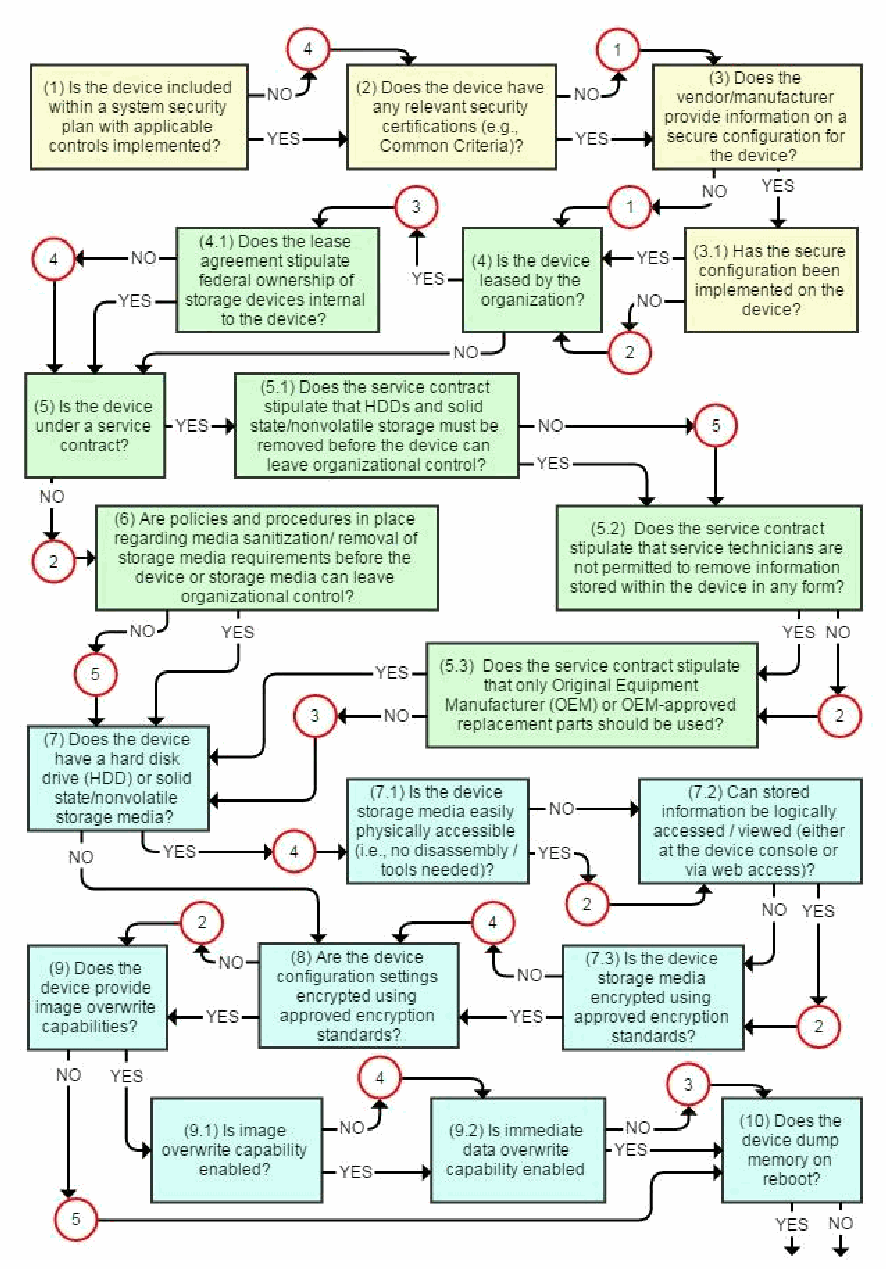
セキュリティリスク評価フローチャートの1ページ目です。各質問ボックスにはYESとNOの出口があり、リスクスコアが付く回答は、次のボックスに進む前に、そのスコアを示す赤い円を通ります。黄色のボックス(計画/安全な構成):「(1) 装置は、該当する管理策が実装されたシステムセキュリティ計画に含まれていますか」(NO: 4)、「(2) 装置には関連するセキュリティ認証(たとえば Common Criteria)がありますか」(NO: 1)、「(3) ベンダー/製造者は、装置の安全な構成に関する情報を提供していますか」(NO: 1)、「(3.1) 安全な構成は装置に実装されていますか」(NO: 2)。緑色のボックス(第三者):「(4) 装置は組織がリースしたものですか」(YES: 3)、「(4.1) リース契約で、装置内部の記憶装置の連邦政府による所有が定められていますか」(NO: 4)、「(5) 装置はサービス契約の対象ですか」(NO: 2)、「(5.1) サービス契約で、装置が組織の管理を離れる前に、HDDおよびソリッドステート/不揮発性記憶装置を取り外さなければならないと定められていますか」(NO: 5)、「(5.2) サービス契約で、サービス技術者が装置内に保存された情報をいかなる形でも持ち出すことを許可されていないと定められていますか」(NO: 2)、「(5.3) サービス契約で、Original Equipment Manufacturer(OEM)またはOEMが承認した交換部品のみを使用すべきであると定められていますか」(NO: 3)、「(6) 装置または記憶媒体が組織の管理を離れる前に、媒体のサニタイズ/記憶媒体の取り外しに関する方針と手順が整備されていますか」(NO: 5)。水色のボックス(装置の記憶媒体):「(7) 装置にはハードディスクドライブ(HDD)またはソリッドステート/不揮発性記憶媒体がありますか」(YES: 4; NOは8へ)、「(7.1) 装置の記憶媒体には物理的に容易にアクセスできますか(すなわち、分解/工具が不要ですか)」(YES: 2)、「(7.2) 保存された情報には(装置のコンソールまたはWebアクセスで)論理的にアクセス/閲覧できますか」(YES: 2)、「(7.3) 装置の記憶媒体は承認された暗号化標準を使って暗号化されていますか」(NO: 4)、「(8) 装置の構成設定は承認された暗号化標準を使って暗号化されていますか」(NO: 2)、「(9) 装置はイメージ上書き機能を備えていますか」(NO: 5)、「(9.1) イメージ上書き機能は有効になっていますか」(NO: 4)、「(9.2) 即時のデータ上書き機能は有効になっていますか」(NO: 3)、および「(10) 装置は再起動時にメモリをダンプしますか」。YESとNOの矢印は次のページへ続きます。
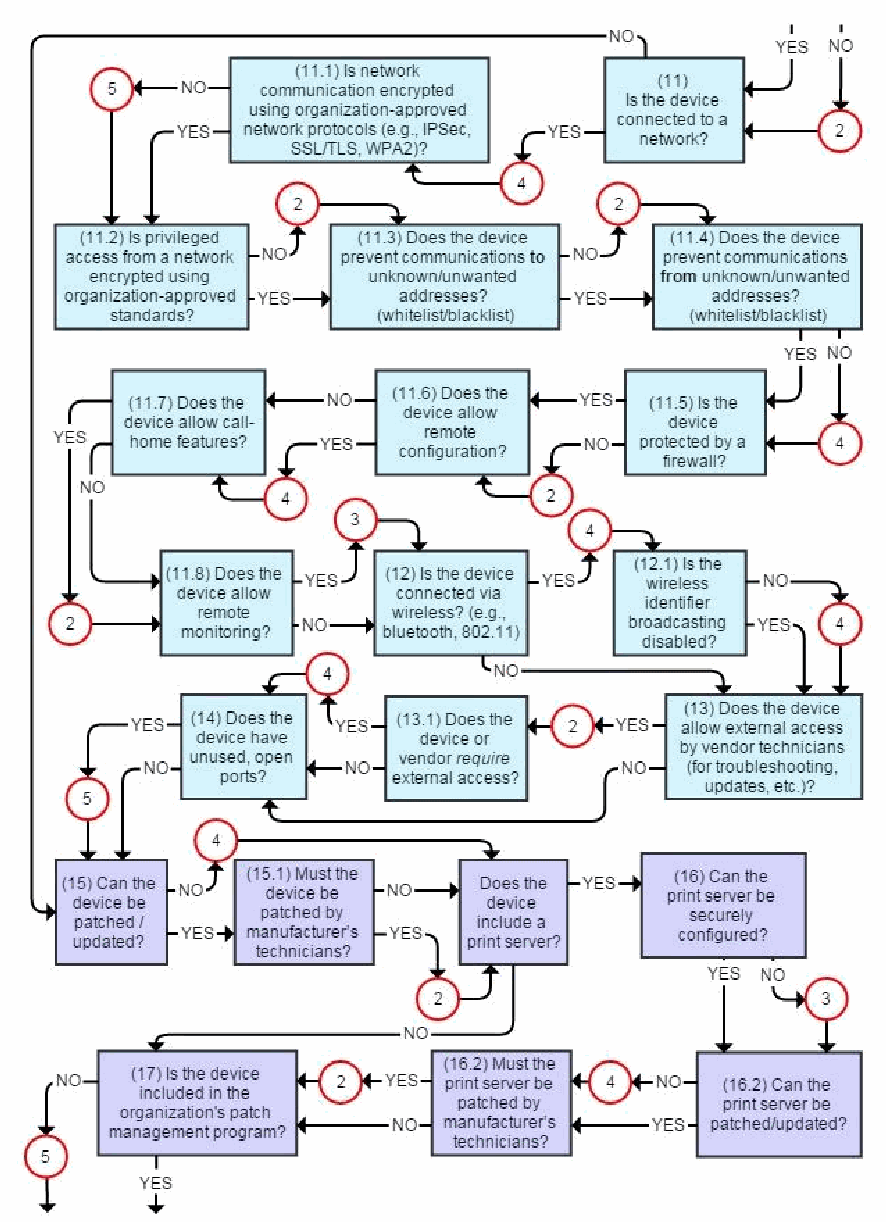
フローチャートの2ページ目です。各質問ボックスにはYESとNOの出口があり、リスクスコアが付く回答は、次のボックスに進む前に、そのスコアを示す赤い円を通ります。薄い青色のボックス(ネットワーク):「(11) 装置はネットワークに接続されていますか」(YES: 4)、「(11.1) ネットワーク通信は組織が承認したネットワークプロトコル(たとえば IPSec、SSL/TLS、WPA2)で暗号化されていますか」(NO: 5)、「(11.2) ネットワークからの特権アクセスは組織が承認した標準で暗号化されていますか」(NO: 2)、「(11.3) 装置は不明/望ましくないアドレスへの通信を防ぎますか(許可リスト/拒否リスト)」(NO: 2)、「(11.4) 装置は不明/望ましくないアドレスからの通信を防ぎますか(許可リスト/拒否リスト)」(NO: 4)、「(11.5) 装置はファイアウォールで保護されていますか」(NO: 2)、「(11.6) 装置はリモート構成を許可しますか」(YES: 4)、「(11.7) 装置はコールホーム機能を許可しますか」(YES: 2)、「(11.8) 装置はリモート監視を許可しますか」(YES: 3)、「(12) 装置はワイヤレス(たとえば Bluetooth、802.11)で接続されていますか」(YES: 4)、「(12.1) ワイヤレス識別子のブロードキャストは無効化されていますか」(NO: 4)、「(13) 装置はベンダー技術者による外部アクセス(トラブルシューティング、更新など)を許可しますか」(YES: 2)、「(13.1) 装置またはベンダーは外部アクセスを必要としていますか」(YES: 4)、「(14) 装置には未使用の開いたポートがありますか」(YES: 5)。紫色のボックス(ソフトウェア/ファームウェア):「(15) 装置にパッチを適用/更新できますか」(NO: 4)、「(15.1) 装置には製造者の技術者がパッチを適用しなければなりませんか」(YES: 2)、「装置にはプリントサーバーがありますか」(NOは17へ)、「(16) プリントサーバーを安全に構成できますか」(NO: 3)、「(16.2) プリントサーバーにパッチを適用/更新できますか」(NO: 4)、「(16.2) プリントサーバーには製造者の技術者がパッチを適用しなければなりませんか」(YES: 2)、および「(17) 装置は組織のパッチ管理プログラムに含まれていますか」(NO: 5)。矢印は次のページへ続きます。
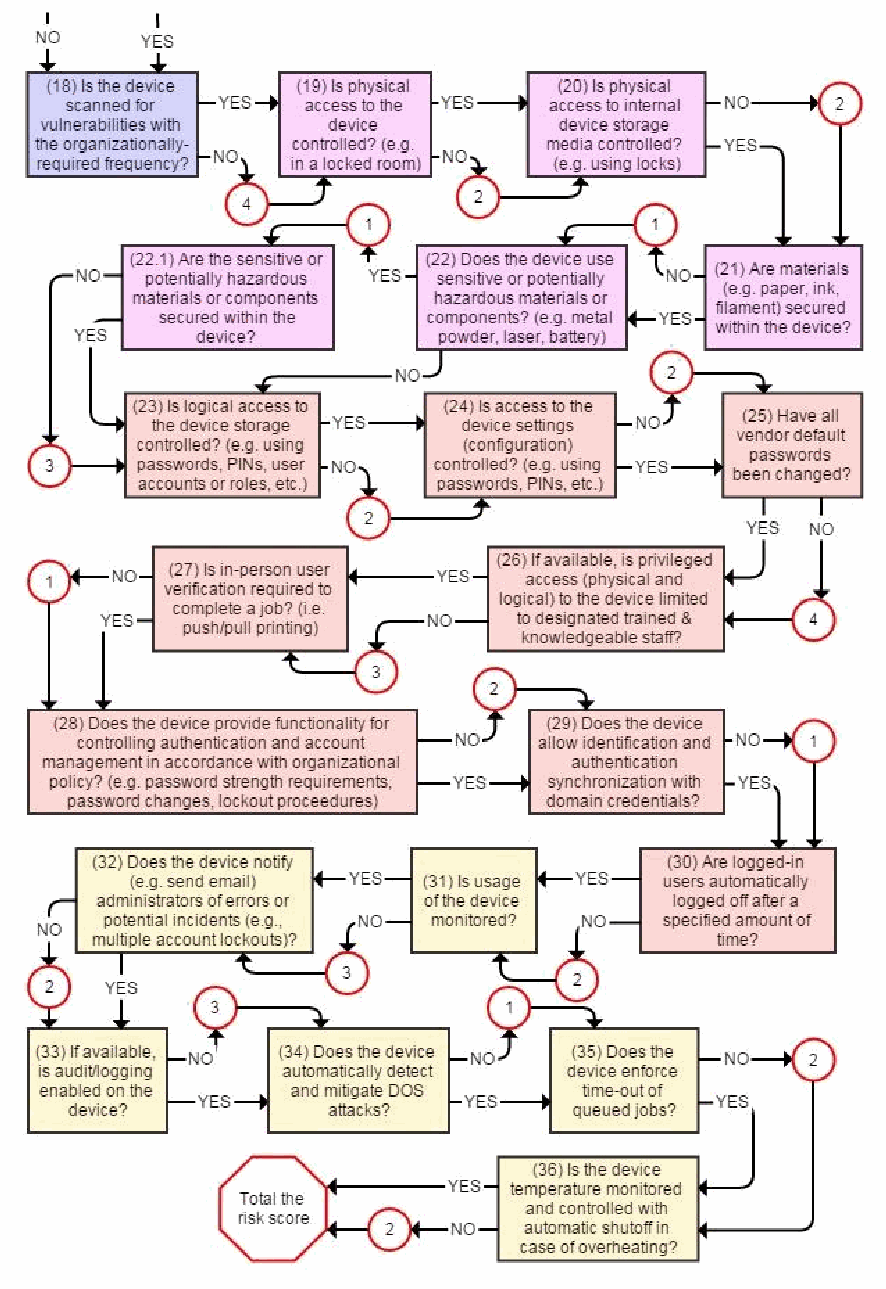
流れ図の最後のページです。各質問ボックスにはYESとNOの出口があり、リスクスコアが付く回答は、次のボックスに進む前に、そのスコアを示す赤い円を通ります。紫色のボックス:「(18) 装置は組織が求める頻度で脆弱性スキャンを受けていますか」(NO: 4)。ピンク色のボックス(物理的セキュリティ):「(19) 装置への物理的アクセスは管理されていますか(たとえば、施錠された部屋)」(NO: 2)、「(20) 装置内部の記憶媒体への物理的アクセスは管理されていますか(たとえば、錠を使用)」(NO: 2)、「(21) 資材(たとえば、用紙、インク、フィラメント)は装置内で保護されていますか」(NO: 1)、「(22) 装置は機微な、または危険をもたらす可能性のある資材や部品(たとえば、金属粉末、レーザー、バッテリー)を使用していますか」(YES: 1)、「(22.1) 機微な、または危険をもたらす可能性のある資材や部品は装置内で保護されていますか」(NO: 3)。サーモン色のボックス(アクセス制御):「(23) 装置の記憶装置への論理的アクセスは管理されていますか(たとえば、パスワード、PIN、ユーザーアカウントまたはロールなどを使用)」(NO: 2)、「(24) 装置の設定(構成)へのアクセスは管理されていますか(たとえば、パスワード、PINなどを使用)」(NO: 2)、「(25) ベンダーの既定のパスワードはすべて変更されていますか」(NO: 4)、「(26) 利用可能な場合、装置への特権アクセス(物理的および論理的)は、指定された訓練を受けた知識のある職員に限定されていますか」(NO: 3)、「(27) ジョブを完了するために、対面での利用者確認が必要ですか(すなわち、プッシュ/プル印刷)」(NO: 1)、「(28) 装置は、組織の方針に従って認証とアカウント管理を制御する機能を提供しますか(たとえば、パスワード強度の要件、パスワード変更、ロックアウト手順)」(NO: 2)、「(29) 装置はドメイン認証情報との識別と認証の同期を許可しますか」(NO: 1)、「(30) ログイン中のユーザーは指定された時間が経過すると自動的にログオフされますか」(NO: 2)。黄色のボックス(監視):「(31) 装置の使用状況は監視されていますか」(NO: 3)、「(32) 装置はエラーや潜在的なインシデント(たとえば、複数のアカウントロックアウト)を管理者に通知しますか(たとえば、電子メールを送信)」(NO: 2)、「(33) 装置で監査/ログ記録が利用可能で有効になっていますか」(NO: 3)、「(34) 装置はDOS攻撃を自動的に検知して緩和しますか」(NO: 1)、「(35) 装置はキューに入れられたジョブのタイムアウトを実施しますか」(NO: 2)、「(36) 装置の温度は監視され、過熱した場合に自動停止するよう制御されていますか」(NO: 2)。流れは赤い八角形「リスクスコアを合計する」で終わります。
Total Risk Scores and Risk Levels
総合リスクスコアとリスクレベル
Add up the total risk score from either the Security Risk Assessment Table or Flow Chart. The maximum total risk score is 170.
セキュリティリスクアセスメント表またはフローチャートのいずれかから、総合リスクスコアを合計します。総合リスクスコアの最大値は 170 です。
•115 and Above: High Risk - Consider obtaining a replacement RD that meets minimum security requirements within the next fiscal year; implement compensating controls in the interim, e.g., install a firewall for networked RDs that can’t be patched/updated and/or don’t provide encryption functionality, renegotiate the service contract or lease agreement, escort service technicians at all times.
•115 以上: 高リスク - 次の会計年度内に、最低限のセキュリティ要件を満たす交換用の RD を入手することを検討します。それまでの間は、代替の管理策を実施します。たとえば、パッチ適用/更新ができない、または暗号化機能を提供しないネットワーク接続された RD にファイアウォールを設置する、サービス契約やリース契約を再交渉する、サービス技術者に常に付き添う、といったものです。
•60-115: Moderate Risk – Actions to be taken as stated in the “Action” column in the table along with compensating controls are sufficient until a new RD is needed for functional reasons. Risks identified as accepted in the table or for which compensating controls are not available or are impractical are monitored closely in the interim.
•60-115: 中リスク – 機能上の理由で新しい RD が必要になるまでは、表の「措置」の列に記載された講じるべき措置と、代替の管理策で十分です。表で受容されたと特定されたリスクや、代替の管理策が利用できない、または現実的でないリスクは、それまでの間、綿密に監視します。
•50 and Below: Low Risk – Acceptable level of risk, excepting actions to be taken as stated in the “Action” column in the table. Risks identified as accepted in the table are monitored.
•50 以下: 低リスク – 表の「措置」の列に記載された講じるべき措置を除き、許容できる水準のリスクです。表で受容されたと特定されたリスクは監視します。
Appendix C: Roles and Responsibilities
付録 C: 役割と責任
Authorizing Official (AO) - An AO is a senior official or executive with the authority to formally assume responsibility for operating an information system (including copy/print/scan devices) at an acceptable level of risk to organization operations and assets, individuals, other organizations, and the Nation.
Authorizing Official(AO) - AO は、組織の運用と資産、個人、他の組織、国家に対する許容可能なリスク水準で、(コピー/印刷/スキャン装置を含む)情報システムを運用する責任を正式に負う権限を持つ、上級職員または幹部です。
Common Control Providers – Common control providers are responsible for ensuring that organization-defined common controls are implemented, documented, and operating as intended in accordance with the organizational risk management strategy.
Common Control Providers – 共通管理策の提供者は、組織が定めた共通管理策が、組織のリスクマネジメント戦略に従って実施され、文書化され、意図したとおりに動作していることを確保する責任を負います。
Contracting Officer - The contracting officer is the person who has the authority to enter into, administer, and/or terminate contracts and make related determinations and findings.
Contracting Officer - 契約担当官は、契約を締結し、管理し、あるいは終了する権限を持ち、関連する判断と認定を行う人物です。
Information Owner/Steward and/or Program Manager - The program manager and/or information owner/steward represents the business and programmatic interests in the information system throughout the system development life cycle.
Information Owner/Steward and/or Program Manager - プログラムマネージャーまたは情報オーナー/スチュワード、あるいはその両方は、システム開発ライフサイクルを通じて、情報システムに対する事業上およびプログラム上の利益を代表します。
Information System Owner - The information system owner is responsible for ensuring that system security controls are selected, implemented, documented, and operating as intended in accordance with the organizational risk management strategy.
Information System Owner - 情報システムオーナーは、システムのセキュリティ管理策が、組織のリスクマネジメント戦略に従って選択され、実施され、文書化され、意図したとおりに動作していることを確保する責任を負います。
Information System Security Officer (ISSO) – The ISSO is responsible for ensuring that the appropriate operational security posture is maintained for an information system, and thus works closely with the information system owner. The ISSO has the detailed knowledge and expertise required to manage the security aspects of an information system and may be assigned responsibility for the day-to-day security operations of a system.
Information System Security Officer(ISSO) – ISSO は、情報システムに対して適切な運用上のセキュリティ態勢が維持されることを確保する責任を負い、そのため、情報システムオーナーと緊密に連携します。ISSO は、情報システムのセキュリティ面を管理するために必要な詳細な知識と専門性を持っており、システムの日常のセキュリティ運用の責任を割り当てられる場合があります。
Security Control Assessors – Security control assessors are responsible for conducting assessments of the security controls employed within or inherited by an information system to determine the overall effectiveness of the controls.
Security Control Assessors – セキュリティ管理策アセッサーは、情報システム内で採用されている、または情報システムが継承しているセキュリティ管理策のアセスメントを実施して、管理策の全体的な有効性を判断する責任を負います。
Information System Administrators – Information system administrators are responsible for implementing agreed-upon controls and incorporating secure configuration settings for IT products. Information system administrators may also be responsible for managing information system accounts.
Information System Administrators – 情報システム管理者は、合意された管理策を実施し、IT 製品に安全な構成設定を組み込む責任を負います。情報システム管理者は、情報システムのアカウントを管理する責任を負う場合もあります。