NIST SP 800-113 日本語訳
英語タイトル : Guide to SSL VPNs日本語タイトル : SSL VPNの設計・導入・運用ガイド
公開日 : 2008-07-01
原文URL : https://csrc.nist.gov/pubs/sp/800/113/final
翻訳編集 : 自動生成(有志による非公式の日本語訳), 原文取得日 : 2026-09-30, 訳文 : 923 / 923 ブロック
[要約] SP 800-113 は、組織がSSL VPN技術を理解し、その設計、実装、構成、保護、監視、保守を行えるよう支援するガイドです。ネットワーク層とトランスポート層のセキュリティ、SSL VPNの基礎、計画と実装、推奨プラクティスを扱い、IPsec VPNなどの代替手段やケーススタディも示します。コンピュータセキュリティ担当者、プログラムマネージャー、システム・ネットワーク・アプリケーション管理者などが、SSL VPNの導入を段階的に進める際の指針となります。
[NIST のロゴ。公的な標章のため、この非公式サイトには掲載していません。原本 PDF を参照してください。]
Special Publication 800-113
特別刊行物800-113
Guide to SSL VPNs
SSL VPNガイド
Recommendations of the National Institute of Standards and Technology
米国国立標準技術研究所による推奨事項
Sheila Frankel Paul Hoffman Angela Orebaugh Richard Park
Sheila Frankel、Paul Hoffman、Angela Orebaugh、Richard Park
Guide to SSL VPNs
SSL VPNガイド

NIST特別刊行物800-113
Recommendations of the National Institute of Standards and Technology
米国国立標準技術研究所による推奨事項
Sheila Frankel Paul Hoffman Angela Orebaugh Richard Park
Sheila Frankel、Paul Hoffman、Angela Orebaugh、Richard Park
C O M P U T E R S E C U R I T Y
コンピュータセキュリティ
Computer Security Division Information Technology Laboratory National Institute of Standards and Technology Gaithersburg, MD 20899-8930
コンピュータセキュリティ部門、情報技術研究所、米国国立標準技術研究所、メリーランド州ゲイザースバーグ 20899-8930
July 2008
2008年7月
U.S. Department of Commerce
米国商務省
Carlos M. Gutierrez, Secretary
Carlos M. Gutierrez、長官
National Institute of Standards and Technology
米国国立標準技術研究所
James M. Turner, Deputy Director
James M. Turner、副所長
Reports on Computer Systems Technology
コンピュータシステム技術に関する報告書
The Information Technology Laboratory (ITL) at the National Institute of Standards and Technology (NIST) promotes the U.S. economy and public welfare by providing technical leadership for the nation’s measurement and standards infrastructure. ITL develops tests, test methods, reference data, proof of concept implementations, and technical analysis to advance the development and productive use of information technology. ITL’s responsibilities include the development of technical, physical, administrative, and management standards and guidelines for the cost-effective security and privacy of sensitive unclassified information in Federal computer systems. This Special Publication 800-series reports on ITL’s research, guidance, and outreach efforts in computer security and its collaborative activities with industry, government, and academic organizations.
米国国立標準技術研究所(NIST)の情報技術研究所(ITL)は、国の計測および標準インフラストラクチャに技術的リーダーシップを発揮することにより、米国経済および公共の福祉を促進しています。ITLは、情報技術の発展と生産的な利用を進めるため、試験、試験方法、参照データ、概念実証実装、および技術分析を開発します。ITLの責務には、連邦政府のコンピュータシステムにおける機密扱いではないセンシティブ情報を費用対効果の高い方法で保護し、プライバシーを確保するための技術的、物理的、管理的およびマネジメント上の標準ならびにガイドラインの策定が含まれます。本書を含む特別出版物800シリーズは、コンピュータセキュリティに関するITLの研究、指針および普及活動と、産業界、政府機関および学術機関との協力活動を報告するものです。
National Institute of Standards and Technology Special Publication 800-113 Natl. Inst. Stand. Technol. Spec. Publ. 800-113, 87 pages (July 2008)
米国国立標準技術研究所 特別出版物800-113。米国国立標準技術研究所特別刊行物800-113、全87ページ(2008年7月)。
Certain commercial entities, equipment, or materials may be identified in this document in order to describe an experimental procedure or concept adequately. Such identification is not intended to imply recommendation or endorsement by the National Institute of Standards and Technology, nor is it intended to imply that the entities, materials, or equipment are necessarily the best available for the purpose.
原本PDFの抜粋画像
実験手順または概念を十分に説明するため、本書では特定の商業事業体、機器または材料を示す場合があります。このような記載は、米国国立標準技術研究所による推奨または承認を意味するものではなく、また、記載された事業体、材料または機器が目的に対して必ずしも最良の入手可能なものであることを意味するものでもありません。
Acknowledgements
謝辞
The authors, Sheila Frankel of the National Institute of Standards and Technology (NIST), Paul Hoffman of the Virtual Private Network Consortium (VPNC), and Angela Orebaugh and Richard Park of Booz Allen Hamilton, wish to thank their colleagues who reviewed drafts of this document and contributed to its technical content, especially Elaine Barker, Jim St. Pierre and Tim Polk of NIST. The authors would like to acknowledge Tim Grance and Karen Scarfone of NIST for their keen and insightful assistance throughout the development of the document. The authors particularly want to thank Guy Snyder, Darren Hartman and Thang Phan of ICSA Labs for their careful review and valuable contributions to improving the quality of this publication. The authors would also like to express their thanks to Mike Hillhouse of Juniper Networks and Mahesh Jethanandani of Cisco for their worthwhile comments and suggestions.
著者である米国国立標準技術研究所(NIST)のSheila Frankel、Virtual Private Network Consortium(VPNC)のPaul Hoffman、ならびにBooz Allen HamiltonのAngela OrebaughおよびRichard Parkは、本書の草稿を査読し、技術的内容に貢献した同僚、特にNISTのElaine Barker、Jim St. Pierre、Tim Polkに感謝します。著者らは、本書の作成全体を通じて鋭く洞察に富む支援を提供したNISTのTim GranceおよびKaren Scarfoneに謝意を表します。著者らは特に、ICSA LabsのGuy Snyder、Darren Hartman、Thang Phanに対し、丁寧な査読と本書の品質向上への貴重な貢献について感謝します。また、Juniper NetworksのMike HillhouseおよびCiscoのMahesh Jethanandaniから寄せられた有益なコメントと提案にも感謝します。
Table of Contents
目次
List of Appendices
付録一覧
List of Figures
図の一覧
List of Tables
表一覧
Executive Summary
エグゼクティブサマリー
Secure Sockets Layer (SSL) virtual private networks (VPN) provide secure remote access to an organization’s resources. A VPN is a virtual network, built on top of existing physical networks, that can provide a secure communications mechanism for data and other information transmitted between two endpoints. Because a VPN can be used over existing networks such as the Internet, it can facilitate the secure transfer of sensitive data across public networks. An SSL VPN consists of one or more VPN devices to which users connect using their Web browsers. The traffic between the Web browser and the SSL VPN device is encrypted with the SSL protocol or its successor, the Transport Layer Security (TLS) protocol. This type of VPN may be referred to as either an SSL VPN or a TLS VPN. This guide uses the term SSL VPN. SSL VPNs provide remote users with access to Web applications and client/server applications, and connectivity to internal networks. Despite the popularity of SSL VPNs, they are not intended to replace Internet Protocol Security (IPsec) VPNs.1 The two VPN technologies are complementary and address separate network architectures and business needs. SSL VPNs offer versatility and ease of use because they use the SSL protocol, which is included with all standard Web browsers, so the client usually does not require configuration by the user. SSL VPNs offer granular control for a range of users on a variety of computers, accessing resources from many locations. There are two primary types of SSL VPNs:
Secure Sockets Layer(SSL)仮想プライベートネットワーク(VPN)は、組織のリソースへの安全なリモートアクセスを提供します。VPNは、既存の物理ネットワーク上に構築される仮想ネットワークであり、2つのエンドポイント間で送信されるデータその他の情報について、安全な通信機構を提供できます。VPNはインターネットなどの既存のネットワーク上で利用できるため、公衆ネットワークを越えた機微データの安全な転送を容易にできます。SSL VPNは、1台以上のVPN装置で構成され、利用者はWebブラウザーを使ってそこへ接続します。WebブラウザーとSSL VPN装置の間のトラフィックは、SSLプロトコルまたはその後継であるTransport Layer Security(TLS)プロトコルで暗号化されます。この種のVPNは、SSL VPNまたはTLS VPNのいずれの名称でも呼ばれる場合があります。本ガイドでは、SSL VPNという用語を用います。SSL VPNは、リモート利用者にWebアプリケーションおよびクライアント/サーバーアプリケーションへのアクセスと、内部ネットワークへの接続性を提供します。SSL VPNは普及しているものの、Internet Protocol Security(IPsec)VPNを置き換えることを意図したものではありません。1この2つのVPN技術は補完的であり、それぞれ別のネットワークアーキテクチャとビジネス上のニーズに対応します。SSL VPNは、すべての標準的なWebブラウザーに含まれるSSLプロトコルを利用するため、多用途で使いやすく、通常、クライアントは利用者による設定を必要としません。SSL VPNは、さまざまなコンピュータ上の多様な利用者に対して、多くの場所からリソースにアクセスさせる際のきめ細かな制御を提供します。SSL VPNには主に2つの種類があります。
•SSL Portal VPNs. This type of SSL VPN allows a user to use a single standard SSL connection to a Web site to securely access multiple network services. The site accessed is typically called a portal because it is a single page that leads to many other resources. The remote user accesses the SSL VPN gateway using any modern Web browser, identifies himself or herself to the gateway using an authentication method supported by the gateway, and is then presented with a Web page that acts as the portal to the other services.
•▪ SSLポータルVPN。この種類のSSL VPNでは、利用者はWebサイトへの単一の標準SSL接続を使って、複数のネットワークサービスに安全にアクセスできます。アクセス先のサイトは、通常、1つのページから他の多くのリソースへ導くことから「ポータル」と呼ばれます。リモート利用者は任意の最新WebブラウザーでSSL VPNゲートウェイにアクセスし、ゲートウェイがサポートする認証方式で本人確認を行います。その後、他のサービスへのポータルとなるWebページが表示されます。
•SSL Tunnel VPNs. This type of SSL VPN allows a user to use a typical Web browser to securely access multiple network services, including applications and protocols that are not web-based, through a tunnel that is running under SSL. SSL tunnel VPNs require that the Web browser be able to handle active content, which allows them to provide functionality that is not accessible to SSL portal VPNs. Examples of active content include Java, JavaScript, Active X, or Flash applications or plug-ins.
•▪ SSLトンネルVPN。この種類のSSL VPNでは、利用者は一般的なWebブラウザーを使い、SSL上で動作するトンネルを通じて、Webベースではないアプリケーションやプロトコルを含む複数のネットワークサービスに安全にアクセスできます。SSLトンネルVPNでは、Webブラウザーがアクティブコンテンツを処理できる必要があります。これにより、SSLポータルVPNでは利用できない機能を提供できます。アクティブコンテンツの例には、Java、JavaScript、ActiveX、Flashのアプリケーションまたはプラグインがあります。
This publication discusses the fundamental technologies and features of SSL VPNs. It describes SSL and how it fits within the context of layered network security. It presents a phased approach to SSL VPN planning and implementation that can help in achieving successful SSL VPN deployments. It also compares the SSL VPN technology with IPsec VPNs and other VPN solutions. This information is particularly valuable for helping organizations to determine how best to deploy SSL VPNs within their specific network environments.
本書ではSSL VPNの基礎技術と機能を説明し、SSLとは何か、およびSSLが階層型ネットワークセキュリティの中でどのように位置付けられるかを述べます。また、導入の成功に役立つ、SSL VPNの計画と実装に関する段階的なアプローチを提示します。さらに、SSL VPN技術をIPsec VPNや他のVPNソリューションと比較します。これらの情報は、各組織がそれぞれのネットワーク環境にSSL VPNを最適に導入する方法を判断するうえで特に有用です。
Implementing the following recommendations should assist in facilitating more efficient and effective SSL VPN use for Federal departments and agencies.
以下の推奨事項を実施することは、連邦政府の省庁および機関におけるSSL VPNのより効率的かつ効果的な利用の促進に役立つはずです。
Federal agencies deploying SSL VPNs must configure them to only allow FIPS-compliant cryptographic algorithms, cipher suites, and versions of SSL.
SSL VPNを導入する連邦政府機関は、FIPS準拠の暗号アルゴリズム、暗号スイート、およびSSLのバージョンのみを許可するようにSSL VPNを構成しなければなりません。
Some organizations, such as Federal agencies, have strict requirements for encryption and integrity protection. SSL VPNs should support the required algorithms for symmetric encryption, key exchange, and hash functions. For government agencies, traffic that requires protection must employ Federal
連邦政府機関などの一部の組織は、暗号化と完全性保護に関して厳格な要件を定めています。SSL VPNは、共通鍵暗号、鍵交換、ハッシュ関数について、必要とされるアルゴリズムをサポートすべきです。政府機関の場合、保護を必要とするトラフィックには、連邦
Information Processing Standard (FIPS)-compliant cryptographic algorithms and modules. Many of the cryptographic algorithms used in some SSL cipher suites are not FIPS-approved, and therefore are not allowed for use in SSL VPNs that are to be used in applications that must conform to FIPS 140-2. This means that to be run in FIPS-compliant mode, an SSL VPN gateway must only allow cipher suites that are allowed by FIPS 140-2.
情報処理標準(FIPS)に準拠した暗号アルゴリズムおよびモジュール。一部のSSL暗号スイートで使われる暗号アルゴリズムの多くはFIPS承認済みではないため、FIPS 140-2への適合が求められる用途で使用するSSL VPNでは利用が許可されません。したがって、FIPS準拠モードで稼働するには、SSL VPNゲートウェイは、FIPS 140-2で許可された暗号スイートのみを許可しなければなりません。
Some of the cryptographic requirements, including allowable hash functions and certificate key lengths, will change at the end of 2010. Therefore, Federal agencies who want to provide SSL VPN services after 2010 must ensure that their systems are upgradeable to the new FIPS-compliant cipher suites and key lengths before the end of 2010, and that their SSL VPN vendors guarantee that such upgrades will be available early enough for testing and deployment in the field.
使用が認められるハッシュ関数や証明書の鍵長など、一部の暗号要件は2010年末に変更されます。したがって、2010年より後もSSL VPNサービスを提供しようとする連邦政府機関は、自機関のシステムが2010年末までに新しいFIPS準拠の暗号スイートおよび鍵長へアップグレード可能であること、ならびに、試験と現場への展開に十分間に合う早い時期にそのアップグレードが提供されることをSSL VPNベンダーが保証していることを確実にしなければなりません。
Organizations planning SSL VPN deployments should identify and define requirements, and evaluate several products to determine their fit into the organization.
SSL VPNの導入を計画する組織は、要件を特定して定義し、複数の製品を評価して組織への適合性を判断すべきです。
SSL VPN products vary in functionality, including protocol and application support. They also vary in breadth, depth, and completeness of features and security services. Some recommendations and considerations include the following:
SSL VPN製品は、プロトコルやアプリケーションのサポートなど、機能が製品ごとに異なります。また、機能およびセキュリティサービスの広さ、深さ、完成度も異なります。検討すべき推奨事項と考慮点を以下に示します。
•SSL VPN manageability features such as status reporting, logging, and auditing should provide adequate capabilities for the organization to effectively operate and manage the SSL VPN and to extract detailed usage information.
•▪ 状態報告、ログ記録、監査などのSSL VPN管理機能は、組織がSSL VPNを効果的に運用・管理し、詳細な利用状況を抽出するために十分な機能を備えるべきです。
•The SSL VPN high availability and scalability features should support the organization’s requirements for failover, load balancing and throughput. State and information sharing is recommended to keep the failover process transparent to the user.
•▪ SSL VPNの高可用性および拡張性機能は、フェイルオーバー、負荷分散、スループットに関する組織の要件を満たすべきです。フェイルオーバー処理が利用者に意識されないよう、状態および情報を共有することが推奨されます。
•SSL VPN portal customization should allow the organization to control the look and feel of the portal and to customize the portal to support various devices such as personal digital assistants (PDA) and smart phones.
•▪ SSL VPNのポータルカスタマイズ機能により、組織はポータルの外観と操作感を制御し、携帯情報端末(PDA)やスマートフォンなど各種デバイスに対応するようポータルをカスタマイズできるべきです。
•SSL VPN authentication should provide the necessary support for the organization’s current and future authentication methods and leverage existing authentication databases. SSL VPN authentication should also be tested to ensure interoperability with existing authentication methods.
•▪ SSL VPNの認証機能は、組織が現在および将来使用する認証方式を必要な範囲でサポートし、既存の認証データベースを活用すべきです。また、既存の認証方式との相互運用性を確保するため、SSL VPNの認証を試験すべきです。
•The strongest possible cryptographic algorithms and key lengths that are considered secure for current practice should be used for encryption and integrity protection unless they are incompatible with interoperability, performance and export constraints.
•▪ 相互運用性、性能、輸出上の制約と両立しない場合を除き、現在の実務で安全とみなされる最も強力な暗号アルゴリズムおよび鍵長を、暗号化と完全性保護に使用すべきです。
•SSL VPNs should be evaluated to ensure they provide the level of granularity needed for access controls. Access controls should be capable of applying permissions to users, groups, and resources, as well as integrating with endpoint security controls.
•▪ SSL VPNがアクセス制御に必要な粒度を提供することを評価して確認すべきです。アクセス制御では、利用者、グループ、リソースに権限を適用し、エンドポイントセキュリティ対策と統合できるべきです。
•Implementation of endpoint security controls is often the most diverse service amongst SSL VPN products. Endpoint security should be evaluated to ensure it provides the necessary host integrity checking and security protection mechanisms required for the organization.
•▪ エンドポイントセキュリティ対策の実装は、SSL VPN製品の中でも特に製品差が大きい機能です。エンドポイントセキュリティが、組織に必要なホストの完全性検査とセキュリティ保護メカニズムを提供することを評価して確認すべきです。
•Not all SSL VPNs have integrated intrusion prevention capabilities. Those that do should be evaluated to ensure they do not introduce an unacceptable amount of latency into the network traffic.
•▪ 侵入防止機能を統合していないSSL VPN製品もあります。その機能を備える製品は、ネットワークトラフィックに許容できない遅延を生じさせないことを評価して確認すべきです。
Organizations should use a phased approach to SSL VPN planning and implementation.
組織は、段階的なアプローチでSSL VPNの計画と実装を進めるべきです。
A successful SSL VPN deployment can be achieved by following a clear, step-by-step planning and implementation process. The use of a phased approach can minimize unforeseen issues and identify potential pitfalls early in the process. The five phases of the recommended approach are as follows:
明確な段階を追った計画・実装プロセスに従うことで、SSL VPNの導入を成功させられます。段階的なアプローチを用いると、予期しない問題を減らし、潜在的な落とし穴をプロセスの早い段階で特定できます。推奨する5つの段階は次のとおりです。
1.Identify Requirements. Identify the requirements for remote access and determine how they can best be met.
1.要件の特定。リモートアクセスの要件を特定し、それらを最適に満たす方法を決定します。
2.Design the Solution. Make design decisions in five areas: access control, endpoint security, authentication methods, architecture, and cryptography policy.
2.ソリューションの設計。アクセス制御、エンドポイントセキュリティ、認証方式、アーキテクチャ、暗号化ポリシーの5分野で設計上の決定を行います。
3.Implement and Test a Prototype. Test a prototype of the designed solution in a laboratory, test, or production environment to identify any potential issues.
3.プロトタイプの実装と試験。設計したソリューションのプロトタイプをラボ、試験環境、または本番環境で試験し、潜在的な問題を特定します。
4.Deploy the Solution. Gradually deploy the SSL VPN solution throughout the enterprise, beginning with a pilot program.
4.ソリューションの導入。パイロットプログラムから開始し、SSL VPNソリューションを企業全体に段階的に導入します。
5.Manage the Solution. Maintain the SSL VPN components and resolve operational issues. Repeat the planning and implementation process when significant changes need to be incorporated into the solution.
5.ソリューションの管理。SSL VPNの構成要素を保守し、運用上の問題を解決します。ソリューションに重大な変更を取り込む必要が生じた場合は、計画・実装プロセスを繰り返します。
Organizations should be familiar with the limitations of SSL VPN technology.
組織は、SSL VPN技術の限界を把握しておくべきです。
SSL VPNs, although a maturing technology, continue to face several challenges. These include limitations on their ability to support a large number of applications and clients, the methods of implementing network extension and endpoint security, the ability to provide clientless access, the use of the SSL VPN from public locations, and product and technology education.
SSL VPNは成熟しつつある技術ですが、依然として複数の課題があります。具体的には、多数のアプリケーションやクライアントをサポートする能力、ネットワーク拡張やエンドポイントセキュリティの実装方法、クライアントレスアクセスの提供能力、公共の場所からのSSL VPN利用、製品および技術に関する教育の課題が挙げられます。
Organizations should implement other measures that support and complement SSL VPN implementations.
組織は、SSL VPNの実装を支援し補完する他の対策も実施すべきです。
These measures help to ensure that the SSL VPN solution is implemented in an environment with the technical, management, and operational controls necessary to provide sufficient security for the SSL VPN implementation. Examples of supporting measures include:
これらの対策は、SSL VPNの実装に十分なセキュリティを提供するために必要な技術的、管理的、運用上の管理策を備えた環境にSSL VPNソリューションが実装されることを確実にするのに役立ちます。支援策の例を以下に示します。
•Establishing and maintaining control over all entry and exit points for the protected network, which helps to ensure its integrity
•保護対象ネットワークのすべての出入口に対する管理を確立し、維持します。これにより、ネットワークの完全性を確保しやすくなります。
•Incorporating SSL VPN considerations into organizational policies (e.g., identity management, remote access)
•▪ ID管理やリモートアクセスなど、組織の方針にSSL VPNに関する事項を組み込みます。
•Ensuring that all SSL VPN endpoints are secured and maintained properly to reduce the risk of SSL VPN compromise or misuse.
•▪ SSL VPNの侵害または不正利用のリスクを低減するため、すべてのSSL VPNエンドポイントを適切に保護し、保守します。
Although SSL VPNs are flexible enough to meet many needs, there are certain cases when other types of VPNs may provide a better solution. Network layer VPN protocols, primarily IPsec; data link layer VPN protocols, such as Point-to-Point Tunneling Protocol (PPTP), Layer 2 Tunneling Protocol (L2TP), and Layer 2 Forwarding (L2F); and application layer security protocols, including OpenPGP and Secure Shell (SSH), are all effective alternatives to SSL VPNs for particular needs and environments.
SSL VPNは多様なニーズに柔軟に対応できますが、他の種類のVPNがより適切な場合もあります。主にIPsecを用いるネットワーク層VPNプロトコル、Point-to-Point Tunneling Protocol(PPTP)、Layer 2 Tunneling Protocol(L2TP)、Layer 2 Forwarding(L2F)などのデータリンク層VPNプロトコル、OpenPGPやSecure Shell(SSH)などのアプリケーション層セキュリティプロトコルは、特定のニーズや環境においてSSL VPNの有効な代替手段となります。
1. Introduction
1. はじめに
1.1 Authority
1.1 法的根拠
The National Institute of Standards and Technology (NIST) developed this document in furtherance of its statutory responsibilities under the Federal Information Security Management Act (FISMA) of 2002, Public Law 107-347.
米国国立標準技術研究所(NIST)は、2002年連邦情報セキュリティ管理法(FISMA)、Public Law 107-347に基づく法定責務を遂行するため、本書を作成しました。
NIST is responsible for developing standards and guidelines, including minimum requirements, for providing adequate information security for all agency operations and assets; but such standards and guidelines shall not apply to national security systems. This guideline is consistent with the requirements of the Office of Management and Budget (OMB) Circular A-130, Section 8b(3), “Securing Agency Information Systems,” as analyzed in A-130, Appendix IV: Analysis of Key Sections. Supplemental information is provided in A-130, Appendix III.
NISTは、すべての機関の業務および資産に十分な情報セキュリティを提供するため、最低要件を含む標準およびガイドラインを策定する責任を負います。ただし、これらの標準およびガイドラインは国家安全保障システムには適用されません。本ガイドラインは、OMB Circular A-130第8b(3)節「機関情報システムの保護」の要件に沿っており、同節はA-130附属書IV「主要節の分析」で分析されています。補足情報はA-130附属書IIIに示されています。
This guideline has been prepared for use by Federal agencies. It may be used by nongovernmental organizations on a voluntary basis and is not subject to copyright, though attribution is desired.
本ガイドラインは連邦政府機関が使用するために作成されました。非政府組織も任意で使用でき、著作権の対象ではありませんが、出典の明記が望まれます。
Nothing in this document should be taken to contradict standards and guidelines made mandatory and binding on Federal agencies by the Secretary of Commerce under statutory authority, nor should these guidelines be interpreted as altering or superseding the existing authorities of the Secretary of Commerce, Director of the OMB, or any other Federal official.
本書のいかなる内容も、法令上の権限に基づき商務長官が連邦政府機関に義務付け、拘束力を持たせた標準およびガイドラインに反するものと解釈してはなりません。また、本ガイドラインを、商務長官、OMB長官、その他の連邦政府職員が有する既存の権限を変更または置き換えるものと解釈してはなりません。
1.2 Purpose and Scope
1.2 目的と適用範囲
This publication seeks to assist organizations in understanding SSL VPN technologies and in designing, implementing, configuring, securing, monitoring, and maintaining SSL VPN solutions. This document provides a phased approach to SSL VPN planning and implementation that can help in achieving successful SSL VPN deployments. It also provides a comparison with other similar technologies such as IPsec VPNs and other VPN solutions.
本書は、組織がSSL VPN技術を理解し、SSL VPNソリューションの設計、実装、構成、保護、監視、保守を行えるよう支援することを目的とします。本書は、SSL VPNの導入を成功させるのに役立つ、SSL VPNの計画と実装への段階的なアプローチを示します。また、IPsec VPNやその他のVPNソリューションなど、類似する他の技術との比較も示します。
1.3 Audience
1.3 対象読者
The publication has been created for computer security staff and program managers; system, network, and application administrators; and others who are considering the deployment of SSL VPNs. It is also useful for organizations that already deploy IPsec VPNs and want to know how IPsec and SSL VPNs are complementary.
本書は、コンピュータセキュリティ担当者、プログラムマネージャー、システム・ネットワーク・アプリケーション管理者、およびSSL VPNの導入を検討しているその他の読者を対象とします。また、IPsec VPNをすでに導入しており、IPsec VPNとSSL VPNがどのように相互補完するかを知りたい組織にも有用です。
1.4 Document Structure
1.4 文書構成
The remainder of this document is organized into the following six major sections:
本書の残りは、次の6つの主要な節で構成されます。
•Section 2 provides a general introduction to network and transport layer security.
•▪ 第2節では、ネットワーク層およびトランスポート層のセキュリティを概説します。
•Section 3 gives describes the fundamentals of SSL VPNs and their services and features.
•▪ 第3節では、SSL VPNの基礎と、そのサービスおよび機能を説明します。
•Section 4 explores in depth each of the SSL VPN planning and implementation phases.
•▪ 第4節では、SSL VPNの計画および実装における各段階を詳しく検討します。
•Section 5 provides a consolidated list of recommended practices for SSL VPN deployment in terms of the system development life cycle approach.
•▪ 第5節では、システム開発ライフサイクルに基づくSSL VPN導入の推奨実践を一覧にまとめます。
•Section 6 describes several VPN protocols that are used as alternatives to SSL VPNs in different scenarios.
•▪ 第6節では、さまざまな状況でSSL VPNの代替として用いられる複数のVPNプロトコルを説明します。
•Section 7 presents an SSL VPN solution planning and implementation case study.
•▪ 第7節では、SSL VPNソリューションの計画および実装に関する事例研究を示します。
The document also contains appendices with supporting material. Appendices A and B contain a glossary and an acronym list, respectively.
また、本書には補足資料を含む付録があります。付録Aには用語集、付録Bには略語一覧を掲載します。
2. Network and Transport Layer Security
2. ネットワーク層およびトランスポート層のセキュリティ
This section provides a general introduction to network and transport layer security. Network layer security protects network communications at the layer that is responsible for routing packets across networks. Transport layer security provides security at the layer responsible for end-to-end communications. This section first introduces the Transmission Control Protocol/Internet Protocol (TCP/IP) model and its layers and then discusses the need to use security controls at each layer to protect communications. It provides a brief introduction to Secure Sockets Layer (SSL) and its successor, Transport Layer Security (TLS), primarily focused on the types of protection that SSL can provide for communications. This section also provides a brief introduction to virtual private networking (VPN) services and explains what types of protection a VPN can provide. It introduces three VPN architecture models and discusses the features and common uses of each model. This document discusses only the most common VPN scenarios and uses of SSL.
本節では、ネットワーク層およびトランスポート層のセキュリティを概説します。ネットワーク層セキュリティは、ネットワーク間でパケットをルーティングする層で通信を保護します。トランスポート層セキュリティは、エンドツーエンド通信を担う層でセキュリティを提供します。まずTransmission Control Protocol/Internet Protocol(TCP/IP)モデルとその各層を紹介し、次に通信を保護するため各層でセキュリティ対策を用いる必要性を説明します。また、Secure Sockets Layer(SSL)とその後継であるTransport Layer Security(TLS)を簡単に紹介し、主にSSLが通信に提供できる保護の種類に焦点を当てます。さらに、仮想プライベートネットワーク(VPN)サービスを簡潔に紹介し、VPNが提供できる保護の種類を説明します。3つのVPNアーキテクチャモデルを紹介し、それぞれの機能と一般的な用途を説明します。本書では、最も一般的なVPNのシナリオおよびSSLの用途のみを扱います。
2.1 The Need for Network and Transport Layer Security
2.1 ネットワーク層およびトランスポート層のセキュリティの必要性
TCP/IP is widely used throughout the world to provide network communications. TCP/IP communications are composed of four layers that work together. When a user wants to transfer data across networks, the data is passed from the highest layer through intermediate layers to the lowest layer, with each layer adding information. At each layer, the logical units are typically composed of a header and a payload. The payload consists of the information passed down from the previous layer, while the header contains layer-specific information such as addresses. At the application layer, the payload is the actual application data. The lowest layer sends the accumulated data through the physical network; the data is then passed up through the layers to its destination. Essentially, the data produced by a layer is encapsulated in a larger container by the layer below it. The four TCP/IP layers, from highest to lowest, are shown in Figure 2-1.
TCP/IPは世界中で広く使われているネットワーク通信方式です。TCP/IP通信は、連携して動作する4つの層で構成されます。利用者がネットワークを介してデータを転送すると、データは最上位層から中間層を通って最下位層へ渡され、そのたびに各層が情報を付加します。各層で論理単位は通常、ヘッダーとペイロードで構成されます。ペイロードには直前の層から渡された情報が含まれ、ヘッダーにはアドレスなど層固有の情報が含まれます。アプリケーション層では、ペイロードは実際のアプリケーションデータです。最下位層は累積したデータを物理ネットワークに送り、データは宛先まで各層を上向きに渡されます。つまり、ある層が生成したデータは、その下の層によってより大きな容器にカプセル化されます。最上位から最下位までの4つのTCP/IP層を図2-1に示します。
| Application Layer. This layer sends and receives data for particular applications, such as Domain Name System (DNS), HyperText Transfer Protocol (HTTP), and Simple Mail Transfer Protocol (SMTP). |
| Transport Layer. This layer provides connection-oriented or connectionless services for transporting application layer services between networks. The transport layer can optionally assure the reliability of communications. Transmission Control Protocol (TCP) and User Datagram Protocol (UDP) are commonly used transport layer protocols. |
| Network Layer. This layer routes packets across networks. Internet Protocol (IP) is the fundamental network layer protocol for TCP/IP. Other commonly used protocols at the network layer are Internet Control Message Protocol (ICMP) and Internet Group Management Protocol (IGMP). |
| Data Link Layer. This layer handles communications on the physical network components. The best-known data link layer protocol is Ethernet. |
| アプリケーション層。この層は、ドメインネームシステム(DNS)、ハイパーテキスト転送プロトコル(HTTP)、簡易メール転送プロトコル(SMTP)など、特定のアプリケーションのデータを送受信します。 |
| トランスポート層。この層は、ネットワーク間でアプリケーション層のサービスを転送するための、コネクション型またはコネクションレス型のサービスを提供します。トランスポート層は、通信の信頼性を任意で保証できます。トランスミッション・コントロール・プロトコル(TCP)とユーザー・データグラム・プロトコル(UDP)は、トランスポート層のプロトコルとして一般的に使われます。 |
| ネットワーク層。この層は、ネットワーク間でパケットをルーティングします。インターネットプロトコル(IP)は、TCP/ |
| データリンク層。この層は、物理的なネットワーク構成要素上の通信を処理します。最もよく知られたデータリンク層プロトコルはイーサネットです。 |
Figure 2-1. TCP/IP Layers
図2-1 TCP/IPの各層
Security controls exist for network communications at each layer of the TCP/IP model. As previously explained, data is passed from the highest to the lowest layer, with each layer adding more information. Because of this, a security control at a higher layer cannot provide protection for lower layers, because the lower layers perform functions of which the higher layers are not aware. Security controls that are available at each layer include:
TCP/IPモデルの各層には、ネットワーク通信を保護するセキュリティ対策があります。前述のとおり、データは最上位層から最下位層へ渡され、そのたびに各層が情報を追加します。このため、上位層のセキュリティ対策では下位層を保護できません。下位層は上位層が把握していない機能を実行するからです。各層で利用できるセキュリティ対策を以下に示します。
•Application Layer. Separate controls must be established for each application. For example, if an application needs to protect sensitive data sent across networks, the application may need to be modified to provide this protection. While this provides a very high degree of control and flexibility over the application’s security, it may require a large resource investment to add and configure controls properly for each application. Designing a cryptographically sound application protocol is very difficult, and implementing it properly is even more challenging, so creating new application layer security controls is likely to create vulnerabilities. Also, some applications, particularly off-the-shelf software, may not be capable of providing such protection. While application layer controls can protect application data, they cannot protect TCP/IP information such as IP addresses because this information exists at a lower layer. Whenever possible, application layer controls for protecting network communications should be standards-based solutions that have been in use for some time. One example is Secure Multipurpose Internet Mail Extensions (S/MIME), which is commonly used to encrypt email messages.2
•▪ アプリケーション層:アプリケーションごとに個別の対策を確立する必要があります。たとえば、アプリケーションがネットワーク経由で送信する機密データを保護するには、その機能を備えるようアプリケーションを変更する必要がある場合があります。これにより、アプリケーションのセキュリティを高度に制御し柔軟に対応できる一方、各アプリケーションに適切な対策を追加・設定するため、多くのリソースが必要になることがあります。暗号学的に堅牢なアプリケーションプロトコルを設計するのは非常に難しく、適切に実装するのはさらに困難です。そのため、新たなアプリケーション層のセキュリティ対策を作ると、脆弱性が生じる可能性が高いです。また、市販ソフトウェアなど、保護機能を提供できないアプリケーションもあります。アプリケーション層の対策はアプリケーションデータを保護できますが、IPアドレスなど、より下位層に存在するTCP/IP情報は保護できません。可能な限り、ネットワーク通信を保護するアプリケーション層の対策には、一定期間の利用実績がある標準ベースのソリューションを用いるべきです。例として、電子メールの暗号化に広く使われるSecure Multipurpose Internet Mail Extensions(S/MIME)があります。2
•Transport Layer. Controls at this layer can be used to protect the data in a single communication session between two hosts. Because IP information is added at the network layer, transport layer controls cannot protect it. The most common use for transport layer protocols is securing HTTP traffic; the Transport Layer Security (TLS)3 protocol is usually used for this. The use of TLS typically requires each application to support TLS; however, unlike application layer controls, which typically involve extensive customization of the application, transport layer controls such as TLS are much less intrusive because they do not need to understand the application’s functions or characteristics. Although using TLS may require modifying some applications, TLS is a well-tested protocol that has several implementations that have been added to many applications, so it is a relatively low-risk option compared to adding protection at the application layer. Traditionally TLS has been used to protect HTTP-based communications and can be used with SSL portal VPNs.
•▪ トランスポート層:この層の対策は、2つのホスト間の単一の通信セッションに含まれるデータを保護するために使えます。IP情報はネットワーク層で付加されるため、トランスポート層の対策では保護できません。トランスポート層プロトコルの最も一般的な用途はHTTPトラフィックの保護であり、通常はTransport Layer Security(TLS)3が使われます。TLSを使うには各アプリケーションがTLSをサポートする必要があることが多くあります。ただし、通常はアプリケーションの大幅なカスタマイズを伴うアプリケーション層の対策と異なり、TLSなどトランスポート層の対策はアプリケーションの機能や特性を理解する必要がないため、影響が比較的小さいです。TLSを使うために一部のアプリケーションを変更する場合がありますが、TLSは十分に試験されたプロトコルであり、多数のアプリケーションに複数の実装が組み込まれているため、アプリケーション層で対策を追加する場合と比べてリスクが比較的低いです。従来、TLSは主にHTTPベースの通信を保護するために使われてきましたが、SSLポータルVPNにも利用できます。
•Network Layer. Controls at this layer can be applied to all applications; thus, they are not application-specific. For example, all network communications between two hosts or networks can be protected at this layer without modifying any applications on the clients or the servers. In some environments, network layer controls such as Internet Protocol Security (IPsec) provide a much better solution than transport or application layer controls because of the difficulties in adding controls to individual applications. Network layer controls also provide a way for network administrators to enforce certain security policies. Another advantage of network layer controls is that since IP information (e.g., IP addresses) is added at this layer, the controls can protect both the data within the packets and the IP information for each packet. However, network layer controls provide less control and flexibility for protecting specific applications than transport and application layer controls. SSL tunnel VPNs provide the ability to secure both TCP and UDP communications including client/server and other network traffic, and therefore act as network layer VPNs.
•ネットワーク層:この層の対策はすべてのアプリケーションに適用でき、特定のアプリケーションに依存しません。たとえば、クライアントやサーバーのアプリケーションを変更せずに、2つのホストまたはネットワーク間のすべての通信をこの層で保護できます。環境によっては、個々のアプリケーションに対策を追加する難しさから、Internet Protocol Security(IPsec)などのネットワーク層対策がトランスポート層またはアプリケーション層の対策よりはるかに優れた解決策になります。ネットワーク層の対策は、ネットワーク管理者が特定のセキュリティポリシーを適用する手段にもなります。また、IPアドレスなどのIP情報はこの層で付加されるため、パケット内のデータと各パケットのIP情報の両方を保護できます。一方、特定のアプリケーションを保護する制御性と柔軟性は、トランスポート層やアプリケーション層の対策より低いです。SSLトンネルVPNは、クライアント/サーバー通信やその他のネットワークトラフィックを含むTCPおよびUDP通信を保護できるため、ネットワーク層VPNとして機能します。
•Data Link Layer. Data link layer controls are applied to all communications on a specific physical link, such as a dedicated circuit between two buildings or a dial-up modem connection to an Internet Service Provider (ISP). Data link layer controls for dedicated circuits are most often provided by specialized hardware devices known as data link encryptors; data link layer controls for other types of connections, such as dial-up modem communications, are usually provided through software. Because the data link layer is below the network layer, controls at this layer can protect both data and IP information. Compared to controls at the other layers, data link layer controls are relatively simple, which makes them easier to implement; also, they support other network layer protocols besides IP. Because data link layer controls are specific to a particular physical link, they cannot protect connections with multiple links, such as establishing a VPN over the Internet. An Internet-based connection is typically composed of several physical links chained together; protecting such a connection with data link layer controls would require deploying a separate control to each link, which is not feasible. Data link layer protocols have been used for many years primarily to provide additional protection for specific physical links that should not be trusted.
•▪ データリンク層:データリンク層の対策は、2つの建物間の専用回線やインターネットサービスプロバイダー(ISP)へのダイヤルアップモデム接続など、特定の物理リンク上のすべての通信に適用されます。専用回線では、通常、データリンク暗号装置と呼ばれる専用ハードウェアが対策を提供します。ダイヤルアップモデム通信など、他の種類の接続では、通常ソフトウェアで提供します。データリンク層はネットワーク層より下位にあるため、この層の対策はデータとIP情報の両方を保護できます。他の層の対策に比べて比較的単純で実装しやすく、IP以外のネットワーク層プロトコルもサポートします。また、特定の物理リンクに限定されるため、インターネット上にVPNを確立する場合のような複数リンクの接続は保護できません。インターネット接続は通常、複数の物理リンクを連結して構成されます。これをデータリンク層の対策で保護するには各リンクに個別の対策を導入しなければならず、現実的ではありません。データリンク層プロトコルは長年、信頼すべきでない特定の物理リンクを追加的に保護するために主に使われてきました。
Because they can provide protection for many applications at once without modifying them, network layer security controls have been used frequently for securing communications, particularly over shared networks such as the Internet. Network layer security controls provide a single solution for protecting data from all applications, as well as protecting IP information. Nevertheless, in many cases, controls at another layer are better suited to providing protection than network layer controls. For example, if only one or two applications need protection, a network layer control may be excessive. Transport layer protocols such as SSL are most commonly used to provide security for communications with individual HTTP-based applications, although they are also used to provide protection for communication sessions of other types of applications such as SMTP, Point of Presence (POP), Internet Message Access Protocol (IMAP), and File Transfer Protocol (FTP). Because all major Web browsers include support for TLS, users who wish to use Web-based applications that are protected by TLS normally do not need to install any client software or reconfigure their systems. Newer applications of transport layer security protocols protect both HTTP and non-HTTP application communications, including client/server applications and other network traffic. Controls at each layer offer advantages and features that controls at other layers do not. Section 3 contains detailed information on transport layer security controls. Information on data link, network, and application layer alternatives to transport layer controls is provided in Section 6.
ネットワーク層のセキュリティ対策は、アプリケーションを変更せずに多くのアプリケーションを一度に保護できるため、特にインターネットなどの共有ネットワーク上の通信を保護する目的で頻繁に使われてきました。ネットワーク層のセキュリティ対策は、すべてのアプリケーションのデータを保護するとともにIP情報も保護する単一のソリューションを提供します。それでも、多くの場合、ネットワーク層の対策よりも別の層の対策のほうが保護の提供に適しています。たとえば、保護が必要なアプリケーションが1つか2つだけなら、ネットワーク層の対策は過剰となる場合があります。SSLなどのトランスポート層プロトコルは、個々のHTTPベースのアプリケーションとの通信にセキュリティを提供するために最もよく使われますが、SMTP、Point of Presence(POP)、Internet Message Access Protocol(IMAP)、File Transfer Protocol(FTP)など、他の種類のアプリケーションの通信セッションの保護にも使われます。主要なWebブラウザーはすべてTLSをサポートしているため、TLSで保護されたWebベースのアプリケーションを利用したい利用者は、通常、クライアントソフトウェアのインストールやシステムの再設定を行う必要がありません。トランスポート層セキュリティプロトコルの新しい用途では、クライアント/サーバー型アプリケーションやその他のネットワークトラフィックを含め、HTTPと非HTTPの両方のアプリケーション通信を保護します。各層の対策には、他の層の対策にはない利点と機能があります。トランスポート層のセキュリティ対策の詳細は第3節に示します。トランスポート層の対策に代わるデータリンク層、ネットワーク層、アプリケーション層の対策については第6節に示します。
IPsec4 has emerged as the most commonly used network layer security control for protecting communications, while SSL is the most commonly used transport layer security control. Depending on how IPsec and SSL are implemented and configured, both can provide any combination of the following types of protection:
IPsec4は最も一般的に使われるネットワーク層のセキュリティ対策となっており、SSLは最も一般的に使われるトランスポート層のセキュリティ対策です。IPsecとSSLは、実装および設定の方法に応じて、以下の保護を組み合わせて提供できます。
•Confidentiality. IPsec and SSL can ensure that data cannot be read by unauthorized parties. This is accomplished by encrypting data using a cryptographic algorithm and a secret key—a value known only to the two parties exchanging data. The data can only be decrypted by someone who has the secret key.
•▪ 機密性:IPsecとSSLは、権限のない者がデータを読めないようにできます。これは、暗号アルゴリズムと秘密鍵(データを交換する2者だけが知る値)を使ってデータを暗号化することで実現します。秘密鍵を持つ者だけがデータを復号できます。
•Integrity. IPsec and SSL can determine if data has been changed (intentionally or unintentionally) during transit. The integrity of data can be assured by generating a message authentication code (MAC) value, which is a keyed cryptographic checksum of the data. If the data is altered and the MAC is recalculated, the old and new MACs will differ.
•▪ 完全性:IPsecとSSLは、転送中にデータが意図的または偶発的に変更されたかどうかを検出できます。データからメッセージ認証コード(MAC)を生成することで完全性を保証できます。MACは、鍵を用いたデータの暗号学的チェックサムです。データが変更されてMACが再計算されると、変更前後のMACは異なります。
•Peer Authentication. Each IPsec endpoint confirms the identity of the other IPsec endpoint with which it wishes to communicate, ensuring that the network traffic and data is being sent from the expected host. SSL authentication is typically performed one-way, authenticating the server to the client; however, SSL VPNs require authentication for both endpoints.
•▪ ピア認証:各IPsecエンドポイントは、通信相手となる他方のIPsecエンドポイントの識別情報を確認し、ネットワークトラフィックとデータが想定したホストから送信されていることを確かめます。SSL認証は通常、サーバーをクライアントに対して認証する片方向方式ですが、SSL VPNでは両エンドポイントの認証が必要となります。
•Replay Protection. The same data is not delivered multiple times, and data is not delivered grossly out of order.
•▪ リプレイ保護:同じデータが複数回配信されることや、データが大幅に順序を乱して配信されることを防ぎます。
•Traffic Analysis Protection. A person monitoring network traffic cannot determine the contents of the network traffic or how much data is being exchanged. IPsec can also conceal which parties are communicating, whereas SSL leaves this information exposed. Frequency of communication may also be protected depending on implementation. Nevertheless, the number of packets being exchanged can be counted.
•トラフィック分析の保護:ネットワークトラフィックを監視する者が、通信内容や交換されるデータ量を判別できないようにします。IPsecでは通信当事者も隠せますが、SSLでは当事者の情報が露出します。実装によっては通信頻度も保護できます。ただし、交換されたパケット数は数えることができます。
•Access Control. IPsec and SSL endpoints can perform filtering to ensure that only authorized users can access particular network resources. IPsec and SSL endpoints can also allow or block certain types of network traffic, such as allowing Web server access but denying file sharing.
•▪ アクセス制御:IPsecおよびSSLのエンドポイントはフィルタリングを実行し、認可された利用者だけが特定のネットワークリソースにアクセスできるようにします。また、Webサーバーへのアクセスは許可し、ファイル共有は拒否するなど、特定の種類のネットワークトラフィックを許可または遮断できます。
2.2 Virtual Private Networking (VPN)
2.2 仮想プライベートネットワーク(VPN)
A VPN is a virtual network, built on top of existing physical networks, that can provide a secure communications mechanism for data and other information transmitted between networks. Because a VPN can be used over existing networks, such as the Internet, it can facilitate the secure transfer of sensitive data across public networks. This is often less expensive than alternatives such as dedicated private telecommunications lines between organizations or branch offices. VPNs can also provide flexible solutions, such as securing communications between remote telecommuters and the organization’s servers, regardless of where the telecommuters are located. A VPN can even be established within a single network to protect particularly sensitive communications from other parties on the same network.
VPNは既存の物理ネットワーク上に構築される仮想ネットワークであり、ネットワーク間で送信されるデータその他の情報に安全な通信手段を提供できます。VPNをインターネットなど既存のネットワーク上で利用すれば、パブリックネットワークを介して機密データを安全に転送できます。これは、組織間や支店間に専用の私設通信回線を設けるなどの代替手段より費用を抑えられることが多くあります。また、テレワーカーの所在地を問わず、リモート勤務者と組織のサーバー間の通信を保護するなど、柔軟なソリューションを提供できます。単一のネットワーク内にVPNを構築し、同じネットワーク上の他者から特に機密性の高い通信を保護することもできます。
It is important to understand that VPNs do not remove all risk from networking. While VPNs can greatly reduce risk, particularly for communications that occur over public networks, they cannot eliminate all risk for such communications. One potential problem is the strength of the implementation. For example, flaws in an encryption algorithm or the software implementing the algorithm could allow attackers to decrypt intercepted traffic; random number generators that do not produce sufficiently random values could provide additional attack possibilities. Another issue is encryption key disclosure; an attacker who discovers a key could not only decrypt traffic but potentially also pose as a legitimate user. Another area of risk involves availability. A common model for information assurance is based on the concepts of confidentiality, integrity, and availability. Although VPNs are designed to support confidentiality and integrity, they generally do not improve availability, the ability for authorized users to access systems as needed. In fact, many VPN implementations actually tend to decrease availability somewhat, because they add more components and services to the existing network infrastructure. This is highly dependent upon the chosen VPN architecture model and the details of the implementation.
VPNを使っても、ネットワーク通信に伴うリスクがすべてなくなるわけではないことを理解する必要があります。VPNは、特にパブリックネットワーク上の通信リスクを大きく低減できますが、完全には排除できません。潜在的な問題の1つは実装の強度です。たとえば、暗号アルゴリズムまたはその実装ソフトウェアの欠陥により、攻撃者が傍受したトラフィックを復号できる場合があります。また、十分にランダムな値を生成しない乱数生成器は、追加の攻撃機会を生む可能性があります。別の問題は暗号鍵の漏えいであり、鍵を入手した攻撃者はトラフィックを復号するだけでなく、正規利用者になりすます可能性もあります。可用性もリスク領域の1つです。情報保証の一般的なモデルは、機密性、完全性、可用性の概念に基づきます。VPNは機密性と完全性を支えるよう設計されていますが、必要なときに認可済み利用者がシステムにアクセスできる能力である可用性は、一般に向上させません。実際、多くのVPN実装は既存のネットワーク基盤に構成要素やサービスを追加するため、可用性をある程度低下させる傾向があります。その影響は選択したVPNアーキテクチャモデルと実装の詳細に大きく左右されます。
The following sections describe the two primary types of SSL VPNs: SSL portal VPNs and SSL tunnel VPNs. (There is a third type, SSL gateway-to-gateway VPNs, that is available in some implementations. These are rarely used because they have very similar features to IPsec VPNs but less flexibility; they are therefore not discussed in this document.) Both types of SSL VPNs are typically used to provide remote users access to multiple services controlled and administered by the SSL VPN gateway.
以下では、SSLポータルVPNとSSLトンネルVPNという、SSL VPNの主な2種類を説明します。(一部の実装では、3つ目の種類としてSSLゲートウェイ間VPNも利用できます。これはIPsec VPNと機能が非常によく似ている一方、柔軟性が低いため、ほとんど使われず、本書では扱いません。)どちらの種類も通常、SSL VPNゲートウェイが制御・管理する複数のサービスへのリモート利用者のアクセスを提供するために使われます。
SSL VPN gateways are sometimes single-purpose hardware systems that contain the software needed to perform the SSL VPN tasks. In other cases, firewall and router hardware systems contain SSL VPN capabilities and thus become SSL VPN gateways when those capabilities are turned on in the system’s administrative interface.
SSL VPNゲートウェイは、SSL VPN機能を実行するために必要なソフトウェアを搭載した専用ハードウェアシステムの場合があります。また、ファイアウォールやルーターのハードウェアにSSL VPN機能が組み込まれ、システムの管理インターフェースでその機能を有効にするとSSL VPNゲートウェイとして動作する場合もあります。
It should be noted that, although there are standards for the TLS protocol, there are currently no standards for any type of SSL VPN.5 For example, SSL VPN features such as access control and endpoint security have not been standardized. Thus, the descriptions here are based on common implementations of SSL VPNs at the time this document was being prepared.
TLSプロトコルには標準があるものの、現時点では、どの種類のSSL VPNにも標準がない点に留意すべきです。5たとえば、アクセス制御やエンドポイントセキュリティなどのSSL VPN機能は標準化されていません。したがって、本書の説明は、本書の作成時点で一般的だったSSL VPNの実装に基づきます。
2.2.1 SSL Portal VPNs
2.2.1 SSLポータルVPN
An SSL portal VPN allows a user to use a single standard SSL connection to a Web site to securely access multiple network services. The site accessed is typically called a portal because it has a single page that leads to many other resources. SSL portal VPNs act as transport-layer VPNs that work over a single network port, namely the TCP port for SSL-protected HTTP (443).
SSLポータルVPNでは、利用者はWebサイトへの単一の標準SSL接続を使って、複数のネットワークサービスに安全にアクセスできます。アクセス先のサイトは、1つのページから多くのリソースへ導くことから、通常「ポータル」と呼ばれます。SSLポータルVPNは、SSLで保護されたHTTPに用いるTCPポート443という単一のネットワークポート上で動作するトランスポート層VPNです。
The remote user accesses the SSL VPN gateway using any modern Web browser, identifies himself or herself to the gateway using an authentication method supported by the gateway, and then is presented with a Web page that acts as the portal to the other services. These other services might be links to other Web servers, shared file directories, Web-based email systems, applications that run on protected servers, and any other services that can be channeled through a Web page.
リモート利用者は、任意の最新WebブラウザーでSSL VPNゲートウェイにアクセスし、ゲートウェイがサポートする認証方式で本人確認を行います。その後、他のサービスへのポータルとなるWebページが表示されます。これらのサービスには、他のWebサーバーへのリンク、共有ファイルディレクトリ、Webベースの電子メールシステム、保護対象サーバー上で動作するアプリケーション、およびWebページを介して提供できるその他のサービスがあります。
To the user, an SSL portal VPN is a Web site with more options of services available after the user has authenticated. To access an SSL portal VPN, the user enters the portal’s URL in a Web browser just as the user would enter the URL for any other Web page. These URLs typically use the https: scheme to start SSL immediately, but many SSL VPNs allow users to first enter an http: URL that then redirects to a secure SSL port.
利用者から見ると、SSLポータルVPNは認証後に利用できるサービスの選択肢が増えたWebサイトです。SSLポータルVPNにアクセスするには、他のWebページと同様に、WebブラウザーへポータルのURLを入力します。通常、このURLはhttps:スキームを使ってSSLを直ちに開始しますが、まずhttp:のURLを入力すると、安全なSSLポートへリダイレクトするSSL VPNも多くあります。
SSL portal VPNs work with essentially any modern Web browser. Specifically, they work with browsers whether or not the browsers allow (or support) active content. Thus, SSL portal VPNs are accessible to more users than SSL tunnel VPNs.
SSLポータルVPNは、ほぼすべての最新Webブラウザーで動作します。具体的には、ブラウザーがアクティブコンテンツを許可またはサポートするかどうかにかかわらず利用できます。そのため、SSLポータルVPNはSSLトンネルVPNより多くの利用者がアクセスできます。
2.2.2 SSL Tunnel VPNs
2.2.2 SSLトンネルVPN
An SSL tunnel VPN allows a user to use a typical Web browser to securely access multiple network services through a tunnel that is running under SSL. SSL tunnel VPNs require that the Web browser be able to handle specific types of active content (e.g., Java, JavaScript, Flash, or ActiveX) and that the user be able to run them. (Most browsers that handle such applications and plug-ins also allow the user or administrator to block them from being executed.)
SSLトンネルVPNでは、利用者は一般的なWebブラウザーを使い、SSL上で動作するトンネルを通じて、複数のネットワークサービスに安全にアクセスできます。SSLトンネルVPNでは、WebブラウザーがJava、JavaScript、Flash、ActiveXなど特定の種類のアクティブコンテンツを処理できること、また利用者がそれらを実行できることが必要です。(そのようなアプリケーションやプラグインを処理できるブラウザーの多くでは、利用者または管理者が実行をブロックすることもできます。)
The “tunnel” in an SSL tunnel VPN is both similar and quite different from the tunnels seen in typical IPsec VPNs. The two types of tunnels are similar in that almost all IP traffic is fully protected by the tunnel, giving the user full access to services on the network protected by the VPN gateway. The tunnels are quite different in that SSL/VPN tunnels are usually created in SSL using a non-standard tunneling method, while IPsec tunnels are created with methods described in the IPsec standard.
SSLトンネルVPNの「トンネル」は、一般的なIPsec VPNで見られるトンネルと似ている点も、大きく異なる点もあります。2種類のトンネルは、ほぼすべてのIPトラフィックがトンネルによって完全に保護され、利用者がVPNゲートウェイによって保護されたネットワーク上のサービスに全面的にアクセスできる点で似ています。一方、SSL/VPNトンネルが通常、標準ではないトンネリング方式を用いてSSL内に作成されるのに対し、IPsecトンネルはIPsec標準に記載された方式で作成される点で、両者は大きく異なります。
The tunneling in an SSL tunnel VPN allows a wide variety of protocols and applications to be run through it. For example, essentially any protocol that runs over TCP or UDP can be tunneled through such a gateway, making the remote user’s experience of the protected network very similar to being directly on the network. To the user, an SSL tunnel VPN may appear quite different from a typical Web site because the tunneling plug-in or application needs to be loaded into the user’s browser before the user can access the VPN. This might involve warning messages about the software being loaded, and it could also prevent users from entering the VPN if their Web browsers are instructed not to allow such programs to run. Because of the active content requirement, SSL tunnel VPNs may be accessible to fewer users than SSL portal VPNs.
SSLトンネルVPNでは、多種多様なプロトコルやアプリケーションをトンネル経由で実行できます。たとえば、TCPまたはUDP上で動作するほぼすべてのプロトコルをゲートウェイ経由でトンネリングできるため、リモート利用者は保護対象ネットワークに直接接続している場合に近い体験を得られます。利用者から見ると、SSLトンネルVPNは、VPNにアクセスする前にトンネリング用のプラグインやアプリケーションを利用者のブラウザーに読み込む必要があるため、一般的なWebサイトとはかなり異なって見える場合があります。読み込み中のソフトウェアに関する警告が表示されることがあり、Webブラウザーでそのようなプログラムの実行を許可しない設定になっていると、利用者がVPNに入れないこともあります。アクティブコンテンツが必要なため、SSLトンネルVPNを利用できる利用者はSSLポータルVPNより少ない場合があります。
2.2.3 Administering SSL VPNs
2.2.3 SSL VPNの管理
The administration of both SSL portal VPNs and SSL tunnel VPNs is similar. The gateway administrator needs to specify local policy in at least two broad areas:
SSLポータルVPNとSSLトンネルVPNの管理方法は類似しています。ゲートウェイ管理者は、少なくとも次の2つの大分類についてローカルポリシーを指定する必要があります。
•Access. All SSL VPNs allow the administrator to specify which users have access to the VPN services. User authentication might be done with a simple password through a Web form, or through more sophisticated authentication mechanisms.
•▪ アクセス:すべてのSSL VPNで、管理者はどの利用者にVPNサービスへのアクセスを許可するかを指定できます。利用者認証には、Webフォームでの単純なパスワード入力から、より高度な認証メカニズムまで利用できます。
•Capabilities. The administrator can specify the services to which each authorized user has access. For example, some users might have access to only certain Web pages, while others might have access to those Web pages plus other services.
•▪ 機能:管理者は、認可された各利用者がアクセスできるサービスを指定できます。たとえば、Webページの一部だけにアクセスできる利用者もいれば、それらのWebページに加えて他のサービスも利用できる利用者もいます。
Different SSL VPNs have very different administrative interfaces and very different capabilities for allowing access and specifying allowed actions for users. For example, many but not all SSL VPNs allow validation of users through the Remote Authentication Dial-In User Server (RADIUS) protocol. As another example, some SSL VPNs allow the administrator to create groups of users who have the same access methods and capabilities; this makes adding new users to the system easier than gateways that require the administrator to specify both of these for each new user.
SSL VPNによって、管理インターフェースは大きく異なり、アクセスを許可し利用者に許可する操作を指定する機能も大きく異なります。たとえば、すべてではないが多くのSSL VPNは、Remote Authentication Dial-In User Server(RADIUS)プロトコルによる利用者の検証を可能にします。別の例として、一部のSSL VPNでは、同じアクセス方式と機能を持つ利用者のグループを管理者が作成できます。これにより、新しい利用者ごとにその両方を管理者が指定する必要があるゲートウェイに比べて、システムへの新しい利用者の追加が容易になります。
2.3 Summary
2.3 まとめ
Section 2 describes the TCP/IP model and its layers—application, transport, network, and data link—and explained how security controls at each layer provide different types of protection for TCP/IP communications. SSL, a transport layer security control, can provide several types of protection for data, depending on its configuration. The section describes SSL VPNs and highlights the two primary SSL VPN architecture models (SSL portal VPNs and SSL tunnel VPNs). The following summarizes the key points from Section 2:
第2節ではTCP/IPモデルと、そのアプリケーション層、トランスポート層、ネットワーク層、データリンク層を説明し、各層のセキュリティ対策がTCP/IP通信に異なる種類の保護を提供する仕組みを示しました。トランスポート層のセキュリティ対策であるSSLは、設定に応じて複数の種類のデータ保護を提供できます。また、SSL VPNを説明し、主な2つのアーキテクチャモデル(SSLポータルVPNとSSLトンネルVPN)を取り上げました。第2節の要点を以下にまとめます。
•TCP/IP is widely used throughout the world to provide network communications. The TCP/IP model is composed of the following four layers, each having its own security controls that provide different types of protection:
•▪ TCP/IPは世界中でネットワーク通信に広く使われています。TCP/IPモデルは次の4層で構成され、各層に異なる種類の保護を提供するセキュリティ対策があります。
•Application layer, which sends and receives data for particular applications. Separate controls must be established for each application; this provides a very high degree of control and flexibility over each application’s security, but it may be very resource-intensive. However, inventing new application layer security controls can create vulnerabilities. Another potential issue is that some applications may not be capable of providing such protection or of being modified to do so.
•アプリケーション層:各アプリケーションのデータを送受信します。アプリケーションごとに個別の対策を確立する必要があります。これにより各アプリケーションのセキュリティを高度に制御し柔軟に対応できますが、多くのリソースを要する場合があります。ただし、新たなアプリケーション層のセキュリティ対策を作ると、脆弱性を生む可能性があります。また、保護機能を提供できない、または提供するために変更できないアプリケーションもあります。
•Transport layer, which provides connection-oriented or connectionless services for transporting application layer services across networks. Controls at this layer can protect the data in a single communications session between two hosts. The most frequently used transport layer control is SSL, which most often secures HTTP traffic but is also used to implement VPNs. To be used, transport layer controls must be supported by both the clients and servers. SSL portal VPNs operate at the transport layer.
•トランスポート層:ネットワークを介してアプリケーション層のサービスを転送するため、コネクション型またはコネクションレス型のサービスを提供します。この層の対策は、2つのホスト間の単一の通信セッションに含まれるデータを保護できます。最もよく使われるトランスポート層の対策はSSLであり、主にHTTPトラフィックを保護しますが、VPNの実装にも使われます。利用するには、クライアントとサーバーの両方がトランスポート層の対策をサポートしなければなりません。SSLポータルVPNはトランスポート層で動作します。
•Network layer, which routes packets across networks. Controls at this layer apply to all applications and are not application-specific, so applications do not have to be modified to use the controls. However, network layer controls provide less control and flexibility for protecting specific applications than transport and application layer controls. Network layer controls can protect both the data within packets and the IP information for each packet. IPsec VPNs operate at the network layer; since they can secure both TCP and UDP traffic, SSL tunnel VPNs operate as network layer VPNs.
•ネットワーク層:ネットワーク間でパケットをルーティングします。この層の対策はすべてのアプリケーションに適用され、特定のアプリケーションに依存しないため、利用にあたりアプリケーションの変更は不要です。一方、特定のアプリケーションを保護する制御性と柔軟性は、トランスポート層やアプリケーション層の対策より低いです。パケット内のデータと各パケットのIP情報の両方を保護できます。IPsec VPNはネットワーク層で動作します。SSLトンネルVPNもTCPとUDPの両方を保護できるため、ネットワーク層VPNとして動作します。
•Data link layer, which handles communications on the physical network components. Data link layer controls are suitable for protecting a specific physical link, such as a dedicated circuit between two buildings or a dial-up modem connection to an ISP. Because each physical link must be secured separately, data link layer controls generally are not feasible for protecting connections that involve several links, such as connections across the Internet.
•データリンク層:物理ネットワーク構成要素間の通信を処理します。この層の対策は、2つの建物間の専用回線やISPへのダイヤルアップモデム接続など、特定の物理リンクを保護するのに適しています。物理リンクごとに個別の保護が必要なため、インターネットを横断する接続など、複数リンクからなる接続の保護には一般に適しません。
•IPsec is a framework of open standards for ensuring private communications over IP networks which has become the most commonly used network layer security control. SSL is an open standards track protocol that provides secure communications at the transport layer. Both protocols can provide several types of protection, including maintaining confidentiality and integrity, authenticating the origin of data, preventing packet replay and traffic analysis, and providing access protection.
•▪ IPsecは、IPネットワーク上のプライベート通信を確保するためのオープン標準の枠組みであり、最も広く使われているネットワーク層セキュリティ対策となっています。SSLは、トランスポート層で安全な通信を提供する標準化過程にあるオープンプロトコルです。どちらも、機密性と完全性の維持、データ送信元の認証、パケットのリプレイおよびトラフィック分析の防止、アクセス保護など、複数の保護を提供できます。
•A VPN is a virtual network built on top of existing networks that can provide a secure communications mechanism for data and IP information transmitted between networks.
•▪ VPNは既存のネットワーク上に構築される仮想ネットワークであり、ネットワーク間で送信されるデータとIP情報に安全な通信手段を提供できます。
•Although VPNs can reduce the risks of networking, they cannot eliminate it. For example, a VPN implementation may have flaws in algorithms or software that attackers can exploit. Also, VPN implementations often have at least a slight negative impact on availability, because they add components and services to existing network infrastructures.
•▪ VPNはネットワーク通信のリスクを低減できますが、排除はできません。たとえば、VPNの実装にはアルゴリズムやソフトウェアの欠陥があり、攻撃者に悪用される可能性があります。また、多くのVPN実装は既存のネットワーク基盤に構成要素やサービスを追加するため、可用性に少なからず悪影響を及ぼすことがあります。
•There are two primary models for SSL VPN architectures:
•▪ SSL VPNアーキテクチャには、主に次の2つのモデルがあります。
•SSL portal VPN. These VPNs allow remote users with almost any Web browser to connect to a VPN gateway and access services from a Web site provided on the gateway. SSL portal VPNs are more accessible to a wider range of users than SSL tunnel VPNs because they can be run on more Web browsers, particularly those whose security policies prevent running of active content that is downloaded from the Internet.
•SSLポータルVPN:ほぼすべてのWebブラウザーを使うリモート利用者がVPNゲートウェイに接続し、ゲートウェイ上のWebサイトからサービスにアクセスできます。特に、インターネットからダウンロードしたアクティブコンテンツの実行をセキュリティポリシーで禁止しているブラウザーを含め、より多くのWebブラウザーで動作するため、SSLトンネルVPNより幅広い利用者が使えます。
•SSL tunnel VPN. These VPNs allow remote users with Web browsers that allow active content to access the network protected by a VPN gateway. SSL tunnel VPNs have many more capabilities than SSL portal VPNs because more services can be provided more easily.
•SSLトンネルVPN:アクティブコンテンツを許可するWebブラウザーを使うリモート利用者が、VPNゲートウェイによって保護されたネットワークにアクセスできます。より多くのサービスを簡単に提供できるため、SSLポータルVPNより多くの機能を備えます。
3. SSL VPN Fundamentals
3. SSL VPNの基礎
SSL VPNs provide secure remote access to an organization’s resources. An SSL VPN consists of one or more VPN devices that users connect to using their Web browsers. The traffic between the Web browser and SSL VPN device is encrypted with the SSL protocol. SSL VPNs provide remote users with access to Web applications and client/server applications, and with connectivity to internal networks. They offer versatility and ease of use because they use the SSL protocol that is included with all standard Web browsers, so the client usually does not require configuration by the user.
SSL VPNは、組織の資源への安全なリモートアクセスを提供します。SSL VPNは1台以上のVPN装置で構成され、利用者はWebブラウザーを使って接続します。WebブラウザーとSSL VPN装置の間のトラフィックはSSLプロトコルで暗号化されます。SSL VPNはリモート利用者にWebアプリケーションやクライアント/サーバー型アプリケーションへのアクセス、および内部ネットワークへの接続を提供します。すべての標準Webブラウザーに含まれるSSLプロトコルを利用するため、汎用性が高く使いやすく、通常、利用者によるクライアントの設定を必要としません。
This section of the document discusses SSL VPNs and their services and features. Section 3.1 provides an overview of the high-level SSL VPN architecture. Section 3.2 highlights the major functions of an SSL VPN. Section 3.3 describes the various features and services provided by SSL VPNs and the security controls used to protect the confidentiality, integrity, and availability of data. Section 3.4 briefly covers the technical details of the SSL and TLS protocols. Section 3.5 addresses the challenges involved with SSL VPNs.
本節では、SSL VPN、そのサービスおよび機能を説明します。3.1節ではSSL VPNの高水準アーキテクチャを概説します。3.2節ではSSL VPNの主な機能を取り上げます。3.3節ではSSL VPNが提供するさまざまな機能とサービス、およびデータの機密性、完全性、可用性を保護するためのセキュリティ対策を説明します。3.4節ではSSLおよびTLSプロトコルの技術的な詳細を簡単に扱います。3.5節ではSSL VPNに関する課題を取り上げます。
3.1 SSL VPN Architecture
3.1 SSL VPNアーキテクチャ
Figure 3-1 provides a high level view of a typical SSL VPN architecture. That architecture is the same for both SSL portal VPNs and SSL tunnel VPNs.
図3-1に、一般的なSSL VPNアーキテクチャの概要を示します。このアーキテクチャは、SSLポータルVPNとSSLトンネルVPNのどちらにも共通します。
Typical SSL VPN users include people in remote offices, mobile users, business partners, and customers. Hardware clients include various types of devices, such as public kiosks, home personal computers (PC), PDAs, or smart phones, which may or may not be controlled or managed by the organization. The SSL VPN may also be accessed from any location including an airport, a coffee shop, or a hotel room, as long as the location has connectivity to the Internet and the user has a Web client that is capable of using the particular SSL VPN. All traffic is encrypted as it traverses public networks such as the Internet. The SSL VPN gateway is the endpoint for the secure connection and provides various services and features (most SSL VPN products are standalone hardware appliances, although there are some software-based solutions that are installed on user-supplied servers).
SSL VPNの一般的な利用者には、遠隔地のオフィスで働く人、モバイル利用者、ビジネスパートナー、顧客が含まれます。クライアント端末には、公共のキオスク端末、家庭用パーソナルコンピューター(PC)、携帯情報端末(PDA)、スマートフォンなど、組織の管理下にある場合もない場合もあるさまざまなデバイスが使われます。インターネット接続があり、利用者が対象のSSL VPNに対応するWebクライアントを持っていれば、空港、喫茶店、ホテルの客室など、どこからでもSSL VPNにアクセスできます。インターネットなどのパブリックネットワークを通過するすべてのトラフィックは暗号化されます。SSL VPNゲートウェイは安全な接続のエンドポイントであり、さまざまなサービスと機能を提供します。(SSL VPN製品の多くは独立したハードウェアアプライアンスですが、利用者が用意したサーバーにインストールするソフトウェア製品もあります。)
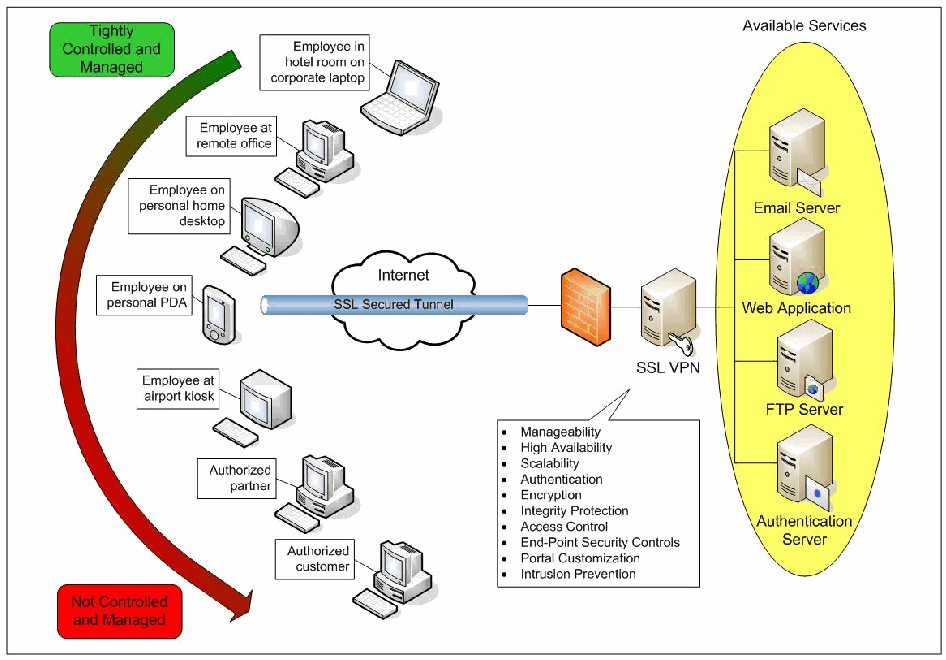
図3-1 SSL VPNアーキテクチャ。左側に、上の緑の箱「Tightly Controlled and Managed」(厳密に管理・統制されている)から下の赤の箱「Not Controlled and Managed」(管理・統制されていない)へ、緑から赤へ色が変わる曲線の矢印がある。その横にクライアントの機器が上から並ぶ。「Employee in hotel room on corporate laptop」(ホテルの部屋で会社のノートPCを使う従業員)、「Employee at remote office」(遠隔地のオフィスにいる従業員)、「Employee on personal home desktop」(自宅の個人用デスクトップPCを使う従業員)、「Employee on personal PDA」(個人のPDAを使う従業員)、「Employee at airport kiosk」(空港のキオスク端末を使う従業員)、「Authorized partner」(認可されたパートナー)、「Authorized customer」(認可された顧客)である。「SSL Secured Tunnel」(SSLで保護されたトンネル)と記した管が、PDAから「Internet」(インターネット)の雲を通ってファイアウォールへ、さらに鍵のアイコンが付いた「SSL VPN」のサーバーへ延びる。SSL VPNからの吹き出しには、Manageability(管理性)、High Availability(高可用性)、Scalability(拡張性)、Authentication(認証)、Encryption(暗号化)、Integrity Protection(完全性保護)、Access Control(アクセス制御)、End-Point Security Controls(エンドポイントセキュリティ制御)、Portal Customization(ポータルのカスタマイズ)、Intrusion Prevention(侵入防止)が並ぶ。右側で、SSL VPNは「Available Services」(利用可能なサービス)と記した黄色の楕円に接続し、楕円の中に「Email Server」(電子メールサーバー)、「Web Application」(Webアプリケーション)、「FTP Server」(FTPサーバー)、「Authentication Server」(認証サーバー)がある。
Figure 3-1. SSL VPN Architecture
図3-1 SSL VPNアーキテクチャ
3.2 SSL VPN Functions
3.2 SSL VPNの機能
Providing secure remote access to a wide variety of users and devices at many locations calls for a diverse set of SSL VPN services and features. Most SSL VPNs have one or more of the following three core functions:
多様な場所にいる多種多様な利用者やデバイスに安全なリモートアクセスを提供するには、さまざまなSSL VPNサービスと機能が必要となります。ほとんどのSSL VPNは、次に示す3つの中核機能のうち1つ以上を備えています。
•Proxying. A proxy is an intermediary device or program that provides communication and other services between a client and server. It has the ability to represent itself as the server to the client, and vice versa. A proxy may service requests internally or translate the information and pass it on to other servers. Proxying is a core function of an SSL portal VPN. The simplest form of an SSL portal VPN involves secure proxying of Web pages. The SSL portal VPN acts as a gateway by mediating the traffic between the user and the application. It receives the request from the user, connects to the Web server, downloads the information, and sends the information back to the user over the SSL connection. The proxy performs encryption or decryption and content inspection on each packet, which causes slightly slower performance.
•プロキシ処理。プロキシとは、クライアントとサーバの間で通信その他のサービスを提供する中継装置またはプログラムです。プロキシはクライアントに対してサーバとして、またその逆にサーバに対してクライアントとして振る舞うことができます。要求を内部で処理する場合も、情報を変換して別のサーバに渡す場合もあります。プロキシ処理はSSLポータルVPNの中核機能です。最も単純なSSLポータルVPNは、Webページを安全にプロキシします。SSLポータルVPNは、利用者とアプリケーションの間のトラフィックを仲介するゲートウェイとして動作します。利用者から要求を受け取り、Webサーバに接続して情報を取得し、SSL接続を介して利用者に送り返します。プロキシは各パケットの暗号化または復号とコンテンツ検査を行うため、性能がわずかに低下します。
• Application Translation. Application translation converts information from one protocol to another. It is often used to convert a legacy or proprietary protocol into a more widely used or standard protocol. It is also used to facilitate system integration and communication between applications and devices. Application translation uses proxying to interact with both sides of the connection with the appropriate protocol. SSL portal VPNs use application translation for applications that are not Web-enabled. This allows users to use a Web browser to access applications that do not have their own Web interfaces. For example, to provide file server access, an SSL portal VPN would communicate with a file server using the appropriate protocol, such as the Common Internet File System (CIFS) or the File Transfer Protocol (FTP), and translate the information into a Web-based format so that users can view the information with a Web browser. Application translation requires a translator engine for each protocol that is supported.
• アプリケーション変換。 アプリケーション変換は、あるプロトコルの情報を別のプロトコルに変換します。従来型または独自仕様のプロトコルを、より広く使われているプロトコルや標準的なプロトコルに変換する用途が多くあります。また、システム統合や、アプリケーションとデバイスの間の通信を容易にするためにも使われます。アプリケーション変換は、プロキシ処理を用いて、接続の両側とそれぞれ適切なプロトコルでやり取りします。SSLポータルVPNは、Web対応していないアプリケーションに対してアプリケーション変換を使います。これにより、利用者は、独自のWebインターフェースを持たないアプリケーションにWebブラウザからアクセスできます。たとえば、ファイルサーバへのアクセスを提供する場合、SSLポータルVPNは、Common Internet File System(CIFS)やFile Transfer Protocol(FTP)などの適切なプロトコルでファイルサーバと通信し、その情報をWebベースの形式に変換して、利用者がWebブラウザで表示できるようにします。アプリケーション変換には、サポートするプロトコルごとに変換エンジンが必要です。
•Network Extension. Network extension is a method of providing partial or complete network access to remote users. Users can connect to the network and access internal resources as if they were physically located on the internal local area network (LAN). This eliminates the need for creating Web-specific portals for all applications that require remote access. An SSL tunnel VPN network extension provides a secure connection from the user’s system to an organization’s network. This host-to-gateway tunnel can handle arbitrary traffic, much like a host-to-gateway IPsec VPN can. SSL tunnel VPN devices can support full or split tunneling. Full tunneling causes all network traffic to go through the tunnel to the organization. Split tunneling routes organization-specific traffic through the SSL VPN tunnel, but other traffic uses the remote user’s default gateway. Network extension requires a client to be installed either as a plug-in in the user’s Web browser or as a program on the user’s system, which in turn requires administrative access to the local system. The client is typically an active content agent, so the system must have the ability to load the agent and the necessary privileges to run it. This can cause challenges on public systems, where users might not have those privileges, and on managed systems where security policy prevents such applets and controls. A more limited form of network extension is sometimes called port forwarding.
•ネットワーク拡張。ネットワーク拡張は、リモート利用者にネットワークへの部分的または完全なアクセスを提供する方法です。利用者はネットワークに接続し、組織内のLANに物理的に接続しているかのように内部リソースへアクセスできます。これにより、リモートアクセスが必要なすべてのアプリケーションについて、Web専用ポータルを作成する必要がなくなります。SSLトンネルVPNのネットワーク拡張は、利用者のシステムから組織のネットワークへの安全な接続を提供します。このホスト対ゲートウェイのトンネルは、ホスト対ゲートウェイのIPsec VPNと同様、任意のトラフィックを扱えます。SSLトンネルVPN装置は、フルトンネルまたはスプリットトンネルをサポートできます。フルトンネルでは、すべてのネットワークトラフィックがトンネルを通って組織に送られます。スプリットトンネルでは、組織向けのトラフィックをSSL VPNトンネル経由にし、それ以外のトラフィックはリモート利用者のデフォルトゲートウェイ経由にします。ネットワーク拡張には、利用者のWebブラウザのプラグインとして、または利用者のシステム上のプログラムとしてクライアントをインストールする必要があり、そのためローカルシステムの管理者権限が必要となります。クライアントは通常、アクティブコンテンツエージェントであるため、システムにはそのエージェントを読み込み、実行するための権限が必要です。権限を持たない利用者がいる公共のシステムや、セキュリティポリシーによりそのようなアプレットや制御機能が禁止されている管理対象システムでは、これが課題となる場合があります。ネットワーク拡張のより限定的な形態は、ポートフォワーディングと呼ばれることがあります。
The three core functions allow SSL VPNs to provide secure remote access to a variety of applications. SSL VPN products vary in quality and effectiveness by the way they implement these three core functions. For example, SSL VPN products may offer support for different protocols via proxy and application translation; others might offer more or less control of the level of network access for network extensions. When evaluating SSL VPN products, it is important to have identified the remote access needs and applications served.
この3つの中核機能により、SSL VPNはさまざまなアプリケーションへの安全なリモートアクセスを提供できます。SSL VPN製品の品質と有効性は、これら3機能の実装方法によって異なります。たとえば、プロキシ処理やアプリケーション変換で異なるプロトコルをサポートする製品もあれば、ネットワーク拡張によるアクセス範囲をより細かく、または限定的に制御する製品もあります。SSL VPN製品を評価する際には、リモートアクセスのニーズと対象アプリケーションを明確にしておくことが重要です。
3.3 SSL VPN Features and Security Services
3.3 SSL VPNの機能とセキュリティサービス
In addition to the three core functions, SSL VPNs include other features and security services. These elements often vary in breadth, depth, and completeness, so side-by-side comparisons of SSL VPN products often result in more differences than similarities. Therefore, it is important to identify and define requirements, and evaluate several products. Common SSL VPN features include the following:
3つの中核機能に加え、SSL VPNにはその他の機能やセキュリティサービスが含まれます。これらの要素は範囲、深さ、完全性が異なることが多いため、SSL VPN製品を横並びで比較すると、共通点より相違点のほうが多くなることがよくあります。したがって、要件を特定して定義し、複数の製品を評価することが重要です。一般的なSSL VPN機能には次のものがあります。
•Manageability. Manageability includes device management, status reporting, logging, and auditing.
•管理性。管理性には、装置管理、状態報告、ログ記録、監査が含まれます。
•High availability. High availability is a failover feature to ensure availability during device or component interruptions.
•高可用性。高可用性は、装置またはコンポーネントの停止中にも可用性を確保するためのフェイルオーバー機能です。
•Scalability. Scalability is the ability to support more users, concurrent sessions, and throughput than a single SSL VPN device can typically handle. Scalability is often integrated with high availability by balancing the VPN load amongst multiple SSL VPN devices.
•拡張性。拡張性とは、単一のSSL VPN装置で通常処理できる数を超える利用者、同時セッション数、スループットをサポートできる能力です。複数のSSL VPN装置間でVPN負荷を分散することで、高可用性と統合されることが多くあります。
•Customization. Customization is the ability to control the appearance of the SSL VPN Web pages that the users see when they first access the VPN. Besides layout and color preferences, customized portals are often necessary to support PDAs and smart phones over the SSL VPN.
•カスタマイズ。カスタマイズとは、利用者がVPNに最初にアクセスしたときに表示されるSSL VPNのWebページの外観を制御する機能です。レイアウトや色の設定に加え、SSL VPN経由でPDAやスマートフォンをサポートするために、ポータルのカスタマイズが必要となることも多くあります。
Common SSL VPN security services include the following:
一般的なSSL VPNセキュリティサービスには次のものがあります。
•Authentication. Authentication is the process a VPN uses to limit access to protected services by forcing users to identify themselves. This feature includes the ability to support strong authentication and to integrate with current authentication mechanisms.
•認証。認証とは、利用者に本人確認を求めることで、VPNが保護対象のサービスへのアクセスを制限するプロセスです。この機能には、強固な認証のサポートや、既存の認証機構との統合能力が含まれます。
•Encryption and integrity protection. Encryption protects the confidentiality of data as it traverses the Internet, while integrity protection ensures that the data is not altered as it traverses the Internet. Both are inherent in SSL.
•暗号化と完全性保護。暗号化は、インターネットを通過するデータの機密性を保護し、完全性保護は、データが改ざんされないことを保証します。どちらもSSLに備わっています。
•Access control. Access control permits or restricts access to applications at a granular level, such as per-user, per-group, and per-resource.
•アクセス制御。アクセス制御は、利用者単位、グループ単位、リソース単位など、きめ細かなレベルでアプリケーションへのアクセスを許可または制限します。
•Endpoint security controls. Endpoint security controls validate the security compliance of the client system that is attempting to use the SSL VPN. For example, host integrity checks may verify that firewall, malware detection and antivirus software are enabled and running on the client system, and the host is up-to-date on its patches. Endpoint security controls also include security protection mechanisms, such as Web browser cache cleaners, that remove sensitive information from client systems.
•エンドポイントセキュリティ制御。エンドポイントセキュリティ制御は、SSL VPNを利用しようとするクライアントシステムがセキュリティ要件を満たしているかを検証します。たとえば、ホスト完全性チェックでは、ファイアウォール、マルウェア検出ソフトウェア、ウイルス対策ソフトウェアが有効で実行中であることや、ホストに最新のパッチが適用されていることを確認できます。また、Webブラウザのキャッシュクリーナーなど、クライアントシステムから機密情報を削除するセキュリティ保護機構も含まれます。
•Intrusion prevention. Intrusion prevention involves inspecting the data after it has been decrypted in the SSL VPN for potential attacks. It may also include anti-malware functionality to detect viruses, worms, and other malicious payloads and block or change network access rights based on the results of such checks.
•侵入防止。侵入防止では、SSL VPN内で復号された後のデータを検査し、攻撃の可能性を調べます。ウイルス、ワーム、その他の悪意あるペイロードを検出するマルウェア対策機能や、検査結果に応じてネットワークアクセス権を遮断または変更する機能が含まれる場合もあります。
Sections 3.3.1 through 3.3.8 provide details and examples of the various SSL VPN features and security services.
3.3.1から3.3.8では、SSL VPNの各種機能とセキュリティサービスについて、詳細と例を示します。
3.3.1 Manageability
3.3.1 管理性
SSL VPNs offer a variety of manageability features such as status reporting, logging, and auditing. Status reporting includes identifying connected users and reporting usage data in a graphical format. Logging includes the ability to export logs, debug logging, and automate log rollover. Auditing includes auditing application access, RADIUS-based accounting, and persistent storage of auditing information. Another manageability feature is the ability to terminate sessions as needed.
SSL VPNには、状態報告、ログ記録、監査など、さまざまな管理機能があります。状態報告には、接続中の利用者の特定や、使用状況データのグラフィカルな表示が含まれます。ログ記録には、ログのエクスポート、デバッグログ、ログのローテーションの自動化が含まれます。監査には、アプリケーションアクセスの監査、RADIUSベースのアカウンティング、監査情報の永続的な保存が含まれます。必要に応じてセッションを終了できることも、管理機能の1つです。
A manageability feature that is often overlooked is documentation. It is beneficial to have documentation for SSL VPN usage, configuration, and troubleshooting. Documentation may also include context-sensitive help within the management interface.
見過ごされがちな管理性の機能の1つに、ドキュメントがあります。SSL VPNの利用方法、設定方法、トラブルシューティングに関するドキュメントがあると有益です。ドキュメントには、管理インターフェース内の状況依存ヘルプが含まれることもあります。
Another manageability feature that is beneficial for SSL VPNs is partitioned or delegated management. This allows different aspects of the SSL VPN device to be managed by different groups or individuals. This feature can be beneficial for service providers, collocation facilities, and organizations with different groups sharing the SSL VPN device. It is also quite useful for an SSL VPN to be able to be managed remotely, such as by a system administrator who is not on-site. Remote management requires greater security to prevent attackers from watching and possibly altering the management sessions; in SSL VPNs, this security is normally provided by running all remote management sessions under SSL.
SSL VPNに有益なもう1つの管理機能は、管理の分割または委任です。これにより、SSL VPN装置の異なる機能を、異なるグループまたは個人が管理できます。この機能は、サービスプロバイダ、コロケーション施設、または複数のグループがSSL VPN装置を共用する組織に有益です。また、たとえば現地にいないシステム管理者がSSL VPNを遠隔管理できることも非常に有用です。遠隔管理では、攻撃者による管理セッションの盗聴や改ざんを防ぐため、より強固なセキュリティが必要となります。SSL VPNでは通常、すべての遠隔管理セッションをSSL上で実行することでこのセキュリティを確保します。
3.3.2 High Availability and Scalability
3.3.2 高可用性と拡張性
Two other important features for SSL VPNs are high availability and scalability. High availability solutions use two or more SSL VPN devices configured in either active/passive or active/active mode. In an active/passive solution, one device actively services connections, while the other device is waiting in standby mode. The two devices continuously exchange “heartbeat” messages to communicate their status with one another. If the standby device does not receive a heartbeat message from the active device for a preconfigured time period, it will assume that the active device is no longer operating and take over servicing connections. In an active/active solution, both devices are actively servicing connections at the same time. If one device fails, the other device will service all connections if it has been properly sized to do so. High availability allows the SSL VPN to survive the loss of a device or device component.
SSL VPNにとって重要な機能が、高可用性と拡張性です。高可用性ソリューションでは、2台以上のSSL VPN装置をアクティブ/パッシブまたはアクティブ/アクティブのいずれかで構成します。アクティブ/パッシブ構成では、一方の装置が接続を処理し、他方は待機状態になります。2台の装置は「ハートビート」メッセージを継続的に交換し、互いの状態を通知します。待機側の装置が、あらかじめ設定された時間内にアクティブ側からハートビートを受信しない場合、アクティブ側が動作していないと判断し、接続処理を引き継ぎます。アクティブ/アクティブ構成では、両方の装置が同時に接続を処理します。一方が故障した場合、もう一方がその処理能力に見合うよう適切にサイジングされていれば、すべての接続を処理します。高可用性により、SSL VPNは装置または装置コンポーネントの障害に耐えられます。
In either active/passive or active/active mode, one of the challenges of high availability is properly propagating and sharing information between the devices. Another challenge is maintaining state information about existing connections in the event of a failure. SSL VPN proxying and network extension functionality each handle state information differently. Another consideration is transparency of failover to the users. Depending on how state information is shared, the user may or may not need to re-authenticate after a failure.
アクティブ/パッシブ構成でもアクティブ/アクティブ構成でも、高可用性を実現する際の課題の1つは、装置間で情報を適切に伝播し共有することです。もう1つの課題は、障害発生時に既存の接続状態を維持することです。SSL VPNのプロキシ機能とネットワーク拡張機能は、それぞれ異なる方法で状態情報を扱います。フェイルオーバーが利用者に分からないようにすることも検討事項です。状態情報の共有方法によっては、障害後に利用者が再認証を求められる場合と、求められない場合があります。
SSL VPNs support scalability with load-balancing features. Both high availability and load balancing often use a virtual IP address that is shared across multiple SSL VPN devices. In an active/passive architecture, the passive device has the ability to take over the virtual IP address and associated traffic if the active device fails. In an active/active architecture, both devices service the virtual IP address. SSL VPN devices configured as active/passive typically are not providing any scalability features, whereas active/active configurations use either an integrated load balancer or an external load balancer to distribute connections across multiple VPN devices. However, for the VPN to maintain functionality when one of the devices fails, it is essential to ensure that the VPN traffic load does not exceed the throughput capability of a single device.
SSL VPNは、負荷分散機能によって拡張性を実現します。高可用性と負荷分散では、複数のSSL VPN装置で共有する仮想IPアドレスを使うことが多くあります。アクティブ/パッシブ構成では、アクティブ側が故障した場合、パッシブ側が仮想IPアドレスと関連するトラフィックを引き継げます。アクティブ/アクティブ構成では、両方の装置がその仮想IPアドレス宛ての通信を処理します。通常、アクティブ/パッシブ構成のSSL VPN装置は拡張性機能を提供しません。一方、アクティブ/アクティブ構成では、内蔵または外部のロードバランサーを使って複数のVPN装置に接続を分散します。ただし、装置の1台が故障してもVPNの機能を維持するには、VPNトラフィックの負荷が単一装置のスループット能力を超えないようにすることが不可欠です。
3.3.3 Portal Customization
3.3.3 ポータルのカスタマイズ
Portal customization is a feature that allows an administrator to control the appearance of the SSL VPN Web interface that the end users see and with which they interact. Note that both SSL portal VPNs and SSL tunnel VPNs usually have portal pages: SSL tunnel VPNs often have portal pages for users to change their settings, request help from a system administrator, and so on.
ポータルのカスタマイズは、エンドユーザーが目にし、操作するSSL VPNのWebインターフェースの外観を管理者が制御できる機能です。SSLポータルVPNとSSLトンネルVPNのどちらも、通常はポータルページを備えている点に注意します。SSLトンネルVPNでは、利用者が設定を変更したり、システム管理者にヘルプを依頼したりするために、ポータルページを設けることが多くあります。
Some products lack portal customization features; nevertheless, finding the right files on the SSL VPN device and editing them may allow customization of the look and feel of the portal. Other products have built-in configuration settings to control the colors, icons, and layout of the portal. Some products only provide system-wide customization, while others allow portal customization on a per-group basis. Besides layout and color preferences, customized portals are often necessary to support PDAs and smart phones over SSL VPNs. Some products allow portal customization per system type to accommodate the limited functionality of PDAs and smart phones. Portal customization sometimes integrates with the endpoint security controls and access control. If an end system does not pass all of the endpoint security checks and access is restricted, the user may be presented with a limited portal.
ポータルのカスタマイズ機能がない製品もありますが、SSL VPN装置上の適切なファイルを探して編集すれば、ポータルの外観や操作感を変更できる場合があります。色、アイコン、レイアウトを制御する設定機能を内蔵する製品もあります。システム全体に対するカスタマイズしかできない製品がある一方、グループごとにカスタマイズできる製品もあります。レイアウトや色の設定に加え、SSL VPN経由でPDAやスマートフォンをサポートするために、ポータルのカスタマイズが必要となることも多くあります。PDAやスマートフォンの機能制限に対応するため、システムの種類ごとにポータルをカスタマイズできる製品もあります。ポータルのカスタマイズがエンドポイントセキュリティ制御やアクセス制御と連動することもあります。エンドシステムがすべてのエンドポイントセキュリティ検査に合格せず、アクセスが制限された場合、利用者には機能を制限したポータルが表示されることがあります。
Some advanced products also have the capability to allow users to control the layout and customization of their own portals. This includes creating bookmarks, adding icons, and saving passwords.
高度な製品の中には、利用者自身がポータルのレイアウトやカスタマイズを制御できるものもあります。これには、ブックマークの作成、アイコンの追加、パスワードの保存などが含まれます。
3.3.4 Authentication
3.3.4 認証
SSL VPNs support the authentication security service either directly through an integrated authentication method, or indirectly via an external authentication server, or both. Traditional SSL Web page authentication relies on server-side authentication, so that users trust the server with which they are communicating. SSL VPN authentication takes this a step further by requiring both server-side and client-side authentication. SSL VPNs support flexible client authentication methods, such as username and password, smart cards, two-factor authentication, and X.509 digital certificates. For the use of methods involving tokens, the SSL VPN must be able to handle the various messages, such as PIN change requests, that are involved in token solutions.
SSL VPNは、統合された認証方式によって直接、外部の認証サーバーを介して間接的に、またはその両方によって認証セキュリティサービスをサポートします。従来のSSL Webページ認証はサーバー側認証に依存しており、それによって利用者は通信相手であるサーバーを信頼します。SSL VPNの認証はさらに進んで、サーバー側とクライアント側の両方の認証を要求します。SSL VPNは、ユーザー名とパスワード、スマートカード、二要素認証、X.509デジタル証明書など、柔軟なクライアント認証方式をサポートします。トークンを使う方式では、PIN変更要求など、トークンソリューションに伴うさまざまなメッセージをSSL VPNが処理できなければなりません。
When digital certificates are used for client authentication, each endpoint has its own digital certificate that contains a public key. An endpoint uses the corresponding private key to digitally sign data before sending it to the other endpoint, which verifies the signature using the peer’s public key. The digital signature algorithm choices are RSA and the Digital Signature Standard (DSS). In addition to authentication with certificates, the SSL VPN should also support certificate revocation list (CRL) checking. The SSL VPN should be able to generate certificate-signing requests for its own digital certificates. Note that most SSL VPNs that allow digital certificates for client authentication do so using proprietary mechanisms; this is because client digital certificate authentication often does not work well in typical Web browsers, which provide a difficult user interface for users who have many client certificates issued for different purposes.
クライアント認証にデジタル証明書を使用する場合、各エンドポイントは公開鍵を含む独自のデジタル証明書を持ちます。一方のエンドポイントは、対応する秘密鍵でデータにデジタル署名して相手に送信し、相手側はピアの公開鍵を使って署名を検証します。デジタル署名アルゴリズムには、RSAとDigital Signature Standard(DSS)があります。証明書による認証に加えて、SSL VPNは証明書失効リスト(CRL)の確認もサポートするべきです。SSL VPNは、自身のデジタル証明書について証明書署名要求を生成できるべきです。クライアント認証にデジタル証明書を利用できるSSL VPNの多くは、独自の方式を使用している点に注意します。これは、一般的なWebブラウザではクライアントのデジタル証明書認証がうまく機能しないことが多いためです。異なる目的で発行されたクライアント証明書を多数持つ利用者にとって、ブラウザのユーザーインターフェースが扱いにくいものです。
In addition to the authentication methods already mentioned, SSL VPNs also support integration with external authentication servers such as RADIUS, Active Directory, and Lightweight Directory Access Protocol (LDAP), allowing the VPNs to leverage existing authentication databases. SSL VPNs need access to group information on the authentication servers since security and access control are often expressed in terms of groups. Some SSL VPN products also use the information contained in authentication servers to make additional access control decisions, such as restricting the number of bad password attempts. Windows Active Directory (AD) is a common type of authentication server that can be accessed directly or by using LDAP. Some SSL VPN products do not support direct AD authentication. To access AD via LDAP, the administrator must have strong knowledge of the underlying structure of the directory. In this case, it is easier and less time consuming to use an SSL VPN with the capability to communicate directly with AD.
前述の認証方式に加えて、SSL VPNはRADIUS、Active Directory、Lightweight Directory Access Protocol(LDAP)などの外部認証サーバーとの統合もサポートし、既存の認証データベースを利用できるようにします。セキュリティやアクセス制御はグループ単位で定義されることが多いため、SSL VPNは認証サーバー上のグループ情報にアクセスする必要があります。SSL VPN製品によっては、不正なパスワード入力の回数制限など、追加のアクセス制御判断にも認証サーバーの情報を利用します。Windows Active Directory(AD)は一般的な認証サーバーであり、直接またはLDAP経由でアクセスできます。ADへの直接認証をサポートしないSSL VPN製品もあります。LDAP経由でADにアクセスするには、管理者がディレクトリの基盤構造を十分に理解している必要があります。その場合、ADと直接通信できるSSL VPNを利用するほうが簡単で、時間も節約できます。
SSL VPN authentication methods may be applied on an individual or group basis. One class of users may use a specific form of authentication and another class may use a different form of authentication. For example, employees may authenticate via username and password, and business partners may authenticate via digital certificates. Some SSL VPN products have the capability to combine various forms of authentication methods, such as using a digital certificate in addition to a username and password. Because integration with authentication servers is an area where SSL VPN products vary greatly, potential products should be evaluated with an organization’s authentication servers to verify interoperability.
SSL VPNの認証方式は、個人単位またはグループ単位で適用できます。ある利用者クラスには特定の認証方式を適用し、別のクラスには異なる方式を適用できます。たとえば、従業員にはユーザー名とパスワードを使わせ、ビジネスパートナーにはデジタル証明書を使わせることができます。ユーザー名とパスワードに加えてデジタル証明書を使うなど、複数の認証方式を組み合わせられるSSL VPN製品もあります。認証サーバーとの統合はSSL VPN製品による差が大きい領域であるため、導入候補の製品を組織の認証サーバーと組み合わせて評価し、相互運用性を確認するべきです。
3.3.5 Encryption and Integrity Protection
3.3.5 暗号化と完全性保護
SSL VPNs use the underlying SSL protocol to protect the confidentiality of data using encryption and to provide data integrity (ensuring that the data has not been modified). SSL VPN’s encryption and data integrity come from SSL itself, not from any feature added by the SSL VPN product. SSL ensures the encryption and data integrity between the user’s computer and the VPN gateway. Many SSL VPNs also support using SSL between the gateway and Web hosts on the protected network for applications that require encryption and integrity protection even within the protected network.
SSL VPNは基盤となるSSLプロトコルを使い、暗号化によってデータの機密性を保護し、データ完全性(データが変更されていないこと)を確保します。SSL VPNの暗号化とデータ完全性はSSL自体によって提供され、SSL VPN製品が追加する機能によるものではありません。SSLは利用者のコンピュータとVPNゲートウェイの間の暗号化とデータ完全性を確保します。保護対象ネットワーク内であっても暗号化と完全性保護を必要とするアプリケーションのため、ゲートウェイとWebホストの間でもSSLを使用するSSL VPNが多くあります。
3.3.6 Access Control
3.3.6 アクセス制御
SSL VPN products vary greatly in their access control features. Some products have an allow policy for the entire system by default, which allows authenticated users complete unrestricted access to the protected network. This may be adequate for a wide open network, but in most SSL VPN implementations, the organization will be providing different services to different types of users and will want controlled access. Granular access control supports one of the fundamental goals of SSL VPNs: to provide access to a variety of groups and users such as mobile employees, branch offices, business partners, and customers. Some SSL VPN products allow highly granular access control, which can include the particular application or file being accessed, day and time, type of browser, authentication method used, computer type and location, user identification, and other characteristics. The SSL VPN uses an access control policy to provide different services based on these characteristics.
SSL VPN製品のアクセス制御機能には大きな差があります。認証済みの利用者に保護対象ネットワークへの制限のない完全なアクセスを許すポリシーが、システム全体の既定値になっている製品もあります。開放的なネットワークではこれで十分な場合もありますが、ほとんどのSSL VPN導入環境では、組織が利用者の種類ごとに異なるサービスを提供するため、アクセスの制御を望むことになります。きめ細かなアクセス制御は、モバイル従業員、支店、ビジネスパートナー、顧客など、さまざまなグループや利用者にアクセスを提供するというSSL VPNの基本的な目標の1つを支えます。アクセス先の特定のアプリケーションやファイル、曜日や時刻、ブラウザの種類、使用した認証方式、コンピュータの種類と場所、利用者の識別情報、その他の属性を含め、非常にきめ細かなアクセス制御ができるSSL VPN製品もあります。SSL VPNはアクセス制御ポリシーを使い、これらの属性に応じて異なるサービスを提供します。
Table 3-1 provides examples of typical access control policies. Access privileges may be granted to individuals, groups, or resources. For ease of configuration, access control is typically configured based on groups. Each user is assigned to one or more groups, each group having certain security parameters. Group information may be accessed from the authentication database, such as the LDAP directory. Access control may also be defined for a set of resources instead of an individual resource. This makes adding and removing resources to and from a group transparent to the users and reduces policy complexity. In some specific instances, user-level parameters are also set.
表3-1に、一般的なアクセス制御ポリシーの例を示します。アクセス権限は個人、グループ、またはリソースに対して付与できます。設定を簡単にするため、通常、アクセス制御はグループに基づいて設定します。各利用者を1つ以上のグループに割り当て、グループごとに特定のセキュリティパラメータを設定します。グループ情報は、LDAPディレクトリなどの認証データベースから取得できます。アクセス制御は、個々のリソースではなく、リソース群に対して定義することもできます。この方法では、グループへのリソースの追加や削除が利用者に意識されず、ポリシーも複雑になりません。特定の状況では、利用者単位のパラメータも設定します。
Table 3-1. Access Control Examples
表3-1. アクセス制御の例
| Method | Example |
|---|---|
| Per-user | The CEO may access all intranet servers, email, and the executive folder of the administrative server. |
| Per-group | Sales staff may access email, the organization’s intranet, and the sales server. |
| Per-resource | All users and groups may access the Community Relations server. |
| 方式 | 例 |
|---|---|
| 利用者単位 | CEOは、すべてのイントラネットサーバー、電子メール、および管理サーバーの役員用フォルダーにアクセスできます。 |
| グループ単位 | 営業担当者は、電子メール、組織のイントラネット、および営業サーバーにアクセスできます。 |
| リソース単位 | すべての利用者とグループが、地域連携サーバーにアクセスできます。 |
Access control can also be integrated with endpoint security controls. SSL VPNs can use host integrity checking to check the status of the SSL VPN client before access is granted. Some SSL VPNs have the capability to perform this checking either before or after authentication to determine the appropriate access controls. Access control in this sense may be as simple as allowing or denying access completely, or more elaborate such as providing restricted access to selected information based on host integrity checks. Access controls may also be configured per-user, per-group, and per-resource in terms of host integrity checking. It is beneficial to have the ability to bypass the endpoint security restrictions for certain circumstances such as disaster response. Bypassing endpoint security for special circumstances may be accomplished through a special access control policy setting or whitelist.
アクセス制御はエンドポイントセキュリティ制御と統合することもできます。SSL VPNはホスト完全性チェックを使い、アクセスを許可する前にSSL VPNクライアントの状態を確認できます。一部のSSL VPNでは、適切なアクセス制御を決定するため、この確認を認証の前または後に実行できます。この場合のアクセス制御は、アクセスを全面的に許可または拒否する単純なものから、ホスト完全性チェックの結果に基づき、選択した情報に限定したアクセスを提供する、より高度なものまであります。ホスト完全性チェックに関するアクセス制御は、利用者単位、グループ単位、リソース単位でも設定できます。災害対応など特定の状況でエンドポイントセキュリティ制限を迂回できる機能があると有益です。特別な状況でのエンドポイントセキュリティの迂回は、特別なアクセス制御ポリシー設定や許可リストによって実現できます。
Table 3-2 shows some examples of access control policies in conjunction with endpoint security controls. These examples are an extension of the examples in Table 3-1. The first user is the CEO, who is accessing the SSL VPN from home via an organization-issued laptop. The firewall and antivirus software pass the security checks since they are enabled and up-to-date. Based on user and group access policies, and the passing of the endpoint security checks, the CEO may access the intranet servers, email, the executive folder of the administrative server, and the Community Relations server. The next user is John Smith, who is a traveling member of the sales team. He is attempting to access the SSL VPN from a public computer in an Internet café. The firewall passes the security checks, but the antivirus software is not up-to-date on its signatures. Based on user and group access policies and the fact that only some of the security checks passed, John is granted access to email and the ability to download (but not upload) files from the sales server (he would have been given more privileges if he had passed all the security checks). He may also access the Community Relations server. The last user is Sally Jones, who is an employee at a business partner, XYZ Corp. She is attempting to access the SSL VPN from a trusted partner network. Based on user and group access policies, and the passing of the endpoint security checks, Sally is granted access to the extranet partner server and the Community Relations server.
表3-2に、エンドポイントセキュリティ制御と組み合わせたアクセス制御ポリシーの例を示します。これらの例は表3-1を拡張したものです。最初の利用者はCEOで、組織が支給したノートPCを使い、自宅からSSL VPNにアクセスしています。ファイアウォールとウイルス対策ソフトウェアは有効かつ最新であるため、セキュリティチェックに合格しています。利用者およびグループのアクセス制御ポリシーに基づき、さらにエンドポイントセキュリティチェックにも合格していることから、CEOはイントラネットサーバー、電子メール、管理サーバーの役員用フォルダー、地域連携サーバーにアクセスできます。次の利用者は営業チームの出張中のメンバー、John Smithです。インターネットカフェの公共コンピュータからSSL VPNにアクセスしようとしています。ファイアウォールはセキュリティチェックに合格しましたが、ウイルス対策ソフトウェアの定義ファイルは最新ではありません。利用者およびグループのアクセス制御ポリシーと、一部のセキュリティチェックにしか合格していないことに基づき、Johnには電子メールへのアクセスと、営業サーバーからファイルをダウンロードする権限(アップロードは不可)が付与されます(すべてのセキュリティチェックに合格していれば、より多くの権限が付与されていました)。地域連携サーバーにもアクセスできます。最後の利用者はビジネスパートナーXYZ Corp.の従業員、Sally Jonesです。信頼されたパートナーネットワークからSSL VPNにアクセスしようとしています。利用者およびグループのアクセス制御ポリシーに基づき、さらにエンドポイントセキュリティチェックにも合格しているため、Sallyにはパートナー向けエクストラネットサーバーと地域連携サーバーへのアクセスが付与されます。
Table 3-2. Access Control Examples with Endpoint Security Controls
表3-2. エンドポイントセキュリティ制御と組み合わせたアクセス制御の例
| User | Group | Location | Security Checks | Access |
|---|---|---|---|---|
| CEO | • Executive • Employees | Home | Firewall: passed Antivirus: passed | The CEO may access all intranet servers, email, and the executive folder of the administrative server. He may also access the Community Relations server. |
| John Smith | • Sales • Employees | Internet café | Firewall: passed Antivirus: failed | John Smith may only access email and perform downloads from the sales server. He may also access the Community Relations server. |
| Sally Jones | • XYZ Corp. (Business Partner) | Partner network | Firewall: passed Antivirus: passed | Sally Jones may access the extranet partner server and the Community Relations server. |
| 利用者 | グループ | 場所 | セキュリティチェック | アクセス |
|---|---|---|---|---|
| CEO | • 役員 • 従業員 | 自宅 | ファイアウォール:合格 ウイルス対策:合格 | CEOは、すべてのイントラネットサーバー、電子メール、および管理サーバーの役員用フォルダーにアクセスできます。地域連携サーバーにもアクセスできます。 |
| John Smith | • 営業 • 従業員 | インターネットカフェ | ファイアウォール:合格 ウイルス対策:不合格 | John Smith は、電子メールへのアクセスと営業サーバーからのダウンロードのみ行えます。地域連携サーバーにもアクセスできます。 |
| Sally Jones | • XYZ Corp.(ビジネスパートナー) | パートナーのネットワーク | ファイアウォール:合格 ウイルス対策:合格 | Sally Jones は、エクストラネットのパートナーサーバーと地域連携サーバーにアクセスできます。 |
Knowing the needs and requirements for the SSL VPN solution, such as the types of users and the reasons they will use the SSL VPN, will help organizations choose a product with the appropriate level of access control capability. These needs and requirements will also help organizations determine the level of granularity needed for access controls.
SSL VPNソリューションのニーズと要件、たとえば利用者の種類やSSL VPNを使用する理由を把握しておくと、組織は適切なレベルのアクセス制御機能を備えた製品を選びやすくなります。これらのニーズと要件は、必要なアクセス制御の細かさを判断する助けにもなります。
3.3.7 Endpoint Security Controls
3.3.7 エンドポイントセキュリティ制御
Some SSL VPNs provide endpoint security controls that include host integrity checking and security protection mechanisms. Host integrity checks help ensure that the client system is in compliance with an organization’s security policy. These checks are performed before a session is begun and may be periodically rechecked during the session.
一部のSSL VPNは、ホスト完全性チェックやセキュリティ保護機構を含むエンドポイントセキュリティ制御を提供します。ホスト完全性チェックは、クライアントシステムが組織のセキュリティポリシーに準拠していることを確認するのに役立ちます。このチェックはセッション開始前に実施され、セッション中にも定期的に再確認される場合があります。
Endpoint security controls are sometimes tightly integrated with access control to analyze the client system and apply access controls based on the results. For example, an up-to-date company-issued laptop that is connecting from a remote site might be allowed full access. Another example is a personal laptop that complies with the standard firewall and antivirus checks but is attempting access from an untrusted wireless hotspot, and thus is granted only limited access. Endpoint security controls also include security protection mechanisms, such as Web browser cache cleaners that remove temporary files, cookies, and other session information from the Web browser used for SSL VPN access. This supports the use of the SSL VPN from public locations.
エンドポイントセキュリティ制御は、クライアントシステムを分析し、その結果に基づいてアクセス制御を適用するため、アクセス制御と緊密に統合されることがあります。たとえば、最新の状態に保たれた会社支給のノートPCが遠隔地から接続する場合、完全なアクセスが許可されることがあります。別の例として、標準的なファイアウォールおよびウイルス対策チェックには合格している個人所有のノートPCでも、信頼されていない無線ホットスポットからアクセスしようとしている場合は、制限付きアクセスだけが認められることがあります。エンドポイントセキュリティ制御には、SSL VPNアクセスに使用したWebブラウザから一時ファイル、Cookie、その他のセッション情報を削除するWebブラウザキャッシュクリーナーなどのセキュリティ保護機構も含まれます。これにより、公共の場所からSSL VPNを利用しやすくなります。
Endpoint security controls can be implemented in a variety of ways, and this often differentiates products. Endpoint security starts with a policy definition. The policy definition includes what the host integrity checker should look for and the actions to take depending on what it finds. If host integrity checkers are used, they should be configured to execute before the logon process to look for malware such as keystroke loggers. Typical host integrity checks may look for operating system type and version, antivirus and personal firewall status and configurations, or a specific file, registry key, or running process. Depending on the product, checking for running processes may be as simple as looking for the process name or as elaborate as verifying the actual validity of the process.
エンドポイントセキュリティ制御の実装方法はさまざまであり、これが製品間の差になることが多くあります。エンドポイントセキュリティはポリシーの定義から始まります。ポリシー定義には、ホスト完全性チェッカーが何を検査するか、および検出結果に応じてどのような措置を取るかが含まれます。ホスト完全性チェッカーを使用する場合、キーストロークロガーなどのマルウェアを検出できるよう、ログオン処理の前に実行する設定にするべきです。一般的なホスト完全性チェックでは、オペレーティングシステムの種類とバージョン、ウイルス対策ソフトウェアとパーソナルファイアウォールの状態および設定、特定のファイル、レジストリキー、または実行中のプロセスを確認します。実行中プロセスの確認方法は製品によって異なり、プロセス名を調べるだけの単純なものから、プロセス自体の正当性を検証する高度なものまであります。
Some SSL VPN products include their own integrated endpoint security software. This software may be part of the SSL VPN product or an add-on for an additional cost. Other SSL VPN products rely on third-party software for endpoint security. This allows organizations to leverage their existing products, such as cache cleaning tools, malware scanners, and compliance checking software, with their SSL VPNs. Some of these SSL VPNs can only integrate with a single specific third-party product, while others can integrate with a variety of third-party products.
一部のSSL VPN製品には、独自の統合エンドポイントセキュリティソフトウェアが含まれています。このソフトウェアはSSL VPN製品の一部の場合も、追加料金のアドオンの場合もあります。ほかのSSL VPN製品は、エンドポイントセキュリティをサードパーティ製ソフトウェアに依存します。この方法では、組織はキャッシュ消去ツール、マルウェアスキャナー、準拠性チェックソフトウェアなどの既存製品をSSL VPNと組み合わせて活用できます。こうしたSSL VPNの一部は特定のサードパーティ製品1つとのみ統合できますが、さまざまなサードパーティ製品と統合できるものもあります。
Some SSL VPN products provide endpoint security controls for systems that are connecting into the network via the network extension function. Such systems are generally of higher concern than those that are just accessing Web sites, since these systems are usually granted much broader access to resources.
一部のSSL VPN製品は、ネットワーク拡張機能を介してネットワークに接続するシステムにもエンドポイントセキュリティ制御を提供します。このようなシステムには、単にWebサイトへアクセスするだけのシステムよりも大きな注意が必要です。通常、リソースへのより広範なアクセスが許可されるためです。
Endpoint security controls should be used with care. Due to the nature of remote access, the client systems are more likely to be originating from uncontrolled environments. It is imperative that remote systems are evaluated before allowing access to internal resources and cleaned after access is granted. There is no industry-wide standard for endpoint security controls; many leading network and security companies are working to create vendor-driven standards.
エンドポイントセキュリティ制御は注意して使用するべきです。リモートアクセスの性質上、クライアントシステムは管理されていない環境から接続する可能性が高いです。内部リソースへのアクセスを許可する前にリモートシステムを評価し、アクセス許可後にクリーンアップすることが不可欠です。エンドポイントセキュリティ制御に業界全体で共通する標準はありません。大手のネットワーク企業やセキュリティ企業の多くが、ベンダー主導の標準の策定に取り組んでいます。
3.3.8 Intrusion Prevention
3.3.8 侵入防止
Some SSL VPN products provide an integrated intrusion prevention security service. They inspect the contents of the data after it has been decrypted by the SSL VPN for potential attacks and various forms of malware, including viruses and worms. The SSL VPN may include its own anti-malware and intrusion detection software, or it may integrate with third-party software. Performing content inspection adds processing time and latency to the throughput of packets. For high-volume networks, this latency in addition to the latency of the encryption and decryption process may exceed tolerable limits. In those cases, it is best to offload the intrusion prevention capabilities to a specialized intrusion prevention system (IPS) device on the inside of the trusted network (that is, after the SSL VPN has decrypted the data).
SSL VPN製品の中には、侵入防止セキュリティサービスを統合しているものがあります。SSL VPNによる復号後のデータ内容を検査し、攻撃やウイルス、ワームなどさまざまな形態のマルウェアを検出します。SSL VPNに独自のマルウェア対策ソフトウェアや侵入検知ソフトウェアを含める場合も、サードパーティ製ソフトウェアと統合する場合もあります。コンテンツ検査を実行すると、パケット処理の時間と遅延が増加します。トラフィック量の多いネットワークでは、暗号化と復号の処理による遅延にこれが加わり、許容限度を超える場合があります。そのような場合は、信頼されたネットワークの内側にある専用の侵入防止システム(IPS)装置に侵入防止機能をオフロードするのが最善です(つまり、SSL VPNがデータを復号した後に検査します)。
3.4 SSL Protocol Basics
3.4 SSLプロトコルの基礎
The security of the data sent over an SSL VPN relies on the security of the SSL protocol. The SSL protocol allows a client (such as a Web browser) and a server (such as an SSL VPN) to negotiate the type of security to be used during an SSL session. Thus, it is critical to make sure that the security agreed to by the remote user and the SSL gateway meets the security requirements of the organization using the SSL VPN.
SSL VPN経由で送信されるデータのセキュリティは、SSLプロトコルのセキュリティに依存します。SSLプロトコルにより、クライアント(Webブラウザなど)とサーバー(SSL VPNなど)は、SSLセッション中に使用するセキュリティ方式を交渉できます。したがって、リモート利用者とSSLゲートウェイが合意するセキュリティ方式が、SSL VPNを使用する組織のセキュリティ要件を満たすことを確認するのが重要です。
There are three types of security that the client and server can negotiate: the version of SSL, the type of cryptography, and the authentication method. All three are important to the security of the communications channel that is established and are thus important to SSL VPN systems. These are discussed in more detail in Sections 3.4.1 through 3.4.3.
クライアントとサーバーが交渉できるセキュリティ要素は、SSLのバージョン、暗号方式、認証方式の3つです。3つすべてが確立される通信チャネルのセキュリティにとって重要であり、したがってSSL VPNシステムにとっても重要です。これらについては3.4.1節から3.4.3節でより詳しく説明します。
NIST Special Publication (SP) 800-52, Guidelines for the Selection and Use of Transport Layer Security (TLS) Implementations6, describes the technology used in SSL and TLS in detail. Readers of this document who want to know more about these technologies are encouraged to read that publication.
NIST SP 800-52『Transport Layer Security(TLS)実装の選択と使用に関するガイドライン』6では、SSLおよびTLSで使われる技術を詳しく説明しています。これらの技術についてさらに知りたい読者には、この刊行物を読むことを推奨します。
3.4.1 Versions of SSL and TLS
3.4.1 SSLおよびTLSのバージョン
In this document, the terms SSL and TLS are often used together to describe the same protocol. In fact, SSL refers to all versions of the SSL protocol as defined by the IETF, while TLS refers only to versions 3.1 and later of the SSL protocol. Two versions of TLS have been standardized: TLS 1.0 and TLS 1.1. TLS 1.0 is the same as SSL 3.1; there are no versions of SSL after 3.1. As of the writing of this guide, work is being done on TLS version 1.2. TLS is approved for use in the protection of Federal information; SSL versions other than 3.1 are not.
本書では、同じプロトコルを指す語としてSSLとTLSを併記することが多くあります。実際には、SSLはIETFが定義したSSLプロトコルのすべてのバージョンを指し、TLSはSSLプロトコルのバージョン3.1以降のみを指します。TLSには標準化されたバージョンが2つあり、TLS 1.0とTLS 1.1です。TLS 1.0はSSL 3.1と同じであり、SSL 3.1より後のバージョンはありません。本ガイドの執筆時点では、TLSバージョン1.2の策定が進められています。TLSは連邦政府の情報保護に使用することが承認されていますが、SSL 3.1以外のSSLバージョンは承認されていません。
Different SSL VPNs and different Web browsers use different versions of the SSL and TLS protocols. For example, some browsers support SSL 3.0 but not TLS 1.0 or 1.1; other browsers support TLS 1.0 but not SSL 3.0. Because each version of SSL or TLS is incompatible with other versions, both the browser and the SSL VPN have to have at least one version of SSL in common. Further, they both have to have a version in common that meets the security policy of the organization running the SSL VPN; otherwise, the browser and the SSL VPN gateway will not be able to communicate.
SSL VPNやWebブラウザによって、使用するSSLおよびTLSプロトコルのバージョンは異なります。たとえば、SSL 3.0には対応しているがTLS 1.0や1.1には対応していないブラウザもあれば、SSL 3.0には対応せずTLS 1.0に対応するブラウザもあります。SSLまたはTLSの各バージョンはほかのバージョンと互換性がないため、ブラウザとSSL VPNの双方が少なくとも1つの共通バージョンを備えている必要があります。さらに、双方に共通するバージョンが、SSL VPNを運用する組織のセキュリティポリシーを満たしていなければなりません。そうでなければ、ブラウザとSSL VPNゲートウェイは通信できません。
3.4.2 Cryptography Used in SSL Sessions
3.4.2 SSLセッションで使用される暗号技術
There are many types of cryptographic functions that are used in security protocols. The most widely known cryptographic features are confidentiality (secrecy of data), integrity (the ability to detect even minute changes in the data), and signature (the ability to trace the origin of the data). The combination of these features is an important aspect of the overall security of a communications stream. SSL uses four significant types of features: confidentiality, integrity, signature, and key establishment (the way that a key is agreed to by the two parties).
セキュリティプロトコルで使用される暗号機能にはさまざまな種類があります。最もよく知られている暗号機能は、機密性(データの秘匿)、完全性(データのわずかな変更も検出できる能力)、および署名(データの出所を追跡できる能力)です。これらの機能の組み合わせは、通信ストリーム全体のセキュリティにおいて重要な要素です。SSLでは、機密性、完全性、署名、鍵確立(2者が鍵について合意する方法)という4種類の主要機能を使用します。
SSL uses cipher suites to define the set of cryptographic functions that a client and server use when communicating. This is unlike protocols such as IPsec and S/MIME where the two parties agree to individual cryptographic functions. That is, SSL exchanges say in effect, “Here is a set of functions to be used together, and here is another set I am willing to use.” IPsec and S/MIME (and many other protocols) instead say, “Here are the confidentiality functions I am willing to use, here are the integrity functions I am willing to use, and here are the signature algorithms I am willing to use”, and the other side creates a set from those choices.
SSLでは暗号スイートを使い、通信時にクライアントとサーバーが使用する暗号機能の組み合わせを定義します。これは、両者が個々の暗号機能について合意するIPsecやS/MIMEなどのプロトコルとは異なります。つまり、SSLのやり取りでは、実質的に「組み合わせて使用する機能一式はこちらであり、こちらの一式も使用可能である」と伝えます。これに対してIPsecやS/MIME(および他の多くのプロトコル)では、「使用可能な機密性機能、完全性機能、署名アルゴリズムはそれぞれこちらである」と伝え、相手側がその選択肢から組み合わせを作成します。
Just as the SSL client and server need to be able to use the same version of SSL, they also need to be able to use the same cipher suite; otherwise, the two sides cannot communicate. The organization running the SSL VPN chooses which cipher suites meet its security goals and configures the SSL VPN gateway to use only those cipher suites.
SSLクライアントとサーバーは同じバージョンのSSLを使用できなければなりませんが、それと同様に同じ暗号スイートも使用できる必要があります。そうでなければ、両者は通信できません。SSL VPNを運用する組織は、セキュリティ目標を満たす暗号スイートを選び、それらの暗号スイートだけを使うようSSL VPNゲートウェイを設定します。
3.4.3 Authentication Used for Identifying SSL Servers
3.4.3 SSLサーバーの識別に使用する認証
When a Web browser connects to an SSL server such as an SSL VPN gateway, the browser user needs some way to know that the browser is talking to a server the user trusts. SSL uses certificates that are signed by trusted entities to authenticate the server to the Web user. (SSL can also use certificates to authenticate users to servers, but this is rarely done.)
WebブラウザがSSL VPNゲートウェイなどのSSLサーバーに接続するとき、ブラウザの利用者は、信頼できるサーバーと通信していることを確認する方法が必要です。SSLでは、信頼できる機関が署名した証明書を使って、Web利用者に対するサーバーの認証を行います(SSLではサーバーに対する利用者認証にも証明書を使えますが、これはまれです)。
The server authentication occurs very early in the SSL process, immediately after the user sends its first message to the SSL server. In that first message, the Web browser specifies which type of certificate algorithms it can handle; the two common choices are RSA and DSS. In the second message, the SSL server responds with a certificate of one of the types that the browser said it understands. After receiving the certificate, the Web browser verifies that the identity in the certificate (that is, the domain name listed in the certificate) matches the domain name to which the Web browser attempted to connect.
SSLプロセスのごく初期、利用者がSSLサーバーに最初のメッセージを送った直後にサーバー認証が行われます。最初のメッセージでWebブラウザは、処理できる証明書アルゴリズムの種類を指定します。一般的な選択肢はRSAとDSSの2つです。2番目のメッセージでSSLサーバーは、ブラウザが対応すると通知した種類の証明書を返します。証明書を受信すると、Webブラウザは証明書内の識別情報(証明書に記載されたドメイン名)が、接続しようとしたドメイン名と一致することを確認します。
Some SSL VPNs use certificates issued by the vendor of the SSL VPN, and those certificates do not link through a chain of trust to a root certificate that is normally trusted by most users. If that is the case, the user should add the SSL VPN's own certificate to the user's list of directly-trusted certificates. It is important to note that users should not add the root certificate of the SSL VPN's manufacturer to the list of certification authorities that the user trusts, since the manufacturer’s security policies and controls may differ from those of the organization. Other SSL VPNs produce self-signed certificates that do not chain to any trusted root certificate; as before, the user should add the SSL VPN's own certificate to the user's list of directly-trusted certificates.
SSL VPNのベンダーが発行した証明書を使用するSSL VPNもあります。その証明書は、通常ほとんどの利用者が信頼するルート証明書まで信頼チェーンがつながりません。この場合、利用者はSSL VPN自体の証明書を、自身が直接信頼する証明書のリストに追加するべきです。SSL VPN製造元のルート証明書を、利用者が信頼する認証局のリストに追加するべきではない点に注意します。製造元のセキュリティポリシーや管理策は、組織のものと異なる可能性があるためです。自己署名証明書を生成し、信頼されたルート証明書につながらないSSL VPNもあります。この場合も同様に、利用者はSSL VPN自体の証明書を直接信頼する証明書のリストに追加するべきです。
Certificates are signed with keys of a specified length. The security of the authentication is linked to the length of the key that is protecting the identity in the certificate. If an SSL server uses a key of insufficient length to protect its identity, the Web client might not want to trust the identity at all. In most Web browsers, there are mechanisms to check the length of the key that was used by the SSL server after the browser has successfully made an SSL connection.
証明書には、所定の長さの鍵を使って署名します。認証のセキュリティは、証明書内の識別情報を保護する鍵の長さに関係します。SSLサーバーが識別情報の保護に不十分な長さの鍵を使用している場合、Webクライアントはその識別情報を信頼しない可能性があります。ほとんどのWebブラウザには、SSLサーバーとのSSL接続が正常に確立された後、サーバーが使用した鍵の長さを確認する仕組みがあります。
3.5 SSL VPN Challenges
3.5 SSL VPNの課題
SSL VPNs are rapidly maturing technologies. Nevertheless, they still face several challenges:
SSL VPNは急速に成熟しつつある技術です。それでも、いくつかの課題が残っています。
•Application and client interoperability. This is the biggest challenge for SSL VPNs. SSL VPNs must be able to export a large variety of applications to remote connections of various types. There are many factors that can affect interoperability, including operating system type and version, browser type and version, device type (e.g., laptop, PDA, smart phone), location (e.g., home or public kiosk), and the specifics of the applications and protocols to be accessed. For example, some SSL VPN products offer support for PDAs, but most offer limited (if any) support for smart phones. Some SSL VPN devices support phones via a browser, for web-based access, but few support them from an agent perspective, allowing access to client/server applications.
•アプリケーションとクライアントの相互運用性。これはSSL VPNにとって最大の課題です。SSL VPNは、多種多様なアプリケーションを、さまざまな種類のリモート接続に提供しなければなりません。相互運用性には、オペレーティングシステムの種類とバージョン、ブラウザの種類とバージョン、デバイスの種類(ノートPC、PDA、スマートフォンなど)、利用場所(自宅、公共キオスクなど)、アクセス対象のアプリケーションやプロトコルの特性など、多くの要因が影響します。たとえば、PDAをサポートするSSL VPN製品もありますが、スマートフォンを十分に(あるいはまったく)サポートしていない製品がほとんどです。ブラウザを介したWebベースのアクセスで電話機をサポートするSSL VPN装置はありますが、クライアント/サーバーアプリケーションにアクセスできるエージェント方式で電話機をサポートするものは少ない。
•Client/server application support. SSL VPNs are also still struggling with client/server applications. Some VPNs use application translation and network extension, along with special clients, to establish the appropriate access. Each SSL VPN product that uses network extension tends to have a unique solution to client/server applications. In addition, not all SSL VPN products support the same applications; some support more than others and each has niche areas.
•クライアント/サーバーアプリケーションのサポート。SSL VPNでは、クライアント/サーバーアプリケーションへの対応も依然として課題です。適切なアクセスを実現するため、アプリケーション変換やネットワーク拡張を専用クライアントと併用するVPNもあります。ネットワーク拡張を使用するSSL VPN製品は、それぞれ独自の方法でクライアント/サーバーアプリケーションに対応する傾向があります。また、すべてのSSL VPN製品が同じアプリケーションをサポートするわけではありません。サポート範囲は製品ごとに異なり、それぞれ得意分野があります。
•Network extension. Although the network extension function is a core part of SSL tunnel VPNs, it still presents several challenges. Network extension requires a client to be installed on the end user’s system. Installing this client on a public kiosk or on a PC that has policies against downloading programs and plug-ins may not be possible due to insufficient privileges. Because network extension gives a remote user complete access to internal systems, specific per-application access controls may be difficult to enforce.
•ネットワーク拡張。ネットワーク拡張機能はSSLトンネルVPNの中核ですが、いくつかの課題が残っています。ネットワーク拡張には、エンドユーザーのシステムへのクライアントのインストールが必要です。権限が不足している場合、公共キオスクやプログラムおよびプラグインのダウンロードを制限するポリシーが設定されたPCには、このクライアントをインストールできないことがあります。ネットワーク拡張はリモート利用者に内部システムへの完全なアクセスを許すため、アプリケーションごとのアクセス制御を徹底するのが難しい場合があります。
•Endpoint security. Endpoint security for unmanaged PCs and public computers also remains a challenge. Two issues are trusting the endpoint responses to the host integrity checks and performing proper sanitization of sensitive information from the client system when the session is terminated. Unmanaged public client systems are less likely to have antivirus and firewall software enabled and up-to-date. A compromised public computer could trick the host integrity checks by circumventing them or by simulating firewalls, antivirus software, and other required security controls. The systems are also more likely to be infected with malware, such as Trojan horses and keystroke loggers, that could gain access to passwords and other sensitive information. In addition, proper sanitization of these systems after the session terminates often requires elevated privileges.
•エンドポイントセキュリティ。管理されていないPCや公共コンピュータのエンドポイントセキュリティも課題として残ります。課題には、ホスト完全性チェックに対するエンドポイントの応答を信頼できるかどうか、セッション終了時にクライアントシステムから機密情報を適切に消去できるかどうかがあります。管理されていない公共のクライアントシステムでは、ウイルス対策ソフトウェアやファイアウォールが有効になっておらず、最新の状態でもない可能性が高いです。侵害された公共コンピュータは、ホスト完全性チェックを回避したり、ファイアウォール、ウイルス対策ソフトウェア、その他の必要なセキュリティ制御を装ったりして、チェックを欺くおそれがあります。また、パスワードその他の機密情報を取得するトロイの木馬やキーストロークロガーなどのマルウェアに感染している可能性も高いです。さらに、セッション終了後にこれらのシステムを適切に消去するには、昇格された権限が必要となることが多くあります。
•Clientless operation. SSL VPNs are often described as being clientless, which is used as a selling point over traditional IPsec VPNs. For Web-enabled applications, the Web browser is the only client piece needed to connect to them via an SSL portal VPN. In other cases, dynamically downloaded agents, which may require software installation, are needed to provide access to legacy and client/server applications and network layer connections to non-Web enabled applications; these are the hallmarks of SSL tunnel VPNs. Proper privileges are needed to install the software and make appropriate system configurations. This has caused much debate in the security community over the marketing of SSL tunnel VPNs as clientless. In the cases where dynamic agents are necessary, some systems and locations, such as public kiosks, may be unable to install the appropriate software or use the SSL VPN.
•クライアントレス動作。SSL VPNはクライアントレスと説明されることが多く、従来のIPsec VPNに対する売り文句として使われています。Web対応アプリケーションの場合、SSLポータルVPNで接続するために必要なクライアント要素はWebブラウザだけです。それ以外の場合、レガシーアプリケーションやクライアント/サーバーアプリケーション、およびWeb非対応アプリケーションへのネットワーク層接続を提供するには、動的にダウンロードされるエージェントが必要になることがあります。そのエージェントのインストールにはソフトウェアの導入が必要な場合があります。これはSSLトンネルVPNの特徴です。ソフトウェアのインストールや適切なシステム設定の変更には、適切な権限が必要です。このため、SSLトンネルVPNをクライアントレスと宣伝することについて、セキュリティコミュニティで多くの議論が起きています。動的エージェントが必要な場合、公共キオスクなど一部のシステムや場所では、必要なソフトウェアをインストールできず、SSL VPNを利用できないことがあります。
3.6 Summary
3.6 まとめ
SSL VPNs can support a range of users, on a variety of computers, accessing resources from many locations. They can provide secure remote access to internal services such as email, file servers, and other applications in a Web-based format. SSL VPNs use the SSL protocol, which is included in all standard Web browsers, to secure the transmission of data between the user and the organization as it traverses public networks.
SSL VPNは、さまざまな場所から多様なコンピュータを使ってリソースにアクセスする幅広い利用者をサポートできます。電子メール、ファイルサーバー、その他のアプリケーションなどの内部サービスへの安全なリモートアクセスを、Webベースの形式で提供できます。SSL VPNは、標準的なWebブラウザすべてに含まれるSSLプロトコルを使い、パブリックネットワークを通過する利用者と組織の間のデータ送信を保護します。
SSL VPNs consist of three core functions to enable secure access to internal resources. These functions—proxying, application translation, and network extension—provide multiple methods to enable remote access to a variety of applications. This allows SSL VPNs to support Web-based, client/server, and legacy applications. Proxying provides the simplest form of an SSL VPN by enabling encryption and authentication for internal Web sites. Application translation is often used to access non-Web-enabled applications by converting a legacy or proprietary protocol into a more widely used or standard protocol. Network extension provides complete network access to remote users as if they were physically located on the internal local area network. Users with network extension can access all network resources, not just Web servers; this is particularly useful in organizations with custom applications that cannot be translated to the Web easily.
SSL VPNは、内部リソースへの安全なアクセスを可能にする3つの中核機能で構成されます。プロキシ処理、アプリケーション変換、ネットワーク拡張というこれらの機能は、さまざまなアプリケーションへのリモートアクセスを実現する複数の方法を提供します。これにより、SSL VPNはWebベース、クライアント/サーバー型、レガシー型のアプリケーションをサポートできます。プロキシ処理は、内部Webサイトに対する暗号化と認証を可能にすることで、最も単純な形態のSSL VPNを提供します。アプリケーション変換は、レガシーまたは独自仕様のプロトコルを、より広く使用されているプロトコルまたは標準的なプロトコルに変換することで、Web非対応アプリケーションにアクセスするためによく用いられます。ネットワーク拡張は、リモートユーザーが内部ローカルエリアネットワーク上に物理的に存在しているかのように、完全なネットワークアクセスを提供します。ネットワーク拡張を利用するユーザーは、Webサーバーに限らずすべてのネットワークリソースにアクセスできます。これは、Web向けに容易に変換できないカスタムアプリケーションを持つ組織にとって特に有用です。
SSL VPNs vary in breadth, depth, and completeness of features and security services. This makes it important to identify and define requirements, and evaluate several products to determine their fit into the organization. Recommendations and considerations include the following:
SSL VPNの機能やセキュリティサービスは、範囲、深さ、完全性に差があります。そのため、要件を特定して定義し、複数の製品を評価して組織のニーズに適合するか判断することが重要です。推奨事項と検討事項を次に示します。
•Because some SSL VPN products cannot cover all remote access needs, for selecting the best product it is recommended to identify the remote access needs and the applications that require remote access.
•一部のSSL VPN製品ではすべてのリモートアクセスのニーズを満たせないため、最適な製品を選ぶには、リモートアクセスのニーズとリモートアクセスが必要なアプリケーションを特定することが推奨されます。
•Each SSL VPN supports different protocols via proxy and application translation. In addition, some SSL VPN products have concentrated their efforts and expertise in supporting certain protocols and applications. It is crucial to make sure that the SSL VPN provides the necessary proxies and application translators for the applications that require remote access.
•SSL VPNごとに、プロキシ処理とアプリケーション変換でサポートするプロトコルが異なります。また、特定のプロトコルやアプリケーションのサポートに開発努力や専門性を集中しているSSL VPN製品もあります。リモートアクセスが必要なアプリケーションに対応するプロキシとアプリケーション変換機能がSSL VPNに備わっていることを確認することが不可欠です。
•SSL VPN manageability features such as status reporting, logging, and auditing should provide adequate capabilities for the organization to effectively operate and manage the SSL VPN and to extract detailed usage information.
•状態報告、ログ記録、監査などのSSL VPN管理機能は、組織がSSL VPNを効果的に運用・管理し、詳細な利用状況を把握するのに十分な能力を提供するべきです。
•The SSL VPN high availability and scalability features should support the organization’s requirements for failover, load balancing, and throughput. State and information sharing is recommended to keep the failover process transparent to the user.
•SSL VPNの高可用性機能と拡張性機能は、フェイルオーバー、負荷分散、スループットに関する組織の要件を満たすべきです。フェイルオーバーの過程を利用者に意識させないため、状態と情報を共有することが推奨されます。
•SSL VPN portal customization should allow the organization to control the look and feel of the portal and to customize the portal to support various devices such as PDAs and smart phones.
•SSL VPNのポータルカスタマイズ機能では、組織がポータルの外観や操作感を制御でき、PDAやスマートフォンなどさまざまなデバイスをサポートするようポータルをカスタマイズできるべきです。
•SSL VPN authentication should provide the necessary support for the organization’s current and future authentication methods and to leverage existing authentication databases. SSL VPN authentication should also be tested to ensure interoperability with existing authentication methods.
•SSL VPNの認証機能は、組織の現在および将来の認証方式を必要に応じてサポートし、既存の認証データベースを活用できるべきです。既存の認証方式との相互運用性を確保するため、SSL VPNの認証機能もテストするべきです。
•Some organizations, such as Federal agencies, have strict requirements for encryption and integrity protection. SSL VPNs should support the required algorithms for symmetric encryption, key exchange, and hash functions. All cryptographic algorithms and modules must be FIPS-approved.
•連邦政府機関など、暗号化と完全性保護に厳格な要件を設けている組織もあります。SSL VPNは、共通鍵暗号、鍵交換、ハッシュ関数に必要なアルゴリズムをサポートするべきです。すべての暗号アルゴリズムと暗号モジュールは、FIPSの承認を受けていなければなりません。
•SSL VPNs should be evaluated to ensure they provide the level of granularity needed for access controls. Access controls should be capable of applying permissions to users, groups, and resources, as well as integrating with endpoint security controls.
•SSL VPNを評価し、アクセス制御に必要な細かさが得られることを確認するべきです。アクセス制御では、利用者、グループ、リソースに権限を適用でき、エンドポイントセキュリティ制御とも統合できる必要があります。
•Implementation of endpoint security controls varies greatly from one SSL VPN product to another. Endpoint security should be evaluated to ensure it provides the necessary host integrity checking and security protection mechanisms for the organization.
•エンドポイントセキュリティ制御の実装方法は、SSL VPN製品ごとに大きく異なります。組織に必要なホスト完全性チェックとセキュリティ保護機構が備わっていることを確認するため、エンドポイントセキュリティを評価するべきです。
•Not all SSL VPNs have integrated intrusion prevention capabilities. Those that do should be evaluated to ensure they do not introduce an unacceptable amount of latency into the network traffic.
•すべてのSSL VPNが侵入防止機能を統合しているわけではありません。侵入防止機能を備える製品については、ネットワークトラフィックに許容できないほどの遅延を生じさせないことを確認するべきです。
Several of the security services provided by SSL VPNs rely on the underlying SSL protocol. SSL VPNs may use versions of either SSL or TLS protocols. The choice of which protocol to implement depends on the data being secured. For example, TLS is approved for use in the protection of Federal information; SSL versions other than 3.1 are not. The SSL VPN must be configured to ensure that the appropriate protocol is used. This also applies to the security mechanisms that SSL and TLS use to secure communications.
SSL VPNが提供するセキュリティサービスのいくつかは、基盤となるSSLプロトコルに依存します。SSL VPNでは、SSLまたはTLSプロトコルのいずれかのバージョンを使用できます。どちらのプロトコルを実装するかは、保護対象のデータによって決まります。たとえば、TLSは連邦政府の情報保護に使用することが承認されていますが、SSL 3.1以外のSSLバージョンは承認されていません。適切なプロトコルが使用されるようSSL VPNを設定しなければなりません。これは、SSLおよびTLSが通信を保護するために使用するセキュリティ機構にも当てはまります。
Not all SSL VPN products include all of these services, and there are differences in the level of sophistication of the services that are supported. The main differentiators for SSL VPN products are how they implement security policies and handle remote clients, and how transparent their usage is to the end user. The strengths of an SSL VPN include support for a variety of systems and locations, granular access control, Web browser client access, and ease of use.
すべてのSSL VPN製品がこれらのサービスをすべて備えているわけではなく、サポートされるサービスの高度さにも違いがあります。SSL VPN製品の主な違いは、セキュリティポリシーの実装方法、リモートクライアントの扱い方、利用者に意識させずに使える度合いにあります。SSL VPNの長所には、さまざまなシステムと場所をサポートすること、きめ細かなアクセス制御、Webブラウザからのクライアントアクセス、使いやすさがあります。
SSL VPNs, although a maturing technology, continue to face several challenges. These include limitations on their ability to support a large number of applications and clients, the methods of implementing network extension and endpoint security, the ability to provide clientless access, the use of the SSL VPN from public locations, and product and technology education.
成熟しつつある技術であるSSL VPNには、依然としていくつかの課題があります。多数のアプリケーションやクライアントをサポートする能力の制限、ネットワーク拡張やエンドポイントセキュリティの実装方法、クライアントレスアクセスを提供する能力、公共の場所からSSL VPNを使用する場合の問題、製品や技術に関する教育などです。
4. SSL VPN Planning and Implementation
4. SSL VPNの計画と実装
This section focuses on the planning and implementation of SSL VPNs in the enterprise. As with any new technology deployment, SSL VPN planning and implementation should be addressed in a phased approach. A successful SSL VPN deployment can be achieved by following a clear, step-by-step planning and implementation process. The use of a phased approach can minimize unforeseen issues and identify potential pitfalls early in the process. This section explores in depth each of the recommended SSL VPN planning and implementation phases, as follows:
本節では、企業におけるSSL VPNの計画と実装に焦点を当てます。ほかの新技術を導入する場合と同様に、SSL VPNの計画と実装は段階的に進めるべきです。明確な手順に沿った計画・実装プロセスを踏むことで、SSL VPNを適切に導入できます。段階的な方法を用いれば、予期しない問題を最小限に抑え、潜在的な落とし穴を早期に特定できます。本節では、推奨するSSL VPNの計画・実装フェーズをそれぞれ詳しく説明します。
1.Identify Requirements. The first phase of the process involves identifying the current and future requirements for remote access and determining how they can best be met by an SSL VPN implementation. Determining requirements for U.S. federal agencies also means assessing how to comply with FIPS 140-2.
1.要件の特定。最初のフェーズでは、リモートアクセスに関する現在および将来の要件を特定し、SSL VPNの導入によってどのように満たすのが最適かを判断します。米国連邦政府機関の要件を決めるには、FIPS 140-2への準拠方法を評価することも必要です。
2.Design the Solution. The second phase involves all aspects of designing an SSL VPN solution. The design elements are grouped into five categories: access control, endpoint security, authentication methods, architecture, and cryptography policy.
2.ソリューションの設計。第2フェーズでは、SSL VPNソリューションの設計に関するすべての側面を扱います。設計項目は、アクセス制御、エンドポイントセキュリティ、認証方式、アーキテクチャ、暗号ポリシーの5つに分類されます。
3.Implement and Test a Prototype. The next phase involves implementing and testing a prototype in a laboratory or test environment. The primary goals are to evaluate all aspects of the solution including authentication, application compatibility, management, logging, performance, security of the implementation, design and layout of the VPN portal, and default settings.
3.プロトタイプの実装とテスト。次のフェーズでは、ラボまたはテスト環境にプロトタイプを実装してテストします。主な目的は、認証、アプリケーション互換性、管理、ログ記録、性能、実装のセキュリティ、VPNポータルの設計とレイアウト、既定の設定など、ソリューションのあらゆる側面を評価することです。
4.Deploy the Solution. Once testing is completed and all issues are resolved, the next phase includes the deployment of the SSL VPN throughout the enterprise. This phase addresses issues specific to SSL VPNs that may occur during deployment. Support must be addressed, and this includes the process of working with a help desk to provide assistance for end users.
4.ソリューションの導入。テストが完了し、すべての問題が解決したら、次のフェーズで企業全体にSSL VPNを導入します。このフェーズでは、導入時に発生する可能性があるSSL VPN固有の問題に対処します。エンドユーザーを支援するためヘルプデスクと連携するプロセスなど、サポート体制も整備する必要があります。
5.Manage the Solution. After the SSL VPN solution has been deployed, it must be managed throughout its lifecycle. Management includes maintenance (e.g., patching, solution expansion, key management, policy changes), performance monitoring, and periodic testing/validation of the solution. The handling of operational issues must also be considered.
5.ソリューションの管理。SSL VPNソリューションの導入後は、ライフサイクル全体を通じて管理しなければなりません。管理には、保守(パッチ適用、ソリューションの拡張、鍵管理、ポリシー変更など)、性能監視、定期的なソリューションのテストと妥当性確認が含まれます。運用上の問題への対処も検討する必要があります。
Organizations should also put into place other measures that support and complement SSL VPN implementations. These measures help to ensure that the SSL VPN solution is implemented in an environment with the technical, management, and operational controls necessary to provide sufficient security for the SSL VPN. Examples of supporting measures include:
組織は、SSL VPNの導入を支援し補完するその他の対策も実施するべきです。これらの対策は、SSL VPNに十分なセキュリティを提供するために必要な技術的、管理的、運用上の管理策を備えた環境でSSL VPNソリューションが導入されることを確実にするのに役立ちます。支援策の例を次に示します。
•Establish and maintain control over all entry and exit points for the protected network to help ensure its integrity.
•保護対象ネットワークのすべての入口と出口を管理下に置き、その状態を維持することで、ネットワークの完全性を確保します。
•Ensure that all SSL VPN endpoints are secured and maintained properly to reduce the risk of SSL VPN compromise or misuse.
•SSL VPNの侵害や誤用のリスクを減らすため、SSL VPNのすべてのエンドポイントを適切に保護し、維持します。
4.1 Identify Requirements
4.1 要件の特定
The purpose of this phase is to identify which resources or services need to be available for remote access and who should be able to access them through the SSL VPN. It is also important to identify other general and application-specific requirements, such as performance, and to think about future requirements. For example, if it is likely that other resources will need to be accessible by remote users in a year, then those needs should also be considered.
このフェーズの目的は、リモートアクセスで利用可能にする必要のあるリソースやサービスと、SSL VPNを通じてそれらにアクセスできるべき者を特定することです。性能などの、その他の一般要件やアプリケーション固有の要件を特定し、将来の要件について検討することも重要です。たとえば、1年後にリモートユーザーがほかのリソースにもアクセスできる必要が生じそうであれば、そのニーズも考慮するべきです。
One of the primary strengths of an SSL VPN architecture is its granularity of access control. An organization should leverage this feature by being specific in its identification of resources, the users who can access them, and other security requirements. It is helpful to begin this process by articulating a set of organizational requirements for remote access. These requirements are not strictly technical but are dictated by the needs of the organization. Here are a few examples of organizational requirements:
SSL VPNアーキテクチャの主な長所の1つは、アクセス制御をきめ細かく設定できることです。組織はこの機能を活用し、リソース、アクセスできる利用者、その他のセキュリティ要件を具体的に特定するべきです。まず、リモートアクセスに関する組織の要件を明確にすることが役立ちます。こうした要件は厳密には技術的なものではなく、組織のニーズによって決まります。組織要件の例を以下に示します。
•All employees should be able to access the main corporate applications and a set of Web-based applications such as email that are all hosted on the intranet servers.
•すべての従業員が、主要な業務アプリケーションと、イントラネットサーバー上でホストされる電子メールなどのWebベースアプリケーション群にアクセスできること。
•A small group of executives should be able to access the executive file share on the administrative server.
•少数の役員が、管理サーバー上の役員用ファイル共有にアクセスできること。
•The sales team should have access to the sales database and the sales file share on the sales server.
•営業チームが、営業サーバー上の営業データベースと営業用ファイル共有にアクセスできること。
•Business partners should be able to access the extranet partner server.
•ビジネスパートナーが、パートナー向けエクストラネットサーバーにアクセスできること。
•Network administrators should have full access to routers, switches, and other network infrastructure (network management devices, etc.)
•ネットワーク管理者が、ルーター、スイッチ、その他のネットワーク基盤(ネットワーク管理装置など)に完全にアクセスできること。
The next step is to determine other requirements such as anticipated performance requirements (normal and peak loads), service level agreement (SLA) guarantees, and the use of multiple languages.
次の段階では、想定される性能要件(通常時およびピーク時の負荷)、サービスレベル契約(SLA)の保証、複数言語の使用など、その他の要件を判断します。
The organization should consider the best possible technical solution once its requirements are identified. It is possible that other protocols such as SSH or IPsec provide a better technical solution than SSL. This is especially pertinent if a VPN solution already exists, because it could potentially be leveraged to meet the identified requirements. See Section 6 for descriptions of such protocols and guidance on when a particular protocol may be a viable alternative to SSL. SSL may be the only option in some cases, such as when granularity on a per-application basis is required for remote access or if the VPN needs to be available to remote users without any software or hardware installation.
要件を特定したら、組織は最適な技術ソリューションを検討するべきです。SSHやIPsecなどの他のプロトコルのほうが、SSLよりも優れた技術ソリューションとなる可能性があります。これは、既にVPNソリューションが存在する場合に特に当てはまります。特定した要件を満たすためにそれを活用できる可能性があるためです。こうしたプロトコルの説明と、特定のプロトコルがSSLに代わる現実的な選択肢となり得る場合の指針は、第6節を参照のこと。リモートアクセスにアプリケーション単位のきめ細かさが必要な場合や、ソフトウェアもハードウェアもインストールせずにリモートユーザーがVPNを利用できる必要がある場合など、SSLが唯一の選択肢となることもあります。
4.2 SSL VPNs and FIPS 140-2 Approval
4.2 SSL VPNとFIPS 140-2承認
Federal agencies are required to use cryptographic algorithms that are NIST-approved and contained in FIPS-validated modules. The FIPS 140-27 specification defines how cryptographic modules will be validated. One requirement of FIPS 140 is that the module be capable of operating in a mode where all algorithms are NIST-approved. NIST-approved algorithms are specified in a FIPS (e.g., FIPS 180, Secure Hash Standard8) or in a NIST Recommendation (e.g., SP 800-56A, Recommendation for Pair-Wise Key Establishment Schemes Using Discrete Logarithm Cryptography9). Where there are no NIST-approved algorithms in a specific class, such as key transport, the Cryptographic Module Validation Program (CMVP) Implementation Guidance may specify additional constraints. Because SSL VPN technology employs a number of cryptographic algorithms, Federal agencies must be aware of whether their chosen SSL VPN technology is FIPS-compliant now and whether it is expected to be FIPS-compliant during the entire expected lifetime of the system.
連邦政府機関は、NISTが承認し、FIPS検証済みモジュールに含まれる暗号アルゴリズムを使用する必要があります。FIPS 140-2仕様7は、暗号モジュールの検証方法を定めます。FIPS 140の要件の1つは、すべてのアルゴリズムがNIST承認済みであるモードでモジュールを動作させられることです。NIST承認済みのアルゴリズムは、FIPS(例:FIPS 180『Secure Hash Standard』8)またはNIST勧告(例:SP 800-56A『離散対数暗号を使用するペア単位鍵確立方式に関する勧告』9)に規定されています。鍵転送など特定の分類にNIST承認済みのアルゴリズムがない場合は、暗号モジュール検証プログラム(CMVP)の実装ガイダンスで追加の制約が規定されることがあります。SSL VPN技術では多数の暗号アルゴリズムを使用するため、連邦政府機関は、選定するSSL VPN技術が現在FIPSに準拠しているか、また、システムの想定耐用期間全体を通じて準拠する見込みがあるかを把握しておく必要があります。
Many of the cryptographic algorithms used in some SSL cipher suites are not FIPS-approved, and therefore are not allowed for use in SSL VPNs that are to be used in applications that must conform to
SSL暗号スイートの一部で使用される暗号アルゴリズムの多くはFIPS承認済みではなく、したがって、以下への適合が必須となるアプリケーションで使用するSSL VPNでは使用が認められない
FIPS 140-2. This means that to be run in FIPS-compliant mode, an SSL VPN gateway must only allow cipher suites that are allowed by FIPS 140-2.
FIPS 140-2。つまり、FIPS適合モードで稼働させるには、SSL VPNゲートウェイはFIPS 140-2で許可されている暗号スイートのみを許可しなければなりません。
NIST SP 800-5210 lists the TLS cipher suites that satisfied FIPS requirements as of its publication date (June 2005); additional cipher suites meeting FIPS requirements may become available in the future. All of the cipher suites listed in SP 800-52 will become disallowed after the end of 2010. Therefore, Federal agencies who want to provide SSL VPN services after 2010 must ensure that their systems are upgradeable to the new FIPS-compliant cipher suites before the end of 2010, and that their SSL VPN vendors guarantee that such upgrades will be available early enough for testing and deployment in the field. Further, those systems must be able to be configured to only use cipher suites with FIPS-compliant hash functions. Otherwise, a client that is offering a cipher suite with non-compliant cryptographic functions might negotiate an SSL session that does not rely on FIPS-compliant technologies.
NIST SP 800-5210には、発行日(2005年六月)時点でFIPS要件を満たしていたTLS暗号スイートが列挙されています。FIPS要件を満たす追加の暗号スイートが将来利用可能になることもあります。SP 800-52に列挙された暗号スイートはすべて、2010年末以降は使用が認められなくなります。したがって、2010年以降もSSL VPNサービスを提供する連邦機関は、2010年末までに新しいFIPS適合暗号スイートへシステムをアップグレードできること、およびSSL VPNベンダーが、現場でのテストと導入に十分間に合う時期にそのアップグレードを提供すると保証することを確保しなければなりません。さらに、システムはFIPS適合ハッシュ関数を用いる暗号スイートのみを使用するよう設定できなければなりません。そうでなければ、非適合の暗号機能を含む暗号スイートを提示するクライアントとのSSLネゴシエーションにより、FIPS適合技術に依存しないSSLセッションが確立される可能性があります。
4.2.1 Versions of SSL
4.2.1 SSLのバージョン
Because of the way that SSL was designed, SSL versions 3.0 and earlier do not conform to the requirements of FIPS 140-2. Therefore, SSL VPNs that are to be used in applications that must be FIPS-compliant must use TLS 1.0 (SSL 3.1) or later for their SSL VPN systems. Further, those systems must be able to be configured to only use TLS 1.0 or later; otherwise, a client that is using SSL 3.0 or earlier might use the SSL negotiation to cause the SSL VPN gateway to create an SSL session that is inappropriate for the security level of the organization. A client that only uses SSL 3.0 or earlier should not be permitted to establish an SSL VPN connection; nevertheless, few SSL VPNs have the capability to enforce this restriction.
SSLの設計上、バージョン3.0以前のSSLはFIPS 140-2の要件に適合しません。したがって、FIPS適合が必要なアプリケーションで使用するSSL VPNシステムは、TLS 1.0(SSL 3.1)以降を使用しなければなりません。さらに、そのシステムはTLS 1.0以降のみを使用するよう設定できなければなりません。そうでなければ、SSL 3.0以前を使用するクライアントがSSLネゴシエーションを利用し、組織のセキュリティレベルに適さないSSLセッションをSSL VPNゲートウェイに確立させる可能性があります。SSL 3.0以前のみを使用するクライアントにはSSL VPN接続を確立させるべきではありませんが、この制限を適用できるSSL VPNはほとんどありません。
4.2.2 Key Establishment Used by SSL
4.2.2 SSLで使用される鍵確立
NIST SP 800-56A11, Recommendation for Pair-Wise Key Establishment Schemes Using Discrete Logarithm Cryptography, defines the types of key establishment algorithms that can be used in FIPS-compliant systems that use cryptography such as Diffie-Hellman key exchange. As described in NIST SP 800-52, the method for key establishment in SSL version 3.1 and later that is preferred by NIST is ephemeral Diffie-Hellman.
NIST SP 800-56A11「離散対数暗号を用いるペアワイズ鍵確立方式に関する勧告」は、Diffie-Hellman鍵交換などの暗号を用いるFIPS適合システムで使用できる鍵確立アルゴリズムの種類を定めています。NIST SP 800-52に記載のとおり、SSLバージョン3.1以降における鍵確立方式としてNISTが推奨するのは一時的Diffie-Hellmanです。
The ephemeral Diffie-Hellman key establishment used by TLS version 1.0 and later does not meet the requirements of NIST SP 800-56A. NIST has granted a special exception from this requirement for systems using SSL until the end of 2010; see Implementation Guidance for FIPS PUB 140-2 and the Cryptographic Module Validation Program12. Subject to the results of further analysis, the date may be extended. SSL’s RSA key establishment method, which is not covered by the restrictions in NIST SP 800-56A, is acceptable now and beyond 2010.
TLSバージョン1.0以降で使用される一時的Diffie-Hellman鍵確立は、NIST SP 800-56Aの要件を満たしません。NISTは、SSLを使用するシステムについて、この要件の適用を2010年末まで特例で免除しています。詳細は「FIPS PUB 140-2および暗号モジュール検証プログラムの実装ガイダンス」12を参照してください。追加分析の結果に応じて、この期限は延長される可能性があります。NIST SP 800-56Aの制限対象ではないSSLのRSA鍵確立方式は、現在および2010年以降も使用可能です。
Therefore, purchasers of SSL VPNs who need to be FIPS-compliant after the end of 2010 must ensure that their SSL VPN systems can be configured to require RSA key establishment at that time. Until that time, SSL VPN systems can also use the NIST-preferred method of ephemeral Diffie-Hellman.
したがって、2010年末以降もFIPS適合を必要とするSSL VPNの購入者は、その時点でRSA鍵確立を必須とするようSSL VPNシステムを設定できることを確保しなければなりません。それまでは、SSL VPNシステムはNISTが推奨する一時的Diffie-Hellman方式も使用できます。
4.2.3 Hash Functions Used by SSL
4.2.3 SSLで使用されるハッシュ関数
SSL VPN devices that are to be used in FIPS-compliant applications must also use FIPS-compliant hash functions. Plain SHA-1 can only be used until the end of 2010 in FIPS-compliant systems13. The keyed-hash message authentication code (HMAC) form of SHA-1 is still considered secure, and can be used after 2010. Since SSL VPN devices use HMAC-SHA-1, those suites that employ this hash function will remain acceptable beyond 2010.
FIPS適合アプリケーションで使用するSSL VPNデバイスは、FIPS適合ハッシュ関数も使用しなければなりません。SHA-1単体は、FIPS適合システムでは2010年末までしか使用できません。13 SHA-1の鍵付きハッシュメッセージ認証コード(HMAC)形式は引き続き安全と見なされ、2010年以降も使用できます。SSL VPNデバイスはHMAC-SHA-1を使用するため、このハッシュ関数を採用する暗号スイートは2010年以降も引き続き許容されます。
4.2.4 SSL Encryption
4.2.4 SSL暗号化
SSL VPN devices that are to be used in FIPS-compliant applications must use FIPS-compliant encryption. Fortunately, virtually all SSL VPN devices can do this. Further, those systems must be able to be configured to only use cipher suites with FIPS-compliant encryption; otherwise, a client that is offering a cipher suite with non-compliant encryption might use the SSL negotiation to cause the SSL VPN gateway to create an SSL session that is inappropriate for the security level of the organization.
FIPS適合アプリケーションで使用するSSL VPNデバイスは、FIPS適合暗号化を使用しなければなりません。幸い、ほぼすべてのSSL VPNデバイスでこれが可能です。さらに、そのシステムはFIPS適合暗号化を用いる暗号スイートのみを使用するよう設定できなければなりません。そうでなければ、非適合暗号化を含む暗号スイートを提示するクライアントがSSLネゴシエーションを利用し、組織のセキュリティレベルに適さないSSLセッションをSSL VPNゲートウェイに確立させる可能性があります。
Some SSL VPN devices can be configured to only allow certain cipher suites, or at least to only allow cipher suites with certain types of encryption. Other SSL VPN devices do not allow such configuration. NIST SP 800-52 lists the types of encryption that satisfied FIPS requirements when it was published (June 2005); additional encryption algorithms meeting FIPS requirements may become available in the future.
SSL VPNデバイスの中には、特定の暗号スイート、または少なくとも特定種類の暗号化を用いる暗号スイートのみを許可するよう設定できるものもあります。他方、そのような設定ができないSSL VPNデバイスもあります。NIST SP 800-52には、発行時点(2005年6月)でFIPS要件を満たしていた暗号化の種類が列挙されています。FIPS要件を満たす追加の暗号アルゴリズムが将来利用可能になることもあります。
4.2.5 Certificates Used During SSL Negotiations
4.2.5 SSLネゴシエーション中に使用される証明書
Finally, FIPS compliance for SSL VPNs requires the use of FIPS-compliant key sizes and hash functions for signatures in the certificates used for authentication. Fortunately, virtually all SSL VPN devices are able to do this today. Further, those systems must be able to be configured to only use FIPS-compliant key sizes and hash functions in these certificates; otherwise, a client or server whose certificate uses a non-compliant key size or hash function might use the SSL negotiation to cause the SSL VPN gateway to create an SSL session that is inappropriate for the security level of the organization.
最後に、SSL VPNのFIPS適合には、認証に使用される証明書の署名にFIPS適合の鍵長およびハッシュ関数を使用する必要があります。幸い、現在ではほぼすべてのSSL VPNデバイスがこれに対応できます。さらに、そのシステムは証明書でFIPS適合の鍵長およびハッシュ関数のみを使用するよう設定できなければなりません。そうでなければ、非適合の鍵長またはハッシュ関数を使用する証明書を持つクライアントまたはサーバーがSSLネゴシエーションを利用し、組織のセキュリティレベルに適さないSSLセッションをSSL VPNゲートウェイに確立させる可能性があります。
Note that the list of allowed hash functions will change at the end of 2010. After that time, server certificates that use the SHA-1 hash function will no longer be allowed, and all FIPS-compliant SSL VPN devices will need to use certificates that use the SHA-256 hash function. Some SSL VPN devices today cannot use such certificates as the server authenticating certificate. Further, not all Web browsers today support certificates that use the SHA-256 hash function for authentication.
許可されるハッシュ関数の一覧は2010年末に変更されることに注意されました。それ以降、SHA-1ハッシュ関数を使用するサーバー証明書は許可されなくなり、FIPS適合SSL VPNデバイスはすべてSHA-256ハッシュ関数を使用する証明書を使用する必要があります。現在、一部のSSL VPNデバイスはサーバー認証用証明書としてこの種の証明書を使用できません。さらに、現在すべてのWebブラウザーが、認証にSHA-256ハッシュ関数を使用する証明書をサポートしているわけではありません。
SSL server authentication certificates can use either the RSA or DSS signature schemes, although many SSL VPN systems and most Web browsers only support RSA. Note that if a server authenticates itself with a Digital Signature Algorithm (DSA) certificate, the key negotiation must use the ephemeral Diffie-Hellman method. That method is not allowed to be used after the end of 2010, and therefore SSL VPN systems that use DSA certificates cannot be used after the end of 2010 unless the special exception allowing the use of ephemeral Diffie-Hellman for SSL key establishment is extended. For DSA, a FIPS 186-314 compliant digital signature is required for the larger key sizes.
SSLサーバー認証証明書にはRSAまたはDSSの署名方式を使用できますが、多くのSSL VPNシステムと大半のWebブラウザーがサポートするのはRSAのみです。サーバーがデジタル署名アルゴリズム(DSA)証明書で自身を認証する場合、鍵ネゴシエーションには一時的Diffie-Hellman方式を使用しなければならない点に注意されました。この方式は2010年末以降使用できないため、SSL鍵確立に一時的Diffie-Hellmanを使用する特例が延長されない限り、DSA証明書を使用するSSL VPNシステムは2010年末以降使用できません。DSAでは、より大きな鍵長に対してFIPS 186-314適合のデジタル署名が必要です。
At the current time, few (if any) SSL VPN gateways can be configured to reject certificates based on the size of the key used and therefore most can be used in FIPS-noncompliant modes without any way to prevent such use. Worse, few (if any) SSL VPN gateways even log the size of the key used in certificate authentication, so it is not possible to audit which sessions are FIPS-compliant. Worse yet, few (if any) SSL VPN browsers can be configured to reject server certificates based on the size of the key used and therefore most can be used in FIPS-noncompliant modes without any way to prevent such use.
現時点では、使用する鍵の長さに基づいて証明書を拒否するよう設定できるSSL VPNゲートウェイはほとんど(皆無である可能性もある)ありません。そのため、多くのゲートウェイは、その使用を防ぐ手段がないままFIPS非適合モードで使用できます。さらに悪いことに、証明書認証で使用される鍵の長さをログに記録するSSL VPNゲートウェイもほとんど(皆無である可能性もある)ないため、どのセッションがFIPS適合か監査できません。さらに悪いことに、使用する鍵の長さに基づいてサーバー証明書を拒否するよう設定できるSSL VPNブラウザーもほとんど(皆無である可能性もある)ないため、多くのブラウザーは、その使用を防ぐ手段がないままFIPS非適合モードで使用できます。
To guarantee FIPS compliance, SSL VPNs that cannot enforce requiring particular key sizes need to be configured with both of the following settings:
FIPS適合を保証するため、特定の鍵長の使用を強制できないSSL VPNは、次の両方の設定を行う必要がある:
•The server certificate used for authenticating the SSL VPN device to clients must have an appropriate-length key.
•SSL VPNデバイスをクライアントに認証するために使用するサーバー証明書には、適切な長さの鍵が必要です。
•One of the following steps must be performed:
•次の手順のいずれかを実施しなければならない:
•The SSL VPN gateway must be configured to only validate client certificates that have a certificate policy that enforces the key size requirement.
•SSL VPNゲートウェイは、鍵長要件を適用する証明書ポリシーを持つクライアント証明書のみを検証するよう設定しなければなりません。
•The SSL VPN gateway must be configured to only validate client certificates from a pre-approved list. (In this way, key size validation can be handled at the time the client certificate is registered.)
•SSL VPNゲートウェイは、事前承認済みリストにあるクライアント証明書のみを検証するよう設定しなければなりません。(この方法では、クライアント証明書の登録時に鍵長を検証できます。)
•The use of client certificates for authentication to the SSL VPN gateway must be disabled. In place of client certificates, a smartcard or token should be used. If that is not possible, a username and password may be used, but this solution is a last resort and its use is discouraged.
•SSL VPNゲートウェイへの認証にクライアント証明書を使用することを無効にしなければなりません。クライアント証明書の代わりにスマートカードまたはトークンを使用すべきです。それが不可能な場合はユーザー名とパスワードを使用してもよいですが、これは最後の手段であり、その使用は推奨されません。
It is important to note that the minimum FIPS-compliant key length for DSA and RSA certificates will change at the end of 2010 from 1024 bits to 2048 bits; see Implementation Guidance for FIPS PUB 140-2 and the Cryptographic Module Validation Program for more information.
DSAおよびRSA証明書のFIPS適合最小鍵長は、2010年末に1024ビットから2048ビットに変更される点に注意すること。詳細については「FIPS PUB 140-2および暗号モジュール検証プログラムの実装ガイダンス」を参照してください。
4.3 Design the Solution
4.3 ソリューションの設計
Once the requirements have been identified, and it has been determined that an SSL VPN is the best solution, the next phase is to design a solution that meets the specified requirements. This phase is broken into five major components that are described in more detail in the following subsections.
要件を特定し、SSL VPNが最善のソリューションであると判断したら、次の段階では指定された要件を満たすソリューションを設計します。この段階は五つの主要な構成要素からなり、以下の各小節で詳しく説明します。
•Access Control. Design the access control policy. SSL VPN users may gain access to particular resources based on characteristics such as user identification, computer type and location, and the method of authentication.
•アクセス制御。アクセス制御ポリシーを設計します。SSL VPNユーザーは、ユーザー識別情報、コンピューターの種類と場所、認証方法などの特性に基づいて、特定のリソースへのアクセスを許可される場合があります。
•Endpoint Security. Design the endpoint security controls. SSL VPNs provide endpoint security controls that include host integrity checking and security protection mechanisms. Host integrity checks ensure that the client system is in compliance with an organization’s minimum security policy. Typical host integrity checks may look for operating system type and version, antivirus and personal firewall status and configurations, or a specific file, registry key, or process that is running.
•エンドポイントセキュリティ。エンドポイントセキュリティ制御を設計します。SSL VPNには、ホスト完全性チェックやセキュリティ保護メカニズムを含むエンドポイントセキュリティ制御があります。ホスト完全性チェックにより、クライアントシステムが組織の最低限のセキュリティポリシーに適合していることを確認します。一般的なホスト完全性チェックでは、オペレーティングシステムの種類とバージョン、ウイルス対策ソフトウェアやパーソナルファイアウォールの状態および設定、または特定のファイル、レジストリキー、または実行中のプロセスを確認することがあります。
•Authentication. Select the authentication methods. There are many ways to authenticate SSL VPN users, including LDAP, RADIUS, Active Directory, and digital certificates.
•認証。認証方法を選択します。SSL VPNユーザーを認証する方法は多数あり、LDAP、RADIUS、Active Directory、デジタル証明書などがあります。
•Architecture. Designing the architecture of the SSL VPN implementation includes hardware selection, device placement, firewall and routing considerations, client software selection, high availability configuration, and portal design.
•アーキテクチャ。SSL VPN実装のアーキテクチャ設計には、ハードウェアの選定、デバイスの配置、ファイアウォールとルーティングに関する検討、クライアントソフトウェアの選定、高可用性構成、ポータル設計が含まれます。
•Cryptography Policy and FIPS Compliance. The organization must choose a cryptography policy that fits its needs and is compliant with its requirements. In addition, Federal agencies must use only cryptographic modules that have algorithms and methods that are compliant with the FIPS 140-2 specification.
•暗号ポリシーおよびFIPS適合性。組織は、自らのニーズに適合し、要件を満たす暗号ポリシーを選択しなければなりません。さらに、連邦機関は、FIPS 140-2仕様に適合するアルゴリズムおよび方式を備えた暗号モジュールのみを使用しなければなりません。
4.3.1 Design the Access Control Policy
4.3.1 アクセス制御ポリシーの設計
After the organization determines what resources will be accessible and by whom, the next step is to design the access control policy. The organization should base this policy on the organizational requirements that were identified in the Identify Requirements phase. These requirements stipulate which resources should be accessed by which groups or individuals. The access control policy could provide additional requirements and make access to resources dependent on other characteristics such as the authentication method used, computer type and location, and user identification.
組織が、アクセス可能にするリソースとその利用者を決定した後、次の段階ではアクセス制御ポリシーを設計します。組織は、「要件の特定」段階で特定した組織要件に基づいて、このポリシーを策定すべきです。これらの要件では、どのグループまたは個人がどのリソースにアクセスすべきかを定めます。アクセス制御ポリシーでは、追加要件を設け、使用する認証方法、コンピューターの種類と場所、ユーザー識別情報など、他の特性に応じてリソースへのアクセスを決定することもできます。
The four major steps in designing an access control policy are as follows:
アクセス制御ポリシーを設計する主な四つの手順は次のとおりである:
1.List the resources that will be accessed through the SSL VPN. A resource is as specific as a single application on one server or as general as an enterprise-wide service such as email or all internal Web sites. Resources can be treated separately or grouped together. For example, one specific human resources application can be listed by itself or grouped with a collection of other human resources applications. A resource can be a member of more than one group, but grouping in this way should not be used extensively because security holes or other problems can be created. For example, if Application X is a member of Groups A and B, a user that is granted access to Group A but denied access to Group B may still have access to Application X.
1.SSL VPN経由でアクセスされるリソースを列挙します。リソースは、1台のサーバー上の単一のアプリケーションのように具体的なものでも、電子メールやすべての内部Webサイトのように企業全体にわたるサービスのように一般的なものでもよいです。リソースは個別に扱うことも、まとめてグループ化することもできます。例えば、特定の人事アプリケーション1つを単独で列挙することも、他の人事アプリケーション群とともにグループ化することもできます。リソースは複数のグループに属してもよいですが、セキュリティホールやその他の問題を生む可能性があるため、このようなグループ化を多用すべきではありません。例えば、アプリケーションXがグループAとグループBの両方に属している場合、グループAへのアクセスを許可され、グループBへのアクセスを拒否された利用者が、アプリケーションXにアクセスできてしまうことがあります。
2.List the groups or users. An access control policy is much more manageable if users are assigned primarily to groups. A user can be a member of more than one group. For example, an executive is a member of the Executive and Employee groups, and a salesperson is a member of the Sales and Employee groups.
2.グループまたはユーザーを列挙します。ユーザーを主にグループに割り当てると、アクセス制御ポリシーの管理が大幅に容易になります。ユーザーは複数のグループに所属できます。例えば、幹部は「幹部」と「従業員」のグループに属し、営業担当者は「営業」と「従業員」のグループに属します。
3.List the conditions under which the resources should be accessible by the groups.
3.グループがリソースにアクセスできるようにすべき条件を列挙します。
Conditions are based on the ability of endpoint security controls to perform host integrity checking on the client hosts. Host integrity checking, which is discussed in more detail in Section 4.3.2, involves performing checks on conditions, including the type of operating system on the client machine, the presence of a firewall or antivirus scanner, registry settings, authentication method used, and time of day. These conditions will help determine what resources are accessible by the user. For example, users logging in from an organization-managed host would have access to more resources than if they were to log in from a public system at an Internet café.
条件は、エンドポイントセキュリティ制御がクライアントホストのホスト完全性チェックを実行できるかどうかに基づきます。セクション4.3.2で詳述するホスト完全性チェックでは、クライアントマシンのオペレーティングシステムの種類、ファイアウォールまたはウイルス対策スキャナーの有無、レジストリ設定、使用される認証方法、時刻などの条件を確認します。これらの条件により、ユーザーがアクセスできるリソースを判断します。例えば、組織管理下のホストからログインするユーザーは、インターネットカフェの公衆システムからログインする場合より多くのリソースにアクセスできます。
4.List how the VPN should be used to access the resources. As mentioned in Section 3.2, there are three main components to SSL VPNs: proxying, application translation, and network extension. Proxying is most often used to provide secure access to Web sites. Application translation uses proxying to translate an application into a format that is Web-enabled and accessible through a browser. Finally, network extension provides broad access to the internal network. The organization should decide how each resource should be accessed through the VPN. Proxying and application translation offer the most restrictive access because all communication takes place through the browser interface. Network extension is the easiest to use because users have full network access, but it should be used with discretion for this reason.
4.リソースにアクセスするためにVPNをどのように使うべきかを列挙します。3.2節で述べたとおり、SSL VPNには、プロキシ、アプリケーション変換、ネットワーク拡張という3つの主要な構成要素があります。プロキシは、Webサイトへの安全なアクセスを提供するために最もよく用いられます。アプリケーション変換は、プロキシを用いて、アプリケーションをWeb対応でブラウザー経由でアクセスできる形式に変換します。最後に、ネットワーク拡張は、内部ネットワークへの広範なアクセスを提供します。組織は、各リソースにVPNを通じてどのようにアクセスさせるかを決定すべきです。プロキシとアプリケーション変換では、すべての通信がブラウザーのインタフェースを通じて行われるため、アクセスが最も制限されます。ネットワーク拡張は、利用者がネットワークへのフルアクセスを得られるため最も使いやすいが、そのため慎重に用いるべきです。
A limited type of network extension, port forwarding, is sometimes used instead of full network extension. Port forwarding only creates tunnels for certain TCP or UDP ports instead of for all ports at one time. For example, a port forwarding system might tunnel HTTP traffic but not DNS traffic, leaving the DNS traffic outside of the VPN. Because port forwarding technology is a subset of network extension, this document discusses only network extension.
ネットワーク拡張の限定的な形態であるポートフォワーディングは、完全なネットワーク拡張の代わりに使用されることがあります。ポートフォワーディングでは、すべてのポートを一度にトンネルするのではなく、特定のTCPまたはUDPポートのみのトンネルを作成します。例えば、ポートフォワーディングシステムはHTTPトラフィックをトンネルする一方でDNSトラフィックはトンネルせず、DNSトラフィックをVPNの外に残すことがあります。ポートフォワーディング技術はネットワーク拡張のサブセットであるため、本書ではネットワーク拡張のみを扱います。
Most SSL VPN devices offer packet filtering for users that access resources via network extension. Because network extension provides broad access to users, the most effective way to protect certain subnets may be to configure packet filters that prevent access to them. SSL VPN devices may also support multiple routing tables for users. One routing table can be used to provide access to all internal subnets, while another routing table enables connectivity to subnets that only specific groups should access.
SSL VPNデバイスの多くは、ネットワーク拡張を介してリソースにアクセスするユーザー向けにパケットフィルタリングを提供しています。ネットワーク拡張はユーザーに広範なアクセスを提供するため、特定のサブネットへのアクセスを防ぐパケットフィルターを設定することが、これらを保護する最も効果的な方法となる場合があります。SSL VPNデバイスは、ユーザーごとに複数のルーティングテーブルをサポートする場合もあります。一つのルーティングテーブルで内部のすべてのサブネットへのアクセスを提供し、別のルーティングテーブルで特定のグループのみがアクセスすべきサブネットへの接続を有効にできます。
The following is an example of an organization’s access control requirements. The organizational requirements listed in the Identify Requirements phase are repeated here as a reminder:
以下は組織のアクセス制御要件の例です。「要件の特定」フェーズで列挙した組織要件を、再確認のためここに再掲する:
•All employees should be able to access the main corporate applications and a set of Web-based applications such as email that are all hosted on the intranet servers.
•すべての従業員は、社内サーバー上でホストされる主要な企業アプリケーションおよび電子メールなどのWebベースアプリケーション群にアクセスできるべきです。
•A small group of executives should be able to access the executive file share on the administrative server.
•少数の幹部は、管理サーバー上の幹部用ファイル共有にアクセスできるべきです。
•The sales team should have access to the sales database and the sales file share on the sales server.
•営業チームは、営業サーバー上の営業データベースおよび営業用ファイル共有にアクセスできるべきです。
•Business partners should be able to access the extranet partner server.
•ビジネスパートナーは、エクストラネットのパートナーサーバーにアクセスできるべきです。
•Network administrators should have full access to routers, switches, and other network infrastructure.
•ネットワーク管理者は、ルーター、スイッチ、その他のネットワークインフラストラクチャに完全にアクセスできるべきです。
The resources that should be made accessible by the SSL VPN are then specified:
SSL VPNでアクセス可能とすべきリソースを次のように指定する:
•Corporate applications on intranet servers (grouped together)
•社内サーバー上の企業アプリケーション(グループ化)
•Web applications—email and calendaring (grouped together)
•Webアプリケーション—電子メールおよびカレンダー機能(グループ化)
•Executive file share on administrative server
•管理サーバー上の幹部用ファイル共有
•Sales database
•営業データベース
•Sales file share on sales server
•営業サーバー上の営業用ファイル共有
•Extranet partner server
•エクストラネットのパートナーサーバー
•Network infrastructure devices (grouped together).
•ネットワークインフラストラクチャデバイス(グループ化)。
The groups that should be able to access resources are as follows:
リソースへのアクセスを許可するグループは次のとおりである:
•Employees
•従業員
•Executives
•幹部
•Sales
•営業
•Business partners
•ビジネスパートナー
•Administrators.
•管理者。
These are the conditions by which resources can be accessed by groups:
グループによるリソースへのアクセスを許可する条件は次のとおりである:
•All employees should be able to access the main enterprise applications on the intranet servers from organization-managed hosts. An organization-managed host has a firewall, antivirus software, and a registry key indicating that it is managed by the organization.
•すべての従業員は、組織管理下のホストから社内サーバー上の主要な企業アプリケーションにアクセスできるべきです。組織管理下のホストには、ファイアウォール、ウイルス対策ソフトウェア、および組織による管理を示すレジストリキーが備わっています。
•When these same users log in from any other host such as a PC at a kiosk or in an Internet café, they should be able to access only a limited set of Web-based applications such as email and calendaring. The only condition for any host is that, if it is running a Windows operating system, it must be using one or more specific versions of Windows, with each specific version using the most current set of updates.
•同じユーザーがキオスク端末またはインターネットカフェのPCなど、その他のホストからログインした場合、電子メールやカレンダー機能など、限定されたWebベースアプリケーション群のみにアクセスできるべきです。どのホストにも適用される唯一の条件は、Windowsオペレーティングシステムを実行している場合、特定の一つ以上のWindowsバージョンを使用し、各バージョンで最新の更新一式を適用していることです。
•Executives have the same access rights as other employees, as well as access to the executive file share on the administrative server. The executives are only given this access from organization-managed hosts.
•幹部は他の従業員と同じアクセス権に加え、管理サーバー上の幹部用ファイル共有にもアクセスできます。幹部にこのアクセスを許可するのは、組織管理下のホストからの場合に限ります。
•Members of the sales group have the same access rights as other employees. In addition, they should have full access to the sales database and the sales file share on the sales server when they are using their own organization-managed hosts; from other hosts, they can only access the sales file share on the sales folder.
•営業グループのメンバーは他の従業員と同じアクセス権を持ちます。さらに、自組織管理下のホストを使用している場合は営業データベースおよび営業サーバー上の営業用ファイル共有への完全なアクセスを許可すべきです。他のホストからは、営業フォルダー内の営業用ファイル共有のみにアクセスできます。
•Business partners should be able to access the extranet partner server from specified IP addresses only Monday to Friday between 9 a.m. and 5 p.m. Eastern time.
•ビジネスパートナーは、指定されたIPアドレスから、月曜日から金曜日の東部時間午前9時から午後5時までに限り、エクストラネットのパートナーサーバーにアクセスできるべきです。
•In addition to all other resources, network administrators should have access to a range of subnets that are assigned to network infrastructure devices. They only have this access if they are using their organization-managed hosts.
•その他すべてのリソースに加え、ネットワーク管理者はネットワークインフラストラクチャデバイスに割り当てられたサブネット範囲にアクセスできるべきです。このアクセスを許可するのは、組織管理下のホストを使用している場合に限ります。
Note that these conditions are not mutually exclusive and can be fulfilled simultaneously. So a user who logs in from an organization-managed host also satisfies the any host condition.
これらの条件は相互排他的ではなく、同時に満たすことができる点に注意されました。したがって、組織管理下のホストからログインするユーザーは、「任意のホスト」の条件も満たします。
The organization has decided to use the following access types for the various resources:
組織は、さまざまなリソースに次のアクセス方式を使用することを決定した:
•The corporate applications are accessible by network extension because there are a broad number of them on multiple servers. Access to routers, switches, and other network infrastructure are also accessible through network extension. Packet filtering is used to limit access to the specific application servers.
•企業アプリケーションは複数のサーバーに多数存在するため、ネットワーク拡張を介してアクセス可能とします。ルーター、スイッチ、その他のネットワークインフラストラクチャにもネットワーク拡張を介してアクセスできます。特定のアプリケーションサーバーへのアクセスを制限するため、パケットフィルタリングを使用します。
•The Web applications are accessible by proxy because they are already available by Web browser.
•Webアプリケーションは既にWebブラウザーから利用できるため、プロキシを介してアクセス可能とします。
•The executive file share is accessible by proxying so that executives can use the file share in the same fashion whether connecting remotely or internally.
•幹部用ファイル共有にはプロキシを介してアクセスします。これにより、幹部はリモート接続時も内部接続時も同じ方法でファイル共有を利用できます。
•The sales database is accessible by proxying because database administrators require direct access to the database server. The application is therefore not able to be translated.
•データベース管理者がデータベースサーバーへの直接アクセスを必要とするため、営業データベースにはプロキシを介してアクセスします。したがって、アプリケーションを変換することはできません。
•Both the sales file share and file shares on the extranet partner server are made accessible by translation, where all file sharing takes place in a Web browser.
•営業用ファイル共有およびエクストラネットのパートナーサーバー上のファイル共有は、すべてのファイル共有をWebブラウザー内で行う変換方式を介してアクセス可能とします。
Table 4-1 shows the resources and groups listed with conditions for access.
表4-1に、アクセス条件とともに列挙されたリソースおよびグループを示します。
Table 4-1. Sample Access Control Policy
表4-1. アクセス制御ポリシーの例
| Resource | Group | Condition | Access Type |
|---|---|---|---|
| Corporate applications | Employees | Organization-managed host | Network extension |
| Web applications | Employees | Any host | Proxy |
| Executive file share | Executives | Organization-managed host | Proxy |
| Sales database | Sales | Organization-managed host | Proxy |
| Sales file share | Sales | Any host | Translation |
| Extranet partner server | Business Partners | Correct IP address and time | Translation |
| Network infrastructure | Administrators | Organization-managed host | Network extension |
| リソース | グループ | 条件 | アクセスの種類 |
|---|---|---|---|
| 社内アプリケーション | 従業員 | 組織管理下のホスト | ネットワーク拡張 |
| Webアプリケーション | 従業員 | 任意のホスト | プロキシ |
| 役員用ファイル共有 | 役員 | 組織管理下のホスト | プロキシ |
| 営業データベース | 営業 | 組織管理下のホスト | プロキシ |
| 営業用ファイル共有 | 営業 | 任意のホスト | 変換 |
| エクストラネットのパートナーサーバー | ビジネスパートナー | 正しいIPアドレスと時刻 | 変換 |
| ネットワークインフラストラクチャ | 管理者 | 組織管理下のホスト | ネットワーク拡張 |
Users are added to the various groups to grant them access to resources via the SSL VPN. For example, regular employees are added to the Employees group, while executives are added to both the Executives and Employees groups. A user in the Employees group who logs in from an organization-managed host is granted access to both the corporate applications and Web applications resources. This same user is restricted to only Web applications if the host cannot be verified as organization-managed.
SSL VPNを介してリソースへのアクセスを許可するため、ユーザーを各グループに追加します。例えば、一般従業員は「従業員」グループに追加され、幹部は「幹部」グループと「従業員」グループの両方に追加されます。「従業員」グループのユーザーが組織管理下のホストからログインすると、企業アプリケーションとWebアプリケーションの両方のリソースへのアクセスが許可されます。同じユーザーでも、ホストが組織管理下であることを検証できない場合は、Webアプリケーションのみに制限されます。
Note that the access policy is configured to restrict access to the executive file share only to users who belong to the Executives group and are logging in from an organization-managed host. An executive is only given the access privileges of a regular employee if he or she logs in from any other host. If desired, users could also use a different authentication method to receive access to the executive file share.
アクセス制御ポリシーは、幹部用ファイル共有へのアクセスを、「幹部」グループに属し、組織管理下のホストからログインするユーザーのみに制限するよう設定されている点に注意されました。幹部が他のホストからログインした場合に与えられるのは、一般従業員としてのアクセス権のみです。必要であれば、ユーザーは別の認証方式を用いて幹部用ファイル共有へのアクセスを得ることもできます。
This access control policy assumes that a user can satisfy multiple conditions simultaneously. For example, a user who logs in from an organization-managed host also satisfies the any host condition and is granted access to the corresponding resources. If the SSL VPN device cannot support this flexibility, then the organization would have to specify the resources for each condition.
このアクセス制御ポリシーは、ユーザーが複数の条件を同時に満たせることを前提としています。例えば、組織管理下のホストからログインするユーザーは「任意のホスト」の条件も満たし、該当するリソースへのアクセスを許可されます。SSL VPNデバイスがこの柔軟性をサポートできない場合、組織は各条件についてリソースを個別に指定しなければなりません。
4.3.2 Design the Endpoint Security Policy
4.3.2 エンドポイントセキュリティポリシーの設計
Once the organization designs its access control policy, it should consider constructing a policy to enforce endpoint security. Such a policy could initially verify that a client host complies with an organization’s security policy by requiring host integrity checks to be performed on the client host. It is recommended to run the checks before the login process to look for malware such as keystroke loggers or viruses.
組織はアクセス制御ポリシーを設計した後、エンドポイントセキュリティを適用するポリシーの策定を検討すべきです。このポリシーでは、まずクライアントホストでホスト完全性チェックを実施することを求め、クライアントホストが組織のセキュリティポリシーに適合しているかを確認できます。キーロガーやウイルスなどのマルウェアを検出するため、ログイン処理の前にチェックを実行することが推奨されます。
The checks can prohibit login altogether if the client host does not comply with the organization’s minimum security policy. For example, the organization’s endpoint security policy may specify that desktop search tools that index the contents of a user’s hard drive are prohibited during an SSL VPN session because these tools can cache data from the session. If this is the case, then the host integrity checking process may either turn off the search tools directly or prevent login until the tools are explicitly turned off by the user.
クライアントホストが組織の最低限のセキュリティポリシーに適合しない場合、チェックによってログインを全面的に禁止できます。例えば組織のエンドポイントセキュリティポリシーでは、ユーザーのハードドライブの内容を索引付けするデスクトップ検索ツールは、SSL VPNセッションのデータをキャッシュする可能性があるため、セッション中の使用を禁止する場合があります。その場合、ホスト完全性チェックのプロセスで検索ツールを直接停止するか、ユーザーが明示的に停止するまでログインを禁止できます。
Some SSL VPN vendors perform the host integrity checks by having the client host dynamically download active content from the SSL VPN device and then execute the active content. In this case, the client operating system and browser need to be configured to permit these agents to be downloaded and executed; otherwise, the client could perceive the agents as malware and block them, preventing the SSL VPN from performing the host integrity checks. This shows a basic conundrum of using this type of integrity check: some organizations prohibit such active content to be run in browsers because it is difficult to distinguish it from malware.
SSL VPNベンダーの中には、クライアントホストにSSL VPNデバイスからアクティブコンテンツを動的にダウンロードさせ、そのコンテンツを実行させることでホスト完全性チェックを行うものがあります。この場合、これらのエージェントのダウンロードと実行を許可するよう、クライアントのオペレーティングシステムとブラウザーを設定する必要があります。そうしないと、クライアントがエージェントをマルウェアと認識してブロックし、SSL VPNによるホスト完全性チェックが妨げられる可能性があります。これは、この種の完全性チェックを使用する際の根本的なジレンマを示しています。一部の組織は、マルウェアとの区別が困難なため、ブラウザーでこのようなアクティブコンテンツを実行することを禁止しています。
An endpoint security policy should also specify how to enforce endpoint security on a client system after the user has logged out. Security protection mechanisms such as a cache cleaner can be activated during the logout process to remove data that was cached or saved during the SSL VPN session. For even higher security, some SSL VPN vendors offer the capability of putting the session into a virtual storage space. The SSL VPN device allocates temporary memory and hard drive space for it. On a Windows machine, the virtual storage space may consist of temporary My Documents and Desktop directories. The user is not able to save anything to a directory outside of the virtual storage space. After the user logs out, the entire virtual storage space and all data downloaded during the session is erased. This virtual space may also be encrypted for greater security. Not all applications may be compatible with the virtual storage space because some of the user’s directories are temporarily replaced, and interoperability problems could result. Also, the organization will have to make a policy decision about when to put users into the virtual storage space. For example, it may make sense to allow users to access their entire hard drive and keep downloaded files or email attachments if they are logging into the SSL VPN from their own organization-managed hosts.
エンドポイントセキュリティポリシーでは、ユーザーのログアウト後にクライアントシステム上でエンドポイントセキュリティを適用する方法も定めるべきです。キャッシュクリーナーなどのセキュリティ保護メカニズムをログアウト処理中に起動し、SSL VPNセッション中にキャッシュまたは保存されたデータを削除できます。さらに高いセキュリティを実現するため、一部のSSL VPNベンダーはセッションを仮想ストレージ領域に格納する機能を提供しています。SSL VPNデバイスは、そのための一時メモリとハードドライブ領域を割り当てます。Windowsマシンでは、仮想ストレージ領域は一時的な「マイドキュメント」および「デスクトップ」ディレクトリで構成されることがあります。ユーザーは仮想ストレージ領域外のディレクトリに何も保存できません。ユーザーがログアウトすると、仮想ストレージ領域全体とセッション中にダウンロードされたすべてのデータが消去されます。この仮想領域は、セキュリティをさらに高めるため暗号化することもできます。ユーザーのディレクトリの一部が一時的に置き換えられるため、すべてのアプリケーションが仮想ストレージ領域と互換性があるとは限らず、相互運用性の問題が生じる可能性があります。また、ユーザーを仮想ストレージ領域に格納するタイミングについて、組織はポリシー上の判断を行う必要があります。例えば、ユーザーが自組織管理下のホストからSSL VPNにログインする場合、ハードドライブ全体へのアクセスを許可し、ダウンロードしたファイルや電子メールの添付ファイルを保持できるようにするのが妥当なこともあります。
If a user forgets to log out, the SSL VPN device should be able to perform an automatic logout after a specific period of inactivity. Ideally the device could detect and ignore activity that is automatic, such as an email client that periodically connects to the mail server or automatic refresh requests by a Web browser. The device may also have a separate timeout threshold to require re-authentication regardless of inactivity. This timeout limits the damage that is done if a malicious user somehow gets control of the VPN session. Some SSL VPN devices may have different timeout thresholds for different types of users. For example, users who are put into a virtual storage space might have much shorter timeout thresholds than users who log in from an organization-managed machine.
ユーザーがログアウトを忘れた場合、SSL VPNデバイスは一定の非アクティブ期間後に自動ログアウトを実行できるべきです。理想的には、デバイスは、定期的にメールサーバーへ接続するメールクライアントやWebブラウザーによる自動更新要求など、自動的に発生する活動を検知して無視できることが望まれます。デバイスは、非アクティブ状態かどうかに関係なく再認証を要求する別のタイムアウトしきい値を持つこともあります。このタイムアウトにより、悪意あるユーザーが何らかの方法でVPNセッションを掌握した場合に生じる損害が制限されます。一部のSSL VPNデバイスは、ユーザーの種類に応じて異なるタイムアウトしきい値を持つことがあります。例えば、仮想ストレージ領域に入れられるユーザーのタイムアウトしきい値は、組織管理下のマシンからログインするユーザーよりも大幅に短い場合があります。
The following is an example of an endpoint security policy that is based on the access control policy described in the previous section. The access control policy is based on a user’s host meeting one of three conditions: organization-managed host, any host, or correct IP address and time:
以下は、前のセクションで説明したアクセス制御ポリシーに基づくエンドポイントセキュリティポリシーの例です。アクセス制御ポリシーでは、ユーザーのホストが次の三つの条件のいずれかを満たすことを前提としている:組織管理下のホスト、任意のホスト、または正しいIPアドレスおよび時刻。
•Organization-managed host. An organization-managed host has a firewall, antivirus software, and a registry key indicating that it is managed by the organization.
•組織管理下のホスト。組織管理下のホストには、ファイアウォール、ウイルス対策ソフトウェア、および組織による管理を示すレジストリキーが備わっています。
•Any host. If users are not using their organization-managed hosts to access resources, they can still use any host, but with more restricted access. The only requirement for the any host condition is that if it is running a Windows operating system, it is using one or more specific versions of Windows, with each specific version using the most current set of updates.
•任意のホスト。ユーザーは、リソースへのアクセスに組織管理下のホストを使用していない場合でも、アクセスをより制限された形で、任意のホストから利用できます。任意のホスト条件における唯一の要件は、Windowsオペレーティングシステムを実行している場合、特定の一つ以上のWindowsバージョンを使用し、各バージョンに最新の更新一式を適用していることです。
•Correct IP address and time. Business partners can only access their assigned resources from specified IP addresses on Monday to Friday between 9 a.m. and 5 p.m. Eastern time.
•正しいIPアドレスおよび時刻。ビジネスパートナーは、月曜日から金曜日の東部時間午前9時から午後5時まで、指定されたIPアドレスからのみ、割り当てられたリソースにアクセスできます。
The endpoint security policy is based on the access control policy and elaborates on host integrity checking and the post-login process:
エンドポイントセキュリティポリシーはアクセス制御ポリシーに基づき、ホスト完全性チェックおよびログイン後の処理を詳述する:
•An organization-managed host must be currently running a firewall. Also, for specific versions of Windows, if there is no firewall running then the built-in Windows Firewall will automatically be enabled. An antivirus software program certified by the organization must be currently running and use a signature database that is out of date by no more than one week. The registry key is installed by the organization’s information technology (IT) group either when the host is first configured or afterward by user request. Users are permitted to keep all cookies, Web browser cache entries, and downloaded files and attachments. Desktop search tools are automatically disabled at login.
•組織管理下のホストでは、ファイアウォールが現在稼働していなければなりません。また、特定のWindowsバージョンでファイアウォールが稼働していない場合は、組み込みのWindows Firewallが自動的に有効になります。組織が認定したウイルス対策ソフトウェアプログラムが現在稼働しており、シグネチャデータベースの更新遅延が一週間以内でなければなりません。レジストリキーは、ホストの初期設定時またはその後にユーザーの要求に応じて、組織の情報技術(IT)グループがインストールします。ユーザーはすべてのCookie、Webブラウザーのキャッシュ項目、ダウンロードしたファイルおよび添付ファイルを保持できます。デスクトップ検索ツールはログイン時に自動的に無効化されます。
•If a host is not determined to be organization-managed, it is still permitted to access the SSL VPN but must run one or more specific versions of Windows, with each specific version using the most current set of updates. After login, a user’s session is established in a virtual storage space so that all data stored during the session can be erased afterward. Desktop search tools are automatically disabled at login.
•ホストが組織管理下であると判断されない場合も、SSL VPNへのアクセスは許可されますが、特定の一つ以上のWindowsバージョンを使用し、各バージョンに最新の更新一式を適用していなければなりません。ログイン後、ユーザーのセッションは仮想ストレージ領域内に確立され、セッション中に保存されたすべてのデータを後で消去できます。デスクトップ検索ツールはログイン時に自動的に無効化されます。
•Business partners do not need to run any firewall or antivirus software, and access is based on the client host’s IP address and the current time of day. Although users’ sessions are not put into the virtual storage space, all browser-related data is erased after the user logs out. Downloaded files or attachments are not erased. Desktop search tools are automatically disabled at login.
•ビジネスパートナーはファイアウォールまたはウイルス対策ソフトウェアを実行する必要はなく、アクセスはクライアントホストのIPアドレスと現在時刻に基づきます。ユーザーのセッションは仮想ストレージ領域に格納されませんが、ログアウト後にブラウザー関連のデータはすべて消去されます。ダウンロードしたファイルや添付ファイルは消去されません。デスクトップ検索ツールはログイン時に自動的に無効化されます。
If an organization has an endpoint security policy, it should deploy SSL VPN devices that can support those policies. This is especially important because endpoint security controls vary widely by device and vendor. As with authentication, each organization should conduct testing during its evaluation process to determine the endpoint security capabilities of each device being considered.
組織がエンドポイントセキュリティポリシーを定めている場合、そのポリシーをサポートできるSSL VPNデバイスを導入すべきです。エンドポイントセキュリティの管理策はデバイスやベンダーによって大きく異なるため、これは特に重要です。認証と同様に、各組織は評価プロセス中にテストを行い、検討対象となる各デバイスのエンドポイントセキュリティ機能を判断すべきです。
4.3.3 Select the Authentication Methods
4.3.3 認証方式の選択
After the organization determines how resources are to be accessed and how access control and endpoint security are to be enforced, the next step is to decide on an authentication scheme for clients. The organization should choose a scheme consistent with its security policy. For example, if two-factor authentication is already required in the enterprise, then it should also be used for SSL VPN client authentication15. The flexible nature of SSL VPNs, however, may require further elaboration in policy. Authentication based on digital certificates requires each host to have a certificate installed, so the organization will have to decide what type of access to permit from hosts that do not have certificates, such as hosts owned by employees or public computers. An organization might not want to allow its certificates to be installed or used on hosts that are not managed by the organization. In the case of public computers, even certificates that are stored on an external device may not work, since many public computers have their USB ports blocked to prevent the unauthorized installation of malware.
リソースへのアクセス方法とアクセス制御およびエンドポイントセキュリティの適用方法を組織が決定したら、次にクライアントの認証方式を決定します。組織は、自らのセキュリティポリシーに沿った方式を選択すべきです。例えば、企業内で既に二要素認証が必要であれば、SSL VPNクライアントの認証にも使用すべきです。15ただし、SSL VPNの柔軟性により、ポリシーでさらに詳細を定める必要が生じることがあります。デジタル証明書による認証では各ホストに証明書をインストールする必要があるため、従業員所有のホストや公衆コンピューターなど、証明書を持たないホストにどの種類のアクセスを許可するかを組織が決めなければなりません。組織は、自らが管理していないホストに証明書をインストールまたは使用することを許可したくない場合があります。公衆コンピューターの場合、外部デバイスに保存された証明書でも機能しないことがあります。多くの公衆コンピューターでは、マルウェアの未認可インストールを防ぐためUSBポートがブロックされているためです。
Existing external authentication infrastructures should also be leveraged if feasible. Many SSL VPN products support LDAP, RADIUS, and Active Directory, so they can be configured to access authentication servers using any of these options. The authentication server can provide group information for authenticated users, such as whether a user belongs to the Sales or Executives group, so the SSL VPN device can enforce the organization’s access control policy.
実行可能であれば、既存の外部認証インフラストラクチャも活用すべきです。多くのSSL VPN製品はLDAP、RADIUS、Active Directoryをサポートしているため、これらのいずれかを用いて認証サーバーにアクセスするよう設定できます。認証サーバーは、認証済みユーザーが「営業」グループまたは「幹部」グループに属するかなど、グループ情報を提供できるため、SSL VPNデバイスは組織のアクセス制御ポリシーを適用できます。
SSL VPN authentication methods may be applied on an individual or group basis. This feature enables an organization to choose one form of authentication for one group, such as the Employees group, and another form of authentication for another group, such as the Executives group. The organization may also choose to base the authentication method on the specific resources, with some resources requiring stronger authentication than others.
SSL VPNの認証方式は、個人単位またはグループ単位で適用できます。この機能により、組織は「従業員」グループには一つの認証方式を、「幹部」グループには別の認証方式を選択できます。また、特定のリソースに基づいて認証方式を決め、一部のリソースでは他より強い認証を必要とすることもできます。
Table 4-2 illustrates sample authentication methods for the resources defined in the previous example. Because access to the executive file share, sales database, and network infrastructure is considered to be especially sensitive, it requires two-factor authentication where the user must also use a physical token to be authenticated to the resource.
表4-2は、前の例で定義したリソースに対する認証方式の例を示します。幹部用ファイル共有、営業データベース、ネットワークインフラストラクチャへのアクセスは特に機微なものと見なされるため、ユーザーが物理トークンも使用してリソースに認証する二要素認証を必要とします。
Table 4-2. Sample Authentication Methods Table
表4-2. 認証方式の例
| Resource | Group | Condition | Authentication |
|---|---|---|---|
| Corporate applications | Employees | Organization-managed host | RADIUS (password) |
| Web applications | Employees | Any host | RADIUS (password) |
| Executive file share | Executives | Organization-managed host | RADIUS (password and token) |
| Sales database | Sales | Organization-managed host | RADIUS (password and token) |
| Sales file share | Sales | Any host | RADIUS (password) |
| Extranet partner server | Business Partners | Correct IP address and time | RADIUS (password) |
| Network infrastructure | Administrators | Organization-managed host | TACACS+ (password and token) |
| リソース | グループ | 条件 | 認証 |
|---|---|---|---|
| 社内アプリケーション | 従業員 | 組織管理下のホスト | RADIUS(パスワード) |
| Webアプリケーション | 従業員 | 任意のホスト | RADIUS(パスワード) |
| 役員用ファイル共有 | 役員 | 組織管理下のホスト | RADIUS(パスワードとトークン) |
| 営業データベース | 営業 | 組織管理下のホスト | RADIUS(パスワードとトークン) |
| 営業用ファイル共有 | 営業 | 任意のホスト | RADIUS(パスワード) |
| エクストラネットのパートナーサーバー | ビジネスパートナー | 正しいIPアドレスと時刻 | RADIUS(パスワード) |
| ネットワークインフラストラクチャ | 管理者 | 組織管理下のホスト | TACACS+(パスワードとトークン) |
Various SSL VPN products can use internal databases, combine external authentication servers with an internal database stored on the SSL VPN device itself, or just use external authentication. Either the SSL VPN database or the authentication server database can contain user-specific information, such as preferences for portal settings and bookmarks for Web sites. For ease of management, user information should be stored on the external authentication server whenever possible to reduce the amount of duplicated information, which can get out of sync.
SSL VPN製品によっては、内部データベースを使用するもの、外部認証サーバーとSSL VPNデバイス内に保存された内部データベースを組み合わせるもの、外部認証のみを使用するものがあります。SSL VPNのデータベースまたは認証サーバーのデータベースには、ポータル設定の選好やWebサイトのブックマークなど、ユーザー固有の情報を含めることができます。管理を簡素化するため、重複した情報が増えて同期しなくなるのを防ぐ目的で、可能な限りユーザー情報は外部認証サーバーに保存すべきです。
In addition to user authentication, the organization should also evaluate different server authentication options. The SSL VPN device requires an SSL server certificate so it can authenticate itself to clients. The organization can purchase a server certificate signed by a trusted certificate authority (CA), have the server certificate signed by its own CA if it already has a public key infrastructure (PKI) in place, or give the server a self-signed certificate. A user then validates the credentials of the SSL VPN device by decrypting the certificate with the issuer’s public key and possibly chaining to a trust anchor such as the trusted CA. The type and issuer of the server certificate may determine whether users from other organizations can access the VPN.16
ユーザー認証に加え、組織はサーバー認証のさまざまな選択肢も評価すべきです。SSL VPNデバイスがクライアントに対して自身を認証するには、SSLサーバー証明書が必要となります。組織は、信頼できる認証局(CA)が署名したサーバー証明書を購入する、既に公開鍵基盤(PKI)を導入している場合は独自のCAでサーバー証明書に署名する、または自己署名証明書をサーバーに付与することができます。その後、ユーザーは発行者の公開鍵で証明書を復号し、場合によっては信頼できるCAなどの信頼アンカーまで証明書チェーンをたどることで、SSL VPNデバイスの認証情報を検証します。サーバー証明書の種類と発行者によって、他組織のユーザーがVPNにアクセスできるかどうかが決まる場合があります。16
Because integration with authentication servers is an area where SSL VPN products vary greatly, an organization should ensure that whatever product it chooses is able to support its authentication requirements. Any potential products should also be tested with the existing authentication servers to verify interoperability.
認証サーバーとの統合はSSL VPN製品間で大きく異なるため、組織は選択する製品が自らの認証要件をサポートできることを確認すべきです。相互運用性を検証するため、候補製品は既存の認証サーバーと組み合わせてテストすべきです。
4.3.4 Design the Architecture
4.3.4 アーキテクチャの設計
The architecture of the SSL VPN implementation refers to the selection of devices and software to provide SSL VPN services and the placement of SSL VPN devices within the existing network infrastructure. This section focuses on specific recommendations such as selection of hardware configuration, device placement and firewall configuration, routing policy and other network considerations, high availability or load balancing support, device management, client software selection, and portal design.
SSL VPN実装のアーキテクチャとは、SSL VPNサービスを提供するデバイスおよびソフトウェアの選定と、既存ネットワークインフラストラクチャ内でのSSL VPNデバイスの配置を指します。本セクションでは、ハードウェア構成の選定、デバイス配置とファイアウォール構成、ルーティングポリシーその他のネットワーク上の考慮事項、高可用性または負荷分散のサポート、デバイス管理、クライアントソフトウェアの選定、ポータル設計など、具体的な推奨事項に焦点を当てます。
4.3.4.1 Selection of Hardware Configuration
4.3.4.1 ハードウェア構成の選定
A key decision to be made for the SSL VPN implementation is the type of hardware configuration to use for the SSL VPN device. There are three main types of hardware configuration: a hardware appliance, an upgrade to an existing security product, and a software solution.
SSL VPN実装において重要な決定事項の一つは、SSL VPNデバイスにどの種類のハードウェア構成を使用するかです。ハードウェア構成には主に三つの種類がある:ハードウェアアプライアンス、既存のセキュリティ製品のアップグレード、ソフトウェアソリューション。
•A hardware appliance is a device running the SSL VPN software that has been hardened by the SSL VPN device vendor to make it more secure. For example, unnecessary services and programs have been removed from the operating system, and various default settings have been changed. The hardware appliance is the most common type of SSL VPN device on the market today. Some SSL VPN appliances have accelerator options that offload SSL processing so the appliance can process more user requests. These accelerators are either external devices or cards that are installed in the SSL VPN appliance. An organization with high performance requirements should consider these options.
•ハードウェアアプライアンスとは、SSL VPNソフトウェアを実行し、より安全になるようSSL VPNデバイスベンダーが堅牢化したデバイスです。例えば、不要なサービスやプログラムをオペレーティングシステムから削除し、さまざまな既定設定を変更しています。現在、市場で最も一般的な種類のSSL VPNデバイスです。一部のSSL VPNアプライアンスには、SSL処理をオフロードしてアプライアンスがより多くのユーザー要求を処理できるようにするアクセラレーターの選択肢があります。これらのアクセラレーターは外部デバイス、またはSSL VPNアプライアンスに取り付けるカードです。高い性能要件を持つ組織は、これらの選択肢を検討すべきです。
•Some existing security products such as firewalls or IPsec VPN gateways can be upgraded to support SSL VPNs. This option is made available by the vendor as either a software upgrade or a hardware module that is installed into the existing security device.
•ファイアウォールやIPsec VPNゲートウェイなど、一部の既存セキュリティ製品はSSL VPNをサポートするようアップグレードできます。この選択肢は、ソフトウェアアップグレード、または既存のセキュリティデバイスに装着するハードウェアモジュールとしてベンダーから提供されます。
•A software solution is software that is installed on standard hardware, such as a server built by the organization. The hardware can either be used to support a dedicated SSL VPN service or to support other services such as a firewall or IPsec VPN.
•ソフトウェアソリューションとは、組織が構築したサーバーなど、標準的なハードウェアにインストールするソフトウェアです。ハードウェアは、専用のSSL VPNサービスを支援するため、またはファイアウォールやIPsec VPNなど他のサービスを支援するために使用できます。
4.3.4.2 Device Placement and Firewall Configuration
4.3.4.2 デバイスの配置とファイアウォール構成
Device placement of the SSL VPN hardware is often a challenging task because the placement has security, functionality, and performance implications. It may also have an effect on other network devices such as firewalls, routers, and switches. Incorporating an SSL VPN device into a network architecture requires strong overall knowledge of network and security policy.
SSL VPNハードウェアの配置は、セキュリティ、機能性、性能に影響するため、しばしば困難な作業となります。また、ファイアウォール、ルーター、スイッチなど他のネットワークデバイスにも影響することがあります。SSL VPNデバイスをネットワークアーキテクチャに組み込むには、ネットワークおよびセキュリティポリシー全般に関する十分な知識が必要です。
It is important to understand that the cryptographic protection of the SSL VPN only extends from client machines to the SSL VPN device. After the device receives the traffic from users, it is decrypted and forwarded in its original form to the destination. So if client traffic is originally sent in plaintext before it is encrypted with SSL, it is sent in plaintext from the VPN device to its destination. The SSL VPN device preserves most of the fields in the packet headers, with the exception of the source IP address and source TCP or UDP port.
SSL VPNの暗号保護は、クライアントマシンからSSL VPNデバイスまでしか及ばないことを理解することが重要です。デバイスがユーザーからトラフィックを受信すると、そのトラフィックは復号され、元の形式で宛先に転送されます。したがって、クライアントトラフィックがSSLで暗号化される前に元々平文で送信されていた場合、VPNデバイスから宛先までも平文で送信されます。SSL VPNデバイスは、送信元IPアドレスと送信元TCPまたはUDPポートを除き、パケットヘッダー内の大半のフィールドを保持します。
There are three main options for SSL VPN device placement: as part of the organization’s firewall, within the internal network, or within a demilitarized zone (DMZ). Placing the SSL VPN device outside the organization’s firewalls is not recommended because the device itself receives no protection from the firewall.
SSL VPNデバイスの配置には主に三つの選択肢がある:組織のファイアウォールの一部とする、内部ネットワーク内に配置する、または非武装地帯(DMZ)内に配置します。組織のファイアウォールの外側にSSL VPNデバイスを置くことは推奨されません。デバイス自体がファイアウォールの保護を受けられないためです。
Enabling VPN functionality on the firewall. This design integrates the firewall and SSL VPN device. The most common scenario is for an existing firewall product to be upgraded so it supports SSL VPNs. This option is made available by the vendor as either a software upgrade or hardware add-on. TCP port 443 for the firewall’s external address must be opened on the firewall to permit users to initiate SSL VPN connections. The firewall/SSL VPN device then communicates directly with internal hosts. Figure 4-1 illustrates this design.
ファイアウォールでVPN機能を有効にします。この設計ではファイアウォールとSSL VPNデバイスが統合されます。最も一般的な形態は、既存のファイアウォール製品をアップグレードしてSSL VPNをサポートさせることです。この選択肢は、ソフトウェアアップグレードまたはハードウェア追加モジュールとしてベンダーから提供されます。ユーザーがSSL VPN接続を開始できるよう、ファイアウォールの外部アドレスに対するTCPポート443をファイアウォールで開放しなければなりません。その後、ファイアウォール/SSL VPNデバイスは内部ホストと直接通信します。図4-1にこの設計を示します。
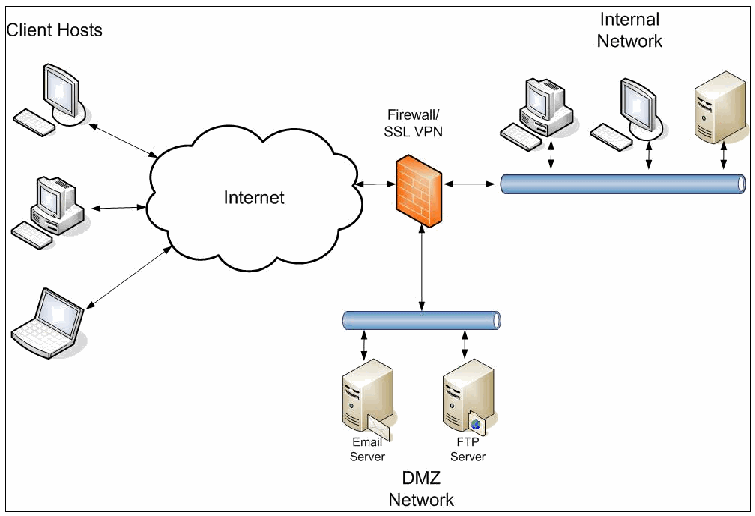
図4-1. SSL VPN機能を備えたファイアウォール。枠で囲まれたネットワーク図である。左側の「Client Hosts」(クライアントホスト)の下で、2台のデスクトップPCと1台のノートPCがそれぞれ両向きの矢印で「Internet」(インターネット)の雲に接続する。インターネットは両向きの矢印で「Firewall/ SSL VPN」(ファイアウォール/SSL VPN)と記したファイアウォールに接続する。ファイアウォールは両向きの矢印で、2台のデスクトップPCと1台のサーバーが両向きの矢印で接続する「Internal Network」(内部ネットワーク)のバスと、「Email Server」(電子メールサーバー)と「FTP Server」(FTPサーバー)が接続する「DMZ Network」(DMZネットワーク)のバスに接続する。
Figure 4-1. Firewall with SSL VPN Functionality
図4-1. SSL VPN機能を備えたファイアウォール
This approach has some advantages and disadvantages when compared to the other options:
この方式には、他の選択肢と比べて次の利点と欠点がある:
Advantages:
利点:
•Holes do not need to be opened in the firewall between an external SSL VPN device and the internal network.
•外部SSL VPNデバイスと内部ネットワークの間で、ファイアウォールにポートを開ける必要がありません。
•Traffic between the device and the internal network must go through the firewall, so the traffic is still subject to the firewall’s policies.
•デバイスと内部ネットワークの間のトラフィックはファイアウォールを通過しなければならないため、引き続きファイアウォールのポリシーの適用対象となります。
•Network design and system administration are simpler because there are no additional devices to administer.
•管理対象となる追加デバイスがないため、ネットワーク設計およびシステム管理が簡素化されます。
Disadvantages:
欠点:
•The organization is limited to the VPN functionality offered by its firewall vendor. It does not have the option of using a VPN appliance because appliances are separate hardware devices.
•組織はファイアウォールベンダーが提供するVPN機能に制限されます。VPNアプライアンスは独立したハードウェアデバイスであるため、アプライアンスを使用する選択肢はありません。
•The firewall is directly accessible by external users on TCP port 443. This increases the likelihood of a vulnerability on the firewall that can be exploited via these ports.
•ファイアウォールは、外部ユーザーがTCPポート443で直接アクセスできる状態にあります。これにより、これらのポートを介して悪用可能なファイアウォールの脆弱性が存在する可能性が高まります。
•The firewall must be augmented by SSL VPN functionality. This additional code could introduce potential vulnerabilities to the firewall.
•ファイアウォールにSSL VPN機能を追加しなければなりません。この追加コードによって、ファイアウォールに潜在的な脆弱性が持ち込まれる可能性があります。
Placing the VPN device in the internal network. This option places the VPN device entirely within the internal network behind the firewall. TCP port 443 for the address of the SSL VPN must be opened in the firewall to access the device. Figure 4-2 illustrates this design. Although it is not shown in the diagram, placement of an additional firewall between the SSL VPN device and the rest of the internal network is highly recommended. That ensures both front-end and back-end protection for the SSL VPN device.
VPNデバイスを内部ネットワークに配置します。この選択肢では、VPNデバイス全体をファイアウォールの内側にある内部ネットワーク内に配置します。デバイスにアクセスするには、SSL VPNのアドレスに対するTCPポート443をファイアウォールで開放しなければなりません。図4-2にこの設計を示します。図には示されていませんが、SSL VPNデバイスと内部ネットワークの残りの部分との間に追加のファイアウォールを配置することを強く推奨します。これにより、SSL VPNデバイスのフロントエンドとバックエンドの両方を保護できます。
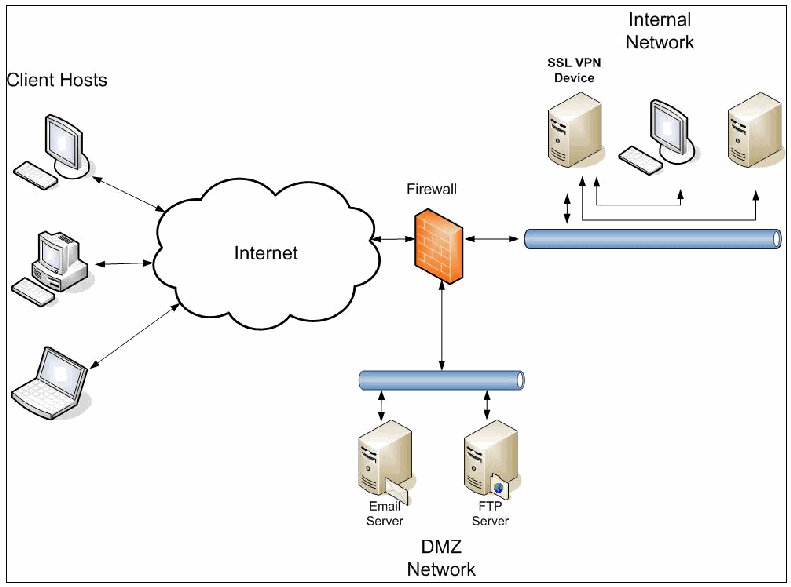
図4-2. 内部ネットワーク内のSSL VPNデバイス。枠で囲まれたネットワーク図である。左側の「Client Hosts」(クライアントホスト)の下で、2台のデスクトップPCと1台のノートPCがそれぞれ両向きの矢印で「Internet」(インターネット)の雲に接続する。インターネットは両向きの矢印で「Firewall」(ファイアウォール)に接続する。ファイアウォールは両向きの矢印で、「Email Server」(電子メールサーバー)と「FTP Server」(FTPサーバー)が接続する「DMZ Network」(DMZネットワーク)のバスと、内部ネットワークのバスに接続する。内部ネットワークのバスの上、「Internal Network」(内部ネットワーク)の下には、「SSL VPN Device」(SSL VPNデバイス)と記したサーバー、デスクトップPC、別のサーバーが並ぶ。SSL VPNデバイスは両向きの矢印でバスに接続し、SSL VPNデバイスから別の線がデスクトップPCと別のサーバーへ延びる。
Figure 4-2. SSL VPN Device in Internal Network
図4-2. 内部ネットワーク内のSSL VPNデバイス
Here are the advantages and disadvantages as compared with the other options:
他の選択肢と比較した利点と欠点は次のとおりである:
Advantages:
利点:
•Only a single rule for a single address needs to be added to the firewall.
•ファイアウォールに追加する必要があるルールは、単一アドレスに対する一つだけです。
•The device is internal, so holes between the device and internal hosts do not have to be opened in the firewall.
•デバイスは内部にあるため、デバイスと内部ホストの間の通信を許可するポートをファイアウォールで開ける必要がありません。
•Traffic between the device and the internal network is behind the firewall, so it is protected from sniffing or Address Resolution Protocol (ARP) attacks by machines in the DMZ.
•デバイスと内部ネットワーク間のトラフィックはファイアウォールの内側にあるため、DMZ内のマシンによる盗聴やアドレス解決プロトコル(ARP)攻撃から保護されます。
Disadvantages:
欠点:
•VPN traffic bypasses the firewall entirely because all applications are tunneled through the SSL connection. This means that the firewall offers no protection from malicious traffic sent through the VPN. Instead, the VPN device must provide this protection by means of a packet filter or other methods.
•すべてのアプリケーションがSSL接続を通じてトンネルされるため、VPNトラフィックはファイアウォールを完全に迂回します。つまり、VPN経由で送信される悪意あるトラフィックに対してファイアウォールは保護を提供しません。その代わり、この保護はVPNデバイスがパケットフィルターなどの方法で提供しなければなりません。
•Unsolicited traffic can now be sent from the outside into the internal network (namely, to the SSL VPN device). This behavior is a violation of some corporate security policies.
•外部から内部ネットワーク(具体的にはSSL VPNデバイス宛て)へ、要求されていないトラフィックを送信できるようになります。この動作は一部の企業セキュリティポリシーに違反します。
•If the SSL VPN device is compromised, the attacker could have access to the internal network. This is, of course, also true if the firewall itself is compromised.
•SSL VPNデバイスが侵害された場合、攻撃者が内部ネットワークにアクセスできる可能性があります。当然ながら、ファイアウォール自体が侵害された場合にも同様です。
Placing the VPN device within the DMZ. This design protects traffic between the device and internal hosts as well as the device itself from external attacks. The only port that must be opened in the firewall to access the device is TCP port 443 (https). Figure 4-3 illustrates an example of a network design where the VPN device is placed in the DMZ. The DMZ is a network segment attached to a firewall interface. Although it is not shown in the diagram, placement of an additional firewall between the SSL VPN device and the internal network is highly recommended. That ensures both front-end and back-end protection for the SSL VPN device. An alternate approach is a two-DMZ architecture, placing the SSL VPN device, front- and back-ended by a firewall, on a separate DMZ segment.
VPNデバイスをDMZ内に配置します。この設計では、デバイスと内部ホスト間のトラフィック、およびデバイス自体を外部攻撃から保護します。デバイスへのアクセスのためにファイアウォールで開放しなければならないポートはTCPポート443(https)のみです。図4-3は、VPNデバイスをDMZ内に配置するネットワーク設計例を示します。DMZはファイアウォールインターフェースに接続されたネットワークセグメントです。図には示されていませんが、SSL VPNデバイスと内部ネットワークの間に追加のファイアウォールを配置することを強く推奨します。これにより、SSL VPNデバイスの前面側と背面側の両方の保護が確保されます。別の方法として、SSL VPNデバイスを独立したDMZセグメントに置き、その前後をファイアウォールで保護する二重DMZアーキテクチャがあります。
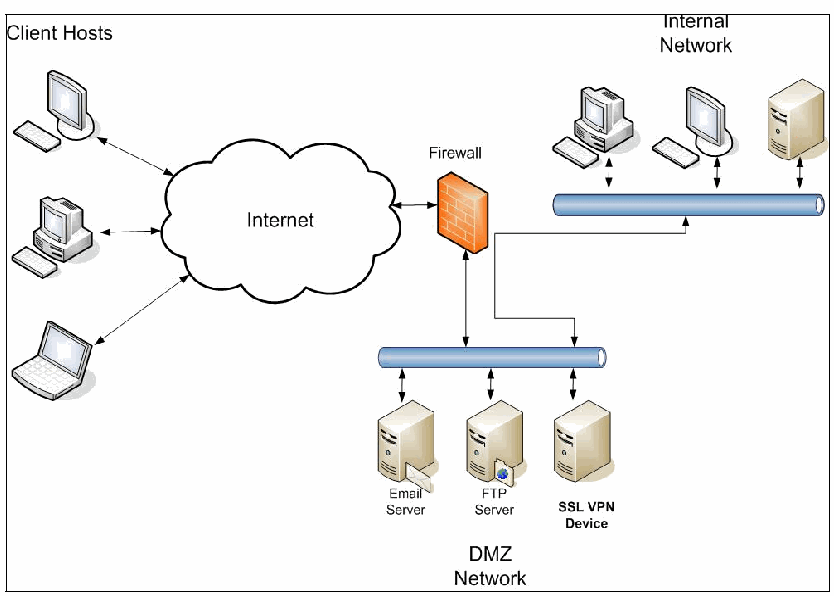
図4-3. DMZネットワーク内のSSL VPNデバイス。枠で囲まれたネットワーク図である。左側の「Client Hosts」(クライアントホスト)の下で、2台のデスクトップPCと1台のノートPCがそれぞれ両向きの矢印で「Internet」(インターネット)の雲に接続する。インターネットは両向きの矢印で「Firewall」(ファイアウォール)に接続する。ファイアウォールは両向きの矢印で「DMZ Network」(DMZネットワーク)のバスに接続し、そのバスには「Email Server」(電子メールサーバー)、「FTP Server」(FTPサーバー)、「SSL VPN Device」(SSL VPNデバイス)が接続する。ファイアウォールを経由しない別の線が、DMZのバスのSSL VPNデバイスの上の位置と内部ネットワークのバスを結び、両方のバスの側に矢じりがある。内部ネットワークのバスの上、「Internal Network」(内部ネットワーク)の表示の下にある2台のデスクトップPCと1台のサーバーが、両向きの矢印でそのバスに接続する。
Figure 4-3. SSL VPN Device in DMZ Network
図4-3. DMZネットワーク内のSSL VPNデバイス
This approach has some advantages and disadvantages when compared to the other options:
この方式には、他の選択肢と比べて次の利点と欠点がある:
Advantages:
利点:
•Compromise of the device does not necessarily mean that the attacker has full access to the internal network.
•デバイスが侵害されても、必ずしも攻撃者が内部ネットワークに完全にアクセスできるとは限りません。
•Traffic between the device and the internal network must go through the firewall, so the traffic is still subject to the firewall’s policies.
•デバイスと内部ネットワークの間のトラフィックはファイアウォールを通過しなければならないため、引き続きファイアウォールのポリシーの適用対象となります。
•An intrusion detection system (IDS) within the DMZ can analyze the traffic destined for the internal network for malicious activity.
•DMZ内の侵入検知システム(IDS)は、内部ネットワーク宛てのトラフィックを分析し、悪意ある活動を検知できます。
Disadvantages:
欠点:
•Numerous ports from the device to internal hosts must be opened in the firewall. User traffic from the VPN device will only reach internal hosts if these holes are opened. Despite one of the previously mentioned advantages of this approach, an attacker that compromises the VPN device will have access to the internal network through these holes. However, of the three solutions, this approach best minimizes the impact of a VPN breach.
•デバイスから内部ホストへの多数のポートをファイアウォールで開放しなければなりません。VPNデバイスからのユーザートラフィックは、これらのポートが開放されている場合にのみ内部ホストへ到達します。前述したこの方式の利点の一つに反して、VPNデバイスを侵害した攻撃者は、これらのポートを通じて内部ネットワークにアクセスできます。ただし、三つのソリューションの中では、この方式がVPN侵害の影響を最も小さく抑えます。
•Decrypted traffic from the device to the internal network must be sent in cleartext through the DMZ network. This traffic is vulnerable to sniffing or ARP attacks by other machines in the DMZ that could be compromised by attackers.
•デバイスから内部ネットワークへの復号済みトラフィックは、DMZネットワークを通じて平文で送信しなければなりません。このトラフィックは、DMZ内にある他のマシンが侵害された場合、そのマシンによる盗聴またはARP攻撃に対して脆弱です。
•The firewall is bypassed when user traffic is destined for hosts in the DMZ. This assumes that clients use the VPN device to reach these DMZ hosts and do not use a split tunnel configuration (described in the next section).
•ユーザートラフィックの宛先がDMZ内のホストである場合、ファイアウォールは迂回されます。これは、クライアントがVPNデバイスを使用してこれらのDMZホストに到達し、次のセクションで説明するスプリットトンネル構成を使用していないことを前提としています。
It is recommended that if the VPN device is placed in the DMZ then it should be configured with two interfaces. Remote users use the external interface to connect to the device, while traffic destined for the internal network traverses the internal interface. This internal interface is connected to either another firewall or another interface on the same firewall. Figure 4-4 illustrates this design.
VPNデバイスをDMZ内に配置する場合は、インターフェースを二つ備えるよう設定することが推奨されます。リモートユーザーは外部インターフェースを使用してデバイスに接続し、内部ネットワーク宛てのトラフィックは内部インターフェースを通過します。この内部インターフェースは、別のファイアウォール、または同じファイアウォール上の別のインターフェースに接続します。図4-4にこの設計を示します。
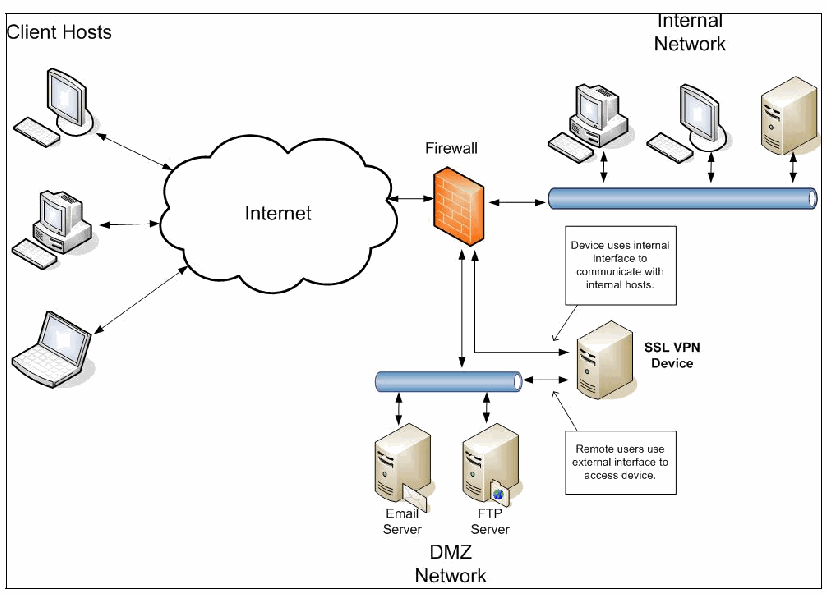
図4-4. 二つのインターフェースを備えたSSL VPNデバイス。枠で囲まれたネットワーク図である。左側の「Client Hosts」(クライアントホスト)の下で、2台のデスクトップPCと1台のノートPCがそれぞれ両向きの矢印で「Internet」(インターネット)の雲に接続する。インターネットは両向きの矢印で「Firewall」(ファイアウォール)に接続する。ファイアウォールは両向きの矢印で、2台のデスクトップPCと1台のサーバーが両向きの矢印で接続する「Internal Network」(内部ネットワーク)のバスと、「Email Server」(電子メールサーバー)と「FTP Server」(FTPサーバー)が接続する「DMZ Network」(DMZネットワーク)のバスに接続する。「SSL VPN Device」(SSL VPNデバイス)には2つの接続がある。1つはDMZのバスへの両向きの矢印で、「Remote users use external interface to access device.」(リモートユーザーは外部インターフェースを使ってデバイスにアクセスする)という注記がある。もう1つはファイアウォールへの別の両向きの線で、「Device uses internal interface to communicate with internal hosts.」(デバイスは内部インターフェースを使って内部ホストと通信する)という注記がある。
Figure 4-4. SSL VPN Device with Two Interfaces
図4-4. 二つのインターフェースを備えたSSL VPNデバイス
This approach has the following advantages and disadvantages compared to the other options:
この方式には、他の選択肢と比較して次の利点と欠点がある:
Advantages:
利点:
•All of the previously mentioned advantages of placing the device in the DMZ still apply.
•デバイスをDMZ内に配置することについて前述した利点は、すべて引き続き当てはまります。
•The unencrypted traffic headed for internal hosts is protected from sniffing or ARP attacks from other hosts in the DMZ.
•内部ホスト宛ての暗号化されていないトラフィックは、DMZ内の他のホストによる盗聴またはARP攻撃から保護されます。
•Only the firewall interface connected to the device’s internal interface must be configured to permit traffic from the VPN device. An intruder who compromises another host in the DMZ cannot use this internal interface to access the internal network unless the VPN device is compromised too.
•VPNデバイスからのトラフィックを許可するよう設定しなければならないのは、デバイスの内部インターフェースに接続されたファイアウォールインターフェースのみです。DMZ内の別のホストを侵害した侵入者は、VPNデバイスも侵害しない限り、この内部インターフェースを使って内部ネットワークにアクセスできません。
Disadvantages:
欠点:
•Holes need to be opened in the firewall between the SSL VPN device and internal hosts.
•SSL VPNデバイスと内部ホストの間で、ファイアウォールにポートを開放する必要があります。
•The firewall is bypassed when split tunneling is not used and user traffic is destined for hosts in the DMZ. Possible solutions include turning on split tunneling, putting a firewall between DMZ hosts and the VPN device, and configuring packet filtering on a router connecting the DMZ hosts to the VPN device.
•スプリットトンネルを使用せず、ユーザートラフィックの宛先がDMZ内のホストである場合、ファイアウォールは迂回されます。解決策として、スプリットトンネルを有効にする、DMZホストとVPNデバイスの間にファイアウォールを置く、またはDMZホストをVPNデバイスに接続するルーターでパケットフィルタリングを設定する方法があります。
•Using a second interface on the VPN device may introduce additional routing complexity (see next section).
•VPNデバイスに二つ目のインターフェースを使用すると、ルーティングがさらに複雑になる可能性があります(次のセクションを参照してください)。
If the organization decides to place the VPN device within the DMZ, it must decide how many holes to open in its firewall between the device and the internal network. If the organization must support many services through the SSL VPN then it may decide to completely open up all connectivity between the VPN device and the internal network. This enables VPN users to access any machine and port internally. The benefits of such an approach will have to be weighed against the costs of potential security issues.
組織がVPNデバイスをDMZ内に配置することを決定した場合、デバイスと内部ネットワークの間でファイアウォールのポートをいくつ開放するかを決めなければなりません。SSL VPNを通じて多くのサービスをサポートする必要がある場合、VPNデバイスと内部ネットワークの間の接続をすべて開放することを組織が選択する可能性があります。これにより、VPNユーザーは内部の任意のマシンおよびポートにアクセスできます。この方法の利点と、潜在的なセキュリティ問題のリスクとを比較検討する必要があります。
4.3.4.3 Routing Policy and Other Network Considerations
4.3.4.3 ルーティングポリシーおよびその他のネットワーク上の考慮事項
Routing policy is as important as firewall configuration. Packets must be routed correctly within the internal network for the VPN to function properly. When the VPN components of proxying and application translation are used, routing is fairly straightforward. Packets from the VPN device that are destined for the internal network have the source address of the VPN device itself. As long as the VPN device’s source address is routable in the internal network, packets will be correctly routed from internal hosts back to the VPN device.
ルーティングポリシーはファイアウォール構成と同じくらい重要です。VPNが適切に機能するには、内部ネットワーク内でパケットを正しくルーティングしなければなりません。プロキシおよびアプリケーション変換というVPN構成要素を使用する場合、ルーティングは比較的単純です。内部ネットワーク宛てのVPNデバイス発パケットでは、送信元アドレスはVPNデバイス自体のアドレスとなります。VPNデバイスの送信元アドレスが内部ネットワークでルーティング可能であれば、内部ホストからVPNデバイスへパケットを正しく戻すことができます。
If network extension is used, routing becomes more complicated. Network extension creates a point-to-point tunnel interface between the client machine and the VPN device. Each end of the tunnel is assigned a virtual IP address. The client’s virtual IP address is used as the source address of VPN packets from the client machine. Even after traffic from the client machine reaches the VPN device and is taken out of the SSL tunnel, the source address remains the same. This means that internal hosts must know how to route the client’s virtual IP address back to the VPN device, or routing will not work correctly.
ネットワーク拡張を使用する場合、ルーティングはより複雑になります。ネットワーク拡張では、クライアントマシンとVPNデバイスの間にポイントツーポイントのトンネルインターフェースを作成します。トンネルの各端には仮想IPアドレスが割り当てられます。クライアントマシンから送られるVPNパケットの送信元アドレスには、クライアントの仮想IPアドレスが使用されます。クライアントマシンからのトラフィックがVPNデバイスに到達し、SSLトンネルから取り出された後も、送信元アドレスは変わりません。つまり、内部ホストはクライアントの仮想IPアドレス宛てのトラフィックをVPNデバイスへ送り返す経路を把握していなければならず、そうでなければルーティングは正しく機能しません。
For example, a client establishes a VPN connection using network extension. It receives the address of 192.168.1.200. The VPN device receives 192.168.1.1 for its virtual tunnel interface. When the VPN device forwards packets from the client to internal hosts, these internal hosts will receive packets with a source address of 192.168.1.200. If the internal routers cannot route these packets back to the VPN device, then the client will not be able to communicate with any internal hosts.
例えば、クライアントがネットワーク拡張を使用してVPN接続を確立し、アドレス192.168.1.200を受け取るとします。VPNデバイスは、仮想トンネルインターフェースに192.168.1.1を受け取ります。VPNデバイスがクライアントから内部ホストへパケットを転送すると、内部ホストが受信するパケットの送信元アドレスは192.168.1.200となります。内部ルーターがこれらのパケットをVPNデバイスに戻すようルーティングできなければ、クライアントは内部ホストと通信できません。
Another option is to use Network Address Translation (NAT) for clients using network extension. If NAT is used, then all packets forwarded from the VPN device to the internal network are given the source address of the VPN device. The routing configuration can therefore remain unchanged because it is assumed that internal hosts can already route traffic to the VPN device. This approach has its own disadvantages. The biggest one is that it is no longer possible to track the network activity of VPN clients by IP address because all of them share a single address. For this reason it is recommended that NAT not be used for clients using network extension.
別の選択肢として、ネットワーク拡張を使用するクライアントにネットワークアドレス変換(NAT)を使用する方法があります。NATを使用すると、VPNデバイスから内部ネットワークに転送されるすべてのパケットの送信元アドレスはVPNデバイスのものになります。そのため、内部ホストは既にVPNデバイス宛てのトラフィックをルーティングできると想定されるため、ルーティング構成を変更せずに済みます。この方法にも欠点があります。最大の欠点は、すべてのVPNクライアントが単一のアドレスを共有するため、IPアドレスによってVPNクライアントのネットワーク活動を追跡できなくなることです。このため、ネットワーク拡張を使用するクライアントにはNATを使用しないことが推奨されます。
One more issue with network extension that must be addressed is split tunneling. Split tunneling is defined as the process of allowing a remote VPN user to access a public network, most commonly the Internet, at the same time that the user is allowed to access resources on the VPN. A client machine that establishes a split tunnel connection with the VPN device does not send all of its network traffic through the VPN tunnel. It sends all traffic not destined for the internal (protected) network through its standard network connection and only sends traffic destined for the internal network through the VPN tunnel. Split tunneling offers the advantages of efficiency and bandwidth conservation, as traffic destined for the Internet does not have to be sent first to the VPN device. On the other hand, split tunneling also creates a potential security vulnerability. If an attacker from the Internet compromises the client machine, then this attacker can use the split tunnel to also access the organization’s internal network. The organization must weigh the advantages and disadvantages of split tunneling before deciding to implement it.
ネットワーク拡張に関して対処しなければならないもう一つの問題は、スプリットトンネルです。スプリットトンネルとは、リモートVPNユーザーがVPN上のリソースへのアクセスを許可されているのと同時に、公衆ネットワーク(最も一般的にはインターネット)にもアクセスできるようにするプロセスと定義されます。スプリットトンネル接続をVPNデバイスと確立したクライアントマシンは、ネットワークトラフィックのすべてをVPNトンネル経由で送信するわけではありません。内部(保護対象)ネットワーク宛てではないトラフィックはすべて標準のネットワーク接続を通じて送信し、内部ネットワーク宛てのトラフィックのみをVPNトンネル経由で送信します。インターネット宛てのトラフィックを最初にVPNデバイスへ送る必要がないため、スプリットトンネルには効率性と帯域幅の節約という利点があります。一方で、潜在的なセキュリティ脆弱性も生じます。インターネット上の攻撃者がクライアントマシンを侵害した場合、その攻撃者はスプリットトンネルを使って組織の内部ネットワークにもアクセスできます。組織は、スプリットトンネルを実装する前に、その利点と欠点を比較検討しなければなりません。
If split tunneling is implemented, then the organization must decide which IP addresses will be routed through the split tunnel. If all of an organization’s IP addresses are assigned to internal hosts, then the routing is straightforward, but some hosts may be in the DMZ and therefore publicly accessible. Traffic destined for these DMZ hosts will bypass the firewall if split tunneling is not used. It may therefore be more secure and efficient for the client to reach hosts located in the DMZ via the Internet rather than to use the split tunnel. If this is the case, then the organization must take care to configure the split tunnel with internal subnets only.
スプリットトンネルを実装する場合、どのIPアドレスをスプリットトンネル経由でルーティングするかを組織が決めなければなりません。組織のIPアドレスがすべて内部ホストに割り当てられていれば、ルーティングは単純です。ただし、一部のホストはDMZ内にあり、そのため一般にアクセス可能な場合があります。スプリットトンネルを使用しなければ、これらのDMZホスト宛てのトラフィックはファイアウォールを迂回します。したがって、クライアントはスプリットトンネルを使うより、インターネット経由でDMZ内のホストに到達する方が安全かつ効率的な場合があります。その場合、組織は内部サブネットのみを対象としてスプリットトンネルを構成するよう注意しなければなりません。
Section 4.3.4.2 recommends that a VPN device placed into the DMZ be configured with at least two interfaces: one for external traffic and one for internal traffic. However, using two interfaces introduces more routing complexity. The device needs to be configured with static routes that correctly point toward internal hosts or hosts in the DMZ. The routing tables for routers within the DMZ must also be configured to route all traffic destined for both interfaces on the device toward the device’s external interface. If any traffic is routed toward the device’s internal interface, this traffic may get dropped because it must traverse a firewall to reach the internal interface. This firewall will have no knowledge of the traffic because the original traffic from the VPN device to the DMZ hosts traversed the device’s external interface and therefore did not go through the firewall. Figure 4-5 illustrates a scenario where traffic will get dropped if the packets are not correctly routed to the right interface.
セクション4.3.4.2では、DMZ内に配置するVPNデバイスに、外部トラフィック用と内部トラフィック用の少なくとも二つのインターフェースを設定することを推奨しています。しかし、二つのインターフェースを使用するとルーティングがさらに複雑になります。内部ホストまたはDMZ内のホストを正しく指す静的ルートをデバイスに設定する必要があります。DMZ内のルーターのルーティングテーブルも、デバイスの両方のインターフェース宛てのすべてのトラフィックをデバイスの外部インターフェースに向けてルーティングするよう設定しなければなりません。いずれかのトラフィックがデバイスの内部インターフェースに向けてルーティングされると、内部インターフェースに到達するにはファイアウォールを通過しなければならないため、そのトラフィックが破棄される場合があります。このファイアウォールはそのトラフィックを認識できません。VPNデバイスからDMZホストへの元のトラフィックはデバイスの外部インターフェースを通過し、ファイアウォールを通らなかったためです。図4-5は、パケットが適切なインターフェースに正しくルーティングされない場合にトラフィックが破棄される状況を示します。
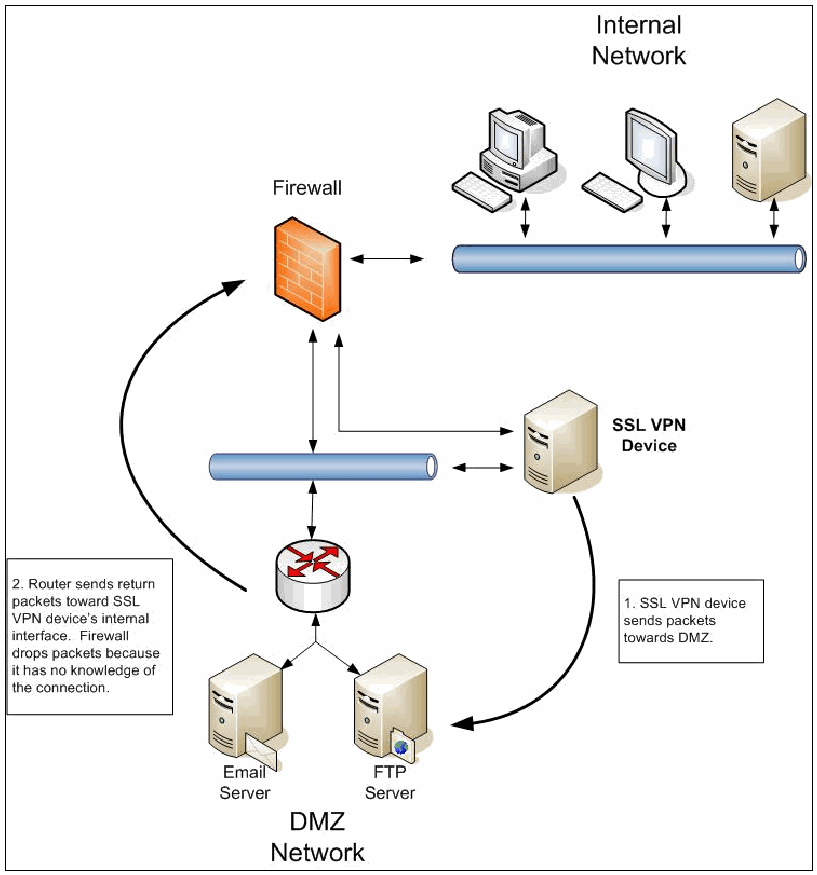
図4-5. SSL VPNトラフィックのルーティング問題。枠で囲まれたネットワーク図である。「Firewall」(ファイアウォール)は両向きの矢印で、2台のデスクトップPCと1台のサーバーが両向きの矢印で接続する「Internal Network」(内部ネットワーク)のバスに接続する。その下で、ファイアウォールは両向きの矢印でバスに接続し、「SSL VPN Device」(SSL VPNデバイス)はそのバスと、別の線でファイアウォールの両方に接続する。バスはルーターに接続し、ルーターは「DMZ Network」(DMZネットワーク)の「Email Server」(電子メールサーバー)と「FTP Server」(FTPサーバー)に接続する。SSL VPNデバイスからFTPサーバーへの曲線の矢印には「1. SSL VPN device sends packets towards DMZ.」(1. SSL VPNデバイスがDMZへパケットを送る)という注記がある。ルーターからファイアウォールへ上向きの曲線の矢印には「2. Router sends return packets toward SSL VPN device’s internal interface. Firewall drops packets because it has no knowledge of the connection.」(2. ルーターはSSL VPNデバイスの内部インターフェースへ戻りパケットを送る。ファイアウォールはその接続を把握していないため、パケットを破棄する)という注記がある。
Figure 4-5. Routing Problem with SSL VPN Traffic
図4-5. SSL VPNトラフィックのルーティング問題
One final consideration for overall network policy is the issue of multiple sites. If the organization wants multiple sites to support SSL VPN services, then it must decide how to configure authentication and routing. There are several possibilities:
ネットワークポリシー全体に関する最後の考慮事項は、複数拠点の問題です。組織が複数拠点でSSL VPNサービスをサポートする場合、認証とルーティングをどのように構成するかを決めなければなりません。いくつかの方法がある:
•Each site has an SSL VPN device, but users can only authenticate to the device at their local site. If there is a network between sites, then users can use the SSL VPN to access those other sites.
•各拠点にSSL VPNデバイスを置きますが、ユーザーは自拠点のデバイスにしか認証できません。拠点間にネットワークがあれば、ユーザーはSSL VPNを使用して他拠点にもアクセスできます。
•Users can authenticate to a device at any of the sites but not simultaneously. So if there are two sites, Site A and Site B, users cannot establish VPN connections to Site A and Site B at the same time. All internal traffic must go to either Site A or Site B. Once users are authenticated, their traffic is sent to a single site and then traverses the internal network if necessary to access the other sites. This configuration could be used for backup purposes, so that a user who normally establishes a VPN connection to Site A can create a Site B VPN if the Site A VPN architecture is inaccessible.
•ユーザーはどの拠点のデバイスにも認証できますが、同時には認証できません。例えば拠点Aと拠点Bの二拠点がある場合、ユーザーは拠点Aと拠点Bの両方に同時にVPN接続を確立できません。すべての内部トラフィックは拠点Aまたは拠点Bのいずれかに送らなければなりません。ユーザーが認証されると、そのトラフィックは一つの拠点に送られ、必要に応じて内部ネットワークを経由して他拠点にアクセスします。この構成はバックアップ目的で使用できます。通常は拠点AにVPN接続するユーザーが、拠点AのVPNアーキテクチャにアクセスできない場合に、拠点BのVPN接続を作成できるためです。
•Users can authenticate to all sites simultaneously. Each user’s routing table is configured so that packets destined for a specific site’s addresses will take that site’s VPN connection. If a user creates VPNs to Sites A and B simultaneously, then packets destined for a Site A subnet traverse the VPN to Site A, with the same applying to packets destined for a Site B subnet.
•ユーザーはすべての拠点に同時に認証できます。ユーザーの各ルーティングテーブルは、特定拠点のアドレス宛てのパケットがその拠点のVPN接続を通るように設定します。ユーザーが拠点Aと拠点BへのVPN接続を同時に作成した場合、拠点Aのサブネット宛てのパケットは拠点AへのVPNを通り、拠点Bのサブネット宛てのパケットも同様に拠点BへのVPNを通ります。
Note that the routing issues mentioned earlier in this section are also relevant for an architecture with multiple sites. Each site must be sure to correctly route and to not block VPN packets with addresses assigned at other sites. If the VPN devices have multiple interfaces, the packets destined for the external interface may have to be routed differently from packets destined for the internal interface. This depends on how the internal connectivity between sites is configured.
本セクションで先に述べたルーティングの問題は、複数拠点のアーキテクチャにも当てはまる点に注意されました。各拠点は、他拠点で割り当てられたアドレスを持つVPNパケットを正しくルーティングし、ブロックしないようにしなければなりません。VPNデバイスに複数のインターフェースがある場合、外部インターフェース宛てのパケットと内部インターフェース宛てのパケットで、異なるルーティングが必要となることがあります。これは拠点間の内部接続がどのように構成されているかによります。
4.3.4.4 High Availability or Load Balancing Support
4.3.4.4 高可用性または負荷分散のサポート
An organization may decide to implement high availability or load balancing. High availability may be required so the organization can meet service level agreements (SLA) for guaranteed uptime, or load balancing may be required to support a large number of users. SSL VPN products vary widely in how they support high availability and load balancing. For this reason, an organization with a need for high availability or load balancing should answer at least these questions about each device under evaluation, with testing possibly being required to receive detailed answers.
組織は高可用性または負荷分散を実装することを決定する場合があります。保証された稼働時間に関するサービスレベル合意(SLA)を組織が満たすために高可用性が必要となる場合や、多数のユーザーをサポートするために負荷分散が必要となる場合があります。SSL VPN製品によって、高可用性および負荷分散のサポート方法は大きく異なります。このため、高可用性または負荷分散が必要な組織は、評価中の各デバイスについて、少なくとも以下の質問に答えるべきです。詳細な回答を得るにはテストが必要となる場合もあります。
•Does the device employ an active/passive or an active/active mode architecture? An active/passive architecture only supports one active device at a time, while an active/active architecture supports two devices simultaneously. Active/passive systems are much easier to design and are therefore usually less expensive than active/active systems. Active/active systems are mostly useful in architectures where a very high load is expected, so more than one device needs to be active under normal circumstances.
•デバイスはアクティブ/パッシブ方式またはアクティブ/アクティブ方式のアーキテクチャを採用していますか。アクティブ/パッシブ方式では一度に一台のデバイスのみがアクティブとなりますが、アクティブ/アクティブ方式では二台のデバイスを同時にサポートします。アクティブ/パッシブシステムは設計がはるかに容易なため、通常アクティブ/アクティブシステムより低コストです。アクティブ/アクティブシステムは、非常に高い負荷が予想され、通常時に複数デバイスをアクティブにする必要のあるアーキテクチャで主に有用です。
•How is state information maintained across devices in a failure scenario? How long does the failover process take for proxying, translation, and network extension?
•障害発生時、デバイス間で状態情報をどのように維持しますか。プロキシ、変換、ネットワーク拡張について、フェイルオーバープロセスにはどのくらい時間がかかりますか。
•In an active/active mode architecture, is state information for all sessions mirrored across all devices so a device failure will not disrupt any user sessions? Or does each device track state information (such as user authentication status) only for its own sessions so a device failure may require re-authentication?
•アクティブ/アクティブ方式のアーキテクチャでは、デバイス障害が発生してもユーザーセッションが中断されないよう、すべてのセッションの状態情報が全デバイス間でミラーリングされていますか。それとも、各デバイスは自身のセッションの状態情報(ユーザー認証状態など)のみを追跡するため、デバイス障害時に再認証が必要となる場合がありますか。
•If an external load balancing solution is used, how is state information maintained throughout the architecture?
•外部負荷分散ソリューションを使用する場合、アーキテクチャ全体で状態情報をどのように維持しますか。
Configuration and upgrading pose additional issues. Some devices mirror configuration settings across devices, so only the active devices should be configured. Any altered settings on the passive devices will quickly be overwritten by the active device’s settings. If configuration settings are not mirrored, all devices should be configured with identical settings at the same time.
構成とアップグレードにも追加の問題があります。一部のデバイスではデバイス間で構成設定をミラーリングするため、アクティブデバイスのみを設定すべきです。パッシブデバイス上で変更された設定は、アクティブデバイスの設定によってすぐに上書きされます。構成設定がミラーリングされない場合、すべてのデバイスに同一の設定を同時に行うべきです。
For upgrades, the vendor’s instructions for upgrading should be followed. Some vendors require the passive device in an active/passive mode architecture to be upgraded first. After this upgrade is complete, the newly upgraded device becomes active and the newly passive device can then be upgraded. Other vendors require the active device to be upgraded first. The active device is still handling VPN traffic while it is being upgraded and only fails over to the passive device when it is ready to reboot with the new upgrade in place. Upgrading the active device first avoids a scenario where the passive device is being upgraded and receives mirrored configuration changes from the active device in the middle of the upgrade process.
アップグレードについては、ベンダーのアップグレード手順に従うべきです。一部のベンダーは、アクティブ/パッシブ方式のアーキテクチャで、まずパッシブデバイスをアップグレードするよう求めます。このアップグレードが完了すると、新しくアップグレードされたデバイスがアクティブになり、新たにパッシブになったデバイスをアップグレードできます。他のベンダーは、まずアクティブデバイスのアップグレードを求めます。アップグレード中もアクティブデバイスはVPNトラフィックを処理し続け、新しいアップグレードを適用した状態で再起動する準備が整った時点でのみ、パッシブデバイスへフェイルオーバーします。アクティブデバイスを先にアップグレードすれば、アップグレード途中にパッシブデバイスがアクティブデバイスからミラーリングされた構成変更を受け取る状況を避けられます。
4.3.4.5 Management
4.3.4.5 管理
The organization should design a management policy to determine who will manage the SSL VPN device and by what means. Some devices offer a partitioned or delegated management feature that allows different aspects of the device to be managed by different groups or individuals. For example, a group that manages IT for the sales department can control access control and endpoint security policies for sales resources only. System administrators can manage endpoint security regarding the type and number of patches that each client machine must have installed.
組織は、誰がどの手段でSSL VPNデバイスを管理するかを定める管理ポリシーを設計すべきです。一部のデバイスは、異なるグループまたは個人がデバイスの異なる部分を管理できるようにする、分割型または委任型の管理機能を備えています。例えば、営業部門のITを管理するグループは、営業リソースに限ってアクセス制御ポリシーとエンドポイントセキュリティポリシーを管理できます。システム管理者は、各クライアントマシンにインストールされていなければならないパッチの種類と数に関するエンドポイントセキュリティを管理できます。
If multiple interfaces on the SSL VPN device are used, the management policy should also specify which interface permits administrative access. Some devices provide flexibility in selectively enabling administrative access on each interface, as well as permitting this access only from specific IP addresses. Various forms of authentication for administrative access may also be supported, such as smart cards and two-factor authentication. If the organization is using multiple interfaces, administrative access is commonly only configured on the interface connected to the internal network for security reasons (although allowing management from the external interface over an SSL-protected tunnel is also considered secure). If administrative access is permitted on the external interface, a stronger form of authentication than username and password should be used.
SSL VPNデバイスの複数のインターフェースを使用する場合、管理ポリシーでは、どのインターフェースから管理アクセスを許可するかも定めるべきです。一部のデバイスでは、各インターフェースで管理アクセスを選択的に有効化できるほか、特定のIPアドレスからのみこのアクセスを許可できます。スマートカードや二要素認証など、管理アクセス用のさまざまな認証方式もサポートされる場合があります。組織が複数のインターフェースを使用する場合、セキュリティ上の理由から、管理アクセスは通常、内部ネットワークに接続されたインターフェースでのみ設定されます(ただし、SSLで保護されたトンネルを通じて外部インターフェースから管理することも安全と考えられています)。外部インターフェースで管理アクセスを許可する場合、ユーザー名とパスワードより強力な認証方式を使用すべきです。
The management policy should also discuss the means of backing up and restoring the device configuration. The specific procedures will vary by device but will include a means of transferring the configuration to another computer for archiving, and of retrieving this configuration. Some devices also support the ability to create a complete image of the operating system and configuration. This feature is useful for restoring every aspect of the device’s functionality at a specific point in time.
管理ポリシーでは、デバイス構成のバックアップと復元の方法についても扱うべきです。具体的な手順はデバイスによって異なりますが、構成をアーカイブ用に別のコンピューターへ転送する方法と、その構成を取得する方法を含みます。一部のデバイスでは、オペレーティングシステムと構成の完全なイメージを作成する機能もサポートされています。この機能は、特定時点におけるデバイス機能のあらゆる側面を復元するのに有用です。
4.3.4.6 Client Software Selection
4.3.4.6 クライアントソフトウェアの選定
Although SSL VPNs are described as clientless, some forms of SSL VPN access such as network extension require dynamically downloaded agents to be run on the host. Even before login, the client machine may have to execute a dynamically downloaded agent that performs host integrity checks. The organization will have to ensure that these agents can run on client machines if the agents are required by access control and endpoint security policies. Once logged in, users can use common Web browsers to use the SSL VPN via proxy, but network extension requires particular browsers or versions of those browsers because they require other downloadable agents that establish the virtual network connection. If some systems such as public kiosks cannot download and execute these dynamically downloadable agents, then the organization will have to make a decision about the level of access to offer to these machines. Many SSL portal VPNs will work from all common Web browsers, but many SSL tunnel VPNs require particular browsers, and particular versions of those browsers.
SSL VPNはクライアントレスと説明されますが、ネットワーク拡張など一部のSSL VPNアクセス方式では、ホスト上で動作するエージェントを動的にダウンロードする必要があります。ログイン前であっても、ホスト完全性チェックを実行する動的ダウンロードエージェントをクライアントマシンで実行しなければならない場合があります。アクセス制御ポリシーおよびエンドポイントセキュリティポリシーでこれらのエージェントが必要とされる場合、クライアントマシン上で実行できることを組織が確認しなければなりません。ログイン後、ユーザーは一般的なWebブラウザーを使用してプロキシ経由でSSL VPNを利用できますが、ネットワーク拡張では、仮想ネットワーク接続を確立する他のダウンロード可能なエージェントが必要なため、特定のブラウザーまたはその特定バージョンが必要となります。公衆キオスクなど一部のシステムが、このような動的にダウンロード可能なエージェントをダウンロードして実行できない場合、それらのマシンにどのレベルのアクセスを提供するかを組織が決定しなければなりません。多くのSSLポータルVPNは一般的なすべてのWebブラウザーで動作しますが、多くのSSLトンネルVPNでは特定のブラウザーおよびその特定バージョンが必要となります。
4.3.4.7 Portal Design
4.3.4.7 ポータル設計
The organization should provide a portal for users so they can login to the SSL VPN and gain access to internal resources. The portal can either be supplied by the SSL VPN device vendor or developed by the organization itself. If the organization chooses to use the portal supplied by the SSL VPN device vendor, it can customize it to match the appearance of the organization’s intranet.
組織は、ユーザーがSSL VPNにログインして内部リソースへアクセスできるよう、ポータルを提供すべきです。ポータルはSSL VPNデバイスベンダーが提供することも、組織自身が開発することもできます。SSL VPNデバイスベンダー提供のポータルを使用する場合、組織のイントラネットの外観に合わせてカスタマイズできます。
Portal customization features vary widely by device, but the organization should be able to alter graphics, colors, and possibly icons and the layout of the portal. The functionality of the portal will depend on the type of access to the SSL VPN. For example, resources that rely on proxying and application translation will require some sort of icon or hyperlink in the portal so users can access them. Access via network extension also requires a hyperlink or icon on the portal to initiate the network extension process. Once this takes place, however, the portal is not required to access resources because the client machine has direct access to these resources via the network extension. An organization’s access control policy could determine the hyperlinks or icons that are displayed in the portal. For example, if the access control policy prohibits a user from using network extension, then the hyperlink or icon enabling network extension should not be displayed. Figure 4-6 depicts an example of a generic SSL VPN portal interface.
ポータルのカスタマイズ機能はデバイスごとに大きく異なりますが、組織はグラフィック、色、場合によってはアイコンやポータルのレイアウトを変更できるべきです。ポータルの機能はSSL VPNへのアクセス方式によって異なります。例えば、プロキシやアプリケーション変換に依存するリソースでは、ユーザーがアクセスできるようポータル内に何らかのアイコンまたはハイパーリンクが必要となります。ネットワーク拡張でアクセスする場合も、ネットワーク拡張を開始するためのハイパーリンクまたはアイコンがポータルに必要となります。ただし、その後はクライアントマシンがネットワーク拡張を介してこれらのリソースに直接アクセスできるため、リソースへのアクセスにポータルは必要ありません。組織のアクセス制御ポリシーに基づいて、ポータルに表示するハイパーリンクやアイコンを決定できます。例えば、アクセス制御ポリシーでユーザーによるネットワーク拡張の使用を禁止している場合、ネットワーク拡張を有効にするハイパーリンクやアイコンを表示すべきではありません。図4-6に一般的なSSL VPNポータルインターフェースの例を示します。
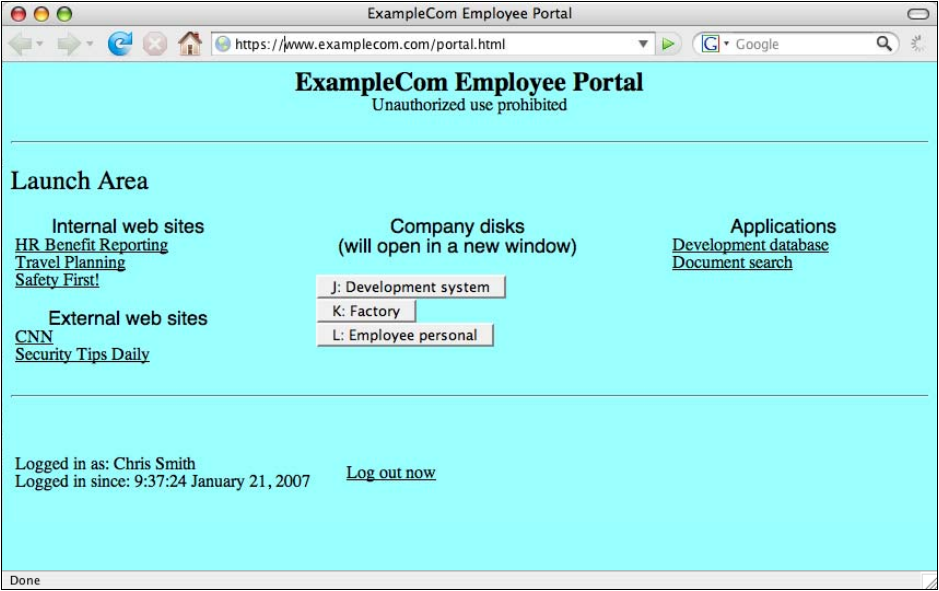
図4-6. ポータルインターフェースの例。「ExampleCom Employee Portal」というタイトルのWebブラウザーの画面のスクリーンショットで、アドレスは https://www.examplecom.com/portal.html である。ページの見出しは「ExampleCom Employee Portal」(ExampleCom従業員ポータル)と「Unauthorized use prohibited」(無許可の使用を禁ずる)である。「Launch Area」(起動エリア)の下に3つのグループがある。左に「Internal web sites」(社内Webサイト:HR Benefit Reporting、Travel Planning、Safety First!)と「External web sites」(外部Webサイト:CNN、Security Tips Daily)、中央に「J: Development system」「K: Factory」「L: Employee personal」のボタンを持つ「Company disks (will open in a new window)」(会社のディスク(新しいウィンドウで開く))、右に「Applications」(アプリケーション:Development database、Document search)である。下部にはログイン中の利用者とログイン時刻を示す行と「Log out now」(今すぐログアウト)のリンクがある。ブラウザーのステータスバーには「Done」(完了)とある。
Figure 4-6. Example Portal Interface
図4-6. ポータルインターフェースの例
4.3.5 Cryptography Policy and FIPS Compliance
4.3.5 暗号ポリシーおよびFIPS適合性
The organization should choose a cryptography policy that fits its needs and is compliant with its requirements. In addition, Federal agencies must use only cryptographic modules whose algorithms and methods are compliant with the FIPS 140-2 specification. This topic is discussed in detail in Section 4.2.
組織は、自らのニーズに適合し、要件を満たす暗号ポリシーを選択すべきです。さらに、連邦機関は、アルゴリズムおよび方式がFIPS 140-2仕様に適合する暗号モジュールのみを使用しなければなりません。このトピックの詳細についてはセクション4.2で説明します。
4.3.6 Other Design Decisions
4.3.6 その他の設計判断
In addition to what has already been discussed in this section, there are other possible design considerations. The following items describe issues not addressed earlier:
本セクションで既に説明した内容に加え、その他の設計上の考慮事項があります。以下では、前述していない問題を説明する:
•IPv6. The Office of Management and Budget (OMB) has mandated that all Federal government agencies must migrate their network backbones to support Internet Protocol version 6 (IPv6) by June 2008.17 If the organization is planning a migration to IPv6 in the near future for compliance with this mandate or for any other reason, it should deploy an SSL VPN solution that is compliant with IPv6. There is currently no official definition of “IPv6 compliance” from a Federal government perspective.18 It is therefore important to verify the specific functionality of an IPv6-compliant SSL VPN device as well as of all Web browsers that will connect to the SSL VPN. For example, an organization should verify if the SSL VPN device can serve as a reverse proxy for IPv6 applications and assign IPv6 addresses to network extension clients, or if it just passes IPv6 packets through.
•IPv6。行政管理予算局(OMB)は、すべての連邦政府機関に対し、2008年六月までにネットワークバックボーンをインターネットプロトコルバージョン6(IPv6)に対応するよう移行することを義務付けています。17 組織がこの義務への適合またはその他の理由で近い将来IPv6へ移行する予定であれば、IPv6に適合するSSL VPNソリューションを導入すべきです。連邦政府の観点から「IPv6適合」を定める公式な定義は現在存在しません。18したがって、IPv6適合SSL VPNデバイスの具体的な機能と、SSL VPNに接続するすべてのWebブラウザーの機能を確認することが重要です。例えば、SSL VPNデバイスがIPv6アプリケーションのリバースプロキシとして動作し、ネットワーク拡張クライアントにIPv6アドレスを割り当てられるのか、あるいはIPv6パケットを通過させるだけなのかを組織は確認すべきです。
•Incident Response. Organizations should consider how SSL VPN components may be affected by security-related incidents and create a design that supports effective and efficient incident response activities. For example, if an SSL VPN user’s system is compromised, this should necessitate disabling the user’s SSL VPN account.
•インシデント対応。組織は、セキュリティ関連インシデントがSSL VPNの構成要素に与える影響を検討し、効果的かつ効率的なインシデント対応活動を支援する設計を作成すべきです。例えば、SSL VPNユーザーのシステムが侵害された場合、そのユーザーのSSL VPNアカウントを無効にする必要が生じます。
•Log Management. Many organizations have security logging policies. SSL VPN devices should be configured so they log sufficient details regarding successful and failed login attempts to support troubleshooting and incident response activities. It is helpful for these logs to track which users log in, what type of browser they are logging in from, their IP address, what capabilities of the SSL VPN service they use, and why they may be denied from logging in (e.g., fail endpoint security because of outdated antivirus software). SSL VPN logging should adhere to the organization’s policies on log management, such as requiring copies of all log entries to be sent through a secure mechanism to centralized log servers and preserving all log entries for a certain number of days. Additional guidance on log management can be found in NIST SP 800-92, Guide to Computer Security Log Management.19
•ログ管理。多くの組織にはセキュリティログ記録ポリシーがあります。SSL VPNデバイスは、トラブルシューティングおよびインシデント対応活動を支援するため、ログイン成功および失敗の詳細を十分に記録するよう設定すべきです。ログには、ログインしたユーザー、使用ブラウザーの種類、IPアドレス、使用したSSL VPNサービスの機能、ログインを拒否された理由(例:ウイルス対策ソフトウェアが古く、エンドポイントセキュリティに失敗)を記録すると有用です。SSL VPNのログ記録は、すべてのログ項目のコピーを安全な手段で集中ログサーバーに送信することや、すべてのログ項目を一定日数保持することなど、ログ管理に関する組織のポリシーに従うべきです。ログ管理に関する追加の指針は、NIST SP 800-92「コンピューターセキュリティログ管理ガイド」に記載されています。19
•Redundancy. Organizations should carefully consider the need for a robust SSL VPN solution that can survive the failure of one or more components, even if high availability or load balancing is already part of the VPN design. If the SSL VPN solution is supporting critical functions within the organization, redundancy should also be considered for supporting systems such as authentication servers and directory servers.
•冗長性。高可用性や負荷分散がVPN設計に既に含まれている場合でも、組織は一つ以上の構成要素の障害に耐えられる堅牢なSSL VPNソリューションの必要性を慎重に検討すべきです。SSL VPNソリューションが組織内の重要な機能を支援する場合、認証サーバーやディレクトリサーバーなどの支援システムについても冗長性を検討すべきです。
•End-to-end SSL VPNs. If the corporate policy requires network connections to be protected from end-to-end, VPN devices that can create SSL connections to internal hosts via proxy must have this functionality turned off. This is due to the encryption being removed by the VPN gateway, which breaks the end-to-end requirement even if the same gateway re-encrypts the connection to the endpoint.
•エンドツーエンドSSL VPN。企業ポリシーでネットワーク接続をエンドツーエンドで保護する必要がある場合、プロキシ経由で内部ホストとのSSL接続を作成できるVPNデバイスでは、この機能を無効にしなければなりません。VPNゲートウェイで暗号化が解除されるためであり、同じゲートウェイがエンドポイントへの接続を再暗号化したとしても、エンドツーエンド要件が損なわれます。
4.3.7 Summary of Design Decisions
4.3.7 設計判断の概要
Table 4-3 provides a checklist that summarizes the major design decisions made during the first two phases of the SSL VPN planning and implementation process.
表4-3は、SSL VPNの計画および実装プロセスの最初の二段階で行う主要な設計判断をまとめたチェックリストです。
Table 4-3. Design Decisions Checklist
表4-3. 設計判断チェックリスト
| Completed | Design Decision |
|---|---|
| Identify Requirements | |
| Determine the resources to be made accessible by SSL VPN. | |
| Determine who must access the resources. | |
| Identify other current and future VPN-related requirements. | |
| Consider the possible technical solutions and select the one that best meets the identified requirements. | |
| 完了 | 設計判断 |
|---|---|
| 要件の特定 | |
| SSL VPNでアクセス可能にするリソースを決定します。 | |
| リソースへのアクセスが必要な対象者を決定します。 | |
| 現在および将来のその他のVPN関連要件を特定します。 | |
| 技術的ソリューションの候補を検討し、特定した要件を最もよく満たすものを選択します。 | |
| Completed | Design Decision |
|---|---|
| Design the Solution–Authentication | |
| Decide which authentication methods should be supported. | |
| Design the Solution–Access Control | |
| Specify the resources to be made accessible. | |
| Specify the groups that have access to the resources. | |
| Identify the conditions under which the groups have access. | |
| Decide on the type of SSL VPN access to grant to users for each resource. | |
| Design the Solution–Architecture | |
| Determine where SSL VPN devices should be located within the network architecture. | |
| Decide on routing policy including the use of NAT and split tunneling. | |
| Define architecture for high availability and/or load balancing. | |
| Determine management policies regarding who has administrative access, for what functions, to which interfaces, and by which authentication methods. | |
| Verify that dynamically downloadable agents will run on client machines. | |
| Customize vendor-supplied portal or develop internal portal with Application Programming Interface (API) hooks. | |
| Design the Solution–Endpoint Security | |
| Define the host integrity checks that work in conjunction with access control policy. | |
| Decide which protection mechanisms (cache cleaner, virtual storage space, etc.) to use to protect data. | |
| Define timeout thresholds for inactivity and re-authentication. | |
| Design the Solution–Cryptography | |
| Choose encryption and integrity protection algorithms and key lengths. | |
| Design the Solution–Other Design Considerations | |
| Determine if IPv6 compliance is a requirement. | |
| Adjust incident response policy to include SSL VPN users. | |
| Define log management policy for SSL VPN devices. | |
| Consider redundancy for supporting systems (authentication or directory servers, etc.) | |
| 完了 | 設計判断 |
|---|---|
| ソリューションの設計—認証 | |
| サポートすべき認証方式を決定します。 | |
| ソリューションの設計—アクセス制御 | |
| アクセス可能にするリソースを指定します。 | |
| リソースへのアクセスを許可するグループを指定します。 | |
| グループがアクセスできる条件を特定します。 | |
| 各リソースについてユーザーに許可するSSL VPNアクセスの種類を決定します。 | |
| ソリューションの設計—アーキテクチャ | |
| ネットワークアーキテクチャ内でSSL VPNデバイスを配置する場所を決定します。 | |
| NATおよびスプリットトンネルの使用を含め、ルーティングポリシーを決定します。 | |
| 高可用性および/または負荷分散のアーキテクチャを定義します。 | |
| 誰が、どの機能について、どのインターフェースに対し、どの認証方式で管理アクセスを行うかに関する管理ポリシーを決定します。 | |
| 動的にダウンロード可能なエージェントがクライアントマシン上で実行できることを確認します。 | |
| ベンダー提供のポータルをカスタマイズするか、アプリケーションプログラミングインターフェース(API)フックを備えた社内ポータルを開発します。 | |
| ソリューションの設計—エンドポイントセキュリティ | |
| アクセス制御ポリシーと連携して機能するホスト完全性チェックを定義します。 | |
| データ保護に使用する保護メカニズム(キャッシュクリーナー、仮想ストレージ領域など)を決定します。 | |
| 非アクティブおよび再認証のタイムアウトしきい値を定義します。 | |
| ソリューションの設計—暗号 | |
| 暗号化および完全性保護のアルゴリズムと鍵長を選択します。 | |
| ソリューションの設計—その他の設計上の考慮事項 | |
| IPv6適合が要件かどうかを判断します。 | |
| SSL VPNユーザーを含めるようインシデント対応ポリシーを調整します。 | |
| SSL VPNデバイスのログ管理ポリシーを定義します。 | |
| 支援システム(認証サーバーまたはディレクトリサーバーなど)の冗長性を検討します。 | |
4.4 Implement and Test Prototype
4.4 プロトタイプの実装およびテスト
After the SSL VPN solution has been designed, the next step is to implement and test a prototype of the design. This could be done in one or more environments, including a laboratory network, a test network, and a production network. Ideally, implementation and testing should first be performed with a laboratory network, then a test network. Only implementations in final testing should be placed onto a production network. Aspects of the solution to evaluate include the following:
SSL VPNソリューションの設計後、次の段階では設計のプロトタイプを実装してテストします。実験室ネットワーク、テストネットワーク、本番ネットワークなど、一つ以上の環境で実施できます。理想的には、まず実験室ネットワークで実装およびテストを行い、次にテストネットワークで行います。最終テスト段階にある実装のみを本番ネットワークに配置すべきです。評価対象となるソリューションの側面には、以下が含まれる:
•Connectivity. Users should be able to establish and maintain SSL VPN connections to access all resources that are intended to be accessible by the SSL VPN. It is important to verify that all of the intended applications are accessible by the operating systems and browsers that are most likely to be used by end users. Intermediate devices in the network such as routers and firewalls should not block SSL VPN connectivity, especially if the VPN device supports multiple interfaces or if multiple sites offer SSL VPN access.
•接続性。ユーザーはSSL VPN接続を確立および維持し、SSL VPNでアクセス可能とするすべてのリソースにアクセスできるべきです。想定されるすべてのアプリケーションが、エンドユーザーによる使用可能性が最も高いオペレーティングシステムおよびブラウザーからアクセスできることを確認することが重要です。ルーターやファイアウォールなど、ネットワーク内の中間デバイスは、特にVPNデバイスが複数のインターフェースをサポートする場合や複数拠点でSSL VPNアクセスを提供する場合に、SSL VPN接続をブロックすべきではありません。
•Authentication. Users and groups should be able to authenticate and be granted access to resources. If various groups or access to different resources require different authentication methods, then this should be verified too.
•認証。ユーザーおよびグループが認証され、リソースへのアクセスを許可されるべきです。異なるグループや異なるリソースへのアクセスに別々の認証方式が必要な場合は、その点も検証すべきです。
•Access Control. Resources should be protected in accordance with the access control policy that was established. This should be verified by monitoring network traffic and checking SSL VPN device logs. If packet filtering or multiple routing tables are used as a means of enforcing access control, then this needs to be verified as well.
•アクセス制御。確立したアクセス制御ポリシーに従ってリソースを保護すべきです。ネットワークトラフィックを監視し、SSL VPNデバイスのログを確認してこれを検証すべきです。アクセス制御を適用する手段としてパケットフィルタリングや複数のルーティングテーブルを使用する場合、それらも検証する必要があります。
•Application and Client Interoperability. The solution should not break or interfere with the use of existing software applications. This is especially relevant for applications that are translated to be accessible by SSL VPN, or for complex Web sites that are processed by the SSL VPN reverse proxy. It also applies to SSL VPN client software issues (e.g., conflict between active content components and other parts of the client operating system).
•アプリケーションとクライアントの相互運用性。ソリューションは既存のソフトウェアアプリケーションを壊したり、使用を妨げたりすべきではありません。これは、SSL VPNでアクセスできるよう変換するアプリケーションや、SSL VPNリバースプロキシが処理する複雑なWebサイトに特に関係します。また、SSL VPNクライアントソフトウェアの問題(例:アクティブコンテンツコンポーネントとクライアントオペレーティングシステムの他の部分との競合)にも当てはまります。
•Management. Administrators should be able to configure and manage the solution effectively and securely. This includes all components such as devices, management servers, and client software. Administrators should verify that they can create backups and restore from them.
•管理。管理者はソリューションを効果的かつ安全に構成および管理できるべきです。これには、デバイス、管理サーバー、クライアントソフトウェアなど、すべての構成要素が含まれます。管理者はバックアップを作成し、そこから復元できることを確認すべきです。
•Network Management. If the organization has built a network management infrastructure, this infrastructure should periodically monitor uptime and possibly performance of the SSL VPN devices. Either the devices should send Simple Network Management Protocol (SNMP) traps to indicate a warning or critical issue or the network management system should determine this through its polling process.
•ネットワーク管理。組織がネットワーク管理インフラストラクチャを構築している場合、このインフラストラクチャでSSL VPNデバイスの稼働時間および必要に応じて性能を定期的に監視すべきです。デバイスが警告または重大な問題を示す簡易ネットワーク管理プロトコル(SNMP)トラップを送信するか、ネットワーク管理システムがポーリング処理によって問題を判定すべきです。
•Logging. The logging and data management functions should work properly in accordance with the organization’s policies and strategies.
•ログ記録。ログ記録およびデータ管理機能は、組織のポリシーと戦略に従って正常に動作すべきです。
•Performance. The SSL VPN implementation should provide adequate performance during normal and peak usage. It is important to consider not only the performance of the primary SSL VPN components but also that of intermediate devices such as routers and firewalls. Encrypted traffic often consumes more processing power than unencrypted traffic, so it may cause bottlenecks. The additional resources necessitated by SSL vary widely based on several factors, including the encryption algorithm. Performance also involves the amount of time it takes to establish an SSL VPN session; this can be affected by the demands of the back-end authentication system (e.g., RADIUS, LDAP, AD) and also by the size of the keys in the server’s certificate. Also, because traffic is encapsulated within an SSL connection, intermediate network devices may need to fragment packets, possibly slowing network activity. The typical solution for these types of problems is to reduce the size of the maximum transmission unit (MTU) value on the host originating the network traffic. The MTU is the maximum allowable packet size. The MTU might be able to be lowered by the network administrator so that SSL-encapsulated packets are not large enough to require fragmentation. In many cases, the best way to test the performance under load of a prototype implementation is to use simulated traffic generators on a live test network to mimic the actual characteristics of expected traffic as closely as possible. Testing should incorporate a variety of applications that will be used with the SSL VPN implementation, especially those most likely to be affected by network throughput or latency issues. Addressing performance problems generally involves upgrading or replacing hardware, using an SSL accelerator to offload SSL processing, or reducing processing demands (e.g., limiting the number of simultaneous users, limiting the amount of encrypted application traffic).
•性能。SSL VPN実装は通常時およびピーク時に十分な性能を提供すべきです。主要なSSL VPN構成要素だけでなく、ルーターやファイアウォールなど中間デバイスの性能も考慮することが重要です。暗号化トラフィックは暗号化されていないトラフィックより多くの処理能力を消費することが多く、ボトルネックを引き起こす可能性があります。SSLに必要な追加リソースは、暗号化アルゴリズムなど複数の要因によって大きく異なります。性能にはSSL VPNセッションの確立にかかる時間も含まれ、バックエンド認証システム(例:RADIUS、LDAP、AD)の負荷やサーバー証明書の鍵長の影響を受けることがあります。また、トラフィックはSSL接続内にカプセル化されるため、中間ネットワークデバイスがパケットをフラグメント化し、ネットワーク活動を遅くする場合があります。この種の問題に対する一般的な解決策は、ネットワークトラフィックの送信元ホストで最大伝送単位(MTU)値を小さくすることです。MTUは許容される最大パケットサイズです。SSLでカプセル化されたパケットがフラグメント化を必要とする大きさにならないよう、ネットワーク管理者がMTUを下げられる場合があります。多くの場合、負荷時のプロトタイプ実装の性能をテストする最善の方法は、稼働中のテストネットワークでシミュレーション用トラフィックジェネレーターを使い、予想されるトラフィックの実際の特性をできるだけ忠実に再現することです。テストでは、SSL VPN実装で使用するさまざまなアプリケーションを組み込み、特にネットワークスループットまたは遅延の問題の影響を受けやすいアプリケーションを含めるべきです。性能問題の解決には一般に、ハードウェアのアップグレードまたは交換、SSLアクセラレーターによるSSL処理のオフロード、あるいは処理負荷の削減(例:同時ユーザー数や暗号化アプリケーショントラフィック量の制限)が必要となります。
•Portal Design and Layout. The portal provided for SSL VPN access should be intuitive and straightforward to navigate. It should also contain the features required by users and only display the resources for which the current user is authorized. If relevant, it should be consistent with the organization’s guidelines for Web sites and applications.
•ポータルの設計およびレイアウト。SSL VPNアクセス用ポータルは直感的で、簡単に操作できるべきです。また、ユーザーが必要とする機能を備え、現在のユーザーが認可されているリソースのみを表示すべきです。該当する場合、組織のWebサイトおよびアプリケーションに関するガイドラインとの一貫性も保つべきです。
•Security of the Implementation. Parts of the SSL VPN’s implementation, such as the SSL code or the firewall code, may contain vulnerabilities that attackers could exploit. Organizations with high security requirements may want to perform extensive vulnerability assessments against the SSL VPN components. At a minimum, the testers should update the SSL VPN components with the latest patches and configure the components following sound security practices. If the device supports features to protect against cross-site scripting, Structured Query Language (SQL) injection, and buffer overflow attacks, then these features should be enabled.
•実装のセキュリティ。SSLコードやファイアウォールコードなど、SSL VPN実装の一部に攻撃者が悪用できる脆弱性が含まれる可能性があります。高いセキュリティ要件を持つ組織は、SSL VPN構成要素に対して広範な脆弱性評価を実施したい場合があります。少なくとも、テスト担当者はSSL VPN構成要素を最新のパッチで更新し、適切なセキュリティ慣行に従って構成すべきです。クロスサイトスクリプティング、構造化照会言語(SQL)インジェクション、バッファーオーバーフロー攻撃から保護する機能をデバイスがサポートする場合、それらの機能を有効にすべきです。
•Endpoint Security. Only the client machines that pass the security requirements (e.g., firewall, antivirus software) should be granted access to the SSL VPN. If any security mechanism such as a virtual storage space or cache cleaner is enabled during a login session, these mechanisms should erase all data downloaded during the VPN session.
•エンドポイントセキュリティ。セキュリティ要件(例:ファイアウォール、ウイルス対策ソフトウェア)に合格したクライアントマシンのみ、SSL VPNへのアクセスを許可すべきです。ログインセッション中に仮想ストレージ領域やキャッシュクリーナーなどのセキュリティメカニズムを有効にする場合、これらのメカニズムはVPNセッション中にダウンロードしたすべてのデータを消去すべきです。
•Default Settings. SSL VPN implementations have many default configuration settings. SSL VPN implementers should carefully review the default values for each setting and alter the settings as necessary to support their design goals. They should also ensure that the implementation does not unexpectedly “drop back” to default settings for interoperability or other reasons.
•既定の設定。SSL VPN実装には多くの既定構成設定があります。SSL VPN実装者は各設定の既定値を慎重に確認し、設計目標を支援するため必要に応じて変更すべきです。また、相互運用性その他の理由で実装が予期せず既定設定に「戻る」ことがないよう確認すべきです。
4.4.1 Application and Client Interoperability
4.4.1 アプリケーションとクライアントの相互運用性
Application and client interoperability is a key requirement for a successful SSL VPN implementation. This is especially important because of the diversity of both the accessible applications and the potential user client environments. It is difficult to predict how a specific client will interoperate with a specific application through the SSL VPN.
アプリケーションとクライアントの相互運用性は、SSL VPNを適切に実装するための重要な要件です。アクセス可能なアプリケーションと、ユーザーが利用する可能性のあるクライアント環境の双方が多様であるため、これは特に重要です。特定のクライアントがSSL VPNを介して特定のアプリケーションとどのように相互運用するかを予測するのは困難です。
Some examples of potential interoperability issues are as follows:
相互運用性に関する潜在的な問題の例を以下に示します。
•Complex Web applications that use JavaScript, Flash, or other languages may not function correctly after being translated by the SSL VPN proxy component. For example, these applications may include URLs to internal sites that cannot be traversed because they are not visible to the proxy. Even if the proxy can translate some of the programming code, it might not be able to translate all of it.
•JavaScript、Flash、その他の言語を使用する複雑なWebアプリケーションは、SSL VPNのプロキシコンポーネントによる変換後に正しく動作しないことがあります。例えば、これらのアプリケーションには、プロキシから見えないためにたどれない内部サイトへのURLが含まれている場合があります。プロキシが一部のプログラムコードを変換できても、そのすべてを変換できるとは限りません。
•Some SSL VPN devices alter the URL when they function as a proxy. In other words, the user enters a URL for a Web site to access, but this URL is altered so it no longer resembles what was originally entered. This alteration may prevent some applications from working correctly.
•一部のSSL VPNデバイスは、プロキシとして機能する際にURLを変更します。つまり、ユーザーがアクセスするWebサイトのURLを入力すると、そのURLは元の入力内容とは似ても似つかない形に変更されます。この変更により、一部のアプリケーションが正しく動作しなくなる可能性があります。
•Clients may not be able to download and install the active content controls that are required to establish the SSL VPN network extension. This may be due to popup blocker settings in the user’s browser, managed desktop settings that prevent the installation of active content controls for security reasons, or idiosyncrasies on the client machine.
•クライアントは、SSL VPNネットワーク拡張を確立するために必要なアクティブコンテンツ制御をダウンロードしてインストールできない場合があります。これは、ユーザーのブラウザーのポップアップブロッカー設定、セキュリティ上の理由でアクティブコンテンツ制御のインストールを禁止する管理対象デスクトップの設定、またはクライアントマシン固有の事情が原因となることがあります。
•Endpoint security mechanisms may not work correctly on a client machine, either preventing login or failing to erase sensitive data from the machine after the session is over. These issues may be due to idiosyncrasies on the client machine, a conflict with other security programs such as personal firewalls, or a conflict between multiple endpoint security programs that are running at the same time.
•エンドポイントセキュリティ機構がクライアントマシン上で正しく動作せず、ログインを妨げたり、セッション終了後に機密データをマシンから消去できなかったりする場合があります。こうした問題は、クライアントマシン固有の事情、パーソナルファイアウォールなど他のセキュリティプログラムとの競合、または複数のエンドポイントセキュリティプログラムが同時に実行されていることによる競合が原因となる場合があります。
The best way to determine if there are interoperability issues is to test as many configurations as possible in a lab or test environment. The most popular configurations of all target operating system platforms (e.g., Windows, Mac OS X, Linux) should be tested with the most popular Web browsers (e.g., Internet Explorer, Firefox, Opera, Safari). The testing process should also attempt to verify that the organization’s applications are accessible in each commonly used browser and operating system. It is impossible to test every single permutation of client environment because of the wide variety of possible configuration settings on each machine, but at least a default configuration of each commonly used operating system and browser should be tested.
相互運用性の問題の有無を判断する最善の方法は、ラボまたはテスト環境で可能な限り多くの構成をテストすることです。対象となるすべてのオペレーティングシステムプラットフォーム(例:Windows、Mac OS X、Linux)の代表的な構成を、代表的なWebブラウザー(例:Internet Explorer、Firefox、Opera、Safari)と組み合わせてテストすべきです。また、一般に使用されている各ブラウザーおよびオペレーティングシステムで、組織のアプリケーションにアクセスできることを検証するよう試みるべきです。各マシンで設定可能な構成が多岐にわたるため、クライアント環境のあらゆる組み合わせをテストすることは不可能ですが、一般に使用されている各オペレーティングシステムおよびブラウザーについて、少なくともデフォルト構成をテストすべきです。
Disk imaging technologies could be helpful in the interoperability testing process. Baseline images of each operating system could be created and then restored to the baseline after each iteration of testing. This practice helps to ensure consistency during the testing process and may help to identify specific configurations that result in interoperability problems. Virtual machine technology could also be helpful in a similar way, where a “snapshot” of the baseline operating system running in a virtual machine is created and then restored after each testing iteration. Virtual machine technology streamlines the interoperability testing process by vastly reducing the time to restore a machine to its initial baseline condition.
ディスクイメージング技術は、相互運用性テストの過程で役立つ可能性があります。各オペレーティングシステムのベースラインイメージを作成し、テストを反復するたびにベースラインへ復元できます。この方法は、テスト過程の一貫性を確保するのに役立ち、相互運用性の問題を引き起こす特定の構成の特定にも役立つ場合があります。同様に仮想マシン技術も有用であり、仮想マシン上で動作するベースラインオペレーティングシステムの「スナップショット」を作成し、テストを反復するたびに復元できます。仮想マシン技術により、マシンを初期のベースライン状態に戻す時間が大幅に短縮され、相互運用性テストの過程が効率化されます。
If interoperability problems are discovered, the organization should work with the SSL VPN device vendor to troubleshoot them. Helping the vendor to replicate these problems is essential for this process. The problems may be solved by configuration changes, patches provided by the vendor, or modifications to the application or operating system that is causing the problem. If an interoperability problem with an application cannot be solved, the organization may have to reconsider whether it will be possible to enable remote access for the application.
相互運用性の問題が見つかった場合、組織はSSL VPNデバイスのベンダーと協力して問題をトラブルシューティングすべきです。この過程では、ベンダーが問題を再現できるよう支援することが不可欠です。問題は、構成変更、ベンダーが提供するパッチ、または問題の原因となっているアプリケーションやオペレーティングシステムの変更によって解決できる場合があります。アプリケーションとの相互運用性の問題を解決できない場合、組織はそのアプリケーションへのリモートアクセスを有効にできるかどうかを再検討しなければならない場合があります。
4.5 Deploy the Solution
4.5 ソリューションの展開
Once testing is complete and any issues have been resolved, the next phase of the SSL VPN planning and implementation model involves deploying the solution. It is important to launch a pilot program before enterprise-wide deployment. A pilot program should consist of users who will be helpful for testing the SSL VPN solution for interoperability, functionality, and usability. Pilot users should fall in a broad range of technical knowledge levels to evaluate the organization’s ability to answer a wide variety of technical questions regarding the SSL VPN solution. At the same time, the limited nature of a pilot program helps to identify a set of problems that could potentially affect a greater audience, while offering the opportunity to fix these problems before the SSL VPN is used by the entire enterprise.
テストが完了し、問題が解決された後、SSL VPNの計画および実装モデルの次の段階ではソリューションを展開します。企業全体への展開に先立ち、パイロットプログラムを開始することが重要です。パイロットプログラムには、SSL VPNソリューションの相互運用性、機能性、および使いやすさのテストに役立つユーザーを含めるべきです。SSL VPNソリューションに関する幅広い技術的な質問に組織が対応できるかを評価するため、パイロットユーザーには幅広い技術知識レベルの人々を含めるべきです。同時に、パイロットプログラムの範囲が限定されていることで、より多くの利用者に影響する可能性のある問題を特定し、SSL VPNを企業全体で使用する前にそれらを修正する機会が得られます。
Part of the pilot program includes end user training and help desk support to assist users in understanding and using the SSL VPN’s features. End users can either be trained in hands-on sessions or larger lectures. Users also require documentation that serves as a reference in supplementing the training. Help desk personnel should receive more detailed technical training so they can help users to troubleshoot problems and walk them through the process of establishing VPN connectivity. If the pilot program is small enough, the group deploying the SSL VPN solution may provide technical support to pilot users, with training for help desk personnel occurring later.
パイロットプログラムには、SSL VPNの機能を理解して使用できるようユーザーを支援するエンドユーザー研修とヘルプデスクサポートも含まれます。エンドユーザーは、実習形式のセッションまたは大人数向けの講義で研修を受けることができます。ユーザーには、研修を補完する参考資料としての文書も必要です。ヘルプデスク担当者には、問題のトラブルシューティングを支援し、VPN接続を確立する手順をユーザーに案内できるよう、より詳細な技術研修を実施すべきです。パイロットプログラムの規模が十分小さい場合、SSL VPNソリューションを展開するチームがパイロットユーザーに技術サポートを提供し、ヘルプデスク担当者への研修は後で実施してもよいです。
After the pilot program has been launched, it is recommended that the organization gradually migrate existing network infrastructure, applications, and users to the new SSL VPN solution. This phased deployment provides administrators an opportunity to evaluate the impact of the SSL VPN solution and resolve issues before enterprise-wide deployment. Most of the issues that can occur during SSL VPN deployment are the same type of issues that occur during any large IT deployment.
パイロットプログラムの開始後、組織は既存のネットワークインフラストラクチャ、アプリケーション、およびユーザーを新しいSSL VPNソリューションへ段階的に移行することが推奨されます。この段階的な展開により、管理者はSSL VPNソリューションの影響を評価し、企業全体への展開前に問題を解決できます。SSL VPNの展開中に発生し得る問題の大半は、大規模なIT展開全般で発生する問題と同種です。
The organization should also produce technical documentation somewhere in the deployment phase. The documentation should include the following:
組織は展開段階のどこかで技術文書も作成すべきです。この文書には、以下を含めるべきです。
•Instructions on configuring the SSL VPN devices to their present state
•SSL VPNデバイスを現在の状態に構成する手順
•Access control policy
•アクセス制御ポリシー
•Routing and firewall configuration policies
•ルーティングおよびファイアウォールの構成ポリシー
•Standard operating procedures for the SSL VPN implementation
•SSL VPN実装の標準運用手順
•Endpoint security requirements.
•エンドポイントセキュリティ要件。
Typical issues that could arise at various stages of the deployment process are as follows:
展開プロセスの各段階で発生する可能性のある典型的な問題を以下に示します。
•Encrypted traffic can negatively affect services such as firewalls, intrusion detection, Quality of Service (QoS), remote monitoring (RMON) probes, and congestion control protocols.
•暗号化トラフィックは、ファイアウォール、侵入検知、Quality of Service(QoS)、リモート監視(RMON)プローブ、および輻輳制御プロトコルなどのサービスに悪影響を及ぼす可能性があります。
•Unexpected performance issues may arise, either with the SSL VPN components themselves or with intermediate devices such as routers.
•SSL VPNコンポーネント自体、またはルーターなどの中間デバイスにおいて、予期しない性能上の問題が発生する場合があります。
•SSL VPN traffic may not flow properly on some production networks because of firewalls, routers, or other intermediate packet filtering devices that block SSL VPN traffic.
•ファイアウォール、ルーター、またはその他の中間パケットフィルタリングデバイスがSSL VPNトラフィックを遮断するため、一部の本番ネットワークでSSL VPNトラフィックが正しく流れない場合があります。
•The environment may change during the deployment. For example, active content controls used for network extensions may be broken by a client operating system update or new application installation. This issue can be handled rather easily in a managed environment, but it can pose a major problem if users have full control over their systems and can select their own client software.
•展開中に環境が変化することがあります。例えば、ネットワーク拡張に使用されるアクティブコンテンツ制御が、クライアントのオペレーティングシステムの更新や新しいアプリケーションのインストールによって機能しなくなる場合があります。この問題は管理環境では比較的容易に対処できますが、ユーザーが自分のシステムを完全に管理し、使用するクライアントソフトウェアを自分で選択できる場合には重大な問題となる可能性があります。
4.6 Manage the Solution
4.6 ソリューションの管理
The last phase of the SSL VPN planning and implementation model lasts the longest. Managing the solution involves maintaining the SSL VPN architecture, policies, software, and other components of the deployed solution. Examples of typical maintenance actions are testing and applying patches or software updates to the SSL VPN devices, deploying SSL VPN connectivity to additional remote sites, renewing SSL server certificates that are going to expire, and adapting the policies as requirements change. It is also important to monitor the performance of SSL VPN components so that potential resource issues can be identified and addressed before performance becomes seriously degraded. Another important task is to perform testing periodically to verify that the access controls are functioning as expected. Any new hardware, software, or significant configuration changes start the process again at the Identify Requirements phase. This ensures that the SSL VPN solution lifecycle operates effectively and efficiently.
SSL VPNの計画および実装モデルの最後の段階は、最も長く続きます。ソリューションの管理には、展開済みソリューションのSSL VPNアーキテクチャ、ポリシー、ソフトウェア、およびその他のコンポーネントの保守が含まれます。一般的な保守作業の例として、SSL VPNデバイスへのパッチやソフトウェア更新のテストおよび適用、追加のリモートサイトへのSSL VPN接続の展開、期限切れが近いSSLサーバー証明書の更新、要件の変更に応じたポリシーの適応があります。SSL VPNコンポーネントの性能を監視し、リソース上の潜在的な問題を性能が著しく低下する前に特定して対処することも重要です。アクセス制御が期待どおりに機能していることを確認するため、定期的にテストを実施することも重要な作業です。新しいハードウェア、ソフトウェア、または重要な構成変更がある場合は、要件の特定段階からプロセスを再開します。これにより、SSL VPNソリューションのライフサイクルが効果的かつ効率的に機能します。
Another aspect of managing the SSL VPN solution is handling operational issues. For example, poor performance may be caused by connection problems such as fragmentation. Fragmentation occurs when network packets are broken down into smaller fragments, which then need to be reassembled at the receiving host. A network sniffer such as tcpdump or Wireshark is typically very helpful in troubleshooting SSL VPN connections. A sniffer allows the administrator to analyze the communications as they take place and correct problems. Because SSL traffic is encrypted and may not be decipherable from a standard packet capture, some SSL VPN devices provide decrypted network sniffing capability so that connectivity from one of the VPN endpoints may be analyzed. SSL VPN device logs and client logs may also be valuable resources during troubleshooting. Additionally, firewall and router logs may validate whether the SSL VPN traffic is reaching them, passing through them, or being blocked.
SSL VPNソリューションの管理には、運用上の問題への対処も含まれます。例えば、性能低下は、フラグメンテーションなどの接続問題が原因である場合があります。フラグメンテーションとは、ネットワークパケットがより小さなフラグメントに分割され、それらを受信ホストで再構成する必要がある状態です。tcpdumpやWiresharkなどのネットワークスニファーは、SSL VPN接続のトラブルシューティングに通常非常に役立ちます。スニファーを使うと、管理者は通信の進行中にその内容を分析して問題を修正できます。SSLトラフィックは暗号化されており、標準的なパケットキャプチャから解読できない場合があるため、一部のSSL VPNデバイスは、VPNエンドポイントの一方からの接続を分析できるよう、復号済みネットワークスニッフィング機能を提供しています。SSL VPNデバイスのログとクライアントログも、トラブルシューティングに有用な情報源となる場合があります。さらに、ファイアウォールおよびルーターのログにより、SSL VPNトラフィックがそれらに到達しているか、通過しているか、または遮断されているかを確認できます。
4.7 Summary
4.7 要約
This section describes a phased approach to SSL VPN planning and implementation and highlights various issues that may be of significance to implementers. The following summarizes the key points from the section:
このセクションでは、SSL VPNの計画および実装に対する段階的なアプローチを説明し、実装者にとって重要となり得るさまざまな問題を取り上げました。以下に、このセクションの要点をまとめます。
•The use of a phased approach for SSL VPN planning and implementation can help to achieve successful SSL VPN deployments. The five phases of the approach are as follows:
•SSL VPNの計画および実装に段階的なアプローチを用いることで、SSL VPNの展開を成功させるのに役立ちます。このアプローチの五つの段階は以下のとおりです。
1.Identify Requirements. Identify the requirements for remote access and determine how they can best be met.
1.要件の特定。リモートアクセスの要件を特定し、それらを最適に満たす方法を決定します。
2.Design the Solution. Make design decisions in five areas: access control, endpoint security, authentication methods, architecture, and cryptography policy.
2.ソリューションの設計。アクセス制御、エンドポイントセキュリティ、認証方式、アーキテクチャ、および暗号ポリシーの五つの領域で設計上の決定を行います。
3.Implement and Test a Prototype. Test a prototype of the designed solution in a lab, test, or production environment to identify any potential issues.
3.プロトタイプの実装およびテスト。設計したソリューションのプロトタイプをラボ、テスト、または本番環境でテストし、潜在的な問題を特定します。
4.Deploy the Solution. Gradually deploy the SSL VPN solution throughout the enterprise, beginning with a pilot program.
4.ソリューションの展開。パイロットプログラムから開始し、SSL VPNソリューションを企業全体に段階的に展開します。
5.Manage the Solution. Maintain the SSL VPN components and resolve operational issues. Repeat the planning and implementation process when significant changes need to be incorporated into the solution.
5.ソリューションの管理。SSL VPNコンポーネントを保守し、運用上の問題を解決します。ソリューションに重要な変更を組み込む必要がある場合は、計画および実装のプロセスを繰り返します。
•The organization should base its access control policy on its organizational requirements for remote access. These requirements stipulate which resources should be accessed by which groups or individuals. The access control policy could provide additional requirements and make access to resources dependent on other characteristics such as the authentication method used, computer type and location, and user identification.
•組織は、リモートアクセスに関する組織要件に基づいてアクセス制御ポリシーを策定すべきです。これらの要件には、どのグループまたは個人がどのリソースにアクセスすべきかが定められています。アクセス制御ポリシーでは追加要件を定め、使用する認証方式、コンピューターの種類と場所、ユーザー識別情報などの他の特性に応じてリソースへのアクセスを決定してもよいです。
•The endpoint security policy specifies the host integrity checks that are performed before a host logs in. The policy also defines the checks that are performed after logout to guarantee the security of data that is downloaded during the VPN session.
•エンドポイントセキュリティポリシーでは、ホストがログインする前に実施するホスト完全性チェックを指定します。また、VPNセッション中にダウンロードされたデータのセキュリティを保証するため、ログアウト後に実施するチェックも定義します。
•The organization should select an authentication solution that is consistent with its security policy. The method of authentication can vary by user, group, or specific resource.
•組織は、自組織のセキュリティポリシーに合致した認証ソリューションを選択すべきです。認証方式は、ユーザー、グループ、または特定のリソースによって異なる場合があります。
•There are three main types of hardware configuration: a hardware appliance, an option to an existing security product, and a software solution. The hardware appliance configuration is the most common.
•ハードウェア構成には、ハードウェアアプライアンス、既存のセキュリティ製品に対するオプション、およびソフトウェアソリューションの三つの主な種類があります。ハードウェアアプライアンス構成が最も一般的です。
•The placement of an SSL VPN device has potential security, functionality, and performance implications.
•SSL VPNデバイスの配置は、セキュリティ、機能性、および性能に影響を及ぼす可能性があります。
•Routing policy is an important consideration, especially if the VPN implementation supports network extension, split tunneling, or multiple sites. It is recommended that NAT not be used so traffic to and from individual remote hosts can be tracked.
•ルーティングポリシーは重要な検討事項であり、特にVPN実装がネットワーク拡張、スプリットトンネリング、または複数サイトをサポートする場合に重要です。個々のリモートホストとの間のトラフィックを追跡できるよう、NATを使用しないことが推奨されます。
•SSL VPN devices vary widely in how they support load balancing and high availability, so the organization should select a device that supports its load balancing or high availability requirements.
•SSL VPNデバイスによって、負荷分散および高可用性のサポート方法は大きく異なるため、組織は自組織の負荷分散または高可用性の要件を満たすデバイスを選択すべきです。
•Although SSL VPNs are described as clientless, some forms of SSL VPN access such as network extension require dynamically downloaded agents to be run on the host.
•SSL VPNはクライアントレスと説明されますが、ネットワーク拡張など一部の形式のSSL VPNアクセスでは、動的にダウンロードされるエージェントをホスト上で実行する必要があります。
•SSL VPN users require access to a portal so they can login to the SSL VPN and gain access to internal resources. The portal can either be supplied by the SSL VPN device vendor or developed by the organization itself. The organization’s access control policy determines the VPN options available to a user.
•SSL VPNユーザーは、SSL VPNにログインして内部リソースにアクセスできるよう、ポータルを利用する必要があります。ポータルはSSL VPNデバイスのベンダーから提供される場合も、組織が独自に開発する場合もあります。組織のアクセス制御ポリシーによって、ユーザーが利用できるVPNオプションが決まります。
•The strongest possible cryptographic algorithms and key lengths that are considered secure for current practice should be used for encryption and integrity protection unless they are incompatible with performance and export constraints. For government agencies, traffic that requires protection must employ FIPS-compliant cryptographic algorithms.
•現行の実務において安全と見なされる、可能な限り強力な暗号アルゴリズムおよび鍵長を、性能上の制約や輸出規制と両立しない場合を除き、暗号化および完全性保護に使用すべきです。政府機関では、保護を必要とするトラフィックにFIPS準拠の暗号アルゴリズムを使用しなければなりません。
•Other design decisions include IPv6 capability, incident response, log management, and redundancy.
•その他の設計上の決定事項には、IPv6対応、インシデント対応、ログ管理、および冗長性が含まれます。
•Testing of the prototype implementation should evaluate multiple factors including connectivity, authentication, access control, endpoint security, application and client interoperability, management, network management, logging, performance, portal design and layout, and security.
•プロトタイプ実装のテストでは、接続性、認証、アクセス制御、エンドポイントセキュリティ、アプリケーションとクライアントの相互運用性、管理、ネットワーク管理、ロギング、性能、ポータルの設計とレイアウト、およびセキュリティなど、複数の要因を評価すべきです。
•It is important to launch a pilot program before enterprise-wide deployment. Once this program has been launched, it is recommended to gradually migrate existing network infrastructure, applications, and users to the new SSL VPN solution.
•企業全体への展開に先立ち、パイロットプログラムを開始することが重要です。このプログラムの開始後、既存のネットワークインフラストラクチャ、アプリケーション、およびユーザーを新しいSSL VPNソリューションへ段階的に移行することが推奨されます。
•After implementation, the SSL VPN solution needs to be maintained. Such maintenance can include applying patches and deploying SSL VPN connectivity to additional remote sites. Operational issues also need to be addressed and resolved.
•実装後は、SSL VPNソリューションを保守する必要があります。保守には、パッチの適用や追加のリモートサイトへのSSL VPN接続の展開が含まれる場合があります。運用上の問題にも対処し、解決する必要があります。
•Organizations should implement technical, operational, and management controls that support and complement SSL VPN implementations. Examples include having control over all entry and exit points for the protected networks, ensuring the security of all SSL VPN endpoints, and incorporating SSL VPN considerations into organizational policies.
•組織は、SSL VPNの実装を支援し補完する技術的、運用上、および管理上の制御を実装すべきです。例えば、保護対象ネットワークのすべての入口と出口を管理すること、すべてのSSL VPNエンドポイントのセキュリティを確保すること、SSL VPNに関する事項を組織のポリシーに組み込むことが挙げられます。
5. SSL VPN Recommended Practices
5. SSL VPNの推奨プラクティス
This section summarizes the information presented in the previous sections as a manageable and actionable set of recommendations that organizations can implement to provide reasonable assurance that their SSL VPN solutions are providing adequate security and are themselves secured properly. To be effective, an SSL VPN should have its security considerations incorporated throughout the entire IT life cycle, involving everything from policy to operations. This section references a five-phase life cycle model to help organizations determine at what point in their SSL VPN deployments a recommended practice might be relevant. The model is based on one introduced in NIST SP 800-64, Security Considerations in the Information System Development Life Cycle20. Organizations may follow a project management methodology or life cycle model that does not directly map to the phases in the model that is presented in this section, but the types of tasks in the methodology and their sequencing are probably similar.
このセクションでは、前のセクションで示した情報を、組織が実施できる管理可能かつ実行可能な一連の推奨事項としてまとめます。これにより、SSL VPNソリューションが適切なセキュリティを提供し、ソリューション自体も適切に保護されているという合理的な保証を得られます。SSL VPNを有効に機能させるには、ポリシーから運用まで、ITライフサイクル全体にセキュリティ上の考慮事項を組み込むべきです。このセクションでは、SSL VPN展開のどの時点で推奨プラクティスが関連するかを組織が判断できるよう、五段階のライフサイクルモデルを参照します。このモデルは、NIST SP 800-64「情報システム開発ライフサイクルにおけるセキュリティの考慮事項」20で導入されたモデルに基づきます。組織が採用するプロジェクト管理方法論またはライフサイクルモデルは、本セクションで示すモデルの各段階に直接対応していない場合もありますが、その方法論におけるタスクの種類と順序はおそらく類似しています。
Table 5-1 presents the recommended practices corresponding to the life cycle phases. Each recommendation is accompanied by a brief explanation of the rationale for its inclusion and section reference for more information, and is rated as recommended practice or should consider. Organizations are strongly encouraged to adopt the recommended practices. Failure to implement them significantly increases the risk of an SSL VPN security failure or makes it more difficult to assess the overall security of the SSL VPN system. Organizations should also examine each of the should consider recommendations to determine their applicability to the target environment. In general, should consider measures enhance security beyond what can be achieved through the recommended practices. A should consider should be rejected only if it is infeasible or if the reduction in risk from its implementation does not justify its cost.
表5-1に、ライフサイクルの各段階に対応する推奨プラクティスを示します。各推奨事項には、採用理由の簡単な説明と詳細情報を参照するためのセクション番号が付され、推奨プラクティスまたは検討事項として評価されています。組織には、推奨プラクティスを採用することが強く推奨されます。これらを実施しないと、SSL VPNのセキュリティ障害のリスクが大幅に高まるか、SSL VPNシステム全体のセキュリティ評価が困難になります。組織は、各「検討事項」についても、対象環境への適用可能性を判断するために検討すべきです。一般に、「検討事項」の対策は、推奨プラクティスで達成できる水準を超えてセキュリティを強化します。「検討事項」は、実施が実行不可能である場合、または実施によるリスク低減がコストに見合わない場合に限り、採用を見送るべきです。
Table 5-1. SSL VPN Life Cycle Phase Recommendations
表5-1. SSL VPNライフサイクル段階の推奨事項
| Life Cycle Phase | Recommendation | Rationale | Rating |
|---|---|---|---|
| Initiation | Identify which resources or services need to be available for remote access and who should be able to access them through the SSL VPN. | This will assist in creating a granular access control list. Reference: 4.1 | Recommended Practice |
| Consider future needs as well as current. | This will assist in choosing a scalable solution. Reference: 4.1 | Should Consider | |
| Determine other requirements such as anticipated performance requirements (normal and peak loads), service level agreement (SLA) guarantees, and the use of multiple languages. | This will assist in choosing a comprehensive solution. Reference: 4.1 | Should Consider | |
| Acquisition/Development | SSL VPNs should support the required algorithms for symmetric encryption, key exchange, and hash functions; and the required key lengths. | Some organizations, such as Federal agencies, have strict requirements for encryption and integrity protection. All cryptographic algorithms for Federal agencies must be FIPS-approved. Reference: 3.6 | Recommended Practice |
| ライフサイクル段階 | 推奨事項 | 理由 | 評価 |
|---|---|---|---|
| 開始 | リモートアクセスで利用可能にする必要があるリソースまたはサービスと、SSL VPNを通じてそれらにアクセスできるユーザーを特定します。 | これは、きめ細かなアクセス制御リストの作成に役立ちます。 参照:4.1 | 推奨プラクティス |
| 現在のニーズだけでなく、将来のニーズも考慮します。 | これは、拡張性のあるソリューションの選択に役立ちます。 参照:4.1 | 検討事項 | |
| 予想される性能要件(通常負荷およびピーク負荷)、サービスレベル合意(SLA)の保証、多言語の使用など、その他の要件を決定します。 | これは、包括的なソリューションの選択に役立ちます。 参照:4.1 | 検討事項 | |
| 調達/開発 | SSL VPNは、共通鍵暗号化、鍵交換、およびハッシュ関数に必要なアルゴリズムと、必要な鍵長をサポートすべきです。 | 連邦政府機関など一部の組織には、暗号化および完全性保護に関する厳格な要件があります。連邦政府機関で使用するすべての暗号アルゴリズムは、FIPS承認済みでなければなりません。 参照:3.6 | 推奨プラクティス |
| Life Cycle Phase | Recommendation | Rationale | Rating |
|---|---|---|---|
| Weigh the different technical solutions after the deployment requirements are identified. | It is possible that other protocols such as SSH or IPsec provide a better technical solution than SSL. This is especially pertinent if a VPN solution already exists, because it could potentially be leveraged to meet the identified requirements. Reference: 4.1 | Recommended Practice | |
| Implementation | SSL VPNs that are to be used in applications that must be FIPS-compliant must use TLS 1.0 or later for their SSL VPN systems. Further, those systems must be able to be configured to only use TLS 1.0 or later. | This configuration ensures proper compliance and security level for the organization. Reference: 4.2.1 | Recommended Practice |
| SSL VPNs that are to be used in applications that must be FIPS-compliant must be able to be configured to only use cipher suites with FIPS-compliant encryption. | A client that is offering a cipher suite with non-compliant encryption might use the SSL negotiation to cause the SSL VPN gateway to create an SSL session that is inappropriate for the security level of the organization. Reference: 4.2.3 | Recommended Practice | |
| SSL VPNs that are to be used in applications that must be FIPS-compliant must be able to be configured to only use FIPS-compliant key sizes and hash functions in these certificates. | This configuration ensures proper compliance and security level for the organization. Reference: 4.2.5 | Recommended Practice | |
| Design the access control policy by listing the resources that will be accessed through the SSL VPN, the groups or users, the conditions under which the resources should be accessible by the groups, and how the VPN should be used to access the resources. | This allows a more manageable and granular access control policy. Reference: 4.3.1 | Recommended Practice | |
| Run host integrity checks before the login process. | This looks for malware such as keystroke loggers or viruses, validates that the operating system and applications have current patches, looks for out-of-compliance software, etc. Reference: 4.3.2 | Recommended Practice | |
| An endpoint security policy should consider how to enforce endpoint security on a client system after the user has logged out. | This includes the use of cache cleaners and virtual storage space. Reference: 4.3.2 | Should Consider |
| ライフサイクル段階 | 推奨事項 | 理由 | 評価 |
|---|---|---|---|
| 導入要件を特定した後で、さまざまな技術的ソリューションを比較検討します。 | SSHやIPsecなどの他のプロトコルのほうが、SSLよりも優れた技術的ソリューションとなる可能性があります。既にVPNソリューションが存在する場合は特に当てはまります。特定した要件を満たすためにそれを活用できる可能性があるためです。 参照:4.1 | 推奨プラクティス | |
| 実装 | FIPSに準拠しなければならない用途で使用するSSL VPNは、SSL VPNシステムにTLS 1 | この構成により、組織にとって適切な準拠性とセキュリティレベルが確保されます。 参照:4.2.1 | 推奨プラクティス |
| FIPSに準拠しなければならない用途で使用するSSL VPNは、FIPS準拠の暗号化を行う暗号スイートのみを使用するよう構成できなければなりません。 | 準拠していない暗号化の暗号スイートを提示するクライアントが、SSLネゴシエーションを利用して、組織のセキュリティレベルにそぐわないSSLセッションをSSL VPNゲートウェイに作らせるおそれがあります。 参照:4.2.3 | 推奨プラクティス | |
| FIPSに準拠しなければならない用途で使用するSSL VPNは、これらの証明書でFIPS準拠の鍵長とハッシュ関数のみを使用するよう構成できなければなりません。 | この構成により、組織にとって適切な準拠性とセキュリティレベルが確保されます。 参照:4.2.5 | 推奨プラクティス | |
| SSL VPN経由でアクセスするリソース、グループまたはユーザー、グループがリソースにアクセスできる条件、およびリソースへのアクセスにVPNをどのように使うかを列挙して、アクセス制御ポリシーを設計します。 | これにより、管理しやすく、きめ細かなアクセス制御ポリシーを策定できます。 参照:4.3.1 | 推奨プラクティス | |
| ログイン処理の前にホスト完全性チェックを実行します。 | これにより、キーストロークロガーやウイルスなどのマルウェアを検出し、オペレーティングシステムとアプリケーションに最新のパッチが適用されていることを検証し、準拠していないソフトウェアを検出するなどの確認ができます。 参照:4.3.2 | 推奨プラクティス | |
| エンドポイントセキュリティポリシーでは、ユーザーのログアウト後にクライアントシステム上でエンドポイントセキュリティをどのように適用するかを検討すべきです。 | これには、キャッシュクリーナーや仮想ストレージ領域の使用が含まれます。 参照:4.3.2 | 検討事項 |
| Life Cycle Phase | Recommendation | Rationale | Rating |
|---|---|---|---|
| If a user forgets to log out, the SSL VPN device should be able to perform an automatic logout after a specific period of inactivity. | This protects against open connections that could be hijacked by attackers. Reference: 4.3.2 | Should Consider | |
| The organization should choose an authentication scheme consistent with its security policy. | This will ensure compatibility and can leverage current authentication methods. If two-factor authentication is already required, then it should also be used for SSL VPN client authentication. Reference: 4.3.3 | Recommended Practice | |
| Existing external authentication infrastructures should also be leveraged if feasible. | Many SSL VPN products support LDAP, RADIUS, and Active Directory, so they can be configured to access authentication servers using any of these options. Reference: 4.3.3 | Recommended Practice | |
| In addition to user authentication, the organization should also evaluate different server authentication options. | The SSL VPN device requires an SSL server certificate so it can authenticate itself to clients. Reference: 4.3.3 | Should Consider | |
| An organization with high performance requirements should consider a hardware SSL VPN appliance with accelerators. | Hardware accelerators offload SSL processing so the appliance can process more user requests. Reference: 4.3.4.1 | Should Consider | |
| Place the SSL VPN device inside the organization’s firewall. | Placing the SSL VPN device outside the firewall is not recommended because the traffic destined for the internal network still has to go through the firewall, limiting any value provided by the VPN. The traffic between the VPN device and internal hosts is not encrypted by SSL and potentially vulnerable to sniffing attacks. Also, the device itself receives no protection from the firewall. Reference: 4.3.4.2 | Should Consider |
| ライフサイクル段階 | 推奨事項 | 理由 | 評価 |
|---|---|---|---|
| ユーザーがログアウトし忘れた場合に、SSL VPNデバイスが一定期間の無操作の後に自動的にログアウトできるようにすべきです。 | これにより、攻撃者に乗っ取られるおそれのある開いたままの接続から保護されます。 参照:4.3.2 | 検討事項 | |
| 組織は、自らのセキュリティポリシーに沿った認証方式を選択すべきです。 | これにより互換性が確保され、現在の認証方法を活用できます。二要素認証が既に必須となっている場合は、SSL VPNのクライアント認証にも使用すべきです。 参照:4.3.3 | 推奨プラクティス | |
| 既存の外部認証基盤も、実現可能であれば活用すべきです。 | 多くのSSL VPN製品はLDAP、RADIUS、Active Directoryをサポートしているため、これらのいずれの方法でも認証サーバーにアクセスするよう構成できます。 参照:4.3.3 | 推奨プラクティス | |
| ユーザー認証に加えて、組織はサーバー認証のさまざまな選択肢も評価すべきです。 | SSL VPNデバイスは、クライアントに対して自身を認証できるよう、SSLサーバー証明書を必要とします。 参照:4.3.3 | 検討事項 | |
| 高い性能要件を持つ組織は、アクセラレーターを備えたハードウェアSSL VPNアプライアンスを検討すべきです。 | ハードウェアアクセラレーターがSSL処理をオフロードするため、アプライアンスはより多くのユーザー要求を処理できます。 参照:4.3.4.1 | 検討事項 | |
| SSL VPNデバイスは、組織のファイアウォールの内側に配置すべきです。 | SSL VPNデバイスをファイアウォールの外側に置くことは推奨されません。内部ネットワーク宛てのトラフィックは結局ファイアウォールを通過しなければならず、VPNによる価値が損なわれるためです。VPNデバイスと内部ホストの間のトラフィックはSSLで暗号化されず、盗聴攻撃に対して脆弱となるおそれがあります。また、デバイス自体もファイアウォールによる保護を受けられません。 参照:4.3.4.2 | 検討事項 |
| Life Cycle Phase | Recommendation | Rationale | Rating |
|---|---|---|---|
| It is recommended that if the VPN device is placed in the DMZ then it should be configured with two interfaces. | Remote users use the external interface to connect to the device, while traffic destined for the internal network traverses the internal interface. This internal interface is connected to either another firewall or another interface on the same firewall. Reference: 4.3.4.2 | Should Consider | |
| It is recommended that NAT not be used for clients using network extension. | NAT makes it difficult to track the network activity of VPN clients by IP address because all of them share a single address. Additionally, client machines lose the option of offering file or print services to be shared by internal hosts. Reference: 4.3.4.3 | Recommended Practice | |
| The organization should design a management policy to determine who will manage the SSL VPN device and by what means. | This will establish points of contact and accountability. Reference: 4.3.4.5 | Recommended Practice | |
| If administrative access is permitted on the external interface, a stronger form of authentication should be used than username and password. | It is important to protect external interfaces that may be accessible by attackers. Reference: 4.3.4.5 | Recommended Practice | |
| The management policy should address the means of backing up and restoring the device configuration. | Regular configuration backups should be performed as well as periodic testing of restore procedures. Reference: 4.3.4.5 | Recommended Practice | |
| The organization should provide a portal for users so they can login to the SSL VPN and gain access to internal resources. | This is the main interface for users. Reference: 4.3.4.7 | Recommended Practice | |
| If the organization is planning a migration to IPv6 in the near future for compliance or for any other reason, it should deploy an SSL VPN solution that is compliant with IPv6. | The Office of Management and Budget (OMB) has mandated that all Federal government agencies must migrate their network backbones to support IPv6 by June 2008. Reference: 4.3.6 | Recommended Practice | |
| Organizations should consider how SSL VPN components may be affected by security-related incidents and create a design that supports effective and efficient incident response activities. | Creating effective and efficient incident response procedures can lessen the damage caused by attackers. Reference: 4.3.6 | Recommended Practice |
| ライフサイクル段階 | 推奨事項 | 理由 | 評価 |
|---|---|---|---|
| VPNデバイスをDMZに配置する場合は、2つのインターフェースで構成することが推奨されます。 | リモートユーザーは外部インターフェースを使ってデバイスに接続し、内部ネットワーク宛てのトラフィックは内部インターフェースを通ります。この内部インターフェースは、別のファイアウォール、または同じファイアウォールの別のインターフェースに接続されます。 参照:4.3.4.2 | 検討事項 | |
| ネットワーク拡張を使用するクライアントには、NATを使用しないことが推奨されます。 | NATでは、すべてのVPNクライアントが1つのアドレスを共有するため、IPアドレスによってVPNクライアントのネットワーク活動を追跡することが難しくなります。また、クライアントマシンは、内部ホストと共有するファイルサービスや印刷サービスを提供する選択肢を失います。 参照:4.3.4.3 | 推奨プラクティス | |
| 組織は、誰がどのような手段でSSL VPNデバイスを管理するかを定める管理ポリシーを設計すべきです。 | これにより、連絡窓口と説明責任が明確になります。 参照:4.3.4.5 | 推奨プラクティス | |
| 外部インターフェースでの管理アクセスを許可する場合は、ユーザー名とパスワードよりも強力な認証方式を使用すべきです。 | 攻撃者がアクセスできる可能性のある外部インターフェースを保護することが重要です。 参照:4.3.4.5 | 推奨プラクティス | |
| 管理ポリシーでは、デバイス構成のバックアップおよび復元の手段を定めるべきです。 | 構成のバックアップを定期的に実施するとともに、復元手順を定期的にテストすべきです。 参照:4.3.4.5 | 推奨プラクティス | |
| 組織は、ユーザーがSSL VPNにログインして内部リソースにアクセスできるよう、ポータルを提供すべきです。 | これはユーザーにとっての主要なインターフェースです。 参照:4.3.4.7 | 推奨プラクティス | |
| 組織が、準拠のため、またはその他の理由で近い将来にIPv6への移行を計画している場合は、IPv6に準拠したSSL VPNソリューションを導入すべきです。 | 行政管理予算局(OMB)は、すべての連邦政府機関に対し、2008年6月までにネットワークバックボーンをIPv6対応へ移行することを義務付けています。 参照:4.3.6 | 推奨プラクティス | |
| 組織は、セキュリティ関連インシデントがSSL VPNの構成要素にどのような影響を与え得るかを検討し、効果的かつ効率的なインシデント対応活動を支援する設計を作成すべきです。 | 効果的かつ効率的なインシデント対応手順を整えることで、攻撃者による被害を軽減できます。 参照:4.3.6 | 推奨プラクティス |
| Life Cycle Phase | Recommendation | Rationale | Rating |
|---|---|---|---|
| SSL VPN devices should be configured so they log sufficient details regarding successful and failed login attempts to support troubleshooting and incident response activities. | Establishing effective event logging and review procedures can lessen the damage if a security event occurs. Reference: 4.3.6 | Recommended Practice | |
| Implement and test a prototype of the design. | Test a prototype of the designed solution in a lab, test, or production environment to identify any potential issues. Reference: 4.4 | Should Consider | |
| Launch a pilot program before enterprise-wide deployment. | A pilot program should consist of users who will be helpful for testing the SSL VPN solution for interoperability, functionality, and usability. Reference: 4.5 | Should Consider | |
| After the pilot program has been launched, it is recommended that the organization gradually migrate existing network infrastructure, applications, and users to the new SSL VPN solution. | This phased deployment provides administrators an opportunity to evaluate the impact of the SSL VPN solution and resolve issues before enterprise-wide deployment. Reference: 4.5 | Recommended Practice | |
| The organization should produce technical documentation somewhere in the deployment phase. | This will assist with configuration and troubleshooting of the SSL VPN solution. Reference: 4.5 | Recommended Practice | |
| Operations/Maintenance | Organizations should implement other measures that support and complement SSL VPN implementations. | These measures help to ensure that the SSL VPN solution is implemented in an environment with the technical, management, and operational controls necessary to provide sufficient security for the SSL VPN implementation. Reference: 4 | Recommended Practice |
| Perform ongoing monitoring, upgrading, and securing of the SSL VPN solution. | This includes testing and applying patches or software updates to the SSL VPN devices, deploying SSL VPN connectivity to additional remote sites, renewing SSL server certificates that are going to expire, and adapting the policies as requirements change. Reference: 4.6 | Recommended Practice |
| ライフサイクル段階 | 推奨事項 | 理由 | 評価 |
|---|---|---|---|
| SSL VPNデバイスは、トラブルシューティングやインシデント対応活動を支援するため、ログインの成功および失敗の試行について十分な詳細をログに記録するよう構成すべきです。 | 効果的なイベントログ記録とレビューの手順を整えることで、セキュリティイベントが発生した場合の被害を軽減できます。 参照:4.3.6 | 推奨プラクティス | |
| 設計のプロトタイプを実装してテストします。 | 設計したソリューションのプロトタイプをラボ環境、テスト環境、または本番環境でテストし、潜在的な問題を特定します。 参照:4.4 | 検討事項 | |
| 全社展開の前にパイロットプログラムを開始します。 | パイロットプログラムは、SSL VPNソリューションの相互運用性、機能性、使いやすさをテストするうえで役立つユーザーで構成すべきです。 参照:4.5 | 検討事項 | |
| パイロットプログラムの開始後は、既存のネットワークインフラストラクチャ、アプリケーション、ユーザーを新しいSSL VPNソリューションへ段階的に移行することが推奨されます。 | この段階的な導入により、管理者は全社展開の前にSSL VPNソリューションの影響を評価し、問題を解決する機会を得られます。 参照:4.5 | 推奨プラクティス | |
| 組織は、展開段階のどこかで技術文書を作成すべきです。 | これは、SSL VPNソリューションの構成およびトラブルシューティングに役立ちます。 参照:4.5 | 推奨プラクティス | |
| 運用/保守 | 組織は、SSL VPNの実装を支援し補完するその他の対策を実施すべきです。 | これらの対策は、SSL VPNの実装に十分なセキュリティを提供するために必要な技術的、管理的、運用的な管理策を備えた環境で、SSL VPNソリューションを実装するのに役立ちます。 参照:4 | 推奨プラクティス |
| SSL VPNソリューションの継続的な監視、アップグレード、セキュリティ確保を行います。 | これには、SSL VPNデバイスへのパッチやソフトウェア更新のテストと適用、追加のリモート拠点へのSSL VPN接続の展開、有効期限が近づいたSSLサーバー証明書の更新、要件の変化に応じたポリシーの調整が含まれます。 参照:4.6 | 推奨プラクティス |
| Life Cycle Phase | Recommendation | Rationale | Rating |
|---|---|---|---|
| Monitor the performance of SSL VPN components. | Potential resource issues can be identified and addressed before performance becomes seriously degraded. Reference: 4.6 | Recommended Practice | |
| Perform testing periodically to verify that the access controls are functioning as expected. | This may reveal security weaknesses that need to be mitigated. Reference: 4.6 | Recommended Practice |
| ライフサイクル段階 | 推奨事項 | 理由 | 評価 |
|---|---|---|---|
| SSL VPNの構成要素の性能を監視します。 | 性能が著しく低下する前に、潜在的なリソースの問題を特定して対処できます。 参照:4.6 | 推奨プラクティス | |
| アクセス制御が想定どおりに機能していることを確認するため、定期的にテストを実施します。 | これにより、軽減すべきセキュリティ上の弱点が明らかになる場合があります。 参照:4.6 | 推奨プラクティス |
6. Alternatives to SSL VPNs
6. SSL VPNの代替手段
Although SSL VPNs are flexible enough to meet many needs, there are certain cases when other types of VPNs may provide a better solution. This section lists several VPN protocols that are used as alternatives to SSL VPNs in different scenarios. This section groups the types of VPN by the approximate layer of the TCP/IP model at which they function, because many of the protocols’ characteristics are based on the layer they use. SSL is the prevalent transport layer VPN protocol; this section discusses several data link layer, network layer, and application layer VPN protocols. For each protocol, a brief description is provided, along with a description of the circumstances under which it may be more advantageous than an SSL VPN.
SSL VPNは多くのニーズを満たす柔軟性を備えていますが、他の種類のVPNがより適切な解決策となる場合もあります。このセクションでは、さまざまなシナリオでSSL VPNの代替として使用される複数のVPNプロトコルを列挙します。多くのプロトコルの特性は使用する層に基づくため、ここではTCP/IPモデルのおおよその動作層ごとにVPNの種類を分類します。SSLは広く普及しているトランスポート層VPNプロトコルです。本セクションでは、複数のデータリンク層、ネットワーク層、およびアプリケーション層VPNプロトコルについて説明します。各プロトコルについて、簡単な説明と、SSL VPNより有利となる可能性がある状況を説明します。
6.1 Data Link Layer VPN Protocols
6.1 データリンク層VPNプロトコル
Data link layer VPN protocols function below the network layer in the TCP/IP model. This means that various network protocols, such as IP, Internetwork Packet Exchange (IPX), and Network Basic Input/Output System (NetBIOS) Extended User Interface (NetBEUI), can usually be used with a data link layer VPN. Most VPN protocols, such as IPsec, only support IP, so data link layer VPN protocols may provide a viable option for protecting networks running non-IP protocols and for networks running more than one network protocol (such as IP and IPX at the same time).
データリンク層VPNプロトコルは、TCP/IPモデルのネットワーク層より下位で動作します。つまり、IP、Internetwork Packet Exchange(IPX)、およびNetwork Basic Input/Output System(NetBIOS)Extended User Interface(NetBEUI)など、さまざまなネットワークプロトコルを通常データリンク層VPNで使用できます。IPsecなど、ほとんどのVPNプロトコルはIPのみをサポートするため、データリンク層VPNプロトコルは、非IPプロトコルを実行するネットワークや、複数のネットワークプロトコル(IPとIPXを同時に使用する場合など)を実行するネットワークを保護するための実行可能な選択肢となる場合があります。
The most commonly implemented data link layer VPN protocols are typically used on top of the Point-to-Point Protocol (PPP) and are most often used to secure modem-based connections. PPP, not the VPN protocol itself, typically provides encryption and authentication services for the traffic. The standards for PPP only reference supporting Data Encryption Standard (DES) for encryption and Password Authentication Protocol (PAP) and Challenge Handshake Authentication Protocol (CHAP) for authentication. Because there are known weaknesses in these algorithms, data link layer VPN protocols often make use of additional protocols and services to provide stronger encryption and authentication for VPN connections. The most commonly used data link layer VPN protocols are as follows:
最も一般的に実装されているデータリンク層VPNプロトコルは、通常Point-to-Point Protocol(PPP)上で使用され、主にモデムベースの接続の保護に用いられます。通常、トラフィックの暗号化および認証サービスを提供するのはVPNプロトコル自体ではなくPPPです。PPPの標準が暗号化について規定しているのはData Encryption Standard(DES)のサポートのみであり、認証についてはPassword Authentication Protocol(PAP)およびChallenge Handshake Authentication Protocol(CHAP)のみです。これらのアルゴリズムには既知の弱点があるため、データリンク層VPNプロトコルでは、VPN接続により強力な暗号化および認証を提供する追加のプロトコルやサービスがよく使用されます。最も一般的に使用されるデータリンク層VPNプロトコルを以下に示します。
•Point-to-Point Tunneling Protocol (PPTP) Version 2
•Point-to-Point Tunneling Protocol(PPTP)バージョン2
•PPTP provides a protected tunnel between a PPTP-enabled client (e.g., a personal computer) and a PPTP-enabled server. Each system that may use PPTP needs to have PPTP client software installed and configured appropriately.
•PPTPは、PPTP対応クライアント(例:パーソナルコンピューター)とPPTP対応サーバーとの間に保護されたトンネルを提供します。PPTPを使用する可能性のある各システムには、PPTPクライアントソフトウェアをインストールし、適切に構成しておく必要があります。
•PPTP uses Generic Routing Encapsulation (GRE) to transport data. Most packet filtering devices block this protocol by default, so they may need to be reconfigured to permit it in systems that use PPTP for a VPN. In addition to the GRE connection, PPTP also establishes a separate control channel using TCP port 1723.
•PPTPはGeneric Routing Encapsulation(GRE)を使用してデータを転送します。ほとんどのパケットフィルタリングデバイスはデフォルトでこのプロトコルを遮断するため、VPNにPPTPを使用するシステムでは、許可するよう再構成が必要となる場合があります。GRE接続に加え、PPTPはTCPポート1723を使用する別個の制御チャネルも確立します。
•Microsoft has created its own PPP encryption mechanism for use with PPTP, Microsoft Point-to-Point Encryption (MPPE); it uses a 40-bit or 128-bit key with the RSA RC4 algorithm. Microsoft has also created MS-CHAP to provide stronger authentication than PAP and CHAP; nevertheless, researchers have found serious weaknesses in MS-CHAP.21
•Microsoftは、PPTPで使用する独自のPPP暗号化機構であるMicrosoft Point-to-Point Encryption(MPPE)を作成しました。これはRSA RC4アルゴリズムと40ビットまたは128ビットの鍵を使用します。Microsoftは、PAPおよびCHAPより強力な認証を提供するMS-CHAPも作成しましたが、研究者はMS-CHAPに重大な弱点があることを発見しています。21
•The original version of PPTP contained serious security flaws. PPTP version 2 addressed many of these issues, but researchers have identified weaknesses with it as well (in addition to the MS-CHAP issues).
•PPTPの初期バージョンには重大なセキュリティ上の欠陥がありました。PPTPバージョン2ではこれらの問題の多くに対処しましたが、研究者は同バージョンにも(MS-CHAPの問題に加えて)弱点を特定しています。
•Layer 2 Tunneling Protocol (L2TP)
•Layer 2 Tunneling Protocol(L2TP)
•Like PPTP, L2TP protects communications between an L2TP-enabled client and an L2TP-enabled server, and it requires L2TP client software to be installed and configured on each user system.
•PPTPと同様に、L2TPはL2TP対応クライアントとL2TP対応サーバー間の通信を保護します。各ユーザーシステムにはL2TPクライアントソフトウェアをインストールし、構成する必要があります。
•Unlike PPTP, which relies on GRE to tunnel data, L2TP uses its own tunneling protocol, which runs over UDP port 1701. Because of this, L2TP may be easier to pass through packet filtering devices than PPTP.
•データのトンネリングにGREを使用するPPTPとは異なり、L2TPは独自のトンネリングプロトコルを使用し、これはUDPポート1701上で動作します。このため、L2TPはPPTPよりパケットフィルタリングデバイスを通過しやすい場合があります。
•L2TP can support multiple sessions within the same tunnel.
•L2TPは同一トンネル内で複数のセッションをサポートできます。
•L2TP with IPsec is an established standard of the IETF (RFC 3193).
•IPsecと組み合わせたL2TPは、IETFの確立された標準(RFC 3193)です。
•In addition to the PPP-provided authentication methods, L2TP can also use other methods, such as RADIUS and Terminal Access Controller Access Control System (TACACS+).
•PPPが提供する認証方式に加え、L2TPはRADIUSやTerminal Access Controller Access Control System(TACACS+)などの他の方式も使用できます。
•L2TP often uses IPsec to provide encryption and key management services.
•L2TPは、暗号化および鍵管理サービスを提供するためにIPsecをよく使用します。
•Layer 2 Forwarding (L2F)
•Layer 2 Forwarding(L2F)
•Unlike PPTP and L2TP, L2F is intended for use between network devices, such as an ISP’s network access server and an organization’s VPN gateway. Users establish unprotected connections from their computers to the ISP. The ISP recognizes that the users’ traffic should be tunneled to the organization, so it authenticates each user and the organization’s VPN gateway, and then provides protection for the traffic between the ISP and the organization. The use of L2F requires the ISP’s support and participation.
•PPTPおよびL2TPとは異なり、L2Fは、ISPのネットワークアクセスサーバーと組織のVPNゲートウェイなど、ネットワークデバイス間で使用することを意図しています。ユーザーは自分のコンピューターからISPへの保護されていない接続を確立します。ISPは、ユーザーのトラフィックが組織へトンネリングされるべきだと認識すると、各ユーザーと組織のVPNゲートウェイを認証し、ISPと組織間のトラフィックを保護します。L2Fを使用するには、ISPの支援と参加が必要です。
•Because L2F is not client-based, users’ systems do not need L2F client software or configuration. However, this also means that communications between the users’ systems and the ISP are completely unprotected.
•L2Fはクライアントベースではないため、ユーザーのシステムにL2Fクライアントソフトウェアや構成は必要ありません。ただし、そのため、ユーザーのシステムとISP間の通信は完全に保護されません。
•Like L2TP, L2F can use authentication protocols such as RADIUS and TACACS+. L2F does not support encryption.
•L2TPと同様に、L2FはRADIUSやTACACS+などの認証プロトコルを使用できます。L2Fは暗号化をサポートしません。
L2TP was intended to replace PPTP and L2F. When configured properly, L2TP combined with IPsec can provide strong encryption and authentication. PPTP should not be used to protect communications because of its known weaknesses. Because L2F can provide only limited protection for portions of communications that involve a participating ISP, L2TP should be used instead of L2F when the link from the remote user to the ISP needs to be protected (which is normally the case). L2TP with IPsec is a viable option for providing confidentiality and integrity for dial-up communications, particularly for organizations that contract VPN services to an ISP.
L2TPはPPTPおよびL2Fを置き換えることを意図していました。適切に構成すれば、L2TPとIPsecの組み合わせにより強力な暗号化および認証を提供できます。既知の弱点があるため、通信の保護にPPTPを使用すべきではありません。L2Fは、参加するISPが関与する通信の一部に対して限定的な保護しか提供できないため、リモートユーザーからISPまでのリンクを保護する必要がある場合(通常は必要となる)、L2Fの代わりにL2TPを使用すべきです。L2TPとIPsecの組み合わせは、特にISPにVPNサービスを委託する組織にとって、ダイヤルアップ通信の機密性と完全性を提供する有効な選択肢です。
6.2 Network Layer VPN Protocols
6.2 ネットワーク層VPNプロトコル
Network layer VPN protocols apply to all applications and are not application-specific. This allows some or all network communications between two hosts or networks to be protected without modifying any applications. IPsec is the most common network layer security control used to create VPNs. It is a framework of open standards for ensuring private communications over public networks. IPsec protocols work together in various combinations to provide protection for communications. The primary components of IPsec include the Authentication Header (AH), Encapsulating Security Payload (ESP), Internet Key Exchange (IKE), and IP Payload Compression Protocol (IPComp).22
ネットワーク層VPNプロトコルはすべてのアプリケーションに適用され、特定のアプリケーションに限定されません。このため、アプリケーションを変更せずに、2つのホストまたはネットワーク間のネットワーク通信の一部または全部を保護できます。IPsecはVPNの作成に使用される最も一般的なネットワーク層セキュリティ制御です。これは、公衆ネットワーク上でプライベート通信を確保するためのオープン標準の枠組みです。IPsecプロトコルはさまざまな組み合わせで連携し、通信を保護します。IPsecの主要コンポーネントには、Authentication Header(AH)、Encapsulating Security Payload(ESP)、Internet Key Exchange(IKE)、およびIP Payload Compression Protocol(IPComp)が含まれます。22
In many environments, network layer controls such as IPsec provide a much better solution than transport or application layer controls because of the difficulties in adding controls to individual applications. Another advantage of network layer controls is that since IP information (e.g., IP addresses) is added at this layer, the controls can protect both the data within the packets and the IP information for each packet. Nevertheless, network layer controls provide less control and flexibility for protecting specific applications than transport and application layer controls.
多くの環境では、個々のアプリケーションに制御を追加することが難しいため、IPsecなどのネットワーク層制御は、トランスポート層またはアプリケーション層の制御よりはるかに優れた解決策となります。ネットワーク層制御のもう一つの利点は、IP情報(例:IPアドレス)がこの層で追加されるため、パケット内のデータと各パケットのIP情報の両方を保護できることです。それでも、ネットワーク層制御は、特定のアプリケーションを保護する際の制御性と柔軟性が、トランスポート層およびアプリケーション層の制御より低いです。
6.3 Application Layer “VPNs”
6.3 アプリケーション層「VPN」
As discussed in Section 2.1, each application layer protocol provides protection for only a single application. In many cases, the protocol protects only a portion of the application data. For example, the S/MIME and OpenPGP application protocols can be used in conjunction with email servers to encrypt the body of an email, but not the email headers (which include addressing information). Doing the encrypting at the mail server creates a secure path between the mail servers, but only for the data covered by the cryptographic changes.
セクション2.1で説明したように、各アプリケーション層プロトコルが保護するのは単一のアプリケーションだけです。多くの場合、プロトコルが保護するのはアプリケーションデータの一部にすぎません。例えば、S/MIMEおよびOpenPGPアプリケーションプロトコルは、電子メールサーバーと組み合わせて電子メール本文を暗号化できますが、宛先情報を含む電子メールヘッダーは暗号化できません。メールサーバーで暗号化を行うと、メールサーバー間に安全な経路が作成されますが、それは暗号処理の対象となるデータに限られます。
It is difficult to call such encryption a VPN. It is not a network: it is a set of paths. Even if the entire message is encrypted, such as with Voice over IP (VoIP) that is using encryption, it is by no means a network: it is just a collection of encrypted data. Thus, it is incorrect to call anything above the network layer a “VPN”, although many companies market their application-layer encryption products as such.
このような暗号化をVPNと呼ぶのは困難です。これはネットワークではなく、経路の集合です。暗号化を使用するVoice over IP(VoIP)のようにメッセージ全体が暗号化されている場合であっても、それは決してネットワークではなく、暗号化されたデータの集まりにすぎません。したがって、ネットワーク層より上位のものを「VPN」と呼ぶのは誤りですが、多くの企業はアプリケーション層暗号化製品をそのように販売しています。
A commonly used application layer protocol suite is Secure Shell (SSH), which contains secure replacements for several unencrypted application protocols, including telnet, Remote Copy Protocol (RCP), and FTP. The SSH client program itself provides protection for remote logins to another system. Some organizations extend the use of the SSH application by establishing SSH tunnels between hosts, and then passing other communications through the tunnels. This allows many applications to be protected at one time through a single tunnel. Generally, the tunnel is constructed between a remote user’s system and a server within the organization that the user can log into. Because a single SSH tunnel can provide protection for one or more applications at the same time, it is technically a transport layer VPN protocol, not application layer.
一般に使用されるアプリケーション層プロトコルスイートの一つがSecure Shell(SSH)であり、暗号化されていない複数のアプリケーションプロトコル(telnet、Remote Copy Protocol(RCP)、FTPなど)を安全な代替プロトコルに置き換えます。SSHクライアントプログラム自体が、別のシステムへのリモートログインを保護します。一部の組織では、ホスト間にSSHトンネルを確立し、そのトンネルを通して他の通信を転送することで、SSHアプリケーションの用途を拡張しています。これにより、単一のトンネルを通して複数のアプリケーションを同時に保護できます。通常、このトンネルはリモートユーザーのシステムと、ユーザーがログインできる組織内のサーバーとの間に構築されます。単一のSSHトンネルで1つ以上のアプリケーションを同時に保護できるため、技術的にはアプリケーション層ではなくトランスポート層VPNプロトコルです。
SSH tunnel-based VPNs are resource-intensive to set up. They require the installation and configuration of SSH client software on each user’s machine, as well as the reconfiguration of client applications to use the tunnel. Each user must also have login privileges on a server within the organization. Generally, users need to have solid technical skills so that they can configure systems and applications themselves, as well as troubleshoot problems that occur. Because of this, using SSH tunnels as a VPN is uncommon, particularly when compared to SSL VPN deployment.
SSHトンネルベースのVPNは、設定に多くのリソースを要します。各ユーザーのマシンにSSHクライアントソフトウェアをインストールして構成し、トンネルを使用するようクライアントアプリケーションも再構成する必要があります。また、各ユーザーは組織内のサーバーにログインする権限を持たなければなりません。一般に、ユーザー自身がシステムやアプリケーションを構成し、発生した問題をトラブルシューティングできるだけの十分な技術スキルを持つ必要があります。このため、特にSSL VPNの展開と比較すると、VPNとしてSSHトンネルを使用することは一般的でありません。
6.4 Summary
6.4 要約
Section 6 describes the main alternatives to SSL VPNs. Data link layer VPN protocols, such as PPTP, L2TP, and L2F; network layer VPN protocols, primarily IPsec; and application layer “VPN” protocols, including OpenPGP and SSH, are all effective alternatives to SSL VPNs for particular needs and environments. Table 6-1 provides a high-level comparison of the alternatives. The following summarizes the key points from Section 6:
セクション6では、SSL VPNの主な代替手段について説明しました。PPTP、L2TP、L2Fなどのデータリンク層VPNプロトコル、主にIPsecであるネットワーク層VPNプロトコル、OpenPGPやSSHなどのアプリケーション層「VPN」プロトコルは、それぞれ特定のニーズや環境においてSSL VPNの有効な代替手段となります。表6-1に、これらの代替手段の概要比較を示します。以下に、セクション6の要点をまとめます。
•Data link layer VPNs can protect various network protocols, so they are often used for non-IP protocols. Data link layer VPNs are most commonly used on top of PPP to secure modem-based connections, although PPP actually encrypts the traffic.
•データリンク層VPNはさまざまなネットワークプロトコルを保護できるため、非IPプロトコルによく使用されます。データリンク層VPNは、モデムベースの接続を保護するためPPP上で最も一般的に使用されますが、実際にトラフィックを暗号化するのはPPPです。
•PPTP protects communications between a PPTP-enabled client and a PPTP-enabled server, and uses GRE to transport data between them.
•PPTPはPPTP対応クライアントとPPTP対応サーバー間の通信を保護し、それらの間でデータを転送するためにGREを使用します。
•L2TP protects communications between an L2TP-enabled client and an L2TP-enabled server and uses its own tunneling protocol over UDP port 1701 to transport data.
•L2TPはL2TP対応クライアントとL2TP対応サーバー間の通信を保護し、UDPポート1701上で独自のトンネリングプロトコルを使用してデータを転送します。
•L2F protects communications between two network devices, such as ISP network access servers and VPN gateways. It is transparent to users, but it does not protect communications between users’ systems and ISPs.
•L2Fは、ISPのネットワークアクセスサーバーやVPNゲートウェイなど、2つのネットワークデバイス間の通信を保護します。ユーザーには透過的ですが、ユーザーのシステムとISP間の通信は保護しません。
•Network layer VPNs provide secure communication between two hosts or networks without modifying any applications. IPsec is the most common network layer VPN; it is used to secure some or all communications between two endpoints. In addition to protecting the data in the packet, IPsec also protects the IP information, such as IP addresses. IPsec VPNs only support IP and provide less flexibility and control for protecting specific applications.
•ネットワーク層VPNは、アプリケーションを変更せずに2つのホストまたはネットワーク間の安全な通信を提供します。IPsecは最も一般的なネットワーク層VPNであり、2つのエンドポイント間の通信の一部または全部を保護するために使用されます。IPsecはパケット内のデータに加え、IPアドレスなどのIP情報も保護します。IPsec VPNがサポートするのはIPのみであり、特定のアプリケーションを保護する柔軟性と制御性は低いです。
•So-called application layer “VPNs” are protocols that allow encryption to be added to application data. These are not really VPNs because there is no network involved.
•いわゆるアプリケーション層「VPN」は、アプリケーションデータに暗号化を追加できるプロトコルです。ネットワークが介在しないため、これらは実際にはVPNではありません。
Table 6-1. Comparison of SSL and Alternatives
表6-1. SSLと代替手段の比較
| Name | Primary Strengths | Primary Weaknesses | Potential Cases for Use Instead of SSL |
|---|---|---|---|
| PPTP | + Can protect non-IP protocols | - Requires client software to be configured (and installed on hosts without a built-in client) - Has known security weaknesses - Does not offer strong authentication - Only supports one session per tunnel | None |
| L2TP | + Can protect non-IP protocols + Can support multiple sessions per tunnel + Can use authentication protocols such as RADIUS + Can use IPsec to provide encryption and key management services | - Requires client software to be configured (and installed on hosts without a built-in client) | Protecting dial-up communications |
| L2F | + Can protect non-IP protocols + Transparent to clients + Can use authentication protocols such as RADIUS | - Requires each ISP’s participation - Does not protect communications between the clients and the ISP - Does not offer encryption; must rely on PPP encryption services, which have known weaknesses | None |
| 名称 | 主な長所 | 主な短所 | SSLの代わりに使用できる可能性のある場合 |
|---|---|---|---|
| PPTP | + 非IPプロトコルを保護できる | - クライアントソフトウェアの構成が必要(クライアントが組み込まれていないホストではインストールも必要) - 既知のセキュリティ上の弱点がある - 強力な認証を提供しない - トンネルごとに1セッションのみサポートする | なし |
| L2TP | + 非IPプロトコルを保護できる + トンネルごとに複数のセッションをサポートできる + RADIUSなどの認証プロトコルを使用できる + IPsecを使用して暗号化および鍵管理サービスを提供できる | - クライアントソフトウェアの構成が必要(クライアントが組み込まれていないホストではインストールも必要) | ダイヤルアップ通信の保護 |
| L2F | + 非IPプロトコルを保護できる + クライアントに対して透過的 + RADIUSなどの認証プロトコルを使用できる | - 各ISPの参加が必要 - クライアントとISP間の通信を保護しない - 暗号化を提供せず、既知の弱点があるPPP暗号化サービスに依存しなければならない | なし |
| Name | Primary Strengths | Primary Weaknesses | Potential Cases for Use Instead of SSL |
|---|---|---|---|
| IPsec | + Already supported by most operating systems + Can provide strong encryption and integrity protection + Transparent to clients in gateway-to-gateway architecture + Can use a variety of authentication protocols | - Can only protect IP-based communications - Requires client software to be configured (and installed on hosts without a built-in client) for host-to-gateway and host-to-host architectures - Does not protect communications between the clients and the IPsec gateway in gateway-to-gateway architectures | Protecting all communications between networks, such as supporting connectivity for a remote site |
| SSL | + Already supported by all major Web browsers + Can provide strong encryption and integrity protection + Can provide multiple layers of authentication + Transparent to users + Granular access control | - Can only protect TCP-based communications - Requires application servers and clients to support SSL - Configured on an application-by-application basis | N/A |
| 名称 | 主な長所 | 主な短所 | SSLの代わりに使用できる可能性のある場合 |
|---|---|---|---|
| IPsec | + ほとんどのオペレーティングシステムで既にサポートされている + 強力な暗号化および完全性保護を提供できる + ゲートウェイ間アーキテクチャではクライアントに対して透過的 + さまざまな認証プロトコルを使用できる | - IPベースの通信のみ保護できる - ホスト対ゲートウェイおよびホスト対ホストのアーキテクチャでは、クライアントソフトウェアの構成が必要(クライアントが組み込まれていないホストではインストールも必要) - ゲートウェイ間アーキテクチャでは、クライアントとIPsecゲートウェイ間の通信を保護しない | リモートサイトの接続性の確保など、ネットワーク間のすべての通信の保護 |
| SSL | + 主要なすべてのWebブラウザーで既にサポートされている + 強力な暗号化および完全性保護を提供できる + 多層の認証を提供できる + ユーザーに対して透過的 + きめ細かなアクセス制御 | - TCPベースの通信のみ保護できる - アプリケーションサーバーおよびクライアントがSSLをサポートする必要がある - アプリケーションごとに構成する | 該当なし |
Table 6-2 lists the TCP and UDP port numbers and IP protocols associated with SSL VPNs and the alternative VPN protocols described in Section 6. This information may be helpful in configuring other network security devices, such as firewalls and routers, to permit VPN activity to pass through.
表6-2に、SSL VPNおよびセクション6で説明した代替VPNプロトコルに関連するTCPおよびUDPのポート番号とIPプロトコルを示します。この情報は、ファイアウォールやルーターなどの他のネットワークセキュリティデバイスを構成し、VPNトラフィックの通過を許可する際に役立つ場合があります。
Table 6-2. IP Protocols and TCP/UDP Port Numbers for VPN Protocols
表6-2. VPNプロトコルのIPプロトコルおよびTCP/UDPポート番号
| VPN Protocol | IP Protocols |
|---|---|
| PPTP | 47 (Generic Routing Encapsulation) 6 (TCP), port 1723 |
| L2TP | 17 (UDP), port 1701 |
| L2F | 17 (UDP), port 1701 |
| IPsec | 50 (Authentication Header, for AH connections) 51 (Encapsulating Security Payload, for ESP connections) 17 (UDP), port 500 (for Internet Key Exchange, whether or not NAT-Traversal is used) 17 (UDP), port 4500 (for Internet Key Exchange using NAT-Traversal) |
| SSL | 6 (TCP), port 443 |
| VPNプロトコル | IPプロトコル |
|---|---|
| PPTP | 47(Generic Routing Encapsulation) 6(TCP)、ポート1723 |
| L2TP | 17(UDP)、ポート1701 |
| L2F | 17(UDP)、ポート1701 |
| IPsec | 50(Authentication Header、AH接続用) 51(Encapsulating Security Payload、ESP接続用) 17(UDP)、ポート500(Internet Key Exchange用。NAT-Traversalの使用有無にかかわらない) 17(UDP)、ポート4500(NAT-Traversalを使用するInternet Key Exchange用) |
| SSL | 6(TCP)、ポート443 |
7. Case Study
7. 事例研究
This section presents an SSL VPN solution planning and implementation case study. The case study begins by describing a real-world security requirement scenario: protecting network communications between remote users and a main office. The case study then discusses possible solutions for the security requirement and explains why an SSL VPN architecture was selected over the alternatives. The next section of the case study discusses the design of the solution and also provides some details of the implementation of the solution prototype, including examples of configuring the solution using commonly available equipment and software.
このセクションでは、SSL VPNソリューションの計画および実装に関する事例研究を示します。事例研究では、リモートユーザーと本社間のネットワーク通信を保護するという実際のセキュリティ要件のシナリオから説明を始めます。次に、セキュリティ要件に対する解決策の候補を検討し、代替手段ではなくSSL VPNアーキテクチャを選択した理由を説明します。事例研究の次のセクションでは、ソリューションの設計を検討するとともに、一般に入手可能な機器およびソフトウェアを使用した構成例を含め、ソリューションのプロトタイプ実装の詳細も示します。
The case study is not meant to endorse the use of particular products, nor are any products being recommended over other products. A fictional combination of several common products was chosen so that the case study would demonstrate a variety of solutions. Organizations and individuals should not replicate and deploy the sample entries. They are intended to illustrate the decisions and actions involved in configuring the solutions, not to be deployed as-is into systems.
この事例研究は、特定の製品の使用を推奨することを意図したものではなく、他の製品より特定の製品を推奨するものでもありません。さまざまな解決策を示せるよう、一般的な複数製品を架空の形で組み合わせて選択しました。組織および個人は、サンプルの設定項目をそのまま再現して展開すべきではありません。これらはソリューションの構成に伴う判断や作業を例示するものであり、そのままシステムに展開するためのものではありません。
The scenario described here is connecting remote users to a single main office. A medium-sized organization has a large population of users that work from remote locations once to several days each week. The organization is research-oriented, and many of these users require access to a broad range of internal IT resources to conduct their research. These resources include email, calendar, file sharing services, and secure shell access on a variety of hosts.
ここで説明するシナリオは、リモートユーザーを単一の本社に接続するものです。中規模の組織には、週に1日から数日、遠隔地で勤務する多数のユーザーがいます。この組織は研究を中心とし、ユーザーの多くは研究を行うため、幅広い内部ITリソースへのアクセスを必要とします。これらのリソースには、電子メール、カレンダー、ファイル共有サービス、およびさまざまなホストへのセキュアシェルアクセスが含まれます。
The organization already offers remote access services in the form of a host-to-gateway IPsec solution. This works successfully but has required significant IT labor resources to install and support the client software on user hosts. The current solution also does not provide remote access for hosts based in public locations such as hotels and kiosks. The organization is therefore looking to implement a complementary remote access architecture.
組織はすでに、ホストからゲートウェイへのIPsecソリューションという形でリモートアクセスサービスを提供しています。このサービスは正常に機能していますが、ユーザーホストへのクライアントソフトウェアのインストールおよびサポートに、相当なIT労力を要しています。また、現在のソリューションでは、ホテルやキオスクなどの公共の場所にあるホストからリモートアクセスできません。そのため組織は、補完的なリモートアクセスアーキテクチャの実装を検討しています。
7.1 Identifying Needs and Evaluating Options
7.1 ニーズの特定と選択肢の評価
The organization specifies its organizational requirements for remote access:
組織は、リモートアクセスに関する組織要件を次のように定めています。
•All users should have access to all internal network resources, especially email and calendar services. This open policy is necessary because of the broad range of IT resources required by users to conduct their research. Users may also be required to authenticate themselves to specific resources such as file shares and databases.
•すべてのユーザーは、特に電子メールおよびカレンダーサービスを含む、すべての内部ネットワークリソースにアクセスできるべきです。ユーザーが研究を行うために幅広いITリソースを必要とすることから、このオープンなポリシーが必要です。また、ファイル共有やデータベースなどの特定のリソースに対して、ユーザーに認証を要求する場合もあります。
•Users should only have access to a limited set of internal services such as email and calendaring if they are using public hosts (e.g., hosts located in environments such as hotels and Internet cafes).
•公共のホスト(例:ホテルやインターネットカフェなどの環境にあるホスト)を使用する場合、ユーザーがアクセスできるのは、電子メールやカレンダーなど、限定された内部サービスだけであるべきです。
•A small population of users outside of the organization, human resources (HR) staff from the parent organization, should have access to a limited set of internal HR applications.
•組織外の少数のユーザー、すなわち親組織の人事(HR)担当者は、限定された内部HRアプリケーションにアクセスできるべきです。
After articulating these requirements, the organization considers its options for remote access:
これらの要件を明確にした後、組織はリモートアクセスの選択肢を検討します。
•Network Layer Solution: IPsec VPN. As mentioned earlier, the organization has already established IPsec-based network layer VPN services for remote users. Many users are satisfied with this solution, but it can be cumbersome for IT staff to support because each host requires client software to be installed and supported. Moreover, hosts without the preinstalled client software cannot access internal resources.
•ネットワーク層ソリューション:IPsec VPN。前述のとおり、組織はすでにリモートユーザー向けにIPsecベースのネットワーク層VPNサービスを確立しています。多くのユーザーはこのソリューションに満足していますが、各ホストにクライアントソフトウェアをインストールしてサポートする必要があるため、ITスタッフにとってサポートが煩雑となる場合があります。さらに、クライアントソフトウェアがあらかじめインストールされていないホストは、内部リソースにアクセスできません。
•Transport Layer Solution: SSL VPN. The organization could provide an SSL VPN between the remote users and the office over the Internet. Network extension is the most flexible option because it provides broad access for users into an internal network.
•トランスポート層ソリューション:SSL VPN。組織はインターネット経由で、リモートユーザーとオフィスの間にSSL VPNを提供できます。ネットワーク拡張は、ユーザーに内部ネットワークへの幅広いアクセスを提供するため、最も柔軟な選択肢です。
•Application Layer Solution: Application Modification. The organization could modify every application required for remote access. Applications such as SSH are already supported for remote access. Due to the broad range of relevant applications, it is not considered feasible to modify all of them.
•アプリケーション層ソリューション:アプリケーションの変更。組織は、リモートアクセスに必要なすべてのアプリケーションを変更することができます。SSHなど、リモートアクセスがすでにサポートされているアプリケーションもあります。関連するアプリケーションの範囲が広いため、それらすべてを変更することは実行可能とは見なされません。
The organization decides to develop an SSL VPN solution. This solution will complement and not replace the existing IPsec VPN services. It is assumed that some users will stay with the IPsec solution, but others will migrate to SSL VPN over time. The organization purchases a commercial appliance with a support contract to ensure the existence of vendor support.
組織はSSL VPNソリューションを開発することを決定します。このソリューションは既存のIPsec VPNサービスを置き換えるのではなく、補完します。IPsecソリューションを使い続けるユーザーもいれば、時間の経過とともにSSL VPNへ移行するユーザーもいると想定します。組織は、ベンダーサポートが確実に得られるよう、サポート契約付きの商用アプライアンスを購入します。
7.2 Designing the Solution
7.2 ソリューションの設計
The organization goes through the process described in Section 4.3 to design the SSL VPN solution. It first designs an access control policy to determine who can access internal resources and under what conditions. The next step is to create an endpoint security policy that enforces access control, usually with host integrity checks. Creating an authentication infrastructure follows, and designing the architecture and deciding on encryption are the last steps.
組織はセクション4.3で説明した手順に従ってSSL VPNソリューションを設計します。まず、誰がどのような条件で内部リソースにアクセスできるかを定めるアクセス制御ポリシーを設計します。次に、通常はホスト完全性チェックを用いてアクセス制御を実施するエンドポイントセキュリティポリシーを作成します。その後、認証インフラストラクチャを作成し、最後にアーキテクチャを設計して暗号化方式を決定します。
7.2.1 Access Control Policy
7.2.1 アクセス制御ポリシー
The organization goes through the four major steps to designing an access control policy that are described in Section 4.3.1:
組織は、セクション4.3.1で説明したアクセス制御ポリシー設計の主な四つの手順に従います。
1.List the resources that will be accessed through the SSL VPN. Users should have access to all internal network resources, so these resources can all be grouped together. If a specific resource such as a file share or database requires additional authentication, then this takes place when a user accesses the resource. The only exception to this policy of grouping all resources is a set of HR applications that only a small set of external users is authorized to access. Note that these users may not access the other internal resources that other users can access.
1.SSL VPN経由でアクセスされるリソースを列挙します。利用者はすべての内部ネットワークリソースにアクセスできるようにすべきであるため、これらのリソースはすべて1つにまとめてグループ化できます。ファイル共有やデータベースなどの特定のリソースが追加の認証を必要とする場合、その認証は利用者がそのリソースにアクセスする時点で行われます。すべてのリソースをまとめるというこの方針の唯一の例外は、少数の外部利用者のみがアクセスを認可されている人事アプリケーション群です。これらの利用者は、他の利用者がアクセスできるその他の内部リソースにはアクセスできない点に注意します。
2.List the groups or users. Most users are in one main group that has network connectivity to all internal resources. A smaller group is composed of external users that have access to the set of HR applications mentioned in the previous step.
2.グループまたはユーザーを列挙します。ほとんどのユーザーは、すべての内部リソースへのネットワーク接続を持つ一つの主要グループに属します。より小規模なグループは、前の手順で述べたHRアプリケーション群にアクセスする外部ユーザーで構成されます。
3.List the conditions under which the resources should be accessible by the groups. There are several conditions for accessing resources:
3.グループがリソースにアクセスできるようにすべき条件を列挙します。リソースにアクセスするための条件はいくつかあります。
•Users must use hosts managed by the organization to gain access to internal resources. These organization-managed hosts all have a system registry key installed that can be checked to verify their identity.
•利用者が内部リソースにアクセスするには、組織が管理するホストを使用しなければなりません。これらの組織管理ホストにはすべて、ホストの身元を確認するために検査できるシステムレジストリキーがインストールされています。
•Users who login from systems in a public location such as a kiosk or Internet café or use their personal computers can only access a limited set of Web-based applications such as email, calendaring, and employee phone directory.
•キオスクやインターネットカフェなどの公共の場所にあるシステムからログインする利用者、または個人のコンピュータを使用する利用者は、電子メール、カレンダー、従業員電話帳などの、限られたWebベースのアプリケーションにのみアクセスできます。
•The small group of external users that access the HR applications must also use organization-managed hosts to gain access to these applications.
•人事アプリケーションにアクセスする少数の外部利用者も、これらのアプリケーションにアクセスするには、組織管理ホストを使用しなければなりません。
•All hosts, public or otherwise, must be running the latest version of Windows with critical security updates installed and an antivirus package with an up-to-date virus signature database. They must also have a firewall program installed and running. Any host not meeting these requirements is not permitted to login.
•公共のホストであるか否かを問わず、すべてのホストは、重要なセキュリティ更新プログラムが適用された最新バージョンのWindows、および最新のウイルス定義データベースを備えたウイルス対策パッケージを実行していなければなりません。また、ファイアウォールプログラムがインストールされ、実行されていなければなりません。これらの要件を満たさないホストは、ログインを許可されません。
4.List how the VPN should be used to access the resources. Resources are accessible in different ways:
4.リソースにアクセスするためにVPNをどのように使うべきかを列挙します。リソースには、さまざまな方法でアクセスできます。
•The organization’s internal resources are accessible by network extension because a broad number of them are hosted on multiple servers. Also, some Web-based applications do not function properly when proxying is used, so network extension must be used.
•組織の内部リソースは、その多くが複数のサーバー上でホストされているため、ネットワーク拡張でアクセスできます。また、Webベースのアプリケーションの中にはプロキシを使用すると正しく動作しないものがあるため、ネットワーク拡張を使用しなければなりません。
•When users login from public hosts that are not organization-managed, they can access a set of Web-based applications via proxy.
•組織管理ではない公共のホストからログインする場合、利用者はプロキシ経由で、Webベースのアプリケーションの一部にアクセスできます。
•The set of HR applications are accessible by network extension because some require many interlocking programs and cannot be accessed by other means.
•人事アプリケーション群は、相互に連携する多数のプログラムを必要とするものがあり、他の手段ではアクセスできないため、ネットワーク拡張でアクセスできます。
Table 7-1 summarizes the organization’s access control policy.
表7-1に、組織のアクセス制御ポリシーをまとめます。
Table 7-1. Organization’s Access Control Policy
表7-1. 組織のアクセス制御ポリシー
| Resource | Group | Condition | Access Type |
|---|---|---|---|
| Internal resources (except HR applications) | Users | Organization-managed host | Network extension |
| Web applications | Users | Any host running a recent version of Windows with critical updates installed and updated antivirus and firewall software | Proxy |
| HR applications (only) | HR users | Organization-managed host | Network extension |
| リソース | グループ | 条件 | アクセスの種類 |
|---|---|---|---|
| 内部リソース(人事アプリケーションを除く) | ユーザー | 組織管理下のホスト | ネットワーク拡張 |
| Webアプリケーション | ユーザー | 最近のバージョンのWindowsを実行し、重要な更新プログラムがインストールされ、ウイルス対策ソフトウェアとファイアウォールソフトウェアが最新である任意のホスト | プロキシ |
| 人事アプリケーション(のみ) | 人事部門のユーザー | 組織管理下のホスト | ネットワーク拡張 |
7.2.2 Endpoint Security Policy
7.2.2 エンドポイントセキュリティポリシー
The organization designs an endpoint security policy to enforce access control. The policy is mainly driven by a prelogin sequence executed by the SSL VPN appliance before a user logs in. This sequence runs host integrity checks that require the host to download and run active content controls. These controls or applets ensure that the host complies with the organization’s endpoint security policy.
組織は、アクセス制御を実施するためのエンドポイントセキュリティポリシーを設計します。このポリシーは主に、ユーザーのログイン前にSSL VPNアプライアンスが実行する事前ログインシーケンスによって実施されます。このシーケンスでは、ホストにアクティブコンテンツ制御をダウンロードして実行させるホスト完全性チェックを行います。これらの制御またはアプレットにより、ホストが組織のエンドポイントセキュリティポリシーに準拠していることを確認します。
The endpoint security policy is based on the access control policy and elaborates further:
エンドポイントセキュリティポリシーはアクセス制御ポリシーに基づき、さらに詳細を定めます。
•An organization-managed host is identified by a registry key indicating that the host is managed by the organization. The host integrity check only needs to find this key to verify the host’s identity. Organization-managed hosts use network extension to gain full access to the internal network. A packet filter is configured on the SSL VPN to prevent these hosts from accessing the restricted set of HR applications. If a user is permitted to use the restricted set of HR applications, a packet filter is configured on the SSL VPN to prevent the user from accessing any resource outside the HR applications. Users are permitted to keep all cookies, Web browser cache entries, and downloaded files and attachments.
•組織管理ホストは、そのホストが組織によって管理されていることを示すレジストリキーで識別します。ホスト完全性チェックでは、このキーを見つけるだけでホストの識別情報を検証できます。組織管理ホストはネットワーク拡張を使用して内部ネットワークへの完全なアクセスを得ます。これらのホストが制限対象のHRアプリケーション群にアクセスできないよう、SSL VPN上でパケットフィルターを構成します。ユーザーに制限対象のHRアプリケーション群へのアクセスが許可されている場合、そのユーザーがHRアプリケーション以外のリソースにアクセスできないよう、SSL VPN上でパケットフィルターを構成します。ユーザーには、すべてのCookie、Webブラウザーのキャッシュエントリー、ダウンロードしたファイルおよび添付ファイルを保持することが許可されます。
•A host that is not organization-managed or is personally owned can only access Web applications via proxy. The SSL VPN session is established in a virtual storage space and all data stored or downloaded during the session is erased after logout.
•組織管理外または個人所有のホストは、プロキシ経由でのみWebアプリケーションにアクセスできます。SSL VPNセッションは仮想ストレージ領域内に確立され、セッション中に保存またはダウンロードされたすべてのデータはログアウト後に消去されます。
•All hosts must run one or more specific versions of Windows, with each specific version using the most current set of updates. Critical security updates are also required to be installed. The host must run an antivirus software program certified by the organization that is active and uses a virus signature database that has been updated in the past month. The host must also run a firewall program.
•すべてのホストは、特定のバージョンのWindowsを一つ以上実行しなければならず、各バージョンには最新の更新プログラム一式が適用されていなければなりません。重要なセキュリティ更新プログラムもインストールされている必要があります。ホストは、組織が認定したウイルス対策ソフトウェアプログラムを実行しなければなりません。このプログラムは有効であり、過去一か月以内に更新されたウイルス定義データベースを使用する必要があります。ホストはファイアウォールプログラムも実行しなければなりません。
7.2.3 Authentication Scheme
7.2.3 認証方式
The organization has an existing RADIUS authentication infrastructure for multiple resources such as databases and email servers. The SSL VPN appliances use the same RADIUS servers to authenticate users as they login to the SSL VPN portal. The groups that are defined by the access control policy are configured in RADIUS. So most users belong to one large RADIUS group, and the external users granted access to the HR applications are put into another smaller RADIUS group.
組織は、データベースや電子メールサーバーなど複数のリソース向けに、既存のRADIUS認証インフラストラクチャを備えています。SSL VPNアプライアンスは、ユーザーがSSL VPNポータルにログインする際の認証に、同じRADIUSサーバーを使用します。アクセス制御ポリシーで定義されたグループはRADIUSに構成されます。そのため、ほとんどのユーザーは一つの大規模なRADIUSグループに属し、HRアプリケーションへのアクセスを許可された外部ユーザーは別の小規模なRADIUSグループに含められます。
The SSL VPN appliances determine this group information from RADIUS so they can dynamically map users into the correct group. For example, a user who is a member of the HR Users’ RADIUS group is only given access to the HR applications.
SSL VPNアプライアンスはRADIUSからこのグループ情報を取得し、ユーザーを正しいグループに動的に割り当てます。例えば、HR UsersのRADIUSグループに属するユーザーには、HRアプリケーションへのアクセスのみが許可されます。
Users authenticate themselves via two-factor authentication. Each user must type in a password and use a physical token to enter a one-time password generated by the token. Table 7-2 shows the authentication method for each internal resource.
ユーザーは二要素認証で本人確認を行います。各ユーザーはパスワードを入力し、トークンが生成するワンタイムパスワードを入力するために物理トークンを使用しなければなりません。表7-2に、各内部リソースの認証方式を示します。
Table 7-2. Organization’s Authentication Methods
表7-2. 組織の認証方式
| Resource | Group | Condition | Authentication |
|---|---|---|---|
| Internal resources (except HR applications) | Users | Organization-managed host | RADIUS (password and token) |
| Web applications | Users | Any host running a recent version of Windows with critical updates installed and updated antivirus and firewall software | RADIUS (password and token) |
| HR applications (only) | HR Users | Organization-managed host | RADIUS (password and token) |
| リソース | グループ | 条件 | 認証 |
|---|---|---|---|
| 内部リソース(人事アプリケーションを除く) | ユーザー | 組織管理下のホスト | RADIUS(パスワードとトークン) |
| Webアプリケーション | ユーザー | 最近のバージョンのWindowsを実行し、重要な更新プログラムがインストールされ、ウイルス対策ソフトウェアとファイアウォールソフトウェアが最新である任意のホスト | RADIUS(パスワードとトークン) |
| 人事アプリケーション(のみ) | 人事部門のユーザー | 組織管理下のホスト | RADIUS(パスワードとトークン) |
For server authentication, the organization purchases an SSL server certificate from a CA whose root certificate is already installed in most common browsers and installs the SSL server certificate on the SSL VPN appliance.
サーバー認証用に、組織は、ルート証明書がすでに一般的なほとんどのブラウザーにインストールされている認証局(CA)からSSLサーバー証明書を購入し、そのSSLサーバー証明書をSSL VPNアプライアンスにインストールします。
7.2.4 Architecture Design
7.2.4 アーキテクチャ設計
The organization designs an architecture incorporating the SSL VPN appliances within its existing network infrastructure. It performs configuration of the appliances and devises a management policy.
組織は、既存のネットワークインフラストラクチャ内にSSL VPNアプライアンスを組み込むアーキテクチャを設計します。アプライアンスを構成し、管理ポリシーを策定します。
7.2.5 Selection of Hardware Configuration
7.2.5 ハードウェア構成の選択
The organization chooses an appliance solution developed by a commercial vendor. Hardware appliances are the most common type of SSL VPN hardware on the market today, and they possess the advantages of being preconfigured and already hardened by the vendor. Furthermore, support is more straightforward because the device configuration is standardized.
組織は、商用ベンダーが開発したアプライアンスソリューションを選択します。ハードウェアアプライアンスは現在市場で最も一般的な種類のSSL VPNハードウェアであり、あらかじめ構成され、ベンダーによってすでに堅牢化されているという利点があります。さらに、デバイス構成が標準化されているため、サポートもより容易です。
7.2.6 Device Placement and Firewall Configuration
7.2.6 デバイスの配置とファイアウォール構成
The organization adopts an internal SSL VPN approach for device placement. Access to TCP port 443 on the SSL VPN for all external addresses is added to the corporate firewall; no other access rules are added to the firewall. This is similar to the architecture shown in Figure 4-2.
組織はデバイス配置について、内部SSL VPN方式を採用します。すべての外部アドレスからSSL VPNのTCPポート443へのアクセスを企業ファイアウォールに追加し、ファイアウォールには他のアクセス規則を追加しません。これは図4-2に示すアーキテクチャに類似しています。
7.2.7 Routing Policy
7.2.7 ルーティングポリシー
The organization prohibits split tunneling, so the remote access host sends all traffic destined for internal subnets and the rest of the Internet through the VPN tunnel. Traffic destined for machines outside the organization’s perimeter is blocked by the SSL VPN. In this case, attempts to go off the corporate network directly from the user's system are blocked. Some SSL VPNs include hairpin proxies that allow VPN users to leave the network, but only by traversing the SSL VPN gateway which has been set up as a normal outgoing firewall.
組織はスプリットトンネリングを禁止しているため、リモートアクセスホストは、内部サブネット宛てのすべてのトラフィックとインターネット上の他の宛先へのすべてのトラフィックをVPNトンネル経由で送信します。組織の境界外にあるマシン宛てのトラフィックはSSL VPNによって遮断されます。この場合、ユーザーのシステムから企業ネットワークを直接離れる通信の試みは遮断されます。一部のSSL VPNにはヘアピンプロキシが含まれており、通常の送信ファイアウォールとして設定されたSSL VPNゲートウェイを経由する場合に限り、VPNユーザーがネットワーク外へ通信できます。
The organization has a main headquarters location and several branch offices, but it only deploys SSL VPN appliances at headquarters. All of the organization’s internal IT resources are available at headquarters.
組織には本社と複数の支社がありますが、SSL VPNアプライアンスを展開するのは本社のみです。組織の内部ITリソースはすべて本社で利用できます。
7.2.8 High Availability
7.2.8 高可用性
The organization is pursuing a high availability strategy. The VPN appliance supports high availability with an active/passive architecture. Configuration settings are mirrored across both devices, so any configuration change made to the active device is automatically copied to the passive device’s configuration. VPN session information is also mirrored; users do not have to reauthenticate after a device failure, but existing TCP connections are broken and do have to be reestablished.
組織は高可用性戦略を採用しています。VPNアプライアンスはアクティブ/パッシブ構成による高可用性をサポートします。構成設定は両方のデバイス間でミラーリングされるため、アクティブデバイスに加えた構成変更は、パッシブデバイスの構成にも自動的に複製されます。VPNセッション情報もミラーリングされます。デバイス障害後、ユーザーは再認証する必要はありませんが、既存のTCP接続は切断され、再確立しなければなりません。
7.2.9 Management
7.2.9 管理
The management policy for the VPN appliances is consistent with the organization’s security policy. Administrative access is only supported on the appliance’s internal interface and is limited to a small set of IP addresses. Accounts with limited administrative access are created and assigned to different groups, such as one account that can review system logs and another account that can update the host integrity checks to search for recent security updates.
VPNアプライアンスの管理ポリシーは組織のセキュリティポリシーに合致しています。管理アクセスはアプライアンスの内部インターフェースでのみサポートされ、少数のIPアドレスに制限されています。限定的な管理アクセス権を持つアカウントが作成され、異なるグループに割り当てられます。例えば、システムログを確認できるアカウントや、最近のセキュリティ更新を検査対象とするようホスト完全性チェックを更新できる別のアカウントです。
Configuration settings are backed up each week to a central server. The organization also uses a set of appliances for testing and staging. They are configured identically to the live units, and any updates or patches are applied on them first.
構成設定は毎週、中央サーバーにバックアップされます。組織はテストおよびステージング用に一連のアプライアンスも使用します。これらは稼働中の装置と同一に構成され、更新またはパッチはまずこれらに適用されます。
The appliances are monitored by the organization’s network management system. The network management system periodically pings the appliances’ IP addresses and polls the appliances’ SNMP management information base (MIB). It compares data from the MIB with known operational values to search for any potential operational issues.
アプライアンスは組織のネットワーク管理システムによって監視されます。ネットワーク管理システムは、定期的にアプライアンスのIPアドレスにpingを送り、アプライアンスのSNMP管理情報ベース(MIB)をポーリングします。MIBのデータを既知の運用値と比較し、潜在的な運用上の問題を探します。
7.2.10 Client Software Selection
7.2.10 クライアントソフトウェアの選択
The prelogin sequence requires a remote access host to download and execute active content so the host integrity checks can be performed. The desktop management policies for the organization-managed hosts are configured to permit specific active content controls to run locally.
事前ログインシーケンスでは、ホスト完全性チェックを実施できるよう、リモートアクセスホストにアクティブコンテンツをダウンロードして実行させる必要があります。組織管理ホストのデスクトップ管理ポリシーは、特定のアクティブコンテンツ制御をローカルで実行できるよう構成されています。
7.2.11 Portal Design
7.2.11 ポータルの設計
The organization uses the portal provided by the VPN appliance vendor. It provides some customization such as altering the banner graphics to be consistent with the organization’s logo and colors. It also only displays options that the user is authorized to access. For example, if a user is in the group that is only allowed to view the HR Web sites, only those sites are listed on the user’s portal page.
組織はVPNアプライアンスベンダーが提供するポータルを使用します。このポータルは、組織のロゴや色に合わせてバナー画像を変更するなど、ある程度のカスタマイズ機能を提供します。また、このポータルは、ユーザーがアクセスを認可されているオプションのみを表示します。例えば、HRのWebサイトの閲覧のみが許可されたグループに属するユーザーの場合、そのユーザーのポータルページにはそれらのサイトのみが一覧表示されます。
7.2.12 Encryption Scheme
7.2.12 暗号化方式
The organization requires FIPS 140-2 compliance for its SSL VPN solution. As a result, the organization verifies the level of FIPS compliance of the system before purchasing it. The organization configures the SSL VPN to only permit logins from client browsers that use SSL cipher suites with FIPS-approved cryptography. The appliance is also configured to require browsers to support TLS 1.0 for SSL connections.
組織はSSL VPNソリューションにFIPS 140-2準拠を要求します。そのため、購入前にシステムのFIPS準拠レベルを確認します。組織は、FIPS承認済み暗号方式を使用するSSL暗号スイートを備えたクライアントブラウザーからのログインのみを許可するよう、SSL VPNを構成します。アプライアンスは、SSL接続にTLS 1.0をサポートするブラウザーを要求するようにも構成されます。
7.3 Implementing a Prototype
7.3 プロトタイプの実装
After the organization designs the SSL VPN solution, it implements and tests a prototype of the design. The prototype is initially configured and tested in a laboratory network and is moved later to a production network so access to actual internal resources can be tested. The laboratory network replicates the addresses of the corporate network, and thus needs to be completely unconnected to the corporate network. The test network includes a firewall with the same configuration as the corporate firewall, and example servers that have the same capabilities and the same addresses as the servers that will be accessed through the SSL VPN.
組織はSSL VPNソリューションを設計した後、その設計のプロトタイプを実装してテストします。プロトタイプは最初にラボネットワークで構成およびテストされ、実際の内部リソースへのアクセスをテストできるよう、その後本番ネットワークに移されます。ラボネットワークは企業ネットワークのアドレスを複製するため、企業ネットワークとは完全に切り離す必要があります。テストネットワークには、企業ファイアウォールと同じ構成のファイアウォールと、SSL VPN経由でアクセスするサーバーと同じ機能およびアドレスを持つサーバーの例が含まれます。
The organization develops a test plan to evaluate functionality and connectivity. The plan is based on Section 4.3 and includes tests for connectivity, authentication, access control, endpoint security, and client interoperability. Users of multiple operating systems (e.g., Windows, Linux, Macintosh), device types (e.g., laptops, PDAs, smart phones) and Web browsers (e.g., Internet Explorer, Firefox, Mozilla, Safari) must be able to access internal resources from outside the network. If users are using organization-managed hosts, then they should be able to do everything they could do if they were located in their offices. Multiple scenarios such as a user logging in from a public host or a host that has an out of date virus database must be tested. The testers also validate that people with different types of RADIUS credentials only get the expected type of access when they log in during the test.
組織は機能性および接続性を評価するテスト計画を策定します。この計画はセクション4.3に基づき、接続性、認証、アクセス制御、エンドポイントセキュリティ、およびクライアント相互運用性のテストを含みます。複数のオペレーティングシステム(例:Windows、Linux、Macintosh)、デバイスの種類(例:ノートPC、PDA、スマートフォン)、およびWebブラウザー(例:Internet Explorer、Firefox、Mozilla、Safari)のユーザーが、ネットワーク外から内部リソースにアクセスできなければなりません。ユーザーが組織管理ホストを使用する場合、オフィスにいる場合と同じことができるべきです。ユーザーが公共ホストからログインする場合や、ウイルス定義データベースが古いホストを使う場合など、複数のシナリオをテストしなければなりません。テスターは、種類の異なるRADIUS資格情報を持つ利用者が、テスト中にログインしたとき、期待される種類のアクセスのみを取得することも検証します。
7.3.1 Example configuration steps
7.3.1 構成手順の例
Different SSL VPNs have different administrative interfaces. Many allow control through Web browsers, while some use custom programs, and still others use old-style command line interfaces (CLI). In this section, a fictitious SSL VPN that has a browser interface is described along with examples of steps that might be taken to implement the rules from the scenario.
SSL VPNによって管理インターフェースは異なります。多くはWebブラウザー経由の制御に対応し、一部は独自のプログラムを使用し、さらに別のものは旧式のコマンドラインインターフェース(CLI)を使用します。このセクションでは、ブラウザーインターフェースを備えた架空のSSL VPNを説明し、シナリオの規則を実装する際に行う可能性のある手順を例示します。
The interface has four major sections:
インターフェースには、主に次の四つのセクションがあります。
•System
•システム
•Users
•ユーザー
•Access
•アクセス
•Policies.
•ポリシー。
To begin, the administrator needs to configure the addresses of the Ethernet interface on the SSL VPN. The administrator goes to the Ethernet choice in the System menu and sets the address assigned to the SSL VPN on the inside of the corporate network. Because this system is configured inside the existing network, no routing needs to be defined; had this SSL VPN been located outside the firewall or on the DMZ, the administrator would need to specify routing information.
まず、管理者はSSL VPNのイーサネットインターフェースのアドレスを構成する必要があります。管理者は[システム]メニューの[イーサネット]を選択し、企業ネットワークの内部側でSSL VPNに割り当てられたアドレスを設定します。このシステムは既存ネットワークの内部に構成されるため、ルーティングを定義する必要はありません。仮にこのSSL VPNがファイアウォールの外側またはDMZに配置されていたならば、管理者はルーティング情報を指定する必要があったでしょう。
Using the Add User Group choice of the Users menu, the administrator creates a group called “NormalUsers”. In this dialog box, the administrator specifies which authentication mechanisms are used (a password and a physical token) and specifies how the authentication is validated (using the existing RADIUS server). The administrator specifies that participation in the NormalUsers group for the VPN is given to people whom the RADIUS server labels as “User”. They use the Add User Group choice to add a second group, “HROnlyUsers”, but participation in that group is the people the RADIUS server labels as “HR Users”.
[ユーザー]メニューの[ユーザーグループの追加]を使用し、管理者は「NormalUsers」というグループを作成します。このダイアログボックスで管理者は、使用する認証機構(パスワードと物理トークン)を指定し、認証の検証方法(既存のRADIUSサーバーを使用)を指定します。VPNのNormalUsersグループへの参加対象として、RADIUSサーバーが「User」とラベル付けする人々を指定します。同じ[ユーザーグループの追加]を使用して「HROnlyUsers」という二つ目のグループを追加しますが、このグループへの参加対象は、RADIUSサーバーが「HR Users」とラベル付けする人々です。
The Access menu allows the administrator to define those resources to which the members of each user group have access. Using the Add Access Group command, the administrator creates an access group called “NormalFullAccess” that links “NormalUsers” to all network services, using a network extension program from the SSL VPN. The network extension’s packet filter is set up to block TCP ports 80 and 443 of the addresses of the Web servers that are controlled by the HR department. The administrator also selects only display available resources for this access group.
[アクセス]メニューでは、各ユーザーグループのメンバーがアクセスできるリソースを管理者が定義できます。[アクセスグループの追加]コマンドを使用し、管理者は「NormalFullAccess」というアクセスグループを作成します。このグループは「NormalUsers」をすべてのネットワークサービスに関連付け、SSL VPNのネットワーク拡張プログラムを使用します。ネットワーク拡張のパケットフィルターは、HR部門が管理するWebサーバーのアドレスに対するTCPポート80および443を遮断するよう設定します。管理者は、このアクセスグループについて利用可能なリソースのみを表示する設定も選択します。
Next, for users accessing the SSL VPN from equipment that is not owned by the organization, the administrator uses the Add Access Group command to create an access group called “NormalPartialAccess” that links “NormalUsers” only to TCP port 80 of the addresses for the three Web servers that have the corporate calendar, the Web mail system, and the employee phone directory, using a reverse Web proxy, and selects only display available resources. Last, the administrator creates the “HRAccess” group that links “HROnlyUsers”, using a network extension program from the SSL VPN to allow access to only TCP ports 80 and 443 of the addresses of the Web servers that are controlled by the HR department, and selects only display available resources.
次に、組織所有ではない機器からSSL VPNにアクセスするユーザー向けに、管理者は[アクセスグループの追加]コマンドを使用し、「NormalPartialAccess」というアクセスグループを作成します。このグループは、リバースWebプロキシを使用して、「NormalUsers」を、企業カレンダー、Webメールシステム、および従業員電話帳を持つ三台のWebサーバーのアドレスのTCPポート80のみに関連付けます。また、利用可能なリソースのみを表示する設定を選択します。最後に管理者は「HRAccess」グループを作成します。このグループは、SSL VPNのネットワーク拡張プログラムを使用して「HROnlyUsers」を関連付け、HR部門が管理するWebサーバーのアドレスのTCPポート80および443のみへのアクセスを許可します。また、利用可能なリソースのみを表示する設定を選択します。
The three access lists each have policies associated with them, so the administrator uses the Policy List command in the Policies menu to create a list of policies. The dialog box starts with an empty list, and the administrator clicks the Add button to create the first policy. In that dialog box, the administrator specifies that everyone in the NormalFullAccess group must use the following policies:
三つのアクセスリストにはそれぞれポリシーが関連付けられているため、管理者は[ポリシー]メニューの[ポリシーリスト]コマンドを使用してポリシー一覧を作成します。ダイアログボックスには最初は空の一覧が表示され、管理者は[追加]ボタンをクリックして最初のポリシーを作成します。そのダイアログボックスで、NormalFullAccessグループの全員に次のポリシーを適用するよう指定します。
•The remote host is managed by the organization.
•リモートホストは組織によって管理されています。
•The latest version of one or more specific versions of Windows is being used.
•特定のバージョンのWindowsのうち、一つ以上の最新バージョンが使用されています。
•The most current set of patches and security updates has been applied to the operating system.
•オペレーティングシステムに最新のパッチおよびセキュリティ更新プログラム一式が適用されています。
•An approved antivirus program is running.
•承認済みのウイルス対策プログラムが実行されています。
•An approved firewall program with an approved configuration is running.
•承認済みの構成を持つ承認済みのファイアウォールプログラムが実行されています。
•Split tunneling is not permitted.
•スプリットトンネリングは許可されません。
•The protocol used must be TLS 1.0 or later.
•使用するプロトコルはTLS 1.0以降でなければなりません。
•The cryptographic protocol being used must be one that complies with FIPS 140-2.
•使用する暗号プロトコルはFIPS 140-2に準拠したものでなければなりません。
After creating this policy, the administrator creates similar policies for everyone in the NormalPartialAccess and HRAccess groups.
このポリシーを作成した後、管理者はNormalPartialAccessグループおよびHRAccessグループの全員に対して同様のポリシーを作成します。
The last steps are to configure the management of the SSL VPN itself. In the Administrators command in the System menu, the administrator changes the default password that came with the system and sets the range of IP addresses that can be used to administer the system. In the same dialog box, the administrator also creates additional administrative accounts with limited rights, such as for viewing particular logs. Under the Backup command in the System menu, the administrator sets up automatic weekly backups to be sent to an FTP server on the internal network. The SNMP command in the System menu is used to allow monitoring of the device.
最後に、SSL VPN自体の管理を構成します。[システム]メニューの[管理者]コマンドで、管理者はシステムに付属していたデフォルトパスワードを変更し、システム管理に使用できるIPアドレスの範囲を設定します。同じダイアログボックスで、特定のログの閲覧など、権限を制限した追加の管理者アカウントも作成します。[システム]メニューの[バックアップ]コマンドで、内部ネットワーク上のFTPサーバーに毎週自動送信するバックアップを設定します。[システム]メニューの[SNMP]コマンドを使用して、デバイスの監視を許可します。
The Replication command in the System menu allows configuration of the high availability feature described earlier. The administrator enters the address of the other server in the high availability group and specifies that this server is the “master” of the group.
[システム]メニューの[レプリケーション]コマンドで、前述の高可用性機能を構成できます。管理者は高可用性グループ内のもう一方のサーバーのアドレスを入力し、このサーバーをグループの「マスター」として指定します。
7.4 Deploying and Managing the Solution
7.4 ソリューションの展開と管理
The organization employs a pilot program to deploy the solution. It solicits volunteers who can contribute their user experience and help to troubleshoot any problems with connectivity or interoperability. The SSL VPN development staff also produces documentation to help in establishing VPN connectivity. The documentation assists users in enabling the host integrity checks to be executed on their hosts, and it addresses frequently asked questions.
組織はパイロットプログラムを利用してソリューションを展開します。ユーザーとしての経験を共有し、接続性や相互運用性に関する問題のトラブルシューティングを支援できるボランティアを募ります。SSL VPN開発スタッフも、VPN接続の確立を支援する文書を作成します。この文書では、ホスト完全性チェックをホスト上で実行できるようにする方法を説明し、よくある質問にも回答します。
7.5 Summary
7.5 要約
Section 7 covered a case study for planning and implementing an SSL VPN system for an organization. The steps described in this section follow the recommendations and guidelines given throughout this document for choosing and setting up an SSL VPN. It should be emphasized that the scenario described in this section is for a fictitious organization and that the steps taken by a real organization would likely be different from those given here.
セクション7では、組織向けSSL VPNシステムの計画および実装に関する事例研究を扱いました。このセクションで説明した手順は、本書全体で示したSSL VPNの選択および設定に関する推奨事項とガイドラインに従っています。このセクションで説明したシナリオは架空の組織を対象としており、実際の組織が取る手順はここに示したものとは異なる可能性が高いことを強調しておきます。
The portrayed organization first identified its needs based on its current operations and its stated future goals for secure remote access. In designing the proposed solution, the organization followed the typical steps of creating both an access control and an endpoint security policy: laying out its methods for authentication of users, designing an overall architecture for the expected remote access solution, selecting the hardware needed to meet its goals, specifying where in its current network the hardware will go, determining whether or not it needs a high availability solution, creating a management policy for the system and users, selecting the client software, designing the portal that the users will see when they connect to the system, and developing an encryption policy.
事例に登場する組織は、まず、現在の運用と、安全なリモートアクセスに関して表明した将来目標に基づいてニーズを特定しました。提案するソリューションを設計するにあたり、組織はアクセス制御ポリシーとエンドポイントセキュリティポリシーの両方を作成するという一般的な手順に従いました。その手順には、ユーザー認証方式の整理、想定するリモートアクセスソリューション全体のアーキテクチャ設計、目標達成に必要なハードウェアの選定、現在のネットワーク内でハードウェアを配置する場所の指定、高可用性ソリューションが必要かどうかの判断、システムおよびユーザー向け管理ポリシーの作成、クライアントソフトウェアの選択、ユーザーがシステムへの接続時に目にするポータルの設計、および暗号化ポリシーの策定が含まれていました。
After this design was completed, the organization implemented a prototype of the system before deploying it fully. The test plan for this prototype involved creating a sample configuration for the network access, the list of users for the system, definitions of the types of access that will be given to the users, and a specific policy plan linking the users to the types of access as well as other policy restrictions on the users.
この設計の完了後、組織は全面展開の前にシステムのプロトタイプを実装しました。このプロトタイプのテスト計画では、ネットワークアクセスのサンプル構成、システムのユーザー一覧、ユーザーに付与するアクセス種別の定義、およびユーザーをアクセス種別に関連付けるとともにユーザーに対するその他のポリシー制限を含む具体的なポリシー計画を作成しました。
Appendix A—Glossary
付録A—用語集
Selected terms used in the Guide to SSL VPNs are defined below.
SSL VPNガイドで使用する用語のうち、選定したものを以下に定義します。
Access Control: The process of permitting or restricting access to applications at a granular level, such as per-user, per-group, and per-resources.
Access Control(アクセス制御):ユーザー単位、グループ単位、リソース単位など、きめ細かなレベルでアプリケーションへのアクセスを許可または制限するプロセス。
Agent: A host-based IPS program that monitors and analyzes activity and performs preventive actions; OR a program or plug-in that enables an SSL VPN to access non-Web-based applications and services.
Agent(エージェント):活動を監視・分析し、予防措置を実行するホストベースのIPSプログラム。または、SSL VPNがWebベースではないアプリケーションやサービスにアクセスできるようにするプログラムまたはプラグイン。
Application Layer: Layer of the TCP/IP protocol stack that sends and receives data for particular applications such as DNS, HTTP, and SMTP.
Application Layer(アプリケーション層):DNS、HTTP、SMTPなど、特定のアプリケーション向けにデータを送受信するTCP/IPプロトコルスタックの層。
Application Translation: A function that converts information from one protocol to another.
Application Translation(アプリケーション変換):あるプロトコルから別のプロトコルへ情報を変換する機能。
Authentication: The process a VPN uses to limit access to protected services by forcing users to identify themselves.
Authentication(認証):ユーザーに自身の識別を要求することで、保護対象サービスへのアクセスを制限するVPNのプロセス。
Availability: The ability for authorized users to access systems as needed.
Availability(可用性):認可されたユーザーが必要に応じてシステムにアクセスできる能力。
Confidentiality: The ability to protect data so that unauthorized parties cannot view the data.
Confidentiality(機密性):認可されていない者がデータを閲覧できないよう保護する能力。
Customization: The ability to control the appearance of the SSL VPN Web pages that the users see when they first access the VPN.
Customization(カスタマイズ):ユーザーがVPNに初めてアクセスしたときに表示されるSSL VPNのWebページの外観を制御する能力。
Data Link Layer: Layer of the TCP/IP protocol stack that handles communications on the physical network components such as Ethernet.
Data Link Layer(データリンク層):Ethernetなどの物理ネットワークコンポーネント上の通信を処理するTCP/IPプロトコルスタックの層。
Diffie-Hellman: A method used to securely exchange or establish secret keys across an insecure network. Ephemeral Diffie-Hellman is used to create temporary or single-use secret keys.
Diffie-Hellman:安全でないネットワーク上で秘密鍵を安全に交換または確立するために使用される方式。Ephemeral Diffie-Hellmanは、一時的または一回限りの秘密鍵を作成するために使用されます。
Full Tunneling: A method that causes all network traffic to go through the tunnel to the organization.
Full Tunneling(フルトンネリング):すべてのネットワークトラフィックをトンネル経由で組織に送信する方式。
Header: A portion of a packet that contains layer-specific information such as addresses.
Header(ヘッダー):アドレスなど、層固有の情報を含むパケットの一部。
High Availability: A failover feature to ensure availability during device or component interruptions.
High Availability(高可用性):デバイスまたはコンポーネントの中断中も可用性を確保するフェイルオーバー機能。
Integrity: The ability to detect even minute changes in the data.
Integrity(完全性):データに生じたごくわずかな変更も検出する能力。
Network Extension: A method of providing partial or complete network access to remote users.
Network Extension(ネットワーク拡張):リモートユーザーに部分的または完全なネットワークアクセスを提供する方式。
Network Layer: Layer of the TCP/IP protocol stack that is responsible for routing packets across networks.
Network Layer(ネットワーク層):ネットワーク間でパケットをルーティングする役割を担うTCP/IPプロトコルスタックの層。
Payload: Consists of the information passed down from the previous layer.
Payload(ペイロード):直前の層から渡される情報で構成されます。
Portal VPN: A single standard SSL connection to a Web site (the portal) that allows a remote user to securely access multiple network services via a standard Web browser.
Portal VPN(ポータルVPN):ポータルと呼ばれるWebサイトへの単一の標準SSL接続であり、標準Webブラウザーを介してリモートユーザーが複数のネットワークサービスに安全にアクセスできるようにします。
Proxy: An intermediary device or program that provides communication and other services between a client and server.
Proxy(プロキシ):クライアントとサーバー間で通信その他のサービスを提供する中継デバイスまたはプログラム。
Scalability: The ability to support more users, concurrent sessions, and throughput than a single SSL VPN device can typically handle.
Scalability(拡張性):単一のSSL VPNデバイスが通常処理できる量を超えるユーザー数、同時セッション数、およびスループットをサポートする能力。
Signature: The ability to trace the origin of the data.
Signature(署名):データの発信元を追跡する能力。
Split Tunneling: A method that routes organization-specific traffic through the SSL VPN tunnel, but routes other traffic through the remote user's default gateway.
Split Tunneling(スプリットトンネリング):組織固有のトラフィックはSSL VPNトンネル経由でルーティングし、それ以外のトラフィックはリモートユーザーのデフォルトゲートウェイ経由でルーティングする方式。
Transport Layer: Layer of the TCP/IP protocol stack that is responsible for reliable connection-oriented or connectionless end-to-end communications.
Transport Layer(トランスポート層):信頼性のあるコネクション型通信またはコネクションレス型通信によるエンドツーエンド通信を担うTCP/IPプロトコルスタックの層。
Tunnel VPN: An SSL connection that allows a remote user to securely access a wide variety of protocols and applications, through a tunnel that is running under SSL, via a Web browser, generally augmented by a client application or plug-in..
Tunnel VPN(トンネルVPN):SSL上で動作するトンネルを通じて、リモートユーザーが幅広いプロトコルおよびアプリケーションに安全にアクセスできるようにするSSL接続。アクセスは、通常はクライアントアプリケーションまたはプラグインによって機能を補ったWebブラウザーを介して行います。
Virtual Private Network: A virtual network built on top of existing networks that can provide a secure communications mechanism for data and IP information transmitted between networks.
Virtual Private Network(仮想プライベートネットワーク):既存のネットワーク上に構築される仮想ネットワークであり、ネットワーク間で送信されるデータおよびIP情報に安全な通信機構を提供できます。
Appendix B—Acronyms
付録B—略語
Selected acronyms used in the Guide to SSL VPNs are defined below.
SSL VPNガイドで使用する略語のうち、選定したものを以下に定義します。
AD — Active Directory
AD — Active Directory
AH — Authentication Header
AH — 認証ヘッダー(Authentication Header)
API — Application Programming Interface
API — アプリケーションプログラミングインタフェース(Application Programming Interface)
ARP — Address Resolution Protocol
ARP — アドレス解決プロトコル(Address Resolution Protocol)
CA — Certificate Authority
CA — 認証局(Certificate Authority)
CEO — Chief Executive Officer
CEO — 最高経営責任者
CHAP — Challenge Handshake Authentication Protocol
CHAP — チャレンジハンドシェイク認証プロトコル(Challenge Handshake Authentication Protocol)
CIFS — Common Internet File System
CIFS — 共通インターネットファイルシステム(Common Internet File System)
CLI — Command Line Interface
CLI — Command Line Interface(コマンドラインインターフェース)
CMS — Cryptographic Message Syntax
CMS — 暗号メッセージ構文
CMVP — Cryptographic Module Validation Program
CMVP — 暗号モジュール検証プログラム(Cryptographic Module Validation Program)
CRL — Certificate Revocation List
CRL — 証明書失効リスト(Certificate Revocation List)
DES — Data Encryption Standard
DES — データ暗号化標準(Data Encryption Standard)
DMZ — DeMilitarized Zone
DMZ — 非武装地帯(DeMilitarized Zone)
DNS — Domain Name System
DNS — ドメインネームシステム(Domain Name System)
DSA — Digital Signature Algorithm
DSA — デジタル署名アルゴリズム(Digital Signature Algorithm)
DSS — Digital Signature Standard
DSS — デジタル署名標準(Digital Signature Standard)
ESP — Encapsulating Security Payload
ESP — カプセル化セキュリティペイロード(Encapsulating Security Payload)
FIPS — Federal Information Processing Standard
FIPS — 連邦情報処理標準(Federal Information Processing Standard)
FISMA — Federal Information Security Management Act
FISMA — 連邦情報セキュリティマネジメント法(Federal Information Security Management Act)
FTP — File Transfer Protocol
FTP — ファイル転送プロトコル(File Transfer Protocol)
GRE — Generic Routing Encapsulation
GRE — 汎用ルーティングカプセル化(Generic Routing Encapsulation)
HMAC Keyed-Hash Message Authentication Code HR Human Resources HTTP HyperText Transfer Protocol
HMAC 鍵付きハッシュメッセージ認証コード HR 人事 HTTP ハイパーテキスト転送プロトコル
ICMP — Internet Control Message Protocol
ICMP — インターネット制御メッセージプロトコル(Internet Control Message Protocol)
IDS — Intrusion Detection System
IDS — 侵入検知システム(Intrusion Detection System)
IETF — Internet Engineering Task Force
IETF — インターネット技術タスクフォース(Internet Engineering Task Force)
IGMP — Internet Group Management Protocol
IGMP — インターネットグループ管理プロトコル(Internet Group Management Protocol)
IKE — Internet Key Exchange
IKE — インターネット鍵交換(Internet Key Exchange)
IMAP — Internet Message Access Protocol
IMAP — インターネットメッセージアクセスプロトコル(Internet Message Access Protocol)
IP — Internet Protocol
IP — インターネットプロトコル(Internet Protocol)
IPComp — IP Payload Compression Protocol
IPComp — IPペイロード圧縮プロトコル(IP Payload Compression Protocol)
IPS — Intrusion Prevention System
IPS — 侵入防止システム(Intrusion Prevention System)
IPsec — Internet Protocol Security
IPsec — インターネットプロトコルセキュリティ(Internet Protocol Security)
IPv4 — Internet Protocol version 4
IPv4 — インターネットプロトコルバージョン4(Internet Protocol version 4)
IPv6 — Internet Protocol version 6
IPv6 — インターネットプロトコルバージョン6(Internet Protocol version 6)
IPX — Internetwork Packet Exchange
IPX — Internetwork Packet Exchange
ISP — Internet Service Provider
ISP — インターネットサービスプロバイダー(Internet Service Provider)
IT — Information Technology
IT — 情報技術(Information Technology)
ITL — Information Technology Laboratory
ITL — 情報技術研究所(Information Technology Laboratory)
L2F — Layer 2 Forwarding
L2F — レイヤー2フォワーディング(Layer 2 Forwarding)
L2TP — Layer 2 Tunneling Protocol
L2TP — レイヤー2トンネリングプロトコル(Layer 2 Tunneling Protocol)
LAN — Local Area Network
LAN — ローカルエリアネットワーク(Local Area Network)
LDAP — Lightweight Directory Access Protocol
LDAP — 軽量ディレクトリアクセスプロトコル(Lightweight Directory Access Protocol)
MAC — Message Authentication Code
MAC — メッセージ認証コード(Message Authentication Code)
MIB — Management Information Base
MIB — 管理情報ベース(Management Information Base)
MPPE — Microsoft Point to Point Encryption
MPPE — Microsoft ポイントツーポイント暗号化(Microsoft Point to Point Encryption)
MS-CHAP — Microsoft Challenge Handshake Authentication Protocol
MS-CHAP — Microsoft チャレンジハンドシェイク認証プロトコル(Microsoft Challenge Handshake Authentication Protocol)
MTU — Maximum Transmission Unit
MTU — 最大転送単位(Maximum Transmission Unit)
NAT — Network Address Translation
NAT — ネットワークアドレス変換(Network Address Translation)
NetBEUI — NetBIOS Extended User Interface
NetBEUI — NetBIOS拡張ユーザーインタフェース(NetBIOS Extended User Interface)
NetBIOS — Network Basic Input/Output System
NetBIOS — ネットワーク基本入出力システム(Network Basic Input/Output System)
NIST — National Institute of Standards and Technology
NIST — 米国国立標準技術研究所(National Institute of Standards and Technology)
OMB — Office of Management and Budget
OMB — 行政管理予算局(Office of Management and Budget)
PAP — Password Authentication Protocol
PAP — パスワード認証プロトコル(Password Authentication Protocol)
PC — Personal Computer
PC — パーソナルコンピュータ(Personal Computer)
PDA — Personal Digital Assistant
PDA — 携帯情報端末(Personal Digital Assistant)
PGP — Pretty Good Privacy
PGP — Pretty Good Privacy
PIN — Personal Identification Number
PIN — 個人識別番号(Personal Identification Number)
PKI — Public Key Infrastructure
PKI — 公開鍵基盤(Public Key Infrastructure)
POP — Point of Presence
POP — 接続拠点(Point of Presence)
PPP — Point-to-Point Protocol
PPP — ポイントツーポイントプロトコル(Point-to-Point Protocol)
PPTP — Point-to-Point Tunneling Protocol
PPTP — ポイントツーポイントトンネリングプロトコル(Point-to-Point Tunneling Protocol)
QoS — Quality of Service
QoS — サービス品質(Quality of Service)
RADIUS Remote Authentication Dial-In User Server RC4 Rivest Cipher 4 RCP Remote Copy Protocol RFC Request for Comment RMON Remote Monitoring RSA Rivest Shamir Adleman
RADIUS リモート認証ダイヤルインユーザーサーバー RC4 Rivest暗号4 RCP リモートコピープロトコル RFC コメント要求 RMON リモート監視 RSA Rivest Shamir Adleman
S/MIME — Secure MultiPurpose Internet Mail Extensions
S/MIME — Secure MultiPurpose Internet Mail Extensions
SHA — Secure Hashing Algorithm
SHA — セキュアハッシュアルゴリズム(Secure Hashing Algorithm)
SLA — Service Level Agreement
SLA — サービスレベル合意
SMTP — Simple Mail Transfer Protocol
SMTP — 簡易メール転送プロトコル(Simple Mail Transfer Protocol)
SNMP — Simple Network Management Protocol
SNMP — 簡易ネットワーク管理プロトコル(Simple Network Management Protocol)
SP — Special Publication
SP — 特別刊行物(Special Publication)
SQL — Structured Query Language
SQL — 構造化照会言語(Structured Query Language)
SSH — Secure Shell
SSH — セキュアシェル(Secure Shell)
SSL — Secure Sockets Layer
SSL — Secure Sockets Layer
TACACS — Terminal Access Controller Access Control System
TACACS — 端末アクセスコントローラーアクセス制御システム(Terminal Access Controller Access Control System)
TCP — Transmission Control Protocol
TCP — 伝送制御プロトコル(Transmission Control Protocol)
TCP/IP — Transmission Control Protocol/Internet Protocol
TCP/IP — 伝送制御プロトコル/インターネットプロトコル(Transmission Control Protocol/Internet Protocol)
TLS — Transport Layer Security
TLS — Transport Layer Security
UDP — User Datagram Protocol
UDP — ユーザーデータグラムプロトコル(User Datagram Protocol)
URL — Uniform Resource Locator
URL — Uniform Resource Locator
USB — Universal Serial Bus
USB — ユニバーサルシリアルバス(Universal Serial Bus)
VoIP — Voice over Internet Protocol
VoIP — Voice over Internet Protocol
VPN — Virtual Private Network
VPN — 仮想プライベートネットワーク(Virtual Private Network)