NIST SP 800-125 日本語訳
英語タイトル : Guide to Security for Full Virtualization Technologies日本語タイトル : 完全仮想化技術のセキュリティガイド
公開日 : 2011-01-28
原文URL : https://csrc.nist.gov/pubs/sp/800/125/final
翻訳編集 : 自動生成(有志による非公式の日本語訳), 原文取得日 : 2026-09-30, 訳文 : 364 / 364 ブロック
[要約] SP 800-125 は、サーバーおよびデスクトップ向けの完全仮想化技術に関連するセキュリティ上の懸念を説明し、その対処のための推奨事項を示すガイドです。完全仮想化の概要と仮想化セキュリティの概要を説明したうえで、仮想化コンポーネントごとのセキュリティ推奨事項と、セキュアな仮想化の計画および導入を扱います。アプリケーション仮想化やオペレーティングシステム仮想化は範囲外で、既存の推奨セキュリティ実践が仮想環境でも適用され、実施されていることを前提としています。
[NIST のロゴ。公的な標章のため、この非公式サイトには掲載していません。原本 PDF を参照してください。]
Special Publication 800-125
特別刊行物 800-125
Guide to Security for Full Virtualization Technologies
完全仮想化技術のセキュリティガイド
Recommendations of the National Institute of Standards and Technology
国立標準技術研究所の推奨事項
Karen Scarfone Murugiah Souppaya Paul Hoffman
Karen Scarfone、Murugiah Souppaya、Paul Hoffman

NIST 特別刊行物 800-125
Guide to Security for Full Virtualization Technologies
完全仮想化技術のセキュリティガイド
Recommendations of the National Institute of Standards and Technology
国立標準技術研究所の推奨事項
Karen Scarfone Murugiah Souppaya Paul Hoffman
Karen Scarfone、Murugiah Souppaya、Paul Hoffman
C O M P U T E R S E C U R I T Y
コンピューターセキュリティ
Computer Security Division Information Technology Laboratory National Institute of Standards and Technology Gaithersburg, MD 20899-8930
Computer Security Division Information Technology Laboratory National Institute of Standards and Technology Gaithersburg, MD 20899-8930
January 2011
2011年1月
U.S. Department of Commerce
米国商務省
Gary Locke, Secretary
Gary Locke 長官
National Institute of Standards and Technology
国立標準技術研究所
Patrick D. Gallagher, Director
Patrick D. Gallagher 所長
Reports on Computer Systems Technology
コンピューターシステム技術レポート
The Information Technology Laboratory (ITL) at the National Institute of Standards and Technology (NIST) promotes the U.S. economy and public welfare by providing technical leadership for the nation’s measurement and standards infrastructure. ITL develops tests, test methods, reference data, proof of concept implementations, and technical analysis to advance the development and productive use of information technology. ITL’s responsibilities include the development of technical, physical, administrative, and management standards and guidelines for the cost-effective security and privacy of sensitive unclassified information in Federal computer systems. This Special Publication 800-series reports on ITL’s research, guidance, and outreach efforts in computer security and its collaborative activities with industry, government, and academic organizations.
国立標準技術研究所 (NIST) の情報技術研究所 (ITL) は、米国の計測および標準インフラストラクチャに技術的リーダーシップを提供することで、米国経済と公共の福祉を促進します。ITL は、情報技術の発展と生産的利用を推進するため、試験、試験方法、参照データ、概念実証の実装、および技術分析を開発します。ITL の責務には、連邦コンピューターシステム内の機密指定されていない機微情報の費用対効果に優れたセキュリティとプライバシーを実現するための技術的、物理的、事務的および管理的な標準とガイドラインの策定が含まれます。この特別刊行物 800 シリーズは、コンピューターセキュリティに関する ITL の研究、指針および普及活動、ならびに産業界、政府機関、学術機関との協力活動を報告します。
National Institute of Standards and Technology Special Publication 800-125 Natl. Inst. Stand. Technol. Spec. Publ. 800-125, 35 pages (January 2010)
国立標準技術研究所 特別刊行物 800-125 Natl. Inst. Stand. Technol. Spec. Publ. 800-125, 35ページ(2010年1月)
Certain commercial entities, equipment, or materials may be identified in this document in order to describe an experimental procedure or concept adequately. Such identification is not intended to imply recommendation or endorsement by the National Institute of Standards and Technology, nor is it intended to imply that the entities, materials, or equipment are necessarily the best available for the purpose.
原本PDFの抜粋画像
実験手順または概念を十分に説明するため、本書では特定の商業組織、機器または材料を識別する場合があります。このような識別は、国立標準技術研究所による推奨または是認を意味するものではなく、また、識別された組織、材料または機器がその目的のために入手可能なもののうち必ずしも最良であることを意味するものでもありません。
Acknowledgments
謝辞
The authors, Karen Scarfone of G2, Inc., Murugiah Souppaya of the National Institute of Standards and Technology (NIST), and Paul Hoffman of the VPN Consortium, wish to thank their colleagues who reviewed drafts of this document and contributed to its technical content. The authors gratefully acknowledge and appreciate the contributions from individuals and organizations whose comments improved the overall quality of this publication.
著者である G2, Inc. の Karen Scarfone、国立標準技術研究所 (NIST) の Murugiah Souppaya、および VPN Consortium の Paul Hoffman は、本書の草案を査読し、技術的内容に貢献した同僚に謝意を表します。著者は、本刊行物全体の品質を高めたコメントを寄せた個人および組織の貢献に深く感謝します。
Trademark Information
商標情報
All names are trademarks or registered trademarks of their respective owners.
すべての名称は、それぞれの所有者の商標または登録商標です。
Table of Contents
目次
List of Appendices
付録一覧
Executive Summary
エグゼクティブ・サマリー
Virtualization is the simulation of the software and/or hardware upon which other software runs. This simulated environment is called a virtual machine (VM). There are many forms of virtualization, distinguished primarily by computing architecture layer. This publication focuses on the form of virtualization known as full virtualization. In full virtualization, one or more OSs and the applications they contain are run on top of virtual hardware. Each instance of an OS and its applications runs in a separate VM called a guest operating system. The guest OSs on a host are managed by the hypervisor. which controls the flow of instructions between the guest OSs and the physical hardware, such as CPU, disk storage, memory, and network interface cards. The hypervisor can partition the system’s resources and isolate the guest OSs so that each has access to only its own resources, as well as possible access to shared resources such as files on the host OS. Also, each guest OS can be completely encapsulated, making it portable. Some hypervisors run on top of another OS, which is known as the host operating system.
仮想化とは、他のソフトウェアが実行される基盤となるソフトウェアおよび/またはハードウェアをシミュレートすることです。このシミュレートされた環境は仮想マシン(VM)と呼ばれます。仮想化には多くの形態があり、主としてコンピューティング・アーキテクチャの層によって区別されます。本書は、完全仮想化として知られる形態に焦点を当てます。完全仮想化では、1つ以上のOSとそれらに含まれるアプリケーションが仮想ハードウェア上で実行されます。OSとそのアプリケーションの各インスタンスは、ゲストオペレーティングシステムと呼ばれる別個のVMで実行されます。ホスト上のゲストOSはハイパーバイザーによって管理されます。ハイパーバイザーは、ゲストOSとCPU、ディスクストレージ、メモリ、ネットワークインターフェースカードなどの物理ハードウェアとの間の命令の流れを制御します。ハイパーバイザーはシステムリソースを分割し、各ゲストOSが自身のリソースだけにアクセスできるように分離できます(can)。また、ホストOS上のファイルなどの共有リソースへのアクセスを可能にできます(can)。さらに、各ゲストOSは完全にカプセル化でき、可搬性を持たせられます。一部のハイパーバイザーは、ホストオペレーティングシステムとして知られる別のOS上で実行されます。
The recent increase in the use of full virtualization products and services has been driven by many benefits. One of the most common reasons for adopting full virtualization is operational efficiency: organizations can use their existing hardware (and new hardware purchases) more efficiently by putting more load on each computer. In general, servers using full virtualization can use more of the computer’s processing and memory resources than servers running a single OS instance and a single set of services. A second common use of full virtualization is for desktop virtualization, where a single PC is running more than one OS instance. Desktop virtualization can provide support for applications that only run on a particular OS. It allows changes to be made to an OS and subsequently revert to the original if needed, such as to eliminate changes that negatively affect security. Desktop virtualization also supports better control of OSs to ensure that they meet the organization’s security requirements.
完全仮想化製品およびサービスの利用が近年増加した背景には、多くの利点があります。完全仮想化を採用する最も一般的な理由の1つは運用効率であり、組織は各コンピューターにより多くの負荷をかけることで、既存のハードウェア(および新たに購入するハードウェア)をより効率的に利用できます(can)。一般に、完全仮想化を使用するサーバーは、単一のOSインスタンスと単一のサービス群を実行するサーバーよりも、コンピューターの処理リソースとメモリリソースをより多く利用できます(can)。完全仮想化の2つ目の一般的な用途はデスクトップ仮想化であり、1台のPC上で複数のOSインスタンスを実行します。デスクトップ仮想化は、特定のOSでのみ動作するアプリケーションをサポートできます(can)。また、OSに変更を加え、その後、セキュリティに悪影響を与える変更を取り除く場合など、必要に応じて元の状態へ戻すことを可能にします。デスクトップ仮想化は、OSが組織のセキュリティ要件を確実に満たすよう、OSをより適切に制御することも支援します。
Full virtualization has some negative security implications. Virtualization adds layers of technology, which can increase the security management burden by necessitating additional security controls. Also, combining many systems onto a single physical computer can cause a larger impact if a security compromise occurs. Further, some virtualization systems make it easy to share information between the systems; this convenience can turn out to be an attack vector if it is not carefully controlled. In some cases, virtualized environments are quite dynamic, which makes creating and maintaining the necessary security boundaries more complex.
完全仮想化には、セキュリティ上の好ましくない影響もあります。仮想化は技術層を追加するため、追加のセキュリティ管理策が必要となり、セキュリティ管理の負担を増大させることがあります(can)。また、多数のシステムを1台の物理コンピューターに統合すると、セキュリティ侵害が発生した場合の影響がより大きくなり得ます(can)。さらに、一部の仮想化システムではシステム間で情報を容易に共有でき、この利便性は慎重に管理されない場合、攻撃経路となり得ます(can)。仮想化環境は非常に動的な場合があり、その場合、必要なセキュリティ境界の作成と維持がより複雑になります。
This publication discusses the security concerns associated with full virtualization technologies for server and desktop virtualization, and provides recommendations for addressing these concerns. Most existing recommended security practices remain applicable in virtual environments. The practices described in this document build on and assume the implementation of practices described in other NIST publications.
本書は、サーバーおよびデスクトップ仮想化向けの完全仮想化技術に関連するセキュリティ上の懸念を説明し、これらに対処するための推奨事項を示します。既存の推奨セキュリティ実践の大半は、仮想環境でも引き続き適用されます。本書で説明する実践は、他のNIST刊行物に記載された実践を基礎とし、それらが実施されていることを前提とします。
To improve the security of server and desktop full virtualization technologies, organizations should implement the following recommendations:
サーバーおよびデスクトップの完全仮想化技術のセキュリティを向上させるため、組織は以下の推奨事項を実施すべきである(should):
Secure all elements of a full virtualization solution and maintain their security.
完全仮想化ソリューションのすべての要素を保護し、そのセキュリティを維持します。
The security of a full virtualization solution is heavily dependent on the individual security of each of its components, from the hypervisor and host OS (if applicable) to guest OSs, applications, and storage. Organizations should secure all of these elements and maintain their security based on sound security practices, such as keeping software up-to-date with security patches, using secure configuration baselines, and using host-based firewalls, antivirus software, or other appropriate mechanisms to detect and stop attacks. In general, organizations should have the same security controls in place for virtualized operating systems as they have for the same operating systems running directly on hardware. The same is true for applications running on guest OSs: if the organization has a security policy for an application, it should apply the same regardless of whether the application is running on an OS within a hypervisor or on an OS running on hardware.
完全仮想化ソリューションのセキュリティは、ハイパーバイザーやホストOS(該当する場合)からゲストOS、アプリケーション、ストレージに至るまで、各コンポーネント個々のセキュリティに大きく依存します。組織は、セキュリティパッチによってソフトウェアを最新の状態に保つこと、セキュアな構成ベースラインを使用すること、ホストベースのファイアウォール、ウイルス対策ソフトウェア、または攻撃を検知して阻止するその他の適切なメカニズムを使用することなど、健全なセキュリティ実践に基づいて、これらすべての要素を保護し、そのセキュリティを維持すべきです(should)。一般に、組織は、仮想化されたオペレーティングシステムに対して、同じオペレーティングシステムがハードウェア上で直接実行される場合と同じセキュリティ管理策を講じるべきです(should)。ゲストOS上で実行されるアプリケーションについても同様です。組織があるアプリケーションにセキュリティポリシーを定めている場合、そのアプリケーションがハイパーバイザー内のOS上で実行されるか、ハードウェア上で実行されるOS上で実行されるかにかかわらず、同じポリシーを適用すべきです(should)。
Restrict and protect administrator access to the virtualization solution.
仮想化ソリューションへの管理者アクセスを制限し、保護します。
The security of the entire virtual infrastructure relies on the security of the virtualization management system that controls the hypervisor and allows the operator to start guest OSs, create new guest OS images, and perform other administrative actions. Because of the security implications of these actions, access to the virtualization management system should be restricted to authorized administrators only. Some virtualization products offer multiple ways to manage hypervisors, so organizations should secure each management interface, whether locally or remotely accessible. For remote administration, the confidentiality of communications should be protected, such as through use of FIPS-approved cryptographic algorithms and modules.
仮想インフラストラクチャ全体のセキュリティは、ハイパーバイザーを制御し、オペレーターがゲストOSを起動し、新しいゲストOSイメージを作成し、その他の管理操作を実行できるようにする仮想化管理システムのセキュリティに依存します。これらの操作がセキュリティに及ぼす影響を踏まえ、仮想化管理システムへのアクセスは、許可された管理者のみに制限すべきです(should)。一部の仮想化製品ではハイパーバイザーを管理する複数の方法が提供されているため、組織は、ローカルまたはリモートからアクセス可能なものを問わず、各管理インターフェースを保護すべきです(should)。リモート管理では、FIPS承認済みの暗号アルゴリズムおよびモジュールの使用などにより、通信の機密性を保護すべきです(should)。
Ensure that the hypervisor is properly secured.
ハイパーバイザーが適切に保護されていることを確保します。
Securing a hypervisor involves actions that are standard for any type of software, such as installing updates as they become available. Other recommended actions that are specific to hypervisors include disabling unused virtual hardware; disabling unneeded hypervisor services such as clipboard- or file-sharing; and considering using the hypervisor’s capabilities to monitor the security of each guest OS running within it, as well as the security of activity occurring between guest OSs. The hypervisor itself also needs to be carefully monitored for signs of compromise. It is also important to provide physical access controls for the hardware on which the hypervisor runs. For example, hosted hypervisors are typically controlled by management software that can be used by anyone with access to the keyboard and mouse. Even bare metal hypervisors require physical security: someone who can reboot the host computer that the hypervisor is running on might be able to alter some of the security settings for the hypervisor.
ハイパーバイザーの保護には、更新が利用可能になった際のインストールなど、あらゆる種類のソフトウェアに共通する措置が含まれます。ハイパーバイザー固有のその他の推奨措置には、未使用の仮想ハードウェアを無効にすること、クリップボード共有やファイル共有など不要なハイパーバイザーサービスを無効にすること、ハイパーバイザー内で稼働する各ゲストOSのセキュリティと、ゲストOS間で発生する活動のセキュリティを監視するために、ハイパーバイザーの機能を利用することを検討することが含まれます。ハイパーバイザー自体も、侵害の兆候がないか注意深く監視する必要があります。また、ハイパーバイザーが稼働するハードウェアへの物理アクセス制御を設けることも重要です。例えば、ホスト型ハイパーバイザーは通常、キーボードとマウスにアクセスできる誰もが使用できる(can)管理ソフトウェアによって制御されます。ベアメタル型ハイパーバイザーにも物理的セキュリティが必要です。ハイパーバイザーが稼働するホストコンピューターを再起動できる者は、ハイパーバイザーのセキュリティ設定の一部を変更できる可能性があります(might)。
Carefully plan the security for a full virtualization solution before installing, configuring, and deploying it.
完全仮想化ソリューションのセキュリティは、インストール、構成、導入の前に慎重に計画します。
Planning helps ensure that the virtual environment is as secure as possible and in compliance with all relevant organizational policies. Security should be considered from the initial planning stage at the beginning of the systems development life cycle to maximize security and minimize costs. It is much more difficult and expensive to address security after deployment and implementation.
計画により、仮想環境のセキュリティを可能な限り高め、関連するすべての組織ポリシーへの準拠を確保しやすくなります。セキュリティは、セキュリティを最大化しコストを最小化するため、システム開発ライフサイクルの初期に当たる計画段階から考慮すべきです(should)。導入および実装後にセキュリティへ対処するのは、はるかに困難で費用もかかります。
1. Introduction
1. はじめに
1.1 Authority
1.1 権限
The National Institute of Standards and Technology (NIST) developed this document in furtherance of its statutory responsibilities under the Federal Information Security Management Act (FISMA) of 2002, Public Law 107-347.
米国国立標準技術研究所(NIST)は、2002年連邦情報セキュリティ管理法(FISMA)、公法107-347に基づく法定責任を遂行するため、本書を作成しました。
NIST is responsible for developing standards and guidelines, including minimum requirements, for providing adequate information security for all agency operations and assets; but such standards and guidelines shall not apply to national security systems. This guideline is consistent with the requirements of the Office of Management and Budget (OMB) Circular A-130, Section 8b(3), “Securing Agency Information Systems,” as analyzed in A-130, Appendix IV: Analysis of Key Sections. Supplemental information is provided in A-130, Appendix III.
NISTは、すべての機関の業務および資産に対して適切な情報セキュリティを提供するための規格およびガイドライン(最低要件を含む)を策定する責任を負います。ただし、そのような規格およびガイドラインは国家安全保障システムには適用されないものとします(shall not)。本ガイドラインは、A-130付録IV「主要節の分析」で分析されているとおり、行政管理予算局(OMB)通達A-130第8b(3)節「機関情報システムの保護」の要件に整合しています。補足情報はA-130付録IIIに記載されています。
This guideline has been prepared for use by Federal agencies. It may be used by nongovernmental organizations on a voluntary basis and is not subject to copyright, though attribution is desired.
本ガイドラインは連邦機関による使用を目的として作成されました。非政府組織も任意で使用してもよいです(may)。本ガイドラインは著作権の対象ではありませんが、出典の明記が望まれます。
Nothing in this document should be taken to contradict standards and guidelines made mandatory and binding on Federal agencies by the Secretary of Commerce under statutory authority, nor should these guidelines be interpreted as altering or superseding the existing authorities of the Secretary of Commerce, Director of the OMB, or any other Federal official.
本書のいかなる記述も、法的権限に基づき商務長官が連邦機関に対して義務的かつ拘束力のあるものとした規格およびガイドラインに矛盾するものと解釈すべきではありません(should)。また、本ガイドラインを、商務長官、OMB長官、またはその他の連邦政府職員が有する既存の権限を変更する、またはそれに取って代わるものと解釈すべきでもありません(should)。
1.2 Purpose and Scope
1.2 目的および適用範囲
The purpose of the guide is to discuss the security concerns associated with full virtualization technologies for server and desktop virtualization, and to provide recommendations for addressing these concerns. All forms of virtualization other than server and desktop full virtualization are outside the scope of this document.
本ガイドの目的は、サーバーおよびデスクトップ仮想化向けの完全仮想化技術に関連するセキュリティ上の懸念を説明し、これらに対処するための推奨事項を示すことです。サーバーおよびデスクトップの完全仮想化以外のすべての形態の仮想化は、本書の適用範囲外です。
Most existing recommended security practices remain applicable in virtual environments. The practices described in this document build on and assume the implementation of practices described in other NIST publications.
既存の推奨セキュリティ実践の大半は、仮想環境でも引き続き適用されます。本書に記載された実践は、他のNIST刊行物に記載された実践を基礎とし、それらが実施されていることを前提とします。
1.3 Audience
1.3 対象読者
The intended audience for this document is system and security administrators, security program managers, information system security officers, and others who have responsibilities for or are otherwise interested in the security of server or desktop full virtualization technologies.
本書の対象読者は、システム管理者およびセキュリティ管理者、セキュリティプログラムマネージャー、情報システムセキュリティ担当者、ならびにサーバーまたはデスクトップの完全仮想化技術のセキュリティに責任を負うか、その他の形で関心を持つ人々です。
This document assumes that readers have some operating system, networking, and security expertise. Because of the constantly changing nature of full virtualization technologies, readers are encouraged to take advantage of other resources (including those listed in this document) for more current and detailed information.
本書は、読者がオペレーティングシステム、ネットワーク、およびセキュリティに関する一定の専門知識を有することを前提としています。完全仮想化技術は絶えず変化するため、読者には、本書に記載されたものを含む他の情報源を活用し、より新しく詳細な情報を得ることを推奨します。
1.4 Document Structure
1.4 文書の構成
The remainder of this document is organized into the following major sections:
本書の残りの部分は、以下の主要な節で構成されます。
■ Section 2 presents an introduction to full virtualization technologies and describes server and desktop full virtualization.
■ 第2節では、完全仮想化技術を紹介し、サーバーおよびデスクトップの完全仮想化について説明します。
■ Section 3 discusses the security characteristics of full virtualization technologies.
■ 第3節では、完全仮想化技術のセキュリティ特性を論じます。
■ Section 4 provides security recommendations for virtualization components.
■ 第4節では、仮想化コンポーネントに関するセキュリティ推奨事項を示します。
■ Section 5 highlights security considerations of particular interest throughout the lifecycle of full virtualization solutions.
■ 第5節では、完全仮想化ソリューションのライフサイクル全体を通じて特に重要なセキュリティ上の考慮事項を取り上げます。
The document also contains appendices with supporting material:
本書には、参考資料を含む付録もあります。
■ Appendix A defines terms used in this document.
■ 付録Aでは、本書で使用する用語を定義します。
■ Appendix B contains a list of acronyms and abbreviations used in this document.
■ 付録Bには、本書で使用する頭字語および略語の一覧を掲載します。
2. Introduction to Full Virtualization
2. 完全仮想化の概要
Virtualization is the simulation of the software and/or hardware upon which other software runs. This simulated environment is called a virtual machine (VM). There are many forms of virtualization, distinguished primarily by computing architecture layer. For example, application virtualization provides a virtual implementation of the application programming interface (API) that a running application expects to use, allowing applications developed for one platform to run on another without modifying the application itself. The Java Virtual Machine (JVM) is an example of application virtualization; it acts as an intermediary between the Java application code and the operating system (OS). Another form of virtualization, known as operating system virtualization, provides a virtual implementation of the OS interface that can be used to run applications written for the same OS as the host, with each application in a separate VM container.
仮想化とは、他のソフトウェアが実行される基盤となるソフトウェアおよび/またはハードウェアをシミュレートすることです。このシミュレートされた環境は仮想マシン(VM)と呼ばれます。仮想化には多くの形態があり、主としてコンピューティング・アーキテクチャの層によって区別されます。例えば、アプリケーション仮想化は、実行中のアプリケーションが使用すると想定するアプリケーション・プログラミング・インターフェース(API)の仮想実装を提供し、アプリケーション自体を変更せずに、あるプラットフォーム向けに開発されたアプリケーションを別のプラットフォーム上で実行できるようにします。Java仮想マシン(JVM)はアプリケーション仮想化の一例であり、Javaアプリケーションのコードとオペレーティングシステム(OS)の間を仲介します。オペレーティングシステム仮想化として知られる別の形態の仮想化は、ホストと同じOS向けに作成されたアプリケーションを実行するために使用できるOSインターフェースの仮想実装を提供し、各アプリケーションを別々のVMコンテナーで実行します。
Application virtualization and operating system virtualization are outside the scope of this publication. This publication focuses on the form of virtualization known as full virtualization. In full virtualization, one or more OSs and the applications they contain are run on top of virtual hardware. Each instance of an OS and its applications runs in a separate VM called a guest operating system. The guest OSs on a host are managed by the hypervisor, also called the virtual machine monitor (VMM), which controls the flow of instructions between the guest OSs and the physical hardware, such as CPU, disk storage, memory, and network interface cards. The hypervisor can partition the system’s resources and isolate the guest OSs so that each has access to only its own resources, as well as possible access to shared resources such as files on the host OS. Also, each guest OS can be completely encapsulated, making it portable. Some hypervisors run on top of another OS, which is known as the host operating system.
アプリケーション仮想化およびオペレーティングシステム仮想化は、本書の適用範囲外です。本書は、完全仮想化として知られる形態の仮想化に焦点を当てます。完全仮想化では、1つ以上のOSとそれらに含まれるアプリケーションが仮想ハードウェア上で実行されます。OSとそのアプリケーションの各インスタンスは、ゲストオペレーティングシステムと呼ばれる別個のVMで実行されます。ホスト上のゲストOSは、仮想マシンモニター(VMM)とも呼ばれるハイパーバイザーによって管理されます。ハイパーバイザーは、ゲストOSとCPU、ディスクストレージ、メモリ、ネットワークインターフェースカードなどの物理ハードウェアとの間の命令の流れを制御します。ハイパーバイザーはシステムのリソースを分割し、各ゲストOSが自身のリソースだけに(加えて、場合によってはホストOS上のファイルなどの共有リソースにも)アクセスできるようにゲストOSを分離できます。また、各ゲストOSは完全にカプセル化でき、それにより可搬性を持ちます。一部のハイパーバイザーは別のOS上で実行され、そのOSはホストオペレーティングシステムとして知られます。
In full virtualization the hypervisor provides most of the same hardware interfaces as those provided by the hardware’s physical platform. This means that the OSs and applications running within full virtualization do not need to be modified for virtualization to work if the OSs and applications are compatible with the underlying hardware. An interesting twist on full virtualization is paravirtualization, which is a method for the hypervisor to offer interfaces to the guest OS that the guest OS can use instead of the normal hardware interfaces. If a guest OS can use paravirtualized interfaces, they offer significantly faster access for resources such as hard drives and networks. Different types of paravirtualization are offered by different hypervisor systems.
完全仮想化では、ハイパーバイザーは、ハードウェアの物理プラットフォームが提供するものと同じハードウェアインターフェースの大半を提供します。このため、完全仮想化内で実行されるOSおよびアプリケーションは、基盤となるハードウェアと互換性があれば、仮想化を機能させるために変更する必要はありません。完全仮想化の興味深い変形として準仮想化があります。これは、通常のハードウェアインターフェースの代わりにゲストOSが使用できるインターフェースを、ハイパーバイザーがゲストOSに提供する方式です。ゲストOSが準仮想化インターフェースを使用できる場合、それらのインターフェースにより、ハードドライブやネットワークなどのリソースに大幅に高速にアクセスできます。ハイパーバイザーシステムごとに、異なる種類の準仮想化が提供されます。
This section provides an overview of full virtualization as a foundation for the rest of the publication. It also explains the two common use cases for full virtualization: server virtualization and desktop virtualization.
本節では、本書の残りの部分の基礎として、完全仮想化の概要を示します。また、完全仮想化の一般的な2つのユースケース、すなわちサーバー仮想化とデスクトップ仮想化についても説明します。
2.1 Motivations for Full Virtualization
2.1 完全仮想化の動機
The recent increase in the use of full virtualization products and services has been driven by many benefits. One of the most common reasons for adopting full virtualization is operational efficiency: organizations can use their existing hardware (and new hardware purchases) more efficiently by putting more load on each computer. In general, servers using full virtualization can use more of the computer’s processing and memory resources than servers running a single OS instance and a single set of services. Recent advances in CPU architectures have made full virtualization faster than it was just a few years ago, and similar advances are expected to continue to be made both by CPU vendors and virtualization software vendors. Also, CPU architecture changes have made full virtualization more secure by strengthening hypervisor restrictions on resources.
完全仮想化製品およびサービスの利用が近年増加した背景には、多くの利点があります。完全仮想化を採用する最も一般的な理由の1つは運用効率であり、組織は各コンピューターにより多くの負荷をかけることで、既存のハードウェア(および新たに購入するハードウェア)をより効率的に利用できます。一般に、完全仮想化を使用するサーバーは、単一のOSインスタンスと単一のサービス群を実行するサーバーよりも、コンピューターの処理リソースとメモリリソースをより多く利用できます。近年のCPUアーキテクチャの進歩により、完全仮想化はほんの数年前より高速になっており、CPUベンダーと仮想化ソフトウェアベンダーの双方による同様の進歩が今後も続くと予想されます。また、CPUアーキテクチャの変更により、リソースに対するハイパーバイザーの制約が強化され、完全仮想化のセキュリティも向上しました。
A second common use of full virtualization is for desktop virtualization, where a single PC is running more than one OS instance. There are several reasons for deploying desktop virtualization. It can provide support for applications that only run on a particular OS. It allows changes to be made to an OS and subsequently revert to the original if needed, such as to eliminate changes that negatively affect security. Desktop virtualization also supports better control of OSs to ensure that they meet the organization’s security requirements. This control can be asserted by creating a high-assurance platform that constantly updates the guest OS to have the exact versions of the programs that it is authorized to have, and no other programs.
完全仮想化の2つ目の一般的な用途はデスクトップ仮想化であり、1台のPC上で複数のOSインスタンスを実行します。デスクトップ仮想化を導入する理由はいくつかあります。特定のOSでのみ動作するアプリケーションをサポートできます。OSに変更を加えた後、必要に応じて元の状態へ戻すことができ、例えばセキュリティに悪影響を与える変更を取り除けます。デスクトップ仮想化は、OSが組織のセキュリティ要件を確実に満たすよう、OSをより適切に制御することも支援します。この制御は、ゲストOSが持つことを認可されたプログラムの正確なバージョンだけを持ち、それ以外のプログラムを持たないようにゲストOSを常時更新する高保証プラットフォームを作成することで実現できます。
A more recent use of desktop virtualization is to enable the use of applications that only run on an older version of an OS when the user’s desktop is running a newer version. In such a situation, desktop virtualization is useful for continuity of applications as the OSs advance faster than the applications that run on them. As more applications become web-based, desktop virtualization can become even more important: a web application that only runs on an older version of a particular browser can be run in a virtualized system that has the older version of that browser, while the user’s main environment is running the newer (usually more secure) version of the browser. For use cases such as this, many organizations use application virtualization instead of desktop virtualization.
デスクトップ仮想化の比較的新しい用途は、ユーザーのデスクトップで新しいバージョンのOSが実行されているときに、古いバージョンのOSでしか動作しないアプリケーションを使用できるようにすることです。このような状況では、OSの進化がその上で動作するアプリケーションより速いため、デスクトップ仮想化はアプリケーションの継続利用に役立ちます。Webベースのアプリケーションが増えるにつれ、デスクトップ仮想化はさらに重要になり得ます。特定のブラウザーの古いバージョンでしか動作しないWebアプリケーションを、その古いバージョンのブラウザーを備えた仮想化システム内で実行する一方、ユーザーの主環境ではブラウザーの新しい(通常はより安全な)バージョンを実行できます。こうしたユースケースでは、多くの組織がデスクトップ仮想化の代わりにアプリケーション仮想化を使用します。
Full virtualization has some negative security implications. Virtualization adds layers of technology, which can increase the security management burden by necessitating additional security controls. Also, combining many systems onto a single physical computer can cause a larger impact if a security compromise occurs. Further, some virtualization systems make it easy to share information between the systems; this convenience can turn out to be an attack vector if it is not carefully controlled. In some cases, virtualized environments are quite dynamic, which makes creating and maintaining the necessary security boundaries more complex.
完全仮想化には、セキュリティ上の好ましくない影響もいくつかあります。仮想化は技術の層を追加するため、追加のセキュリティ管理策が必要となり、セキュリティ管理の負担を増大させ得ます。また、多数のシステムを1台の物理コンピューターに統合すると、セキュリティ侵害が発生した場合の影響がより大きくなり得ます。さらに、一部の仮想化システムではシステム間で情報を容易に共有でき、この利便性は慎重に管理されない場合、攻撃経路となり得ます。仮想化環境は非常に動的な場合があり、その場合、必要なセキュリティ境界の作成と維持がより複雑になります。
2.2 Types of Full Virtualization
2.2 完全仮想化の種類
There are two forms of full virtualization. Figure 2-1 compares their high-level architectures. In bare metal virtualization, also known as native virtualization, the hypervisor runs directly on the underlying hardware, without a host OS; the hypervisor can even be built into the computer’s firmware. In the other form of full virtualization, known as hosted virtualization, the hypervisor runs on top of the host OS; the host OS can be almost any common operating system such as Windows, Linux, or MacOS. Hosted virtualization architectures usually also have an additional layer of software (the virtualization application) running in the guest OS that provides utilities to control the virtualization while in the guest OS, such as the ability to share files with the host OS. Hosted virtualization architectures also allow users to run applications such as web browsers and email clients alongside the hosted virtualization application, unlike bare metal architectures, which can only run applications within virtualized systems.
完全仮想化には2つの形態があります。図2-1は、それらの高水準アーキテクチャを比較します。ベアメタル仮想化(ネイティブ仮想化とも呼ばれる)では、ホストOSを介さず、ハイパーバイザーが基盤となるハードウェア上で直接実行されます。ハイパーバイザーがコンピューターのファームウェアに組み込まれることさえあり得ます。ホスト型仮想化として知られるもう1つの形態の完全仮想化では、ハイパーバイザーがホストOS上で実行されます。ホストOSには、Windows、Linux、MacOSなど、一般的なほぼあらゆるオペレーティングシステムを使用できます。ホスト型仮想化アーキテクチャには通常、ゲストOS内で実行される追加のソフトウェア層(仮想化アプリケーション)もあり、ホストOSとファイルを共有する機能など、ゲストOS内にいながら仮想化を制御するためのユーティリティを提供します。また、ホスト型仮想化アーキテクチャでは、ユーザーはホスト型仮想化アプリケーションと並行してWebブラウザーや電子メールクライアントなどのアプリケーションを実行できます。これは、仮想化システム内でしかアプリケーションを実行できないベアメタル型アーキテクチャとは異なります。
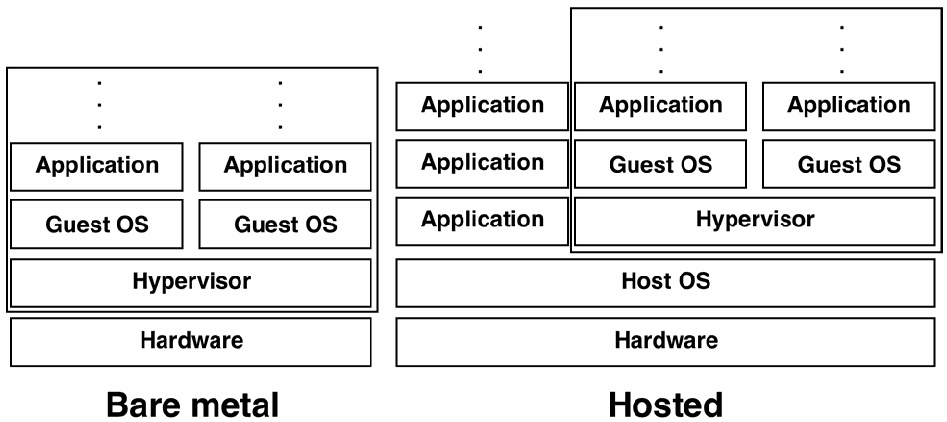
図2-1. 完全仮想化アーキテクチャ。層の積み重ね2つを左右に並べた図である。左の「Bare metal」(ベアメタル)は、最下部に「Hardware」(ハードウェア)、その上に「Hypervisor」(ハイパーバイザー)があり、その上に「Guest OS」(ゲストOS)と「Application」(アプリケーション)と縦の点からなる列が2つある。枠がHypervisorとその上のすべてを囲む。右の「Hosted」(ホスト型)は、最下部に「Hardware」、その上に「Host OS」(ホストOS)がある。Host OSの上の左側には「Application」の箱が3つ縦に並び、その上に縦の点がある。右側には枠で囲んだまとまりがあり、「Hypervisor」の上に「Guest OS」と「Application」と縦の点からなる列が2つある。
Figure 2-1. Full Virtualization Architectures
図2-1. 完全仮想化アーキテクチャ
Servers are most often virtualized on computers using bare metal virtualization. Desktops are most often virtualized on computers with hosted virtualization. In both bare metal and hosted virtualization, each guest OS appears to have its own hardware, like a regular computer. This includes:
サーバーは通常、ベアメタル仮想化を使用するコンピューター上で仮想化されます。デスクトップは通常、ホスト型仮想化を使用するコンピューター上で仮想化されます。ベアメタル仮想化でもホスト型仮想化でも、各ゲストOSには通常のコンピューターと同様に独自のハードウェアがあるように見えます。これには以下が含まれます。
■ CPU
■ CPU
■ Memory
■ メモリ
■ Storage (hard disk, and possibly floppy and CD-ROM drives)
■ ストレージ(ハードディスク、および場合によってはフロッピーディスクドライブとCD-ROMドライブ)
■ Storage controllers
■ ストレージコントローラー
■ Ethernet controllers
■ イーサネットコントローラー
■ Display and sound devices
■ ディスプレイおよびサウンドデバイス
■ Keyboard and mouse
■ キーボードおよびマウス
Many virtualization environments offer additional virtual hardware, such as USB controllers, parallel ports for printing, and serial ports. Some hypervisors allow paravirtualization of some hardware interfaces, most commonly the storage controller and Ethernet controllers. Some hypervisors also provide direct memory access (DMA) to high-speed storage controllers and Ethernet controllers, if such features are supported in the hardware CPU on which the hypervisor is running. DMA access from guest OSs can significantly increase the speed of disk and network access, although this type of acceleration prevents some useful virtualization features such as snapshots and moving guest OSs while they are running.
多くの仮想化環境では、USBコントローラー、印刷用のパラレルポート、シリアルポートなどの追加の仮想ハードウェアが提供されます。一部のハイパーバイザーは、いくつかのハードウェアインターフェースの準仮想化を可能にしており、最も一般的にはストレージコントローラーおよびイーサネットコントローラーが対象となります。一部のハイパーバイザーは、ハイパーバイザーが実行されているハードウェアCPUがその機能に対応している場合、高速ストレージコントローラーおよびイーサネットコントローラーへのダイレクト・メモリー・アクセス(DMA)も提供します。ゲストOSからのDMAアクセスは、ディスクおよびネットワークへのアクセス速度を大幅に向上させ得ますが、この種の高速化により、スナップショットや実行中のゲストOSの移動など、一部の有用な仮想化機能が利用できなくなります。
Deciding between bare metal and hosted virtualization—whether or not to have a host OS—is an important operational and security decision. Adding a hypervisor on top of a host OS adds more complexity and more vulnerabilities to the host. However, a hypervisor is much simpler and smaller than a host OS, so it provides a smaller target. Choosing bare metal virtualization by replacing a host OS with a hypervisor may improve security, depending on how well-secured the hypervisor is, while adding a hypervisor on top of a host OS tends to increase risk. Organizations should balance security and functionality when deciding whether or not a host OS should be used under a server or desktop virtualization solution. They should also take into account that bare metal hypervisors run on a much more limited range of hardware than hosted hypervisors; for example, bare metal hypervisors often work on only a limited number of Ethernet controllers and graphics cards.
ベアメタル仮想化とホスト型仮想化のどちらを選ぶか、すなわちホストOSを使用するかどうかは、運用上およびセキュリティ上の重要な判断です。ホストOS上にハイパーバイザーを追加すると、ホストの複雑さと脆弱性が増します。しかし、ハイパーバイザーはホストOSよりはるかに単純で小さいため、攻撃の標的としてはより小さくなります。ホストOSをハイパーバイザーに置き換えてベアメタル仮想化を選択すると、ハイパーバイザーがどれだけ適切に保護されているかによっては、セキュリティが向上する可能性があります。一方、ホストOS上にハイパーバイザーを追加すると、リスクが増す傾向にあります。組織は、サーバーまたはデスクトップ仮想化ソリューションの下でホストOSを使用すべきかどうかを決定する際、セキュリティと機能性のバランスを取るべきです。また、ベアメタル型ハイパーバイザーが動作するハードウェアの範囲はホスト型ハイパーバイザーよりはるかに限られている点も考慮すべきです。例えば、ベアメタル型ハイパーバイザーは、限られた数のイーサネットコントローラーおよびグラフィックスカードでしか動作しないことが多くあります。
Hardware emulation (sometimes called hardware translation) is a type of hosted virtualization. The primary difference is that in hardware emulation, the hypervisor provides different hardware interfaces from those provided by the physical hardware. Because the hypervisor in hardware emulation can simulate all of the hardware required by the guest OS, it can run unmodified OSs designed for platforms different from the host platform. For example, early versions of VirtualPC allowed users to run the Microsoft Windows OS on the PowerPC processor supported by the Apple MacOS platform. Similarly, Apple supplies the Rosetta software with its Intel Mac OS X platform, allowing programs designed for the PowerPC version of Mac OS X to run on the Intel Mac platform.
ハードウェアエミュレーション(ハードウェア変換と呼ばれることもある)は、ホスト型仮想化の一種です。主な違いは、ハードウェアエミュレーションでは、ハイパーバイザーが物理ハードウェアの提供するものとは異なるハードウェアインターフェースを提供する点にあります。ハードウェアエミュレーションのハイパーバイザーはゲストOSに必要なすべてのハードウェアをシミュレートできるため、ホストプラットフォームとは異なるプラットフォーム向けに設計された未変更のOSを実行できます。例えば、VirtualPCの初期バージョンでは、ユーザーはApple MacOSプラットフォームがサポートするPowerPCプロセッサ上でMicrosoft Windows OSを実行できました。同様に、AppleはIntel Mac OS XプラットフォームにRosettaソフトウェアを付属させて提供しており、PowerPC版Mac OS X向けに設計されたプログラムをIntel Macプラットフォーム上で実行できるようにしています。
2.3 Virtualizing Hardware
2.3 ハードウェアの仮想化
For full virtualization to be effective, the virtualized hardware presented to the guest OS must resemble physical hardware extremely closely. In addition, virtualization systems must offer additional features for the virtualized hardware to help it integrate well with the physical hardware in an organization’s network. This section discusses virtualized networking and storage, as well as how a guest OS is encapsulated.
完全仮想化を有効に機能させるには、ゲストOSに提示される仮想化ハードウェアが物理ハードウェアに極めてよく似ていなければなりません(must)。さらに、仮想化システムは、組織のネットワーク内で物理ハードウェアとうまく統合できるよう、仮想化ハードウェアに追加機能を提供しなければなりません(must)。本節では、仮想化ネットワークおよびストレージと、ゲストOSのカプセル化について説明します。
2.3.1 Virtualized Networking
2.3.1 仮想化ネットワーク
Full virtualization hypervisors can provide networking capabilities, allowing the individual guest OSs to communicate with one another while simultaneously limiting access to the external physical network. The network interfaces that the guest OSs see may be virtual, physical, or both. Typical hypervisors offer three primary forms of network access:
完全仮想化ハイパーバイザーは、個々のゲストOSが相互に通信できるようにしつつ、同時に外部の物理ネットワークへのアクセスを制限するネットワーク機能を提供できます(can)。ゲストOSから見えるネットワークインターフェースは、仮想、物理、またはその両方の場合があります(may)。一般的なハイパーバイザーは、主に次の3種類のネットワークアクセスを提供します。
■ Network Bridging. The guest OS is given direct access to the host’s network interface cards (NIC) independent of the host OS.
■ ネットワークブリッジ。ゲストOSには、ホストOSとは独立して、ホストのネットワークインターフェースカード(NIC)への直接アクセスが与えられます。
■ Network Address Translation (NAT). The guest OS is given a virtual NIC that is connected to a simulated NAT inside the hypervisor. As in a traditional NAT, all outbound network traffic is sent through the virtual NIC to the host OS for forwarding, usually to a physical NIC on the host system.
■ ネットワークアドレス変換(NAT)。ゲストOSには、ハイパーバイザー内のシミュレートされたNATに接続する仮想NICが与えられます。従来のNATと同様に、すべての送信ネットワークトラフィックは仮想NICを通じてホストOSに送られ、通常はホストシステム上の物理NICへ転送されます。
■ Host Only Networking. The guest OS is given a virtual NIC that does not directly route to a physical NIC. In this scenario, guest OSs can be configured to communicate with one another and, potentially, with the host OS.
■ ホストオンリーネットワーキング。ゲストOSには、物理NICへ直接ルーティングしない仮想NICが与えられます。この構成では、ゲストOSを、ゲストOS同士で、また場合によってはホストOSとも通信するように設定できます(can)。
When a number of guest OSs exist on a single host, the hypervisor can provide a virtual network for these guest OSs. The hypervisor may implement virtual switches, hubs, and other network devices. Using a hypervisor’s networking for communications between guests on a single host has the advantage of greatly increased speed because the packets never hit physical networking devices. Internal host-only networking can be done in many ways by the hypervisor. In some systems, the internal network looks like a virtual switch. Others use virtual LAN (VLAN) standards to allow better control of how the guest systems are connected. Most hypervisors also provide internal network address and port translation (NAPT) that acts like a virtual router with NAT.
1台のホスト上に複数のゲストOSが存在する場合、ハイパーバイザーはそれらのゲストOS向けに仮想ネットワークを提供できます(can)。ハイパーバイザーは仮想スイッチ、ハブ、その他のネットワーク機器を実装することがあります(may)。1台のホスト上のゲスト間通信にハイパーバイザーのネットワーク機能を使用すると、パケットが物理ネットワーク機器を通過しないため、速度が大幅に向上するという利点があります。ハイパーバイザーは内部ホストオンリーネットワークをさまざまな方法で実装できます(can)。一部のシステムでは、内部ネットワークは仮想スイッチのように見えます。他のシステムでは、ゲストシステムの接続方法をより適切に制御できるようにするため、仮想LAN(VLAN)規格が使用されます。ほとんどのハイパーバイザーは、NATを備えた仮想ルーターのように機能する内部ネットワークアドレス・ポート変換(NAPT)も提供します。
Networks that are internal to a hypervisor’s networking structure can pose an operational disadvantage, however. Many networks rely on tools that watch traffic as it flows across routers and switches; these tools cannot view traffic as it moves in a hypervisor’s network. There are some hypervisors that allow network monitoring, but this capability is generally not as robust as the tools that many organizations have come to expect for significant monitoring of physical networks. Some hypervisors provide APIs that allow a privileged VM to have full visibility to the network traffic. Unfortunately, these APIs may also provide additional ways for attackers to attempt to monitor network communications. Another concern with network monitoring through a hypervisor is the potential for performance degradation or denial of service conditions to occur for the hypervisor because of high volumes of traffic.
ただし、ハイパーバイザーのネットワーク構造内に閉じたネットワークには、運用上の不利な点があり得ます(can)。多くのネットワークでは、ルーターやスイッチを流れるトラフィックを監視するツールを利用していますが、そのようなツールでは、ハイパーバイザー内のネットワークを流れるトラフィックを確認できません。ネットワーク監視を可能にするハイパーバイザーもありますが、この機能は一般に、多くの組織が物理ネットワークの本格的な監視のために期待するようになったツールほど堅牢ではありません。一部のハイパーバイザーは、特権VMにネットワークトラフィックの完全な可視性を与えるAPIを提供します。残念ながら、これらのAPIは、攻撃者がネットワーク通信を監視しようとするための追加手段にもなり得ます(may)。ハイパーバイザーを介したネットワーク監視に関するもう1つの懸念は、大量のトラフィックによってハイパーバイザーの性能が低下したり、サービス拒否状態が発生したりする可能性です。
The security implications of networks internal to a hypervisor should not be minimized. For example, assume that an organization has two computers, one that acts as a public-facing web server and another that is an internal database server. The organization also monitors the switch that connects the two computers, watching for traffic that would indicate an attack on the database. If both of those servers were moved onto a single hypervisor, and the hypervisor’s virtual network was used for communications between the servers for increased efficiency, the ability to monitor all the traffic between the two systems would be lost unless the hypervisor itself can perform this monitoring that meets the organization’s security policies.
ハイパーバイザー内部ネットワークのセキュリティ上の影響を過小評価すべきではありません(should)。例えば、ある組織が2台のコンピューターを持ち、一方が外部公開Webサーバー、もう一方が内部データベースサーバーとして機能しているとします。組織は、2台を接続するスイッチを監視し、データベースへの攻撃を示すであろう(would)トラフィックを確認しています。この2台のサーバーを1台のハイパーバイザー上に移し、効率向上のためサーバー間通信にハイパーバイザーの仮想ネットワークを使用した場合、ハイパーバイザー自体が組織のセキュリティポリシーを満たす監視を実行できる(can)のでなければ、2つのシステム間の全トラフィックを監視する能力は失われます(would)。
To get around this loss of visibility, some organizations purposely expose network traffic between virtualized hosts to the physical network already in place in the organization. This requires the system on which the hypervisor is running to have multiple network interfaces, and this may significantly slow network communications as compared to a virtual-only network, but the advantage is that the organization does not need to change its security policies to gain the cost advantages of virtualization. Organizations should consider the tradeoffs between traffic being hidden within a hypervisor and the extra overhead and risk of exposing that traffic but being able to control it using the same tools already used for controlling other network traffic. See Section 3.5 for additional information.
この可視性の喪失を回避するため、仮想化されたホスト間のネットワークトラフィックを、組織にすでに設置されている物理ネットワークへ意図的に露出させる組織もあります。これには、ハイパーバイザーが稼働するシステムに複数のネットワークインターフェースが必要となり、また、仮想ネットワークのみの場合と比べてネットワーク通信が大幅に遅くなることがあります(may)。しかし、仮想化によるコスト上の利点を得るために、組織がセキュリティポリシーを変更する必要がない(need)という利点があります。組織は、トラフィックがハイパーバイザー内に隠れることと、そのトラフィックを露出させることによる追加のオーバーヘッドおよびリスクを負う代わりに、他のネットワークトラフィックの制御にすでに使用しているのと同じツールでそれを制御できることとのトレードオフを検討すべきです(should)。追加情報については第3.5節を参照してください。
2.3.2 Virtualized Storage
2.3.2 仮想化ストレージ
Hypervisor systems have many ways of simulating disk storage for guest OSs. All hypervisors, at a minimum, have virtual hard drives, while some of them also have more advanced virtual storage options. In addition, some hypervisors can use advanced storage interfaces on the host system, such as network-attached storage (NAS) and storage area networks (SAN) to present different storage options to the guest OSs. This section describes those options.
ハイパーバイザーシステムは、ゲストOS用のディスクストレージをシミュレートする方法を数多く備えています。最低限、すべてのハイパーバイザーに仮想ハードドライブがあり、一部にはより高度な仮想ストレージオプションもあります。さらに、一部のハイパーバイザーは、ネットワーク接続ストレージ(NAS)やストレージエリアネットワーク(SAN)など、ホストシステム上の高度なストレージインターフェースを使用して、ゲストOSにさまざまなストレージオプションを提示できます(can)。本節では、これらのオプションについて説明します。
All hypervisors in common use present the guest OSs with virtual hard drives though the use of disk images. A disk image is a file on the host that looks to the guest OS like an entire disk drive. Whatever the guest OS writes onto the virtual hard drive goes into the disk image. With hosted virtualization, the disk image appears in the host OS as a file or a folder, and it can be handled like other files and folders.
一般に使用されているすべてのハイパーバイザーは、ディスクイメージを使用してゲストOSに仮想ハードドライブを提示します。ディスクイメージとは、ゲストOSからはディスクドライブ全体のように見える、ホスト上のファイルです。ゲストOSが仮想ハードドライブに書き込む内容はすべて、ディスクイメージに格納されます。ホスト型仮想化では、ディスクイメージはホストOS上でファイルまたはフォルダーとして表示され、他のファイルやフォルダーと同様に扱うことができます(can)。
Most virtualization systems also allow a guest OS to access physical hard drives as if they were connected to the guest OS directly. This is different than using disk images in that a disk image is a virtual representation of a real drive. Direct access is common for floppy and CD-ROM drives that are attached to the host OS, so that a guest OS can, for example, install new software from a CD-ROM that is inserted in the host computer. Some hypervisors also allow a guest OS to connect to an entire physical hard drive. The main advantage of using physical hard drives is that accessing them is much faster than accessing disk images.
ほとんどの仮想化システムでは、ゲストOSが物理ハードドライブに直接接続されているかのように、そのドライブへアクセスすることもできます。これはディスクイメージの使用とは異なります。ディスクイメージは実ドライブを仮想的に表現したものです。ホストOSに接続されたフロッピーディスクドライブやCD-ROMドライブでは、ゲストOSが例えばホストコンピューターに挿入されたCD-ROMから新しいソフトウェアをインストールできる(can)ように、直接アクセスが一般的です。一部のハイパーバイザーでは、ゲストOSが物理ハードドライブ全体に接続することもできます。物理ハードドライブを使用する主な利点は、ディスクイメージにアクセスするよりもはるかに高速にアクセスできることです。
Many computers can access NAS and SAN systems. Some hypervisors can present these systems to the guest OSs as a NAS or SAN, while others can make those systems appear as virtual drives. This is an active area of development in the virtualization market, and new types of storage virtualization are being added to hypervisors frequently.
多くのコンピューターはNASおよびSANシステムにアクセスできます(can)。一部のハイパーバイザーは、これらのシステムをNASまたはSANとしてゲストOSに提示できる(can)一方、他のハイパーバイザーは、これらのシステムを仮想ドライブのように見せることができます(can)。これは仮想化市場で活発に開発が進んでいる分野であり、新しい種類のストレージ仮想化がハイパーバイザーに頻繁に追加されています。
The security implications of using virtual storage are essentially the same as using real storage. Access to the various types of storage that a guest OS has access to should be controlled as it would be if the storage were being used by a full computer. Of course, using disk backups as part of a security strategy is just as important with virtual computers as it is with non-virtual computers, so organizations should incorporate backups of virtualized storage into their backup policies. In addition, access to the virtual storage can be controlled at the host and VM level. Existing authentication and authorization mechanisms is leveraged to restrict user access to the file and object resources according to the organization policy.
仮想ストレージを使用する場合のセキュリティ上の影響は、基本的に実ストレージを使用する場合と同じです。ゲストOSがアクセスできる各種ストレージへのアクセスは、そのストレージが完全なコンピューターによって使用される場合に行うであろう(would)のと同様に制御すべきです(should)。当然ながら、セキュリティ戦略の一環としてディスクのバックアップを使用することは、仮想コンピューターでも非仮想コンピューターと同様に重要であるため、組織は仮想化ストレージのバックアップをバックアップポリシーに組み込むべきです(should)。さらに、仮想ストレージへのアクセスはホストレベルおよびVMレベルで制御できます(can)。組織のポリシーに従ってファイルおよびオブジェクトリソースへのユーザーアクセスを制限するために、既存の認証および認可メカニズムが活用されます。
2.3.3 Guest OS Images
2.3.3 ゲストOSイメージ
A full virtualization hypervisor encapsulates all of the components of a guest OS, including its applications and the virtual resources they use, into a single logical entity. An image is a file or a directory that contains, at a minimum, this encapsulated information. Images are stored on hard drives, and can be transferred to other systems the same way that any file can (note, however, that images are often many gigabytes in size). Some virtualization systems use a virtualization image metadata standard called the Open Virtualization Format (OVF)1 that supports interoperability for image metadata and components across virtualization solutions.
完全仮想化ハイパーバイザーは、アプリケーションおよびそれらが使用する仮想リソースを含め、ゲストOSのすべての構成要素を単一の論理エンティティにカプセル化します。イメージとは、少なくともこのカプセル化された情報を含むファイルまたはディレクトリです。イメージはハードドライブに保存され、他のあらゆるファイルと同じ方法で別のシステムに転送できます(can)(ただし、イメージは数ギガバイトに及ぶことが多い点に注意)。一部の仮想化システムは、仮想化ソリューション間でイメージのメタデータおよびコンポーネントの相互運用性をサポートする、Open Virtualization Format(OVF)1と呼ばれる仮想化イメージメタデータ規格を使用します。
A snapshot is a record of the state of a running image, generally captured as the differences between an image and the current state. For example, a snapshot would record changes within virtual storage, virtual memory, network connections, and other state-related data. Snapshots allow the guest OS to be suspended and subsequently resumed without having to shut down or reboot the guest OS. Many, but not all, virtualization systems can take snapshots.
スナップショットとは、実行中のイメージの状態を記録したもので、一般にイメージと現在の状態との差分として取得されます。例えば、スナップショットは、仮想ストレージ、仮想メモリ、ネットワーク接続、その他の状態関連データの変更を記録します(would)。スナップショットを使うと、ゲストOSをシャットダウンまたは再起動せずに一時停止し、その後再開できます。すべてではありませんが、多くの仮想化システムでスナップショットを取得できます(can)。
On some hypervisors, snapshots of the guest OS can even be resumed on a different host. While a number of issues may be introduced to handle real-time migration, including the transfer delay and any differences that may exist between the two physical servers (e.g., IP address, number of processors or hard disk space), most live-migration solutions provide mechanisms to resolve these issues. Should the target system use the same virtualization product, many of these issues will not arise. However, live migration across heterogeneous hypervisors may introduce potential configuration errors that may affect the security of the guest OS.
一部のハイパーバイザーでは、ゲストOSのスナップショットを別のホスト上で再開することさえできます(can)。リアルタイム移行に対応する際には、転送遅延や、2台の物理サーバー間に存在し得る(may)差異(例えば、IPアドレス、プロセッサ数、ハードディスク容量)など、いくつかの問題が生じる場合がある(may)が、ほとんどのライブマイグレーションソリューションは、これらの問題を解決する仕組みを提供しています。移行先システムが同じ仮想化製品を使用する場合、これらの問題の多くは発生しません。ただし、異種ハイパーバイザー間のライブマイグレーションでは、ゲストOSのセキュリティに影響する可能性のある(may)構成エラーが生じる場合があります(may)。
2.4 Full Virtualization Use Cases
2.4 完全仮想化のユースケース
Full virtualization solutions have two major use cases: server virtualization and desktop virtualization. These are described below.
完全仮想化ソリューションには、サーバー仮想化とデスクトップ仮想化という2つの主要なユースケースがあります。以下でこれらについて説明します。
2.4.1 Server Virtualization
2.4.1 サーバー仮想化
Virtualizing a server can provide some security benefits. Running a server within a hypervisor provides a sandbox, which can limit the impact of a compromise, and the hypervisor might provide a smaller attack surface than a host operating system would, reducing the possibility of expanding a successful compromise outside the guest OS. However, server virtualization does not prevent attackers from compromising the server through vulnerabilities in the server application or the guest OS, nor does it prevent attackers from directly compromising the host OS (if present), such as attacking the host OS’s network services from another host on the same subnet. Most importantly, virtualizing multiple servers on the same host tends to negatively affect security because of the logical proximity of the servers and the potential impact of a single compromise affecting all the servers on a host.
サーバーを仮想化すると、セキュリティ上の利点が得られる場合があります(can)。ハイパーバイザー内でサーバーを実行するとサンドボックスが提供され、侵害の影響を限定できます(can)。また、ハイパーバイザーは、ホストオペレーティングシステムの場合よりも小さい攻撃対象領域を提供する可能性があり(might)、成功した侵害がゲストOSの外へ拡大する可能性を低減します。しかし、サーバー仮想化は、攻撃者がサーバーアプリケーションまたはゲストOSの脆弱性を通じてサーバーを侵害することを防止せず、また、同じサブネット上の別のホストからホストOSのネットワークサービスを攻撃するなどして、攻撃者が(存在する場合)ホストOSを直接侵害することも防止しません。最も重要なのは、複数のサーバーを同じホスト上で仮想化すると、サーバー間の論理的な近接性と、単一の侵害がホスト上の全サーバーに影響を及ぼす可能性により、セキュリティに悪影響を与える傾向があることです。
The discussions below address common reasons for using single server and multiple server virtualization.
以下の説明では、単一サーバーおよび複数サーバーの仮想化を使用する一般的な理由を取り上げます。
2.4.1.1 Single Server Virtualization
2.4.1.1 単一サーバーの仮想化
A common use case for single server virtualization is supporting a service that only runs on a legacy OS that cannot be properly secured on its own. For example, common security controls may not be available for the legacy OS. If the service and legacy OS are run as a guest OS, the hypervisor or host OS may be able to monitor the guest OS’s actions using various security controls that the legacy OS itself cannot. Also, an additional layer of authentication and auditing could be added, such as at the host OS level. Such monitoring can be built into the organization’s security policies.
単一サーバー仮想化の一般的なユースケースは、それ自体では適切に保護できないレガシーOSでしか動作しないサービスをサポートすることです。例えば、そのレガシーOSでは一般的なセキュリティ管理策を利用できない場合があります(may)。このサービスとレガシーOSをゲストOSとして実行すれば、ハイパーバイザーまたはホストOSが、レガシーOS自体では利用できない各種セキュリティ管理策を使って、ゲストOSの動作を監視できる場合があります(may)。さらに、ホストOSレベルなどで、認証および監査の層を追加することもできます(could)。このような監視は組織のセキュリティポリシーに組み込むことができます(can)。
2.4.1.2 Multiple Server Virtualization
2.4.1.2 複数サーバーの仮想化
For many years, organizations have typically deployed each important service to its own dedicated host so as to better isolate each server from the others and prevent a compromise of one server or host from granting control to other servers. However, having many hosts is costly (space, power consumption, maintenance, hardware, etc.), so organizations have been adopting server virtualization so that they can host multiple services on a single host, with each service in a separate guest OS to enforce security requirements. When a service experiences higher-than-normal use, the hypervisor can coordinate requests among guest OSs and other hypervisors to ensure that resources are properly distributed. Services that are rarely used can be kept in a saved state by the guest OS and loaded by the guest OS on demand. This frees up resources for other guest OSs. Also, new servers can be deployed without the need to configure and deploy as much new dedicated hardware.
長年、組織は通常、各重要サービスをそれぞれ専用のホストに導入することで、各サーバーを他のサーバーからより適切に分離し、1台のサーバーまたはホストの侵害によって他のサーバーの制御が奪われるのを防いできました。しかし、多数のホストを保有すると(設置スペース、消費電力、保守、ハードウェアなどの面で)コストがかかるため、組織は、セキュリティ要件を強制するために各サービスを別個のゲストOSに置きつつ、単一ホストで複数のサービスをホストできる(can)ようにサーバー仮想化を採用してきました。あるサービスの使用率が通常より高くなると、ハイパーバイザーはゲストOSおよび他のハイパーバイザーの間で要求を調整し、リソースが適切に配分されるようにできます(can)。使用頻度の低いサービスは、ゲストOSによって保存状態に保ち、必要に応じてゲストOSによって読み込むことができます(can)。これにより、他のゲストOS向けのリソースが解放されます。また、それほど多くの新たな専用ハードウェアを構成・導入する必要なく、新しいサーバーを導入できます(can)。
Another benefit for data centers is that a hypervisor can present resources to the guest OSs as a single entity, such as showing multiple hard drives as a single storage entity. This allows individual resources to be added or removed from the system transparently, without modifying individual guest OSs. A single read-only image can be shared among many servers. Additionally, there are benefits for configuration management, because each guest OS can be derived from a parent guest OS, providing a consistent security baseline and reducing the time and effort required to configure and patch individual servers. Organizations taking advantage of virtualization may benefit from improved incident handling; servers can be reverted to an uninfected state quickly, while the complete state (including RAM) of the compromised guest OS can be saved in a snapshot for later examination.
データセンターにとってのもう1つの利点は、ハイパーバイザーがゲストOSにリソースを単一のエンティティとして提示できる(can)ことです。例えば、複数のハードドライブを単一のストレージエンティティとして見せます。これにより、個々のゲストOSを変更することなく、個々のリソースを透過的にシステムに追加またはシステムから削除できるようになります。単一の読み取り専用イメージを多数のサーバーで共有できます(can)。さらに、各ゲストOSを親ゲストOSから派生させることができ(can)、それによって一貫したセキュリティベースラインが提供され、個々のサーバーの構成およびパッチ適用に要する時間と労力が削減されるため、構成管理にも利点があります。仮想化を利用する組織は、インシデント対応の改善という恩恵を受ける可能性があります(may)。サーバーを迅速に未感染状態に戻せる(can)一方、侵害されたゲストOSの完全な状態(RAMを含む)を、後の調査のためにスナップショットに保存できます(can)。
However, there can be substantial security risks in consolidating multiple services within a single hypervisor. For example, a critical service is usually placed on its own dedicated host so that the host can be secured specifically for that service and so that a compromise of any other service would not impact the critical service. By placing a critical service on a host with other services, both of those goals are impacted. It is particularly risky to place multiple services on a host if they have significantly different security needs. For example, suppose that one service is considered critical and is secured very strongly, while another service on the same host is considered low-impact and is secured relatively weakly. An attacker wanting to compromise the critical service could compromise the low-impact service and use the fact that it is local on the virtual network to attempt to access the critical service or to compromise the hypervisor and thus gain access to the critical service. Organizations that have policies relating to allocation of computer resources should consider virtualization in such policies.
ただし、複数のサービスを単一のハイパーバイザーに統合すると、重大なセキュリティリスクが生じ得ます(can)。例えば、重要なサービスは通常、専用のホストに配置されます。これは、そのサービスに特化してホストを保護できる(can)ようにし、かつ他のいずれかのサービスが侵害されても重要なサービスに影響が及ばない(would)ようにするためです。重要なサービスを他のサービスと同じホストに配置すると、これら2つの目標の両方が損なわれます。セキュリティ上のニーズが大きく異なる複数のサービスを1台のホストに置くのは、特に危険です。例えば、あるサービスは重要と見なされて非常に強固に保護されている一方、同じホスト上の別のサービスは影響度が低いと見なされ、比較的弱く保護されているとします。重要なサービスの侵害を狙う攻撃者は、影響度の低いサービスを侵害し、それが仮想ネットワーク上でローカルにあることを利用して、重要なサービスへのアクセスを試みたり、ハイパーバイザーを侵害することで重要なサービスへのアクセスを得たりする可能性があります(could)。コンピューターリソースの割り当てに関するポリシーを定めている組織は、そのようなポリシーで仮想化を考慮すべきです(should)。
When multiple server virtualization is used for running servers on many hosts and for moving servers from host to host based on changing resource needs, it can be called cloud computing. Cloud computing is “a model for enabling convenient, on-demand network access to a shared pool of configurable computing resources (e.g., networks, servers, storage, applications, and services) that can be rapidly provisioned and released with minimal management effort or service provider interaction.”2 Full virtualization is a core enabling technology for cloud infrastructure as a service architectures. NIST describes cloud computing and related topics in detail at http://csrc.nist.gov/groups/SNS/cloud-computing/. Further discussion of cloud computing is outside the scope of this document.
複数サーバーの仮想化を、多数のホスト上でサーバーを実行し、リソース需要の変化に応じてホスト間でサーバーを移動するために使用する場合、それはクラウドコンピューティングと呼ぶことができます(can)。クラウドコンピューティングとは、「最小限の管理労力またはサービスプロバイダーとのやり取りで迅速にプロビジョニングおよび解放できる(can)、構成可能なコンピューティングリソース(例えば、ネットワーク、サーバー、ストレージ、アプリケーションおよびサービス)の共有プールへの、便利でオンデマンドなネットワークアクセスを可能にするモデル」です。2完全仮想化は、クラウドのInfrastructure as a Service(サービスとしてのインフラストラクチャ)アーキテクチャを実現する中核技術です。NISTは、クラウドコンピューティングおよび関連トピックについて、http://csrc.nist.gov/groups/SNS/cloud-computing/ で詳しく説明しています。クラウドコンピューティングに関するこれ以上の議論は、本書の適用範囲外です。
2.4.2 Desktop Virtualization
2.4.2 デスクトップ仮想化
One of the most common reasons for using desktop virtualization is to allow a user to run applications for different OSs on a single host. Without virtualization, this would be accomplished by using multiple devices, each with a different OS, or by configuring a single device to boot using multiple OSs and using one OS (and application) at a time. Desktop virtualization allows users to access both OSs simultaneously on one computer.
デスクトップ仮想化を使用する最も一般的な理由の1つは、ユーザーが1台のホスト上で異なるOS向けのアプリケーションを実行できるようにすることです。仮想化がなければ、これは、それぞれ異なるOSを搭載した複数のデバイスを使用するか、1台のデバイスを複数のOSで起動できるよう構成して一度に1つのOS(およびアプリケーション)を使用することで実現することになります(would)。デスクトップ仮想化を使うと、ユーザーは1台のコンピューター上で両方のOSに同時にアクセスできます。
Another common use for desktop virtualization is allowing organizations to more tightly control the environment of its users. The organization stores a known-good image that contains the OS and all the applications needed for the user. The user loads this image using hosted virtualization and does all their work within this image, not on the host OS, then exits the guest OS. Later the user restarts the guest OS, causing any previous changes to the guest OS to be lost. The advantage of this quit-and-restart strategy is that malicious changes that have been introduced to the OS or applications are erased by quitting.
デスクトップ仮想化のもう1つの一般的な用途は、組織がユーザーの環境をより厳密に制御できるようにすることです。組織は、OSとユーザーに必要なすべてのアプリケーションを含む、正常と確認されたイメージを保存します。ユーザーはホスト型仮想化を使用してこのイメージを読み込み、ホストOS上ではなくイメージ内ですべての作業を行った後、ゲストOSを終了します。その後、ユーザーがゲストOSを再起動すると、ゲストOSへの以前の変更はすべて失われます。この終了・再起動方式の利点は、OSまたはアプリケーションに加えられた悪意ある変更が、終了によって消去されることです。
With desktop virtualization, the user’s data is normally stored on the host or on the network; otherwise, it would be lost each time the user quits from the virtualization system. This aspect of desktop virtualization can be the most frustrating and complicated for users; it is quite easy to store new documents on what appears to be the correct place, only to discover later that the document was lost because it was stored in the wrong place. Some desktop virtualization systems have methods to deal with making sure that users’ data is correctly stored before quitting, but these programs are not foolproof. For example, many Windows programs store valuable information in the Windows Registry, and such data is often hard to find and back up correctly. Organizations should test the data backup facilities of any desktop virtualization system they use for all software that the desktop users are expected to use.
デスクトップ仮想化では、ユーザーのデータは通常ホストまたはネットワーク上に保存されます。そうでなければ、ユーザーが仮想化システムを終了するたびにデータが失われます(would)。この点は、ユーザーにとってデスクトップ仮想化の最も苛立たしく複雑な側面となり得ます(can)。正しい保存先に見える場所へ新しい文書を保存したつもりでも、誤った場所に保存したため後で文書が失われていたと判明することは容易に起こります。一部のデスクトップ仮想化システムには、終了前にユーザーデータが正しく保存されていることを確認する方法がありますが、これらのプログラムは完全ではありません。例えば、多くのWindowsプログラムは貴重な情報をWindowsレジストリに保存しており、そのようなデータは見つけて正しくバックアップするのが難しいことが多くあります。組織は、使用するあらゆるデスクトップ仮想化システムのデータバックアップ機能を、デスクトップユーザーが使用する予定のすべてのソフトウェアについてテストすべきです(should)。
3. Virtualization Security Overview
3. 仮想化セキュリティの概要
Migrating computing resources to a virtualized environment has little or no effect on most of the resources’ vulnerabilities and threats. For example, if a service has inherent vulnerabilities and that service is moved from a non-virtualized server to a virtualized server, the service is still just as vulnerable to exploitation. However, the use of virtualization may help reduce the impact of such exploitation—but virtualization may also provide additional attack vectors, thus increasing the likelihood of successful attacks. Many of the features of virtualization offer both benefits and disadvantages to security.
コンピューティングリソースを仮想化環境へ移行しても、それらのリソースの脆弱性および脅威の大半には、ほとんど、またはまったく影響しません。例えば、あるサービスに固有の脆弱性があり、そのサービスを非仮想化サーバーから仮想化サーバーへ移した場合でも、そのサービスは依然として同じ程度に悪用されやすい傾向があります。しかし、仮想化を使用すると、そのような悪用の影響を軽減できる場合があります(may)。一方で、仮想化により追加の攻撃経路が生まれ、攻撃が成功する可能性が高まる場合もあります(may)。仮想化の機能の多くは、セキュリティに対して利点と欠点の両方をもたらします。
This section describes these security implications. Section 3.1 discusses the isolation of guest OSs from each other and the underlying hypervisor and host OS. Section 3.2 explains the purpose of and mechanisms for guest OS monitoring. Section 3.3 discusses image and snapshot management.
本節では、これらのセキュリティ上の影響について説明します。第3.1節では、ゲストOS相互間、および基盤となるハイパーバイザーとホストOSからのゲストOSの分離を論じます。第3.2節では、ゲストOS監視の目的とメカニズムを説明します。第3.3節では、イメージおよびスナップショットの管理を論じます。
3.1 Guest OS Isolation
3.1 ゲストOSの分離
The hypervisor is responsible for managing guest OS access to hardware (e.g., CPU, memory, storage). The hypervisor partitions these resources so that each guest OS can access its own resources but cannot encroach on the other guest OSs’ resources or any resources not allocated for virtualization use. This prevents unauthorized access to resources and also helps prevent one guest OS from injecting malware into another, such as infecting a guest OS’s files or placing malware code into another guest OS’s memory. Separately, partitioning can also reduce the threat of denial of service conditions caused by excess resource consumption in other guest OSs on the same hypervisor.
ハイパーバイザーは、ゲストOSによるハードウェア(例えば、CPU、メモリ、ストレージ)へのアクセスを管理する責任を負います。ハイパーバイザーは、各ゲストOSが自身のリソースにはアクセスできる(can)一方、他のゲストOSのリソースや仮想化用途に割り当てられていないリソースには侵入できないよう、これらのリソースを分割します。これにより、リソースへの不正アクセスを防ぐとともに、あるゲストOSが別のゲストOSにマルウェアを注入すること、例えばゲストOSのファイルに感染させたり、別のゲストOSのメモリにマルウェアコードを配置したりすることの防止にも役立ちます。これとは別に、分割は、同じハイパーバイザー上の他のゲストOSが過剰にリソースを消費することによって生じるサービス拒否状態の脅威も軽減できます(can)。
Resources may be partitioned physically or logically. In physical partitioning, the hypervisor assigns separate physical resources to each guest OS, such as disk partitions, disk drives, and network interface cards. Logical partitioning may divide resources on a single host or across multiple hosts as in a pool of resources with the same security impact level categorization, allowing multiple guest OSs to share the same physical resources, such as processors and RAM, with the hypervisor mediating access to the resources. Physical partitioning sets hard limits on resources for each guest OS because unused capacity from one resource may not be accessed by any other guest OS. However, having physical separation for resources may provide stronger security and improved performance than logical partitioning. Many virtualization systems can do both physical and logical partitioning. Some organizations have policies about which application data can physically reside on drives with the data of other applications, and such policies should take into account physical and logical partitioning in hypervisors.
リソースは物理的または論理的に分割できます(may)。物理分割では、ハイパーバイザーがディスクパーティション、ディスクドライブ、ネットワークインターフェースカードなど、個別の物理リソースを各ゲストOSに割り当てます。論理分割では、単一ホスト上または複数ホストにまたがってリソースを分割できます(may)。後者の例として、同じセキュリティ影響度区分のリソースプールがあります。論理分割により、ハイパーバイザーがアクセスを仲介しながら、複数のゲストOSがプロセッサやRAMなど同じ物理リソースを共有します。物理分割では、あるリソースの未使用容量を他のゲストOSが利用できない(may)ため、各ゲストOSのリソースに厳格な上限が設定されます。しかし、リソースを物理的に分離すると、論理分割より強固なセキュリティと優れた性能が得られる場合があります(may)。多くの仮想化システムは、物理分割と論理分割の両方を実行できます(can)。一部の組織は、あるアプリケーションのデータを他のアプリケーションのデータと同じドライブに物理的に格納できる(can)かどうかについてポリシーを定めており、そのようなポリシーではハイパーバイザーの物理分割と論理分割を考慮すべきです(should)。
Having separate partitions for resource is an important part of isolating guest OSs. Isolation also involves limiting guest OS communications and the access that each guest OS has to the other guest OSs, to the hypervisor, and to the host OS (if present). Hypervisors can theoretically support a level of logical isolation nearly equivalent to physical isolation, mediating all communications from each guest OS to have full control over each guest OS’s actions. Hypervisors can permit interactions between guest OSs as needed, such as allowing two desktop OSs to share a file system. Hypervisors can also dynamically alter isolation for each guest OS as needed—for example, enabling and disabling networking at specific times. Isolation has obvious security benefits, but it can also increase the reliability of a host by preventing actions in one guest OS from directly affecting another. For example, if one guest OS crashes because of an application fault or an attack, the other guest OSs on that host are unlikely to be affected. Isolating each guest OS from the others and restricting what resources they can access and what privileges they have is also known as sandboxing.
リソース用の別個のパーティションを設けることは、ゲストOSの分離における重要な要素です。分離には、ゲストOSの通信、および各ゲストOSが他のゲストOS、ハイパーバイザー、ホストOS(存在する場合)に対して持つアクセスを制限することも含まれます。ハイパーバイザーは理論上、各ゲストOSからのすべての通信を仲介して各ゲストOSの動作を完全に制御することにより、物理分離とほぼ同等の水準の論理分離をサポートできます(can)。ハイパーバイザーは、例えば2つのデスクトップOSにファイルシステムを共有させるなど、必要に応じてゲストOS間の相互作用を許可できます(can)。また、特定の時間にネットワーキングを有効化または無効化するなど、必要に応じて各ゲストOSの分離を動的に変更することもできます(can)。分離には明らかなセキュリティ上の利点がありますが、あるゲストOS内の動作が別のゲストOSに直接影響することを防ぐことで、ホストの信頼性を高めることもできます(can)。例えば、アプリケーション障害や攻撃によって1つのゲストOSがクラッシュしても、そのホスト上の他のゲストOSが影響を受ける可能性は低いです。各ゲストOSを他から分離し、アクセスできる(can)リソースと保有する権限を制限することは、サンドボックス化とも呼ばれます。
Another motivation for isolating guest OSs from each other and the underlying hypervisor and host OS is the mitigation of side-channel attacks. These attacks exploit the physical properties of hardware to reveal information about usage patterns for memory access, CPU use, and other resources. A common goal of these attacks is to reveal cryptographic keys. These attacks are considered difficult, usually requiring direct physical access to the host.
ゲストOSを相互に、また基盤となるハイパーバイザーおよびホストOSから分離するもう1つの動機は、サイドチャネル攻撃の緩和です。これらの攻撃は、ハードウェアの物理的特性を悪用して、メモリアクセス、CPU使用、その他のリソースの利用パターンに関する情報を明らかにします。これらの攻撃の一般的な目的は暗号鍵を明らかにすることです。これらの攻撃は困難と見なされており、通常、ホストへの直接的な物理アクセスを必要とします。
Attackers may attempt to break out of a guest OS so that they can access the hypervisor, other guest OSs, or the underlying host OS. Breaking out of a guest OS is also known as escape. If an attacker can successfully escape a guest OS and gain access to the hypervisor, the attacker might be able to compromise the hypervisor and gain control over all of its guest OSs. So the hypervisor provides a single point of security failure for all the guest OSs; a single breach of the hypervisor places all the guest OSs at high risk.
攻撃者は、ハイパーバイザー、他のゲストOS、または基盤となるホストOSにアクセスできる(can)ようにするため、ゲストOSからの脱出を試みることがあります(may)。ゲストOSからの脱出はエスケープとも呼ばれます。攻撃者がゲストOSからのエスケープに成功し(can)、ハイパーバイザーへのアクセスを得た場合、攻撃者はハイパーバイザーを侵害し、そのすべてのゲストOSを制御できる可能性があります(might)。したがって、ハイパーバイザーはすべてのゲストOSにとってセキュリティ上の単一障害点となります。ハイパーバイザーが一度侵害されるだけで、すべてのゲストOSが高いリスクにさらされます。
Guest OSs are often not completely isolated from each other and from the host OS because that would prevent necessary functionality. For example, many hosted virtualization solutions provide mechanisms called guest tools through which a guest OS can access files, directories, the copy/paste buffer, and other resources on the host OS or another guest OS. These communication mechanisms can inadvertently serve as an attack vector, such as transmitting malware or permitting an attacker to gain access to particular resources. Bare metal virtualization software does not offer such sharing capabilities.
ゲストOSは、相互に、またホストOSから完全には分離されていないことが多くあります。完全に分離すると必要な機能が妨げられてしまう(would)ためです。例えば、多くのホスト型仮想化ソリューションはゲストツールと呼ばれる仕組みを提供しており、これを通じてゲストOSはホストOSまたは別のゲストOS上のファイル、ディレクトリ、コピー/貼り付けバッファー、その他のリソースにアクセスできます(can)。これらの通信メカニズムは、マルウェアを伝送したり、攻撃者が特定のリソースへのアクセスを得ることを許したりするなど、意図せず攻撃経路となる可能性があります(can)。ベアメタル仮想化ソフトウェアは、このような共有機能を提供しません。
3.2 Guest OS Monitoring
3.2 ゲストOSの監視
The hypervisor is fully aware of the current state of each guest OS it controls. As such, the hypervisor may have the ability to monitor each guest OS as it is running, which is known as introspection. Introspection can provide full auditing capabilities that may otherwise be unavailable. Monitoring capabilities provided through introspection can include network traffic, memory, processes, and other elements of a guest OS. For many virtualization products, the hypervisor can incorporate additional security controls or interface with external security controls and provide information to them that was gathered through introspection. Examples include firewalling, intrusion detection, and access control. Many products also allow the security policy being enforced through hypervisor-based security controls to be moved as a guest OS is migrated from one physical host to another.
ハイパーバイザーは、自身が制御する各ゲストOSの現在の状態を完全に把握しています。そのため、ハイパーバイザーは、実行中の各ゲストOSを監視する能力を持つ場合があり(may)、これはイントロスペクションと呼ばれます。イントロスペクションは、他の方法では利用できない可能性のある(may)完全な監査機能を提供できます(can)。イントロスペクションを通じて提供される監視機能には、ネットワークトラフィック、メモリ、プロセス、その他のゲストOS要素を含めることができます(can)。多くの仮想化製品では、ハイパーバイザーが追加のセキュリティ管理策を組み込むか、外部のセキュリティ管理策と連携して、イントロスペクションで収集した情報をそれらに提供できます(can)。その例には、ファイアウォール機能、侵入検知、アクセス制御があります。多くの製品では、ゲストOSがある物理ホストから別の物理ホストへ移行される際に、ハイパーバイザーベースのセキュリティ管理策によって適用されているセキュリティポリシーを移動させることもできます。
Network traffic monitoring is particularly important when networking is being performed between two guest OSs on the host or between a guest OS and the host OS. Under typical network configurations, this traffic does not pass through network-based security controls, so host-based security controls should be used to monitor the traffic instead.
ホスト上の2つのゲストOS間、またはゲストOSとホストOS間でネットワーク通信が行われる場合、ネットワークトラフィックの監視は特に重要です。一般的なネットワーク構成では、このトラフィックはネットワークベースのセキュリティ管理策を通過しないため、代わりにホストベースのセキュリティ管理策を使用してトラフィックを監視すべきです(should)。
3.3 Image and Snapshot Management
3.3 イメージおよびスナップショットの管理
Creating guest machine images and snapshots does not affect the vulnerabilities within them, such as the vulnerabilities in the guest OSs, services, and applications. However, images and snapshots do affect security in several ways, some positive and some negative, and they also affect IT operations.
ゲストマシンのイメージおよびスナップショットを作成しても、ゲストOS、サービス、アプリケーションの脆弱性など、それらに含まれる脆弱性には影響しません。しかし、イメージとスナップショットは、肯定的な面と否定的な面の両方で、いくつかの方法によりセキュリティに影響し、IT運用にも影響します。
Note that one of the biggest security issues with images and snapshots is that they contain sensitive data (such as passwords, personal data, and so on) just like a physical hard drive. Because it is easier to move around an image or snapshot than a hard drive, it is more important to think about the security of the data in that image or snapshot. Snapshots can be more risky than images because snapshots contain the contents of RAM memory at the time that the snapshot was taken, and this might include sensitive information that was not even stored on the drive itself.
なお、イメージおよびスナップショットに関する最大のセキュリティ問題の1つは、物理ハードドライブと同様に、機密データ(パスワードや個人データなど)を含む点です。ハードドライブよりイメージやスナップショットの方が容易に持ち運べるため、そのイメージやスナップショットに含まれるデータのセキュリティを検討することがより重要です。スナップショットには取得時点のRAMの内容が含まれ、ドライブ自体には保存すらされていなかった機密情報がそこに含まれる場合がある(might)ため、スナップショットはイメージよりリスクが高くなり得ます(can)。
An operating system and applications can be installed, configured, secured, and tested in a single image and that image then distributed to many hosts. This can save considerable time, providing additional time for the contents of the image to be secured more effectively, and also improve the consistency and strength of security across hosts. However, because images can be distributed and stored easily, they need to be carefully protected against unauthorized access, modification, and replacement. Some organizations need to have a small number of known-good images of guest OSs that differ, for example, based on the application software that is installed.
オペレーティングシステムとアプリケーションを単一のイメージ内でインストール、構成、保護、テストし、そのイメージを多数のホストに配布できます(can)。これにより大幅に時間を節約でき(can)、イメージの内容をより効果的に保護するための時間が生まれるとともに、ホスト間のセキュリティの一貫性と強度も高められます。しかし、イメージは容易に配布および保存できる(can)ため、不正なアクセス、改変、置換から慎重に保護する必要があります。一部の組織では、例えばインストールされているアプリケーションソフトウェアに応じて異なる、少数の正常と確認されたゲストOSイメージを保持する必要があります。
As the use of server and desktop virtualization grows within an organization, the management of images can become a significant challenge. Some virtualization products offer management solutions that can examine stored images and update them as needed, such as applying patches and making security configuration changes, but other products offer no way of applying updates other than loading each image. For these products, the longer an image is stored without running it, the more vulnerabilities it is likely to contain when it is loaded again. It may be necessary to track all images and ensure that each non-archival image is periodically updated. Tracking images may also be a significant problem, particularly if users and administrators are able to create their own images. These images may also not be secured properly, especially if they are not based on a security baseline (e.g., the one provided by a different pre-secured image). This could increase the risk of compromise.
組織内でサーバーおよびデスクトップ仮想化の利用が拡大するにつれて、イメージの管理は大きな課題となり得ます(can)。一部の仮想化製品は、保存されたイメージを検査し、パッチの適用やセキュリティ構成の変更など、必要に応じてイメージを更新できる(can)管理ソリューションを提供しますが、他の製品は各イメージを読み込む以外に更新を適用する方法を提供しません。これらの製品では、イメージを実行せずに保存しておく期間が長いほど、再度読み込んだときに含まれている脆弱性が多くなる可能性が高いです。すべてのイメージを追跡し、アーカイブ用ではない各イメージが定期的に更新されるようにすることが必要となる場合があります(may)。特にユーザーや管理者が独自のイメージを作成できる場合、イメージの追跡も大きな問題となり得ます(may)。これらのイメージは、特にセキュリティベースライン(例えば、別の事前保護済みイメージが提供するもの)に基づいていない場合、適切に保護されていないこともあります(may)。これは侵害のリスクを高める可能性があります(could)。
Another potential problem with increasing the use of virtualization in particular is the proliferation of images, also known as sprawl. It is easy to create a new image—it can often be done in just a few minutes, albeit without any consideration of security—so unnecessary images may be created and run. Each additional image running is another potential point of compromise for an attacker. Also, each additional image is another image that has to have its security maintained. Therefore, organizations should minimize the creation, storage, and use of unnecessary images. Organizations should consider implementing formal image management processes that govern image creation, security, distribution, storage, use, retirement, and destruction, particularly for server virtualization. Similar consideration should be given to snapshot management. In some cases, organizations have policies to not allow storage of snapshots because of the risk of malware from infected systems being stored in snapshots and later reloaded.
特に仮想化の利用拡大に伴うもう1つの潜在的問題は、スプロールとも呼ばれるイメージの増殖です。新しいイメージの作成は容易であり、セキュリティは一切考慮されないものの、多くの場合わずか数分で実施できます(can)。そのため、不要なイメージが作成され実行される可能性があります(may)。実行中のイメージが1つ増えるごとに、攻撃者に侵害される可能性のある箇所が1つ増えます。また、イメージが1つ増えるごとに、セキュリティを維持しなければならないイメージも1つ増えます。したがって、組織は不要なイメージの作成、保存、使用を最小限に抑えるべきです(should)。組織は、特にサーバー仮想化について、イメージの作成、セキュリティ確保、配布、保存、使用、廃止、破棄を統制する正式なイメージ管理プロセスの導入を検討すべきです(should)。スナップショット管理についても同様の検討を行うべきです(should)。感染したシステムのマルウェアがスナップショットに保存され、後で再読み込みされるリスクがあるため、スナップショットの保存を認めないポリシーを設けている組織もあります。
Image management can provide significant security and operational benefits to an organization. For example, if the contents of an image become compromised, corrupted, or otherwise damaged, the image can quickly be replaced with a known good image. Also, snapshots can serve as backups, permitting the rapid recovery of information added to the guest OS since the original image was deployed. One of the drawbacks associated with this type of backup is that incremental or differential backups of the system may not be feasible unless those backups are supported by the hypervisor. If a modification is made to the guest OS after a snapshot has been captured, the original snapshot will not include the modification, and a new snapshot will need to be applied. Because of this, snapshot management needs to be considered as part of image management.
イメージ管理は、組織に大きなセキュリティ上および運用上の利点をもたらし得ます(can)。例えば、イメージの内容が侵害、破損、またはその他の理由で損傷した場合、正常と確認されたイメージにすぐ置き換えられます(can)。また、スナップショットはバックアップとして機能し、元のイメージの導入後にゲストOSへ追加された情報を迅速に復旧できます(can)。この種のバックアップの欠点の1つは、ハイパーバイザーがサポートしていない限り、システムの増分バックアップまたは差分バックアップが実行できない(may)場合があることです。スナップショット取得後にゲストOSが変更された場合、元のスナップショットにはその変更が含まれない(will)ため、新しいスナップショットを適用する必要が生じます(will)。このため、スナップショット管理はイメージ管理の一環として考慮する必要があります(need)。
If an image has been compromised, its encapsulated nature means that it can easily be preserved for forensic purposes. Also, a guest OS can be suspended quickly, which causes a snapshot to be recorded that captures the entire state of a compromised guest OS, including the complete contents of RAM, then stops the guest OS to prevent the compromise from spreading to other guest OSs or hosts. In traditional environments, it is more difficult to capture the complete contents of RAM during or after an attack. Often, multiple steps must be performed before the data can be captured, potentially leading to the loss of important information.
イメージが侵害された場合、そのカプセル化された性質により、フォレンジック目的で容易に保存できます(can)。また、ゲストOSを迅速に一時停止できます(can)。これにより、RAMの完全な内容を含む侵害されたゲストOSの全状態を記録するスナップショットが取得され、その後、侵害が他のゲストOSやホストに拡散するのを防ぐためゲストOSが停止します。従来の環境では、攻撃中または攻撃後にRAMの全内容を取得することはより困難です。データを取得できる(can)ようになる前に複数の手順を実施しなければならない(must)ことが多く、そのため重要な情報が失われる可能性があります。
Image files can be monitored to detect unauthorized changes to the image files; this can be done by calculating cryptographic checksums for each file as it is stored, then recalculating these checksums periodically and investigating the source of any discrepancies. Image files can also be scanned to detect rootkits and other malware that, when running, conceal themselves from security software present within the guest OS.
イメージファイルは、不正な変更を検知するために監視できます(can)。これは、各ファイルの保存時に暗号学的チェックサムを計算し、その後これらのチェックサムを定期的に再計算して、不一致があればその原因を調査することで実施できます(can)。イメージファイルをスキャンして、実行時にはゲストOS内に存在するセキュリティソフトウェアから自身を隠すルートキットやその他のマルウェアを検知することもできます(can)。
In some virtualization systems, guest OSs can be moved from one host computer to another when needed, such as when a host needs to be rebooted or shut off for maintenance work, when a partial host failure or an attack against the hypervisor or OS is detected, when there is a strong expectation of an impending attack. This can lower the pressure to perform upgrades and replacements quickly, thus reducing inconvenience to system administrators and providing more time for testing the changes. For server virtualization, the hypervisor may be able to move its guest OSs to other host computers automatically; on some VM systems, this can happen when the virtual machines are still running, and do not require a shutdown or suspend of the guest operating system. For desktop virtualization, manual actions are generally needed. A storage network is dedicated to perform these migrations or the transport channel is fully authenticated and encrypted to preserve the integrity of the VMs and prevent information leakage.
一部の仮想化システムでは、ホストの再起動や保守のための停止が必要な場合、ホストの部分的な障害、ハイパーバイザーまたはOSに対する攻撃の検知時、あるいは差し迫った攻撃が強く予想される場合などに、ゲストOSを必要に応じて別のホストコンピューターへ移動できます(can)。これにより、アップグレードや置換を急いで実施する必要性を軽減できます(can)。その結果、システム管理者の不便を減らし、変更をテストする時間を増やせます。サーバー仮想化では、ハイパーバイザーがゲストOSを他のホストコンピューターへ自動的に移動できる(may)場合があります。一部のVMシステムでは、仮想マシンの実行中に移動できる(can)ため、ゲストOSのシャットダウンや一時停止を必要としません。デスクトップ仮想化では、通常、手動操作が必要です。これらの移行を実行するためにストレージネットワークを専用化するか、VMの完全性を維持し情報漏えいを防ぐため、転送チャネルを完全に認証し暗号化します。
For virtualization involving multiple physical servers, guest OS migration supports load balancing by allowing dynamic control over which host each virtualized server is running on at any given time. For example, if a particular host is being heavy utilized, nearly to the point of resource exhaustion, one or more of its guest OSs could be transferred to hosts with lower utilization. This prevents denial of service conditions, but is most often used simply to improve performance of the guest OSs.
複数の物理サーバーを含む仮想化では、ゲストOSの移行によって、各仮想化サーバーがその時点でどのホスト上で実行されるかを動的に制御できるようになり、負荷分散が支援されます。例えば、特定のホストの負荷が非常に高く、リソース枯渇に近づいている場合、そのホスト上の1つ以上のゲストOSを、利用率の低いホストへ転送できます(could)。これによりサービス拒否状態を防止しますが、最も一般的にはゲストOSの性能向上を目的として使用されます。
A potential drawback of using guest OS migration is that if a guest OS has been compromised or contains malicious code, but this malicious activity has not been detected, the guest OS could be migrated to another host and could compromise that host. The same problem occurs when converting a compromised physical system to a virtual machine.
ゲストOS移行を使用することの潜在的な欠点は、ゲストOSが侵害されているか悪意あるコードを含んでいるにもかかわらず、その悪意ある活動が検知されていない場合、そのゲストOSが別のホストへ移行され(could)、そのホストを侵害する可能性がある(could)ことです。侵害された物理システムを仮想マシンに変換する場合にも、同じ問題が発生します。
The use of images can improve software testing practices. An organization can test an application on multiple OSs without needing separate hardware for each OS. Additional physical test machines may still be necessary to test hardware compatibility. Organizations should not depend solely on the results of tests provided in a virtual environment. The virtualization environment may provide some functionality or protections that do not exist on the target environment, potentially resulting in inaccurate results. In particular, due to the overhead required for virtualization, load testing in a virtual environment may not provide the same results as load testing in a physical environment. In addition to ensuring that the test guest OS image is configured the same as the target environment, organizations should ensure that additional tests will be performed on physical hardware.
イメージを使用すると、ソフトウェアのテスト手法を改善できます(can)。組織は、各OS用に別個のハードウェアを用意する必要なく、複数のOS上でアプリケーションをテストできます(can)。ハードウェア互換性をテストするには、追加の物理テストマシンが依然として必要な場合があります(may)。組織は、仮想環境内で実施したテストの結果だけに依存すべきではありません(should)。仮想化環境には、対象環境に存在しない機能や保護が備わっている(may)場合があり、その結果、テスト結果が不正確になる可能性があります。特に、仮想化に必要なオーバーヘッドのため、仮想環境での負荷テストは物理環境での負荷テストと同じ結果を示さない(may)場合があります。テスト用ゲストOSイメージが対象環境と同じ構成であることを確保することに加え、追加のテストが物理ハードウェア上で実施される(will)ことを組織は確保すべきです(should)。
Organizations can maintain known-good copies of each guest OS in a single place, allowing testers to take advantage of a “fresh” copy of the guest OS for each test that restores the system to the desired baseline. This allows testers to ensure that the test environment’s configuration matches that of the production environment and that the effects of performing one test do not inadvertently affect the results of a subsequent test. Also, through virtualization, testers can have access to multiple configurations and platforms to test applications, software updates or patches in a secure, confined environment. By properly configuring the guest OS, any configuration available on a production system can be replicated. In some situations, testing can be performed on an exact copy of the production guest OS. In all these cases, images can be used to good effect. Images holding an entire guest OS can be replicated for each fresh copy, and many organizations keep their images on shared storage so that many departments can access them easily.
組織は、各ゲストOSの正常と確認されたコピーを1か所で維持できます(can)。これにより、テスターはテストごとに、システムを望ましいベースラインに戻す「新鮮な」ゲストOSコピーを利用できます。これによってテスターは、テスト環境の構成が本番環境の構成と一致すること、および1つのテストを実施した影響が後続のテストの結果に意図せず及ばないことを確実にできます。また、仮想化により、テスターは、安全で隔離された環境でアプリケーション、ソフトウェア更新、またはパッチをテストするために、複数の構成やプラットフォームを利用できます(can)。ゲストOSを適切に構成すれば、本番システムで利用可能なあらゆる構成を再現できます(can)。状況によっては、本番ゲストOSの完全なコピー上でテストを実施できます(can)。これらすべての場合において、イメージを効果的に利用できます(can)。ゲストOS全体を保持するイメージは、新鮮なコピーが必要になるたびに複製できます(can)。また、多くの組織は、多くの部門が容易にアクセスできる(can)よう、イメージを共有ストレージ上に保持しています。
4. Security Recommendations for Virtualization Components
4. 仮想化コンポーネントに関するセキュリティ推奨事項
The security of a full virtualization solution is heavily dependent on the individual security of each of its components, including the hypervisor, host computer, and host OS (if applicable), guest OSs, applications, and storage. Organizations should secure all of these elements and maintain their security based on sound security practices, such as restricting access to administrative interfaces, keeping software up-to-date with security patches, using secure configuration baselines, performing monitoring and analysis of logs at all layers of the solution, and using host-based firewalls, antivirus software, or other appropriate mechanisms to detect and stop attacks.
完全仮想化ソリューションのセキュリティは、ハイパーバイザー、ホストコンピューター、ホストOS(該当する場合)、ゲストOS、アプリケーション、ストレージなど、各コンポーネント個々のセキュリティに大きく依存します。組織は、管理インターフェースへのアクセス制限、セキュリティパッチによるソフトウェアの最新化、セキュアな構成ベースラインの使用、ソリューションのすべての層でのログの監視および分析、ホストベースのファイアウォール、ウイルス対策ソフトウェア、または攻撃の検知・阻止に適したその他のメカニズムの使用など、健全なセキュリティ実践に基づいて、これらすべての要素を保護し、そのセキュリティを維持すべきです(should)。
Following these recommendations alone is not sufficient to secure a virtualization solution. Virtualization can be used in many ways, so the appropriate security controls for each situation vary. This section discusses common threats against virtualization solutions and provides recommendations for countering these threats. With this information, organizations will be able to apply the risk management framework outlined in NIST SP 800-37 Revision 1, Guide for Applying the Risk Management Framework to Federal Information Systems: A Security Life Cycle Approach to more accurately assess the risks associated with virtualization.
これらの推奨事項に従うだけでは、仮想化ソリューションを保護するのに十分ではありません。仮想化はさまざまな方法で使用できる(can)ため、各状況に適したセキュリティ管理策は異なります。本節では、仮想化ソリューションに対する一般的な脅威を論じ、これらの脅威に対抗するための推奨事項を示します。この情報により、組織はNIST SP 800-37 Revision 1, Guide for Applying the Risk Management Framework to Federal Information Systems: A Security Life Cycle Approachで概説されたリスク管理フレームワークを適用し、仮想化に関連するリスクをより正確に評価できます(will)。
In general, organizations should have the same security controls in place for the virtualized operating systems as they have for the same operating systems running directly on hardware. The same is true for applications running on guest OSs: if the organization has a security policy for an application, it should apply the same regardless of whether the application is running on an OS within a hypervisor or on an OS running on hardware.
一般に、組織は、仮想化されたオペレーティングシステムに対して、同じオペレーティングシステムがハードウェア上で直接実行される場合と同じセキュリティ管理策を講じるべきです(should)。ゲストOS上で実行されるアプリケーションについても同様です。組織があるアプリケーションにセキュリティポリシーを定めている場合、そのアプリケーションがハイパーバイザー内のOS上で実行されるか、ハードウェア上で実行されるOS上で実行されるかにかかわらず、同じポリシーを適用すべきです(should)。
4.1 Hypervisor Security
4.1 ハイパーバイザーのセキュリティ
The programs that control the hypervisor should be secured using methods similar to those used to protect other software running on desktops and servers. The security of the entire virtual infrastructure relies on the security of the virtualization management system that controls the hypervisor and allows the operator to start guest OSs, create new guest OS images, and perform other actions. Because of the security implications of these actions, access to the virtualization management system should be restricted to authorized administrators only. Some virtualization management systems allow different level of access to different users, such as giving some users read-only access to the administrative interface of a guest OS, other users control over particular guest OSs, and yet other users complete administrative control. Most hypervisor software currently only uses passwords for access control; this may be too weak for some organizations’ security policies and may require the use of compensating controls, such as a separate authentication system used for restricting access to the host on which the virtualization management system is installed.
ハイパーバイザーを制御するプログラムは、デスクトップやサーバー上で実行される他のソフトウェアを保護する方法と同様の方法で保護すべきです(should)。仮想インフラストラクチャ全体のセキュリティは、ハイパーバイザーを制御し、オペレーターがゲストOSを起動し、新しいゲストOSイメージを作成し、その他の操作を実行できるようにする仮想化管理システムのセキュリティに依存します。これらの操作がセキュリティに及ぼす影響を踏まえ、仮想化管理システムへのアクセスは、許可された管理者のみに制限すべきです(should)。一部の仮想化管理システムでは、ユーザーごとに異なるアクセスレベルを許可します。例えば、一部のユーザーにはゲストOSの管理インターフェースへの読み取り専用アクセスを与え、他のユーザーには特定のゲストOSの制御権を与え、さらに別のユーザーには完全な管理制御を与えます。現在、ほとんどのハイパーバイザーソフトウェアはアクセス制御にパスワードのみを使用しています。これは一部の組織のセキュリティポリシーには弱すぎる(may)可能性があり、仮想化管理システムがインストールされているホストへのアクセスを制限するために使用する別個の認証システムなど、補完的管理策が必要となる(may)場合があります。
Hypervisors can be managed in different ways, with some hypervisors allowing management through multiple methods. It is important to secure each hypervisor management interface, both locally and remotely accessible. The capability for remote administration can usually be enabled or disabled in the virtualization management system. If remote administration is enabled in a hypervisor, access to all remote administration interfaces should be restricted by a firewall. Also, hypervisor management communications should be protected. One option is to have a dedicated management network that is separate from all other networks and that can only be accessed by authorized administrators. Management communications carried on untrusted networks must be encrypted using FIPS-approved methods, provided by either the virtualization solution or a third-party solution, such as a virtual private network (VPN) that encapsulates the management traffic.
ハイパーバイザーはさまざまな方法で管理でき、一部のハイパーバイザーでは複数の方法による管理が可能です(can)。ローカルおよびリモートからアクセス可能な各ハイパーバイザー管理インターフェースを保護することが重要です。リモート管理機能は通常、仮想化管理システムで有効化または無効化できます(can)。ハイパーバイザーでリモート管理が有効になっている場合、すべてのリモート管理インターフェースへのアクセスをファイアウォールで制限すべきです(should)。また、ハイパーバイザーの管理通信を保護すべきです(should)。1つの選択肢は、他のすべてのネットワークから分離され、許可された管理者のみがアクセスできる(can)専用管理ネットワークを設けることです。信頼できないネットワーク上で行われる管理通信は、仮想化ソリューション自体または仮想プライベートネットワーク(VPN)などの第三者ソリューションによって提供されるFIPS承認済み方式を使用して暗号化しなければなりません(must)。VPNは管理トラフィックをカプセル化します。
Because of the hypervisor’s level of access to and control over the guest OSs, limiting access to the hypervisor is critical to the security of the entire system. The access options vary based on hypervisor type. Most bare metal hypervisors have access controls to the system. Typically, the access method is just username and password, but some bare metal hypervisors offer additional controls such as hardware token-based authentication to grant access to the hypervisor’s management interface. On some systems, there are different levels of authorization, such as allowing some users to view logs but not be able to change any settings or interact directly with the guest OSs. These view-only user accounts allow auditors and others to have sufficient access to meet their needs without reducing overall security.
ハイパーバイザーはゲストOSへの高いアクセス権と制御能力を持つため、ハイパーバイザーへのアクセス制限はシステム全体のセキュリティにとって極めて重要です。アクセス方法はハイパーバイザーの種類によって異なります。ほとんどのベアメタル型ハイパーバイザーにはシステムへのアクセス制御があります。通常、アクセス方法はユーザー名とパスワードだけですが、一部のベアメタル型ハイパーバイザーは、ハードウェアトークンベースの認証など、ハイパーバイザー管理インターフェースへのアクセスを許可する追加の制御を提供します。一部のシステムには異なる認可レベルがあり、例えば、一部のユーザーはログを閲覧できますが、設定を変更したりゲストOSと直接やり取りしたりできないようにします。閲覧専用ユーザーアカウントにより、監査人などが全体的なセキュリティを低下させずに必要なアクセスを得られます。
In contrast to bare metal solutions, hosted virtualization products rarely have hypervisor access controls: anyone who can launch an application on the host OS can run the hypervisor. The only access control is whether or not someone can log into the host OS. Because of this wide disparity in security, organizations should have security policies about which guest OSs can be run from bare metal hypervisors and which can be run from hosted virtualization hypervisors. Further, organizations running bare metal hypervisors should have policies specifying who can and cannot access various features of the hypervisor.
ベアメタル型ソリューションとは対照的に、ホスト型仮想化製品にはハイパーバイザーのアクセス制御がほとんどありません。ホストOS上でアプリケーションを起動できる者は誰でも、ハイパーバイザーを実行できます(can)。唯一のアクセス制御は、ホストOSにログインできる(can)かどうかです。このようにセキュリティに大きな差があるため、組織は、ベアメタル型ハイパーバイザーから実行できる(can)ゲストOSと、ホスト型仮想化ハイパーバイザーから実行できる(can)ゲストOSについて、セキュリティポリシーを定めるべきです(should)。さらに、ベアメタル型ハイパーバイザーを実行する組織は、誰がハイパーバイザーの各種機能にアクセスできる(can)か、またはアクセスできない(can)かを定めるポリシーを持つべきです(should)。
The following are security recommendations for the hypervisor itself:
以下は、ハイパーバイザー自体に関するセキュリティ推奨事項です。
■ Install all updates to the hypervisor as they are released by the vendor. Most hypervisors have features that will check for updates automatically and install the updates when found. Centralized patch management solutions can also be used to administer updates.
■ ベンダーが更新をリリースしたら、ハイパーバイザーのすべての更新をインストールします。ほとんどのハイパーバイザーには、更新を自動的に確認し(will)、見つかった更新をインストールする機能があります。集中型パッチ管理ソリューションを使用して更新を管理することもできます(can)。
■ Restrict administrative access to the management interfaces of the hypervisor. Protect all management communication channels using a dedicated management network or the management network communications is authenticated and encrypted using FIPS 140-2 validated cryptographic modules.
■ ハイパーバイザーの管理インターフェースへの管理者アクセスを制限します。専用管理ネットワークを使用するか、管理ネットワーク通信が認証され、FIPS 140-2検証済み暗号モジュールを使用して暗号化されるようにして、すべての管理通信チャネルを保護します。
■ Synchronize the virtualized infrastructure to a trusted authoritative time server.
■ 仮想化インフラストラクチャの時刻を、信頼できる権威ある時刻サーバーと同期させます。
■ Disconnect unused physical hardware from the host system. For example, a removable disk drive might be occasionally used for backups, but it should be disconnected when not actively being used for backup or restores. Disconnect unused NICs from any network.
■ 未使用の物理ハードウェアをホストシステムから切り離します。例えば、リムーバブルディスクドライブはバックアップ用に時折使用されることがある(might)が、バックアップまたは復元に実際に使用していないときは切り離すべきです(should)。未使用のNICは、いかなるネットワークからも切り離します。
■ Disable all hypervisor services such as clipboard- or file-sharing between the guest OS and the host OS unless they are needed. Each of these services can provide a possible attack vector. File sharing can also be an attack vector on systems where more than one guest OS share the same folder with the host OS.
■ 必要でない限り、ゲストOSとホストOS間のクリップボード共有やファイル共有など、すべてのハイパーバイザーサービスを無効にします。これらのサービスはいずれも攻撃経路となる可能性があります(can)。ファイル共有は、複数のゲストOSがホストOSと同じフォルダーを共有するシステムでも攻撃経路となる可能性があります(can)。
■ Consider using introspection capabilities to monitor the security of each guest OS. If a guest OS is compromised, its security controls may be disabled or reconfigured so as to suppress any signs of compromise. Having security services in the hypervisor permits security monitoring even when the guest OS is compromised.
■ イントロスペクション機能を使用して各ゲストOSのセキュリティを監視することを検討します。ゲストOSが侵害された場合、侵害の兆候を抑制するため、セキュリティ管理策が無効化または再構成されている可能性があります(may)。ハイパーバイザー内にセキュリティサービスを設ければ、ゲストOSが侵害された場合でもセキュリティ監視を実施できます。
■ Consider using introspection capabilities to monitor the security of activity occurring between guest OSs. This is particularly important for communications that in a non-virtualized environment were carried over networks and monitored by network security controls (such as network firewalls, security appliances, and network IDPS sensors).
■ イントロスペクション機能を使用して、ゲストOS間で発生する活動のセキュリティを監視することを検討します。これは、非仮想化環境ではネットワーク上を流れ、ネットワークファイアウォール、セキュリティアプライアンス、ネットワークIDPSセンサーなどのネットワークセキュリティ管理策によって監視されていた通信にとって特に重要です。
■ Carefully monitor the hypervisor itself for signs of compromise. This includes using self-integrity monitoring capabilities that hypervisors may provide, as well as monitoring and analyzing hypervisor logs on an ongoing basis.
■ ハイパーバイザー自体に侵害の兆候がないか注意深く監視します。これには、ハイパーバイザーが提供する場合のある(may)自己完全性監視機能を使用することに加え、ハイパーバイザーのログを継続的に監視・分析することが含まれます。
Of course, it is also important to provide physical access controls for the hardware on which the virtualization system runs. For example, hosted hypervisors are typically controlled by management software that can be used by anyone with access to the keyboard and mouse. Even bare metal hypervisors require physical security: someone who can reboot the host computer that the hypervisor is running on could alter some of the security settings for the hypervisor. It is also important to secure the external resources that the hypervisor uses, particularly data on hard drives and other storage devices.
もちろん、仮想化システムが稼働するハードウェアに物理アクセス制御を設けることも重要です。例えば、ホスト型ハイパーバイザーは通常、キーボードとマウスにアクセスできる者なら誰でも使用できる(can)管理ソフトウェアによって制御されます。ベアメタル型ハイパーバイザーにも物理的セキュリティが必要です。ハイパーバイザーが稼働するホストコンピューターを再起動できる(can)者は、ハイパーバイザーのセキュリティ設定の一部を変更できる可能性があります(could)。ハイパーバイザーが使用する外部リソース、特にハードドライブやその他のストレージデバイス上のデータを保護することも重要です。
There are additional recommendations for hosted virtualization solutions for server virtualization. Hosted virtualization exposes the system to more threats because of the presence of a host OS. To increase the security of the host OS, minimize the number of applications other than the hypervisor that are ever run on the system. All unneeded applications should be removed. Those that remain should be restricted as much as possible to prevent malware from being inadvertently installed on the system. For example, a web browser is often used to download updates to the hypervisor, and also to read instructions and bulletins about the hypervisor. If the computer is intended to be exclusively used to run the hosted hypervisor, the web browser should have as many settings as possible adjusted to their highest security level.
サーバー仮想化向けのホスト型仮想化ソリューションには、追加の推奨事項があります。ホストOSが存在するため、ホスト型仮想化はシステムをより多くの脅威にさらします。ホストOSのセキュリティを高めるには、ハイパーバイザー以外のアプリケーションがシステム上で実行される数を最小限にします。不要なアプリケーションはすべて削除すべきです(should)。残すアプリケーションは、不注意によるシステムへのマルウェアのインストールを防ぐため、可能な限り制限すべきです(should)。例えば、Webブラウザーは、ハイパーバイザーの更新をダウンロードするため、またハイパーバイザーに関する手順や速報を読むために、しばしば使用されます。コンピューターをホスト型ハイパーバイザーの実行専用にする場合、Webブラウザーの設定は可能な限り多く、最高のセキュリティレベルに調整すべきです(should)。
Because hosted virtualization systems are run under host OSs, the security of every guest OS relies on the security of the host OS. This means that there should be tight access controls to the host OS to prevent someone from gaining access through the host OS to the virtualization system and possibly changing its settings or modifying the guest OSs.
ホスト型仮想化システムはホストOS上で実行されるため、すべてのゲストOSのセキュリティはホストOSのセキュリティに依存します。したがって、ホストOS経由で仮想化システムにアクセスし、その設定を変更したりゲストOSを改変したりすることを防ぐため、ホストOSへのアクセス制御を厳格にすべきです(should)。
There has been some concern in the security community about designing hypervisors so that they cannot be detected by attackers. The motivation for this is to provide an additional layer of security that is invisible to the attacker, thus preventing successful attacks against the hypervisor and the host OS below it. However, hypervisors have various characteristics that permit attackers to detect their presence. Detection techniques include checking for hypervisor artifacts in processes, file system, registry, or memory; checking for hypervisor-specific processor instructions or capabilities; and checking for hypervisor-specific virtual hardware devices. These detection techniques are hypervisor implementation-dependent. Although hypervisor detection can be deterred by a vendor modifying the hypervisor’s implementation or hiding its identifiable software artifacts, it is not possible to completely hide all characteristics. When planning their virtualization security, organizations should not assume that attackers will not be able to detect the presence of a hypervisor or the product type and version.
攻撃者に検知されないようハイパーバイザーを設計することについて、セキュリティコミュニティでは懸念が示されてきました。その目的は、攻撃者から見えない追加のセキュリティ層を設け、ハイパーバイザーおよびその下のホストOSに対する攻撃の成功を防ぐことです。しかし、ハイパーバイザーには攻撃者がその存在を検知できるさまざまな特性があります。検知手法には、プロセス、ファイルシステム、レジストリ、またはメモリ内のハイパーバイザーの痕跡の確認、ハイパーバイザー固有のプロセッサ命令または機能の確認、ハイパーバイザー固有の仮想ハードウェアデバイスの確認が含まれます。これらの検知手法はハイパーバイザーの実装に依存します。ベンダーがハイパーバイザーの実装を変更したり、識別可能なソフトウェアの痕跡を隠したりすれば、ハイパーバイザーの検知を抑止できる(can)が、すべての特性を完全に隠すことはできません。仮想化セキュリティを計画する際、攻撃者はハイパーバイザーの存在、製品の種類、およびバージョンを検知できない(will)と組織は想定すべきではありません(should)。
4.2 Guest OS Security
4.2 ゲストOSのセキュリティ
A guest OS running in a virtualized environment acts almost identically to the OS running on real hardware. All of the security considerations that apply to OSs running on real hardware also apply to guest OSs; however, there are some additional security considerations for guest OSs.
仮想化環境で実行されるゲストOSは、実ハードウェア上で実行されるOSとほぼ同じように動作します。実ハードウェア上のOSに適用されるセキュリティ上の考慮事項はすべてゲストOSにも適用されますが、ゲストOSには追加のセキュリティ上の考慮事項があります。
To run in a virtual machine, a guest OS needs to use video, sound, keyboard, mouse, and network hardware drivers that are specific to the hypervisor. There are no specific security issues with such drivers unless they have programming bugs that are not present in the normal drivers.
仮想マシン内で実行するには、ゲストOSはハイパーバイザー固有のビデオ、サウンド、キーボード、マウス、およびネットワーク用ハードウェアドライバーを使用する必要があります。このようなドライバーに固有のセキュリティ問題は、通常のドライバーには存在しないプログラミング上のバグがない限り存在しません。
More importantly, many hosted virtualization systems allow guest OSs to share information with the host OS through shared disks or folders, which are normally created by emulating networked disks. In either case, if one guest OS has been compromised by malware, it might spread the malware through the shared disk or folder. This is a security vulnerability that does not exist on regular OSs unless they have shared network storage. Organizations that have security policies that cover network shared storage should apply those policies to shared disks in virtualization systems.
さらに重要なことに、多くのホスト型仮想化システムでは、通常ネットワーク接続ディスクをエミュレートして作成される共有ディスクまたはフォルダーを通じて、ゲストOSがホストOSと情報を共有できます。いずれの場合も、あるゲストOSがマルウェアに侵害されていると、共有ディスクまたはフォルダーを介してマルウェアが拡散する可能性があります(might)。これは、ネットワーク共有ストレージが存在しない通常のOSにはないセキュリティ脆弱性です。ネットワーク共有ストレージを対象とするセキュリティポリシーを持つ組織は、そのポリシーを仮想化システム内の共有ディスクにも適用すべきです(should)。
Many hosted virtualization systems also allow guest OSs to share information with the host OS through clipboard sharing. That is, copying information to the clipboard in the host OS allows that information to be pasted in the guest OS, and vice versa. Similarly, putting information on the clipboard in one guest OS makes the same information show up on the clipboard in other guest OSs running on the same hypervisor. This is a handy feature for users, but it is also a vector for attacks between the guest OS and host OS. Because of this, organizations should have policies regarding the use of shared clipboards.
多くのホスト型仮想化システムでは、クリップボード共有によってゲストOSとホストOSの間で情報を共有することもできます。つまり、ホストOSのクリップボードに情報をコピーすると、その情報をゲストOSに貼り付けられます。逆も同様です。同じハイパーバイザー上で実行されている別のゲストOSのクリップボードにも、あるゲストOSのクリップボードに置かれた情報が同様に表示されます。これはユーザーにとって便利な機能ですが、ゲストOSとホストOS間の攻撃経路にもなります。このため、組織は共有クリップボードの使用に関するポリシーを設けるべきです(should)。
The following are security recommendations for the guest OS itself:
以下は、ゲストOS自体に関するセキュリティ推奨事項です。
■ Follow the recommended practices for managing the physical OS, e.g., time synchronization, log management, authentication, remote access, etc.
■ 物理OSの管理に関する推奨実践(例えば、時刻同期、ログ管理、認証、リモートアクセスなど)に従います。
■ Install all updates to the guest OS promptly. All modern OSs have features that will automatically check for updates and install them.
■ ゲストOSのすべての更新を速やかにインストールします。現代のOSにはすべて、更新を自動的に確認してインストールする(will)機能があります。
■ Back up the virtual drives used by the guest OS on a regular basis, using the same policy for backups as is used for non-virtualized computers in the organization.
■ 組織内の非仮想化コンピューターに適用されるバックアップポリシーと同じポリシーを用い、ゲストOSが使用する仮想ドライブを定期的にバックアップします。
■ In each guest OS, disconnect unused virtual hardware. This is particularly important for virtual drives (usually virtual CDs and floppy drives), but is also important for virtual network adapters other than the primary network interface and serial and/or parallel ports.
■ 各ゲストOSで、未使用の仮想ハードウェアを切り離します。これは仮想ドライブ(通常は仮想CDおよびフロッピードライブ)で特に重要ですが、プライマリネットワークインターフェース以外の仮想ネットワークアダプター、ならびにシリアルポートおよび/またはパラレルポートでも重要です。
■ Use separate authentication solutions for each guest OS unless there is a particular reason for two guest OSs to share credentials.
■ 2つのゲストOSが認証情報を共有する特別な理由がない限り、各ゲストOSで別々の認証ソリューションを使用します。
■ Ensure that virtual devices for the guest OS are associated only with the appropriate physical devices on the host system, such as the mappings between virtual and physical NICs.
■ ゲストOS用の仮想デバイスが、ホストシステム上の適切な物理デバイスだけに関連付けられていることを確認します。例えば、仮想NICと物理NICとの対応付けがこれに当たります。
If a guest OS on a hosted virtualization system is compromised, that guest OS can potentially infect other systems on the same hypervisor. The most likely way this can happen is that both systems are sharing disks or clipboards. If such sharing is turned on in two or more guest OSs, and one guest OS is compromised, the administrator of the virtualization system needs to decide how to deal with the potential compromise of other guest OSs. Two strategies for dealing with this situation are:
ホスト型仮想化システム上のゲストOSが侵害されると、そのゲストOSは同じハイパーバイザー上の他のシステムに感染を広げる可能性があります(can)。これが起こり得る(can)可能性が最も高いのは、両方のシステムがディスクまたはクリップボードを共有している場合です。2つ以上のゲストOSでそのような共有が有効になっており、1つのゲストOSが侵害された場合、仮想化システムの管理者は、他のゲストOSが侵害されている可能性にどう対処するかを決定する必要があります。対処方法として、次の2つの戦略があります。
■ Assume that all guest OSs on the same hardware have been compromised. Revert each guest OS to a known-good image that was saved before the compromise.
■ 同じハードウェア上のすべてのゲストOSが侵害されたと仮定します。各ゲストOSを、侵害前に保存された正常と確認済みのイメージに戻します。
■ Investigate each guest OS for compromise, just as one would during normal scanning for malware. If malware is found, follow the organization’s normal security policy.
■ 通常のマルウェアスキャン時に行うであろう(would)のと同様に、各ゲストOSに侵害がないか調査します。マルウェアが見つかった場合は、組織の通常のセキュリティポリシーに従います。
The first method assumes that guest OSs are different than “regular” systems, while the second assumes that the organization’s current security policy is sufficient and should be applied to all systems in the same manner.
最初の方法は、ゲストOSを「通常の」システムとは異なるものと見なす一方、2番目の方法は、組織の現行セキュリティポリシーが十分であり、すべてのシステムに同じ方法で適用すべきである(should)と見なします。
4.3 Virtualized Infrastructure Security
4.3 仮想化インフラストラクチャのセキュリティ
Virtualization provides simulation of hardware such as storage and network interfaces. This infrastructure is as important to the security of a virtualized guest OS as real hardware infrastructure is to an operating system running on a physical computer. Many virtualization systems have features to provide access control to the virtual hardware, particularly storage and networking. Access to virtual hardware should be strictly limited to the guest OSs that will use it. For example, if a virtual hard drive will be shared between two guest OSs, only those two OSs should have access to the virtual hard drive. Some virtual hardware is meant to be widely shared. For example, a disk image that represents an installation CD may be shared among many guest OSs; still, access to that image should be read-only, and no guest image should have write access to it.
仮想化は、ストレージやネットワークインターフェースなどのハードウェアをシミュレートします。このインフラストラクチャは、物理コンピューター上で動作するオペレーティングシステムにとって実ハードウェアのインフラストラクチャが重要であるのと同様に、仮想化ゲストOSのセキュリティにとって重要です。多くの仮想化システムには、特にストレージおよびネットワーキングの仮想ハードウェアへのアクセス制御機能があります。仮想ハードウェアへのアクセスは、それを使用することになる(will)ゲストOSだけに厳格に制限すべきです(should)。例えば、仮想ハードドライブを2つのゲストOS間で共有する(will)場合、その2つのOSだけが仮想ハードドライブにアクセスできるべきです(should)。広く共有することを意図した仮想ハードウェアもあります。例えば、インストール用CDを表すディスクイメージは多数のゲストOS間で共有できる(may)が、それでもそのイメージへのアクセスは読み取り専用とすべきであり(should)、ゲストイメージはいずれも書き込みアクセス権を持つべきではありません(should)。
Hypervisor systems that connect multiple guest OSs together on a virtual network present issues for organizations whose policies require that all networks be monitored in specified fashions. For example, an organization might have a network security policy that says that all network switches connecting multiple servers must be managed and that traffic between the servers be monitored for suspicious activity. However, network switches in most virtual systems do not have such a capability. Some virtual switches support virtual LAN (VLAN) and firewall capabilites to provide separation and isolation of the VM network traffic. In some environments, additional security appliances can be implemted to inspect, control, shape, and monitor the VM network communications in a centralized location.
仮想ネットワーク上で複数のゲストOSを接続するハイパーバイザーシステムは、すべてのネットワークを所定の方法で監視することをポリシーで義務付ける組織にとって問題となります。例えば、複数のサーバーを接続するすべてのネットワークスイッチを管理し、サーバー間のトラフィックを監視して不審な活動を検出しなければならない(must)とするネットワークセキュリティポリシーを組織が定めている場合があります(might)。しかし、ほとんどの仮想システムのネットワークスイッチには、そのような機能がありません。一部の仮想スイッチは、VMネットワークトラフィックの分離および隔離を実現するため、仮想LAN(VLAN)機能およびファイアウォール機能をサポートします。環境によっては、VMネットワーク通信を一元的な場所で検査、制御、整形、監視するための追加のセキュリティアプライアンスを実装できます(can)。
Hypervisors sometimes offer virtual storage networks and virtual interfaces to existing hardware storage networks. These features offer the same security problems as virtual networks, namely that organizations whose security policies require monitoring those connections cannot use the same methods for virtual storage as they do for physical storage. Using physical interfaces to existing networked storage can eliminate this problem, but also reduces some of the flexibility that hypervisors offer.
ハイパーバイザーは、仮想ストレージネットワークや既存のハードウェアストレージネットワークへの仮想インターフェースを提供する場合があります。これらの機能は仮想ネットワークと同じセキュリティ上の問題をもたらします。すなわち、それらの接続の監視をセキュリティポリシーで義務付ける組織は、仮想ストレージに対して物理ストレージと同じ方法を使用できません。既存のネットワーク接続ストレージへの物理インターフェースを使用すれば、この問題を解消できる(can)が、ハイパーバイザーが提供する柔軟性の一部も失われます。
4.4 Desktop Virtualization Security
4.4 デスクトップ仮想化のセキュリティ
A major difference in security between server and desktop virtualization is the ability to control the images. In a server environment, the ability to create and manage images is usually limited to administrators. But in desktop environments, end users often have the ability to create, modify, duplicate, and delete images. The virtualization software itself may also be fully controlled by the user. It may not be possible for the organization to ensure that the guest OS images meet the organization’s security policy requirements, such as being patched regularly.
サーバー仮想化とデスクトップ仮想化のセキュリティ上の大きな違いは、イメージを制御できるかどうかです。サーバー環境では、イメージの作成および管理は通常、管理者に限定されます。一方、デスクトップ環境では、エンドユーザーがイメージを作成、変更、複製、削除できることが多くあります。仮想化ソフトウェア自体もユーザーが完全に制御する場合があります(may)。ゲストOSイメージが定期的なパッチ適用など、組織のセキュリティポリシー要件を満たしていることを組織が保証できない(may)場合があります。
Organizations considering the use of desktop virtualization should determine which scenarios require the enforcement of security by managed virtualization solutions and which scenarios do not require centralized management. For example, if a teleworker is using desktop virtualization to run programs that the security policy would allow them to run from, say, a lightly-protected home computer, then that system probably does not need to be as tightly managed as one that accesses internal databases or websites, and therefore would only be allowed from computers with more stringent security controls. Organizations often manage virtual machines like they are real computers; another option is to treat them as appliances that expire (or are forced out of service) after a period of time and replaced by more up-to-date appliances.
デスクトップ仮想化の使用を検討する組織は、管理された仮想化ソリューションによるセキュリティの実施が必要なシナリオと、一元管理を必要としないシナリオを判断すべきです(should)。例えば、在宅勤務者がデスクトップ仮想化を使用し、例えば軽度の保護しかない自宅のコンピューターから実行することをセキュリティポリシーが許可するであろう(would)プログラムを実行するのであれば、そのシステムはおそらく、内部データベースやWebサイトにアクセスするため、より厳格なセキュリティ管理策を備えたコンピューターからのみ許可されるであろう(would)システムほど厳しく管理する必要はありません(need)。組織は仮想マシンを実コンピューターのように管理することが多いですが、別の選択肢として、一定期間後に期限切れとなり(または使用停止を強制され)、より新しいアプライアンスに置き換えられるアプライアンスとして扱う方法もあります。
Desktop virtualization can be used to improve security by providing a well-secured guest OS image for the desktop environment. A number of virtualization vendors provide solutions that will allow organizations to deploy a managed desktop guest OS on unmanaged computers. For example, telecommuting employees may install a hypervisor on their home computer and access the organization’s intranet through a specific guest OS image, or a remote access server might deliver a clean guest OS image every time a user initiates a remote access session. Some solutions even permit users to boot their home computers from removable media containing a hypervisor and guest OS image; this can provide a bare metal full virtualization solution that does not run the host OS on the home computer. Guest OS images on read-only media are not a panacea, however. Guest OSs are often updated, which means that the old read-only media would need to be destroyed and new media created and distributed. Because of this, some organizations might be tempted to use rewritable media instead, but that could lead to the media being infected with malware.
デスクトップ仮想化は、デスクトップ環境用に十分に保護されたゲストOSイメージを提供することで、セキュリティ向上に使用できます(can)。複数の仮想化ベンダーが、組織が管理対象外のコンピューターに管理されたデスクトップゲストOSを導入できるようにする(will)ソリューションを提供しています。例えば、在宅勤務者は自宅のコンピューターにハイパーバイザーをインストールし、特定のゲストOSイメージを介して組織のイントラネットにアクセスできます(may)。または、リモートアクセスサーバーが、ユーザーがリモートアクセスセッションを開始するたびにクリーンなゲストOSイメージを配信する場合があります(might)。ハイパーバイザーおよびゲストOSイメージを含むリムーバブルメディアから自宅のコンピューターを起動することをユーザーに許可するソリューションさえあります。これにより、自宅のコンピューター上でホストOSを実行しないベアメタル完全仮想化ソリューションを提供できます(can)。ただし、読み取り専用メディア上のゲストOSイメージは万能ではありません。ゲストOSは頻繁に更新されるため、古い読み取り専用メディアを破棄し、新しいメディアを作成して配布する必要が生じる(would)(need)。そのため、一部の組織は代わりに書き換え可能なメディアを使用したくなるかもしれない(might)が、その結果、メディアがマルウェアに感染する可能性があります(could)。
Organizations typically take advantage of these types of desktop virtualization solutions to reduce the security concerns associated with connecting unmanaged systems to internal resources, as well as to lessen dependence on distributing managed computers to individuals and trying to ensure that unmanaged computers meet security requirements. An often overlooked concern about checking personally owned computers is that scans and other checks may affect privacy. For the data and resources the guest OS accesses, it can provide some protection from threats in the host OS—for example, by establishing a VPN to the organization and by encrypting stored data. However, it cannot fully protect against threats in the host OS unless the host OS is bypassed altogether (e.g., by booting the computer to run a hypervisor from removable media).
組織は通常、管理対象外システムを内部リソースに接続することに伴うセキュリティ上の懸念を減らし、個人への管理対象コンピューターの配布や、管理対象外コンピューターがセキュリティ要件を満たすようにする取り組みへの依存を軽減するため、こうした種類のデスクトップ仮想化ソリューションを利用します。個人所有のコンピューターの確認に関して見落とされがちな懸念は、スキャンなどの確認がプライバシーに影響する場合がある(may)ことです。ゲストOSは、自身がアクセスするデータおよびリソースについて、例えば組織へのVPNを確立し、保存データを暗号化することで、ホストOS内の脅威に対するある程度の保護を提供できます(can)。しかし、ホストOSを完全に迂回しない限り(例えば、リムーバブルメディアからハイパーバイザーを実行するようコンピューターを起動するなど)、ホストOS内の脅威から完全に保護することはできません。
Another benefit of using managed guest OS images is that they can be updated by the organization as needed without requiring user intervention. However, image distribution can be problematic because a single guest OS image can be many gigabytes in size, making it difficult to download. Organizations may choose to lessen the frequency of full image updates by configuring images to patch and update their operating systems and applications automatically. Organizations that manage guest OSs for multiple users should also be particularly careful that any changes made by one user do not propagate back to the main image and then appear in the images used by other users.
管理されたゲストOSイメージを使用するもう1つの利点は、ユーザーの介入を必要とせずに、必要に応じて組織が更新できる(can)ことです。しかし、単一のゲストOSイメージのサイズが何ギガバイトにもなり得て(can)ダウンロードが困難になるため、イメージの配布は問題となり得ます(can)。組織は、イメージがOSやアプリケーションに自動的にパッチを適用して更新するよう構成することで、完全イメージ更新の頻度を減らすことを選択する場合があります(may)。複数のユーザー向けにゲストOSを管理する組織は、あるユーザーが行った変更がメインイメージに逆流し、その結果として他のユーザーが使用するイメージに現れることがないよう、特に注意すべきです(should)。
Another common use of desktop virtualization is supporting an application that only runs on a legacy OS that cannot be properly secured on its own. In this case, the hypervisor or host OS may be able to monitor the guest OS’s actions using various compensating controls that the legacy OS cannot run. Legacy applications may have vulnerabilities that may be exposed if it is granted network access. Legacy applications (and the OSs on which they run) may also be more susceptible to insider attack due to a lack of stringent auditing mechanisms. An additional layer of authentication and auditing could be added, such as at the host OS level. Virtualization can also be used to strengthen network communications involving the legacy applications—options for accessing an application include accessing a standalone guest OS via a console and using a remote connection protocol to the guest OS. In cases where the legacy application must be provided full network access, care must be taken to ensure that the data it receives is not malicious and, when policy requires, that the information is encrypted and signed.
デスクトップ仮想化のもう1つの一般的な用途は、それ自体では適切に保護できないレガシーOSでしか動作しないアプリケーションのサポートです。この場合、ハイパーバイザーまたはホストOSは、レガシーOSでは実行できない各種補完的管理策を用いてゲストOSの動作を監視できる場合があります(may)。レガシーアプリケーションには、ネットワークアクセスが許可された場合に露呈する可能性がある(may)脆弱性が存在する場合があります(may)。レガシーアプリケーション(およびその実行OS)は、厳格な監査メカニズムがないため、内部者攻撃を受けやすい場合もあります(may)。例えばホストOSレベルで、認証および監査の層を追加できます(could)。仮想化はレガシーアプリケーションが関与するネットワーク通信を強化するためにも使用できます(can)。アプリケーションへのアクセス方法には、コンソール経由でスタンドアロンのゲストOSにアクセスする方法や、ゲストOSへのリモート接続プロトコルを使用する方法があります。レガシーアプリケーションに完全なネットワークアクセスを提供しなければならない(must)場合は、受信するデータが悪意あるものでないこと、およびポリシーで要求される場合には情報が暗号化され署名されていることを確保するよう注意しなければなりません(must)。
5. Secure Virtualization Planning and Deployment
5. セキュアな仮想化の計画および導入
A critical aspect of deploying a secure virtualization solution is careful planning prior to installation, configuration, and deployment. This helps ensure that the virtual environment is as secure as possible and in compliance with all relevant organizational policies. Many virtualization security and performance problems can be traced to a lack of planning or management controls. Security should be considered from the initial planning stage at the beginning of the systems development life cycle to maximize security and minimize costs. It is much more difficult and expensive to address security after deployment and implementation. The guidelines found in Section 4 and other general resources on security practices should aid organizations in making appropriate decisions for deploying virtualization solutions.
セキュアな仮想化ソリューションを導入するうえで重要なのは、インストール、構成、導入に先立つ慎重な計画です。これにより、仮想環境のセキュリティを可能な限り高め、関連するすべての組織ポリシーに準拠させやすくなります。仮想化に関するセキュリティおよび性能上の問題の多くは、計画または管理策の不足に起因すると特定できます(can)。セキュリティは、セキュリティを最大化しコストを最小化するため、システム開発ライフサイクルの冒頭に当たる初期計画段階から考慮すべきです(should)。導入および実装後にセキュリティへ対処するのは、はるかに困難で費用もかかります。第4節のガイドラインおよびセキュリティ実践に関する他の一般資料は、仮想化ソリューション導入に関する適切な判断を行ううえで組織の助けとなるはずです(should)。
This section brings together the concepts presented in the previous sections of the guide and explains how they should be incorporated throughout the entire life cycle of virtualization solutions, involving everything from policy to operations. This section references a five-phase life cycle model to help organizations determine at what point in their virtualization deployments a recommendation may be relevant. This model is based on one introduced in NIST SP 800-64, Security Considerations in the Information System Development Life Cycle. Organizations may follow a project management methodology or life cycle model that does not directly map to the phases in the model presented here, but the types of tasks in the methodology and their sequencing are probably similar. The phases of the life cycle are as follows:
本節では、本ガイドのこれまでの各節で提示した概念をまとめ、ポリシーから運用に至るまで、仮想化ソリューションのライフサイクル全体にわたってどのように組み込むべきか(should)を説明します。本節では、仮想化の導入過程のどの時点で推奨事項が関係し得る(may)かを組織が判断しやすくするため、5フェーズのライフサイクルモデルを参照します。このモデルは、NIST SP 800-64, Security Considerations in the Information System Development Life Cycleで導入されたモデルに基づきます。組織は、ここで示すモデルの各フェーズに直接対応しないプロジェクト管理手法またはライフサイクルモデルに従う場合がある(may)が、その手法におけるタスクの種類と順序はおそらく類似しています。ライフサイクルの各フェーズは以下のとおりです。
■ Phase 1: Initiation. This phase includes the tasks that an organization should perform before it starts to design a virtualization solution. These include identifying needs for virtualization, providing an overall vision for how virtualization solutions would support the mission of the organization, creating a high-level strategy for implementing virtualization solutions, developing virtualization policy, identifying platforms and applications that can be virtualized, and specifying business and functional requirements for the solution.
■ フェーズ1:開始。このフェーズには、仮想化ソリューションの設計開始前に組織が実施すべき(should)タスクが含まれます。これには、仮想化の必要性の特定、仮想化ソリューションが組織の使命をどのように支援する(would)かについての全体的なビジョンの提示、仮想化ソリューション導入のための高水準戦略の作成、仮想化ポリシーの策定、仮想化できる(can)プラットフォームおよびアプリケーションの特定、ならびにソリューションの業務要件および機能要件の明確化が含まれます。
■ Phase 2: Planning and Design. In this phase, personnel specify the technical characteristics of the virtualization solution and related components. These include the authentication methods and the cryptographic mechanisms used to protect communications. At the end of this phase, solution components are procured.
■ フェーズ2:計画および設計。このフェーズでは、担当者が仮想化ソリューションおよび関連コンポーネントの技術的特性を明確にします。これには、通信を保護するために使用する認証方式および暗号メカニズムが含まれます。このフェーズの終了時に、ソリューションコンポーネントを調達します。
■ Phase 3: Implementation. In this phase, equipment is configured to meet operational and security requirements, installed and tested as a prototype, and then activated on a production network. Implementation includes altering the configuration of other security controls and technologies, such as security event logging, network management, and authentication server integration.
■ フェーズ3:実装。このフェーズでは、運用要件およびセキュリティ要件を満たすよう機器を構成し、プロトタイプとしてインストールおよびテストした後、本番ネットワーク上で稼働させます。実装には、セキュリティイベントのログ記録、ネットワーク管理、認証サーバーとの統合など、他のセキュリティ管理策および技術の構成変更が含まれます。
■ Phase 4: Operations and Maintenance. This phase includes security-related tasks that an organization should perform on an ongoing basis once the virtualization solution is operational, including log review, attack detection, and incident response.
■ フェーズ4:運用および保守。このフェーズには、仮想化ソリューションの稼働後、組織が継続的に実施すべき(should)セキュリティ関連タスクが含まれます。これにはログレビュー、攻撃検知、インシデント対応が含まれます。
■ Phase 5: Disposition. This phase encompasses tasks that occur when a virtualization solution is being retired, including preserving information to meet legal requirements, sanitizing media, and disposing of equipment properly.
■ フェーズ5:廃止。このフェーズには、法的要件を満たすための情報の保存、媒体のサニタイズ、機器の適切な廃棄など、仮想化ソリューションを廃止する際に発生するタスクが含まれます。
This section highlights security considerations of particular interest for virtualization solutions. These considerations are not intended to be comprehensive, nor is there any implication that security elements not listed here are unimportant or unnecessary. In addition to following the security recommendations presented in this publication, organizations implementing full virtualization solutions should also follow the recommendations from NIST SP 800-53, Recommended Security Controls for Federal Information Systems and Organizations, which defines minimum recommended management, operational, and technical controls for information systems based on impact categories.
本節では、仮想化ソリューションに特に関係するセキュリティ上の考慮事項を取り上げます。これらの考慮事項は網羅的なものではなく、ここに記載されていないセキュリティ要素が重要でない、または不要であることを意味するものでもありません。完全仮想化ソリューションを導入する組織は、本書に示すセキュリティ推奨事項に従うことに加え、NIST SP 800-53, Recommended Security Controls for Federal Information Systems and Organizationsの推奨事項にも従うべきです。同文書は、影響度区分に基づき、情報システムに対する最低限の推奨される管理面、運用面、および技術面の管理策を定義しています。
5.1 Initiation
5.1 開始
The initiation phase involves many preparatory actions, such as identifying current and future needs, and specifying requirements for performance, functionality, and security. A critical part of the initiation phase is the development of a virtualization security policy. The section lists elements that a virtualization security policy should contain and, where relevant, describes some of the factors that should be considered when making the decisions behind each element. A virtualization security policy should define which forms of virtualization the organization permits and which types of applications and data are permitted to be used with each form of virtualization. It should also cover how the organization's virtualization solutions are administered and how their policies are updated. Note that some virtualization security policies will inherently prevent certain types of virtualization from being selected during the initiation process.
開始フェーズには、現在および将来のニーズの特定、性能、機能、セキュリティに関する要件の明確化など、多くの準備作業が含まれます。開始フェーズの重要な部分は、仮想化セキュリティポリシーの策定です。本節では、仮想化セキュリティポリシーに含めるべき(should)要素を列挙し、該当する場合には、各要素の背後にある判断を行う際に検討すべき(should)要因の一部を説明します。仮想化セキュリティポリシーでは、組織が許可する仮想化の形態、および各形態で使用を許可するアプリケーションとデータの種類を定めるべきです(should)。また、組織の仮想化ソリューションをどのように管理し、そのポリシーをどのように更新するかも規定すべきです(should)。なお、一部の仮想化セキュリティポリシーは、開始プロセス中に特定の種類の仮想化が選択されることを必然的に妨げることになります(will)。
In addition to the considerations described in this section for virtualization security policies, organizations should also consider how other security policies may be affected by virtualization and adjust these policies as needed to take virtualization into consideration.
本節で述べた仮想化セキュリティポリシーに関する考慮事項に加え、仮想化によって他のセキュリティポリシーがどのような影響を受ける(may)かを組織は検討し、必要に応じて仮想化を考慮するようそれらのポリシーを調整すべきです(should)。
Organizations should be aware of how their use of virtualization may affect the security categorization of the physical system. The security categories associated with Federal information system based on three security objectives: confidentiality, integrity and availability. These security categories are described in NIST FIPS 199, Standards for Security Categorization of Federal Information and Information Systems. The security categorization of a particular information system depends on the potential impact associated with a loss of confidentiality, integrity or availability. If a system hosts guest OSs with different impact levels, the system should be secured in accordance with the highest of those levels. The organization’s virtualization security policy should define how combining multiple guest OSs on a single system affects the system’s security requirements, both positively and negatively, and which combinations of guest OSs are permitted or prohibited. Organizations may also choose to reduce risk by prohibiting combinations that include resources accessing particular types of information, such as highly sensitive personally identifiable information (PII).3
組織は、仮想化の利用が物理システムのセキュリティ分類にどのような影響を及ぼす(may)かを把握すべきです(should)。連邦情報システムに関するセキュリティカテゴリは、機密性、完全性、可用性という3つのセキュリティ目的に基づきます。このようなセキュリティカテゴリは、NIST FIPS 199, Standards for Security Categorization of Federal Information and Information Systemsに記載されています。特定の情報システムのセキュリティ分類は、機密性、完全性、または可用性の喪失に伴う潜在的な影響によって決まります。システムが異なる影響度レベルのゲストOSをホストする場合、そのシステムは、それらのうち最も高いレベルに従って保護すべきです(should)。組織の仮想化セキュリティポリシーでは、複数のゲストOSを単一システムに統合することが、システムのセキュリティ要件に肯定的および否定的にどのような影響を及ぼすか、また、どのゲストOSの組み合わせを許可または禁止するかを定めるべきです(should)。また、組織は、高度な機密性を持つ個人識別情報(PII)など、特定の種類の情報にアクセスするリソースを含む組み合わせを禁止することによって、リスクを低減することを選択する場合があります(may)。3
Every year, there are many changes in virtualization capabilities, the security controls available to organizations, the types of threats against different types of virtualization, and so on. Therefore, organizations should periodically reassess their policies for virtualization. Organizations should also be aware of the emergence of new types of virtualization solutions and of major changes to existing virtualization technologies, and ensure that policies are updated accordingly as needed.
仮想化機能、組織が利用できるセキュリティ管理策、さまざまな種類の仮想化に対する脅威の種類などには、毎年多くの変化があります。そのため、組織は仮想化に関するポリシーを定期的に再評価すべきです(should)。また、組織は、新しい種類の仮想化ソリューションの登場や既存の仮想化技術の大幅な変更を把握し、必要に応じてポリシーが適宜更新されるようにすべきです(should)。
5.2 Planning and Design
5.2 計画および設計
Once the organization has established a virtualization security policy, identified virtualization needs, and completed other preparatory activities, the next step is to determine which types of virtualization technologies should be used and to design a solution to deploy. There are many considerations for designing a solution, most of which are generally applicable to any IT technology. This section focuses on the technical security considerations that are most important for designing virtualization solutions. Major considerations include the following:
組織が仮想化セキュリティポリシーを策定し、仮想化のニーズを特定し、その他の準備作業を完了した後、次の段階では、使用すべき(should)仮想化技術の種類を決定し、導入するソリューションを設計します。ソリューションの設計では、多くの事項を検討する必要があり、その大半は一般にあらゆるIT技術に適用されます。本節では、仮想化ソリューションの設計に最も重要な技術的セキュリティ上の考慮事項に焦点を当てます。主な考慮事項は以下のとおりです。
■ Architecture. Designing the architecture includes the placement of the virtualization solution and the selection of virtualization software. It also includes placement and selection of storage, network topology, bandwidth availability, management systems, etc.
■ アーキテクチャ。アーキテクチャ設計には、仮想化ソリューションの配置と仮想化ソフトウェアの選択が含まれます。また、ストレージの配置および選択、ネットワークトポロジー、利用可能な帯域幅、管理システムなども含まれます。
■ Authentication. This involves determining which layers of the virtualization solution (e.g., application/server, guest OS, hypervisor, host OS) need separate authentication mechanisms and selecting, implementing and maintaining those mechanisms.
■ 認証。これには、仮想化ソリューションのどの層(例えば、アプリケーション/サーバー、ゲストOS、ハイパーバイザー、ホストOS)に個別の認証メカニズムが必要か(need)を判断し、それらのメカニズムを選択、実装、維持することが含まれます。
■ Cryptography. Decisions related to cryptography include selecting the algorithms for encryption and integrity protection of virtualization communications, and setting the key strength for algorithms that support multiple key lengths. These decisions affect many aspects of virtualized systems, including the type of authentication used at different levels of management and the protection of virtual machines when they are stored on disk.
■ 暗号技術。暗号技術に関する判断には、仮想化通信の暗号化および完全性保護に使用するアルゴリズムの選択や、複数の鍵長をサポートするアルゴリズムの鍵強度の設定が含まれます。これらの判断は、管理の各レベルで使用する認証の種類や、仮想マシンをディスクに保存する際の保護など、仮想化システムの多くの側面に影響します。
Testing should be performed to make sure that servers, storage, and the network infrastructure can accommodate virtualization. For example, virtualization may require more powerful hardware platforms that currently exist in the organization, and moving disparate servers into a single location may cause network bandwidth problems. Also consider whether the networked environment would benefit from application streaming.
サーバー、ストレージ、およびネットワークインフラストラクチャが仮想化に対応できる(can)ことを確認するため、テストを実施すべきです(should)。例えば、仮想化には、現在組織が保有するものより高性能なハードウェアプラットフォームが必要となる場合があります(may)。また、異なるサーバーを単一の場所に移動すると、ネットワーク帯域幅の問題が発生する場合があります(may)。さらに、ネットワーク環境がアプリケーションストリーミングの恩恵を受ける(would)かどうかも検討します。
The security aspects of the virtualization solution design should be documented in the system security plan. The organization should also consider how incidents involving the virtualization solutions should be handled and document those plans as well.4 An incident response team can save a snapshot of the guest OS to capture the contents of memory, the hard disk, and state information. Many forensics tools can directly examine the contents of a snapshot, allowing full forensic analysis of the image itself. The incident response team may also be able to run a copy of the snapshot within a separate environment to determine what the effects of the attack were. Organizations should not assume that incidents are contained by virtualization; an attacker may have escaped the guest OS, potentially compromising the hypervisor and other guest OSs, so it may be necessary to shut down or disconnect the host quickly to achieve containment.
仮想化ソリューション設計のセキュリティ面は、システムセキュリティ計画に記載すべきです(should)。組織は、仮想化ソリューションに関わるインシデントをどのように処理すべき(should)かも検討し、その計画も文書化すべきです(should)。4インシデント対応チームは、メモリ、ハードディスク、および状態情報の内容を取得するためにゲストOSのスナップショットを保存できます(can)。多くのフォレンジックツールはスナップショットの内容を直接調査でき(can)、イメージ自体の完全なフォレンジック分析が可能となります。インシデント対応チームは、攻撃の影響を特定するため、別の環境内でスナップショットのコピーを実行できる場合もあります(may)。仮想化によってインシデントが封じ込められると組織は想定すべきではありません(should not)。攻撃者がゲストOSから脱出し、ハイパーバイザーや他のゲストOSを侵害している可能性がある(may)ため、封じ込めを達成するためにホストを速やかにシャットダウンまたは切断することが必要となる場合があります(may)。
Running OSs and applications in virtualized environments sometimes has effects on software licensing. This is not directly a security issue, but losing a license for running software can cause loss of data or access to data. An example of a problem is a license that is tied to a NIC address or CPU characteristic; moving the software to a virtualized environment could force relicensing. Many products have changed their licensing terms to address virtualization, but others have not. Before placing software in a virtualized environment, organizations should ensure that such use would be compatible with existing licensing agreements and, if not, discuss with their software vendor how to minimize the possible loss of data or access to their data.
仮想化環境でOSやアプリケーションを実行すると、ソフトウェアライセンスに影響する場合があります。これは直接的なセキュリティ問題ではありませんが、ソフトウェアを実行するライセンスを失うと、データまたはデータへのアクセスを失う可能性があります(can)。例えば、NICアドレスまたはCPU特性に紐付けられたライセンスでは、ソフトウェアを仮想化環境へ移すと再ライセンスが必要となる可能性があります(could)。多くの製品では仮想化に対応するようライセンス条件が変更されていますが、変更されていない製品もあります。ソフトウェアを仮想化環境に配置する前に、その使用が既存のライセンス契約と両立する(would)ことを組織は確認し、両立しない場合は、データまたはそのデータへのアクセスが失われる可能性を最小限にする方法について、ソフトウェアベンダーと協議すべきです(should)。
5.3 Implementation
5.3 実装
After the virtualization solution has been designed, the next step is to implement and test a prototype of the design before putting the solution into production. Aspects of the solution that should be evaluated include the following:
仮想化ソリューションの設計後、次の段階では、ソリューションを本番環境に導入する前に、設計のプロトタイプを実装してテストします。評価すべき(should)ソリューションの側面には以下が含まれます。
■ Physical to Virtual Conversion. Existing servers and desktops may need to be migrated to guest OSs. Most hypervisors provide tools for doing this quickly and automatically. It is important to verify that the tools are compatible with the OSs running on the physical and the virtual machines. There may also be problems with loading the guest OS (e.g., boot device errors) or communicating properly with the hypervisor.
■ 物理環境から仮想環境への変換。既存のサーバーやデスクトップをゲストOSへ移行する必要が生じる場合があります(may)。ほとんどのハイパーバイザーは、これを迅速かつ自動的に行うツールを提供します。物理マシンおよび仮想マシンで実行されるOSと、これらのツールに互換性があることを確認することが重要です。ゲストOSの読み込み(例えば、起動デバイスエラー)やハイパーバイザーとの適切な通信に問題が生じる場合もあります(may)。
■ Introspection. Determine whether the virtualization solution gives the necessary capability to monitor security events occurring within the guest OSs. If not, deploying additional security monitoring, such as with security devices, may need to be added and tested before the overall system is deployed.
■ イントロスペクション。仮想化ソリューションが、ゲストOS内で発生するセキュリティイベントを監視するために必要な機能を備えているかどうかを判断します。備えていない場合は、セキュリティデバイスなどを用いた追加のセキュリティ監視を追加し、システム全体の導入前にテストする必要が生じる場合があります(may)。
■ Authentication. Authentication is required at each of the appropriate solution layers and cannot be readily compromised or circumvented. If token-based authentication is needed in virtualized systems, test whether or not the tokens work in the emulated hardware.
■ 認証。ソリューションの適切な各層で認証が要求され、その認証は容易に侵害または回避できません。仮想化システムでトークンベース認証が必要な場合は、エミュレートされたハードウェアでトークンが動作するかどうかをテストします。
■ Connectivity. Users can connect to all of the resources that they are permitted to and cannot connect to any other resources. Each traffic flow is protected, if necessary, in accordance with the organization’s established requirements.
■ 接続性。ユーザーは許可されたすべてのリソースに接続できる(can)一方、その他のリソースには接続できません。必要に応じて、各トラフィックフローは、組織が定めた要件に従って保護されます。
■ Applications. The virtualization solution does not interfere with the use of applications or servers within the guest OSs.
■ アプリケーション。仮想化ソリューションが、ゲストOS内のアプリケーションまたはサーバーの使用を妨げないこと。
■ Networking. The internal networking offered by the virtualization solution can be configured to conform to the organization’s security policy. This includes the ability to monitor communications between guest OSs and to block particular types of traffic.
■ ネットワーキング。仮想化ソリューションが提供する内部ネットワークは、組織のセキュリティポリシーに適合するよう構成できます(can)。これには、ゲストOS間の通信を監視し、特定の種類のトラフィックを遮断する機能が含まれます。
■ Management. Administrators can configure and manage the solution effectively and securely. This includes all components, including hypervisors and images.
■ 管理。管理者はソリューションを効果的かつ安全に構成・管理できます(can)。これには、ハイパーバイザーやイメージを含むすべてのコンポーネントが含まれます。
■ Performance. The solution provides adequate performance during normal and peak usage. This is particularly important for server virtualization and may require the use of simulated traffic generators to mimic the actual characteristics of expected traffic as closely as possible. Test all appropriate load characteristics, such as CPU, network, and storage load.
■ 性能。ソリューションは通常時およびピーク使用時に十分な性能を提供します。これはサーバー仮想化で特に重要であり、想定されるトラフィックの実際の特性を可能な限り忠実に模擬するために、シミュレートされたトラフィック生成器の使用が必要となる場合があります(may)。CPU、ネットワーク、ストレージの負荷など、適切な負荷特性をすべてテストします。
■ Security of the Implementation. The virtualization implementation itself may contain vulnerabilities and weaknesses that attackers could exploit. Organizations with high security needs may choose to perform extensive vulnerability assessments against the virtualization components. At a minimum, all components should be updated with the latest patches and configured following sound security practices.
■ 実装のセキュリティ。仮想化の実装自体に、攻撃者が悪用できる(could)脆弱性や弱点が含まれる場合があります(may)。高度なセキュリティを必要とする組織は、仮想化コンポーネントに対する広範な脆弱性評価の実施を選択する場合があります(may)。最低限、すべてのコンポーネントを最新のパッチで更新し、健全なセキュリティ実践に従って構成すべきです(should)。
5.4 Operations and Maintenance
5.4 運用および保守
Operational processes that are particularly important for maintaining virtualization security, and thus should be performed regularly, include the following:
仮想化セキュリティの維持に特に重要であり、したがって定期的に実施すべきである(should)運用プロセスには、以下が含まれます。
■ Administration. Being sure that only authorized administrators have physical access to the hypervisor hardware and logical access to the hypervisor software and host OS.
■ 管理。許可された管理者だけが、ハイパーバイザーのハードウェアへの物理アクセスと、ハイパーバイザーソフトウェアおよびホストOSへの論理アクセスを持つようにすること。
■ Staying Current. Check for upgrades and patches to the hypervisor, each guest OS, the host OS (if relevant), and all application software running on each guest OS and the host OS. Acquire, test, and deploy the updates to all systems in the virtualized environment.
■ 最新状態の維持。ハイパーバイザー、各ゲストOS、(該当する場合)ホストOS、および各ゲストOSとホストOS上で実行されるすべてのアプリケーションソフトウェアについて、アップグレードおよびパッチを確認します。仮想化環境内のすべてのシステムに更新を取得、テスト、導入します。
■ Time Synchronization. Ensure that each virtualization component has its clock synched to a common time source so that its timestamps will match those generated by other systems. In some virtualization systems, guest OSs can be synchronized with the host OS. At a minimum, use the guest OS’s built-in time synchronization to synchronize with a reliable time server.
■ 時刻同期。各仮想化コンポーネントの時計を共通の時刻源と同期し、そのタイムスタンプが他のシステムのタイムスタンプと一致する(will)ようにします。仮想化システムによっては、ゲストOSをホストOSと同期できます(can)。最低限、ゲストOSに組み込まれた時刻同期機能を使用し、信頼できる時刻サーバーと同期します。
■ Control. Reconfigure access control features as needed based on factors such as policy changes, technology changes, audit findings, and new security needs
■ 制御。ポリシー変更、技術変更、監査結果、新たなセキュリティニーズなどの要因に基づき、必要に応じてアクセス制御機能を再構成します。
■ Logging. Document anomalies detected within the virtualized environment. Such anomalies might indicate malicious activity or deviations from policy and procedures. Anomalies should be reported to other systems’ administrators as appropriate.
■ ログ記録。仮想化環境内で検知された異常を文書化します。そのような異常は、悪意ある活動、またはポリシーや手順からの逸脱を示す可能性があります(might)。異常は、適宜、他のシステムの管理者へ報告すべきです(should)。
Organizations should periodically perform assessments to confirm that the organization’s virtualization policies, processes, and procedures are being followed properly. Assessment activities may be passive, such as reviewing logs, or active, such as performing vulnerability scans and penetration testing. Assessments need to be made at all levels of the virtualized infrastructure, including the host and guest OSs, the hypervisor, and shared storage media. More information on technical assessments is available from NIST SP 800-115, Technical Guide to Information Security Testing and Assessment.
組織は、仮想化に関するポリシー、プロセス、手順が適切に遵守されていることを確認するため、定期的に評価を実施すべきです(should)。評価活動は、ログレビューのような受動的なものでも、脆弱性スキャンや侵入テストの実施のような能動的なものでもよいです(may)。ホストとゲストOS、ハイパーバイザー、共有ストレージ媒体を含め、仮想化インフラストラクチャのすべてのレベルで評価を実施する必要があります(need)。技術的評価に関する詳細は、NIST SP 800-115, Technical Guide to Information Security Testing and Assessmentを参照してください。
5.5 Disposition
5.5 廃止
Before a device using virtualization permanently leaves an organization (such as when a leased server’s lease expires or when an obsolete PC is being recycled), the organization should remove any sensitive data from the host. Data may also need to be wiped if an organization provides “loaner” devices to teleworkers, particularly for travel. The task of scrubbing all sensitive data from storage devices is often surprisingly difficult because of all the places where such data resides. See NIST SP 800-88, Guidelines for Media Sanitization, for additional information and recommendations on removing data from devices. Note that sensitive data may be found nearly anywhere on a device because of the nature of virtualization. An organization should strongly consider erasing all storage devices completely.
仮想化を使用するデバイスが組織から恒久的に離れる前に(例えば、リースサーバーのリース期間が満了する場合や、旧式PCをリサイクルする場合)、組織はホストから機密データをすべて削除すべきです(should)。組織がテレワーカーに、特に出張用として「貸出用」デバイスを提供する場合にも、データの消去が必要となることがあります(may)。ストレージデバイス上の機密データをすべて消去する作業は、そのようなデータが存在する場所が多いため、驚くほど困難なことが多くあります。デバイスからデータを削除するための追加情報および推奨事項は、NIST SP 800-88, Guidelines for Media Sanitizationを参照してください。仮想化の性質上、機密データはデバイス上のほぼどこにでも見つかる可能性があります(may)。組織は、すべてのストレージデバイスを完全に消去することを強く検討すべきです(should)。
Appendix A—Glossary
付録A—用語集
Selected terms used in the publication are defined below.
本書で使用する用語のうち、選定されたものを以下に定義します。
Application virtusalization: A virtual implementation of the application programming interface (API) that a running application expects to use.
アプリケーション仮想化:実行中のアプリケーションが使用すると想定するアプリケーション・プログラミング・インターフェース(API)の仮想実装。
Bare metal virtualization: A form of full virtualization where the hypervisor runs directly on the underlying hardware, without a host operating system.
ベアメタル仮想化:ホストオペレーティングシステムを介さず、ハイパーバイザーが基盤となるハードウェア上で直接実行される完全仮想化の形態。
Disk image: A virtual representation of a real disk drive.
ディスクイメージ:実ディスクドライブを仮想的に表現したもの。
Escape: The act of breaking out of a guest OS to gain access to the hypervisor, other guest OSs, or the underlying host OS.
エスケープ:ゲストOSから脱出し、ハイパーバイザー、他のゲストOS、または基盤となるホストOSへのアクセスを得る行為。
Full virtualization: A form of virtualization where one or more operating systems and the applications they contain are run on top of virtualized hardware.
完全仮想化:1つ以上のオペレーティングシステムとそれらに含まれるアプリケーションを、仮想化されたハードウェア上で実行する仮想化の形態。
Guest operating system: A virtual machine that runs an instance of an OS and its applications.
ゲストオペレーティングシステム:OSとそのアプリケーションのインスタンスを実行する仮想マシン。
Guest tools: Mechanisms within hosted virtualization solutions that allow a guest OS to access files, directories, the copy/paste buffer, and other resources on the host OS or another guest OS.
ゲストツール:ホスト型仮想化ソリューション内のメカニズムであり、ゲストOSがホストOSまたは別のゲストOS上のファイル、ディレクトリ、コピー/貼り付けバッファー、その他のリソースにアクセスできるようにします。
Host operating system: In a hosted virtualization solution, the OS that the hypervisor runs on top of.
ホストオペレーティングシステム:ホスト型仮想化ソリューションにおいて、ハイパーバイザーがその上で実行されるOS。
Hosted virtualization: A form of full virtualization where the hypervisor runs on top of a host OS.
ホスト型仮想化:ハイパーバイザーがホストOS上で実行される完全仮想化の形態。
Hypervisor: The virtualization component that manages the guest OSs on a host and controls the flow of instructions between the guest OSs and the physical hardware.
ハイパーバイザー:ホスト上のゲストOSを管理し、ゲストOSと物理ハードウェアとの間の命令の流れを制御する仮想化コンポーネント。
Image: A file or directory that contains, at a minimum, the encapsulated components of a guest OS.
イメージ:少なくともゲストOSのカプセル化された構成要素を含むファイルまたはディレクトリ。
Logical partitioning: The hypervisor allowing multiple guest OSs to share the same physical resources.
論理分割:ハイパーバイザーが複数のゲストOSに同一の物理リソースを共有させること。
Native virtualization: See “bare metal virtualization”.
ネイティブ仮想化:「ベアメタル仮想化」を参照してください。
Operating system virtualization: A virtual implementation of the OS interface that can be used to run applications written for the same OS.
オペレーティングシステム仮想化:同じOS向けに作成されたアプリケーションを実行するために使用できる、OSインターフェースの仮想実装。
Paravirtualization: A method for a hypervisor to offer interfaces to a guest OS that the guest OS can use instead of the normal hardware interfaces.
準仮想化:通常のハードウェアインターフェースの代わりにゲストOSが使用できるインターフェースを、ハイパーバイザーがゲストOSに提供する方式。
Partitioning: Managing guest operating system access to hardware so that each guest OS can access its own resources but cannot encroach on the other guest OSs’ resources or any resources not allocated for virtualization use.
分割:各ゲストOSが自身のリソースにはアクセスできる一方、他のゲストOSのリソースや仮想化用途に割り当てられていないリソースには侵入できないよう、ハードウェアへのゲストオペレーティングシステムのアクセスを管理すること。
Physical partitioning: The hypervisor assigning separate physical resources to each guest OS.
物理分割:ハイパーバイザーが各ゲストOSに個別の物理リソースを割り当てること。
Sandboxing: Isolating each guest OS from the others and restricting what resources they can access and what privileges they have.
サンドボックス化:各ゲストOSを他のゲストOSから分離し、それらがアクセスできるリソースおよび保有する権限を制限すること。
Snapshot: A record of the state of a running image, generally captured as the differences between an image and the current state.
スナップショット:実行中のイメージの状態を記録したもので、一般にイメージと現在の状態との差分として取得されます。
Sprawl: The proliferation of images.
スプロール:イメージの増殖。
Virtual machine (VM): A simulated environment created by virtualization.
仮想マシン(VM):仮想化によって作成されるシミュレートされた環境。
Virtual machine monitor (VMM): See “hypervisor”.
仮想マシンモニター(VMM):「ハイパーバイザー」を参照してください。
Virtualization: The simulation of the software and/or hardware upon which other software runs.
仮想化:他のソフトウェアが実行される基盤となるソフトウェアおよび/またはハードウェアをシミュレートすること。
Appendix B—Acronyms and Abbreviations
付録B—頭字語および略語
This appendix contains a list of selected acronyms and abbreviations used in the guide.
本付録では、本ガイドで使用する頭字語および略語の一部を一覧にします。
API
API
Application Programming Interface
アプリケーション・プログラミング・インターフェース
CPU
CPU
Central Processing Unit
中央処理装置
FIPS
FIPS
Federal Information Processing Standard
連邦情報処理規格
FISMA
FISMA
Federal Information Security Management Act
連邦情報セキュリティ管理法
IDPS
IDPS
Intrusion Detection and Prevention System
侵入検知・防止システム
IP
IP
Internet Protocol
インターネットプロトコル
IT
IT
Information Technology
情報技術
ITL
ITL
Information Technology Laboratory
情報技術ラボラトリー
JVM
JVM
Java Virtual Machine
Java仮想マシン
LAN
LAN
Local Area Network
ローカルエリアネットワーク
MAC
MAC
Media Access Control
メディアアクセス制御
NAPT
NAPT
Network Address and Port Translation
ネットワークアドレス/ポート変換
NAS
NAS
Network Attached Storage
ネットワーク接続ストレージ
NAT
NAT
Network Address Translation
ネットワークアドレス変換
NIC
NIC
Network Interface Card
ネットワークインターフェースカード
NIST
NIST
National Institute of Standards and Technology
米国国立標準技術研究所
OMB
OMB
Office of Management and Budget
行政管理予算局
OS
OS
Operating System
オペレーティングシステム
OVF
OVF
Open Virtualization Format
オープン仮想化フォーマット
PC
PC
Personal Computer
パーソナルコンピュータ
PII
PII
Personally Identifiable Information
個人を特定できる情報
RAM
RAM
Random Access Memory
ランダムアクセスメモリ
SAN
SAN
Storage Area Network
ストレージエリアネットワーク
SP
SP
Special Publication
特別刊行物
USB
USB
Universal Serial Bus
ユニバーサルシリアルバス
VLAN
VLAN
Virtual Local Area Network
仮想ローカルエリアネットワーク
VM
VM
Virtual Machine
仮想マシン
VMM
VMM
Virtual Machine Monitor
仮想マシンモニター
VPN
VPN
Virtual Private Network
仮想プライベートネットワーク