NIST SP 800-153 日本語訳
英語タイトル : Guidelines for Securing Wireless Local Area Networks (WLANs)日本語タイトル : 無線LAN(WLAN)セキュリティガイドライン
公開日 : 2012-02-21
原文URL : https://csrc.nist.gov/pubs/sp/800/153/final
翻訳編集 : 自動生成(有志による非公式の日本語訳), 原文取得日 : 2026-09-30, 訳文 : 241 / 241 ブロック
[要約] SP 800-153 は、IEEE 802.11無線LAN(WLAN)と接続デバイスのセキュリティ構成と監視を改善するための推奨事項を示すガイドラインです。WLANセキュリティ構成(構成設計、実装、評価、保守)とWLANセキュリティ監視を扱い、他のNIST刊行物の主要な推奨事項を統合・強化して補完します。適用範囲は非機密の無線ネットワークと施設に限られ、他のNIST無線関連刊行物の推奨事項と競合する場合は本書の推奨事項が優先されます。
[NIST のロゴ。公的な標章のため、この非公式サイトには掲載していません。原本 PDF を参照してください。]
Special Publication 800-153
特別刊行物800-153
Guidelines for Securing Wireless Local Area Networks (WLANs)
無線ローカルエリアネットワーク(WLAN)のセキュリティ保護ガイドライン
Recommendations of the National Institute of Standards and Technology
米国国立標準技術研究所の推奨事項
Murugiah Souppaya Karen Scarfone
Murugiah Souppaya Karen Scarfone
Guidelines for Securing Wireless Local Area Networks (WLANs)
無線ローカルエリアネットワーク(WLAN)のセキュリティ保護ガイドライン
原本PDFの抜粋画像

Recommendations of the National Institute of Standards and Technology
米国国立標準技術研究所の推奨事項
Murugiah Souppaya Karen Scarfone
Murugiah Souppaya Karen Scarfone
C O M P U T E R S E C U R I T Y
コンピューターセキュリティ
Computer Security Division Information Technology Laboratory National Institute of Standards and Technology Gaithersburg, MD 20899-8930
コンピューターセキュリティ部門 情報技術研究所 米国国立標準技術研究所 メリーランド州ゲイザースバーグ 20899-8930
February 2012
2012年2月
U.S. Department of Commerce
米国商務省
John Bryson, Secretary
長官:John Bryson
National Institute of Standards and Technology
米国国立標準技術研究所
Patrick D. Gallagher, Under Secretary for Standards and Technology and Director
標準技術担当次官兼所長:Patrick D. Gallagher
Reports on Computer Systems Technology
コンピューターシステム技術報告書
The Information Technology Laboratory (ITL) at the National Institute of Standards and Technology (NIST) promotes the U.S. economy and public welfare by providing technical leadership for the nation’s measurement and standards infrastructure. ITL develops tests, test methods, reference data, proof of concept implementations, and technical analysis to advance the development and productive use of information technology. ITL’s responsibilities include the development of technical, physical, administrative, and management standards and guidelines for the cost-effective security and privacy of sensitive unclassified information in Federal computer systems. This Special Publication 800-series reports on ITL’s research, guidance, and outreach efforts in computer security and its collaborative activities with industry, government, and academic organizations.
米国国立標準技術研究所(NIST)の情報技術研究所(ITL)は、国の計測・標準基盤に関する技術的リーダーシップを提供することにより、米国の経済と公共の福祉を促進しています。ITLは、情報技術の発展と生産的な利用を促進するため、試験、試験方法、参照データ、概念実証の実装および技術分析を開発します。ITLの責務には、連邦コンピューターシステムにおける機微な非機密情報について、費用対効果の高いセキュリティとプライバシーを確保するための、技術的、物理的、運用管理上および経営管理上の標準とガイドラインの策定が含まれます。この特別刊行物800シリーズは、コンピューターセキュリティに関するITLの研究、指針および普及活動、ならびに産業界、政府および学術機関との協力活動について報告します。
National Institute of Standards and Technology Special Publication 800-153
米国国立標準技術研究所 特別刊行物800-153
24 pages (Feb. 2012)
全24ページ(2012年2月)
原本PDFの抜粋画像
Acknowledgments
謝辞
The authors, Murugiah Souppaya of the National Institute of Standards and Technology (NIST) and Karen Scarfone of Scarfone Cybersecurity, wish to thank their colleagues who reviewed drafts of this document and contributed to its technical content, particularly Sheila Frankel, Arnold Johnson, and Terry Hahn of NIST, and representatives from the Department of Justice and the Office of the Director of National Intelligence.
著者である米国国立標準技術研究所(NIST)のMurugiah SouppayaおよびScarfone CybersecurityのKaren Scarfoneは、本書の草稿をレビューし技術的内容に貢献した同僚、特にNISTのSheila Frankel、Arnold Johnson、Terry Hahn、ならびに司法省と国家情報長官室の関係者に感謝します。
Trademark Information
商標に関する情報
All trademarks and registered trademarks belong to their respective organizations.
すべての商標および登録商標は、それぞれの組織に帰属します。
Table of Contents
目次
List of Appendices
付録一覧
List of Figures
図一覧
Executive Summary
エグゼクティブサマリー
A wireless local area network (WLAN) is a group of wireless networking devices within a limited geographic area, such as an office building, that exchange data through radio communications. WLAN technologies are based on the IEEE 802.11 standard and its amendments.1 The fundamental components of an IEEE 802.11 WLAN (hereafter referred to as a “WLAN” in this publication) are client devices, such as laptops and smartphones, and access points (APs), which logically connect client devices with a distribution system, typically the organization’s wired network infrastructure. Some WLANs also use wireless switches, which act as intermediaries between APs and the distribution system.
無線ローカルエリアネットワーク(WLAN)は、オフィスビルなど限られた地理的範囲内にある無線ネットワーク機器の集合であり、無線通信を介してデータを交換します。WLAN技術はIEEE 802.11規格およびその追補に基づきます。1 IEEE 802.11 WLAN(本刊行物では以後「WLAN」と呼ぶ)の基本構成要素は、ノートパソコンやスマートフォンなどのクライアントデバイスと、クライアントデバイスを通常は組織の有線ネットワークインフラストラクチャである配信システムに論理的に接続するアクセスポイント(AP)です。一部のWLANは、APと配信システムの間の仲介役となる無線スイッチも使用します。
The security of each WLAN is heavily dependent on how well each WLAN component—including client devices, APs, and wireless switches—is secured throughout the WLAN lifecycle, from initial WLAN design and deployment through ongoing maintenance and monitoring. Unfortunately, WLANs are typically less secure than their wired counterparts for several reasons, including the ease of access to the WLAN and the weak security configurations often used for WLANs (to favor convenience over security). The purpose of this publication is to help organizations improve their WLAN security by providing recommendations for WLAN security configuration and monitoring. This publication supplements other NIST publications by consolidating and strengthening their key recommendations.
各WLANのセキュリティは、初期のWLAN設計と展開から継続的な保守・監視に至るWLANライフサイクル全体を通じて、クライアントデバイス、AP、無線スイッチを含む各WLAN構成要素がどれだけ適切に保護されているかに大きく依存します。残念ながら、WLANは、アクセスが容易であることや、(セキュリティより利便性を優先して)弱いセキュリティ構成がしばしば用いられることなど、複数の理由により、一般に有線ネットワークよりセキュリティが弱いです。本刊行物の目的は、WLANのセキュリティ構成および監視に関する推奨事項を示すことにより、組織によるWLANセキュリティの改善を支援することです。本刊行物は、他のNIST刊行物の主要な推奨事項を統合・強化することで、それらの刊行物を補完します。
Organizations should implement the following guidelines to improve the security of their WLANs.
組織は、WLANのセキュリティを改善するため、次の指針を実施すべきです。
Have standardized security configurations for common WLAN components, such as client devices and APs.
クライアントデバイスやAPなど、一般的なWLAN構成要素に標準化されたセキュリティ構成を用意します。
A standardized configuration provides a base level of security, reducing vulnerabilities and lessening the impact of successful attacks. Standardized configurations can also significantly reduce the time and effort needed to secure WLAN components and verify their security, particularly if the configuration can be deployed and verified through automated means.
標準構成は基本的なセキュリティレベルを提供し、脆弱性を減らすとともに、攻撃が成功した場合の影響を軽減します。特に構成を自動的に展開・検証できる場合、標準構成はWLAN構成要素の保護とセキュリティ検証に必要な時間と労力も大幅に削減できます。
When planning WLAN security, consider the security not only of the WLAN itself, but also how it may affect the security of other networks.
WLANセキュリティを計画する際は、WLAN自体のセキュリティだけでなく、他のネットワークのセキュリティに及ぼす影響も考慮します。
A WLAN is usually connected to an organization’s wired networks, and WLANs may also be connected to each other. For WLANs that need wired network access, their client devices should be allowed access only to the necessary hosts on the wired network using only the required protocols. Also, an organization should have separate WLANs if there is more than one security profile for WLAN usage; for example, an organization should have logically separated WLANs for external use (such as guests) and internal use. Devices on one WLAN should not be able to connect to devices on a logically separated WLAN.
WLANは通常、組織の有線ネットワークに接続され、WLAN同士が接続されることもあります。有線ネットワークへのアクセスが必要なWLANでは、クライアントデバイスに対し、必要なプロトコルのみを用いて有線ネットワーク上の必要なホストへのアクセスだけを許可すべきです。また、WLANの利用に複数のセキュリティプロファイルがある場合、組織はWLANを分離すべきです。例えば、外部利用(来訪者など)用と内部利用用のWLANを論理的に分離すべきです。一方のWLAN上のデバイスが、論理的に分離された別のWLAN上のデバイスに接続できないようにすべきです。
Have policies that clearly state which forms of dual connections are permitted or prohibited for WLAN client devices, and enforce these policies through the appropriate security controls.
WLANクライアントデバイスで許可または禁止するデュアル接続の形態を明確に定めた方針を設け、適切なセキュリティ管理策によってその方針を実施します。
The term “dual connected” generally refers to a client device that is connected to both a wired network and a WLAN at the same time. If an attacker gains unauthorized wireless access to a dual-connected client device, the attacker could then use it to access or attack resources on the wired network. Organizations should consider the risks posed not only by the traditional form of dual connectness, but also by other forms involving multiple wireless networks. It is common today for client devices to be connected to multiple wireless networks simultaneously, such as cell phone, WiMAX, Bluetooth, and WLAN networks. Organizations should assess the risk of the possible combinations of network technologies for their WLAN client devices and determine how those risks should be mitigated. If one or more of the networks cannot have its risk mitigated to an acceptable level, then dual connections involving that network may pose too much risk to the organization and may need to be prohibited.
「デュアル接続」とは一般に、クライアントデバイスが有線ネットワークとWLANの両方に同時に接続している状態を指します。攻撃者がデュアル接続されたクライアントデバイスへの不正な無線アクセスを得た場合、そのデバイスを使って有線ネットワーク上のリソースにアクセスしたり、攻撃したりできる可能性があります。組織は従来型のデュアル接続だけでなく、複数の無線ネットワークを伴う他の形態のリスクも考慮すべきです。現在では、携帯電話、WiMAX、Bluetooth、WLANなど複数の無線ネットワークにクライアントデバイスを同時接続することが一般的です。組織は、WLANクライアントデバイスで可能なネットワーク技術の組合せによるリスクを評価し、その緩和方法を決定すべきです。いずれかのネットワークのリスクを許容可能な水準まで緩和できない場合、そのネットワークを伴うデュアル接続は組織にとってリスクが大きすぎる可能性があり、禁止が必要となることもあります。
Ensure that the organization’s WLAN client devices and APs have configurations at all times that are compliant with the organization’s WLAN policies.
組織のWLANクライアントデバイスおよびAPが、常に組織のWLAN方針に準拠する構成を備えていることを確保します。
After designing WLAN security configurations for client devices and APs, an organization should determine how the configurations will be implemented, evaluate the effectiveness of the implementations, deploy the implementations to the appropriate devices, and maintain the configurations and their implementations throughout the devices’ lifecycles. Organizations should standardize, automate, and centralize as much of their WLAN security configuration implementation and maintenance as practical. This allows organizations to implement consistent WLAN security throughout the enterprise, to detect and correct unauthorized changes to configurations, and to react quickly when newly identified vulnerabilities or recent incidents indicate a need to change the WLAN’s security configuration.
クライアントデバイスおよびAPのWLANセキュリティ構成を設計した後、組織は構成の実装方法を決定し、実装の有効性を評価し、適切なデバイスに展開し、デバイスのライフサイクル全体を通して構成とその実装を維持すべきです。組織は、実用上可能な限りWLANセキュリティ構成の実装と保守を標準化、自動化、集中管理すべきです。これにより、企業全体で一貫したWLANセキュリティを実装し、構成に対する不正な変更を検知・修正し、新たに特定された脆弱性や最近のインシデントによりWLANセキュリティ構成の変更が必要と判明した際に迅速に対応できます。
Perform both attack monitoring and vulnerability monitoring to support WLAN security.
WLANセキュリティを支援するため、攻撃監視と脆弱性監視の両方を実施します。
Security monitoring is important for all systems and networks, but it is generally even more important for WLANs because of the increased risks that they face. Organizations should continuously monitor their WLANs for both WLAN-specific and general (wired network) attacks. Organizations should do largely the same vulnerability monitoring for WLAN components that they do for any other software: identifying patches and applying them, and verifying security configuration settings and adjusting them as needed. These actions should be performed at least as often for WLAN components as they are for the organization’s equivalent wired systems.
セキュリティ監視はすべてのシステムとネットワークにとって重要ですが、WLANは直面するリスクが高いため、一般にさらに重要です。組織は、WLAN固有の攻撃と一般的な(有線ネットワークの)攻撃の両方について、WLANを継続的に監視すべきです。組織は、他のソフトウェアとほぼ同様にWLAN構成要素の脆弱性を監視すべきです。すなわち、パッチを特定・適用し、セキュリティ構成設定を検証して必要に応じて調整します。これらの措置は、少なくとも組織の同等の有線システムと同じ頻度でWLAN構成要素に対して実施すべきです。
Conduct regular periodic technical security assessments for the organization’s WLANs.
組織のWLANについて、定期的な技術セキュリティ評価を実施します。
These assessments should be performed at least annually to evaluate the overall security of the WLAN. In addition, organizations should perform periodic assessments at least quarterly unless continuous monitoring of WLAN security is already collecting all of the necessary information about WLAN attacks and vulnerabilities needed for assessment purposes.
WLAN全体のセキュリティを評価するため、これらの評価は少なくとも年次で実施すべきです。さらに、評価に必要なWLAN攻撃および脆弱性に関するすべての情報をWLANセキュリティの継続的監視ですでに収集していない限り、組織は少なくとも四半期ごとに定期評価を実施すべきです。
1. Introduction
1. はじめに
1.1 Authority
1.1 権限
The National Institute of Standards and Technology (NIST) developed this document in furtherance of its statutory responsibilities under the Federal Information Security Management Act (FISMA) of 2002, Public Law 107-347.
米国国立標準技術研究所(NIST)は、2002年連邦情報セキュリティ管理法(FISMA)、Public Law 107-347に基づく法定責任を果たすため、本書を作成しました。
NIST is responsible for developing standards and guidelines, including minimum requirements, for providing adequate information security for all agency operations and assets; but such standards and guidelines shall not apply to national security systems. This guideline is consistent with the requirements of the Office of Management and Budget (OMB) Circular A-130, Section 8b(3), “Securing Agency Information Systems,” as analyzed in A-130, Appendix IV: Analysis of Key Sections. Supplemental information is provided in A-130, Appendix III.
NISTは、機関のすべての運用および資産に十分な情報セキュリティを提供するため、最低要件を含む標準および指針を策定する責任を負います。ただし、そのような標準および指針は国家安全保障システムには適用されません。本指針は、行政管理予算局(OMB)通達A-130第8b(3)節「機関情報システムの保護」の要件(A-130付録IV「主要節の分析」で分析されているもの)と整合しています。補足情報はA-130付録IIIに記載されています。
This guideline has been prepared for use by Federal agencies. It may be used by nongovernmental organizations on a voluntary basis and is not subject to copyright, though attribution is desired.
本指針は連邦機関による利用のために作成されました。非政府組織も任意に利用でき、著作権の対象ではありませんが、出典表示が望まれます。
Nothing in this document should be taken to contradict standards and guidelines made mandatory and binding on Federal agencies by the Secretary of Commerce under statutory authority, nor should these guidelines be interpreted as altering or superseding the existing authorities of the Secretary of Commerce, Director of the OMB, or any other Federal official.
本書のいかなる記述も、法定権限に基づき商務長官が連邦機関に義務付け、拘束力を持たせた標準および指針に矛盾するものと解釈してはなりません。また、本指針を、商務長官、OMB長官、その他の連邦当局者の既存の権限を変更または置き換えるものと解釈してはなりません。
1.2 Purpose and Scope
1.2 目的と適用範囲
The purpose of this publication is to provide organizations with recommendations for improving the security configuration and monitoring of their IEEE 802.11 wireless local area networks (WLANs) and their devices connecting to those networks. The scope of this publication is limited to unclassified wireless networks and unclassified facilities within range of unclassified wireless networks.
本刊行物の目的は、組織のIEEE 802.11無線ローカルエリアネットワーク(WLAN)およびそれらのネットワークに接続するデバイスのセキュリティ構成と監視を改善するための推奨事項を提供することです。本刊行物の適用範囲は、非機密無線ネットワークおよび非機密無線ネットワークの到達範囲内にある非機密施設に限定されます。
This publication supplements other NIST publications by consolidating and strengthening their key recommendations, and it points readers to the appropriate NIST publications for additional information (see Appendix C for the full list of references and Appendix A for a list of major security controls relevant for WLAN security). This publication does not eliminate the need to follow recommendations in other NIST publications, such as [SP800-48] and [SP800-97]. If there is a conflict between recommendations in this publication and another NIST wireless publication, the recommendation in this publication takes precedence.
本刊行物は、他のNIST刊行物の主要な推奨事項を統合・強化することでそれらの刊行物を補完し、追加情報について適切なNIST刊行物を読者に案内します(参考文献の全一覧は付録C、WLANセキュリティに関連する主要セキュリティ管理策の一覧は付録Aを参照してください)。本刊行物は、[SP800-48]や[SP800-97]など、他のNIST刊行物の推奨事項に従う必要をなくすものではありません。本刊行物の推奨事項と別のNIST無線関連刊行物の推奨事項が競合する場合、本刊行物の推奨事項が優先されます。
1.3 Audience
1.3 対象読者
The primary audience for this publication is security professionals, network professionals, system administrators, and others who are responsible for planning, implementing, maintaining, and monitoring the security of their organization’s WLANs and the devices that connect to those WLANs.
本刊行物の主な対象読者は、組織のWLANおよびそのWLANに接続するデバイスのセキュリティの計画、実装、保守、監視を担うセキュリティ専門家、ネットワーク専門家、システム管理者、その他の関係者です。
1.4 Document Structure
1.4 文書の構成
The remainder of this document is composed of the following sections and appendices:
本書の残りの部分は、次の各節および付録で構成されます。
• Section 2 provides recommendations for WLAN security configuration, including configuration design, implementation, evaluation, and maintenance.
• 第2節では、構成の設計、実装、評価、保守を含むWLANセキュリティ構成の推奨事項を示します。
• Section 3 presents an overview of WLAN security monitoring and gives related recommendations, including criteria for selecting monitoring tools and guidelines for determining how often to perform monitoring.
• 第3節では、WLANセキュリティ監視の概要と関連する推奨事項を示します。監視ツールの選定基準や監視頻度の決定指針を含みます。
原本PDFの抜粋画像

• Appendix B provides a list of acronyms and abbreviations used in this document.
• 付録Bでは、本書で使用する頭字語および略語の一覧を示します。
• Appendix C lists references for this document.
• 付録Cでは、本書の参考文献を一覧にします。
2. WLAN Security Configuration
2. WLANセキュリティ構成
Wireless networking enables computing devices with wireless capabilities to use computing resources without being physically connected to a network. The devices simply need to be within a certain distance (known as the range) of the wireless network infrastructure. Wireless local area networks (WLANs) are groups of wireless networking devices within a limited geographic area, such as an office building, that are capable of exchanging data through radio communications. WLANs are usually implemented as extensions to existing wired local area networks (LANs) to provide enhanced user mobility and network access. WLAN technologies are based on the IEEE 802.11 standard and its amendments. Throughout the rest of this publication, the generic term “WLAN” refers to an IEEE 802.11 WLAN.
無線ネットワーキングにより、無線機能を備えたコンピューティングデバイスは、ネットワークに物理的に接続することなくコンピューティング資源を利用できます。デバイスは、無線ネットワークインフラストラクチャから一定距離(到達範囲と呼ぶ)内にあれば十分です。無線ローカルエリアネットワーク(WLAN)は、オフィスビルなど限られた地理的範囲内にある無線ネットワークデバイスの集合であり、無線通信を介してデータを交換できます。WLANは通常、ユーザーのモビリティとネットワークアクセスを向上させるため、既存の有線ローカルエリアネットワーク(LAN)の拡張として実装されます。WLAN技術はIEEE 802.11規格およびその追補に基づきます。本刊行物の以降の部分では、総称「WLAN」はIEEE 802.11 WLANを指します。
The two fundamental types of WLAN components are client devices (such as laptops and smartphones) and access points (APs), which logically connect client devices with a distribution system (DS), typically the organization’s wired network infrastructure. The DS is the means by which client devices can communicate with the organization’s wired LANs and external networks such as the Internet. Some WLANs also use wireless switches, which act as intermediaries between APs and the DS. The purpose of the switch is to assist administrators in managing the WLAN infrastructure. Figure 1 shows a simplified view of WLAN components that includes a wireless switch. WLANs without wireless switches have a similar architecture, except that the APs connect directly to the DS.
WLAN構成要素の2つの基本的な種類は、クライアントデバイス(ノートパソコンやスマートフォンなど)とアクセスポイント(AP)であり、APはクライアントデバイスを配信システム(DS)に論理的に接続します。DSは通常、組織の有線ネットワークインフラストラクチャです。DSは、クライアントデバイスが組織の有線LANおよびインターネットなどの外部ネットワークと通信するための手段です。一部のWLANは、APとDSの仲介役となる無線スイッチも使用します。スイッチの目的は、管理者によるWLANインフラストラクチャの管理を支援することです。図1は無線スイッチを含むWLAN構成要素の簡略図です。無線スイッチのないWLANも同様のアーキテクチャを持ちますが、APがDSに直接接続する点が異なります。
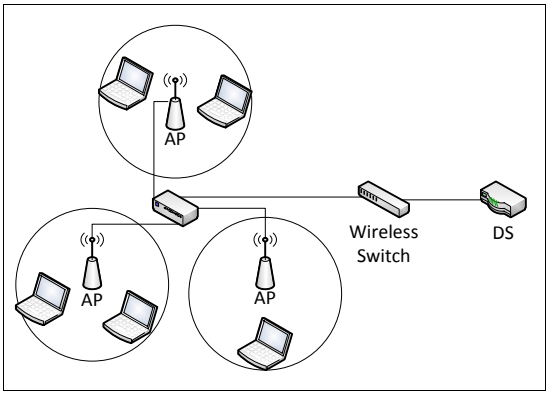
クライアント端末が3台のアクセスポイントを介し、スイッチを通じて配信システム(DS)に接続するWLANアーキテクチャの概略図。
Figure 1: Simplified View of WLAN Architecture
図1:WLANアーキテクチャの簡略図
The security of each of the WLAN components—including client devices, APs, and wireless switches—is heavily dependent on their WLAN security configuration. This section explains why having standardized security configurations is important for WLAN components and provides recommendations for designing, implementing, evaluating, and maintaining those configurations, particularly for client devices.
クライアントデバイス、AP、無線スイッチを含む各WLAN構成要素のセキュリティは、WLANセキュリティ構成に大きく依存します。本節では、標準化されたセキュリティ構成がWLAN構成要素にとって重要である理由を説明し、特にクライアントデバイスを対象として、構成の設計、実装、評価、保守に関する推奨事項を示します。
As explained in Section 1.2, the recommendations presented in this section supplement those provided for specific WLAN technologies by other NIST publications [SP800-48, SP800-97].
第1.2節で説明したように、本節の推奨事項は、特定のWLAN技術に関して他のNIST刊行物が示す推奨事項を補完します[SP800-48, SP800-97]。
This section does not provide an exhaustive explanation of the entire security configuration lifecycle; rather, it highlights a few topics of particular relevance to WLAN security. Section 2.1 discusses security configuration design, while Section 2.2 focuses on security configuration implementation, evaluation, and maintenance.
本節ではセキュリティ構成ライフサイクル全体を網羅的に説明するのではなく、WLANセキュリティに特に関連するいくつかの話題を取り上げます。第2.1節ではセキュリティ構成設計を論じ、第2.2節ではセキュリティ構成の実装、評価、保守に焦点を当てます。
2.1 Configuration Design
2.1 構成設計
Organizations should have standardized security configurations for their common WLAN components, such as client devices and APs. A standardized configuration provides a base level of security, reducing vulnerabilities and lessening the impact of successful attacks. Standardized configuration use improves the consistency and predictability of security, in conjunction with user training and awareness activities and other supporting security controls. Standardized configurations can also provide a large resource savings by reducing the time needed to secure each WLAN device and to verify its configuration for security assessments, audits, etc., particularly if the configuration can be deployed and verified through automated means.
組織は、クライアントデバイスやAPなど、一般的なWLAN構成要素向けに標準化されたセキュリティ構成を用意すべきです。標準化された構成は基本的なセキュリティレベルを提供し、脆弱性を減らすとともに攻撃成功時の影響を軽減します。標準化された構成の利用は、ユーザー訓練・意識向上活動やその他の補助的なセキュリティ管理策と相まって、セキュリティの一貫性と予測可能性を高めます。また、標準化された構成は、各WLANデバイスの保護と、セキュリティ評価・監査などのための構成検証に必要な時間を削減することで、大幅な資源節約にもつながります。構成を自動化された手段で展開・検証できる場合は特にそうです。
This section focuses on two noteworthy aspects of configuration design: gathering needs and designing WLAN architectures.
本節では、構成設計における特に重要な2つの側面、すなわちニーズの収集とWLANアーキテクチャの設計に焦点を当てます。
2.1.1 Needs Gathering
2.1.1 ニーズの収集
Before designing a WLAN security architecture or WLAN component security configurations, an organization should gather information on needs, particularly operational and security related ones. This should include identifying relevant WLAN security requirements from applicable laws, policies, regulations, etc. For Federal agencies, this often includes requirements from OMB, the Government Accountability Office (GAO), the Department of Homeland Security (DHS), and other agencies. Another part of needs gathering is identifying and reviewing recommended WLAN security practices from Federal agencies (e.g., NIST Special Publications, DISA Security Technical Implementation Guides), WLAN vendors, and other parties [NCP]. See Section 9 of [SP800-94] for examples of possible requirements to include in needs gathering.
WLANセキュリティアーキテクチャまたはWLAN構成要素のセキュリティ構成を設計する前に、組織は特に運用面とセキュリティ面のニーズに関する情報を収集すべきです。適用される法律、方針、規制などに由来する関連WLANセキュリティ要件の特定を含めるべきです。連邦機関では、OMB、政府説明責任院(GAO)、国土安全保障省(DHS)、その他の機関の要件が含まれることが多くあります。ニーズ収集には、連邦機関(NIST特別刊行物、DISAセキュリティ技術実装ガイドなど)、WLANベンダー、その他の関係者が推奨するWLANセキュリティ実務の特定とレビューも含まれます[NCP]。ニーズ収集に含め得る要件の例は[SP800-94]第9節を参照してください。
In addition to identifying these requirements and recommendations, organizations should also determine what threats their WLAN security faces. Organizations should conduct risk assessments to identify the threats against their WLANs and determine the effectiveness of existing security controls in counteracting the threats; they then should perform risk mitigation to decide what additional measures (if any) should be implemented, as discussed in [SP800-37]. Performing risk assessments and mitigation helps organizations decide how their WLANs should be secured. See Section 3.1 for an overview of common WLAN threats.
これらの要件と推奨事項を特定するだけでなく、組織は自らのWLANセキュリティがどのような脅威に直面しているかも判断すべきです。組織はリスク評価を実施してWLANに対する脅威を特定し、既存のセキュリティ管理策が脅威に対抗するうえでの有効性を判断すべきです。その後、[SP800-37]で論じられているように、リスク緩和を行い、どのような追加措置を(もしあれば)実装すべきかを決定すべきです。リスク評価と緩和を行うことは、組織がWLANをどのように保護すべきかを決定する助けとなります。一般的なWLAN脅威の概要は第3.1節を参照してください。
2.1.2 WLAN Architecture
2.1.2 WLANアーキテクチャ
When planning WLAN security, configuration designers should consider the security not only of the WLAN itself, but also how it may affect other networks that are accessible through it, such as internal wired networks reachable from the WLAN. An important principle of WLAN security is to separate WLANs with different security profiles. For example, there should be separate WLANs for external (guest, etc.) and internal use. Devices on an organization’s external WLAN should not be able to connect through that WLAN to devices on another of the organization’s WLANs. This helps to protect the organization’s other networks and devices from external devices and users. Organizations often set up external WLANs primarily to provide Internet access to visitors; such WLANs should be architected so that their traffic does not traverse the organization’s internal networks. For external WLANs that do need internal network access, WLAN client devices should be allowed access only to the necessary hosts or subnets using only the required protocols.
WLANセキュリティを計画する際、構成設計者はWLAN自体のセキュリティだけでなく、内部有線ネットワークなど、WLAN経由でアクセスできる他のネットワークに及ぼし得る影響も考慮すべきです。WLANセキュリティの重要な原則は、セキュリティプロファイルが異なるWLANを分離することです。例えば、外部利用(来訪者など)と内部利用には別々のWLANを設けるべきです。組織の外部WLAN上のデバイスは、そのWLANを経由して組織の別のWLAN上のデバイスに接続できないようにすべきです。これは、外部デバイスやユーザーから組織の他のネットワークおよびデバイスを保護するのに役立ちます。組織は多くの場合、来訪者にインターネットアクセスを提供することを主な目的として外部WLANを設置します。そのようなWLANは、トラフィックが組織の内部ネットワークを経由しないよう設計すべきです。内部ネットワークアクセスが必要な外部WLANでは、WLANクライアントデバイスに対し、必要なプロトコルのみを用いて必要なホストまたはサブネットへのアクセスだけを許可すべきです。
Another architectural issue mentioned in the WLAN reference architecture document and discussed in more detail in [GAO-11-43] is dual connected client devices. The term “dual connected” generally refers to a device that is connected to both a wired network and a WLAN at the same time. The primary concern with dual connected configurations is that an attacker may be able to gain unauthorized wireless access to the client device and then use it to attack resources on the wired network. Essentially this is allowing an attacker to exploit a lower-security network in order to gain access to a higher-security network. One possible scenario is an attacker tunneling traffic from the higher-security network to the lower-security network through the client device instead of following the intended network architecture, and thus avoiding network-based security controls intended for the higher-security network. Dual connected configurations also generally violate the principle of disabling unneeded network services to reduce attack surface; if the device is already connected to a wired network access, WLAN access is usually redundant.
WLANリファレンスアーキテクチャ文書で言及され、[GAO-11-43]でより詳しく論じられているもう1つのアーキテクチャ上の問題が、デュアル接続されたクライアントデバイスです。「デュアル接続」とは、一般に、有線ネットワークとWLANの両方に同時に接続されているデバイスを指します。デュアル接続構成の主な懸念は、攻撃者がクライアントデバイスへの不正な無線アクセスを得て、それを使って有線ネットワーク上のリソースを攻撃できる可能性があることです。これは本質的に、攻撃者がセキュリティの低いネットワークを悪用して、セキュリティの高いネットワークにアクセスすることを許すものです。想定されるシナリオの1つは、攻撃者が、意図されたネットワークアーキテクチャに従わずに、クライアントデバイスを経由してセキュリティの高いネットワークからセキュリティの低いネットワークへトラフィックをトンネリングし、それによってセキュリティの高いネットワーク向けのネットワークベースのセキュリティ管理策を回避することです。デュアル接続構成は、攻撃対象領域を減らすために不要なネットワークサービスを無効化するという原則にも、一般に反します。デバイスがすでに有線ネットワークに接続されていれば、WLANアクセスは通常、冗長です。
Organizations should not only consider simultaneous wired network and WLAN use, but other forms of dual connectedness involving their WLAN client devices. With the increasing variety and popularity of wireless networking technologies, it is common today for devices to be connected to multiple wireless networks simultaneously. For example, most smartphones can use cell phone networks, WLANs, and Bluetooth networks simultaneously, while they are also connected to wired laptops/desktops (and possibly their wired networks) through a cabled connection (e.g., USB). It is also increasingly common for laptops to have multiple wireless interfaces, such as both WLAN and WiMAX interfaces, or to be configured to accept removable media-based WLAN interfaces. A single laptop with multiple WLAN interfaces could have simultaneous connections to multiple WLANs, such as an organization WLAN and an external WLAN.
組織は、有線ネットワークとWLANの同時使用だけでなく、WLANクライアントデバイスに関わる他の形態のデュアル接続も考慮すべきです。無線ネットワーク技術の多様化と普及に伴い、今日では、デバイスが複数の無線ネットワークに同時に接続されているのは一般的です。たとえば、ほとんどのスマートフォンは、携帯電話ネットワーク、WLAN、Bluetoothネットワークを同時に使用できる上、ケーブル接続(例:USB)を介して有線のノートパソコン/デスクトップパソコン(および場合によってはその有線ネットワーク)にも接続されています。ノートパソコンが、WLANとWiMAXの両方のインターフェースなど複数の無線インターフェースを備えていたり、リムーバブルメディア型のWLANインターフェースを受け入れるように構成されていたりすることも、ますます一般的になっています。複数のWLANインターフェースを備えた1台のノートパソコンは、組織のWLANと外部のWLANなど、複数のWLANに同時に接続できる場合があります。
Organizations should assess the risk of the possible combinations of network technologies for their WLAN client devices and determine how those risks should be mitigated. This does not mean that all forms of dual connectedness should automatically be prohibited; examples of use cases that are often permitted include a smartphone attaching to both a WLAN and a Bluetooth-networked earbud simultaneously, and a laptop attaching to both a WLAN and a Bluetooth-networked keyboard and mouse simultaneously. However, the security of such use cases is largely dependent on the security of all of the networks. If one or more of the networks cannot have its risk mitigated to an acceptable level, then dual connections involving that network may pose too much risk to the organization and may need to be prohibited. The primary risk-related issue to be considered is the likelihood of an attacker accessing and manipulating legitimate communications and the possible and typical impact of such an attack.
組織は、WLANクライアントデバイスについて、ネットワーク技術の考えられる組み合わせのリスクを評価し、それらのリスクをどのように軽減すべきかを決定すべきです。これは、あらゆる形態のデュアル接続を自動的に禁止すべきだという意味ではありません。よく許可される使用例としては、スマートフォンがWLANとBluetooth接続のイヤホンの両方に同時に接続する場合や、ノートパソコンがWLANとBluetooth接続のキーボードおよびマウスの両方に同時に接続する場合があります。ただし、こうした使用例のセキュリティは、すべてのネットワークのセキュリティに大きく依存します。1つ以上のネットワークについてリスクを許容可能な水準まで軽減できない場合、そのネットワークを伴うデュアル接続は組織にとってリスクが大きすぎる可能性があり、禁止が必要となる場合があります。考慮すべき主なリスク関連の問題は、攻撃者が正当な通信にアクセスして操作する可能性と、そのような攻撃の起こり得る典型的な影響です。
Organizations should have policies that clearly state which forms of dual connections are permitted or prohibited for their WLAN client devices under various circumstances. Organizations should enforce these policies through the appropriate security controls, including the actions listed below:
組織は、さまざまな状況でWLANクライアントデバイスに許可または禁止するデュアル接続の形態を明確に定めた方針を設けるべきです。組織は、以下に挙げる措置を含む適切なセキュリティ管理策によって、これらの方針を実施すべきです。
•For all their WLAN client devices: disable all network interfaces that are not authorized for any use (including during contingency plans for business continuity, disaster recovery, etc.), and configure the device so that the user cannot enable them or otherwise circumvent the restrictions.
•すべてのWLANクライアントデバイスについて:いかなる用途にも認可されていないすべてのネットワークインターフェースを(事業継続や災害復旧などの緊急時対応計画の実施中も含めて)無効化し、ユーザーがそれらを有効化したり、制限を回避したりできないようにデバイスを構成します。
•For all their WLAN client devices not authorized for dual connections:
•デュアル接続が認可されていないすべてのWLANクライアントデバイスについて:
•Implement the appropriate technical security controls (discussed below the bullets) so that all dual connected configurations are prohibited.
•すべてのデュアル接続構成が禁止されるように、適切な技術的セキュリティ管理策(箇条書きの後に述べる)を実装します。
•If feasible, configure the devices to disable bridging (passing traffic between the networks). This is precautionary in case an unauthorized dual connection occurs.
•可能であれば、ブリッジング(ネットワーク間でのトラフィックの受け渡し)を無効にするようにデバイスを構成します。これは、認可されていないデュアル接続が発生した場合に備えた予防措置です。
•For all their WLAN client devices authorized for dual connections:
•デュアル接続が認可されているすべてのWLANクライアントデバイスについて:
•Implement the appropriate technical security controls (discussed below the bullets) so that the authorized dual connected configurations are only active when necessary and that all other dual connected configurations are prohibited.
•認可されたデュアル接続構成が必要なときにのみ有効となり、それ以外のすべてのデュアル接続構成が禁止されるように、適切な技術的セキュリティ管理策(箇条書きの後に述べる)を実装します。
•Configure the devices to disable bridging (passing traffic between the networks) unless absolutely necessary.
•絶対に必要な場合を除き、ブリッジング(ネットワーク間でのトラフィックの受け渡し)を無効にするようにデバイスを構成します。
There are several options for implementing WLAN client device dual connection policies, such as prohibiting unauthorized configurations from being used and disabling authorized dual connections when not needed. To enforce such restrictions, organizations should rely on automated technical controls whenever feasible. Non-technical controls are usually not effective enough; for example, it is generally not feasible to rely on users to remember to always promptly disable WLAN interfaces every time they are no longer needed. Each organization should evaluate the possible controls for implementing dual connection policies on their WLAN client devices and then choose the combinations of controls that are most appropriate, providing sufficient security while also permitting necessary functionality.
WLANクライアントデバイスのデュアル接続方針を実施する方法には、認可されていない構成が使用されることを禁止する、認可されたデュアル接続を必要のないときに無効にする、など複数の選択肢があります。こうした制限を実施するには、組織は可能な限り自動化された技術的管理策に依拠すべきです。技術的でない管理策は通常、十分に有効ではありません。たとえば、WLANインターフェースが不要になるたびに、ユーザーが常にすぐに無効化することを当てにするのは、一般に現実的ではありません。各組織は、WLANクライアントデバイスにデュアル接続方針を実装するための管理策の候補を評価したうえで、十分なセキュリティを確保しつつ必要な機能も許容できる、最も適切な管理策の組み合わせを選択すべきです。
Some of the possible controls are preventative (implementing and enforcing a configuration), while others are detective (monitoring a configuration, monitoring network activity, alerting when a problem is detected, etc.) Preventative controls are generally preferable to detective controls, but it is even stronger to use both preventative and detective controls together. See Section 3 for more information on monitoring (detective) controls.
管理策の中には予防的なもの(構成の実装と実施)もあれば、検知的なもの(構成の監視、ネットワーク活動の監視、問題検出時の通知など)もあります。一般に予防的管理策は検知的管理策より望ましいですが、予防的管理策と検知的管理策を併用すればさらに強力です。監視(検知的)管理策の詳細については、第3節を参照のこと。
Preventative controls may need to enforce granular policies. For example, an organization might permit only wired network usage while at their headquarters, but might permit wired or wireless access to external networks. Preventative controls may also need to provide flexibility; organizations often need to allow users to attach the organization’s mobile client devices to new external WLANs, and thus the users need some ability to manage their devices’ WLAN configuration.
予防的管理策では、きめ細かな方針を実施する必要がある場合があります。たとえば、組織が、本社内では有線ネットワークの使用のみを許可する一方で、外部ネットワークへは有線または無線のアクセスを許可することがあります。予防的管理策にはまた、柔軟性が求められる場合もあります。組織は、組織のモバイルクライアントデバイスを新しい外部WLANに接続することをユーザーに許可する必要がしばしばあり、そのためユーザーには、デバイスのWLAN構成を管理するある程度の能力が必要です。
Examples of preventative controls include the following:
予防的管理策の例には、次のものがあります。
•Configure the device’s BIOS so that WLAN connections are automatically terminated when a wired connection is detected. The BIOS setting for this is often called LAN/WLAN switching.
•有線接続が検出されたときにWLAN接続が自動的に切断されるように、デバイスのBIOSを構成します。これに対応するBIOS設定は、LAN/WLANスイッチングと呼ばれることが多くあります。
•Enable specialized software-based controls that permit either WLAN or wired network access, but not both simultaneously. These controls could be built into the operating system (OS), provided as part of the WLAN driver or management software, provided by the device manufacturer (e.g., laptop vendor), or acquired from third parties. These controls typically favor wired connections over WLAN because of their relative reliability, performance, and security.
•WLANと有線ネットワークのどちらか一方のアクセスのみを許可し、同時のアクセスは許可しない、専用のソフトウェアベースの管理策を有効にします。これらの管理策は、オペレーティングシステム(OS)に組み込まれている場合、WLANドライバーや管理ソフトウェアの一部として提供される場合、デバイス製造元(例:ノートパソコンのベンダー)から提供される場合、サードパーティから入手する場合があります。これらの管理策は通常、信頼性、性能、セキュリティの面で相対的に優れていることから、WLANよりも有線接続を優先します。
•Configure host-based network security tools (e.g., host-based firewalls, host-based intrusion detection and prevention systems) to prevent multiple network interfaces from being used at one time.
•複数のネットワークインターフェースが同時に使用されることを防ぐように、ホストベースのネットワークセキュリティツール(例:ホストベースのファイアウォール、ホストベースの侵入検知・防止システム)を構成します。
•Specify and enforce authorized network profiles and/or unauthorized profiles through OS/domain controls, third party policy-based software, etc.
•OS/ドメインの管理機能やサードパーティのポリシーベースソフトウェアなどにより、認可されたネットワークプロファイルおよび/または認可されていないネットワークプロファイルを指定し、実施します。
There are other technical WLAN security controls, such as configuring clients so that they will not automatically connect to any WLANs they detect, that are beneficial for WLAN security but not robust enough to prevent dual connections.
検出したいかなるWLANにもクライアントが自動接続しないよう構成するなど、ほかにも技術的なWLANセキュリティ管理策があり、それらはWLANセキュリティに有益ではありますが、デュアル接続を防止できるほど堅牢ではありません。
2.2 Configuration Implementation, Evaluation, and Maintenance
2.2 構成の実装、評価および保守
After designing a WLAN security configuration, an organization should determine how the configuration will be implemented, evaluate the effectiveness of the implementation, deploy the implementation to the appropriate devices, and maintain the configuration and its implementation throughout the devices’ lifecycles. Organizations should ensure that their WLAN client devices and APs have configurations at all times that are compliant with the organization’s WLAN policies.
WLANセキュリティ構成を設計した後、組織はその実装方法を決定し、実装の有効性を評価し、適切なデバイスに展開し、各デバイスのライフサイクル全体を通じて構成とその実装を維持すべきです。組織は、WLANクライアントデバイスとAPの構成が常に組織のWLANポリシーに準拠するようにすべきです。
Organizations should standardize, automate, and centralize as much of their WLAN security configuration implementation and maintenance as practical, particularly for their WLAN client devices and access points. This allows organizations to implement consistent WLAN security throughout the enterprise, to detect and correct unauthorized changes to configurations, and to react quickly when newly identified vulnerabilities or recent incidents indicate a need to change the WLAN’s security configuration.
組織は、特にWLANクライアントデバイスとアクセスポイントについて、WLANセキュリティ構成の実装と保守を可能な限り標準化、自動化および集中管理すべきです。これにより、企業全体で一貫したWLANセキュリティを実装し、構成への不正な変更を検出・修正し、新たに特定された脆弱性や最近のインシデントを受けてWLANセキュリティ構成を変更する必要が生じたときに迅速に対応できます。
Organizations can often leverage existing configuration management solutions for their WLAN security configuration management. Many organizations already have general configuration management solutions in place that can handle a wide variety of software; such solutions may be built into operating systems or provided through third-party software installed on their client devices and other WLAN components. Also, WLAN client management software often has configuration management capabilities; this software may already be installed on the WLAN devices. If the existing configuration management solutions cannot collectively provide the necessary WLAN configuration implementation and maintenance capabilities, then the organization should evaluate alternatives and implement a suitable configuration management solution that provides the missing capabilities.
組織は、既存の構成管理ソリューションをWLANセキュリティ構成の管理に活用できることが多くあります。多くの組織はすでに、多様なソフトウェアを扱える汎用構成管理ソリューションを導入しています。このようなソリューションはOSに組み込まれている場合や、クライアントデバイスなどのWLAN構成要素にインストールするサードパーティ製ソフトウェアとして提供される場合があります。また、WLANクライアント管理ソフトウェアに構成管理機能が備わっていることも多く、そのソフトウェアがすでにWLANデバイスにインストールされている場合があります。既存の構成管理ソリューションを組み合わせても必要なWLAN構成の実装・保守機能を提供できない場合、組織は代替策を評価し、不足機能を補う適切な構成管理ソリューションを実装すべきです。
Organizations should evaluate all standardized WLAN security configuration implementations carefully before deploying them throughout production environments. Even if the organization is confident that the configuration is sound, it should still be evaluated carefully to ensure that its implementation meets the organization’s particular security and operational requirements. Every operating environment has unique characteristics that should be taken into account. It is particularly important to evaluate the strength of the configuration and its potential impacts on performance and functionality (for example, a security setting that is incompatible with use of a particular application).
組織は、標準化されたWLANセキュリティ構成の実装のすべてを、本番環境全体に展開する前に慎重に評価すべきです。構成が適切であると確信している場合でも、その実装が組織固有のセキュリティ要件と運用要件を満たすことを確実にするため、慎重に評価すべきです。運用環境にはそれぞれ固有の特性があり、それらを考慮に入れるべきです。構成の強度と、性能や機能への潜在的な影響(例:特定のアプリケーションの使用と両立しないセキュリティ設定)を評価することが特に重要です。
3. WLAN Security Monitoring
3. WLANセキュリティ監視
This section discusses two types of security monitoring: assessments [SP800-115, SP800-53A] and continuous monitoring. Security assessment is “the process of determining how effectively an entity being assessed meets specific security objectives.” Security assessments are typically performed periodically, such as annually or quarterly, and are often called periodic assessments. Continuous monitoring is defined in [SP800-137] as “maintaining ongoing awareness of information security, vulnerabilities, and threats to support organizational risk management decisions. The objective is to conduct ongoing monitoring of the security of an organization’s networks, information, and systems, and respond by accepting, avoiding/rejecting, transferring/sharing, or mitigating risk as situations change.” Think of continuous monitoring as doing assessments in near real-time, so that the organization can react to problems in minutes instead of months or years.
本節では、セキュリティ監視の2種類、すなわち評価[SP800-115, SP800-53A]と継続的監視について説明します。セキュリティ評価とは「評価対象の主体が特定のセキュリティ目標をどの程度有効に満たすかを判断するプロセス」です。セキュリティ評価は通常、年次や四半期ごとなど定期的に行われ、定期評価と呼ばれることも多くあります。[SP800-137]では、継続的監視を「組織のリスク管理上の意思決定を支援するため、情報セキュリティ、脆弱性および脅威について継続的に認識を保つこと。組織のネットワーク、情報およびシステムのセキュリティを継続的に監視し、状況の変化に応じてリスクを受容、回避/拒否、移転/共有、または軽減することで対応することを目的とする」と定義しています。継続的監視とは、問題に数か月や数年後ではなく数分以内に対応できるよう、ほぼリアルタイムで評価を行うことと考えるとよいです。
For WLAN security, the same tools are often useful for both periodic assessments and continuous monitoring. These forms of monitoring are used to ensure that each WLAN component’s security configuration meets the organization’s requirements (and to report all deviations from these requirements), as well as to monitor WLAN activity to identify attacks, improperly secured communications, and other WLAN security issues. This section provides recommendations for WLAN security monitoring (both periodic assessments and continuous monitoring).
WLANセキュリティでは、定期評価と継続的監視の両方に同じツールが役立つことが多くあります。これらの監視は、各WLAN構成要素のセキュリティ構成が組織の要件を満たすこと(および要件からの逸脱をすべて報告すること)を確認するとともに、WLANの活動を監視して攻撃、不適切に保護された通信、その他のWLANセキュリティ上の問題を特定するために使用します。本節では、定期評価と継続的監視の両方を含むWLANセキュリティ監視の推奨事項を示します。
As explained in Section 1.2, the recommendations presented in this section supplement those provided for specific WLAN technologies by other NIST publications [SP800-48, SP800-97], as well as NIST publications on general security assessment [SP800-115, SP800-53A] and continuous monitoring [SP800-137].
1.2節で説明したとおり、本節の推奨事項は、特定のWLAN技術に関する他のNIST刊行物[SP800-48, SP800-97]の推奨事項に加え、一般的なセキュリティ評価[SP800-115, SP800-53A]および継続的監視[SP800-137]に関するNIST刊行物の推奨事項を補足します。
3.1 WLAN Security Monitoring Basics
3.1 WLANセキュリティ監視の基礎
Security monitoring is important for all systems and networks, but it is generally even more important for WLANs. WLANs and wired networks have the same security objectives and face the same general types of threats, but WLAN security is typically harder to achieve for several reasons.
セキュリティ監視はすべてのシステムとネットワークで重要ですが、WLANでは一般にさらに重要です。WLANと有線ネットワークは同じセキュリティ目標を持ち、大まかに同じ種類の脅威に直面しますが、いくつかの理由から、WLANのセキュリティは通常、実現がより困難です。
First, WLANs tend to be easier for attackers to access than wired networks. The most significant difference between protecting WLANs and wired networks is the relative ease of intercepting wireless network transmissions and inserting new or altered transmissions from what is presumed to be the authentic source. To monitor traffic on a wired network, an attacker would have to gain physical access to the network or remotely compromise systems on the network; for a WLAN, an attacker simply needs to be within range of the wireless transmissions. (Some attackers use highly sensitive directional antennas, which can greatly extend the effective range of attack beyond the standard WLAN range.)
第一に、WLANは有線ネットワークより攻撃者がアクセスしやすい傾向があります。WLANの保護と有線ネットワークの保護との最大の違いは、無線ネットワークの送信を傍受すること、および正当な送信元からのものと見なされる形で新しい送信や改変した送信を挿入することが比較的容易な点です。有線ネットワーク上のトラフィックを監視するには、攻撃者はネットワークに物理的にアクセスするか、ネットワーク上のシステムをリモートから侵害しなければなりません。一方、WLANでは、攻撃者は無線送信の到達範囲内にいるだけで十分です。(高感度の指向性アンテナを使用する攻撃者もおり、これにより攻撃の実効範囲を標準的なWLANの到達範囲より大幅に拡張できます。)
Second, WLANs are often poorly secured. For example, many WLANs are configured so that they do not require strong authentication; this makes it much easier, sometimes trivial, for attackers within range of the WLAN to successfully gain access to it. These configurations are often used because they are more convenient for users and administrators, but they often put the transmitted information and WLAN devices at serious risk of compromise.
第二に、WLANのセキュリティ確保が不十分なことが多くあります。たとえば、強固な認証を要求しないよう構成されたWLANが多く、その場合、WLANの到達範囲内にいる攻撃者がWLANへのアクセスに成功することがはるかに容易になり、ときにはごく簡単になります。こうした構成は、利用者や管理者にとって利便性が高いために用いられることが多いですが、伝送される情報とWLANデバイスを侵害の重大なリスクにさらすことが多くあります。
Third, WLANs are usually connected to an organization’s wired networks. This means that the WLANs and WLAN devices are not only subject to WLAN-specific attacks, but also nearly all the attacks that wired networks and devices on those networks face.
第三に、WLANは通常、組織の有線ネットワークに接続されます。このため、WLANとWLANデバイスはWLAN固有の攻撃だけでなく、有線ネットワークやそのネットワーク上のデバイスが受けるほぼすべての攻撃にもさらされます。
To support WLAN security, organizations should perform both attack monitoring and vulnerability monitoring. Sections 3.1.1 and 3.1.2 provide more information on these, respectively.
WLANセキュリティを支えるため、組織は攻撃監視と脆弱性監視の両方を行うべきです。これらについては、それぞれ3.1.1節と3.1.2節で詳しく説明します。
3.1.1 Attack Monitoring
3.1.1 攻撃の監視
Organizations should continuously monitor their WLANs for both WLAN-specific and general (wired network) attacks. The latter involves the same security controls as would be used for any network-connected system in an organization; see [SP800-53] for additional information on general system security and [SP800-94] for general information on attack detection technologies. Further discussion of general (non-wireless) attack monitoring is out of the scope of this publication.
組織は、WLAN固有の攻撃と一般的な(有線ネットワークの)攻撃の両方について、WLANを継続的に監視すべきです。後者には、組織内のネットワークに接続されたあらゆるシステムに使用するものと同じセキュリティ管理策を用います。システム全般のセキュリティに関する追加情報は[SP800-53]を、攻撃検出技術に関する一般的な情報は[SP800-94]を参照のこと。一般的な(無線以外の)攻撃監視についてのこれ以上の説明は、本刊行物の範囲外です。
WLAN-specific attacks can typically be divided into two types: passive and active. These attack classes, which are significant for monitoring purposes, are described below.
WLAN固有の攻撃は通常、受動攻撃と能動攻撃の2種類に分けられます。監視上重要なこれらの攻撃の分類を以下に説明します。
• Passive attack: an attack in which an unauthorized party only monitors WLAN communications; the attacker does not generate, alter, or disrupt WLAN communications. There are two types of passive attacks:
• 受動攻撃:権限のない者がWLAN通信を監視するだけで、WLAN通信を生成、変更または妨害しない攻撃。受動攻撃には次の2種類があります。
o Eavesdropping. The attacker monitors WLAN data transmissions for message content.
○ 盗聴:攻撃者がメッセージの内容を知るためにWLANデータ通信を監視します。
o Traffic analysis (also known as traffic flow analysis). The attacker gains intelligence by monitoring the transmissions for patterns of communication. A considerable amount of information is contained in the flow of messages between communicating parties.
○ トラフィック分析(トラフィックフロー分析ともいう):攻撃者が送信を監視して通信のパターンを探ることで情報を得ます。通信当事者間のメッセージの流れには、かなりの量の情報が含まれています。
• Active attack: an attack in which an unauthorized party generates, alters, or disrupts WLAN communications. Active attacks may take the form of one of the following types:
• 能動攻撃:権限のない者がWLAN通信を生成、変更または妨害する攻撃。能動攻撃には次の種類があります。
o Masquerading. The attacker impersonates an authorized user to gain access to certain unauthorized privileges.
○ なりすまし:攻撃者が認可された利用者になりすまし、許可されていない特権へのアクセスを得ます。
o Replay. The attacker monitors transmissions (passive attack) and retransmits messages posing as the legitimate user.
○ リプレイ:攻撃者が送信を監視し(受動攻撃)、正当な利用者を装ってメッセージを再送します。
o Message modification. The attacker alters a legitimate message by deleting, adding to, changing, or reordering the message.
○ メッセージ改変:攻撃者が、正当なメッセージに対して削除、追加、変更または並べ替えを行うことにより、そのメッセージを改変します。
o Denial of service (DoS). A DoS can occur inadvertently, such as other electronic devices causing interference, or it can occur intentionally, such as an attacker sending large numbers of messages at a high rate to flood the WLAN.
○ サービス拒否(DoS):他の電子機器による干渉など、意図せず発生する場合と、攻撃者が大量のメッセージを高頻度で送信してWLANをあふれさせるなど、意図的に発生する場合があります。
o Misappropriation. The attacker steals or makes other unauthorized use of WLAN services.
○ サービスの不正利用:攻撃者がWLANサービスを盗用する、またはその他の不正な方法で使用します。
A form of active attack that is particularly noteworthy is the deployment of rogue WLAN devices. For example, an attacker deploys an AP that has been configured to appear as part of an organization’s WLAN infrastructure. This can provide a backdoor into the wired network, bypassing perimeter security mechanisms, such as firewalls. In addition, if client devices inadvertently connect to the rogue AP, the attacker can view and manipulate the client devices’ communications (e.g., man-in-the-middle attacks), as well as potentially gaining access to the client devices themselves.
特に注目すべき能動攻撃の1つが、不正なWLANデバイスの設置です。たとえば、攻撃者が組織のWLAN基盤の一部に見えるよう構成したAPを設置します。これにより、ファイアウォールなどの境界セキュリティ機構を迂回して有線ネットワークに侵入するバックドアが作られる可能性があります。さらに、クライアントデバイスが誤って不正なAPに接続すると、攻撃者はクライアントデバイスの通信を閲覧・操作でき(例:中間者攻撃)、クライアントデバイス自体にアクセスできる可能性もあります。
Monitoring WLAN-specific attacks is focused on active attacks. Because passive attacks strictly involve intercepting radio transmissions and do not generate their own transmissions, there is nothing for an organization to monitor electronically. However, all forms of active attack mentioned above can be detected through monitoring. Section 3.2 discusses tools that can monitor for active attacks.
WLAN固有の攻撃監視は能動攻撃に重点を置きます。受動攻撃は無線送信の傍受だけで、攻撃者自身は送信を行わないため、組織が電子的に監視できるものがありません。一方、前述の能動攻撃はすべて監視によって検出できます。能動攻撃を監視するツールについては3.2節で説明します。
3.1.2 Vulnerability Monitoring
3.1.2 脆弱性の監視
Organizations should do largely the same vulnerability monitoring for WLAN components that they do for any other software: identifying patches and applying them, and verifying security configuration settings and adjusting them as needed (see Section 2). These actions should be performed at least as often for WLAN components as they are for the organization’s equivalent wired systems. Further discussion of these general vulnerability monitoring techniques is outside the scope of this publication.
組織は、WLAN構成要素について、他のソフトウェアとほぼ同じ方法で脆弱性を監視すべきです。すなわち、パッチを特定して適用し、セキュリティ構成設定を検証して必要に応じて調整します(2節参照)。これらの作業は、少なくとも組織内の同等の有線システムと同じ頻度でWLAN構成要素に対して実施すべきです。一般的な脆弱性監視手法の詳細は、本刊行物の適用範囲外です。
In addition to the general vulnerability monitoring, WLAN-specific vulnerability monitoring involves analyzing WLAN communications and identifying policy violations, such as communications using the wrong protocols, encryption key lengths, etc. This is effective at identifying misconfigured WLAN devices as well as devices that are acting differently than their configuration indicates. It is especially helpful when not all of the WLAN devices are under the organization’s control, such as visitor laptops, and when unauthorized WLAN devices are a concern (e.g., an employee attaching a personal mobile device to an organization WLAN without authorization). This form of vulnerability monitoring is often provided by the same tools that are effective at attack monitoring, as explained in Section 3.2.
一般的な脆弱性監視に加え、WLAN固有の脆弱性監視では、WLAN通信を分析して、誤ったプロトコルや暗号鍵長を使った通信など、ポリシー違反を特定します。この方法は、構成が誤ったWLANデバイスや、構成で示される動作と異なる動作をするデバイスの特定に有効です。組織がすべてのWLANデバイスを管理しているわけではない場合(例:訪問者のノートPC)や、許可されていないWLANデバイスが懸念される場合(例:従業員が個人のモバイルデバイスを無許可で組織のWLANに接続する場合)に、特に役立ちます。この種の脆弱性監視は、3.2節で説明するとおり、攻撃監視に有効なものと同じツールで提供されることが多くあります。
3.2 Monitoring Tools
3.2 監視ツール
One of the primary tools for WLAN security monitoring is a wireless intrusion detection and prevention system (WIDPS). A WIDPS has sensors placed at designated locations within an organization’s facilities; these sensors monitor WLAN bands and channels to sample traffic, allowing them to identify WLAN attacks and some WLAN vulnerabilities. WIDPS sensors are available in several forms:
WLANセキュリティ監視の主なツールの1つは、無線侵入検知・防止システム(WIDPS)です。WIDPSでは、組織施設内の指定場所にセンサーを配置し、そのセンサーがWLANの周波数帯とチャネルを監視してトラフィックをサンプリングすることで、WLAN攻撃や一部のWLAN脆弱性を特定します。WIDPSセンサーにはいくつかの形態があります。
• Dedicated. A dedicated sensor performs WIDPS functions but does not pass network traffic from source to destination. Dedicated sensors are often completely passive, simply sniffing WLAN traffic. Some dedicated sensors analyze the traffic they monitor, while other sensors forward the traffic to a management server for analysis. The sensor is typically connected to a wired network. Dedicated sensors are usually designed for one of two deployment types:
• 専用型:専用センサーはWIDPS機能を実行しますが、送信元から送信先へのネットワークトラフィックは中継しません。多くの場合、専用センサーはWLANトラフィックを受動的に傍受するだけです。監視対象のトラフィックを分析するセンサーもあれば、管理サーバーに転送して分析させるセンサーもあります。センサーは通常、有線ネットワークに接続します。専用センサーは、通常、次の2種類の設置方式を想定しています。
o Fixed—the sensor is deployed to a particular location. Fixed sensors usually depend on the organization’s infrastructure for power, wired network access, and other resources.
○ 固定型 — センサーを特定の場所に設置します。固定型センサーは通常、電源、有線ネットワークへの接続、その他のリソースを組織の基盤に依存します。
o Mobile—the sensor is designed to be portable so it can be used from multiple locations or while in motion. For example, a security administrator could use a mobile sensor while walking through an organization’s buildings to find rogue APs.
○ モバイル型 — センサーは、複数の場所や移動中に使用できるよう携帯可能に設計されています。たとえば、セキュリティ管理者は組織の建物内を移動しながらモバイルセンサーを使い、不正なAPを探すことができます。
• Bundled. Many APs and wireless switches offer some WIDPS capabilities as a secondary function.
バンドル型:多くのAPや無線スイッチは、二次的な機能として一部のWIDPS機能を提供します。
In addition to these hardware-based forms, there are also host-based WIDPS sensor software products that can be installed on WLAN client devices. The sensor software detects WLAN attacks within range of the client device, as well as WLAN vulnerabilities of the client device, and reports this information to WIDPS management servers. The sensor software may also be able to enforce WLAN security policies. See [SP800-94] for more information on all forms of WIDPS.
これらのハードウェア型に加えて、WLANクライアントデバイスにインストールするホストベースのWIDPSセンサーソフトウェア製品もあります。センサーソフトウェアは、クライアントデバイスの通信範囲内にあるWLAN攻撃と、そのクライアントデバイスのWLAN脆弱性を検出し、WIDPS管理サーバーに報告します。WLANセキュリティポリシーを適用できるセンサーソフトウェアもあります。WIDPSのすべての形態に関する詳細は[SP800-94]を参照します。
Another primary tool for WLAN security monitoring is a WLAN scanner. A passive WLAN scanning tool captures WLAN traffic being transmitted within the range of the tool’s antenna. Most passive tools record the key attributes of discovered WLAN devices. This information can be used to identify WLAN vulnerabilities and to detect potential rogue devices. WLAN scanning tools used to conduct completely passive scans transmit no data, nor do the tools in any way affect the operation of deployed WLAN devices. By not transmitting data, a passive scanning tool remains undetected by malicious users and other devices. This reduces the likelihood of individuals avoiding detection by disconnecting or disabling unauthorized WLAN devices.
WLANセキュリティ監視のもう1つの主なツールは、WLANスキャナーです。受動型WLANスキャンツールは、ツールのアンテナの到達範囲内で送信されているWLANトラフィックを取得します。ほとんどの受動型ツールは、検出したWLANデバイスの主要な属性を記録します。この情報は、WLANの脆弱性を特定し、不正の可能性があるデバイスを検出するために利用できます。完全に受動的なスキャンの実施に用いるWLANスキャンツールはデータを一切送信せず、導入済みWLANデバイスの動作にもいかなる影響も与えません。データを送信しないことで、受動型スキャンツールは悪意ある利用者や他のデバイスに検知されないままでいられます。これにより、未許可のWLANデバイスを切断または無効化することで個人が検出を逃れる可能性が低くなります。
There are also active WLAN scanning tools. Building on the information collected during passive scans, active scanning attempts to attach to discovered WLAN devices and conduct penetration or vulnerability-related testing. Organizations should be cautious in conducting active scans to make sure they do not inadvertently scan devices owned or operated by other organizations or individuals within range. It is important to evaluate the physical location of devices before actively scanning them. Generally, organizations should focus on identifying and locating potential rogue devices rather than performing active scans of such devices.
能動型のWLANスキャンツールもあります。受動スキャンで収集した情報を基に、能動スキャンでは検出したWLANデバイスへの接続を試み、侵入テストまたは脆弱性関連のテストを行います。組織は、到達範囲内にある他の組織または個人が所有または運用するデバイスを誤ってスキャンしないよう、能動スキャンの実施に慎重を期すべきです。デバイスを能動的にスキャンする前に、その物理的な位置を評価することが重要です。一般に、組織は、不正の可能性があるデバイスに対して能動スキャンを行うよりも、そうしたデバイスを特定し、その位置を突き止めることに重点を置くべきです。
The types of tools mentioned in this section are examples of tools that are often effective at WLAN security monitoring. This is not intended to imply that no other types of tools may also be useful at WLAN security monitoring. What is important is having the necessary monitoring capabilities, not the labels applied to the tool or tools providing those capabilities.
本節で挙げた種類のツールは、WLANセキュリティ監視に有効なことが多いツールの例です。これは、他の種類のツールがWLANセキュリティ監視に役立つ可能性がないことを意味するものではありません。重要なのは、必要な監視機能を備えることであり、その機能を提供するツールにどのような名称を付けるかではありません。
3.3 Continuous Monitoring Recommendations
3.3 継続的監視に関する推奨事項
Organizations with WLANs should implement continuous monitoring solutions for their WLANs that provide all of the following detection capabilities:
WLANを運用する組織は、以下のすべての検知機能を提供する、WLANの継続的監視ソリューションを導入すべきです。
• Unauthorized WLAN devices, including rogue APs and unauthorized client devices
認可されていないWLANデバイス(不正APおよび認可されていないクライアントデバイスを含む)
• WLAN devices that are misconfigured or using weak WLAN protocols and protocol implementations
• 設定に誤りがある、または脆弱なWLANプロトコルやプロトコル実装を使用しているWLANデバイス
• Unusual WLAN usage patterns, such as extremely high numbers of client devices using a particular AP, abnormally high volumes of WLAN traffic involving a particular client device, or many failed attempts to join the WLAN in a short period of time
• 特定のAPを利用するクライアントデバイスが極端に多い、特定のクライアントデバイスに関係するWLANトラフィック量が異常に多い、短時間にWLANへの接続を何度も失敗するといった、通常とは異なるWLAN利用パターン
• The use of active WLAN scanners (e.g., war driving tools) that generate WLAN traffic. The use of passive sensors cannot be detected through monitoring controls.
WLANトラフィックを発生させる能動型WLANスキャナー(例: ウォードライビングツール)の使用。受動型センサーの使用は、監視の管理策では検知できません。
• DoS attacks and conditions (e.g., network interference). Many denial of service attacks are detected by counting events during periods of time and alerting when threshold values are exceeded. For example, a large number of events involving the termination of WLAN sessions can indicate a DoS attack.
• DoS攻撃およびDoS状態(例: ネットワーク干渉)。多くのサービス拒否攻撃は、一定時間内のイベント数を数え、しきい値を超えたときに警告することで検知されます。たとえば、WLANセッションの終了に関するイベントが多数発生すれば、DoS攻撃を示している可能性があります。
• Impersonation and man-in-the-middle attacks. For example, some WIDPS sensors can detect when a device is attempting to spoof the identity of another device.
• なりすまし攻撃および中間者攻撃。たとえば、一部のWIDPSセンサーは、あるデバイスが別のデバイスの識別情報を偽装しようとしていることを検知できます。
Organizations with WLANs should also have the capability to identify the physical location of a detected WLAN threat by using triangulation—estimating the threat’s approximate distance from multiple sensors by the strength of the threat’s signal received by each sensor, then calculating the physical location at which the threat would be the estimated distance from each sensor. This allows an organization to send appropriate personnel, such as physical security staff, to the location to address the threat.
WLANを運用する組織は、三角測量を用いて、検知したWLAN脅威の物理的位置を特定する機能も備えるべきです。三角測量では、複数のセンサーが受信した脅威の信号強度から各センサーまでのおおよその距離を推定し、脅威が各センサーからその推定距離にあるときの物理的位置を算出します。これにより組織は、物理的セキュリティ担当者などの適切な職員を現場に派遣し、脅威に対処できます。
3.4 Periodic Assessment Recommendations
3.4 定期的評価に関する推奨事項
Organizations with WLANs should conduct regular periodic technical WLAN security assessments. These assessments should be performed at least annually to evaluate the overall security of the WLAN. In addition, organizations should perform periodic assessments at least quarterly unless continuous monitoring of WLAN security is already collecting all of the information about WLAN attacks and vulnerabilities needed for assessment purposes. For example, an organization that does not have comprehensive WIDPS coverage of its facilities should use mobile WIDPS sensors, WLAN scanners, or other tools with similar capabilities to search for rogue WLANs in areas outside the WIDPS’s range.
WLANを運用する組織は、WLANセキュリティの技術的評価を定期的に実施すべきです。これらの評価は、WLAN全体のセキュリティを評価するため、少なくとも年1回実施すべきです。さらに、評価に必要なWLAN攻撃と脆弱性に関する情報を、WLANセキュリティの継続的監視ですでにすべて収集している場合を除き、組織は少なくとも四半期ごとに定期評価を実施すべきです。たとえば、施設をWIDPSで包括的にカバーしていない組織は、モバイルWIDPSセンサー、WLANスキャナー、または同等の機能を持つ他のツールを使って、WIDPSの検知範囲外にある区域の不正WLANを探索すべきです。
The following are additional factors that organizations should consider when planning the frequency and breadth of periodic assessments:
定期評価の頻度と範囲を計画する際に、組織が考慮すべき追加要因を以下に示します。
• The location of the facility being scanned, because the physical proximity of a building to a public area (e.g., streets and public common areas) or its location in a busy metropolitan area may increase the risk of WLAN threats
スキャン対象施設の場所。建物が公共区域(例: 道路や公共の共用区域)に物理的に近いことや、にぎやかな大都市圏に位置することにより、WLANの脅威のリスクが高まる可能性があるためです。
• The security level of the data to be transmitted on the WLAN
• WLAN上で送信するデータのセキュリティレベル
• How often WLAN client devices connect to and disconnect from the environment, and the typical traffic levels for these devices (e.g., occasional activity or fairly constant activity)—this is because only active WLAN client devices are discoverable during a WLAN scan
• WLANクライアントデバイスが環境に接続・切断する頻度と、これらのデバイスの通常のトラフィック量(例: ときどき発生する通信、またはほぼ継続的な通信)。WLANスキャンで検出できるのは、動作中のWLANクライアントデバイスに限られるためです。
• Physical changes to the facilities, such as construction projects that could affect the strength and propagation of WLAN signals
• WLAN信号の強度や伝搬に影響する可能性がある建設工事など、施設の物理的な変更
Appendix A—Supporting NIST SP 800-53 Security Controls and Publications
付録A—裏付けとなるNIST SP 800-53セキュリティ管理策および関連刊行物
原本PDFの抜粋画像

AC-3, Access Enforcement Related controls: AC-2, AC-4, AC-5, AC-6, AC-16, AC-17, AC-18, AC-19, AC-20, AC-21, AC-22, AU-9, CM-5, CM-6, MA-3, MA-4, MA-5, SA-7, SC-13, SI-9
AC-3、アクセスの強制。関連する管理策: AC-2、AC-4、AC-5、AC-6、AC-16、AC-17、AC-18、AC-19、AC-20、AC-21、AC-22、AU-9、CM-5、CM-6、MA-3、MA-4、MA-5、SA-7、SC-13、SI-9
AC-4, Information Flow Enforcement Related controls: AC-17, AC-19, AC-21, CM-7, SA-8, SC-2, SC-5, SC-7, SC-18
AC-18, Wireless Access Related controls: AC-3, IA-2, IA-3, IA-8 References: NIST Special Publications 800-48, 800-94, 800-97
AC-19, Access Control for Mobile Devices Related controls: MP-4, MP-5 References: NIST Special Publications 800-114, 800-124
AC-20, Use of External Information Systems Related controls: AC-3, AC-17, PL-4 References: FIPS Publication 199
CA-2, Security Assessments Related controls: CA-6, CA-7, PM-9, SA-11 References: FIPS Publication 199; NIST Special Publications 800-37, 800-53A, 800-115
CA-7, Continuous Monitoring Related controls: CA-2, CA-5, CA-6, CM-3, CM-4 References: NIST Special Publications 800-37, 800-53A; US-CERT Technical Cyber Security Alerts; DOD Information Assurance Vulnerability Alerts
CM-6, Configuration Settings Related controls: CM-2, CM-3, SI-4 References: OMB Memoranda 07-11, 07-18, 08-22; NIST Special Publications 800-70, 800-128; Web: nvd.nist.gov; www.nsa.gov)
AU-2, Auditable Events Related control: AU-3 References: NIST Special Publication 800-92
IA-2, Identification and Authentication (Organizational Users) Related controls: AC-14, AC-17, AC-18, IA-4, IA-5 References: HSPD 12; OMB Memorandum 04-04; FIPS Publication 201; NIST Special Publications
AC-4、情報フローの強制。関連する管理策: AC-17、AC-19、AC-21、CM-7、SA-8、SC-2、SC-5、SC-7、SC-18。
AC-18、無線アクセス。関連する管理策: AC-3、IA-2、IA-3、IA-8。参考資料: NIST特別刊行物800-48、800-94、800-97。
AC-19、モバイルデバイスのアクセス制御。関連する管理策: MP-4、MP-5。参考資料: NIST特別刊行物800-114、800-124。
AC-20、外部情報システムの利用。関連する管理策: AC-3、AC-17、PL-4。参考資料: FIPS刊行物199。
CA-2、セキュリティ評価。関連する管理策: CA-6、CA-7、PM-9、SA-11。参考資料: FIPS刊行物199、NIST特別刊行物800-37、800-53A、800-115。
CA-7、継続的監視。関連する管理策: CA-2、CA-5、CA-6、CM-3、CM-4。参考資料: NIST特別刊行物800-37、800-53A、US-CERT技術サイバーセキュリティ警告、DOD情報保証脆弱性警告。
CM-6、構成設定。関連する管理策: CM-2、CM-3、SI-4。参考資料: OMB覚書07-11、07-18、08-22、NIST特別刊行物800-70、800-128。Web: nvd.nist.gov、www.nsa.gov)。
AU-2、監査対象イベント。関連する管理策: AU-3。参考資料: NIST特別刊行物800-92。
IA-2、識別および認証(組織内ユーザー)。関連する管理策: AC-14、AC-17、AC-18、IA-4、IA-5。参考資料: HSPD 12、OMB覚書04-04、FIPS刊行物201、NIST特別刊行物
800-63, 800-73, 800-76, 800-78
IA-3, Device Identification and Authentication Related controls: AC-17, AC-18
IA-5, Authenticator Management Related controls: AC-2, IA-2, PL-4, PS-6 References: OMB Memorandum 04-04; FIPS Publication 201; NIST Special Publications 800-73, 800-63, 800-76, 800-78
IA-8, Identification and Authentication (Non-Organizational Users) Related controls: AC-14, AC-17, AC-18, MA-4 References: OMB Memorandum 04-04; Web: www.cio.gov/eauthentication; NIST Special Publication 800-63
PE-18, Location of Information System Components
RA-3, Risk Assessment Reference: NIST Special Publication 800-30
RA-5, Vulnerability Scanning Related controls: CA-2, CM-6, RA-3, SI-2 References: NIST Special Publications 800-40, 800-70, 800-115; Web: cwe.mitre.org; nvd.nist.gov
SC-7, Boundary Protection Related controls: AC-4, IR-4, SC-5 References: FIPS Publication 199; NIST Special Publications 800-41, 800-77
SC-8, Transmission Integrity Related controls: AC-17, PE-4 References: FIPS Publications 140-2, 197; NIST Special Publications 800-52, 800-77, 800-81, 800-113; NSTISSI No. 7003
SC-9, Transmission Confidentiality Related controls: AC-17, PE-4 References: FIPS Publications 140-2, 197; NIST Special Publications 800-52, 800-77, 800-113; CNSS Policy 15; NSTISSI No. 7003
SI-2, Flaw Remediation Related controls: CA-2, CA-7, CM-3, MA-2, IR-4, RA-5, SA-11, SI-11 References: NIST Special Publication 800-40
SI-4, Information System Monitoring Related controls: AC-4, AC-8, AC-17, AU-2, AU-6, SI-3, SI-7 References: NIST Special Publications 800-61, 800-83, 800-92, 800-94
800-63、800-73、800-76、800-78。
IA-3、デバイスの識別および認証。関連する管理策: AC-17、AC-18。
IA-5、認証器の管理。関連する管理策: AC-2、IA-2、PL-4、PS-6。参考資料: OMB覚書04-04、FIPS刊行物201、NIST特別刊行物800-73、800-63、800-76、800-78。
IA-8、識別および認証(組織外ユーザー)。関連する管理策: AC-14、AC-17、AC-18、MA-4。参考資料: OMB覚書04-04。Web: www.cio.gov/eauthentication。NIST特別刊行物800-63。
PE-18、情報システム構成要素の設置場所。
RA-3、リスク評価。参考資料: NIST特別刊行物800-30。
RA-5、脆弱性スキャン。関連する管理策: CA-2、CM-6、RA-3、SI-2。参考資料: NIST特別刊行物800-40、800-70、800-115。Web: cwe.mitre.org、nvd.nist.gov。
SC-7、境界保護。関連する管理策: AC-4、IR-4、SC-5。参考資料: FIPS刊行物199、NIST特別刊行物800-41、800-77。
SC-8、伝送の完全性。関連する管理策: AC-17、PE-4。参考資料: FIPS刊行物140-2、197、NIST特別刊行物800-52、800-77、800-81、800-113、NSTISSI第7003号。
SC-9、伝送の機密性。関連する管理策: AC-17、PE-4。参考資料: FIPS刊行物140-2、197、NIST特別刊行物800-52、800-77、800-113、CNSSポリシー15、NSTISSI第7003号。
SI-2、欠陥の修正。関連する管理策: CA-2、CA-7、CM-3、MA-2、IR-4、RA-5、SA-11、SI-11。参考資料: NIST特別刊行物800-40。
SI-4、情報システムの監視。関連する管理策: AC-4、AC-8、AC-17、AU-2、AU-6、SI-3、SI-7。参考資料: NIST特別刊行物800-61、800-83、800-92、800-94
原本PDFの抜粋画像

- SP 800-30, Risk Management Guide for Information Technology Systems
- Draft SP 800-30 Revision 1, Guide for Conducting Risk Assessments
- SP 800-37, Guide for Applying the Risk Management Framework to Federal Information Systems: A Security Life Cycle Approach
- SP 800-40 Version 2.0, Creating a Patch and Vulnerability Management Program
- SP 800-41 Rev. 1, Guidelines on Firewalls and Firewall Policy
- SP 800-48 Rev. 1, Guide to Securing Legacy IEEE 802.11 Wireless Networks
- SP 800-52, Guidelines for the Selection and Use of Transport Layer Security (TLS) Implementations
- SP 800-53 Rev. 3, Recommended Security Controls for Federal Information Systems and Organizations
- SP 800-53A Rev. 1, Guide for Assessing the Security Controls in Federal Information Systems and Organizations
- SP 800-61 Rev. 1, Computer Security Incident Handling Guide
- SP 800-63 Rev. 1: E-Authentication Guideline
- SP 800-70 Rev. 2, National Checklist Program for IT Products--Guidelines for Checklist Users and Developers
- SP 800-73-3, Interfaces for Personal Identity Verification
- Draft SP 800-76-2, Biometric Data Specification for Personal Identity Verification
- SP 800-77, Guide to IPsec VPNs
- SP 800-78-3, Cryptographic Algorithms and Key Sizes for Personal Identification Verification (PIV)
- SP 800-81 Rev. 1, Secure Domain Name System (DNS) Deployment Guide
- SP 800-83, Guide to Malware Incident Prevention and Handling
- SP 800-92, Guide to Computer Security Log Management
- SP 800-94, Guide to Intrusion Detection and Prevention Systems (IDPS)
- SP 800-97, Establishing Wireless Robust Security Networks: A Guide to IEEE 802.11i
- SP 800-113, Guide to SSL VPNs
- SP 800-114, User's Guide to Securing External Devices for Telework and Remote Access
- SP 800-115, Technical Guide to Information Security Testing and Assessment
- SP 800-124, Guidelines on Cell Phone and PDA Security
- SP 800-128, Guide for Security-Focused Configuration Management of Information Systems
- SP 800-30「情報技術システムのリスク管理ガイド」
- SP 800-30改訂第1版ドラフト「リスク評価の実施ガイド」
- SP 800-37「連邦情報システムへのリスク管理フレームワーク適用ガイド—セキュリティ・ライフサイクルのアプローチ」
- SP 800-40バージョン2.0「パッチおよび脆弱性管理プログラムの作成」
- SP 800-41改訂第1版「ファイアウォールおよびファイアウォールポリシーに関するガイドライン」
- SP 800-48改訂第1版「旧式IEEE 802.11無線ネットワークのセキュリティ確保ガイド」
- SP 800-52「Transport Layer Security(TLS)実装の選択および使用に関するガイドライン」
- SP 800-53改訂第3版「連邦情報システムおよび組織のための推奨セキュリティ管理策」
- SP 800-53A改訂第1版「連邦情報システムおよび組織のセキュリティ管理策評価ガイド」
- SP 800-61改訂第1版「コンピューターセキュリティインシデント対応ガイド」
- SP 800-63改訂第1版「電子認証ガイドライン」
- SP 800-70改訂第2版「IT製品の国家チェックリストプログラム—チェックリスト利用者および開発者向けガイドライン」
- SP 800-73-3「個人識別検証のためのインターフェース」
- SP 800-76-2ドラフト「個人識別検証のための生体データ仕様」
- SP 800-77「IPsec VPNガイド」
- SP 800-78-3「個人識別検証(PIV)のための暗号アルゴリズムおよび鍵長」
- SP 800-81改訂第1版「セキュアなドメインネームシステム(DNS)導入ガイド」
- SP 800-83「マルウェアのインシデント防止および対応ガイド」
- SP 800-92「コンピューターセキュリティログ管理ガイド」
- SP 800-94「侵入検知・防止システム(IDPS)ガイド」
- SP 800-97「堅牢な無線セキュリティネットワークの確立: IEEE 802.11iガイド」
- SP 800-113「SSL VPNガイド」
- SP 800-114「テレワークおよびリモートアクセスのための外部デバイスのセキュリティ確保に関するユーザーガイド」
- SP 800-115「情報セキュリティの試験および評価に関する技術ガイド」
- SP 800-124「携帯電話およびPDAのセキュリティに関するガイドライン」
- SP 800-128「情報システムのセキュリティ重視型構成管理ガイド」
Appendix B—Acronyms and Abbreviations
付録B—頭字語および略語
Selected acronyms and abbreviations used in the guide are defined below.
本ガイドで使用する主な頭字語および略語を以下に定義します。
AP
AP
Access Point
アクセスポイント
BIOS
BIOS
Basic Input/Output System
基本入出力システム
DHS
DHS
Department of Homeland Security
国土安全保障省
DISA
DISA
Defense Information Systems Agency
国防情報システム局
DoS
DoS
Denial of Service
サービス拒否
DS
DS
Distribution System
FISMA Federal Information Security Management Act
配信システム
FISMA 連邦情報セキュリティ管理法
GAO
GAO
Government Accountability Office
会計検査院
IDPS
IDPS
Intrusion Detection and Prevention System
侵入検知・防止システム
IEEE
IEEE
Institute of Electrical and Electronics Engineers
電気電子技術者協会
IT
IT
Information Technology
情報技術
ITL
ITL
Information Technology Laboratory
情報技術研究所
LAN
LAN
Local Area Network
ローカルエリアネットワーク
NIST
NIST
National Institute of Standards and Technology
米国国立標準技術研究所
OMB
OMB
Office of Management and Budget
行政管理予算局
OS
OS
Operating System
オペレーティングシステム
SP
SP
Special Publication
特別刊行物
STIG
STIG
Security Technical Implementation Guide
セキュリティ技術実装ガイド
TIC
TIC
Trusted Internet Connection
信頼されたインターネット接続
USB
USB
Universal Serial Bus
ユニバーサルシリアルバス
WIDPS Wireless Intrusion Detection and Prevention System
WiMAX Worldwide Interoperability for Microwave Access
WLAN Wireless Local Area Network
WIDPS 無線侵入検知・防止システム
WiMAX マイクロ波アクセスのための世界的相互運用性
WLAN 無線ローカルエリアネットワーク
Appendix C—References
付録C—参考文献
The list below provides references for the publication.
以下に、本刊行物の参考文献を示します。
[GAO-11-43] GAO-11-43, Federal Agencies Have Taken Steps to Secure Wireless Networks, but Further Actions Can Mitigate Risk, November 2010. http://www.gao.gov/new.items/d1143.pdf
[GAO-11-43] GAO-11-43, Federal Agencies Have Taken Steps to Secure Wireless Networks, but Further Actions Can Mitigate Risk, November 2010. http://www.gao.gov/new.items/d1143.pdf
[NCP]
[NCP]
National Checklist Program Repository. http://checklists.nist.gov/
National Checklist Program Repository. http://checklists.nist.gov/
[SP800-37] NIST Special Publication 800-37 Revision 1, Guide for Applying the Risk Management Framework to Federal Information Systems: A Security Life Cycle Approach, February http://csrc.nist.gov/publications/PubsSPs.html#800-37
[SP800-37] NIST Special Publication 800-37 Revision 1, Guide for Applying the Risk Management Framework to Federal Information Systems: A Security Life Cycle Approach, February http://csrc.nist.gov/publications/PubsSPs.html#800-37
[SP800-48] NIST Special Publication 800-48 Revision 1, Guide to Securing Legacy IEEE 802.11 Wireless Networks, July 2008. http://csrc.nist.gov/publications/PubsSPs.html#800-48
[SP800-48] NIST Special Publication 800-48 Revision 1, Guide to Securing Legacy IEEE 802.11 Wireless Networks, July 2008. http://csrc.nist.gov/publications/PubsSPs.html#800-48
[SP800-53] NIST Special Publication 800-53 Revision 3, Recommended Security Controls for Federal Information Systems and Organizations, August 2009. http://csrc.nist.gov/publications/PubsSPs.html#800-53
[SP800-53] NIST Special Publication 800-53 Revision 3, Recommended Security Controls for Federal Information Systems and Organizations, August 2009. http://csrc.nist.gov/publications/PubsSPs.html#800-53
[SP800-53A] NIST Special Publication 800-53A, Guide for Assessing the Security Controls in Federal Information Systems and Organizations: Building Effective Security Assessment Plans, June 2010. http://csrc.nist.gov/publications/PubsSPs.html#800-53a
[SP800-53A] NIST Special Publication 800-53A, Guide for Assessing the Security Controls in Federal Information Systems and Organizations: Building Effective Security Assessment Plans, June 2010. http://csrc.nist.gov/publications/PubsSPs.html#800-53a
[SP800-70] NIST Special Publication 800-70 Revision 2, National Checklist Program for IT Products—Guidelines for Checklist Users and Developers, February 2011. http://csrc.nist.gov/publications/PubsSPs.html#800-70
[SP800-70] NIST Special Publication 800-70 Revision 2, National Checklist Program for IT Products—Guidelines for Checklist Users and Developers, February 2011. http://csrc.nist.gov/publications/PubsSPs.html#800-70
[SP800-94] NIST Special Publication 800-94, Guide to Intrusion Detection and Prevention Systems (IDPS), February 2007. http://csrc.nist.gov/publications/PubsSPs.html#800-94
[SP800-94] NIST Special Publication 800-94, Guide to Intrusion Detection and Prevention Systems (IDPS), February 2007. http://csrc.nist.gov/publications/PubsSPs.html#800-94
[SP800-97] NIST Special Publication 800-97, Establishing Robust Security Networks: A Guide to IEEE 802.11i, February 2007. http://csrc.nist.gov/publications/PubsSPs.html#800-97
[SP800-97] NIST Special Publication 800-97, Establishing Robust Security Networks: A Guide to IEEE 802.11i, February 2007. http://csrc.nist.gov/publications/PubsSPs.html#800-97
[SP800-115] NIST Special Publication 800-115, Technical Guide to Information Security Testing and Assessment, September 2008. http://csrc.nist.gov/publications/PubsSPs.html#800-115
[SP800-115] NIST Special Publication 800-115, Technical Guide to Information Security Testing and Assessment, September 2008. http://csrc.nist.gov/publications/PubsSPs.html#800-115
[SP800-137] NIST Special Publication 800-137, Information Security Continuous Monitoring for Federal Information Systems and Organizations, September 2011. http://csrc.nist.gov/publications/PubsSPs.html#800-137
[SP800-137] NIST Special Publication 800-137, Information Security Continuous Monitoring for Federal Information Systems and Organizations, September 2011. http://csrc.nist.gov/publications/PubsSPs.html#800-137