NIST SP 800-83 Rev. 1 日本語訳
英語タイトル : Guide to Malware Incident Prevention and Handling for Desktops and Laptops日本語タイトル : デスクトップおよびノートパソコンのマルウェアインシデント予防と対応
公開日 : 2013-07-22
原文URL : https://csrc.nist.gov/pubs/sp/800/83/r1/final
翻訳編集 : 自動生成(有志による非公式の日本語訳), 原文取得日 : 2026-10-01, 訳文 : 459 / 459 ブロック
[要約] SP 800-83 Rev. 1 は、デスクトップおよびノートパソコンにおけるマルウェアインシデントの予防策を改善し、対応能力を強化するための推奨事項を示します。マルウェアの形態や攻撃者のツール、今日の特性といった脅威の理解に加え、ポリシー、啓発、脆弱性の緩和、脅威の緩和、防御アーキテクチャによる予防と、インシデント対応を扱います。組織が既に一般的なインシデント対応プログラムを整備していることを前提に、特に広範囲に及ぶインシデントに備えるための実践的なガイダンスを提供します。
NIST Special Publication 800-83
NIST Special Publication 800-83
Revision 1
Revision 1
Guide to Malware Incident Prevention and Handling for Desktops and Laptops
デスクトップおよびノートPCのためのマルウェアインシデントの防止と対処に関するガイド
Murugiah Souppaya
Murugiah Souppaya
Karen Scarfone
Karen Scarfone
COMPUTER SECURITY
コンピューターセキュリティ
[NIST のロゴ。公的な標章のため、この非公式サイトには掲載していません。原本 PDF を参照してください。]
NIST Special Publication 800-83
NIST Special Publication 800-83
Revision 1
Revision 1
Guide to Malware Incident Prevention and Handling for Desktops and Laptops
デスクトップおよびノートPCのためのマルウェアインシデントの防止と対処に関するガイド
Murugiah Souppaya, Computer Security Division, Information Technology Laboratory
Murugiah Souppaya、情報技術研究所コンピュータセキュリティ部門
Karen Scarfone, Scarfone Cybersecurity, Clifton, VA
Karen Scarfone、Scarfone Cybersecurity、バージニア州クリフトン
July 2013
2013年7月
U.S. Department of Commerce Cameron F. Kerry, Acting Secretary
米国商務省 Cameron F. Kerry、長官代行
National Institute of Standards and Technology Patrick D. Gallagher, Under Secretary of Commerce for Standards and Technology and Director
国立標準技術研究所 Patrick D. Gallagher、標準技術担当商務次官兼NIST所長
Authority
権限
This publication has been developed by NIST to further its statutory responsibilities under the Federal Information Security Management Act (FISMA), Public Law (P.L.) 107-347. NIST is responsible for developing information security standards and guidelines, including minimum requirements for Federal information systems, but such standards and guidelines shall not apply to national security systems without the express approval of appropriate Federal officials exercising policy authority over such systems. This guideline is consistent with the requirements of the Office of Management and Budget (OMB) Circular A-130, Section 8b(3), Securing Agency Information Systems, as analyzed in Circular A-130, Appendix IV: Analysis of Key Sections. Supplemental information is provided in Circular A-130, Appendix III, Security of Federal Automated Information Resources.
本書は、連邦情報セキュリティマネジメント法(FISMA)、公法(P.L.)107-347に基づくNISTの法定責任を果たすために、NISTが作成しました。NISTは、連邦情報システムの最低要件を含む情報セキュリティの標準およびガイドラインを策定する責任を負います。ただし、これらの標準およびガイドラインは、国家安全保障システムに対して政策上の権限を行使する適切な連邦政府職員の明示的な承認なしには、国家安全保障システムには適用してはなりません。本ガイドラインは、行政管理予算局(OMB)通達A-130のSection 8b(3)「機関の情報システムの保護」の要件と整合しており、これは通達A-130の付録IV「主要節の分析」で分析されています。補足情報は、通達A-130の付録III「連邦自動化情報資源のセキュリティ」に示されています。
Nothing in this publication should be taken to contradict the standards and guidelines made mandatory and binding on Federal agencies by the Secretary of Commerce under statutory authority. Nor should these guidelines be interpreted as altering or superseding the existing authorities of the Secretary of Commerce, Director of the OMB, or any other Federal official. This publication may be used by nongovernmental organizations on a voluntary basis and is not subject to copyright in the United States. Attribution would, however, be appreciated by NIST.
本書のいかなる記述も、法定権限に基づき商務長官が連邦機関に義務付け、拘束力を持たせた標準およびガイドラインに反すると解釈してはなりません。また、本ガイドラインは、商務長官、OMB長官、その他の連邦政府職員が既に有する権限を変更または置き換えるものと解釈してはなりません。本書は非政府組織が任意に利用でき、米国内では著作権の対象となりません。ただし、NISTの出典を明記することが望まれます。
National Institute of Standards and Technology Special Publication 800-83 Revision 1 Natl. Inst. Stand. Technol. Spec. Publ. 800-83r1, 47 pages (July 2013) http://dx.doi.org/10.6028/NIST.SP.800-83r1 CODEN: NSPUE2
National Institute of Standards and Technology Special Publication 800-83 Revision 1 Natl. Inst. Stand. Technol. Spec. Publ. 800-83r1, 47ページ(2013年7月)http://dx.doi.org/10.6028/NIST.SP.800-83r1 CODEN: NSPUE2
Certain commercial entities, equipment, or materials may be identified in this document in order to describe an experimental procedure or concept adequately. Such identification is not intended to imply recommendation or endorsement by NIST, nor is it intended to imply that the entities, materials, or equipment are necessarily the best available for the purpose.
本書では、実験的な手順や概念を適切に説明するために、特定の商業的主体、機器、または材料を挙げることがあります。このような記載は、NISTによる推奨または支持を意味するものではなく、挙げられた主体、材料、機器がその目的に最適であることを必ずしも意味するものでもありません。
There may be references in this publication to other publications currently under development by NIST in accordance with its assigned statutory responsibilities. The information in this publication, including concepts and methodologies, may be used by Federal agencies even before the completion of such companion publications. Thus, until each publication is completed, current requirements, guidelines, and procedures, where they exist, remain operative. For planning and transition purposes, Federal agencies may wish to closely follow the development of these new publications by NIST.
本文書には、NISTが割り当てられた法定責任に従って現在策定中の他の文書への参照が含まれることがあります。本文書に含まれる情報は、概念や方法論を含め、それらの関連文書の完成前であっても連邦政府機関が利用してもよいです。したがって、各文書が完成するまでは、現行の要件、ガイドライン、および手順は、存在する場合には引き続き有効です。計画立案および移行のため、連邦政府機関は、NISTによるこれらの新しい文書の策定状況を注意深く追うことを検討してもよいです。
Organizations are encouraged to review all draft publications during public comment periods and provide feedback to NIST. All NIST Computer Security Division publications, other than the ones noted above, are available at http://csrc.nist.gov/publications.
各組織には、パブリックコメント期間中にすべての草案を確認し、NISTにフィードバックを提供することが奨励されます。上記の文書を除くNISTコンピュータセキュリティ部門のすべての文書は、http://csrc.nist.gov/publications で入手できます。
Comments on this publication may be submitted to:
本書に関するコメントの提出先:
National Institute of Standards and Technology Attn: Computer Security Division, Information Technology Laboratory 100 Bureau Drive (Mail Stop 8930) Gaithersburg, MD 20899-8930
National Institute of Standards and Technology Attn: Computer Security Division, Information Technology Laboratory 100 Bureau Drive (Mail Stop 8930) Gaithersburg, MD 20899-8930
Reports on Computer Systems Technology
コンピューターシステム技術に関する報告書
The Information Technology Laboratory (ITL) at the National Institute of Standards and Technology (NIST) promotes the U.S. economy and public welfare by providing technical leadership for the Nation’s measurement and standards infrastructure. ITL develops tests, test methods, reference data, proof of concept implementations, and technical analyses to advance the development and productive use of information technology. ITL’s responsibilities include the development of management, administrative, technical, and physical standards and guidelines for the cost-effective security and privacy of other than national security-related information in Federal information systems. The Special Publication 800-series reports on ITL’s research, guidelines, and outreach efforts in information system security, and its collaborative activities with industry, government, and academic organizations.
米国国立標準技術研究所(NIST)の情報技術研究所(ITL)は、米国の計測・標準基盤に技術的リーダーシップを提供し、米国経済と社会福祉の向上を促進しています。ITLは、情報技術の発展と有効利用を推進するため、試験、試験方法、参照データ、概念実証実装、技術分析を開発します。ITLの責務には、国家安全保障に関係しない連邦情報システムの情報セキュリティとプライバシーを費用対効果よく確保するための管理、運用、技術、物理に関する標準およびガイドラインの策定が含まれます。特別刊行物800シリーズは、情報システムセキュリティに関するITLの研究、ガイドライン、普及活動、および産業界、政府、学術機関との協働活動を報告するものです。
Abstract
概要
Malware, also known as malicious code, refers to a program that is covertly inserted into another program with the intent to destroy data, run destructive or intrusive programs, or otherwise compromise the confidentiality, integrity, or availability of the victim’s data, applications, or operating system. Malware is the most common external threat to most hosts, causing widespread damage and disruption and necessitating extensive recovery efforts within most organizations. This publication provides recommendations for improving an organization’s malware incident prevention measures. It also gives extensive recommendations for enhancing an organization’s existing incident response capability so that it is better prepared to handle malware incidents, particularly widespread ones.
マルウェア(悪意のあるコードともいう)とは、データを破壊する、破壊的または侵入的なプログラムを実行する、あるいは被害者のデータ、アプリケーション、オペレーティングシステムの機密性、完全性、可用性を損なう目的で、別のプログラムに密かに挿入されるプログラムを指します。マルウェアはほとんどのホストにとって最も一般的な外部脅威であり、多くの組織に広範な損害と混乱をもたらし、大規模な復旧作業を必要とします。本書は、組織のマルウェアインシデント予防策を改善するための推奨事項を示します。また、特に広範囲に及ぶインシデントに備えられるよう、組織の既存のインシデント対応能力を強化するための幅広い推奨事項も示します。
Keywords
キーワード
incident response; information security; malware
インシデント対応、情報セキュリティ、マルウェア
Acknowledgments
謝辞
The authors, Murugiah Souppaya of the National Institute of Standards and Technology (NIST) and Karen Scarfone of Scarfone Cybersecurity, thank their colleagues who assisted with developing this revision of the publication.
著者である米国国立標準技術研究所(NIST)のMurugiah SouppayaとScarfone CybersecurityのKaren Scarfoneは、本書の本改訂版の作成を支援した同僚に感謝します。
Acknowledgments, Original Version of SP 800-83
SP 800-83初版の謝辞
The authors, Peter Mell of the National Institute of Standards and Technology (NIST) and Karen Kent and Joseph Nusbaum of Booz Allen Hamilton, wish to thank their colleagues who reviewed drafts of this document and contributed to its technical content. The authors would particularly like to acknowledge Tim Grance and Murugiah Souppaya of NIST and Lucinda Gagliano, Thomas Goff, and Pius Uzamere of Booz Allen Hamilton for their keen and insightful assistance throughout the development of the document. The authors would also like to express their thanks to security experts Mike Danseglio (Microsoft), Kurt Dillard (Microsoft), Michael Gerdes (Getronics RedSiren Security Solutions), Peter Szor (Symantec), Miles Tracy (U.S. Federal Reserve System), and Lenny Zeltser (Gemini Systems LLC), as well as representatives from the General Accounting Office, and for their particularly valuable comments and suggestions.
著者である米国国立標準技術研究所(NIST)のPeter Mell、およびBooz Allen HamiltonのKaren KentとJoseph Nusbaumは、本書の草案をレビューし、技術的内容に貢献した同僚に感謝します。特に、文書の作成を通じて鋭く洞察に富む支援を提供したNISTのTim GranceとMurugiah Souppaya、ならびにBooz Allen HamiltonのLucinda Gagliano、Thomas Goff、Pius Uzamereに謝意を表します。また、セキュリティ専門家であるMicrosoftのMike DanseglioとKurt Dillard、Getronics RedSiren Security SolutionsのMichael Gerdes、SymantecのPeter Szor、米国連邦準備制度のMiles Tracy、Gemini Systems LLCのLenny Zeltser、米国会計検査院の代表者から寄せられた特に有益な意見と提案にも感謝します。
The National Institute of Standards and Technology would also like to express its appreciation and thanks to the Department of Homeland Security for its sponsorship and support of NIST Special Publication 800-83.
米国国立標準技術研究所は、NIST特別刊行物800-83への後援と支援について、米国国土安全保障省にも謝意を表します。
Trademark Information
商標に関する情報
All product names are registered trademarks or trademarks of their respective companies.
製品名はすべて、それぞれの企業の登録商標または商標です。
Table of Contents
目次
List of Appendices
付録一覧
List of Figures
図一覧
Executive Summary
エグゼクティブサマリー
Malware, also known as malicious code, refers to a program that is covertly inserted into another program with the intent to destroy data, run destructive or intrusive programs, or otherwise compromise the confidentiality, integrity, or availability of the victim’s data, applications, or operating system. Malware is the most common external threat to most hosts, causing widespread damage and disruption and necessitating extensive recovery efforts within most organizations. Organizations also face similar threats from a few forms of non-malware threats that are often associated with malware. One of these forms that has become commonplace is phishing, which is using deceptive computer-based means to trick individuals into disclosing sensitive information.
マルウェア(悪意のあるコードとも呼ばれる)とは、データを破壊する、破壊的または侵入的なプログラムを実行する、あるいは被害者のデータ、アプリケーション、またはオペレーティングシステムの機密性、完全性、可用性をその他の方法で侵害する意図をもって、別のプログラムにひそかに挿入されるプログラムを指します。マルウェアは、ほとんどのホストに対する最も一般的な外部脅威であり、広範な損害や障害を引き起こし、ほとんどの組織で大規模な復旧作業を必要とします。組織は、マルウェアに関連することが多い少数の非マルウェア型脅威からも同様の脅威に直面します。一般的になったその一種がフィッシングであり、これは、欺瞞的なコンピュータベースの手段を用いて個人をだまし、機微情報を開示させるものです。
This publication provides recommendations for improving an organization’s malware incident prevention measures. It also gives extensive recommendations for enhancing an organization’s existing incident response capability so that it is better prepared to handle malware incidents, particularly widespread ones. This revision of the publication, Revision 1, updates material throughout the publication to reflect the changes in threats and incidents. Unlike most malware threats several years ago, which tended to be fast-spreading and easy to notice, many of today’s malware threats are more stealthy, specifically designed to quietly, slowly spread to other hosts, gathering information over extended periods of time and eventually leading to exfiltration of sensitive data and other negative impacts.
本書は、組織のマルウェアインシデント防止対策を改善するための推奨事項を提供します。また、特に広範囲に及ぶものを含むマルウェアインシデントによりよく備えられるよう、組織の既存のインシデント対応能力を強化するための推奨事項を幅広く示します。本書の今回の改訂版であるRevision 1は、脅威とインシデントの変化を反映して、全体にわたり内容を更新しています。数年前のマルウェアの脅威の多くは、急速に拡散して気づきやすいものだったが、今日のマルウェアの脅威の多くは、より巧妙に隠れるものであり、他のホストへ静かにゆっくりと拡散し、長期間にわたって情報を収集して、最終的には機微なデータの外部持ち出しやその他の悪影響につながるよう、意図的に設計されています。
Implementing the following recommendations should facilitate more efficient and effective malware incident response activities for Federal departments and agencies.
以下の推奨事項を実施することで、連邦省庁におけるマルウェアインシデント対応活動の効率と有効性が向上するはずです。
Organizations should develop and implement an approach to malware incident prevention.
組織は、マルウェアインシデントを予防するためのアプローチを策定し、実施すべきです。
Organizations should plan and implement an approach to malware incident prevention based on the attack vectors that are most likely to be used currently and in the near future. Because the effectiveness of prevention techniques may vary depending on the environment (i.e., a technique that works well in a managed environment might be ineffective in a non-managed environment), organizations should choose preventive methods that are well-suited to their environment and hosts. An organization’s approach to malware incident prevention should incorporate policy considerations, awareness programs for users and information technology (IT) staff, vulnerability and threat mitigation efforts, and defensive architecture considerations.
組織は、現在および近い将来に最も利用される可能性が高い攻撃ベクトルに基づき、マルウェアインシデント予防のアプローチを計画し実施すべきです。予防技法の有効性は環境によって異なる場合があるため(すなわち、管理された環境で有効な技法が、管理されていない環境では効果がない場合があるため)、組織は環境およびホストに適した予防方法を選択すべきです。組織のマルウェアインシデント予防アプローチには、方針上の考慮事項、ユーザーおよび情報技術(IT)スタッフ向けの啓発プログラム、脆弱性および脅威の軽減活動、防御アーキテクチャに関する考慮事項を組み込むべきです。
Organizations should ensure that their policies address prevention of malware incidents.
組織は、マルウェアインシデントの予防を方針で扱うようにすべきです。
An organization’s policy statements should be used as the basis for additional malware prevention efforts, such as user and IT staff awareness, vulnerability mitigation, threat mitigation, and defensive architecture. If an organization does not state malware prevention considerations clearly in its policies, it is unlikely to perform malware prevention activities consistently and effectively throughout the organization. Malware prevention–related policy should be as general as possible to provide flexibility in policy implementation and to reduce the need for frequent policy updates, but should also be specific enough to make the intent and scope of the policy clear. Malware prevention–related policy should include provisions related to remote workers—both those using hosts controlled by the organization and those using hosts outside of the organization’s control (e.g., contractor computers, employees’ home computers, business partners’ computers, mobile devices).
組織の方針声明は、ユーザーおよびITスタッフへの啓発、脆弱性の軽減、脅威の軽減、防御アーキテクチャなど、追加のマルウェア予防活動の基礎として使用すべきです。組織が方針でマルウェア予防に関する考慮事項を明確に示さない場合、組織全体で一貫性と有効性をもってマルウェア予防活動を実施できる可能性は低いです。マルウェア予防関連の方針は、方針の実施に柔軟性を持たせ、頻繁な更新の必要性を減らすため、可能な限り一般的であるべきですが、方針の意図と範囲を明確にするのに十分な具体性も備えるべきです。マルウェア予防関連の方針には、遠隔勤務者に関する規定を含めるべきです。これには、組織が管理するホストを使用する者と、組織の管理外にあるホスト(例:請負業者のコンピュータ、従業員の自宅のコンピュータ、ビジネスパートナーのコンピュータ、モバイルデバイス)を使用する者の両方が含まれます。
Organizations should incorporate malware incident prevention and handling into their awareness programs.
組織は、マルウェアインシデントの予防および対処を啓発プログラムに組み込むべきです。
Organizations should implement awareness programs that include guidance to users on malware incident prevention. All users should be made aware of the ways that malware enters and infects hosts, the risks that malware poses, the inability of technical controls to prevent all incidents, and the importance of users in preventing incidents, with an emphasis on avoiding social engineering attacks. Awareness programs should also make users aware of policies and procedures that apply to malware incident handling, such as how to identify if a host may be infected, how to report a suspected incident, and what users might need to do to assist with incident handling. In addition, the organization should conduct awareness activities for IT staff involved in malware incident prevention and provide training on specific tasks.
組織は、マルウェアインシデントの予防に関するユーザー向けガイダンスを含む啓発プログラムを実施すべきです。すべてのユーザーに、マルウェアがホストに侵入し感染させる方法、マルウェアがもたらすリスク、技術的管理策ではすべてのインシデントを防止できないこと、インシデント予防におけるユーザーの重要性を認識させるべきであり、ソーシャルエンジニアリング攻撃を避けることを重点的に扱うべきです。啓発プログラムでは、ホストが感染した可能性を特定する方法、疑わしいインシデントの報告方法、インシデント対処を支援するためにユーザーが行う必要があることなど、マルウェアインシデント対処に適用される方針および手順についてもユーザーに認識させるべきです。さらに、組織はマルウェアインシデント予防に関わるITスタッフ向けの啓発活動を行い、特定のタスクに関する訓練を提供すべきです。
Organizations should have vulnerability mitigation capabilities to help prevent malware incidents.
組織は、マルウェアインシデントの予防に役立つ脆弱性軽減能力を備えるべきです。
Organizations should have documented policy, processes, and procedures to mitigate known vulnerabilities that malware might exploit. Because a vulnerability usually can be mitigated through one or more methods, organizations should use an appropriate combination of techniques, including security automation technologies with security configuration checklists and patch management, and additional host hardening measures so that effective techniques are readily available for various types of vulnerabilities.
組織は、マルウェアに悪用される可能性のある既知の脆弱性を軽減するため、文書化された方針、プロセス、手順を備えるべきです。脆弱性は通常、1つ以上の方法で軽減できるため、組織は、セキュリティ構成チェックリストおよびパッチ管理を伴うセキュリティ自動化技術と、追加のホスト強化策を含め、適切な技法の組み合わせを用い、さまざまな種類の脆弱性に対して有効な技法をすぐに利用できるようにすべきです。
Organizations should have threat mitigation capabilities to assist in containing malware incidents.
組織は、マルウェアインシデントの封じ込めを支援する脅威軽減能力を備えるべきです。
Organizations should perform threat mitigation to detect and stop malware before it can affect its targets. The most commonly used malware threat mitigation technical control is antivirus software; organizations should deploy antivirus software on all hosts for which satisfactory antivirus software is available. Additional technical controls that are helpful for malware threat mitigation include intrusion prevention systems, firewalls, content filtering and inspection, and application whitelisting. The System and Information Integrity family of security controls in NIST Special Publication (SP) 800-53, Recommended Security Controls for Federal Information Systems and Organizations, recommends having malware protection mechanisms on various types of hosts, including workstations, servers, mobile computing devices, firewalls, email servers, web servers, and remote access servers.
組織は、マルウェアが標的に影響を与える前に検出して阻止するため、脅威を軽減すべきです。最も一般的に使用されるマルウェア脅威軽減の技術的管理策はウイルス対策ソフトウェアです。組織は、満足できるウイルス対策ソフトウェアが利用可能なすべてのホストに、ウイルス対策ソフトウェアを導入すべきです。マルウェア脅威の軽減に役立つ追加の技術的管理策には、侵入防止システム、ファイアウォール、コンテンツのフィルタリングおよび検査、アプリケーションの許可リスト化が含まれます。NIST Special Publication(SP)800-53『連邦情報システムおよび組織のための推奨セキュリティ管理策』のシステムおよび情報完全性ファミリーのセキュリティ管理策は、ワークステーション、サーバー、モバイルコンピューティングデバイス、ファイアウォール、電子メールサーバー、ウェブサーバー、リモートアクセスサーバーなど、さまざまな種類のホストにマルウェア保護メカニズムを備えることを推奨しています。
Organizations should consider using defensive architecture methods to reduce the impact of malware incidents.
組織は、マルウェアインシデントの影響を軽減するため、防御アーキテクチャの手法の利用を検討すべきです。
No matter how rigorous vulnerability and threat mitigation efforts are, malware incidents will still occur. Organizations should consider altering the defensive architecture of their hosts’ software to help mitigate those incidents that still occur. One technique is sandboxing, which is a security model where applications are run within a controlled environment that restricts what operations the applications can perform and isolates them from other applications. Another technique is browser separation, which involves using different web browsers for different types of website access (corporate applications, general access, etc.) Finally, segregation through virtualization techniques separate applications or operating systems from each other through the use of virtualization, such as having one OS instance for corporate applications and another OS instance for all other activity.
脆弱性および脅威の軽減にどれほど厳格に取り組んでも、マルウェアインシデントは発生します。組織は、発生してしまうインシデントを軽減するため、ホストのソフトウェアの防御アーキテクチャを変更することを検討すべきです。一つの技法はサンドボックス化であり、アプリケーションが実行できる操作を制限する制御環境内でアプリケーションを実行し、他のアプリケーションから隔離するセキュリティモデルです。もう一つの技法はブラウザー分離であり、ウェブサイトへのアクセスの種類(企業アプリケーション、一般アクセスなど)ごとに異なるウェブブラウザーを使用します。最後に、仮想化による分離では、企業アプリケーション用とその他すべての活動用に別々のOSインスタンスを用意するなど、仮想化を利用してアプリケーションまたはオペレーティングシステムを相互に分離します。
Organizations should have a robust incident response process capability that addresses malware incident handling.
組織は、マルウェアインシデント対処を扱う堅牢なインシデント対応プロセス能力を備えるべきです。
As defined in NIST SP 800-61, Computer Security Incident Handling Guide, the incident response process has four main phases: preparation, detection and analysis, containment/eradication/recovery, and post-incident activity. Some major recommendations for malware incident handling, by phase or subphase, are as follows:
NIST SP 800-61『コンピュータセキュリティインシデント対応ガイド』で定義されるとおり、インシデント対応プロセスには、準備、検出および分析、封じ込め/根絶/復旧、インシデント後の活動という4つの主要フェーズがあります。フェーズまたはサブフェーズ別のマルウェアインシデント対処に関する主な推奨事項は次のとおりです。
•Preparation. Organizations should perform preparatory measures to ensure that they can respond effectively to malware incidents. Recommended actions include—
•準備。組織は、マルウェアインシデントに効果的に対応できるよう、準備措置を講じるべきです。推奨される行動には次が含まれます。
•Building and maintaining malware-related skills within the incident response team
•インシデント対応チーム内でマルウェア関連のスキルを構築し、維持します。
•Facilitating communication and coordination throughout the organization
•組織全体のコミュニケーションおよび調整を促進します。
•Acquiring the necessary tools (hardware and software) and resources to assist in malware incident handling
•マルウェアインシデント対処を支援するために必要なツール(ハードウェアおよびソフトウェア)とリソースを調達します。
•Detection and Analysis. Organizations should strive to detect and validate malware incidents rapidly to minimize the number of infected hosts and the amount of damage the organization sustains. Recommended actions include—
•検出および分析。組織は、感染ホスト数と組織が被る損害を最小限に抑えるため、マルウェアインシデントを迅速に検出し、妥当性を確認するよう努めるべきです。推奨される行動には次が含まれます。
•Analyzing any suspected malware incident and validating that malware is the cause. This includes identifying characteristics of the malware activity by examining detection sources, such as antivirus software, intrusion prevention systems, and security information and event management (SIEM) technologies.
•疑わしいマルウェアインシデントを分析し、原因がマルウェアであることを検証します。これには、ウイルス対策ソフトウェア、侵入防止システム、セキュリティ情報イベント管理(SIEM)技術などの検出元を調査して、マルウェア活動の特徴を特定することが含まれます。
•Identifying which hosts are infected by the malware, so that the hosts can undergo the appropriate containment, eradication, and recovery actions. Identifying infected hosts is often complicated by the dynamic nature of malware and computing. Organizations should carefully consider host identification issues before a large-scale malware incident occurs so that they are prepared to use multiple strategies for identifying infected hosts as part of their containment efforts. Organizations should select a sufficiently broad range of identification approaches and should develop procedures and technical capabilities to perform each selected approach effectively when a major malware incident occurs.
•マルウェアに感染したホストを特定し、それらのホストに適切な封じ込め、根絶、復旧措置を実施できるようにします。感染ホストの特定は、マルウェアおよびコンピューティング環境の動的な性質により、しばしば複雑です。大規模なマルウェアインシデントが発生する前にホスト特定の課題を慎重に検討し、封じ込め活動の一環として感染ホストを特定するための複数の戦略を使えるよう準備すべきです。組織は十分に広範な特定アプローチを選択し、重大なマルウェアインシデント発生時に各アプローチを効果的に実施する手順および技術能力を整備すべきです。
•Prioritizing the handling of each incident based on NIST SP 800-61 guidelines and additional malware-specific criteria
•NIST SP 800-61のガイドラインおよびマルウェア固有の追加基準に基づき、各インシデントへの対処に優先順位を付けます。
•Studying the behavior of malware by analyzing it either actively (executing the malware) or forensically (examining an infected host for evidence of malware)
•マルウェアを能動的に(マルウェアを実行して)またはフォレンジックに(感染ホストからマルウェアの証拠を調査して)分析し、その動作を調べます。
•Containment. Malware incident containment has two major components: stopping the spread of malware and preventing further damage to hosts. Nearly every malware incident requires containment actions. In addressing an incident, it is important for an organization to decide which methods of containment to employ initially, early in the response. Organizations should have strategies and procedures in place for making containment-related decisions that reflect the level of risk acceptable to the organization. Containment strategies should support incident handlers in selecting the appropriate combination of containment methods based on the characteristics of a particular situation. Specific containment-related recommendations include the following:
•封じ込め。マルウェアインシデントの封じ込めには、マルウェアの拡散を止めることと、ホストへのさらなる損害を防ぐことという2つの主要な要素があります。ほぼすべてのマルウェアインシデントで封じ込め措置が必要となります。インシデントに対処する際、組織が対応の早い段階で、最初にどの封じ込め方法を採用するかを決定することが重要です。組織は、自らが許容できるリスクレベルを反映した封じ込め関連の意思決定を行うための戦略および手順を整備すべきです。封じ込め戦略は、特定の状況の特性に基づき、適切な封じ込め方法の組み合わせをインシデント対応担当者が選択できるよう支援すべきです。封じ込めに関する具体的な推奨事項は次のとおりです。
•It can be helpful to provide users with instructions on how to identify infections and what measures to take if a host is infected; however, organizations should not rely primarily on users for containing malware incidents.
•感染の特定方法やホスト感染時に取るべき措置について、ユーザーに指示を提供すると役立つ場合があります。ただし、組織はマルウェアインシデントの封じ込めを主としてユーザーに依存すべきではありません。
•If malware cannot be identified and contained by updated antivirus software, organizations should be prepared to use other security tools to contain it. Organizations should also be prepared to submit copies of unknown malware to their security software vendors for analysis, as well as contacting trusted parties such as incident response organizations and antivirus vendors when guidance is needed on handling new threats.
•更新済みウイルス対策ソフトウェアでマルウェアを特定して封じ込められない場合、組織は他のセキュリティツールを用いて封じ込める準備を整えるべきです。また、未知のマルウェアのコピーをセキュリティソフトウェアベンダーに分析用として提出する準備を整え、新たな脅威への対処に関するガイダンスが必要な際は、インシデント対応組織やウイルス対策ベンダーなどの信頼できる関係者にも連絡できるようにすべきです。
•Organizations should be prepared to shut down or block services used by malware to contain an incident and should understand the consequences of doing so. Organizations should also be prepared to respond to problems caused by other organizations disabling their own services in response to a malware incident.
•組織は、インシデントを封じ込めるため、マルウェアが利用するサービスを停止または遮断する準備を整え、その結果を理解すべきです。また、マルウェアインシデントへの対応として他の組織が自組織のサービスを無効化したことによって生じる問題にも対応できるよう備えるべきです。
•Organizations should be prepared to place additional temporary restrictions on network connectivity to contain a malware incident, such as suspending Internet access or physically disconnecting hosts from networks, recognizing the impact that the restrictions might have on organizational functions.
•組織は、インターネットアクセスの一時停止やホストのネットワークからの物理的切断など、マルウェアインシデントを封じ込めるためにネットワーク接続に追加の一時的制限を課す準備を整えるべきであり、その制限が組織機能に与える影響を認識しておくべきです。
•Eradication. The primary goal of eradication is to remove malware from infected hosts. Because of the potential need for extensive eradication efforts, organizations should be prepared to use various combinations of eradication techniques simultaneously for different situations. Organizations should also consider performing awareness activities that set expectations for eradication and recovery efforts; these activities can be helpful in reducing the stress that major malware incidents can cause.
•根絶。根絶の主な目的は、感染ホストからマルウェアを除去することです。大規模な根絶作業が必要となる可能性があるため、組織は状況に応じてさまざまな根絶技法を同時に組み合わせて用いる準備を整えるべきです。また、根絶および復旧作業への期待を設定する啓発活動の実施も検討すべきです。このような活動は、大規模なマルウェアインシデントが引き起こし得るストレスの軽減に役立ちます。
•Recovery. The two main aspects of recovery from malware incidents are restoring the functionality and data of infected hosts and removing temporary containment measures. Organizations should carefully consider possible worst-case scenarios and determine how recovery should be performed, including rebuilding compromised hosts from scratch or known good backups. Determining when to remove temporary containment measures, such as suspension of services or connectivity, is often a difficult decision during major malware incidents. Incident response teams should strive to keep containment measures in place until the estimated number of infected hosts and hosts vulnerable to infection is sufficiently low that subsequent incidents should be of little consequence. However, even though the incident response team should assess the risks of restoring services or connectivity, management ultimately should be responsible for determining what should be done based on the incident response team’s recommendations and management’s understanding of the business impact of maintaining the containment measures.
•復旧。マルウェアインシデントからの復旧には、感染ホストの機能およびデータを復元することと、一時的な封じ込め措置を解除することという2つの主要な側面があります。組織は、考えられる最悪のシナリオを慎重に検討し、侵害されたホストを一から再構築する、または正常と確認されたバックアップから再構築することを含め、復旧の実施方法を決定すべきです。サービスまたは接続の停止など、一時的な封じ込め措置をいつ解除するかの判断は、大規模なマルウェアインシデントの際にしばしば困難となります。インシデント対応チームは、感染ホストおよび感染に対して脆弱なホストの推定数が十分に少なくなり、その後のインシデントの影響が小さくなるまで、封じ込め措置を維持するよう努めるべきです。ただし、インシデント対応チームはサービスまたは接続を復旧するリスクを評価すべきであるものの、最終的には、同チームの推奨事項および封じ込め措置を維持することの業務影響に関する経営陣の理解に基づき、何を行うべきかを経営陣が決定すべきです。
•Post-Incident Activity. Because the handling of malware incidents can be extremely expensive, it is particularly important for organizations to conduct a robust assessment of lessons learned after major malware incidents to prevent similar incidents from occurring. Capturing the lessons learned from the handling of such incidents should help an organization improve its incident handling capability and malware defenses, including identifying needed changes to security policy, software configurations, and malware detection and prevention software deployments.
•インシデント後の活動。マルウェアインシデントの対処には非常に高額な費用がかかる場合があるため、同様のインシデントの再発防止に向けて、組織が重大なマルウェアインシデント後に教訓を堅牢に評価することが特に重要です。そのようなインシデントへの対処から得られた教訓を記録することは、セキュリティ方針、ソフトウェア構成、マルウェア検出・予防ソフトウェアの配備に必要な変更の特定を含め、組織のインシデント対処能力とマルウェア防御の改善に役立つはずです。
1. Introduction
1. はじめに
1.1 Purpose and Scope
1.1 目的および範囲
This publication is intended to help a wide variety of organizations understand the threats posed by malware and mitigate the risks associated with malware incidents. In addition to providing background information on the major categories of malware, it provides practical, real-world guidance on preventing malware incidents and responding to malware incidents in an effective, efficient manner. The information presented in this publication is intended to be used as data points entered into a much larger risk management process. See the latest version of NIST SP 800-37, Guide for Applying the Risk Management Framework to Federal Information Systems for information on the basics of risk management.1
本出版物は、幅広い組織がマルウェアによる脅威を理解し、マルウェアインシデントに伴うリスクを軽減できるよう支援することを目的としています。主要なマルウェアの分類に関する背景情報に加え、マルウェアインシデントを防止し、効果的かつ効率的に対応するための実践的な実務ガイダンスを示します。本出版物に記載する情報は、より大規模なリスクマネジメントプロセスに入力するデータポイントとして使用することを意図しています。リスクマネジメントの基本については、NIST SP 800-37の最新版『連邦情報システムへのリスクマネジメントフレームワーク適用ガイド』を参照されました。1
This publication is based on the assumption that the organization already has a general incident response program and capability in place. See the latest version of NIST SP 800-61, Computer Security Incident Handling Guide for more information on general incident response.2 NIST SP 800-61 serves as the foundation for this publication.
本出版物は、組織が一般的なインシデント対応プログラムおよび能力をすでに整備していることを前提としています。一般的なインシデント対応の詳細については、NIST SP 800-61の最新版『コンピュータセキュリティインシデント対応ガイド』を参照されました。2 NIST SP 800-61は本出版物の基礎となっています。
1.2 Audience
1.2 対象読者
This document has been created for computer security staff and program managers, technical support staff and managers, computer security incident response teams, and system and network administrators, who are responsible for preventing, preparing for, or responding to malware incidents.
本書は、マルウェアインシデントの予防、準備、対応を担うコンピュータセキュリティスタッフおよびプログラムマネージャー、技術サポートスタッフおよびマネージャー、コンピュータセキュリティインシデント対応チーム、ならびにシステムおよびネットワーク管理者を対象に作成されています。
1.3 Document Structure
1.3 文書の構成
The remainder of this guide is divided into three major sections. Section 2 defines, discusses, and compares the various categories of malware. Section 3 provides recommendations for preventing malware incidents through several layers of controls. Section 4 explains the malware incident response process, focusing on practical strategies for detection, containment, eradication, and recovery.
本ガイドの残りは、3つの主要な節で構成されます。Section 2では、さまざまなマルウェア分類を定義し、論じ、比較します。Section 3では、複数層の管理策を通じてマルウェアインシデントを予防するための推奨事項を示します。Section 4では、検出、封じ込め、根絶、復旧の実践的な戦略に焦点を当て、マルウェアインシデント対応プロセスを説明します。
The guide also contains several appendices with supporting material. Appendices A and B contain a glossary and an acronym list, respectively. Appendix C lists resources that can help readers gain a better understanding of malware, malware incident prevention, and malware incident handling.
本ガイドには、補足資料を含む複数の付録もあります。Appendix AおよびBには、それぞれ用語集と略語一覧が含まれます。Appendix Cには、マルウェア、マルウェアインシデントの予防、マルウェアインシデントへの対処について読者の理解を深めるために役立つ参考資料を示します。
2. Understanding Malware Threats
2. マルウェア脅威の理解
Malware, also known as malicious code, refers to a program that is covertly inserted into another program with the intent to destroy data, run destructive or intrusive programs, or otherwise compromise the confidentiality, integrity, or availability of the victim’s data, applications, or operating system. Malware is the most common external threat to most hosts, causing widespread damage and disruption and necessitating extensive recovery efforts within most organizations.
マルウェア(悪意のあるコードとも呼ばれる)とは、データを破壊する、破壊的または侵入的なプログラムを実行する、あるいは被害者のデータ、アプリケーション、またはオペレーティングシステムの機密性、完全性、可用性をその他の方法で侵害する意図をもって、別のプログラムにひそかに挿入されるプログラムを指します。マルウェアは、ほとんどのホストに対する最も一般的な外部脅威であり、広範な損害や障害を引き起こし、ほとんどの組織で大規模な復旧作業を必要とします。
This section provides basic information on various forms of malware. It defines common terminology that is used throughout the rest of the document, and it presents fundamental concepts of malware. It does not attempt to explain how these different types of malware work in detail, but rather it highlights the basic characteristics of each type of malware. This section first discusses attacker tools, which are often delivered to targeted hosts via malware, and malware toolkits, which are used by attackers to construct malware. The rest of the section examines forms of malware: traditional, phishing, web-based malware, and advanced persistent threats.
この節では、さまざまな形態のマルウェアに関する基本情報を示します。文書の残りの部分で用いる一般的な用語を定義し、マルウェアの基本概念を説明します。各種マルウェアの動作を詳細に説明することは意図せず、各種マルウェアの基本的な特徴を明らかにします。この節ではまず、マルウェアを介して標的ホストに配布されることが多い攻撃者ツールと、攻撃者がマルウェアを作成するために用いるマルウェアツールキットを論じます。続いて、従来型、フィッシング型、ウェブベース型、高度持続的脅威というマルウェアの形態を検討します。
2.1 Forms of Malware
2.1 マルウェアの形態
Malware has become the greatest external threat to most hosts, causing damage and requiring extensive recovery efforts within most organizations. The following are the classic categories of malware:
マルウェアは、ほとんどのホストに対する最大の外部脅威となり、損害を引き起こし、ほとんどの組織で大規模な復旧作業を必要としています。従来型のマルウェア分類は次のとおりです。
•Viruses. A virus self-replicates by inserting copies of itself into host programs or data files. Viruses are often triggered through user interaction, such as opening a file or running a program. Viruses can be divided into the following two subcategories:
•ウイルス。ウイルスは、ホストプログラムまたはデータファイルに自身のコピーを挿入して自己複製します。ウイルスは、ファイルを開く、プログラムを実行するなど、ユーザーの操作を契機とすることが多くあります。ウイルスは次の2つの下位分類に分けられます。
•Compiled Viruses. A compiled virus is executed by an operating system. Types of compiled viruses include file infector viruses, which attach themselves to executable programs; boot sector viruses, which infect the master boot records of hard drives or the boot sectors of removable media; and multipartite viruses, which combine the characteristics of file infector and boot sector viruses.
•コンパイル型ウイルス。コンパイル型ウイルスはオペレーティングシステムによって実行されます。コンパイル型ウイルスには、実行可能プログラムに自身を付着させるファイル感染型ウイルス、ハードドライブのマスターブートレコードまたはリムーバブルメディアのブートセクターに感染するブートセクターウイルス、ファイル感染型とブートセクターの両方の特徴を併せ持つ複合感染型ウイルスがあります。
•Interpreted Viruses. Interpreted viruses are executed by an application. Within this subcategory, macro viruses take advantage of the capabilities of applications’ macro programming language to infect application documents and document templates, while scripting viruses infect scripts that are understood by scripting languages processed by services on the OS.
•インタープリター型ウイルス。インタープリター型ウイルスはアプリケーションによって実行されます。この下位分類のうち、マクロウイルスはアプリケーションのマクロプログラミング言語の機能を悪用して、アプリケーション文書や文書テンプレートに感染します。一方、スクリプトウイルスは、OS上のサービスが処理するスクリプト言語によって解釈されるスクリプトに感染します。
•Worms. A worm is a self-replicating, self-contained program that usually executes itself without user intervention. Worms are divided into two categories:
•ワーム。ワームは、通常ユーザーの介入なしに自ら実行される、自己複製型の自己完結プログラムです。ワームは次の2種類に分けられます。
•Network Service Worms. A network service worm takes advantage of a vulnerability in a network service to propagate itself and infect other hosts.
•ネットワークサービスワーム。ネットワークサービスワームは、ネットワークサービスの脆弱性を悪用して自己を拡散させ、他のホストに感染します。
•Mass Mailing Worms. A mass mailing worm is similar to an email-borne virus but is self-contained, rather than infecting an existing file.
•大量メール送信型ワーム。大量メール送信型ワームは、電子メール経由のウイルスに似ていますが、既存のファイルに感染するのではなく、自己完結しています。
•Trojan Horses. A Trojan horse is a self-contained, nonreplicating program that, while appearing to be benign, actually has a hidden malicious purpose. Trojan horses either replace existing files with malicious versions or add new malicious files to hosts. They often deliver other attacker tools to hosts.
•トロイの木馬。トロイの木馬は、無害に見せかけながら実際には隠れた悪意ある目的を持つ、自己完結型で自己複製しないプログラムです。トロイの木馬は、既存ファイルを悪意あるバージョンで置き換えるか、ホストに新たな悪意あるファイルを追加します。攻撃者の他のツールをホストに配布することも多くあります。
•Malicious Mobile Code. Malicious mobile code is software with malicious intent that is transmitted from a remote host to a local host and then executed on the local host, typically without the user’s explicit instruction. Popular languages for malicious mobile code include Java, ActiveX, JavaScript, and VBScript.
•悪意あるモバイルコード。悪意あるモバイルコードは、悪意ある意図を持つソフトウェアであり、リモートホストからローカルホストへ送信され、通常はユーザーの明示的な指示なしにローカルホスト上で実行されます。悪意あるモバイルコードでよく使用される言語には、Java、ActiveX、JavaScript、VBScriptがあります。
•Blended Attacks. A blended attack uses multiple infection or transmission methods. For example, a blended attack could combine the propagation methods of viruses and worms.
•複合型攻撃。複合型攻撃は、複数の感染方法または伝播方法を使用します。例えば、ウイルスとワームの伝播方法を組み合わせる場合があります。
Many, if not most, instances of malware today are blended attacks. Current malware also relies heavily on social engineering, which is a general term for attackers trying to trick people into revealing sensitive information or performing certain actions, such as downloading and executing files that appear to be benign but are actually malicious. Because so many instances of malware have a variety of malware characteristics, the classic malware categories listed above (virus, worm, etc.) are considerably less useful than they used to be for malware incident handling. At one time, there were largely different procedures for handling incidents of each malware category; now there is largely one set of procedures for handling all malware incidents, thus nullifying the primary need for having categories.
今日のマルウェア事例は、ほとんどとは言わないまでも、その多くが複合型攻撃です。現在のマルウェアはソーシャルエンジニアリングにも大きく依存しています。ソーシャルエンジニアリングとは、攻撃者が人々をだまして機微情報を明らかにさせたり、無害に見えるが実際には悪意あるファイルのダウンロードおよび実行など、特定の行動を取らせたりすることを指す一般的な用語です。多くのマルウェア事例がさまざまなマルウェアの特徴を持つため、上記の従来型マルウェア分類(ウイルス、ワームなど)は、マルウェアインシデント対処において以前ほど有用ではありません。かつては各マルウェア分類のインシデントに対して大きく異なる手順がありましたが、現在ではほぼすべてのマルウェアインシデントに対して単一の手順群が用いられており、分類を設ける主要な必要性は失われています。
Another problem with the classic categories is that newer forms of malware do not neatly fit into them. For example, in the growing trend of web-based malware, also known as drive-by-download, a user’s web browsing is redirected to an infected website, often with little or no use of social engineering techniques. The infected website then attempts to exploit vulnerabilities on the user’s host and ultimately to install rootkits or other attacker tools onto the host, thus compromising the host. Although the website is infected, its malware does not infect the user’s host; rather, it functions as an attacker tool and installs other attacker tools on the host. Web-based malware is a blended attack of sorts, but its components do not map to the other malware categories.
従来型分類のもう一つの問題は、新しい形態のマルウェアが分類にきれいに当てはまらないことです。例えば、ドライブバイダウンロードとも呼ばれるウェブベース型マルウェアの増加傾向では、ユーザーのウェブ閲覧が感染ウェブサイトへリダイレクトされます。この際、ソーシャルエンジニアリング技法がほとんど、またはまったく用いられないことが多くあります。感染ウェブサイトはその後、ユーザーのホスト上の脆弱性を悪用し、最終的にルートキットまたは他の攻撃者ツールをホストにインストールして、ホストを侵害しようとします。ウェブサイトは感染しているものの、そのマルウェアがユーザーのホストに感染するのではなく、攻撃者ツールとして機能して、ホストに他の攻撃者ツールをインストールします。ウェブベース型マルウェアは一種の複合型攻撃ですが、その構成要素は他のマルウェア分類には対応づけられません。
The classic malware categories do not include phishing, which refers to use of deceptive computer-based means to trick individuals into disclosing sensitive personal information.3 To perform a phishing attack, an attacker creates a website or email that looks as if it is from a well-known organization, such as an online business, credit card company, or financial institution. The fraudulent emails and websites are intended to deceive users into disclosing personal data, usually financial information. For example, phishers might seek usernames and passwords for online banking sites, as well as bank account numbers. Some phishing attacks overlap with web-based malware, because they install keystroke loggers or other attacker tools onto hosts to gather additional personal information.
従来型マルウェア分類にはフィッシングが含まれません。フィッシングとは、欺瞞的なコンピュータベースの手段を用いて個人をだまし、機微な個人情報を開示させることを指します。3フィッシング攻撃を行うため、攻撃者はオンライン事業者、クレジットカード会社、金融機関などの有名組織からのものに見えるウェブサイトまたは電子メールを作成します。不正な電子メールやウェブサイトは、ユーザーをだまして個人データ(通常は金融情報)を開示させることを意図しています。例えば、フィッシング攻撃者はオンラインバンキングサイトのユーザー名とパスワード、ならびに銀行口座番号を狙うことがあります。フィッシング攻撃の一部はウェブベース型マルウェアと重複します。追加の個人情報を収集するため、キーストロークロガーまたは他の攻撃者ツールをホストにインストールするためです。
Organizations should avoid expending substantial time and resources in categorizing each malware incident based on the types of categories expressed above.
組織は、上記の分類に基づいて個々のマルウェアインシデントを分類することに多大な時間とリソースを費やすべきではありません。
2.2 Attacker Tools
2.2 攻撃者ツール
Various types of attacker tools might be delivered to a host by malware. These tools allow attackers to have unauthorized access to or use of infected hosts and their data, or to launch additional attacks. Popular types of attacker tools are as follows:
さまざまな種類の攻撃者ツールがマルウェアによってホストに配布される場合があります。これらのツールによって攻撃者は、感染ホストおよびそのデータに不正にアクセスまたは使用したり、追加の攻撃を開始したりできます。よく使われる攻撃者ツールの種類は次のとおりです。
•Backdoors. A backdoor is a malicious program that listens for commands on a certain TCP or UDP port. Most backdoors allow an attacker to perform a certain set of actions on a host, such as acquiring passwords or executing arbitrary commands. Types of backdoors include zombies (better known as bots), which are installed on a host to cause it to attack other hosts, and remote administration tools, which are installed on a host to enable a remote attacker to gain access to the host’s functions and data as needed.
•バックドア。バックドアは、特定のTCPまたはUDPポートでコマンドを待ち受ける悪意あるプログラムです。ほとんどのバックドアは、パスワードの取得や任意のコマンドの実行など、ホスト上で特定の一連の操作を攻撃者が実行できるようにします。バックドアには、ホストにインストールされて他のホストを攻撃させるゾンビ(ボットとしてよく知られる)と、リモート攻撃者が必要に応じてホストの機能およびデータにアクセスできるようにホストへインストールされるリモート管理ツールがあります。
•Keystroke Loggers. A keystroke logger monitors and records keyboard use. Some require the attacker to retrieve the data from the host, whereas other loggers actively transfer the data to another host through email, file transfer, or other means.
•キーストロークロガー。キーストロークロガーは、キーボードの使用を監視し記録します。攻撃者がホストからデータを取得する必要があるものもあれば、電子メール、ファイル転送、その他の手段でデータを別のホストへ能動的に転送するものもあります。
•Rootkits. A rootkit is a collection of files that is installed on a host to alter its standard functionality in a malicious and stealthy way. A rootkit typically makes many changes to a host to hide the rootkit’s existence, making it very difficult to determine that the rootkit is present and to identify what the rootkit has changed.
•ルートキット。ルートキットは、ホストの標準的な機能を悪意ある方法で密かに変更するため、ホストにインストールされるファイル群です。ルートキットは通常、その存在を隠すためホストに多くの変更を加えます。そのため、ルートキットが存在することや、ルートキットが何を変更したかを特定するのが非常に困難になります。
•Web Browser Plug-Ins. A web browser plug-in provides a way for certain types of content to be displayed or executed through a web browser. Malicious web browser plug-ins can monitor all use of a browser.
•ウェブブラウザープラグイン。ウェブブラウザープラグインは、特定種類のコンテンツをウェブブラウザー経由で表示または実行する手段を提供します。悪意あるウェブブラウザープラグインは、ブラウザーのあらゆる使用を監視できます。
•E-Mail Generators. An email generating program can be used to create and send large quantities of email, such as malware and spam, to other hosts without the user’s permission or knowledge.
•電子メール生成プログラム。電子メール生成プログラムは、ユーザーの許可または認識なしに、マルウェアやスパムなど大量の電子メールを作成して他のホストへ送信するために使用できます。
•Attacker Toolkits. Many attackers use toolkits containing several different types of utilities and scripts that can be used to probe and attack hosts, such as packet sniffers, port scanners, vulnerability scanners, password crackers, and attack programs and scripts.
•攻撃者ツールキット。多くの攻撃者は、パケットスニファー、ポートスキャナー、脆弱性スキャナー、パスワードクラッカー、攻撃プログラムおよびスクリプトなど、ホストを調査し攻撃するために使用できる複数種類のユーティリティおよびスクリプトを含むツールキットを使用します。
Because attacker tools can be detected by antivirus software, some people think of them as forms of malware. However, attacker tools have no infections capability on their own; they rely on malware or other attack mechanisms to install them onto target hosts. Strictly speaking, attacker tools are not malware, but because they are so closely tied to malware and often detected and removed using the same tools, attacker tools will be covered where appropriate throughout this publication.
攻撃者ツールはウイルス対策ソフトウェアによって検出されることがあるため、これらをマルウェアの一形態と考える人もいます。しかし、攻撃者ツール自体には感染能力がなく、標的ホストへのインストールにはマルウェアまたは他の攻撃メカニズムに依存します。厳密には攻撃者ツールはマルウェアではありませんが、マルウェアと密接に結びつき、同じツールで検出・除去されることが多いため、本出版物では適切な箇所で攻撃者ツールも扱います。
2.3 The Nature of Today’s Malware
2.3 今日のマルウェアの性質
The characteristic of today’s malware that most distinguishes it from previous generations of malware is its degree of customization. It has become trivial for attackers to create their own malware by acquiring malware toolkits, such as Zeus, SpyEye, and Poison Ivy, and customizing the malware produced by those toolkits to meet their individual needs. Many of these toolkits are available for purchase, while others are open source, and most have user-friendly interfaces that make it simple for unskilled attackers to create customized, high-capability malware.
今日のマルウェアを過去の世代のマルウェアと最も区別する特徴は、そのカスタマイズの度合いです。Zeus、SpyEye、Poison Ivyなどのマルウェアツールキットを入手し、それらのツールキットで生成されたマルウェアを個々のニーズに合わせてカスタマイズすることで、攻撃者が独自のマルウェアを作成することはごく容易になりました。こうしたツールキットの多くは購入可能で、オープンソースのものもあり、その大半は使いやすいインターフェースを備えているため、熟練していない攻撃者でも高い能力を持つカスタムマルウェアを簡単に作成できます。
Here’s an example of what a malware toolkit can do, illustrated by how the resulting attack works.
マルウェアツールキットが可能にすることを、生成される攻撃の仕組みを例に説明します。
1.The toolkit sends spam to users, attempting to trick them into visiting a particular website.
1.ツールキットはユーザーにスパムを送り、ユーザーをだまして特定のウェブサイトを訪問させようとします。
2.Users visit the website, which has malicious content provided by the toolkit.
2.ユーザーは、そのツールキットが提供する悪意あるコンテンツを含むウェブサイトを訪問します。
3.The website infects the users’ computers with Trojan horses (provided by the toolkit) by exploiting vulnerabilities in the computers’ operating systems.
3.ウェブサイトは、コンピュータのオペレーティングシステムの脆弱性を悪用し、ユーザーのコンピュータをツールキットが提供するトロイの木馬に感染させます。
4.The Trojan horses install attacker tools, such as keystroke loggers and rootkits (provided by the toolkit).
4.トロイの木馬は、ツールキットが提供するキーストロークロガーやルートキットなどの攻撃者ツールをインストールします。
Many attackers further customize their malware by tailoring each instance of malware to a particular person or small group of people. For example, many attackers harvest information through social networks, then use that affiliation and relationship information to craft superior social engineering attacks.
多くの攻撃者は、マルウェアの各インスタンスを特定の個人または少人数のグループに合わせて調整し、さらにカスタマイズします。例えば、多くの攻撃者はソーシャルネットワークを通じて情報を収集し、その後、所属関係や交友関係の情報を利用して、より巧妙なソーシャルエンジニアリング攻撃を仕掛けます。
Other examples are the frequent use of spear phishing attacks, which are targeted phishing attacks, and whaling attacks, which are spear phishing attacks targeted at executives and other individuals with access to information of particular interest or value.
他の例としては、標的型フィッシング攻撃であるスピアフィッシング攻撃や、幹部および特に関心または価値のある情報にアクセスできる他の個人を標的とするスピアフィッシング攻撃であるホエーリング攻撃が頻繁に使われます。
Malware customization causes significant problems for malware detection, because it greatly increases the variety of malware that antivirus software and other security controls need to detect and block. When attackers are capable of sending a unique attack to each potential victim, it should not be surprising that largely signature-based security controls, such as antivirus software, cannot keep up with them. Mitigation involves a defense in depth approach, using several different detection techniques to increase the odds that at least one of them can detect the malicious behavior of the customized malware.
マルウェアのカスタマイズは、ウイルス対策ソフトウェアや他のセキュリティ管理策が検出し遮断すべきマルウェアの種類を大幅に増やすため、マルウェア検出に重大な問題をもたらします。攻撃者が潜在的な被害者一人ひとりに固有の攻撃を送れるのであれば、ウイルス対策ソフトウェアなど、主にシグネチャに基づくセキュリティ管理策が攻撃者に追いつけないのは当然です。軽減策は多層防御のアプローチをとり、複数の異なる検出技法を使って、カスタマイズされたマルウェアの悪意ある振る舞いを少なくとも1つの技法が検出できる可能性を高めることです。
In addition to customization, another important characteristic of today’s malware is its stealthy nature. Unlike most malware several years ago, which tended to be easy to notice, much of today’s malware is specifically designed to quietly, slowly spread to other hosts, gathering information over extended periods of time and eventually leading to exfiltration of sensitive data and other negative impacts. The term advanced persistent threats (APTs) is generally used to refer to such types of malware. The attack scenario outlined in the above box could be an example of an advanced persistent threat if it was stealthy. APTs may conduct surveillance for weeks, months, or even years, potentially causing extensive damage to an organization with just one compromise. APTs are also notoriously difficult to remove from hosts, often requiring the host’s operating system and applications to be reinstalled and all data restored from known good backups.
カスタマイズに加え、今日のマルウェアのもう一つの重要な特徴は隠密性です。数年前のマルウェアの大部分は容易に気づかれる傾向がありましたが、今日のマルウェアの多くは、他のホストにひそかにゆっくり拡散し、長期間にわたって情報を収集した後、最終的に機微データの持ち出しやその他の悪影響につながるよう特別に設計されています。このようなマルウェアは一般に高度持続的脅威(APT)と呼ばれます。前掲の枠内で説明した攻撃シナリオも、隠密性を備えていれば高度持続的脅威の例となり得ます。APTは数週間、数か月、場合によっては数年間にわたり監視を行い、侵害が一度だけでも組織に広範な損害をもたらす可能性があります。APTはホストから除去することも非常に難しいことで知られており、多くの場合、ホストのオペレーティングシステムおよびアプリケーションを再インストールし、すべてのデータを正常と確認されたバックアップから復元する必要があります。
In summary, today’s malware is often harder to detect, more damaging, and harder to remove than previous generations of malware. And there is no indication that this evolution is at an end. When today’s hardest malware problems become routine to address, expect new challenges to emerge.
要約すると、今日のマルウェアは過去の世代より検出が難しく、より大きな損害をもたらし、除去も困難であることが多くあります。そして、この進化が終わりに近づいている兆候はありません。今日の最も難しいマルウェア問題への対処が日常的になれば、新たな課題が現れると予想されます。
3. Malware Incident Prevention
3. マルウェアインシデントの予防
This section presents recommendations for preventing malware incidents within an organization. The main elements of prevention are policy, awareness, vulnerability mitigation, threat mitigation, and defensive architecture. Ensuring that policies address malware prevention provides a basis for implementing preventive controls. Establishing and maintaining general malware awareness programs for all users, as well as specific awareness training for the IT staff directly involved in malware prevention– related activities, are critical to reducing the number of incidents that occur through human error. Expending effort on vulnerability mitigation can eliminate some possible attack vectors. Implementing a combination of threat mitigation techniques and tools, such as antivirus software and firewalls, can prevent threats from successfully attacking hosts and networks. Also, using defensive architectures such as sandboxing, browser separation, and segregation through virtualization can reduce the impact of compromises. Sections 3.1 through 3.5 address each of these areas in detail and explain that organizations should implement guidance from each category of recommendations to create an effective layered defense against malware.
この節では、組織内でマルウェアインシデントを予防するための推奨事項を示します。予防の主な要素は、方針、啓発、脆弱性の軽減、脅威の軽減、防御アーキテクチャです。方針でマルウェア予防を扱うようにすることで、予防的管理策を実施する基盤が得られます。すべてのユーザーを対象に一般的なマルウェア啓発プログラムを確立・維持し、マルウェア予防関連の活動に直接関わるITスタッフに特化した啓発訓練を行うことは、人為的ミスによるインシデント数を減らすうえで不可欠です。脆弱性の軽減に取り組むことで、可能性のある攻撃ベクトルを一部排除できます。ウイルス対策ソフトウェアやファイアウォールなど、脅威軽減技法およびツールを組み合わせて実装することで、脅威がホストやネットワークへの攻撃に成功するのを防げます。また、サンドボックス化、ブラウザー分離、仮想化による分離などの防御アーキテクチャを使用すれば、侵害の影響を軽減できます。3.1節から3.5節ではこれらの各領域を詳しく扱い、マルウェアに対する有効な多層防御を構築するため、組織は各推奨事項の分類に含まれるガイダンスを実施すべきであることを説明します。
When planning an approach to malware prevention, organizations should be mindful of the attack vectors that are most likely to be used currently and in the near future.4 They should also consider how well-controlled their hosts are (e.g., managed environment, non-managed environment); this has significant bearing on the effectiveness of various preventive approaches. In addition, organizations should incorporate existing capabilities, such as antivirus software deployments and patch management programs, into their malware prevention efforts. However, organizations should be aware that no matter how much effort they put into malware incident prevention, incidents will still occur (e.g., previously unknown types of threats, human error). For this reason, as described in Section 4, organizations should have robust malware incident handling capabilities to limit the damage that malware can cause and restore data and services efficiently.
マルウェア予防のアプローチを計画する際、組織は現在および近い将来に最も利用される可能性が高い攻撃ベクトルに留意すべきです。4また、ホストがどの程度適切に管理されているか(例:管理された環境、管理されていない環境)も考慮すべきです。これは、さまざまな予防アプローチの有効性に大きく影響します。さらに、組織はウイルス対策ソフトウェアの導入やパッチ管理プログラムなど、既存の能力をマルウェア予防活動に組み込むべきです。ただし、マルウェアインシデント予防にどれだけ取り組んでも、インシデントは発生する(例:未知の脅威の種類、人為的ミス)ことを認識すべきです。このため、Section 4で説明するとおり、組織はマルウェアによる損害を制限し、データとサービスを効率的に復元するため、堅牢なマルウェアインシデント対処能力を備えるべきです。
3.1 Policy
3.1 方針
Organizations should ensure that their policies address prevention of malware incidents. These policy statements should be used as the basis for additional malware prevention efforts, such as user and IT staff awareness, vulnerability mitigation, threat mitigation, and defensive architecture (described in Sections 3.2 through 3.5, respectively). If an organization does not state malware prevention considerations clearly in its policies, it is unlikely to perform malware prevention activities consistently and effectively throughout the organization. Malware prevention–related policy should be as general as possible to provide flexibility in policy implementation and to reduce the need for frequent policy updates, but also specific enough to make the intent and scope of the policy clear. Although some organizations have separate malware policies, many malware prevention considerations belong in other policies, such as acceptable use policies, so a separate malware policy might duplicate some of the content of other policies.5 Malware prevention–related policy should include provisions related to remote workers—both those using hosts controlled by the organization and those using hosts outside of the organization’s control (e.g., contractor computers, employees’ home computers, business partners’ computers, mobile devices).
組織は、マルウェアインシデントの予防を方針で扱うようにすべきです。これらの方針声明は、ユーザーおよびITスタッフへの啓発、脆弱性の軽減、脅威の軽減、防御アーキテクチャなど、追加のマルウェア予防活動の基礎として使用すべきです(それぞれSections 3.2から3.5で説明します)。組織が方針でマルウェア予防に関する考慮事項を明確に示さない場合、組織全体で一貫性と有効性をもってマルウェア予防活動を実施できる可能性は低いです。マルウェア予防関連の方針は、方針の実施に柔軟性を持たせ、頻繁な更新の必要性を減らすため、可能な限り一般的であるべきですが、方針の意図と範囲を明確にするのに十分な具体性も備えるべきです。マルウェアに関する独立した方針を設ける組織もありますが、多くのマルウェア予防上の考慮事項は許容される使用に関する方針など他の方針に含めるべきであるため、独立したマルウェア方針は他の方針の内容と重複する場合があります。5マルウェア予防関連の方針には、遠隔勤務者に関する規定を含めるべきです。これには、組織が管理するホストを使用する者と、組織の管理外にあるホスト(例:請負業者のコンピュータ、従業員の自宅のコンピュータ、ビジネスパートナーのコンピュータ、モバイルデバイス)を使用する者の両方が含まれます。
Common malware prevention–related policy considerations include the following:6
マルウェア予防関連の一般的な方針上の考慮事項には、次が含まれます。6
•Requiring the scanning of media from outside of the organization for malware before they can be used
•組織外から持ち込まれたメディアについて、使用前にマルウェアをスキャンすることを義務付けます。
•Requiring that email file attachments be scanned before they are opened
•電子メールの添付ファイルについて、開く前にスキャンすることを義務付けます。
•Prohibiting the sending or receipt of certain types of files (e.g., .exe files) via email
•電子メールによる特定種類のファイル(例:.exeファイル)の送信または受信を禁止します。
•Restricting or prohibiting the use of unnecessary software, such as user applications that are often used to transfer malware (e.g., personal use of external instant messaging and file sharing services)
•マルウェアの転送によく使われるユーザーアプリケーションなど、不要なソフトウェアの使用を制限または禁止します(例:個人的な外部インスタントメッセージングサービスおよびファイル共有サービスの利用)。
•Restricting the use of removable media (e.g., flash drives), particularly on hosts that are at high risk of infection, such as publicly accessible kiosks
•特に一般利用可能なキオスクなど、感染リスクの高いホストでは、リムーバブルメディア(例:フラッシュドライブ)の使用を制限します。
•Specifying which types of preventive software (e.g., antivirus software, content filtering software) are required for each type of host (e.g., email server, web server, laptop, smart phone) and application (e.g., email client, web browser), and listing the high-level requirements for configuring and maintaining the software (e.g., software update frequency, host scan scope and frequency)
•各種類のホスト(例:電子メールサーバー、ウェブサーバー、ノートPC、スマートフォン)およびアプリケーション(例:電子メールクライアント、ウェブブラウザー)に必要な予防ソフトウェアの種類(例:ウイルス対策ソフトウェア、コンテンツフィルタリングソフトウェア)を指定し、ソフトウェアの構成および保守に関する大まかな要件(例:ソフトウェア更新頻度、ホストスキャンの範囲および頻度)を列挙します。
•Restricting or prohibiting the use of organization-issued and/or personally-owned mobile devices on the organization’s networks and for telework/remote access.
•組織が支給するモバイルデバイスおよび/または個人所有のモバイルデバイスを、組織のネットワークならびにテレワーク/リモートアクセスで使用することを制限または禁止します。
3.2 Awareness
3.2 啓発
An effective awareness program explains proper rules of behavior for use of an organization’s IT hosts and information. Accordingly, awareness programs should include guidance to users on malware incident prevention, which can help reduce the frequency and severity of malware incidents. All users should be made aware of the ways in which malware enters and infects hosts; the risks that malware poses; the inability of technical controls to prevent all incidents; and the importance of users in preventing incidents, with an emphasis on avoiding social engineering attacks (as discussed below). In addition, the organization’s awareness program should cover the malware incident prevention considerations in the organization’s policies and procedures, as described in Section 3.1, as well as generally recommended practices for avoiding malware incidents. Examples of such practices are as follows:
有効な啓発プログラムは、組織のITホストおよび情報を使用する際に守るべき適切な行動規則を説明します。したがって、啓発プログラムには、マルウェアインシデントの頻度と重大度を減らす助けとなる、マルウェアインシデント予防に関するユーザー向けガイダンスを含めるべきです。すべてのユーザーに、マルウェアがホストに侵入し感染させる方法、マルウェアがもたらすリスク、技術的管理策ではすべてのインシデントを防止できないこと、インシデント予防におけるユーザーの重要性を認識させるべきであり、ソーシャルエンジニアリング攻撃を避けることを重点的に扱うべきです(後述)。さらに、組織の啓発プログラムでは、Section 3.1で説明した組織の方針および手順におけるマルウェアインシデント予防上の考慮事項と、マルウェアインシデントを避けるために一般的に推奨される慣行を取り上げるべきです。そのような慣行の例は次のとおりです。
•Not opening suspicious emails or email attachments, clicking on hyperlinks, etc. from unknown or known senders, or visiting websites that are likely to contain malicious content
•不審な電子メールや添付ファイルを開かない、不明または既知の送信者からのハイパーリンクをクリックしない、悪意あるコンテンツを含む可能性が高いウェブサイトを訪問しません。
•Not clicking on suspicious web browser popup windows
•不審なウェブブラウザーのポップアップウィンドウをクリックしません。
•Not opening files with file extensions that are likely to be associated with malware (e.g., .bat, .com, .exe, .pif, .vbs)
•マルウェアに関連する可能性が高いファイル拡張子(例:.bat、.com、.exe、.pif、.vbs)のファイルを開きません。
•Not disabling malware security control mechanisms (e.g., antivirus software, content filtering software, reputation software, personal firewall)
•マルウェアセキュリティ管理メカニズム(例:ウイルス対策ソフトウェア、コンテンツフィルタリングソフトウェア、レピュテーションソフトウェア、パーソナルファイアウォール)を無効にしません。
•Not using administrator-level accounts for regular host operation
•通常のホスト運用に管理者レベルのアカウントを使用しません。
•Not downloading or executing applications from untrusted sources.
•信頼できない情報源からアプリケーションをダウンロードまたは実行しません。
As described in Section 4, organizations should also make users aware of policies and procedures that apply to malware incident handling, such as how to identify if a host may be infected, how to report a suspected incident, and what users might need to do to assist with incident handling (e.g., updating antivirus software, scanning hosts for malware). Users should be made aware of how the organization will communicate notices of major malware incidents and given a way to verify the authenticity of all such notices. In addition, users should be aware of changes that might be temporarily made to the environment to contain an incident, such as disconnecting infected hosts from networks.
Section 4で説明するとおり、組織は、ホストが感染した可能性を特定する方法、疑わしいインシデントの報告方法、インシデント対処を支援するためにユーザーが行う必要があること(例:ウイルス対策ソフトウェアの更新、ホストのマルウェアスキャン)など、マルウェアインシデント対処に適用される方針および手順についてもユーザーに認識させるべきです。組織が重大なマルウェアインシデントに関する通知をどのように伝達するかをユーザーに知らせ、そのような通知すべての真正性を確認する手段を提供すべきです。さらに、感染ホストをネットワークから切断するなど、インシデントの封じ込めのために環境に一時的な変更が加えられる可能性があることもユーザーに認識させるべきです。
As part of awareness activities, organizations should educate their users on the social engineering techniques that are employed to trick users into disclosing information. Examples of recommendations for avoiding phishing attacks and other forms of social engineering include:
啓発活動の一環として、組織は情報を開示させるためにユーザーをだますソーシャルエンジニアリング技法について、ユーザーを教育すべきです。フィッシング攻撃および他の形態のソーシャルエンジニアリングを避けるための推奨例は次のとおりです。
•Never reply to email requests for financial or personal information. Instead, contact the person or the organization at the legitimate phone number or website. Do not use the contact information provided in the email, and do not click on any attachments or hyperlinks in the email.
•金銭情報または個人情報を求める電子メールには決して返信しません。その代わり、正規の電話番号またはウェブサイトを使って相手または組織に連絡します。電子メールに記載された連絡先情報を使用せず、添付ファイルやハイパーリンクもクリックしません。
•Do not provide passwords, PINs, or other access codes in response to emails or unsolicited popup windows. Only enter such information into the legitimate website or application.
•電子メールまたは予期しないポップアップウィンドウへの返信として、パスワード、PIN、その他のアクセスコードを提供しません。そのような情報は、正規のウェブサイトまたはアプリケーションにのみ入力します。
•Do not open suspicious email file attachments, even if they come from known senders. If an unexpected attachment is received, contact the sender (preferably by a method other than email, such as phone) to confirm that the attachment is legitimate.
•既知の送信者から届いた場合であっても、不審な電子メールの添付ファイルを開きません。予期しない添付ファイルを受信した場合は、送信者に連絡し(電子メール以外の方法、例えば電話が望ましい)、添付ファイルが正当なものか確認します。
•Do not respond to any suspicious or unwanted emails. (Asking to have an email address removed from a malicious party’s mailing list confirms the existence and active use of that email address, potentially leading to additional attack attempts.)
•不審な、または望ましくない電子メールには返信しません。(悪意ある者のメーリングリストから自分の電子メールアドレスを削除するよう依頼すると、そのアドレスが実在し、現在も使用されていることを確認させ、追加の攻撃試行につながる可能性があります。)
Although user awareness programs are increasingly important to help reduce the frequency and severity of social engineering-driven malware incidents, the impact of these programs is still typically not as great as that of the technical controls described in Sections 3.3 through 3.5 for malware incident prevention. An organization should not rely on user awareness as its primary method of preventing malware incidents; instead, the awareness program should supplement the technical controls to provide additional protection against incidents.
ユーザー啓発プログラムは、ソーシャルエンジニアリングによるマルウェアインシデントの頻度と重大度を減らすうえでますます重要になっていますが、通常、その効果はマルウェアインシデント予防のためSection 3.3から3.5で説明する技術的管理策ほど大きくありません。組織はマルウェアインシデントの予防をユーザー啓発だけに主として依存すべきではありません。代わりに啓発プログラムは、インシデントに対する追加の保護を提供するため、技術的管理策を補完すべきです。
The awareness program for users should also serve as the foundation for awareness activities for the IT staff involved in malware incident prevention, such as security, system, and network administrators. All IT staff members should have some basic level of awareness regarding malware prevention, and individuals should be trained in the malware prevention–related tasks that pertain to their areas of responsibility. In addition, on an ongoing basis, some IT staff members (most likely, some members of the security or incident response teams) should receive and review bulletins on types of new malware threats, assess the likely risk to the organization, and inform the necessary IT staff members of the new threat so that incidents can be prevented. IT staff awareness activities related to malware incident handling are discussed in Section 4.
ユーザー向け啓発プログラムは、セキュリティ、システム、ネットワーク管理者など、マルウェアインシデント予防に関与するITスタッフへの啓発活動の基礎ともなるべきです。すべてのITスタッフはマルウェア予防について何らかの基本的な認識を持つべきであり、各自の責任範囲に関係するマルウェア予防関連タスクについて訓練を受けるべきです。さらに、一部のITスタッフ(おそらくセキュリティチームまたはインシデント対応チームの一部のメンバー)は継続的に新たなマルウェア脅威の種類に関する速報を受け取り、確認し、組織に対する可能性の高いリスクを評価し、インシデントを予防できるよう必要なITスタッフに新たな脅威を知らせるべきです。マルウェアインシデント対処に関連するITスタッフの啓発活動については、Section 4で論じます。
3.3 Vulnerability Mitigation
3.3 脆弱性の軽減
As described in Section 2, malware often attacks hosts by exploiting vulnerabilities in operating systems, services, and applications. Consequently, mitigating vulnerabilities is very important to the prevention of malware incidents, particularly when malware is released shortly after the announcement of a new vulnerability, or even before a vulnerability is publicly acknowledged. A vulnerability can usually be mitigated by one or more methods, such as applying patches to update the software or reconfiguring the software (e.g., disabling a vulnerable service). Because of the challenges that vulnerability mitigation presents, including handling the continual discovery of new vulnerabilities, organizations should have documented policy, processes, and procedures for vulnerability mitigation.
Section 2で説明したとおり、マルウェアはオペレーティングシステム、サービス、アプリケーションの脆弱性を悪用してホストを攻撃することが多くあります。したがって、脆弱性の軽減はマルウェアインシデントの予防に非常に重要です。特に、新たな脆弱性の公表直後、あるいは脆弱性が公に認識される前にマルウェアが公開される場合には重要となります。脆弱性は通常、ソフトウェアを更新するパッチの適用や、ソフトウェアの再構成(例:脆弱なサービスの無効化)など、1つ以上の方法で軽減できます。新たな脆弱性が継続的に発見されることへの対処など、脆弱性軽減には課題が伴うため、組織は脆弱性軽減に関する方針、プロセス、手順を文書化しておくべきです。
Organizations should consider using security automation technologies with OS and application configuration checklists to help administrators secure hosts consistently and effectively. Security automation technologies can use checklists to apply configuration settings that improve the default level of security and to continuously monitor the hosts’ settings to verify that they are still in compliance with the checklist settings.7 Organizations should also consider using security automation technologies for OS and application patch management—to identify, acquire, distribute, and install security-related patches so as to mitigate vulnerabilities that the patches address.8
組織は、管理者がホストを一貫性と有効性をもって保護できるよう、OSおよびアプリケーション構成チェックリストとともにセキュリティ自動化技術を使用することを検討すべきです。セキュリティ自動化技術はチェックリストを利用して、既定のセキュリティレベルを向上させる構成設定を適用したり、ホストの設定を継続的に監視して、チェックリストの設定に引き続き準拠していることを確認したりできます。7組織は、パッチが対処する脆弱性を軽減するため、セキュリティ関連パッチを特定、取得、配布、インストールするOSおよびアプリケーションのパッチ管理にも、セキュリティ自動化技術を用いることを検討すべきです。8
In terms of security configurations, organizations should use sound host hardening principles. For example, organizations should follow the principle of least privilege, which refers to configuring hosts to provide only the minimum necessary rights to the appropriate users, processes, and hosts. Least privilege can be helpful in preventing malware incidents, because malware often requires administrator-level privileges to exploit vulnerabilities successfully. If an incident does occur, prior application of least privilege might minimize the amount of damage that the malware can cause. Organizations should also implement other host hardening measures that can further reduce the possibility of malware incidents, such as the following:
セキュリティ構成に関して、組織は適切なホスト強化の原則を用いるべきです。例えば、組織は最小権限の原則に従うべきです。これは、適切なユーザー、プロセス、ホストに必要最小限の権限だけを提供するようホストを構成することを指します。マルウェアは脆弱性の悪用に成功するため管理者レベルの権限を必要とすることが多いため、最小権限はマルウェアインシデントの予防に役立ちます。インシデントが発生した場合でも、最小権限を事前に適用していれば、マルウェアが引き起こす損害を最小限に抑えられる可能性があります。組織は、マルウェアインシデントの可能性をさらに減らすため、次のような他のホスト強化策も実施すべきです。
•Disabling or removing unneeded services (particularly network services), which are additional vectors that malware can use to spread
•不要なサービス(特にネットワークサービス)を無効化または削除します。これらはマルウェアが拡散に利用できる追加の経路となります。
•Eliminating unsecured file shares, which are a common way for malware to spread
•セキュリティ保護されていないファイル共有を排除します。これはマルウェアの一般的な拡散経路です。
•Removing or changing default usernames and passwords for OSs and applications, which could be used by malware to gain unauthorized access to hosts
•OSおよびアプリケーションの既定のユーザー名とパスワードを削除または変更します。これらはマルウェアがホストへ不正アクセスするために利用される可能性があります。
•Disabling automatic execution of binaries and scripts, including AutoRun on Windows hosts
•WindowsホストのAutoRunを含め、バイナリおよびスクリプトの自動実行を無効にします。
•Changing the default file associations for file types that are most frequently used by malware but not by users (e.g., .pif, .vbs) so that such files are not run automatically if users attempt to open them.
•マルウェアが頻繁に利用する一方、ユーザーはあまり使用しないファイル形式(例:.pif、.vbs)の既定のファイル関連付けを変更し、ユーザーがそのようなファイルを開こうとしても自動実行されないようにします。
Host hardening should also include applications, such as email clients, web browsers, and word processors, that are frequently targeted by malware. Organizations should disable unneeded features and capabilities from these applications, particularly those that are commonly exploited by malware, to limit the possible attack vectors for malware. One example is the use of macro languages by word processors and spreadsheets; most common applications with macro capabilities offer macro security features that permit macros only from trusted locations or prompt the user to approve or reject each attempt to run a macro, thus reducing the chance of macro-induced malware infection. Another example is preventing software installation within web browsers by configuring browsers to prohibit plug-in installation or to prompt users to approve the installation of each plug-in.
ホスト強化には、電子メールクライアント、ウェブブラウザー、ワープロソフトなど、マルウェアの標的となることが多いアプリケーションも含めるべきです。組織は、マルウェアが頻繁に悪用する機能や能力を特に対象として、これらのアプリケーションから不要な機能および能力を無効にし、マルウェアの攻撃ベクトルとなり得る範囲を制限すべきです。一例は、ワープロソフトや表計算ソフトにおけるマクロ言語の使用です。マクロ機能を持つ一般的なアプリケーションの多くは、信頼された場所からのマクロのみを許可する、またはマクロ実行の試行ごとにユーザーに承認/拒否を求めるマクロセキュリティ機能を備えており、マクロによるマルウェア感染の可能性を減らせます。もう一つの例は、プラグインのインストールを禁止する、またはプラグインごとにユーザーの承認を求めるようブラウザーを構成し、ウェブブラウザー内でのソフトウェアインストールを防止することです。
Being able to alter application configuration settings quickly can be very beneficial in remediating vulnerabilities very quickly, including temporary remediation measures. For example, a configuration change could disable a vulnerable service temporarily while the service’s vendor prepares and releases a patch that permanently fixes the vulnerability. Once the patch is available and deployed, the organization can reverse the configuration change to reactivate the no longer vulnerable service. Organizations should consider in advance how configuration settings could be changed in response to a malware emergency and establish and maintain appropriate procedures.
アプリケーション構成設定を迅速に変更できることは、一時的な是正措置を含め、脆弱性を迅速に修正するうえで非常に有益です。例えば、サービスのベンダーが脆弱性を恒久的に修正するパッチを準備してリリースする間、構成変更によって脆弱なサービスを一時的に無効化できます。パッチが利用可能になり導入された後、組織は構成変更を元に戻し、脆弱性がなくなったサービスを再有効化できます。組織は、マルウェア緊急事態に応じて構成設定をどのように変更するかを事前に検討し、適切な手順を確立・維持すべきです。
3.4 Threat Mitigation
3.4 脅威の軽減
Organizations should perform threat mitigation to detect and stop malware before it can affect its targets. Even if virtually all vulnerabilities in a host have been mitigated, threat mitigation is still critically important—for example, for stopping instances of malware that do not exploit vulnerabilities, such as attacks that rely on social engineering methods to trick users into running malicious files. Threat mitigation is also critical for situations where a major new threat is likely to attack an organization soon and the organization does not have an acceptable vulnerability mitigation option. For example, there might not be a patch available for a new vulnerability.
組織は、マルウェアが標的に影響を及ぼす前に検出して阻止するため、脅威を軽減すべきです。ホスト内のほぼすべての脆弱性が軽減されていたとしても、脅威の軽減は依然として極めて重要です。例えば、脆弱性を悪用しないマルウェアのインスタンスや、ユーザーをだまして悪意あるファイルを実行させるソーシャルエンジニアリング手法に依存する攻撃を阻止するためです。また、新たな重大脅威がまもなく組織を攻撃すると予想される一方で、組織に受け入れ可能な脆弱性軽減策がない状況でも、脅威の軽減は不可欠です。例えば、新たな脆弱性に対するパッチがまだ利用できない場合があります。
This section describes several types of security tools that can mitigate malware threats: antivirus software, intrusion prevention systems (IPS), firewalls, content filtering/inspection, and application whitelisting. For each of these categories, the section also describes typical features, the types of malware and attack vectors the tools address, and the methods they use to detect and stop malware. Recommendations and guidance for implementing, configuring, and maintaining the tools are also provided, as well as explanations of the tools’ shortcomings and the ways in which they complement other tools. In addition, the section discusses client and server application settings that can be helpful in mitigating threats.
この節では、マルウェア脅威を軽減できる複数種類のセキュリティツール、すなわちウイルス対策ソフトウェア、侵入防止システム(IPS)、ファイアウォール、コンテンツのフィルタリング/検査、アプリケーションの許可リスト化について説明します。各分類について、一般的な機能、ツールが対処するマルウェアおよび攻撃ベクトルの種類、マルウェアの検出および阻止に用いる方法も説明します。ツールの実装、構成、保守に関する推奨事項およびガイダンスに加え、ツールの欠点や他のツールとの補完関係についても解説します。さらに、脅威の軽減に役立つクライアントおよびサーバーアプリケーションの設定も取り上げます。
3.4.1 Antivirus Software
3.4.1 ウイルス対策ソフトウェア
Antivirus software is the most commonly used technical control for malware threat mitigation. There are many brands of antivirus software, with most providing similar protection through the following recommended capabilities:
ウイルス対策ソフトウェアは、マルウェア脅威の軽減に最も一般的に使われる技術的管理策です。ウイルス対策ソフトウェアには多数のブランドがあり、ほとんどは次の推奨機能を通じて同様の保護を提供します。
•Scanning critical host components such as startup files and boot records.
•起動ファイルやブートレコードなど、重要なホスト構成要素をスキャンします。
•Watching real-time activities on hosts to check for suspicious activity; a common example is scanning all email attachments for known malware as emails are sent and received. Antivirus software should be configured to perform real-time scans of each file as it is downloaded, opened, or executed, which is known as on-access scanning.
•不審な活動がないかホスト上の動作をリアルタイムに監視します。一般的な例は、電子メールの送受信時にすべての電子メール添付ファイルを既知のマルウェアについてスキャンすることです。ウイルス対策ソフトウェアは、各ファイルのダウンロード、オープン、実行時にリアルタイムでスキャンするよう構成すべきであり、これはオンアクセススキャンと呼ばれます。
•Monitoring the behavior of common applications, such as email clients, web browsers, and instant messaging software. Antivirus software should monitor activity involving the applications most likely to be used to infect hosts or spread malware to other hosts.
•電子メールクライアント、ウェブブラウザー、インスタントメッセージングソフトウェアなど、一般的なアプリケーションの動作を監視します。ウイルス対策ソフトウェアは、ホストへの感染または他のホストへのマルウェア拡散に最も利用されやすいアプリケーションに関する活動を監視すべきです。
•Scanning files for known malware. Antivirus software on hosts should be configured to scan all hard drives regularly to identify any file system infections and, optionally, depending on organization security needs, to scan removable media inserted into the host before allowing its use. Users should also be able to launch a scan manually as needed, which is known as on-demand scanning.
•既知のマルウェアについてファイルをスキャンします。ホスト上のウイルス対策ソフトウェアは、ファイルシステム感染を特定するため、すべてのハードドライブを定期的にスキャンするよう構成すべきです。また、組織のセキュリティ上の必要性に応じて、ホストに挿入されたリムーバブルメディアを使用前にスキャンするよう構成してもよいです。ユーザーは必要に応じて手動でスキャンを開始できるようにすべきであり、これはオンデマンドスキャンと呼ばれます。
•Identifying common types of malware as well as attacker tools.
•一般的な種類のマルウェアに加え、攻撃者ツールも特定します。
•Disinfecting files, which refers to removing malware from within a file, and quarantining files, which means that files containing malware are stored in isolation for future disinfection or examination. Disinfecting a file is generally preferable to quarantining it because the malware is removed and the original file restored; however, many infected files cannot be disinfected. Accordingly, antivirus software should be configured to attempt to disinfect infected files and to either quarantine or delete files that cannot be disinfected.
•ファイルの駆除(ファイル内からマルウェアを除去すること)およびファイルの隔離(マルウェアを含むファイルを後日の駆除または検査のために隔離して保存すること)を行います。一般に、マルウェアが除去され元のファイルが復元されるため、ファイルの駆除は隔離より望まれます。ただし、感染ファイルの多くは駆除できません。したがって、ウイルス対策ソフトウェアは感染ファイルの駆除を試み、駆除できないファイルを隔離または削除するよう構成すべきです。
Organizations should use both host-based and network-based antivirus scanning. Organizations should deploy antivirus software on all hosts for which satisfactory antivirus software is available. Antivirus software should be installed as soon after OS installation as possible and then updated with the latest signatures and antivirus software patches (to eliminate any known vulnerabilities in the antivirus software itself). The antivirus software should then perform a complete scan of the host to identify any potential infections. To support the security of the host, the antivirus software should be configured and maintained properly so that it continues to be effective at detecting and stopping malware. Antivirus software is most effective when its signatures are fully up-to-date. Accordingly, antivirus software should be kept current with the latest signature and software updates to improve malware detection.
組織はホストベースとネットワークベースの両方のウイルス対策スキャンを使用すべきです。組織は、満足できるウイルス対策ソフトウェアが利用可能なすべてのホストに導入すべきです。ウイルス対策ソフトウェアはOSのインストール後できるだけ早くインストールし、その後、最新のシグネチャおよびウイルス対策ソフトウェアのパッチ(ウイルス対策ソフトウェア自体の既知の脆弱性を解消するため)で更新すべきです。その後、ウイルス対策ソフトウェアでホスト全体をスキャンし、潜在的な感染を特定すべきです。ホストのセキュリティを支援するため、マルウェアの検出と阻止に引き続き有効であるよう、ウイルス対策ソフトウェアを適切に構成し保守すべきです。ウイルス対策ソフトウェアは、シグネチャが完全に最新である場合に最も有効です。したがって、マルウェア検出を向上させるため、最新のシグネチャおよびソフトウェア更新を適用してウイルス対策ソフトウェアを最新の状態に保つべきです。
Organizations should use centrally managed antivirus software that is controlled and monitored regularly by antivirus administrators, who are also typically responsible for acquiring, testing, approving, and delivering antivirus signature and software updates throughout the organization. Users should not be able to disable or delete antivirus software from their hosts, nor should they be able to alter critical settings. Antivirus administrators should perform continuous monitoring to confirm that hosts are using current antivirus software and that the software is configured properly. Implementing all of these recommendations should strongly support an organization in having a strong and consistent antivirus deployment across the organization.
組織は、ウイルス対策管理者が一元管理し定期的に監視する集中管理型ウイルス対策ソフトウェアを使用すべきです。ウイルス対策管理者は通常、組織全体でウイルス対策のシグネチャおよびソフトウェア更新を取得、テスト、承認、配布する責任も負います。ユーザーは、自身のホストからウイルス対策ソフトウェアを無効化または削除できず、重要な設定も変更できないようにすべきです。ウイルス対策管理者は、ホストが最新のウイルス対策ソフトウェアを使用し、ソフトウェアが適切に構成されていることを確認するため、継続的な監視を実施すべきです。これらの推奨事項をすべて実施することで、組織全体に強力かつ一貫したウイルス対策ソフトウェアの導入を強く後押しできます。
A possible measure for improving malware prevention is to use multiple antivirus products for key hosts, such as email servers. For example, one antivirus vendor might have a new signature available several hours before another vendor, or an organization might have an operational issue with a particular signature update. Another possibility is that an antivirus product itself might contain an exploitable vulnerability; having an alternative product available in such cases could provide protection until the issue with the primary product has been resolved. Because running multiple antivirus products on a single host simultaneously is likely to cause conflicts between the products, if multiple products are used concurrently, they should be installed on separate hosts. For example, one antivirus product could be used on perimeter email servers and another on internal email servers. This could provide more effective detection of new threats, but also would necessitate increased administration and training, as well as additional hardware and software costs.
マルウェア予防を改善するための一つの方法として、電子メールサーバーなど重要なホストで複数のウイルス対策製品を使用することが考えられます。例えば、あるウイルス対策ベンダーは、別のベンダーより数時間早く新しいシグネチャを提供する場合があり、また、組織が特定のシグネチャ更新に関する運用上の問題に直面する場合もあります。別の可能性として、ウイルス対策製品自体に悪用可能な脆弱性が含まれることがあります。その場合、代替製品を利用できれば、主製品の問題が解決するまで保護を提供できます。1台のホストで複数のウイルス対策製品を同時に実行すると、製品間で競合が生じる可能性が高いため、複数製品を同時に使用する場合は別々のホストにインストールすべきです。例えば、境界の電子メールサーバーでは一方の製品を、内部の電子メールサーバーでは別の製品を使用できます。これにより新たな脅威の検出をより効果的にできる一方、管理および訓練の増加に加えて、ハードウェアとソフトウェアの追加費用も必要となります。
Although antivirus software has become a necessity for malware incident prevention, it is not possible for antivirus software to stop all malware incidents. As discussed previously in this section, antivirus software does not excel at stopping previously unknown threats. Antivirus software products detect malware primarily by looking for certain characteristics of known instances of malware. This is highly effective for identifying known malware, but is not so effective at detecting the highly customized, tailored malware increasingly being used.
ウイルス対策ソフトウェアはマルウェアインシデント予防に不可欠となりましたが、すべてのマルウェアインシデントを阻止できるわけではありません。この節で前述したとおり、ウイルス対策ソフトウェアは未知の脅威の阻止を得意としません。ウイルス対策ソフトウェア製品は主に、既知のマルウェア事例に特有の特性を探すことでマルウェアを検出します。既知のマルウェアの特定には非常に有効ですが、ますます利用される高度にカスタマイズされたマルウェアの検出にはあまり有効でありません。
3.4.2 Intrusion Prevention Systems
3.4.2 侵入防止システム
Network-based intrusion prevention systems (IPS) perform packet sniffing and analyze network traffic to identify and stop suspicious activity.9 Network-based IPS products are typically deployed inline, which means that the software acts like a network firewall. It receives packets, analyzes them, and allows acceptable packets to pass through. The network-based IPS architecture allows some attacks to be detected on networks before they reach their intended targets. Most network-based IPS products use a combination of attack signatures and analysis of network and application protocols, which means that they compare network activity for frequently attacked applications (e.g., email servers, web servers) to expected behavior to identify potentially malicious activity.
ネットワークベースの侵入防止システム(IPS)は、パケットスニッフィングを行い、ネットワークトラフィックを分析して、不審な活動を特定し阻止します。9ネットワークベースIPS製品は通常、インラインに配置されます。つまり、ソフトウェアがネットワークファイアウォールのように動作します。パケットを受信して分析し、許可可能なパケットを通過させます。ネットワークベースIPSのアーキテクチャでは、攻撃が意図された標的に到達する前にネットワーク上で検出できる場合があります。ほとんどのネットワークベースIPS製品は、攻撃シグネチャとネットワークおよびアプリケーションプロトコルの分析を組み合わせて用います。これは、頻繁に攻撃されるアプリケーション(例:電子メールサーバー、ウェブサーバー)のネットワーク活動を期待される動作と比較し、潜在的に悪意ある活動を特定することを意味します。
Network-based IPS products are used to detect many types of malicious activity besides malware, and typically can detect only a few instances of malware by default, such as recent major worms. However, some IPS products are highly customizable, allowing administrators to create and deploy attack signatures for many major new malware threats in a matter of minutes. Although there are risks in doing this, such as a poorly written signature triggering false positives that block benign activity inadvertently, a custom signature can block a new malware threat hours before antivirus signatures become available. Network-based IPS products can be effective at stopping specific known threats, such as network service worms, and email–borne malware with easily recognizable characteristics (e.g., subject, attachment filename).
ネットワークベースIPS製品は、マルウェア以外にも多くの種類の悪意ある活動の検出に使用され、通常、既定では最近の大規模なワームなど少数のマルウェア事例しか検出できません。ただし、高度にカスタマイズ可能なIPS製品もあり、管理者が多くの新たな重大マルウェア脅威に対する攻撃シグネチャを数分で作成し、導入できます。その場合、適切に作成されていないシグネチャが誤検知を引き起こし、無害な活動を意図せず遮断するといったリスクがあるものの、カスタムシグネチャによって、ウイルス対策シグネチャが利用可能になる何時間も前に新たなマルウェア脅威を遮断できます。ネットワークベースIPS製品は、ネットワークサービスワームなど特定の既知の脅威や、容易に識別できる特徴(例:件名、添付ファイル名)を持つ電子メール経由のマルウェアを阻止するうえで有効です。
Another form of IPS, known as a network behavior analysis (NBA) system, attempts to stop attacks by identifying unusual network traffic flows. Although these products are primarily intended to stop distributed denial of service (DDoS) attacks against an organization, they can also be used to identify worm activity and other forms of malware, as well as use of attacker tools such as backdoors and email generators. An NBA system typically works by monitoring normal network traffic patterns, including which hosts communicate with each other using which protocols, and the typical and peak volumes of activity, to establish baselines. The software then monitors network activity to identify significant deviations from the baselines. If malware causes a particularly high volume of network traffic or uses network or application protocols that are not typically seen, an NBA system should be able to detect and, if deployed inline, block the activity. Another way of limiting some malware incidents is by configuring network devices to limit the maximum amount of bandwidth that can be used by particular hosts or services. Also, some types of network monitoring software can detect and report significant deviations from expected network activity, although this software typically cannot specifically label the activity as malware-related or block it.
ネットワーク挙動分析(NBA)システムと呼ばれる別形式のIPSは、通常とは異なるネットワークトラフィックフローを特定して攻撃の阻止を試みます。これらの製品は主に、組織に対する分散型サービス拒否(DDoS)攻撃を阻止することを目的としますが、ワーム活動や他の形態のマルウェア、さらにバックドアや電子メール生成プログラムなどの攻撃者ツールの使用を特定するためにも利用できます。NBAシステムは通常、どのホスト同士がどのプロトコルを用いて通信するか、活動の通常時およびピーク時の量など、通常のネットワークトラフィックパターンを監視してベースラインを確立します。その後、ソフトウェアはネットワーク活動を監視し、ベースラインからの大幅な逸脱を特定します。マルウェアによって特に大量のネットワークトラフィックが発生した場合や、通常見られないネットワークまたはアプリケーションプロトコルが使用された場合、NBAシステムは活動を検出し、インラインに配置されていれば遮断できるはずです。マルウェアインシデントの一部を制限する別の方法として、ネットワークデバイスを構成し、特定ホストまたはサービスが使用できる最大帯域幅を制限できます。また、一部のネットワーク監視ソフトウェアは、予想されるネットワーク活動からの大幅な逸脱を検出して報告できますが、通常、その活動をマルウェア関連と特定したり遮断したりすることはできません。
Host-based IPS products are similar in principle and purpose to other IPSs, except that a host-based IPS product monitors the characteristics of a single host and the events occurring within that host. Examples of activity that might be monitored by host-based IPSs include network traffic, host logs, running processes, file access and modification, and host and application configuration changes. Host-based IPS products often use a combination of attack signatures and knowledge of expected or typical behavior to identify known and unknown attacks on hosts. For example, host-based IPS products that monitor attempted changes to files can be effective at detecting viruses attempting to infect files and Trojan horses attempting to replace files, as well as the use of attacker tools, such as rootkits, that often are delivered by malware. If a host-based IPS product monitors the host’s network traffic, it offers detection capabilities similar to a network-based IPS’s.
ホストベースIPS製品は、原理および目的において他のIPSと類似していますが、単一ホストの特性およびそのホスト内で発生する事象を監視する点が異なります。ホストベースIPSが監視する活動の例として、ネットワークトラフィック、ホストログ、実行中のプロセス、ファイルアクセスおよび変更、ホストおよびアプリケーションの構成変更が挙げられます。ホストベースIPS製品は、攻撃シグネチャと期待または通常の動作に関する知識を組み合わせて、ホストに対する既知および未知の攻撃を特定することが多くあります。例えば、ファイルへの変更試行を監視するホストベースIPS製品は、ファイルに感染しようとするウイルスや、ファイルを置き換えようとするトロイの木馬の検出に有効です。また、ルートキットなど、マルウェアによって配布されることが多い攻撃者ツールの使用も検出できます。ホストベースIPS製品がホストのネットワークトラフィックを監視する場合、ネットワークベースIPSと同様の検出機能を提供します。
See NIST SP 800-94, Guide to Intrusion Detection and Prevention Systems (IDPS) for more information on IPSs.10
IPSの詳細については、NIST SP 800-94『侵入検知および防止システム(IDPS)ガイド』を参照されました。10
3.4.3 Firewalls
3.4.3 ファイアウォール
A network firewall is a device deployed between networks to restrict which types of traffic can pass from one network to another. A host-based firewall is a piece of software running on a single host that can restrict incoming and outgoing network activity for that host only. Both types of firewalls can be useful for preventing malware incidents. Organizations should configure their firewalls with deny by default rulesets, meaning that the firewalls deny all incoming traffic that is not expressly permitted. With such rulesets in place, malware could not spread using services deemed unnecessary to the organization.11 Organizations should also restrict outgoing traffic to the degree feasible, with a focus on preventing the use of prohibited services commonly used by malware.
ネットワークファイアウォールはネットワーク間に配置され、一方のネットワークから他方へ通過できるトラフィックの種類を制限する装置です。ホストベースファイアウォールは単一ホスト上で動作するソフトウェアであり、そのホストへの着信および発信ネットワーク活動のみを制限できます。どちらの種類のファイアウォールも、マルウェアインシデントの予防に有用です。組織は、既定で拒否するルールセットを用いてファイアウォールを構成すべきです。これは、明示的に許可されていないすべての着信トラフィックをファイアウォールが拒否することを意味します。このようなルールセットが適用されていれば、マルウェアは組織に不要と判断されたサービスを使って拡散できません。11組織はまた、実行可能な範囲で発信トラフィックも制限し、マルウェアがよく利用する禁止サービスの使用を防ぐことに重点を置くべきです。
When a major new malware threat targeting a network service is impending, organizations might need to rely on firewalls to prevent an incident. To prepare for worst-case situations, organizations should be ready to add or change firewall rules quickly to prevent a network service–based malware incident. Firewall rules might also be helpful in stopping malware that relies on particular IP addresses, such as a worm that downloads Trojan horses from one of five external hosts. Adding a rule that blocks all activity involving the external hosts’ IP addresses could prevent the Trojan horses from reaching the organization.
ネットワークサービスを標的とする大規模な新しいマルウェア脅威が差し迫っている場合、組織はインシデントを防ぐためにファイアウォールに頼る必要が生じることがあります。最悪の事態に備え、組織はネットワークサービスを介したマルウェアインシデントを防止できるよう、ファイアウォール規則を迅速に追加または変更する準備を整えておくべきです。特定のIPアドレスに依存するマルウェアを阻止するうえでも、ファイアウォール規則が役立つ場合があります。たとえば、5つの外部ホストのいずれかからトロイの木馬をダウンロードするワームがあります。外部ホストのIPアドレスに関係するすべての通信を遮断する規則を追加すれば、トロイの木馬が組織内に到達するのを防げる可能性があります。
More information on firewalls is available from NIST SP 800-41 Revision 1, Guidelines on Firewalls and Firewall Policy (http://csrc.nist.gov/publications/PubsSPs.html#800-41).
ファイアウォールに関する詳細は、NIST SP 800-41 Revision 1, Guidelines on Firewalls and Firewall Policy(http://csrc.nist.gov/publications/PubsSPs.html#800-41)を参照してください。
3.4.4 Content Filtering/Inspection
3.4.4 コンテンツのフィルタリング/検査
Organizations should use content inspection and filtering technologies for stopping email-based malware threats. Organizations should use spam filtering technologies to reduce the amount of spam that reaches users.12 Spam is often used for malware delivery, particularly phishing attacks, so reducing spam should lead to a corresponding decline in spam-triggered malware incidents. Organizations should also consider configuring their email servers and clients to block attachments with file extensions that are associated with malicious code (e.g., .pif, .vbs), and suspicious file extension combinations (e.g., .txt.vbs, .htm.exe). However, this might also inadvertently block legitimate activity. Some organizations alter suspicious email attachment file extensions so that a recipient would have to save the attachment and rename it before running it, which can be a good compromise between functionality and security.
組織は、電子メールベースのマルウェア脅威を阻止するため、コンテンツ検査およびフィルタリング技術を使用すべきです。ユーザーに届くスパムの量を減らすため、スパムフィルタリング技術を使用すべきです。12スパムはマルウェア配信、とりわけフィッシング攻撃に頻繁に使われるため、スパムを減らせばスパムを引き金とするマルウェアインシデントも相応に減ると考えられます。組織は、悪意のあるコードに関連するファイル拡張子(例:.pif、.vbs)や、不審な拡張子の組み合わせ(例:.txt.vbs、.htm.exe)を持つ添付ファイルを遮断するよう、電子メールサーバーおよびクライアントを設定することも検討すべきです。ただし、正当な活動まで誤って妨げる可能性もあります。一部の組織では、不審な電子メール添付ファイルの拡張子を変更し、受信者が実行前に添付ファイルを保存して名前を変更しなければならないようにしています。これは機能性とセキュリティの妥協策として有効となり得ます。
Organizations should also use content inspection and filtering technologies for stopping web-based malware threats. Web content filtering software has several ways of doing this; although it is typically thought of as preventing access to materials that are inappropriate for the workplace, it may also contain blacklist and reputation information (see below). It can also block undesired file types, such as by file extension or by mobile code type. For particularly high security situations, organizations should consider restricting which types of mobile code (such as unsigned ActiveX) may or may not be used from various sources (e.g., internal servers, external servers).
組織は、ウェブベースのマルウェア脅威を阻止するためにも、コンテンツ検査およびフィルタリング技術を使用すべきです。ウェブコンテンツフィルタリングソフトウェアには複数の方法があり、職場に不適切な素材へのアクセスを防ぐものと一般に考えられていますが、ブラックリストやレピュテーション情報(後述)を含む場合もあります。また、ファイル拡張子やモバイルコードの種類に基づき、望ましくないファイル形式を遮断できます。特に高いセキュリティが求められる状況では、さまざまな送信元(例:内部サーバー、外部サーバー)からのモバイルコード(例:署名されていないActiveX)の使用を許可するかどうか、種類を限定することを検討すべきです。
Organizations should also block undesired web browser popup windows, as a form of content filtering. Some popup windows are crafted to look like legitimate system message boxes or websites, and can trick users into going to phony websites, including sites used for phishing, or authorizing changes to their hosts, among other malicious actions. Most web browsers can block popup windows, and third-party popup blockers are also available.
組織は、コンテンツフィルタリングの一環として、望ましくないウェブブラウザーのポップアップウィンドウも遮断すべきです。一部のポップアップウィンドウは、正当なシステムメッセージボックスやウェブサイトに見えるように作られており、フィッシングに使われるサイトなどの偽サイトへ誘導したり、ホストへの変更を許可させたりするなど、悪意のある行為にユーザーを誘導できます。ほとんどのウェブブラウザーにはポップアップウィンドウを遮断する機能があり、サードパーティ製ポップアップブロッカーも利用できます。
Both email and web content filtering should use real-time blacklists, reputation services, and other similar mechanisms whenever feasible to avoid accepting content from known or likely malicious hosts and domains. These mechanisms use a variety of techniques to identify certain IP addresses, domain names, or URIs as being probably malicious or probably benign. Real-time blacklists tend to be based on observed malware activity, while reputation services may be based on user opinions or on automated analysis of websites, emails, etc. without necessarily detecting malware. Because the fidelity and accuracy of these mechanisms varies widely from one implementation to another, organizations should carefully evaluate any real-time blacklists, reputation services, or other similar mechanisms before deploying them into production environments to minimize disruption to operations.
電子メールおよびウェブコンテンツのフィルタリングでは、可能な場合は常に、リアルタイムブラックリスト、レピュテーションサービス、その他の同様の仕組みを用いて、悪意があると判明している、またはその可能性が高いホストやドメインからコンテンツを受け入れないようにすべきです。これらの仕組みは、特定のIPアドレス、ドメイン名、URIが悪意のある可能性が高いか、または安全な可能性が高いかを識別するために、さまざまな技術を用います。リアルタイムブラックリストは、観測されたマルウェア活動に基づく傾向がある一方、レピュテーションサービスは、マルウェアを必ずしも検出せずに、ユーザーの意見やウェブサイト、電子メールなどの自動分析に基づく場合があります。これらの仕組みの忠実度と精度は実装によって大きく異なるため、組織は運用への支障を最小限に抑えるため、本番環境へ導入する前にリアルタイムブラックリスト、レピュテーションサービス、その他の同様の仕組みを慎重に評価すべきです。
3.4.5 Application Whitelisting
3.4.5 アプリケーションの許可リスト化
Application whitelisting technologies, also known as application control programs, are used to specify which applications are authorized for use on a host. Most application whitelisting technologies can be run in two modes: audit and enforcement. In enforcement mode, the technology generally prohibits all applications that are not in the whitelist from being executed. In audit mode, the technology logs all instances of non-whitelisted applications being run on the host, but does not act to stop them. The tradeoff between enforcement mode and audit mode is simple; using enforcement mode will stop malware from executing, but it may also prevent benign applications not included on the whitelist from being run. Organizations deploying application whitelisting technologies should consider first deploying them in audit mode, so as to identify any necessary applications missing from the whitelist, before reconfiguring them for enforcement mode. Running application whitelisting technologies in audit mode is analogous to intrusion detection software without intrusion prevention capabilities; it can be useful after an infection occurs to determine which hosts were affected, but it has no ability to prevent infections.
アプリケーション制御プログラムとも呼ばれるアプリケーション許可リスト化技術は、ホスト上で使用を許可するアプリケーションを指定するために用いられます。多くのアプリケーション許可リスト化技術は、監査モードと強制モードの2つのモードで実行できます。強制モードでは、通常、許可リストにないすべてのアプリケーションの実行を禁止します。監査モードでは、許可リストにないアプリケーションがホスト上で実行されたすべての事例を記録しますが、実行を阻止する措置は取りません。強制モードと監査モードのトレードオフは明確です。強制モードを使えばマルウェアの実行を止められますが、許可リストに含まれていない無害なアプリケーションの実行まで妨げる場合があります。アプリケーション許可リスト化技術を導入する組織は、強制モードに再設定する前に、まず監査モードで導入し、許可リストに不足している必要なアプリケーションを特定することを検討すべきです。監査モードでのアプリケーション許可リスト化技術の実行は、侵入防止機能を持たない侵入検知ソフトウェアに似ています。感染後に影響を受けたホストを特定するには役立ちますが、感染を防ぐ機能はありません。
Organizations with high security needs or high-risk environments should consider the use of application whitelisting technologies for their managed hosts. Application whitelisting technologies are built into many operating systems and are also available through third-party utilities.
セキュリティ要件が高い組織やリスクの高い環境では、管理対象ホストにアプリケーション許可リスト化技術を使用することを検討すべきです。アプリケーション許可リスト化技術は多くのオペレーティングシステムに組み込まれており、サードパーティ製ユーティリティでも利用できます。
3.5 Defensive Architecture
3.5 防御アーキテクチャ
No matter how rigorous vulnerability and threat mitigation efforts are, malware incidents will still occur. This section describes four types of complementary methods that organizations should consider using to alter the defensive architecture of a host’s software so as to reduce the impact of incidents: BIOS protection, sandboxing, browser separation, and segregation through virtualization.
脆弱性および脅威の軽減にどれだけ厳格に取り組んでも、マルウェアインシデントは発生します。本節では、インシデントの影響を抑えるために、ホストソフトウェアの防御アーキテクチャを変更する補完的な方法として組織が検討すべき4種類の手法を説明する:BIOS保護、サンドボックス化、ブラウザーの分離、仮想化による分離。
3.5.1 BIOS Protection
3.5.1 BIOSの保護
Unauthorized modification of BIOS firmware by malicious software constitutes a significant threat because of the BIOS’s unique and privileged position within the PC architecture. A malicious BIOS modification could be part of a sophisticated, targeted attack on an organization—either a permanent denial of service (if the BIOS is corrupted) or a persistent malware presence (if the BIOS is implanted with malware). The move from conventional BIOS implementations to implementations based on the Unified Extensible Firmware Interface (UEFI) may make it easier for malware to target the BIOS in a widespread fashion, as these BIOS implementations are based on a common specification.13 NIST Special Publication 800-14714 provides guidelines for significantly improving BIOS protection and integrity, which is a necessary foundation for the other host-based methods.
BIOSファームウェアが悪意のあるソフトウェアによって不正に変更されることは、PCアーキテクチャにおけるBIOSの独自かつ特権的な位置のため、重大な脅威となります。悪意のあるBIOS変更は、組織を狙った高度な攻撃の一部となり得ます。BIOSが破損すれば恒久的なサービス拒否を、BIOSにマルウェアが埋め込まれれば持続的なマルウェア感染を引き起こす可能性があります。従来型BIOSの実装から、Unified Extensible Firmware Interface(UEFI)に基づく実装への移行により、これらのBIOS実装が共通仕様に基づくため、マルウェアが広範囲にわたってBIOSを標的にしやすくなる可能性があります。13 NIST Special Publication 800-14714は、他のホストベース手法に必要な基盤となるBIOSの保護と完全性を大幅に向上させるための指針を示しています。
3.5.2 Sandboxing
3.5.2 サンドボックス化
Sandboxing refers to a security model where applications are run within a sandbox—a controlled environment that restricts what operations the applications can perform and that isolates them from other applications running on the same host. In a sandbox security model, typically only authorized “safe” operations may be performed within the sandbox; the sandbox prohibits applications within the sandbox from performing any other operations. The sandbox also restricts access to system resources, such as memory and the file system, to keep the sandbox’s applications isolated from the host’s other applications.
サンドボックス化とは、アプリケーションをサンドボックス内で実行するセキュリティモデルを指します。サンドボックスは、アプリケーションが実行できる操作を制限する制御環境であり、同じホスト上で実行される他のアプリケーションから隔離します。サンドボックス型セキュリティモデルでは、通常、許可された「安全な」操作のみをサンドボックス内で実行でき、それ以外の操作を禁止します。また、サンドボックス内のアプリケーションをホスト上の他のアプリケーションから隔離するため、メモリやファイルシステムなどのシステムリソースへのアクセスも制限します。
Sandboxing provides several benefits in terms of malware incident prevention and handling. By limiting the operations available, it can prevent malware from performing some or all of the malicious actions it is attempting to execute; this could prevent the malware from succeeding or reduce the damage it causes. And the sandboxing environment—the isolation—can further reduce the impact of the malware by restricting what information and functions the malware can access. Another benefit of sandboxing is that the sandbox itself can be reset to a known good state every time it is initialized.
サンドボックス化は、マルウェアインシデントの防止と対応に複数の利点をもたらします。実行可能な操作を制限することで、マルウェアが実行しようとする悪意のある行為の一部または全部を防げます。その結果、マルウェアの実行を失敗させたり、被害を軽減したりできる可能性があります。さらに、サンドボックス環境、すなわち隔離によって、マルウェアがアクセスできる情報や機能を制限し、影響をさらに抑えられます。サンドボックス自体を、初期化のたびに既知の正常な状態へリセットできることも利点です。
3.5.3 Browser Separation
3.5.3 ブラウザーの分離
Multiple brands of Web browsers (e.g., Microsoft Internet Explorer, Mozilla Firefox, Apple Safari, Google Chrome, Opera) can be installed on a single host. Accessing Web sites containing malicious content is one of the most common ways for hosts to be attacked, such as malicious plug-ins being installed within a browser. To reduce the impact of such attacks, users can use one brand of browser for corporate applications and another brand of browser for all other website access. This separates the sensitive corporate data within one browser from the data within the other browser, providing better protection for the corporate data (although this alone cannot adequately secure browser data) and reducing the likelihood that malware encountered during general web browsing will affect corporate applications. Having a separate brand of browser for corporate applications also allows that browser to be secured more tightly, such as disabling all forms of mobile code (e.g., Java, ActiveX) that are not required for the specified applications.
1台のホストに複数ブランドのウェブブラウザー(例:Microsoft Internet Explorer、Mozilla Firefox、Apple Safari、Google Chrome、Opera)をインストールできます。悪意のあるコンテンツを含むウェブサイトへのアクセスは、ホストが攻撃される最も一般的な方法の1つであり、たとえば悪意のあるプラグインがブラウザーにインストールされることがあります。このような攻撃の影響を抑えるため、ユーザーは企業アプリケーション用に1つのブランドのブラウザーを使い、それ以外のすべてのウェブサイトへのアクセスには別のブランドを使うことができます。これにより、一方のブラウザー内の機密企業データを他方のブラウザー内のデータから分離して保護を強化し(ただし、これだけでブラウザーデータを十分に保護できるわけではない)、一般のウェブ閲覧中に遭遇したマルウェアが企業アプリケーションに影響する可能性を下げられます。企業アプリケーション用に別ブランドのブラウザーを用いれば、指定されたアプリケーションに不要なあらゆる形式のモバイルコード(例:Java、ActiveX)を無効にするなど、そのブラウザーをより厳格に保護することもできます。
3.5.4 Segregation Through Virtualization
3.5.4 仮想化による隔離
Browser separation essentially segregates web browsers from each other. Virtualization15 can be used to segregate applications or operating systems from each other, with much more rigor than simple browser separation can provide. For example, an organization could have one OS instance for corporate applications and another OS instance for all other activities, including web browsing. Each OS instance is a known-good virtualized image that contains the appropriate applications and is secured accordingly. The user loads these virtualized images and does their work within these guest OS images, not directly on the host OS itself. A compromise occurring within one image will not affect the other image unless the compromise involves the virtualization software itself. Another benefit is that every time an image is restarted, it can be reloaded from the known-good image, ensuring that any compromises occurring within the image are eradicated.
ブラウザーの分離は、ウェブブラウザー同士を隔離するものです。仮想化15を使えば、単純なブラウザー分離よりもはるかに厳格に、アプリケーションやオペレーティングシステム同士を隔離できます。たとえば、組織は企業アプリケーション用のOSインスタンスと、ウェブ閲覧を含むその他すべての活動用の別のOSインスタンスを用意できます。各OSインスタンスは適切なアプリケーションを含み、それに応じて保護された既知の正常な仮想化イメージです。ユーザーはこれらの仮想化イメージを読み込み、ホストOS上で直接ではなく、ゲストOSイメージ内で作業します。仮想化ソフトウェア自体が侵害されない限り、一方のイメージで発生した侵害がもう一方に影響することはありません。さらに、イメージを再起動するたびに既知の正常なイメージから再ロードできるため、イメージ内で発生した侵害を確実に除去できます。
An alternative strategy, more usable but less secure, is to use a guest OS for more risky behavior (such as general web browsing) and the host OS for corporate applications. This helps to isolate the riskier activities from the other activities on the host. The host OS can be restricted to only whitelisted applications (see Section 3.4.5) to prevent unauthorized applications from being run within it.
より使いやすいが安全性が低い代替策として、リスクの高い行動(一般のウェブ閲覧など)にはゲストOSを使い、企業アプリケーションにはホストOSを使う方法があります。これにより、リスクの高い活動をホスト上の他の活動から隔離できます。ホストOSでは、許可リストに登録されたアプリケーションのみ実行できるよう制限し(3.4.5節参照)、未承認アプリケーションの実行を防ぐこともできます。
4. Malware Incident Response
4. マルウェアインシデント対応
As defined in NIST SP 800-61, Computer Security Incident Handling Guide, the incident response process has four major phases: preparation, detection and analysis, containment/eradication/recovery, and post-incident activity. Figure 4-1 displays this incident response life cycle. This section of the guide builds on the concepts of SP 800-61 by providing additional details about responding to malware incidents.16
NIST SP 800-61, Computer Security Incident Handling Guideで定義されているように、インシデント対応プロセスには、準備、検知と分析、封じ込め/根絶/復旧、インシデント後の活動という4つの主要フェーズがあります。図4-1にインシデント対応ライフサイクルを示します。本ガイドの本節では、マルウェアインシデントへの対応に関する追加の詳細を示し、SP 800-61の概念を発展させます。16
The initial phase of malware incident response involves performing preparatory activities, such as developing malware-specific incident handling procedures and training programs for incident response teams. As described in Section 3, the preparation phase also involves using policy, awareness activities, vulnerability mitigation, and security tools to reduce the number of malware incidents. Despite these measures, residual risk will inevitably persist, and no solution is foolproof. Detection of malware infections is thus necessary to alert the organization whenever incidents occur. Early detection is particularly important for malware incidents because they are more likely than other types of incidents to increase their impact over time, so faster detection and handling can help reduce the number of infected hosts and the damage done.
マルウェアインシデント対応の初期フェーズでは、マルウェアに特化したインシデント処理手順やインシデント対応チーム向けの訓練プログラムの策定など、準備活動を行います。3節で説明したように、準備フェーズには、方針、啓発活動、脆弱性の軽減、セキュリティツールを利用してマルウェアインシデントの件数を減らすことも含まれます。これらの対策を講じても、残存リスクは避けられず、完全な解決策はありません。そのため、インシデント発生時に組織へ警告するには、マルウェア感染の検知が必要です。マルウェアインシデントは他の種類のインシデントよりも時間とともに影響が拡大しやすいため、早期検知が特に重要です。迅速な検知と対応により、感染ホストの数と被害を減らせます。
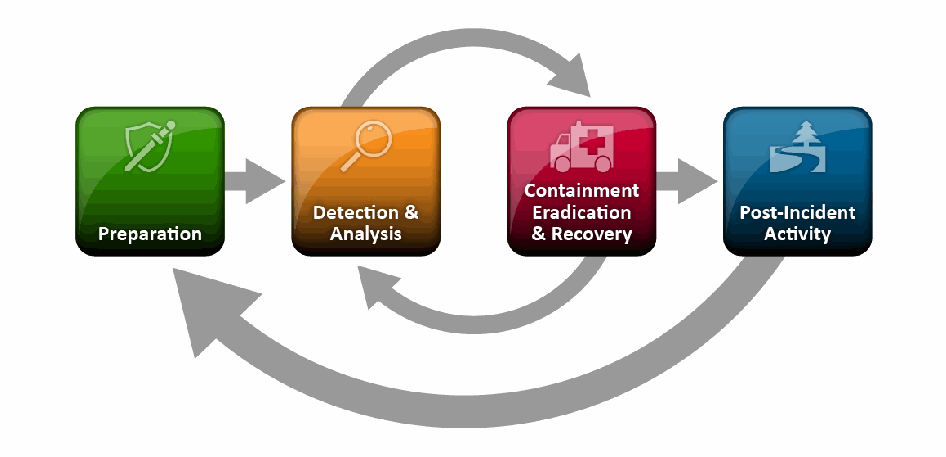
図4-1 インシデント対応ライフサイクル。色付きの角の丸い四角が横に4つ並び、それぞれにアイコンがある。「Preparation」(準備、緑、盾と注射器)、「Detection & Analysis」(検知と分析、橙、虫眼鏡)、「Containment Eradication & Recovery」(封じ込め/根絶/復旧、赤、救急車)、「Post-Incident Activity」(インシデント後の活動、青、木と道)である。灰色のまっすぐな矢印が準備から検知と分析へ、封じ込め/根絶/復旧からインシデント後の活動へ向かう。上側の曲がった矢印は検知と分析から封じ込め/根絶/復旧へ、下側の曲がった矢印は封じ込め/根絶/復旧から検知と分析へ戻る。下部の大きな曲がった矢印は、インシデント後の活動から準備へ戻る。
Figure 4-1. Incident Response Life Cycle
図4-1 インシデント対応ライフサイクル
For each incident, the organization should act appropriately, based on the severity of the incident, to mitigate its impact by containing it, eradicating infections, and ultimately recovering from the incident. The organization may need to jump back to the detection and analysis phase during containment, eradication, and recovery—for example, to check for additional infections that have occurred since the original detection was done. After an incident has been handled, the organization should issue a report that details the cause and cost of the incident and the steps the organization should take to prevent future incidents and to prepare more effectively to handle incidents that do occur.
各インシデントについて、組織は深刻度に応じて適切に対応し、封じ込め、感染の根絶、最終的な復旧によって影響を軽減すべきです。封じ込め、根絶、復旧の最中に、組織は検知と分析のフェーズへ戻る必要が生じる場合があります。たとえば、最初の検知以降に追加の感染が発生していないか確認するためです。インシデントへの対応後、組織はインシデントの原因と費用、将来のインシデントを防ぎ、発生するインシデントにより効果的に備えるために講じるべき手順を詳述した報告書を発行すべきです。
This section of the document focuses on those aspects of incident handling that are specific to malware incidents.
本書の本節では、マルウェアインシデントに特有のインシデント処理事項に焦点を当てます。
4.1 Preparation
4.1 準備
Organizations should perform preparatory measures to ensure that they are capable of responding effectively to malware incidents. Sections 4.1.1 through 4.1.3 describe several recommended preparatory measures, including building and maintaining malware-related skills within the incident response team, facilitating communication and coordination throughout the organization, and acquiring necessary tools and resources.
組織は、マルウェアインシデントに効果的に対応できるよう、準備措置を講じるべきです。4.1.1〜4.1.3節では、インシデント対応チームのマルウェア関連スキルの構築と維持、組織全体でのコミュニケーションと連携の促進、必要なツールとリソースの調達など、推奨される準備措置をいくつか説明します。
4.1.1 Building and Maintaining Malware-Related Skills
4.1.1 マルウェア関連スキルの構築と維持
In addition to standard incident response team skills as described in NIST SP 800-61, all malware incident handlers should have a solid understanding of how each major category of malware infects hosts and spreads. Also, incident handlers should be familiar with the organization’s implementations and configurations of malware detection tools so that they are better able to analyze supporting data and identify the characteristics of threats. Incident handlers doing in-depth malware analysis should have strong skills in that area and be familiar with the numerous tools for malware analysis, as described in Section 4.2.4.
NIST SP 800-61に記載された標準的なインシデント対応チームのスキルに加えて、すべてのマルウェアインシデント対応担当者は、マルウェアの主要カテゴリごとにホストへ感染し、拡散する仕組みを十分に理解しておくべきです。また、脅威を示す裏付けデータをより適切に分析し、その特徴を特定できるよう、インシデント対応担当者は組織でのマルウェア検知ツールの実装と設定に精通しているべきです。詳細なマルウェア分析を行う担当者は、その分野で高度なスキルを持ち、4.2.4節で説明する数多くのマルウェア分析ツールに精通しているべきです。
Malware incident handlers should keep abreast of the ever-evolving landscape of malware threats and technology. Besides conducting malware-related training and exercises, organizations should also seek other ways of building and maintaining skills. One possibility is to have incident handlers temporarily work as antivirus engineers or administrators so that they can gain new technical skills and become more familiar with antivirus staff procedures and practices.
マルウェアインシデント対応担当者は、絶えず進化するマルウェア脅威と技術の動向を把握しておくべきです。マルウェア関連の訓練や演習を実施するほか、組織はスキルを構築・維持する別の方法も探すべきです。たとえば、インシデント対応担当者を一時的にウイルス対策エンジニアまたは管理者として勤務させ、新しい技術スキルを身につけさせるとともに、ウイルス対策担当者の手順や業務慣行への理解を深めさせる方法があります。
4.1.2 Facilitating Communication and Coordination
4.1.2 コミュニケーションと調整の促進
One of the most common problems during malware incident handling is poor communication and coordination. Anyone involved in an incident, including users, can inadvertently cause additional problems because of a limited view or understanding of the situation. To improve communication and coordination, an organization should designate in advance a few individuals or a small team to be responsible for coordinating the organization’s responses to malware incidents. The coordinator’s primary goal is to maintain situational awareness by gathering all pertinent information, making decisions that are in the best interests of the organization, and communicating pertinent information and decisions to all relevant parties in a timely manner. For malware incidents, the relevant parties often include end users, who might be given instructions on how to avoid infecting their hosts, how to recognize the signs of an infection, and what to do if a host appears to be infected. The coordinator also needs to provide technical guidance and instructions to all staff assisting with containment, eradication, and recovery efforts, as well as giving management regular updates on the status of the response and the current and likely future impact of the incident. Another possible role for the coordinator is interacting with external parties, such as other incident response teams facing similar malware issues.
マルウェアインシデント対応中に最もよく発生する問題の一つは、コミュニケーションと調整が不十分なことです。ユーザーを含め、インシデントに関与する誰もが、状況を限定的にしか見ていない、または理解していないために、意図せず問題をさらに引き起こすことがあります。コミュニケーションと調整を改善するため、組織は事前に、マルウェアインシデントへの組織の対応を調整する責任者として数名または小規模なチームを指名しておくべきです。調整担当者の主な目標は、関連するすべての情報を収集し、組織にとって最善の判断を下し、関係者全員に適切な情報と判断を適時に伝達することで、状況認識を維持することです。マルウェアインシデントでは、関係者にエンドユーザーが含まれることが多く、ホストへの感染を避ける方法、感染の兆候を認識する方法、ホストが感染したように見える場合に取るべき行動について指示を受けることがあります。調整担当者は、封じ込め、根絶、復旧を支援するすべての職員に技術的な指針と指示を提供し、対応状況ならびにインシデントの現在および将来予測される影響について、管理者に定期的に報告する必要もあります。調整担当者の別の役割として、同様のマルウェア問題に直面している他のインシデント対応チームなど、外部関係者との連絡を担うことも考えられます。
Organizations should also establish a point of contact for answering questions about the legitimacy of malware alerts. Many organizations use the IT help desk as the initial point of contact and give help desk agents access to sources of information on real malware threats and virus hoaxes so that they can quickly determine the legitimacy of an alert and provide users with guidance on what to do. Organizations should caution users not to forward malware alerts to others without first confirming that the alerts are legitimate.
組織は、マルウェア警告の正当性に関する質問に答える連絡窓口も設けるべきです。多くの組織ではITヘルプデスクを最初の連絡窓口とし、実際のマルウェア脅威やウイルスデマに関する情報源へのアクセスをヘルプデスク担当者に提供しています。これにより担当者は、警告が正当なものかを速やかに判断し、ユーザーが取るべき行動について案内できます。組織は、警告が正当であることを最初に確認せずに、マルウェア警告を他者に転送しないようユーザーに注意を促すべきです。
4.1.3 Acquiring Tools and Resources
4.1.3 ツールおよびリソースの調達
Organizations should also ensure that they have the necessary tools (hardware and software) and resources to assist in malware incident handling. See Section 4.2.4 for more information on malware analysis toolkits, systems, and other related resources.
組織は、マルウェアインシデント対応を支援するために必要なツール(ハードウェアおよびソフトウェア)とリソースを確保しておくべきです。マルウェア解析ツールキット、システム、その他の関連リソースの詳細については、セクション4.2.4を参照してください。
4.2 Detection and Analysis
4.2 検知および分析
Organizations should strive to detect and validate malware incidents rapidly to minimize the number of infected hosts and the amount of damage the organization sustains. Because malware can take many forms and be distributed through many means, there are many possible signs of a malware incident and many locations within an organization where the signs might be recorded or observed. It sometimes takes considerable analysis, requiring extensive technical knowledge and experience, to confirm that an incident has been caused by malware, particularly if the malware threat is new and unknown. After malware incident detection and validation, incident handlers should determine the type, extent, and magnitude of the problem as quickly as possible so that the response to the incident can be given the appropriate priority. Sections 4.2.1 through 4.2.4 provide guidance on identifying the characteristics of incidents, identifying infected hosts, prioritizing incident response efforts, and analyzing malware, respectively.
組織は、感染ホスト数と組織が受ける損害を最小限に抑えるため、マルウェアインシデントを迅速に検知し、妥当性を確認するよう努めるべきです。マルウェアには多くの形態があり、さまざまな手段で配布されるため、インシデントの兆候は数多く存在し、組織内でも兆候が記録または観察される場所は多岐にわたります。特に脅威が新しく未知の場合、インシデントがマルウェアによって引き起こされたことを確認するには、広範な技術知識と経験を要する相当な分析が必要となることがあります。マルウェアインシデントの検知と妥当性確認の後、インシデント対応者は、適切な優先度で対応できるよう、問題の種類、範囲、規模をできるだけ速やかに判断すべきです。セクション4.2.1から4.2.4では、それぞれインシデントの特性の特定、感染ホストの特定、インシデント対応作業の優先順位付け、マルウェア分析に関する指針を示します。
4.2.1 Identifying Malware Incident Characteristics
4.2.1 マルウェアインシデントの特性の特定
Because no indicator is completely reliable—even antivirus software might miscategorize benign activity as malicious—incident handlers need to analyze any suspected malware incident and validate that malware is the cause. In some cases, such as a massive, organization-wide infection, validation may be unnecessary because the nature of the incident is obvious. The goal is for incident handlers to be as certain as feasible that an incident is caused by malware and to have a basic understanding of the type of malware threat responsible, such as a worm or a Trojan horse. If the source of the incident cannot easily be confirmed, it is often better to respond as if it were caused by malware and to alter response efforts if it is later determined that malware is not involved. Waiting for conclusive evidence of malware might have a serious negative impact on response efforts and significantly increase the damage sustained by the organization.
完全に信頼できる指標は存在しないため(ウイルス対策ソフトウェアでさえ、無害な活動を悪意あるものと誤分類する可能性がある)、インシデント対応者は疑わしいマルウェアインシデントを分析し、マルウェアが原因であることを検証する必要があります。組織全体に及ぶ大規模感染のように、インシデントの性質が明白な場合は、検証が不要なこともあります。目標は、インシデントがマルウェアに起因すると実行可能な範囲で確信し、ワームやトロイの木馬など、原因となるマルウェア脅威の種類を基本的に理解することです。インシデントの発生源を容易に確認できない場合、マルウェアが原因であるものとして対応し、後にマルウェアが関与していないと判明した時点で対応を変更する方がよいことが多くあります。マルウェアの決定的な証拠を待つと、対応作業に深刻な悪影響を及ぼし、組織が受ける損害を大幅に増やすおそれがあります。
As part of the analysis and validation process, incident handlers typically identify characteristics of the malware activity by examining detection sources. Understanding the activity’s characteristics is very helpful in assigning an appropriate priority to the incident response efforts and planning effective containment, eradication, and recovery activities. Incident handlers should collaborate with security administrators in advance to identify data sources that can aid in detecting malware information and to understand what types of information each data source may record. In addition to the obvious sources of data, such as antivirus software, intrusion detection system (IDS), and security information and event management (SIEM) technologies, incident handlers should be aware of and use secondary sources as appropriate. See Section 4.2 for more information on possible sources of malware characteristic information.
分析および検証の過程で、インシデント対応者は通常、検知元を調査してマルウェア活動の特性を特定します。活動の特性を理解することは、インシデント対応作業に適切な優先度を割り当て、効果的な封じ込め、根絶、復旧活動を計画するうえで非常に役立ちます。インシデント対応者は、マルウェア情報の検知に役立つデータソースを特定し、各データソースがどのような情報を記録し得るかを理解するため、セキュリティ管理者と事前に連携すべきです。ウイルス対策ソフトウェア、侵入検知システム(IDS)、セキュリティ情報イベント管理(SIEM)技術などの明白なデータソースに加えて、インシデント対応者は二次的な情報源にも注意を払い、適宜利用すべきです。マルウェアの特性に関する情報源の詳細については、セクション4.2を参照してください。
Once incident handlers have reviewed detection source data and identified characteristics of the malware, the handlers could search for those characteristics in antivirus vendors’ malware databases and identify which instance of malware is the most likely cause. If the malware has been known for some time, it is likely that antivirus vendors will have a substantial amount of information on it, such as the following:
インシデント対応者が検知元のデータを確認し、マルウェアの特性を特定したら、その特性をウイルス対策ベンダーのマルウェアデータベースで検索し、原因である可能性が最も高いマルウェアの個体を特定できます。マルウェアが以前から知られている場合、ウイルス対策ベンダーは通常、次のような相当量の情報を保有している可能性が高い:
•Malware category (e.g., virus, worm, Trojan horse)
•マルウェアのカテゴリ(例:ウイルス、ワーム、トロイの木馬)
•Services, ports, protocols, etc. that are attacked
•攻撃対象となるサービス、ポート、プロトコルなど
•Vulnerabilities that are exploited (e.g., software flaws, misconfigurations, social engineering)
•悪用される脆弱性(例:ソフトウェアの欠陥、設定ミス、ソーシャルエンジニアリング)
•Malicious filenames, sizes, content, and other metadata (e.g., email subjects, web URLs)
•悪意あるファイル名、サイズ、内容、その他のメタデータ(例:電子メールの件名、Web URL)
•Which versions of operating systems, devices, applications, etc., may be affected
•影響を受ける可能性のあるオペレーティングシステム、デバイス、アプリケーションなどのバージョン
•How the malware affects the infected host, including the names and locations of affected files, altered configuration settings, installed backdoor ports, etc.
•感染ホストに対するマルウェアの影響(影響を受けたファイルの名前と場所、変更された構成設定、インストールされたバックドア用ポートなど)
•How the malware propagates and how to approach containment
•マルウェアの拡散方法および封じ込めの進め方
•How to remove the malware from the host.
•ホストからマルウェアを削除する方法。
Unfortunately, the newest threats might not be included in malware databases for several hours or days, depending on the relative importance of the threat, and highly customized threats might not be included in malware databases at all. Therefore, incident handlers may need to consult other sources of information. One option is using public security mailing lists, which might contain first-hand accounts of malware incidents; however, such reports are often incomplete or inaccurate, so incident handlers should validate any information obtained from these sources. Another potentially valuable source of malware characteristic information is peers at other organizations. Other organizations may have already been affected and gathered data on the threat. Establishing and maintaining good relationships with peers at other organizations that face similar problems can be advantageous for all involved. An alternative source of information is self-discovery by performing malware analysis (see Section 4.2.4). This is particularly important if the malware is highly customized; there may be no other way of getting details for the malware other than doing a hands-on analysis.
残念ながら、新しい脅威は、その相対的な重要度によっては数時間から数日間マルウェアデータベースに収録されない場合があり、高度にカスタマイズされた脅威はまったく収録されない可能性もあります。したがって、インシデント対応者は他の情報源を参照する必要が生じる場合があります。選択肢の一つは、マルウェアインシデントの直接的な報告が含まれている可能性のある公開セキュリティメーリングリストを利用することです。ただし、そのような報告は不完全または不正確なことが多いため、インシデント対応者はこれらの情報源から得た情報を検証すべきです。マルウェアの特性に関する情報のもう一つの有用な情報源は、他組織の同業者です。他組織がすでに影響を受け、脅威に関するデータを収集していることもあります。同様の問題に直面している他組織の同業者と良好な関係を築き維持することは、関係者全員にとって有益となり得ます。別の情報源として、マルウェア解析を実施して自ら情報を発見する方法があります(4.2.4節を参照してください)。マルウェアが高度にカスタマイズされている場合、これは特に重要です。実際に手作業で解析しない限り、そのマルウェアの詳細を得る方法が他にないこともあります。
4.2.2 Identifying Infected Hosts
4.2.2 感染ホストの特定
Identifying hosts that are infected by malware is part of every malware incident. Once identified, infected hosts can undergo the appropriate containment, eradication, and recovery actions. Unfortunately, identifying all infected hosts is often complicated by the dynamic nature of computing. For instance, people shut hosts down, disconnect them from networks, or move them from place to place, making it extremely difficult to identify which hosts are currently infected. In addition, some hosts can boot to multiple OSs or use virtual operating system software; an infection in one OS instantiation might not be detectable when a host is currently using another OS.
マルウェアインシデントでは、感染したホストを特定することが必須です。特定後、感染ホストに対して適切な封じ込め、根絶、復旧措置を実施できます。残念ながら、コンピューティング環境の動的な性質により、感染ホストをすべて特定することはしばしば困難です。例えば、人々がホストをシャットダウンしたり、ネットワークから切断したり、別の場所に移動したりするため、現在どのホストが感染しているかを特定するのが極めて難しくなります。さらに、複数のOSで起動できるホストや仮想オペレーティングシステムソフトウェアを使用するホストもあり、あるOSインスタンスでの感染は、ホストが別のOSを現在使用していると検出できないことがあります。
Accurate identification of infected hosts can also be complicated by other factors. For example, hosts with unmitigated vulnerabilities might be disinfected and reinfected multiple times. Some instances of malware actually remove some or all traces of other malware, which could cause the partially or fully removed infections to go undetected. In addition, the data concerning infected hosts might come from several sources—antivirus software, IDSs, SIEMs, user reports, and other methods—and be very difficult to consolidate and keep current.
感染ホストを正確に特定することは、他の要因によっても複雑になります。例えば、脆弱性が緩和されていないホストは、駆除後に何度も再感染することがあります。マルウェアの中には、他のマルウェアの痕跡の一部または全部を実際に削除するものがあり、その結果、一部または完全に除去された感染が検出されない可能性があります。また、感染ホストに関するデータは、ウイルス対策ソフトウェア、IDS、SIEM、ユーザー報告、その他の方法など、複数の情報源から得られることがあり、それらを統合して最新状態に保つことが非常に困難な場合があります。
Given the number of malware threats, all infection identification should be performed through automated means (as described in Sections 4.2.2.1 and 4.2.2.2). Manual identification methods, such as relying on users to identify and report infected hosts, and having technical staff personally check each host, are not feasible for most situations. Organizations should carefully consider host identification issues so that they are prepared to use multiple identification strategies as part of implementing effective containment strategies. Organizations should also determine which types of identifying information might be needed and what data sources might record the information. For example, a host’s current IP address is typically needed for remote actions; of course, a host’s physical location is needed for local actions. One piece of information can often be used to determine others, such as mapping an IP address to a media access control (MAC) address, which could then be mapped to a switch serving a particular group of offices. If an IP address can be mapped to a host owner or user—for example, by recording the mapping during network login—the owner or user can be contacted to provide the host’s location.
マルウェア脅威の数を考慮すると、感染の特定はすべて自動化された手段(セクション4.2.2.1および4.2.2.2に記載)で行うべきです。感染ホストの特定をユーザーに依存する方法や、技術職員が各ホストを個別に確認する方法などの手動特定は、ほとんどの状況で実行可能ではありません。組織は、効果的な封じ込め戦略の実施にあたって複数の特定戦略を使用できるよう、ホスト特定の課題を慎重に検討して備えるべきです。また、必要となり得る識別情報の種類と、その情報を記録する可能性のあるデータソースを判断すべきです。例えば、リモート操作には通常ホストの現在のIPアドレスが必要であり、ローカル操作には当然ホストの物理的な場所が必要です。一つの情報を使って他の情報を特定できる場合も多くあります。例えば、IPアドレスをメディアアクセス制御(MAC)アドレスに対応付け、そのMACアドレスを特定のオフィス群にサービスを提供するスイッチに対応付けることができます。例えばネットワークログイン時に対応関係を記録することで、IPアドレスをホスト所有者またはユーザーに対応付けられる場合、所有者またはユーザーに連絡してホストの場所を確認できます。
The difficulty in identifying the physical location of an infected host depends on several factors. In a managed environment, identifying a host’s location is often relatively easy because of the standardized manner in which things are done. For example, host names might contain the user’s ID or office number, or the host’s serial number (which can be tied to a user ID). Also, asset inventory management tools might contain current information on host characteristics. In other environments, especially those in which users have full control over their hosts and network management is not centralized, it might be challenging to link a machine to a location. For example, an administrator might know that the host at address 10.3.1.70 appears to be infected but not have any idea where that machine resides or who uses it. Administrators might need to track down an infected host through network devices. For example, a switch port mapper can poll switches for a particular IP address and identify the switch port number and host name associated with that IP address. If the infected host is several switches away, it can take hours to track down a single machine; if the infected host is not directly switched, the administrator might still need to manually trace connectivity through various wiring closets and network devices. An alternative is to pull the network cable or shut down the switch port for an apparently infected host and wait for a user to report an outage. This approach can inadvertently cause a loss of connectivity for small numbers of uninfected hosts, but if performed carefully as a last-resort identification and containment method, it can be quite effective.
感染ホストの物理的な場所を特定する難しさは、いくつかの要因によって異なります。管理された環境では、作業手順が標準化されているため、ホストの場所を特定するのは比較的容易なことが多くあります。例えば、ホスト名にユーザーIDやオフィス番号が含まれていたり、ホストのシリアル番号(ユーザーIDに紐付け可能)が使われたりします。また、資産インベントリ管理ツールにホスト特性の最新情報が含まれていることもあります。他の環境、特にユーザーがホストを完全に管理し、ネットワーク管理が集中化されていない環境では、マシンと場所を結び付けるのが難しい場合があります。例えば、管理者はアドレス10.3.1.70のホストが感染しているようだと把握していても、そのマシンの場所や使用者をまったく知らないことがあります。管理者はネットワーク機器を通じて感染ホストを追跡する必要があるかもしれません。例えば、スイッチポートマッパーを使って特定のIPアドレスを求めてスイッチをポーリングし、そのIPアドレスに関連付けられたスイッチポート番号とホスト名を特定できます。感染ホストが複数のスイッチを経由した先にある場合、一台のマシンを追跡するのに数時間かかることもあります。感染ホストが直接スイッチに接続されていない場合、管理者は複数の配線室やネットワーク機器を経由して接続を手作業で追跡する必要があるかもしれません。別の方法として、感染したように見えるホストのネットワークケーブルを抜くかスイッチポートを停止し、ユーザーから障害の報告が来るのを待つことができます。この方法では、少数の未感染ホストの接続を誤って失わせる可能性がありますが、最終手段として特定と封じ込めを慎重に行えば、非常に効果的となり得ます。
Some organizations first make reasonable efforts to identify infected hosts and perform containment, eradication, and recovery efforts on them, then implement measures to prevent hosts that have not been verified as uninfected and properly secured from attaching to the network. These measures should be discussed well in advance, and incident handlers should have prior written permission to lock out hosts under certain circumstances. Generally, lockout measures are based on the characteristics of particular hosts, such as MAC addresses or static IP addresses, but lockouts can also be performed based on user ID if a host is associated with a single user. Another possibility is to use network login scripts to identify and deny access to infected hosts, but this might be ineffective if an infected host starts spreading malware after system boot but before user authentication. As described in Section 4.3.4, having a separate VLAN for infected or unverified hosts can provide a good way to lock out hosts, as long as the mechanism to detect infections is reliable. Although lockout methods might be needed only under extreme circumstances, organizations should think in advance about how individual hosts or users could be locked out so that if needed, lockouts can be performed rapidly.
一部の組織では、まず感染ホストを特定するための妥当な努力を行い、それらに封じ込め、根絶、復旧措置を実施してから、未感染であり適切に保護されていると確認されていないホストがネットワークに接続しないようにする措置を講じます。こうした措置は十分前もって検討し、一定の状況下でホストを締め出すための事前の書面による許可を、インシデント対応者が得ておくべきです。一般に、締め出し措置はMACアドレスや静的IPアドレスなど、特定ホストの特性に基づきますが、ホストが単一ユーザーに関連付けられている場合はユーザーIDに基づいて行うこともできます。ネットワークログインスクリプトを使って感染ホストを特定しアクセスを拒否する方法もありますが、感染ホストがシステム起動後かつユーザー認証前にマルウェアを拡散し始める場合は効果がない可能性があります。4.3.4節に記載のとおり、感染または未検証ホスト用に別個のVLANを設けると、感染を検知する仕組みが信頼できる限り、ホストを締め出す有効な方法となり得ます。締め出し方法が必要となるのは極端な状況に限られるかもしれませんが、必要時に迅速に実施できるよう、個々のホストまたはユーザーをどのように締め出すかを組織は事前に検討すべきです。
Sections 4.2.2.1 through 4.2.2.3 discuss the possible categories of infected host identification techniques: forensic, active, and manual.
セクション4.2.2.1から4.2.2.3では、感染ホスト特定技術の考えられるカテゴリ、すなわちフォレンジック、アクティブ、手動について説明します。
4.2.2.1 Forensic Identification
4.2.2.1 フォレンジックによる特定
Forensic identification is the practice of identifying infected hosts by looking for evidence of recent infections. The evidence may be very recent (only a few minutes old) or not so recent (hours or days old); the older the information is, the less accurate it is likely to be. The most obvious sources of evidence are those that are designed to identify malware activity, such as antivirus software, content filtering (e.g., anti-spam measures), IPS, and SIEM technologies. The logs of security applications might contain detailed records of suspicious activity, and might also indicate whether a security compromise occurred or was prevented.
フォレンジックによる特定とは、最近の感染の証拠を探して感染ホストを特定する方法です。証拠はごく最近(数分前)のものの場合も、さほど最近ではない(数時間または数日前)ものの場合もあります。情報が古いほど、正確性は低くなる可能性が高いです。最も明白な証拠源は、ウイルス対策ソフトウェア、コンテンツフィルタリング(例:スパム対策)、IPS、SIEM技術など、マルウェア活動の特定を目的とするものです。セキュリティアプリケーションのログには、疑わしい活動の詳細な記録が含まれることがあり、セキュリティ侵害が発生したか、または防止されたかが示される場合もあります。
In situations in which the typical sources of evidence do not contain the necessary information, organizations might need to turn to secondary sources, such as the following:
一般的な証拠源に必要な情報が含まれていない場合、組織は次のような二次的な情報源を利用する必要があるかもしれない:
•DNS Server Logs. DNS server logs often contain records of infected hosts attempting to get the IP address for an external malicious site that they are trying to interact with (e.g., send data to, receive commands from). Some organizations deploy passive DNS collection systems, which keep track of all DNS resolutions occurring within the enterprise; these are often more helpful than DNS server logs in identifying malicious activity because malware might use DNS services other than the organization’s. Analysts should be cautious of blocking hosts based only on resolved IP addresses because many current attacks use fast flux DNS, which means that each domain resolves to several different IP addresses (in a round robin arrangement), and these addresses often change in a matter of hours. The newer the DNS resolution, the more likely the IP addresses are to be the correct ones to block in the short term.
•DNSサーバーログ。DNSサーバーログには、感染ホストが通信しようとしている外部の悪意あるサイト(例:データ送信先、コマンド取得元)のIPアドレスを取得しようとした記録が含まれることが多くあります。組織によっては、企業内で発生したすべてのDNS解決を追跡するパッシブDNS収集システムを導入しています。マルウェアは組織のDNS以外のサービスを利用する場合があるため、こうしたシステムは悪意ある活動の特定にDNSサーバーログより役立つことが多くあります。現在の攻撃の多くは高速フラックスDNSを使用し、各ドメインが複数のIPアドレスに(ラウンドロビン方式で)解決され、これらのアドレスが数時間単位で変わることが多いため、解決されたIPアドレスだけを根拠にホストをブロックすることには分析担当者は注意すべきです。DNS解決が新しいほど、短期的にブロックすべき正しいIPアドレスである可能性が高いです。
•Other Application Server Logs. Applications commonly used as malware transmission mechanisms, such as email and HTTP, might record information in their logs that indicates which hosts were infected. From end to end, information regarding a single email message might be recorded in several places: the sender’s host, each email server that handles the message, and the recipient’s host, as well as antivirus and content filtering servers. Similarly, hosts running web browsers can provide a rich resource for information on malicious web activity, including a history of websites visited and the dates and times that they were visited, and cached web data files.
•その他のアプリケーションサーバーログ。電子メールやHTTPなど、マルウェアの伝送手段として一般に使われるアプリケーションは、どのホストが感染したかを示す情報をログに記録することがあります。単一の電子メールメッセージに関する情報は、送信元ホスト、そのメッセージを処理する各メールサーバー、受信者のホスト、さらにウイルス対策サーバーやコンテンツフィルタリングサーバーなど、エンドツーエンドの複数箇所に記録される場合があります。同様に、Webブラウザーを実行するホストは、アクセスしたWebサイトの履歴、そのアクセス日時、キャッシュされたWebデータファイルなど、悪意あるWeb活動に関する豊富な情報源となります。
•Network Forensic Tools. Software programs that capture and record packets, such as network forensic analysis tools and packet sniffers, might have highly detailed information on malware activity. However, because these tools record so much information about most or all network activity, it can be very time-intensive to extract just the needed information. More efficient means of identifying infected hosts are often available.
•ネットワークフォレンジックツール。ネットワークフォレンジック分析ツールやパケットスニファーなど、パケットを捕捉して記録するソフトウェアは、マルウェア活動に関する非常に詳細な情報を持つことがあります。しかし、これらのツールはネットワーク活動の大部分または全部について大量の情報を記録するため、必要な情報だけを抽出するのに非常に時間がかかる可能性があります。感染ホストを特定するより効率的な方法が利用できることも多くあります。
•Network Device Logs. Firewalls, routers, and other filtering devices that record connection activity, as well as network monitoring tools, might be helpful in identifying network connection activity (e.g., specific port number combinations, unusual protocols) consistent with certain malware.
•ネットワーク機器ログ。接続活動を記録するファイアウォール、ルーター、その他のフィルタリング機器や、ネットワーク監視ツールは、特定のマルウェアに合致するネットワーク接続活動(例:特定のポート番号の組み合わせ、異常なプロトコル)の特定に役立つ場合があります。
Using forensic data for identifying infected hosts can be advantageous over other methods because the data has already been collected—the pertinent data just needs to be extracted from the total data set. Unfortunately, for some data sources, extracting the data can take a considerable amount of time. Also, event information can become outdated quickly, causing uninfected hosts to undergo containment unnecessarily and allowing infected hosts to avoid containment measures. If an accurate, comprehensive, and reasonably current source of forensic data is available, it might provide the most effective way of identifying infected hosts.
感染ホストの特定にフォレンジックデータを使うことは、データがすでに収集されており、データセット全体から関連データを抽出するだけでよい点で、他の方法より有利となり得ます。残念ながら、一部のデータソースではデータ抽出にかなりの時間がかかります。また、イベント情報はすぐに古くなり、未感染ホストが不必要に封じ込め措置を受けたり、感染ホストが封じ込めを回避したりすることがあります。正確で包括的かつ比較的新しいフォレンジックデータソースを利用できる場合、感染ホストの特定に最も効果的な方法となる可能性があります。
4.2.2.2 Active Identification
4.2.2.2 アクティブな特定
Active identification methods are used to identify which hosts are currently infected. Immediately after identifying an infection, some active approaches can be used to perform containment and eradication measures for the host, such as running a disinfection utility, deploying patches or antivirus updates, or moving the host to a VLAN for infected hosts. Active identification can be performed through several methods, including the following:
アクティブな特定方法は、現在感染しているホストを特定するために用いられます。感染を特定した直後に、一部のアクティブな方法では、駆除ユーティリティの実行、パッチやウイルス対策更新の配布、感染ホスト用VLANへのホスト移動などにより、そのホストへの封じ込めおよび根絶措置を実行できます。アクティブな特定は、次のようないくつかの方法で実施できる:
•Security Automation. Security automation technologies, particularly those used for continuous monitoring (e.g., network access control technologies), can be used to check host characteristics for signs of a current infection, such as a particular configuration setting or a system file with a certain size that indicates an infection. Security automation technologies are generally the preferred method for active identification.
•セキュリティ自動化。特に継続的監視(例:ネットワークアクセス制御技術)に用いられるセキュリティ自動化技術は、特定の構成設定や感染を示す特定サイズのシステムファイルなど、現在の感染の兆候がないかホスト特性を確認するために利用できます。セキュリティ自動化技術は一般に、アクティブな特定の望ましい方法です。
•Custom Network-Based IPS or IDS Signature. Writing a custom IPS or IDS signature that identifies infected hosts is often a highly effective technique. Some organizations have separate IPS or IDS sensors with strong signature-writing capabilities that can be dedicated to identifying malware infections. This provides a high-quality source of information while keeping other sensors from becoming overloaded with malware alerts.
•カスタムのネットワークベースIPSまたはIDSシグネチャ。感染ホストを特定するカスタムIPSまたはIDSシグネチャを作成することは、非常に効果的な手法となることが多くあります。一部の組織には、強力なシグネチャ作成能力を持ち、マルウェア感染の特定に専用できる独立したIPSまたはIDSセンサーがあります。これにより、他のセンサーをマルウェア警告で過負荷にすることなく、高品質な情報源を確保できます。
•Packet Sniffers and Protocol Analyzers. Configuring packet sniffers and protocol analyzers to look only for network traffic matching the characteristics of a particular malware threat can be effective at identifying infected hosts. An example of what to monitor is to look for botnet command and control communications being carried over IRC. These packet examination techniques are most helpful if most or all malware-generated network traffic attempts to pass through the same network device or a few devices.
•パケットスニファーおよびプロトコルアナライザー。特定のマルウェア脅威の特性に一致するネットワークトラフィックだけを調べるようにパケットスニファーやプロトコルアナライザーを構成すると、感染ホストの特定に効果的な場合があります。監視対象の例として、IRC上で行われるボットネットのコマンド・アンド・コントロール通信を探す方法があります。こうしたパケット検査技術は、マルウェアが生成するネットワークトラフィックの大部分または全部が、同じネットワーク機器または少数の機器を通過しようとする場合に最も役立ちます。
Although active approaches can produce highly accurate results, active approaches need to be used repeatedly because the status of infections changes constantly and the data is gathered over a period of time.
アクティブな方法は非常に正確な結果を得られますが、感染状況は絶えず変化し、データも一定期間にわたって収集されるため、繰り返し実施する必要があります。
4.2.2.3 Manual Identification
4.2.2.3 手動による特定
Another method for identifying infected hosts is the manual approach. This is by far the most labor-intensive of the three methods. It should only be considered in those situations where automated methods are not feasible, such as when networks are completely overwhelmed by infection-related traffic using spoofed addresses. Also, if users have full control over their hosts, as they do in many non-managed environments, the characteristics of hosts may be so different that the results of automated identification methods are quite incomplete and inaccurate. In such situations, a manual approach might be needed to supplement automated approaches.
感染ホストを特定する別の方法は手動による方法です。三つの方法の中で、これが断然最も労力を要します。これは、自動化された方法が実行可能でない場合、例えば、偽装アドレスを使った感染関連トラフィックによってネットワークが完全に圧倒されている場合に限って検討すべきです。また、多くの非管理環境のように、ユーザーがホストを完全に管理している場合、ホストの特性が大きく異なり、自動特定方法の結果が非常に不完全かつ不正確になることがあります。そのような状況では、自動化された方法を補完するために手動の方法が必要となる場合があります。
There are a few possible techniques for implementing a manual approach. One is to ask users to identify infections themselves by providing them with information on the malware and the signs of an infection, as well as antivirus software, OS or application patches, or scanning tools. These items may need to be distributed on removable media. A similar manual technique is to have local IT staffers (including individuals who normally do not participate in malware incident handling) either check all hosts or check hosts that are suspected of being infected. In some cases, non-IT staff might fulfill this duty at remote offices that do not have available IT staff. Any staff who might need to assist during major malware incidents should be designated in advance and provided with documentation and periodic training on their possible duties.
手動の方法を実施するための手法はいくつかあります。一つは、マルウェアと感染の兆候に関する情報、ならびにウイルス対策ソフトウェア、OSまたはアプリケーションのパッチ、スキャンツールをユーザーに提供し、感染を自ら特定してもらうことです。これらの物品はリムーバブルメディアで配布する必要があるかもしれません。同様の手動手法として、ローカルのIT職員(通常はマルウェアインシデント対応に関与しない職員を含む)が、すべてのホストまたは感染が疑われるホストを確認する方法があります。IT職員がいない遠隔オフィスでは、IT以外の職員がこの役割を担うこともあります。大規模なマルウェアインシデントで支援が必要となる可能性のある職員は、事前に指名し、想定される職務に関する文書と定期的な訓練を提供すべきです。
4.2.2.4 Identification Recommendations
4.2.2.4 特定に関する推奨事項
Although active approaches typically produce the most accurate results, they are often not the fastest way of identifying infections. It might take considerable time to scan every host in an organization, and because hosts that have been disconnected or shut off will not be identified, the scan will need to be repeated. If forensic data is very recent, it might be a good source of readily available information, although the information might not be comprehensive. Manual methods are generally not feasible for comprehensive enterprise-wide identification, but they are a necessary part of identification when other methods are not sufficient. In many cases, it is most effective to use multiple approaches simultaneously or in sequence to provide the best results.
アクティブな方法は通常、最も正確な結果をもたらしますが、感染を特定する最速の方法とは限りません。組織内のすべてのホストをスキャンするにはかなりの時間がかかることがあり、切断または電源オフ状態のホストは特定されないため、スキャンを繰り返す必要があります。フォレンジックデータが非常に新しければ、網羅的ではない可能性はあるものの、すぐに利用できる情報源として有用な場合があります。手動の方法は通常、企業全体を網羅する特定には実行可能ではありませんが、他の方法が不十分な場合には特定に必要です。多くの場合、複数の方法を同時にまたは順番に用いることが、最良の結果を得るうえで最も効果的です。
Organizations should carefully consider the possible approaches for their environment ahead of time, select a sufficiently broad range of approaches, and develop procedures and technical capabilities to perform each selected approach effectively when a malware incident occurs. Organizations should also identify which individuals or groups can assist in identification efforts. For example, identification might be performed by security administrators, system administrators, network administrators, desktop administrators, mobile device administrators, and others, depending on the sources of identification information. Organizations should ensure that everyone who might be involved in identification knows what his or her role is and how to perform necessary tasks.
組織は、環境に適した方法を事前に慎重に検討し、十分に幅広い方法を選定し、マルウェアインシデント発生時に選定した各方法を効果的に実施するための手順と技術的能力を整備すべきです。また、特定作業を支援できる個人またはグループを特定すべきです。例えば、特定情報の情報源に応じて、セキュリティ管理者、システム管理者、ネットワーク管理者、デスクトップ管理者、モバイルデバイス管理者などが特定を実施することがあります。特定に関与する可能性のある全員が、自分の役割と必要な作業の実施方法を把握していることを組織は確保すべきです。
4.2.3 Prioritizing Incident Response
4.2.3 インシデント対応の優先順位付け
Once a malware incident has been validated, the next activity is to prioritize its handling. NIST SP 800-61 presents general guidelines for incident prioritization; this section extends those by including additional factors to consider during prioritization.
マルウェアインシデントの妥当性が確認されたら、次に対応の優先順位を決めます。NIST SP 800-61ではインシデントの優先順位付けに関する一般的な指針を示しており、本セクションでは優先順位付けの際に考慮すべき追加要因を含めてその指針を拡張します。
Certain forms of malware, such as worms, tend to spread very quickly and can cause a substantial impact in minutes or hours, so they often necessitate a high-priority response. Other forms of malware, such as Trojan horses, tend to affect a single host; the response to such incidents should be based on the value of the data and services provided by the host. Organizations should establish a set of criteria that identify the appropriate level of response for various malware-related situations. The criteria should incorporate considerations such as the following:
ワームなどの特定のマルウェアは非常に速く拡散し、数分から数時間で重大な影響を及ぼす可能性があるため、多くの場合、最優先の対応が必要となります。他の種類のマルウェア、例えばトロイの木馬は単一ホストに影響する傾向があり、そのようなインシデントへの対応は、ホストが提供するデータおよびサービスの価値に基づくべきです。組織は、さまざまなマルウェア関連状況に適切な対応レベルを定める基準を設けるべきです。その基準には、次のような考慮事項を含めるべきである:
•How the malware entered the environment and what transmission mechanisms it uses
•マルウェアが環境に侵入した方法と、使用する伝送メカニズム
•What type of malware it is (e.g., virus, worm, Trojan horse)
•マルウェアの種類(例:ウイルス、ワーム、トロイの木馬)
•Which types of attacker tools are placed onto the host by the malware
•マルウェアがホストに配置する攻撃者ツールの種類
•What networks and hosts the malware is affecting and how it is affecting them
•マルウェアが影響を与えているネットワークおよびホストと、その影響の内容
•How the impact of the incident is likely to increase in the following minutes, hours, and days if the incident is not contained.
•インシデントを封じ込めない場合、今後数分、数時間、数日間にインシデントの影響がどのように拡大する可能性がありますか。
4.2.4 Malware Analysis
4.2.4 マルウェア分析
Incident handlers can study the behavior of malware by analyzing it either actively (executing the malware) or forensically (examining the infected host for evidence of malware). Forensic approaches are safer to perform on an infected host because they can examine the host without allowing the malware to continue executing. However, sometimes it is significantly faster and easier to analyze malware by monitoring it during execution. Such active approaches are best performed on malware test systems instead of production hosts, to minimize possible damage caused by allowing the malware to execute.
インシデント対応者は、マルウェアをアクティブに(実行して)分析するか、フォレンジックに(感染ホストを調べてマルウェアの証拠を探して)分析することで、その挙動を調査できます。フォレンジック手法は、マルウェアを実行し続けることなくホストを調べられるため、感染ホスト上でより安全に実施できます。ただし、マルウェアの実行中に監視して分析する方が大幅に速く簡単な場合もあります。マルウェアの実行を許可することで生じる損害を最小限に抑えるため、このようなアクティブな方法は、本番ホストではなくマルウェア試験システム上で実施するのが最善です。
Ideal active approaches involve an incident handler acquiring a malware sample from an infected host and placing the malware on an isolated test system. Test systems often have a virtualized OS image; copies of these builds can be infected, isolating any infection within the virtualized OS, and the infected image can be replaced with a known good image after the analysis is complete.17 On such test systems, the host OS is kept uninfected so it can be used to monitor the execution of the malware within the virtualized OS. The test system should include up-to-date tools for identifying malware (e.g., antivirus software, intrusion detection systems), listing the currently running processes, and displaying network connections, as well as many other potentially helpful utilities. There are various websites and books that provide detailed instructions on setting up malware test systems and their tools; further discussion of them is outside the scope of this publication. Malware test systems are helpful not only for analyzing current malware threats without the risk of inadvertently causing additional damage to the organization, but also for training staff in malware incident handling.
理想的なアクティブ手法では、インシデント対応者が感染ホストからマルウェアのサンプルを取得し、隔離された試験システムに配置します。試験システムには仮想化OSイメージが使われることが多くあります。これらのビルドのコピーを感染させれば、感染を仮想化OS内に隔離でき、分析完了後に感染イメージを既知の正常なイメージに置き換えられます。17このような試験システムでは、ホストOSを感染させずに保ち、仮想化OS内でのマルウェア実行を監視するために使用します。試験システムには、マルウェアを特定する最新ツール(例:ウイルス対策ソフトウェア、侵入検知システム)、現在実行中のプロセスを一覧表示するツール、ネットワーク接続を表示するツール、およびその他多数の有用な可能性のあるユーティリティを含めるべきです。マルウェア試験システムとそのツールの設定方法を詳しく説明するWebサイトや書籍は複数ありますが、それらの詳細な説明は本刊行物の範囲外です。マルウェア試験システムは、組織に意図せず追加の損害を与える危険を冒さずに現在のマルウェア脅威を分析するだけでなく、マルウェアインシデント対応に関する職員訓練にも役立ちます。
Forensic approaches involve booting a forensic environment and using it to study the stored information from an infected host. The toolsets for forensic analysis greatly overlap those for active analysis; similarly, there are various websites and books available that explain how to create forensic analysis environments. There are two basic approaches: create a bootable forensic environment on write-protected removable media, or use a forensic workstation and connect it to the storage of the infected host (e.g., hard drive). The motivation for using such a trusted toolkit instead of relying on the information reported by the infected host’s OS is that malware on the host may have disabled or altered the functionality of the security tools on the infected host, such as antivirus software, so that they do not report malicious activity. By running tools from a protected, verified toolkit, incident handlers can gain a more accurate understanding of the activity on the host.
フォレンジック手法では、フォレンジック環境を起動し、それを使って感染ホストに保存された情報を調査します。フォレンジック分析用のツールセットはアクティブ分析用のものと大きく重複しています。同様に、フォレンジック分析環境の作成方法を説明するWebサイトや書籍も複数あります。基本的な方法は二つあります。書き込み保護されたリムーバブルメディア上に起動可能なフォレンジック環境を作成する方法、またはフォレンジックワークステーションを使い、感染ホストのストレージ(例:ハードドライブ)に接続する方法です。感染ホストのOSが報告する情報に依存せず、このような信頼できるツールキットを使用する理由は、ホスト上のマルウェアによって、感染ホストのウイルス対策ソフトウェアなどのセキュリティツールの機能が無効化または改変され、悪意ある活動が報告されなくなっている可能性があるためです。保護され検証済みのツールキットからツールを実行することで、インシデント対応者はホスト上の活動をより正確に把握できます。
4.3 Containment
4.3 封じ込め
Containment of malware has two major components: stopping the spread of the malware and preventing further damage to hosts. Nearly every malware incident requires containment actions. In addressing an incident, it is important for an organization to decide which methods of containment to employ initially, early in the response. Containment of isolated incidents and incidents involving noninfectious forms of malware is generally straightforward, involving such actions as disconnecting the affected hosts from networks or shutting down the hosts. For more widespread malware incidents, such as fast-spreading worms, organizations should use a strategy that contains the incident for most hosts as quickly as possible; this should limit the number of machines that are infected, the amount of damage that is done, and the amount of time that it will take to fully recover all data and services.
マルウェアの封じ込めには、マルウェアの拡散を止めることと、ホストへのさらなる損害を防ぐことという二つの主な要素があります。ほぼすべてのマルウェアインシデントで封じ込め措置が必要となります。インシデントに対処する際、組織は対応の初期段階で、最初にどの封じ込め方法を採用するかを決めることが重要です。孤立したインシデントや感染性のない形態のマルウェアが関与するインシデントの封じ込めは、通常簡単であり、影響を受けたホストをネットワークから切断する、またはホストをシャットダウンするなどの措置を伴います。急速に拡散するワームなど、より広範囲に及ぶマルウェアインシデントでは、できるだけ速やかに大半のホストでインシデントを封じ込める戦略を組織は用いるべきです。これにより、感染するマシンの数、発生する損害、すべてのデータとサービスを完全に復旧するまでに要する時間を抑えられます。
In containing a malware incident, it is also important to understand that stopping the spread of malware does not necessarily prevent further damage to hosts. Malware on a host might continue to exfiltrate sensitive data, replace OS files, or cause other damage. In addition, some instances of malware are designed to cause additional damage when network connectivity is lost or other containment measures are performed. For example, an infected host might run a malicious process that contacts another host periodically. If that connectivity is lost because the infected host is disconnected from the network, the malware might overwrite all the data on the host’s hard drive. For these reasons, handlers should not assume that just because a host has been disconnected from the network, further damage to the host has been prevented, and in many cases, should begin eradication efforts as soon as possible to prevent more damage.
マルウェアインシデントを封じ込める際には、マルウェアの拡散を止めても、必ずしもホストへのさらなる損害を防げるわけではないことも理解しておく必要があります。ホスト上のマルウェアは、機密データを引き続き外部へ送信したり、OSファイルを置き換えたり、その他の損害を引き起こしたりすることがあります。また、ネットワーク接続が失われた場合や、他の封じ込め措置が実施された場合にさらなる損害を引き起こすよう設計されたマルウェアもあります。例えば、感染ホストが別のホストに定期的に接続する悪意あるプロセスを実行していることがあります。感染ホストをネットワークから切断したことで接続が失われると、マルウェアがホストのハードドライブ上の全データを上書きするかもしれません。このため、ホストをネットワークから切断しただけでさらなる損害が防止されたと対応者は想定すべきではなく、多くの場合、追加の損害を防ぐため根絶作業をできるだけ早く開始すべきです。
Organizations should have strategies and procedures in place for making containment-related decisions that reflect the level of risk acceptable to the organization. For example, an organization might decide that infected hosts performing critical functions should not be disconnected from networks or shut down if the likely damage to the organization from those functions being unavailable would be greater than the security risks posed by not isolating or shutting down the host. Containment strategies should support incident handlers in selecting the appropriate combination of containment methods based on the characteristics of a particular situation.
組織は、組織が許容できるリスクレベルを反映した、封じ込めに関する判断のための戦略および手順を整備しておくべきです。例えば、重要な機能を担う感染ホストについて、その機能が利用できなくなることによる組織への損害が、ホストを隔離または停止しないことによるセキュリティリスクを上回る可能性がある場合、組織はネットワークから切断もシャットダウンもしないと決めることがあります。封じ込め戦略は、特定状況の特性に基づいて適切な封じ込め方法を組み合わせて選択できるよう、インシデント対応者を支援すべきです。
Containment methods can be divided into four basic categories: relying on user participation, performing automated detection, temporarily halting services, and blocking certain types of network connectivity. Sections 4.3.1 through 4.3.4 describe each category in detail.
封じ込め方法は、ユーザーの参加に依存する、自動検知を実施する、サービスを一時停止する、特定の種類のネットワーク接続を遮断する、という基本的な四つのカテゴリに分けられます。各カテゴリの詳細はセクション4.3.1から4.3.4で説明します。
4.3.1 Containment Through User Participation
4.3.1 ユーザー参加による封じ込め
At one time, user participation was a valuable part of containment efforts, particularly during large-scale incidents in non-managed environments. Users were provided with instructions on how to identify infections and what measures to take if a host was infected, such as calling the help desk, disconnecting the host from the network, or powering off the host. The instructions might also cover malware eradication, such as updating antivirus signatures and performing a host scan, or obtaining and running a specialized malware eradication utility. As hosts have increasingly become managed, user participation in containment has sharply decreased. However, having users perform containment actions is still helpful in non-managed environments and other situations in which use of fully automated containment methods (such as those described in Sections 4.3.2 through 4.3.4) is not feasible.
かつて、特に非管理環境での大規模インシデントでは、ユーザーの参加が封じ込め作業の有効な一部でした。ユーザーには、感染の特定方法と、ホストが感染した場合に取るべき措置(ヘルプデスクへの電話、ホストのネットワーク切断、ホストの電源オフなど)が指示されていました。この指示には、ウイルス対策シグネチャの更新やホストスキャンの実施などのマルウェア根絶、または専用のマルウェア根絶ユーティリティの入手と実行も含まれることがありました。ホストの管理が進むにつれ、封じ込めへのユーザー参加は大幅に減少しました。しかし、非管理環境や、セクション4.3.2から4.3.4に記載されるような完全自動化された封じ込め方法を利用できないその他の状況では、ユーザーによる封じ込め措置は依然として有用です。
Effectively communicating helpful information to users in a timely manner is challenging. Although email is typically the most efficient communication mechanism, it might be unavailable during certain incidents, or users might not read the email until it is too late. Therefore, organizations should have several alternate mechanisms in place for distributing information to users, such as sending messages to all voice mailboxes within the organization, posting signs in work areas, and handing out instructions at building and office entrances. Organizations with significant numbers of users in alternate locations, such as home offices and small branch offices, should ensure that the communication mechanisms reach these users. Another important consideration is that users might need to be provided with software, such as cleanup utilities, and software updates, such as patches and updated antivirus signatures. Organizations should identify and implement multiple methods for delivering software utilities and updates to users who are expected to assist with containment.
役立つ情報を適時にユーザーへ効果的に伝えることは困難です。電子メールは通常、最も効率的な連絡手段ですが、特定のインシデント中は利用できない場合があり、ユーザーが手遅れになるまでメールを読まないこともあります。そのため組織は、組織内のすべてのボイスメールボックスへのメッセージ送信、作業区域への掲示、建物やオフィスの入口での指示書配布など、ユーザーに情報を配布する代替手段を複数用意すべきです。在宅勤務者や小規模支店など、別の場所にいるユーザーが多数いる組織は、連絡手段がそれらのユーザーにも届くようにすべきです。もう一つの重要な考慮事項として、ユーザーにクリーンアップユーティリティなどのソフトウェアや、パッチおよび更新されたウイルス対策シグネチャなどのソフトウェア更新を提供する必要がある場合があります。組織は、封じ込めを支援することが想定されるユーザーにソフトウェアユーティリティと更新を届ける複数の方法を特定し、実装すべきです。
Although user participation can be very helpful for containment, organizations should not rely on this means for containing malware incidents unless absolutely necessary. No matter how containment guidance is communicated, it is unlikely that all users will receive it and realize that it might pertain to them. In addition, some users who receive containment instructions are unlikely to follow the directions successfully because of a lack of understanding, a mistake in following the directions, or host-specific characteristics or variations in the malware that make the directions incorrect for that host. Some users also might be focused on performing their regular tasks and be unconcerned about the possible effects of malware on their hosts. Nevertheless, for large-scale incidents involving a sizable percentage of the organization’s hosts in non-managed environments, user involvement in containment can significantly reduce the burden on incident handlers and technical support staff in responding to the incident.
ユーザー参加は封じ込めに大いに役立つ場合がありますが、絶対に必要な場合を除き、組織はマルウェアインシデントの封じ込めをこの方法に頼るべきではありません。封じ込めの指針をどのように伝えても、すべてのユーザーがそれを受け取り、自分に関係する可能性に気付くとは限りません。さらに、指示を受け取ったユーザーの中には、理解不足、指示に従う際の誤り、または指示がそのホストに適さなくなるようなホスト固有の特性やマルウェアの違いにより、指示どおりに対応できない人もいます。また、通常業務に集中していて、ホストに対するマルウェアの潜在的影響を気にしないユーザーもいます。それでも、非管理環境で組織のホストのかなりの割合が関与する大規模インシデントでは、封じ込めへのユーザーの関与によって、対応時のインシデント対応者および技術サポート職員の負担を大幅に軽減できます。
4.3.2 Containment Through Automated Detection
4.3.2 自動検知による封じ込め
Many malware incidents can be contained primarily through the use of the automated technologies described in Section 3.4 for preventing and detecting infections. These technologies include antivirus software, content filtering, and intrusion prevention software. Because antivirus software on hosts can detect and remove infections, it is often the preferred automated detection method for assisting in containment. However, as previously discussed, many of today’s malware threats are novel, so antivirus software and other technologies often fail to recognize them as being malicious. Also, malware that compromises the OS may disable security controls such as antivirus software, particularly in unmanaged environments where users have greater control over their hosts. Containment through antivirus software is not as robust and effective as it used to be.
多くのマルウェアインシデントは、感染の防止と検知のためにセクション3.4で説明した自動化技術を主に用いて封じ込められます。これらの技術には、ウイルス対策ソフトウェア、コンテンツフィルタリング、侵入防止ソフトウェアが含まれます。ホスト上のウイルス対策ソフトウェアは感染を検知して削除できるため、封じ込め支援には自動検知方法として望ましいことが多くあります。しかし前述のように、今日のマルウェア脅威の多くは新種であるため、ウイルス対策ソフトウェアなどの技術では悪意あるものと認識できないことが多くあります。また、OSを侵害するマルウェアは、特にユーザーがホストをより強く管理する非管理環境において、ウイルス対策ソフトウェアなどのセキュリティ制御を無効にすることがあります。ウイルス対策ソフトウェアによる封じ込めは、以前ほど堅牢で効果的ではありません。
Organizations should be prepared to use other security tools to contain the malware until the antivirus signatures can perform the containment effectively, if antivirus signatures become available at all.18 After an organization receives updated signatures, it is prudent to test them at least minimally before deployment, to ensure that the update itself should not cause a negative impact on the organization. Another benefit of having multiple types of automated detection ready is that different detectors may be more effective in different situations. For example, detection tools that were not capable of recognizing or stopping malware when it was a new threat can sometimes be updated or reconfigured to recognize the same malware’s characteristics later and stop it from spreading. Examples of automated detection methods other than antivirus software are as follows:
組織は、ウイルス対策シグネチャによって効果的に封じ込められるようになるまで、他のセキュリティツールでマルウェアを封じ込められるよう備えるべきです。ただし、シグネチャがそもそも提供されない場合もあります。18組織が更新されたシグネチャを受け取った後は、更新そのものが組織に悪影響を及ぼさないよう、展開前に少なくとも基本的な試験を行うことが賢明です。複数の種類の自動検知を使えるようにしておくもう一つの利点は、状況によって有効な検知手段が異なることです。例えば、新たな脅威として出現した時点ではマルウェアを認識・阻止できなかった検知ツールでも、後から更新や再構成によってそのマルウェアの特徴を認識し、拡散を止められる場合があります。ウイルス対策ソフトウェア以外の自動検知方法の例を以下に示します。
•Content Filtering. For example, email servers and clients, as well as anti-spam software, can be configured to block emails or email attachments that have certain characteristics, such as a known bad subject, sender, message text, or attachment name or type.19 This is only helpful when the malware has static characteristics; highly customized malware usually cannot be blocked effectively using content filtering. Web content filtering and other content filtering technologies may also be of use for static malware.
•コンテンツフィルタリング。例えば、メールサーバーやクライアント、スパム対策ソフトウェアは、既知の不正な件名、送信者、本文、添付ファイル名や種類など、特定の特徴を持つメールや添付ファイルをブロックするよう設定できます。19これが有効なのは、マルウェアの特徴が変化しない場合に限られます。高度にカスタマイズされたマルウェアは、通常、コンテンツフィルタリングでは効果的にブロックできません。ウェブコンテンツフィルタリングなどのコンテンツフィルタリング技術も、特徴が変化しないマルウェアに役立つ場合があります。
•Network-Based IPS Software. Most IPS products allow their prevention capabilities to be enabled for specific signatures. If a network-based IPS device is inline, meaning that it is an active part of the network, and it has a signature for the malware, it should be able to identify the malware and stop it from reaching its targets. If the IPS device does not have its prevention capabilities enabled, it may be prudent during a severe incident to reconfigure or redeploy one or more IPS sensors and enable IPS so they can stop the activity. IPS technologies should be able to stop both incoming and outgoing infection attempts. Of course, the value of IPSs in malware containment depends on the availability and accuracy of a signature to identify the malware. Several IPS products allow administrators to write custom signatures based on some of the known characteristics of the malware, or to customize existing signatures. For example, an IPS may allow administrators to specify known bad email attachment names or subjects, or to specify known bad destination port numbers. In many cases, IPS administrators can have their own accurate signature in place hours before antivirus vendors have signatures available. In addition, because the IPS signature affects only network-based IPS sensors, whereas antivirus signatures generally affect all workstations and servers, it is generally less risky to rapidly deploy a new IPS signature than new antivirus signatures.
•ネットワークベースIPSソフトウェア。多くのIPS製品では、特定のシグネチャに対して防止機能を有効化できます。ネットワークベースIPS装置がインライン、つまりネットワークのアクティブな構成要素であり、そのマルウェア用のシグネチャを持っていれば、マルウェアを特定し、標的に到達するのを阻止できるはずです。IPS装置で防止機能が有効になっていない場合、深刻なインシデント中に一つ以上のIPSセンサーを再構成または再配置し、活動を止められるようIPSを有効化することが賢明な場合があります。IPS技術は、内向きと外向きの両方の感染試行を阻止できるはずです。当然ながら、マルウェア封じ込めにおけるIPSの価値は、マルウェアを特定するシグネチャが利用可能であり、正確であるかどうかに左右されます。複数のIPS製品では、既知のマルウェア特性に基づくカスタムシグネチャの作成や、既存シグネチャのカスタマイズが可能です。例えば、既知の不正な電子メール添付ファイル名や件名、または既知の不正な宛先ポート番号を管理者が指定できるIPSもあります。多くの場合、IPS管理者はウイルス対策ベンダーがシグネチャを提供する何時間も前に、正確な独自シグネチャを用意できます。さらに、IPSシグネチャはネットワークベースIPSセンサーにのみ影響する一方、ウイルス対策シグネチャは通常すべてのワークステーションとサーバーに影響するため、新しいウイルス対策シグネチャよりも新しいIPSシグネチャを迅速に展開する方が一般にリスクが低いです。
•Executable Blacklisting. Some operating systems, host-based IPS products, and other technologies can restrict certain executables from being run. For example, administrators can enter the names of files that should not be executed. If antivirus signatures are not yet available for a new threat, it might be possible to configure a blacklisting technology to block the execution of the files that are part of the new threat.
•実行可能ファイルのブラックリスト化。一部のオペレーティングシステム、ホストベースIPS製品、その他の技術では、特定の実行可能ファイルの実行を制限できます。例えば管理者は、実行してはならないファイル名を登録できます。新しい脅威に対するウイルス対策シグネチャがまだ利用できない場合、ブラックリスト化技術を設定して、その新しい脅威に属するファイルの実行をブロックできることがあります。
4.3.3 Containment Through Disabling Services
4.3.3 サービス停止による封じ込め
Some malware incidents necessitate more drastic and potentially disruptive measures for containment. These incidents make extensive use of a particular service. Containing such an incident quickly and effectively might be accomplished through a loss of services, such as shutting down a service used by malware, blocking a certain service at the network perimeter, or disabling portions of a service (e.g., large mailing lists). Also, a service might provide a channel for infection or for transferring data from infected hosts—for example, a botnet command and control channel using Internet Relay Chat (IRC). In either case, shutting down the affected services might be the best way to contain the infection without losing all services. This action is typically performed at the application level (e.g., disabling a service on servers) or at the network level (e.g., configuring firewalls to block IP addresses or ports associated with a service). The goal is to disable as little functionality as possible while containing the incident effectively. To support the disabling of network services, organizations should maintain lists of the services they use and the TCP and UDP ports used by each service.
一部のマルウェアインシデントでは、封じ込めのために、より抜本的で業務を妨げる可能性のある措置が必要となります。こうしたインシデントでは、特定のサービスが広範に利用されます。サービスを停止・遮断することで、インシデントを迅速かつ効果的に封じ込められる場合があります。例えば、マルウェアが使うサービスの停止、ネットワーク境界での特定サービスの遮断、サービスの一部の無効化(大規模メーリングリストなど)が挙げられます。また、サービスが感染の経路や感染ホストからデータを転送する経路となる場合もあります。例えば、Internet Relay Chat(IRC)を使うボットネットのコマンド&コントロールチャネルです。いずれの場合も、影響を受けているサービスを停止することが、すべてのサービスを失わずに感染を封じ込める最善の方法となる場合があります。この措置は通常、アプリケーションレベル(サーバー上のサービスの無効化など)またはネットワークレベル(サービスに関連するIPアドレスやポートをブロックするファイアウォール設定など)で行います。目的は、無効にする機能をできる限り少なくしつつ、インシデントを効果的に封じ込めることです。ネットワークサービスの無効化に備え、組織は利用しているサービスと、各サービスが使うTCPおよびUDPポートの一覧を維持すべきです。
From a technology standpoint, disabling a service is generally a simple process; understanding the consequences of doing so tends to be more challenging. Disabling a service that the organization relies on has an obvious negative impact on the organization’s functions. Also, disabling a service might inadvertently disrupt other services that depend on it. For example, disabling email services could impair directory services that replicate information through email. Organizations should maintain a list of dependencies between major services so that incident handlers are aware of them when making containment decisions. Also, organizations might find it helpful to provide alternative services with similar functionality. For example, in a highly managed environment, if a vulnerability in an email client were being exploited by a new virus, users could be blocked temporarily from using that email client and instead directed to use a web-based email client that did not have the vulnerability. This step would help contain the incident while providing users with email access. The same strategy could be used for cases involving exploitation of vulnerabilities in web browsers and other common client applications.
技術的には、サービスの無効化は一般に簡単な作業です。難しいのは、その結果を理解することです。組織が依存しているサービスを無効化すれば、組織の機能に明らかな悪影響が生じます。また、あるサービスを無効化すると、それに依存する他のサービスまで意図せず中断させる可能性があります。たとえば、電子メールサービスを無効化すると、電子メールを介して情報を複製するディレクトリサービスに支障が出ることがあります。インシデント対応担当者が封じ込めの判断を行う際に把握できるよう、組織は主要サービス間の依存関係一覧を維持すべきです。また、同様の機能を持つ代替サービスを用意しておくと役立つ場合があります。たとえば、管理が厳格な環境で、電子メールクライアントの脆弱性を新しいウイルスが悪用している場合、ユーザーによるそのクライアントの使用を一時的に禁止し、脆弱性のないウェブベースの電子メールクライアントを使うよう案内できます。この措置により、ユーザーに電子メールへのアクセスを提供しながらインシデントを封じ込められます。同じ方法は、ウェブブラウザーやその他の一般的なクライアントアプリケーションの脆弱性が悪用された場合にも使用できます。
4.3.4 Containment Through Disabling Connectivity
4.3.4 接続性の無効化による封じ込め
Containing incidents by placing temporary restrictions on network connectivity can be very effective. For example, if infected hosts attempt to establish connections with an external host to download rootkits, handlers should consider blocking all access to the external host (by IP address or domain name, as appropriate). Similarly, if infected hosts within the organization attempt to spread their malware, the organization might block network traffic from the hosts’ IP addresses to control the situation while the infected hosts are physically located and disinfected. An alternative to blocking network access for particular IP addresses is to disconnect the infected hosts from the network, which could be accomplished by reconfiguring network devices to deny network access or physically disconnecting network cables from infected hosts.
ネットワーク接続に一時的な制限を設けてインシデントを封じ込める方法は、非常に効果的な場合があります。たとえば、感染したホストがルートキットをダウンロードするため外部ホストへの接続を試みている場合、担当者は外部ホストへのすべてのアクセスを(適切にIPアドレスまたはドメイン名で)遮断することを検討すべきです。同様に、組織内の感染ホストがマルウェアを拡散させようとしている場合、感染ホストを物理的に特定して駆除する間、状況を制御するため、組織はそれらのホストのIPアドレスからのネットワークトラフィックを遮断することがあります。特定IPアドレスへのネットワークアクセスを遮断する代わりに、感染ホストをネットワークから切断する方法もあります。これは、ネットワーク機器を再設定してネットワークアクセスを拒否するか、感染ホストからネットワークケーブルを物理的に抜くことで実施できます。
The most drastic containment step is purposely breaking needed network connectivity for uninfected hosts. This could eliminate network access for groups of hosts, such as remote VPN users. In worst-case scenarios, isolating subnets from the primary network or the Internet might be necessary to stop the spread of malware, halt damage to hosts, and provide an opportunity to mitigate vulnerabilities. Implementing a widespread loss of connectivity to achieve containment is most likely to be acceptable to an organization in cases in which malware activity is already causing severe network disruptions or infected hosts are performing an attack against other organizations. Because a major loss of connectivity almost always affects many organizational functions, connectivity usually must be restored as soon as possible.
最も極端な封じ込め措置は、感染していないホストに必要なネットワーク接続を意図的に切断することです。これにより、リモートVPNユーザーなど、ホストのグループがネットワークにアクセスできなくなる可能性があります。最悪の場合、マルウェアの拡散を止め、ホストへの被害を食い止め、脆弱性を緩和する機会を確保するため、サブネットをプライマリネットワークまたはインターネットから隔離する必要が生じる場合があります。封じ込めのために広範囲な接続喪失を実施することが組織に受け入れられやすいのは、マルウェア活動がすでに深刻なネットワーク障害を引き起こしている場合、または感染ホストが他組織を攻撃している場合です。大規模な接続喪失はほぼ常に組織の多くの機能に影響するため、接続性は通常できるだけ早く復旧しなければなりません。
Organizations can design and implement their networks to make containment through loss of connectivity easier to do and less disruptive. For example, some organizations place their servers and workstations on separate subnets; during a malware incident targeting workstations, the infected workstation subnets can be isolated from the main network, and the server subnets can continue to provide functionality to external customers and internal workstation subnets that are not infected. Another network design strategy related to malware containment is the use of separate virtual local area networks (VLAN) for infected hosts. With this design, a host’s security posture is checked when it wants to join the network, and also may be checked periodically while connected. The security checking is often done through network access control software by placing on each host an agent that monitors various characteristics of the host, such as OS patches and antivirus updates. When the host attempts to connect to the network, a network device such as a router requests information from the host’s agent. If the host does not respond to the request or the response indicates that the host is insecure, the network device causes the host to be placed onto a separate VLAN. The same technique can be used with hosts that are already on the organization’s regular networks, allowing infected hosts to be moved automatically to a separate VLAN.
組織は、接続性の喪失による封じ込めを容易にし、影響を抑えるようネットワークを設計・実装できます。たとえば、サーバーとワークステーションを別々のサブネットに配置する組織があります。ワークステーションを標的とするマルウェアインシデントの際には、感染したワークステーションのサブネットをメインネットワークから隔離できる一方、サーバーのサブネットは外部顧客および感染していない内部ワークステーションのサブネットに機能を提供し続けられます。マルウェア封じ込めに関する別のネットワーク設計戦略として、感染ホスト用に個別の仮想ローカルエリアネットワーク(VLAN)を使用する方法があります。この設計では、ホストがネットワークに参加しようとする際にセキュリティ状態を確認し、接続中も定期的に確認する場合があります。このセキュリティ確認は、多くの場合、各ホストにエージェントを配置するネットワークアクセス制御ソフトウェアを通じて行われます。エージェントは、OSパッチやウイルス対策ソフトの更新状況など、ホストのさまざまな特性を監視します。ホストがネットワークへの接続を試みると、ルーターなどのネットワーク機器がホストのエージェントに情報を要求します。ホストが要求に応答しない場合、または応答からホストが安全でないと判断された場合、ネットワーク機器はホストを別のVLANに配置します。同じ技術は、すでに組織の通常ネットワークに接続されているホストにも使用でき、感染ホストを自動的に別のVLANへ移動できます。
Having a separate VLAN for infected hosts also helps organizations to provide antivirus signature updates and OS and application patches to the hosts while severely restricting what they can do. Without a separate VLAN, the organization might need to remove infected hosts’ network access entirely, which necessitates transferring and applying updates manually to each host to contain and eradicate the malware and mitigate vulnerabilities. A variant of the separate VLAN strategy that can be effective in some situations is to place all hosts on a particular network segment in a VLAN and then move hosts to the production network as each is deemed to be clean and remediated.
感染ホスト用にVLANを分けることで、ホストの操作を厳しく制限しながら、ウイルス対策シグネチャの更新、OSおよびアプリケーションのパッチを提供しやすくなります。専用VLANがない場合、組織は感染ホストのネットワークアクセスを完全に取り消す必要が生じることがあります。その場合、マルウェアの封じ込めと根絶、脆弱性の緩和のため、更新を各ホストへ手動で転送し適用しなければなりません。別VLAN戦略の変形で、状況によって有効なものとして、特定のネットワークセグメント上の全ホストをVLANに配置し、クリーンアップおよび修復済みと判断されたホストから本番ネットワークへ移動する方法があります。
4.3.5 Containment Recommendations
4.3.5 封じ込めに関する推奨事項
Containment can be performed through many methods in the four categories described above (users, automated detection, loss of services, and loss of connectivity). Because no single malware containment category or individual method is appropriate or effective in every situation, incident handlers should select a combination of containment methods that is likely to be effective in containing the current incident while limiting damage to hosts and reducing the impact that containment methods might have on other hosts. For example, shutting down all network access might be very effective at stopping the spread of malware, but it would also allow infections on hosts to continue damaging files and would disrupt many important functions of the organization.
封じ込めは、前述の4つのカテゴリ(ユーザー、検知の自動化、サービスの停止、接続性の停止)に含まれる多数の方法で実施できます。どの封じ込めカテゴリや個別の方法も、あらゆる状況で適切または効果的とは限らないため、インシデント対応担当者は、現在のインシデントを封じ込める効果が見込める一方、ホストへの損害を抑え、他のホストに及ぼす封じ込めの影響を小さくする方法を組み合わせて選択すべきです。たとえば、ネットワークアクセスをすべて停止すればマルウェアの拡散を非常に効果的に阻止できるかもしれませんが、ホスト上の感染がファイルを破壊し続けることになり、組織の重要な機能も多数中断します。
The most drastic containment methods can be tolerated by most organizations for only a brief period of time. Accordingly, organizations should support sound containment decisions by having policies that clearly state who has authority to make major containment decisions and under what circumstances various actions (e.g., disconnecting subnets from the Internet) are appropriate.
最も極端な封じ込め方法は、ほとんどの組織で短期間しか許容されません。したがって、組織は、重大な封じ込め判断を行う権限を誰が持つか、またどのような状況で各措置(例:サブネットのインターネット切断)が適切かを明確に定めた方針を設け、適切な封じ込め判断を支援すべきです。
4.4 Eradication
4.4 根絶
Although the primary goal of eradication is to remove malware from infected hosts, eradication is typically more involved than that. If an infection was successful because of a host vulnerability or other security weakness, such as an unsecured file share, then eradication includes the elimination or mitigation of that weakness, which should prevent the host from becoming reinfected or becoming infected by another instance of malware or a variant of the original threat. Eradication actions are often consolidated with containment efforts. For example, organizations might run a utility that identifies infected hosts, applies patches to remove vulnerabilities, and runs antivirus software that removes infections. Containment actions often limit eradication choices; for example, if an incident is contained by disconnecting infected hosts from the primary network, the hosts should either be connected to a separate VLAN so that they can be updated remotely, or patched and reconfigured manually. Because the hosts are disconnected from the primary network, the incident handlers will be under pressure to perform eradication actions on the hosts as quickly as possible so that the users can regain full use of their hosts.
根絶の主な目的は感染ホストからマルウェアを除去することですが、通常はそれだけではありません。ホストの脆弱性や、保護されていないファイル共有など他のセキュリティ上の弱点が原因で感染が成功した場合、根絶にはその弱点の除去または緩和も含まれます。これにより、ホストの再感染や、別のマルウェアまたは元の脅威の変種による感染を防止できるはずです。根絶措置は封じ込めと併せて実施されることが多くあります。たとえば、感染ホストを特定するユーティリティを実行し、脆弱性を除去するパッチを適用し、感染を除去するウイルス対策ソフトを実行することがあります。封じ込め措置によって根絶の選択肢が限られる場合も多くあります。たとえば、感染ホストをプライマリネットワークから切断してインシデントを封じ込めた場合、ホストをリモート更新できるよう別のVLANに接続するか、手動でパッチを適用し再設定すべきです。ホストがプライマリネットワークから切断されているため、ユーザーがホストを全面的に再利用できるよう、インシデント対応担当者はできるだけ迅速にホストの根絶措置を行う必要に迫られます。
Different situations necessitate various combinations of eradication techniques. In cases where disinfection is possible, the most common tools for eradication are antivirus software, vulnerability management technologies, network access control software, and other tools designed to remove malware and correct vulnerabilities. Automated eradication methods, such as triggering antivirus scans remotely, are much more efficient than manual methods, such as visiting infected hosts in person and running disinfection software from a CD. As described in Section 4.3.1, some situations necessitate user participation in containment and eradication activities. Providing instructions and software updates to users works in some cases, but other users might need assistance. Having formal or informal walk-up help desk areas at major facilities can also be effective and is more efficient and convenient than having IT staff locate and interrupt each affected user. During major incidents, additional IT staff members can be relieved of other duties temporarily to assist in eradication efforts. For locations without IT staff, it is often helpful to have a few people trained in basic eradication actions so that they can take care of their own hosts. Organizations should be prepared to perform a few different types of eradication efforts simultaneously if needed.
状況に応じて、さまざまな根絶技術の組み合わせが必要になります。駆除が可能な場合、根絶に最もよく使われるツールは、ウイルス対策ソフト、脆弱性管理技術、ネットワークアクセス制御ソフトウェア、およびマルウェア除去と脆弱性修正を目的とするその他のツールです。リモートでウイルス対策スキャンを開始するなどの自動根絶方法は、感染ホストを訪問してCDから駆除ソフトを実行するなどの手動方法よりはるかに効率的です。4.3.1節で説明したように、状況によっては、封じ込めと根絶にユーザーの参加が必要となります。ユーザーへの指示やソフトウェア更新の提供が有効な場合もありますが、支援が必要なユーザーもいます。主要施設に正式または非公式の立ち寄り型ヘルプデスクを設ける方法も効果的であり、ITスタッフが各ユーザーを探し出して作業を中断させるより効率的で便利です。大規模インシデント時には、他の業務を一時的に免除された追加のITスタッフが根絶作業を支援できます。ITスタッフのいない拠点では、基本的な根絶措置について数人を訓練しておくと、自分たちのホストに対応できるため役立つことが多くあります。必要に応じて、組織は複数種類の根絶作業を同時に実施できるよう準備しておくべきです。
For many malware incidents, simple disinfection is not feasible, so it is necessary to rebuild all infected hosts as part of eradication efforts. Rebuilding includes the reinstallation and securing of the OS and applications (or restoration of known good OS and application backups, including the use of built-in OS rollback capabilities), and the restoration of data from known good backups. Some types of malware are extremely difficult to remove from hosts; even if they can be removed, each host’s OS may be damaged, possibly to the point where the hosts cannot boot. Rebuilding is also the best eradication option when the actions performed on an infected host are unknown. If a host has multiple infections; has been infected for an extended or unknown period of time; or has had backdoors, rootkits, or other damaging attacker tools installed, other malicious actions besides the malware infections may have been performed against the host. In such cases, rebuilding the host would be the most reliable way of restoring its integrity. Also, in some cases it is faster to rebuild a host than to perform all of the analysis necessary to determine exactly what the malware has done and remove all traces of it from the host. This is particularly true in managed environments where hosts are built based on standard OS images, baselines, etc. Organizations should be prepared to rebuild hosts quickly, as needed, when malware incidents occur.
多くのマルウェアインシデントでは、単純な駆除が現実的でないため、根絶作業の一環として感染ホストをすべて再構築する必要があります。再構築には、OSおよびアプリケーションの再インストールとセキュリティ設定(または組み込みのOSロールバック機能を含む既知の正常なOS・アプリケーションのバックアップからの復元)、および既知の正常なバックアップからのデータ復元が含まれます。一部のマルウェアはホストからの除去が極めて困難であり、除去できたとしても各ホストのOSが損傷し、起動できなくなることさえあります。感染ホスト上で実行された操作が不明な場合も、再構築が最善の根絶策です。ホストが複数の感染を受けている場合、長期間または不明な期間感染していた場合、バックドア、ルートキット、その他の有害な攻撃者ツールがインストールされていた場合、マルウェア感染以外の悪意ある操作もホストに対して行われた可能性があります。このような場合、ホストの完全性を回復する最も確実な方法は再構築です。また、マルウェアが何を行ったかを正確に特定して痕跡をすべて除去する分析より、ホストを再構築するほうが速い場合もあります。標準OSイメージ、ベースラインなどに基づいてホストを構築する管理環境では特にそうです。マルウェアインシデント発生時に必要に応じてホストを迅速に再構築できるよう、組織は準備しておくべきです。
In general, organizations should rebuild any host that has any of the following incident characteristics, instead of performing typical eradication actions (disinfection):
一般に、次のインシデント特性のいずれかを持つホストは、通常の根絶措置(駆除)を行わず、再構築すべきです。
•One or more attackers gained administrator-level access to the host.
•1人以上の攻撃者がホストの管理者レベルのアクセス権を取得しました。
•Unauthorized administrator-level access to the host was available to anyone through a backdoor, an unprotected share created by a worm, or other means.
•バックドア、ワームが作成した保護されていない共有、その他の手段を通じて、誰でもホストの未承認の管理者レベルアクセスを利用できる状態だった。
•System files were replaced by a Trojan horse, backdoor, rootkit, attacker tools, or other means.
•トロイの木馬、バックドア、ルートキット、攻撃者ツール、その他の手段によってシステムファイルが置き換えられました。
•The host is unstable or does not function properly after the malware has been eradicated by antivirus software or other programs or techniques. This indicates that either the malware has not been eradicated completely or that it has caused damage to important system or application files or settings.
•ウイルス対策ソフトやその他のプログラムまたは技術でマルウェアを根絶した後も、ホストが不安定であるか、正常に機能しません。これは、マルウェアが完全に根絶されていないか、重要なシステムファイル、アプリケーションファイル、または設定に損害を与えたことを示します。
•There is doubt about the nature of and extent of the infection or any unauthorized access gained because of the infection.
•感染の性質や範囲、または感染によって得られた未承認アクセスについて疑いが残ります。
If a malware incident does not have any of these characteristics, then it is typically sufficient to eradicate the malware from the host instead of rebuilding the host.
マルウェアインシデントにこれらの特性がない場合は、通常、ホストを再構築するのではなく、ホストからマルウェアを根絶すれば十分です。
Eradication can be frustrating because of the number of hosts to clean up and the tendency to have additional infections and reinfections occurring for days, weeks, or months.20 Incident handlers should periodically perform identification activities to identify hosts that are still infected and estimate the success of the eradication. A reduction in the number of infected hosts would demonstrate that the incident response team was making progress and would help the team choose the best strategy for handling the remaining hosts and allocate sufficient time and resources. It can be tempting to declare an incident resolved once the number of infected hosts has dropped significantly from the original numbers, but the organization should strive to reduce the suspected numbers of infected and vulnerable machines to low enough levels that if they were all connected to the network at once and the vulnerable machines all became infected, the overall impact of the infections would be minimal.
根絶は、クリーンアップ対象のホストが多く、数日、数週間、数か月にわたって追加感染や再感染が発生しやすいため、困難な作業となることがあります。20インシデント対応担当者は、感染が続いているホストを特定し、根絶の成功度を見積もるため、定期的に識別作業を行うべきです。感染ホスト数の減少は、インシデント対応チームの進捗を示し、残るホストに対する最善の対応策を選び、十分な時間とリソースを配分する助けとなります。感染ホスト数が当初の数から大幅に減ると、インシデントが解決したと宣言したくなることがあります。しかし組織は、感染が疑われる機器と脆弱な機器の数を十分に低く抑えるよう努めるべきです。そうすれば、それらすべてが一度にネットワークへ接続され、脆弱な機器がすべて感染した場合でも、感染による全体的な影響を最小限にできます。
4.5 Recovery
4.5 復旧
The two main aspects of recovery from malware incidents are restoring the functionality and data of infected hosts and removing temporary containment measures. Additional actions to restore hosts are not necessary for most malware incidents that cause limited host damage (for example, an infection that simply altered a few data files and was completely removable with antivirus software). As discussed in Section 4.4, for malware incidents that are far more damaging, such as Trojan horses, rootkits, or backdoors, corrupting thousands of system and data files, or wiping out hard drives, it is often best to first rebuild the host, then secure the host so that it is no longer vulnerable to the malware threat. Organizations should carefully consider possible worst-case scenarios, such as a new malware threat that necessitates rebuilding a large percentage of the organization’s workstations, and determine how the hosts would be recovered in these cases. This should include identifying who would perform the recovery tasks, estimating how many hours of labor would be needed and how much calendar time would elapse, and determining how the recovery efforts should be prioritized.
マルウェアインシデントからの復旧には、感染ホストの機能とデータの回復、および一時的な封じ込め措置の解除という2つの主な側面があります。ホストへの損害が限定的なほとんどのマルウェアインシデントでは、追加の復旧措置は必要ありません(たとえば、少数のデータファイルを変更しただけで、ウイルス対策ソフトによって完全に除去できた感染)。4.4節で説明したように、トロイの木馬、ルートキット、バックドアなどにより数千のシステムファイルやデータファイルが破損した場合、またはハードドライブが消去された場合など、はるかに破壊的なマルウェアインシデントでは、まずホストを再構築し、その後マルウェア脅威に対して脆弱でなくなるよう保護するのが最善であることが多くあります。組織は、組織内のワークステーションの大部分を再構築する必要が生じる新たなマルウェア脅威など、想定される最悪のシナリオを慎重に検討し、その場合にホストをどのように復旧するかを決定すべきです。その検討には、復旧作業を誰が実施するかの特定、必要な労働時間と経過日数の見積もり、復旧作業の優先順位の決定を含めるべきです。
Determining when to remove temporary containment measures, such as suspended services (e.g., email) or connectivity (e.g., Internet access, VPN for telecommuters), is often a difficult decision during major malware incidents. For example, suppose that email has been shut down to stop the spread of a malware infection while vulnerable hosts are patched and infected hosts undergo individual malware containment, eradication, and recovery measures. It might take days or weeks for all vulnerable hosts to be located and patched and for all infected hosts to be cleaned, but email cannot remain suspended for that period of time. When email service is restored, it is almost certain that an infected host will begin spreading the malware again at some time. However, if nearly all hosts have been patched and cleaned, the impact of a new malware infection should be minimal. Incident response teams should strive to keep containment measures in place until the estimated number of infected hosts and hosts vulnerable to infection is sufficiently low that subsequent incidents should be of little consequence. Incident handlers should also consider alternative containment measures that could adequately maintain containment of the incident while causing less of an impact on the normal functions of the organization. However, even though the incident response team should assess the risks of restoring the service, management should ultimately be responsible for determining what should be done, based on the incident response team’s recommendations and management’s understanding of the business impact of maintaining the containment measures.
サービス(例:電子メール)や接続(例:インターネットアクセス、在宅勤務者用VPN)の一時停止など、一時的な封じ込め措置をいつ解除するかの判断は、大規模なマルウェアインシデント時には難しいことが多くあります。たとえば、脆弱なホストにパッチを適用し、感染ホストに対して個別のマルウェア封じ込め、根絶、復旧措置を行う間、マルウェア感染の拡散を止めるために電子メールを停止したとします。すべての脆弱なホストの特定とパッチ適用、およびすべての感染ホストのクリーンアップに数日または数週間かかる場合がありますが、その期間中ずっと電子メールを停止しておくことはできません。電子メールサービスを復旧すれば、感染ホストがいつか再びマルウェアを拡散し始める可能性が極めて高いです。しかし、ほぼすべてのホストにパッチが適用され、クリーンアップされていれば、新たなマルウェア感染の影響は最小限であるはずです。インシデント対応チームは、感染ホストおよび感染に脆弱なホストの推定数が十分に低くなり、その後のインシデントがほとんど影響を及ぼさないと見込めるまで、封じ込め措置を維持するよう努めるべきです。また、組織の通常機能への影響を減らしつつ、インシデントを適切に封じ込め続けられる代替策も検討すべきです。ただし、インシデント対応チームはサービス復旧のリスクを評価すべきですが、最終的に何を行うかは、同チームの推奨事項と封じ込め措置を維持する事業上の影響に対する経営陣の理解に基づき、経営陣が決定すべきです。
4.6 Lessons Learned
4.6 教訓の抽出
When a major malware incident occurs, the primary individuals performing the response usually work intensively for days or weeks. As the major handling efforts end, the key people are usually mentally and physically fatigued, and are behind in performing other tasks that were pending during the incident handling period. Consequently, the lessons learned phase of incident response might be significantly delayed or skipped altogether for major malware incidents. However, because major malware incidents can be extremely expensive to handle, it is particularly important for organizations to conduct robust lessons learned activities for major malware incidents. Although it is reasonable to give handlers and other key people a few days to catch up on other tasks, review meetings and other efforts should occur expeditiously, while the incident is still fresh in everyone’s minds. The lessons learned process for malware incidents is no different than for any other type of incident. Examples of possible outcomes of lessons learned activities for malware incidents are as follows:
大規模なマルウェアインシデントが発生すると、対応の中心となる担当者は通常、数日または数週間にわたり集中的に作業します。主要な処理作業が終わる頃には、中心人物は精神的にも身体的にも疲労し、インシデント対応中に保留していた他の業務も滞っていることが多くあります。そのため、大規模なマルウェアインシデントでは、インシデント対応の教訓抽出フェーズが大幅に遅れたり、完全に省略されたりすることがあります。しかし、大規模なマルウェアインシデントへの対応には非常に大きな費用がかかり得るため、組織が強固な教訓抽出活動を実施することは特に重要です。担当者などの主要人物に他の業務を数日間片付ける時間を与えるのは妥当ですが、レビュー会議などの取り組みは、インシデントの記憶が新しいうちに速やかに実施すべきです。マルウェアインシデントにおける教訓抽出プロセスは、他の種類のインシデントと変わりません。マルウェアインシデントの教訓抽出活動から得られる成果の例を次に示します。
•Security Policy Changes. Security policies might be modified to prevent similar incidents. For example, if connecting personally owned mobile devices to organization laptops caused a serious infection, modifying the organization’s policies to secure, restrict, or prohibit such device connections might be advisable.
•セキュリティ方針の変更。類似インシデントを防止するため、セキュリティ方針を変更する場合があります。たとえば、個人所有のモバイルデバイスを組織のノートPCに接続したことが深刻な感染を引き起こした場合、デバイス接続を保護、制限、または禁止するよう組織の方針を変更することが望ましい場合があります。
•Awareness Program Changes. Security awareness training for users might be changed to reduce the number of infections or to improve users’ actions in reporting incidents and assisting with handling incidents on their own hosts.
•啓発プログラムの変更。感染数を減らしたり、インシデント報告や自身のホスト上のインシデント処理支援におけるユーザーの行動を改善したりするため、ユーザー向けセキュリティ啓発訓練を変更する場合があります。
•Software Reconfiguration. OS or application settings might need to be changed to support security policy changes or to achieve compliance with existing policy.
•ソフトウェアの再設定。セキュリティ方針の変更を支援するため、または既存方針への準拠を達成するため、OSやアプリケーションの設定を変更する必要がある場合があります。
•Malware Detection Software Deployment. If hosts were infected through a transmission mechanism that was unprotected by antivirus software or other malware detection tools, an incident might provide sufficient justification to purchase and deploy additional software.
•マルウェア検知ソフトウェアの導入。ウイルス対策ソフトやその他のマルウェア検知ツールで保護されていない伝播経路を通じてホストが感染した場合、追加ソフトウェアの購入と導入を正当化する根拠として、インシデントが十分な理由となる場合があります。
•Malware Detection Software Reconfiguration. Detection software might need to be reconfigured in various ways, such as the following:
•マルウェア検知ソフトウェアの再設定。検知ソフトウェアは、次のようなさまざまな方法で再設定する必要がある場合があります。
•Increasing the frequency of software and signature updates
•ソフトウェアおよびシグネチャ更新の頻度を高める
•Improving the accuracy of detection (e.g., fewer false positives, fewer false negatives)
•検知精度を向上させる(例:誤検知と見逃しを減らす)
•Increasing the scope of monitoring (e.g., monitoring additional transmission mechanisms, monitoring additional files or file systems)
•監視範囲を拡大する(例:追加の伝播経路や追加のファイル/ファイルシステムを監視する)
•Changing the action automatically performed in response to detected malware
•検知したマルウェアへの応答として自動実行する措置を変更する
•Improving the efficiency of update distribution.
•更新配布の効率を改善します。
Appendix A—Glossary
付録A—用語集
Selected terms used in the guide are defined below.
本ガイドで使用する一部の用語を以下に定義します。
Antivirus Software — A program that monitors a computer or network to identify all major types of malware and prevent or contain malware incidents.
Antivirus Software — コンピューターまたはネットワークを監視し、主要なあらゆる種類のマルウェアを特定して、マルウェアインシデントを防止または封じ込めるプログラム。
Backdoor — A malicious program that listens for commands on a certain Transmission Control Protocol (TCP) or User Datagram Protocol (UDP) port.
Backdoor — 特定のTransmission Control Protocol(TCP)またはUser Datagram Protocol(UDP)ポートでコマンドを待ち受ける悪意のあるプログラム。
Disinfecting — Removing malware from within a file.
Disinfecting — ファイル内からマルウェアを除去すること。
False Negative — An instance in which a security tool intended to detect a particular threat fails to do so.
False Negative — 特定の脅威を検知することを目的としたセキュリティツールが、それを検知できなかった事例。
False Positive — An instance in which a security tool incorrectly classifies benign content as malicious.
False Positive — セキュリティツールが、無害な内容を誤って悪意のあるものと分類した事例。
Malware — A program that is covertly inserted into another program with the intent to destroy data, run destructive or intrusive programs, or otherwise compromise the confidentiality, integrity, or availability of the victim’s data, applications, or operating system.
Malware — データを破壊する、破壊的または侵入的なプログラムを実行する、あるいは被害者のデータ、アプリケーション、オペレーティングシステムの機密性、完全性、可用性を損なう意図で、別のプログラムに密かに挿入されるプログラム。
Mobile Code — Software that is transmitted from a remote host to be executed on a local host, typically without the user’s explicit instruction.
Mobile Code — 通常は利用者の明示的な指示なしに、リモートホストから送信されてローカルホスト上で実行されるソフトウェア。
On-Access Scanning — Configuring a security tool to perform real-time scans of each file for malware as the file is downloaded, opened, or executed.
On-Access Scanning — ファイルのダウンロード、オープン、または実行の際に、各ファイルに対してマルウェアのリアルタイムスキャンを実行するようセキュリティツールを構成すること。
On-Demand Scanning — Allowing users to launch security tool scans for malware on a computer as desired.
On-Demand Scanning — 利用者が必要に応じて、セキュリティツールによるコンピューター上のマルウェアのスキャンを起動できるようにすること。
Phishing — Tricking individuals into disclosing sensitive personal information through deceptive computer-based means.
Phishing — 欺瞞的なコンピューターベースの手段を通じて、個人をだまして機微な個人情報を開示させること。
Quarantining — Storing files containing malware in isolation for future disinfection or examination.
Quarantining — マルウェアを含むファイルを、将来の駆除または調査のために隔離して保管すること。
Rootkit — A collection of files that is installed on a host to alter the standard functionality of the host in a malicious and stealthy way.
Rootkit — ホストの標準的な機能を悪意をもって密かに改変するために、ホストにインストールされるファイルの集合。
Signature — A set of characteristics of known malware instances that can be used to identify known malware and some new variants of known malware.
Signature — 既知のマルウェアのインスタンスの特性の集合で、既知のマルウェアおよび既知のマルウェアの一部の新しい亜種を識別するために使用できます。
Appendix B—Acronyms and Abbreviations
付録B—頭字語および略語
Selected acronyms and abbreviations used in the guide are defined below.
本ガイドで使用する主な頭字語および略語を以下に定義します。
ACL — Access Control List
ACL — アクセス制御リスト(Access Control List)
CSRC — Computer Security Resource Center
CSRC — コンピュータセキュリティリソースセンター(Computer Security Resource Center)
DDoS — Distributed Denial of Service
DDoS — 分散型サービス拒否(Distributed Denial of Service)
DMARC — Domain-based Message Authentication, Reporting & Conformance
DMARC — Domain-based Message Authentication, Reporting & Conformance
DNS — Domain Name System
DNS — ドメインネームシステム(Domain Name System)
FAQ — Frequently Asked Questions
FAQ — よくある質問(Frequently Asked Questions)
FISMA — Federal Information Security Management Act
FISMA — 連邦情報セキュリティマネジメント法(Federal Information Security Management Act)
HTML — Hypertext Markup Language
HTML — ハイパーテキストマークアップ言語(Hypertext Markup Language)
HTTP — Hypertext Transfer Protocol
HTTP — ハイパーテキスト転送プロトコル(Hypertext Transfer Protocol)
ICMP — Internet Control Message Protocol
ICMP — インターネット制御メッセージプロトコル(Internet Control Message Protocol)
ID — Identification
ID — 識別(Identification)
IDS — Intrusion Detection System
IDS — 侵入検知システム(Intrusion Detection System)
IETF — Internet Engineering Task Force
IETF — インターネット技術タスクフォース(Internet Engineering Task Force)
IP — Internet Protocol
IP — インターネットプロトコル(Internet Protocol)
IPS — Intrusion Prevention System
IPS — 侵入防止システム(Intrusion Prevention System)
IT — Information Technology
IT — 情報技術(Information Technology)
ITL — Information Technology Laboratory
ITL — 情報技術研究所(Information Technology Laboratory)
MAC — Media Access Control
MAC — メディアアクセス制御(Media Access Control)
NAP — Network Access Protection
NAP — Network Access Protection
NAT — Network Address Translation
NAT — ネットワークアドレス変換(Network Address Translation)
NIST — National Institute of Standards and Technology
NIST — 米国国立標準技術研究所(National Institute of Standards and Technology)
NSRL — National Software Reference Library
NSRL — National Software Reference Library
OMB — Office of Management and Budget
OMB — 行政管理予算局(Office of Management and Budget)
OS — Operating System
OS — オペレーティングシステム(Operating System)
PIN — Personal Identification Number
PIN — 個人識別番号(Personal Identification Number)
RFC — Request for Comment
RFC — Request for Comment
SIEM — Security Information and Event Management
SIEM — セキュリティ情報イベント管理(Security Information and Event Management)
SMTP — Simple Mail Transfer Protocol
SMTP — シンプルメール転送プロトコル(Simple Mail Transfer Protocol)
SP — Special Publication
SP — 特別刊行物(Special Publication)
TCP — Transmission Control Protocol
TCP — 伝送制御プロトコル(Transmission Control Protocol)
UDP — User Datagram Protocol
UDP — ユーザーデータグラムプロトコル(User Datagram Protocol)
USB — Universal Serial Bus
USB — ユニバーサルシリアルバス(Universal Serial Bus)
US-CERT — United States Computer Emergency Readiness Team
US-CERT — United States Computer Emergency Readiness Team
VBScript — Visual Basic Script
VBScript — Visual Basic Script
VLAN — Virtual Local Area Network
VLAN — 仮想ローカルエリアネットワーク(Virtual Local Area Network)
VPN — Virtual Private Network
VPN — 仮想プライベートネットワーク(Virtual Private Network)
Appendix C—Resources
付録C—参考資料
The following lists provide examples of resources that may be helpful in understanding malware and in preventing and handling malware incidents.
以下のリストは、マルウェアの理解、およびマルウェアインシデントの防止と対応に役立つ資料の例を示します。
Organizations
組織
| Organization | URL |
|---|---|
| Anti-Phishing Working Group (APWG) | http:/ |
| Anti-Virus Information Exchange Network (AVIEN) | http://www.avien.org/ |
| Computer Antivirus Research Organization (CARO) | http://www.caro.org/ |
| Cooperative Association for Internet Data Analysis (CAIDA) | http://www.caida.org/ |
| European Institute for Computer Antivirus Research (EICAR) | http://www.eicar.org/ |
| Internet Storm Center (ISC) | http:/ |
| Securelist | http:/ |
| United States Computer Emergency Readiness Team (US-CERT) | http://www.us-cert.gov/ |
| Virus Bulletin | http://www.virusbtn.com/ |
| WildList Organization International | http://www.wildlist.org/ |
| 組織 | URL |
|---|---|
| Anti-Phishing Working Group (APWG) | http:/ |
| Anti-Virus Information Exchange Network (AVIEN) | http://www.avien.org/ |
| Computer Antivirus Research Organization (CARO) | http://www.caro.org/ |
| Cooperative Association for Internet Data Analysis (CAIDA) | http://www.caida.org/ |
| European Institute for Computer Antivirus Research (EICAR) | http://www.eicar.org/ |
| Internet Storm Center (ISC) | http:/ |
| Securelist | http:/ |
| United States Computer Emergency Readiness Team (US-CERT) | http://www.us-cert.gov/ |
| Virus Bulletin | http://www.virusbtn.com/ |
| WildList Organization International | http://www.wildlist.org/ |
Other Technical Resource Documents
その他の技術資料
| Resource Name | URL |
|---|---|
| FTC, How Not to Get Hooked by a “Phishing” Scam | http:/ |
| IETF, RFC 2267, Network Ingress Filtering: Defeating Denial of Service Attacks Which Employ IP Source Address Spoofing | http:/ |
| NIST, SP 800-28 Version 2, Guidelines on Active Content and Mobile Code | http:/ |
| NIST, SP 800-37 Revision 1, Guide for Applying the Risk Management Framework to Federal Information Systems | http:/ |
| NIST, SP 800-40 Revision 3, Guide to Enterprise Patch Management Technologies | http:/ |
| NIST, SP 800-41 Revision 1, Guidelines on Firewalls and Firewall Policy | http:/ |
| NIST, SP 800-45 Version 2, Guidelines on Electronic Mail Security | http:/ |
| NIST, SP 800-53 Revision 3, Recommended Security Controls for Federal Information Systems and Organizations | http:/ |
| NIST, SP 800-61 Revision 2, Computer Security Incident Handling Guide | http:/ |
| NIST, SP 800-70 Revision 2, Security Configuration Checklists Program for IT Products | http:/ |
| NIST, SP 800-86, Guide to Applying Forensic Techniques to Incident Response | http:/ |
| NIST, SP 800-92, Guide to Computer Security Log Management | http:/ |
| リソース名 | URL |
|---|---|
| FTC, How Not to Get Hooked by a “Phishing” Scam | http:/ |
| IETF, RFC 2267, Network Ingress Filtering: Defeating Denial of Service Attacks Which Employ IP Source Address Spoofing | http:/ |
| NIST, SP 800-28 Version 2, Guidelines on Active Content and Mobile Code | http:/ |
| NIST, SP 800-37 Revision 1, Guide for Applying the Risk Management Framework to Federal Information Systems | http:/ |
| NIST, SP 800-40 Revision 3, Guide to Enterprise Patch Management Technologies | http:/ |
| NIST, SP 800-41 Revision 1, Guidelines on Firewalls and Firewall Policy | http:/ |
| NIST, SP 800-45 Version 2, Guidelines on Electronic Mail Security | http:/ |
| NIST, SP 800-53 Revision 3, Recommended Security Controls for Federal Information Systems and Organizations | http:/ |
| NIST, SP 800-61 Revision 2, Computer Security Incident Handling Guide | http:/ |
| NIST, SP 800-70 Revision 2, Security Configuration Checklists Program for IT Products | http:/ |
| NIST, SP 800-86, Guide to Applying Forensic Techniques to Incident Response | http:/ |
| NIST, SP 800-92, Guide to Computer Security Log Management | http:/ |
| Resource Name | URL |
|---|---|
| NIST, SP 800-94, Guide to Intrusion Detection and Prevention Systems (IDPS) | http:/ |
| NIST, SP 800-115, Technical Guide to Information Security Testing and Assessment | http:/ |
| NIST, SP 800-117, Guide to Adopting and Using the Security Content Automation Protocol (SCAP) | http:/ |
| NIST, SP 800-128, Guide for Security-Focused Configuration Management of Information Systems | http:/ |
| NIST, SP 800-147. BIOS Protection Guidelines | http:/ |
| リソース名 | URL |
|---|---|
| NIST, SP 800-94, Guide to Intrusion Detection and Prevention Systems (IDPS) | http:/ |
| NIST, SP 800-115, Technical Guide to Information Security Testing and Assessment | http:/ |
| NIST, SP 800-117, Guide to Adopting and Using the Security Content Automation Protocol (SCAP) | http:/ |
| NIST, SP 800-128, Guide for Security-Focused Configuration Management of Information Systems | http:/ |
| NIST, SP 800-147. BIOS Protection Guidelines | http:/ |